Cloud Object Storage

Use Cases

Product Documentation

Copyright Notice

©2013-2026 Tencent Cloud. All rights reserved.

Copyright in this document is exclusively owned by Tencent Cloud. You must not reproduce, modify, copy or distribute in any way, in whole or in part, the contents of this document without Tencent Cloud's the prior written consent.

Trademark Notice

All trademarks associated with Tencent Cloud and its services are owned by the Tencent corporate group, including its parent, subsidiaries and affiliated companies, as the case may be. Trademarks of third parties referred to in this document are owned by their respective proprietors.

Service Statement

This document is intended to provide users with general information about Tencent Cloud's products and services only and does not form part of Tencent Cloud's terms and conditions. Tencent Cloud's products or services are subject to change. Specific products and services and the standards applicable to them are exclusively provided for in Tencent Cloud's applicable terms and conditions.

Contents

Use Cases

Overview

Last updated:2024-01-06 17:50:58

Access Control and Permission Management

ACL Practices

Last updated:2024-03-25 15:11:18

CAM Practices

Last updated:2024-03-25 15:11:18

Granting Sub-Accounts Access to COS

Last updated:2025-11-18 16:41:54

Authorization Cases

Last updated:2025-11-18 16:49:47

Working with COS API Authorization Policies

Last updated:2025-11-19 11:50:28

Security Guidelines for Using Temporary Credentials for Direct Upload from Frontend to COS

Last updated:2024-11-20 15:48:24

Generating and Using Temporary Keys

Last updated:2024-03-25 15:11:17

Authorizing Sub-Account to Get Buckets by Tag

Last updated:2025-12-31 17:57:34

Descriptions and Use Cases of Condition Keys

Last updated:2025-07-10 10:52:48

Granting Bucket Permissions to a Sub-Account that is Under Another Root Account

Last updated:2024-06-03 11:10:51

Performance Optimization

Request Rate and Performance Optimization

Last updated:2025-04-23 14:11:36

Working with COSBench

Last updated:2024-11-18 14:12:26

Accessing COS with AWS S3 SDK

Last updated:2025-01-24 13:07:58

Data Disaster Recovery and Backup

Disaster Recovery and High Availability Architecture Based on Cross-Bucket Replication

Last updated:2024-03-25 15:11:17

Cloud Data Backup

Last updated:2024-03-25 15:11:19

Local Data Backup

Last updated:2025-12-09 15:01:03

Domain Name Management Practice

Switch bucket to custom domain

Last updated:2025-06-04 18:23:37

Supporting HTTPS for Custom Endpoints

Last updated:2025-11-14 17:29:10

Setting CORS

Last updated:2024-03-25 15:11:17

Hosting a Static Website

Last updated:2025-07-17 10:10:46

Building a Frontend Single-Page Application with COS's Static Website Feature

Last updated:2025-11-04 15:37:02

Configuring a Custom CDN Domain Name to Support Gzip Compression

Last updated:2024-12-16 16:34:35

Image Processing

Hybrid Watermarking

Last updated:2024-03-25 15:11:19

Audio/Video Practices

COS Audio/Video Player Overview

Last updated:2024-03-25 15:11:17

Playing back COS Video File with TCPlayer

Last updated:2024-03-25 15:11:19

Playing back Video in COS with DPlayer

Last updated:2024-03-25 15:11:17

Playing back Video in COS with VideojsPlayer

Last updated:2024-03-25 15:11:19

Workflow

Using Custom Function to Manage COS Files

Last updated:2024-03-25 15:16:26

Direct Data Upload

Upload Security Restriction

Last updated:2025-09-19 10:43:52

Server Signature Practice

Last updated:2025-09-19 10:43:54

Practice of Direct Transfer for Web End

Last updated:2024-09-29 12:07:08

Practice of Direct Upload for Mobile Apps

Last updated:2024-03-25 15:16:26

HarmonyOS Direct Upload Practice

Last updated:2025-09-19 10:43:53

Flutter Direct Upload Practice

Last updated:2025-09-19 10:43:53

uni-app Direct Upload Practice

Last updated:2026-02-09 15:12:38

Content Moderation

Blocking CDN Cache Based on Moderation Result

Last updated:2024-03-25 15:16:26

Data Security

Introduction to COS Data Security Solution

Last updated:2024-03-25 15:16:26

Hotlink Protection Practice

Last updated:2025-11-13 17:25:25

Practice for Auditing COS Bucket Encryption Configuration Using Custom SCF Functions

Last updated:2026-01-14 14:11:04

Data Verification

MD5 Verification

Last updated:2024-03-25 15:16:26

CRC64 Check

Last updated:2024-03-25 15:16:26

Big Data Practice

Using COS as Deep Storage of Druid

Last updated:2024-03-25 15:16:26

Importing/Exporting COS Using DataX

Last updated:2025-09-26 10:13:02

Configuring COSN for CDH

Last updated:2024-03-25 15:16:26

COS Ranger Permission System Solution

Last updated:2024-03-25 15:16:26

Connecting Oceanus to COS

Last updated:2024-03-25 15:16:26

COS Cost Optimization Solutions

Last updated:2025-08-22 10:41:49

Using COS in the Third-party Applications

Use the general configuration of COS in third-party applications compatible with S3

Last updated:2026-02-28 15:48:32

Storing Remote WordPress Attachments to COS

Last updated:2025-08-07 15:41:58

Storing Ghost Attachment to COS

Last updated:2024-03-25 15:16:26

Backing up Files from PC to COS

Last updated:2024-03-25 15:16:26

Using Nextcloud and COS to Build Personal Online File Storage Service

Last updated:2024-11-20 15:38:51

Mounting COS to Windows Server as Local Drive

Last updated:2025-08-29 10:35:53

Setting up Image Hosting Service with PicGo, Typora, and COS

Last updated:2024-03-25 15:16:26

Managing COS Resource with CloudBerry Explorer

Last updated:2025-04-18 17:26:02

Completing Data Migration Recovery From Self-Built ES to Tencent Cloud ES Via COS+snapshot

Last updated:2025-04-17 18:26:55

Implementing a Cloud Storage Solution for Web Applications Using Django + COS

Last updated:2025-12-24 11:00:45

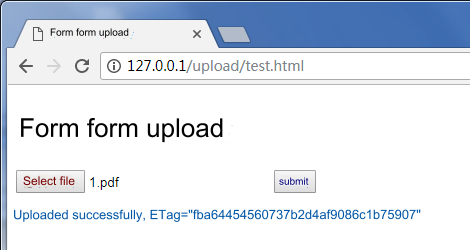
\"}],\"type\":\"code-line\"},{\"id\":\"ATQ4O6s3Fo5ljLa6k3iGT\",\"children\":[{\"text\":\" \"}],\"type\":\"code-line\"},{\"id\":\"YfTlcpeCQ1F1gcXUkVPYS\",\"children\":[{\"text\":\"\"}],\"type\":\"code-line\"}],\"type\":\"code-block\",\"language\":\"html\",\"autoWrap\":false},{\"id\":\"ARRqzHndBFC3jsK0zE0ET\",\"children\":[{\"text\":\"The execution effect is as shown below:\"}],\"type\":\"p\"},{\"id\":\"CW9ApVbLUwZMXzwJ0AUaZ\",\"type\":\"p\",\"children\":[{\"text\":\" \"},{\"type\":\"image\",\"url\":\"https://cloudcache.intl.tencent-cloud.com/cms/backend-cms/7ae225267cbd11ef80ff525400d5f8ef.png\",\"inline\":true,\"alt\":\"\",\"children\":[{\"text\":\"\"}],\"id\":\"IT8oa9fFrmViq-Vwr0QFe\",\"naturalSize\":[470,250],\"size\":[470,250]},{\"text\":\"\"}]},{\"id\":\"k2zrVa2LXhjJteOvqHsxB\",\"children\":[{\"text\":\"Use AJAX POST to upload\"}],\"nodeId\":\"ajaxpost\",\"type\":\"h3\"},{\"type\":\"p\",\"children\":[{\"text\":\"AJAX Upload requires the browser to support basic HTML5 features. The current solution uses \"},{\"type\":\"ref\",\"props\":{\"type\":\"link\",\"url\":\"https://www.tencentcloud.com/document/product/436/14690\"},\"children\":[{\"text\":\"Post Object\"}],\"id\":\"KtV3ycvJxrl_CzHVpU5dF\"},{\"text\":\" interface. Operation guide:\"}],\"id\":\"bQ961Dx5kiGc_jGOKJ4LQ\"},{\"children\":[{\"text\":\"Obtain the bucket information by taking the steps in \"},{\"children\":[{\"text\":\"Prerequisites\"}],\"linkTarget\":\"self\",\"linkTitle\":\"#1\",\"props\":{\"type\":\"link\",\"url\":\"#1\"},\"type\":\"ref\",\"id\":\"5F3cseuJG6HWSQwXJ3Z9K\"},{\"text\":\".\"}],\"start\":true,\"type\":\"oli\",\"id\":\"2p2i_xKimc2LgWjXmqD3J\"},{\"type\":\"oli\",\"children\":[{\"text\":\"Create a \"},{\"text\":\"test.html\",\"code\":1},{\"text\":\" file and copy the code below into the \"},{\"text\":\"test.html\",\"code\":1},{\"text\":\" file.\"}],\"id\":\"j5qKTt69MY7Dy588DqRtU\"},{\"children\":[{\"text\":\"Deploy the signature service at the backend and modify the signature service address in \"},{\"code\":1,\"text\":\"test.html\"},{\"text\":\".\"}],\"start\":false,\"type\":\"oli\",\"id\":\"zFY_G8oHsSDRjKkN7FUwF\"},{\"type\":\"oli\",\"id\":\"jTqMLSod5dQyym9rMbbbv\",\"children\":[{\"text\":\"Place \"},{\"code\":1,\"text\":\"test.html\"},{\"text\":\" on the Web server. Then, browser the page to test the file upload feature.\"}]},{\"id\":\"-q13YH9QOCLUUKqHIVw4T\",\"children\":[{\"id\":\"_cQMXSceYtRNQNKiF50Mh\",\"children\":[{\"text\":\"\"}],\"type\":\"code-line\"},{\"id\":\"D6GY4tEkSOXL7u50ytCzu\",\"children\":[{\"text\":\"\"}],\"type\":\"code-line\"},{\"id\":\"j45l0SzKSU-rVyV-J6zu6\",\"children\":[{\"text\":\" \"}],\"type\":\"code-line\"},{\"id\":\"L223fXKCap_JV6-pc3l0r\",\"children\":[{\"text\":\" \"}],\"type\":\"code-line\"},{\"id\":\"yJmGOKtnZiFvIdqZHrLQM\",\"children\":[{\"text\":\" Ajax Post Upload (Server-side signature calculation)\"}],\"type\":\"code-line\"},{\"id\":\"SYmvOAJDF7h227xaufwON\",\"children\":[{\"text\":\" \"}],\"type\":\"code-line\"},{\"id\":\"Bi8MgA5EbD2fG8BU5doHX\",\"children\":[{\"text\":\" \"}],\"type\":\"code-line\"},{\"id\":\"cUH7Sc4pwZi597K0oDLHm\",\"children\":[{\"text\":\" \"}],\"type\":\"code-line\"},{\"id\":\"_hV672jc8GlPmCPCLN_iV\",\"children\":[{\"text\":\"

Post Object Upload (Server-side signature calculation)

\"}],\"type\":\"code-line\"},{\"id\":\"ujZCYmkQxdpzwkomfs2TQ\",\"children\":[{\"text\":\"\"}],\"type\":\"code-line\"},{\"id\":\"GDoc3pORagUHHvZFW0HfN\",\"children\":[{\"text\":\" \"}],\"type\":\"code-line\"},{\"id\":\"Y--WSF423yFFxutuHokSj\",\"children\":[{\"text\":\" \"}],\"type\":\"code-line\"},{\"id\":\"fFbh9BhTk7-W3pPClOE56\",\"children\":[{\"text\":\"\"}],\"type\":\"code-line\"},{\"id\":\"cPlj_QhSkcZZWGxvWMxVB\",\"children\":[{\"text\":\"
\"}],\"type\":\"code-line\"},{\"id\":\"nTAGXlk3NvdI_otcYEXZZ\",\"children\":[{\"text\":\"\"}],\"type\":\"code-line\"},{\"id\":\"ku9QgHauISKql2nBYd5ug\",\"children\":[{\"text\":\" \"}],\"type\":\"code-line\"},{\"id\":\"EQ2i4nHeEGbV0YL46tvSP\",\"children\":[{\"text\":\" \"}],\"type\":\"code-line\"},{\"id\":\"-yAVuRj5GdFUrucX7yFL1\",\"children\":[{\"text\":\"\"}],\"type\":\"code-line\"}],\"type\":\"code-block\",\"language\":\"html\",\"autoWrap\":false},{\"children\":[{\"text\":\"The execution effect is as shown below:\\n\"},{\"type\":\"image\",\"alt\":\"\",\"inline\":true,\"url\":\"https://cloudcache.intl.tencent-cloud.com/cms/backend-cms/792c2bf87cbf11efb9d8525400f69702.png\",\"children\":[{\"text\":\"\"}],\"id\":\"Dy1EzhZwILQbNP1M8_l06\",\"naturalSize\":[470,250],\"size\":[470,250]},{\"text\":\"\"}],\"type\":\"p\",\"id\":\"Y760yy2RF8E53fKDbPt2O\"},{\"id\":\"R-YtNJaoxH200O9e9R4GJ\",\"nodeId\":\"formbiaodan\",\"type\":\"h3\",\"__nid\":\"A7Z25tlh1n89lC41ySo7d\",\"diff\":{\"type\":\"insert\"},\"children\":[{\"text\":\"Use Form to upload\"}]},{\"id\":\"6tEuGLcdX25go2fxbk8Qp\",\"children\":[{\"text\":\"Form Upload supports uploads from older browsers (for example, IE8). The current solution uses \"},{\"type\":\"ref\",\"props\":{\"type\":\"link\",\"url\":\"https://www.tencentcloud.com/document/product/436/14690\"},\"children\":[{\"text\":\"Post Object\"}],\"id\":\"oZaJG8Yl8aSvrPQ1wvT39\"},{\"text\":\" interface. Operation guide:\"}],\"type\":\"p\"},{\"children\":[{\"text\":\"Obtain the bucket information by taking the steps in \"},{\"children\":[{\"text\":\"Prerequisites\"}],\"linkTarget\":\"self\",\"linkTitle\":\"#1\",\"props\":{\"type\":\"link\",\"url\":\"#1\"},\"type\":\"ref\",\"id\":\"TBB2rre_HxscDckCt4pFO\"},{\"text\":\".\"}],\"start\":true,\"type\":\"oli\",\"id\":\"qC22iyo-xioIzDuuCd_UP\"},{\"children\":[{\"text\":\"Create a \"},{\"text\":\"test.html\",\"code\":1},{\"text\":\" file and copy the code below into the \"},{\"text\":\"test.html\",\"code\":1},{\"text\":\" file.\"}],\"start\":false,\"type\":\"oli\",\"id\":\"iB-1LsKnJ0KRLVnu3N3rC\"},{\"children\":[{\"text\":\"Deploy the signature service at the backend and modify the signature service address in \"},{\"code\":1,\"text\":\"test.html\"},{\"text\":\".\"}],\"start\":false,\"type\":\"oli\",\"id\":\"Pa3b8MDhzIrVg2KjDOLZ1\"},{\"children\":[{\"text\":\"In the directory where \"},{\"code\":1,\"text\":\"test.html\"},{\"text\":\" is stored, create an empty \"},{\"code\":1,\"text\":\"empty.html\"},{\"text\":\" file to be redirected back when the upload is successful.\"}],\"start\":false,\"type\":\"oli\",\"id\":\"uJ54GJs7Bzj1uOi49AOnH\"},{\"children\":[{\"text\":\"Place \"},{\"code\":1,\"text\":\"test.html\"},{\"text\":\" and \"},{\"code\":1,\"text\":\"empty.html\"},{\"text\":\" on the Web server. Then, browse the page to test the file upload feature.\"}],\"start\":false,\"type\":\"oli\",\"id\":\"uSZzG580MD3BP3mmI0Ay3\"},{\"id\":\"5MiflT3pYX09tjHdoTJbe\",\"children\":[{\"id\":\"pvwKT1VPGLURZr7NdofkJ\",\"children\":[{\"text\":\"\"}],\"type\":\"code-line\"},{\"id\":\"MI_mhOqFYS_wmPbCoO7hH\",\"children\":[{\"text\":\"\"}],\"type\":\"code-line\"},{\"id\":\"ZPl3YDvwpnM8rOVB0taxX\",\"children\":[{\"text\":\" \"}],\"type\":\"code-line\"},{\"id\":\"RD1oHpHzzNM23ZnABk3JV\",\"children\":[{\"text\":\" \"}],\"type\":\"code-line\"},{\"id\":\"ibvW0K93inK_RDdktS1VA\",\"children\":[{\"text\":\" Simple Form Upload (Compatible with IE8) (Server-side Signature Calculation)\"}],\"type\":\"code-line\"},{\"id\":\"IdhdmaHLIHBs-PFwv0ABz\",\"children\":[{\"text\":\" \"}],\"type\":\"code-line\"},{\"id\":\"A8j44fPyumGC255_W_zeR\",\"children\":[{\"text\":\" \"}],\"type\":\"code-line\"},{\"id\":\"lePqALxryPalENWcADbYu\",\"children\":[{\"text\":\" \"}],\"type\":\"code-line\"},{\"id\":\"dC0scY9dmJLFnbu7YNZ0k\",\"children\":[{\"text\":\"

Simple Form Upload (Compatible with IE8) (Server-side Signature Calculation)

\"}],\"type\":\"code-line\"},{\"id\":\"lPmn75EhFmOQIsvxWJKeW\",\"children\":[{\"text\":\"
Minimum compatibility with IE6 for uploading, and onprogress is not supported
.\"}],\"type\":\"code-line\"},{\"id\":\"R-lGOHBYWbBAkec62mea9\",\"children\":[{\"text\":\"\"}],\"type\":\"code-line\"},{\"id\":\"KQlV7iBuFnEKoxL3ljbei\",\"children\":[{\"text\":\" \"}],\"type\":\"code-line\"},{\"id\":\"divrMDfGAm-5QrZk_eTYQ\",\"children\":[{\"text\":\" \"}],\"type\":\"code-line\"},{\"id\":\"GR3nwvLwu4l7eMpTV4HZ9\",\"children\":[{\"text\":\" \"}],\"type\":\"code-line\"},{\"id\":\"A6idqIT6StJ8a1DUB-Yij\",\"children\":[{\"text\":\" \"}],\"type\":\"code-line\"},{\"id\":\"CAyr5XHqkxLvsntzQ7ZDR\",\"children\":[{\"text\":\" \"}],\"type\":\"code-line\"},{\"id\":\"d1SL2VyXsP7lfWsWmuC8J\",\"children\":[{\"text\":\" \"}],\"type\":\"code-line\"},{\"id\":\"xuuMQlvBk7rcy2DIEDnMc\",\"children\":[{\"text\":\" \"}],\"type\":\"code-line\"},{\"id\":\"Py0nRVMw089eef-MOGJKt\",\"children\":[{\"text\":\" \"}],\"type\":\"code-line\"},{\"id\":\"iIZ_fE5MgNEsAOhvzh-s2\",\"children\":[{\"text\":\" \"}],\"type\":\"code-line\"},{\"id\":\"vyKZSfffRuvttXRYEdcsb\",\"children\":[{\"text\":\" \"}],\"type\":\"code-line\"},{\"id\":\"eemroNYJ4yhZy1M4EXV_i\",\"children\":[{\"text\":\" \"}],\"type\":\"code-line\"},{\"id\":\"8LP2IMYJBd12yw8SzEYnc\",\"children\":[{\"text\":\" \"}],\"type\":\"code-line\"},{\"id\":\"QRYiaFvmZvmuoTfylwLzH\",\"children\":[{\"text\":\"\"}],\"type\":\"code-line\"},{\"id\":\"KJyLx_w4tswLUdtXFK8UM\",\"children\":[{\"text\":\" \"}],\"type\":\"code-line\"},{\"id\":\"_blWtAaez_Mkb_eUW136_\",\"children\":[{\"text\":\" \"}],\"type\":\"code-line\"},{\"id\":\"txzsHEk4WpA6_qhWVWxeU\",\"children\":[{\"text\":\" \"}],\"type\":\"code-line\"},{\"id\":\"Wmm9TArVEfAENfBBaO-7f\",\"children\":[{\"text\":\" \"}],\"type\":\"code-line\"},{\"id\":\"Eow1EjpVgRBYpDdemP4Dk\",\"children\":[{\"text\":\" \"}],\"type\":\"code-line\"},{\"id\":\"iwg-b9lZcWoT_DJWbNZWu\",\"children\":[{\"text\":\"\"}],\"type\":\"code-line\"},{\"id\":\"ZPQmvccYu-qN6Jp6JtB_y\",\"children\":[{\"text\":\"
\"}],\"type\":\"code-line\"},{\"id\":\"6lIPbWllJC6jkObeo5cZP\",\"children\":[{\"text\":\"\"}],\"type\":\"code-line\"},{\"id\":\"hQ9l7qJ0dmQoV1KRMEMv2\",\"children\":[{\"text\":\" \"}],\"type\":\"code-line\"},{\"id\":\"tl2WND2lDMVfAojWpOloU\",\"children\":[{\"text\":\" \"}],\"type\":\"code-line\"},{\"id\":\"iY069paEtC5bNx3yf1sEX\",\"children\":[{\"text\":\"\"}],\"type\":\"code-line\"}],\"type\":\"code-block\",\"language\":\"html\",\"autoWrap\":false},{\"id\":\"Nm8ooOEYvmDDcsgWfoUbJ\",\"children\":[{\"text\":\"The execution effect is as shown below:\"}],\"type\":\"p\"},{\"type\":\"p\",\"children\":[{\"text\":\" \"},{\"type\":\"image\",\"url\":\"https://cloudcache.intl.tencent-cloud.com/cms/backend-cms/7bbada367cbe11ef80ff525400d5f8ef.png\",\"inline\":true,\"alt\":\"\",\"children\":[{\"text\":\"\"}],\"id\":\"MurRihRW2ugSFlxxgV2q-\",\"naturalSize\":[470,250],\"size\":[470,250]},{\"text\":\"\"}],\"id\":\"glsyO9232c9isyPz5TwC1\"},{\"id\":\"j3Z89dIRaR9MPCVF1GK8A\",\"children\":[{\"text\":\"Restricting the File Type and the File Size During Upload\"}],\"nodeId\":\".E4.B8.8A.E4.BC.A0.E6.97.B6.E9.99.90.E5.88.B6.E6.96.87.E4.BB.B6.E5.90.8E.E7.BC.80\",\"type\":\"h4\"},{\"id\":\"7cfwdTmxvjbauipwG5A3B\",\"children\":[{\"text\":\"File Types Limited by Front End\"}],\"nodeId\":\".E5.89.8D.E7.AB.AF.E9.99.90.E5.88.B6\",\"type\":\"h5\"},{\"id\":\"jQrgVOjxv5Up3va3Qusgx\",\"children\":[{\"text\":\"Refer to the above AJAX PUT upload, add a layer of judgment when selecting files. (Only restricted file extensions are supported)\"}],\"type\":\"p\"},{\"id\":\"1Mmu4jwvGZG_4fGcRcxv7\",\"children\":[{\"id\":\"cLRfVFLFFZkCBcOwRvhyD\",\"children\":[{\"text\":\"// Omit other codes\"}],\"type\":\"code-line\"},{\"id\":\"feYeOmYcKojEekySwYUik\",\"children\":[{\"text\":\"document.getElementById('submitBtn').onclick = function (e) {\"}],\"type\":\"code-line\"},{\"id\":\"z9EvbS_Hcr-okph6xnsAi\",\"children\":[{\"text\":\" const file = document.getElementById('fileSelector').files[0];\"}],\"type\":\"code-line\"},{\"id\":\"tFQYtPyI13axDNdVdOyMJ\",\"children\":[{\"text\":\" if (!file) {\"}],\"type\":\"code-line\"},{\"id\":\"wNNEdoHw7ZSMQlkSxdtCz\",\"children\":[{\"text\":\" document.getElementById('msg').innerText = 'No file selected for upload';\"}],\"type\":\"code-line\"},{\"id\":\"0IJtO8fglZJPjz0gMfepZ\",\"children\":[{\"text\":\" return;\"}],\"type\":\"code-line\"},{\"id\":\"IycDri9HmnGjdSPEHoNNB\",\"children\":[{\"text\":\" }\"}],\"type\":\"code-line\"},{\"id\":\"kzQiZbeYE5eoH5Thf4a_q\",\"children\":[{\"text\":\" // Get the file extension\"}],\"type\":\"code-line\"},{\"id\":\"sAgFwIErHYSxOpA7hPUJX\",\"children\":[{\"text\":\" const fileName = file.name;\"}],\"type\":\"code-line\"},{\"id\":\"jvvBbcwMlhCxD1tg4Q7V3\",\"children\":[{\"text\":\" const lastDotIndex = fileName.lastIndexOf('.');\"}],\"type\":\"code-line\"},{\"id\":\"HICdF8g6ahsmKbKuf3pb6\",\"children\":[{\"text\":\" const ext = lastDotIndex > -1 ? fileName.substring(lastDotIndex + 1) : '';\"}],\"type\":\"code-line\"},{\"id\":\"BCuVhRZPUW7wBmtSu2k7t\",\"children\":[{\"text\":\"\"}],\"type\":\"code-line\"},{\"id\":\"jwhE4U9RaTlnZykAPcZ99\",\"children\":[{\"text\":\" // Please replace with the formats you want to restrict, for example, only jpg and png files\"}],\"type\":\"code-line\"},{\"id\":\"d-2ahiUqNa8gd_35TOZet\",\"children\":[{\"text\":\" const allowExt = ['jpg', 'png'];\"}],\"type\":\"code-line\"},{\"id\":\"ijKkpUxOJRde-1JhEFJD7\",\"children\":[{\"text\":\" if (!allowExt.includes(ext)) {\"}],\"type\":\"code-line\"},{\"id\":\"LpvW9iYTa9C0YRHBskn4v\",\"children\":[{\"text\":\" alert('Only jpg and png files are supported for upload');\"}],\"type\":\"code-line\"},{\"id\":\"sj99sSxRthjiTRFbzM2fs\",\"children\":[{\"text\":\" return;\"}],\"type\":\"code-line\"},{\"id\":\"f8zt7qS6Fw6Uk4scJFiBR\",\"children\":[{\"text\":\" }\"}],\"type\":\"code-line\"},{\"id\":\"bj3hOdkIUEY9qYnSFDv4_\",\"children\":[{\"text\":\"\"}],\"type\":\"code-line\"},{\"id\":\"Tq3SpGNs9XJkat2uiP_o8\",\"children\":[{\"text\":\" file &&\"}],\"type\":\"code-line\"},{\"id\":\"C5Dnzgx-C6Fq1zMas25q7\",\"children\":[{\"text\":\" uploadFile(file, function (err, data) {\"}],\"type\":\"code-line\"},{\"id\":\"IMG4QxqjEna5gkaZ6fPdQ\",\"children\":[{\"text\":\" console.log(err || data);\"}],\"type\":\"code-line\"},{\"id\":\"fAnIeXcJWdDz_VhZQqBtI\",\"children\":[{\"text\":\" document.getElementById('msg').innerText = err\"}],\"type\":\"code-line\"},{\"id\":\"Hn1y9Kob9VfnaZRg0zAvk\",\"children\":[{\"text\":\" ? err\"}],\"type\":\"code-line\"},{\"id\":\"twMbOcGqIw4KqRubJK4hK\",\"children\":[{\"text\":\" : 'Upload successfully, ETag=' + data.ETag + 'url=' + data.url;\"}],\"type\":\"code-line\"},{\"id\":\"rRshT3PqPj8JZCiG0f8EC\",\"children\":[{\"text\":\" });\"}],\"type\":\"code-line\"},{\"id\":\"NCx1aW35gYW9K9RR7pmPm\",\"children\":[{\"text\":\"};\"}],\"type\":\"code-line\"}],\"type\":\"code-block\",\"language\":\"js\",\"autoWrap\":false},{\"id\":\"-WrXyqVWqfSPWJ07L_v70\",\"children\":[{\"text\":\"File Size Limited by Front End\"}],\"nodeId\":\".E5.89.8D.E7.AB.AF.E9.99.90.E5.88.B62\",\"type\":\"h5\"},{\"id\":\"vU4EPAIdpL4M1ZLJU9E6f\",\"children\":[{\"text\":\"Refer to the above AJAX PUT upload, add a layer of judgment when selecting files.\"}],\"type\":\"p\"},{\"id\":\"3-UB4hPW--3BbMuVEY0DH\",\"children\":[{\"id\":\"JY1sIL0cHLoCwGx0XpU0J\",\"children\":[{\"text\":\"// Omit other codes\"}],\"type\":\"code-line\"},{\"id\":\"_Nvzw6pZBbRKmrTEH2Gw3\",\"children\":[{\"text\":\"document.getElementById('submitBtn').onclick = function (e) {\"}],\"type\":\"code-line\"},{\"id\":\"07WZ6nvYxG5o4y2abcCdf\",\"children\":[{\"text\":\" const file = document.getElementById('fileSelector').files[0];\"}],\"type\":\"code-line\"},{\"id\":\"V-hh-lTVSAIBT7yBiFepQ\",\"children\":[{\"text\":\" if (!file) {\"}],\"type\":\"code-line\"},{\"id\":\"T6sL_21tJH_2B1x_ahEpr\",\"children\":[{\"text\":\" document.getElementById('msg').innerText = 'No file selected for upload';\"}],\"type\":\"code-line\"},{\"id\":\"gFdGUUOehNyWHoE-nY5ce\",\"children\":[{\"text\":\" return;\"}],\"type\":\"code-line\"},{\"id\":\"F0W8xpdEvdDBOyEWGjMxg\",\"children\":[{\"text\":\" }\"}],\"type\":\"code-line\"},{\"id\":\"k6GeDXlKVT_4xy3qJ_wee\",\"children\":[{\"text\":\" const fileSize = file.size;\"}],\"type\":\"code-line\"},{\"id\":\"HFWSPw19IQzsO7FkFmp1J\",\"children\":[{\"text\":\"\"}],\"type\":\"code-line\"},{\"id\":\"MQJSTBhZC42re-RqpURLp\",\"children\":[{\"text\":\" // Please replace with the object size you want to restrict, up to a maximum of 5GB per object. For example, restrict uploaded files to no more than 5MB.\"}],\"type\":\"code-line\"},{\"id\":\"kN_yIa3frf8HSd9O4O7KL\",\"children\":[{\"text\":\" if (fileSize > 5 * 1024 * 1024) {\"}],\"type\":\"code-line\"},{\"id\":\"3LbQcH5v_qaw8c_Jj1lsA\",\"children\":[{\"text\":\" alert('The selected file exceeds 5MB, please selected another one');\"}],\"type\":\"code-line\"},{\"id\":\"0QwLCR3FF0t6sz89u7cUE\",\"children\":[{\"text\":\" return;\"}],\"type\":\"code-line\"},{\"id\":\"DkDzzRo_bnkrLlAvny6xj\",\"children\":[{\"text\":\" }\"}],\"type\":\"code-line\"},{\"id\":\"sMfywuQNOSA5EkKJcTf9-\",\"children\":[{\"text\":\"\"}],\"type\":\"code-line\"},{\"id\":\"llKZexNHB-6ik8zBRd2iB\",\"children\":[{\"text\":\" file &&\"}],\"type\":\"code-line\"},{\"id\":\"XF_kyIHsoK867z7V5tjya\",\"children\":[{\"text\":\" uploadFile(file, function (err, data) {\"}],\"type\":\"code-line\"},{\"id\":\"Qjbx-ZV8W0DaeYHnvp2Pe\",\"children\":[{\"text\":\" console.log(err || data);\"}],\"type\":\"code-line\"},{\"id\":\"WEFtMafO10GRTsN-ZIapX\",\"children\":[{\"text\":\" document.getElementById('msg').innerText = err\"}],\"type\":\"code-line\"},{\"id\":\"ILxtHxOaci-R0OZ6wGdqy\",\"children\":[{\"text\":\" ? err\"}],\"type\":\"code-line\"},{\"id\":\"AEOnfikPr1KeHNWUXZzXm\",\"children\":[{\"text\":\" : 'Upload successfully, ETag=' + data.ETag + 'url=' + data.url;\"}],\"type\":\"code-line\"},{\"id\":\"ujq-11ZorvNL2BLEFJHYW\",\"children\":[{\"text\":\" });\"}],\"type\":\"code-line\"},{\"id\":\"sAlciXcUMe5B1AStjdbYh\",\"children\":[{\"text\":\"};\"}],\"type\":\"code-line\"}],\"type\":\"code-block\",\"language\":\"js\",\"autoWrap\":false},{\"id\":\"9Y5oPMOFLr-tk6JEAjO6q\",\"children\":[{\"text\":\"Server-Side Signature Restriction\"}],\"nodeId\":\".E6.9C.8D.E5.8A.A1.E7.AB.AF.E7.AD.BE.E5.90.8D.E9.99.90.E5.88.B62\",\"type\":\"h5\"},{\"id\":\"Un8zSz2PTP62AVWmqgxgl\",\"children\":[{\"text\":\"Refer to the server-side signature code \"},{\"type\":\"ref\",\"id\":\"SrsKP7J2aAiPJR98ua1yM\",\"props\":{\"type\":\"link\",\"url\":\"https://github.com/tencentyun/cos-demo/blob/main/server/upload-sign/nodejs/app.js\"},\"children\":[{\"text\":\"Nodejs Example\"}]},{\"text\":\" for put-sign-limit and post-policy-limit.\"}],\"type\":\"p\"},{\"children\":[{\"text\":\"Reference\"}],\"nodeId\":\"reference\",\"type\":\"h2\",\"id\":\"oSZ5bO2d6jkvB9Sy7MEiT\"},{\"children\":[{\"text\":\"If you need to call more APIs, please see the following JavaScript SDK document:\"}],\"type\":\"p\",\"id\":\"JmRI2IL1TnbzigTW7kpDk\"},{\"children\":[{\"text\":\"\"},{\"children\":[{\"text\":\"JavaScript SDK\"}],\"linkTarget\":\"blank\",\"linkTitle\":\"https://intl.cloud.tencent.com/document/product/436/11459\",\"props\":{\"type\":\"link\",\"url\":\"https://intl.cloud.tencent.com/document/product/436/11459\"},\"type\":\"ref\",\"id\":\"uWDO6-uHdj0GFEdv2gOOm\"},{\"text\":\"\"}],\"start\":false,\"type\":\"p\",\"id\":\"426gnyhxBVC44uEXygzLb\"},{\"type\":\"p\",\"children\":[{\"text\":\"\"}],\"id\":\"QGIecjq-cgc9ffUk9cJl4\"}]"}},"9512":{"categoryId":436,"weight":65,"type":"page","extension":"","pid":32966,"id":9512,"lang":"en","title":"Hosting a Static Website","pdfUrl":"","docType":"default","children":[],"firstReleaseTime":"2020-02-20 01:06:08","recentReleaseTime":"2020-02-20 01:06:08","content":{"title":"Hosting a Static Website","body":"

Overview

In this practice, users can host a static website on Tencent Cloud object storage (Cloud Object Storage, COS). Visitors can access the hosted static website through the static website domain provided by COS or a bound custom domain (for example, www.example.com). Whether you want to host an existing static website on COS or build one from scratch, this practice can help you host a static website on COS. Here are the specific steps:

\"\"


Note:
For buckets created after January 1, 2024, when users use the default domain name (including the static website domain) to access files, preview is not supported. For details, please see COS Bucket Domain Usage Security Management Notification. It is recommended that you enable the static website and configure a custom domain name (set the type of the origin server to static website), and then use the custom domain name to access.
Use COS default domain to access. No static website effect.

Prerequisites

The following services will be used in the steps outlined below:
Tencent Cloud Domain Service: Before hosting a static website, you need to register a domain name such as www.example.com. You can do so via the Tencent Cloud Domain Service.
COS: You need to create a bucket in COS for storing the uploaded webpage contents.
DNS resolution related service: achieve the purpose of accessing static websites using a custom domain by using DNS resolution.
Note:
The sample domain name www.example.com is used in the steps outlined in this document. For your purposes, replace it with your own domain name.

Step 1: Register a Domain Name

Domain registration is the foundation for establishing any service on the Internet. Proceed according to your specific situation:
Registered domain name. You can skip this step and perform Step 2.
If the domain name is not registered, please first Register Domain Name.

Step 2: Create a bucket and upload content

After completing domain registration, you need to perform the following tasks in the COS console to create and configure website content:

1. Create a Bucket

Please log in to the COS Console with your Tencent Cloud account and create a bucket for your website. This bucket can be used to store website content and data.
If you are using COS for the first time, you can create a bucket directly by clicking Create Bucket on the Overview interface of the console or click Bucket List on the left sidebar to create one. For details, see Create Bucket documentation.

2. Configure Bucket and Upload Content

1. Enable the static website settings of the bucket. The steps are as follows. For detailed directions, please see set up static website.
1.1 Log in to the COS Console, click in the left menu bar on Bucket List, find the bucket just created, and click on the right on Configuration.
1.2 Select Basic Configurations > Static Website in the left menu bar, click Edit, set the current status to Enable, set the index document to index.html, do not configure the rest for now, and then click Save.
2. Upload your website contents to the bucket. For detailed directions, see Uploading Objects.
You can use the bucket to store any content you want to host, including text files, photos, and videos. If you haven't built your website yet, just create a file as described in this document.
For example, you can create a file with the following HTML code and upload it to the bucket. The filename of the website homepage is usually index.html. In subsequent steps, you will need to provide this file as an index document for your website.
<!DOCTYPE html>
<html>
<head>
<title>Hello COS!</title>
<meta charset="utf-8">
</head>
<body>
<p>Welcome to the static website feature of COS.</p>
<p>This is the homepage!</p>
</body>
</html>
Note:
After the COS static website feature is enabled, if a user accesses any first-level directory that does not point to any files, COS will first match index.html in the bucket directory and then index.htm by default. If this file does not exist, a 404 error will be returned.

Step 3: Binding Custom Domains

1. Add a Domain Name

1. Log in to the COS Console, go to the Bucket List page on the left sidebar, and click the bucket that hosts your website.
2. In the left menu bar, click Domain and Transfer > Custom Endpoint to enter the custom origin server domain name management page.
3. In the "Custom Endpoint" column, click Add Domain. The main configuration items are described as follows.
Domain Name: Enter your purchased custom domain name (for example, www.example.com). For more information, please see Enable Custom Origin Site Domain.
Origin Server Type: Select Static Website Endpoint.
4. Click Create. Once configured, wait a few minutes and wait for the domain name deployment to complete. Then copy the corresponding CNAME record and proceed with the domain name resolution procedure.

2. Domain Name Resolution

You need to add a CNAME record for your custom domain name at your service provider and point it to the corresponding CNAME record in the above domain addition steps. For more information about configuring domain name resolution, please refer to Appendix: Configuring Domain Name Resolution.

Step 4: Verify the result

After completing the above steps, verify the result by entering the domain name, e.g. www.example.com, in your browser:
http://www.example.com: Returns the index page (index.html) in the bucket named example.
http://www.example.com/folder/: Returns the index page (folder/index.html) under the folder directory in the bucket named example.
http://www.example.com/test.html (a non-existing file): returns 404 error. If you want to customize the error document, you can do so in step 2 when configuring the static website, so that when an access attempt is made to a non-existing file, this error document will be displayed.
Note:
In some cases, you may have to clear your browser's cache to see the expected result.
For each bucket, you can configure only one error document, which can be placed in a sub-directory, such as pages/404.html.
","recentReleaseTime":"2025-07-17 10:10:46","slate":"[{\"children\":[{\"text\":\"Overview\"}],\"id\":\"cHMHyMdZX-dJuIm8hO8i4\",\"nodeId\":\"overview\",\"type\":\"h2\"},{\"children\":[{\"text\":\"In this practice, users can host a static website on Tencent Cloud object storage (Cloud Object Storage, COS). Visitors can access the hosted static website through the static website domain provided by COS or a bound custom domain (for example, \"},{\"code\":1,\"text\":\"www.example.com\"},{\"text\":\"). Whether you want to host an existing static website on COS or build one from scratch, this practice can help you host a static website on COS. Here are the specific steps:\"}],\"id\":\"yx3Wbxfj6NHu3Xdn9CIiq\",\"type\":\"p\"},{\"children\":[{\"text\":\"\"},{\"alt\":\"\",\"children\":[{\"text\":\"\"}],\"id\":\"oV8-BbM6HKICNzG7OaMIW\",\"inline\":true,\"naturalSize\":[697,111],\"size\":[697,111],\"type\":\"image\",\"url\":\"https://cloudcache.intl.tencent-cloud.com/cms/backend-cms/e09b8be20aba11f088bd525400e889b2.png\"},{\"text\":\"\"}],\"id\":\"Ts-hlrRNXIytdIdK6Sk57\",\"type\":\"p\"},{\"children\":[{\"children\":[{\"b\":1,\"color\":\"#04C8DC\",\"id\":\"sM0vs327UrQ5QvDEAjtQU\",\"text\":\"Note:\",\"type\":\"text\"}],\"id\":\"YuChGO0kXqlyjWBhqXbd8\",\"type\":\"p\"},{\"children\":[{\"text\":\"For buckets created after January 1, 2024, when users use the default domain name (including the static website domain) to access files, preview is not supported. For details, please see \"},{\"children\":[{\"text\":\"COS Bucket Domain Usage Security Management Notification\"}],\"id\":\"9pp8ZQQQ5n_JaKD_fOtSb\",\"props\":{\"type\":\"link\",\"url\":\"https://www.tencentcloud.com/document/product/436/57456\"},\"type\":\"ref\"},{\"text\":\". It is recommended that you enable the static website and configure a custom domain name (set the type of the origin server to static website), and then use the custom domain name to access.\"}],\"id\":\"Bm7ehZvDjdGEE8vz1tPB-\",\"type\":\"uli\"},{\"children\":[{\"text\":\"Use COS default domain to access. No static website effect.\"}],\"id\":\"ZpdEZ5JHr7rRi4u6rIfUO\",\"type\":\"uli\"}],\"hintType\":\"alert\",\"id\":\"4ujA8Rd2VQuCVOhfGUC13\",\"type\":\"hint\"},{\"children\":[{\"text\":\"Prerequisites\"}],\"id\":\"LFJ-iS2by3vBVUKKcGbIs\",\"nodeId\":\".E4.BA.8B.E5.89.8D.E5.87.86.E5.A4.87\",\"type\":\"h2\"},{\"children\":[{\"text\":\"The following services will be used in the steps outlined below:\"}],\"id\":\"y53j779Cg7AW-bycU95O1\",\"type\":\"p\"},{\"children\":[{\"text\":\"\"},{\"children\":[{\"text\":\"Tencent Cloud Domain Service\"}],\"id\":\"_wHvn1d-ur2nuKpKwEub7\",\"props\":{\"type\":\"link\",\"url\":\"https://www.tencentcloud.com/products/domain\"},\"type\":\"ref\"},{\"text\":\": Before hosting a static website, you need to register a domain name such as \"},{\"code\":1,\"text\":\"www.example.com\"},{\"text\":\". You can do so via the \"},{\"children\":[{\"text\":\"Tencent Cloud Domain Service\"}],\"id\":\"JezNCC7hoRG89R7hJNCDG\",\"props\":{\"type\":\"link\",\"url\":\"https://www.tencentcloud.com/products/domain\"},\"type\":\"ref\"},{\"text\":\".\"}],\"id\":\"JdZzY1iEHj0LLI2AtmXPC\",\"start\":false,\"type\":\"uli\"},{\"children\":[{\"text\":\"\"},{\"children\":[{\"text\":\"COS\"}],\"id\":\"toZujQMhCJtrusqa2jgpV\",\"linkTarget\":\"blank\",\"linkTitle\":\"https://intl.cloud.tencent.com/product/cos\",\"props\":{\"type\":\"link\",\"url\":\"https://intl.cloud.tencent.com/product/cos\"},\"type\":\"ref\"},{\"text\":\": You need to create a bucket in COS for storing the uploaded webpage contents.\"}],\"id\":\"MXRGSbAitr-5gylHOUL_D\",\"start\":false,\"type\":\"uli\"},{\"children\":[{\"text\":\"DNS resolution related service: achieve the purpose of accessing static websites using a custom domain by using DNS resolution.\"}],\"id\":\"TS9GHuPEQAR1INci40gWk\",\"type\":\"uli\"},{\"children\":[{\"children\":[{\"b\":1,\"color\":\"inherit\",\"text\":\"Note:\"}],\"id\":\"iG11wTYnRRLHDpYFBT4D0\",\"type\":\"p\"},{\"children\":[{\"text\":\"The sample domain name \"},{\"code\":1,\"text\":\"www.example.com\"},{\"text\":\" is used in the steps outlined in this document. For your purposes, replace it with your own domain name.\"}],\"id\":\"NJ107sIVwOuEPqA6-KBrA\",\"type\":\"p\"}],\"hintType\":\"info\",\"id\":\"sxqJH9h4G9AdM8pbG8oBV\",\"type\":\"hint\"},{\"children\":[{\"text\":\"Step 1: Register a Domain Name\"}],\"id\":\"fH6K8xcMkR2L_0ojO1MoT\",\"nodeId\":\"step-1.-register-the-domain-name-and-obtain-icp-filing-for-service-in-china\",\"type\":\"h2\"},{\"children\":[{\"text\":\"Domain registration is the foundation for establishing any service on the Internet. Proceed according to your specific situation:\"}],\"id\":\"kQO8-uTApNnvFtWT0u4WS\",\"type\":\"p\"},{\"children\":[{\"text\":\"Registered domain name. You can skip this step and perform \"},{\"children\":[{\"text\":\"Step 2\"}],\"id\":\"derT4kGSO57GjW22rcqxk\",\"props\":{\"type\":\"link\",\"url\":\"#step2\"},\"type\":\"ref\"},{\"text\":\".\"}],\"id\":\"HFXszepQkeIN9cfcX34o1\",\"start\":false,\"type\":\"uli\"},{\"children\":[{\"text\":\"If the domain name is not registered, please first \"},{\"children\":[{\"text\":\"Register Domain Name\"}],\"id\":\"M0ygnlPGHuUYR7MAYbe1G\",\"props\":{\"type\":\"link\",\"url\":\"https://www.tencentcloud.com/products/domain\"},\"type\":\"ref\"},{\"text\":\".\"}],\"id\":\"lK6H1JIpbPogo_-36JfWt\",\"start\":false,\"type\":\"uli\"},{\"children\":[{\"text\":\"Step 2: Create a bucket and upload content\"}],\"id\":\"JND-K8cB9RiU7i-AeFm4m\",\"nodeId\":\"step2\",\"type\":\"h2\"},{\"children\":[{\"text\":\"After completing domain registration, you need to perform the following tasks in the COS console to create and configure website content:\"}],\"id\":\"zn6NGhjbTZ2A64xx68s8Q\",\"type\":\"p\"},{\"children\":[{\"b\":1,\"text\":\"1. Create a Bucket\"}],\"id\":\"fSuLAnELz4ktGBIDP6CAp\",\"nodeId\":\"a6e0603e-e6c9-4b5a-b50a-9d6b30f32b8c\",\"start\":true,\"type\":\"h3\"},{\"children\":[{\"text\":\"Please log in to the \"},{\"children\":[{\"text\":\"COS Console\"}],\"id\":\"Fc1AuQLx1kjtZVuHGI_-L\",\"linkTarget\":\"blank\",\"linkTitle\":\"https://console.tencentcloud.com/cos\",\"props\":{\"type\":\"link\",\"url\":\"https://console.tencentcloud.com/cos\"},\"type\":\"ref\"},{\"text\":\" with your Tencent Cloud account and create a bucket for your website. This bucket can be used to store website content and data.\"}],\"id\":\"qlP-B3pH0wLr1ER0mpNM-\",\"type\":\"p\"},{\"children\":[{\"text\":\"If you are using COS for the first time, you can create a bucket directly by clicking \"},{\"b\":1,\"text\":\"Create Bucket\"},{\"text\":\" on the Overview interface of the console or click \"},{\"b\":1,\"text\":\"Bucket List\"},{\"text\":\" on the left sidebar to create one. For details, see \"},{\"children\":[{\"text\":\"Create Bucket\"}],\"id\":\"lxSeJ_8ehLxrYAeDt9u5m\",\"props\":{\"type\":\"link\",\"url\":\"https://intl.cloud.tencent.com/document/product/436/13309\"},\"type\":\"ref\"},{\"text\":\" documentation.\"}],\"id\":\"MkvQrgRhYUVe5bzfWr0-K\",\"type\":\"p\"},{\"children\":[{\"text\":\"2. Configure Bucket and Upload Content\"}],\"id\":\"Id2xA0Ck28GpJb3k_1FCP\",\"nodeId\":\"e4e54247-b55f-4f49-aca7-7affc65476c0\",\"start\":false,\"type\":\"h3\"},{\"children\":[{\"text\":\"Enable the \"},{\"b\":1,\"text\":\"static website\"},{\"text\":\" settings of the bucket. The steps are as follows. For detailed directions, please see \"},{\"children\":[{\"text\":\"set up static website\"}],\"id\":\"LvHjM2GtBDCcP0ciSnfWS\",\"props\":{\"type\":\"link\",\"url\":\"https://www.tencentcloud.com/document/product/436/14984\"},\"type\":\"ref\"},{\"text\":\".\"}],\"id\":\"NvDUF4MnaPXURHd0oJbTl\",\"type\":\"oli\"},{\"children\":[{\"text\":\"Log in to the \"},{\"children\":[{\"text\":\"COS Console\"}],\"id\":\"cyGYA7l1DdFiq7RjutKa7\",\"linkTarget\":\"blank\",\"linkTitle\":\"https://console.tencentcloud.com/cos\",\"props\":{\"type\":\"link\",\"url\":\"https://console.tencentcloud.com/cos\"},\"type\":\"ref\"},{\"text\":\", click in the left menu bar on \"},{\"b\":1,\"text\":\"Bucket List\"},{\"text\":\", find the bucket just created, and click on the right on \"},{\"b\":1,\"text\":\"Configuration\"},{\"text\":\".\"}],\"id\":\"dsJJrg1ZS4pTtbHP-ct-X\",\"indent\":1,\"type\":\"oli\"},{\"children\":[{\"text\":\"Select \"},{\"b\":1,\"text\":\"Basic Configurations\"},{\"text\":\" \\u003e \"},{\"b\":1,\"text\":\"Static Website\"},{\"text\":\" in the left menu bar, click \"},{\"b\":1,\"text\":\"Edit\"},{\"text\":\", set the current status to Enable, set the index document to index.html, do not configure the rest for now, and then click \"},{\"b\":1,\"text\":\"Save\"},{\"text\":\".\"}],\"id\":\"VG4-r8ApQalUGE_C4i7o1\",\"indent\":1,\"start\":false,\"type\":\"oli\"},{\"children\":[{\"text\":\"Upload your website contents to the bucket. For detailed directions, see \"},{\"children\":[{\"text\":\"Uploading Objects\"}],\"id\":\"I_pmyRwbHmas8quaVAyCT\",\"linkTarget\":\"blank\",\"linkTitle\":\"https://intl.cloud.tencent.com/document/product/436/13321\",\"props\":{\"type\":\"link\",\"url\":\"https://intl.cloud.tencent.com/document/product/436/13321\"},\"type\":\"ref\"},{\"text\":\".\"}],\"id\":\"5MOOVbIBu852LHiy8dBpU\",\"type\":\"oli\"},{\"children\":[{\"text\":\"You can use the bucket to store any content you want to host, including text files, photos, and videos. If you haven't built your website yet, just create a file as described in this document.\"}],\"id\":\"X-Hx_d3wgcy3_n74zbksH\",\"indent\":1,\"type\":\"p\"},{\"children\":[{\"text\":\"For example, you can create a file with the following HTML code and upload it to the bucket. The filename of the website homepage is usually index.html. In subsequent steps, you will need to provide this file as an index document for your website.\"}],\"id\":\"XwMoXYDmi1YQPwgtPjPXT\",\"indent\":1,\"type\":\"p\"},{\"autoWrap\":false,\"children\":[{\"children\":[{\"text\":\"\\u003c!DOCTYPE html\\u003e\"}],\"id\":\"6fRTgNw6gDXL6uE-N7fsp\",\"type\":\"code-line\"},{\"children\":[{\"text\":\"\\u003chtml\\u003e\"}],\"id\":\"jmxtKu2EukhJHWYpF_6od\",\"type\":\"code-line\"},{\"children\":[{\"text\":\" \\u003chead\\u003e\"}],\"id\":\"qpoy_-eEjYbKXPUXx-joL\",\"type\":\"code-line\"},{\"children\":[{\"text\":\" \\u003ctitle\\u003eHello COS!\\u003c/title\\u003e\"}],\"id\":\"6Z8-WYRPDGr2xr4GwuNB5\",\"type\":\"code-line\"},{\"children\":[{\"text\":\" \\u003cmeta charset=\\\"utf-8\\\"\\u003e\"}],\"id\":\"NpIsyc8ZAsDoBG-oQVNfV\",\"type\":\"code-line\"},{\"children\":[{\"text\":\" \\u003c/head\\u003e\"}],\"id\":\"9OOoM0r-3-kYTUo7StSaX\",\"type\":\"code-line\"},{\"children\":[{\"text\":\" \\u003cbody\\u003e\"}],\"id\":\"-IpSfsSBd_RtIjuKta14x\",\"type\":\"code-line\"},{\"children\":[{\"text\":\" \\u003cp\\u003eWelcome to the static website feature of COS.\\u003c/p\\u003e\"}],\"id\":\"2LuKOJPmu8e2vYe61rGg4\",\"type\":\"code-line\"},{\"children\":[{\"text\":\" \\u003cp\\u003eThis is the homepage!\\u003c/p\\u003e\"}],\"id\":\"zjLl_aaOCGBQZ-U_ytW6F\",\"type\":\"code-line\"},{\"children\":[{\"text\":\" \\u003c/body\\u003e\"}],\"id\":\"SdbHavqzOPlqE1mdDCQtk\",\"type\":\"code-line\"},{\"children\":[{\"text\":\"\\u003c/html\\u003e\"}],\"id\":\"StuR4q1xVxLmWE3yvHAq4\",\"type\":\"code-line\"}],\"id\":\"1kYJnl53QSekUgly2St6a\",\"indent\":1,\"language\":\"xml\",\"type\":\"code-block\"},{\"children\":[{\"children\":[{\"b\":1,\"color\":\"#04C8DC\",\"id\":\"hwSQvrgoQtrG8rayjdu9w\",\"text\":\"Note:\",\"type\":\"text\"}],\"id\":\"aCOxO7r9hzJ3JN5NJpwgG\",\"type\":\"p\"},{\"children\":[{\"text\":\"After the COS static website feature is enabled, if a user accesses any first-level directory that does not point to any files, COS will first match \"},{\"code\":1,\"text\":\"index.html\"},{\"text\":\" in the bucket directory and then \"},{\"code\":1,\"text\":\"index.htm\"},{\"text\":\" by default. If this file does not exist, a 404 error will be returned.\"}],\"id\":\"h_HP2FQRRKTiPSVpWcqDi\",\"type\":\"p\"}],\"hintType\":\"alert\",\"id\":\"OojGDS7sZ3CMAMD2wbJMS\",\"type\":\"hint\"},{\"children\":[{\"text\":\"Step 3: Binding Custom Domains\"}],\"id\":\"8VKIAXEWL0Tr-urM2hpL3\",\"nodeId\":\"616f24d8-fd73-44ea-b227-a9eea40273ed\",\"type\":\"h2\"},{\"children\":[{\"children\":[{\"text\":\"Add a Domain Name\"}],\"id\":\"I2-tDVblSAV5P8l0MjbIW\",\"start\":true,\"type\":\"oli\"}],\"id\":\"qSbZqcNn8bZy-VjCvJwkK\",\"nodeId\":\"85422410-a198-472c-b7c7-3fc85c64f792\",\"start\":true,\"type\":\"h3\"},{\"children\":[{\"text\":\"Log in to the \"},{\"children\":[{\"text\":\"COS Console\"}],\"id\":\"wObVOgPZhV_HwIEwiodyd\",\"linkTarget\":\"blank\",\"linkTitle\":\"https://console.tencentcloud.com/cos\",\"props\":{\"type\":\"link\",\"url\":\"https://console.tencentcloud.com/cos\"},\"type\":\"ref\"},{\"text\":\", go to the \"},{\"b\":1,\"text\":\"Bucket List\"},{\"text\":\" page on the left sidebar, and click the bucket that hosts your website.\"}],\"id\":\"XZTKdowigM-ZO7QsuohsE\",\"type\":\"oli\"},{\"children\":[{\"text\":\"In the left menu bar, click \"},{\"b\":1,\"text\":\"Domain and Transfer\"},{\"text\":\" \\u003e \"},{\"b\":1,\"text\":\"Custom Endpoint\"},{\"text\":\" to enter the custom origin server domain name management page.\"}],\"id\":\"tIjV4E_NmWzLhxGmN2i8R\",\"type\":\"oli\"},{\"children\":[{\"text\":\"In the \\\"Custom Endpoint\\\" column, click \"},{\"b\":1,\"text\":\"Add Domain\"},{\"text\":\". The main configuration items are described as follows.\"}],\"id\":\"MtiaLRtZh0oP6o8J8pmkf\",\"start\":false,\"type\":\"oli\"},{\"children\":[{\"b\":1,\"text\":\"Domain Name\"},{\"text\":\": Enter your purchased custom domain name (for example, www.example.com). For more information, please see \"},{\"children\":[{\"text\":\"Enable Custom Origin Site Domain\"}],\"id\":\"xzEC-h-saYgyrzzqYhw81\",\"props\":{\"type\":\"link\",\"url\":\"https://www.tencentcloud.com/document/product/436/31507\"},\"type\":\"ref\"},{\"text\":\".\"}],\"id\":\"I0Wy9aYgAR6gqRB0eQf-g\",\"indent\":1,\"type\":\"uli\"},{\"children\":[{\"b\":1,\"text\":\"Origin Server Type\"},{\"text\":\": Select \"},{\"b\":1,\"text\":\"Static Website Endpoint\"},{\"text\":\".\"}],\"id\":\"W5gVT_GniL58NRwn5-zST\",\"indent\":1,\"type\":\"uli\"},{\"children\":[{\"text\":\"Click\"},{\"b\":1,\"text\":\" Create\"},{\"text\":\". Once configured, wait a few minutes and wait for the domain name deployment to complete. Then copy the corresponding CNAME record and proceed with the \"},{\"children\":[{\"text\":\"domain name resolution\"}],\"id\":\"Sj1MZuZy-2J5sZ9YgNdGC\",\"props\":{\"type\":\"link\",\"url\":\"#123fcf86-4409-4e28-b744-949a1ea1b761\"},\"type\":\"ref\"},{\"text\":\" procedure.\"}],\"id\":\"rZN80golqehsnAjes0iH7\",\"start\":false,\"type\":\"oli\"},{\"children\":[{\"text\":\"2. Domain Name Resolution\"}],\"id\":\"iaU4nF9ep19XZG1ZaCsKR\",\"nodeId\":\"123fcf86-4409-4e28-b744-949a1ea1b761\",\"start\":false,\"type\":\"h3\"},{\"children\":[{\"text\":\"You need to add a CNAME record for your custom domain name at your service provider and point it to the corresponding CNAME record in the above domain addition steps. For more information about configuring domain name resolution, please refer to \"},{\"children\":[{\"text\":\"Appendix: Configuring Domain Name Resolution\"}],\"id\":\"gv10Yzi-rD30i9P_mHQBU\",\"props\":{\"anchor\":\"a6d96c6d-fa71-456c-94d3-3649f39b8f09\",\"id\":\"130680065566134272\",\"type\":\"link\",\"url\":\"https://www.tencentcloud.com/document/product/436/31507#a6d96c6d-fa71-456c-94d3-3649f39b8f09\"},\"type\":\"ref\"},{\"text\":\".\"}],\"id\":\"g5_l9JECSfZ43mb6eroB-\",\"type\":\"p\"},{\"children\":[{\"text\":\"Step 4: Verify the result\"}],\"id\":\"cdgMWTqSDUmkvxBQ4al0A\",\"nodeId\":\"step-4.-verify-the-result\",\"type\":\"h2\"},{\"children\":[{\"text\":\"After completing the above steps, verify the result by entering the domain name, e.g. \"},{\"code\":1,\"text\":\"www.example.com\"},{\"text\":\", in your browser:\"}],\"id\":\"s0r390Bm80WVoJAub1BcF\",\"type\":\"p\"},{\"children\":[{\"code\":1,\"text\":\"http://www.example.com\"},{\"text\":\": Returns the index page (index.html) in the bucket named \"},{\"code\":1,\"text\":\"example\"},{\"text\":\".\"}],\"id\":\"H6_KPPAWnWXNxH4iB9i8r\",\"start\":false,\"type\":\"uli\"},{\"children\":[{\"code\":1,\"text\":\"http://www.example.com/folder/\"},{\"text\":\": Returns the index page (folder/index.html) under the \"},{\"code\":1,\"text\":\"folder\"},{\"text\":\" directory in the bucket named \"},{\"code\":1,\"text\":\"example\"},{\"text\":\".\"}],\"id\":\"6eL1wsSLg_RuctZuiTjtI\",\"start\":false,\"type\":\"uli\"},{\"children\":[{\"code\":1,\"text\":\"http://www.example.com/test.html\"},{\"text\":\" (a non-existing file): returns 404 error. If you want to customize the error document, you can do so in \"},{\"children\":[{\"text\":\"step 2\"}],\"id\":\"rFq6mSkspy4eQbLcCVKPi\",\"props\":{\"type\":\"link\",\"url\":\"#e4e54247-b55f-4f49-aca7-7affc65476c0\"},\"type\":\"ref\"},{\"text\":\" when configuring the static website, so that when an access attempt is made to a non-existing file, this error document will be displayed.\"}],\"id\":\"5vXV5qn7HZaBllXS8aRLO\",\"start\":false,\"type\":\"uli\"},{\"children\":[{\"children\":[{\"b\":1,\"color\":\"inherit\",\"text\":\"Note:\"}],\"id\":\"U4yjP4CbJJbaH0yYScmMy\",\"type\":\"p\"},{\"children\":[{\"text\":\"In some cases, you may have to clear your browser's cache to see the expected result.\"}],\"id\":\"VKWqbccRI__BTNRLS9N8t\",\"type\":\"uli\"},{\"children\":[{\"text\":\"For each bucket, you can configure only one error document, which can be placed in a sub-directory, such as pages/404.html.\"}],\"id\":\"V-fjgCql3iq-jG_95EwKx\",\"type\":\"uli\"}],\"hintType\":\"info\",\"id\":\"5qusmE-NMxcHKkCW8KD6e\",\"type\":\"hint\"}]"}},"11142":{"categoryId":436,"weight":90,"type":"page","extension":"","pid":32966,"id":11142,"lang":"en","title":"Supporting HTTPS for Custom Endpoints","pdfUrl":"","docType":"default","children":[],"firstReleaseTime":"2019-06-26 02:49:06","recentReleaseTime":"2019-06-26 02:49:06","content":{"title":"Supporting HTTPS for Custom Endpoints","body":"

Overview

You can access the objects under a bucket using your own endpoint (the custom endpoint, for example, test.cos.com). Detailed directions are as follows:

Directions

Enabling CDN Acceleration

Step 1. Bind a custom domain name

Bind the bucket to your own endpoint and enable CDN acceleration. For detailed directions, please see Enabling Custom Accelerated Domain Name.

Step 2. Perform HTTPS configuration

You can configure HTTPS access in the CDN console. For detailed directions, please see HTTPS Configuration Guide.

Disabling CDN Acceleration

This section uses an example to describe how to support HTTPS access in COS by configuring custom endpoints through a reverse proxy (with CDN acceleration disabled). In this example, we use the custom endpoint https://test.cos.com to directly access the testhttps-1250000000 bucket in the Guangzhou region with CDN acceleration disabled. The specific steps are as follows:

Step 1. Bind a custom domain name

HTTPS certificate hosting for custom origin server domain names of COS is supported in public cloud regions in the Chinese mainland and in Singapore. You can bind the certificate to the added custom origin server domain names via the console. For details, see Method 1. If no HTTPS certificate is available for your domain name, click Apply for Free Certificate.
This feature is currently not supported in other regions. To use an HTTPS certificate, see Method 2.

Method 1
: Bind a custom origin server domain name via the COS console
Bind the testhttps-1250000000 bucket to the https://test.cos.com domain and disable CDN acceleration. For detailed directions, please see Enabling Custom Accelerated Domain Name.

Method 2:
Configure a reverse proxy for the domain name
Configure a reverse proxy for the https://test.cos.com endpoint on the server, as shown below (the Nginx configuration is for reference only):
server {
listen 443;
server_name test.cos.com ;

ssl on;
ssl_certificate /usr/local/nginx/conf/server.crt;
ssl_certificate_key /usr/local/nginx/conf/server.key;

error_log logs/test.cos.com.error_log;
access_log logs/test.cos.com.access_log;
location / {
root /data/www/;
proxy_pass http://testhttps-1250000000.cos.ap-guangzhou.myqcloud.com; // Configure the default download domain for the bucket.
}
}
Server.crt; and server.key are HTTPS certificates for your own (custom) domain. If no HTTPS certificate is available for your domain, you can apply for one at Tencent Cloud SSL Certificate Service.\nIf no certificate is available, the following configuration information can be deleted, but an alarm will occur during access. Click Continue to access the bucket:
ssl on;
ssl_certificate /usr/local/nginx/conf/server.crt;
ssl_certificate_key /usr/local/nginx/conf/server.key;

Step 2. Resolve the domain name at a server

Resolve your endpoint at your endpoint’s DNS provider.

Step 3. Perform advanced configurations

Opening the web page in a browser directly\nAfter configuring the custom endpoint to support HTTPS, you can download objects in the bucket using your domain. If your business requires directly accessing web pages and images in a browser, you can use the static website feature. For detailed directions, please see Setting Up a Static Website.\nAfter the configuration is completed, add the following code to the Nginx configuration file, restart Nginx, and refresh the browser cache.
proxy_set_header Host $http_host;
Configuring referer hotlink protection\nPublic buckets might be hotlinked. You can use the hotlink protection feature to set a referer allowlist to prevent malicious hotlinking as follows:
1.1 Log in to the COS console, enable the hotlink protection feature, and configure an allowlist. For detailed directions, please see Setting Hotlink Protection.
1.2 Add the following code to the Nginx configuration file, restart Nginx, and refresh the browser cache.
proxy_set_header Referer www.test.com;
1.3 After the configuration, if you open the file directly, the error errorcode: -46616 (error message: not hit white refer) will be reported. In this case, you can access the custom endpoint with a proxy to open the page.
{
errorcode: -46616,
errormsg: "not hit white refer, retcode:-46616"
}

","recentReleaseTime":"2025-11-14 17:29:10","slate":"[{\"children\":[{\"text\":\"Overview\"}],\"nodeId\":\"overview\",\"type\":\"h2\",\"id\":\"gZJWHEq2TXeepBFTj0h9j\"},{\"children\":[{\"text\":\"You can access the objects under a bucket using your own endpoint (the custom endpoint, for example, \"},{\"code\":1,\"text\":\"test.cos.com\"},{\"text\":\"). Detailed directions are as follows:\"}],\"type\":\"p\",\"id\":\"MFNWIfIa9G3f-7EhYtOhC\"},{\"children\":[{\"text\":\"\"},{\"type\":\"ref\",\"props\":{\"type\":\"link\",\"url\":\"#enabling-cdn-acceleration\"},\"children\":[{\"text\":\"Supporting HTTPS for a custom endpoint with CDN acceleration enabled\"}],\"id\":\"Z0-33ZK8UWixaO7e4AtBS\"},{\"text\":\"\"}],\"start\":false,\"type\":\"uli\",\"id\":\"LkNRzfzfg9yG8TCcbIg1_\"},{\"children\":[{\"text\":\"\"},{\"type\":\"ref\",\"props\":{\"type\":\"link\",\"url\":\"#disabling-cdn-acceleration\"},\"children\":[{\"text\":\"Supporting HTTPS for a custom endpoint with CDN acceleration disabled\"}],\"id\":\"YVJjBrcuVLCVqlXsR30ft\"},{\"text\":\"\"}],\"start\":false,\"type\":\"uli\",\"id\":\"YEK6jkMFvytkkjQpRR9NS\"},{\"children\":[{\"text\":\"Directions\"}],\"nodeId\":\"directions\",\"type\":\"h2\",\"id\":\"uYw62d5WSmXbpPBwjYOuf\"},{\"children\":[{\"text\":\"Enabling CDN Acceleration\"}],\"nodeId\":\"enabling-cdn-acceleration\",\"type\":\"h3\",\"id\":\"QWAGMXPb42UiA24jdl5Cd\"},{\"children\":[{\"text\":\"Step 1. Bind a custom domain name\"}],\"nodeId\":\"step-1.-bind-a-custom-domain-name\",\"type\":\"h4\",\"id\":\"4HtHGC5h0tMKIVw0HbRN0\"},{\"children\":[{\"text\":\"Bind the bucket to your own endpoint and enable CDN acceleration. For detailed directions, please see \"},{\"children\":[{\"text\":\"Enabling Custom Accelerated Domain Name\"}],\"linkTarget\":\"blank\",\"linkTitle\":\"https://intl.cloud.tencent.com/document/product/436/31506\",\"props\":{\"type\":\"link\",\"url\":\"https://intl.cloud.tencent.com/document/product/436/31506\"},\"type\":\"ref\",\"id\":\"ZLmJ-LxLcrLdTqqOwZfa_\"},{\"text\":\".\"}],\"type\":\"p\",\"id\":\"PwRU8n1fpyM9WYIOvvpD3\"},{\"children\":[{\"text\":\"Step 2. Perform HTTPS configuration\"}],\"nodeId\":\"step-2.-perform-https-configuration\",\"type\":\"h4\",\"id\":\"C9AKCO_ThCUGmmhPQFE5m\"},{\"children\":[{\"text\":\"You can configure HTTPS access in the \"},{\"children\":[{\"text\":\"CDN console\"}],\"linkTarget\":\"blank\",\"linkTitle\":\"https://console.tencentcloud.com/cdn\",\"props\":{\"type\":\"link\",\"url\":\"https://console.tencentcloud.com/cdn\"},\"type\":\"ref\",\"id\":\"mXHF8VoLFZVL54Dqt524Y\"},{\"text\":\". For detailed directions, please see \"},{\"children\":[{\"text\":\"HTTPS Configuration Guide\"}],\"linkTarget\":\"blank\",\"linkTitle\":\"https://intl.cloud.tencent.com/document/product/228/35213\",\"props\":{\"type\":\"link\",\"url\":\"https://intl.cloud.tencent.com/document/product/228/35213\"},\"type\":\"ref\",\"id\":\"tsCX7YV1Jb2UT759a_rxZ\"},{\"text\":\".\"}],\"type\":\"p\",\"id\":\"doaK4oF1eDv4dl7nfUI0H\"},{\"children\":[{\"text\":\"Disabling CDN Acceleration\"}],\"nodeId\":\"disabling-cdn-acceleration\",\"type\":\"h3\",\"id\":\"BQBQocy_5exSlf-UkzrlP\"},{\"children\":[{\"text\":\"This section uses an example to describe how to support HTTPS access in COS by configuring custom endpoints through a reverse proxy (with CDN acceleration disabled). In this example, we use the custom endpoint \"},{\"code\":1,\"text\":\"https://test.cos.com\"},{\"text\":\" to directly access the \"},{\"code\":1,\"text\":\"testhttps-1250000000\"},{\"text\":\" bucket in the Guangzhou region with CDN acceleration disabled. The specific steps are as follows:\"}],\"type\":\"p\",\"id\":\"JqcoBkoxx3H_wjT9GTACx\"},{\"children\":[{\"text\":\"Step 1. Bind a custom domain name\"}],\"nodeId\":\"step-1.-bind-a-custom-domain-name2\",\"type\":\"h4\",\"id\":\"eG6bCut_ofhkgdYR-S9L1\"},{\"children\":[{\"text\":\"HTTPS certificate hosting for custom origin server domain names of COS is supported in public cloud regions in the Chinese mainland and in Singapore. You can bind the certificate to the added custom origin server domain names via the console. For details, see \"},{\"type\":\"ref\",\"props\":{\"type\":\"link\",\"url\":\"#Method 1\"},\"children\":[{\"text\":\"Method 1\"}],\"id\":\"_GJhwV0EkHZ0sb3l7kev0\"},{\"text\":\". If no HTTPS certificate is available for your domain name, click \"},{\"children\":[{\"text\":\"Apply for Free Certificate\"}],\"linkTarget\":\"blank\",\"linkTitle\":\"https://console.tencentcloud.com/ssl\",\"props\":{\"type\":\"link\",\"url\":\"https://console.tencentcloud.com/ssl\"},\"type\":\"ref\",\"id\":\"CLKPpU9bNPXZl00llyx3k\"},{\"text\":\".\"}],\"type\":\"p\",\"id\":\"kfTDWs9sNpeS2-rlv6awG\"},{\"children\":[{\"text\":\"This feature is currently not supported in other regions. To use an HTTPS certificate, see \"},{\"type\":\"ref\",\"props\":{\"type\":\"link\",\"url\":\"#Method 2\"},\"children\":[{\"text\":\"Method 2\"}],\"id\":\"scLWy5C-DZbMT0k658bG2\"},{\"text\":\".\"}],\"type\":\"p\",\"id\":\"KGad_FNSJQecBmAxCbI7m\"},{\"children\":[{\"text\":\"\"},{\"type\":\"inline-anchor\",\"nodeId\":\"Method 1\",\"children\":[{\"text\":\"Method 1\"}],\"id\":\"bxr7i8n2TaavidHmitbfM\"},{\"text\":\": Bind a custom origin server domain name via the COS console\"}],\"start\":false,\"type\":\"uli\",\"id\":\"YDuhszzgEquzrpV51yb6B\"},{\"start\":false,\"type\":\"p\",\"id\":\"PHWfvdcw4BTiNQlYwYj1o\",\"children\":[{\"text\":\"Bind the \"},{\"code\":1,\"text\":\"testhttps-1250000000\"},{\"text\":\" bucket to the \"},{\"code\":1,\"text\":\"https://test.cos.com\"},{\"text\":\" domain and disable CDN acceleration. For detailed directions, please see \"},{\"children\":[{\"text\":\"Enabling Custom Accelerated Domain Name\"}],\"linkTarget\":\"blank\",\"linkTitle\":\"https://intl.cloud.tencent.com/document/product/436/31507\",\"props\":{\"type\":\"link\",\"url\":\"https://intl.cloud.tencent.com/document/product/436/31507\"},\"type\":\"ref\",\"id\":\"c1GUg5N4AvHicacr615Xe\"},{\"text\":\".\"}],\"indent\":1},{\"children\":[{\"text\":\"\"},{\"type\":\"inline-anchor\",\"nodeId\":\"Method 2\",\"children\":[{\"text\":\"Method 2:\"}],\"id\":\"PRAaMEfSjqqGC6qs8gI37\"},{\"text\":\" Configure a reverse proxy for the domain name\"}],\"start\":false,\"type\":\"uli\",\"id\":\"sUv2kcE7M_HnUT__6O187\"},{\"start\":false,\"type\":\"p\",\"id\":\"49uOs_wHpqNB2Zd8-Tqzm\",\"children\":[{\"text\":\"Configure a reverse proxy for the \"},{\"code\":1,\"text\":\"https://test.cos.com\"},{\"text\":\" endpoint on the server, as shown below (the Nginx configuration is for reference only):\"}],\"indent\":1},{\"children\":[{\"children\":[{\"text\":\"server {\"}],\"type\":\"code-line\",\"id\":\"1nBwWNveZTgGFYXPhMkl0\"},{\"children\":[{\"text\":\" listen 443;\"}],\"type\":\"code-line\",\"id\":\"SSUgl0cUbjjH3ml5qVzQT\"},{\"children\":[{\"text\":\" server_name test.cos.com ;\"}],\"type\":\"code-line\",\"id\":\"_rDSiuwqKhDWbVVkZl4ss\"},{\"children\":[{\"text\":\"\"}],\"type\":\"code-line\",\"id\":\"4-8nON9R2O2YGj1gHt7Qf\"},{\"children\":[{\"text\":\" ssl on;\"}],\"type\":\"code-line\",\"id\":\"0Dc5lNdqux0miMIPYAkgN\"},{\"children\":[{\"text\":\" ssl_certificate /usr/local/nginx/conf/server.crt;\"}],\"type\":\"code-line\",\"id\":\"TS2uUXDIuHLlwD0Lats1B\"},{\"children\":[{\"text\":\" ssl_certificate_key /usr/local/nginx/conf/server.key;\"}],\"type\":\"code-line\",\"id\":\"PUgWSsmmcfSDpFbe2NuuF\"},{\"children\":[{\"text\":\"\"}],\"type\":\"code-line\",\"id\":\"3KVe5-8XNlLWmKCFQ3c4v\"},{\"children\":[{\"text\":\" error_log logs/test.cos.com.error_log;\"}],\"type\":\"code-line\",\"id\":\"7BNCTsg5VGxYSJ6rekAde\"},{\"children\":[{\"text\":\" access_log logs/test.cos.com.access_log;\"}],\"type\":\"code-line\",\"id\":\"qQCjkv4-dmLGPflHluqmU\"},{\"children\":[{\"text\":\" location / {\"}],\"type\":\"code-line\",\"id\":\"kjtrZAj-mND-H8qx1f0dS\"},{\"children\":[{\"text\":\" root /data/www/;\"}],\"type\":\"code-line\",\"id\":\"RTRDfKLgqVg3Y-IUlS7_6\"},{\"children\":[{\"text\":\" proxy_pass http://testhttps-1250000000.cos.ap-guangzhou.myqcloud.com; // Configure the default download domain for the bucket. \"}],\"type\":\"code-line\",\"id\":\"4LxFL4Ph3qBr6vjb0mcvt\"},{\"children\":[{\"text\":\" }\"}],\"type\":\"code-line\",\"id\":\"S41c2QAj6WkLnoxUfbuTu\"},{\"children\":[{\"text\":\"}\"}],\"type\":\"code-line\",\"id\":\"RXJmB3wAeALBc5oFrHlsM\"}],\"indent\":1,\"language\":\"shell\",\"type\":\"code-block\",\"id\":\"bNMZttXzb2uggSA492HVu\",\"autoWrap\":false},{\"children\":[{\"code\":1,\"text\":\"Server.crt;\"},{\"text\":\" and \"},{\"code\":1,\"text\":\"server.key\"},{\"text\":\" are HTTPS certificates for your own (custom) domain. If no HTTPS certificate is available for your domain, you can apply for one at \"},{\"children\":[{\"text\":\"Tencent Cloud SSL Certificate Service\"}],\"linkTarget\":\"blank\",\"linkTitle\":\"https://intl.cloud.tencent.com/products/ssl\",\"props\":{\"type\":\"link\",\"url\":\"https://intl.cloud.tencent.com/products/ssl\"},\"type\":\"ref\",\"id\":\"G6PQfs4RWiMWAzjJ0HXTd\"},{\"text\":\".\\nIf no certificate is available, the following configuration information can be deleted, but an alarm will occur during access. Click Continue to access the bucket:\"}],\"indent\":1,\"type\":\"p\",\"id\":\"3RIRGiXDmYB_B2Yv38KLF\"},{\"children\":[{\"children\":[{\"text\":\"ssl on;\"}],\"type\":\"code-line\",\"id\":\"JsVGXUA4sSneAfIYTxmZO\"},{\"children\":[{\"text\":\"ssl_certificate /usr/local/nginx/conf/server.crt;\"}],\"type\":\"code-line\",\"id\":\"YUcsN7sIEZGBMPrgYa3Up\"},{\"children\":[{\"text\":\"ssl_certificate_key /usr/local/nginx/conf/server.key;\"}],\"type\":\"code-line\",\"id\":\"JhnmF6a0uK7FCBqsQW4Wt\"}],\"indent\":1,\"language\":\"shell\",\"type\":\"code-block\",\"id\":\"Rt3q7--lua3zwMzIn5Rtn\",\"autoWrap\":false},{\"children\":[{\"text\":\"Step 2. Resolve the domain name at a server\"}],\"nodeId\":\"step-2.-resolve-the-domain-name-at-a-server\",\"type\":\"h4\",\"id\":\"kFDvkhx0N-JyOQhL58P-n\"},{\"children\":[{\"text\":\"Resolve your endpoint at your endpoint’s DNS provider.\"}],\"type\":\"p\",\"id\":\"JzV9TRhA4OeRbSpJhHubq\"},{\"children\":[{\"text\":\"Step 3. Perform advanced configurations\"}],\"nodeId\":\"step-3.-perform-advanced-configurations\",\"type\":\"h4\",\"id\":\"ZEvF39eJ3SpA5I080_M4k\"},{\"children\":[{\"b\":1,\"text\":\"Opening the web page in a browser directly\"},{\"text\":\"\\nAfter configuring the custom endpoint to support HTTPS, you can download objects in the bucket using your domain. If your business requires directly accessing web pages and images in a browser, you can use the static website feature. For detailed directions, please see \"},{\"children\":[{\"text\":\"Setting Up a Static Website\"}],\"linkTarget\":\"blank\",\"linkTitle\":\"https://intl.cloud.tencent.com/document/product/436/14984\",\"props\":{\"type\":\"link\",\"url\":\"https://intl.cloud.tencent.com/document/product/436/14984\"},\"type\":\"ref\",\"id\":\"P5_W9avcCJDIrsr0S4XwB\"},{\"text\":\".\\nAfter the configuration is completed, add the following code to the Nginx configuration file, restart Nginx, and refresh the browser cache.\"}],\"start\":false,\"type\":\"uli\",\"id\":\"qjRXYzHzaAdUWnT3RkPy9\"},{\"children\":[{\"children\":[{\"text\":\"proxy_set_header Host $http_host;\"}],\"type\":\"code-line\",\"id\":\"F0_xnrW8ITYtIF3ybcP2Z\"}],\"indent\":1,\"language\":\"bash\",\"type\":\"code-block\",\"id\":\"nEDA-qOXzwQ1a0BlpOmLE\",\"autoWrap\":false},{\"children\":[{\"b\":1,\"text\":\"Configuring referer hotlink protection\"},{\"text\":\"\\nPublic buckets might be hotlinked. You can use the hotlink protection feature to set a referer allowlist to prevent malicious hotlinking as follows:\"}],\"start\":false,\"type\":\"uli\",\"id\":\"BE0TemvmBQJdCj20uQ3hJ\"},{\"children\":[{\"text\":\"Log in to the \"},{\"children\":[{\"text\":\"COS console\"}],\"linkTarget\":\"blank\",\"linkTitle\":\"https://console.tencentcloud.com/cos5\",\"props\":{\"type\":\"link\",\"url\":\"https://console.tencentcloud.com/cos5\"},\"type\":\"ref\",\"id\":\"C_fJ4qthQ8RzGENGVYuac\"},{\"text\":\", enable the hotlink protection feature, and configure an allowlist. For detailed directions, please see \"},{\"children\":[{\"text\":\"Setting Hotlink Protection\"}],\"linkTarget\":\"blank\",\"linkTitle\":\"https://intl.cloud.tencent.com/document/product/436/13319\",\"props\":{\"type\":\"link\",\"url\":\"https://intl.cloud.tencent.com/document/product/436/13319\"},\"type\":\"ref\",\"id\":\"8rOmC-IkQWXXgKUCTBekQ\"},{\"text\":\".\"}],\"indent\":1,\"start\":true,\"type\":\"oli\",\"id\":\"a7rOg2BxwYa6B-v0rWVu1\"},{\"children\":[{\"text\":\"Add the following code to the Nginx configuration file, restart Nginx, and refresh the browser cache.\"}],\"indent\":1,\"start\":false,\"type\":\"oli\",\"id\":\"uDlr3enWu95U6xhd3NcP7\"},{\"children\":[{\"children\":[{\"text\":\"proxy_set_header Referer www.test.com;\"}],\"type\":\"code-line\",\"id\":\"aGiWHCmM1ZHps5CEbdE2U\"}],\"indent\":2,\"language\":\"bash\",\"type\":\"code-block\",\"id\":\"9W1dNAFUAmGM5R463E12C\",\"autoWrap\":false},{\"children\":[{\"text\":\"After the configuration, if you open the file directly, the error \"},{\"code\":1,\"text\":\"errorcode: -46616\"},{\"text\":\" (error message: \"},{\"code\":1,\"text\":\"not hit white refer\"},{\"text\":\") will be reported. In this case, you can access the custom endpoint with a proxy to open the page.\"}],\"indent\":1,\"start\":false,\"type\":\"oli\",\"id\":\"LMICE-TwRVwvNxVgcf9N3\"},{\"children\":[{\"children\":[{\"text\":\"{\"}],\"type\":\"code-line\",\"id\":\"Kqjn3kMGpdaerKLvmvyDk\"},{\"children\":[{\"text\":\"errorcode: -46616,\"}],\"type\":\"code-line\",\"id\":\"YQUDjLoVKtUKhkBnP295h\"},{\"children\":[{\"text\":\"errormsg: \\\"not hit white refer, retcode:-46616\\\"\"}],\"type\":\"code-line\",\"id\":\"GowoE9G6ESW_B-nZxSdIi\"},{\"children\":[{\"text\":\"}\"}],\"type\":\"code-line\",\"id\":\"mefu9DEe7VBkOmfzNkyZw\"}],\"indent\":2,\"language\":\"json\",\"type\":\"code-block\",\"id\":\"JCcdR8g7HEH4-uvl2KHcD\",\"autoWrap\":false},{\"type\":\"p\",\"children\":[{\"text\":\"\"}],\"id\":\"qFo5DVrWyrpmlndTpTvr9\"}]"}},"11488":{"categoryId":436,"weight":75,"type":"page","extension":"","pid":32966,"id":11488,"lang":"en","title":"Setting CORS","pdfUrl":"","docType":"default","children":[],"firstReleaseTime":"2019-07-02 19:35:45","recentReleaseTime":"2019-07-02 19:35:45","content":{"title":"Setting CORS","body":"

One-Origin Policy

The one-origin policy is a key security mechanism for isolating potentially malicious files. It restricts the way files/scripts loaded from one origin interacts with resources from another origin. Resources with the same protocol, domain name (or IP), and port are considered to belong to the same origin. Scripts on one origin only have permissions to read/write resources on the origin but cannot access resources on other origins.

Definition of one-origin resources

Webpages from a single origin should have the same protocol, domain name, and port (if specified). The following table shows how to test whether a webpage belongs to the same origin as http://www.example.com/dir/page.html:
URL
Result
Reason
http://www.example.com/dir2/other.html
Yes
Same protocol, domain name, and port
http://www.example.com/dir/inner/another.html
Yes
Same protocol, domain name, and port
https://www.example.com/secure.html
No
Different protocols (HTTPS)
http://www.example.com:81/dir/etc.html
No
Different ports (81)
http://news.example.com/dir/other.html
No
Different domain names

CORS

Cross-Origin Resource Sharing (CORS) is also known as cross-origin access. It allows web application servers to perform cross-origin access control to ensure secure cross-origin data transfer. Both the browser and server need to support this feature before you can use it. The feature is compatible with all browsers (for IE, IE 10 or later is required).
The CORS communication process is automatically completed by the browser without any manual intervention required. For developers, CORS communication and one-origin AJAX communication work in the same way and use the same code. Once the browser identifies an AJAX request for cross-origin access, it automatically adds additional header information. In some cases, an additional request is made, but you will not perceive it.
Therefore, the key to CORS communication lies in the server. As long as the server implements CORS APIs, cross-origin communication can be implemented.

CORS Use Cases

CORS is used when you are using a browser. This is because access permissions are controlled by the browser but not the server. Therefore, if you use other clients, you don't need to care about cross-origin access.
With CORS, you can use AJAX in a browser to directly access, upload, and download COS data without using your app server for data transfer. If your website adopts both COS and AJAX technologies, we recommend you use CORS for direct communication with COS.

COS Support for CORS

COS supports configuring CORS rules to allow or deny cross-origin requests as needed. CORS rules are configured at the bucket level.
COS authentication and whether a CORS request is allowed are independent of each other. In other words, CORS rules of COS are only used to decide whether to add CORS-related headers. It is up to the browser whether to block the request.
All object and multipart APIs of COS support CORS authentication.
Note:
When two webpages (www.a.com and www.b.com) running in the same browser request the same cross-origin resource at the same time, if the request from www.a.com arrives at the server first, the server will return the resource to the user of www.a.com with the Access-Control-Allow-Origin header. If www.b.com sends a request later, the browser will return the cached response of the last request to the user. In this case, the header content does not match the CORS-required content, so the www.b.com request will fail.

CORS Configuration Example

The following example shows how to configure CORS to get data from COS by using AJAX. The bucket permission used in the example is set to public. For a bucket with private access permission, a signature needs to be added in the request, while other configurations are the same.\nThe bucket used in the following example is named corstest, with the access permission of public read/private write.

Preparations

1. Verify whether the file can be accessed.\nUpload the test.txt file to corstest. The access address of this file is http://corstest-125xxxxxxx.cos.ap-beijing.myqcloud.com/test.txt.\nAccess the text file by using curl, with the following address replaced with your file address:
curl http://corstest-125xxxxxxx.cos.ap-beijing.myqcloud.com/test.txt
If "test" (the file content) is returned, the file can be accessed normally.\n
\"\"

2. Access the file by using AJAX\nYou can access the text.txt file directly by using AJAX.\n (1) Copy the following code to a local HTML file and then open it with a browser. As no custom header is set, no preflight request is required.
<!doctype html>
<html lang="en">
<head>
<meta charset="UTF-8">
</head>
<body>
<a href="javascript:test()">Test CORS</a>
<script>
function test() {
var url = 'http://corstest-125xxxxxxx.cos.ap-beijing.myqcloud.com/test.txt';
var xhr = new XMLHttpRequest();
xhr.open('HEAD', url);
xhr.onload = function () {
var headers = xhr.getAllResponseHeaders().replace(/\\r\\n/g, '\\n');
alert('request success, CORS allow.\\n' +
'url: ' + url + '\\n' +
'status: ' + xhr.status + '\\n' +
'headers:\\n' + headers);
};
xhr.onerror = function () {
alert('request error, maybe CORS error.');
};
xhr.send();
}
</script>
</body>
</html>
(2) Open the HTML file in the browser and click Test CORS to send the request. The following error occurs with the message "Access denied. No Access-Control-Allow-Origin header is found". This is because CORS has not been configured on the server.\n
\"\"

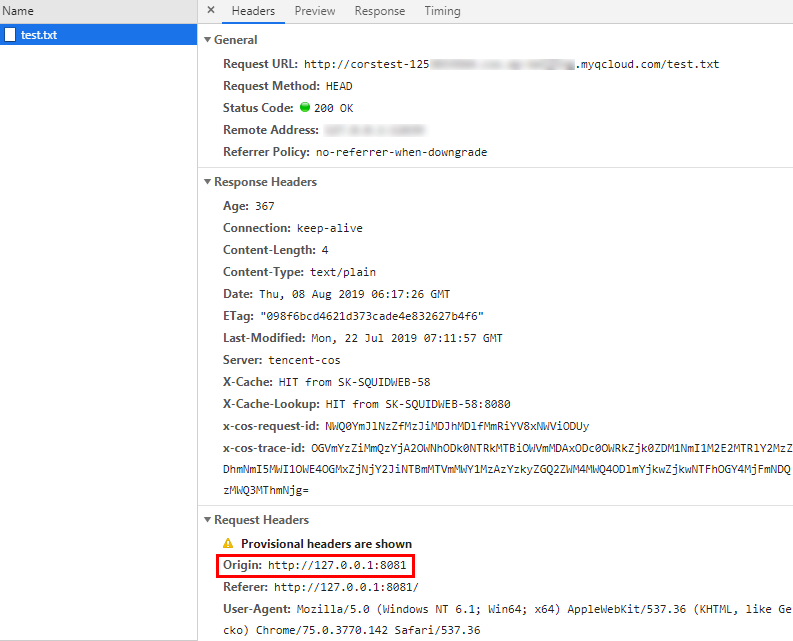
\n (3) When the access fails, go to the Headers page to find out the cause. You can see that the browser sent a request with Origin specified, meaning it is a cross-origin request.\n
\"\"

Note:
The webpage is set up on the server with the address http://127.0.0.1:8081. Therefore, the Origin is http://127.0.0.1:8081.

Configuring CORS

Now that you have identified the cause of the access failure, you can solve the problem by configuring CORS for the bucket. This example configures CORS in the COS console as follows, which is recommended for easy configurations:
1. Log in to the COS console, click Bucket List, and click the name of the target bucket. Then, select the Security Management tab and find CORS (Cross-Origin-Resource Sharing) in the drop-down list.
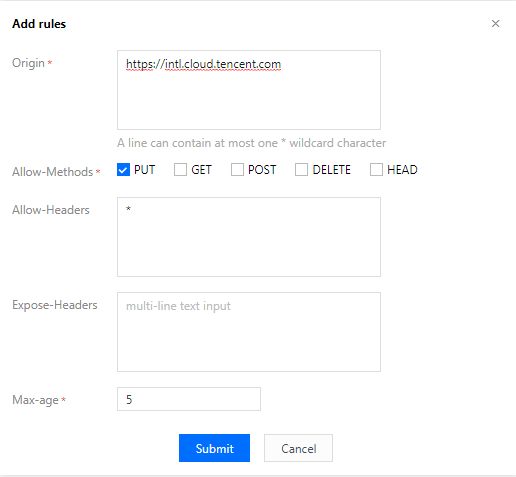
2. Click Add a Rule to add the first rule with the following least restricted configuration:\n
\"\"

Note:
The CORS configuration consists of multiple rules, which are matched individually from top to bottom. The first matched rule will be applied.

Verifying result

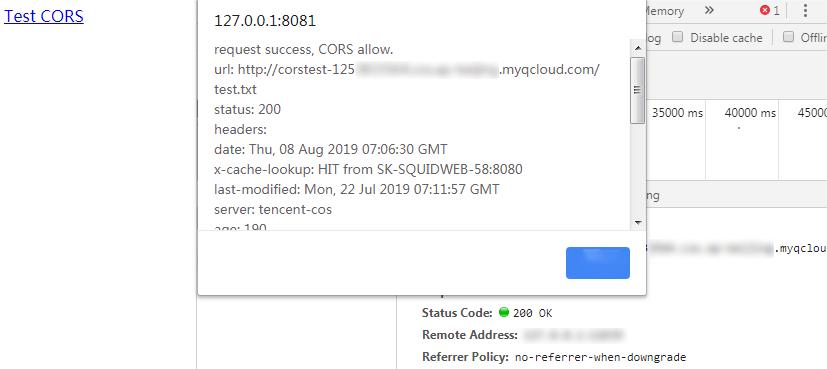
After the configuration is completed, try accessing the test.txt file again. If the result is as follows, the file can be accessed normally.\n
\"\"


Troubleshooting and suggestions

To avoid problems related to cross-origin access, you can set the least restricted CORS rule as described above to allow all cross-origin requests. If an error still occurs under this configuration, the root cause may lie in other factors rather than CORS.
In addition to configuring the least restricted rule, you can also configure a more refined rule. For example, in this example, you can use the following most restricted configuration to ensure a successful match:\n
\"\"

\nTherefore, for most scenarios, we recommend you use the most restricted configuration as needed to ensure security.

CORS Configuration Items

CORS configuration items are as follows:

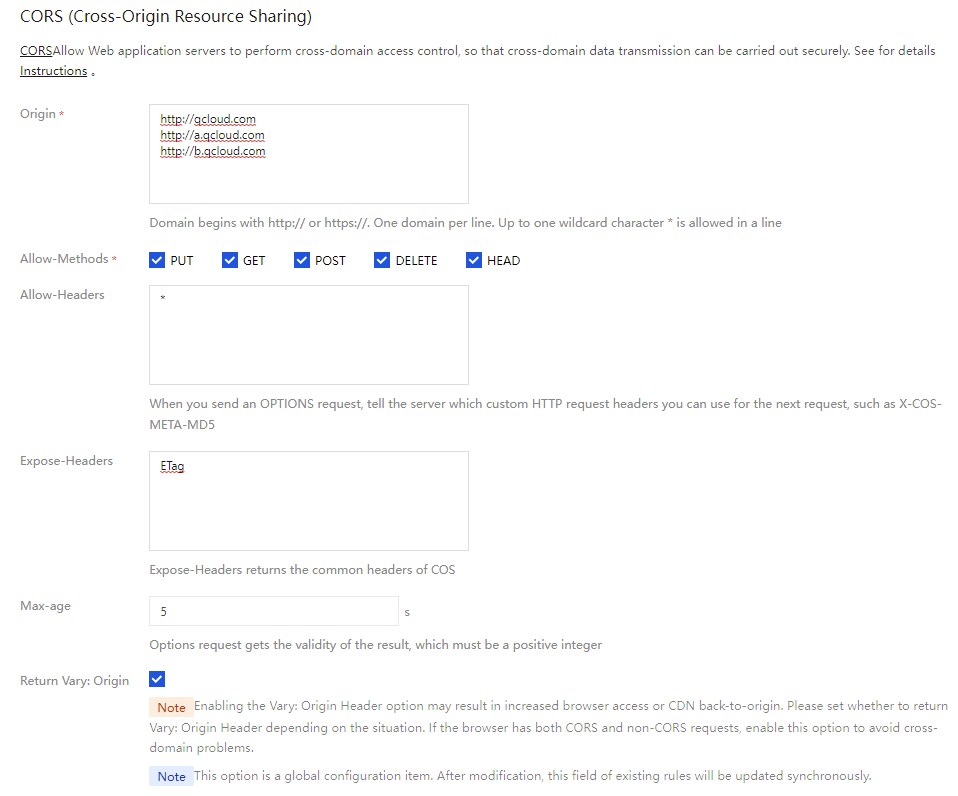
Origin

This refers to the origin allowing cross-origin requests.
Multiple domain names can be specified, with one domain name per line.
Asterisk (*) is supported, meaning that all domain names are allowed. This is not recommended.
A single specific domain name such as http://www.abc.com is supported.
Second-level wildcard domain names such as http://*.abc.com are supported. Note that each line can contain only one *.
Do not omit the protocol name HTTP or HTTPS. If the port is not the default port 80, the port should also be specified.

Allow-Methods

Enumerate one or multiple allowed cross-origin request methods.\nExamples: GET, PUT, POST, DELETE, and HEAD.

Allow-Headers

Allowed cross-origin request header.
Multiple domain names can be specified, with one domain name per line.
Headers may be easily omitted. Therefore, if there is no special requirement, we recommend you set this field to *, meaning that all headers are allowed.
The values are case-insensitive.
Each header specified in Access-Control-Request-Headers must correspond to a value in Allow-Headers.

Expose-Headers

This is a list of headers exposed to the browser, i.e., the response headers that you access from the application (for example, JavaScript's XMLHttpRequest object).
The configuration should be specific to the requirements of the application. ETag is recommended by default.
Wildcard is not allowed. The headers are case-insensitive, with one header per line.

Max-Age

This is the time (in seconds) the browser can cache the results of a preflight request (OPTIONS request) for specific resources. In general cases, you can set it to a bigger value, for example, 60 seconds. This configuration item is optional.
","recentReleaseTime":"2024-03-25 15:11:17","slate":"[{\"children\":[{\"text\":\"One-Origin Policy\"}],\"nodeId\":\"one-origin-policy\",\"type\":\"h2\"},{\"children\":[{\"text\":\"The one-origin policy is a key security mechanism for isolating potentially malicious files. It restricts the way files/scripts loaded from one origin interacts with resources from another origin. Resources with the same protocol, domain name (or IP), and port are considered to belong to the same origin. Scripts on one origin only have permissions to read/write resources on the origin but cannot access resources on other origins. \"}],\"type\":\"p\"},{\"children\":[{\"text\":\"Definition of one-origin resources\"}],\"nodeId\":\"definition-of-one-origin-resources\",\"type\":\"h4\"},{\"children\":[{\"text\":\"Webpages from a single origin should have the same protocol, domain name, and port (if specified). The following table shows how to test whether a webpage belongs to the same origin as \"},{\"code\":1,\"text\":\"http://www.example.com/dir/page.html\"},{\"text\":\":\"}],\"type\":\"p\"},{\"children\":[{\"children\":[{\"children\":[{\"children\":[{\"b\":1,\"text\":\"URL\"}],\"type\":\"p\"}],\"type\":\"cell\"},{\"children\":[{\"children\":[{\"b\":1,\"text\":\"Result\"}],\"type\":\"p\"}],\"type\":\"cell\"},{\"children\":[{\"children\":[{\"b\":1,\"text\":\"Reason\"}],\"type\":\"p\"}],\"type\":\"cell\"}],\"type\":\"row\"},{\"children\":[{\"children\":[{\"children\":[{\"children\":[{\"code\":1,\"text\":\"http://www.example.com/dir2/other.html\"}],\"type\":\"p\"}],\"type\":\"p\"}],\"type\":\"cell\"},{\"children\":[{\"children\":[{\"children\":[{\"text\":\"Yes\"}],\"type\":\"p\"}],\"type\":\"p\"}],\"type\":\"cell\"},{\"children\":[{\"children\":[{\"children\":[{\"text\":\"Same protocol, domain name, and port\"}],\"type\":\"p\"}],\"type\":\"p\"}],\"type\":\"cell\"}],\"type\":\"row\"},{\"children\":[{\"children\":[{\"children\":[{\"children\":[{\"code\":1,\"text\":\"http://www.example.com/dir/inner/another.html\"}],\"type\":\"p\"}],\"type\":\"p\"}],\"type\":\"cell\"},{\"children\":[{\"children\":[{\"children\":[{\"text\":\"Yes\"}],\"type\":\"p\"}],\"type\":\"p\"}],\"type\":\"cell\"},{\"children\":[{\"children\":[{\"children\":[{\"text\":\"Same protocol, domain name, and port\"}],\"type\":\"p\"}],\"type\":\"p\"}],\"type\":\"cell\"}],\"type\":\"row\"},{\"children\":[{\"children\":[{\"children\":[{\"children\":[{\"code\":1,\"text\":\"https://www.example.com/secure.html\"}],\"type\":\"p\"}],\"type\":\"p\"}],\"type\":\"cell\"},{\"children\":[{\"children\":[{\"children\":[{\"text\":\"No\"}],\"type\":\"p\"}],\"type\":\"p\"}],\"type\":\"cell\"},{\"children\":[{\"children\":[{\"children\":[{\"text\":\"Different protocols (HTTPS)\"}],\"type\":\"p\"}],\"type\":\"p\"}],\"type\":\"cell\"}],\"type\":\"row\"},{\"children\":[{\"children\":[{\"children\":[{\"children\":[{\"code\":1,\"text\":\"http://www.example.com:81/dir/etc.html\"}],\"type\":\"p\"}],\"type\":\"p\"}],\"type\":\"cell\"},{\"children\":[{\"children\":[{\"children\":[{\"text\":\"No\"}],\"type\":\"p\"}],\"type\":\"p\"}],\"type\":\"cell\"},{\"children\":[{\"children\":[{\"children\":[{\"text\":\"Different ports (81)\"}],\"type\":\"p\"}],\"type\":\"p\"}],\"type\":\"cell\"}],\"type\":\"row\"},{\"children\":[{\"children\":[{\"children\":[{\"children\":[{\"code\":1,\"text\":\"http://news.example.com/dir/other.html\"}],\"type\":\"p\"}],\"type\":\"p\"}],\"type\":\"cell\"},{\"children\":[{\"children\":[{\"children\":[{\"text\":\"No\"}],\"type\":\"p\"}],\"type\":\"p\"}],\"type\":\"cell\"},{\"children\":[{\"children\":[{\"children\":[{\"text\":\"Different domain names\"}],\"type\":\"p\"}],\"type\":\"p\"}],\"type\":\"cell\"}],\"type\":\"row\"}],\"columnHeader\":false,\"rowHeader\":true,\"type\":\"table\"},{\"children\":[{\"text\":\"CORS\"}],\"nodeId\":\"cors\",\"type\":\"h4\"},{\"children\":[{\"text\":\"Cross-Origin Resource Sharing (CORS) is also known as cross-origin access. It allows web application servers to perform cross-origin access control to ensure secure cross-origin data transfer. Both the browser and server need to support this feature before you can use it. The feature is compatible with all browsers (for IE, IE 10 or later is required).\"}],\"type\":\"p\"},{\"children\":[{\"text\":\"The CORS communication process is automatically completed by the browser without any manual intervention required. For developers, CORS communication and one-origin AJAX communication work in the same way and use the same code. Once the browser identifies an AJAX request for cross-origin access, it automatically adds additional header information. In some cases, an additional request is made, but you will not perceive it.\"}],\"type\":\"p\"},{\"children\":[{\"text\":\"Therefore, the key to CORS communication lies in the server. As long as the server implements CORS APIs, cross-origin communication can be implemented.\"}],\"type\":\"p\"},{\"children\":[{\"text\":\"CORS Use Cases\"}],\"nodeId\":\"cors-use-cases\",\"type\":\"h2\"},{\"children\":[{\"text\":\"CORS is used when you are using a browser. This is because access permissions are controlled by the browser but not the server. Therefore, if you use other clients, you don't need to care about cross-origin access.\"}],\"type\":\"p\"},{\"children\":[{\"text\":\"With CORS, you can use AJAX in a browser to directly access, upload, and download COS data without using your app server for data transfer. If your website adopts both COS and AJAX technologies, we recommend you use CORS for direct communication with COS.\"}],\"type\":\"p\"},{\"children\":[{\"text\":\"COS Support for CORS\"}],\"nodeId\":\"cos-support-for-cors\",\"type\":\"h2\"},{\"children\":[{\"text\":\"COS supports configuring CORS rules to allow or deny cross-origin requests as needed. CORS rules are configured at the bucket level.\"}],\"type\":\"p\"},{\"children\":[{\"text\":\"COS authentication and whether a CORS request is allowed are independent of each other. In other words, CORS rules of COS are only used to decide whether to add CORS-related headers. It is up to the browser whether to block the request.\"}],\"type\":\"p\"},{\"children\":[{\"text\":\"All object and multipart APIs of COS support CORS authentication.\"}],\"type\":\"p\"},{\"children\":[{\"children\":[{\"b\":1,\"color\":\"inherit\",\"text\":\"Note: \",\"type\":\"text\"}],\"type\":\"p\"},{\"children\":[{\"text\":\"When two webpages (\"},{\"code\":1,\"text\":\"www.a.com\"},{\"text\":\" and \"},{\"code\":1,\"text\":\"www.b.com\"},{\"text\":\") running in the same browser request the same cross-origin resource at the same time, if the request from \"},{\"code\":1,\"text\":\"www.a.com\"},{\"text\":\" arrives at the server first, the server will return the resource to the user of \"},{\"code\":1,\"text\":\"www.a.com\"},{\"text\":\" with the \"},{\"code\":1,\"text\":\"Access-Control-Allow-Origin\"},{\"text\":\" header. If \"},{\"code\":1,\"text\":\"www.b.com\"},{\"text\":\" sends a request later, the browser will return the cached response of the last request to the user. In this case, the header content does not match the CORS-required content, so the \"},{\"code\":1,\"text\":\"www.b.com\"},{\"text\":\" request will fail.\"}],\"type\":\"p\"}],\"hintType\":\"info\",\"type\":\"hint\"},{\"children\":[{\"text\":\"CORS Configuration Example\"}],\"nodeId\":\"cors-configuration-example\",\"type\":\"h2\"},{\"children\":[{\"text\":\"The following example shows how to configure CORS to get data from COS by using AJAX. The bucket permission used in the example is set to public. For a bucket with private access permission, a signature needs to be added in the request, while other configurations are the same.\\nThe bucket used in the following example is named \"},{\"code\":1,\"text\":\"corstest\"},{\"text\":\", with the access permission of public read/private write.\"}],\"type\":\"p\"},{\"children\":[{\"text\":\"Preparations\"}],\"nodeId\":\"preparations\",\"type\":\"h3\"},{\"children\":[{\"b\":1,\"text\":\"Verify whether the file can be accessed.\"},{\"text\":\"\\nUpload the \"},{\"code\":1,\"text\":\"test.txt\"},{\"text\":\" file to \"},{\"code\":1,\"text\":\"corstest\"},{\"text\":\". The access address of this file is \"},{\"code\":1,\"text\":\"http://corstest-125xxxxxxx.cos.ap-beijing.myqcloud.com/test.txt\"},{\"text\":\".\\nAccess the text file by using curl, with the following address replaced with your file address:\"}],\"start\":true,\"type\":\"oli\"},{\"children\":[{\"children\":[{\"text\":\"curl http://corstest-125xxxxxxx.cos.ap-beijing.myqcloud.com/test.txt\"}],\"type\":\"code-line\"}],\"indent\":1,\"language\":\"bash\",\"type\":\"code-block\"},{\"children\":[{\"text\":\"If \\\"test\\\" (the file content) is returned, the file can be accessed normally.\\n\"},{\"alt\":\"\",\"children\":[{\"text\":\"\"}],\"inline\":true,\"type\":\"image\",\"url\":\"https://main.qcloudimg.com/raw/d9e4cee0e6ac49d9774bab3be46bed46.png\"}],\"indent\":1,\"type\":\"p\"},{\"children\":[{\"b\":1,\"text\":\"Access the file by using AJAX\"},{\"text\":\"\\nYou can access the \"},{\"code\":1,\"text\":\"text.txt\"},{\"text\":\" file directly by using AJAX.\\n (1) Copy the following code to a local HTML file and then open it with a browser. As no custom header is set, no preflight request is required.\"}],\"start\":false,\"type\":\"oli\"},{\"children\":[{\"children\":[{\"text\":\"\\u003c!doctype html\\u003e\"}],\"type\":\"code-line\"},{\"children\":[{\"text\":\"\\u003chtml lang=\\\"en\\\"\\u003e\"}],\"type\":\"code-line\"},{\"children\":[{\"text\":\"\\u003chead\\u003e\"}],\"type\":\"code-line\"},{\"children\":[{\"text\":\" \\u003cmeta charset=\\\"UTF-8\\\"\\u003e\"}],\"type\":\"code-line\"},{\"children\":[{\"text\":\"\\u003c/head\\u003e\"}],\"type\":\"code-line\"},{\"children\":[{\"text\":\"\\u003cbody\\u003e\"}],\"type\":\"code-line\"},{\"children\":[{\"text\":\"\\u003ca href=\\\"javascript:test()\\\"\\u003eTest CORS\\u003c/a\\u003e\"}],\"type\":\"code-line\"},{\"children\":[{\"text\":\"\\u003cscript\\u003e\"}],\"type\":\"code-line\"},{\"children\":[{\"text\":\" function test() {\"}],\"type\":\"code-line\"},{\"children\":[{\"text\":\" var url = 'http://corstest-125xxxxxxx.cos.ap-beijing.myqcloud.com/test.txt';\"}],\"type\":\"code-line\"},{\"children\":[{\"text\":\" var xhr = new XMLHttpRequest();\"}],\"type\":\"code-line\"},{\"children\":[{\"text\":\" xhr.open('HEAD', url);\"}],\"type\":\"code-line\"},{\"children\":[{\"text\":\" xhr.onload = function () {\"}],\"type\":\"code-line\"},{\"children\":[{\"text\":\" var headers = xhr.getAllResponseHeaders().replace(/\\\\r\\\\n/g, '\\\\n');\"}],\"type\":\"code-line\"},{\"children\":[{\"text\":\" alert('request success, CORS allow.\\\\n' +\"}],\"type\":\"code-line\"},{\"children\":[{\"text\":\" 'url: ' + url + '\\\\n' +\"}],\"type\":\"code-line\"},{\"children\":[{\"text\":\" 'status: ' + xhr.status + '\\\\n' +\"}],\"type\":\"code-line\"},{\"children\":[{\"text\":\" 'headers:\\\\n' + headers);\"}],\"type\":\"code-line\"},{\"children\":[{\"text\":\" };\"}],\"type\":\"code-line\"},{\"children\":[{\"text\":\" xhr.onerror = function () {\"}],\"type\":\"code-line\"},{\"children\":[{\"text\":\" alert('request error, maybe CORS error.');\"}],\"type\":\"code-line\"},{\"children\":[{\"text\":\" };\"}],\"type\":\"code-line\"},{\"children\":[{\"text\":\" xhr.send();\"}],\"type\":\"code-line\"},{\"children\":[{\"text\":\" }\"}],\"type\":\"code-line\"},{\"children\":[{\"text\":\"\\u003c/script\\u003e\"}],\"type\":\"code-line\"},{\"children\":[{\"text\":\"\\u003c/body\\u003e\"}],\"type\":\"code-line\"},{\"children\":[{\"text\":\"\\u003c/html\\u003e\"}],\"type\":\"code-line\"}],\"indent\":1,\"language\":\"bash\",\"type\":\"code-block\"},{\"children\":[{\"text\":\" (2) Open the HTML file in the browser and click \"},{\"b\":1,\"text\":\"Test CORS\"},{\"text\":\" to send the request. The following error occurs with the message \\\"Access denied. No Access-Control-Allow-Origin header is found\\\". This is because CORS has not been configured on the server.\\n\"},{\"alt\":\"\",\"children\":[{\"text\":\"\"}],\"inline\":true,\"type\":\"image\",\"url\":\"https://main.qcloudimg.com/raw/db84b59f4e48ec50b3b577fa116fe7ba.jpg\"},{\"text\":\"\\n (3) When the access fails, go to the \"},{\"b\":1,\"text\":\"Headers\"},{\"text\":\" page to find out the cause. You can see that the browser sent a request with \"},{\"b\":1,\"text\":\"Origin\"},{\"text\":\" specified, meaning it is a cross-origin request.\\n\"},{\"alt\":\"\",\"children\":[{\"text\":\"\"}],\"inline\":true,\"type\":\"image\",\"url\":\"https://main.qcloudimg.com/raw/0ba03fd90d9e6bb59785a6ba3b17d812.jpg\"}],\"indent\":1,\"type\":\"p\"},{\"children\":[{\"children\":[{\"b\":1,\"color\":\"inherit\",\"text\":\"Note: \",\"type\":\"text\"}],\"type\":\"p\"},{\"children\":[{\"text\":\"The webpage is set up on the server with the address \"},{\"code\":1,\"text\":\"http://127.0.0.1:8081\"},{\"text\":\". Therefore, the \"},{\"b\":1,\"text\":\"Origin\"},{\"text\":\" is \"},{\"code\":1,\"text\":\"http://127.0.0.1:8081\"},{\"text\":\".\"}],\"type\":\"p\"}],\"hintType\":\"info\",\"indent\":1,\"type\":\"hint\"},{\"children\":[{\"text\":\"Configuring CORS\"}],\"nodeId\":\"configuring-cors\",\"type\":\"h3\"},{\"children\":[{\"text\":\"Now that you have identified the cause of the access failure, you can solve the problem by configuring CORS for the bucket. This example configures CORS in the COS console as follows, which is recommended for easy configurations:\"}],\"type\":\"p\"},{\"children\":[{\"text\":\"Log in to the \"},{\"children\":[{\"text\":\"COS console\"}],\"linkTarget\":\"blank\",\"linkTitle\":\"https://console.tencentcloud.com/cos5\",\"props\":{\"type\":\"link\",\"url\":\"https://console.tencentcloud.com/cos5\"},\"type\":\"ref\"},{\"text\":\", click \"},{\"b\":1,\"text\":\"Bucket List\"},{\"text\":\", and click the name of the target bucket. Then, select the \"},{\"b\":1,\"text\":\"Security Management\"},{\"text\":\" tab and find \"},{\"b\":1,\"text\":\"CORS (Cross-Origin-Resource Sharing)\"},{\"text\":\" in the drop-down list.\"}],\"start\":true,\"type\":\"oli\"},{\"children\":[{\"text\":\"Click \"},{\"b\":1,\"text\":\"Add a Rule\"},{\"text\":\" to add the first rule with the following least restricted configuration:\\n\"},{\"alt\":\"\",\"children\":[{\"text\":\"\"}],\"inline\":true,\"type\":\"image\",\"url\":\"https://main.qcloudimg.com/raw/6a1f4bed7f42fba69449514822759c42.png\"}],\"start\":false,\"type\":\"oli\"},{\"children\":[{\"children\":[{\"b\":1,\"color\":\"#04C8DC\",\"text\":\"Note: \",\"type\":\"text\"}],\"type\":\"p\"},{\"children\":[{\"text\":\" The CORS configuration consists of multiple rules, which are matched individually from top to bottom. The first matched rule will be applied.\"}],\"type\":\"p\"}],\"hintType\":\"alert\",\"indent\":1,\"type\":\"hint\"},{\"children\":[{\"text\":\"Verifying result\"}],\"nodeId\":\"verifying-result\",\"type\":\"h4\"},{\"children\":[{\"text\":\"After the configuration is completed, try accessing the \"},{\"code\":1,\"text\":\"test.txt\"},{\"text\":\" file again. If the result is as follows, the file can be accessed normally.\\n\"},{\"alt\":\"\",\"children\":[{\"text\":\"\"}],\"inline\":true,\"type\":\"image\",\"url\":\"https://qcloudimg.tencent-cloud.cn/raw/b3725a24d973dd4799ec58ddb081dffd.jpg\"}],\"type\":\"p\"},{\"children\":[{\"text\":\"Troubleshooting and suggestions\"}],\"nodeId\":\"troubleshooting-and-suggestions\",\"type\":\"h3\"},{\"children\":[{\"text\":\"To avoid problems related to cross-origin access, you can set the least restricted CORS rule as described above to allow all cross-origin requests. If an error still occurs under this configuration, the root cause may lie in other factors rather than CORS.\"}],\"type\":\"p\"},{\"children\":[{\"text\":\"In addition to configuring the least restricted rule, you can also configure a more refined rule. For example, in this example, you can use the following most restricted configuration to ensure a successful match:\\n\"},{\"alt\":\"\",\"children\":[{\"text\":\"\"}],\"inline\":true,\"type\":\"image\",\"url\":\"https://main.qcloudimg.com/raw/6a1f4bed7f42fba69449514822759c42.png\"},{\"text\":\"\\nTherefore, for most scenarios, we recommend you use the most restricted configuration as needed to ensure security.\"}],\"type\":\"p\"},{\"children\":[{\"text\":\"CORS Configuration Items\"}],\"nodeId\":\"cors-configuration-items\",\"type\":\"h2\"},{\"children\":[{\"text\":\"CORS configuration items are as follows:\"}],\"type\":\"p\"},{\"children\":[{\"text\":\"Origin\"}],\"nodeId\":\"origin\",\"type\":\"h4\"},{\"children\":[{\"text\":\"This refers to the origin allowing cross-origin requests.\"}],\"type\":\"p\"},{\"children\":[{\"text\":\"Multiple domain names can be specified, with one domain name per line.\"}],\"start\":false,\"type\":\"uli\"},{\"children\":[{\"text\":\"Asterisk (*) is supported, meaning that all domain names are allowed. This is not recommended.\"}],\"start\":false,\"type\":\"uli\"},{\"children\":[{\"text\":\"A single specific domain name such as \"},{\"code\":1,\"text\":\"http://www.abc.com\"},{\"text\":\" is supported.\"}],\"start\":false,\"type\":\"uli\"},{\"children\":[{\"text\":\"Second-level wildcard domain names such as \"},{\"code\":1,\"text\":\"http://*.abc.com\"},{\"text\":\" are supported. Note that each line can contain only one \"},{\"code\":1,\"text\":\"*\"},{\"text\":\".\"}],\"start\":false,\"type\":\"uli\"},{\"children\":[{\"text\":\"Do not omit the protocol name HTTP or HTTPS. If the port is not the default port 80, the port should also be specified.\"}],\"start\":false,\"type\":\"uli\"},{\"children\":[{\"text\":\"Allow-Methods\"}],\"nodeId\":\"allow-methods\",\"type\":\"h4\"},{\"children\":[{\"text\":\"Enumerate one or multiple allowed cross-origin request methods.\\nExamples: GET, PUT, POST, DELETE, and HEAD.\"}],\"type\":\"p\"},{\"children\":[{\"text\":\"Allow-Headers\"}],\"nodeId\":\"allow-headers\",\"type\":\"h4\"},{\"children\":[{\"text\":\"Allowed cross-origin request header.\"}],\"type\":\"p\"},{\"children\":[{\"text\":\"Multiple domain names can be specified, with one domain name per line.\"}],\"start\":false,\"type\":\"uli\"},{\"children\":[{\"text\":\"Headers may be easily omitted. Therefore, if there is no special requirement, we recommend you set this field to \"},{\"code\":1,\"text\":\"*\"},{\"text\":\", meaning that all headers are allowed.\"}],\"start\":false,\"type\":\"uli\"},{\"children\":[{\"text\":\"The values are case-insensitive.\"}],\"start\":false,\"type\":\"uli\"},{\"children\":[{\"text\":\"Each header specified in \"},{\"code\":1,\"text\":\"Access-Control-Request-Headers\"},{\"text\":\" must correspond to a value in \"},{\"code\":1,\"text\":\"Allow-Headers\"},{\"text\":\".\"}],\"start\":false,\"type\":\"uli\"},{\"children\":[{\"text\":\"Expose-Headers\"}],\"nodeId\":\"expose-headers\",\"type\":\"h4\"},{\"children\":[{\"text\":\"This is a list of headers exposed to the browser, i.e., the response headers that you access from the application (for example, JavaScript's \"},{\"code\":1,\"text\":\"XMLHttpRequest\"},{\"text\":\" object).\"}],\"type\":\"p\"},{\"children\":[{\"text\":\"The configuration should be specific to the requirements of the application. \"},{\"code\":1,\"text\":\"ETag\"},{\"text\":\" is recommended by default.\"}],\"start\":false,\"type\":\"uli\"},{\"children\":[{\"text\":\"Wildcard is not allowed. The headers are case-insensitive, with one header per line.\"}],\"start\":false,\"type\":\"uli\"},{\"children\":[{\"text\":\"Max-Age\"}],\"nodeId\":\"max-age\",\"type\":\"h4\"},{\"children\":[{\"text\":\"This is the time (in seconds) the browser can cache the results of a preflight request (OPTIONS request) for specific resources. In general cases, you can set it to a bigger value, for example, 60 seconds. This configuration item is optional.\"}],\"type\":\"p\"}]"}},"11714":{"categoryId":436,"weight":80,"type":"page","extension":"","pid":12473,"id":11714,"lang":"en","title":"Granting Sub-Accounts Access to COS","pdfUrl":"","docType":"default","children":[],"firstReleaseTime":"2019-08-21 00:46:45","recentReleaseTime":"2019-08-21 00:46:45","content":{"title":"Granting Sub-Accounts Access to COS","body":"

Overview

You can set different operation permissions on COS buckets or objects through CAM, so that different teams or users in different companies or departments can better collaborate with each other .
To start with, you need to understand several terms: root account, sub-account (user), and user group. For CAM terms and the detailed description of configurations, please see CAM Glossary.

Root account

A root account is also known as a developer. When you sign up for a Tencent Cloud account, the system creates a root account identity for you to log in to the Tencent Cloud services. Tencent Cloud records your usage and bills you based on the root account.
By default, a root account has full access to the resources in the account. A root account can access billing information, change user passwords, create users and user groups, access other Tencent Cloud service resources, etc. By default, only a root account can access such resources. Any other users can only access them after they are authorized by a root account.

Sub-account (user) and user group

A sub-account is an entity created by the root account. It has an ID and identity credentials, as well as permission to log in to the Tencent Cloud console.
By default, a sub-account does not own resources. It needs to be authorized by a root account.
One root account can create multiple sub-accounts (users).
One sub-account can belong to multiple root accounts to assist them in managing their Tencent Cloud resources. However, at any specific time point, one sub-account can only log in under one root account to manage its Tencent Cloud resources.
A sub-account can switch between developers (root accounts) in the console.
When a sub-account logs in to the console, it is under its default root account and has the access permissions granted by the root account.
After a sub-account switches from one root account to another, it will only have the access permissions granted by the current root account, but not the permissions granted by the previous one.
A user group is a collection of multiple users (sub-accounts) with the same functions. You can create different user groups based on your business needs and associate them with appropriate policies to grant them different permissions.

Directions

You can grant a sub-account permission to access COS in three steps: creating a sub-account, granting permissions to the sub-account, and accessing COS resources with the sub-account.

Step 1. Create a sub-account

You can create a sub-account in the CAM console and grant it access permissions. The specific operations are shown as below:
1. Log in to the CAM console.
2. Select User > User List > Create User to enter the user creation page.
3. Select Custom Creation, set Access Resources and Receive Messages, and click Next.
4. Enter the user information as required.
User Information: Set the username and email address of the sub-account. The email address is needed to receive the email sent by Tencent Cloud to bind the sub-account with his/her Weixin account.
Access Method: Select Programming access and Tencent Cloud console access. Other configuration items can be set as needed.
5. Click Next and start identity verification.
6. Grant permissions to the sub-account. You can configure simple policies, such as granting the sub-account permission to access the COS bucket list or read-only permission, with the policy options provided. To configure a more complex policy, proceed to Step 2. Grant permissions to the sub-account.
7. Set the user tag optionally and click Next.
8. Click Finish. In this way, the sub-account is created.

Step 2. Grant permissions to the sub-account

Create a custom policy or select an existing policy and associate it with the sub-account.
1. Log in to the CAM console.
2. Choose Policy > Create Custom Policy > Create by Policy Syntax to go to the policy creation page.
3. You can select Blank Template to customize a permission policy as needed. You can also select a COS-associated System Template. Then, click Next.
4. Enter an easy-to-remember policy name. If you have selected Blank Template, enter the policy syntax. For more information, see Sample Policies. You can copy and paste the policy content into the Policy Content box and click Finish.
5. After you create a policy, associate it with the sub-account.
\"\"

6. Select the sub-account and click Confirm to complete the authorization.
\"\"


Step 3. Access COS resources using the sub-account

The access methods (programming access and Tencent Cloud console access) mentioned in Step 1 are described as follows:
(1) Programming access
To use the programming access method (for example, using APIs, SDKs, or tools) to access COS resources with a sub-account, you need to obtain the APPID of the root account first. Besides, you need to go to the CAM console to generate SecretId and SecretKey of the sub-account as follows:
1. Log in to the CAM console with the root account.
2. Click User > User List.
3. Click the name of the sub-account to go to the User Details page of the sub-account.
4. Click the API Key tab. Then, click Create Key to create SecretId and SecretKey for the sub-account.
After this, you can use this sub-account’s SecretId and SecretKey, as well as the root account’s APPID to access COS resources.
Note:
To access COS resources with a sub-account, you need to use XML APIs or SDKs based on XML APIs.

Example of access using XML Java SDK

The following parameters need to be set if you use the XML Java SDK:
// Initialize the user authentication information
COSCredentials cred = new BasicCOSCredentials("<root account's APPID>", "<sub-account's SecretId>", "<sub-account's SecretKey>");
Example:
String secretId = System.getenv("secretId");// Sub-account's `SecretId`. Follow the principle of least privilege to reduce risks. For information about how to obtain a sub-account key, visit https://cloud.tencent.com/document/product/598/37140.
String secretKey = System.getenv("secretKey");// Sub-account's `SecretKey`. Follow the principle of least privilege to reduce risks. For information about how to obtain a sub-account key, visit https://cloud.tencent.com/document/product/598/37140.
COSCredentials cred = new BasicCOSCredentials(secretId, secretKey);

// Initialize the user authentication information
COSCredentials cred = new BasicCOSCredentials("<root account's APPID>", secretId, secretKey);

Example of access using COSCMD command line tool

The following parameters need to be set if you use COSCMD:
coscmd config -u <root account's APPID> -a <sub-account's SecretId> -s <sub-account's SecretKey> -b <root account's bucketname> -r <root account's bucket region>
Example:
coscmd config -u 1250000000 -a ************************************ -s e8Sdeasdfas2238Vi**** -b examplebucket -r ap-beijing
(2) Tencent Cloud console access
After the sub-user is granted permissions, they can enter the root account ID, sub-user name, and sub-user password on the Sub-user Login page to log in to the console. Then, they can click Cloud Object Storage in Products to access storage resources under the root account.

Sample Policies

The following typical sample policies are provided herein. When configuring a policy, you can refer to the following code, copy and paste it into the Policy Content box, and modify it as needed. For more policy syntax for other common COS scenarios, see Overview or the business use cases parts of Cloud Access Management.

Sample 1. Granting the sub-account full read/write permissions for COS access

Note:
This policy grants a large range of permissions to the sub-account. Please configure it with caution.
The policy is as follows:
{
"version": "2.0",
"statement": [
{
"action":[
"name/cos:*"
],
"resource": "*",
"effect": "allow"
},
{
"effect": "allow",
"action": "monitor:*",
"resource": "*"
}
]
}

Sample 2. Granting the sub-account read-only permission

The following policy grants the sub-account read-only permission:
{
"version": "2.0",
"statement": [
{
"action":[
"name/cos:List*",
"name/cos:Get*",
"name/cos:Head*",
"name/cos:OptionsObject"
],
"resource": "*",
"effect": "allow"
},
{
"effect": "allow",
"action": "monitor:*",
"resource": "*"
}
]
}

Sample 3. Granting the sub-account write-only permission (excluding deletion)

The policy is as follows:
{
"version": "2.0",
"statement": [
{
"effect": "allow",
"action":[
"cos:ListParts",
"cos:PostObject",
"cos:PutObject*",
"cos:InitiateMultipartUpload",
"cos:UploadPart",
"cos:UploadPartCopy",
"cos:CompleteMultipartUpload",
"cos:AbortMultipartUpload",
"cos:ListMultipartUploads"
],
"resource": "*"
}
]
}

Sample 4. Granting the sub-account read/write permission for a certain IP range

The following sample grants read/write permission only for the 192.168.1.0/24 and 192.168.2.0/24 IP address ranges:\nTo enter more conditions, see Conditions.
{
"version": "2.0",
"statement": [
{
"action":[
"cos:*"
],
"resource": "*",
"effect": "allow",
"condition":{
"ip_equal":{
"qcs:ip": ["192.168.1.0/24", "192.168.2.0/24"]
}
}
}
]
}

","recentReleaseTime":"2025-11-18 16:41:54","slate":"[{\"children\":[{\"text\":\"Overview\"}],\"id\":\"8zJFuqcuAPHRPyR8ms9Py\",\"nodeId\":\"overview\",\"type\":\"h2\"},{\"children\":[{\"text\":\"You can set different operation permissions on COS buckets or objects through CAM, so that different teams or users in different companies or departments can better collaborate with each other .\"}],\"id\":\"G7FV26bi6vh0S8CZqE7OQ\",\"type\":\"p\"},{\"children\":[{\"text\":\"To start with, you need to understand several terms: root account, sub-account (user), and user group. For CAM terms and the detailed description of configurations, please see CAM \"},{\"children\":[{\"text\":\"Glossary\"}],\"id\":\"UdxZz-aXlsKPsMBNe4z1E\",\"linkTarget\":\"blank\",\"linkTitle\":\"https://intl.cloud.tencent.com/document/product/598/18564\",\"props\":{\"type\":\"link\",\"url\":\"https://intl.cloud.tencent.com/document/product/598/18564\"},\"type\":\"ref\"},{\"text\":\".\"}],\"id\":\"9XJRwQj_vHr8PU1mnniAN\",\"type\":\"p\"},{\"children\":[{\"text\":\"Root account\"}],\"id\":\"PFIUBAMUatk_jtpHYEKvY\",\"nodeId\":\"root-account\",\"type\":\"h4\"},{\"children\":[{\"text\":\"A root account is also known as a developer. When you sign up for a Tencent Cloud account, the system creates a root account identity for you to log in to the Tencent Cloud services. Tencent Cloud records your usage and bills you based on the root account.\"}],\"id\":\"vCaZku2ZMixrRgaEQnMOw\",\"type\":\"p\"},{\"children\":[{\"text\":\"By default, a root account has full access to the resources in the account. A root account can access billing information, change user passwords, create users and user groups, access other Tencent Cloud service resources, etc. By default, only a root account can access such resources. Any other users can only access them after they are authorized by a root account.\"}],\"id\":\"doKhs5B6beq-e9s_ilHvS\",\"type\":\"p\"},{\"children\":[{\"text\":\"Sub-account (user) and user group\"}],\"id\":\"4mMylFYw-mdnQQIvKwmqK\",\"nodeId\":\"sub-account-(user)-and-user-group\",\"type\":\"h4\"},{\"children\":[{\"text\":\"A sub-account is an entity created by the root account. It has an ID and identity credentials, as well as permission to log in to the Tencent Cloud console.\"}],\"id\":\"lybI8owqKHZRiwNWZoSjS\",\"start\":false,\"type\":\"uli\"},{\"children\":[{\"text\":\"By default, a sub-account does not own resources. It needs to be authorized by a root account.\"}],\"id\":\"mJrMItiMHjOPv1XCRlPUA\",\"start\":false,\"type\":\"uli\"},{\"children\":[{\"text\":\"One root account can create multiple sub-accounts (users).\"}],\"id\":\"p-mauDLQv3NvTWs6Jbk9v\",\"start\":false,\"type\":\"uli\"},{\"children\":[{\"text\":\"One sub-account can belong to multiple root accounts to assist them in managing their Tencent Cloud resources. However, at any specific time point, one sub-account can only log in under one root account to manage its Tencent Cloud resources.\"}],\"id\":\"MkfteMgKxDCh38-xoRa1f\",\"start\":false,\"type\":\"uli\"},{\"children\":[{\"text\":\"A sub-account can switch between developers (root accounts) in the console.\"}],\"id\":\"SPA8pS3qY50d-IZtkhVqW\",\"start\":false,\"type\":\"uli\"},{\"children\":[{\"text\":\"When a sub-account logs in to the console, it is under its default root account and has the access permissions granted by the root account.\"}],\"id\":\"6qoASYI9AIMQFEAHKpl-h\",\"start\":false,\"type\":\"uli\"},{\"children\":[{\"text\":\"After a sub-account switches from one root account to another, it will only have the access permissions granted by the current root account, but not the permissions granted by the previous one.\"}],\"id\":\"h52RQETkW4i3LOeVSAPtZ\",\"start\":false,\"type\":\"uli\"},{\"children\":[{\"text\":\"A user group is a collection of multiple users (sub-accounts) with the same functions. You can create different user groups based on your business needs and associate them with appropriate policies to grant them different permissions.\"}],\"id\":\"I9NCm4w2Xk7Cs2xHaj9Pt\",\"start\":false,\"type\":\"uli\"},{\"children\":[{\"text\":\"Directions\"}],\"id\":\"BNLLxSXLx2z7FNdf05hs7\",\"nodeId\":\"directions\",\"type\":\"h2\"},{\"children\":[{\"text\":\"You can grant a sub-account permission to access COS in three steps: creating a sub-account, granting permissions to the sub-account, and accessing COS resources with the sub-account.\"}],\"id\":\"mDLAvwtswd4SHQVWufgaI\",\"type\":\"p\"},{\"children\":[{\"text\":\"Step 1. Create a sub-account\"}],\"id\":\"Cti41bcMHj-tOuzm_i9rL\",\"nodeId\":\"step-1.-create-a-sub-account\",\"type\":\"h3\"},{\"children\":[{\"text\":\"You can create a sub-account in the CAM console and grant it access permissions. The specific operations are shown as below:\"}],\"id\":\"jvm0LQE_l9dXaoYS82yGn\",\"type\":\"p\"},{\"children\":[{\"text\":\"Log in to the \"},{\"children\":[{\"text\":\"CAM console\"}],\"id\":\"Txz9j6HIKXPHkT3Au2VH3\",\"linkTarget\":\"blank\",\"linkTitle\":\"https://console.tencentcloud.com/cam\",\"props\":{\"type\":\"link\",\"url\":\"https://console.tencentcloud.com/cam\"},\"type\":\"ref\"},{\"text\":\".\"}],\"id\":\"2HN6bi3m4G6lw3r6SxV0l\",\"start\":true,\"type\":\"oli\"},{\"children\":[{\"text\":\"Select \"},{\"b\":1,\"text\":\"User\"},{\"text\":\" \\u003e \"},{\"b\":1,\"text\":\"User List\"},{\"text\":\" \\u003e \"},{\"b\":1,\"text\":\"Create User\"},{\"text\":\" to enter the user creation page.\"}],\"id\":\"pqNE_OS_5AA6LI4JfEN6B\",\"start\":false,\"type\":\"oli\"},{\"children\":[{\"text\":\"Select \"},{\"b\":1,\"text\":\"Custom Creation\"},{\"text\":\", set \"},{\"b\":1,\"text\":\"Access Resources and Receive Messages\"},{\"text\":\", and click \"},{\"b\":1,\"text\":\"Next\"},{\"text\":\".\"}],\"id\":\"ZJbrbb6P8hs6EeXhNujgG\",\"start\":false,\"type\":\"oli\"},{\"children\":[{\"text\":\"Enter the user information as required.\"}],\"id\":\"dAxeV2INHFwu4YBn-rRHC\",\"start\":false,\"type\":\"oli\"},{\"children\":[{\"b\":1,\"text\":\"User Information\"},{\"text\":\": Set the username and email address of the sub-account. The email address is needed to receive the email sent by Tencent Cloud to bind the sub-account with his/her Weixin account.\"}],\"id\":\"vwXGo1IGY7KYf_Ebu4kHC\",\"indent\":1,\"start\":false,\"type\":\"uli\"},{\"children\":[{\"b\":1,\"text\":\"Access Method\"},{\"text\":\": Select \"},{\"b\":1,\"text\":\"Programming access\"},{\"text\":\" and \"},{\"b\":1,\"text\":\"Tencent Cloud console access\"},{\"text\":\". Other configuration items can be set as needed.\"}],\"id\":\"xyXzo_2tAX-D0gTJh1mYD\",\"indent\":1,\"start\":false,\"type\":\"uli\"},{\"children\":[{\"text\":\"Click \"},{\"b\":1,\"text\":\"Next\"},{\"text\":\" and start identity verification.\"}],\"id\":\"KYmNhuulr1KzvkvRhjh6a\",\"indent\":0,\"start\":false,\"type\":\"oli\"},{\"children\":[{\"text\":\"Grant permissions to the sub-account. You can configure simple policies, such as granting the sub-account permission to access the COS bucket list or read-only permission, with the policy options provided. To configure a more complex policy, proceed to \"},{\"children\":[{\"text\":\"Step 2. Grant permissions to the sub-account\"}],\"id\":\"m8ost6Av8jt-xbkE2kgJA\",\"props\":{\"type\":\"link\",\"url\":\"#step2\"},\"type\":\"ref\"},{\"text\":\".\"}],\"id\":\"mC86WpqmJ-wNLrTxrYo7L\",\"indent\":0,\"start\":false,\"type\":\"oli\"},{\"children\":[{\"text\":\"Set the user tag optionally and click \"},{\"b\":1,\"text\":\"Next\"},{\"text\":\".\"}],\"id\":\"yvGi13JcvsqkIeUsVJeF5\",\"indent\":0,\"start\":false,\"type\":\"oli\"},{\"children\":[{\"text\":\"Click \"},{\"b\":1,\"text\":\"Finish\"},{\"text\":\". In this way, the sub-account is created.\"}],\"id\":\"rT4BHUY1Ikh27n6EHgqjL\",\"indent\":0,\"start\":false,\"type\":\"oli\"},{\"children\":[{\"text\":\"Step 2. Grant permissions to the sub-account\"}],\"id\":\"t9A-SMn1tC_f8IO7gqaZm\",\"nodeId\":\"step2\",\"type\":\"h3\"},{\"children\":[{\"text\":\"Create a custom policy or select an existing policy and associate it with the sub-account.\"}],\"id\":\"JEbuxw0JQGeyysLcvE6OK\",\"type\":\"p\"},{\"children\":[{\"text\":\"Log in to the \"},{\"children\":[{\"text\":\"CAM console\"}],\"id\":\"uZtq24V7w7268aXqICbFO\",\"linkTarget\":\"blank\",\"linkTitle\":\"https://console.tencentcloud.com/cam\",\"props\":{\"type\":\"link\",\"url\":\"https://console.tencentcloud.com/cam\"},\"type\":\"ref\"},{\"text\":\".\"}],\"id\":\"ShUUSRsogF6COclkoq4le\",\"start\":true,\"type\":\"oli\"},{\"children\":[{\"text\":\"Choose \"},{\"b\":1,\"text\":\"Policy\"},{\"text\":\" \\u003e \"},{\"b\":1,\"text\":\"Create Custom Policy\"},{\"text\":\" \\u003e \"},{\"b\":1,\"text\":\"Create by Policy Syntax\"},{\"text\":\" to go to the policy creation page.\"}],\"id\":\"46tlAAIkgd0_4px_KpmL-\",\"start\":false,\"type\":\"oli\"},{\"children\":[{\"text\":\"You can select \"},{\"b\":1,\"text\":\"Blank Template\"},{\"text\":\" to customize a permission policy as needed. You can also select a COS-associated \"},{\"b\":1,\"text\":\"System Template\"},{\"text\":\". Then, click \"},{\"b\":1,\"text\":\"Next\"},{\"text\":\".\"}],\"id\":\"75668eYbGU3bD25mzae3p\",\"start\":false,\"type\":\"oli\"},{\"children\":[{\"text\":\"Enter an easy-to-remember policy name. If you have selected \"},{\"b\":1,\"text\":\"Blank Template\"},{\"text\":\", enter the policy syntax. For more information, see \"},{\"children\":[{\"text\":\"Sample Policies\"}],\"id\":\"wJiRgPtQ9h9E_buufg3uy\",\"linkTarget\":\"self\",\"props\":{\"anchor\":\"sample-policies\",\"id\":\"130680036622290944\",\"type\":\"link\",\"url\":\"https://www.tencentcloud.com/document/product/436/11714#sample-policies\"},\"type\":\"ref\"},{\"text\":\". You can copy and paste the policy content into the \"},{\"b\":1,\"text\":\"Policy Content\"},{\"text\":\" box and click \"},{\"b\":1,\"text\":\"Finish\"},{\"text\":\".\"}],\"id\":\"AGnOf47c9sBTUwfnp9OSl\",\"start\":false,\"type\":\"oli\"},{\"children\":[{\"text\":\"After you create a policy, associate it with the sub-account.\"}],\"id\":\"JNeZb9gAzbrQ1lKiif6qU\",\"start\":false,\"type\":\"oli\"},{\"alt\":\"\",\"children\":[{\"text\":\"\"}],\"id\":\"KRAF1I0N4BtFlShcc_3bC\",\"indent\":1,\"inline\":false,\"naturalSize\":[1300,101],\"size\":[783,60],\"type\":\"image\",\"url\":\"https://cloudcache.intl.tencent-cloud.com/cms/backend-cms/1913c3c04d8c11f0a97752540044a08e.png\"},{\"children\":[{\"text\":\"Select the sub-account and click \"},{\"b\":1,\"text\":\"Confirm\"},{\"text\":\" to complete the authorization.\"}],\"id\":\"1Ynjls-A45LhHiYQ3xma2\",\"start\":false,\"type\":\"oli\"},{\"alt\":\"\",\"children\":[{\"text\":\"\"}],\"id\":\"UWHHWbZYDe53k4y1QbjRv\",\"indent\":1,\"inline\":false,\"naturalSize\":[874,271],\"size\":[783,242],\"type\":\"image\",\"url\":\"https://cloudcache.intl.tencent-cloud.com/cms/backend-cms/4208509d4d8c11f08bba5254001c06ec.png\"},{\"children\":[{\"text\":\"Step 3. Access COS resources using the sub-account\"}],\"id\":\"30ZdaQZ-s313O-TUtTtIe\",\"nodeId\":\"step-3.-access-cos-resources-using-the-sub-account\",\"type\":\"h3\"},{\"children\":[{\"text\":\"The access methods (programming access and Tencent Cloud console access) mentioned in Step 1 are described as follows:\"}],\"id\":\"d7JhT_uLcrZvoPhbzr9lD\",\"type\":\"p\"},{\"children\":[{\"text\":\"(1) Programming access\"}],\"id\":\"uspoNI7vZtOYpsmyolzCb\",\"type\":\"p\"},{\"children\":[{\"text\":\"To use the programming access method (for example, using APIs, SDKs, or tools) to access COS resources with a sub-account, you need to obtain the \"},{\"code\":1,\"text\":\"APPID\"},{\"text\":\" of the root account first. Besides, you need to go to the CAM console to generate \"},{\"code\":1,\"text\":\"SecretId\"},{\"text\":\" and \"},{\"code\":1,\"text\":\"SecretKey\"},{\"text\":\" of the sub-account as follows:\"}],\"id\":\"BWzp0no27lzlVKEDlYRJJ\",\"type\":\"p\"},{\"children\":[{\"text\":\"Log in to the \"},{\"children\":[{\"text\":\"CAM console\"}],\"id\":\"gvxm4J4TUQKag9GPQUPgV\",\"linkTarget\":\"blank\",\"linkTitle\":\"https://console.tencentcloud.com/cam/capi\",\"props\":{\"type\":\"link\",\"url\":\"https://console.tencentcloud.com/cam/capi\"},\"type\":\"ref\"},{\"text\":\" with the root account.\"}],\"id\":\"RBUyO2XIt5TYozD895JFi\",\"start\":true,\"type\":\"oli\"},{\"children\":[{\"text\":\"Click \"},{\"b\":1,\"text\":\"User\"},{\"text\":\" \\u003e \"},{\"b\":1,\"text\":\"User List\"},{\"text\":\".\"}],\"id\":\"xsWvxWngCzFogvotCTKzL\",\"start\":false,\"type\":\"oli\"},{\"children\":[{\"text\":\"Click the name of the sub-account to go to the \"},{\"b\":1,\"text\":\"User Details\"},{\"text\":\" page of the sub-account.\"}],\"id\":\"T6j6WLXIUDyKFph8g4wiV\",\"start\":false,\"type\":\"oli\"},{\"children\":[{\"text\":\"Click the \"},{\"b\":1,\"text\":\"API Key\"},{\"text\":\" tab. Then, click \"},{\"b\":1,\"text\":\"Create Key\"},{\"text\":\" to create \"},{\"code\":1,\"text\":\"SecretId\"},{\"text\":\" and \"},{\"code\":1,\"text\":\"SecretKey\"},{\"text\":\" for the sub-account.\"}],\"id\":\"xbsZ0MUonfKuGDEDMKkZV\",\"start\":false,\"type\":\"oli\"},{\"children\":[{\"text\":\"After this, you can use this sub-account’s \"},{\"code\":1,\"text\":\"SecretId\"},{\"text\":\" and \"},{\"code\":1,\"text\":\"SecretKey\"},{\"text\":\", as well as the root account’s \"},{\"code\":1,\"text\":\"APPID\"},{\"text\":\" to access COS resources. \"}],\"id\":\"UTif5ELEiKsY6abDsMsCd\",\"type\":\"p\"},{\"children\":[{\"children\":[{\"b\":1,\"color\":\"#04C8DC\",\"text\":\"Note: \",\"type\":\"text\"}],\"id\":\"32fNyCTU0Jj-wE1Dw2F4T\",\"type\":\"p\"},{\"children\":[{\"text\":\"To access COS resources with a sub-account, you need to use XML APIs or SDKs based on XML APIs.\"}],\"id\":\"9etKt-T9q5DjTAM6eaeic\",\"type\":\"p\"}],\"hintType\":\"alert\",\"id\":\"nYL0rGpw3CmajZL53_XkG\",\"type\":\"hint\"},{\"children\":[{\"text\":\"Example of access using XML Java SDK\"}],\"id\":\"fdLj8ruRLoFYvg1Tny0qw\",\"nodeId\":\"example-of-access-using-xml-java-sdk\",\"type\":\"h4\"},{\"children\":[{\"text\":\"The following parameters need to be set if you use the XML Java SDK:\"}],\"id\":\"MPbJ9oUA3x-fCY5ie_fYO\",\"type\":\"p\"},{\"autoWrap\":false,\"children\":[{\"children\":[{\"text\":\"// Initialize the user authentication information\"}],\"id\":\"svt2YFzmc5MpTR14nXGZB\",\"type\":\"code-line\"},{\"children\":[{\"text\":\"COSCredentials cred = new BasicCOSCredentials(\\\"\\u003croot account's APPID\\u003e\\\", \\\"\\u003csub-account's SecretId\\u003e\\\", \\\"\\u003csub-account's SecretKey\\u003e\\\");\"}],\"id\":\"vdP7qsdjOTFDOaj43w6yo\",\"type\":\"code-line\"}],\"id\":\"I5QR-OJIxQHaC2tNPL1x4\",\"language\":\"java\",\"type\":\"code-block\"},{\"children\":[{\"text\":\"Example:\"}],\"id\":\"0DhUJSCLFx3IL8fzqtKG1\",\"type\":\"p\"},{\"autoWrap\":false,\"children\":[{\"children\":[{\"text\":\"String secretId = System.getenv(\\\"secretId\\\");// Sub-account's `SecretId`. Follow the principle of least privilege to reduce risks. For information about how to obtain a sub-account key, visit https://cloud.tencent.com/document/product/598/37140.\"}],\"id\":\"MDAv9xMpPnNNVC4oY5Jkn\",\"type\":\"code-line\"},{\"children\":[{\"text\":\"String secretKey = System.getenv(\\\"secretKey\\\");// Sub-account's `SecretKey`. Follow the principle of least privilege to reduce risks. For information about how to obtain a sub-account key, visit https://cloud.tencent.com/document/product/598/37140.\"}],\"id\":\"9z149IvBg2sVqX3EZSfhn\",\"type\":\"code-line\"},{\"children\":[{\"text\":\"COSCredentials cred = new BasicCOSCredentials(secretId, secretKey);\"}],\"id\":\"e-NvFEibZIp1n-6dOiBic\",\"type\":\"code-line\"},{\"children\":[{\"text\":\"\"}],\"id\":\"jDMkyNoTe8xjBvm9mQak8\",\"type\":\"code-line\"},{\"children\":[{\"text\":\"// Initialize the user authentication information\"}],\"id\":\"dJWV8Wpl2MboQeD8X3KV5\",\"type\":\"code-line\"},{\"children\":[{\"text\":\"COSCredentials cred = new BasicCOSCredentials(\\\"\\u003croot account's APPID\\u003e\\\", secretId, secretKey);\"}],\"id\":\"RO8jVHNk7Sa0BuSvl6oKE\",\"type\":\"code-line\"}],\"id\":\"k42DWrqngkKXvd_2yDVmg\",\"language\":\"java\",\"type\":\"code-block\"},{\"children\":[{\"text\":\"Example of access using COSCMD command line tool\"}],\"id\":\"npNYpPUcZBdIliwq5PXeg\",\"nodeId\":\"example-of-access-using-coscmd-command-line-tool\",\"type\":\"h4\"},{\"children\":[{\"text\":\"The following parameters need to be set if you use COSCMD:\"}],\"id\":\"hOCAyhuu_uMPV96Iy2bi8\",\"type\":\"p\"},{\"autoWrap\":false,\"children\":[{\"children\":[{\"text\":\"coscmd config -u \\u003croot account's APPID\\u003e -a \\u003csub-account's SecretId\\u003e -s \\u003csub-account's SecretKey\\u003e -b \\u003croot account's bucketname\\u003e -r \\u003croot account's bucket region\\u003e\"}],\"id\":\"BhR00nYZmVuYuXjlfDGCJ\",\"type\":\"code-line\"}],\"id\":\"5M7ry9bAsy_qq_ZDjhQm5\",\"language\":\"sh\",\"type\":\"code-block\"},{\"children\":[{\"text\":\"Example:\"}],\"id\":\"jy57lvzHHUFbvi4-1eDw-\",\"type\":\"p\"},{\"autoWrap\":false,\"children\":[{\"children\":[{\"text\":\"coscmd config -u 1250000000 -a ************************************ -s e8Sdeasdfas2238Vi**** -b examplebucket -r ap-beijing\"}],\"id\":\"Hg0uQ_gG_G0CxA21P5I10\",\"type\":\"code-line\"}],\"id\":\"2do3YNu9Zjr8Dlc6LhwK0\",\"language\":\"sh\",\"type\":\"code-block\"},{\"children\":[{\"text\":\"(2) Tencent Cloud console access\"}],\"id\":\"vzlhJd5uI635nKAimmqzV\",\"type\":\"p\"},{\"children\":[{\"text\":\"After the sub-user is granted permissions, they can enter the root account ID, sub-user name, and sub-user password on the \"},{\"children\":[{\"text\":\"Sub-user Login\"}],\"id\":\"smocpXmdq02FoNAkD_FF8\",\"linkTarget\":\"blank\",\"linkTitle\":\"https://www.tencentcloud.com/account/login/subAccount\",\"props\":{\"type\":\"link\",\"url\":\"https://www.tencentcloud.com/account/login/subAccount\"},\"type\":\"ref\"},{\"text\":\" page to log in to the console. Then, they can click \"},{\"b\":1,\"text\":\"Cloud Object Storage\"},{\"text\":\" in \"},{\"b\":1,\"text\":\"Products\"},{\"text\":\" to access storage resources under the root account.\"}],\"id\":\"vpPStturnWMlMQ4Aeqlvn\",\"type\":\"p\"},{\"children\":[{\"text\":\"Sample Policies\"}],\"id\":\"rxQvisi-UKpZMbTDxb-t-\",\"nodeId\":\"sample-policies\",\"type\":\"h2\"},{\"children\":[{\"text\":\"The following typical sample policies are provided herein. When configuring a policy, you can refer to the following code, copy and paste it into the \"},{\"b\":1,\"text\":\"Policy Content\"},{\"text\":\" box, and modify it as needed. For more policy syntax for other common COS scenarios, see \"},{\"children\":[{\"text\":\"Overview\"}],\"id\":\"cz8XB_rSji-nyLutF8LHR\",\"linkTarget\":\"blank\",\"linkTitle\":\"https://intl.cloud.tencent.com/document/product/436/18023\",\"props\":{\"type\":\"link\",\"url\":\"https://intl.cloud.tencent.com/document/product/436/18023\"},\"type\":\"ref\"},{\"text\":\" or the business use cases parts of \"},{\"children\":[{\"text\":\"Cloud Access Management\"}],\"id\":\"P86FcAm65tKnWmVH3LaXo\",\"linkTarget\":\"blank\",\"linkTitle\":\"https://www.tencentcloud.com/document/product/598\",\"props\":{\"type\":\"link\",\"url\":\"https://www.tencentcloud.com/document/product/598\"},\"type\":\"ref\"},{\"text\":\".\"}],\"id\":\"cFeU8wHlMEnceBEwpuHtl\",\"type\":\"p\"},{\"children\":[{\"text\":\"Sample 1. Granting the sub-account full read/write permissions for COS access\"}],\"id\":\"fSLUKDPKwtnH-AfSTM_YT\",\"nodeId\":\"sample-1.-granting-the-sub-account-full-read.2Fwrite-permissions-for-cos-access\",\"type\":\"h3\"},{\"children\":[{\"children\":[{\"b\":1,\"color\":\"#04C8DC\",\"text\":\"Note: \",\"type\":\"text\"}],\"id\":\"-tawkzZ71nXaW_FpJaxjZ\",\"type\":\"p\"},{\"children\":[{\"text\":\"This policy grants a large range of permissions to the sub-account. Please configure it with caution.\"}],\"id\":\"Nj0Q-kCZ8c1KcTW8_uly5\",\"type\":\"p\"}],\"hintType\":\"alert\",\"id\":\"T55HR8yWqeshTlHfP-cLB\",\"type\":\"hint\"},{\"children\":[{\"text\":\"The policy is as follows:\"}],\"id\":\"XnR7pPoEOs7aRkifJs8-Z\",\"type\":\"p\"},{\"autoWrap\":false,\"children\":[{\"children\":[{\"text\":\"{\"}],\"id\":\"FfA9P9Fz1J4cIG9YgOgX0\",\"type\":\"code-line\"},{\"children\":[{\"text\":\" \\\"version\\\": \\\"2.0\\\",\"}],\"id\":\"6Kpk1cvB_yteSfckwfnnL\",\"type\":\"code-line\"},{\"children\":[{\"text\":\" \\\"statement\\\": [\"}],\"id\":\"sT0l_j_HJcCub-ZoLfqf3\",\"type\":\"code-line\"},{\"children\":[{\"text\":\" {\"}],\"id\":\"H1Ylp87lUuIAvB9O2nEue\",\"type\":\"code-line\"},{\"children\":[{\"text\":\" \\\"action\\\":[\"}],\"id\":\"wglVhu6HZES5f7dhYSAok\",\"type\":\"code-line\"},{\"children\":[{\"text\":\" \\\"name/cos:*\\\"\"}],\"id\":\"fPD76kS4innvvJFMsbh_u\",\"type\":\"code-line\"},{\"children\":[{\"text\":\" ],\"}],\"id\":\"pAGq5p-uMSv4XQktXerf6\",\"type\":\"code-line\"},{\"children\":[{\"text\":\" \\\"resource\\\": \\\"*\\\",\"}],\"id\":\"GnA0RAdozuddq5S5XqCMS\",\"type\":\"code-line\"},{\"children\":[{\"text\":\" \\\"effect\\\": \\\"allow\\\"\"}],\"id\":\"5Uya1t4TDv_r7TtHx1ODL\",\"type\":\"code-line\"},{\"children\":[{\"text\":\" },\"}],\"id\":\"eIk1H8RSZFSRoUpOq2cNW\",\"type\":\"code-line\"},{\"children\":[{\"text\":\" {\"}],\"id\":\"7nN8Ld_cPzg5AMMRT5-xK\",\"type\":\"code-line\"},{\"children\":[{\"text\":\" \\\"effect\\\": \\\"allow\\\",\"}],\"id\":\"7La4WwzJ-BTG1X9lCx4QX\",\"type\":\"code-line\"},{\"children\":[{\"text\":\" \\\"action\\\": \\\"monitor:*\\\",\"}],\"id\":\"9XXOo7B0G0bNe1_KqJkJ9\",\"type\":\"code-line\"},{\"children\":[{\"text\":\" \\\"resource\\\": \\\"*\\\"\"}],\"id\":\"Ineq9hXIF3X0kNvYhI6Mm\",\"type\":\"code-line\"},{\"children\":[{\"text\":\" }\"}],\"id\":\"F4oZ3eLtZK6qMJPKVMi69\",\"type\":\"code-line\"},{\"children\":[{\"text\":\" ]\"}],\"id\":\"dskXD7qVNyWKXo886TRxu\",\"type\":\"code-line\"},{\"children\":[{\"text\":\"}\"}],\"id\":\"yo0caAejh0xBpIRsHpD5N\",\"type\":\"code-line\"}],\"id\":\"3Fy9jKI-IDrNXKvJichWd\",\"language\":\"json\",\"type\":\"code-block\"},{\"children\":[{\"text\":\"Sample 2. Granting the sub-account read-only permission\"}],\"id\":\"IcDBqmI_tacW38WW5WfwM\",\"nodeId\":\"sample-2.-granting-the-sub-account-read-only-permission\",\"type\":\"h3\"},{\"children\":[{\"text\":\"The following policy grants the sub-account read-only permission:\"}],\"id\":\"8Yxb0Sf8n4AGo-V-mjmiI\",\"type\":\"p\"},{\"autoWrap\":false,\"children\":[{\"children\":[{\"text\":\"{\"}],\"id\":\"jPinY52ZXQ3PI4UB3Ysxs\",\"type\":\"code-line\"},{\"children\":[{\"text\":\" \\\"version\\\": \\\"2.0\\\",\"}],\"id\":\"utCMpmifuokaRPZSsdHbR\",\"type\":\"code-line\"},{\"children\":[{\"text\":\" \\\"statement\\\": [\"}],\"id\":\"LKJtCrjX4uyQIq4iO6vn3\",\"type\":\"code-line\"},{\"children\":[{\"text\":\" {\"}],\"id\":\"fYjTRJDnQIsyhKKNS1vsh\",\"type\":\"code-line\"},{\"children\":[{\"text\":\" \\\"action\\\":[\"}],\"id\":\"W9FepJbD7Y1R0l4TzW5K3\",\"type\":\"code-line\"},{\"children\":[{\"text\":\" \\\"name/cos:List*\\\",\"}],\"id\":\"pQyic_tZ2-V08Kxg6Cpeq\",\"type\":\"code-line\"},{\"children\":[{\"text\":\" \\\"name/cos:Get*\\\",\"}],\"id\":\"IzpkSG4-NmWoGapv8TZZb\",\"type\":\"code-line\"},{\"children\":[{\"text\":\" \\\"name/cos:Head*\\\",\"}],\"id\":\"T0foexzcc172sbhOAqp_u\",\"type\":\"code-line\"},{\"children\":[{\"text\":\" \\\"name/cos:OptionsObject\\\"\"}],\"id\":\"_RIq0Ca65fu1SAwLbQmHa\",\"type\":\"code-line\"},{\"children\":[{\"text\":\" ],\"}],\"id\":\"6POUx-2N2o6bgukUUTwBO\",\"type\":\"code-line\"},{\"children\":[{\"text\":\" \\\"resource\\\": \\\"*\\\",\"}],\"id\":\"0_pWUa37oILhEpWjPn22B\",\"type\":\"code-line\"},{\"children\":[{\"text\":\" \\\"effect\\\": \\\"allow\\\"\"}],\"id\":\"pkzF05qVgSa5dQCpk_Avk\",\"type\":\"code-line\"},{\"children\":[{\"text\":\" },\"}],\"id\":\"3Gp3h88xqOD9mbLzJw7LV\",\"type\":\"code-line\"},{\"children\":[{\"text\":\" {\"}],\"id\":\"XupTY5hawkNwQWtayOzdk\",\"type\":\"code-line\"},{\"children\":[{\"text\":\" \\\"effect\\\": \\\"allow\\\",\"}],\"id\":\"A0FEfDlvTXCNn5ihdl1xi\",\"type\":\"code-line\"},{\"children\":[{\"text\":\" \\\"action\\\": \\\"monitor:*\\\",\"}],\"id\":\"E4oJ7a2WHESyg-kdoOp1h\",\"type\":\"code-line\"},{\"children\":[{\"text\":\" \\\"resource\\\": \\\"*\\\"\"}],\"id\":\"D9LSM-WGeXek34fu2SXLx\",\"type\":\"code-line\"},{\"children\":[{\"text\":\" }\"}],\"id\":\"EaMXdH3uUaB3To1lyJer1\",\"type\":\"code-line\"},{\"children\":[{\"text\":\" ]\"}],\"id\":\"TiCmhBYnuKot4uxgXxxVQ\",\"type\":\"code-line\"},{\"children\":[{\"text\":\"}\"}],\"id\":\"gD-CUu6BKlvEffnHk5Vs4\",\"type\":\"code-line\"}],\"id\":\"a9abvvJNBz53Yv9ccBJeG\",\"language\":\"json\",\"type\":\"code-block\"},{\"children\":[{\"text\":\"Sample 3. Granting the sub-account write-only permission (excluding deletion)\"}],\"id\":\"ZCtKJOcZrnxnFE2E2WW-N\",\"nodeId\":\"sample-3.-granting-the-sub-account-write-only-permission-(excluding-deletion)\",\"type\":\"h3\"},{\"children\":[{\"text\":\"The policy is as follows:\"}],\"id\":\"qeC_g9qkslQyov-qmKeFe\",\"type\":\"p\"},{\"autoWrap\":false,\"children\":[{\"children\":[{\"text\":\"{\"}],\"id\":\"V0Bsffkdp98m1DjTL0aMP\",\"type\":\"code-line\"},{\"children\":[{\"text\":\" \\\"version\\\": \\\"2.0\\\",\"}],\"id\":\"iFT2FjRZS2gGuRTmOZbHi\",\"type\":\"code-line\"},{\"children\":[{\"text\":\" \\\"statement\\\": [\"}],\"id\":\"73Pqj01f-Wzlv71lB8sHW\",\"type\":\"code-line\"},{\"children\":[{\"text\":\" {\"}],\"id\":\"ZgoijTNXmliTrXgDLQcM_\",\"type\":\"code-line\"},{\"children\":[{\"text\":\" \\\"effect\\\": \\\"allow\\\",\"}],\"id\":\"JnmgVLyj8XJooe0oUTA6q\",\"type\":\"code-line\"},{\"children\":[{\"text\":\" \\\"action\\\":[\"}],\"id\":\"fppSJl6rwOXYgyaRMgFCm\",\"type\":\"code-line\"},{\"children\":[{\"text\":\" \\\"cos:ListParts\\\",\"}],\"id\":\"5KqvhGlWQScmT5MQrfcvQ\",\"type\":\"code-line\"},{\"children\":[{\"text\":\" \\\"cos:PostObject\\\",\"}],\"id\":\"NGMw5yhOuHSZ6vaAF4Ump\",\"type\":\"code-line\"},{\"children\":[{\"text\":\" \\\"cos:PutObject*\\\",\"}],\"id\":\"gLFHWbXh6VUWLvoeNKqrf\",\"type\":\"code-line\"},{\"children\":[{\"text\":\" \\\"cos:InitiateMultipartUpload\\\",\"}],\"id\":\"CmVfQ8l4ghHrcm7NKiFzn\",\"type\":\"code-line\"},{\"children\":[{\"text\":\" \\\"cos:UploadPart\\\",\"}],\"id\":\"Kaud9M4SWSx-HCFP00MLD\",\"type\":\"code-line\"},{\"children\":[{\"text\":\" \\\"cos:UploadPartCopy\\\",\"}],\"id\":\"xvD_pnOYd4BlloI-XwQVc\",\"type\":\"code-line\"},{\"children\":[{\"text\":\" \\\"cos:CompleteMultipartUpload\\\",\"}],\"id\":\"PVRQaWikJe-P_5_0q49Qu\",\"type\":\"code-line\"},{\"children\":[{\"text\":\" \\\"cos:AbortMultipartUpload\\\",\"}],\"id\":\"zADqWHeEwejSLms7bDpyz\",\"type\":\"code-line\"},{\"children\":[{\"text\":\" \\\"cos:ListMultipartUploads\\\"\"}],\"id\":\"w9TzwJQqyBJteZu1c3VZ3\",\"type\":\"code-line\"},{\"children\":[{\"text\":\" ],\"}],\"id\":\"-X6CUGvBYQ3MAeXo7r71m\",\"type\":\"code-line\"},{\"children\":[{\"text\":\" \\\"resource\\\": \\\"*\\\"\"}],\"id\":\"uuH-ki5y9CV0w4vouw2qp\",\"type\":\"code-line\"},{\"children\":[{\"text\":\" }\"}],\"id\":\"4Hs_i1SDdv4oSDs7k7iHn\",\"type\":\"code-line\"},{\"children\":[{\"text\":\" ]\"}],\"id\":\"BJMTe4JNvSk-cajcJCYgC\",\"type\":\"code-line\"},{\"children\":[{\"text\":\"}\"}],\"id\":\"YP98pO61UoouhV5qSeg-E\",\"type\":\"code-line\"}],\"id\":\"7TJYtFiPOYeziX0a6KWHD\",\"language\":\"json\",\"type\":\"code-block\"},{\"children\":[{\"text\":\"Sample 4. Granting the sub-account read/write permission for a certain IP range\"}],\"id\":\"oYdf-9_s4qTBVbv4OFaCu\",\"nodeId\":\"sample-4.-granting-the-sub-account-read.2Fwrite-permission-for-a-certain-ip-range\",\"type\":\"h3\"},{\"children\":[{\"text\":\"The following sample grants read/write permission only for the \"},{\"code\":1,\"text\":\"192.168.1.0/24\"},{\"text\":\" and \"},{\"code\":1,\"text\":\"192.168.2.0/24\"},{\"text\":\" IP address ranges:\\nTo enter more conditions, see \"},{\"children\":[{\"text\":\"Conditions\"}],\"id\":\"3PDW41FUY_J89O2ZsGN1Q\",\"linkTarget\":\"blank\",\"linkTitle\":\"https://www.tencentcloud.com/document/product/598/10608\",\"props\":{\"type\":\"link\",\"url\":\"https://www.tencentcloud.com/document/product/598/10608\"},\"type\":\"ref\"},{\"text\":\".\"}],\"id\":\"WS_SqR43argsWc0yMt0AI\",\"type\":\"p\"},{\"autoWrap\":false,\"children\":[{\"children\":[{\"text\":\"{\"}],\"id\":\"LMLMOm-Kpd1Ct0IjCZs-z\",\"type\":\"code-line\"},{\"children\":[{\"text\":\" \\\"version\\\": \\\"2.0\\\",\"}],\"id\":\"5drDugBMOwV6hF_4si1qZ\",\"type\":\"code-line\"},{\"children\":[{\"text\":\" \\\"statement\\\": [\"}],\"id\":\"9WRoXZyW0xUH5IT5BfiFJ\",\"type\":\"code-line\"},{\"children\":[{\"text\":\" {\"}],\"id\":\"YHZWORGqHvpZVKvHSoEdw\",\"type\":\"code-line\"},{\"children\":[{\"text\":\" \\\"action\\\":[\"}],\"id\":\"7ZtiyTmI_jq2gKukClOlP\",\"type\":\"code-line\"},{\"children\":[{\"text\":\" \\\"cos:*\\\"\"}],\"id\":\"ZH9KmL5BhKeC35V2NReFt\",\"type\":\"code-line\"},{\"children\":[{\"text\":\" ],\"}],\"id\":\"-c2-fw8M9u5bsqFzmQCsJ\",\"type\":\"code-line\"},{\"children\":[{\"text\":\" \\\"resource\\\": \\\"*\\\",\"}],\"id\":\"k3ASxbp_Xt5_bxvue3Mv3\",\"type\":\"code-line\"},{\"children\":[{\"text\":\" \\\"effect\\\": \\\"allow\\\",\"}],\"id\":\"XJbrk2RhGRKoyY5EYmIzP\",\"type\":\"code-line\"},{\"children\":[{\"text\":\" \\\"condition\\\":{\"}],\"id\":\"g8RK-jL_YtfeRLeygJURZ\",\"type\":\"code-line\"},{\"children\":[{\"text\":\" \\\"ip_equal\\\":{\"}],\"id\":\"p9EPf7bT87GgwknEl5U5o\",\"type\":\"code-line\"},{\"children\":[{\"text\":\" \\\"qcs:ip\\\": [\\\"192.168.1.0/24\\\", \\\"192.168.2.0/24\\\"]\"}],\"id\":\"8En7LSGTCPQkRTe2YTGJR\",\"type\":\"code-line\"},{\"children\":[{\"text\":\" }\"}],\"id\":\"VuowflR2Xv_wK-IvpA_-p\",\"type\":\"code-line\"},{\"children\":[{\"text\":\" }\"}],\"id\":\"Pu3_-8Smz2b2nqg3kDhdV\",\"type\":\"code-line\"},{\"children\":[{\"text\":\" }\"}],\"id\":\"ExIiCDLfZ95G3LHwVi4dc\",\"type\":\"code-line\"},{\"children\":[{\"text\":\" ]\"}],\"id\":\"5a4AaigzUW2r7yBV-sPeZ\",\"type\":\"code-line\"},{\"children\":[{\"text\":\"}\"}],\"id\":\"7ISQpfLxJkrpkTLHft5LC\",\"type\":\"code-line\"}],\"id\":\"UAZtPy1q4Ay-GLU9uK9ka\",\"language\":\"json\",\"type\":\"code-block\"},{\"children\":[{\"text\":\"\"}],\"id\":\"4ftzbt2gbXYOfhuc_Llqx\",\"type\":\"p\"}]"}},"12469":{"categoryId":436,"weight":90,"type":"page","extension":"","pid":12473,"id":12469,"lang":"en","title":"CAM Practices","pdfUrl":"","docType":"default","children":[],"firstReleaseTime":"2019-06-15 02:42:25","recentReleaseTime":"2019-06-15 02:42:25","content":{"title":"CAM Practices","body":"

Overview

Cloud Access Management (CAM) is a Tencent Cloud authentication and authorization service that helps you manage the access to your Tencent Cloud resources. You can manage authorized objects, resources, and operations and set policies to control access when granting permissions.

Features

Granting access to resources under the root account

You can grant the access to resources under your root account to other users, including sub-accounts and other root accounts, without sharing the identity credentials of your root account.

Granular permission management

Different access permissions of different resources can be granted to different users. For example, some sub-accounts can be granted the read access to a COS bucket, while some other sub-accounts or root accounts can be granted the write access to a COS object. Such resources, access permissions, and users can all be managed in batch.

Eventual consistency

CAM currently supports data sync across Tencent Cloud regions by copying policies. CAM policies can be modified timely, but it may take some time for those policies synced across regions to take effect. In addition, CAM uses cache (currently valid for one minute) to improve the performance, and any policy update does not take effect until the cache expires.

Use Cases

Enterprise sub-account permission management
Enterprises may need to grant the minimal access permission of their cloud resources to all kinds of employees. Assume that an enterprise owns many cloud resources (CVM/VPC/CDN instances, COS buckets/objects, etc.) and many employees (developers, testers, Ops engineers, etc.).\nDevelopers and testers need the read/write permissions of project-specific cloud resources on development servers and test servers respectively, while Ops engineers are responsible for the purchase and daily operations of such servers. If the duty or project of an employee changes, the corresponding permissions should be terminated.
Cross-enterprise permission management
There are cases where enterprises may need to share their cloud resources. For example, enterprise A has many cloud resources and wants to focus on product R&D, so it outsources the operations of its cloud resources to enterprise B, and it needs to revoke all the granted permissions as soon as the outsourcing service contract is terminated.

Policy Syntax

A CAM policy consists of several elements and is used to describe specific information on authorization. Core elements include principal, action, resource, condition, and effect. For more information, see Overview.
Note:
There is no particular sequence in the description of policy syntax. However, note that the action element is case-sensitive.
If there are no particular conditions required, the condition element is optional.
You can define the principal element only through policy management APIs or policy syntax parameters but not in the console.

Core elements

Core Element
Description
Required
version
Specifies the version of the policy syntax. Valid value: 2.0.
Yes
principal
Describes the entity to be authorized by the policy, including users (developers, sub-accounts, anonymous users) and user groups
This element can be used only in policy management APIs and policy syntax parameters.
statement
Describes the details of a permission or a permission set defined by other elements including effect, action, resource, and condition. One policy has only one statement.
Yes
action
Describes the action to be allowed or denied, which can be an API operation or a set of API operations. This element is case-sensitive, such as name/cos:GetService.
Yes
resource
Describes the resource to which the permission applies. A resource is described in a six-segment format. Detailed resource definitions vary by product. For more information on how to specify a resource, see the documentation of the product for which you are writing a resource statement.
Yes
condition
Describes the condition for the policy to take effect. A condition consists of the operator, action key, and action value. A condition value may be time, IP address, etc. Some services allow you to specify additional values in a condition.
No
effect
Describes whether the statement result is "allow" or "deny".
Yes

Policy limits

Item
Upper Limit
Number of user groups under a root account
300
Number of sub-accounts under a root account
1,000
Number of roles under a root account
1,000
Number of user groups that a sub-account can be added to
10
Number of root accounts with which a collaborator can be associated
10
Number of sub-accounts in a user group
100
Number of custom policies that can be created under a root account
1,500
Number of policies that can be directly associated with a user, user group, or role
200
Number of characters in a policy syntax
4,096

Sample policy

The policy in this example allows the sub-account with ID 100000000011 under the root account with ID 100000000001 (APPID: 1250000000) to upload and download objects regarding the examplebucket-bj bucket in Beijing region and the exampleobject object in the examplebucket-gz bucket in Guangzhou region, on condition that the access IP falls within the IP range 10.*.*.10/24.
{
"version": "2.0",
"principal": {
"qcs": ["qcs::cam::uin/100000000001:uin/100000000011"]
},
"statement": [{
"effect": "allow",
"action": ["name/cos:PutObject", "name/cos:GetObject"],
"resource": ["qcs::cos:ap-beijing:uid/1250000000:examplebucket-bj-1250000000/*",
"qcs::cos:ap-guangzhou:uid/1250000000:examplebucket-gz-1250000000/exampleobject"
],
"condition": {
"ip_equal": {
"qcs:ip": "10.*.*.10/24"
}
}
}]
}

","recentReleaseTime":"2024-03-25 15:11:18","slate":"[{\"id\":\"9OWu4BwmB_djAYFfE37_K\",\"children\":[{\"text\":\"Overview\"}],\"nodeId\":\"overview\",\"type\":\"h2\"},{\"id\":\"Ndy61jCmTf6GBl2YDSX5-\",\"children\":[{\"text\":\"Cloud Access Management (CAM) is a Tencent Cloud authentication and authorization service that helps you manage the access to your Tencent Cloud resources. You can manage authorized objects, resources, and operations and set policies to control access when granting permissions.\"}],\"type\":\"p\"},{\"id\":\"B5OZOwNrDE4nLwJ3Gnc4I\",\"children\":[{\"text\":\"Features\"}],\"nodeId\":\"features\",\"type\":\"h2\"},{\"id\":\"4eXHvIH2RdQ6r1B08l9v_\",\"children\":[{\"text\":\"Granting access to resources under the root account\"}],\"nodeId\":\"granting-access-to-resources-under-the-root-account\",\"type\":\"h4\"},{\"id\":\"5dJleZEUclwpqAildWQvb\",\"children\":[{\"text\":\"You can grant the access to resources under your root account to other users, including sub-accounts and other root accounts, without sharing the identity credentials of your root account.\"}],\"type\":\"p\"},{\"id\":\"eGcWrhQIyhNUEcfCwhS8Q\",\"children\":[{\"text\":\"Granular permission management\"}],\"nodeId\":\"granular-permission-management\",\"type\":\"h4\"},{\"id\":\"QiY3LUXTpedmpsUMD3jLK\",\"children\":[{\"text\":\"Different access permissions of different resources can be granted to different users. For example, some sub-accounts can be granted the read access to a COS bucket, while some other sub-accounts or root accounts can be granted the write access to a COS object. Such resources, access permissions, and users can all be managed in batch.\"}],\"type\":\"p\"},{\"id\":\"qIms1-lLq2TTabnMc4XoA\",\"children\":[{\"text\":\"Eventual consistency\"}],\"nodeId\":\"eventual-consistency\",\"type\":\"h4\"},{\"id\":\"pI1ihIbGDOlXv6OFy5I-z\",\"children\":[{\"text\":\"CAM currently supports data sync across Tencent Cloud regions by copying policies. CAM policies can be modified timely, but it may take some time for those policies synced across regions to take effect. In addition, CAM uses cache (currently valid for one minute) to improve the performance, and any policy update does not take effect until the cache expires.\"}],\"type\":\"p\"},{\"id\":\"w7s6lR_XWDqDxP0Wu0Jyb\",\"children\":[{\"text\":\"Use Cases\"}],\"nodeId\":\"use-cases\",\"type\":\"h2\"},{\"id\":\"nSDA-1PFB2_kIZHSiHoZo\",\"children\":[{\"b\":1,\"text\":\"Enterprise sub-account permission management\"}],\"type\":\"p\"},{\"id\":\"USqKceDg0rQvRqRWNwmNr\",\"children\":[{\"text\":\"Enterprises may need to grant the minimal access permission of their cloud resources to all kinds of employees. Assume that an enterprise owns many cloud resources (CVM/VPC/CDN instances, COS buckets/objects, etc.) and many employees (developers, testers, Ops engineers, etc.).\\nDevelopers and testers need the read/write permissions of project-specific cloud resources on development servers and test servers respectively, while Ops engineers are responsible for the purchase and daily operations of such servers. If the duty or project of an employee changes, the corresponding permissions should be terminated.\"}],\"type\":\"p\"},{\"id\":\"9gA31J7TLVywkgjxOZ5b7\",\"children\":[{\"b\":1,\"text\":\"Cross-enterprise permission management\"}],\"type\":\"p\"},{\"id\":\"OFCHCarNH-CuY5itzBdyB\",\"children\":[{\"text\":\"There are cases where enterprises may need to share their cloud resources. For example, enterprise A has many cloud resources and wants to focus on product R&D, so it outsources the operations of its cloud resources to enterprise B, and it needs to revoke all the granted permissions as soon as the outsourcing service contract is terminated.\"}],\"type\":\"p\"},{\"id\":\"_JIpfMWhvGXlMiqYt2i8-\",\"children\":[{\"text\":\"Policy Syntax\"}],\"nodeId\":\"policy-examples\",\"type\":\"h2\"},{\"id\":\"jnR2O5pk4-qSlu4oHjHOu\",\"children\":[{\"text\":\"A CAM policy consists of several elements and is used to describe specific information on authorization. Core elements include principal, action, resource, condition, and effect. For more information, see \"},{\"id\":\"xTPxSJ5vsCD5TlkGOni72\",\"children\":[{\"text\":\"Overview\"}],\"linkTarget\":\"blank\",\"linkTitle\":\"https://intl.cloud.tencent.com/document/product/436/18023\",\"props\":{\"type\":\"link\",\"url\":\"https://intl.cloud.tencent.com/document/product/436/18023\"},\"type\":\"ref\"},{\"text\":\".\"}],\"type\":\"p\"},{\"id\":\"p8OzDJ00zFONku_n1auZG\",\"children\":[{\"id\":\"VwXgW6McEW4cOraBzGXt0\",\"children\":[{\"b\":1,\"color\":\"inherit\",\"text\":\"Note: \",\"type\":\"text\"}],\"type\":\"p\"},{\"id\":\"mzuP5emehQcJWN9gb-8kB\",\"children\":[{\"text\":\"There is no particular sequence in the description of policy syntax. However, note that the action element is case-sensitive.\"}],\"start\":false,\"type\":\"uli\"},{\"id\":\"FqdJHS3ZD0A8Z6TZsqiiV\",\"children\":[{\"text\":\"If there are no particular conditions required, the condition element is optional.\"}],\"start\":false,\"type\":\"uli\"},{\"id\":\"74iYJew8JX_05X-jB6CqL\",\"children\":[{\"text\":\"You can define the principal element only through policy management APIs or policy syntax parameters but not in the console.\"}],\"start\":false,\"type\":\"uli\"}],\"hintType\":\"info\",\"type\":\"hint\"},{\"id\":\"bzYEM2lHXoMN3V-vS346p\",\"children\":[{\"text\":\"Core elements\"}],\"nodeId\":\"core-elements\",\"type\":\"h4\"},{\"id\":\"dfT1DcSXZsEyZAgezjhkY\",\"children\":[{\"id\":\"jkNe-NxR43ZVPsITzphmI\",\"children\":[{\"id\":\"EVbRmlYvc-49Up9A87DuQ\",\"children\":[{\"id\":\"4XzhByMgAQcl8zheZo_n0\",\"children\":[{\"text\":\"Core Element\"}],\"type\":\"p\"}],\"type\":\"cell\"},{\"id\":\"Omo4rRJcwiVCub1ovr37J\",\"children\":[{\"id\":\"48Ju3pnCDLMafB8I0knH_\",\"children\":[{\"text\":\"Description\"}],\"type\":\"p\"}],\"type\":\"cell\"},{\"id\":\"CKFrUsVlyztiCj5Y5lTJZ\",\"children\":[{\"id\":\"RxiykU2Vz6Vs6zB7wMT61\",\"children\":[{\"text\":\"Required\"}],\"type\":\"p\"}],\"type\":\"cell\"}],\"type\":\"row\"},{\"id\":\"Vucxp3GwVDZDo7qwt4eJI\",\"children\":[{\"id\":\"wIdNgY9E4NDzg5TDDgU2N\",\"children\":[{\"id\":\"7uqdmLt5iBVcUBqQ7BycU\",\"children\":[{\"id\":\"yVhJxrBNPaqcdRX4eDkI9\",\"children\":[{\"text\":\"version\"}],\"type\":\"p\"}],\"type\":\"p\"}],\"type\":\"cell\"},{\"id\":\"_8gMB-1TmKyeSVA-PDcyx\",\"children\":[{\"id\":\"njS1gbMSmN0FdzoS1T8i5\",\"children\":[{\"id\":\"YiK45oQ1qxHwZkPfKoZYN\",\"children\":[{\"text\":\"Specifies the version of the policy syntax. Valid value: \"},{\"code\":1,\"text\":\"2.0\"},{\"text\":\".\"}],\"type\":\"p\"}],\"type\":\"p\"}],\"type\":\"cell\"},{\"id\":\"SgCVkIYEJXr_6YCnL1JkZ\",\"children\":[{\"id\":\"pN1NyR7umdj4UCP0m0XEm\",\"children\":[{\"id\":\"FY8NfpOok1P5c-wjvlN5v\",\"children\":[{\"text\":\"Yes\"}],\"type\":\"p\"}],\"type\":\"p\"}],\"type\":\"cell\"}],\"type\":\"row\"},{\"id\":\"ebqqn5_BUSZCufmo7Y3tD\",\"children\":[{\"id\":\"FGmZppVRys3hMd5K-I_iA\",\"children\":[{\"id\":\"IixUcdqeUodT_zUWz5jBX\",\"children\":[{\"id\":\"ZLNSn6Dw34fsGgdU4y6pz\",\"children\":[{\"text\":\"principal\"}],\"type\":\"p\"}],\"type\":\"p\"}],\"type\":\"cell\"},{\"id\":\"4d5ajHKiGCdha_3DsXvpW\",\"children\":[{\"id\":\"Lk1JEjdW0qemqVFvIwXDE\",\"children\":[{\"id\":\"9D2m7e7gN5MxGlZQecgeG\",\"children\":[{\"text\":\"Describes the entity to be authorized by the policy, including users (developers, sub-accounts, anonymous users) and user groups\"}],\"type\":\"p\"}],\"type\":\"p\"}],\"type\":\"cell\"},{\"id\":\"4v1TT8ZnhC3HQ9S5cMx8J\",\"children\":[{\"id\":\"TYDqO3w-S7xxsUIBIYrGw\",\"children\":[{\"id\":\"mVLquXAF8uTHOZgZWgqV1\",\"children\":[{\"text\":\"This element can be used only in policy management APIs and policy syntax parameters.\"}],\"type\":\"p\"}],\"type\":\"p\"}],\"type\":\"cell\"}],\"type\":\"row\"},{\"id\":\"1jhBDV6HAaX_Z1htKTZyD\",\"children\":[{\"id\":\"22vE3I8_C_EY_wnMQBr_X\",\"children\":[{\"id\":\"Xjg4zDJRi-2CG8Jxycez8\",\"children\":[{\"id\":\"IAOGojdzTRbiPlY_vMPVR\",\"children\":[{\"text\":\"statement\"}],\"type\":\"p\"}],\"type\":\"p\"}],\"type\":\"cell\"},{\"id\":\"wbFGpVLsb2giWUTmxL-bE\",\"children\":[{\"id\":\"yJWWLJG1pT2OJl9MOmT5V\",\"children\":[{\"id\":\"yhPJiggYGUMy5DGcS33MT\",\"children\":[{\"text\":\"Describes the details of a permission or a permission set defined by other elements including effect, action, resource, and condition. One policy has only one statement.\"}],\"type\":\"p\"}],\"type\":\"p\"}],\"type\":\"cell\"},{\"id\":\"djMh_vI2NOprqXFkThNI7\",\"children\":[{\"id\":\"LH4LU0rwjEIDuggGuB2BK\",\"children\":[{\"id\":\"JcYoaJyIWZ5HCh8cBvzIO\",\"children\":[{\"text\":\"Yes\"}],\"type\":\"p\"}],\"type\":\"p\"}],\"type\":\"cell\"}],\"type\":\"row\"},{\"id\":\"KgWLlaWv5_rws7oiL3jeq\",\"children\":[{\"id\":\"hpKEFBVcKSBFnwLRSptul\",\"children\":[{\"id\":\"xv3AjsR086Q7ABugTi51m\",\"children\":[{\"id\":\"0J3Plp1vtPq9OePzdvMMj\",\"children\":[{\"text\":\"action\"}],\"type\":\"p\"}],\"type\":\"p\"}],\"type\":\"cell\"},{\"id\":\"rbvPH-hdbhP-wyqOhHeRg\",\"children\":[{\"id\":\"W-brxhmf54BCAtFyj3ggR\",\"children\":[{\"id\":\"0jFIZdnvTHoGJVPJZteKF\",\"children\":[{\"text\":\"Describes the action to be allowed or denied, which can be an API operation or a set of API operations. This element is case-sensitive, such as \"},{\"code\":1,\"text\":\"name/cos:GetService\"},{\"text\":\".\"}],\"type\":\"p\"}],\"type\":\"p\"}],\"type\":\"cell\"},{\"id\":\"_YS9FaVehVt74uKJy_yoZ\",\"children\":[{\"id\":\"fCBV0FBcHsqpFzwDWO_-A\",\"children\":[{\"id\":\"jKUT6ELg_Q-_kjo5m3ui8\",\"children\":[{\"text\":\"Yes\"}],\"type\":\"p\"}],\"type\":\"p\"}],\"type\":\"cell\"}],\"type\":\"row\"},{\"id\":\"Lcgiq3_-D-O2IDAtRfjxL\",\"children\":[{\"id\":\"fDSMfG3woe9g3M72kgbnV\",\"children\":[{\"id\":\"tPlNCWASUyLf3Nb_f2PwO\",\"children\":[{\"id\":\"NsVdpXJfMdwnNIiQkiEUD\",\"children\":[{\"text\":\"resource\"}],\"type\":\"p\"}],\"type\":\"p\"}],\"type\":\"cell\"},{\"id\":\"otyZ8MyJYGO9pDmb6h71x\",\"children\":[{\"id\":\"Od53ttN6Dgi05uaL3UxI1\",\"children\":[{\"id\":\"VvcleNrIAC-PPyklLfS9M\",\"children\":[{\"text\":\"Describes the resource to which the permission applies. A resource is described in a six-segment format. Detailed resource definitions vary by product. For more information on how to specify a resource, see the documentation of the product for which you are writing a resource statement.\"}],\"type\":\"p\"}],\"type\":\"p\"}],\"type\":\"cell\"},{\"id\":\"Su0xDoBsuQGb268Zzm8Qa\",\"children\":[{\"id\":\"8_E0VLjjNdjFG1vClAK3w\",\"children\":[{\"id\":\"X8vgWvgwe1MlwkzpehuG7\",\"children\":[{\"text\":\"Yes\"}],\"type\":\"p\"}],\"type\":\"p\"}],\"type\":\"cell\"}],\"type\":\"row\"},{\"id\":\"ZDvOGgbTnKy9TMdsd_j7g\",\"children\":[{\"id\":\"3NHRanOFvd9MHewnIqOcM\",\"children\":[{\"id\":\"9Z-JpFOWQy9__6H3eIr5R\",\"children\":[{\"id\":\"v6cvXkqyzM5xgsRIPX1gA\",\"children\":[{\"text\":\"condition\"}],\"type\":\"p\"}],\"type\":\"p\"}],\"type\":\"cell\"},{\"id\":\"8f0vPPHM5U9-IJwMyISBf\",\"children\":[{\"id\":\"GoTikxryJDenw_KpExBJA\",\"children\":[{\"id\":\"_28c8eGCFV04SJJXRyCZ1\",\"children\":[{\"text\":\"Describes the condition for the policy to take effect. A condition consists of the operator, action key, and action value. A condition value may be time, IP address, etc. Some services allow you to specify additional values in a condition.\"}],\"type\":\"p\"}],\"type\":\"p\"}],\"type\":\"cell\"},{\"id\":\"68kvLV_R3v1AhZkACJRCy\",\"children\":[{\"id\":\"tvRqo6_PcWHuLIXVGVjb5\",\"children\":[{\"id\":\"ByTMLDo9dpdYSuM4mu_M5\",\"children\":[{\"text\":\"No\"}],\"type\":\"p\"}],\"type\":\"p\"}],\"type\":\"cell\"}],\"type\":\"row\"},{\"id\":\"_zPtuoFTKeuPpsCzGLacJ\",\"children\":[{\"id\":\"dVvlSnkoDSJvmYGLRSeDm\",\"children\":[{\"id\":\"l3inEv1PUPMu634fu5Wx-\",\"children\":[{\"id\":\"hp2LTYAB0rZfOyNFfLMtE\",\"children\":[{\"text\":\"effect\"}],\"type\":\"p\"}],\"type\":\"p\"}],\"type\":\"cell\"},{\"id\":\"ag3g8A7uCou0qJxuAdkeG\",\"children\":[{\"id\":\"xtcFmXKL0jGVDB6phuV3G\",\"children\":[{\"id\":\"Wx-Jh7mtFDC9CniPbb2ly\",\"children\":[{\"text\":\"Describes whether the statement result is \\\"allow\\\" or \\\"deny\\\".\"}],\"type\":\"p\"}],\"type\":\"p\"}],\"type\":\"cell\"},{\"id\":\"0zRlBeBQx8H1SaSki0xik\",\"children\":[{\"id\":\"4neMpkjvkUfuVGGLMxPrF\",\"children\":[{\"id\":\"GO8n7hnOqR9UOO_-SZJvC\",\"children\":[{\"text\":\"Yes\"}],\"type\":\"p\"}],\"type\":\"p\"}],\"type\":\"cell\"}],\"type\":\"row\"}],\"columnHeader\":false,\"rowHeader\":true,\"type\":\"table\",\"widths\":[15,58,27],\"widthMode\":\"percentage\"},{\"id\":\"4kyZ9raAWCzayGFDQP2ug\",\"children\":[{\"text\":\"Policy limits\"}],\"nodeId\":\"policy-limits\",\"type\":\"h4\"},{\"id\":\"uuCX5d3xbGOzLOLXhXWaI\",\"children\":[{\"id\":\"-e2aVQxtXE3mv6b2ywdys\",\"children\":[{\"id\":\"LGDm-h8_nrp7MXuee4vFb\",\"children\":[{\"id\":\"o4SVqajgMQ6R8TYk21Avu\",\"children\":[{\"text\":\"Item\"}],\"type\":\"p\"}],\"type\":\"cell\"},{\"id\":\"5GuHmCkueKYZzHFIfxFmn\",\"children\":[{\"id\":\"w7xpbDaXosYJ5i78LUyxg\",\"children\":[{\"text\":\"Upper Limit\"}],\"type\":\"p\"}],\"type\":\"cell\"}],\"type\":\"row\"},{\"id\":\"mb6cb-90jvDA0FRaWztyr\",\"children\":[{\"id\":\"mGMYNG62XjdVh9MgI2wD6\",\"children\":[{\"id\":\"UvQLO-PzHIoX1e231880B\",\"children\":[{\"id\":\"BHgO1AJhV8N-UdanGDHWP\",\"children\":[{\"text\":\"Number of user groups under a root account\"}],\"type\":\"p\"}],\"type\":\"p\"}],\"type\":\"cell\"},{\"id\":\"SiiAMhJsH4fkcRscrU8EN\",\"children\":[{\"id\":\"IVXV5k3gQ8l1um8raFSgO\",\"children\":[{\"id\":\"8CWKriH3MEC_1HEr_kHI_\",\"children\":[{\"text\":\"300\"}],\"type\":\"p\"}],\"type\":\"p\"}],\"type\":\"cell\"}],\"type\":\"row\"},{\"id\":\"aPV5XIO5JdiRkOiaXI50U\",\"children\":[{\"id\":\"yqnp83umHsJewHRotnJfR\",\"children\":[{\"id\":\"tJmJQhdEdzMD1r-41Ux_i\",\"children\":[{\"id\":\"KdHUyOkLR07sN_X_5LqI2\",\"children\":[{\"text\":\"Number of sub-accounts under a root account\"}],\"type\":\"p\"}],\"type\":\"p\"}],\"type\":\"cell\"},{\"id\":\"D2ui4JUsoYNTumfLVMKAp\",\"children\":[{\"id\":\"DsfJufDh8E4rPzd07obKm\",\"children\":[{\"id\":\"JK3eE58oYjWv8jc7be8z9\",\"children\":[{\"text\":\"1,000\"}],\"type\":\"p\"}],\"type\":\"p\"}],\"type\":\"cell\"}],\"type\":\"row\"},{\"id\":\"7F1BJidQPPVbvVTxPB9SR\",\"children\":[{\"id\":\"N2flXX9G4LVcChviJmeP5\",\"children\":[{\"id\":\"6vM8pDUfEJJVb3UDqURRE\",\"children\":[{\"id\":\"vKWpDBzi05YZ6QLk2D5Vv\",\"children\":[{\"text\":\"Number of roles under a root account\"}],\"type\":\"p\"}],\"type\":\"p\"}],\"type\":\"cell\"},{\"id\":\"jr9l0aZrek7NVJzVAwCIj\",\"children\":[{\"id\":\"59qGZKU9ynCW2n1u2t8yn\",\"children\":[{\"id\":\"UZhHuX9G0BXTzZukPF3Pa\",\"children\":[{\"text\":\"1,000\"}],\"type\":\"p\"}],\"type\":\"p\"}],\"type\":\"cell\"}],\"type\":\"row\"},{\"id\":\"U8izZnOkT_PYJQerwfIiw\",\"children\":[{\"id\":\"Q_IQHW-fVxqALpQxcQk2f\",\"children\":[{\"id\":\"erzj8KqkQMPnGcHNbtRRk\",\"children\":[{\"id\":\"-LPWcaOBzGvPYIfdW5-Nk\",\"children\":[{\"text\":\"Number of user groups that a sub-account can be added to\"}],\"type\":\"p\"}],\"type\":\"p\"}],\"type\":\"cell\"},{\"id\":\"DyuilsE6uQLax3qOkQIaW\",\"children\":[{\"id\":\"ZW-uBq3aqR4d8ou21U33-\",\"children\":[{\"id\":\"Z1tzNRXVfj2JgN378_JNI\",\"children\":[{\"text\":\"10\"}],\"type\":\"p\"}],\"type\":\"p\"}],\"type\":\"cell\"}],\"type\":\"row\"},{\"id\":\"YfHkyebsyQ2kjPbc0CnKL\",\"children\":[{\"id\":\"5XmGltXq3KGFKH0eD19NH\",\"children\":[{\"id\":\"CdV-QVFiQwS8OsPMia8Vo\",\"children\":[{\"id\":\"76PxB14KYrcp2Ju7_T3S4\",\"children\":[{\"text\":\"Number of root accounts with which a collaborator can be associated\"}],\"type\":\"p\"}],\"type\":\"p\"}],\"type\":\"cell\"},{\"id\":\"PRD1gaKBfCUTCsJm6K1nr\",\"children\":[{\"id\":\"_gJG4VHKbBTJPF94sO8Vt\",\"children\":[{\"id\":\"IC9BfGm5xF-4fbEssxP_N\",\"children\":[{\"text\":\"10\"}],\"type\":\"p\"}],\"type\":\"p\"}],\"type\":\"cell\"}],\"type\":\"row\"},{\"id\":\"gE8Zo9wMb-gfV8T0dUvT4\",\"children\":[{\"id\":\"ezfAlzN5bhWJ0tnrZe-nQ\",\"children\":[{\"id\":\"W-XzrIsNj-NWp0Duaq0fJ\",\"children\":[{\"id\":\"A0b3OI1TKTOg25AVt4JWd\",\"children\":[{\"text\":\"Number of sub-accounts in a user group\"}],\"type\":\"p\"}],\"type\":\"p\"}],\"type\":\"cell\"},{\"id\":\"dJOR8tUkmOwbjq4VMTVP2\",\"children\":[{\"id\":\"WYVnk5gVzK43OstBmc10b\",\"children\":[{\"id\":\"XxvgK5XukZHWo8d3516-4\",\"children\":[{\"text\":\"100\"}],\"type\":\"p\"}],\"type\":\"p\"}],\"type\":\"cell\"}],\"type\":\"row\"},{\"id\":\"20HjEwDmrypfKU1jfFmAX\",\"children\":[{\"id\":\"UYJargsODtuTpCfq0reLe\",\"children\":[{\"id\":\"sj9HW-t2LSVlJwcvRqSlY\",\"children\":[{\"id\":\"Ly5KA6ZsFjEf4xFXJZhGM\",\"children\":[{\"text\":\"Number of custom policies that can be created under a root account\"}],\"type\":\"p\"}],\"type\":\"p\"}],\"type\":\"cell\"},{\"id\":\"9npIs9OgBkFX6fsqkIEyx\",\"children\":[{\"id\":\"TyknPRVWUvZ0IHKkxitpr\",\"children\":[{\"id\":\"neAH-rRK5x1aal8nqACOz\",\"children\":[{\"text\":\"1,500\"}],\"type\":\"p\"}],\"type\":\"p\"}],\"type\":\"cell\"}],\"type\":\"row\"},{\"id\":\"q9xVtPkrDQxY1nqdFRZvf\",\"children\":[{\"id\":\"xDcMVkjcj2Kcp7ws4S1Ga\",\"children\":[{\"id\":\"xnriWx2XuxJlzKIqJtlJ6\",\"children\":[{\"id\":\"J8zxEIN109UfN33xfR6Of\",\"children\":[{\"text\":\"Number of policies that can be directly associated with a user, user group, or role\"}],\"type\":\"p\"}],\"type\":\"p\"}],\"type\":\"cell\"},{\"id\":\"AKMHVhmAknf7d1nC1359r\",\"children\":[{\"id\":\"mWV2Tm2U8VME3Zw40k27r\",\"children\":[{\"id\":\"zIDWylfPnOtK4--mlAJGm\",\"children\":[{\"text\":\"200\"}],\"type\":\"p\"}],\"type\":\"p\"}],\"type\":\"cell\"}],\"type\":\"row\"},{\"id\":\"EcWmI_yTUJlkAUrS8kkCB\",\"children\":[{\"id\":\"aP_bFwlK13PCAbCA22kmY\",\"children\":[{\"id\":\"fskPiTvKIOuvF2Hprk45y\",\"children\":[{\"id\":\"fKT0KGzCgvMStGVfP_en0\",\"children\":[{\"text\":\"Number of characters in a policy syntax\"}],\"type\":\"p\"}],\"type\":\"p\"}],\"type\":\"cell\"},{\"id\":\"sw-9Gi8mkcsLSyU5clJrg\",\"children\":[{\"id\":\"PA-7akE_HQAkuNpyLORfu\",\"children\":[{\"id\":\"GmILnHLZkxPEeTRXLz_0e\",\"children\":[{\"text\":\"4,096\"}],\"type\":\"p\"}],\"type\":\"p\"}],\"type\":\"cell\"}],\"type\":\"row\"}],\"columnHeader\":false,\"rowHeader\":true,\"type\":\"table\",\"widths\":[73,27],\"widthMode\":\"percentage\"},{\"id\":\"JJLcvqVrNz93G76YEhGs7\",\"children\":[{\"text\":\"Sample policy\"}],\"nodeId\":\"sample-policy\",\"type\":\"h4\"},{\"id\":\"sc87MFPZuq9JHom5PAXRb\",\"children\":[{\"text\":\"The policy in this example allows the sub-account with ID 100000000011 under the root account with ID 100000000001 (APPID: 1250000000) to \"},{\"b\":1,\"text\":\"upload\"},{\"text\":\" and \"},{\"b\":1,\"text\":\"download\"},{\"text\":\" objects regarding the \"},{\"code\":1,\"text\":\"examplebucket-bj\"},{\"text\":\" bucket in Beijing region and the \"},{\"code\":1,\"text\":\"exampleobject\"},{\"text\":\" object in the \"},{\"code\":1,\"text\":\"examplebucket-gz\"},{\"text\":\" bucket in Guangzhou region, on condition that the access IP falls within the IP range \"},{\"code\":1,\"text\":\"10.*.*.10/24\"},{\"text\":\".\"}],\"type\":\"p\"},{\"id\":\"WmfbkSuwGPxJsoqfmkw9y\",\"children\":[{\"id\":\"LJBm9PuoVhDADJFugKJz2\",\"children\":[{\"text\":\"{\"}],\"type\":\"code-line\"},{\"id\":\"c8TEM0CCe6327ZiCSrHxm\",\"children\":[{\"text\":\" \\\"version\\\": \\\"2.0\\\",\"}],\"type\":\"code-line\"},{\"id\":\"0dsFUp5_gh0co59UdKHDY\",\"children\":[{\"text\":\" \\\"principal\\\": {\"}],\"type\":\"code-line\"},{\"id\":\"-WclOxqwpafocCIJesKc5\",\"children\":[{\"text\":\" \\\"qcs\\\": [\\\"qcs::cam::uin/100000000001:uin/100000000011\\\"]\"}],\"type\":\"code-line\"},{\"id\":\"0qkyWTPzMicJz1CqPBjQL\",\"children\":[{\"text\":\" },\"}],\"type\":\"code-line\"},{\"id\":\"tdxNwQw1LI_T165026g7t\",\"children\":[{\"text\":\" \\\"statement\\\": [{\"}],\"type\":\"code-line\"},{\"id\":\"_XyEBJxpAHVU-YbDNtOEe\",\"children\":[{\"text\":\" \\\"effect\\\": \\\"allow\\\",\"}],\"type\":\"code-line\"},{\"id\":\"mqvo8ASbD1mTkkSvvJ41S\",\"children\":[{\"text\":\" \\\"action\\\": [\\\"name/cos:PutObject\\\", \\\"name/cos:GetObject\\\"],\"}],\"type\":\"code-line\"},{\"id\":\"FzzAffSaXX0OYCV_jl8do\",\"children\":[{\"text\":\" \\\"resource\\\": [\\\"qcs::cos:ap-beijing:uid/1250000000:examplebucket-bj-1250000000/*\\\",\"}],\"type\":\"code-line\"},{\"id\":\"8fajrnBwzw3KGBx_D_J88\",\"children\":[{\"text\":\" \\\"qcs::cos:ap-guangzhou:uid/1250000000:examplebucket-gz-1250000000/exampleobject\\\"\"}],\"type\":\"code-line\"},{\"id\":\"iteeP9AaXlJtYYmJzHnEO\",\"children\":[{\"text\":\" ],\"}],\"type\":\"code-line\"},{\"id\":\"9WOdNHzWeyuMACTJYZ9-5\",\"children\":[{\"text\":\" \\\"condition\\\": {\"}],\"type\":\"code-line\"},{\"id\":\"RlvgBjDedFQIktDmRh3EH\",\"children\":[{\"text\":\" \\\"ip_equal\\\": {\"}],\"type\":\"code-line\"},{\"id\":\"z5iICBc2l28tHioxIxxih\",\"children\":[{\"text\":\" \\\"qcs:ip\\\": \\\"10.*.*.10/24\\\"\"}],\"type\":\"code-line\"},{\"id\":\"HDepPRApR5G603GaUIG4C\",\"children\":[{\"text\":\" }\"}],\"type\":\"code-line\"},{\"id\":\"YoZX1JONKu7DYSO14osKn\",\"children\":[{\"text\":\" }\"}],\"type\":\"code-line\"},{\"id\":\"Y2rpSWlr_ObYRuQdr1h_Q\",\"children\":[{\"text\":\" }]\"}],\"type\":\"code-line\"},{\"id\":\"jBTbhP7GG0hZwp5we447K\",\"children\":[{\"text\":\"}\"}],\"type\":\"code-line\"}],\"language\":\"json\",\"type\":\"code-block\",\"autoWrap\":false},{\"type\":\"p\",\"children\":[{\"text\":\"\"}],\"id\":\"LEWMsOQkL_HJtsIY4MOat\"}]"}},"12470":{"categoryId":436,"weight":100,"type":"page","extension":"","pid":12473,"id":12470,"lang":"en","title":"ACL Practices","pdfUrl":"","docType":"default","children":[],"firstReleaseTime":"2019-07-01 23:16:09","recentReleaseTime":"2019-07-01 23:16:09","content":{"title":"ACL Practices","body":"

ACL Overview

Access Control List (ACL) is a resource-based access policy option that manages access to buckets and objects. You can grant read and write permissions to other root accounts, sub-accounts and user groups using ACLs.
Unlike an access policy, an ACL in Tencent Cloud has the following limits on the permissions:
Only supports permission grants to Tencent Cloud accounts.
Only supports five operation sets: Read Objects, Write to Objects, Read ACLs, Write to ACLs, and All Permissions.
Does not support additional conditions for the ACL rules to take effect.
Does not support explicit deny.
Control granularities supported by ACLs
Bucket
Object Key Prefix
Object

Control Elements of ACLs

When a bucket or object is created, the root account to which the bucket or object's resources belong has full access to these resources, and the access cannot be modified or deleted. You can use ACLs to grant other Tencent Cloud accounts the access permissions.\nThe following is an ACL example for a bucket. 100000000001 is the root account, 100000000011 is its sub-account, and 100000000002 is another root account. The ACL contains an Owner element that identifies the bucket owner, who has full access to the bucket. The Grant element grants anonymous read permission, which is expressed as READ permission of http://cam.qcloud.com/groups/global/AllUsers.
<AccessControlPolicy>
<Owner>
<ID>qcs::cam::uin/100000000001:uin/100000000001</ID>
<DisplayName>qcs::cam::uin/100000000001:uin/100000000001</DisplayName>
</Owner>
<AccessControlList>
<Grant>
<Grantee xmlns:xsi="http://www.w3.org/2001/XMLSchema-instance" xsi:type="RootAccount">
<ID>qcs::cam::uin/100000000001:uin/100000000001</ID>
<DisplayName>qcs::cam::uin/100000000001:uin/100000000001</DisplayName>
</Grantee>
<Permission>FULL_CONTROL</Permission>
</Grant>
<Grant>
<Grantee xmlns:xsi="http://www.w3.org/2001/XMLSchema-instance" xsi:type="Group">
<URI>http://cam.qcloud.com/groups/global/AllUsers</URI>
</Grantee>
<Permission>READ</Permission>
</Grant>
</AccessControlList>
</AccessControlPolicy>

Grantees

Root account\nYou can grant access permissions to other root accounts using the definition of the principal in CAM, as described below:
qcs::cam::uin/100000000002:uin/100000000002
Sub-account\nYou can grant access permissions to sub-accounts (such as 100000000011) under your root account or those under other root accounts using the definition of the principal in CAM, as described below:
qcs::cam::uin/100000000001:uin/100000000011
Anonymous user\nYou can grant access permissions to anonymous users using the definition of the principal in CAM, as described below:
http://cam.qcloud.com/groups/global/AllUsers

Operation Set

The operation sets supported by ACLs are listed below.
Operation Set
Access to Bucket
Access to Prefix
Access to Object
READ
Lists and reads objects in the bucket
Lists and reads objects in the directory
Reads objects
WRITE
Creates, overwrites and deletes any object in the bucket
Creates, overwrites and deletes any object in the directory
Not supported
READ_ACP
Reads the ACL of bucket
Reads the ACL in the directory
Reads the ACL of object
WRITE_ACP
Modifies the ACL of bucket
Modifies the ACL in the directory
Modifies the ACL of object
FULL_CONTROL
Any operations on the bucket and objects
Any operations on the objects in the directory
Any operations on the objects

Standard ACL

COS supports a range of predefined authorizations, which are called standard ACLs. The meanings of the standard ACLs are listed below.
Note:
A root account always has the FULL_CONTROL permission, which is not described here.
Standard ACL
Description
(Null)
This is the default policy. Others do not have permissions. The permissions for resources are inherited from upper level.
private
Other users do not have permissions
public-read
Anonymous user group has the READ permission
public-read-write
Anonymous user group has the READ and WRITE permissions. This is not recommended for buckets.

Directions

Using ACLs in the console

Set an ACL for a bucket\nThe following example grants another root account the read access to a bucket:\n
\"\"


Set an ACL for an object\nThe following example grants another root account the read access to an object:\n
\"\"


Note:
If the message You have no access to it appears when you access a bucket or object using a sub-account, grant the sub-account the access to the bucket through the root account. For more information, see Accessing Bucket List Using Sub-Account.

Using ACLs via APIs

Bucket ACL
API
Operation
Description
Setting bucket ACL
Sets the ACL for a specified bucket
Querying bucket ACL
Queries the ACL of a bucket
Object ACL
API
Operation
Description
Setting object ACL
Sets the ACL for a specified object in a bucket
Querying object ACL
Queries the ACL of an object

","recentReleaseTime":"2024-03-25 15:11:18","slate":"[{\"id\":\"z0MFfQVMNbs5SrlwmPg1-\",\"children\":[{\"text\":\"ACL Overview\"}],\"nodeId\":\"acl-overview\",\"type\":\"h2\"},{\"id\":\"pNjsN9AlA2rQtx7fWwV8Z\",\"children\":[{\"text\":\"Access Control List (ACL) is a resource-based access policy option that manages access to buckets and objects. You can grant read and write permissions to other root accounts, sub-accounts and user groups using ACLs.\"}],\"type\":\"p\"},{\"id\":\"oI1n-yPvYBSiI9uz2QGr4\",\"children\":[{\"b\":1,\"text\":\"Unlike an access policy, an ACL in Tencent Cloud has the following limits on the permissions:\"}],\"type\":\"p\"},{\"id\":\"vmd76bhNF3MfqUwHiktnd\",\"children\":[{\"text\":\"Only supports permission grants to Tencent Cloud accounts.\"}],\"start\":false,\"type\":\"uli\"},{\"id\":\"YvWRKa_Ce8EYc16ee5Jmw\",\"children\":[{\"text\":\"Only supports five operation sets: Read Objects, Write to Objects, Read ACLs, Write to ACLs, and All Permissions.\"}],\"start\":false,\"type\":\"uli\"},{\"id\":\"Nl_ooJU9bVxfRnsMPrzkw\",\"children\":[{\"text\":\"Does not support additional conditions for the ACL rules to take effect.\"}],\"start\":false,\"type\":\"uli\"},{\"id\":\"S9tyDwCRhVFE3BZnN6Z_z\",\"children\":[{\"text\":\"Does not support explicit deny.\"}],\"start\":false,\"type\":\"uli\"},{\"id\":\"AuCZ36kR30P9ZtkG_kHgm\",\"children\":[{\"b\":1,\"text\":\"Control granularities supported by ACLs\"}],\"type\":\"p\"},{\"id\":\"TMLmg0hM-naLcj-j9PvGQ\",\"children\":[{\"text\":\"Bucket\"}],\"start\":false,\"type\":\"uli\"},{\"id\":\"8h6LFsswcWsrEGCwy1ILs\",\"children\":[{\"text\":\"Object Key Prefix\"}],\"start\":false,\"type\":\"uli\"},{\"id\":\"NMSu-wXR3tXOcBUdebUwO\",\"children\":[{\"text\":\"Object\"}],\"start\":false,\"type\":\"uli\"},{\"id\":\"Iv54uPE-JeTz9OfswtQ42\",\"children\":[{\"text\":\"Control Elements of ACLs\"}],\"nodeId\":\"control-elements-of-acls\",\"type\":\"h2\"},{\"id\":\"87V8r2ZutG2rkFVKeY47N\",\"children\":[{\"text\":\"When a bucket or object is created, the root account to which the bucket or object's resources belong has full access to these resources, and the access cannot be modified or deleted. You can use ACLs to grant other Tencent Cloud accounts the access permissions.\\nThe following is an ACL example for a bucket. 100000000001 is the root account, 100000000011 is its sub-account, and 100000000002 is another root account. The ACL contains an Owner element that identifies the bucket owner, who has full access to the bucket. The Grant element grants anonymous read permission, which is expressed as READ permission of \"},{\"code\":1,\"text\":\"http://cam.qcloud.com/groups/global/AllUsers\"},{\"text\":\".\"}],\"type\":\"p\"},{\"id\":\"SlXCyAoF9jIy4x58Wbr94\",\"children\":[{\"id\":\"2Kj8Q-mTgB4ATC8iimnSs\",\"children\":[{\"text\":\"\"}],\"type\":\"code-line\"},{\"id\":\"G_Km_CupqfSgacgivmjt9\",\"children\":[{\"text\":\" \"}],\"type\":\"code-line\"},{\"id\":\"q2wptBwoyv7g1mtf_q1lH\",\"children\":[{\"text\":\" qcs::cam::uin/100000000001:uin/100000000001\"}],\"type\":\"code-line\"},{\"id\":\"Vt7bbeUVp5ygmapaCCs-a\",\"children\":[{\"text\":\" qcs::cam::uin/100000000001:uin/100000000001\"}],\"type\":\"code-line\"},{\"id\":\"jkxvhyjdXbrUGtYWL9uJi\",\"children\":[{\"text\":\" \"}],\"type\":\"code-line\"},{\"id\":\"PVNgqYxMyuDKmscfU32hZ\",\"children\":[{\"text\":\" \"}],\"type\":\"code-line\"},{\"id\":\"4LVDBw0eSn7F1L42lUvKv\",\"children\":[{\"text\":\" \"}],\"type\":\"code-line\"},{\"id\":\"RUGJyg-XX8HWc_e3C3yiF\",\"children\":[{\"text\":\" \"}],\"type\":\"code-line\"},{\"id\":\"_e_0qnWYoU0Isl_xLyZUV\",\"children\":[{\"text\":\" qcs::cam::uin/100000000001:uin/100000000001\"}],\"type\":\"code-line\"},{\"id\":\"zeD3Xj50PskxlZTw-23UL\",\"children\":[{\"text\":\" qcs::cam::uin/100000000001:uin/100000000001\"}],\"type\":\"code-line\"},{\"id\":\"uqAO__nlw1e94EOzyz9WB\",\"children\":[{\"text\":\" \"}],\"type\":\"code-line\"},{\"id\":\"NFQHTZmek3qFAPmy7-Z0e\",\"children\":[{\"text\":\" FULL_CONTROL\"}],\"type\":\"code-line\"},{\"id\":\"0uHzhLx4_KNh0UCIEowDk\",\"children\":[{\"text\":\" \"}],\"type\":\"code-line\"},{\"id\":\"57lPZh_hRPOQxJ-etFMHW\",\"children\":[{\"text\":\" \"}],\"type\":\"code-line\"},{\"id\":\"Xgy3G8rP_UBx_QePkfHyc\",\"children\":[{\"text\":\" \"}],\"type\":\"code-line\"},{\"id\":\"3VAx2MsqvsTNbb2n9LuvJ\",\"children\":[{\"text\":\" http://cam.qcloud.com/groups/global/AllUsers\"}],\"type\":\"code-line\"},{\"id\":\"2OOkhNlRmbNi89J2cnP_S\",\"children\":[{\"text\":\" \"}],\"type\":\"code-line\"},{\"id\":\"w1piRi-CHtld_jmaMPBJa\",\"children\":[{\"text\":\" READ\"}],\"type\":\"code-line\"},{\"id\":\"n7G8sn_tLRSr55nu6VQLT\",\"children\":[{\"text\":\" \"}],\"type\":\"code-line\"},{\"id\":\"w0MRcxstDXEwvQ7znrO3a\",\"children\":[{\"text\":\" \"}],\"type\":\"code-line\"},{\"id\":\"TP1Y7tqk0KyQMrR7Zzr7h\",\"children\":[{\"text\":\"\"}],\"type\":\"code-line\"}],\"language\":\"xml\",\"type\":\"code-block\",\"autoWrap\":false},{\"id\":\"-vPcNXkQ0kDMKaqCj4Dh7\",\"children\":[{\"text\":\"Grantees\"}],\"nodeId\":\"grantees\",\"type\":\"h4\"},{\"id\":\"2_SfUCxhMChiJu83Pwcho\",\"children\":[{\"b\":1,\"text\":\"Root account\"},{\"text\":\"\\nYou can grant access permissions to other root accounts using the definition of the principal in CAM, as described below:\"}],\"type\":\"p\"},{\"id\":\"Kg8lb1wiAH8R4I1ozCB6X\",\"children\":[{\"id\":\"7CFoAihYHEOoplH5kTQ14\",\"children\":[{\"text\":\"qcs::cam::uin/100000000002:uin/100000000002\"}],\"type\":\"code-line\"}],\"language\":\"bash\",\"type\":\"code-block\",\"autoWrap\":false},{\"id\":\"JunEmaVynVusZh-jrGUI4\",\"children\":[{\"b\":1,\"text\":\"Sub-account\"},{\"text\":\"\\nYou can grant access permissions to sub-accounts (such as 100000000011) under your root account or those under other root accounts using the definition of the principal in CAM, as described below:\"}],\"type\":\"p\"},{\"id\":\"LD8LRR6bErf-KX4Z_4d7U\",\"children\":[{\"id\":\"Qeln8XZO192qeyc98Vn3X\",\"children\":[{\"text\":\"qcs::cam::uin/100000000001:uin/100000000011\"}],\"type\":\"code-line\"}],\"language\":\"bash\",\"type\":\"code-block\",\"autoWrap\":false},{\"id\":\"paMCzxJbY-CdG1Mw5kows\",\"children\":[{\"b\":1,\"text\":\"Anonymous user\"},{\"text\":\"\\nYou can grant access permissions to anonymous users using the definition of the principal in CAM, as described below:\"}],\"type\":\"p\"},{\"id\":\"-kriyrhNnis_fUAo-kxAR\",\"children\":[{\"id\":\"ilHvbCMqAxndNOtP2RJ5U\",\"children\":[{\"text\":\"http://cam.qcloud.com/groups/global/AllUsers\"}],\"type\":\"code-line\"}],\"language\":\"bash\",\"type\":\"code-block\",\"autoWrap\":false},{\"id\":\"w_3De0CRgkvWHe5zPiaqZ\",\"children\":[{\"text\":\"Operation Set\"}],\"nodeId\":\"operation-set\",\"type\":\"h4\"},{\"id\":\"SZC7IG6OySIe66H8kyias\",\"children\":[{\"text\":\"The operation sets supported by ACLs are listed below.\"}],\"type\":\"p\"},{\"id\":\"vPzsJHiSVpYYKqg6SguGx\",\"children\":[{\"id\":\"ihTKMCqm-Id2KVzuyqJtr\",\"children\":[{\"id\":\"5HEmI7Ajf0HJap4aLhAX4\",\"children\":[{\"id\":\"7Q6h3Lb0uCX-AIpbPJJIk\",\"children\":[{\"text\":\"Operation Set\"}],\"type\":\"p\"}],\"type\":\"cell\"},{\"id\":\"e25GAOd_CNNeQzVas9Hvp\",\"children\":[{\"id\":\"lgz7aJ9ax38QuOGgwnNA1\",\"children\":[{\"text\":\"Access to Bucket\"}],\"type\":\"p\"}],\"type\":\"cell\"},{\"id\":\"8MJcYtGPMN_Que1KuH3K8\",\"children\":[{\"id\":\"QAHr5FhMIFdrMSA98vEpt\",\"children\":[{\"text\":\"Access to Prefix\"}],\"type\":\"p\"}],\"type\":\"cell\"},{\"id\":\"wK-iz6Oxx3CSiTMllAbWY\",\"children\":[{\"id\":\"_9WRLC542-ZUhguvjOM3_\",\"children\":[{\"text\":\"Access to Object\"}],\"type\":\"p\"}],\"type\":\"cell\"}],\"type\":\"row\"},{\"id\":\"MnZEf_gxDmzA7XdjCLVR4\",\"children\":[{\"id\":\"lxZzEn-OwE-8eX6QrV9_H\",\"children\":[{\"id\":\"upcwKIbLtqDHIEALPlPiQ\",\"children\":[{\"id\":\"ry9CpQqjoIkjLZzhWC3C1\",\"children\":[{\"text\":\"READ\"}],\"type\":\"p\"}],\"type\":\"p\"}],\"type\":\"cell\"},{\"id\":\"yzVKO26O0TFk1JIDztXBO\",\"children\":[{\"id\":\"m-BLDFzlm5KVdLycvF6zW\",\"children\":[{\"id\":\"y7yNWrEyXpe-UzLVoot_Z\",\"children\":[{\"text\":\"Lists and reads objects in the bucket\"}],\"type\":\"p\"}],\"type\":\"p\"}],\"type\":\"cell\"},{\"id\":\"dU7D3_E-1UpQ28u8iiSRz\",\"children\":[{\"id\":\"GGzq7y4EBib7PT1wHHE93\",\"children\":[{\"id\":\"q9C7wcXNfzH7yiTaS02YB\",\"children\":[{\"text\":\"Lists and reads objects in the directory\"}],\"type\":\"p\"}],\"type\":\"p\"}],\"type\":\"cell\"},{\"id\":\"AvALh3g1swTCVQnnlAZLp\",\"children\":[{\"id\":\"s7DrlYCXPftwlRk6gpQPc\",\"children\":[{\"id\":\"s07Mo6c9v4DHvVtlyGxuy\",\"children\":[{\"text\":\"Reads objects\"}],\"type\":\"p\"}],\"type\":\"p\"}],\"type\":\"cell\"}],\"type\":\"row\"},{\"id\":\"psCxMvn_38KML-XlDepLK\",\"children\":[{\"id\":\"KqxTydp9htew-LVKxI1YO\",\"children\":[{\"id\":\"u400cjNlkAqssmLOw-WPY\",\"children\":[{\"id\":\"4qD89X7LsSK0trBZvf4OB\",\"children\":[{\"text\":\"WRITE\"}],\"type\":\"p\"}],\"type\":\"p\"}],\"type\":\"cell\"},{\"id\":\"BNF_AKIlfJVqkpL3Z3THv\",\"children\":[{\"id\":\"nZBZx9e6QShKcVymo6zrJ\",\"children\":[{\"id\":\"RM3NjnhWnZGnkr2ho3Xd8\",\"children\":[{\"text\":\"Creates, overwrites and deletes any object in the bucket\"}],\"type\":\"p\"}],\"type\":\"p\"}],\"type\":\"cell\"},{\"id\":\"nCH0-4J8quJ67Ycb1P0JV\",\"children\":[{\"id\":\"fQF5nXZDJecSbknPoPDq8\",\"children\":[{\"id\":\"9jsw2dPXLIvJv7sFgRyVb\",\"children\":[{\"text\":\"Creates, overwrites and deletes any object in the directory\"}],\"type\":\"p\"}],\"type\":\"p\"}],\"type\":\"cell\"},{\"id\":\"GcNHeLuw1z9yUo415UaeM\",\"children\":[{\"id\":\"V9N1reeq4ajvUdFe4cC2t\",\"children\":[{\"id\":\"PINg10SbDcUTjOxCdSyQn\",\"children\":[{\"text\":\"Not supported\"}],\"type\":\"p\"}],\"type\":\"p\"}],\"type\":\"cell\"}],\"type\":\"row\"},{\"id\":\"XIVzKLczJTZsb_uP05lRq\",\"children\":[{\"id\":\"bXSX-dBMAk1xbnB2s34T6\",\"children\":[{\"id\":\"JsC_plsl8Z9J8VBB3Kf-v\",\"children\":[{\"id\":\"Q1famwL-zY7BF3L7B_LWQ\",\"children\":[{\"text\":\"READ_ACP\"}],\"type\":\"p\"}],\"type\":\"p\"}],\"type\":\"cell\"},{\"id\":\"Irb7ApkKBJRJY1NFAs3YC\",\"children\":[{\"id\":\"mOK-MWco1tmCtP3_zUbHd\",\"children\":[{\"id\":\"ocGzRV9DblGCzbE94bpDZ\",\"children\":[{\"text\":\"Reads the ACL of bucket\"}],\"type\":\"p\"}],\"type\":\"p\"}],\"type\":\"cell\"},{\"id\":\"I8GwZlpiH3UT9EjfbRhMP\",\"children\":[{\"id\":\"rERGIuPngHK0AOdTfoT2P\",\"children\":[{\"id\":\"lQ_00BjBaOTbSkgkEzfDD\",\"children\":[{\"text\":\"Reads the ACL in the directory\"}],\"type\":\"p\"}],\"type\":\"p\"}],\"type\":\"cell\"},{\"id\":\"uGY8zfel8YuEtBvcqAgNy\",\"children\":[{\"id\":\"AbRSPleJE9ZS9RTDlahC8\",\"children\":[{\"id\":\"MOuypBfSvfShPMyJsE8us\",\"children\":[{\"text\":\"Reads the ACL of object\"}],\"type\":\"p\"}],\"type\":\"p\"}],\"type\":\"cell\"}],\"type\":\"row\"},{\"id\":\"PqFyaq4M5E_ZdjpEpeVHW\",\"children\":[{\"id\":\"aiGXpjy1miR2VrGTCcDGO\",\"children\":[{\"id\":\"f5t4hjUquSIXD-1pZ9Oje\",\"children\":[{\"id\":\"E5Qk6Xno-iFwIatqJTGn-\",\"children\":[{\"text\":\"WRITE_ACP\"}],\"type\":\"p\"}],\"type\":\"p\"}],\"type\":\"cell\"},{\"id\":\"t6PHTFXVwhwX8yJmvpoc1\",\"children\":[{\"id\":\"znMNzdk22iupfyxEg1fuX\",\"children\":[{\"id\":\"7LEIrSSjBtufU-mR2gNUz\",\"children\":[{\"text\":\"Modifies the ACL of bucket\"}],\"type\":\"p\"}],\"type\":\"p\"}],\"type\":\"cell\"},{\"id\":\"E-wA9G4x3rAk-mTLyEeOD\",\"children\":[{\"id\":\"SDuS2TBxo1mufQxMNLaBu\",\"children\":[{\"id\":\"cCokS3aIt7M_C-jx4xlpJ\",\"children\":[{\"text\":\"Modifies the ACL in the directory\"}],\"type\":\"p\"}],\"type\":\"p\"}],\"type\":\"cell\"},{\"id\":\"BfXtfwLY7dxmiSD3-fCNV\",\"children\":[{\"id\":\"yU5eENFWp1kiw3abNx-d_\",\"children\":[{\"id\":\"rvQfkGyGn5ojR9tBhH8Lk\",\"children\":[{\"text\":\"Modifies the ACL of object\"}],\"type\":\"p\"}],\"type\":\"p\"}],\"type\":\"cell\"}],\"type\":\"row\"},{\"id\":\"SKq1Q0WgS-wlQYyO9ewBr\",\"children\":[{\"id\":\"f4_T9t-lf7K2LoN2YyneK\",\"children\":[{\"id\":\"k-BEFo9MZCYBfLXy1Mqc_\",\"children\":[{\"id\":\"PKF_q1U1_30ikiMbfFQtv\",\"children\":[{\"text\":\"FULL_CONTROL\"}],\"type\":\"p\"}],\"type\":\"p\"}],\"type\":\"cell\"},{\"id\":\"Uw-XqHSCaAEk8AM-V5iuw\",\"children\":[{\"id\":\"AwUt11wzyAMcl69N9nNqK\",\"children\":[{\"id\":\"0CkUB0YorWOMXBKZ83fm9\",\"children\":[{\"text\":\"Any operations on the bucket and objects\"}],\"type\":\"p\"}],\"type\":\"p\"}],\"type\":\"cell\"},{\"id\":\"Z2-r-xv_DqzM80vZ0Qlfm\",\"children\":[{\"id\":\"8ZzKCKlv_LL2CnjqJlhZq\",\"children\":[{\"id\":\"GOKkypQQz4OKw4qNKOEmd\",\"children\":[{\"text\":\"Any operations on the objects in the directory\"}],\"type\":\"p\"}],\"type\":\"p\"}],\"type\":\"cell\"},{\"id\":\"IOuCg1_Scw9UZhp46tAj5\",\"children\":[{\"id\":\"V4u_HC2SxZaJQrPOHfD4D\",\"children\":[{\"id\":\"IEcuKS_kBnHgjAr0DH_y6\",\"children\":[{\"text\":\"Any operations on the objects\"}],\"type\":\"p\"}],\"type\":\"p\"}],\"type\":\"cell\"}],\"type\":\"row\"}],\"columnHeader\":false,\"rowHeader\":true,\"type\":\"table\",\"widths\":[16,29,30,25],\"widthMode\":\"percentage\"},{\"id\":\"gWqkY_GKx2zulLCYrEYu2\",\"children\":[{\"text\":\"Standard ACL\"}],\"nodeId\":\"standard-acl\",\"type\":\"h4\"},{\"id\":\"U8rtcNpL3lNCWhK6l2UHI\",\"children\":[{\"text\":\"COS supports a range of predefined authorizations, which are called standard ACLs. The meanings of the standard ACLs are listed below.\"}],\"type\":\"p\"},{\"id\":\"mki29ue2_M9DDtlt3nB7A\",\"children\":[{\"id\":\"H4AamrxQtyPOspI6Tdgev\",\"children\":[{\"b\":1,\"color\":\"#04C8DC\",\"text\":\"Note: \",\"type\":\"text\"}],\"type\":\"p\"},{\"id\":\"FTKhdPShaVT0u579NztMF\",\"children\":[{\"text\":\"A root account always has the FULL_CONTROL permission, which is not described here.\"}],\"type\":\"p\"}],\"hintType\":\"alert\",\"type\":\"hint\"},{\"id\":\"_kP3UaNb5G-aIcE7fKrkG\",\"children\":[{\"id\":\"bKbKWlWNiQ-v7R8ZyNuzg\",\"children\":[{\"id\":\"MNKy_CVuvSyLDYKZC97Mi\",\"children\":[{\"id\":\"-xxlTc5ffyysPXUzfsp6W\",\"children\":[{\"text\":\"Standard ACL\"}],\"type\":\"p\"}],\"type\":\"cell\"},{\"id\":\"DBPvtPbgdeJ-yKTGatx1f\",\"children\":[{\"id\":\"IYG3ihEQplAhFhcRYtwDR\",\"children\":[{\"text\":\"Description\"}],\"type\":\"p\"}],\"type\":\"cell\"}],\"type\":\"row\"},{\"id\":\"eYCicOWahEp-Lx0gIBDUF\",\"children\":[{\"id\":\"Sp_kfnm8v2yfGYbbiiZmY\",\"children\":[{\"id\":\"LTe7LWk8ZPQ5A3N3odzu6\",\"children\":[{\"id\":\"ELjdGs5z8kljtP2RhqU0V\",\"children\":[{\"text\":\"(Null)\"}],\"type\":\"p\"}],\"type\":\"p\"}],\"type\":\"cell\"},{\"id\":\"QxZN1trS_QK3BDQDBwV4K\",\"children\":[{\"id\":\"EA1ASy1IBsi4HJeBku4zH\",\"children\":[{\"id\":\"7SFhkedjqpRdF7iPB_HpW\",\"children\":[{\"text\":\"This is the default policy. Others do not have permissions. The permissions for resources are inherited from upper level.\"}],\"type\":\"p\"}],\"type\":\"p\"}],\"type\":\"cell\"}],\"type\":\"row\"},{\"id\":\"VrvIWl8XNW_kULNRVjeX4\",\"children\":[{\"id\":\"9H2Yr1CrVQjbSLVSqka12\",\"children\":[{\"id\":\"YUswd6XRSL6wt2S95Swua\",\"children\":[{\"id\":\"t7Y23EDg1mz60KwMOWVp4\",\"children\":[{\"text\":\"private\"}],\"type\":\"p\"}],\"type\":\"p\"}],\"type\":\"cell\"},{\"id\":\"wXKcjW0kIrZpe_tvz6ZB6\",\"children\":[{\"id\":\"W1E7B-JBA666MtI9y-S9q\",\"children\":[{\"id\":\"bTBx0aFojYpJOiwuw8jFK\",\"children\":[{\"text\":\"Other users do not have permissions\"}],\"type\":\"p\"}],\"type\":\"p\"}],\"type\":\"cell\"}],\"type\":\"row\"},{\"id\":\"k84zhHDn6aX9WZ2haW3Ud\",\"children\":[{\"id\":\"6kT11cFSVKwpnqhVPgJoO\",\"children\":[{\"id\":\"ucUZQ0Bdk_5y34KWmwkg8\",\"children\":[{\"id\":\"5eynBmtgcxaH1ZOvRCtih\",\"children\":[{\"text\":\"public-read\"}],\"type\":\"p\"}],\"type\":\"p\"}],\"type\":\"cell\"},{\"id\":\"2Ta7BSCOu3EeCsV8QVNF1\",\"children\":[{\"id\":\"sQSqj04s13q8Kl1rbWsb5\",\"children\":[{\"id\":\"5IpEGsgY2Qaw6REGSdaz1\",\"children\":[{\"text\":\"Anonymous user group has the READ permission\"}],\"type\":\"p\"}],\"type\":\"p\"}],\"type\":\"cell\"}],\"type\":\"row\"},{\"id\":\"3gdZqZq4o5spy0J8LU9VQ\",\"children\":[{\"id\":\"lLWf6QCkr1BxeHtB95kuJ\",\"children\":[{\"id\":\"XSujEt6MkZKwKE2HGa4dl\",\"children\":[{\"id\":\"ez-64gEW8mEK3GfzyRDZt\",\"children\":[{\"text\":\"public-read-write\"}],\"type\":\"p\"}],\"type\":\"p\"}],\"type\":\"cell\"},{\"id\":\"k2ZuIbhyLGk_8JeQHU6NY\",\"children\":[{\"id\":\"aQ-7zFJicID-FZepkElnh\",\"children\":[{\"id\":\"DUrRtGyuH-4FP5bUGyPCT\",\"children\":[{\"text\":\"Anonymous user group has the READ and WRITE permissions. This is not recommended for buckets.\"}],\"type\":\"p\"}],\"type\":\"p\"}],\"type\":\"cell\"}],\"type\":\"row\"}],\"columnHeader\":false,\"rowHeader\":true,\"type\":\"table\",\"widths\":[15,85],\"widthMode\":\"percentage\"},{\"id\":\"ggmNKgrJBfYZHGJp96ae7\",\"children\":[{\"text\":\"Directions\"}],\"nodeId\":\"directions\",\"type\":\"h2\"},{\"id\":\"9tKk_Bdb8WaG34VggT7UY\",\"children\":[{\"text\":\"Using ACLs in the console\"}],\"nodeId\":\"using-acls-in-the-console\",\"type\":\"h3\"},{\"id\":\"WmYUszU2l6JMugpN1JIll\",\"children\":[{\"b\":1,\"text\":\"Set an ACL for a bucket\"},{\"text\":\"\\nThe following example grants another root account the read access to a \"},{\"b\":1,\"text\":\"bucket\"},{\"text\":\":\\n\"},{\"id\":\"cONjSPwthUrw9UCwO0ONB\",\"alt\":\"\",\"children\":[{\"text\":\"\"}],\"inline\":true,\"type\":\"image\",\"url\":\"https://cloudcache.intl.tencent-cloud.com/cms/backend-cms/68ad39f2ac7811ee9fd6525400bb593a.png\",\"naturalSize\":[834,254],\"size\":[834,254]},{\"text\":\"\"}],\"type\":\"p\"},{\"id\":\"K7vwxgIDVwer9XeL6Ojz0\",\"children\":[{\"b\":1,\"text\":\"Set an ACL for an object\"},{\"text\":\"\\nThe following example grants another root account the read access to an \"},{\"b\":1,\"text\":\"object\"},{\"text\":\":\\n\"},{\"id\":\"iRCVY9FDRwMZIaCR_3Bs-\",\"alt\":\"\",\"children\":[{\"text\":\"\"}],\"inline\":true,\"type\":\"image\",\"url\":\"https://cloudcache.intl.tencent-cloud.com/cms/backend-cms/68a5eabcac7811eeae9a525400c26da5.png\",\"naturalSize\":[889,258],\"size\":[889,258]},{\"text\":\"\"}],\"type\":\"p\"},{\"id\":\"qATqf3nCbhNPyCTbRw1NZ\",\"children\":[{\"id\":\"tFbizyPjUGr-YfIHGPLyP\",\"children\":[{\"b\":1,\"color\":\"#04C8DC\",\"text\":\"Note: \",\"type\":\"text\"}],\"type\":\"p\"},{\"id\":\"swqjj0Bf6NWfVSqIARZkk\",\"children\":[{\"text\":\"If the message \"},{\"b\":1,\"text\":\"You have no access to it\"},{\"text\":\" appears when you access a bucket or object using a sub-account, grant the sub-account the access to the bucket through the root account. For more information, see \"},{\"id\":\"ucB5j-xP4ljYZQ1Mq_QPz\",\"children\":[{\"text\":\"Accessing Bucket List Using Sub-Account\"}],\"linkTarget\":\"blank\",\"linkTitle\":\"https://intl.cloud.tencent.com/document/product/436/17061\",\"props\":{\"type\":\"link\",\"url\":\"https://intl.cloud.tencent.com/document/product/436/17061\"},\"type\":\"ref\"},{\"text\":\".\"}],\"type\":\"p\"}],\"hintType\":\"alert\",\"type\":\"hint\"},{\"id\":\"8knWV0wZloQb37VWaOAUt\",\"children\":[{\"text\":\"Using ACLs via APIs\"}],\"nodeId\":\"using-acls-via-apis\",\"type\":\"h3\"},{\"id\":\"GbyFscA2Z62tx3vb4RKSZ\",\"children\":[{\"b\":1,\"text\":\"Bucket ACL\"}],\"type\":\"p\"},{\"id\":\"ynA1-rHilVc3BM4fDFHId\",\"children\":[{\"id\":\"ESmrNgb1tz1RcZsZhJ34m\",\"children\":[{\"id\":\"geyvaod5CnDAzhIo_Ah66\",\"children\":[{\"id\":\"-7Xwtd2_j2zrkfjOfeOR0\",\"children\":[{\"text\":\"API\"}],\"type\":\"p\"}],\"type\":\"cell\"},{\"id\":\"0HOPvd6WC0O6XGN0aNNwn\",\"children\":[{\"id\":\"eP3fdHQrfNtWxvTVaJdyj\",\"children\":[{\"text\":\"Operation\"}],\"type\":\"p\"}],\"type\":\"cell\"},{\"id\":\"KX_6SoWPnmg_7NlX6aTr0\",\"children\":[{\"id\":\"b51Eh-MqDlLlfAxRLGp5g\",\"children\":[{\"text\":\"Description\"}],\"type\":\"p\"}],\"type\":\"cell\"}],\"type\":\"row\"},{\"id\":\"BeHDH06bqgm6f14LkAcPU\",\"children\":[{\"id\":\"sk2ObhdiAmJGJ6zwRBC0c\",\"children\":[{\"id\":\"9e855KCmhNQAb9aX4bAUH\",\"children\":[{\"id\":\"WOIYzyyFBBFOq36aWfP9O\",\"children\":[{\"id\":\"0ZxLX_8pYMbW15yZLod0f\",\"children\":[{\"text\":\"PUT Bucket acl\"}],\"linkTarget\":\"blank\",\"linkTitle\":\"https://intl.cloud.tencent.com/document/product/436/7737\",\"props\":{\"type\":\"link\",\"url\":\"https://intl.cloud.tencent.com/document/product/436/7737\"},\"type\":\"ref\"}],\"type\":\"p\"}],\"type\":\"p\"}],\"type\":\"cell\"},{\"id\":\"9d7jICp9jBPdXaFc27vxG\",\"children\":[{\"id\":\"BpPtomCRw1d9oskmdx_wG\",\"children\":[{\"id\":\"IJL7I_sjqPjetEV2VQMjI\",\"children\":[{\"text\":\"Setting bucket ACL\"}],\"type\":\"p\"}],\"type\":\"p\"}],\"type\":\"cell\"},{\"id\":\"NcIsH0LmQwE86MsQ64gvu\",\"children\":[{\"id\":\"N1l1_tiku50w9iYcwWLwX\",\"children\":[{\"id\":\"yLyOF1BaQKaTZudc1Na_U\",\"children\":[{\"text\":\"Sets the ACL for a specified bucket\"}],\"type\":\"p\"}],\"type\":\"p\"}],\"type\":\"cell\"}],\"type\":\"row\"},{\"id\":\"Liy_iSr1y1B1TG9cpZh06\",\"children\":[{\"id\":\"eDCAnkjgI9goRwadLJsdR\",\"children\":[{\"id\":\"9PHSOjgIwNYQYmGv16ieY\",\"children\":[{\"id\":\"og0v4OrMC56YEk63DSAPD\",\"children\":[{\"id\":\"n5cz2Qghx1JiaGPw-45bV\",\"children\":[{\"text\":\"GET Bucket acl\"}],\"linkTarget\":\"blank\",\"linkTitle\":\"https://intl.cloud.tencent.com/document/product/436/7733\",\"props\":{\"type\":\"link\",\"url\":\"https://intl.cloud.tencent.com/document/product/436/7733\"},\"type\":\"ref\"}],\"type\":\"p\"}],\"type\":\"p\"}],\"type\":\"cell\"},{\"id\":\"FguFFqBg7j-ql6PAl4j-i\",\"children\":[{\"id\":\"GoZtKQ2XdPn8ukH-vTZEd\",\"children\":[{\"id\":\"rXQdKHRfDPYCF6a3V3893\",\"children\":[{\"text\":\"Querying bucket ACL\"}],\"type\":\"p\"}],\"type\":\"p\"}],\"type\":\"cell\"},{\"id\":\"tMzea01j-kkPipbO8v9QT\",\"children\":[{\"id\":\"vAgpRIqE3dU4JlGLQPNKL\",\"children\":[{\"id\":\"MHIV5Xgx5mtrH5Fxoo7HA\",\"children\":[{\"text\":\"Queries the ACL of a bucket\"}],\"type\":\"p\"}],\"type\":\"p\"}],\"type\":\"cell\"}],\"type\":\"row\"}],\"columnHeader\":false,\"rowHeader\":true,\"type\":\"table\",\"widths\":[33.33,33.33,33.34],\"widthMode\":\"percentage\"},{\"id\":\"Xdz1LoEYPlPxtPtQseh4g\",\"children\":[{\"b\":1,\"text\":\"Object ACL\"}],\"type\":\"p\"},{\"id\":\"gRAUF9ydmXMJw4jNy8iJR\",\"children\":[{\"id\":\"eILIUmdfS-uiG8fL75LWY\",\"children\":[{\"id\":\"0tqj-2X5hPXpRKuZYTsuR\",\"children\":[{\"id\":\"K2kxssc7KNGf0cXgqx3As\",\"children\":[{\"text\":\"API\"}],\"type\":\"p\"}],\"type\":\"cell\"},{\"id\":\"FeeSiYkJM4_xvwxis3_FT\",\"children\":[{\"id\":\"ZvkAIJ32QYz5nmuKOfC35\",\"children\":[{\"text\":\"Operation\"}],\"type\":\"p\"}],\"type\":\"cell\"},{\"id\":\"G_m_9-OUoU3dF13bW9IYs\",\"children\":[{\"id\":\"OZWGe4YlrDkgdJUdlMpgK\",\"children\":[{\"text\":\"Description\"}],\"type\":\"p\"}],\"type\":\"cell\"}],\"type\":\"row\"},{\"id\":\"XtEM4Y08_8PCgBF4CiCh3\",\"children\":[{\"id\":\"6OoD6UoG3pEtCTRxje6yy\",\"children\":[{\"id\":\"4oEIYbS2_w4QMi-AkQXw7\",\"children\":[{\"id\":\"tu23JZY4CY4T1x94WxQGX\",\"children\":[{\"id\":\"mm0RCdIlupwRKhyJnFpil\",\"children\":[{\"text\":\"PUT Object acl\"}],\"linkTarget\":\"blank\",\"linkTitle\":\"https://intl.cloud.tencent.com/document/product/436/7748\",\"props\":{\"type\":\"link\",\"url\":\"https://intl.cloud.tencent.com/document/product/436/7748\"},\"type\":\"ref\"}],\"type\":\"p\"}],\"type\":\"p\"}],\"type\":\"cell\"},{\"id\":\"BIQ6pAl52ckRi7McvYqh4\",\"children\":[{\"id\":\"ITmqMvTlO-rFh3N0cpr2R\",\"children\":[{\"id\":\"a_3g3e86jrLUBsHbIpAvc\",\"children\":[{\"text\":\"Setting object ACL\"}],\"type\":\"p\"}],\"type\":\"p\"}],\"type\":\"cell\"},{\"id\":\"SNKtt1a1E-PHAJuLFEVlN\",\"children\":[{\"id\":\"wkWvrxFTVIcDL-nECfmk6\",\"children\":[{\"id\":\"WCMu_QjZmKPSf8guhtE3i\",\"children\":[{\"text\":\"Sets the ACL for a specified object in a bucket\"}],\"type\":\"p\"}],\"type\":\"p\"}],\"type\":\"cell\"}],\"type\":\"row\"},{\"id\":\"R5jZL4QX1D9ssEX7fxqUv\",\"children\":[{\"id\":\"mxyfJ8qg-6InOzduFvRwW\",\"children\":[{\"id\":\"R1QJZwEbFLR5t6qruiJxg\",\"children\":[{\"id\":\"XkDPKpdHFPq3kr_wVnZ2-\",\"children\":[{\"id\":\"YzgrA7zoy4tgnICvpt_Q6\",\"children\":[{\"text\":\"GET Object acl\"}],\"linkTarget\":\"blank\",\"linkTitle\":\"https://intl.cloud.tencent.com/document/product/436/7744\",\"props\":{\"type\":\"link\",\"url\":\"https://intl.cloud.tencent.com/document/product/436/7744\"},\"type\":\"ref\"}],\"type\":\"p\"}],\"type\":\"p\"}],\"type\":\"cell\"},{\"id\":\"JfO2FlyWx3anqH7GAj5vN\",\"children\":[{\"id\":\"T31wE2_JEFBIpEjFwnH4h\",\"children\":[{\"id\":\"cdneylZbMV2UhRwXa-EgF\",\"children\":[{\"text\":\"Querying object ACL\"}],\"type\":\"p\"}],\"type\":\"p\"}],\"type\":\"cell\"},{\"id\":\"9aJyO-dCmsQW3ewRLahU5\",\"children\":[{\"id\":\"dVfFPJFI5T6NJ1md6qd81\",\"children\":[{\"id\":\"q5KXGb7bUTHAJa3FkFZht\",\"children\":[{\"text\":\"Queries the ACL of an object\"}],\"type\":\"p\"}],\"type\":\"p\"}],\"type\":\"cell\"}],\"type\":\"row\"}],\"columnHeader\":false,\"rowHeader\":true,\"type\":\"table\",\"widths\":[21,26,53],\"widthMode\":\"percentage\"},{\"type\":\"p\",\"children\":[{\"text\":\"\"}],\"id\":\"A25RqlaYAuvZUpPn5Kh94\"}]"}},"12514":{"categoryId":436,"weight":60,"type":"page","extension":"","pid":12473,"id":12514,"lang":"en","title":"Authorization Cases","pdfUrl":"","docType":"default","children":[],"firstReleaseTime":"2019-06-15 02:42:47","recentReleaseTime":"2019-06-15 02:42:47","content":{"title":"Authorization Cases","body":"

Granting Permission via Bucket Policy

Preparations

1. Create a bucket.\nGranting permissions through a bucket policy involves specific buckets, so you need to create a bucket first. For authorization at the account level, see Granting Permission via CAM in this document.
2. Prepare the UIN of the account to be authorized.\nThis document assumes that the root account that owns the target bucket has a UIN of 100000000001 and its sub-account has a UIN of 100000000011. The sub-account needs to be authorized to access the destination bucket.
Note:
To query sub-accounts created under the root account, log in to the CAM console and view them in the User List.
To create a sub-account, see Creating Sub-user.
3. Open the Add Policy dialog.\nClick the destination bucket and select Permission Management > Permission Policy Settings > Visual Editor > Add Policy. Then, you can configure a policy as instructed in the authorization cases below. For detailed directions, see Adding a Bucket Policy.
The following lists several authorization cases, which you can configure as needed.

Authorization cases

Case 1: Granting a sub-account full permissions for a specified directory

The configuration information is as follows:
Configuration Item
Description
Effect
Select Allow.
User
Select Sub-account and enter a sub-account UIN, which must be a sub-account under the current root account, such as 100000000011.
Resource
Select a specific resource path, such as folder/sub-folder/*.
Actions
Select All Actions.

Case 2: Granting a sub-account read permission for all files in a specified directory

The configuration information is as follows:
Configuration Item
Description
Effect
Select Allow.
User
Select Sub-account and enter a sub-account UIN, which must be a sub-account under the current root account, such as 100000000011.
Resource
Select a specific resource path, such as folder/sub-folder/*.
Actions
Select Read Operation (listing objects is included).

Case 3: Granting a sub-account read/write permission for specified files

The configuration information is as follows:
Configuration Item
Description
Effect
Select Allow.
User
Select Sub-account and enter a sub-account UIN, which must be a sub-account under the current root account, such as 100000000011.
Resource
Select a specific object key, such as folder/sub-folder/example.jpg.
Actions
Select All Actions.

Case 4: Granting a sub-account read/write permission for all files in a specified directory while denying read/write permission for specified files in the directory

For this case, you need to add an allow policy and a deny policy.
1. First, add the allow policy. The configuration information is as follows:
Configuration Item
Description
Effect
Select Allow.
User
Select Sub-account and enter a sub-account UIN, which must be a sub-account under the current root account, such as 100000000011.
Resource
Specify a directory prefix, such as folder/sub-folder/*.
Actions
Select All Actions.
2. Then, add the deny policy. The configuration information is as follows:
Configuration Item
Description
Effect
Select Deny.
User
Select Sub-account and enter a sub-account UIN, which must be a sub-account under the current root account, such as 100000000011.
Resource
Specify the object key to be denied access, such as folder/sub-folder/privateobject.
Actions
Select All Actions.

Case 5: Granting a sub-account read/write permission for files with a specified prefix

The configuration information is as follows:
Configuration Item
Description
Effect
Select Allow.
User
Select Sub-account and enter a sub-account UIN, which must be a sub-account under the current root account, such as 100000000011.
Resource
Specify a prefix, such as folder/sub-folder/prefix.
Actions
Select All Actions.

Granting Permission via CAM

If you need to grant permissions at the account level, see the following documents:
","recentReleaseTime":"2025-11-18 16:49:47","slate":"[{\"id\":\"-uIe0733wG5tv9y8OGQjG\",\"children\":[{\"text\":\"Granting Permission via Bucket Policy\"}],\"nodeId\":\"granting-permission-via-bucket-policy\",\"type\":\"h2\"},{\"id\":\"l80HNNV3h_1AeqnkBCgl8\",\"children\":[{\"text\":\"Preparations\"}],\"nodeId\":\"preparations\",\"type\":\"h3\"},{\"id\":\"g34DNPqC-nUY2_hAWr4J9\",\"children\":[{\"text\":\"Create a bucket.\\nGranting permissions through a bucket policy involves specific buckets, so you need to \"},{\"id\":\"8p0KhGFTm3O_dXmAphiuc\",\"children\":[{\"text\":\"create a bucket\"}],\"linkTarget\":\"blank\",\"linkTitle\":\"https://intl.cloud.tencent.com/document/product/436/13309\",\"props\":{\"type\":\"link\",\"url\":\"https://intl.cloud.tencent.com/document/product/436/13309\"},\"type\":\"ref\"},{\"text\":\" first. For authorization at the account level, see \"},{\"id\":\"oniGtDUZoyL1hqFX9dkTj\",\"children\":[{\"text\":\"Granting Permission via CAM\"}],\"linkTarget\":\"self\",\"linkTitle\":\"#cam\",\"props\":{\"type\":\"link\",\"url\":\"#cam\"},\"type\":\"ref\"},{\"text\":\" in this document.\"}],\"start\":true,\"type\":\"oli\"},{\"id\":\"lZ_31SETAMca_Y7bvvXaZ\",\"children\":[{\"text\":\"Prepare the UIN of the account to be authorized.\\nThis document assumes that the root account that owns the target bucket has a UIN of 100000000001 and its sub-account has a UIN of 100000000011. The sub-account needs to be authorized to access the destination bucket.\"}],\"start\":false,\"type\":\"oli\"},{\"id\":\"5oj3EEXsggy9ffOALnB5m\",\"children\":[{\"id\":\"mQxNCk5SpywaRQJ31qULK\",\"children\":[{\"b\":1,\"color\":\"inherit\",\"text\":\"Note: \",\"type\":\"text\"}],\"type\":\"p\"},{\"id\":\"L2JrA7XUQvOaAC3x0n4vK\",\"children\":[{\"text\":\"To query sub-accounts created under the root account, log in to the CAM console and view them in the \"},{\"id\":\"WrV6t5D6cFyY3o5F7t5xX\",\"children\":[{\"text\":\"User List\"}],\"linkTarget\":\"blank\",\"linkTitle\":\"https://console.tencentcloud.com/cam\",\"props\":{\"type\":\"link\",\"url\":\"https://console.tencentcloud.com/cam\"},\"type\":\"ref\"},{\"text\":\".\"}],\"start\":false,\"type\":\"uli\"},{\"id\":\"U5m9C5bhsdYbor_d-c0Z4\",\"children\":[{\"text\":\"To create a sub-account, see \"},{\"id\":\"b5jW9E6fabjyzOgy7lcem\",\"children\":[{\"text\":\"Creating Sub-user\"}],\"linkTarget\":\"blank\",\"linkTitle\":\"https://intl.cloud.tencent.com/document/product/598/13674\",\"props\":{\"type\":\"link\",\"url\":\"https://intl.cloud.tencent.com/document/product/598/13674\"},\"type\":\"ref\"},{\"text\":\".\"}],\"start\":false,\"type\":\"uli\"}],\"hintType\":\"info\",\"indent\":1,\"type\":\"hint\"},{\"id\":\"_0d7peVBkEDe8z5HXqGgK\",\"children\":[{\"text\":\"Open the \"},{\"b\":1,\"text\":\"Add Policy\"},{\"text\":\" dialog.\\nClick the destination bucket and select \"},{\"b\":1,\"text\":\"Permission Management\"},{\"text\":\" > \"},{\"b\":1,\"text\":\"Permission Policy Settings\"},{\"text\":\" > \"},{\"b\":1,\"text\":\"Visual Editor\"},{\"text\":\" > \"},{\"b\":1,\"text\":\"Add Policy\"},{\"text\":\". Then, you can configure a policy as instructed in the authorization cases below. For detailed directions, see \"},{\"id\":\"DdrdHCT1ikUtofEV5er2D\",\"children\":[{\"text\":\"Adding a Bucket Policy\"}],\"linkTarget\":\"blank\",\"linkTitle\":\"https://intl.cloud.tencent.com/document/product/436/30927\",\"props\":{\"type\":\"link\",\"url\":\"https://intl.cloud.tencent.com/document/product/436/30927\"},\"type\":\"ref\"},{\"text\":\".\"}],\"start\":false,\"type\":\"oli\"},{\"id\":\"X4k3mRJqSYve1418jBBIK\",\"children\":[{\"text\":\"The following lists several authorization cases, which you can configure as needed.\"}],\"type\":\"p\"},{\"id\":\"kSzrKKTFFELlmpO6xgSkz\",\"children\":[{\"text\":\"Authorization cases\"}],\"nodeId\":\"authorization-cases\",\"type\":\"h3\"},{\"id\":\"mFfxJv-doKHNXKxBPDKgN\",\"children\":[{\"text\":\"Case 1: Granting a sub-account full permissions for a specified directory\"}],\"nodeId\":\"case-1.3A-granting-a-sub-account-full-permissions-for-a-specified-directory\",\"type\":\"h4\"},{\"id\":\"RIa1VD1HbngWmeJmrm5UP\",\"children\":[{\"text\":\"The configuration information is as follows:\"}],\"type\":\"p\"},{\"id\":\"Sx-zLSoxedrc6p19xqJ1q\",\"children\":[{\"id\":\"_bVx-5FzyRGpp4WD3XeM9\",\"children\":[{\"id\":\"gZ16uaxzC8oB2FEoQSvsz\",\"children\":[{\"id\":\"_00cjJEQz8srC6AWQGXRb\",\"children\":[{\"text\":\"Configuration Item\"}],\"type\":\"p\"}],\"type\":\"cell\"},{\"id\":\"YiUayQkCOxQ_edFQQfBEX\",\"children\":[{\"id\":\"GektNpCvIbg5xWcp4RfSu\",\"children\":[{\"text\":\"Description\"}],\"type\":\"p\"}],\"type\":\"cell\"}],\"type\":\"row\"},{\"id\":\"zz6naAKwYZNQdu6_ciyDP\",\"children\":[{\"id\":\"0XwgVbR9aNDvFB8G7mpYy\",\"children\":[{\"id\":\"senuSAXwXaPtuVQAM8OrA\",\"children\":[{\"id\":\"renKSj2YRKmTl6aZng2La\",\"children\":[{\"text\":\"Effect\"}],\"type\":\"p\"}],\"type\":\"p\"}],\"type\":\"cell\"},{\"id\":\"CO4MKthrToQgIdpGxsm6x\",\"children\":[{\"id\":\"WXNis_PJCWzDOStW2s4kh\",\"children\":[{\"id\":\"yBy9fta2ydJJ8VkNPn-rv\",\"children\":[{\"text\":\"Select \"},{\"b\":1,\"text\":\"Allow\"},{\"text\":\".\"}],\"type\":\"p\"}],\"type\":\"p\"}],\"type\":\"cell\"}],\"type\":\"row\"},{\"id\":\"MdzTQYEzlwE5aM8KerViy\",\"children\":[{\"id\":\"r5E5PwS8iZyym2EkawFkA\",\"children\":[{\"id\":\"uv1vSNH0RM7p9S5TAq0Du\",\"children\":[{\"id\":\"bam2tJd5E4TUGJf9ni9vQ\",\"children\":[{\"text\":\"User\"}],\"type\":\"p\"}],\"type\":\"p\"}],\"type\":\"cell\"},{\"id\":\"DdEVl22pIOVDnWoIZUJ9y\",\"children\":[{\"id\":\"AVB1B4-ps0DsazQ3Z7sHQ\",\"children\":[{\"id\":\"nZI7Tr5Gss6Nbo3d1YbVg\",\"children\":[{\"text\":\"Select \"},{\"b\":1,\"text\":\"Sub-account\"},{\"text\":\" and enter a sub-account UIN, which must be a sub-account under the current root account, such as \"},{\"code\":1,\"text\":\"100000000011\"},{\"text\":\".\"}],\"type\":\"p\"}],\"type\":\"p\"}],\"type\":\"cell\"}],\"type\":\"row\"},{\"id\":\"B5F6gV9tojJAY5g9kvYb9\",\"children\":[{\"id\":\"RWP71LsaA7lpETicLz2wF\",\"children\":[{\"id\":\"hnz9DVmhuQZmKxT_mBlBo\",\"children\":[{\"id\":\"vsQBlrshs-W1wibkZlg9B\",\"children\":[{\"text\":\"Resource\"}],\"type\":\"p\"}],\"type\":\"p\"}],\"type\":\"cell\"},{\"id\":\"dft83u_NkNiCsESsA6qh7\",\"children\":[{\"id\":\"TqnEO8OX9D_vKqXPpNLHw\",\"children\":[{\"id\":\"HepL7oTExHk7-H9b7qtok\",\"children\":[{\"text\":\"Select a specific resource path, such as \"},{\"code\":1,\"text\":\"folder/sub-folder/*\"},{\"text\":\".\"}],\"type\":\"p\"}],\"type\":\"p\"}],\"type\":\"cell\"}],\"type\":\"row\"},{\"id\":\"o7goCfq3uoG9hAomyaAuG\",\"children\":[{\"id\":\"WqwyCIDszvLA-B6CZwdLO\",\"children\":[{\"id\":\"8vki6GExN_PDlxTAI2y7-\",\"children\":[{\"id\":\"_vAwedfPaEuRaN-RlrFor\",\"children\":[{\"text\":\"Actions\"}],\"type\":\"p\"}],\"type\":\"p\"}],\"type\":\"cell\"},{\"id\":\"Z8DEhluBa0sNZS9hxN1WI\",\"children\":[{\"id\":\"luLV7TUVmFXHFrt_3uysX\",\"children\":[{\"id\":\"PzzseXzydfwZGpAn7yy50\",\"children\":[{\"text\":\"Select \"},{\"b\":1,\"text\":\"All Actions\"},{\"text\":\".\"}],\"type\":\"p\"}],\"type\":\"p\"}],\"type\":\"cell\"}],\"type\":\"row\"}],\"columnHeader\":false,\"rowHeader\":true,\"type\":\"table\",\"widths\":[21,79],\"widthMode\":\"percentage\"},{\"id\":\"RujMC-e-ds9lKOtCN6vMQ\",\"children\":[{\"text\":\"Case 2: Granting a sub-account read permission for all files in a specified directory\"}],\"nodeId\":\"case-2.3A-granting-a-sub-account-read-permission-for-all-files-in-a-specified-directory\",\"type\":\"h4\"},{\"id\":\"5a4a-3wQ6r5krTRjoeGR9\",\"children\":[{\"text\":\"The configuration information is as follows:\"}],\"type\":\"p\"},{\"id\":\"3uZgJu1qwnGR8BT-k750B\",\"children\":[{\"id\":\"tiJLJ9qaYD7jp-JWZ93Iz\",\"children\":[{\"id\":\"X2rkJXuPV_6mJ7hoVznKh\",\"children\":[{\"id\":\"HIuD57q7TNPWE_1kvHbtm\",\"children\":[{\"text\":\"Configuration Item\"}],\"type\":\"p\"}],\"type\":\"cell\"},{\"id\":\"jhgCiJ5o2a6-3-K90teTG\",\"children\":[{\"id\":\"E8zVaLAEeNKS0nM4s-Y54\",\"children\":[{\"text\":\"Description\"}],\"type\":\"p\"}],\"type\":\"cell\"}],\"type\":\"row\"},{\"id\":\"TAMkm2ZFW9nSB9zYHBwBb\",\"children\":[{\"id\":\"toBxOih1ryDM2HSlIPyEj\",\"children\":[{\"id\":\"1_B9EDizGqD03Sy0tW4Ye\",\"children\":[{\"id\":\"A3B_UqulAv762hQNVNBC2\",\"children\":[{\"text\":\"Effect\"}],\"type\":\"p\"}],\"type\":\"p\"}],\"type\":\"cell\"},{\"id\":\"xD5uz02Meo117yrGIeqgZ\",\"children\":[{\"id\":\"VqgPghhkWSbv4lgoOztRB\",\"children\":[{\"id\":\"4fKNyk0x-SEeqLxJU8jeC\",\"children\":[{\"text\":\"Select \"},{\"b\":1,\"text\":\"Allow\"},{\"text\":\".\"}],\"type\":\"p\"}],\"type\":\"p\"}],\"type\":\"cell\"}],\"type\":\"row\"},{\"id\":\"b4BQGZakyZzI2HCq8ltk8\",\"children\":[{\"id\":\"71J3Q-kz6vLrv6Ko4gmcj\",\"children\":[{\"id\":\"SWCzPy9ILRJc5I-Z2O8cZ\",\"children\":[{\"id\":\"VtAav0pkKxbZmQu-UhSNU\",\"children\":[{\"text\":\"User\"}],\"type\":\"p\"}],\"type\":\"p\"}],\"type\":\"cell\"},{\"id\":\"x5aKTbeDjypI7DTSelxqE\",\"children\":[{\"id\":\"jtm4WuGEu0DHy7e4T-Bvu\",\"children\":[{\"id\":\"98oOrnwaheM6QE7Wtq1YK\",\"children\":[{\"text\":\"Select \"},{\"b\":1,\"text\":\"Sub-account\"},{\"text\":\" and enter a sub-account UIN, which must be a sub-account under the current root account, such as \"},{\"code\":1,\"text\":\"100000000011\"},{\"text\":\".\"}],\"type\":\"p\"}],\"type\":\"p\"}],\"type\":\"cell\"}],\"type\":\"row\"},{\"id\":\"ydEsuNAQ2k98GwS90ZdHc\",\"children\":[{\"id\":\"Dg35sscxha5bRumg8zqdm\",\"children\":[{\"id\":\"-rkNaF2A-5Xl95mxKLIPI\",\"children\":[{\"id\":\"ldpA-Be1lR9J6Cj42BACr\",\"children\":[{\"text\":\"Resource\"}],\"type\":\"p\"}],\"type\":\"p\"}],\"type\":\"cell\"},{\"id\":\"dQJHRT0GED2fFJwOUvM0H\",\"children\":[{\"id\":\"WtLF1bEeRjBomZev-zTOO\",\"children\":[{\"id\":\"TwixlovtCMpOdFCNHZELJ\",\"children\":[{\"text\":\"Select a specific resource path, such as \"},{\"code\":1,\"text\":\"folder/sub-folder/*\"},{\"text\":\".\"}],\"type\":\"p\"}],\"type\":\"p\"}],\"type\":\"cell\"}],\"type\":\"row\"},{\"id\":\"yNV_8Tg_1Iue1M0pCcOa7\",\"children\":[{\"id\":\"93c3nXbsSqfB5a55IlKQE\",\"children\":[{\"id\":\"5A5E_kWhwspcEUX1XBYRf\",\"children\":[{\"id\":\"FKavdLRUlho8aLa1gnsp8\",\"children\":[{\"text\":\"Actions\"}],\"type\":\"p\"}],\"type\":\"p\"}],\"type\":\"cell\"},{\"id\":\"KkYz1BMWNjSkUtYNYcPXd\",\"children\":[{\"id\":\"cpR66HnnuvNY8E6YFpxvN\",\"children\":[{\"id\":\"KKEBCP4xAhQwVjF4j1VHm\",\"children\":[{\"text\":\"Select \"},{\"b\":1,\"text\":\"Read Operation (listing objects is included)\"},{\"text\":\".\"}],\"type\":\"p\"}],\"type\":\"p\"}],\"type\":\"cell\"}],\"type\":\"row\"}],\"columnHeader\":false,\"rowHeader\":true,\"type\":\"table\",\"widths\":[21,79],\"widthMode\":\"percentage\"},{\"id\":\"nMCSG8V6gIlZjYCsAQdUN\",\"children\":[{\"text\":\"Case 3: Granting a sub-account read/write permission for specified files\"}],\"nodeId\":\"case-3.3A-granting-a-sub-account-read.2Fwrite-permission-for-specified-files\",\"type\":\"h4\"},{\"id\":\"NUwImJ0Ca-vBEQ9RYVw0Q\",\"children\":[{\"text\":\"The configuration information is as follows:\"}],\"type\":\"p\"},{\"id\":\"lH7bFuk2Z4LEoyhC0surG\",\"children\":[{\"id\":\"1X3UqsrpN7NA_E3pzqjsZ\",\"children\":[{\"id\":\"bMLpWNo0sMxlhhusZGoYb\",\"children\":[{\"id\":\"602CTvWTTdCjzkLn2BUxL\",\"children\":[{\"text\":\"Configuration Item\"}],\"type\":\"p\"}],\"type\":\"cell\"},{\"id\":\"sy4SHta0az6nM2h_5X2y9\",\"children\":[{\"id\":\"YaUatr6OByKml7NteAE7D\",\"children\":[{\"text\":\"Description\"}],\"type\":\"p\"}],\"type\":\"cell\"}],\"type\":\"row\"},{\"id\":\"T1IfOgtPBMvJpXwjzrfJG\",\"children\":[{\"id\":\"spXsOFAWniVVIkl5lyyEh\",\"children\":[{\"id\":\"pRLGrqRRnV-N2SO1GE3Us\",\"children\":[{\"id\":\"D1qSKAqTK0E7QWLAAEbMq\",\"children\":[{\"text\":\"Effect\"}],\"type\":\"p\"}],\"type\":\"p\"}],\"type\":\"cell\"},{\"id\":\"zEOBHokfXyl0HNGtiQnmB\",\"children\":[{\"id\":\"oTCeY24urcLFN8dh5Aov_\",\"children\":[{\"id\":\"YavRevDN55GlY0tCPmaBk\",\"children\":[{\"text\":\"Select \"},{\"b\":1,\"text\":\"Allow\"},{\"text\":\".\"}],\"type\":\"p\"}],\"type\":\"p\"}],\"type\":\"cell\"}],\"type\":\"row\"},{\"id\":\"97qXX3m3ysaRgp3h02CJD\",\"children\":[{\"id\":\"gEVshu3cBNPUz8xaX9oIJ\",\"children\":[{\"id\":\"RN09CJ7mbgfUFiktMG9DG\",\"children\":[{\"id\":\"zEeT-LohS8sGJ2eF_LOQu\",\"children\":[{\"text\":\"User\"}],\"type\":\"p\"}],\"type\":\"p\"}],\"type\":\"cell\"},{\"id\":\"tnYnni0CfQ1f7yVyElSh2\",\"children\":[{\"id\":\"p-kQmIfuD7NuMihLSgZ16\",\"children\":[{\"id\":\"qVRAd21JvcvSx0VV4ncIL\",\"children\":[{\"text\":\"Select \"},{\"b\":1,\"text\":\"Sub-account\"},{\"text\":\" and enter a sub-account UIN, which must be a sub-account under the current root account, such as \"},{\"code\":1,\"text\":\"100000000011\"},{\"text\":\".\"}],\"type\":\"p\"}],\"type\":\"p\"}],\"type\":\"cell\"}],\"type\":\"row\"},{\"id\":\"OinfD-57zAJ88R2U7fRc7\",\"children\":[{\"id\":\"pZ0NrCInl7XsagQ-KIcwo\",\"children\":[{\"id\":\"UzMUs6maxYhKDQUcPJfMh\",\"children\":[{\"id\":\"-yF--zIkXeIBoqW4UuPdM\",\"children\":[{\"text\":\"Resource\"}],\"type\":\"p\"}],\"type\":\"p\"}],\"type\":\"cell\"},{\"id\":\"MaOMPm-hDH5nVrtr68d9a\",\"children\":[{\"id\":\"0jiCWHheHyWtyYcIqbiVz\",\"children\":[{\"id\":\"CSimyfiqFf7ULaf1cf8M9\",\"children\":[{\"text\":\"Select a specific object key, such as \"},{\"code\":1,\"text\":\"folder/sub-folder/example.jpg\"},{\"text\":\".\"}],\"type\":\"p\"}],\"type\":\"p\"}],\"type\":\"cell\"}],\"type\":\"row\"},{\"id\":\"AC6_CZrCSzV8wEQfLBl2W\",\"children\":[{\"id\":\"YWUu8LKMkIqjxY482ll8m\",\"children\":[{\"id\":\"suJVE2_0oiqIUQ3EUKagK\",\"children\":[{\"id\":\"FO_rFLPgWHcCgNYKK-RED\",\"children\":[{\"text\":\"Actions\"}],\"type\":\"p\"}],\"type\":\"p\"}],\"type\":\"cell\"},{\"id\":\"Zav_m0yeBRdzAPfKJwxNf\",\"children\":[{\"id\":\"h_a4fVjW6MrNR3AB3-ehT\",\"children\":[{\"id\":\"MZV3twVRrgo_C911kBYzw\",\"children\":[{\"text\":\"Select \"},{\"b\":1,\"text\":\"All Actions\"},{\"text\":\".\"}],\"type\":\"p\"}],\"type\":\"p\"}],\"type\":\"cell\"}],\"type\":\"row\"}],\"columnHeader\":false,\"rowHeader\":true,\"type\":\"table\",\"widths\":[21,79],\"widthMode\":\"percentage\"},{\"id\":\"FbjsODlMlcZSwDOoaxL13\",\"children\":[{\"text\":\"Case 4: Granting a sub-account read/write permission for all files in a specified directory while denying read/write permission for specified files in the directory\"}],\"nodeId\":\"case-4.3A-granting-a-sub-account-read.2Fwrite-permission-for-all-files-in-a-specified-directory-while-denying-read.2Fwrite-permission-for-specified-files-in-the-directory\",\"type\":\"h4\"},{\"id\":\"k6YeFGeKy1yCZSPoeqg-e\",\"children\":[{\"text\":\"For this case, you need to add an \"},{\"b\":1,\"text\":\"allow\"},{\"text\":\" policy and a \"},{\"b\":1,\"text\":\"deny\"},{\"text\":\" policy.\"}],\"type\":\"p\"},{\"id\":\"8TzAyNciw8Y7AhX-fxQv4\",\"children\":[{\"text\":\"First, add the \"},{\"b\":1,\"text\":\"allow\"},{\"text\":\" policy. The configuration information is as follows:\"}],\"start\":true,\"type\":\"oli\"},{\"id\":\"7bvSgWKopbMTS83jL8KSU\",\"children\":[{\"id\":\"WxE1pTLTIyUS3NDTLGrs2\",\"children\":[{\"id\":\"uuguXYGKtUVnNpjjk492d\",\"children\":[{\"id\":\"tCQ4RJSGJwMX_VrAjWMSG\",\"children\":[{\"text\":\"Configuration Item\"}],\"type\":\"p\"}],\"type\":\"cell\"},{\"id\":\"1U15VN-6Qbq2Nt6BJS2Ds\",\"children\":[{\"id\":\"LxMewnTDebDYdceM0_K4f\",\"children\":[{\"text\":\"Description\"}],\"type\":\"p\"}],\"type\":\"cell\"}],\"type\":\"row\"},{\"id\":\"u5-SL5sRM3-WKoCgPUVLJ\",\"children\":[{\"id\":\"22kJlN-yg44wGqLBAgEgl\",\"children\":[{\"id\":\"mL6hAthU27jySydB7bIum\",\"children\":[{\"id\":\"3HS8b62d0udG30HrIiWrr\",\"children\":[{\"text\":\"Effect\"}],\"type\":\"p\"}],\"type\":\"p\"}],\"type\":\"cell\"},{\"id\":\"_tp83VnvfLfOxWdd_n9dM\",\"children\":[{\"id\":\"aaGrWGmwj4C6_EKLfiGPd\",\"children\":[{\"id\":\"vbjJm2x6Z6R7CMCYR7L5N\",\"children\":[{\"text\":\"Select \"},{\"b\":1,\"text\":\"Allow\"},{\"text\":\".\"}],\"type\":\"p\"}],\"type\":\"p\"}],\"type\":\"cell\"}],\"type\":\"row\"},{\"id\":\"TkfaBwvw3wN__rYldwQi-\",\"children\":[{\"id\":\"fICmzjYSFBB1-e56wVDl4\",\"children\":[{\"id\":\"JeN57ljI0Qsiy8ZrqH-M7\",\"children\":[{\"id\":\"-UpQ38Cv4YCRhU9FMOCTn\",\"children\":[{\"text\":\"User\"}],\"type\":\"p\"}],\"type\":\"p\"}],\"type\":\"cell\"},{\"id\":\"hlDqSgejhiRCJeIyU_5_1\",\"children\":[{\"id\":\"OlyqqinHOAaJFfDY2NJ-q\",\"children\":[{\"id\":\"iQmY0a-hr_pPr--_s0b36\",\"children\":[{\"text\":\"Select \"},{\"b\":1,\"text\":\"Sub-account\"},{\"text\":\" and enter a sub-account UIN, which must be a sub-account under the current root account, such as \"},{\"code\":1,\"text\":\"100000000011\"},{\"text\":\".\"}],\"type\":\"p\"}],\"type\":\"p\"}],\"type\":\"cell\"}],\"type\":\"row\"},{\"id\":\"c0XA2JVugcYX5PFg1JD6N\",\"children\":[{\"id\":\"6aGFmlA2QW6KsSbEHnD1T\",\"children\":[{\"id\":\"5vyxWk_SllL75sHzjfkax\",\"children\":[{\"id\":\"BRGwufh-TiuIWsEcimvph\",\"children\":[{\"text\":\"Resource\"}],\"type\":\"p\"}],\"type\":\"p\"}],\"type\":\"cell\"},{\"id\":\"gSOFq2_E_QJLzxT3WQtXx\",\"children\":[{\"id\":\"agMMGnaunpoL4RNr2BBWH\",\"children\":[{\"id\":\"vUyVd8sxC2JsUeRHoGUQe\",\"children\":[{\"text\":\"Specify a directory prefix, such as \"},{\"code\":1,\"text\":\"folder/sub-folder/*\"},{\"text\":\".\"}],\"type\":\"p\"}],\"type\":\"p\"}],\"type\":\"cell\"}],\"type\":\"row\"},{\"id\":\"6f_0XlWIs_yMC3wRHAduc\",\"children\":[{\"id\":\"MVQcdyhG4D4eDpeLJkb4t\",\"children\":[{\"id\":\"kEz2sjDamrL53KwdzxEoL\",\"children\":[{\"id\":\"ygrZoLjVXW1ZWFP18ehfD\",\"children\":[{\"text\":\"Actions\"}],\"type\":\"p\"}],\"type\":\"p\"}],\"type\":\"cell\"},{\"id\":\"N7pSGzxzkhkPrMYKGCek0\",\"children\":[{\"id\":\"WE-Xw8Kspa-dvFpHnZ-rT\",\"children\":[{\"id\":\"AOIL08-lWiMzyJ6MMfb5M\",\"children\":[{\"text\":\"Select \"},{\"b\":1,\"text\":\"All Actions\"},{\"text\":\".\"}],\"type\":\"p\"}],\"type\":\"p\"}],\"type\":\"cell\"}],\"type\":\"row\"}],\"columnHeader\":false,\"rowHeader\":true,\"type\":\"table\",\"widths\":[20,80],\"widthMode\":\"percentage\"},{\"id\":\"Up4zSLUCoUfqdR5CXpG-P\",\"children\":[{\"text\":\"Then, add the \"},{\"b\":1,\"text\":\"deny\"},{\"text\":\" policy. The configuration information is as follows:\"}],\"start\":false,\"type\":\"oli\"},{\"id\":\"mg7z8RQc-mrom5dww-ajd\",\"children\":[{\"id\":\"mAydTqvW54MrCyVgOrfqo\",\"children\":[{\"id\":\"rc5-Xjeq6Z2g67yJ2IM8S\",\"children\":[{\"id\":\"TulU3TjDUcI4u1BiI51vA\",\"children\":[{\"text\":\"Configuration Item\"}],\"type\":\"p\"}],\"type\":\"cell\"},{\"id\":\"tLYl9d-pSvme0t3U2uiNd\",\"children\":[{\"id\":\"jcAG7DLllRSYhTPd10fKq\",\"children\":[{\"text\":\"Description\"}],\"type\":\"p\"}],\"type\":\"cell\"}],\"type\":\"row\"},{\"id\":\"VHBEIwJlG-xC1eJ1Ha5hy\",\"children\":[{\"id\":\"x0GU9_CMFBbYpb7gLNxnB\",\"children\":[{\"id\":\"27Qx9SEx0Eol24vKBq4zu\",\"children\":[{\"id\":\"7A8LUKP2nJJ96u2cWvf2o\",\"children\":[{\"text\":\"Effect\"}],\"type\":\"p\"}],\"type\":\"p\"}],\"type\":\"cell\"},{\"id\":\"LbaDb3P7059g9fRL7Ufa2\",\"children\":[{\"id\":\"2S_vllKqvVTP9t4GTgpjG\",\"children\":[{\"id\":\"u8DMJMhq7dSvNE3LnZZKt\",\"children\":[{\"text\":\"Select \"},{\"b\":1,\"text\":\"Deny\"},{\"text\":\".\"}],\"type\":\"p\"}],\"type\":\"p\"}],\"type\":\"cell\"}],\"type\":\"row\"},{\"id\":\"nkjyUHLv6JSKGrxPPXNg9\",\"children\":[{\"id\":\"gmDFreZdtZLK5oP04Ko88\",\"children\":[{\"id\":\"Wy_txvOMWI268LMx00Sde\",\"children\":[{\"id\":\"liIqtJCsyouQ4WI2oW0PL\",\"children\":[{\"text\":\"User\"}],\"type\":\"p\"}],\"type\":\"p\"}],\"type\":\"cell\"},{\"id\":\"IOXTggalORicgcSqjv5Z_\",\"children\":[{\"id\":\"8Va1qMp1AqBbA5pfuFEtZ\",\"children\":[{\"id\":\"6rz2N5hltfhwSZf33VvjX\",\"children\":[{\"text\":\"Select \"},{\"b\":1,\"text\":\"Sub-account\"},{\"text\":\" and enter a sub-account UIN, which must be a sub-account under the current root account, such as \"},{\"code\":1,\"text\":\"100000000011\"},{\"text\":\".\"}],\"type\":\"p\"}],\"type\":\"p\"}],\"type\":\"cell\"}],\"type\":\"row\"},{\"id\":\"xuGzUi-isVx1OrC3QBQrw\",\"children\":[{\"id\":\"nUeTzALJ6oGjrLGHIhykc\",\"children\":[{\"id\":\"u4TUcFEHspYPYAe8B5k1i\",\"children\":[{\"id\":\"e69MWBjdjlWsUvSQpuoyt\",\"children\":[{\"text\":\"Resource\"}],\"type\":\"p\"}],\"type\":\"p\"}],\"type\":\"cell\"},{\"id\":\"BZ02dFHRyXWfXYvBnWc1p\",\"children\":[{\"id\":\"EiPqa5xtRLP67RDOlq2aI\",\"children\":[{\"id\":\"2ASBcI3W0JGIlO-NtThBI\",\"children\":[{\"text\":\"Specify the object key to be denied access, such as \"},{\"code\":1,\"text\":\"folder/sub-folder/privateobject\"},{\"text\":\".\"}],\"type\":\"p\"}],\"type\":\"p\"}],\"type\":\"cell\"}],\"type\":\"row\"},{\"id\":\"5s2YW77PfzN7M7GKgRTXm\",\"children\":[{\"id\":\"4h6teLFik03EucxxKD9sO\",\"children\":[{\"id\":\"1wmR99n1JCssHmuBrJ_-Z\",\"children\":[{\"id\":\"PER6pigh7W_gzyefBaYQ6\",\"children\":[{\"text\":\"Actions\"}],\"type\":\"p\"}],\"type\":\"p\"}],\"type\":\"cell\"},{\"id\":\"VcGO9iyYDAjVL7hvC2MsW\",\"children\":[{\"id\":\"69-XqGar1u7zOEmtueMZ8\",\"children\":[{\"id\":\"kPSRBgtoB5fOZ8iDQS1BZ\",\"children\":[{\"text\":\"Select \"},{\"b\":1,\"text\":\"All Actions\"},{\"text\":\".\"}],\"type\":\"p\"}],\"type\":\"p\"}],\"type\":\"cell\"}],\"type\":\"row\"}],\"columnHeader\":false,\"rowHeader\":true,\"type\":\"table\",\"widths\":[19,81],\"widthMode\":\"percentage\"},{\"id\":\"LBKNf3xo-pCf8pEftaAXH\",\"children\":[{\"text\":\"Case 5: Granting a sub-account read/write permission for files with a specified prefix\"}],\"nodeId\":\"case-5.3A-granting-a-sub-account-read.2Fwrite-permission-for-files-with-a-specified-prefix\",\"type\":\"h4\"},{\"id\":\"jqIPDg7zmsxEJj9O0rwy0\",\"children\":[{\"text\":\"The configuration information is as follows:\"}],\"type\":\"p\"},{\"id\":\"ymG6V1VMiTuKaij7_iICb\",\"children\":[{\"id\":\"aUp9egfgyroPXPSkRlr9l\",\"children\":[{\"id\":\"qi-56Ij47dyUjdNzYw3Fi\",\"children\":[{\"id\":\"WhC5quw7B6GoJmmM5SG7Z\",\"children\":[{\"text\":\"Configuration Item\"}],\"type\":\"p\"}],\"type\":\"cell\"},{\"id\":\"lU9Flonk5kSiU3ha5G8u9\",\"children\":[{\"id\":\"WVAmaoyhxJlqeIiumzOl5\",\"children\":[{\"text\":\"Description\"}],\"type\":\"p\"}],\"type\":\"cell\"}],\"type\":\"row\"},{\"id\":\"iTRKMWSF-_uNFSse50uad\",\"children\":[{\"id\":\"01JcCpJ36NkAdRdKN8vAb\",\"children\":[{\"id\":\"ofniOg_dMk9UGejMgqOz6\",\"children\":[{\"id\":\"e9tHy9nvEIlyQLc33fqJK\",\"children\":[{\"text\":\"Effect\"}],\"type\":\"p\"}],\"type\":\"p\"}],\"type\":\"cell\"},{\"id\":\"ABzLF6ANeIqwxO5uGl1kK\",\"children\":[{\"id\":\"uJUWQCa3s_mlIVaEi-Eiv\",\"children\":[{\"id\":\"jt0GqIrlXJGWXR1HcG_nc\",\"children\":[{\"text\":\"Select \"},{\"b\":1,\"text\":\"Allow\"},{\"text\":\".\"}],\"type\":\"p\"}],\"type\":\"p\"}],\"type\":\"cell\"}],\"type\":\"row\"},{\"id\":\"SS_GeX1mVsRYU5epdogym\",\"children\":[{\"id\":\"vzM0JkY3tlgSFnF9KH_AH\",\"children\":[{\"id\":\"1-MY4muxb_476l7MGvo-v\",\"children\":[{\"id\":\"UatisWDZ_MCfY0ZDzIfWe\",\"children\":[{\"text\":\"User\"}],\"type\":\"p\"}],\"type\":\"p\"}],\"type\":\"cell\"},{\"id\":\"7-0KSNA4Z6I5Uz4rNlGRb\",\"children\":[{\"id\":\"Rw9S3HVqfxoXyi9NfGY4s\",\"children\":[{\"id\":\"WzogtG6MA_tqH5hnz5SBs\",\"children\":[{\"text\":\"Select \"},{\"b\":1,\"text\":\"Sub-account\"},{\"text\":\" and enter a sub-account UIN, which must be a sub-account under the current root account, such as \"},{\"code\":1,\"text\":\"100000000011\"},{\"text\":\".\"}],\"type\":\"p\"}],\"type\":\"p\"}],\"type\":\"cell\"}],\"type\":\"row\"},{\"id\":\"uSwr2ZJj3LeVL9fcQKrCj\",\"children\":[{\"id\":\"Xo8oy1r6fjchEASGToZa5\",\"children\":[{\"id\":\"2pHV3yscuPquP_UzfNNcX\",\"children\":[{\"id\":\"e7zExpP3cF58yMit5AQS5\",\"children\":[{\"text\":\"Resource\"}],\"type\":\"p\"}],\"type\":\"p\"}],\"type\":\"cell\"},{\"id\":\"ckW5vQu24Xbkh4NcxWDXm\",\"children\":[{\"id\":\"DEG3mvZGnenvkfQNwkrFS\",\"children\":[{\"id\":\"xdBpaJx2sazM4J-wNqcFD\",\"children\":[{\"text\":\"Specify a prefix, such as \"},{\"code\":1,\"text\":\"folder/sub-folder/prefix\"},{\"text\":\".\"}],\"type\":\"p\"}],\"type\":\"p\"}],\"type\":\"cell\"}],\"type\":\"row\"},{\"id\":\"dRp_56As1R-mOp6MYpT3R\",\"children\":[{\"id\":\"Cps8E2peL4p_zze9XCnpF\",\"children\":[{\"id\":\"nLDKlLAbHy-Rwsf_X-hjS\",\"children\":[{\"id\":\"xOZs0MZsdUji8oTa39_XF\",\"children\":[{\"text\":\"Actions\"}],\"type\":\"p\"}],\"type\":\"p\"}],\"type\":\"cell\"},{\"id\":\"Wlp1BHDxSEayw3-VIUkD5\",\"children\":[{\"id\":\"Wjjc1QY0qe74QpE8JsAfS\",\"children\":[{\"id\":\"pSYysTPq2ukSHEUtxP_-b\",\"children\":[{\"text\":\"Select \"},{\"b\":1,\"text\":\"All Actions\"},{\"text\":\".\"}],\"type\":\"p\"}],\"type\":\"p\"}],\"type\":\"cell\"}],\"type\":\"row\"}],\"columnHeader\":false,\"rowHeader\":true,\"type\":\"table\",\"widths\":[19,81],\"widthMode\":\"percentage\"},{\"id\":\"k22spsGbFYoH7--5x1Hog\",\"children\":[{\"text\":\"Granting Permission via CAM\"}],\"nodeId\":\"cam\",\"type\":\"h2\"},{\"id\":\"HQWg9e05ft_tudf_rkPVt\",\"children\":[{\"text\":\"If you need to grant permissions at the account level, see the following documents:\"}],\"type\":\"p\"},{\"id\":\"IosZHTeoN20Ux1LH3Emdi\",\"children\":[{\"id\":\"8sofBs5vmhMB9y1cHnKG2\",\"children\":[{\"text\":\"Authorizing Sub-account Full Access to Specific Directory\"}],\"linkTarget\":\"blank\",\"linkTitle\":\"https://intl.cloud.tencent.com/document/product/598/11084\",\"props\":{\"type\":\"link\",\"url\":\"https://intl.cloud.tencent.com/document/product/598/11084\"},\"type\":\"ref\"}],\"start\":false,\"type\":\"uli\"},{\"id\":\"oU8Yk7MlgdRZ1lbd3QYwJ\",\"children\":[{\"id\":\"oJrPZneABoeRO3GfGc9oI\",\"children\":[{\"text\":\"Authorizing Sub-account Read-only Access to Files in Specific Directory\"}],\"linkTarget\":\"blank\",\"linkTitle\":\"https://intl.cloud.tencent.com/document/product/598/11085\",\"props\":{\"type\":\"link\",\"url\":\"https://intl.cloud.tencent.com/document/product/598/11085\"},\"type\":\"ref\"}],\"start\":false,\"type\":\"uli\"},{\"id\":\"Y64GtOfZvsr2ZjLLjrBf8\",\"children\":[{\"id\":\"D7L47TQJX2AGYf17RCloh\",\"children\":[{\"text\":\"Authorizing Sub-account Read/Write Access to Specific File\"}],\"linkTarget\":\"blank\",\"linkTitle\":\"https://intl.cloud.tencent.com/document/product/598/11086\",\"props\":{\"type\":\"link\",\"url\":\"https://intl.cloud.tencent.com/document/product/598/11086\"},\"type\":\"ref\"}],\"start\":false,\"type\":\"uli\"},{\"id\":\"e4-nf7Ic4-akzIBQxAHE4\",\"children\":[{\"id\":\"3cbcQlglIWCzsxEJVbcTU\",\"children\":[{\"text\":\"Authorizing Sub-account Read-only Access to COS Resources\"}],\"linkTarget\":\"blank\",\"linkTitle\":\"https://intl.cloud.tencent.com/document/product/598/11087\",\"props\":{\"type\":\"link\",\"url\":\"https://intl.cloud.tencent.com/document/product/598/11087\"},\"type\":\"ref\"}],\"start\":false,\"type\":\"uli\"},{\"id\":\"-j5rcO5Ea88kRUDNhoeYK\",\"children\":[{\"id\":\"7v23CIo3WvZRhgCbnRrsd\",\"children\":[{\"text\":\"Authorizing a Sub-account Read/Write Access to All Files in Specified Directory Except Specified Files\"}],\"linkTarget\":\"blank\",\"linkTitle\":\"https://www.tencentcloud.com/document/product/598/11088\",\"props\":{\"type\":\"link\",\"url\":\"https://www.tencentcloud.com/document/product/598/11088\"},\"type\":\"ref\"}],\"start\":false,\"type\":\"uli\"},{\"id\":\"XuFEExsXyi6JjyDb-R9Pd\",\"children\":[{\"id\":\"Ldrn0Ph8PuPIXvsPW1Ygb\",\"children\":[{\"text\":\"Authorizing Sub-account Read/Write Access to Files with Specified Prefix\"}],\"linkTarget\":\"blank\",\"linkTitle\":\"https://intl.cloud.tencent.com/document/product/598/11090\",\"props\":{\"type\":\"link\",\"url\":\"https://intl.cloud.tencent.com/document/product/598/11090\"},\"type\":\"ref\"}],\"start\":false,\"type\":\"uli\"},{\"id\":\"LoV4eQxI88uBYFtyF1l7q\",\"children\":[{\"id\":\"JwFeSO2pOoVT6byljzrWF\",\"children\":[{\"text\":\"Authorizing Another Account Read/Write Access to Specific Files\"}],\"linkTarget\":\"blank\",\"linkTitle\":\"https://www.tencentcloud.com/document/product/598/11091\",\"props\":{\"type\":\"link\",\"url\":\"https://www.tencentcloud.com/document/product/598/11091\"},\"type\":\"ref\"}],\"start\":false,\"type\":\"uli\"}]"}},"13653":{"categoryId":436,"weight":100,"type":"page","extension":"","pid":32735,"id":13653,"lang":"en","title":"Request Rate and Performance Optimization","pdfUrl":"","docType":"default","children":[],"firstReleaseTime":"2019-06-15 02:43:31","recentReleaseTime":"2019-06-15 02:43:31","content":{"title":"Request Rate and Performance Optimization","body":"
Note:
Currently, COS can achieve a high QPS through the underlying index distribution mechanism. If you need a higher QPS, contact us for assistance. In the daily process of organizing files, we still recommend you follow the guidelines in this document and avoid excessively centralized index storage.

Overview

This document describes the best practices for optimizing the request rate performance in COS.
COS supports a typical workload capacity of 30,000 PUT or GET requests per second. If your workload exceeds the threshold, you can follow this guide to expand and optimize your request rate performance.
Note:
The request load refers to the number of requests initiated per second rather than the number of concurrent connections. In other words, you can still send hundreds of new connection requests per second while maintaining thousands of existing connections.
COS supports performance expansion to provide a higher request rate. In case of a high GET request load, we recommend you use COS in combination with CDN. For more information, see Overview. If the overall request rate of a bucket is expected to exceed 30,000 PUT/GET requests per second, contact us to prepare for the workload and avoid exceeding the request limit.
Note:
If you have a mixed request load that only occasionally reaches 30,000 per second and does not exceed 30,000 per second during bursts, you can ignore this guide.

Directions

Mixed request load

When a large number of objects need to be uploaded, the object key you select may cause performance issues. Below is a brief description of how COS stores object key values.
Tencent Cloud maintains bucket and object key values as indexes in each service region of COS. Object keys are stored in the UTF-8 binary order in multiple index partitions. Due to such a large number of key values, using timestamps or alphabetical order, for example, may exhaust the read/write performance capacity of the partition where the key values are located. Taking the bucket path examplebucket-1250000000.cos.ap-beijing.myqcloud.comas an example, below are some cases that may exhaust the index performance capacity:
20170701/log120000.tar.gz
20170701/log120500.tar.gz
20170701/log121000.tar.gz
20170701/log121500.tar.gz
...
image001/indexpage1.jpg
image002/indexpage2.jpg
image003/indexpage3.jpg
...
If your typical workload exceeds 30,000 requests per second, you should avoid using sequential key values as shown in the above case. When you need to use characters such as sequential numbers, dates, or time values as object keys, you can add random prefixes to key names, so as to manage key values in multiple index partitions and improve the centralized load performance. Below are some methods for adding a random element to key values.
Note:
All the following methods can be used to improve the access performance of a single bucket. If the typical load of your business exceeds 30,000 requests per second, you still need to contact us to prepare for your business load in advance.

Adding hexadecimal hash prefixes

The most direct way to increase the object key randomness is to add a hash string prefix at the beginning of the key name. For example, when uploading an object, calculate the SHA1 or MD5 hash of the path key value and add a few characters as a prefix to the key name. Generally, a hash prefix with a length of 2–4 characters will suffice.
faf1-20170701/log120000.tar.gz
e073-20170701/log120500.tar.gz
333c-20170701/log121000.tar.gz
2c32-20170701/log121500.tar.gz
Note:
As key values in COS are indexed in the UTF-8 binary order, you may need to initiate 65,536 GET Bucket operations to get the original complete 20170701 prefix structure.

Adding enumerated value prefixes

If you still want to ensure that your object keys are easily retrievable, you can enumerate prefixes based on file type to help group your objects. Prefixes with the same enumeration value share the performance of the index partition where they are located.
logs/20170701/log120000.tar.gz
logs/20170701/log120500.tar.gz
logs/20170701/log121000.tar.gz
...
images/image001/indexpage1.jpg
images/image002/indexpage2.jpg
images/image003/indexpage3.jpg
...
If the access load for an enumerated prefix remains at over 30,000 requests per second, you can refer to the previous method to add a hash prefix after the enumerated value to implement multiple index partitions. This can further improve the read/write performance.

logs/faf1-20170701/log120000.tar.gz
logs/e073-20170701/log120500.tar.gz
logs/333c-20170701/log121000.tar.gz
...
images/0165-image001/indexpage1.jpg
images/a349-image002/indexpage2.jpg
images/ac00-image003/indexpage3.jpg
...

Reversing the key name string

When you need to use incremental IDs or dates or upload a large number of objects with successive prefixes in a single request, refer to the following method:
20170701/log0701A.tar.gz
20170701/log0701B.tar.gz
20170702/log0702A.tar.gz
20170702/log0702B.tar.gz
...
id16777216/album/hongkong/img20170701121314.jpg
id16777216/music/artist/tony/anythinggoes.mp3
id16777217/video/record20170701121314.mov
id16777218/live/show/date/20170701121314.mp4
...
The naming method for key values shown above easily exhausts the performance capacity of index partitions where the key values prefixed with 2017 and id are located. In this case, reverse part of the key prefix to allow for a certain degree of randomness.
10707102/log0701A.tar.gz
10707102/log0701B.tar.gz
20707102/log0702A.tar.gz
20707102/log0702B.tar.gz
...
61277761di/album/hongkong/img20170701121314.jpg
61277761di/music/artist/tony/anythinggoes.mp3
71277761di/video/record20170701121314.mov
81277761di/live/show/date/20170701121314.mp4
...

High GET request load

If your workload primarily involves GET requests (i.e., download requests), in addition to the above guidelines, we recommend you use COS in combination with CDN.
CDN has edge cache nodes around the globe that can be used to minimize the latency and improve the speed of content delivery to users. Frequently accessed files can be cached with the prefetch feature, thus reducing the number of GET requests forwarded to the COS origin. For more information, see Overview.
","recentReleaseTime":"2025-04-23 14:11:36","slate":"[{\"children\":[{\"children\":[{\"b\":1,\"color\":\"#04C8DC\",\"text\":\"Note: \",\"type\":\"text\"}],\"type\":\"p\",\"id\":\"hpmlP9QbOvgonHx4c02iX\"},{\"children\":[{\"text\":\"Currently, COS can achieve a high QPS through the underlying index distribution mechanism. If you need a higher QPS, \"},{\"children\":[{\"text\":\"contact us\"}],\"linkTarget\":\"blank\",\"linkTitle\":\"https://intl.cloud.tencent.com/contact-sales\",\"props\":{\"type\":\"link\",\"url\":\"https://intl.cloud.tencent.com/contact-sales\"},\"type\":\"ref\",\"id\":\"MoDv9-L7RG59QaUOsNs2l\"},{\"text\":\" for assistance. In the daily process of organizing files, we still recommend you follow the guidelines in this document and avoid excessively centralized index storage.\"}],\"type\":\"p\",\"id\":\"oRfC-Af82fHRJOH_z-yA2\"}],\"hintType\":\"alert\",\"type\":\"hint\",\"id\":\"9n8on2MqbCm_w-lfQRvws\"},{\"children\":[{\"text\":\"Overview\"}],\"nodeId\":\"overview\",\"type\":\"h2\",\"id\":\"DM1sWAMoY4IVNtTMJMPTP\"},{\"children\":[{\"text\":\"This document describes the best practices for optimizing the request rate performance in COS.\"}],\"type\":\"p\",\"id\":\"qc35onqQkhl_iD5wM3NYg\"},{\"children\":[{\"text\":\"COS supports a typical workload capacity of 30,000 PUT or GET requests per second. If your workload exceeds the threshold, you can follow this guide to expand and optimize your request rate performance.\"}],\"type\":\"p\",\"id\":\"f9fIEnMGTrSbmIFOSVr3p\"},{\"children\":[{\"children\":[{\"b\":1,\"color\":\"inherit\",\"text\":\"Note: \",\"type\":\"text\"}],\"type\":\"p\",\"id\":\"v3CmiUaS-0OoOT7N8TuPa\"},{\"children\":[{\"text\":\" The request load refers to the number of requests initiated per second rather than the number of concurrent connections. In other words, you can still send hundreds of new connection requests per second while maintaining thousands of existing connections.\"}],\"type\":\"p\",\"id\":\"FwWdYtmoxJKoc4kHco-Wa\"}],\"hintType\":\"info\",\"type\":\"hint\",\"id\":\"km4QbdOoys0SVEs9ApWxw\"},{\"children\":[{\"text\":\"COS supports performance expansion to provide a higher request rate. In case of a high GET request load, we recommend you use COS in combination with CDN. For more information, see \"},{\"children\":[{\"text\":\"Overview\"}],\"linkTarget\":\"blank\",\"linkTitle\":\"https://intl.cloud.tencent.com/document/product/436/18424\",\"props\":{\"type\":\"link\",\"url\":\"https://intl.cloud.tencent.com/document/product/436/18424\"},\"type\":\"ref\",\"id\":\"Y6eUCDwcBmkL2Oylfua5o\"},{\"text\":\". If the overall request rate of a bucket is expected to exceed 30,000 PUT/GET requests per second, \"},{\"children\":[{\"text\":\"contact us\"}],\"linkTarget\":\"blank\",\"linkTitle\":\"https://intl.cloud.tencent.com/contact-sales\",\"props\":{\"type\":\"link\",\"url\":\"https://intl.cloud.tencent.com/contact-sales\"},\"type\":\"ref\",\"id\":\"b6NsH4haot8xXKrXlCaJt\"},{\"text\":\" to prepare for the workload and avoid exceeding the request limit.\"}],\"type\":\"p\",\"id\":\"iip7XR7hYBA2gIuughlI1\"},{\"children\":[{\"children\":[{\"b\":1,\"color\":\"inherit\",\"text\":\"Note: \",\"type\":\"text\"}],\"type\":\"p\",\"id\":\"1aaNNHkxR9qOHn2isWdrm\"},{\"children\":[{\"text\":\" If you have a mixed request load that only occasionally reaches 30,000 per second and does not exceed 30,000 per second during bursts, you can ignore this guide.\"}],\"type\":\"p\",\"id\":\"AwvpjmssH-fu-yA94IWLP\"}],\"hintType\":\"info\",\"type\":\"hint\",\"id\":\"1hvsOpXQf7Bn0hD0G8fbl\"},{\"children\":[{\"text\":\"Directions\"}],\"nodeId\":\"directions\",\"type\":\"h2\",\"id\":\"KFt2F0Rrh8oNvaGdLgUQJ\"},{\"children\":[{\"text\":\"Mixed request load\"}],\"nodeId\":\"mixed-request-load\",\"type\":\"h3\",\"id\":\"-oDNTZ4_EjJWBr9-acOoX\"},{\"children\":[{\"text\":\"When a large number of objects need to be uploaded, the object key you select may cause performance issues. Below is a brief description of how COS stores object key values.\"}],\"type\":\"p\",\"id\":\"RUWjXZYaSqa0rl9qoY_ys\"},{\"children\":[{\"text\":\"Tencent Cloud maintains bucket and object key values as indexes in each service region of COS. Object keys are stored in the UTF-8 binary order in multiple index partitions. Due to such a large number of key values, using timestamps or alphabetical order, for example, may exhaust the read/write performance capacity of the partition where the key values are located. Taking the bucket path \"},{\"code\":1,\"text\":\"examplebucket-1250000000.cos.ap-beijing.myqcloud.com\"},{\"text\":\"as an example, below are some cases that may exhaust the index performance capacity:\"}],\"type\":\"p\",\"id\":\"CQsycoOCqV1cgjdPGv4oe\"},{\"children\":[{\"children\":[{\"text\":\"20170701/log120000.tar.gz\"}],\"type\":\"code-line\",\"id\":\"JRfW3_qZ-kAfUexafKUfE\"},{\"children\":[{\"text\":\"20170701/log120500.tar.gz\"}],\"type\":\"code-line\",\"id\":\"Xp-Ad259r51RQXnFX3--O\"},{\"children\":[{\"text\":\"20170701/log121000.tar.gz\"}],\"type\":\"code-line\",\"id\":\"jvZcXv5disDRWQOBCUXQs\"},{\"children\":[{\"text\":\"20170701/log121500.tar.gz\"}],\"type\":\"code-line\",\"id\":\"TBeHIrJ6071_PpfIcarry\"},{\"children\":[{\"text\":\"...\"}],\"type\":\"code-line\",\"id\":\"h5FtN62K7DbssFSloXElj\"},{\"children\":[{\"text\":\"image001/indexpage1.jpg\"}],\"type\":\"code-line\",\"id\":\"e-oNpmGakRN4t7blRpJA0\"},{\"children\":[{\"text\":\"image002/indexpage2.jpg\"}],\"type\":\"code-line\",\"id\":\"78QT10LGEGfztx-wUic2w\"},{\"children\":[{\"text\":\"image003/indexpage3.jpg\"}],\"type\":\"code-line\",\"id\":\"F9byGwMSbCH2Wg0DlnSIq\"},{\"children\":[{\"text\":\"...\"}],\"type\":\"code-line\",\"id\":\"UTmmLRMJJvh8f8EchokgJ\"}],\"language\":\"bash\",\"type\":\"code-block\",\"id\":\"bmsjox1EoaYPcJp9a8zxP\",\"autoWrap\":false},{\"children\":[{\"text\":\"If your typical workload exceeds 30,000 requests per second, you should avoid using sequential key values as shown in the above case. When you need to use characters such as sequential numbers, dates, or time values as object keys, you can add random prefixes to key names, so as to manage key values in multiple index partitions and improve the centralized load performance. Below are some methods for adding a random element to key values.\"}],\"type\":\"p\",\"id\":\"r39H4gp_ZJy8akBAOmaqk\"},{\"children\":[{\"children\":[{\"b\":1,\"color\":\"#04C8DC\",\"text\":\"Note: \",\"type\":\"text\"}],\"type\":\"p\",\"id\":\"8N07uBtOugPE2qA5_iL7M\"},{\"children\":[{\"text\":\"All the following methods can be used to improve the access performance of a single bucket. If the typical load of your business exceeds 30,000 requests per second, you still need to \"},{\"children\":[{\"text\":\"contact us\"}],\"linkTarget\":\"blank\",\"linkTitle\":\"https://intl.cloud.tencent.com/contact-sales\",\"props\":{\"type\":\"link\",\"url\":\"https://intl.cloud.tencent.com/contact-sales\"},\"type\":\"ref\",\"id\":\"Jy1R_pfeLyD-Q0ASZHJ03\"},{\"text\":\" to prepare for your business load in advance.\"}],\"type\":\"p\",\"id\":\"A2vKjTUxoLQXfbHWUlgPs\"}],\"hintType\":\"alert\",\"type\":\"hint\",\"id\":\"F8Dd-XK2K7rHrUcE727sv\"},{\"children\":[{\"text\":\"Adding hexadecimal hash prefixes\"}],\"nodeId\":\"adding-hexadecimal-hash-prefixes\",\"type\":\"h4\",\"id\":\"9OVczYq0etPiW2TS3EVhW\"},{\"children\":[{\"text\":\"The most direct way to increase the object key randomness is to add a hash string prefix at the beginning of the key name. For example, when uploading an object, calculate the SHA1 or MD5 hash of the path key value and add a few characters as a prefix to the key name. Generally, a hash prefix with a length of 2–4 characters will suffice.\"}],\"type\":\"p\",\"id\":\"bMRVg0MEbeNS34std1k8E\"},{\"type\":\"code-block\",\"language\":\"plaintext\",\"children\":[{\"type\":\"code-line\",\"id\":\"28j7_FHWnyt75o8B-v1NN\",\"children\":[{\"text\":\"faf1-20170701/log120000.tar.gz\"}]},{\"type\":\"code-line\",\"id\":\"gz0hjhB7n04kcXPLWJUVi\",\"children\":[{\"text\":\"e073-20170701/log120500.tar.gz\"}]},{\"type\":\"code-line\",\"id\":\"SeOyig5cxRFU_QG2ThS3U\",\"children\":[{\"text\":\"333c-20170701/log121000.tar.gz\"}]},{\"type\":\"code-line\",\"id\":\"6kaj1tXHHC4C1-4XlPCx6\",\"children\":[{\"text\":\"2c32-20170701/log121500.tar.gz\"}]}],\"id\":\"8VaMTYejnMBeyM8CaNnxj\",\"autoWrap\":false},{\"children\":[{\"children\":[{\"b\":1,\"color\":\"#04C8DC\",\"text\":\"Note: \",\"type\":\"text\"}],\"type\":\"p\",\"id\":\"1uOr122Wi0GBLJNQkMqUl\"},{\"children\":[{\"text\":\"As key values in COS are indexed in the UTF-8 binary order, you may need to initiate 65,536 GET Bucket operations to get the original complete \"},{\"code\":1,\"text\":\"20170701\"},{\"text\":\" prefix structure.\"}],\"type\":\"p\",\"id\":\"RcVFWXkWlrbVBq2iHI1Yz\"}],\"hintType\":\"alert\",\"type\":\"hint\",\"id\":\"8Jxab3wSAnjVwER7nZsmY\"},{\"children\":[{\"text\":\"Adding enumerated value prefixes\"}],\"nodeId\":\"adding-enumerated-value-prefixes\",\"type\":\"h4\",\"id\":\"fQxB8ntSU-GaFaYSQb4Bi\"},{\"children\":[{\"text\":\"If you still want to ensure that your object keys are easily retrievable, you can enumerate prefixes based on file type to help group your objects. Prefixes with the same enumeration value share the performance of the index partition where they are located.\"}],\"type\":\"p\",\"id\":\"Sx3Jm_bdSdy8b0Z1MJjOc\"},{\"children\":[{\"children\":[{\"text\":\"logs/20170701/log120000.tar.gz\"}],\"type\":\"code-line\",\"id\":\"LKUi6lKrqkaa8_8FSJ7F-\"},{\"children\":[{\"text\":\"logs/20170701/log120500.tar.gz\"}],\"type\":\"code-line\",\"id\":\"cF_iywUUF2VfJl8biJaQY\"},{\"children\":[{\"text\":\"logs/20170701/log121000.tar.gz\"}],\"type\":\"code-line\",\"id\":\"lk6QdM1UsCQ0jz9Eeop4P\"},{\"children\":[{\"text\":\"...\"}],\"type\":\"code-line\",\"id\":\"kiVrZNh6q8SFAf6i3vevs\"},{\"children\":[{\"text\":\"images/image001/indexpage1.jpg\"}],\"type\":\"code-line\",\"id\":\"-62IJxJcBBPvW7yEQ-RHT\"},{\"children\":[{\"text\":\"images/image002/indexpage2.jpg\"}],\"type\":\"code-line\",\"id\":\"tBWv4q5zpIzzROC1oHMGx\"},{\"children\":[{\"text\":\"images/image003/indexpage3.jpg\"}],\"type\":\"code-line\",\"id\":\"MEtirjUivRg7mkJc-NIwv\"},{\"children\":[{\"text\":\"...\"}],\"type\":\"code-line\",\"id\":\"1dyKt8VVgq27Ax1XXERDS\"}],\"language\":\"bash\",\"type\":\"code-block\",\"id\":\"PB7VUkU2IkP2E45IGHQjL\",\"autoWrap\":false},{\"children\":[{\"text\":\"If the access load for an enumerated prefix remains at over 30,000 requests per second, you can refer to the previous method to add a hash prefix after the enumerated value to implement multiple index partitions. This can further improve the read/write performance.\"}],\"type\":\"p\",\"id\":\"fjHd3ackVtnWAOpK7JxTF\"},{\"type\":\"code-block\",\"language\":\"plaintext\",\"children\":[{\"type\":\"code-line\",\"id\":\"DybdkXKSjrOPxKYNXWfIq\",\"children\":[{\"text\":\"\"}]},{\"type\":\"code-line\",\"id\":\"Lmy-DqD-Tsj5uPndBM2AK\",\"children\":[{\"text\":\"logs/faf1-20170701/log120000.tar.gz\"}]},{\"type\":\"code-line\",\"id\":\"wAlFl7KgBT3Au57EdYWhd\",\"children\":[{\"text\":\"logs/e073-20170701/log120500.tar.gz\"}]},{\"type\":\"code-line\",\"id\":\"Q9OGyoVoJngIqja5-o27U\",\"children\":[{\"text\":\"logs/333c-20170701/log121000.tar.gz\"}]},{\"type\":\"code-line\",\"id\":\"sRm0YFwGdRFE49icmyZiy\",\"children\":[{\"text\":\"...\"}]},{\"type\":\"code-line\",\"id\":\"GToB1A-jqnRuUgN0ZA2Oj\",\"children\":[{\"text\":\"images/0165-image001/indexpage1.jpg\"}]},{\"type\":\"code-line\",\"id\":\"LpIwiLSOIra-ZDK-BkboP\",\"children\":[{\"text\":\"images/a349-image002/indexpage2.jpg\"}]},{\"type\":\"code-line\",\"id\":\"EJizFoMYnwSWmHAt-bvNE\",\"children\":[{\"text\":\"images/ac00-image003/indexpage3.jpg\"}]},{\"type\":\"code-line\",\"id\":\"wNgwJPgJFEg59LusGZqaB\",\"children\":[{\"text\":\"...\"}]}],\"id\":\"cYpO0wC8P0KEE_clGsPac\",\"autoWrap\":false},{\"children\":[{\"text\":\"Reversing the key name string\"}],\"nodeId\":\"reversing-the-key-name-string\",\"type\":\"h4\",\"id\":\"1Y5sUru5Fty_wv_uZ-SsM\"},{\"children\":[{\"text\":\"When you need to use incremental IDs or dates or upload a large number of objects with successive prefixes in a single request, refer to the following method:\"}],\"type\":\"p\",\"id\":\"B9udEsvreIjD9rQya1KKe\"},{\"children\":[{\"children\":[{\"text\":\"20170701/log0701A.tar.gz\"}],\"type\":\"code-line\",\"id\":\"A-wH5cFdEzgxcpDOxbhz6\"},{\"children\":[{\"text\":\"20170701/log0701B.tar.gz\"}],\"type\":\"code-line\",\"id\":\"rcJgSyBI6RVYiTiDgD7W8\"},{\"children\":[{\"text\":\"20170702/log0702A.tar.gz\"}],\"type\":\"code-line\",\"id\":\"Fd3mXPVFxvRr7JdW1qlHg\"},{\"children\":[{\"text\":\"20170702/log0702B.tar.gz\"}],\"type\":\"code-line\",\"id\":\"ONPjH337s4anmu6litr5O\"},{\"children\":[{\"text\":\"...\"}],\"type\":\"code-line\",\"id\":\"CM2rb-HCNpVR__-iODJjC\"},{\"children\":[{\"text\":\"id16777216/album/hongkong/img20170701121314.jpg\"}],\"type\":\"code-line\",\"id\":\"3U1fi_qG2IC51rhmObgFX\"},{\"children\":[{\"text\":\"id16777216/music/artist/tony/anythinggoes.mp3\"}],\"type\":\"code-line\",\"id\":\"Xh2m_iPS__Xu1xl-NPy-F\"},{\"children\":[{\"text\":\"id16777217/video/record20170701121314.mov\"}],\"type\":\"code-line\",\"id\":\"xKE-dPaukiS4_tZ6PJPLS\"},{\"children\":[{\"text\":\"id16777218/live/show/date/20170701121314.mp4\"}],\"type\":\"code-line\",\"id\":\"bhT6Q7-biZbbvroqoxPoO\"},{\"children\":[{\"text\":\"...\"}],\"type\":\"code-line\",\"id\":\"weLXmOAr5-qm_1BXWX1hW\"}],\"language\":\"shell\",\"type\":\"code-block\",\"id\":\"HCCmLE3SvYc2dm58dh2-R\",\"autoWrap\":false},{\"children\":[{\"text\":\"The naming method for key values shown above easily exhausts the performance capacity of index partitions where the key values prefixed with \"},{\"code\":1,\"text\":\"2017\"},{\"text\":\" and \"},{\"code\":1,\"text\":\"id\"},{\"text\":\" are located. In this case, reverse part of the key prefix to allow for a certain degree of randomness.\"}],\"type\":\"p\",\"id\":\"uCMUYuvp7uXWIJOLYqdqp\"},{\"children\":[{\"children\":[{\"text\":\"10707102/log0701A.tar.gz\"}],\"type\":\"code-line\",\"id\":\"PAlIFnjacGmvRgVTtAzP6\"},{\"children\":[{\"text\":\"10707102/log0701B.tar.gz\"}],\"type\":\"code-line\",\"id\":\"ycNpXekEgJTH5cbboPuGa\"},{\"children\":[{\"text\":\"20707102/log0702A.tar.gz\"}],\"type\":\"code-line\",\"id\":\"6RCBkYuvI0YI6vtLDvyL5\"},{\"children\":[{\"text\":\"20707102/log0702B.tar.gz\"}],\"type\":\"code-line\",\"id\":\"KM189pZGXSerSvOEt_lB5\"},{\"children\":[{\"text\":\"...\"}],\"type\":\"code-line\",\"id\":\"avPMFZXA3ko0eYtVUNIok\"},{\"children\":[{\"text\":\"61277761di/album/hongkong/img20170701121314.jpg\"}],\"type\":\"code-line\",\"id\":\"CK0T_8ba14VzTEwK8krCY\"},{\"children\":[{\"text\":\"61277761di/music/artist/tony/anythinggoes.mp3\"}],\"type\":\"code-line\",\"id\":\"wCDrXx54YzRVt5f3hngbZ\"},{\"children\":[{\"text\":\"71277761di/video/record20170701121314.mov\"}],\"type\":\"code-line\",\"id\":\"K-MqMuMl7xyW_UGtZ1Xmf\"},{\"children\":[{\"text\":\"81277761di/live/show/date/20170701121314.mp4\"}],\"type\":\"code-line\",\"id\":\"5aqHGdkV2bk2jPfwLWJUD\"},{\"children\":[{\"text\":\"...\"}],\"type\":\"code-line\",\"id\":\"ymhEZlzp3yNd0YVbaLNw3\"}],\"language\":\"bash\",\"type\":\"code-block\",\"id\":\"jpLOCQTECbUkiPetpAMiB\",\"autoWrap\":false},{\"children\":[{\"text\":\"High GET request load\"}],\"nodeId\":\"high-get-request-load\",\"type\":\"h3\",\"id\":\"xV2FveSiSfljnYWceXaLM\"},{\"children\":[{\"text\":\"If your workload primarily involves GET requests (i.e., download requests), in addition to the above guidelines, we recommend you use COS in combination with CDN.\"}],\"type\":\"p\",\"id\":\"tYYNpf2Diu2VFn9denKki\"},{\"children\":[{\"text\":\"CDN has edge cache nodes around the globe that can be used to minimize the latency and improve the speed of content delivery to users. Frequently accessed files can be cached with the prefetch feature, thus reducing the number of GET requests forwarded to the COS origin. For more information, see \"},{\"children\":[{\"text\":\"Overview\"}],\"linkTarget\":\"blank\",\"linkTitle\":\"https://intl.cloud.tencent.com/document/product/436/18424\",\"props\":{\"type\":\"link\",\"url\":\"https://intl.cloud.tencent.com/document/product/436/18424\"},\"type\":\"ref\",\"id\":\"yqOQsSjnwilci4Bt5T0e2\"},{\"text\":\".\"}],\"type\":\"p\",\"id\":\"BG67FUOyBMvlQa8Yr0TDh\"}]"}},"14048":{"categoryId":436,"weight":55,"type":"page","extension":"","pid":12473,"id":14048,"lang":"en","title":"Generating and Using Temporary Keys","pdfUrl":"","docType":"default","children":[],"firstReleaseTime":"2019-06-15 02:43:16","recentReleaseTime":"2019-06-15 02:43:16","content":{"title":"Generating and Using Temporary Keys","body":"
Note:
When authorizing access with a temporary key, ensure that you follow the principle of the least privilege as needed. If you grant excessive permissions, such as granting permissions to all resources (resource: *) or all operations (action: *), data security risks may arise.
If you have specified a permission scope for the temporary key when applying for it, you can only use the key within the scope. For example, if you have limited the permissions to only uploading objects to the examplebucket-1-1250000000, you can’t upload objects to the examplebucket-2-1250000000 bucket or download objects from the examplebucket-1-1250000000 bucket.

Temporary Key

Temporary keys (temporary access credentials) are access-limited keys requested through CAM APIs.\nTo call the COS API, you use temporary keys to calculate a signature for identity authentication.\nWhen a COS API request uses a temporary key to calculate the signature for authentication, the following three fields in the message returned by the temporary key API are required:
TmpSecretId
TmpSecretKey
Token

Benefits to Use a Temporary Key

When using COS on web, iOS, and Android applications, fixed keys are less ideal for permission management and less secure if stored in your client-side code, as the key may be disclosed. In this case, you can use a temporary key.\nFor example, when applying for a temporary key, you can specify the action and resource by setting the policy field to grant limited access permissions.
For COS API authorization policies, see:

Getting a Temporary Key

You can get a temporary key via the COS STS SDK or by calling the STS API GetFederationToken directly.
Note:
The Java SDK is used as an example in this document. To use it, you need to get the SDK code (version number) on GitHub. If you cannot find the SDK version number, check whether this SDK version is available on GitHub.

COS STS SDK

COS provides SDKs and samples in various languages (e.g., Java, Node.js, PHP, Python, and Go) for STS. For more information, please see COS STS SDK. To learn about how to use each SDK, see the README files and samples on GitHub by referring to the following table:
Note:
To avoid the differences between versions of the STS API, STS SDKs take a return parameters structure that may be different from that of the STS API. For more information, see Java SDK documentation.
Here is an example to obtain a temporary key using the downloaded Java SDK:

Sample codes

// Import `java sts sdk` using the integration method with Maven as described on GitHub, with v3.1.0 or later required.
public class Demo {
public static void main(String[] args) {
TreeMap<String, Object> config = new TreeMap<String, Object>();

try {
// `SecretId` and `SecretKey` represent permanent identities (root account, sub-account) for applying for a temporary key. If it is a sub-account, it must have permission to operate buckets.
String secretId = System.getenv("secretId");// User `SecretId`. We recommend you use a sub-account key and follow the principle of least privilege to reduce risks. For information about how to obtain a sub-account key, visit https://cloud.tencent.com/document/product/598/37140.
String secretKey = System.getenv("secretKey");// User `SecretKey`. We recommend you use a sub-account key and follow the principle of least privilege to reduce risks. For information about how to obtain a sub-account key, visit https://cloud.tencent.com/document/product/598/37140.
// Replace it with your Cloud API key SecretId
config.put("secretId", secretId);
// Replace it with your Cloud API key SecretKey
config.put("secretKey", secretKey);

// Set a domain:
// If you use Tencent Cloud CVMs, you can set an internal domain.
//config.put("host", "sts.internal.tencentcloudapi.com");

// Validity period of the key, in seconds (default: 1800). The value can be up to 7200 (2 hours) for the root account, and 129600 (36 hours) for a sub-account.
config.put("durationSeconds", 1800);

// Replace it with your own bucket
config.put("bucket", "examplebucket-1250000000");
// Replace it with the region where your bucket resides
config.put("region", "ap-guangzhou");

// Change it to an allowed path prefix. You can determine the upload path based on your login status.
// Examples of several typical prefix authorization scenarios:
// 1. Allow access to all objects: "*"
// 2. Allow access to specified objects: "a/a1.txt", "b/b1.txt"
// 3. Allow access to objects with specified prefixes: "a*", "a/*", "b/*"
// If "*" is entered, you allow the user to access all resources. Unless otherwise necessary, grant the user only the limited permissions that are needed following the principle of least privilege.
config.put("allowPrefixes", new String[] {
"exampleobject",
"exampleobject2"
});

// A list of permissions needed for the key (required)
// The following permissions are required for simple, form-based, and multipart upload. For other permissions, visit https://www.tencentcloud.com/document/product/436/30580.
String[] allowActions = new String[] {
// Simple upload
"name/cos:PutObject",
// Upload using a form or Weixin Mini Program
"name/cos:PostObject",
// Multipart upload
"name/cos:InitiateMultipartUpload",
"name/cos:ListMultipartUploads",
"name/cos:ListParts",
"name/cos:UploadPart",
"name/cos:CompleteMultipartUpload"
};
config.put("allowActions", allowActions);
/**
* Set `condition` (if necessary)
//# Condition for the temporary key to take effect. For the detailed configuration rules of `condition` and `condition` types supported by COS, visit https://cloud.tencent.com/document/product/436/71307.
final String raw_policy = "{\\n" +
" \\"version\\":\\"2.0\\",\\n" +
" \\"statement\\":[\\n" +
" {\\n" +
" \\"effect\\":\\"allow\\",\\n" +
" \\"action\\":[\\n" +
" \\"name/cos:PutObject\\",\\n" +
" \\"name/cos:PostObject\\",\\n" +
" \\"name/cos:InitiateMultipartUpload\\",\\n" +
" \\"name/cos:ListMultipartUploads\\",\\n" +
" \\"name/cos:ListParts\\",\\n" +
" \\"name/cos:UploadPart\\",\\n" +
" \\"name/cos:CompleteMultipartUpload\\"\\n" +
" ],\\n" +
" \\"resource\\":[\\n" +
" \\"qcs::cos:ap-shanghai:uid/1250000000:examplebucket-1250000000/*\\"\\n" +
" ],\\n" +
" \\"condition\\": {\\n" +
" \\"ip_equal\\": {\\n" +
" \\"qcs:ip\\": [\\n" +
" \\"192.168.1.0/24\\",\\n" +
" \\"101.226.100.185\\",\\n" +
" \\"101.226.100.186\\"\\n" +
" ]\\n" +
" }\\n" +
" }\\n" +
" }\\n" +
" ]\\n" +
"}";

config.put("policy", raw_policy);
*/\t\t\t\t


Response response = CosStsClient.getCredential(config);
System.out.println(response.credentials.tmpSecretId);
System.out.println(response.credentials.tmpSecretKey);
System.out.println(response.credentials.sessionToken);
} catch (Exception e){
e.printStackTrace();
throw new IllegalArgumentException("no valid secret !");
}
}
}

FAQs

What should I do if NoSuchMethodError occurs due to JSONObject package conflict?

Use 3.1.0 or a later version.

Accessing COS using a temporary key

When a COS API accesses COS with a temporary key, it passes the temporary sessionToken through the x-cos-security-token field, and calculates the signature using the temporary SecretId and SecretKey.
The following example shows how to use a temporary key obtained by use of COS Java SDK to access COS:
Note:
Before you run the sample, go to the GitHub project to download the Java SDK installation package.
// Import `cos xml java sdk` using the integration method with Maven as described on GitHub.
import com.qcloud.cos.*;
import com.qcloud.cos.auth.*;
import com.qcloud.cos.exception.*;
import com.qcloud.cos.model.*;
import com.qcloud.cos.region.*;
public class Demo {
public static void main(String[] args) throws Exception {

// Basic user information
String tmpSecretId = "COS_SECRETID"; // Replace it with the temporary SecretId returned by the STS API.
String tmpSecretKey = "COS_SECRETKEY"; // Replace it with the temporary SecretKey returned by the STS API.
String sessionToken = "Token"; // Replace it with the temporary token returned by the STS API.

// 1. Initialize user authentication information (`secretId`, `secretKey`).
COSCredentials cred = new BasicCOSCredentials(tmpSecretId, tmpSecretKey);
// 2. Set the bucket region. For more information on COS regions, visit https://cloud.tencent.com/document/product/436/6224.
ClientConfig clientConfig = new ClientConfig(new Region("ap-guangzhou"));
// 3. Generate a COS client
COSClient cosclient = new COSClient(cred, clientConfig);
// The bucket name must contain `appid`.
String bucketName = "examplebucket-1250000000";

String key = "exampleobject";
// Upload an object. You are advised to call this API to upload objects smaller than 20 MB.
File localFile = new File("src/test/resources/text.txt");
PutObjectRequest putObjectRequest = new PutObjectRequest(bucketName, key, localFile);

// Set the `x-cos-security-token` header field.
ObjectMetadata objectMetadata = new ObjectMetadata();
objectMetadata.setSecurityToken(sessionToken);
putObjectRequest.setMetadata(objectMetadata);

try {
PutObjectResult putObjectResult = cosclient.putObject(putObjectRequest);
// Success: PutObjectResult returns the file ETag.
String etag = putObjectResult.getETag();
} catch (CosServiceException e) {
//Failure: CosServiceException is thrown.
e.printStackTrace();
} catch (CosClientException e) {
//Failure: CosClientException is thrown.
e.printStackTrace();
}

// Disable the client
cosclient.shutdown();

}
}

","recentReleaseTime":"2024-03-25 15:11:17","slate":"[{\"id\":\"dn4rDD7mbirzUQ141OtaZ\",\"children\":[{\"id\":\"ieYcw72dTK0-lihaCBEuA\",\"children\":[{\"b\":1,\"color\":\"#04C8DC\",\"text\":\"Note: \",\"type\":\"text\"}],\"type\":\"p\"},{\"id\":\"6ufjgkVQRPxjf48-mue6Q\",\"children\":[{\"text\":\"When authorizing access with a temporary key, ensure that you follow the principle of the least privilege as needed. If you grant excessive permissions, such as granting permissions to all resources \"},{\"code\":1,\"text\":\"(resource: *)\"},{\"text\":\" or all operations \"},{\"code\":1,\"text\":\"(action: *)\"},{\"text\":\", data security risks may arise.\"}],\"start\":false,\"type\":\"uli\"},{\"id\":\"OGFkAiu9TVQ4usjMaNGje\",\"children\":[{\"text\":\"If you have specified a permission scope for the temporary key when applying for it, you can only use the key within the scope. For example, if you have limited the permissions to only uploading objects to the \"},{\"code\":1,\"text\":\"examplebucket-1-1250000000\"},{\"text\":\", you \"},{\"b\":1,\"text\":\"can’t\"},{\"text\":\" upload objects to the \"},{\"code\":1,\"text\":\"examplebucket-2-1250000000\"},{\"text\":\" bucket or download objects from the \"},{\"code\":1,\"text\":\"examplebucket-1-1250000000\"},{\"text\":\" bucket.\"}],\"start\":false,\"type\":\"uli\"}],\"hintType\":\"alert\",\"type\":\"hint\"},{\"id\":\"SDK2TnkqOmCMwK0tDeDL5\",\"children\":[{\"text\":\"Temporary Key\"}],\"nodeId\":\"temporary-key\",\"type\":\"h2\"},{\"id\":\"nCceWO1PQqyQa-u-3g2vz\",\"children\":[{\"id\":\"Cxe5yFZrM9SzVJ-7RZRcB\",\"children\":[{\"text\":\"Temporary keys (temporary access credentials)\"}],\"linkTarget\":\"blank\",\"linkTitle\":\"https://intl.cloud.tencent.com/document/product/1150/49452\",\"props\":{\"type\":\"link\",\"url\":\"https://intl.cloud.tencent.com/document/product/1150/49452\"},\"type\":\"ref\"},{\"text\":\" are access-limited keys requested through CAM APIs.\\nTo call the COS API, you use temporary keys to calculate a signature for identity authentication.\\nWhen a COS API request uses a temporary key to calculate the signature for authentication, the following three fields in the message returned by the temporary key API are required:\"}],\"type\":\"p\"},{\"id\":\"W96HP99Eb2i92Il5_nt1U\",\"children\":[{\"text\":\"TmpSecretId\"}],\"start\":false,\"type\":\"uli\"},{\"id\":\"0QRq04OXf8PkCmm4QTr9T\",\"children\":[{\"text\":\"TmpSecretKey\"}],\"start\":false,\"type\":\"uli\"},{\"id\":\"nir-FZWDyJs-5xDBmvbKF\",\"children\":[{\"text\":\"Token\"}],\"start\":false,\"type\":\"uli\"},{\"id\":\"4i8rL9OpzCrQKVmhH5jz-\",\"children\":[{\"text\":\"Benefits to Use a Temporary Key\"}],\"nodeId\":\"benefits-to-use-a-temporary-key\",\"type\":\"h2\"},{\"id\":\"sbHXIPsMQoD2-7KewAntc\",\"children\":[{\"text\":\"When using COS on web, iOS, and Android applications, fixed keys are less ideal for permission management and less secure if stored in your client-side code, as the key may be disclosed. In this case, you can use a temporary key.\\nFor example, when applying for a temporary key, you can specify the action and resource by setting the \"},{\"id\":\"MCIy7N_IoCV00OWtmZcvP\",\"children\":[{\"text\":\"policy\"}],\"linkTarget\":\"blank\",\"linkTitle\":\"https://intl.cloud.tencent.com/document/product/436/30580\",\"props\":{\"type\":\"link\",\"url\":\"https://intl.cloud.tencent.com/document/product/436/30580\"},\"type\":\"ref\"},{\"text\":\" field to grant limited access permissions.\"}],\"type\":\"p\"},{\"id\":\"v1JTEfRByG9-cw7yNAo-R\",\"children\":[{\"text\":\"For COS API authorization policies, see:\"}],\"type\":\"p\"},{\"id\":\"BoeDU__80P9LMlKOIj8u5\",\"children\":[{\"id\":\"MeTYw53m42T60G5ZdVUAC\",\"children\":[{\"text\":\"Working with COS API Access Policies\"}],\"linkTarget\":\"blank\",\"linkTitle\":\"https://intl.cloud.tencent.com/document/product/436/30580\",\"props\":{\"type\":\"link\",\"url\":\"https://intl.cloud.tencent.com/document/product/436/30580\"},\"type\":\"ref\"}],\"start\":false,\"type\":\"uli\"},{\"id\":\"-t9-FEqwGbRTgvtp4K1PN\",\"children\":[{\"id\":\"gI7nhtvyxCyG7D-W5sS83\",\"children\":[{\"text\":\"Examples of Temporary Key Authorization Policies in Common Scenarios\"}],\"linkTarget\":\"blank\",\"linkTitle\":\"https://intl.cloud.tencent.com/document/product/436/30580#.E5.B8.B8.E8.A7.81.E5.9C.BA.E6.99.AF.E6.8E.88.E6.9D.83.E7.AD.96.E7.95.A5\",\"props\":{\"type\":\"link\",\"url\":\"https://intl.cloud.tencent.com/document/product/436/30580#.E5.B8.B8.E8.A7.81.E5.9C.BA.E6.99.AF.E6.8E.88.E6.9D.83.E7.AD.96.E7.95.A5\"},\"type\":\"ref\"},{\"text\":\".\"}],\"start\":false,\"type\":\"uli\"},{\"id\":\"5xhmzX6erexQZ8xEFCzGA\",\"children\":[{\"text\":\"Getting a Temporary Key\"}],\"nodeId\":\"getting-a-temporary-key\",\"type\":\"h2\"},{\"id\":\"0IniUWvB_sjx_QuGajD4m\",\"children\":[{\"text\":\"You can get a temporary key via the \"},{\"id\":\"ODqM8Oll9C5bYuw6cNI1-\",\"children\":[{\"text\":\"COS STS SDK\"}],\"linkTarget\":\"blank\",\"linkTitle\":\"https://github.com/tencentyun/qcloud-cos-sts-sdk\",\"props\":{\"type\":\"link\",\"url\":\"https://github.com/tencentyun/qcloud-cos-sts-sdk\"},\"type\":\"ref\"},{\"text\":\" or by calling the STS API \"},{\"id\":\"H03x5NjB3hggp3vynHKjq\",\"children\":[{\"text\":\"GetFederationToken\"}],\"linkTarget\":\"blank\",\"linkTitle\":\"https://intl.cloud.tencent.com/document/product/1150/49452\",\"props\":{\"type\":\"link\",\"url\":\"https://intl.cloud.tencent.com/document/product/1150/49452\"},\"type\":\"ref\"},{\"text\":\" directly.\"}],\"type\":\"p\"},{\"id\":\"MUleeNakWBGGSG4KwCgMu\",\"children\":[{\"id\":\"CBIE9ey9-yZlzcJF2ao2g\",\"children\":[{\"b\":1,\"color\":\"#04C8DC\",\"text\":\"Note: \",\"type\":\"text\"}],\"type\":\"p\"},{\"id\":\"m1zWbP4Xt72onf0JmAGUa\",\"children\":[{\"text\":\" The Java SDK is used as an example in this document. To use it, you need to get the SDK code (version number) on GitHub. If you cannot find the SDK version number, check whether this SDK version is available on GitHub.\"}],\"type\":\"p\"}],\"hintType\":\"alert\",\"type\":\"hint\"},{\"id\":\"0WuhGc_EkfHOFzAKrsbnu\",\"children\":[{\"text\":\"COS STS SDK\"}],\"nodeId\":\"cos-sts-sdk\",\"type\":\"h3\"},{\"id\":\"9qwBmXgFG4bFDTGXUFdO0\",\"children\":[{\"text\":\"COS provides SDKs and samples in various languages (e.g., Java, Node.js, PHP, Python, and Go) for STS. For more information, please see \"},{\"id\":\"GK8tWB_dAdiaNSeepoB8-\",\"children\":[{\"text\":\"COS STS SDK\"}],\"linkTarget\":\"blank\",\"linkTitle\":\"https://github.com/tencentyun/qcloud-cos-sts-sdk\",\"props\":{\"type\":\"link\",\"url\":\"https://github.com/tencentyun/qcloud-cos-sts-sdk\"},\"type\":\"ref\"},{\"text\":\". To learn about how to use each SDK, see the README files and samples on GitHub by referring to the following table:\"}],\"type\":\"p\"},{\"id\":\"VeD9XGmkwn8u5Hh2VQEKd\",\"children\":[{\"id\":\"pHDSa6jyoPLal-KQcCcfG\",\"children\":[{\"id\":\"5_bcEpu4Nw1w-BsopDuLV\",\"children\":[{\"id\":\"a0NI64URfTI03V8frPEK9\",\"children\":[{\"text\":\"Language\"}],\"type\":\"p\"}],\"type\":\"cell\"},{\"id\":\"gsXNzcxFEAixiG-vsNtC7\",\"children\":[{\"id\":\"IacKJ-HO81rY8NXj1Z1X7\",\"children\":[{\"text\":\"Download Address\"}],\"type\":\"p\"}],\"type\":\"cell\"},{\"id\":\"NZzqj07OE34laskZgb82_\",\"children\":[{\"id\":\"hPyodvUBOjytdDcV9A82M\",\"children\":[{\"text\":\"Sample\"}],\"type\":\"p\"}],\"type\":\"cell\"}],\"type\":\"row\"},{\"id\":\"ux0ZkYIUjwVCThJZDY3Yf\",\"children\":[{\"id\":\"WhngEGr8u3pJ8pGqs2riH\",\"children\":[{\"id\":\"v3qFZjoP_kZ_CYUJx3hWA\",\"children\":[{\"id\":\"KGr-r4W0Vmcz-StkkW7KL\",\"children\":[{\"text\":\"Java\"}],\"type\":\"p\"}],\"type\":\"p\"}],\"type\":\"cell\"},{\"id\":\"XKALa_RDbIJwEnatL-ctP\",\"children\":[{\"id\":\"eRbOS5yXohlBJbVg6x6Jb\",\"children\":[{\"id\":\"SQ9yNl21NrmVAVmeqqQPi\",\"children\":[{\"id\":\"s5G2u0B5l0FJiMPUKHRdr\",\"children\":[{\"text\":\"Download\"}],\"linkTarget\":\"blank\",\"linkTitle\":\"https://github.com/tencentyun/qcloud-cos-sts-sdk/tree/master/java\",\"props\":{\"type\":\"link\",\"url\":\"https://github.com/tencentyun/qcloud-cos-sts-sdk/tree/master/java\"},\"type\":\"ref\"}],\"type\":\"p\"}],\"type\":\"p\"}],\"type\":\"cell\"},{\"id\":\"o0OBy42br1YInXS28xv4O\",\"children\":[{\"id\":\"p7K-klzVS4DXgfuiQpebJ\",\"children\":[{\"id\":\"kaoM8qognh6fkrg9bL9Gs\",\"children\":[{\"id\":\"DsfHDE1g3T2SQCr-umvpp\",\"children\":[{\"text\":\"View Sample\"}],\"linkTarget\":\"blank\",\"linkTitle\":\"https://github.com/tencentyun/qcloud-cos-sts-sdk/blob/master/java/src/test/java/com/tencent/cloud/CosStsClientTest.java\",\"props\":{\"type\":\"link\",\"url\":\"https://github.com/tencentyun/qcloud-cos-sts-sdk/blob/master/java/src/test/java/com/tencent/cloud/CosStsClientTest.java\"},\"type\":\"ref\"}],\"type\":\"p\"}],\"type\":\"p\"}],\"type\":\"cell\"}],\"type\":\"row\"},{\"id\":\"8Oxj0f1za0grqxWgOgOCo\",\"children\":[{\"id\":\"RnYVOcFaErFz7ZVCva--O\",\"children\":[{\"id\":\"eXWqK3IbLV5GODKoto-wZ\",\"children\":[{\"id\":\"p3XvshOXzWZpy78RrlW1q\",\"children\":[{\"text\":\".NET\"}],\"type\":\"p\"}],\"type\":\"p\"}],\"type\":\"cell\"},{\"id\":\"YqG-ZmvrpxPDSupqEyu2R\",\"children\":[{\"id\":\"fkYCqZBKfFuUXzL1G0s8Q\",\"children\":[{\"id\":\"ke1V8NvjkedeZiW6HElj6\",\"children\":[{\"id\":\"BBiXlLOd-2wGetFdHA_MH\",\"children\":[{\"text\":\"Download\"}],\"linkTarget\":\"blank\",\"linkTitle\":\"https://github.com/tencentyun/qcloud-cos-sts-sdk/tree/master/dotnet\",\"props\":{\"type\":\"link\",\"url\":\"https://github.com/tencentyun/qcloud-cos-sts-sdk/tree/master/dotnet\"},\"type\":\"ref\"}],\"type\":\"p\"}],\"type\":\"p\"}],\"type\":\"cell\"},{\"id\":\"FLGVeiyQeQg0fSCRPUkPS\",\"children\":[{\"id\":\"lNphuddWZ-_z7e2v6km-e\",\"children\":[{\"id\":\"9Wr6DUI0gORORl1X6h6Md\",\"children\":[{\"id\":\"Qd0IeDmObE_xLHTkAVqe4\",\"children\":[{\"text\":\"View Sample\"}],\"linkTarget\":\"blank\",\"linkTitle\":\"https://github.com/tencentyun/qcloud-cos-sts-sdk/blob/master/dotnet/demo/Program.cs\",\"props\":{\"type\":\"link\",\"url\":\"https://github.com/tencentyun/qcloud-cos-sts-sdk/blob/master/dotnet/demo/Program.cs\"},\"type\":\"ref\"}],\"type\":\"p\"}],\"type\":\"p\"}],\"type\":\"cell\"}],\"type\":\"row\"},{\"id\":\"ezvX7WgYYkDW471MERbGJ\",\"children\":[{\"id\":\"s5CKtH3ggmYJkIRgW0AN5\",\"children\":[{\"id\":\"oIYHvJlOewFcdkc324xHE\",\"children\":[{\"id\":\"EC0y7u4kVRqat4gn-HOst\",\"children\":[{\"text\":\"Go\"}],\"type\":\"p\"}],\"type\":\"p\"}],\"type\":\"cell\"},{\"id\":\"BhL5Aob9EJoPzCfM0QL7p\",\"children\":[{\"id\":\"XX66ftoPcBV7XeyalgHT6\",\"children\":[{\"id\":\"RpUuSpKrNVnmxjk4AETVD\",\"children\":[{\"id\":\"-ZeZ8QQdTk_m5zSI66Hjj\",\"children\":[{\"text\":\"Download\"}],\"linkTarget\":\"blank\",\"linkTitle\":\"https://github.com/tencentyun/qcloud-cos-sts-sdk/tree/master/go\",\"props\":{\"type\":\"link\",\"url\":\"https://github.com/tencentyun/qcloud-cos-sts-sdk/tree/master/go\"},\"type\":\"ref\"}],\"type\":\"p\"}],\"type\":\"p\"}],\"type\":\"cell\"},{\"id\":\"aoPT2MjVeKXtfTjhEADah\",\"children\":[{\"id\":\"RPTCUoNqdakHd5tvHXDXQ\",\"children\":[{\"id\":\"gm2Tex0OBb7MDj4psHw80\",\"children\":[{\"id\":\"7nswjGvXxpVkqvJjfLNA0\",\"children\":[{\"text\":\"View Sample\"}],\"linkTarget\":\"blank\",\"linkTitle\":\"https://github.com/tencentyun/qcloud-cos-sts-sdk/blob/master/go/example/sts_demo.go\",\"props\":{\"type\":\"link\",\"url\":\"https://github.com/tencentyun/qcloud-cos-sts-sdk/blob/master/go/example/sts_demo.go\"},\"type\":\"ref\"}],\"type\":\"p\"}],\"type\":\"p\"}],\"type\":\"cell\"}],\"type\":\"row\"},{\"id\":\"WrU-64sPNt3MMNmAUFsHn\",\"children\":[{\"id\":\"xFYhUOgB6p-AvrlRorTVS\",\"children\":[{\"id\":\"RGBpIOZzrtzmiF7Jxpf8y\",\"children\":[{\"id\":\"NNHjXedbW-4YEWvCmsBLi\",\"children\":[{\"text\":\"Node.js\"}],\"type\":\"p\"}],\"type\":\"p\"}],\"type\":\"cell\"},{\"id\":\"IHeOe7R-2iU6R6dCdtSQ5\",\"children\":[{\"id\":\"qVzC4IgfFwpLxYzuuCgFr\",\"children\":[{\"id\":\"qRBXcZAm_UZz0J_rSIBP2\",\"children\":[{\"id\":\"7KZ7TyzzSIS0hds1FEzwc\",\"children\":[{\"text\":\"Download\"}],\"linkTarget\":\"blank\",\"linkTitle\":\"https://github.com/tencentyun/qcloud-cos-sts-sdk/tree/master/nodejs\",\"props\":{\"type\":\"link\",\"url\":\"https://github.com/tencentyun/qcloud-cos-sts-sdk/tree/master/nodejs\"},\"type\":\"ref\"}],\"type\":\"p\"}],\"type\":\"p\"}],\"type\":\"cell\"},{\"id\":\"5RWWRTR7IIxAyA4G49fFA\",\"children\":[{\"id\":\"Jk3zQsP6cLDnHFk9V7xK7\",\"children\":[{\"id\":\"kd_u__FcqLavDpa84Z2Vq\",\"children\":[{\"id\":\"JOoPPQ9qMkW3CdO8P76VM\",\"children\":[{\"text\":\"View Sample\"}],\"linkTarget\":\"blank\",\"linkTitle\":\"https://github.com/tencentyun/qcloud-cos-sts-sdk/blob/master/nodejs/demo/sts-server.js\",\"props\":{\"type\":\"link\",\"url\":\"https://github.com/tencentyun/qcloud-cos-sts-sdk/blob/master/nodejs/demo/sts-server.js\"},\"type\":\"ref\"}],\"type\":\"p\"}],\"type\":\"p\"}],\"type\":\"cell\"}],\"type\":\"row\"},{\"id\":\"z4GABaNijl-g0iGtiVRoJ\",\"children\":[{\"id\":\"jOuPSojkzNe4qXskRgO1R\",\"children\":[{\"id\":\"zC7sGxkidoDVfWuB4dBoK\",\"children\":[{\"id\":\"w85dITxUn5upPYgUyL8LV\",\"children\":[{\"text\":\"PHP\"}],\"type\":\"p\"}],\"type\":\"p\"}],\"type\":\"cell\"},{\"id\":\"xpej_XleO_6wkFtZPnxRx\",\"children\":[{\"id\":\"Fvm3Unzbu02j0mRKr8Q2P\",\"children\":[{\"id\":\"zRvTpSrcMcDDPscxfYo0c\",\"children\":[{\"id\":\"Dj9FwJwWRH-FNqH3xnzGO\",\"children\":[{\"text\":\"Download\"}],\"linkTarget\":\"blank\",\"linkTitle\":\"https://github.com/tencentyun/qcloud-cos-sts-sdk/tree/master/php\",\"props\":{\"type\":\"link\",\"url\":\"https://github.com/tencentyun/qcloud-cos-sts-sdk/tree/master/php\"},\"type\":\"ref\"}],\"type\":\"p\"}],\"type\":\"p\"}],\"type\":\"cell\"},{\"id\":\"rPGYIKGdCnajzpqHzODXv\",\"children\":[{\"id\":\"H3F72ddOb9DeuE15qN4xl\",\"children\":[{\"id\":\"oVa4SnF5K6Qd_6jAkYibf\",\"children\":[{\"id\":\"P1_d653Bbrr74OBTclQ4A\",\"children\":[{\"text\":\"View Sample\"}],\"linkTarget\":\"blank\",\"linkTitle\":\"https://github.com/tencentyun/qcloud-cos-sts-sdk/blob/master/php/demo/sts_test.php\",\"props\":{\"type\":\"link\",\"url\":\"https://github.com/tencentyun/qcloud-cos-sts-sdk/blob/master/php/demo/sts_test.php\"},\"type\":\"ref\"}],\"type\":\"p\"}],\"type\":\"p\"}],\"type\":\"cell\"}],\"type\":\"row\"},{\"id\":\"jFLo9-KMf8j-6o1PNB-j0\",\"children\":[{\"id\":\"uNT0uvoXERIbSzPgnc5Sd\",\"children\":[{\"id\":\"eYPkTCDyaeyV6Rne9f0D4\",\"children\":[{\"id\":\"eZUYi8bayk5CX5yEFJ6CC\",\"children\":[{\"text\":\"Python\"}],\"type\":\"p\"}],\"type\":\"p\"}],\"type\":\"cell\"},{\"id\":\"45L9pJ6pAl7SHqPaAMJSZ\",\"children\":[{\"id\":\"dA-dAgrp4XOwfhV-Xb3M8\",\"children\":[{\"id\":\"obfdi_ziycsRumcSjfSLf\",\"children\":[{\"id\":\"u0KUaOCRWgFfUjjrzdESE\",\"children\":[{\"text\":\"Download\"}],\"linkTarget\":\"blank\",\"linkTitle\":\"https://github.com/tencentyun/qcloud-cos-sts-sdk/tree/master/python\",\"props\":{\"type\":\"link\",\"url\":\"https://github.com/tencentyun/qcloud-cos-sts-sdk/tree/master/python\"},\"type\":\"ref\"}],\"type\":\"p\"}],\"type\":\"p\"}],\"type\":\"cell\"},{\"id\":\"Y9JQS6aALq58Eh3dfNuet\",\"children\":[{\"id\":\"imQf6PuJPsChN4dkVZnB8\",\"children\":[{\"id\":\"p4i9aKNiD32wbaAQIuXu_\",\"children\":[{\"id\":\"ArnXcdTqWe8Fn6zSOF7Yw\",\"children\":[{\"text\":\"View Sample\"}],\"linkTarget\":\"blank\",\"linkTitle\":\"https://github.com/tencentyun/qcloud-cos-sts-sdk/blob/master/python/demo/sts_demo.py\",\"props\":{\"type\":\"link\",\"url\":\"https://github.com/tencentyun/qcloud-cos-sts-sdk/blob/master/python/demo/sts_demo.py\"},\"type\":\"ref\"}],\"type\":\"p\"}],\"type\":\"p\"}],\"type\":\"cell\"}],\"type\":\"row\"}],\"columnHeader\":false,\"rowHeader\":true,\"type\":\"table\",\"widths\":[33.33,33.33,33.34],\"widthMode\":\"percentage\"},{\"id\":\"qm_q1nxb2VSVxxHxBYCQu\",\"children\":[{\"id\":\"XVRwqhKQkqzDscRwKnz0q\",\"children\":[{\"b\":1,\"color\":\"#04C8DC\",\"text\":\"Note: \",\"type\":\"text\"}],\"type\":\"p\"},{\"id\":\"AosdZayFwMVVdtP7fmApA\",\"children\":[{\"text\":\" To avoid the differences between versions of the STS API, STS SDKs take a return parameters structure that may be different from that of the STS API. For more information, see \"},{\"id\":\"6LNSow1NBOZOJfxuYB4RB\",\"children\":[{\"text\":\"Java SDK documentation\"}],\"linkTarget\":\"blank\",\"linkTitle\":\"https://github.com/tencentyun/qcloud-cos-sts-sdk/tree/master/java\",\"props\":{\"type\":\"link\",\"url\":\"https://github.com/tencentyun/qcloud-cos-sts-sdk/tree/master/java\"},\"type\":\"ref\"},{\"text\":\".\"}],\"type\":\"p\"}],\"hintType\":\"alert\",\"type\":\"hint\"},{\"id\":\"xeSxe5VQBOZaN5dHXGoLX\",\"children\":[{\"text\":\"Here is an example to obtain a temporary key using the downloaded \"},{\"id\":\"oho5KVUr29vfs_CCHhkac\",\"children\":[{\"text\":\"Java SDK\"}],\"linkTarget\":\"blank\",\"linkTitle\":\"https://github.com/tencentyun/qcloud-cos-sts-sdk/tree/master/java\",\"props\":{\"type\":\"link\",\"url\":\"https://github.com/tencentyun/qcloud-cos-sts-sdk/tree/master/java\"},\"type\":\"ref\"},{\"text\":\":\"}],\"type\":\"p\"},{\"id\":\"WYonbHqtidfZxftIEsXFN\",\"children\":[{\"text\":\"Sample codes\"}],\"nodeId\":\"sample-codes\",\"type\":\"h4\"},{\"id\":\"V7LKrRTZGuKnVaorAsi91\",\"children\":[{\"id\":\"G4x7ZMKkhGK1x6P01unvX\",\"children\":[{\"text\":\"// Import `java sts sdk` using the integration method with Maven as described on GitHub, with v3.1.0 or later required.\"}],\"type\":\"code-line\"},{\"id\":\"PnivaRxSqJQ-25psBkvbB\",\"children\":[{\"text\":\"public class Demo {\"}],\"type\":\"code-line\"},{\"id\":\"VKnXEeh7MhyxB1IvLV1rH\",\"children\":[{\"text\":\" public static void main(String[] args) {\"}],\"type\":\"code-line\"},{\"id\":\"mBVq6iu9-C9o3yzsltD2P\",\"children\":[{\"text\":\" TreeMap config = new TreeMap();\"}],\"type\":\"code-line\"},{\"id\":\"aG-fcrNtA8CbKv1WtrshZ\",\"children\":[{\"text\":\"\"}],\"type\":\"code-line\"},{\"id\":\"GpTyML35MqB3gp2P3kppn\",\"children\":[{\"text\":\" try {\"}],\"type\":\"code-line\"},{\"id\":\"p7wIoVDUSVCFhDMRiEv4q\",\"children\":[{\"text\":\" // `SecretId` and `SecretKey` represent permanent identities (root account, sub-account) for applying for a temporary key. If it is a sub-account, it must have permission to operate buckets.\"}],\"type\":\"code-line\"},{\"id\":\"CNcaKm4kqjgnWWG08jUzn\",\"children\":[{\"text\":\" String secretId = System.getenv(\\\"secretId\\\");// User `SecretId`. We recommend you use a sub-account key and follow the principle of least privilege to reduce risks. For information about how to obtain a sub-account key, visit https://cloud.tencent.com/document/product/598/37140.\"}],\"type\":\"code-line\"},{\"id\":\"w6bLKn6_JE_kffzvHlpAd\",\"children\":[{\"text\":\" String secretKey = System.getenv(\\\"secretKey\\\");// User `SecretKey`. We recommend you use a sub-account key and follow the principle of least privilege to reduce risks. For information about how to obtain a sub-account key, visit https://cloud.tencent.com/document/product/598/37140.\"}],\"type\":\"code-line\"},{\"id\":\"tfuZ4BORZbPCNWX1qPSEo\",\"children\":[{\"text\":\" // Replace it with your Cloud API key SecretId\"}],\"type\":\"code-line\"},{\"id\":\"JjszcpUJtmYsCbJfeOR5o\",\"children\":[{\"text\":\" config.put(\\\"secretId\\\", secretId);\"}],\"type\":\"code-line\"},{\"id\":\"Fqzy8UL0k8XVxA1k0-sV7\",\"children\":[{\"text\":\" // Replace it with your Cloud API key SecretKey\"}],\"type\":\"code-line\"},{\"id\":\"fG0d4yi1ebH1KmIRiM0YA\",\"children\":[{\"text\":\" config.put(\\\"secretKey\\\", secretKey);\"}],\"type\":\"code-line\"},{\"id\":\"RHWtDsy8QJScWJqJLvx_W\",\"children\":[{\"text\":\"\"}],\"type\":\"code-line\"},{\"id\":\"Vb6ufneUp8Xs1lj0-tvV2\",\"children\":[{\"text\":\" // Set a domain: \"}],\"type\":\"code-line\"},{\"id\":\"m0ENuoTW4ggKQUclGBcCB\",\"children\":[{\"text\":\" // If you use Tencent Cloud CVMs, you can set an internal domain.\"}],\"type\":\"code-line\"},{\"id\":\"dmhkGaidIw0N9wdAFJS0o\",\"children\":[{\"text\":\" //config.put(\\\"host\\\", \\\"sts.internal.tencentcloudapi.com\\\");\"}],\"type\":\"code-line\"},{\"id\":\"Ui4yaIkTMaG1V80iBk-Yb\",\"children\":[{\"text\":\"\"}],\"type\":\"code-line\"},{\"id\":\"NGB_7abNaoSmHgRA0LGJG\",\"children\":[{\"text\":\" // Validity period of the key, in seconds (default: 1800). The value can be up to 7200 (2 hours) for the root account, and 129600 (36 hours) for a sub-account.\"}],\"type\":\"code-line\"},{\"id\":\"O22m-tSv3ViYtsheQZ9m8\",\"children\":[{\"text\":\" config.put(\\\"durationSeconds\\\", 1800);\"}],\"type\":\"code-line\"},{\"id\":\"mcn20RTffG3vl7EOdEZgm\",\"children\":[{\"text\":\"\"}],\"type\":\"code-line\"},{\"id\":\"Fn3EEidEhgDyssWXaqtjq\",\"children\":[{\"text\":\" // Replace it with your own bucket\"}],\"type\":\"code-line\"},{\"id\":\"C-L8sAmqwhsKuJgXpHGo3\",\"children\":[{\"text\":\" config.put(\\\"bucket\\\", \\\"examplebucket-1250000000\\\");\"}],\"type\":\"code-line\"},{\"id\":\"cKln9qyBADHJh10A8r0_y\",\"children\":[{\"text\":\" // Replace it with the region where your bucket resides\"}],\"type\":\"code-line\"},{\"id\":\"2ToPtJz8hRbq59jV9TPop\",\"children\":[{\"text\":\" config.put(\\\"region\\\", \\\"ap-guangzhou\\\");\"}],\"type\":\"code-line\"},{\"id\":\"LQLp91MpYq3EsQZKNiGJe\",\"children\":[{\"text\":\"\"}],\"type\":\"code-line\"},{\"id\":\"pu_9qYanbYO0H6YTP4-Zp\",\"children\":[{\"text\":\" // Change it to an allowed path prefix. You can determine the upload path based on your login status.\"}],\"type\":\"code-line\"},{\"id\":\"jy4eTtwo6FG3AsprPsoJn\",\"children\":[{\"text\":\" // Examples of several typical prefix authorization scenarios:\"}],\"type\":\"code-line\"},{\"id\":\"eIElwwj7IkF5nocmn_vxz\",\"children\":[{\"text\":\" // 1. Allow access to all objects: \\\"*\\\"\"}],\"type\":\"code-line\"},{\"id\":\"1xmgIyqLHPLY0vTKdSMWt\",\"children\":[{\"text\":\" // 2. Allow access to specified objects: \\\"a/a1.txt\\\", \\\"b/b1.txt\\\"\"}],\"type\":\"code-line\"},{\"id\":\"EDwjmOp3ChMA3eQbwaVfN\",\"children\":[{\"text\":\" // 3. Allow access to objects with specified prefixes: \\\"a*\\\", \\\"a/*\\\", \\\"b/*\\\"\"}],\"type\":\"code-line\"},{\"id\":\"hUtIZ1vWTQB7bpP_9BmzQ\",\"children\":[{\"text\":\" // If \\\"*\\\" is entered, you allow the user to access all resources. Unless otherwise necessary, grant the user only the limited permissions that are needed following the principle of least privilege.\"}],\"type\":\"code-line\"},{\"id\":\"rogTGIC8SNLQz3fFEABHm\",\"children\":[{\"text\":\" config.put(\\\"allowPrefixes\\\", new String[] {\"}],\"type\":\"code-line\"},{\"id\":\"G_7xIVoWd2v34RhILhMLz\",\"children\":[{\"text\":\" \\\"exampleobject\\\",\"}],\"type\":\"code-line\"},{\"id\":\"559dneeEYb5SEed6uJivR\",\"children\":[{\"text\":\" \\\"exampleobject2\\\"\"}],\"type\":\"code-line\"},{\"id\":\"UU0O6thHbTfcN1FN4pjmf\",\"children\":[{\"text\":\" });\"}],\"type\":\"code-line\"},{\"id\":\"WLp_0eHNzXlG0qVt_efAB\",\"children\":[{\"text\":\"\"}],\"type\":\"code-line\"},{\"id\":\"r6a80-tN0CqLFEWovSZia\",\"children\":[{\"text\":\" // A list of permissions needed for the key (required)\"}],\"type\":\"code-line\"},{\"id\":\"6ppZ5fLvHqYRaHEw9fMgo\",\"children\":[{\"text\":\" // The following permissions are required for simple, form-based, and multipart upload. For other permissions, visit https://intl.cloud.tencent.com/document/product/436/30580.\"}],\"type\":\"code-line\"},{\"id\":\"WAuMQ7RwcKQ043cOCZggT\",\"children\":[{\"text\":\" String[] allowActions = new String[] {\"}],\"type\":\"code-line\"},{\"id\":\"FB6LrabsdZF4sFPCFqyyD\",\"children\":[{\"text\":\" // Simple upload\"}],\"type\":\"code-line\"},{\"id\":\"zoQ5ULbrMhmEuaORfK-e5\",\"children\":[{\"text\":\" \\\"name/cos:PutObject\\\",\"}],\"type\":\"code-line\"},{\"id\":\"0XlbHQajqz0ETorBjrggd\",\"children\":[{\"text\":\" // Upload using a form or Weixin Mini Program\"}],\"type\":\"code-line\"},{\"id\":\"st7b1BNkR2by4BqD8uazh\",\"children\":[{\"text\":\" \\\"name/cos:PostObject\\\",\"}],\"type\":\"code-line\"},{\"id\":\"OoaNXlTqvlfhWoLEudPpO\",\"children\":[{\"text\":\" // Multipart upload\"}],\"type\":\"code-line\"},{\"id\":\"4ytJcFLSKrNQnq2XJSxUA\",\"children\":[{\"text\":\" \\\"name/cos:InitiateMultipartUpload\\\",\"}],\"type\":\"code-line\"},{\"id\":\"f9Drm-tp9Pi9oas3873fv\",\"children\":[{\"text\":\" \\\"name/cos:ListMultipartUploads\\\",\"}],\"type\":\"code-line\"},{\"id\":\"EuDE9SYoSKi7N9v1EWjCd\",\"children\":[{\"text\":\" \\\"name/cos:ListParts\\\",\"}],\"type\":\"code-line\"},{\"id\":\"8CAUvcgOm2SRHrOG7hyTy\",\"children\":[{\"text\":\" \\\"name/cos:UploadPart\\\",\"}],\"type\":\"code-line\"},{\"id\":\"-ISS6G128RmyOZZTri2p4\",\"children\":[{\"text\":\" \\\"name/cos:CompleteMultipartUpload\\\"\"}],\"type\":\"code-line\"},{\"id\":\"f0bWZs4JwrznhUmD9UmZh\",\"children\":[{\"text\":\" };\"}],\"type\":\"code-line\"},{\"id\":\"TMuSXDwT_SQTG4rMvh3Km\",\"children\":[{\"text\":\" config.put(\\\"allowActions\\\", allowActions);\"}],\"type\":\"code-line\"},{\"id\":\"0fh9c-c-oZNTY_P39Tz6-\",\"children\":[{\"text\":\" /**\"}],\"type\":\"code-line\"},{\"id\":\"dBq5Sv5N9E8B11W5Vhv1x\",\"children\":[{\"text\":\" * Set `condition` (if necessary)\"}],\"type\":\"code-line\"},{\"id\":\"DbqnGLenlXV1soSN7CMJ1\",\"children\":[{\"text\":\" //# Condition for the temporary key to take effect. For the detailed configuration rules of `condition` and `condition` types supported by COS, visit https://cloud.tencent.com/document/product/436/71307.\"}],\"type\":\"code-line\"},{\"id\":\"2qOhLPD9MjsvHYwnYS8sI\",\"children\":[{\"text\":\" final String raw_policy = \\\"{\\\\n\\\" +\"}],\"type\":\"code-line\"},{\"id\":\"4L73Ejb6Sd55jsJj5SviU\",\"children\":[{\"text\":\" \\\" \\\\\\\"version\\\\\\\":\\\\\\\"2.0\\\\\\\",\\\\n\\\" +\"}],\"type\":\"code-line\"},{\"id\":\"8qjqzQuX2kEXTXHcC2COi\",\"children\":[{\"text\":\" \\\" \\\\\\\"statement\\\\\\\":[\\\\n\\\" +\"}],\"type\":\"code-line\"},{\"id\":\"kZhtOcucuL0DESzs1aJCa\",\"children\":[{\"text\":\" \\\" {\\\\n\\\" +\"}],\"type\":\"code-line\"},{\"id\":\"WFQmB8XtbQnZsnH3jFukt\",\"children\":[{\"text\":\" \\\" \\\\\\\"effect\\\\\\\":\\\\\\\"allow\\\\\\\",\\\\n\\\" +\"}],\"type\":\"code-line\"},{\"id\":\"at5zNw-UskubQKUE6ayfq\",\"children\":[{\"text\":\" \\\" \\\\\\\"action\\\\\\\":[\\\\n\\\" +\"}],\"type\":\"code-line\"},{\"id\":\"KvF_rDl8d_1ATf-_wCUMg\",\"children\":[{\"text\":\" \\\" \\\\\\\"name/cos:PutObject\\\\\\\",\\\\n\\\" +\"}],\"type\":\"code-line\"},{\"id\":\"MLzNdZGyoB47pAzBs1tUn\",\"children\":[{\"text\":\" \\\" \\\\\\\"name/cos:PostObject\\\\\\\",\\\\n\\\" +\"}],\"type\":\"code-line\"},{\"id\":\"UNn3UAa-FquCS7t4HdnHi\",\"children\":[{\"text\":\" \\\" \\\\\\\"name/cos:InitiateMultipartUpload\\\\\\\",\\\\n\\\" +\"}],\"type\":\"code-line\"},{\"id\":\"ZMCdD2nmBxecXcbYAHGBr\",\"children\":[{\"text\":\" \\\" \\\\\\\"name/cos:ListMultipartUploads\\\\\\\",\\\\n\\\" +\"}],\"type\":\"code-line\"},{\"id\":\"_wVdct7Qrefx5RpsSG6uR\",\"children\":[{\"text\":\" \\\" \\\\\\\"name/cos:ListParts\\\\\\\",\\\\n\\\" +\"}],\"type\":\"code-line\"},{\"id\":\"7Mm7mslWOPikPqxaeLqkg\",\"children\":[{\"text\":\" \\\" \\\\\\\"name/cos:UploadPart\\\\\\\",\\\\n\\\" +\"}],\"type\":\"code-line\"},{\"id\":\"9ZGD6F1XYcMUXi_LUqCYa\",\"children\":[{\"text\":\" \\\" \\\\\\\"name/cos:CompleteMultipartUpload\\\\\\\"\\\\n\\\" +\"}],\"type\":\"code-line\"},{\"id\":\"7npCJTQWwataLVS_x0XGp\",\"children\":[{\"text\":\" \\\" ],\\\\n\\\" +\"}],\"type\":\"code-line\"},{\"id\":\"V00iE0L9xcPinvK4pphlo\",\"children\":[{\"text\":\" \\\" \\\\\\\"resource\\\\\\\":[\\\\n\\\" +\"}],\"type\":\"code-line\"},{\"id\":\"Cu_XNyp_4F1nSDn73SAfl\",\"children\":[{\"text\":\" \\\" \\\\\\\"qcs::cos:ap-shanghai:uid/1250000000:examplebucket-1250000000/*\\\\\\\"\\\\n\\\" +\"}],\"type\":\"code-line\"},{\"id\":\"xQZJgURduSzC9kFBxYMWk\",\"children\":[{\"text\":\" \\\" ],\\\\n\\\" +\"}],\"type\":\"code-line\"},{\"id\":\"ZJVgYlx7QupzSeSqstW9j\",\"children\":[{\"text\":\" \\\" \\\\\\\"condition\\\\\\\": {\\\\n\\\" +\"}],\"type\":\"code-line\"},{\"id\":\"-X-zF-DC4bT1IiiwmWwNa\",\"children\":[{\"text\":\" \\\" \\\\\\\"ip_equal\\\\\\\": {\\\\n\\\" +\"}],\"type\":\"code-line\"},{\"id\":\"VjWvzUVx8rM9FyNCtujRM\",\"children\":[{\"text\":\" \\\" \\\\\\\"qcs:ip\\\\\\\": [\\\\n\\\" +\"}],\"type\":\"code-line\"},{\"id\":\"o1ql8WcCSAkJqgU6uDCUS\",\"children\":[{\"text\":\" \\\" \\\\\\\"192.168.1.0/24\\\\\\\",\\\\n\\\" +\"}],\"type\":\"code-line\"},{\"id\":\"xpxryxufjP8kqqFWm236u\",\"children\":[{\"text\":\" \\\" \\\\\\\"101.226.100.185\\\\\\\",\\\\n\\\" +\"}],\"type\":\"code-line\"},{\"id\":\"dDlcP2eSkBE17wn7FjtzG\",\"children\":[{\"text\":\" \\\" \\\\\\\"101.226.100.186\\\\\\\"\\\\n\\\" +\"}],\"type\":\"code-line\"},{\"id\":\"6iRSPx8_8aiKoWIYvJ5JY\",\"children\":[{\"text\":\" \\\" ]\\\\n\\\" +\"}],\"type\":\"code-line\"},{\"id\":\"ymHoI2LojykGpoVv1_Auc\",\"children\":[{\"text\":\" \\\" }\\\\n\\\" +\"}],\"type\":\"code-line\"},{\"id\":\"X9_rNfLelnP5AxePOiEHb\",\"children\":[{\"text\":\" \\\" }\\\\n\\\" +\"}],\"type\":\"code-line\"},{\"id\":\"UNgoFdate9H1c3BHpIcnd\",\"children\":[{\"text\":\" \\\" }\\\\n\\\" +\"}],\"type\":\"code-line\"},{\"id\":\"nh0y7P8vdP046A6-cEdzl\",\"children\":[{\"text\":\" \\\" ]\\\\n\\\" +\"}],\"type\":\"code-line\"},{\"id\":\"xMZOzZXQYiUMUG8w-PRA2\",\"children\":[{\"text\":\" \\\"}\\\";\"}],\"type\":\"code-line\"},{\"id\":\"b9tAdr_a4txKL1z2wwO7w\",\"children\":[{\"text\":\"\"}],\"type\":\"code-line\"},{\"id\":\"y6dRphNc9WXD8ap0xxgfV\",\"children\":[{\"text\":\" config.put(\\\"policy\\\", raw_policy);\"}],\"type\":\"code-line\"},{\"id\":\"Ku0tAWOK-xrakPYCi8_uO\",\"children\":[{\"text\":\" */\\t\\t\\t\\t\"}],\"type\":\"code-line\"},{\"id\":\"mUn9rfLStv4UCZFhP6o73\",\"children\":[{\"text\":\"\"}],\"type\":\"code-line\"},{\"id\":\"v2k92IqgrNF5k-7OQV2t8\",\"children\":[{\"text\":\"\"}],\"type\":\"code-line\"},{\"id\":\"c_bQ6hDT6IJ2XgbQ8-JQv\",\"children\":[{\"text\":\" Response response = CosStsClient.getCredential(config);\"}],\"type\":\"code-line\"},{\"id\":\"V35q8ByavywfDs9BfH2HX\",\"children\":[{\"text\":\" System.out.println(response.credentials.tmpSecretId);\"}],\"type\":\"code-line\"},{\"id\":\"-DJKUIshvuAFvw0TeX4U5\",\"children\":[{\"text\":\" System.out.println(response.credentials.tmpSecretKey);\"}],\"type\":\"code-line\"},{\"id\":\"dB3bz7GoW_sBWOgpuv_fh\",\"children\":[{\"text\":\" System.out.println(response.credentials.sessionToken);\"}],\"type\":\"code-line\"},{\"id\":\"4LymOmYBulPSNxXvXYkDv\",\"children\":[{\"text\":\" } catch (Exception e){\"}],\"type\":\"code-line\"},{\"id\":\"lJpYqAhoJQBr-i9Ew3fn4\",\"children\":[{\"text\":\" e.printStackTrace();\"}],\"type\":\"code-line\"},{\"id\":\"keUhKDw-avvbpmpHO55PY\",\"children\":[{\"text\":\" throw new IllegalArgumentException(\\\"no valid secret !\\\");\"}],\"type\":\"code-line\"},{\"id\":\"RvxCtzW1-bLMYtodkM6tM\",\"children\":[{\"text\":\" }\"}],\"type\":\"code-line\"},{\"id\":\"12m99IOwaaPdAT2diOIAZ\",\"children\":[{\"text\":\" }\"}],\"type\":\"code-line\"},{\"id\":\"-ZyVeIrpI0UU-ubKPqTHv\",\"children\":[{\"text\":\"}\"}],\"type\":\"code-line\"}],\"language\":\"java\",\"type\":\"code-block\",\"autoWrap\":false},{\"id\":\"tHzDELpNfeQgXJqi8zutD\",\"children\":[{\"text\":\"FAQs\"}],\"nodeId\":\"faqs\",\"type\":\"h4\"},{\"id\":\"N6RVnr5VV4hRq3fJBiUEp\",\"children\":[{\"text\":\"What should I do if NoSuchMethodError occurs due to JSONObject package conflict?\"}],\"nodeId\":\"what-should-i-do-if-nosuchmethoderror-occurs-due-to-jsonobject-package-conflict.3F\",\"type\":\"h4\"},{\"id\":\"_VmVCqPvH83qEWvSuGVLA\",\"children\":[{\"text\":\"Use 3.1.0 or a later version.\"}],\"type\":\"p\"},{\"id\":\"e0zYdHRyAWtsvqA0793pk\",\"children\":[{\"text\":\"Accessing COS using a temporary key\"}],\"nodeId\":\"accessing-cos-using-a-temporary-key\",\"type\":\"h3\"},{\"id\":\"xAiOhRL7tKkFhn_4lMoGF\",\"children\":[{\"text\":\" When a COS API accesses COS with a temporary key, it passes the temporary \"},{\"code\":1,\"text\":\"sessionToken\"},{\"text\":\" through the \"},{\"code\":1,\"text\":\"x-cos-security-token\"},{\"text\":\" field, and calculates the signature using the temporary \"},{\"code\":1,\"text\":\"SecretId\"},{\"text\":\" and \"},{\"code\":1,\"text\":\"SecretKey\"},{\"text\":\".\"}],\"type\":\"p\"},{\"id\":\"PN_6_li_YzDvJk2YHkBak\",\"children\":[{\"text\":\"The following example shows how to use a temporary key obtained by use of COS Java SDK to access COS:\"}],\"type\":\"p\"},{\"id\":\"zrd4euV_enB02ghHMteaY\",\"children\":[{\"id\":\"y7Ipp6EN0RfoWBs3ULMpN\",\"children\":[{\"b\":1,\"color\":\"inherit\",\"text\":\"Note: \",\"type\":\"text\"}],\"type\":\"p\"},{\"id\":\"XNaVVVLgYwzu9E8NBK6PO\",\"children\":[{\"text\":\" Before you run the sample, go to the \"},{\"id\":\"VRlgqMa7wTS50aOVRTW8j\",\"children\":[{\"text\":\"GitHub project\"}],\"linkTarget\":\"blank\",\"linkTitle\":\"https://github.com/tencentyun/cos-java-sdk-v5\",\"props\":{\"type\":\"link\",\"url\":\"https://github.com/tencentyun/cos-java-sdk-v5\"},\"type\":\"ref\"},{\"text\":\" to download the Java SDK installation package.\"}],\"type\":\"p\"}],\"hintType\":\"info\",\"type\":\"hint\"},{\"id\":\"Rp0jQrWAYNDo_g6xxcEBH\",\"children\":[{\"id\":\"WY-07Zb0r2z0f6Hh2tOwo\",\"children\":[{\"text\":\"// Import `cos xml java sdk` using the integration method with Maven as described on GitHub.\"}],\"type\":\"code-line\"},{\"id\":\"ECV6kc_MlJSqhdAQ5bg02\",\"children\":[{\"text\":\"import com.qcloud.cos.*;\"}],\"type\":\"code-line\"},{\"id\":\"8q5N1XVAu20ST9CjcRDD3\",\"children\":[{\"text\":\"import com.qcloud.cos.auth.*;\"}],\"type\":\"code-line\"},{\"id\":\"TdAEWjUO_4xruf5Gaia6Z\",\"children\":[{\"text\":\"import com.qcloud.cos.exception.*;\"}],\"type\":\"code-line\"},{\"id\":\"qBHYIMagVNjDgJ5fxE93H\",\"children\":[{\"text\":\"import com.qcloud.cos.model.*;\"}],\"type\":\"code-line\"},{\"id\":\"FmKs02__hbaJSdyFq9jTZ\",\"children\":[{\"text\":\"import com.qcloud.cos.region.*;\"}],\"type\":\"code-line\"},{\"id\":\"J_a2OhKMLDYHZ4LSFvSgd\",\"children\":[{\"text\":\"public class Demo {\"}],\"type\":\"code-line\"},{\"id\":\"xTIumU8lNehQEZVBhoG_a\",\"children\":[{\"text\":\" public static void main(String[] args) throws Exception {\"}],\"type\":\"code-line\"},{\"id\":\"vIf_l5R1mDdW-uaM_XTn7\",\"children\":[{\"text\":\"\"}],\"type\":\"code-line\"},{\"id\":\"jv_CbvEOwJAV6YKspU3-z\",\"children\":[{\"text\":\" // Basic user information\"}],\"type\":\"code-line\"},{\"id\":\"hIIuju94GmMOitsk4BU7m\",\"children\":[{\"text\":\" String tmpSecretId = \\\"COS_SECRETID\\\"; // Replace it with the temporary SecretId returned by the STS API. \"}],\"type\":\"code-line\"},{\"id\":\"tgjOKJ6wWW2cNtsrd3uO9\",\"children\":[{\"text\":\" String tmpSecretKey = \\\"COS_SECRETKEY\\\"; // Replace it with the temporary SecretKey returned by the STS API.\"}],\"type\":\"code-line\"},{\"id\":\"rRDdftQxIVpfd2vwbnfQQ\",\"children\":[{\"text\":\" String sessionToken = \\\"Token\\\"; // Replace it with the temporary token returned by the STS API.\"}],\"type\":\"code-line\"},{\"id\":\"Sdrd4Dg2613EvxaUptkbi\",\"children\":[{\"text\":\"\"}],\"type\":\"code-line\"},{\"id\":\"GhIVXsujYx01vkYKd4Ojm\",\"children\":[{\"text\":\" // 1. Initialize user authentication information (`secretId`, `secretKey`).\"}],\"type\":\"code-line\"},{\"id\":\"cUlNv4q7-X3BdM4BZOEy0\",\"children\":[{\"text\":\" COSCredentials cred = new BasicCOSCredentials(tmpSecretId, tmpSecretKey);\"}],\"type\":\"code-line\"},{\"id\":\"cFVT3-WSw_aWASaiCiOtU\",\"children\":[{\"text\":\" // 2. Set the bucket region. For more information on COS regions, visit https://cloud.tencent.com/document/product/436/6224.\"}],\"type\":\"code-line\"},{\"id\":\"KH2-jSSmHzKo2sr2cWm-I\",\"children\":[{\"text\":\" ClientConfig clientConfig = new ClientConfig(new Region(\\\"ap-guangzhou\\\"));\"}],\"type\":\"code-line\"},{\"id\":\"OSkYJ20PhTjIgnOfVKhB-\",\"children\":[{\"text\":\" // 3. Generate a COS client\"}],\"type\":\"code-line\"},{\"id\":\"qgLdIpAkAb6uib4Grfdfb\",\"children\":[{\"text\":\" COSClient cosclient = new COSClient(cred, clientConfig);\"}],\"type\":\"code-line\"},{\"id\":\"qjFZq4GupZbQl6uF5iyBO\",\"children\":[{\"text\":\" // The bucket name must contain `appid`.\"}],\"type\":\"code-line\"},{\"id\":\"r6ReoJ61yl6zgwECdRUzh\",\"children\":[{\"text\":\" String bucketName = \\\"examplebucket-1250000000\\\";\"}],\"type\":\"code-line\"},{\"id\":\"fAC1aYHLwvNqmDkwBJ8r-\",\"children\":[{\"text\":\"\"}],\"type\":\"code-line\"},{\"id\":\"w1-_NeragReeZkrVf2Uk5\",\"children\":[{\"text\":\" String key = \\\"exampleobject\\\";\"}],\"type\":\"code-line\"},{\"id\":\"4jwG0nhr0bJgSogNqAceE\",\"children\":[{\"text\":\" // Upload an object. You are advised to call this API to upload objects smaller than 20 MB.\"}],\"type\":\"code-line\"},{\"id\":\"0ETxW2lSAH-Bryf0PLlgy\",\"children\":[{\"text\":\" File localFile = new File(\\\"src/test/resources/text.txt\\\");\"}],\"type\":\"code-line\"},{\"id\":\"hhmLsa7y87_sTQ6RNfg4b\",\"children\":[{\"text\":\" PutObjectRequest putObjectRequest = new PutObjectRequest(bucketName, key, localFile);\"}],\"type\":\"code-line\"},{\"id\":\"hCGtW1e8y3321ND3e6p93\",\"children\":[{\"text\":\"\"}],\"type\":\"code-line\"},{\"id\":\"etq4k9XkOfi6SOFFF9ZIH\",\"children\":[{\"text\":\" // Set the `x-cos-security-token` header field.\"}],\"type\":\"code-line\"},{\"id\":\"SYIQSW93YGfEIrdEUkYbP\",\"children\":[{\"text\":\" ObjectMetadata objectMetadata = new ObjectMetadata();\"}],\"type\":\"code-line\"},{\"id\":\"a_lWGVO5IC6y-JtGvDrnP\",\"children\":[{\"text\":\" objectMetadata.setSecurityToken(sessionToken);\"}],\"type\":\"code-line\"},{\"id\":\"llt1waA_6jaPHSLGpCrfL\",\"children\":[{\"text\":\" putObjectRequest.setMetadata(objectMetadata);\"}],\"type\":\"code-line\"},{\"id\":\"SrP51lwEpml6EvzhneQjP\",\"children\":[{\"text\":\"\"}],\"type\":\"code-line\"},{\"id\":\"SN6DHkvzHnoRUtx5SaWEA\",\"children\":[{\"text\":\" try {\"}],\"type\":\"code-line\"},{\"id\":\"KR29vcOnBd3NkNwnw7edM\",\"children\":[{\"text\":\" PutObjectResult putObjectResult = cosclient.putObject(putObjectRequest);\"}],\"type\":\"code-line\"},{\"id\":\"pHHY7pIEchA9c2wklZnht\",\"children\":[{\"text\":\" // Success: PutObjectResult returns the file ETag.\"}],\"type\":\"code-line\"},{\"id\":\"gUpST_YhPZ-oTKnLPxAEV\",\"children\":[{\"text\":\" String etag = putObjectResult.getETag();\"}],\"type\":\"code-line\"},{\"id\":\"TOnWRv4O6m76R-dUxWhXp\",\"children\":[{\"text\":\" } catch (CosServiceException e) {\"}],\"type\":\"code-line\"},{\"id\":\"PLztqtwpnTqZlGcW541Kc\",\"children\":[{\"text\":\" //Failure: CosServiceException is thrown.\"}],\"type\":\"code-line\"},{\"id\":\"HFstcSPZEYdfRsYqdfgEB\",\"children\":[{\"text\":\" e.printStackTrace();\"}],\"type\":\"code-line\"},{\"id\":\"wECdP2RAnK_gJ7eUHjd31\",\"children\":[{\"text\":\" } catch (CosClientException e) {\"}],\"type\":\"code-line\"},{\"id\":\"48xR1-JnB4Bs1Yb_X0LUB\",\"children\":[{\"text\":\" //Failure: CosClientException is thrown.\"}],\"type\":\"code-line\"},{\"id\":\"2itPHk0AYWGTgaUMgILkR\",\"children\":[{\"text\":\" e.printStackTrace();\"}],\"type\":\"code-line\"},{\"id\":\"rWfhxSUOSEJacSNagwIuQ\",\"children\":[{\"text\":\" }\"}],\"type\":\"code-line\"},{\"id\":\"oX6PaT-3-ZvqAn0WUM7X6\",\"children\":[{\"text\":\"\"}],\"type\":\"code-line\"},{\"id\":\"ATuZa3K1E-XfsZ675PZFS\",\"children\":[{\"text\":\" // Disable the client\"}],\"type\":\"code-line\"},{\"id\":\"wylbciIYxPg37cZ5yow8c\",\"children\":[{\"text\":\" cosclient.shutdown();\"}],\"type\":\"code-line\"},{\"id\":\"-7NN981gTIRHXX_Vv65rh\",\"children\":[{\"text\":\"\"}],\"type\":\"code-line\"},{\"id\":\"9XnjY5_vg6q7sMu9pBslU\",\"children\":[{\"text\":\" }\"}],\"type\":\"code-line\"},{\"id\":\"zHyDZ_-MBtzOznQECAmr2\",\"children\":[{\"text\":\"}\"}],\"type\":\"code-line\"}],\"language\":\"java\",\"type\":\"code-block\",\"autoWrap\":false},{\"type\":\"p\",\"children\":[{\"text\":\"\"}],\"id\":\"wI789KTZYMfkzvYSGDDiW\"}]"}},"18740":{"categoryId":436,"weight":50,"type":"page","extension":"","pid":32969,"id":18740,"lang":"en","title":"Using COS as Deep Storage of Druid","pdfUrl":"","docType":"default","children":[],"firstReleaseTime":"2019-06-15 02:43:48","recentReleaseTime":"2019-06-15 02:43:48","content":{"title":"Using COS as Deep Storage of Druid","body":"

Environment Dependencies

HADOOP-COS and Hadoop-COS-Java-SDK (included in the dep directory of HADOOP-COS)
Druid version: Druid-0.12.1

Download and Installation

Downloading HADOOP-COS

Download HADOOP-COS on Github.

Installing HADOOP-COS

Druid-hdfs-extension is required if Druid uses COS for Deep Storage.\nAfter downloading HADOOP-COS, copy the version you want displayed as hadoop-cos-2.x.x.jar under the dep directory to the Druid installation path extensions/druid-hdfs-storage and the hadoop-dependencies/hadoop-client/2.x.x. Since Druid accesses COS using HDFS plugin, the version you selected needs to be the same as that of the HDFS plugin.

Directions

Modifying configuration

1. Modify the file `conf/druid/_common/common.runtime.properties· under Druid installation path, add the extension of hdfs to ·druid.extensions.loadList·, specify hdfs as Druid's deep storage, and enter the path of cosn:
properties
druid.extensions.loadList=["druid-hdfs-storage"]
druid.storage.type=hdfs
druid.storage.storageDirectory=cosn://bucket-appid/<druid-path>
2. Create a hdfs configuration file hdfs-site.xml under the directory conf/druid/_common/, and enter your COS keys and other information:
<?xml version="1.0" encoding="UTF-8"?>
<?xml-stylesheet type="text/xsl" href="configuration.xsl"?>
<!--
Licensed under the Apache License, Version 2.0 (the "License");
you may not use this file except in compliance with the License.
You may obtain a copy of the License at
http://www.apache.org/licenses/LICENSE-2.0
Unless required by applicable law or agreed to in writing, software
distributed under the License is distributed on an "AS IS" BASIS,
WITHOUT WARRANTIES OR CONDITIONS OF ANY KIND, either express or implied.
See the License for the specific language governing permissions and
limitations under the License. See accompanying LICENSE file.
-->
<!-- Put site-specific property overrides in this file. -->
<configuration>
<property>
<name>fs.cosn.userinfo.secretId</name>
<value>xxxxxxxxxxxxxxxxxxxxxxx</value>
</property>
<property>
<name>fs.cosn.userinfo.secretKey</name>
<value>xxxxxxxxxxxxxxx</value>
</property>
<property>
<name>fs.cosn.impl</name>
<value>org.apache.hadoop.fs.CosFileSystem</value>
</property>
<property>
<name>fs.cosn.userinfo.region</name>
<value>ap-xxxx</value>
</property>
<property>
<name>fs.cosn.tmp.dir</name>
<value>/tmp/hadoop_cos</value>
</property>
</configuration>
The supported items for the above configuration are exactly the same as those described in the HADOOP-COS official documentation. For more information, see HADOOP Tool.

Getting started

After the Druid processes are started in turn, the Druid data can be loaded into the COS.
","recentReleaseTime":"2024-03-25 15:16:26","slate":"[{\"children\":[{\"text\":\"Environment Dependencies\"}],\"nodeId\":\"environment-dependencies\",\"type\":\"h2\"},{\"children\":[{\"children\":[{\"text\":\"HADOOP-COS\"}],\"linkTarget\":\"blank\",\"linkTitle\":\"https://github.com/tencentyun/hadoop-cos\",\"props\":{\"type\":\"link\",\"url\":\"https://github.com/tencentyun/hadoop-cos\"},\"type\":\"ref\"},{\"text\":\" and Hadoop-COS-Java-SDK (included in the \"},{\"code\":1,\"text\":\"dep\"},{\"text\":\" directory of HADOOP-COS)\"}],\"start\":false,\"type\":\"uli\"},{\"children\":[{\"text\":\"Druid version: Druid-0.12.1\"}],\"start\":false,\"type\":\"uli\"},{\"children\":[{\"text\":\"Download and Installation\"}],\"nodeId\":\"download-and-installation\",\"type\":\"h2\"},{\"children\":[{\"text\":\"Downloading HADOOP-COS\"}],\"nodeId\":\"downloading-hadoop-cos\",\"type\":\"h4\"},{\"children\":[{\"text\":\"Download \"},{\"children\":[{\"text\":\"HADOOP-COS\"}],\"linkTarget\":\"blank\",\"linkTitle\":\"https://github.com/tencentyun/hadoop-cos\",\"props\":{\"type\":\"link\",\"url\":\"https://github.com/tencentyun/hadoop-cos\"},\"type\":\"ref\"},{\"text\":\" on Github.\"}],\"type\":\"p\"},{\"children\":[{\"text\":\"Installing HADOOP-COS\"}],\"nodeId\":\"installing-hadoop-cos\",\"type\":\"h4\"},{\"children\":[{\"text\":\"Druid-hdfs-extension is required if Druid uses COS for Deep Storage.\\nAfter downloading HADOOP-COS, copy the version you want displayed as \"},{\"code\":1,\"text\":\"hadoop-cos-2.x.x.jar\"},{\"text\":\" under the \"},{\"code\":1,\"text\":\"dep\"},{\"text\":\" directory to the Druid installation path \"},{\"code\":1,\"text\":\"extensions/druid-hdfs-storage\"},{\"text\":\" and the \"},{\"code\":1,\"text\":\"hadoop-dependencies/hadoop-client/2.x.x\"},{\"text\":\". Since Druid accesses COS using HDFS plugin, the version you selected needs to be the same as that of the HDFS plugin.\"}],\"type\":\"p\"},{\"children\":[{\"text\":\"Directions\"}],\"nodeId\":\"directions\",\"type\":\"h2\"},{\"children\":[{\"text\":\"Modifying configuration\"}],\"nodeId\":\"modifying-configuration\",\"type\":\"h4\"},{\"children\":[{\"text\":\"Modify the file `conf/druid/_common/common.runtime.properties· under Druid installation path, add the extension of hdfs to ·druid.extensions.loadList·, specify hdfs as Druid's deep storage, and enter the path of cosn:\"}],\"start\":true,\"type\":\"oli\"},{\"children\":[{\"children\":[{\"text\":\"properties\"}],\"type\":\"code-line\"},{\"children\":[{\"text\":\"druid.extensions.loadList=[\\\"druid-hdfs-storage\\\"]\"}],\"type\":\"code-line\"},{\"children\":[{\"text\":\"druid.storage.type=hdfs\"}],\"type\":\"code-line\"},{\"children\":[{\"text\":\"druid.storage.storageDirectory=cosn://bucket-appid/\\u003cdruid-path\\u003e\"}],\"type\":\"code-line\"}],\"language\":\"shell\",\"type\":\"code-block\"},{\"children\":[{\"text\":\"Create a hdfs configuration file \"},{\"code\":1,\"text\":\"hdfs-site.xml\"},{\"text\":\" under the directory \"},{\"code\":1,\"text\":\"conf/druid/_common/\"},{\"text\":\", and enter your COS keys and other information:\"}],\"start\":false,\"type\":\"oli\"},{\"children\":[{\"children\":[{\"text\":\"\\u003c?xml version=\\\"1.0\\\" encoding=\\\"UTF-8\\\"?\\u003e\"}],\"type\":\"code-line\"},{\"children\":[{\"text\":\"\\u003c?xml-stylesheet type=\\\"text/xsl\\\" href=\\\"configuration.xsl\\\"?\\u003e\"}],\"type\":\"code-line\"},{\"children\":[{\"text\":\"\\u003c!--\"}],\"type\":\"code-line\"},{\"children\":[{\"text\":\" Licensed under the Apache License, Version 2.0 (the \\\"License\\\");\"}],\"type\":\"code-line\"},{\"children\":[{\"text\":\" you may not use this file except in compliance with the License.\"}],\"type\":\"code-line\"},{\"children\":[{\"text\":\" You may obtain a copy of the License at\"}],\"type\":\"code-line\"},{\"children\":[{\"text\":\" http://www.apache.org/licenses/LICENSE-2.0\"}],\"type\":\"code-line\"},{\"children\":[{\"text\":\" Unless required by applicable law or agreed to in writing, software\"}],\"type\":\"code-line\"},{\"children\":[{\"text\":\" distributed under the License is distributed on an \\\"AS IS\\\" BASIS,\"}],\"type\":\"code-line\"},{\"children\":[{\"text\":\" WITHOUT WARRANTIES OR CONDITIONS OF ANY KIND, either express or implied.\"}],\"type\":\"code-line\"},{\"children\":[{\"text\":\" See the License for the specific language governing permissions and\"}],\"type\":\"code-line\"},{\"children\":[{\"text\":\" limitations under the License. See accompanying LICENSE file.\"}],\"type\":\"code-line\"},{\"children\":[{\"text\":\"--\\u003e\"}],\"type\":\"code-line\"},{\"children\":[{\"text\":\"\\u003c!-- Put site-specific property overrides in this file. --\\u003e\"}],\"type\":\"code-line\"},{\"children\":[{\"text\":\"\\u003cconfiguration\\u003e\"}],\"type\":\"code-line\"},{\"children\":[{\"text\":\" \\u003cproperty\\u003e\"}],\"type\":\"code-line\"},{\"children\":[{\"text\":\" \\u003cname\\u003efs.cosn.userinfo.secretId\\u003c/name\\u003e\"}],\"type\":\"code-line\"},{\"children\":[{\"text\":\" \\u003cvalue\\u003exxxxxxxxxxxxxxxxxxxxxxx\\u003c/value\\u003e\"}],\"type\":\"code-line\"},{\"children\":[{\"text\":\" \\u003c/property\\u003e\"}],\"type\":\"code-line\"},{\"children\":[{\"text\":\" \\u003cproperty\\u003e\"}],\"type\":\"code-line\"},{\"children\":[{\"text\":\" \\u003cname\\u003efs.cosn.userinfo.secretKey\\u003c/name\\u003e\"}],\"type\":\"code-line\"},{\"children\":[{\"text\":\" \\u003cvalue\\u003exxxxxxxxxxxxxxx\\u003c/value\\u003e\"}],\"type\":\"code-line\"},{\"children\":[{\"text\":\" \\u003c/property\\u003e\"}],\"type\":\"code-line\"},{\"children\":[{\"text\":\" \\u003cproperty\\u003e\"}],\"type\":\"code-line\"},{\"children\":[{\"text\":\" \\u003cname\\u003efs.cosn.impl\\u003c/name\\u003e\"}],\"type\":\"code-line\"},{\"children\":[{\"text\":\" \\u003cvalue\\u003eorg.apache.hadoop.fs.CosFileSystem\\u003c/value\\u003e\"}],\"type\":\"code-line\"},{\"children\":[{\"text\":\" \\u003c/property\\u003e\"}],\"type\":\"code-line\"},{\"children\":[{\"text\":\" \\u003cproperty\\u003e\"}],\"type\":\"code-line\"},{\"children\":[{\"text\":\" \\u003cname\\u003efs.cosn.userinfo.region\\u003c/name\\u003e\"}],\"type\":\"code-line\"},{\"children\":[{\"text\":\" \\u003cvalue\\u003eap-xxxx\\u003c/value\\u003e\"}],\"type\":\"code-line\"},{\"children\":[{\"text\":\" \\u003c/property\\u003e\"}],\"type\":\"code-line\"},{\"children\":[{\"text\":\" \\u003cproperty\\u003e\"}],\"type\":\"code-line\"},{\"children\":[{\"text\":\" \\u003cname\\u003efs.cosn.tmp.dir\\u003c/name\\u003e\"}],\"type\":\"code-line\"},{\"children\":[{\"text\":\" \\u003cvalue\\u003e/tmp/hadoop_cos\\u003c/value\\u003e\"}],\"type\":\"code-line\"},{\"children\":[{\"text\":\" \\u003c/property\\u003e\"}],\"type\":\"code-line\"},{\"children\":[{\"text\":\"\\u003c/configuration\\u003e\"}],\"type\":\"code-line\"}],\"language\":\"xml\",\"type\":\"code-block\"},{\"children\":[{\"text\":\"The supported items for the above configuration are exactly the same as those described in the HADOOP-COS official documentation. For more information, see \"},{\"children\":[{\"text\":\"HADOOP Tool\"}],\"linkTarget\":\"blank\",\"linkTitle\":\"https://intl.cloud.tencent.com/document/product/436/6884\",\"props\":{\"type\":\"link\",\"url\":\"https://intl.cloud.tencent.com/document/product/436/6884\"},\"type\":\"ref\"},{\"text\":\".\"}],\"type\":\"p\"},{\"children\":[{\"text\":\"Getting started\"}],\"nodeId\":\"getting-started\",\"type\":\"h4\"},{\"children\":[{\"text\":\"After the Druid processes are started in turn, the Druid data can be loaded into the COS.\"}],\"type\":\"p\"}]"}},"30580":{"categoryId":436,"weight":59,"type":"page","extension":"","pid":12473,"id":30580,"lang":"en","title":"Working with COS API Authorization Policies","pdfUrl":"","docType":"default","children":[],"firstReleaseTime":"2019-06-15 02:43:01","recentReleaseTime":"2019-06-15 02:43:01","content":{"title":"Working with COS API Authorization Policies","body":"
Note:
When granting API access permissions to a sub-user or collaborator, be sure to follow the principle of least privilege and grant the minimum set of permissions necessary to satisfy business needs. There may be data security risks if you grant excessive access to all of your resources (resource:*) or all operations (action:*).

Overview

When using a temporary key to access COS, the operation permissions required vary by API or series of APIs that you specify.
A COS API authorization policy is a JSON string. For example, below is a policy that grants the permission to perform uploads (including simple upload, upload through an HTML form, and multipart upload) for objects prefixed with doc and downloads for objects prefixed with doc2 for the bucket examplebucket-1250000000 in the region "ap-beijing" under the APPID 1250000000:
{
"version": "2.0",
"statement": [{
"action": [
// Upload an object by using simple upload
"name/cos:PutObject",
// Upload an object by using an HTML form
"name/cos:PostObject",
// Initialize a multipart upload
"name/cos:InitiateMultipartUpload",
// List all ongoing multipart uploads
"name/cos:ListMultipartUploads",
// List uploaded parts
"name/cos:ListParts",
// Upload parts
"name/cos:UploadPart",
// Complete a multipart upload
"name/cos:CompleteMultipartUpload",
// Abort a multipart upload
"name/cos:AbortMultipartUpload"
],
"effect": "allow",
"resource": [
"qcs::cos:ap-beijing:uid/1250000000:examplebucket-1250000000/doc/*"
]
},
{
"action": [
// Download
"name/cos:GetObject"
],
"effect": "allow",
"resource": [
"qcs::cos:ap-beijing:uid/1250000000:examplebucket-1250000000/doc2/*"
]
}
]
}


Authorization Policy Elements

Name
Description
version
Policy syntax version, which is 2.0 by default.
effect
Allow or deny.
resource
Specific data of the authorized operation, which can be any resources, resources with a specified path prefix, resource in a specified absolute path, or their combination.
action
COS API. You can specify one, several, or all (*) COS APIs as needed, such as name/cos:GetService. Note that this value is case-sensitive.
condition
Optional condition. For more information, see Element Reference.
Examples of authorization policy settings for each COS API are as listed below.

Service APIs

Querying bucket list

To grant access to the GET Service API, the action field in the policy should be set to name/cos:GetService, and the resource field to *.

Sample

The following policy grants the permission to query the bucket list:
{
"version": "2.0",
"statement": [
{
"action": [
"name/cos:GetService"
],
"effect": "allow",
"resource": [
"*"
]
}
]
}

Bucket APIs

The resource field for bucket API policies is outlined in further detail below:
To allow access to buckets in all regions\nThe resource field should be set to *. Use this option with caution as it may present data security risks due to excessive permissions.
To allow access only to buckets in a specified region\nFor example, to grant access to examplebucket-1250000000 under the APPID 1250000000 in the region ap-beijing, the resource field should be set to qcs::cos:ap-beijing:uid/1250000000:*.
To allow access only to a bucket with a specified name in a specified region
For example, to grant access to the bucket named examplebucket-1250000000 under the APPID 1250000000 in the region ap-beijing, the resource field should be set to qcs::cos:ap-beijing:uid/1250000000:examplebucket-1250000000/*.
The action field in bucket API policies varies by operation. The following lists several bucket API policies for your reference.

Creating bucket

To grant access to the PUT Bucket API, the action field in the policy should be set to name/cos:PutBucket.

Sample

The following policy grants the user with the APPID 1250000000 permission to create a bucket named examplebucket-1250000000 in Beijing region:
{
"version": "2.0",
"statement": [
{
"action": [
"name/cos:PutBucket"
],
"effect": "allow",
"resource": [
"qcs::cos:ap-beijing:uid/1250000000:examplebucket-1250000000/"
]
}
]
}
Note:
For bucket naming rules, see Bucket Overview.

Extracting bucket and its permissions

To grant the access to the HEAD Bucket API, the action field in the policy should be set to name/cos:HeadBucket.

Sample

The following policy grants the permission to extract only the bucket examplebucket-1250000000 in the region ap-beijing under the APPID 1250000000:
{
"version": "2.0",
"statement": [
{
"action": [
"name/cos:HeadBucket"
],
"effect": "allow",
"resource": [
"qcs::cos:ap-beijing:uid/1250000000:examplebucket-1250000000/"
]
}
]
}

Querying object list

To grant access to the GET Bucket API, the action field in the policy should be set to name/cos:GetBucket.

Sample

The following policy grants the permission to query only the list of objects in the bucket examplebucket-1250000000 in the region ap-beijing under the APPID 1250000000:
{
"version": "2.0",
"statement": [
{
"action": [
"name/cos:GetBucket"
],
"effect": "allow",
"resource": [
"qcs::cos:ap-beijing:uid/1250000000:examplebucket-1250000000/"
]
}
]
}

Deleting bucket

To grant access to the Delete Bucket API, the action field in the policy should be set to name/cos:DeleteBucket.

Sample

The following policy grants the permission to delete only the bucket examplebucket-1250000000 in the region ap-beijing under the APPID 1250000000:
{
"version": "2.0",
"statement": [
{
"action": [
"name/cos:DeleteBucket"
],
"effect": "allow",
"resource": [
"qcs::cos:ap-beijing:uid/1250000000:examplebucket-1250000000/"
]
}
]
}

Setting bucket ACL

To grant access to the Put Bucket ACL API, the action field in the policy should be set to name/cos:PutBucketACL.

Sample

The following policy grants the permission to set an ACL only for the bucket examplebucket-1250000000 in the region ap-beijing under the APPID 1250000000:
{
"version": "2.0",
"statement": [
{
"action": [
"name/cos:PutBucketACL"
],
"effect": "allow",
"resource": [
"qcs::cos:ap-beijing:uid/1250000000:examplebucket-1250000000/"
]
}
]
}

Querying bucket ACL

To grant access to the GET Bucket acl API, the action field in the policy should be set to name/cos:GetBucketACL.

Sample

The following policy grants the permission to get the ACL only of the bucket examplebucket-1250000000 in the region ap-beijing under the APPID 1250000000:
{
"version": "2.0",
"statement": [
{
"action": [
"name/cos:GetBucketACL"
],
"effect": "allow",
"resource": [
"qcs::cos:ap-beijing:uid/1250000000:examplebucket-1250000000/"
]
}
]
}

Setting CORS configuration

To grant access to the PUT Bucket cors API, the action field in the policy should be set to name/cos:PutBucketCORS.

Sample

The following policy grants the permission to set a CORS configuration only for the bucket examplebucket-1250000000 in the region ap-beijing under the APPID 1250000000:
{
"version": "2.0",
"statement": [
{
"action": [
"name/cos:PutBucketCORS"
],
"effect": "allow",
"resource": [
"qcs::cos:ap-beijing:uid/1250000000:examplebucket-1250000000/"
]
}
]
}

Querying CORS configuration

To grant access to the GET Bucket cors API, the action field in the policy should be set to name/cos:GetBucketCORS.

Sample

The following policy grants the permission to query the CORS configuration only of the bucket examplebucket-1250000000 in the region ap-beijing under the APPID 1250000000:
{
"version": "2.0",
"statement": [
{
"action": [
"name/cos:GetBucketCORS"
],
"effect": "allow",
"resource": [
"qcs::cos:ap-beijing:uid/1250000000:examplebucket-1250000000/"
]
}
]
}

Deleting CORS configuration

To grant access to the DELETE Bucket cors API, the action field in the policy should be set to name/cos:DeleteBucketCORS.

Sample

The following policy grants the permission to delete the CORS configuration only of the bucket examplebucket-1250000000 in the region ap-beijing under the APPID 1250000000:
{
"version": "2.0",
"statement": [
{
"action": [
"name/cos:DeleteBucketCORS"
],
"effect": "allow",
"resource": [
"qcs::cos:ap-beijing:uid/1250000000:examplebucket-1250000000/"
]
}
]
}

Setting lifecycle configuration

To grant access to the PUT Bucket lifecycle API, the action field in the policy should be set to name/cos:PutBucketLifecycle.

Sample

The following policy grants the permission to set a lifecycle configuration only for the bucket examplebucket-1250000000 in the region ap-beijing under the APPID 1250000000:
{
"version": "2.0",
"statement": [
{
"action": [
"name/cos:PutBucketLifecycle"
],
"effect": "allow",
"resource": [
"qcs::cos:ap-beijing:uid/1250000000:examplebucket-1250000000/"
]
}
]
}

Querying lifecycle configuration

To grant access to the GET Bucket lifecycle API, the action field in the policy should be set to name/cos:GetBucketLifecycle.

Sample

The following policy grants the permission to query the lifecycle configuration only of the bucket examplebucket-1250000000 in the region ap-beijing under the APPID 1250000000:
{
"version": "2.0",
"statement": [
{
"action": [
"name/cos:GetBucketLifecycle"
],
"effect": "allow",
"resource": [
"qcs::cos:ap-beijing:uid/1250000000:examplebucket-1250000000/"
]
}
]
}

Deleting lifecycle configuration

To grant access to the DELETE Bucket lifecycle API, the action field in the policy should be set to name/cos:DeleteBucketLifecycle.

Sample

The following policy grants the permission to delete the lifecycle configuration only of the bucket examplebucket-1250000000 in the region ap-beijing under the APPID 1250000000:
{
"version": "2.0",
"statement": [
{
"action": [
"name/cos:DeleteBucketLifecycle"
],
"effect": "allow",
"resource": [
"qcs::cos:ap-beijing:uid/1250000000:examplebucket-1250000000/"
]
}
]
}

Object APIs

The resource field for object API policies is outlined in further detail below:
To grant access to all objects, the resource field should be set to *.
To grant access only to objects in a specified bucket, such as objects in the bucket examplebucket-1250000000 in the region ap-beijing under the APPID 1250000000, the resource field should be set to qcs::cos:ap-beijing:uid/1250000000:examplebucket-1250000000/*.
To grant access only to objects with a specified path prefix in a specified bucket, such as objects with the path prefix doc in the bucket examplebucket-1250000000 in the region ap-beijing under the APPID 1250000000, the resource field should be set to qcs::cos:ap-beijing:uid/1250000000:examplebucket-1250000000/doc/*.
To grant access only to an object in a specified absolute path, such as the object in the absolute path doc/audio.mp3 in the bucket examplebucket-1250000000 in the region ap-beijing under the APPID 1250000000, the resource field should be set to qcs::cos:ap-beijing:uid/1250000000:examplebucket-1250000000/doc/audio.mp3.
The action field in object API policies varies by operation. All object API policies are as listed below.

Uploading object by using simple upload

To grant access to the PUT Object API, the action field in the policy should be set to name/cos:PutObject.

Sample

The following policy grants the permission to use simple upload to upload only objects with the path prefix doc in the bucket examplebucket-1250000000 in the region ap-beijing under the APPID 1250000000:
{
"version": "2.0",
"statement": [
{
"action": [
"name/cos:PutObject"
],
"effect": "allow",
"resource": [
"qcs::cos:ap-beijing:uid/1250000000:examplebucket-1250000000/doc/*"
]
}
]
}

Multipart upload

Multipart upload APIs include Initiate Multipart Upload, List Multipart Uploads, List Parts, Upload Part, Complete Multipart Upload, and Abort Multipart Upload. To grant access to these APIs, the action field in the policy should be a collection of "name/cos:InitiateMultipartUpload","name/cos:ListMultipartUploads","name/cos:ListParts","name/cos:UploadPart","name/cos:CompleteMultipartUpload","name/cos:AbortMultipartUpload".

Sample

The following policy grants the permission to use multipart upload to upload only objects with the path prefix doc in the bucket examplebucket-1250000000 in the region ap-beijing under the APPID 1250000000:
{
"version": "2.0",
"statement": [
{
"action": [
"name/cos:InitiateMultipartUpload",
"name/cos:ListMultipartUploads",
"name/cos:ListParts",
"name/cos:UploadPart",
"name/cos:CompleteMultipartUpload",
"name/cos:AbortMultipartUpload"
],
"effect": "allow",
"resource": [
"qcs::cos:ap-beijing:uid/1250000000:examplebucket-1250000000/doc/*"
]
}
]
}

Querying multipart upload

To grant access to this API, the action field in the policy should be set to name/cos:ListMultipartUploads.

Sample

The following policy grants the permission to query ongoing multipart uploads only in the bucket examplebucket-1250000000 in the region ap-beijing under the APPID 1250000000:
{
"version": "2.0",
"statement": [
{
"action": [
"name/cos:ListMultipartUploads"
],
"effect": "allow",
"resource": [
"qcs::cos:ap-beijing:uid/1250000000:examplebucket-1250000000/"
]
}
]
}

Uploading object by using HTML form

To grant access to the POST Object API, the action field in the policy should be set to name/cos:PostObject.

Sample

The following policy grants the permission to use the POST method to upload only objects with the path prefix doc in the bucket examplebucket-1250000000 in the region ap-beijing under the APPID 1250000000:
{
"version": "2.0",
"statement": [
{
"action": [
"name/cos:PostObject"
],
"effect": "allow",
"resource": [
"qcs::cos:ap-beijing:uid/1250000000:examplebucket-1250000000/doc/*"
]
}
]
}

Appending parts

To grant access to the Append Object API, the action field in the policy should be set to name/cos:AppendObject.

Sample

The following policy grants permission to append parts to objects with the path prefix doc in the bucket examplebucket-1250000000 in the region ap-beijing under the APPID 1250000000:
{
"version": "2.0",
"statement": [
{
"action": [
"name/cos:AppendObject"
],
"effect": "allow",
"resource": [
"qcs::cos:ap-beijing:uid/1250000000:examplebucket-1250000000/doc/*"
]
}
]
}

Querying object metadata

To grant access to the HEAD Object API, the action field in the policy should be set to name/cos:HeadObject.

Sample

The following policy grants the permission to query objects only with the path prefix doc in the bucket examplebucket-1250000000 in the region ap-beijing under the APPID 1250000000:
{
"version": "2.0",
"statement": [
{
"action": [
"name/cos:HeadObject"
],
"effect": "allow",
"resource": [
"qcs::cos:ap-beijing:uid/1250000000:examplebucket-1250000000/doc/*"
]
}
]
}

Downloading object

To grant access to the GET Object API, the action field in the policy should be set to name/cos:GetObject.

Sample

The following policy grants the permission to download only objects with the path prefix doc in the bucket examplebucket-1250000000 in the region ap-beijing under the APPID 1250000000:
{
"version": "2.0",
"statement": [
{
"action": [
"name/cos:GetObject"
],
"effect": "allow",
"resource": [
"qcs::cos:ap-beijing:uid/1250000000:examplebucket-1250000000/doc/*"
]
}
]
}

Copying object

To grant access to the Put Object Copy API, the action field for the destination object should be set to name/cos:PutObject, and the action field for the source object should be set to name/cos:GetObject.

Sample

The following policy grants the permission to use multipart copy to copy objects from the path prefixed with doc to the path prefixed with doc2 in the bucket examplebucket-1250000000 in the region ap-beijing under the APPID 1250000000:
{
"version": "2.0",
"statement": [
{
"action": [
"name/cos:PutObject"
],
"effect": "allow",
"resource": [
"qcs::cos:ap-beijing:uid/1250000000:examplebucket-1250000000/doc/*"
]
},
{
"action": [
"name/cos:GetObject"
],
"effect": "allow",
"resource": [
"qcs::cos:ap-beijing:uid/1250000000:examplebucket-1250000000/doc2/*"
]
}
]
}
Here, "qcs::cos:ap-beijing:uid/1250000000:examplebucket-1250000000/doc2/*" is the source object.

Copying part

To grant access to the Upload Part - Copy API, the action field for the destination object should be a collection of "name/cos:InitiateMultipartUpload","name/cos:ListMultipartUploads","name/cos:ListParts","name/cos:PutObject","name/cos:CompleteMultipartUpload","name/cos:AbortMultipartUpload", and the action field for the source object should be set to name/cos:GetObject.

Sample

The following policy grants the permission to use multipart copy to copy objects from the path prefixed with doc to the path prefixed with doc2 in the bucket examplebucket-1250000000 in the region ap-beijing under the APPID 1250000000:
{
"version": "2.0",
"statement": [
{
"action": [
"name/cos:InitiateMultipartUpload",
"name/cos:ListMultipartUploads",
"name/cos:ListParts",
"name/cos:PutObject",
"name/cos:CompleteMultipartUpload",
"name/cos:AbortMultipartUpload"
],
"effect": "allow",
"resource": [
"qcs::cos:ap-beijing:uid/1250000000:examplebucket-1250000000/doc/*"
]
},
{
"action": [
"name/cos:GetObject"
],
"effect": "allow",
"resource": [
"qcs::cos:ap-beijing:uid/1250000000:examplebucket-1250000000/doc2/*"
]
}
]
}
Here, "qcs::cos:ap-beijing:uid/1250000000:examplebucket-1250000000/doc2/*" is the source object.

Setting object ACL

To grant access to the Put Object ACL API, the action field in the policy should be set to name/cos:PutObjectACL.

Sample

The following policy grants the permission to set an ACL only for objects with the path prefix doc in the bucket examplebucket-1250000000 in the region ap-beijing under the APPID 1250000000:
{
"version": "2.0",
"statement": [
{
"action": [
"name/cos:PutObjectACL"
],
"effect": "allow",
"resource": [
"qcs::cos:ap-beijing:uid/1250000000:examplebucket-1250000000/doc/*"
]
}
]
}

Querying object ACL

To grant access to the Get Object ACL API, the action field in the policy should be set to name/cos:GetObjectACL.

Sample

The following policy grants the permission to query the ACL only of objects with the path prefix doc in the bucket examplebucket-1250000000 in the region ap-beijing under the APPID 1250000000:
{
"version": "2.0",
"statement": [
{
"action": [
"name/cos:GetObjectACL"
],
"effect": "allow",
"resource": [
"qcs::cos:ap-beijing:uid/1250000000:examplebucket-1250000000/doc/*"
]
}
]
}

Checking CORS configuration

To grant access to the OPTIONS Object API, the action field in the policy should be set to name/cos:OptionsObject.

Sample

The following policy grants the permission to send an OPTIONS request only for objects with the path prefix doc in the bucket examplebucket-1250000000 in the region ap-beijing under the APPID 1250000000:
{
"version": "2.0",
"statement": [
{
"action": [
"name/cos:OptionsObject"
],
"effect": "allow",
"resource": [
"qcs::cos:ap-beijing:uid/1250000000:examplebucket-1250000000/doc/*"
]
}
]
}

Restoring archived object

To grant access to the Post Object Restore API, the action field in the policy should be set to name/cos:PostObjectRestore.

Sample

The following policy grants the permission to restore archived objects only with the path prefix doc in the bucket examplebucket-1250000000 in the region ap-beijing under the APPID 1250000000:
{
"version": "2.0",
"statement": [
{
"action": [
"name/cos:PostObjectRestore"
],
"effect": "allow",
"resource": [
"qcs::cos:ap-beijing:uid/1250000000:examplebucket-1250000000/doc/*"
]
}
]
}

Deleting object

To grant access to the DELETE Object API, the action field in the policy should be set to name/cos:DeleteObject.

Sample

The following policy grants the permission to delete only the object audio.mp3 in the bucket examplebucket-1250000000 in the region ap-beijing under the APPID 1250000000:
{
"version": "2.0",
"statement": [
{
"action": [
"name/cos:DeleteObject"
],
"effect": "allow",
"resource": [
"qcs::cos:ap-beijing:uid/1250000000:examplebucket-1250000000/audio.mp3"
]
}
]
}

Deleting multiple objects

To grant access to the DELETE Multiple Objects API, the action field in the policy should be set to name/cos:DeleteObject.

Sample

The following policy grants the permission to batch delete only the objects audio.mp3 and video.mp4 in the bucket examplebucket-1250000000 in the region ap-beijing under the APPID 1250000000:
{
"version": "2.0",
"statement": [
{
"action": [
"name/cos:DeleteObject"
],
"effect": "allow",
"resource": [
"qcs::cos:ap-beijing:uid/1250000000:examplebucket-1250000000/audio.mp3",
"qcs::cos:ap-beijing:uid/1250000000:examplebucket-1250000000/video.mp4"
]
}
]
}

Authorization Policies for Common Scenarios

Granting full access to all resources

The following policy grants full access to all resources:
{
"version": "2.0",
"statement": [
{
"action": [
"*"
],
"effect": "allow",
"resource": [
"*"
]
}
]
}

Granting read-only access to all resources

The following policy grants read-only access to all resources:
{
"version": "2.0",
"statement": [
{
"action": [
"name/cos:HeadObject",
"name/cos:GetObject",
"name/cos:GetBucket",
"name/cos:OptionsObject"
],
"effect": "allow",
"resource": [
"*"
]
}
]
}

Granting read-write access to resources with specified path prefix

The following policy grants the permission to access only files with the path prefix doc in the bucket examplebucket-1250000000 and does not allow any operations on files in other paths:
{
"version": "2.0",
"statement": [
{
"action": [
"*"
],
"effect": "allow",
"resource": [
"qcs::cos:ap-shanghai:uid/1250000000:examplebucket-1250000000/doc/*"
]
}
]
}

","recentReleaseTime":"2025-11-19 11:50:28","slate":"[{\"id\":\"WFYHZSpoLlQPIeD6UiuiJ\",\"children\":[{\"id\":\"Xb_BSdnzO8HlraqXhvsms\",\"children\":[{\"b\":1,\"color\":\"#04C8DC\",\"text\":\"Note: \",\"type\":\"text\"}],\"type\":\"p\"},{\"id\":\"Iys6JqneMkTFEfAIcTBSP\",\"children\":[{\"text\":\" When granting API access permissions to a sub-user or collaborator, be sure to follow the principle of least privilege and grant the minimum set of permissions necessary to satisfy business needs. There may be data security risks if you grant excessive access to all of your resources \"},{\"code\":1,\"text\":\"(resource:*)\"},{\"text\":\" or all operations \"},{\"code\":1,\"text\":\"(action:*)\"},{\"text\":\".\"}],\"type\":\"p\"}],\"hintType\":\"alert\",\"type\":\"hint\"},{\"id\":\"ZzTOmKzR1fVCj4uJV1ZIJ\",\"children\":[{\"text\":\"Overview\"}],\"nodeId\":\"overview\",\"type\":\"h2\"},{\"id\":\"zoq-0pHrCiqgGuPAl4jTw\",\"children\":[{\"text\":\"When using a temporary key to access COS, the operation permissions required vary by API or series of APIs that you specify.\"}],\"type\":\"p\"},{\"id\":\"4TnAA0mpF8cX89WHvlMSw\",\"children\":[{\"text\":\"A COS API authorization policy is a JSON string. For example, below is a policy that grants the permission to perform uploads (including simple upload, upload through an HTML form, and multipart upload) for objects prefixed with \"},{\"code\":1,\"text\":\"doc\"},{\"text\":\" and downloads for objects prefixed with \"},{\"code\":1,\"text\":\"doc2\"},{\"text\":\" for the bucket \"},{\"code\":1,\"text\":\"examplebucket-1250000000\"},{\"text\":\" in the region \\\"ap-beijing\\\" under the APPID \"},{\"code\":1,\"text\":\"1250000000\"},{\"text\":\":\"}],\"type\":\"p\"},{\"id\":\"YABdCxHgiSdV0NGRg87wa\",\"children\":[{\"id\":\"2pNjKYGVOYgEdhhWRuxaF\",\"children\":[{\"text\":\"{\"}],\"type\":\"code-line\"},{\"id\":\"KfmHI53SLXtAHDzKfLGq0\",\"children\":[{\"text\":\" \\\"version\\\": \\\"2.0\\\",\"}],\"type\":\"code-line\"},{\"id\":\"emxQT5jvA7V32F_z_iGtL\",\"children\":[{\"text\":\" \\\"statement\\\": [{\"}],\"type\":\"code-line\"},{\"id\":\"IIPtYbqL_TG9wdCl5X5kF\",\"children\":[{\"text\":\" \\\"action\\\": [\"}],\"type\":\"code-line\"},{\"id\":\"82eRH6Xkvy-uROxybzgFL\",\"children\":[{\"text\":\" // Upload an object by using simple upload \"}],\"type\":\"code-line\"},{\"id\":\"vW4UHOh156OyY-Cq3bGnd\",\"children\":[{\"text\":\" \\\"name/cos:PutObject\\\",\"}],\"type\":\"code-line\"},{\"id\":\"X-_GYPcq-nAy-yK_vhRbk\",\"children\":[{\"text\":\" // Upload an object by using an HTML form \"}],\"type\":\"code-line\"},{\"id\":\"EzteeQ95RfIwYfdxCIbxO\",\"children\":[{\"text\":\" \\\"name/cos:PostObject\\\",\"}],\"type\":\"code-line\"},{\"id\":\"ugtZckXfqfCLlVuoZnQ5w\",\"children\":[{\"text\":\" // Initialize a multipart upload \"}],\"type\":\"code-line\"},{\"id\":\"aBg1vvVGYt5WERlJl1Rgc\",\"children\":[{\"text\":\" \\\"name/cos:InitiateMultipartUpload\\\",\"}],\"type\":\"code-line\"},{\"id\":\"ZO6cND3ypX7l1p2E0c8b-\",\"children\":[{\"text\":\" // List all ongoing multipart uploads\"}],\"type\":\"code-line\"},{\"id\":\"5Q9noE4E5jZMnniVUn3zk\",\"children\":[{\"text\":\" \\\"name/cos:ListMultipartUploads\\\",\"}],\"type\":\"code-line\"},{\"id\":\"217Fh7kliaZG26_YyZCdF\",\"children\":[{\"text\":\" // List uploaded parts \"}],\"type\":\"code-line\"},{\"id\":\"mF4Jm87gY8tmhyaT1XZGT\",\"children\":[{\"text\":\" \\\"name/cos:ListParts\\\",\"}],\"type\":\"code-line\"},{\"id\":\"H0uB_P6_8GvUAP55WAY4N\",\"children\":[{\"text\":\" // Upload parts \"}],\"type\":\"code-line\"},{\"id\":\"rWHj8FcgQ-kg1GmUlRGU8\",\"children\":[{\"text\":\" \\\"name/cos:UploadPart\\\",\"}],\"type\":\"code-line\"},{\"id\":\"2xD5_Nq2jspJRuvqEMwIR\",\"children\":[{\"text\":\" // Complete a multipart upload \"}],\"type\":\"code-line\"},{\"id\":\"_RgCvrAKzC-w-og0o5Jpg\",\"children\":[{\"text\":\" \\\"name/cos:CompleteMultipartUpload\\\",\"}],\"type\":\"code-line\"},{\"id\":\"jAOFqyeihs2mKfM-OzbxP\",\"children\":[{\"text\":\" // Abort a multipart upload \"}],\"type\":\"code-line\"},{\"id\":\"bYwCiPLlgDsjLwKWKTL_8\",\"children\":[{\"text\":\" \\\"name/cos:AbortMultipartUpload\\\"\"}],\"type\":\"code-line\"},{\"id\":\"yR1FB-tpek9wsR2AI9QMI\",\"children\":[{\"text\":\" ],\"}],\"type\":\"code-line\"},{\"id\":\"42MJMnhjB0RByRuTEPLT-\",\"children\":[{\"text\":\" \\\"effect\\\": \\\"allow\\\",\"}],\"type\":\"code-line\"},{\"id\":\"jC2rwNCu0BTdppgYcmY7T\",\"children\":[{\"text\":\" \\\"resource\\\": [\"}],\"type\":\"code-line\"},{\"id\":\"gH4QYh1vxqkb-_OeUZnru\",\"children\":[{\"text\":\" \\\"qcs::cos:ap-beijing:uid/1250000000:examplebucket-1250000000/doc/*\\\"\"}],\"type\":\"code-line\"},{\"id\":\"KSIp2Z0XpEpR5BlSRtlEF\",\"children\":[{\"text\":\" ]\"}],\"type\":\"code-line\"},{\"id\":\"4ZxprafCIkQEdGnD8JsBB\",\"children\":[{\"text\":\" },\"}],\"type\":\"code-line\"},{\"id\":\"V-T2zOGlAsK171vKsFiiN\",\"children\":[{\"text\":\" {\"}],\"type\":\"code-line\"},{\"id\":\"DKysI-8mPXnGIB6enP8rd\",\"children\":[{\"text\":\" \\\"action\\\": [\"}],\"type\":\"code-line\"},{\"id\":\"-B5rBnX0lEXouMhi-s2dK\",\"children\":[{\"text\":\" // Download \"}],\"type\":\"code-line\"},{\"id\":\"nf0uYQBraxUauJKrPOjpA\",\"children\":[{\"text\":\" \\\"name/cos:GetObject\\\"\"}],\"type\":\"code-line\"},{\"id\":\"iEjWyso5SHvO20DmPlhEr\",\"children\":[{\"text\":\" ],\"}],\"type\":\"code-line\"},{\"id\":\"J73dZNb_xZkTpxl_A3tXm\",\"children\":[{\"text\":\" \\\"effect\\\": \\\"allow\\\",\"}],\"type\":\"code-line\"},{\"id\":\"-BTHw_LCa78Jle7F8U8tj\",\"children\":[{\"text\":\" \\\"resource\\\": [\"}],\"type\":\"code-line\"},{\"id\":\"4230oMrOtzL5HnH8yH6KA\",\"children\":[{\"text\":\" \\\"qcs::cos:ap-beijing:uid/1250000000:examplebucket-1250000000/doc2/*\\\"\"}],\"type\":\"code-line\"},{\"id\":\"dhH_Y3CJuVUv7iGbovwaU\",\"children\":[{\"text\":\" ]\"}],\"type\":\"code-line\"},{\"id\":\"pJt2P1ScqXQRMGJXImncX\",\"children\":[{\"text\":\" }\"}],\"type\":\"code-line\"},{\"id\":\"Xkhb8NUBpPPk2dlfWLj9g\",\"children\":[{\"text\":\" ]\"}],\"type\":\"code-line\"},{\"id\":\"iZKCtVfQCc9WZRgPBG-Sg\",\"children\":[{\"text\":\"}\"}],\"type\":\"code-line\"}],\"language\":\"shell\",\"type\":\"code-block\",\"autoWrap\":false},{\"id\":\"OlMHt0u8u8b5b8Hz7AXJ8\",\"children\":[{\"color\":\"red\",\"text\":\"\"}],\"type\":\"p\"},{\"id\":\"y5oxe1pNvizwNmSbsAas5\",\"children\":[{\"text\":\"Authorization Policy Elements\"}],\"nodeId\":\"authorization-policy-elements\",\"type\":\"h2\"},{\"id\":\"6ZtLli6XAUinvV0mYHB4Q\",\"children\":[{\"id\":\"iqfDSr6FqR5yBLnjZ9XCI\",\"children\":[{\"id\":\"VVAuUtHBBnIrweCDz0ypV\",\"children\":[{\"id\":\"zlTzFeeFWRvvK4b0ahWpd\",\"children\":[{\"text\":\"Name\"}],\"type\":\"p\"}],\"type\":\"cell\"},{\"id\":\"E3JYxkrXluzrX5lrZU74S\",\"children\":[{\"id\":\"2EJwJyqAyq45IS6R_JfwJ\",\"children\":[{\"text\":\"Description\"}],\"type\":\"p\"}],\"type\":\"cell\"}],\"type\":\"row\"},{\"id\":\"rG8j-vNVJyLL_pKUnQ2nz\",\"children\":[{\"id\":\"9ZmaLJwAXFsEixl3xUojn\",\"children\":[{\"id\":\"b7eNdkUFl4fzyD_hzqByJ\",\"children\":[{\"id\":\"siqG7wlH-sn-DfKnetoCf\",\"children\":[{\"text\":\"version\"}],\"type\":\"p\"}],\"type\":\"p\"}],\"type\":\"cell\"},{\"id\":\"ADpWQXwRy2bDwcZ699gwy\",\"children\":[{\"id\":\"KwwPAB0S6xAnlKNzZK5vz\",\"children\":[{\"id\":\"miNqD42GAcEp4-ZkMLhQS\",\"children\":[{\"text\":\"Policy syntax version, which is 2.0 by default.\"}],\"type\":\"p\"}],\"type\":\"p\"}],\"type\":\"cell\"}],\"type\":\"row\"},{\"id\":\"ySTZ0L3XcKStwUxHRpVxA\",\"children\":[{\"id\":\"t5lcd3kTJI8I61SwZUGf9\",\"children\":[{\"id\":\"ZlCABZ0qYlVTOlI_gYTAP\",\"children\":[{\"id\":\"bkVucoB8nixXTsp2wKGG5\",\"children\":[{\"text\":\"effect\"}],\"type\":\"p\"}],\"type\":\"p\"}],\"type\":\"cell\"},{\"id\":\"9QMDKWHJBWSy4eVE6xaoE\",\"children\":[{\"id\":\"jCzhyUXQHNA9OqMD1P8Bk\",\"children\":[{\"id\":\"_aj4nL8CxhUez1Y3CLzch\",\"children\":[{\"text\":\"Allow or deny.\"}],\"type\":\"p\"}],\"type\":\"p\"}],\"type\":\"cell\"}],\"type\":\"row\"},{\"id\":\"7rtG6cifcFbW4H1m_31Kj\",\"children\":[{\"id\":\"lRqGd6cnWTx8tN_M117wP\",\"children\":[{\"id\":\"xCS8M9VmWJfEjW_wACQ9V\",\"children\":[{\"id\":\"oMyA_3qwSmoB_49wbp5Bo\",\"children\":[{\"text\":\"resource\"}],\"type\":\"p\"}],\"type\":\"p\"}],\"type\":\"cell\"},{\"id\":\"q638Kz5a33TZKKXtbWDIn\",\"children\":[{\"id\":\"TtcNDWTjI4HGHHenYa7Ti\",\"children\":[{\"text\":\"Specific data of the authorized operation, which can be any resources, resources with a specified path prefix, resource in a specified absolute path, or their combination. \"}],\"type\":\"p\"}],\"type\":\"cell\"}],\"type\":\"row\"},{\"id\":\"wQ17SScN6SDe8wkl571ve\",\"children\":[{\"id\":\"G0XSrFGfIC0G25OjV7fIR\",\"children\":[{\"id\":\"dCSZ_cTanNKE_h5133747\",\"children\":[{\"id\":\"xJcF7nWgClI2gt1AblTUW\",\"children\":[{\"text\":\"action\"}],\"type\":\"p\"}],\"type\":\"p\"}],\"type\":\"cell\"},{\"id\":\"0wAADVRp8yOOoWNMp_CHh\",\"children\":[{\"id\":\"YVbsEDAbckBXd7KpbuCUE\",\"children\":[{\"id\":\"rrRx-e6bSUqQQ7pickK41\",\"children\":[{\"text\":\"COS API. You can specify one, several, or all (\"},{\"code\":1,\"text\":\"*\"},{\"text\":\") COS APIs as needed, such as \"},{\"code\":1,\"text\":\"name/cos:GetService\"},{\"text\":\". \"},{\"b\":1,\"text\":\"Note that this value is case-sensitive\"},{\"text\":\".\"}],\"type\":\"p\"}],\"type\":\"p\"}],\"type\":\"cell\"}],\"type\":\"row\"},{\"id\":\"YIIWf2oiONG2-Csm1N-vj\",\"children\":[{\"id\":\"L7io6I043FrW4qOq7Qbvt\",\"children\":[{\"id\":\"PqN2Qj9aK3M9jcnAU3dw7\",\"children\":[{\"id\":\"oHzZ5qUBw8B2LTRai23GQ\",\"children\":[{\"text\":\"condition\"}],\"type\":\"p\"}],\"type\":\"p\"}],\"type\":\"cell\"},{\"id\":\"AtogXYPN5NirVoJxVs-ta\",\"children\":[{\"id\":\"SWLOxP5rmcRoydoRE0sa-\",\"children\":[{\"id\":\"FzuSsKCfX6az9CeFHgVV-\",\"children\":[{\"text\":\"Optional condition. For more information, see \"},{\"id\":\"NMbatq534aUxVqULSh7Kx\",\"children\":[{\"text\":\"Element Reference\"}],\"linkTarget\":\"blank\",\"linkTitle\":\"https://intl.cloud.tencent.com/document/product/598/10603\",\"props\":{\"type\":\"link\",\"url\":\"https://intl.cloud.tencent.com/document/product/598/10603\"},\"type\":\"ref\"},{\"text\":\".\"}],\"type\":\"p\"}],\"type\":\"p\"}],\"type\":\"cell\"}],\"type\":\"row\"}],\"columnHeader\":false,\"rowHeader\":true,\"type\":\"table\",\"widths\":[16,84],\"widthMode\":\"percentage\"},{\"id\":\"awJignEcN7pacuiXQp9yg\",\"children\":[{\"text\":\"Examples of authorization policy settings for each COS API are as listed below.\"}],\"type\":\"p\"},{\"id\":\"PeQ572qX9L4jn14hbTZr9\",\"children\":[{\"text\":\"Service APIs\"}],\"nodeId\":\"service-apis\",\"type\":\"h2\"},{\"id\":\"MEK-JoFelhSNHc_ML13Yb\",\"children\":[{\"text\":\"Querying bucket list\"}],\"nodeId\":\"querying-bucket-list\",\"type\":\"h3\"},{\"id\":\"9JM164qIwS484zlRImLIM\",\"children\":[{\"text\":\"To grant access to the \"},{\"code\":1,\"text\":\"GET Service\"},{\"text\":\" API, the \"},{\"code\":1,\"text\":\"action\"},{\"text\":\" field in the policy should be set to \"},{\"code\":1,\"text\":\"name/cos:GetService\"},{\"text\":\", and the \"},{\"code\":1,\"text\":\"resource\"},{\"text\":\" field to \"},{\"code\":1,\"text\":\"*\"},{\"text\":\".\"}],\"type\":\"p\"},{\"id\":\"NXZpBHzihm6qLVHttc3q9\",\"children\":[{\"text\":\"Sample\"}],\"nodeId\":\"sample\",\"type\":\"h4\"},{\"id\":\"KxKASxvma1Ub4CTgqDV-_\",\"children\":[{\"text\":\"The following policy grants the permission to query the bucket list:\"}],\"type\":\"p\"},{\"id\":\"hjnlqkc8T6Ow4zeGPQGFL\",\"children\":[{\"id\":\"ALtKtbSpPtDOavUyx0S3V\",\"children\":[{\"text\":\"{\"}],\"type\":\"code-line\"},{\"id\":\"uyUHSX_E7kE9XKWNBKe3C\",\"children\":[{\"text\":\" \\\"version\\\": \\\"2.0\\\",\"}],\"type\":\"code-line\"},{\"id\":\"UU4UjQ77WHUxbk4XZLjGw\",\"children\":[{\"text\":\" \\\"statement\\\": [\"}],\"type\":\"code-line\"},{\"id\":\"5uG3SUUPnT8tpacI_73qp\",\"children\":[{\"text\":\" {\"}],\"type\":\"code-line\"},{\"id\":\"QydGv9iCYRDdxukybbeai\",\"children\":[{\"text\":\" \\\"action\\\": [\"}],\"type\":\"code-line\"},{\"id\":\"itFIHIdbQ4YyJ04V5n-qO\",\"children\":[{\"text\":\" \\\"name/cos:GetService\\\"\"}],\"type\":\"code-line\"},{\"id\":\"Prx1ww0lGLZHEpuk6b9Xe\",\"children\":[{\"text\":\" ],\"}],\"type\":\"code-line\"},{\"id\":\"YLRhQM1WmkNEQx5vN0mEo\",\"children\":[{\"text\":\" \\\"effect\\\": \\\"allow\\\",\"}],\"type\":\"code-line\"},{\"id\":\"YLcZpq_L35PQlypRsxXpX\",\"children\":[{\"text\":\" \\\"resource\\\": [\"}],\"type\":\"code-line\"},{\"id\":\"eRfiRaysquP92q0u9EPhE\",\"children\":[{\"text\":\" \\\"*\\\"\"}],\"type\":\"code-line\"},{\"id\":\"6pnMYDhce8siwVvbLWD45\",\"children\":[{\"text\":\" ]\"}],\"type\":\"code-line\"},{\"id\":\"AxEMguMqYiX_TYaAb1-6p\",\"children\":[{\"text\":\" }\"}],\"type\":\"code-line\"},{\"id\":\"cfzikZ1WhtLiieYg6uh-T\",\"children\":[{\"text\":\" ]\"}],\"type\":\"code-line\"},{\"id\":\"LYDAn4OZjT0QpH_bciIj_\",\"children\":[{\"text\":\"}\"}],\"type\":\"code-line\"}],\"language\":\"shell\",\"type\":\"code-block\",\"autoWrap\":false},{\"id\":\"1LTShbKKeOlFvUR0q582K\",\"children\":[{\"text\":\"Bucket APIs\"}],\"nodeId\":\"bucket-apis\",\"type\":\"h2\"},{\"id\":\"ZHxk4IYVwoAMyejFQiIq4\",\"children\":[{\"text\":\"The \"},{\"code\":1,\"text\":\"resource\"},{\"text\":\" field for bucket API policies is outlined in further detail below:\"}],\"type\":\"p\"},{\"id\":\"7y5sZQvRvBoCwyvs0Yhf7\",\"children\":[{\"text\":\"To allow access to buckets in all regions\\nThe \"},{\"code\":1,\"text\":\"resource\"},{\"text\":\" field should be set to \"},{\"code\":1,\"text\":\"*\"},{\"text\":\". \"},{\"b\":1,\"text\":\"Use this option with caution as it may present data security risks due to excessive permissions.\"}],\"start\":false,\"type\":\"uli\"},{\"id\":\"b4ZSMBdtYVVUDWx9yCcvj\",\"children\":[{\"text\":\"To allow access only to buckets in a specified region\\nFor example, to grant access to \"},{\"code\":1,\"text\":\"examplebucket-1250000000\"},{\"text\":\" under the APPID \"},{\"code\":1,\"text\":\"1250000000\"},{\"text\":\" in the region \"},{\"code\":1,\"text\":\"ap-beijing\"},{\"text\":\", the \"},{\"code\":1,\"text\":\"resource\"},{\"text\":\" field should be set to \"},{\"code\":1,\"text\":\"qcs::cos:ap-beijing:uid/1250000000:*\"},{\"text\":\".\"}],\"start\":false,\"type\":\"uli\"},{\"id\":\"tY0gNXIPxfYbL5eJNiJb7\",\"children\":[{\"text\":\"To allow access only to a bucket with a specified name in a specified region\"}],\"start\":false,\"type\":\"uli\"},{\"id\":\"l6gIGSD7v4PDubMP8AArU\",\"children\":[{\"text\":\"For example, to grant access to the bucket named \"},{\"code\":1,\"text\":\"examplebucket-1250000000\"},{\"text\":\" under the APPID \"},{\"code\":1,\"text\":\"1250000000\"},{\"text\":\" in the region \"},{\"code\":1,\"text\":\"ap-beijing\"},{\"text\":\", the \"},{\"code\":1,\"text\":\"resource\"},{\"text\":\" field should be set to \"},{\"code\":1,\"text\":\"qcs::cos:ap-beijing:uid/1250000000:examplebucket-1250000000/*\"},{\"text\":\".\"}],\"start\":false,\"type\":\"uli\"},{\"id\":\"CBSLntdb4UblsXCy9n6tX\",\"children\":[{\"text\":\"The \"},{\"code\":1,\"text\":\"action\"},{\"text\":\" field in bucket API policies varies by operation. The following lists several bucket API policies for your reference.\"}],\"type\":\"p\"},{\"id\":\"hKbf1iFGdYFww7i6xLxGn\",\"children\":[{\"text\":\"Creating bucket\"}],\"nodeId\":\"creating-bucket\",\"type\":\"h3\"},{\"id\":\"brfC3dUZJfuTDnzfKlWcq\",\"children\":[{\"text\":\"To grant access to the \"},{\"code\":1,\"text\":\"PUT Bucket\"},{\"text\":\" API, the \"},{\"code\":1,\"text\":\"action\"},{\"text\":\" field in the policy should be set to name/cos:PutBucket.\"}],\"type\":\"p\"},{\"id\":\"8bHXMdidtYt9gA0gOSdLj\",\"children\":[{\"text\":\"Sample\"}],\"nodeId\":\"sample2\",\"type\":\"h4\"},{\"id\":\"LFTJPava3y2NugdQSaSJ6\",\"children\":[{\"text\":\"The following policy grants the user with the APPID \"},{\"code\":1,\"text\":\"1250000000\"},{\"text\":\" permission to create a bucket named \"},{\"code\":1,\"text\":\"examplebucket-1250000000\"},{\"text\":\" in Beijing region:\"}],\"type\":\"p\"},{\"id\":\"hxQ8llD3bvifNMPoTY2iI\",\"children\":[{\"id\":\"yt3-6vn9gmYIOFo01X2Jg\",\"children\":[{\"text\":\"{\"}],\"type\":\"code-line\"},{\"id\":\"U_KGMRitxIVKPDqQIzfZS\",\"children\":[{\"text\":\" \\\"version\\\": \\\"2.0\\\",\"}],\"type\":\"code-line\"},{\"id\":\"AWiY7yKu2wsUL_MD1DUDV\",\"children\":[{\"text\":\" \\\"statement\\\": [\"}],\"type\":\"code-line\"},{\"id\":\"H_lkCJtMO1lztDeWTn6bv\",\"children\":[{\"text\":\" {\"}],\"type\":\"code-line\"},{\"id\":\"mm9iwaPtItxxkRUszlaUC\",\"children\":[{\"text\":\" \\\"action\\\": [\"}],\"type\":\"code-line\"},{\"id\":\"911r9xd0Gby_n8-xuxtpg\",\"children\":[{\"text\":\" \\\"name/cos:PutBucket\\\"\"}],\"type\":\"code-line\"},{\"id\":\"4qsfJrp8arFOpMXqACH_s\",\"children\":[{\"text\":\" ],\"}],\"type\":\"code-line\"},{\"id\":\"KQZuNzf-44YM7iF53YfI7\",\"children\":[{\"text\":\" \\\"effect\\\": \\\"allow\\\",\"}],\"type\":\"code-line\"},{\"id\":\"IS3n5tO0WkSJ3fOByAGTT\",\"children\":[{\"text\":\" \\\"resource\\\": [\"}],\"type\":\"code-line\"},{\"id\":\"YQH43UJOad1upUQHilSp7\",\"children\":[{\"text\":\" \\\"qcs::cos:ap-beijing:uid/1250000000:examplebucket-1250000000/\\\"\"}],\"type\":\"code-line\"},{\"id\":\"cLGREmROC5tZL785zgFZF\",\"children\":[{\"text\":\" ]\"}],\"type\":\"code-line\"},{\"id\":\"iYfTzl8Q_7MjGHebKu12J\",\"children\":[{\"text\":\" }\"}],\"type\":\"code-line\"},{\"id\":\"cunSNv7JjMYWlHFKhK2eW\",\"children\":[{\"text\":\" ]\"}],\"type\":\"code-line\"},{\"id\":\"Js7WauWrM1TME87rahSh2\",\"children\":[{\"text\":\"}\"}],\"type\":\"code-line\"}],\"language\":\"shell\",\"type\":\"code-block\",\"autoWrap\":false},{\"id\":\"CrE-AEQyzaZ4M8vXvwmGx\",\"children\":[{\"id\":\"JePF7QIQRLnEV-Z4e1vQk\",\"children\":[{\"b\":1,\"color\":\"inherit\",\"text\":\"Note: \",\"type\":\"text\"}],\"type\":\"p\"},{\"id\":\"SQGCW4hDbggEElf_r7UEr\",\"children\":[{\"text\":\" For bucket naming rules, see \"},{\"id\":\"bGSvcdLbQU06qYUbcd90k\",\"children\":[{\"text\":\"Bucket Overview\"}],\"linkTarget\":\"blank\",\"linkTitle\":\"https://intl.cloud.tencent.com/document/product/436/13312\",\"props\":{\"type\":\"link\",\"url\":\"https://intl.cloud.tencent.com/document/product/436/13312\"},\"type\":\"ref\"},{\"text\":\".\"}],\"type\":\"p\"}],\"hintType\":\"info\",\"type\":\"hint\"},{\"id\":\"q-Jpi13wrNZo93Jnw8RQX\",\"children\":[{\"text\":\"Extracting bucket and its permissions\"}],\"nodeId\":\"extracting-bucket-and-its-permissions\",\"type\":\"h3\"},{\"id\":\"nhe_BzLNr15cVvTH27ol5\",\"children\":[{\"text\":\"To grant the access to the \"},{\"code\":1,\"text\":\"HEAD Bucket\"},{\"text\":\" API, the \"},{\"code\":1,\"text\":\"action\"},{\"text\":\" field in the policy should be set to \"},{\"code\":1,\"text\":\"name/cos:HeadBucket\"},{\"text\":\".\"}],\"type\":\"p\"},{\"id\":\"26OsFiynKpzUkzcTEw8tf\",\"children\":[{\"text\":\"Sample\"}],\"nodeId\":\"sample3\",\"type\":\"h4\"},{\"id\":\"gYy7S4Ng4KbQS8c44_taU\",\"children\":[{\"text\":\"The following policy grants the permission to extract only the bucket \"},{\"code\":1,\"text\":\"examplebucket-1250000000\"},{\"text\":\" in the region \"},{\"code\":1,\"text\":\"ap-beijing\"},{\"text\":\" under the APPID \"},{\"code\":1,\"text\":\"1250000000\"},{\"text\":\":\"}],\"type\":\"p\"},{\"id\":\"z0poY_YrH7Y7j51ExOjnC\",\"children\":[{\"id\":\"hoQoY7_AJCKQ01peKOPG0\",\"children\":[{\"text\":\"{\"}],\"type\":\"code-line\"},{\"id\":\"GTkxTPtlhRS4thhEwLYaN\",\"children\":[{\"text\":\" \\\"version\\\": \\\"2.0\\\",\"}],\"type\":\"code-line\"},{\"id\":\"C9fuO7EXRfZH7S6YC5eSy\",\"children\":[{\"text\":\" \\\"statement\\\": [\"}],\"type\":\"code-line\"},{\"id\":\"ahdATgBYDhzsUpxTOHvSn\",\"children\":[{\"text\":\" {\"}],\"type\":\"code-line\"},{\"id\":\"6ANXp05SU5Fxa7LGY943A\",\"children\":[{\"text\":\" \\\"action\\\": [\"}],\"type\":\"code-line\"},{\"id\":\"fTg-uid7p4M-Jl3AWLA3s\",\"children\":[{\"text\":\" \\\"name/cos:HeadBucket\\\"\"}],\"type\":\"code-line\"},{\"id\":\"H36d2Uor520fEVuK_h1x3\",\"children\":[{\"text\":\" ],\"}],\"type\":\"code-line\"},{\"id\":\"g9aXmsE9W0eUPyobNmUw5\",\"children\":[{\"text\":\" \\\"effect\\\": \\\"allow\\\",\"}],\"type\":\"code-line\"},{\"id\":\"TjgixmGTb0o9TMu6V0-Ik\",\"children\":[{\"text\":\" \\\"resource\\\": [\"}],\"type\":\"code-line\"},{\"id\":\"Q5HrxhykUTyv0oCPkftHF\",\"children\":[{\"text\":\" \\\"qcs::cos:ap-beijing:uid/1250000000:examplebucket-1250000000/\\\"\"}],\"type\":\"code-line\"},{\"id\":\"-RrAbqoTni1rNaide_pN0\",\"children\":[{\"text\":\" ]\"}],\"type\":\"code-line\"},{\"id\":\"7YNpOv3I6DCf3PQNw9W9k\",\"children\":[{\"text\":\" }\"}],\"type\":\"code-line\"},{\"id\":\"0DvpXI3siuzfSUtiewt9l\",\"children\":[{\"text\":\" ]\"}],\"type\":\"code-line\"},{\"id\":\"FkbkVYX0iszewzhqozOS8\",\"children\":[{\"text\":\"}\"}],\"type\":\"code-line\"}],\"language\":\"shell\",\"type\":\"code-block\",\"autoWrap\":false},{\"id\":\"xfCOc6jQFQo4hQ3x6F3fI\",\"children\":[{\"text\":\"Querying object list\"}],\"nodeId\":\"querying-object-list\",\"type\":\"h3\"},{\"id\":\"pM9CFMXGW7ipmdxDh77k0\",\"children\":[{\"text\":\"To grant access to the \"},{\"code\":1,\"text\":\"GET Bucket\"},{\"text\":\" API, the \"},{\"code\":1,\"text\":\"action\"},{\"text\":\" field in the policy should be set to \"},{\"code\":1,\"text\":\"name/cos:GetBucket\"},{\"text\":\".\"}],\"type\":\"p\"},{\"id\":\"yotw06Lz53nAklInc7yDO\",\"children\":[{\"text\":\"Sample\"}],\"nodeId\":\"sample4\",\"type\":\"h4\"},{\"id\":\"pb6pvgLzO0g0xS2kv8HEj\",\"children\":[{\"text\":\"The following policy grants the permission to query only the list of objects in the bucket \"},{\"code\":1,\"text\":\"examplebucket-1250000000\"},{\"text\":\" in the region \"},{\"code\":1,\"text\":\"ap-beijing\"},{\"text\":\" under the APPID \"},{\"code\":1,\"text\":\"1250000000\"},{\"text\":\":\"}],\"type\":\"p\"},{\"id\":\"-3CaSpRppnTOiBi3ntVdZ\",\"children\":[{\"id\":\"GgwymYCby2hNLzLZ4Qihc\",\"children\":[{\"text\":\"{\"}],\"type\":\"code-line\"},{\"id\":\"Bv6EwuZSqCvfAiyRSdFKR\",\"children\":[{\"text\":\" \\\"version\\\": \\\"2.0\\\",\"}],\"type\":\"code-line\"},{\"id\":\"ajwqkAWSaqctzSNFjrEuO\",\"children\":[{\"text\":\" \\\"statement\\\": [\"}],\"type\":\"code-line\"},{\"id\":\"WgcvVDT7DLdlpqKpK_NR3\",\"children\":[{\"text\":\" {\"}],\"type\":\"code-line\"},{\"id\":\"7xCrlGF1KAFmBam4vV2ci\",\"children\":[{\"text\":\" \\\"action\\\": [\"}],\"type\":\"code-line\"},{\"id\":\"MY1axr1__vs3ScqsXIX0A\",\"children\":[{\"text\":\" \\\"name/cos:GetBucket\\\"\"}],\"type\":\"code-line\"},{\"id\":\"OopfpUYcosVqqxT-uQYal\",\"children\":[{\"text\":\" ],\"}],\"type\":\"code-line\"},{\"id\":\"hKUr4TMhVUTait9fhgHYS\",\"children\":[{\"text\":\" \\\"effect\\\": \\\"allow\\\",\"}],\"type\":\"code-line\"},{\"id\":\"--K4f97VyP-PfX1Amn01E\",\"children\":[{\"text\":\" \\\"resource\\\": [\"}],\"type\":\"code-line\"},{\"id\":\"gBKAf7Npc3fgC34lBIDdq\",\"children\":[{\"text\":\" \\\"qcs::cos:ap-beijing:uid/1250000000:examplebucket-1250000000/\\\"\"}],\"type\":\"code-line\"},{\"id\":\"TuQBUns_OnHxDWIWQUYzw\",\"children\":[{\"text\":\" ]\"}],\"type\":\"code-line\"},{\"id\":\"u-EiMY9HtbuUJfH8QT2SM\",\"children\":[{\"text\":\" }\"}],\"type\":\"code-line\"},{\"id\":\"MMwBw6z0gR3lwnvORliy9\",\"children\":[{\"text\":\" ]\"}],\"type\":\"code-line\"},{\"id\":\"FUYUNlS4qph4WoEzln3Mx\",\"children\":[{\"text\":\"}\"}],\"type\":\"code-line\"}],\"language\":\"shell\",\"type\":\"code-block\",\"autoWrap\":false},{\"id\":\"8iBOe1fhnQ2r5k2Qz3Q_7\",\"children\":[{\"text\":\"Deleting bucket\"}],\"nodeId\":\"deleting-bucket\",\"type\":\"h3\"},{\"id\":\"9nAFuoBYZo7saV5a9-bl7\",\"children\":[{\"text\":\"To grant access to the \"},{\"code\":1,\"text\":\"Delete Bucket\"},{\"text\":\" API, the \"},{\"code\":1,\"text\":\"action\"},{\"text\":\" field in the policy should be set to \"},{\"code\":1,\"text\":\"name/cos:DeleteBucket\"},{\"text\":\".\"}],\"type\":\"p\"},{\"id\":\"XkcS6lj_s7b71QAiKiM83\",\"children\":[{\"text\":\"Sample\"}],\"nodeId\":\"sample5\",\"type\":\"h4\"},{\"id\":\"Pjl660L4JQGFgQe_sGOBI\",\"children\":[{\"text\":\"The following policy grants the permission to delete only the bucket \"},{\"code\":1,\"text\":\"examplebucket-1250000000\"},{\"text\":\" in the region \"},{\"code\":1,\"text\":\"ap-beijing\"},{\"text\":\" under the APPID \"},{\"code\":1,\"text\":\"1250000000\"},{\"text\":\":\"}],\"type\":\"p\"},{\"id\":\"z8l6A6eXEP9YzbXzsp-7_\",\"children\":[{\"id\":\"sk2dz9YjE3Ia_S-wKuwg5\",\"children\":[{\"text\":\"{\"}],\"type\":\"code-line\"},{\"id\":\"iMOZ4gSFnjtgD3rvnYh9p\",\"children\":[{\"text\":\" \\\"version\\\": \\\"2.0\\\",\"}],\"type\":\"code-line\"},{\"id\":\"xzzeK1VIdxZF_S-i9P2q3\",\"children\":[{\"text\":\" \\\"statement\\\": [\"}],\"type\":\"code-line\"},{\"id\":\"t-YB71ftFupDO2F9y0bZx\",\"children\":[{\"text\":\" {\"}],\"type\":\"code-line\"},{\"id\":\"8lqpLHm2fxBEsrpiSJaUd\",\"children\":[{\"text\":\" \\\"action\\\": [\"}],\"type\":\"code-line\"},{\"id\":\"aATA9da50cBXQZ01K1xQs\",\"children\":[{\"text\":\" \\\"name/cos:DeleteBucket\\\"\"}],\"type\":\"code-line\"},{\"id\":\"pfsgIevaHC3wJBvazI3uv\",\"children\":[{\"text\":\" ],\"}],\"type\":\"code-line\"},{\"id\":\"G-uqt3jMWo4F-3HDliidR\",\"children\":[{\"text\":\" \\\"effect\\\": \\\"allow\\\",\"}],\"type\":\"code-line\"},{\"id\":\"dBVtZif3xkN2keY7l0IHW\",\"children\":[{\"text\":\" \\\"resource\\\": [\"}],\"type\":\"code-line\"},{\"id\":\"bDmKYOWqpHoQrieDGdEE_\",\"children\":[{\"text\":\" \\\"qcs::cos:ap-beijing:uid/1250000000:examplebucket-1250000000/\\\"\"}],\"type\":\"code-line\"},{\"id\":\"1P7XM3k5DBNyOtX_WUirU\",\"children\":[{\"text\":\" ]\"}],\"type\":\"code-line\"},{\"id\":\"_H-NVrMev7UTuKoOphdzJ\",\"children\":[{\"text\":\" }\"}],\"type\":\"code-line\"},{\"id\":\"yRUm_mfxabbbrSkLR_xaJ\",\"children\":[{\"text\":\" ]\"}],\"type\":\"code-line\"},{\"id\":\"MZc5j0fbzOfSG02KbViES\",\"children\":[{\"text\":\"}\"}],\"type\":\"code-line\"}],\"language\":\"shell\",\"type\":\"code-block\",\"autoWrap\":false},{\"id\":\"DV3RtKSgxWhFtjbsRh26B\",\"children\":[{\"text\":\"Setting bucket ACL\"}],\"nodeId\":\"setting-bucket-acl\",\"type\":\"h3\"},{\"id\":\"2K0qSy_mRNlrndfmXH6Zw\",\"children\":[{\"text\":\"To grant access to the \"},{\"code\":1,\"text\":\"Put Bucket ACL\"},{\"text\":\" API, the \"},{\"code\":1,\"text\":\"action\"},{\"text\":\" field in the policy should be set to \"},{\"code\":1,\"text\":\"name/cos:PutBucketACL\"},{\"text\":\".\"}],\"type\":\"p\"},{\"id\":\"9yPJiCWXpl0ERSnRnFh-A\",\"children\":[{\"text\":\"Sample\"}],\"nodeId\":\"sample6\",\"type\":\"h4\"},{\"id\":\"FULjLy5WbqQtHjGZnX40h\",\"children\":[{\"text\":\"The following policy grants the permission to set an ACL only for the bucket \"},{\"code\":1,\"text\":\"examplebucket-1250000000\"},{\"text\":\" in the region \"},{\"code\":1,\"text\":\"ap-beijing\"},{\"text\":\" under the APPID \"},{\"code\":1,\"text\":\"1250000000\"},{\"text\":\":\"}],\"type\":\"p\"},{\"id\":\"_gI4vDWmZQK4ed5P0qnWz\",\"children\":[{\"id\":\"xEesLrNaUfs1B6OsImJTo\",\"children\":[{\"text\":\"{\"}],\"type\":\"code-line\"},{\"id\":\"asBJrPrD41769seVKTHpb\",\"children\":[{\"text\":\" \\\"version\\\": \\\"2.0\\\",\"}],\"type\":\"code-line\"},{\"id\":\"6A7Af9phASRdh7tpImXk_\",\"children\":[{\"text\":\" \\\"statement\\\": [\"}],\"type\":\"code-line\"},{\"id\":\"XeiEDHxkyqGPsTsCdiQNB\",\"children\":[{\"text\":\" {\"}],\"type\":\"code-line\"},{\"id\":\"EuHF4I9rjLiP88Fivp1N-\",\"children\":[{\"text\":\" \\\"action\\\": [\"}],\"type\":\"code-line\"},{\"id\":\"5BGobvOSkMdKD0XTD5vpX\",\"children\":[{\"text\":\" \\\"name/cos:PutBucketACL\\\"\"}],\"type\":\"code-line\"},{\"id\":\"LSafsXoKe8jTbg62EfZGh\",\"children\":[{\"text\":\" ],\"}],\"type\":\"code-line\"},{\"id\":\"OR3bAufVbpnNJDNUsUXw6\",\"children\":[{\"text\":\" \\\"effect\\\": \\\"allow\\\",\"}],\"type\":\"code-line\"},{\"id\":\"ykJbgTt3svlLuQVL2krFy\",\"children\":[{\"text\":\" \\\"resource\\\": [\"}],\"type\":\"code-line\"},{\"id\":\"7yPdIZrbuB5a5wgsoJPZ7\",\"children\":[{\"text\":\" \\\"qcs::cos:ap-beijing:uid/1250000000:examplebucket-1250000000/\\\"\"}],\"type\":\"code-line\"},{\"id\":\"Kv64OBVUEkSTIbKjuawUs\",\"children\":[{\"text\":\" ]\"}],\"type\":\"code-line\"},{\"id\":\"n88Dwqc_0gZTccpeqtHcF\",\"children\":[{\"text\":\" }\"}],\"type\":\"code-line\"},{\"id\":\"16_f-Ps78EpICWCWLFbGe\",\"children\":[{\"text\":\" ]\"}],\"type\":\"code-line\"},{\"id\":\"Kjm4xu1OXPAt8pUpY9FVB\",\"children\":[{\"text\":\"}\"}],\"type\":\"code-line\"}],\"language\":\"shell\",\"type\":\"code-block\",\"autoWrap\":false},{\"id\":\"UNNxQzzVrBI7xzxCJ9lfi\",\"children\":[{\"text\":\"Querying bucket ACL\"}],\"nodeId\":\"querying-bucket-acl\",\"type\":\"h3\"},{\"id\":\"V5a33bBhCzpJdLTIH1nmR\",\"children\":[{\"text\":\"To grant access to the \"},{\"code\":1,\"text\":\"GET Bucket acl\"},{\"text\":\" API, the \"},{\"code\":1,\"text\":\"action\"},{\"text\":\" field in the policy should be set to \"},{\"code\":1,\"text\":\"name/cos:GetBucketACL\"},{\"text\":\".\"}],\"type\":\"p\"},{\"id\":\"_3sM3j7tTSfcqCb1dJYuK\",\"children\":[{\"text\":\"Sample\"}],\"nodeId\":\"sample7\",\"type\":\"h4\"},{\"id\":\"cYqc5kJ9LDRM_8ijLrWeG\",\"children\":[{\"text\":\"The following policy grants the permission to get the ACL only of the bucket \"},{\"code\":1,\"text\":\"examplebucket-1250000000\"},{\"text\":\" in the region \"},{\"code\":1,\"text\":\"ap-beijing\"},{\"text\":\" under the APPID \"},{\"code\":1,\"text\":\"1250000000\"},{\"text\":\":\"}],\"type\":\"p\"},{\"id\":\"mLsEt8VysjAVW68KK4icR\",\"children\":[{\"id\":\"iPjzAFyOWqN40AHTXQq8p\",\"children\":[{\"text\":\"{\"}],\"type\":\"code-line\"},{\"id\":\"V6TjyH50rjihjiz4ew6Nh\",\"children\":[{\"text\":\" \\\"version\\\": \\\"2.0\\\",\"}],\"type\":\"code-line\"},{\"id\":\"16jouR609LSaQ5WXryBK6\",\"children\":[{\"text\":\" \\\"statement\\\": [\"}],\"type\":\"code-line\"},{\"id\":\"LzoolbAqqoP9Y7knsQgh5\",\"children\":[{\"text\":\" {\"}],\"type\":\"code-line\"},{\"id\":\"WN-zIbiPOgtrukmc4do9w\",\"children\":[{\"text\":\" \\\"action\\\": [\"}],\"type\":\"code-line\"},{\"id\":\"3j3pQjleeiiruQ-jKug4l\",\"children\":[{\"text\":\" \\\"name/cos:GetBucketACL\\\"\"}],\"type\":\"code-line\"},{\"id\":\"ixFmGgzmy7SxTiDgGW96u\",\"children\":[{\"text\":\" ],\"}],\"type\":\"code-line\"},{\"id\":\"oGc2qJWpvbVNTts6YgFzg\",\"children\":[{\"text\":\" \\\"effect\\\": \\\"allow\\\",\"}],\"type\":\"code-line\"},{\"id\":\"LaTwkLnFcRLwKq5z1ybZc\",\"children\":[{\"text\":\" \\\"resource\\\": [\"}],\"type\":\"code-line\"},{\"id\":\"wipkayc-3AkFI9ADLOEWq\",\"children\":[{\"text\":\" \\\"qcs::cos:ap-beijing:uid/1250000000:examplebucket-1250000000/\\\"\"}],\"type\":\"code-line\"},{\"id\":\"b7qW6BK-X7QRj5RyYom3F\",\"children\":[{\"text\":\" ]\"}],\"type\":\"code-line\"},{\"id\":\"A8wqVAf5R2gX8IcTBotoL\",\"children\":[{\"text\":\" }\"}],\"type\":\"code-line\"},{\"id\":\"7eempBLTuGlJ7ChmGdfEw\",\"children\":[{\"text\":\" ]\"}],\"type\":\"code-line\"},{\"id\":\"Jq5gSFOc55ULTr20vGvik\",\"children\":[{\"text\":\"}\"}],\"type\":\"code-line\"}],\"language\":\"shell\",\"type\":\"code-block\",\"autoWrap\":false},{\"id\":\"r-IVZW32hUjws2uEJ9K4L\",\"children\":[{\"text\":\"Setting CORS configuration\"}],\"nodeId\":\"setting-cors-configuration\",\"type\":\"h3\"},{\"id\":\"JQ0WSsIwj6Q2VqoHTFncQ\",\"children\":[{\"text\":\"To grant access to the \"},{\"code\":1,\"text\":\"PUT Bucket cors\"},{\"text\":\" API, the \"},{\"code\":1,\"text\":\"action\"},{\"text\":\" field in the policy should be set to \"},{\"code\":1,\"text\":\"name/cos:PutBucketCORS\"},{\"text\":\".\"}],\"type\":\"p\"},{\"id\":\"XjpfbFkqMQ7bdAc0DWmkf\",\"children\":[{\"text\":\"Sample\"}],\"nodeId\":\"sample8\",\"type\":\"h4\"},{\"id\":\"pnLF2xMRr0fuTocnrdNYD\",\"children\":[{\"text\":\"The following policy grants the permission to set a CORS configuration only for the bucket \"},{\"code\":1,\"text\":\"examplebucket-1250000000\"},{\"text\":\" in the region \"},{\"code\":1,\"text\":\"ap-beijing\"},{\"text\":\" under the APPID \"},{\"code\":1,\"text\":\"1250000000\"},{\"text\":\":\"}],\"type\":\"p\"},{\"id\":\"muKiK_nHeX-vIpxQfLoXp\",\"children\":[{\"id\":\"SBT4sH5t3_nlKBQ-NVaDP\",\"children\":[{\"text\":\"{\"}],\"type\":\"code-line\"},{\"id\":\"zJb5BOChTNt19BxA5moZW\",\"children\":[{\"text\":\" \\\"version\\\": \\\"2.0\\\",\"}],\"type\":\"code-line\"},{\"id\":\"kumS61OiDFV5jPfua1HAk\",\"children\":[{\"text\":\" \\\"statement\\\": [\"}],\"type\":\"code-line\"},{\"id\":\"poktXK3wqSQefsg_B-wjM\",\"children\":[{\"text\":\" {\"}],\"type\":\"code-line\"},{\"id\":\"ZBkaWhCA9_5MLdJskl3__\",\"children\":[{\"text\":\" \\\"action\\\": [\"}],\"type\":\"code-line\"},{\"id\":\"RITB4Y6q84hTvg5Opx8Rq\",\"children\":[{\"text\":\" \\\"name/cos:PutBucketCORS\\\"\"}],\"type\":\"code-line\"},{\"id\":\"1wn7YYIKYrZjLY0-nevgS\",\"children\":[{\"text\":\" ],\"}],\"type\":\"code-line\"},{\"id\":\"qMrpeQF-qo3Y9ceQHdH_w\",\"children\":[{\"text\":\" \\\"effect\\\": \\\"allow\\\",\"}],\"type\":\"code-line\"},{\"id\":\"Ea5Guy0amhyjMTXREwBvy\",\"children\":[{\"text\":\" \\\"resource\\\": [\"}],\"type\":\"code-line\"},{\"id\":\"bOQMFfMAOZGK-VCPMJLW5\",\"children\":[{\"text\":\" \\\"qcs::cos:ap-beijing:uid/1250000000:examplebucket-1250000000/\\\"\"}],\"type\":\"code-line\"},{\"id\":\"cZ05re7nfVialml5fwwfd\",\"children\":[{\"text\":\" ]\"}],\"type\":\"code-line\"},{\"id\":\"qDkbQqxSWHtPYsKZ0SLP-\",\"children\":[{\"text\":\" }\"}],\"type\":\"code-line\"},{\"id\":\"u9kjen_mRyLj9zpaRqbIm\",\"children\":[{\"text\":\" ]\"}],\"type\":\"code-line\"},{\"id\":\"upc_TapOtVptq9EFeAE9_\",\"children\":[{\"text\":\"}\"}],\"type\":\"code-line\"}],\"language\":\"shell\",\"type\":\"code-block\",\"autoWrap\":false},{\"id\":\"N1Rry7PsO5QVR2fWeo2QD\",\"children\":[{\"text\":\"Querying CORS configuration\"}],\"nodeId\":\"querying-cors-configuration\",\"type\":\"h3\"},{\"id\":\"-OLAiW2ly-ClUTHAFLEwI\",\"children\":[{\"text\":\"To grant access to the \"},{\"code\":1,\"text\":\"GET Bucket cors\"},{\"text\":\" API, the \"},{\"code\":1,\"text\":\"action\"},{\"text\":\" field in the policy should be set to \"},{\"code\":1,\"text\":\"name/cos:GetBucketCORS\"},{\"text\":\".\"}],\"type\":\"p\"},{\"id\":\"8YitoJBhfOaZ9tuCWOEGE\",\"children\":[{\"text\":\"Sample\"}],\"nodeId\":\"sample9\",\"type\":\"h4\"},{\"id\":\"T9ecduTTxGUq7da_1o5J2\",\"children\":[{\"text\":\"The following policy grants the permission to query the CORS configuration only of the bucket \"},{\"code\":1,\"text\":\"examplebucket-1250000000\"},{\"text\":\" in the region \"},{\"code\":1,\"text\":\"ap-beijing\"},{\"text\":\" under the APPID \"},{\"code\":1,\"text\":\"1250000000\"},{\"text\":\":\"}],\"type\":\"p\"},{\"id\":\"zLNE6-V52LK_mXqEtcKxx\",\"children\":[{\"id\":\"shMIupM80ybcKcS-RRwdZ\",\"children\":[{\"text\":\"{\"}],\"type\":\"code-line\"},{\"id\":\"L1U4FJ2W8wiGmS6YCOitt\",\"children\":[{\"text\":\" \\\"version\\\": \\\"2.0\\\",\"}],\"type\":\"code-line\"},{\"id\":\"nWwBd_lrQTfPQySyACyDG\",\"children\":[{\"text\":\" \\\"statement\\\": [\"}],\"type\":\"code-line\"},{\"id\":\"Gl5an0KMxmT1fFlI1VNcc\",\"children\":[{\"text\":\" {\"}],\"type\":\"code-line\"},{\"id\":\"rusFueCwXwDhCypEchCRm\",\"children\":[{\"text\":\" \\\"action\\\": [\"}],\"type\":\"code-line\"},{\"id\":\"FYFQ_ysooCJ2prr1jQyj5\",\"children\":[{\"text\":\" \\\"name/cos:GetBucketCORS\\\"\"}],\"type\":\"code-line\"},{\"id\":\"IvagzvNu2FVd24141mRrX\",\"children\":[{\"text\":\" ],\"}],\"type\":\"code-line\"},{\"id\":\"ZrwNgor0pB9_iEcHtO1d9\",\"children\":[{\"text\":\" \\\"effect\\\": \\\"allow\\\",\"}],\"type\":\"code-line\"},{\"id\":\"9dOCFWTNVZJiNrutETcHh\",\"children\":[{\"text\":\" \\\"resource\\\": [\"}],\"type\":\"code-line\"},{\"id\":\"Zh_0i1Ps9ALUePetRiTd0\",\"children\":[{\"text\":\" \\\"qcs::cos:ap-beijing:uid/1250000000:examplebucket-1250000000/\\\"\"}],\"type\":\"code-line\"},{\"id\":\"XlCiUnPCcG3Zrd5Tap2s5\",\"children\":[{\"text\":\" ]\"}],\"type\":\"code-line\"},{\"id\":\"o9mXj_L8OyCzHXKUT77X3\",\"children\":[{\"text\":\" }\"}],\"type\":\"code-line\"},{\"id\":\"JGzRfGR-zTSYYsIlan9-_\",\"children\":[{\"text\":\" ]\"}],\"type\":\"code-line\"},{\"id\":\"l47O9Rr1Rl6tSHYLFFnBp\",\"children\":[{\"text\":\"}\"}],\"type\":\"code-line\"}],\"language\":\"shell\",\"type\":\"code-block\",\"autoWrap\":false},{\"id\":\"dpBkXBm-Se8I0vBejjK56\",\"children\":[{\"text\":\"Deleting CORS configuration\"}],\"nodeId\":\"deleting-cors-configuration\",\"type\":\"h3\"},{\"id\":\"FEraMqynzJqEItXAXc8SW\",\"children\":[{\"text\":\"To grant access to the \"},{\"code\":1,\"text\":\"DELETE Bucket cors\"},{\"text\":\" API, the \"},{\"code\":1,\"text\":\"action\"},{\"text\":\" field in the policy should be set to \"},{\"code\":1,\"text\":\"name/cos:DeleteBucketCORS\"},{\"text\":\".\"}],\"type\":\"p\"},{\"id\":\"FcWO978d5G7iXWgsD_sZ1\",\"children\":[{\"text\":\"Sample\"}],\"nodeId\":\"sample10\",\"type\":\"h4\"},{\"id\":\"xaG1T31qobL2Aw801K6uh\",\"children\":[{\"text\":\"The following policy grants the permission to delete the CORS configuration only of the bucket \"},{\"code\":1,\"text\":\"examplebucket-1250000000\"},{\"text\":\" in the region \"},{\"code\":1,\"text\":\"ap-beijing\"},{\"text\":\" under the APPID \"},{\"code\":1,\"text\":\"1250000000\"},{\"text\":\":\"}],\"type\":\"p\"},{\"id\":\"CfrqS6NpZLL8VyPluKMQ_\",\"children\":[{\"id\":\"q0iZ-qbU7r3P1Pk-uE2Hp\",\"children\":[{\"text\":\"{\"}],\"type\":\"code-line\"},{\"id\":\"BchJgDBtqknoFps3oEN6j\",\"children\":[{\"text\":\" \\\"version\\\": \\\"2.0\\\",\"}],\"type\":\"code-line\"},{\"id\":\"jstPYDdvJTQMOQ2QoFex_\",\"children\":[{\"text\":\" \\\"statement\\\": [\"}],\"type\":\"code-line\"},{\"id\":\"gi7_5d5uBaBzwl2o4M7_-\",\"children\":[{\"text\":\" {\"}],\"type\":\"code-line\"},{\"id\":\"YTvM_LpTqzCpwniqZdWWp\",\"children\":[{\"text\":\" \\\"action\\\": [\"}],\"type\":\"code-line\"},{\"id\":\"zQjHj6OyT7G5-XoJ4b5zs\",\"children\":[{\"text\":\" \\\"name/cos:DeleteBucketCORS\\\"\"}],\"type\":\"code-line\"},{\"id\":\"98TBC1RBpH7QkCidFoxjd\",\"children\":[{\"text\":\" ],\"}],\"type\":\"code-line\"},{\"id\":\"HSBnMOnwCymQ3VoeGn_8x\",\"children\":[{\"text\":\" \\\"effect\\\": \\\"allow\\\",\"}],\"type\":\"code-line\"},{\"id\":\"HjbZBtn6jh2AsXepqnsWj\",\"children\":[{\"text\":\" \\\"resource\\\": [\"}],\"type\":\"code-line\"},{\"id\":\"xoYfCa7A09hdbyeCv7Xv7\",\"children\":[{\"text\":\" \\\"qcs::cos:ap-beijing:uid/1250000000:examplebucket-1250000000/\\\"\"}],\"type\":\"code-line\"},{\"id\":\"KAXoLl40UHQOkP_9Jf-yi\",\"children\":[{\"text\":\" ]\"}],\"type\":\"code-line\"},{\"id\":\"ARXzOXj5EEOoRpQEaWorv\",\"children\":[{\"text\":\" }\"}],\"type\":\"code-line\"},{\"id\":\"Vob7QIeBcJjdrEkEsx2Xs\",\"children\":[{\"text\":\" ]\"}],\"type\":\"code-line\"},{\"id\":\"hKVlY3U8KhVRqCeEJxZhK\",\"children\":[{\"text\":\"}\"}],\"type\":\"code-line\"}],\"language\":\"shell\",\"type\":\"code-block\",\"autoWrap\":false},{\"id\":\"3COUeJxtaNaIzCsKs59RT\",\"children\":[{\"text\":\"Setting lifecycle configuration\"}],\"nodeId\":\"setting-lifecycle-configuration\",\"type\":\"h3\"},{\"id\":\"cTTNbRyAp5EWjv-gdUBT0\",\"children\":[{\"text\":\"To grant access to the \"},{\"code\":1,\"text\":\"PUT Bucket lifecycle\"},{\"text\":\" API, the \"},{\"code\":1,\"text\":\"action\"},{\"text\":\" field in the policy should be set to \"},{\"code\":1,\"text\":\"name/cos:PutBucketLifecycle\"},{\"text\":\".\"}],\"type\":\"p\"},{\"id\":\"Ik02Pim-n_h_DllQvxwJq\",\"children\":[{\"text\":\"Sample\"}],\"nodeId\":\"sample11\",\"type\":\"h4\"},{\"id\":\"Hwkl8mOW5U3qncPH1ih0k\",\"children\":[{\"text\":\"The following policy grants the permission to set a lifecycle configuration only for the bucket \"},{\"code\":1,\"text\":\"examplebucket-1250000000\"},{\"text\":\" in the region \"},{\"code\":1,\"text\":\"ap-beijing\"},{\"text\":\" under the APPID \"},{\"code\":1,\"text\":\"1250000000\"},{\"text\":\":\"}],\"type\":\"p\"},{\"id\":\"N7tJ-VPw_emXcp05d0h8i\",\"children\":[{\"id\":\"vts19WZ2_axr0iYCnT5Jl\",\"children\":[{\"text\":\"{\"}],\"type\":\"code-line\"},{\"id\":\"47bhgPZMdqMhcgdoi_vwu\",\"children\":[{\"text\":\" \\\"version\\\": \\\"2.0\\\",\"}],\"type\":\"code-line\"},{\"id\":\"Jkn9Ul6o1nF5YzVMjtUhp\",\"children\":[{\"text\":\" \\\"statement\\\": [\"}],\"type\":\"code-line\"},{\"id\":\"t4RxpBeInhyl9ufnltH4J\",\"children\":[{\"text\":\" {\"}],\"type\":\"code-line\"},{\"id\":\"fz2-W16nox1VNVHFIzyCi\",\"children\":[{\"text\":\" \\\"action\\\": [\"}],\"type\":\"code-line\"},{\"id\":\"KQ9sHYB9SE6oCNnqiYhl_\",\"children\":[{\"text\":\" \\\"name/cos:PutBucketLifecycle\\\"\"}],\"type\":\"code-line\"},{\"id\":\"3wLIuPEUO-JqsYz4DSlIk\",\"children\":[{\"text\":\" ],\"}],\"type\":\"code-line\"},{\"id\":\"Co0K7AbZQW6PETTfcSLKE\",\"children\":[{\"text\":\" \\\"effect\\\": \\\"allow\\\",\"}],\"type\":\"code-line\"},{\"id\":\"z3Z17gKTna3RxAD2-g_PN\",\"children\":[{\"text\":\" \\\"resource\\\": [\"}],\"type\":\"code-line\"},{\"id\":\"MgNUQC_CMUzCOiHg6vR28\",\"children\":[{\"text\":\" \\\"qcs::cos:ap-beijing:uid/1250000000:examplebucket-1250000000/\\\"\"}],\"type\":\"code-line\"},{\"id\":\"38T1TwQ2ykWQszuCgXx4R\",\"children\":[{\"text\":\" ]\"}],\"type\":\"code-line\"},{\"id\":\"Mcc3pPwBprIkBhKXThiNd\",\"children\":[{\"text\":\" }\"}],\"type\":\"code-line\"},{\"id\":\"4qdCWhUhTiKgMyMjXlI--\",\"children\":[{\"text\":\" ]\"}],\"type\":\"code-line\"},{\"id\":\"9LzUn-_b5x2nGuURt7tLG\",\"children\":[{\"text\":\"}\"}],\"type\":\"code-line\"}],\"language\":\"shell\",\"type\":\"code-block\",\"autoWrap\":false},{\"id\":\"u-gjvML_CpW9HOAJg6-_w\",\"children\":[{\"text\":\"Querying lifecycle configuration\"}],\"nodeId\":\"querying-lifecycle-configuration\",\"type\":\"h3\"},{\"id\":\"zBx5eJQ5AypMPX-md-Xis\",\"children\":[{\"text\":\"To grant access to the \"},{\"code\":1,\"text\":\"GET Bucket lifecycle\"},{\"text\":\" API, the \"},{\"code\":1,\"text\":\"action\"},{\"text\":\" field in the policy should be set to \"},{\"code\":1,\"text\":\"name/cos:GetBucketLifecycle\"},{\"text\":\".\"}],\"type\":\"p\"},{\"id\":\"a2pAciS_EUy2fgysXXqCW\",\"children\":[{\"text\":\"Sample\"}],\"nodeId\":\"sample12\",\"type\":\"h4\"},{\"id\":\"FsZ_WFNJk7v-0SC5lr2rd\",\"children\":[{\"text\":\"The following policy grants the permission to query the lifecycle configuration only of the bucket \"},{\"code\":1,\"text\":\"examplebucket-1250000000\"},{\"text\":\" in the region \"},{\"code\":1,\"text\":\"ap-beijing\"},{\"text\":\" under the APPID \"},{\"code\":1,\"text\":\"1250000000\"},{\"text\":\":\"}],\"type\":\"p\"},{\"id\":\"0B77CRJ00LqLDgL6ZQJNL\",\"children\":[{\"id\":\"-BVnUTR88FjoVJ93lf8zI\",\"children\":[{\"text\":\"{\"}],\"type\":\"code-line\"},{\"id\":\"0WpJqUy7E0r_49Io84ZtO\",\"children\":[{\"text\":\" \\\"version\\\": \\\"2.0\\\",\"}],\"type\":\"code-line\"},{\"id\":\"rd_6vMvugJDPwA0seP8-A\",\"children\":[{\"text\":\" \\\"statement\\\": [\"}],\"type\":\"code-line\"},{\"id\":\"4PiKGiI1Tu-iK9stFDtjv\",\"children\":[{\"text\":\" {\"}],\"type\":\"code-line\"},{\"id\":\"QLqTBzVxo1tT97mdhCaiP\",\"children\":[{\"text\":\" \\\"action\\\": [\"}],\"type\":\"code-line\"},{\"id\":\"1RMYNTo8xntBzmP6YbeMZ\",\"children\":[{\"text\":\" \\\"name/cos:GetBucketLifecycle\\\"\"}],\"type\":\"code-line\"},{\"id\":\"9xQDBEaGqqgORsuFOHIoF\",\"children\":[{\"text\":\" ],\"}],\"type\":\"code-line\"},{\"id\":\"yQFbt7K7h5gWigFVqRCQd\",\"children\":[{\"text\":\" \\\"effect\\\": \\\"allow\\\",\"}],\"type\":\"code-line\"},{\"id\":\"VnKG9A2BxX9CItrqm2ltE\",\"children\":[{\"text\":\" \\\"resource\\\": [\"}],\"type\":\"code-line\"},{\"id\":\"B-9HbWwh4FfSlF6p40QDh\",\"children\":[{\"text\":\" \\\"qcs::cos:ap-beijing:uid/1250000000:examplebucket-1250000000/\\\"\"}],\"type\":\"code-line\"},{\"id\":\"zdeLJjeMrR-0ww8_TIYe2\",\"children\":[{\"text\":\" ]\"}],\"type\":\"code-line\"},{\"id\":\"pTlLB3rpNkit6OJdA5QbE\",\"children\":[{\"text\":\" }\"}],\"type\":\"code-line\"},{\"id\":\"DDg0OdPEK54P0zdcjHP6e\",\"children\":[{\"text\":\" ]\"}],\"type\":\"code-line\"},{\"id\":\"CtFCi7iCI7dUz5igT5Y9D\",\"children\":[{\"text\":\"}\"}],\"type\":\"code-line\"}],\"language\":\"shell\",\"type\":\"code-block\",\"autoWrap\":false},{\"id\":\"9pUH2DZ2SX2kt1a2IlNg9\",\"children\":[{\"text\":\"Deleting lifecycle configuration\"}],\"nodeId\":\"deleting-lifecycle-configuration\",\"type\":\"h3\"},{\"id\":\"dJ3xsoo1k8JqipgNcxPfc\",\"children\":[{\"text\":\"To grant access to the \"},{\"code\":1,\"text\":\"DELETE Bucket lifecycle\"},{\"text\":\" API, the \"},{\"code\":1,\"text\":\"action\"},{\"text\":\" field in the policy should be set to \"},{\"code\":1,\"text\":\"name/cos:DeleteBucketLifecycle\"},{\"text\":\".\"}],\"type\":\"p\"},{\"id\":\"Qt_8Qiev3iZrzpGYL-zUY\",\"children\":[{\"text\":\"Sample\"}],\"nodeId\":\"sample13\",\"type\":\"h4\"},{\"id\":\"QlIumlrzlsqTZWaMV-nnP\",\"children\":[{\"text\":\"The following policy grants the permission to delete the lifecycle configuration only of the bucket \"},{\"code\":1,\"text\":\"examplebucket-1250000000\"},{\"text\":\" in the region \"},{\"code\":1,\"text\":\"ap-beijing\"},{\"text\":\" under the APPID \"},{\"code\":1,\"text\":\"1250000000\"},{\"text\":\":\"}],\"type\":\"p\"},{\"id\":\"CxTspRiR9aZRLkoEKicqW\",\"children\":[{\"id\":\"fQT8kxJqlUFA4sQvAlRXn\",\"children\":[{\"text\":\"{\"}],\"type\":\"code-line\"},{\"id\":\"ojc7BOJOghXB6zkBTWgQu\",\"children\":[{\"text\":\" \\\"version\\\": \\\"2.0\\\",\"}],\"type\":\"code-line\"},{\"id\":\"DysPEYmwE4rXoiKK6qgLd\",\"children\":[{\"text\":\" \\\"statement\\\": [\"}],\"type\":\"code-line\"},{\"id\":\"Yv0SbovqQpkTzWAaV0f6l\",\"children\":[{\"text\":\" {\"}],\"type\":\"code-line\"},{\"id\":\"VU71GfoJKpiJ-W0FMdgfq\",\"children\":[{\"text\":\" \\\"action\\\": [\"}],\"type\":\"code-line\"},{\"id\":\"fdOvXQjU3Q2UfgvJFTOGU\",\"children\":[{\"text\":\" \\\"name/cos:DeleteBucketLifecycle\\\"\"}],\"type\":\"code-line\"},{\"id\":\"_w0wJqFvMdhB8ST7j5biK\",\"children\":[{\"text\":\" ],\"}],\"type\":\"code-line\"},{\"id\":\"qimQ5-TB8H_FAngJJMtTb\",\"children\":[{\"text\":\" \\\"effect\\\": \\\"allow\\\",\"}],\"type\":\"code-line\"},{\"id\":\"v9xDxhAguWcd1c-ayQ0p2\",\"children\":[{\"text\":\" \\\"resource\\\": [\"}],\"type\":\"code-line\"},{\"id\":\"MvHmQdzrvaYC5PqMea0K9\",\"children\":[{\"text\":\" \\\"qcs::cos:ap-beijing:uid/1250000000:examplebucket-1250000000/\\\"\"}],\"type\":\"code-line\"},{\"id\":\"a1ymkPFQB7wmjYgRkhSRk\",\"children\":[{\"text\":\" ]\"}],\"type\":\"code-line\"},{\"id\":\"3IqYZM1D9CAxvIPNvMasb\",\"children\":[{\"text\":\" }\"}],\"type\":\"code-line\"},{\"id\":\"ZEBHSOF5-lYrhJWno0lry\",\"children\":[{\"text\":\" ]\"}],\"type\":\"code-line\"},{\"id\":\"0vQn2deTspWdAKUmBlOOl\",\"children\":[{\"text\":\"}\"}],\"type\":\"code-line\"}],\"language\":\"shell\",\"type\":\"code-block\",\"autoWrap\":false},{\"id\":\"WR-mpi6y45eSjpFA5xfxl\",\"children\":[{\"text\":\"Object APIs\"}],\"nodeId\":\"object-apis\",\"type\":\"h2\"},{\"id\":\"CSGKl-5wZIejKZGyJX9w5\",\"children\":[{\"text\":\"The \"},{\"code\":1,\"text\":\"resource\"},{\"text\":\" field for object API policies is outlined in further detail below:\"}],\"type\":\"p\"},{\"id\":\"ZpTd0Sj1teO8i99GWFQ90\",\"children\":[{\"text\":\"To grant access to all objects, the \"},{\"code\":1,\"text\":\"resource\"},{\"text\":\" field should be set to \"},{\"code\":1,\"text\":\"*\"},{\"text\":\".\"}],\"start\":false,\"type\":\"uli\"},{\"id\":\"CcOrTCedxpktkWwkto9x4\",\"children\":[{\"text\":\"To grant access only to objects in a specified bucket, such as objects in the bucket \"},{\"code\":1,\"text\":\"examplebucket-1250000000\"},{\"text\":\" in the region \"},{\"code\":1,\"text\":\"ap-beijing\"},{\"text\":\" under the APPID \"},{\"code\":1,\"text\":\"1250000000\"},{\"text\":\", the \"},{\"code\":1,\"text\":\"resource\"},{\"text\":\" field should be set to \"},{\"code\":1,\"text\":\"qcs::cos:ap-beijing:uid/1250000000:examplebucket-1250000000/*\"},{\"text\":\".\"}],\"start\":false,\"type\":\"uli\"},{\"id\":\"9763bKdRUJwMNLoBndDNN\",\"children\":[{\"text\":\"To grant access only to objects with a specified path prefix in a specified bucket, such as objects with the path prefix \"},{\"code\":1,\"text\":\"doc\"},{\"text\":\" in the bucket \"},{\"code\":1,\"text\":\"examplebucket-1250000000\"},{\"text\":\" in the region \"},{\"code\":1,\"text\":\"ap-beijing\"},{\"text\":\" under the APPID \"},{\"code\":1,\"text\":\"1250000000\"},{\"text\":\", the \"},{\"code\":1,\"text\":\"resource\"},{\"text\":\" field should be set to \"},{\"code\":1,\"text\":\"qcs::cos:ap-beijing:uid/1250000000:examplebucket-1250000000/doc/*\"},{\"text\":\".\"}],\"start\":false,\"type\":\"uli\"},{\"id\":\"x-m7b1zdJfZ-6jPtKLh71\",\"children\":[{\"text\":\"To grant access only to an object in a specified absolute path, such as the object in the absolute path \"},{\"code\":1,\"text\":\"doc/audio.mp3\"},{\"text\":\" in the bucket \"},{\"code\":1,\"text\":\"examplebucket-1250000000\"},{\"text\":\" in the region \"},{\"code\":1,\"text\":\"ap-beijing\"},{\"text\":\" under the APPID \"},{\"code\":1,\"text\":\"1250000000\"},{\"text\":\", the \"},{\"code\":1,\"text\":\"resource\"},{\"text\":\" field should be set to \"},{\"code\":1,\"text\":\"qcs::cos:ap-beijing:uid/1250000000:examplebucket-1250000000/doc/audio.mp3\"},{\"text\":\".\"}],\"start\":false,\"type\":\"uli\"},{\"id\":\"XS95gb1-tH_AJh7JSBwuG\",\"children\":[{\"text\":\"The \"},{\"code\":1,\"text\":\"action\"},{\"text\":\" field in object API policies varies by operation. All object API policies are as listed below.\"}],\"type\":\"p\"},{\"id\":\"4wn9HbTiqQB-ykB34_c0-\",\"children\":[{\"text\":\"Uploading object by using simple upload\"}],\"nodeId\":\"uploading-object-by-using-simple-upload\",\"type\":\"h3\"},{\"id\":\"cDn5ZYl8gCcxL-eRjHn0d\",\"children\":[{\"text\":\"To grant access to the \"},{\"code\":1,\"text\":\"PUT Object\"},{\"text\":\" API, the \"},{\"code\":1,\"text\":\"action\"},{\"text\":\" field in the policy should be set to \"},{\"code\":1,\"text\":\"name/cos:PutObject\"},{\"text\":\".\"}],\"type\":\"p\"},{\"id\":\"l0iWUxPZZftjw2KlRFwpW\",\"children\":[{\"text\":\"Sample\"}],\"nodeId\":\"sample14\",\"type\":\"h4\"},{\"id\":\"abIaWiKGu825iYmOukvP1\",\"children\":[{\"text\":\"The following policy grants the permission to use simple upload to upload only objects with the path prefix \"},{\"code\":1,\"text\":\"doc\"},{\"text\":\" in the bucket \"},{\"code\":1,\"text\":\"examplebucket-1250000000\"},{\"text\":\" in the region \"},{\"code\":1,\"text\":\"ap-beijing\"},{\"text\":\" under the APPID \"},{\"code\":1,\"text\":\"1250000000\"},{\"text\":\":\"}],\"type\":\"p\"},{\"id\":\"AfFa1G7LX1QBOTWyvJkZQ\",\"children\":[{\"id\":\"CKv0zCgVd3_03Q8L2WJOP\",\"children\":[{\"text\":\" {\"}],\"type\":\"code-line\"},{\"id\":\"TLgy584-XeovSoZUwXebT\",\"children\":[{\"text\":\" \\\"version\\\": \\\"2.0\\\",\"}],\"type\":\"code-line\"},{\"id\":\"2Cfr1tmoEHJuddzItIwue\",\"children\":[{\"text\":\" \\\"statement\\\": [\"}],\"type\":\"code-line\"},{\"id\":\"8UY9hZtvno4Yg_bV8VHtA\",\"children\":[{\"text\":\" {\"}],\"type\":\"code-line\"},{\"id\":\"ZzpWKGJ-mnF3hLDLu8RLJ\",\"children\":[{\"text\":\" \\\"action\\\": [\"}],\"type\":\"code-line\"},{\"id\":\"-3BtXqb5FGYs10mpkNtmP\",\"children\":[{\"text\":\" \\\"name/cos:PutObject\\\"\"}],\"type\":\"code-line\"},{\"id\":\"yzaWALp7hd7ZPRB7yuC3s\",\"children\":[{\"text\":\" ],\"}],\"type\":\"code-line\"},{\"id\":\"7WmCU6kA75rItnst5IijL\",\"children\":[{\"text\":\" \\\"effect\\\": \\\"allow\\\",\"}],\"type\":\"code-line\"},{\"id\":\"FABX3dOPrRJlIOSJQIhp9\",\"children\":[{\"text\":\" \\\"resource\\\": [\"}],\"type\":\"code-line\"},{\"id\":\"fZzcRd8nZNTsMlIe6cIN2\",\"children\":[{\"text\":\" \\\"qcs::cos:ap-beijing:uid/1250000000:examplebucket-1250000000/doc/*\\\"\"}],\"type\":\"code-line\"},{\"id\":\"hfKuVEmjBuQOxWAQRVK0i\",\"children\":[{\"text\":\" ]\"}],\"type\":\"code-line\"},{\"id\":\"xJNhCOZjveI-RSLzJSxbg\",\"children\":[{\"text\":\" }\"}],\"type\":\"code-line\"},{\"id\":\"CXli3gybCFdW9_9sNo7tR\",\"children\":[{\"text\":\" ]\"}],\"type\":\"code-line\"},{\"id\":\"9Mfl1Uz1lOX5uhKydLsvx\",\"children\":[{\"text\":\"}\"}],\"type\":\"code-line\"}],\"language\":\"shell\",\"type\":\"code-block\",\"autoWrap\":false},{\"id\":\"VJ7rf2YS36JPtbtdlf94s\",\"children\":[{\"text\":\"Multipart upload\"}],\"nodeId\":\"multipart-upload\",\"type\":\"h3\"},{\"id\":\"CeH4d6gi1LVN0X5-XI9UY\",\"children\":[{\"text\":\"Multipart upload APIs include \"},{\"code\":1,\"text\":\"Initiate Multipart Upload\"},{\"text\":\", \"},{\"code\":1,\"text\":\"List Multipart Uploads\"},{\"text\":\", \"},{\"code\":1,\"text\":\"List Parts\"},{\"text\":\", \"},{\"code\":1,\"text\":\"Upload Part\"},{\"text\":\", \"},{\"code\":1,\"text\":\"Complete Multipart Upload\"},{\"text\":\", and \"},{\"code\":1,\"text\":\"Abort Multipart Upload\"},{\"text\":\". To grant access to these APIs, the \"},{\"code\":1,\"text\":\"action\"},{\"text\":\" field in the policy should be a collection of \"},{\"code\":1,\"text\":\"\\\"name/cos:InitiateMultipartUpload\\\",\\\"name/cos:ListMultipartUploads\\\",\\\"name/cos:ListParts\\\",\\\"name/cos:UploadPart\\\",\\\"name/cos:CompleteMultipartUpload\\\",\\\"name/cos:AbortMultipartUpload\\\"\"},{\"text\":\".\"}],\"type\":\"p\"},{\"id\":\"_zTxlXVJmkr-33na7E0m0\",\"children\":[{\"text\":\"Sample\"}],\"nodeId\":\"sample15\",\"type\":\"h4\"},{\"id\":\"XFqLziIPYffXq3K1K5MGI\",\"children\":[{\"text\":\"The following policy grants the permission to use multipart upload to upload only objects with the path prefix \"},{\"code\":1,\"text\":\"doc\"},{\"text\":\" in the bucket \"},{\"code\":1,\"text\":\"examplebucket-1250000000\"},{\"text\":\" in the region \"},{\"code\":1,\"text\":\"ap-beijing\"},{\"text\":\" under the APPID \"},{\"code\":1,\"text\":\"1250000000\"},{\"text\":\":\"}],\"type\":\"p\"},{\"id\":\"joDXUhJ7JABxUL57fgFIP\",\"children\":[{\"id\":\"78MCAbhWZjVdQQmWcIHxh\",\"children\":[{\"text\":\"{\"}],\"type\":\"code-line\"},{\"id\":\"9D9IB3ze4gWWuvy9SYqOy\",\"children\":[{\"text\":\" \\\"version\\\": \\\"2.0\\\",\"}],\"type\":\"code-line\"},{\"id\":\"pKe1dU1tL0ncwXhZ9rGah\",\"children\":[{\"text\":\" \\\"statement\\\": [\"}],\"type\":\"code-line\"},{\"id\":\"xYd_dlV06F7EFjYvv9NB-\",\"children\":[{\"text\":\" {\"}],\"type\":\"code-line\"},{\"id\":\"wCAK41O9miPVSKymYIOqX\",\"children\":[{\"text\":\" \\\"action\\\": [\"}],\"type\":\"code-line\"},{\"id\":\"eiMzsZFrFyUrq0ddMNWhV\",\"children\":[{\"text\":\" \\\"name/cos:InitiateMultipartUpload\\\",\"}],\"type\":\"code-line\"},{\"id\":\"72Akag8xD4TPk32OL3lou\",\"children\":[{\"text\":\" \\\"name/cos:ListMultipartUploads\\\",\"}],\"type\":\"code-line\"},{\"id\":\"27SEp8J3dpnwam11EN3SH\",\"children\":[{\"text\":\" \\\"name/cos:ListParts\\\",\"}],\"type\":\"code-line\"},{\"id\":\"A-9Mq8O3zdLDQwLCB4OGY\",\"children\":[{\"text\":\" \\\"name/cos:UploadPart\\\",\"}],\"type\":\"code-line\"},{\"id\":\"gASA4X_staaquK05lK7md\",\"children\":[{\"text\":\" \\\"name/cos:CompleteMultipartUpload\\\",\"}],\"type\":\"code-line\"},{\"id\":\"PkvaZmh39-9UpS5NVO_js\",\"children\":[{\"text\":\" \\\"name/cos:AbortMultipartUpload\\\"\"}],\"type\":\"code-line\"},{\"id\":\"hphqBbnqBFuDBVl1qBhPK\",\"children\":[{\"text\":\" ],\"}],\"type\":\"code-line\"},{\"id\":\"nqgtYm0TzyGrc1K0zzwg6\",\"children\":[{\"text\":\" \\\"effect\\\": \\\"allow\\\",\"}],\"type\":\"code-line\"},{\"id\":\"QT5k18z_KDK7CW0nbS-CC\",\"children\":[{\"text\":\" \\\"resource\\\": [\"}],\"type\":\"code-line\"},{\"id\":\"z896Cvz4qHvG966o54Uep\",\"children\":[{\"text\":\" \\\"qcs::cos:ap-beijing:uid/1250000000:examplebucket-1250000000/doc/*\\\"\"}],\"type\":\"code-line\"},{\"id\":\"IuOgOoSngOftk7nR-egn2\",\"children\":[{\"text\":\" ]\"}],\"type\":\"code-line\"},{\"id\":\"DDVkETF09Vq_SAMlqHa0i\",\"children\":[{\"text\":\" }\"}],\"type\":\"code-line\"},{\"id\":\"Uivi2XjwGKhN4jdSeCAV6\",\"children\":[{\"text\":\" ]\"}],\"type\":\"code-line\"},{\"id\":\"z2hu9QWsDVUZukCo5bCbl\",\"children\":[{\"text\":\"}\"}],\"type\":\"code-line\"}],\"language\":\"shell\",\"type\":\"code-block\",\"autoWrap\":false},{\"id\":\"z3n_p-Jqs5qJNLHQ112Yv\",\"children\":[{\"text\":\"Querying multipart upload\"}],\"nodeId\":\"querying-multipart-upload\",\"type\":\"h3\"},{\"id\":\"8LERNm4SFnKcUojraEw2N\",\"children\":[{\"text\":\"To grant access to this API, the \"},{\"code\":1,\"text\":\"action\"},{\"text\":\" field in the policy should be set to \"},{\"code\":1,\"text\":\"name/cos:ListMultipartUploads\"},{\"text\":\".\"}],\"type\":\"p\"},{\"id\":\"VgJRvfSsG9dj47RfUNouw\",\"children\":[{\"text\":\"Sample\"}],\"nodeId\":\"sample16\",\"type\":\"h4\"},{\"id\":\"eiDZYrmeTJXxqQl-GFPF3\",\"children\":[{\"text\":\"The following policy grants the permission to query ongoing multipart uploads only in the bucket \"},{\"code\":1,\"text\":\"examplebucket-1250000000\"},{\"text\":\" in the region \"},{\"code\":1,\"text\":\"ap-beijing\"},{\"text\":\" under the APPID \"},{\"code\":1,\"text\":\"1250000000\"},{\"text\":\":\"}],\"type\":\"p\"},{\"id\":\"alApuiKmwU0Gj6yBJ0EJT\",\"children\":[{\"id\":\"f_8xwfi6pOgM-ErxbPU3e\",\"children\":[{\"text\":\"{\"}],\"type\":\"code-line\"},{\"id\":\"4wYHBL6a8ATKx0gT25olP\",\"children\":[{\"text\":\" \\\"version\\\": \\\"2.0\\\",\"}],\"type\":\"code-line\"},{\"id\":\"C59JwKyMauuUmmnKwldxB\",\"children\":[{\"text\":\" \\\"statement\\\": [\"}],\"type\":\"code-line\"},{\"id\":\"hTgMtxaxBNrjoZgc7QDEt\",\"children\":[{\"text\":\" {\"}],\"type\":\"code-line\"},{\"id\":\"c0yFVdaqCyPu84DTfs5m1\",\"children\":[{\"text\":\" \\\"action\\\": [\"}],\"type\":\"code-line\"},{\"id\":\"nFNJbRkYeNAO4H5bU0tF0\",\"children\":[{\"text\":\" \\\"name/cos:ListMultipartUploads\\\"\"}],\"type\":\"code-line\"},{\"id\":\"jlXlqAdIDy8MCVL_lPRLn\",\"children\":[{\"text\":\" ],\"}],\"type\":\"code-line\"},{\"id\":\"fgyQz57Wrv65UNwAesSGf\",\"children\":[{\"text\":\" \\\"effect\\\": \\\"allow\\\",\"}],\"type\":\"code-line\"},{\"id\":\"-k1719Jnf8s9UfcC_lzTt\",\"children\":[{\"text\":\" \\\"resource\\\": [\"}],\"type\":\"code-line\"},{\"id\":\"fImb4tq-wwwzoCXz3hEfR\",\"children\":[{\"text\":\" \\\"qcs::cos:ap-beijing:uid/1250000000:examplebucket-1250000000/\\\"\"}],\"type\":\"code-line\"},{\"id\":\"ZJvslB1DuY4g7TlMo9p7K\",\"children\":[{\"text\":\" ]\"}],\"type\":\"code-line\"},{\"id\":\"dApFxlbDe7SLjmfPYw64l\",\"children\":[{\"text\":\" }\"}],\"type\":\"code-line\"},{\"id\":\"ix7zqrJDvwrAJbwHmR_v0\",\"children\":[{\"text\":\" ]\"}],\"type\":\"code-line\"},{\"id\":\"HHz8qrlC-VZgXy94kSERn\",\"children\":[{\"text\":\"}\"}],\"type\":\"code-line\"}],\"language\":\"shell\",\"type\":\"code-block\",\"autoWrap\":false},{\"id\":\"69PGbn2pzDtws4bjONFEo\",\"children\":[{\"text\":\"Uploading object by using HTML form\"}],\"nodeId\":\"uploading-object-by-using-html-form\",\"type\":\"h3\"},{\"id\":\"X4C2QwtbhY_b6OMY9scxp\",\"children\":[{\"text\":\"To grant access to the \"},{\"code\":1,\"text\":\"POST Object\"},{\"text\":\" API, the \"},{\"code\":1,\"text\":\"action\"},{\"text\":\" field in the policy should be set to \"},{\"code\":1,\"text\":\"name/cos:PostObject\"},{\"text\":\".\"}],\"type\":\"p\"},{\"id\":\"laNo0ZLM8q9yx1ee0IzDq\",\"children\":[{\"text\":\"Sample\"}],\"nodeId\":\"sample17\",\"type\":\"h4\"},{\"id\":\"nbqgTBYZ88oEFtHKlKzJd\",\"children\":[{\"text\":\"The following policy grants the permission to use the \"},{\"code\":1,\"text\":\"POST\"},{\"text\":\" method to upload only objects with the path prefix \"},{\"code\":1,\"text\":\"doc\"},{\"text\":\" in the bucket \"},{\"code\":1,\"text\":\"examplebucket-1250000000\"},{\"text\":\" in the region \"},{\"code\":1,\"text\":\"ap-beijing\"},{\"text\":\" under the APPID \"},{\"code\":1,\"text\":\"1250000000\"},{\"text\":\":\"}],\"type\":\"p\"},{\"id\":\"sBwNsTvXKWvGKqJTVsBWp\",\"children\":[{\"id\":\"Pj0esyKKsQCm_BeOaXBOi\",\"children\":[{\"text\":\"{\"}],\"type\":\"code-line\"},{\"id\":\"nPasxLN2CDXgTG1LRURex\",\"children\":[{\"text\":\" \\\"version\\\": \\\"2.0\\\",\"}],\"type\":\"code-line\"},{\"id\":\"pxtVjVbipBKeAkjPlXZn-\",\"children\":[{\"text\":\" \\\"statement\\\": [\"}],\"type\":\"code-line\"},{\"id\":\"gw2wUYwrg4qXgVRpHhPzo\",\"children\":[{\"text\":\" {\"}],\"type\":\"code-line\"},{\"id\":\"ZVbZtzjuxvBc4Behcsxwf\",\"children\":[{\"text\":\" \\\"action\\\": [\"}],\"type\":\"code-line\"},{\"id\":\"qYb161F9QiUKX_pXd5ZvQ\",\"children\":[{\"text\":\" \\\"name/cos:PostObject\\\"\"}],\"type\":\"code-line\"},{\"id\":\"98f64a3tILC5ZZA-lguYS\",\"children\":[{\"text\":\" ],\"}],\"type\":\"code-line\"},{\"id\":\"omHx2pJeJPOX9rOtRJjfr\",\"children\":[{\"text\":\" \\\"effect\\\": \\\"allow\\\",\"}],\"type\":\"code-line\"},{\"id\":\"0TcDDcHLcxQD8cfNHs9WG\",\"children\":[{\"text\":\" \\\"resource\\\": [\"}],\"type\":\"code-line\"},{\"id\":\"bTTAynhDppOOhLej_FHW4\",\"children\":[{\"text\":\" \\\"qcs::cos:ap-beijing:uid/1250000000:examplebucket-1250000000/doc/*\\\"\"}],\"type\":\"code-line\"},{\"id\":\"CsZUuIsaui57Gg8xNn62S\",\"children\":[{\"text\":\" ]\"}],\"type\":\"code-line\"},{\"id\":\"R6nW6hFwet0wC9EIPn-Mm\",\"children\":[{\"text\":\" }\"}],\"type\":\"code-line\"},{\"id\":\"yFhMf5H_Jv5YR_5xBnORI\",\"children\":[{\"text\":\" ]\"}],\"type\":\"code-line\"},{\"id\":\"ayAGfOZQt0xWzIOGJsa11\",\"children\":[{\"text\":\"}\"}],\"type\":\"code-line\"}],\"language\":\"shell\",\"type\":\"code-block\",\"autoWrap\":false},{\"id\":\"_9NOIuwgbw01bJVRIseZo\",\"children\":[{\"text\":\"Appending parts\"}],\"nodeId\":\"appending-parts\",\"type\":\"h3\"},{\"id\":\"oNNY_C-kRQcpmEwv8FZJA\",\"children\":[{\"text\":\"To grant access to the \"},{\"code\":1,\"text\":\"Append Object\"},{\"text\":\" API, the \"},{\"code\":1,\"text\":\"action\"},{\"text\":\" field in the policy should be set to \"},{\"code\":1,\"text\":\"name/cos:AppendObject\"},{\"text\":\".\"}],\"type\":\"p\"},{\"id\":\"_7dqTTbuCZ6fDmBizAvqR\",\"children\":[{\"text\":\"Sample\"}],\"nodeId\":\"sample18\",\"type\":\"h4\"},{\"id\":\"m0J3vwM14mWCKeQFONzdD\",\"children\":[{\"text\":\"The following policy grants permission to append parts to objects with the path prefix \"},{\"code\":1,\"text\":\"doc\"},{\"text\":\" in the bucket \"},{\"code\":1,\"text\":\"examplebucket-1250000000\"},{\"text\":\" in the region \"},{\"code\":1,\"text\":\"ap-beijing\"},{\"text\":\" under the APPID \"},{\"code\":1,\"text\":\"1250000000\"},{\"text\":\":\"}],\"type\":\"p\"},{\"id\":\"NW4d4fvHo9Ktl3EKIxcUM\",\"children\":[{\"id\":\"N3liq82L3ECRRnhh31ko5\",\"children\":[{\"text\":\" {\"}],\"type\":\"code-line\"},{\"id\":\"PELsVBpjoOU4IbfRtFnXp\",\"children\":[{\"text\":\" \\\"version\\\": \\\"2.0\\\",\"}],\"type\":\"code-line\"},{\"id\":\"tVeG2HWnFeP4sQ2C5jDqI\",\"children\":[{\"text\":\" \\\"statement\\\": [\"}],\"type\":\"code-line\"},{\"id\":\"e1p-s2io_zEroVCA3oQbV\",\"children\":[{\"text\":\" {\"}],\"type\":\"code-line\"},{\"id\":\"Btv5emRPE0hbbihSkLUSu\",\"children\":[{\"text\":\" \\\"action\\\": [\"}],\"type\":\"code-line\"},{\"id\":\"VHn14blE4JClTJqvqG1yR\",\"children\":[{\"text\":\" \\\"name/cos:AppendObject\\\"\"}],\"type\":\"code-line\"},{\"id\":\"PS2Z8xOpJ_-X-3CRYWVlO\",\"children\":[{\"text\":\" ],\"}],\"type\":\"code-line\"},{\"id\":\"P_iopliT_8PoEKejLAWHM\",\"children\":[{\"text\":\" \\\"effect\\\": \\\"allow\\\",\"}],\"type\":\"code-line\"},{\"id\":\"zzp6zB0GN31KRN62eysof\",\"children\":[{\"text\":\" \\\"resource\\\": [\"}],\"type\":\"code-line\"},{\"id\":\"eFxTUZIVmIH1skShCqOBw\",\"children\":[{\"text\":\" \\\"qcs::cos:ap-beijing:uid/1250000000:examplebucket-1250000000/doc/*\\\"\"}],\"type\":\"code-line\"},{\"id\":\"j5ZLrklmvOwLB4PuopDI-\",\"children\":[{\"text\":\" ]\"}],\"type\":\"code-line\"},{\"id\":\"xod3Od1xY-iksLD_aAYB9\",\"children\":[{\"text\":\" }\"}],\"type\":\"code-line\"},{\"id\":\"OAHLwb2EswzBQonsfc5Bj\",\"children\":[{\"text\":\" ]\"}],\"type\":\"code-line\"},{\"id\":\"ei6jUsWtS-gfejPn91JsT\",\"children\":[{\"text\":\"}\"}],\"type\":\"code-line\"}],\"language\":\"shell\",\"type\":\"code-block\",\"autoWrap\":false},{\"id\":\"SRigc92ILebLMpHZCXGYo\",\"children\":[{\"text\":\"Querying object metadata\"}],\"nodeId\":\"querying-object-metadata\",\"type\":\"h3\"},{\"id\":\"1M6JFdNgmrqws_ytXnMj1\",\"children\":[{\"text\":\"To grant access to the \"},{\"code\":1,\"text\":\"HEAD Object\"},{\"text\":\" API, the \"},{\"code\":1,\"text\":\"action\"},{\"text\":\" field in the policy should be set to \"},{\"code\":1,\"text\":\"name/cos:HeadObject\"},{\"text\":\".\"}],\"type\":\"p\"},{\"id\":\"WEJhGoU0aQ6jpimKb_8k_\",\"children\":[{\"text\":\"Sample\"}],\"nodeId\":\"sample19\",\"type\":\"h4\"},{\"id\":\"Sp43iB5mEGk_9HwFurOpO\",\"children\":[{\"text\":\"The following policy grants the permission to query objects only with the path prefix \"},{\"code\":1,\"text\":\"doc\"},{\"text\":\" in the bucket \"},{\"code\":1,\"text\":\"examplebucket-1250000000\"},{\"text\":\" in the region \"},{\"code\":1,\"text\":\"ap-beijing\"},{\"text\":\" under the APPID \"},{\"code\":1,\"text\":\"1250000000\"},{\"text\":\":\"}],\"type\":\"p\"},{\"id\":\"sRa8hg61ntyL4qCCNaj_-\",\"children\":[{\"id\":\"ZeXQojEUWccfi8FA9B24N\",\"children\":[{\"text\":\"{\"}],\"type\":\"code-line\"},{\"id\":\"Q7AOC85f-bc7e_5qxBi6q\",\"children\":[{\"text\":\" \\\"version\\\": \\\"2.0\\\",\"}],\"type\":\"code-line\"},{\"id\":\"PJka2O1__WBtlBdwlRTDj\",\"children\":[{\"text\":\" \\\"statement\\\": [\"}],\"type\":\"code-line\"},{\"id\":\"0gdOtWzeUGmx55xq21Bdv\",\"children\":[{\"text\":\" {\"}],\"type\":\"code-line\"},{\"id\":\"vP0t9Fiw-b4EovWeiCgOU\",\"children\":[{\"text\":\" \\\"action\\\": [\"}],\"type\":\"code-line\"},{\"id\":\"lmCaNPGNzAJlhkw0fIwc_\",\"children\":[{\"text\":\" \\\"name/cos:HeadObject\\\"\"}],\"type\":\"code-line\"},{\"id\":\"mXsbHmMVq7ggWDLJlesVH\",\"children\":[{\"text\":\" ],\"}],\"type\":\"code-line\"},{\"id\":\"FI-_6olmdWAiASdnBqZJU\",\"children\":[{\"text\":\" \\\"effect\\\": \\\"allow\\\",\"}],\"type\":\"code-line\"},{\"id\":\"4ZUvoJDcLT6bUXekzTExJ\",\"children\":[{\"text\":\" \\\"resource\\\": [\"}],\"type\":\"code-line\"},{\"id\":\"siih77hiz7bBPkRGDY_cR\",\"children\":[{\"text\":\" \\\"qcs::cos:ap-beijing:uid/1250000000:examplebucket-1250000000/doc/*\\\"\"}],\"type\":\"code-line\"},{\"id\":\"ng2SoV3liJXzSn497QEXL\",\"children\":[{\"text\":\" ]\"}],\"type\":\"code-line\"},{\"id\":\"H6PD0kJWsYV7CTSl35YYO\",\"children\":[{\"text\":\" }\"}],\"type\":\"code-line\"},{\"id\":\"CcJDsKlytuxDVQ39aKaL9\",\"children\":[{\"text\":\" ]\"}],\"type\":\"code-line\"},{\"id\":\"xLCTSwwgFEOadUkvUI4dN\",\"children\":[{\"text\":\"}\"}],\"type\":\"code-line\"}],\"language\":\"shell\",\"type\":\"code-block\",\"autoWrap\":false},{\"id\":\"HW0VlroBOVeSOIKxo1HY4\",\"children\":[{\"text\":\"Downloading object\"}],\"nodeId\":\"downloading-object\",\"type\":\"h3\"},{\"id\":\"yFKQEE09wsO4luhvqLXRD\",\"children\":[{\"text\":\"To grant access to the \"},{\"code\":1,\"text\":\"GET Object\"},{\"text\":\" API, the \"},{\"code\":1,\"text\":\"action\"},{\"text\":\" field in the policy should be set to \"},{\"code\":1,\"text\":\"name/cos:GetObject\"},{\"text\":\".\"}],\"type\":\"p\"},{\"id\":\"slPAf1-bYpnjXHVDnZcth\",\"children\":[{\"text\":\"Sample\"}],\"nodeId\":\"sample20\",\"type\":\"h4\"},{\"id\":\"gJsrlv681UqyniBOm6QNk\",\"children\":[{\"text\":\"The following policy grants the permission to download only objects with the path prefix \"},{\"code\":1,\"text\":\"doc\"},{\"text\":\" in the bucket \"},{\"code\":1,\"text\":\"examplebucket-1250000000\"},{\"text\":\" in the region \"},{\"code\":1,\"text\":\"ap-beijing\"},{\"text\":\" under the APPID \"},{\"code\":1,\"text\":\"1250000000\"},{\"text\":\":\"}],\"type\":\"p\"},{\"id\":\"JJjwPCzK-QHEyPJbLJusg\",\"children\":[{\"id\":\"v8xLdmq0PbEBjLQ7YaXuv\",\"children\":[{\"text\":\"{\"}],\"type\":\"code-line\"},{\"id\":\"e3foqSNGvUML2tBuTQ_N-\",\"children\":[{\"text\":\" \\\"version\\\": \\\"2.0\\\",\"}],\"type\":\"code-line\"},{\"id\":\"YamnmVUvEyA5Uo_v0N48O\",\"children\":[{\"text\":\" \\\"statement\\\": [\"}],\"type\":\"code-line\"},{\"id\":\"LCyF6-k2eW42tsd-rI7FX\",\"children\":[{\"text\":\" {\"}],\"type\":\"code-line\"},{\"id\":\"vK74g_dvl2bFg0A7QeUVc\",\"children\":[{\"text\":\" \\\"action\\\": [\"}],\"type\":\"code-line\"},{\"id\":\"NmoAol2LBF8UKisnQ6dR6\",\"children\":[{\"text\":\" \\\"name/cos:GetObject\\\"\"}],\"type\":\"code-line\"},{\"id\":\"CvOGZZdRylRa6o9ENy-55\",\"children\":[{\"text\":\" ],\"}],\"type\":\"code-line\"},{\"id\":\"tu6_4jjbmBc6erR2ceQPy\",\"children\":[{\"text\":\" \\\"effect\\\": \\\"allow\\\",\"}],\"type\":\"code-line\"},{\"id\":\"aO2qEGM2L9u_vO6A-oPcc\",\"children\":[{\"text\":\" \\\"resource\\\": [\"}],\"type\":\"code-line\"},{\"id\":\"_EVxwqoLN_GtOSjwmBdh5\",\"children\":[{\"text\":\" \\\"qcs::cos:ap-beijing:uid/1250000000:examplebucket-1250000000/doc/*\\\"\"}],\"type\":\"code-line\"},{\"id\":\"cEOipPbEky45oRqOSdsYV\",\"children\":[{\"text\":\" ]\"}],\"type\":\"code-line\"},{\"id\":\"WQuMRII-2G8_zB2Czun6s\",\"children\":[{\"text\":\" }\"}],\"type\":\"code-line\"},{\"id\":\"Xl43gIchQqliDJoQyYPUz\",\"children\":[{\"text\":\" ]\"}],\"type\":\"code-line\"},{\"id\":\"gMpvdaxpYDBhT9i2Pqg4T\",\"children\":[{\"text\":\"}\"}],\"type\":\"code-line\"}],\"language\":\"shell\",\"type\":\"code-block\",\"autoWrap\":false},{\"id\":\"fLKFvcAPLPVAJpKv-JuYh\",\"children\":[{\"text\":\"Copying object\"}],\"nodeId\":\"copying-object\",\"type\":\"h3\"},{\"id\":\"kd5jP0546ySI6e-4Oq5Nq\",\"children\":[{\"text\":\"To grant access to the \"},{\"code\":1,\"text\":\"Put Object Copy\"},{\"text\":\" API, the \"},{\"code\":1,\"text\":\"action\"},{\"text\":\" field for the destination object should be set to \"},{\"code\":1,\"text\":\"name/cos:PutObject\"},{\"text\":\", and the \"},{\"code\":1,\"text\":\"action\"},{\"text\":\" field for the source object should be set to \"},{\"code\":1,\"text\":\"name/cos:GetObject\"},{\"text\":\".\"}],\"type\":\"p\"},{\"id\":\"AoNE5ZNtFuFBiVA_GuJ2K\",\"children\":[{\"text\":\"Sample\"}],\"nodeId\":\"sample21\",\"type\":\"h4\"},{\"id\":\"z2GAtJaCfHyBGAOfpD0RT\",\"children\":[{\"text\":\"The following policy grants the permission to use multipart copy to copy objects from the path prefixed with \"},{\"code\":1,\"text\":\"doc\"},{\"text\":\" to the path prefixed with \"},{\"code\":1,\"text\":\"doc2\"},{\"text\":\" in the bucket \"},{\"code\":1,\"text\":\"examplebucket-1250000000\"},{\"text\":\" in the region \"},{\"code\":1,\"text\":\"ap-beijing\"},{\"text\":\" under the APPID \"},{\"code\":1,\"text\":\"1250000000\"},{\"text\":\":\"}],\"type\":\"p\"},{\"id\":\"-x8yTE9XDnTQ1X-MkCFKD\",\"children\":[{\"id\":\"P6umotK6jUcX-nXrqjOXI\",\"children\":[{\"text\":\"{\"}],\"type\":\"code-line\"},{\"id\":\"TWThJ5KCoohMBjy1TjhG_\",\"children\":[{\"text\":\" \\\"version\\\": \\\"2.0\\\",\"}],\"type\":\"code-line\"},{\"id\":\"P6jBJFHtPYV3Rpt0Yr2PI\",\"children\":[{\"text\":\" \\\"statement\\\": [\"}],\"type\":\"code-line\"},{\"id\":\"sHE5WZ4d2qq9i3Eisftix\",\"children\":[{\"text\":\" {\"}],\"type\":\"code-line\"},{\"id\":\"wxJsiwyfhwOjw_rsZbHOC\",\"children\":[{\"text\":\" \\\"action\\\": [\"}],\"type\":\"code-line\"},{\"id\":\"oXYC9bETJs3EmexegSvXa\",\"children\":[{\"text\":\" \\\"name/cos:PutObject\\\"\"}],\"type\":\"code-line\"},{\"id\":\"CeJ5VNAL50torc3N0ndCO\",\"children\":[{\"text\":\" ],\"}],\"type\":\"code-line\"},{\"id\":\"CEd0fuZYl8qTZs5fuRPP9\",\"children\":[{\"text\":\" \\\"effect\\\": \\\"allow\\\",\"}],\"type\":\"code-line\"},{\"id\":\"36RfJuB3k4KEsW9rI2tS-\",\"children\":[{\"text\":\" \\\"resource\\\": [\"}],\"type\":\"code-line\"},{\"id\":\"pUZZ0zBSfVUHLFgwGqIcm\",\"children\":[{\"text\":\" \\\"qcs::cos:ap-beijing:uid/1250000000:examplebucket-1250000000/doc/*\\\"\"}],\"type\":\"code-line\"},{\"id\":\"XXRih61AH3ZF85tH44_in\",\"children\":[{\"text\":\" ]\"}],\"type\":\"code-line\"},{\"id\":\"aW2Va7QbMvn_1XiVvrTyG\",\"children\":[{\"text\":\" },\"}],\"type\":\"code-line\"},{\"id\":\"w2pnJHU80_Y4WZEuOz8Vr\",\"children\":[{\"text\":\" {\"}],\"type\":\"code-line\"},{\"id\":\"yayzn7CO5oeYv6td8GBJZ\",\"children\":[{\"text\":\" \\\"action\\\": [\"}],\"type\":\"code-line\"},{\"id\":\"4pVahf6r3K384tl-zau2R\",\"children\":[{\"text\":\" \\\"name/cos:GetObject\\\"\"}],\"type\":\"code-line\"},{\"id\":\"K5q0QL5UKgZnjwIEV-6Tu\",\"children\":[{\"text\":\" ],\"}],\"type\":\"code-line\"},{\"id\":\"A5d9uanriluW05U13AIX0\",\"children\":[{\"text\":\" \\\"effect\\\": \\\"allow\\\",\"}],\"type\":\"code-line\"},{\"id\":\"bnJWRJhtMdaM1DJtWnCQg\",\"children\":[{\"text\":\" \\\"resource\\\": [\"}],\"type\":\"code-line\"},{\"id\":\"qmb23oF6UZao0Oj5qkNsc\",\"children\":[{\"text\":\" \\\"qcs::cos:ap-beijing:uid/1250000000:examplebucket-1250000000/doc2/*\\\"\"}],\"type\":\"code-line\"},{\"id\":\"2dsLJ-fF5WzLvV_HzHzx9\",\"children\":[{\"text\":\" ]\"}],\"type\":\"code-line\"},{\"id\":\"G-2ZHSZEyMB7HO13ImOgr\",\"children\":[{\"text\":\" }\"}],\"type\":\"code-line\"},{\"id\":\"0hCvQDXTWKeFYMo08w_F-\",\"children\":[{\"text\":\" ]\"}],\"type\":\"code-line\"},{\"id\":\"tUAeLuByY7gQI7rdOoIw0\",\"children\":[{\"text\":\"}\"}],\"type\":\"code-line\"}],\"language\":\"shell\",\"type\":\"code-block\",\"autoWrap\":false},{\"id\":\"udTPUxteLGAxCXWv4cyQY\",\"children\":[{\"text\":\"Here, \"},{\"code\":1,\"text\":\"\\\"qcs::cos:ap-beijing:uid/1250000000:examplebucket-1250000000/doc2/*\\\"\"},{\"text\":\" is the source object.\"}],\"type\":\"p\"},{\"id\":\"d2L5fMdt0Gxqkf3ca9-yA\",\"children\":[{\"text\":\"Copying part\"}],\"nodeId\":\"copying-part\",\"type\":\"h3\"},{\"id\":\"gZX6vieG4bBo2MLMU-Z75\",\"children\":[{\"text\":\"To grant access to the \"},{\"code\":1,\"text\":\"Upload Part - Copy\"},{\"text\":\" API, the \"},{\"code\":1,\"text\":\"action\"},{\"text\":\" field for the destination object should be a collection of \"},{\"code\":1,\"text\":\"\\\"name/cos:InitiateMultipartUpload\\\",\\\"name/cos:ListMultipartUploads\\\",\\\"name/cos:ListParts\\\",\\\"name/cos:PutObject\\\",\\\"name/cos:CompleteMultipartUpload\\\",\\\"name/cos:AbortMultipartUpload\\\"\"},{\"text\":\", and the \"},{\"code\":1,\"text\":\"action\"},{\"text\":\" field for the source object should be set to \"},{\"code\":1,\"text\":\"name/cos:GetObject\"},{\"text\":\".\"}],\"type\":\"p\"},{\"id\":\"qCli5cTo1VnCkTCT68QpS\",\"children\":[{\"text\":\"Sample\"}],\"nodeId\":\"sample22\",\"type\":\"h4\"},{\"id\":\"BtQWrKjiVU3wYLkmrhWw7\",\"children\":[{\"text\":\"The following policy grants the permission to use multipart copy to copy objects from the path prefixed with \"},{\"code\":1,\"text\":\"doc\"},{\"text\":\" to the path prefixed with \"},{\"code\":1,\"text\":\"doc2\"},{\"text\":\" in the bucket \"},{\"code\":1,\"text\":\"examplebucket-1250000000\"},{\"text\":\" in the region \"},{\"code\":1,\"text\":\"ap-beijing\"},{\"text\":\" under the APPID \"},{\"code\":1,\"text\":\"1250000000\"},{\"text\":\":\"}],\"type\":\"p\"},{\"id\":\"y3H1nrvCDmaPBQ-Fs0V6h\",\"children\":[{\"id\":\"_sE8hc71Q3ROnRXGHUf-H\",\"children\":[{\"text\":\"{\"}],\"type\":\"code-line\"},{\"id\":\"5kPfi8Kf6ws9HOdy-VWHX\",\"children\":[{\"text\":\" \\\"version\\\": \\\"2.0\\\",\"}],\"type\":\"code-line\"},{\"id\":\"cJBprNelFbHGKpwugjXa8\",\"children\":[{\"text\":\" \\\"statement\\\": [\"}],\"type\":\"code-line\"},{\"id\":\"qhwsQNU1QW9FXWRCoSR8M\",\"children\":[{\"text\":\" {\"}],\"type\":\"code-line\"},{\"id\":\"1mMlkN0yXPJhlLPdNUMEX\",\"children\":[{\"text\":\" \\\"action\\\": [\"}],\"type\":\"code-line\"},{\"id\":\"bfph9FGmmOUP5Clsw9SHY\",\"children\":[{\"text\":\" \\\"name/cos:InitiateMultipartUpload\\\",\"}],\"type\":\"code-line\"},{\"id\":\"7SXg25xE0PIizyodBRy0g\",\"children\":[{\"text\":\" \\\"name/cos:ListMultipartUploads\\\",\"}],\"type\":\"code-line\"},{\"id\":\"Wx3JnrmoPi1OYvN3pX97K\",\"children\":[{\"text\":\" \\\"name/cos:ListParts\\\",\"}],\"type\":\"code-line\"},{\"id\":\"6num1ODJ8KserL8RinLS3\",\"children\":[{\"text\":\" \\\"name/cos:PutObject\\\",\"}],\"type\":\"code-line\"},{\"id\":\"ImCcjaHjd8qS4LeARBhEx\",\"children\":[{\"text\":\" \\\"name/cos:CompleteMultipartUpload\\\",\"}],\"type\":\"code-line\"},{\"id\":\"JB7pPqeGETcWfF-u3nN90\",\"children\":[{\"text\":\" \\\"name/cos:AbortMultipartUpload\\\"\"}],\"type\":\"code-line\"},{\"id\":\"DQV4l85jG2BmzY4LfJxyh\",\"children\":[{\"text\":\" ],\"}],\"type\":\"code-line\"},{\"id\":\"UgIgdT-Fn9lsG-JCdEOwd\",\"children\":[{\"text\":\" \\\"effect\\\": \\\"allow\\\",\"}],\"type\":\"code-line\"},{\"id\":\"T8O7A5SFtOoSxGzGTHHYp\",\"children\":[{\"text\":\" \\\"resource\\\": [\"}],\"type\":\"code-line\"},{\"id\":\"xm4UFiQ03yZJ8rsiewo8q\",\"children\":[{\"text\":\" \\\"qcs::cos:ap-beijing:uid/1250000000:examplebucket-1250000000/doc/*\\\"\"}],\"type\":\"code-line\"},{\"id\":\"U8gXfmOigRr0YERBElRXy\",\"children\":[{\"text\":\" ]\"}],\"type\":\"code-line\"},{\"id\":\"iZsgbpytPg3ki5W4URyv0\",\"children\":[{\"text\":\" },\"}],\"type\":\"code-line\"},{\"id\":\"oBlxwHrarHoGl5J64Uev-\",\"children\":[{\"text\":\" {\"}],\"type\":\"code-line\"},{\"id\":\"lHalEqTNO3Id7CXmZ89Zm\",\"children\":[{\"text\":\" \\\"action\\\": [\"}],\"type\":\"code-line\"},{\"id\":\"qqB-RmuctOREM4F8hrswR\",\"children\":[{\"text\":\" \\\"name/cos:GetObject\\\"\"}],\"type\":\"code-line\"},{\"id\":\"baAZ3Sh8RDb1780AohlWv\",\"children\":[{\"text\":\" ],\"}],\"type\":\"code-line\"},{\"id\":\"aRR_S7tEG_Iowb0fpWttC\",\"children\":[{\"text\":\" \\\"effect\\\": \\\"allow\\\",\"}],\"type\":\"code-line\"},{\"id\":\"4jpNLfBk_9o4h-pthiQZw\",\"children\":[{\"text\":\" \\\"resource\\\": [\"}],\"type\":\"code-line\"},{\"id\":\"-6lD9YktCk1qgzl3jaNnV\",\"children\":[{\"text\":\" \\\"qcs::cos:ap-beijing:uid/1250000000:examplebucket-1250000000/doc2/*\\\" \"}],\"type\":\"code-line\"},{\"id\":\"tj9u5c9e6SU46RsYZsKw2\",\"children\":[{\"text\":\" ]\"}],\"type\":\"code-line\"},{\"id\":\"m90oP4BMY7OPJG_8OEhZd\",\"children\":[{\"text\":\" }\"}],\"type\":\"code-line\"},{\"id\":\"Ul-5PpCOqzXsICnUMnXBX\",\"children\":[{\"text\":\" ]\"}],\"type\":\"code-line\"},{\"id\":\"JqTZ5gUS3mSN630N0X5CB\",\"children\":[{\"text\":\"}\"}],\"type\":\"code-line\"}],\"language\":\"shell\",\"type\":\"code-block\",\"autoWrap\":false},{\"id\":\"MdPPNCUtrlX1QHneP50Lo\",\"children\":[{\"text\":\"Here, \"},{\"code\":1,\"text\":\"\\\"qcs::cos:ap-beijing:uid/1250000000:examplebucket-1250000000/doc2/*\\\"\"},{\"text\":\" is the source object.\"}],\"type\":\"p\"},{\"id\":\"I3H3leEQaetj2kSw_b-0O\",\"children\":[{\"text\":\"Setting object ACL\"}],\"nodeId\":\"setting-object-acl\",\"type\":\"h3\"},{\"id\":\"LRwWdAzyxbja2NJ8ziTzD\",\"children\":[{\"text\":\"To grant access to the \"},{\"code\":1,\"text\":\"Put Object ACL\"},{\"text\":\" API, the \"},{\"code\":1,\"text\":\"action\"},{\"text\":\" field in the policy should be set to \"},{\"code\":1,\"text\":\"name/cos:PutObjectACL\"},{\"text\":\".\"}],\"type\":\"p\"},{\"id\":\"EO-qgMUzU280vB4oZStUC\",\"children\":[{\"text\":\"Sample\"}],\"nodeId\":\"sample23\",\"type\":\"h4\"},{\"id\":\"onJ2gJaFA-aXUEbNdpkoa\",\"children\":[{\"text\":\"The following policy grants the permission to set an ACL only for objects with the path prefix \"},{\"code\":1,\"text\":\"doc\"},{\"text\":\" in the bucket \"},{\"code\":1,\"text\":\"examplebucket-1250000000\"},{\"text\":\" in the region \"},{\"code\":1,\"text\":\"ap-beijing\"},{\"text\":\" under the APPID \"},{\"code\":1,\"text\":\"1250000000\"},{\"text\":\":\"}],\"type\":\"p\"},{\"id\":\"8XKLwc99qQIDyvkMiVian\",\"children\":[{\"id\":\"vF33rZ8Chjd1t_aNZVWTo\",\"children\":[{\"text\":\"{\"}],\"type\":\"code-line\"},{\"id\":\"ma6J9-gc7guOjCG5bF3kq\",\"children\":[{\"text\":\" \\\"version\\\": \\\"2.0\\\",\"}],\"type\":\"code-line\"},{\"id\":\"xkY_jc97i4oRmBHQk2yaU\",\"children\":[{\"text\":\" \\\"statement\\\": [\"}],\"type\":\"code-line\"},{\"id\":\"yRjnjqnaJCrpWVm_CpAx7\",\"children\":[{\"text\":\" {\"}],\"type\":\"code-line\"},{\"id\":\"mQXIsxhu1q4AWo_-cjdwy\",\"children\":[{\"text\":\" \\\"action\\\": [\"}],\"type\":\"code-line\"},{\"id\":\"IShDXcHx-2iJwUbgbwTY8\",\"children\":[{\"text\":\" \\\"name/cos:PutObjectACL\\\"\"}],\"type\":\"code-line\"},{\"id\":\"x0VsJ0ysQAvc2oS4QTPeJ\",\"children\":[{\"text\":\" ],\"}],\"type\":\"code-line\"},{\"id\":\"uo5rmVnEJ_7KdXd5pHVf2\",\"children\":[{\"text\":\" \\\"effect\\\": \\\"allow\\\",\"}],\"type\":\"code-line\"},{\"id\":\"KpGLGfbDGCgh9lb80TpkM\",\"children\":[{\"text\":\" \\\"resource\\\": [\"}],\"type\":\"code-line\"},{\"id\":\"2CuU-bRnG_8jvVqlKMlYz\",\"children\":[{\"text\":\" \\\"qcs::cos:ap-beijing:uid/1250000000:examplebucket-1250000000/doc/*\\\"\"}],\"type\":\"code-line\"},{\"id\":\"lEr1BT43ZOAeEBVKjHgl0\",\"children\":[{\"text\":\" ]\"}],\"type\":\"code-line\"},{\"id\":\"2f12a6cwGi5_Jwv7oDBJX\",\"children\":[{\"text\":\" }\"}],\"type\":\"code-line\"},{\"id\":\"_-cSjGihi4GXhA1KrINVD\",\"children\":[{\"text\":\" ]\"}],\"type\":\"code-line\"},{\"id\":\"SotMGaLl5T-XT7WrwmWCr\",\"children\":[{\"text\":\"}\"}],\"type\":\"code-line\"}],\"language\":\"shell\",\"type\":\"code-block\",\"autoWrap\":false},{\"id\":\"UyUwLo_kVYvmyKnVircTK\",\"children\":[{\"text\":\"Querying object ACL\"}],\"nodeId\":\"querying-object-acl\",\"type\":\"h3\"},{\"id\":\"nnZd23AqzyaA34JWp-chu\",\"children\":[{\"text\":\"To grant access to the \"},{\"code\":1,\"text\":\"Get Object ACL\"},{\"text\":\" API, the \"},{\"code\":1,\"text\":\"action\"},{\"text\":\" field in the policy should be set to \"},{\"code\":1,\"text\":\"name/cos:GetObjectACL\"},{\"text\":\".\"}],\"type\":\"p\"},{\"id\":\"Mm53ZVK5HnbNUXjnAqFtz\",\"children\":[{\"text\":\"Sample\"}],\"nodeId\":\"sample24\",\"type\":\"h4\"},{\"id\":\"C4szLhj0ctehzjflOBNyV\",\"children\":[{\"text\":\"The following policy grants the permission to query the ACL only of objects with the path prefix \"},{\"code\":1,\"text\":\"doc\"},{\"text\":\" in the bucket \"},{\"code\":1,\"text\":\"examplebucket-1250000000\"},{\"text\":\" in the region \"},{\"code\":1,\"text\":\"ap-beijing\"},{\"text\":\" under the APPID \"},{\"code\":1,\"text\":\"1250000000\"},{\"text\":\":\"}],\"type\":\"p\"},{\"id\":\"9LbHA36l7OJrEkkdml57i\",\"children\":[{\"id\":\"mpGj1_P4DdBQnWF2ufLzr\",\"children\":[{\"text\":\"{\"}],\"type\":\"code-line\"},{\"id\":\"WpYvhUXA2v-u-sN78aXlP\",\"children\":[{\"text\":\" \\\"version\\\": \\\"2.0\\\",\"}],\"type\":\"code-line\"},{\"id\":\"pMKdJ71R4qeog8cN5cOol\",\"children\":[{\"text\":\" \\\"statement\\\": [\"}],\"type\":\"code-line\"},{\"id\":\"LDE6IZ8eHtc_R-G1ogMJs\",\"children\":[{\"text\":\" {\"}],\"type\":\"code-line\"},{\"id\":\"YlkaZCR_ifKQFIfWduwFV\",\"children\":[{\"text\":\" \\\"action\\\": [\"}],\"type\":\"code-line\"},{\"id\":\"DcdRQ1N-m4E4qQdCsAdGg\",\"children\":[{\"text\":\" \\\"name/cos:GetObjectACL\\\"\"}],\"type\":\"code-line\"},{\"id\":\"u3tmzD5v0dS63vzTQLRnR\",\"children\":[{\"text\":\" ],\"}],\"type\":\"code-line\"},{\"id\":\"-FuWcEqnKvZ8XcNiA5nVK\",\"children\":[{\"text\":\" \\\"effect\\\": \\\"allow\\\",\"}],\"type\":\"code-line\"},{\"id\":\"78CHT4e7FnBy8m9zZfmnU\",\"children\":[{\"text\":\" \\\"resource\\\": [\"}],\"type\":\"code-line\"},{\"id\":\"TgamdH0sm8rVRc-acsGOT\",\"children\":[{\"text\":\" \\\"qcs::cos:ap-beijing:uid/1250000000:examplebucket-1250000000/doc/*\\\"\"}],\"type\":\"code-line\"},{\"id\":\"cbkyY9Z46BXZ8ijNhyfXY\",\"children\":[{\"text\":\" ]\"}],\"type\":\"code-line\"},{\"id\":\"nsKolfnJkZ3ikkpu8uj58\",\"children\":[{\"text\":\" }\"}],\"type\":\"code-line\"},{\"id\":\"fNHRPR71cmRNRiK30_5hE\",\"children\":[{\"text\":\" ]\"}],\"type\":\"code-line\"},{\"id\":\"D-XkAQ4tVwyIwXsL975pF\",\"children\":[{\"text\":\"}\"}],\"type\":\"code-line\"}],\"language\":\"shell\",\"type\":\"code-block\",\"autoWrap\":false},{\"id\":\"A2i7W-CH-fHkeIWosTzHP\",\"children\":[{\"text\":\"Checking CORS configuration\"}],\"nodeId\":\"checking-cors-configuration\",\"type\":\"h3\"},{\"id\":\"Pkn-g7FlyEBQmNkI8IbrB\",\"children\":[{\"text\":\"To grant access to the \"},{\"code\":1,\"text\":\"OPTIONS Object\"},{\"text\":\" API, the \"},{\"code\":1,\"text\":\"action\"},{\"text\":\" field in the policy should be set to \"},{\"code\":1,\"text\":\"name/cos:OptionsObject\"},{\"text\":\".\"}],\"type\":\"p\"},{\"id\":\"KL5AXpvf9mhZnf235vhEN\",\"children\":[{\"text\":\"Sample\"}],\"nodeId\":\"sample25\",\"type\":\"h4\"},{\"id\":\"1N73hUlEmobsBq-nuOM31\",\"children\":[{\"text\":\"The following policy grants the permission to send an \"},{\"code\":1,\"text\":\"OPTIONS\"},{\"text\":\" request only for objects with the path prefix \"},{\"code\":1,\"text\":\"doc\"},{\"text\":\" in the bucket \"},{\"code\":1,\"text\":\"examplebucket-1250000000\"},{\"text\":\" in the region \"},{\"code\":1,\"text\":\"ap-beijing\"},{\"text\":\" under the APPID \"},{\"code\":1,\"text\":\"1250000000\"},{\"text\":\":\"}],\"type\":\"p\"},{\"id\":\"6Zi4FeHrujR7KH8sp18pF\",\"children\":[{\"id\":\"AbMO_COTEHNLpo6Ga5AJR\",\"children\":[{\"text\":\"{\"}],\"type\":\"code-line\"},{\"id\":\"FLUpOIIHyWcghqQgGS392\",\"children\":[{\"text\":\" \\\"version\\\": \\\"2.0\\\",\"}],\"type\":\"code-line\"},{\"id\":\"f2q0W0oMVAc1DRF5J_g70\",\"children\":[{\"text\":\" \\\"statement\\\": [\"}],\"type\":\"code-line\"},{\"id\":\"mp01CyIXrG0qo-uQSW8uO\",\"children\":[{\"text\":\" {\"}],\"type\":\"code-line\"},{\"id\":\"bjyiTkp3ifQtIkpMz4OX3\",\"children\":[{\"text\":\" \\\"action\\\": [\"}],\"type\":\"code-line\"},{\"id\":\"Vog65Ke8ozkhZtdEldXeu\",\"children\":[{\"text\":\" \\\"name/cos:OptionsObject\\\"\"}],\"type\":\"code-line\"},{\"id\":\"-OucB-_tG9BehAi-DR0iW\",\"children\":[{\"text\":\" ],\"}],\"type\":\"code-line\"},{\"id\":\"-0qSdC1t2y5VM6i6CI_9J\",\"children\":[{\"text\":\" \\\"effect\\\": \\\"allow\\\",\"}],\"type\":\"code-line\"},{\"id\":\"vFa5Wx_20A1mlyG0DaPkH\",\"children\":[{\"text\":\" \\\"resource\\\": [\"}],\"type\":\"code-line\"},{\"id\":\"WgArFouH7PeY0-LG1jaIx\",\"children\":[{\"text\":\" \\\"qcs::cos:ap-beijing:uid/1250000000:examplebucket-1250000000/doc/*\\\"\"}],\"type\":\"code-line\"},{\"id\":\"coDBzuyOVYHDwSPS1keY_\",\"children\":[{\"text\":\" ]\"}],\"type\":\"code-line\"},{\"id\":\"pB2VHW8jIj1lyROWKgPjQ\",\"children\":[{\"text\":\" }\"}],\"type\":\"code-line\"},{\"id\":\"vKqb2rTwuOSzIq0m06vdo\",\"children\":[{\"text\":\" ]\"}],\"type\":\"code-line\"},{\"id\":\"1RGROvcj5zc4ZqvWYBidl\",\"children\":[{\"text\":\"}\"}],\"type\":\"code-line\"}],\"language\":\"shell\",\"type\":\"code-block\",\"autoWrap\":false},{\"id\":\"vN0Dx74pbGg-G3CnKad89\",\"children\":[{\"text\":\"Restoring archived object\"}],\"nodeId\":\"restoring-archived-object\",\"type\":\"h3\"},{\"id\":\"XxUYxZwuFYG10BM4gx4Fi\",\"children\":[{\"text\":\"To grant access to the \"},{\"code\":1,\"text\":\"Post Object Restore\"},{\"text\":\" API, the \"},{\"code\":1,\"text\":\"action\"},{\"text\":\" field in the policy should be set to \"},{\"code\":1,\"text\":\"name/cos:PostObjectRestore\"},{\"text\":\".\"}],\"type\":\"p\"},{\"id\":\"Ym40qwcKjpMDwqEoc1Di6\",\"children\":[{\"text\":\"Sample\"}],\"nodeId\":\"sample26\",\"type\":\"h4\"},{\"id\":\"F9K9ciQG8UloBkd2TZgVs\",\"children\":[{\"text\":\"The following policy grants the permission to restore archived objects only with the path prefix \"},{\"code\":1,\"text\":\"doc\"},{\"text\":\" in the bucket \"},{\"code\":1,\"text\":\"examplebucket-1250000000\"},{\"text\":\" in the region \"},{\"code\":1,\"text\":\"ap-beijing\"},{\"text\":\" under the APPID \"},{\"code\":1,\"text\":\"1250000000\"},{\"text\":\":\"}],\"type\":\"p\"},{\"id\":\"csPZYS7yXDQq9lvsz50BZ\",\"children\":[{\"id\":\"W5sAPbRN_te7TJXwT8B5B\",\"children\":[{\"text\":\"{\"}],\"type\":\"code-line\"},{\"id\":\"w1IkEQ3cmmM8BGwLdHfwp\",\"children\":[{\"text\":\" \\\"version\\\": \\\"2.0\\\",\"}],\"type\":\"code-line\"},{\"id\":\"Mo1Ga96PXwojy6okUUVlu\",\"children\":[{\"text\":\" \\\"statement\\\": [\"}],\"type\":\"code-line\"},{\"id\":\"tB5BbpK4DHptzqU_Hzycr\",\"children\":[{\"text\":\" {\"}],\"type\":\"code-line\"},{\"id\":\"1D_Cmu6bkcOPvGfbUU0CJ\",\"children\":[{\"text\":\" \\\"action\\\": [\"}],\"type\":\"code-line\"},{\"id\":\"D-BbtOJPIqSM_GgrYNn3o\",\"children\":[{\"text\":\" \\\"name/cos:PostObjectRestore\\\"\"}],\"type\":\"code-line\"},{\"id\":\"EpYQ875I3zj9rHotSTfbo\",\"children\":[{\"text\":\" ],\"}],\"type\":\"code-line\"},{\"id\":\"SjJ6ImmD4gx8qrKNnr0SE\",\"children\":[{\"text\":\" \\\"effect\\\": \\\"allow\\\",\"}],\"type\":\"code-line\"},{\"id\":\"HEnb55FytI_NeS15zjmWP\",\"children\":[{\"text\":\" \\\"resource\\\": [\"}],\"type\":\"code-line\"},{\"id\":\"FyFfh5lXCuuMcyquFc3Ns\",\"children\":[{\"text\":\" \\\"qcs::cos:ap-beijing:uid/1250000000:examplebucket-1250000000/doc/*\\\"\"}],\"type\":\"code-line\"},{\"id\":\"e2obCI-oR8q9FrYsuAlRC\",\"children\":[{\"text\":\" ]\"}],\"type\":\"code-line\"},{\"id\":\"M284j2yLJBcYTZzz9Mpc4\",\"children\":[{\"text\":\" }\"}],\"type\":\"code-line\"},{\"id\":\"XssKx7-2iM2LJo6aKmsDc\",\"children\":[{\"text\":\" ]\"}],\"type\":\"code-line\"},{\"id\":\"JHfI6NQbWT_mgB1OPNsHN\",\"children\":[{\"text\":\"}\"}],\"type\":\"code-line\"}],\"language\":\"shell\",\"type\":\"code-block\",\"autoWrap\":false},{\"id\":\"DNLRbP6pz8HJVsKue7NHi\",\"children\":[{\"text\":\"Deleting object\"}],\"nodeId\":\"deleting-object\",\"type\":\"h3\"},{\"id\":\"5b6ViZn-w_VNifUmYhEcM\",\"children\":[{\"text\":\"To grant access to the \"},{\"code\":1,\"text\":\"DELETE Object\"},{\"text\":\" API, the \"},{\"code\":1,\"text\":\"action\"},{\"text\":\" field in the policy should be set to \"},{\"code\":1,\"text\":\"name/cos:DeleteObject\"},{\"text\":\".\"}],\"type\":\"p\"},{\"id\":\"k-hLGXE3XVbGVjlqcDADT\",\"children\":[{\"text\":\"Sample\"}],\"nodeId\":\"sample27\",\"type\":\"h4\"},{\"id\":\"BiYx6nRl-TwDp7W3hxesO\",\"children\":[{\"text\":\"The following policy grants the permission to delete only the object \"},{\"code\":1,\"text\":\"audio.mp3\"},{\"text\":\" in the bucket \"},{\"code\":1,\"text\":\"examplebucket-1250000000\"},{\"text\":\" in the region \"},{\"code\":1,\"text\":\"ap-beijing\"},{\"text\":\" under the APPID \"},{\"code\":1,\"text\":\"1250000000\"},{\"text\":\":\"}],\"type\":\"p\"},{\"id\":\"WcRcAtrZY5aXC9Ixpj0bR\",\"children\":[{\"id\":\"43u0CghmOOoWlN60keM5t\",\"children\":[{\"text\":\"{\"}],\"type\":\"code-line\"},{\"id\":\"cOFNuB3NijG_9cgk4Tvkt\",\"children\":[{\"text\":\" \\\"version\\\": \\\"2.0\\\",\"}],\"type\":\"code-line\"},{\"id\":\"Vafg9onajbmTF1NENRjg8\",\"children\":[{\"text\":\" \\\"statement\\\": [\"}],\"type\":\"code-line\"},{\"id\":\"8S0OCV_GJVQZEicKRlqga\",\"children\":[{\"text\":\" {\"}],\"type\":\"code-line\"},{\"id\":\"C2XM98EXkoaZhqr93JywO\",\"children\":[{\"text\":\" \\\"action\\\": [\"}],\"type\":\"code-line\"},{\"id\":\"jr_v_VCTC5Z29g6QOWrhp\",\"children\":[{\"text\":\" \\\"name/cos:DeleteObject\\\"\"}],\"type\":\"code-line\"},{\"id\":\"ZQDAXMGoKKsHEBladJXO_\",\"children\":[{\"text\":\" ],\"}],\"type\":\"code-line\"},{\"id\":\"C2BJN2Xl7EX4s-ZzSuaE8\",\"children\":[{\"text\":\" \\\"effect\\\": \\\"allow\\\",\"}],\"type\":\"code-line\"},{\"id\":\"0RVlLsW0yoNPsaPSDfqIt\",\"children\":[{\"text\":\" \\\"resource\\\": [\"}],\"type\":\"code-line\"},{\"id\":\"wN791wbnkBmgI4LlejcqX\",\"children\":[{\"text\":\" \\\"qcs::cos:ap-beijing:uid/1250000000:examplebucket-1250000000/audio.mp3\\\"\"}],\"type\":\"code-line\"},{\"id\":\"lq1NuzejgAzs7TpWvXw3V\",\"children\":[{\"text\":\" ]\"}],\"type\":\"code-line\"},{\"id\":\"rt6Jp7lLisdSuMbjTXGmT\",\"children\":[{\"text\":\" }\"}],\"type\":\"code-line\"},{\"id\":\"rRwd1HtO0xDC14jFQI555\",\"children\":[{\"text\":\" ]\"}],\"type\":\"code-line\"},{\"id\":\"yPChhig-tShsfKB8oW_ud\",\"children\":[{\"text\":\"}\"}],\"type\":\"code-line\"}],\"language\":\"shell\",\"type\":\"code-block\",\"autoWrap\":false},{\"id\":\"-q-qOAsLPGutYNxVerUje\",\"children\":[{\"text\":\"Deleting multiple objects\"}],\"nodeId\":\"deleting-multiple-objects\",\"type\":\"h3\"},{\"id\":\"a1V2xIuAcyAMO-0IcBpHd\",\"children\":[{\"text\":\"To grant access to the \"},{\"code\":1,\"text\":\"DELETE Multiple Objects\"},{\"text\":\" API, the \"},{\"code\":1,\"text\":\"action\"},{\"text\":\" field in the policy should be set to \"},{\"code\":1,\"text\":\"name/cos:DeleteObject\"},{\"text\":\".\"}],\"type\":\"p\"},{\"id\":\"WDZaJ2R4zHU20vUDXyIve\",\"children\":[{\"text\":\"Sample\"}],\"nodeId\":\"sample28\",\"type\":\"h4\"},{\"id\":\"865npXz2UbhFtoj_ufV_e\",\"children\":[{\"text\":\"The following policy grants the permission to batch delete only the objects \"},{\"code\":1,\"text\":\"audio.mp3\"},{\"text\":\" and \"},{\"code\":1,\"text\":\"video.mp4\"},{\"text\":\" in the bucket \"},{\"code\":1,\"text\":\"examplebucket-1250000000\"},{\"text\":\" in the region \"},{\"code\":1,\"text\":\"ap-beijing\"},{\"text\":\" under the APPID \"},{\"code\":1,\"text\":\"1250000000\"},{\"text\":\":\"}],\"type\":\"p\"},{\"id\":\"g26LEnfU1TRwqobPIxIok\",\"children\":[{\"id\":\"yQmr8KCfeUnDf1TKz96Lf\",\"children\":[{\"text\":\"{\"}],\"type\":\"code-line\"},{\"id\":\"K6UT381wvQVj51Hi62e9E\",\"children\":[{\"text\":\" \\\"version\\\": \\\"2.0\\\",\"}],\"type\":\"code-line\"},{\"id\":\"MTUyvnTts8HlrcIZqlrZO\",\"children\":[{\"text\":\" \\\"statement\\\": [\"}],\"type\":\"code-line\"},{\"id\":\"t7is6OKrbKXetpXERItDE\",\"children\":[{\"text\":\" {\"}],\"type\":\"code-line\"},{\"id\":\"w8xYSeeMBkJ9Bl4usHlMp\",\"children\":[{\"text\":\" \\\"action\\\": [\"}],\"type\":\"code-line\"},{\"id\":\"nvx0KpsTU5wp4c-GZRVkN\",\"children\":[{\"text\":\" \\\"name/cos:DeleteObject\\\"\"}],\"type\":\"code-line\"},{\"id\":\"hYrg9T6riMSRetrAgYhRk\",\"children\":[{\"text\":\" ],\"}],\"type\":\"code-line\"},{\"id\":\"Q-MUVavprL4uTOPefFoH4\",\"children\":[{\"text\":\" \\\"effect\\\": \\\"allow\\\",\"}],\"type\":\"code-line\"},{\"id\":\"_TCHcKbYf50ZLTmeX4Zaj\",\"children\":[{\"text\":\" \\\"resource\\\": [\"}],\"type\":\"code-line\"},{\"id\":\"C8jNsSbvx0h8_ECd9MaOl\",\"children\":[{\"text\":\" \\\"qcs::cos:ap-beijing:uid/1250000000:examplebucket-1250000000/audio.mp3\\\",\"}],\"type\":\"code-line\"},{\"id\":\"MPYNdVFPVKH6VXTv-BKkV\",\"children\":[{\"text\":\" \\\"qcs::cos:ap-beijing:uid/1250000000:examplebucket-1250000000/video.mp4\\\"\"}],\"type\":\"code-line\"},{\"id\":\"Dpv_tDzr1VwvvU-vQ0gYh\",\"children\":[{\"text\":\" ]\"}],\"type\":\"code-line\"},{\"id\":\"dAEfV_VI8MMZ36qplIwDK\",\"children\":[{\"text\":\" }\"}],\"type\":\"code-line\"},{\"id\":\"4X8rJYNbRUi9ZAFE1zfi4\",\"children\":[{\"text\":\" ]\"}],\"type\":\"code-line\"},{\"id\":\"cSGByDhWJMQYXRNrvcXv6\",\"children\":[{\"text\":\"}\"}],\"type\":\"code-line\"}],\"language\":\"shell\",\"type\":\"code-block\",\"autoWrap\":false},{\"id\":\"yPGOMVnIT9ZnTd7tTVcbZ\",\"children\":[{\"text\":\"Authorization Policies for Common Scenarios\"}],\"nodeId\":\".E5.B8.B8.E8.A7.81.E5.9C.BA.E6.99.AF.E6.8E.88.E6.9D.83.E7.AD.96.E7.95.A5\",\"type\":\"h2\"},{\"id\":\"ZzcdvDRmfsQvocDDo_Iun\",\"children\":[{\"text\":\"Granting full access to all resources\"}],\"nodeId\":\"granting-full-access-to-all-resources\",\"type\":\"h3\"},{\"id\":\"-obQIAe07l0lwfVzZiWRX\",\"children\":[{\"text\":\"The following policy grants full access to all resources:\"}],\"type\":\"p\"},{\"id\":\"mOZD8fd-Qp15vnp16pwzV\",\"children\":[{\"id\":\"nD-6RJLe0QLW5KF6BH-6c\",\"children\":[{\"text\":\"{\"}],\"type\":\"code-line\"},{\"id\":\"ByeMXK-7IZ5eg8eMQdTAz\",\"children\":[{\"text\":\" \\\"version\\\": \\\"2.0\\\",\"}],\"type\":\"code-line\"},{\"id\":\"olCsg4IzW1jsMDPvgACNg\",\"children\":[{\"text\":\" \\\"statement\\\": [\"}],\"type\":\"code-line\"},{\"id\":\"VumZtmNhIRCBL_yd9B9Pb\",\"children\":[{\"text\":\" {\"}],\"type\":\"code-line\"},{\"id\":\"ar7L9vSprHthzs658CKDT\",\"children\":[{\"text\":\" \\\"action\\\": [\"}],\"type\":\"code-line\"},{\"id\":\"Pl6_uEXKAVFEqsxYPih-8\",\"children\":[{\"text\":\" \\\"*\\\"\"}],\"type\":\"code-line\"},{\"id\":\"1rRzN651kLHnlmTdBKrwF\",\"children\":[{\"text\":\" ],\"}],\"type\":\"code-line\"},{\"id\":\"i0FtI907d8w-TIuCF2npa\",\"children\":[{\"text\":\" \\\"effect\\\": \\\"allow\\\",\"}],\"type\":\"code-line\"},{\"id\":\"WGS1B2n5VAOEYWh-JOUzl\",\"children\":[{\"text\":\" \\\"resource\\\": [\"}],\"type\":\"code-line\"},{\"id\":\"LXkoPGebXMA8tkAviJEYe\",\"children\":[{\"text\":\" \\\"*\\\"\"}],\"type\":\"code-line\"},{\"id\":\"NoUUTtFOZkSDCJ4tBHaY5\",\"children\":[{\"text\":\" ]\"}],\"type\":\"code-line\"},{\"id\":\"G21v368UCDm-l8T6Q0ek6\",\"children\":[{\"text\":\" }\"}],\"type\":\"code-line\"},{\"id\":\"tq4VtQabQg1U0iTpUxn9v\",\"children\":[{\"text\":\" ]\"}],\"type\":\"code-line\"},{\"id\":\"50225021di3ubuAARZPL-\",\"children\":[{\"text\":\"}\"}],\"type\":\"code-line\"}],\"language\":\"shell\",\"type\":\"code-block\",\"autoWrap\":false},{\"id\":\"nOBOrceJ1sbKmpvx87qOS\",\"children\":[{\"text\":\"Granting read-only access to all resources\"}],\"nodeId\":\"granting-read-only-access-to-all-resources\",\"type\":\"h3\"},{\"id\":\"VL2Prr3OGWxZAVof1Dqun\",\"children\":[{\"text\":\"The following policy grants read-only access to all resources:\"}],\"type\":\"p\"},{\"id\":\"uxZa-_dZYFz0hqCyibj_B\",\"children\":[{\"id\":\"RNmF0SpeUWK5sbtMRGBU8\",\"children\":[{\"text\":\"{\"}],\"type\":\"code-line\"},{\"id\":\"Of8uZfpvi-0zuptty_u1W\",\"children\":[{\"text\":\" \\\"version\\\": \\\"2.0\\\",\"}],\"type\":\"code-line\"},{\"id\":\"MmXAX9tKcm-MfStc79VUx\",\"children\":[{\"text\":\" \\\"statement\\\": [\"}],\"type\":\"code-line\"},{\"id\":\"gVSUFvLt1UQc3QLepMyyS\",\"children\":[{\"text\":\" {\"}],\"type\":\"code-line\"},{\"id\":\"Y752UbKAuFCVA0xYbs4ZO\",\"children\":[{\"text\":\" \\\"action\\\": [\"}],\"type\":\"code-line\"},{\"id\":\"BWfevyl0zH52ogdoXOaeU\",\"children\":[{\"text\":\" \\\"name/cos:HeadObject\\\",\"}],\"type\":\"code-line\"},{\"id\":\"a2j5eM8JEXOzejbWCUmHI\",\"children\":[{\"text\":\" \\\"name/cos:GetObject\\\",\"}],\"type\":\"code-line\"},{\"id\":\"jzOWbYtUIf9_1j-WZsO7n\",\"children\":[{\"text\":\" \\\"name/cos:GetBucket\\\",\"}],\"type\":\"code-line\"},{\"id\":\"Fy7-cOewK7Kh7xcCC8UzY\",\"children\":[{\"text\":\" \\\"name/cos:OptionsObject\\\"\"}],\"type\":\"code-line\"},{\"id\":\"k9hfRleIk8QiqZgI3wLGn\",\"children\":[{\"text\":\" ],\"}],\"type\":\"code-line\"},{\"id\":\"cKEEwSIx0acQsT3rFukWV\",\"children\":[{\"text\":\" \\\"effect\\\": \\\"allow\\\",\"}],\"type\":\"code-line\"},{\"id\":\"jH4sQYgFu_aEDVfgNe47X\",\"children\":[{\"text\":\" \\\"resource\\\": [\"}],\"type\":\"code-line\"},{\"id\":\"QkXumW6337gELxJsmZv0_\",\"children\":[{\"text\":\" \\\"*\\\"\"}],\"type\":\"code-line\"},{\"id\":\"OmlbmY4b2aMVCAEn9ElAU\",\"children\":[{\"text\":\" ]\"}],\"type\":\"code-line\"},{\"id\":\"v-kbLzZ3locTb6XWsXv9-\",\"children\":[{\"text\":\" }\"}],\"type\":\"code-line\"},{\"id\":\"WpN02XYc6MnN6yd-MUfwY\",\"children\":[{\"text\":\" ]\"}],\"type\":\"code-line\"},{\"id\":\"tfs7u9Ua1OxQXn7UjPygS\",\"children\":[{\"text\":\"}\"}],\"type\":\"code-line\"}],\"language\":\"shell\",\"type\":\"code-block\",\"autoWrap\":false},{\"id\":\"d6bgtKlg9dPQm7lLA3J5k\",\"children\":[{\"text\":\"Granting read-write access to resources with specified path prefix\"}],\"nodeId\":\"granting-read-write-access-to-resources-with-specified-path-prefix\",\"type\":\"h3\"},{\"id\":\"GGxJMX7rXkYIQ16HWp8H6\",\"children\":[{\"text\":\"The following policy grants the permission to access only files with the path prefix \"},{\"code\":1,\"text\":\"doc\"},{\"text\":\" in the bucket \"},{\"code\":1,\"text\":\"examplebucket-1250000000\"},{\"text\":\" and does not allow any operations on files in other paths:\"}],\"type\":\"p\"},{\"id\":\"Twnr0DeWZfuON6YG9gjJq\",\"children\":[{\"id\":\"A9NzYQuCOAi5JnjrJA4bF\",\"children\":[{\"text\":\"{\"}],\"type\":\"code-line\"},{\"id\":\"Lsu2aRVnSahuIBZrSh66J\",\"children\":[{\"text\":\" \\\"version\\\": \\\"2.0\\\",\"}],\"type\":\"code-line\"},{\"id\":\"F0EkR5U0wLnB8h3d2gS2m\",\"children\":[{\"text\":\" \\\"statement\\\": [\"}],\"type\":\"code-line\"},{\"id\":\"4E6RU0AnsUy0Vf7S5uJhL\",\"children\":[{\"text\":\" {\"}],\"type\":\"code-line\"},{\"id\":\"4qTrmKZUa3DQnaqVRbl2V\",\"children\":[{\"text\":\" \\\"action\\\": [\"}],\"type\":\"code-line\"},{\"id\":\"VDr-3wpgy8uyYchBCTSAm\",\"children\":[{\"text\":\" \\\"*\\\"\"}],\"type\":\"code-line\"},{\"id\":\"9vZkOOwUS4Uu3xsEICmZU\",\"children\":[{\"text\":\" ],\"}],\"type\":\"code-line\"},{\"id\":\"c3PPRKzBdcBMh1r698arr\",\"children\":[{\"text\":\" \\\"effect\\\": \\\"allow\\\",\"}],\"type\":\"code-line\"},{\"id\":\"shuTNfkD0ftHfexfKLSpt\",\"children\":[{\"text\":\" \\\"resource\\\": [\"}],\"type\":\"code-line\"},{\"id\":\"OQ1S8Q2PSeyBYplCZoL_p\",\"children\":[{\"text\":\" \\\"qcs::cos:ap-shanghai:uid/1250000000:examplebucket-1250000000/doc/*\\\"\"}],\"type\":\"code-line\"},{\"id\":\"jn9KhMoG_ZwUmVmk6oBJ9\",\"children\":[{\"text\":\" ]\"}],\"type\":\"code-line\"},{\"id\":\"bdk9M6iW76AYOnlIEKOxr\",\"children\":[{\"text\":\" }\"}],\"type\":\"code-line\"},{\"id\":\"C0mcz-6usv2z9Tqgnq-ba\",\"children\":[{\"text\":\" ]\"}],\"type\":\"code-line\"},{\"id\":\"OCOrLzKgew4Fs7uOuS1hL\",\"children\":[{\"text\":\"}\"}],\"type\":\"code-line\"}],\"language\":\"shell\",\"type\":\"code-block\",\"autoWrap\":false},{\"type\":\"p\",\"children\":[{\"text\":\"\"}],\"id\":\"6XLi7EXtqs8vvYYBSzANY\"}]"}},"30618":{"categoryId":436,"weight":60,"type":"page","extension":"","pid":33419,"id":30618,"lang":"en","title":"Practice of Direct Upload for Mobile Apps","pdfUrl":"","docType":"default","children":[],"firstReleaseTime":"2019-06-26 00:42:58","recentReleaseTime":"2019-06-26 00:42:58","content":{"title":"Practice of Direct Upload for Mobile Apps","body":"

Overview

This document describes how to achieve direct file upload with Tencent Cloud COS for your mobile applications. COS makes it easy for you to store files and data as you only need to generate and manage the access key on your server.

Architecture

For client applications, storing permanent keys in the code increases the risk that your credentials could leak and makes it difficult to control access permissions. We recommend that your applications use temporary keys with a specified validity period to access your COS resources to prevent credential leakage.\nThe COS Mobile SDK (Android/IOS) allows you to apply temporary keys on COS access request authorization. You only need to set up the temporary key service on the backend to authorize the requests.

Workflow

The diagram below illustrates how to enable CAM for the COS:\n
\"Enabling

\nNotes:
User's client: user's mobile App.
COS: Cloud Object Storage, which stores the data uploaded from the App.
CAM: Cloud Access Management, which is used to generate temporary keys for COS.
User’s server: user's backend server, which is used to obtain the temporary keys and return them to the App.

Prerequisites

1. Create a bucket.\nCreate a bucket using the COS Console. Depending on your needs, set your bucket permission to private read/write, or public read and private write. For detailed directions, see Creating Buckets and Setting Access Permission.
2. Obtain the permanent key.\nTemporary keys are generated with the permanent key. Get the SecretId and SecretKey on the API Key Management page. Get the APPID in the Account Center.

Directions

Setting up temporary key service

For security purposes, we recommend you use temporary keys to calculate a signature. To create and use temporary keys, you need to set up the temporary key service on your server and an API for your application. For more information, see Temporary Key Generation and Usage Guide.
Note:
In official deployment, add a layer of permission check of your website on the server side.

Defining permissions

We recommended that you define a scope for the permission granted to temporary keys through Policy based on the principle of "least privilege". A key that has all permissions to read and write the data increases the risk that your other data could leak. For more information, see Temporary Key Generation and Usage Guide.

Integrating SDK with authorization service

Android

After the temporary key service is set up, you integrate the SDK with the authorization service. Instead of you managing the temporary keys, the SDK controls the number of concurrent requests to process, cache the valid keys on your local devices, and requests new keys to replace the expired ones.

Authorization with standard response body

If you use the JSON data obtained from the STS SDK as a response body for the temporary key service (similar to cossign), you can create an authorization class in the COS SDK using the following code:
import android.content.Context;
import com.tencent.cos.xml.*;
import com.tencent.qcloud.core.auth.*;
import com.tencent.qcloud.core.common.*;
import com.tencent.qcloud.core.http.*;
import java.net.*;


Context context = ...;
CosXmlServiceConfig cosXmlServiceConfig = ...;

/**
* Get the authorization service URL
*/
URL url = null; // URL of the backend authorization service
try{
url = new URL("your_auth_server_url");
} catch (MalformedURLException e) {
e.printStackTrace();
}

/**
* Initialize the {@link QCloudCredentialProvider} object to provide a temporary key to the SDK.
*/
QCloudCredentialProvider credentialProvider = new SessionCredentialProvider(new HttpRequest.Builder<String>()
.url(url)
.method("GET")
.build());

CosXmlService cosXmlService = new CosXmlService(context, cosXmlServiceConfig, credentialProvider);
Note:
Because this method requires that the signature start time matches the local time on your mobile phone. A large difference (more than 10 minutes) between the time on your phone and the correct local time may cause a signature error. In this case, we recommend you use the custom response body for authorization as described below:

Authorization with custom response body

For higher flexibility, you can inherit the BasicLifecycleCredentialProvider class and implement its fetchNewCredentials() for custom configurations. For example, you can customize the HTTP response body for the temporary key service to return the server time to the device as the signature start time so as to avoid signature error caused by big device time difference. You can also choose to use other protocols for the communication between the end device and the service side.
Define a MyCredentialProvider class first:
import android.content.Context;
import com.tencent.cos.xml.*;
import com.tencent.qcloud.core.auth.*;
import com.tencent.qcloud.core.common.*;
import com.tencent.qcloud.core.http.*;
import java.net.*;


public class MyCredentialProvider extends BasicLifecycleCredentialProvider {

@Override
protected QCloudLifecycleCredentials fetchNewCredentials() throws QCloudClientException {

// First, get the response containing a signature from your temporary key server.
....

// Then, parse the response to get the key.
String tmpSecretId = ...;
String tmpSecretKey = ...;
String sessionToken = ...;
long expiredTime = ...;

// Return server time as the start time of the signature.
long beginTime = ...;

// todo something you want

// Finally return the temporary key info.
return new SessionQCloudCredentials(tmpSecretId, tmpSecretKey, sessionToken, beginTime, expiredTime);
}
}
Authorize the request with your custom MyCredentialProvider instance:
import android.content.Context;
import com.tencent.cos.xml.*;
import com.tencent.qcloud.core.auth.*;
import com.tencent.qcloud.core.common.*;
import com.tencent.qcloud.core.http.*;
import java.net.*;

Context context = ...;
CosXmlServiceConfig cosXmlServiceConfig = ...;

/**
* Initialize the {@link QCloudCredentialProvider} to provide a temporary key to the SDK.
*/
QCloudCredentialProvider credentialProvider = new MyCredentialProvider();

CosXmlService cosXmlService = new CosXmlService(context, cosXmlServiceConfig, credentialProvider);
For more information on how files are uploaded and downloaded between an Android device and COS, see Getting Started with Android SDK.

iOS

We provide QCloudCredentailFenceQueue to make it easier for you to obtain and manage temporary signatures. With QCloudCredentailFenceQueue, a request for signature will be processed only after the signature process is completed.
To use QCloudCredentailFenceQueue, you need to first create an instance.
//AppDelegate.m
//AppDelegate must follow QCloudCredentailFenceQueueDelegate protocol
//
- (BOOL)application:(UIApplication * )application didFinishLaunchingWithOptions:(NSDictionary * )launchOptions {
// init step
self.credentialFenceQueue = [QCloudCredentailFenceQueue new];
self.credentialFenceQueue.delegate = self;
return YES;
}

Next, to call the QCloudCredentailFenceQueue class, you must follow QCloudCredentailFenceQueueDelegate and implement the method defined in the protocol:
- (void) fenceQueue:(QCloudCredentailFenceQueue * )queue requestCreatorWithContinue:(QCloudCredentailFenceQueueContinue)continueBlock
When you obtain the signature using QCloudCredentailFenceQueue, all the requests in the SDK that need signatures will not be performed until the parameters required for the signature are obtained via the method defined by the protocol and a valid signature is generated. See the example below:
- (void)fenceQueue:(QCloudCredentailFenceQueue *)queue requestCreatorWithContinue:(QCloudCredentailFenceQueueContinue)continueBlock {
QCloudHTTPRequest* request = [QCloudHTTPRequest new];
request.requestData.serverURL = @“your sign service url”;//Request URL

[request setConfigureBlock:^(QCloudRequestSerializer *requestSerializer, QCloudResponseSerializer *responseSerializer) {
requestSerializer.serializerBlocks = @[QCloudURLFuseWithURLEncodeParamters];
responseSerializer.serializerBlocks = @[QCloudAcceptRespnseCodeBlock([NSSet setWithObjects:@(200), nil],nil),//An error is returned when the return code is other than 200.
QCloudResponseJSONSerilizerBlock];//Return element parsed in JSON format
}];

[request setFinishBlock:^(id response, NSError *error) {
if (error) {
error = [NSError errorWithDomain:@"com.tac.test" code:-1111 userInfo:@{NSLocalizedDescriptionKey:@"No temporary key is obtained."}];
continueBlock(nil, error);
} else {
QCloudCredential* crendential = [[QCloudCredential alloc] init];
crendential.secretID = response[@"data"][@"credentials"][@"tmpSecretId"];
crendential.secretKey = response[@"data"][@"credentials"][@"tmpSecretKey"];
credential.startDate =[NSDate dateWithTimeIntervalSince1970:@"Returned server time"]
crendential.experationDate = [NSDate dateWithTimeIntervalSinceNow:[response[@"data"][@"expiredTime"] intValue]];
crendential.token = response[@"data"][@"credentials"][@"sessionToken"];;
QCloudAuthentationV5Creator* creator = [[QCloudAuthentationV5Creator alloc] initWithCredential:crendential];
continueBlock(creator, nil);

}
}];
[[QCloudHTTPSessionManager shareClient] performRequest:request];
}
For more information on how files are uploaded and downloaded between an iOS device and COS, see Getting Started With iOS SDK.

Demo code

Android

Download the Demo by clicking here, or scanning QR code with your Android mobile browser:\n
\"\"


iOS

For complete sample project for iOS, see COS iOS Demo.
Modify the file QCloudCOSXMLDemo/QCloudCOSXMLDemo/key.json by adding your APPID, secretID, and secretKey, and run this command:
pod install
Note:
Get your APPID, secretID, and secretKey from the API Key Management page.
After executing the command, open QCloudCOSXMLDemo.xcworkspace to view the Demo.
","recentReleaseTime":"2024-03-25 15:16:26","slate":"[{\"children\":[{\"text\":\"Overview\"}],\"nodeId\":\"overview\",\"type\":\"h2\"},{\"children\":[{\"text\":\"This document describes how to achieve direct file upload with Tencent Cloud COS for your mobile applications. COS makes it easy for you to store files and data as you only need to generate and manage the access key on your server.\"}],\"type\":\"p\"},{\"children\":[{\"text\":\"Architecture\"}],\"nodeId\":\"architecture\",\"type\":\"h2\"},{\"children\":[{\"text\":\"For client applications, storing permanent keys in the code increases the risk that your credentials could leak and makes it difficult to control access permissions. We recommend that your applications use temporary keys with a specified validity period to access your COS resources to prevent credential leakage.\\nThe COS Mobile SDK (Android/IOS) allows you to apply temporary keys on COS access request authorization. You only need to set up the temporary key service on the backend to authorize the requests.\"}],\"type\":\"p\"},{\"children\":[{\"text\":\"Workflow\"}],\"nodeId\":\"workflow\",\"type\":\"h4\"},{\"children\":[{\"text\":\"The diagram below illustrates how to enable CAM for the COS:\\n\"},{\"alt\":\"Enabling CAM for COS\",\"children\":[{\"text\":\"\"}],\"inline\":true,\"type\":\"image\",\"url\":\"https://main.qcloudimg.com/raw/cf0a69ff91770578f70b05873bb1b348.png\"},{\"text\":\"\\nNotes:\"}],\"type\":\"p\"},{\"children\":[{\"text\":\"User's client: user's mobile App.\"}],\"start\":false,\"type\":\"uli\"},{\"children\":[{\"text\":\"COS: \"},{\"children\":[{\"text\":\"Cloud Object Storage\"}],\"linkTarget\":\"blank\",\"linkTitle\":\"https://intl.cloud.tencent.com/product/cos\",\"props\":{\"type\":\"link\",\"url\":\"https://intl.cloud.tencent.com/product/cos\"},\"type\":\"ref\"},{\"text\":\", which stores the data uploaded from the App.\"}],\"start\":false,\"type\":\"uli\"},{\"children\":[{\"text\":\"CAM: \"},{\"children\":[{\"text\":\"Cloud Access Management\"}],\"linkTarget\":\"blank\",\"linkTitle\":\"https://intl.cloud.tencent.com/product/cam\",\"props\":{\"type\":\"link\",\"url\":\"https://intl.cloud.tencent.com/product/cam\"},\"type\":\"ref\"},{\"text\":\", which is used to generate temporary keys for COS.\"}],\"start\":false,\"type\":\"uli\"},{\"children\":[{\"text\":\"User’s server: user's backend server, which is used to obtain the temporary keys and return them to the App.\"}],\"start\":false,\"type\":\"uli\"},{\"children\":[{\"text\":\"Prerequisites\"}],\"nodeId\":\"prerequisites\",\"type\":\"h2\"},{\"children\":[{\"text\":\"Create a bucket.\\nCreate a bucket using the \"},{\"children\":[{\"text\":\"COS Console\"}],\"linkTarget\":\"blank\",\"linkTitle\":\"https://console.tencentcloud.com/cos/bucket\",\"props\":{\"type\":\"link\",\"url\":\"https://console.tencentcloud.com/cos/bucket\"},\"type\":\"ref\"},{\"text\":\". Depending on your needs, set your bucket permission to private read/write, or public read and private write. For detailed directions, see \"},{\"children\":[{\"text\":\"Creating Buckets\"}],\"linkTarget\":\"blank\",\"linkTitle\":\"https://intl.cloud.tencent.com/document/product/436/13309\",\"props\":{\"type\":\"link\",\"url\":\"https://intl.cloud.tencent.com/document/product/436/13309\"},\"type\":\"ref\"},{\"text\":\" and \"},{\"children\":[{\"text\":\"Setting Access Permission\"}],\"linkTarget\":\"blank\",\"linkTitle\":\"https://intl.cloud.tencent.com/document/product/436/13315\",\"props\":{\"type\":\"link\",\"url\":\"https://intl.cloud.tencent.com/document/product/436/13315\"},\"type\":\"ref\"},{\"text\":\".\"}],\"start\":true,\"type\":\"oli\"},{\"children\":[{\"text\":\"Obtain the permanent key.\\nTemporary keys are generated with the permanent key. Get the SecretId and SecretKey on the \"},{\"children\":[{\"text\":\"API Key Management\"}],\"linkTarget\":\"blank\",\"linkTitle\":\"https://console.tencentcloud.com/cam/capi\",\"props\":{\"type\":\"link\",\"url\":\"https://console.tencentcloud.com/cam/capi\"},\"type\":\"ref\"},{\"text\":\" page. Get the APPID in the \"},{\"children\":[{\"text\":\"Account Center\"}],\"linkTarget\":\"blank\",\"linkTitle\":\"https://console.tencentcloud.com/developer\",\"props\":{\"type\":\"link\",\"url\":\"https://console.tencentcloud.com/developer\"},\"type\":\"ref\"},{\"text\":\".\"}],\"start\":false,\"type\":\"oli\"},{\"children\":[{\"text\":\"Directions\"}],\"nodeId\":\"directions\",\"type\":\"h2\"},{\"children\":[{\"text\":\"Setting up temporary key service\"}],\"nodeId\":\"setting-up-temporary-key-service\",\"type\":\"h3\"},{\"children\":[{\"text\":\"For security purposes, we recommend you use temporary keys to calculate a signature. To create and use temporary keys, you need to set up the temporary key service on your server and an API for your application. For more information, see \"},{\"children\":[{\"text\":\"Temporary Key Generation and Usage Guide\"}],\"linkTarget\":\"blank\",\"linkTitle\":\"https://intl.cloud.tencent.com/document/product/436/14048\",\"props\":{\"type\":\"link\",\"url\":\"https://intl.cloud.tencent.com/document/product/436/14048\"},\"type\":\"ref\"},{\"text\":\".\"}],\"type\":\"p\"},{\"children\":[{\"children\":[{\"b\":1,\"color\":\"#04C8DC\",\"text\":\"Note: \",\"type\":\"text\"}],\"type\":\"p\"},{\"children\":[{\"text\":\" In official deployment, add a layer of permission check of your website on the server side.\"}],\"type\":\"p\"}],\"hintType\":\"alert\",\"type\":\"hint\"},{\"children\":[{\"text\":\"Defining permissions\"}],\"nodeId\":\"defining-permissions\",\"type\":\"h4\"},{\"children\":[{\"text\":\"We recommended that you define a scope for the permission granted to temporary keys through Policy based on the principle of \\\"least privilege\\\". A key that has all permissions to read and write the data increases the risk that your other data could leak. For more information, see \"},{\"children\":[{\"text\":\"Temporary Key Generation and Usage Guide\"}],\"linkTarget\":\"blank\",\"linkTitle\":\"https://intl.cloud.tencent.com/document/product/436/14048\",\"props\":{\"type\":\"link\",\"url\":\"https://intl.cloud.tencent.com/document/product/436/14048\"},\"type\":\"ref\"},{\"text\":\".\"}],\"type\":\"p\"},{\"children\":[{\"text\":\"Integrating SDK with authorization service\"}],\"nodeId\":\"integrating-sdk-with-authorization-service\",\"type\":\"h3\"},{\"children\":[{\"text\":\"Android\"}],\"nodeId\":\"android\",\"type\":\"h4\"},{\"children\":[{\"text\":\"After the temporary key service is set up, you integrate the SDK with the authorization service. Instead of you managing the temporary keys, the SDK controls the number of concurrent requests to process, cache the valid keys on your local devices, and requests new keys to replace the expired ones.\"}],\"type\":\"p\"},{\"children\":[{\"text\":\"Authorization with standard response body\"}],\"nodeId\":\"authorization-with-standard-response-body\",\"type\":\"h4\"},{\"children\":[{\"text\":\"If you use the JSON data obtained from the STS SDK as a response body for the temporary key service (similar to cossign), you can create an authorization class in the COS SDK using the following code:\"}],\"type\":\"p\"},{\"children\":[{\"children\":[{\"text\":\"import android.content.Context;\"}],\"type\":\"code-line\"},{\"children\":[{\"text\":\"import com.tencent.cos.xml.*;\"}],\"type\":\"code-line\"},{\"children\":[{\"text\":\"import com.tencent.qcloud.core.auth.*;\"}],\"type\":\"code-line\"},{\"children\":[{\"text\":\"import com.tencent.qcloud.core.common.*;\"}],\"type\":\"code-line\"},{\"children\":[{\"text\":\"import com.tencent.qcloud.core.http.*;\"}],\"type\":\"code-line\"},{\"children\":[{\"text\":\"import java.net.*;\"}],\"type\":\"code-line\"},{\"children\":[{\"text\":\"\"}],\"type\":\"code-line\"},{\"children\":[{\"text\":\"\"}],\"type\":\"code-line\"},{\"children\":[{\"text\":\"Context context = ...;\"}],\"type\":\"code-line\"},{\"children\":[{\"text\":\"CosXmlServiceConfig cosXmlServiceConfig = ...;\"}],\"type\":\"code-line\"},{\"children\":[{\"text\":\"\"}],\"type\":\"code-line\"},{\"children\":[{\"text\":\"/**\"}],\"type\":\"code-line\"},{\"children\":[{\"text\":\" * Get the authorization service URL\"}],\"type\":\"code-line\"},{\"children\":[{\"text\":\" */\"}],\"type\":\"code-line\"},{\"children\":[{\"text\":\"URL url = null; // URL of the backend authorization service\"}],\"type\":\"code-line\"},{\"children\":[{\"text\":\"try{\"}],\"type\":\"code-line\"},{\"children\":[{\"text\":\" url = new URL(\\\"your_auth_server_url\\\");\"}],\"type\":\"code-line\"},{\"children\":[{\"text\":\"} catch (MalformedURLException e) {\"}],\"type\":\"code-line\"},{\"children\":[{\"text\":\" e.printStackTrace();\"}],\"type\":\"code-line\"},{\"children\":[{\"text\":\"}\"}],\"type\":\"code-line\"},{\"children\":[{\"text\":\"\"}],\"type\":\"code-line\"},{\"children\":[{\"text\":\"/**\"}],\"type\":\"code-line\"},{\"children\":[{\"text\":\" * Initialize the {@link QCloudCredentialProvider} object to provide a temporary key to the SDK.\"}],\"type\":\"code-line\"},{\"children\":[{\"text\":\" */\"}],\"type\":\"code-line\"},{\"children\":[{\"text\":\"QCloudCredentialProvider credentialProvider = new SessionCredentialProvider(new HttpRequest.Builder\\u003cString\\u003e()\"}],\"type\":\"code-line\"},{\"children\":[{\"text\":\" .url(url)\"}],\"type\":\"code-line\"},{\"children\":[{\"text\":\" .method(\\\"GET\\\")\"}],\"type\":\"code-line\"},{\"children\":[{\"text\":\" .build());\"}],\"type\":\"code-line\"},{\"children\":[{\"text\":\"\"}],\"type\":\"code-line\"},{\"children\":[{\"text\":\"CosXmlService cosXmlService = new CosXmlService(context, cosXmlServiceConfig, credentialProvider); \"}],\"type\":\"code-line\"}],\"language\":\"bash\",\"type\":\"code-block\"},{\"children\":[{\"children\":[{\"b\":1,\"color\":\"inherit\",\"text\":\"Note: \",\"type\":\"text\"}],\"type\":\"p\"},{\"children\":[{\"text\":\"Because this method requires that the signature start time matches the local time on your mobile phone. A large difference (more than 10 minutes) between the time on your phone and the correct local time may cause a signature error. In this case, we recommend you use the custom response body for authorization as described below:\"}],\"type\":\"p\"}],\"hintType\":\"info\",\"type\":\"hint\"},{\"children\":[{\"text\":\"Authorization with custom response body\"}],\"nodeId\":\"authorization-with-custom-response-body\",\"type\":\"h4\"},{\"children\":[{\"text\":\"For higher flexibility, you can inherit the \"},{\"code\":1,\"text\":\"BasicLifecycleCredentialProvider\"},{\"text\":\" class and implement its \"},{\"code\":1,\"text\":\"fetchNewCredentials()\"},{\"text\":\" for custom configurations. For example, you can customize the HTTP response body for the temporary key service to return the server time to the device as the signature start time so as to avoid signature error caused by big device time difference. You can also choose to use other protocols for the communication between the end device and the service side.\"}],\"type\":\"p\"},{\"children\":[{\"text\":\"Define a \"},{\"code\":1,\"text\":\"MyCredentialProvider\"},{\"text\":\" class first:\"}],\"type\":\"p\"},{\"children\":[{\"children\":[{\"text\":\"import android.content.Context;\"}],\"type\":\"code-line\"},{\"children\":[{\"text\":\"import com.tencent.cos.xml.*;\"}],\"type\":\"code-line\"},{\"children\":[{\"text\":\"import com.tencent.qcloud.core.auth.*;\"}],\"type\":\"code-line\"},{\"children\":[{\"text\":\"import com.tencent.qcloud.core.common.*;\"}],\"type\":\"code-line\"},{\"children\":[{\"text\":\"import com.tencent.qcloud.core.http.*;\"}],\"type\":\"code-line\"},{\"children\":[{\"text\":\"import java.net.*;\"}],\"type\":\"code-line\"},{\"children\":[{\"text\":\"\"}],\"type\":\"code-line\"},{\"children\":[{\"text\":\"\"}],\"type\":\"code-line\"},{\"children\":[{\"text\":\"public class MyCredentialProvider extends BasicLifecycleCredentialProvider {\"}],\"type\":\"code-line\"},{\"children\":[{\"text\":\"\"}],\"type\":\"code-line\"},{\"children\":[{\"text\":\" @Override\"}],\"type\":\"code-line\"},{\"children\":[{\"text\":\" protected QCloudLifecycleCredentials fetchNewCredentials() throws QCloudClientException {\"}],\"type\":\"code-line\"},{\"children\":[{\"text\":\"\"}],\"type\":\"code-line\"},{\"children\":[{\"text\":\" // First, get the response containing a signature from your temporary key server.\"}],\"type\":\"code-line\"},{\"children\":[{\"text\":\" ....\"}],\"type\":\"code-line\"},{\"children\":[{\"text\":\"\"}],\"type\":\"code-line\"},{\"children\":[{\"text\":\" // Then, parse the response to get the key.\"}],\"type\":\"code-line\"},{\"children\":[{\"text\":\" String tmpSecretId = ...;\"}],\"type\":\"code-line\"},{\"children\":[{\"text\":\" String tmpSecretKey = ...;\"}],\"type\":\"code-line\"},{\"children\":[{\"text\":\" String sessionToken = ...;\"}],\"type\":\"code-line\"},{\"children\":[{\"text\":\" long expiredTime = ...;\"}],\"type\":\"code-line\"},{\"children\":[{\"text\":\"\"}],\"type\":\"code-line\"},{\"children\":[{\"text\":\" // Return server time as the start time of the signature.\"}],\"type\":\"code-line\"},{\"children\":[{\"text\":\" long beginTime = ...;\"}],\"type\":\"code-line\"},{\"children\":[{\"text\":\"\"}],\"type\":\"code-line\"},{\"children\":[{\"text\":\" // todo something you want\"}],\"type\":\"code-line\"},{\"children\":[{\"text\":\"\"}],\"type\":\"code-line\"},{\"children\":[{\"text\":\" // Finally return the temporary key info. \"}],\"type\":\"code-line\"},{\"children\":[{\"text\":\" return new SessionQCloudCredentials(tmpSecretId, tmpSecretKey, sessionToken, beginTime, expiredTime);\"}],\"type\":\"code-line\"},{\"children\":[{\"text\":\" }\"}],\"type\":\"code-line\"},{\"children\":[{\"text\":\"}\"}],\"type\":\"code-line\"}],\"language\":\"java\",\"type\":\"code-block\"},{\"children\":[{\"text\":\"Authorize the request with your custom \"},{\"code\":1,\"text\":\"MyCredentialProvider\"},{\"text\":\" instance:\"}],\"type\":\"p\"},{\"children\":[{\"children\":[{\"text\":\"import android.content.Context;\"}],\"type\":\"code-line\"},{\"children\":[{\"text\":\"import com.tencent.cos.xml.*;\"}],\"type\":\"code-line\"},{\"children\":[{\"text\":\"import com.tencent.qcloud.core.auth.*;\"}],\"type\":\"code-line\"},{\"children\":[{\"text\":\"import com.tencent.qcloud.core.common.*;\"}],\"type\":\"code-line\"},{\"children\":[{\"text\":\"import com.tencent.qcloud.core.http.*;\"}],\"type\":\"code-line\"},{\"children\":[{\"text\":\"import java.net.*;\"}],\"type\":\"code-line\"},{\"children\":[{\"text\":\"\"}],\"type\":\"code-line\"},{\"children\":[{\"text\":\"Context context = ...;\"}],\"type\":\"code-line\"},{\"children\":[{\"text\":\"CosXmlServiceConfig cosXmlServiceConfig = ...;\"}],\"type\":\"code-line\"},{\"children\":[{\"text\":\"\"}],\"type\":\"code-line\"},{\"children\":[{\"text\":\"/**\"}],\"type\":\"code-line\"},{\"children\":[{\"text\":\" * Initialize the {@link QCloudCredentialProvider} to provide a temporary key to the SDK.\"}],\"type\":\"code-line\"},{\"children\":[{\"text\":\" */\"}],\"type\":\"code-line\"},{\"children\":[{\"text\":\"QCloudCredentialProvider credentialProvider = new MyCredentialProvider();\"}],\"type\":\"code-line\"},{\"children\":[{\"text\":\"\"}],\"type\":\"code-line\"},{\"children\":[{\"text\":\"CosXmlService cosXmlService = new CosXmlService(context, cosXmlServiceConfig, credentialProvider); \"}],\"type\":\"code-line\"}],\"language\":\"bash\",\"type\":\"code-block\"},{\"children\":[{\"text\":\"For more information on how files are uploaded and downloaded between an Android device and COS, see \"},{\"children\":[{\"text\":\"Getting Started with Android SDK\"}],\"linkTarget\":\"blank\",\"linkTitle\":\"https://intl.cloud.tencent.com/document/product/436/12159\",\"props\":{\"type\":\"link\",\"url\":\"https://intl.cloud.tencent.com/document/product/436/12159\"},\"type\":\"ref\"},{\"text\":\".\"}],\"type\":\"p\"},{\"children\":[{\"text\":\"iOS\"}],\"nodeId\":\"ios\",\"type\":\"h4\"},{\"children\":[{\"text\":\"We provide QCloudCredentailFenceQueue to make it easier for you to obtain and manage temporary signatures. With QCloudCredentailFenceQueue, a request for signature will be processed only after the signature process is completed.\"}],\"type\":\"p\"},{\"children\":[{\"text\":\"To use QCloudCredentailFenceQueue, you need to first create an instance.\"}],\"type\":\"p\"},{\"children\":[{\"children\":[{\"text\":\" //AppDelegate.m\"}],\"type\":\"code-line\"},{\"children\":[{\"text\":\"//AppDelegate must follow QCloudCredentailFenceQueueDelegate protocol\"}],\"type\":\"code-line\"},{\"children\":[{\"text\":\"//\"}],\"type\":\"code-line\"},{\"children\":[{\"text\":\"- (BOOL)application:(UIApplication * )application didFinishLaunchingWithOptions:(NSDictionary * )launchOptions {\"}],\"type\":\"code-line\"},{\"children\":[{\"text\":\" // init step\"}],\"type\":\"code-line\"},{\"children\":[{\"text\":\" self.credentialFenceQueue = [QCloudCredentailFenceQueue new];\"}],\"type\":\"code-line\"},{\"children\":[{\"text\":\" self.credentialFenceQueue.delegate = self;\"}],\"type\":\"code-line\"},{\"children\":[{\"text\":\" return YES;\"}],\"type\":\"code-line\"},{\"children\":[{\"text\":\"}\"}],\"type\":\"code-line\"},{\"children\":[{\"text\":\"\"}],\"type\":\"code-line\"}],\"language\":\"bash\",\"type\":\"code-block\"},{\"children\":[{\"text\":\"Next, to call the QCloudCredentailFenceQueue class, you must follow QCloudCredentailFenceQueueDelegate and implement the method defined in the protocol:\"}],\"type\":\"p\"},{\"children\":[{\"children\":[{\"text\":\"- (void) fenceQueue:(QCloudCredentailFenceQueue * )queue requestCreatorWithContinue:(QCloudCredentailFenceQueueContinue)continueBlock\"}],\"type\":\"code-line\"}],\"language\":\"bash\",\"type\":\"code-block\"},{\"children\":[{\"text\":\"When you obtain the signature using QCloudCredentailFenceQueue, all the requests in the SDK that need signatures will not be performed until the parameters required for the signature are obtained via the method defined by the protocol and a valid signature is generated. See the example below:\"}],\"type\":\"p\"},{\"children\":[{\"children\":[{\"text\":\"- (void)fenceQueue:(QCloudCredentailFenceQueue *)queue requestCreatorWithContinue:(QCloudCredentailFenceQueueContinue)continueBlock {\"}],\"type\":\"code-line\"},{\"children\":[{\"text\":\" QCloudHTTPRequest* request = [QCloudHTTPRequest new];\"}],\"type\":\"code-line\"},{\"children\":[{\"text\":\" request.requestData.serverURL = @“your sign service url”;//Request URL\"}],\"type\":\"code-line\"},{\"children\":[{\"text\":\"\"}],\"type\":\"code-line\"},{\"children\":[{\"text\":\" [request setConfigureBlock:^(QCloudRequestSerializer *requestSerializer, QCloudResponseSerializer *responseSerializer) {\"}],\"type\":\"code-line\"},{\"children\":[{\"text\":\" requestSerializer.serializerBlocks = @[QCloudURLFuseWithURLEncodeParamters];\"}],\"type\":\"code-line\"},{\"children\":[{\"text\":\" responseSerializer.serializerBlocks = @[QCloudAcceptRespnseCodeBlock([NSSet setWithObjects:@(200), nil],nil),//An error is returned when the return code is other than 200.\"}],\"type\":\"code-line\"},{\"children\":[{\"text\":\" QCloudResponseJSONSerilizerBlock];//Return element parsed in JSON format\"}],\"type\":\"code-line\"},{\"children\":[{\"text\":\" }];\"}],\"type\":\"code-line\"},{\"children\":[{\"text\":\"\"}],\"type\":\"code-line\"},{\"children\":[{\"text\":\" [request setFinishBlock:^(id response, NSError *error) {\"}],\"type\":\"code-line\"},{\"children\":[{\"text\":\" if (error) {\"}],\"type\":\"code-line\"},{\"children\":[{\"text\":\" error = [NSError errorWithDomain:@\\\"com.tac.test\\\" code:-1111 userInfo:@{NSLocalizedDescriptionKey:@\\\"No temporary key is obtained.\\\"}];\"}],\"type\":\"code-line\"},{\"children\":[{\"text\":\" continueBlock(nil, error);\"}],\"type\":\"code-line\"},{\"children\":[{\"text\":\" } else {\"}],\"type\":\"code-line\"},{\"children\":[{\"text\":\" QCloudCredential* crendential = [[QCloudCredential alloc] init];\"}],\"type\":\"code-line\"},{\"children\":[{\"text\":\" crendential.secretID = response[@\\\"data\\\"][@\\\"credentials\\\"][@\\\"tmpSecretId\\\"];\"}],\"type\":\"code-line\"},{\"children\":[{\"text\":\" crendential.secretKey = response[@\\\"data\\\"][@\\\"credentials\\\"][@\\\"tmpSecretKey\\\"];\"}],\"type\":\"code-line\"},{\"children\":[{\"text\":\" credential.startDate =[NSDate dateWithTimeIntervalSince1970:@\\\"Returned server time\\\"]\"}],\"type\":\"code-line\"},{\"children\":[{\"text\":\" crendential.experationDate = [NSDate dateWithTimeIntervalSinceNow:[response[@\\\"data\\\"][@\\\"expiredTime\\\"] intValue]];\"}],\"type\":\"code-line\"},{\"children\":[{\"text\":\" crendential.token = response[@\\\"data\\\"][@\\\"credentials\\\"][@\\\"sessionToken\\\"];;\"}],\"type\":\"code-line\"},{\"children\":[{\"text\":\" QCloudAuthentationV5Creator* creator = [[QCloudAuthentationV5Creator alloc] initWithCredential:crendential];\"}],\"type\":\"code-line\"},{\"children\":[{\"text\":\" continueBlock(creator, nil);\"}],\"type\":\"code-line\"},{\"children\":[{\"text\":\"\"}],\"type\":\"code-line\"},{\"children\":[{\"text\":\" }\"}],\"type\":\"code-line\"},{\"children\":[{\"text\":\" }];\"}],\"type\":\"code-line\"},{\"children\":[{\"text\":\" [[QCloudHTTPSessionManager shareClient] performRequest:request];\"}],\"type\":\"code-line\"},{\"children\":[{\"text\":\"}\"}],\"type\":\"code-line\"}],\"language\":\"bash\",\"type\":\"code-block\"},{\"children\":[{\"text\":\"For more information on how files are uploaded and downloaded between an iOS device and COS, see \"},{\"children\":[{\"text\":\"Getting Started With iOS SDK\"}],\"linkTarget\":\"blank\",\"linkTitle\":\"https://intl.cloud.tencent.com/document/product/436/11280\",\"props\":{\"type\":\"link\",\"url\":\"https://intl.cloud.tencent.com/document/product/436/11280\"},\"type\":\"ref\"},{\"text\":\".\"}],\"type\":\"p\"},{\"children\":[{\"text\":\"Demo code\"}],\"nodeId\":\"demo-code\",\"type\":\"h3\"},{\"children\":[{\"text\":\"Android\"}],\"nodeId\":\"android2\",\"type\":\"h4\"},{\"children\":[{\"text\":\"Download the Demo by clicking \"},{\"children\":[{\"text\":\"here\"}],\"linkTarget\":\"blank\",\"linkTitle\":\"https://cos-terminal-resource-1253960454.cos.ap-shanghai.myqcloud.com/cos-transfer-practice.apk\",\"props\":{\"type\":\"link\",\"url\":\"https://cos-terminal-resource-1253960454.cos.ap-shanghai.myqcloud.com/cos-transfer-practice.apk\"},\"type\":\"ref\"},{\"text\":\", or scanning QR code with your Android mobile browser:\\n\"},{\"alt\":\"\",\"children\":[{\"text\":\"\"}],\"inline\":true,\"type\":\"image\",\"url\":\"https://main.qcloudimg.com/raw/8b19785ec487d3e89711063bf80716a6.png\"}],\"type\":\"p\"},{\"children\":[{\"text\":\"iOS\"}],\"nodeId\":\"ios2\",\"type\":\"h4\"},{\"children\":[{\"text\":\"For complete sample project for iOS, see \"},{\"children\":[{\"text\":\"COS iOS Demo\"}],\"linkTarget\":\"blank\",\"linkTitle\":\"https://github.com/tencentyun/qcloud-sdk-ios-samples\",\"props\":{\"type\":\"link\",\"url\":\"https://github.com/tencentyun/qcloud-sdk-ios-samples\"},\"type\":\"ref\"},{\"text\":\".\"}],\"type\":\"p\"},{\"children\":[{\"text\":\"Modify the file \"},{\"code\":1,\"text\":\"QCloudCOSXMLDemo/QCloudCOSXMLDemo/key.json\"},{\"text\":\" by adding your APPID, secretID, and secretKey, and run this command:\"}],\"type\":\"p\"},{\"children\":[{\"children\":[{\"text\":\"pod install\"}],\"type\":\"code-line\"}],\"language\":\"plaintext\",\"type\":\"code-block\"},{\"children\":[{\"children\":[{\"b\":1,\"color\":\"inherit\",\"text\":\"Note: \",\"type\":\"text\"}],\"type\":\"p\"},{\"children\":[{\"text\":\" Get your APPID, secretID, and secretKey from the \"},{\"children\":[{\"text\":\"API Key Management\"}],\"linkTarget\":\"blank\",\"linkTitle\":\"https://console.tencentcloud.com/cam/capi\",\"props\":{\"type\":\"link\",\"url\":\"https://console.tencentcloud.com/cam/capi\"},\"type\":\"ref\"},{\"text\":\" page.\"}],\"type\":\"p\"}],\"hintType\":\"info\",\"type\":\"hint\"},{\"children\":[{\"text\":\"After executing the command, open QCloudCOSXMLDemo.xcworkspace to view the Demo.\"}],\"type\":\"p\"}]"}},"30931":{"categoryId":436,"weight":50,"type":"page","extension":"","pid":12473,"id":30931,"lang":"en","title":"Authorizing Sub-Account to Get Buckets by Tag","pdfUrl":"","docType":"default","children":[],"firstReleaseTime":"2019-07-01 18:35:45","recentReleaseTime":"2019-07-01 18:35:45","content":{"title":"Authorizing Sub-Account to Get Buckets by Tag","body":"

Overview

COS allows you to filter buckets by tag in the console or via the API, which is implemented based on authorization by tag.

Prerequisites

The bucket has been configured with bucket tags. If no configuration is set, please refer to the Set Bucket Tag guide to configure.
A sub-account has been created, such as username SubUser. If no role is created, see Create Sub-User guide to proceed.

Authorization steps

1. Log in to the CAM console with the root account Owner and enter the policy configuration page.
2. Grant sub-account SubUser access to buckets with the specified tag through the policy generator or policy syntax as follows:
Policy generator
1. Go to the CAM policy configuration page.
2. Click Create Custom Policy > Create by Policy Generator.
3. On the permission configuration page, configure the following:
Effect: use the default option Allow.
Service: Select COS.
Action: Select List action > GetService (List buckets).
Resource: Select All resources.
Condition: Click Add other conditions. On the panel, configure the following:
Condition Key: Select qcs:resource_tag.
Operator: Select string_equal.
Condition Value: Enter a tag in the format of key&val. Here, replace key and value with the tag key and value respectively.
4. Click Next and enter the policy name.
5. Click OK to complete the process.
Policy syntax
1. Go to the CAM policy configuration page.
2. Click Create Custom Policy > Create by Policy Syntax.
3. Select Blank Template and click Next.
4. Enter a policy in the following format. Here, replace key and value with the specified tag key and value respectively.
{
"version": "2.0",
"statement": [
{
"effect": "allow",
"action":[
"name/cos:GetService"
],
"resource": "*",
"condition":{
"for_any_value:string_equal": {
"qcs:resource_tag": [
"key&value"
]
}
}
}
]
}
5. Click OK to complete the process.
3. Associate the policy with the sub-account SubUser by locating the policy created in step 2 on the Policies page and clicking Associate User/User Group/Role on the right.
4. In the pop-up window, select the sub-account SubUser and click OK to associate sub-account SubUser with the policy.

Viewing in the console

1. Log in to the COS console with the sub-account SubUser.
2. The Bucket List page automatically displays the list of buckets to which the sub-account has access.
At this point, you have granted the sub-account access to buckets with the specified tag (key and value).

Calling the API

Note:
Unlike the console, the GetService API cannot automatically display the list of buckets to which the sub-account has access and requires you to pass in tag parameters.
The GetService API currently allows you to pass in only one tag.
1. Initiate a request with the key of the sub-account SubUser.
2. Call the GetService API to pass in the tag filtering parameters such as (key,value). Below is a sample request. For more information, see GET Service (List Buckets).
GET /?tagkey=key1&tagvalue=value1 HTTP/1.1
Host: service.cos.myqcloud.com
Date: Fri, 24 May 2019 11:59:51 GMT
Authorization: Auth String

","recentReleaseTime":"2025-12-31 17:57:34","slate":"[{\"id\":\"5JtWHACmFAiGs81im4XuL\",\"children\":[{\"text\":\"Overview\"}],\"nodeId\":\"overview\",\"type\":\"h2\"},{\"id\":\"V9XGG8GLRJlKwv1LGfutY\",\"children\":[{\"text\":\"COS allows you to filter buckets by tag in the console or via the API, which is implemented based on authorization by tag.\"}],\"type\":\"p\"},{\"id\":\"81CO62vQ5TvfUa3kaF8Wu\",\"type\":\"h2\",\"children\":[{\"text\":\"Prerequisites\"}],\"nodeId\":\"e3950897-e31a-4c3b-8b23-439539b4d581\"},{\"id\":\"UAFe5GZeucjAxegdNsPAi\",\"type\":\"uli\",\"children\":[{\"text\":\"The bucket has been configured with bucket tags. If no configuration is set, please refer to the \"},{\"type\":\"ref\",\"props\":{\"type\":\"link\",\"url\":\"https://www.tencentcloud.com/document/product/436/31509\"},\"children\":[{\"text\":\"Set Bucket Tag\"}],\"id\":\"xNtUEmmCR4gO8jl6wiU52\"},{\"text\":\" guide to configure.\"}]},{\"id\":\"xC99qBmAaO0dQhkS4OS__\",\"type\":\"uli\",\"children\":[{\"text\":\"A sub-account has been created, such as username SubUser. If no role is created, see \"},{\"type\":\"ref\",\"props\":{\"type\":\"link\",\"url\":\"https://www.tencentcloud.com/document/product/598/13674\"},\"children\":[{\"text\":\"Create Sub-User\"}],\"id\":\"529HQNGucE6uBTjz4_Phl\"},{\"text\":\" guide to proceed.\"}]},{\"id\":\"uFsr2gtbeMVW9Ru2DaO8V\",\"children\":[{\"text\":\"Authorization steps\"}],\"nodeId\":\"authorization-steps\",\"type\":\"h2\"},{\"id\":\"LHUEj7DPaDVkhRtyv453B\",\"children\":[{\"text\":\"Log in to the \"},{\"id\":\"dg6os3-3GDmtuOargpric\",\"children\":[{\"text\":\"CAM console\"}],\"linkTarget\":\"blank\",\"props\":{\"type\":\"link\",\"url\":\"https://console.tencentcloud.com/cam/policy\"},\"type\":\"ref\"},{\"text\":\" with the root account \"},{\"code\":1,\"text\":\"Owner\"},{\"text\":\" and enter the policy configuration page.\"}],\"start\":true,\"type\":\"oli\"},{\"id\":\"NvVSLquVOZJECQy2nDord\",\"children\":[{\"text\":\"Grant sub-account \"},{\"code\":1,\"text\":\"SubUser\"},{\"text\":\" access to buckets with the specified tag through the \"},{\"b\":1,\"text\":\"policy generator\"},{\"text\":\" or \"},{\"b\":1,\"text\":\"policy syntax\"},{\"text\":\" as follows:\"}],\"start\":false,\"type\":\"oli\"},{\"id\":\"ibm20xhFQNDYYQmrECz1E\",\"children\":[{\"children\":[{\"id\":\"tYdcREXpPpErm0cUy5Pg6\",\"children\":[{\"text\":\"Go to the \"},{\"id\":\"erKPJ7In26lXKXyLi64ah\",\"children\":[{\"text\":\"CAM policy configuration\"}],\"linkTarget\":\"blank\",\"props\":{\"type\":\"link\",\"url\":\"https://console.tencentcloud.com/cam/policy\"},\"type\":\"ref\"},{\"text\":\" page.\"}],\"start\":true,\"type\":\"oli\"},{\"id\":\"JZnlXbm5iRtu9GbuY7oKO\",\"children\":[{\"text\":\"Click \"},{\"b\":1,\"text\":\"Create Custom Policy\"},{\"text\":\" > \"},{\"b\":1,\"text\":\"Create by Policy Generator\"},{\"text\":\".\"}],\"start\":false,\"type\":\"oli\"},{\"id\":\"kDw7YZLusAIrgjN8sWxHg\",\"children\":[{\"text\":\"On the permission configuration page, configure the following:\"}],\"start\":false,\"type\":\"oli\"},{\"id\":\"n23IoqrmIu3-0ngUkZqw4\",\"children\":[{\"b\":1,\"text\":\"Effect\"},{\"text\":\": use the default option Allow.\"}],\"indent\":1,\"start\":false,\"type\":\"uli\"},{\"id\":\"7SU_jXJZREUT-EYjFdHxE\",\"children\":[{\"b\":1,\"text\":\"Service\"},{\"text\":\": Select COS.\"}],\"indent\":1,\"start\":false,\"type\":\"uli\"},{\"id\":\"ibwMiV-jhWsr1YPfvs4B4\",\"children\":[{\"text\":\"Action\",\"b\":1,\"needId\":true,\"id\":\"b3122486dbc2807f8ed885c05670ff4861cffdc4\"},{\"text\":\": Select \",\"needId\":true,\"id\":\"11eec2b160d18cc45f816433160827d242eb5fed\"},{\"text\":\"List action \",\"b\":1},{\"text\":\"> GetService \",\"b\":1,\"needId\":true,\"id\":\"8f1a1b78d979fcd634d231ff67bcfc8ed023f264\"},{\"text\":\"(List buckets)\",\"b\":1},{\"text\":\".\",\"needId\":true,\"id\":\"4743f0d8a2b6948d6cedfbe3ee6b4e0e8bb25379\"}],\"type\":\"uli\",\"start\":false,\"indent\":1},{\"id\":\"nw22LttMHjsR5DNp46IXC\",\"children\":[{\"b\":1,\"text\":\"Resource\"},{\"text\":\": Select \"},{\"b\":1,\"text\":\"All resources\"},{\"text\":\".\"}],\"indent\":1,\"start\":false,\"type\":\"uli\"},{\"id\":\"uiWnsfmbBCKkaIwQbHMU6\",\"children\":[{\"b\":1,\"text\":\"Condition\"},{\"text\":\": Click \"},{\"b\":1,\"text\":\"Add other conditions\"},{\"text\":\". On the panel, configure the following:\"}],\"indent\":1,\"start\":false,\"type\":\"uli\"},{\"id\":\"AC2-yeo5xULFS4crw-xB5\",\"children\":[{\"b\":1,\"text\":\"Condition Key\"},{\"text\":\": Select \"},{\"code\":1,\"text\":\"qcs:resource_tag\"},{\"text\":\".\"}],\"indent\":2,\"start\":false,\"type\":\"uli\"},{\"id\":\"OrNOV4FnoA0RCqIcLk51x\",\"children\":[{\"b\":1,\"text\":\"Operator\"},{\"text\":\": Select \"},{\"code\":1,\"text\":\"string_equal\"},{\"text\":\".\"}],\"indent\":2,\"start\":false,\"type\":\"uli\"},{\"id\":\"sC--EEnvwvJK5SUV06wtn\",\"children\":[{\"b\":1,\"text\":\"Condition Value\"},{\"text\":\": Enter a tag in the format of \"},{\"code\":1,\"text\":\"key&val\"},{\"text\":\". Here, replace \"},{\"code\":1,\"text\":\"key\"},{\"text\":\" and \"},{\"code\":1,\"text\":\"value\"},{\"text\":\" with the tag key and value respectively.\"}],\"indent\":2,\"start\":false,\"type\":\"uli\"},{\"id\":\"ifCkb63ucDQbdB7bYKp6N\",\"children\":[{\"text\":\"Click \"},{\"b\":1,\"text\":\"Next\"},{\"text\":\" and enter the policy name.\"}],\"start\":false,\"type\":\"oli\"},{\"id\":\"_rMwCdd3veb22zGnPPm-f\",\"children\":[{\"text\":\"Click \"},{\"b\":1,\"text\":\"OK\"},{\"text\":\" to complete the process.\"}],\"start\":false,\"type\":\"oli\"}],\"id\":\"64\",\"name\":\"Policy generator\",\"type\":\"tab\"},{\"children\":[{\"id\":\"ox1iWnrfKP6JXsSPWSRwL\",\"children\":[{\"text\":\"Go to the \"},{\"id\":\"4SVIERNYOutc2ajBxTqpw\",\"children\":[{\"text\":\"CAM policy configuration\"}],\"linkTarget\":\"blank\",\"props\":{\"type\":\"link\",\"url\":\"https://console.tencentcloud.com/cam/policy\"},\"type\":\"ref\"},{\"text\":\" page.\"}],\"start\":true,\"type\":\"oli\"},{\"id\":\"5LR7NhENrii2wuqotf42r\",\"children\":[{\"text\":\"Click \"},{\"b\":1,\"text\":\"Create Custom Policy\"},{\"text\":\" > \"},{\"b\":1,\"text\":\"Create by Policy Syntax\"},{\"text\":\".\"}],\"start\":false,\"type\":\"oli\"},{\"id\":\"-sVZP3L6IaqwdcvNswxm7\",\"children\":[{\"text\":\"Select \"},{\"b\":1,\"text\":\"Blank Template\"},{\"text\":\" and click \"},{\"b\":1,\"text\":\"Next\"},{\"text\":\".\"}],\"start\":false,\"type\":\"oli\"},{\"id\":\"huL40kJxfZGvPqfZ0Mymx\",\"children\":[{\"text\":\"Enter a policy in the following format. Here, replace \"},{\"code\":1,\"text\":\"key\"},{\"text\":\" and \"},{\"code\":1,\"text\":\"value\"},{\"text\":\" with the specified tag key and value respectively.\"}],\"start\":false,\"type\":\"oli\"},{\"id\":\"bIjNIx32JcJ70CIsxWFWE\",\"children\":[{\"id\":\"GvyH_tg6P1sfIk8qut0pc\",\"children\":[{\"text\":\"{\"}],\"type\":\"code-line\"},{\"id\":\"P9r7sVQkt-Iide3m4iqwH\",\"children\":[{\"text\":\" \\\"version\\\": \\\"2.0\\\",\"}],\"type\":\"code-line\"},{\"id\":\"mOL4uBUrdVKr6hJ4drvhk\",\"children\":[{\"text\":\" \\\"statement\\\": [\"}],\"type\":\"code-line\"},{\"id\":\"JJqw7bFZvEGKTn4wKqm0c\",\"children\":[{\"text\":\" {\"}],\"type\":\"code-line\"},{\"id\":\"IKX8C-S6CClrThCLqV-ZQ\",\"children\":[{\"text\":\" \\\"effect\\\": \\\"allow\\\",\"}],\"type\":\"code-line\"},{\"id\":\"RytFY83npOiLpwdhBJdcU\",\"children\":[{\"text\":\" \\\"action\\\":[\"}],\"type\":\"code-line\"},{\"id\":\"q7tylqLeXs2c_qMSqxl2B\",\"children\":[{\"text\":\" \\\"name/cos:GetService\\\"\"}],\"type\":\"code-line\"},{\"id\":\"UTn4u2uZEm8n9cRnY_o0L\",\"children\":[{\"text\":\" ],\"}],\"type\":\"code-line\"},{\"id\":\"4XP0qwLZBv35kPQtZsRly\",\"children\":[{\"text\":\" \\\"resource\\\": \\\"*\\\",\"}],\"type\":\"code-line\"},{\"id\":\"7FQIwnHuuc4952UVRJI2p\",\"children\":[{\"text\":\" \\\"condition\\\":{\"}],\"type\":\"code-line\"},{\"id\":\"WJJUy5M-zCTVbHyrYfiGt\",\"children\":[{\"text\":\" \\\"for_any_value:string_equal\\\": {\"}],\"type\":\"code-line\"},{\"id\":\"ZzaqcUIWgelDkT35c-sJM\",\"children\":[{\"text\":\" \\\"qcs:resource_tag\\\": [\"}],\"type\":\"code-line\"},{\"id\":\"zdQz1VOryvBDqY3-_W8xr\",\"children\":[{\"text\":\" \\\"key&value\\\"\"}],\"type\":\"code-line\"},{\"id\":\"Et5FW7WWmvNp7oFdQpBvp\",\"children\":[{\"text\":\" ]\"}],\"type\":\"code-line\"},{\"id\":\"6da2hjsrw8C_YynzeicoX\",\"children\":[{\"text\":\" }\"}],\"type\":\"code-line\"},{\"id\":\"TZOm6M9-kdv2mtCupN4zY\",\"children\":[{\"text\":\" }\"}],\"type\":\"code-line\"},{\"id\":\"giOeIGoGsFHT5vV_B3qaS\",\"children\":[{\"text\":\" }\"}],\"type\":\"code-line\"},{\"id\":\"ObnxraWP31JvnREDPgKyE\",\"children\":[{\"text\":\" ]\"}],\"type\":\"code-line\"},{\"id\":\"mOrOEWwSmhTG06Hcwd_lG\",\"children\":[{\"text\":\"}\"}],\"type\":\"code-line\"}],\"indent\":1,\"language\":\"bash\",\"type\":\"code-block\",\"autoWrap\":false},{\"id\":\"jYlKWRLmm29I9aVHYRyDg\",\"children\":[{\"text\":\"Click \"},{\"b\":1,\"text\":\"OK\"},{\"text\":\" to complete the process.\"}],\"start\":false,\"type\":\"oli\"}],\"id\":\"65\",\"name\":\"Policy syntax\",\"type\":\"tab\"}],\"type\":\"tabs\"},{\"id\":\"-AsFB1n43rfCbdHBzk20k\",\"children\":[{\"text\":\"Associate the policy with the sub-account \"},{\"code\":1,\"text\":\"SubUser\"},{\"text\":\" by locating the policy created in step 2 on the \"},{\"b\":1,\"text\":\"Policies\"},{\"text\":\" page and clicking \"},{\"b\":1,\"text\":\"Associate User/User Group/Role\"},{\"text\":\" on the right.\"}],\"start\":false,\"type\":\"oli\"},{\"id\":\"jDG8Ei-OgG6SoJx07_Pjj\",\"children\":[{\"text\":\"In the pop-up window, select the sub-account \"},{\"code\":1,\"text\":\"SubUser\"},{\"text\":\" and click \"},{\"b\":1,\"text\":\"OK \"},{\"text\":\"to associate sub-account SubUser with the policy.\"}],\"start\":false,\"type\":\"oli\"},{\"id\":\"T6YSnigvUsjIInqaV9C8S\",\"children\":[{\"text\":\"Viewing in the console\"}],\"nodeId\":\"viewing-in-the-console\",\"type\":\"h2\"},{\"id\":\"UsnzqjM__L3s6-zmFC_6q\",\"children\":[{\"text\":\"Log in to the \"},{\"id\":\"PtrGj3RkAztFiEqvonxjj\",\"children\":[{\"text\":\"COS console\"}],\"linkTarget\":\"blank\",\"props\":{\"type\":\"link\",\"url\":\"https://console.tencentcloud.com/cos5\"},\"type\":\"ref\"},{\"text\":\" with the sub-account \"},{\"code\":1,\"text\":\"SubUser\"},{\"text\":\".\"}],\"start\":true,\"type\":\"oli\"},{\"id\":\"CYlTn53wIPlDP8Gl4UFCe\",\"children\":[{\"text\":\"The \"},{\"b\":1,\"text\":\"Bucket List\"},{\"text\":\" page \"},{\"b\":1,\"text\":\"automatically displays the list of buckets to which the sub-account has access\"},{\"text\":\".\"}],\"start\":false,\"type\":\"oli\"},{\"id\":\"is7IX-bx4qT861vMduCBA\",\"children\":[{\"text\":\"At this point, you have granted the sub-account access to buckets with the specified tag (key and value).\"}],\"type\":\"p\"},{\"id\":\"VWLWb6GMuFL6GNLV7xRdS\",\"children\":[{\"text\":\"Calling the API\"}],\"nodeId\":\"calling-the-api\",\"type\":\"h2\"},{\"id\":\"7FM9k3QblAcX8uJ4Aul4p\",\"children\":[{\"id\":\"C7kVXn6FQxzyMa_4pWMp_\",\"children\":[{\"b\":1,\"color\":\"#04C8DC\",\"text\":\"Note: \",\"type\":\"text\"}],\"type\":\"p\"},{\"id\":\"Gtm7KkMACPRxrIPyWRGsl\",\"children\":[{\"text\":\"Unlike the console, the \"},{\"code\":1,\"text\":\"GetService\"},{\"text\":\" API cannot automatically display the list of buckets to which the sub-account has access and requires you to pass in tag parameters.\"}],\"start\":false,\"type\":\"uli\"},{\"id\":\"vG2I2ifiabrEPjSMRfUIP\",\"children\":[{\"text\":\"The \"},{\"code\":1,\"text\":\"GetService\"},{\"text\":\" API currently allows you to pass in only one tag.\"}],\"start\":false,\"type\":\"uli\"}],\"hintType\":\"alert\",\"type\":\"hint\"},{\"id\":\"jrEpRAm4-6MjMMX-0Wj_W\",\"children\":[{\"text\":\"Initiate a request with the key of the sub-account \"},{\"code\":1,\"text\":\"SubUser\"},{\"text\":\".\"}],\"start\":true,\"type\":\"oli\"},{\"id\":\"hoL2nqXL-4W0Bwu_vYmLW\",\"children\":[{\"text\":\"Call the \"},{\"code\":1,\"text\":\"GetService\"},{\"text\":\" API to pass in the tag filtering parameters such as \"},{\"code\":1,\"text\":\"(key,value)\"},{\"text\":\". Below is a sample request. For more information, see \"},{\"id\":\"lEGB03Mc5TzjA0qG4Vpdd\",\"children\":[{\"text\":\"GET Service (List Buckets)\"}],\"linkTarget\":\"blank\",\"props\":{\"type\":\"link\",\"url\":\"https://intl.cloud.tencent.com/document/product/436/8291\"},\"type\":\"ref\"},{\"text\":\".\"}],\"start\":false,\"type\":\"oli\"},{\"id\":\"qkeBTgBlIie0CuDUBJZZV\",\"children\":[{\"id\":\"cAYIz5Wg5L4gn9DBvCPXl\",\"children\":[{\"text\":\"GET /?tagkey=key1&tagvalue=value1 HTTP/1.1\"}],\"type\":\"code-line\"},{\"type\":\"code-line\",\"children\":[{\"text\":\"Host: service.cos.myqcloud.com\"}],\"id\":\"nXRDqW5tIbhuaGOYWHcNd\"},{\"id\":\"S0bcuyqLTRF_YInVC0pRL\",\"children\":[{\"text\":\"Date: Fri, 24 May 2019 11:59:51 GMT\"}],\"type\":\"code-line\"},{\"id\":\"zoHpeB-oW0HewuKyyfXMI\",\"children\":[{\"text\":\"Authorization: Auth String\"}],\"type\":\"code-line\"}],\"language\":\"plaintext\",\"type\":\"code-block\",\"autoWrap\":false,\"executionContext\":{}},{\"type\":\"p\",\"children\":[{\"text\":\"\"}],\"id\":\"KQBJMDj3Aq_eB-E9c_rne\"}]"}},"32466":{"categoryId":436,"weight":74,"type":"page","extension":"","pid":32967,"id":32466,"lang":"en","title":"Hotlink Protection Practice","pdfUrl":"","docType":"default","children":[],"firstReleaseTime":"2019-10-25 19:27:08","recentReleaseTime":"2019-10-25 19:27:08","content":{"title":"Hotlink Protection Practice","body":"

Overview

COS allows you to configure hotlink protection for your bucket. You can set a blocklist and allowlist for access sources to prevent resource hotlinking. This document describes how to configure hotlink protection for a bucket.
Hotlink protection works by checking the Referer address in the request header:
Referer is a part of the header. When a browser sends a request to a web server, it usually carries a Referer to tell the server which page the request comes from, so that the server can decide to deny or allow the access to resources.
If you open the file link https://examplebucket-1250000000.cos.ap-guangzhou.myqcloud.com/1.jpg directly in a browser, the request header will not have a Referer.
For example, in the figure below, the image 1.jpg is embedded in https://127.0.0.1/test/test.html, and a Referer pointing to the access origin will be carried when you access https://127.0.0.1/test/test.html:\n
\"\"


Hotlink Protection Case Study

User A uploaded the image resource 1.jpg to COS, and the accessible link to the image is https://examplebucket-1250000000.cos.ap-guangzhou.myqcloud.com/1.jpg.
User A embedded the image in their webpage https://example.com/index.html and the image is accessible.
User B saw the image on user A's webpage and decided to embed it in their own webpage https://b.com/test/test.html, and user B's webpage can also display the image properly.\nIn the above case, user A's image resource 1.jpg was hotlinked by user B. User A doesn't know that their resource in COS is being used by user B's webpage and suffers from losses caused by extra traffic fees.

Solution

In the above Hotlink Protection Case Study, user A can prevent user B from hotlinking their image by setting hotlink protection in the following way:
1. Set a hotlink protection rule for the bucket "examplebucket-1250000000". There are two options for preventing user B from hotlinking:
Option 1: configure a blacklist by entering the domain name *.b.com, and save it.
Option 2: configure a whitelist, enter *.example.com for the domain name, and save.
2. After hotlink protection is enabled:
The image can be displayed properly when https://example.com/index.html is accessed.
The image cannot be displayed when https://b.com/test/test.html is accessed, as shown below:\n
\"\"


Directions

1. Log in to the COS Console and click Bucket List on the left sidebar to enter the bucket list page.
2. Select the bucket for which to configure hotlink protection and enter it.\n
\"\"


3. Click Security Management > Hotlink Protection on the left.
4. In the Hotlink Protection area, click Edit.\n
\"\"


5. Enable hotlink protection and configure the list type and domain name. Here, select Option 2 as detailed below:
Type: blocklist or allowlist
Blocklist: It prohibits domain names in the list to access the default access address of the bucket. If a domain name in the list accesses the default access address of the bucket, a 403 error will be returned.
Allowlist: It prohibits domain names not in the list to access the default access address of the bucket. If a domain name not in the list accesses the default access address of the bucket, a 403 error will be returned.
Referer : Up to 10 domain names can be set and they will be matched by a prefix. Domain names, IPs, and asterisk * are supported formats (one address per line). Below are configuration rule description and examples:
Domain names and IPs with a specific port are supported, such as example.com:8080 and 10.10.10.10:8080.
If example.com is configured, addresses prefixed with example.com can be hit, such as example.com/123.
If example.com is configured, addresses prefixed with https://example.com and http://example.com can be hit.
If example.com is configured, the domain name with a specific port can also be hit, such as example.com:8080.
If example.com:8080 is configured, the domain name example.com cannot be hit.
If *.example.com is configured, its second-level and third-level domain names can be restricted, such as example.com, b.example.com, and a.b.example.com.
Note:
After hotlink protection is enabled, the corresponding domain names must be entered.
6. After completing the configuration, click Save.\n
\"\"


FAQs

For questions about hotlink protection, see the Data Security section in COS FAQs.
","recentReleaseTime":"2025-11-13 17:25:25","slate":"[{\"children\":[{\"text\":\"Overview\"}],\"nodeId\":\"overview\",\"type\":\"h2\",\"id\":\"dvNbRVDlOnS0pdNtbSqwi\"},{\"children\":[{\"text\":\"COS allows you to configure hotlink protection for your bucket. You can set a blocklist and allowlist for access sources to prevent resource hotlinking. This document describes how to configure hotlink protection for a bucket.\"}],\"type\":\"p\",\"id\":\"Ue7xx3Ax8S09RZ_HAzSAA\"},{\"children\":[{\"text\":\"How Does Hotlink Protection Work\"}],\"nodeId\":\"how-does-hotlink-protection-work\",\"type\":\"h2\",\"id\":\"mHomsGYk9EyMsGeB-6Mjh\"},{\"children\":[{\"text\":\"Hotlink protection works by checking the Referer address in the request header:\"}],\"type\":\"p\",\"id\":\"qfkWUCRFT0H1EoixWIvmf\"},{\"children\":[{\"text\":\"Referer is a part of the header. When a browser sends a request to a web server, it usually carries a Referer to tell the server which page the request comes from, so that the server can decide to deny or allow the access to resources.\"}],\"start\":false,\"type\":\"uli\",\"id\":\"JKiK8hIOgrAa-m2yqYtl4\"},{\"children\":[{\"text\":\"If you open the file link \"},{\"code\":1,\"text\":\"https://examplebucket-1250000000.cos.ap-guangzhou.myqcloud.com/1.jpg\"},{\"text\":\" directly in a browser, the request header will not have a Referer.\"}],\"start\":false,\"type\":\"uli\",\"id\":\"Rh2oDz3leCFdGNMJTrE2E\"},{\"children\":[{\"text\":\"For example, in the figure below, the image \"},{\"code\":1,\"text\":\"1.jpg\"},{\"text\":\" is embedded in \"},{\"code\":1,\"text\":\"https://127.0.0.1/test/test.html\"},{\"text\":\", and a Referer pointing to the access origin will be carried when you access \"},{\"code\":1,\"text\":\"https://127.0.0.1/test/test.html\"},{\"text\":\":\\n\"},{\"alt\":\"\",\"children\":[{\"text\":\"\"}],\"inline\":true,\"type\":\"image\",\"url\":\"https://cloudcache.intl.tencent-cloud.com/cms/backend-cms/2d32db86e4d511ee9f745254008eb8a8.jpeg\",\"id\":\"znouvzjlOdRZXjQwgshHm\",\"naturalSize\":[1616,568],\"size\":[914,321]},{\"color\":\"red\",\"text\":\"\"}],\"type\":\"p\",\"id\":\"AkHr-sQfAXGvS_bULhnG6\"},{\"children\":[{\"text\":\"Hotlink Protection Case Study\"}],\"nodeId\":\"fenxi\",\"type\":\"h2\",\"id\":\"pix_HtInfJrwfcXCdOF4g\"},{\"children\":[{\"text\":\"User A uploaded the image resource \"},{\"code\":1,\"text\":\"1.jpg\"},{\"text\":\" to COS, and the accessible link to the image is \"},{\"code\":1,\"text\":\"https://examplebucket-1250000000.cos.ap-guangzhou.myqcloud.com/1.jpg\"},{\"text\":\".\"}],\"type\":\"p\",\"id\":\"kWbLMU04XCCj0T-hksHNm\"},{\"children\":[{\"text\":\"User A embedded the image in their webpage \"},{\"code\":1,\"text\":\"https://example.com/index.html\"},{\"text\":\" and the image is accessible.\"}],\"start\":false,\"type\":\"uli\",\"id\":\"p0xpr8zcq8M8BgIsMS9vg\"},{\"children\":[{\"text\":\"User B saw the image on user A's webpage and decided to embed it in their own webpage \"},{\"code\":1,\"text\":\"https://b.com/test/test.html\"},{\"text\":\", and user B's webpage can also display the image properly.\\nIn the above case, user A's image resource \"},{\"code\":1,\"text\":\"1.jpg\"},{\"text\":\" was hotlinked by user B. User A doesn't know that their resource in COS is being used by user B's webpage and suffers from losses caused by extra traffic fees.\"}],\"start\":false,\"type\":\"uli\",\"id\":\"u2qh3HBpHOeto9QV_Qg3_\"},{\"children\":[{\"text\":\"Solution\"}],\"nodeId\":\"solution\",\"type\":\"h2\",\"id\":\"LAd44dupzoPPn1tl0hDXF\"},{\"children\":[{\"text\":\"In the above \"},{\"children\":[{\"text\":\"Hotlink Protection Case Study\"}],\"linkTarget\":\"self\",\"linkTitle\":\"#fenxi\",\"props\":{\"type\":\"link\",\"url\":\"#fenxi\"},\"type\":\"ref\",\"id\":\"_cu1-Q5DWbRKfnm-VF54X\"},{\"text\":\", user A can prevent user B from hotlinking their image by setting hotlink protection in the following way:\"}],\"type\":\"p\",\"id\":\"xQKHufUSVXZQk6YgNYPx7\"},{\"children\":[{\"text\":\"Set a hotlink protection rule for the bucket \\\"examplebucket-1250000000\\\". There are two options for preventing user B from hotlinking:\"}],\"start\":true,\"type\":\"oli\",\"id\":\"mJipfHR9bFdrk6Eu7Pk64\"},{\"children\":[{\"text\":\"Option 1: configure a blacklist by entering the domain name \"},{\"code\":1,\"text\":\"*.b.com\"},{\"text\":\", and save it.\"}],\"indent\":1,\"start\":false,\"type\":\"uli\",\"id\":\"d8MB_r-vAIAOhtA0dvBHT\"},{\"children\":[{\"text\":\"Option 2: configure a whitelist, enter \"},{\"code\":1,\"text\":\"*.example.com\"},{\"text\":\" for the domain name, and save.\"}],\"indent\":1,\"start\":false,\"type\":\"uli\",\"id\":\"b8qOAL8cZ1DvqfAZ5RgGD\"},{\"children\":[{\"text\":\"After hotlink protection is enabled:\"}],\"indent\":0,\"start\":false,\"type\":\"oli\",\"id\":\"B6AoSybpwVO06UN3ezeaB\"},{\"children\":[{\"text\":\"The image can be displayed properly when \"},{\"code\":1,\"text\":\"https://example.com/index.html\"},{\"text\":\" is accessed.\"}],\"indent\":1,\"start\":false,\"type\":\"uli\",\"id\":\"BGevUyena5SnBqZOvTg5g\"},{\"children\":[{\"text\":\"The image cannot be displayed when \"},{\"code\":1,\"text\":\"https://b.com/test/test.html\"},{\"text\":\" is accessed, as shown below:\\n\"},{\"alt\":\"\",\"children\":[{\"text\":\"\"}],\"inline\":true,\"type\":\"image\",\"url\":\"https://cloudcache.intl.tencent-cloud.com/cms/backend-cms/2d0a9bbfe4d511ee9ca3525400bb593a.jpeg\",\"id\":\"0yMc68k3Nle32zCNNpujl\",\"naturalSize\":[1516,457],\"size\":[893,269]},{\"text\":\"\"}],\"indent\":1,\"start\":false,\"type\":\"uli\",\"id\":\"7E2mTyXBAqQtOcBklFEcj\"},{\"children\":[{\"text\":\"Directions\"}],\"nodeId\":\"directions\",\"type\":\"h2\",\"id\":\"4sYXr6-7ySOUNIXoys-ej\"},{\"children\":[{\"text\":\"Log in to the \"},{\"children\":[{\"text\":\"COS Console\"}],\"linkTarget\":\"blank\",\"linkTitle\":\"https://console.tencentcloud.com/cos5\",\"props\":{\"type\":\"link\",\"url\":\"https://console.tencentcloud.com/cos5\"},\"type\":\"ref\",\"id\":\"J96Gjd-lipDkOqVwGIy7M\"},{\"text\":\" and click \"},{\"b\":1,\"text\":\"Bucket List\"},{\"text\":\" on the left sidebar to enter the bucket list page.\"}],\"start\":true,\"type\":\"oli\",\"id\":\"fhgxMCu13tjAjKjBE0T_2\"},{\"children\":[{\"text\":\"Select the bucket for which to configure hotlink protection and enter it.\\n\"},{\"alt\":\"\",\"children\":[{\"text\":\"\"}],\"inline\":true,\"type\":\"image\",\"url\":\"https://cloudcache.intl.tencent-cloud.com/cms/backend-cms/2cd3717ce4d511eeb1eb525400b5f95f.png\",\"id\":\"dEiO7OgGa78aXSP2U8X54\",\"naturalSize\":[967,95],\"size\":[914,89]},{\"text\":\"\"}],\"start\":false,\"type\":\"oli\",\"id\":\"BBKgteEKbLqJ98PiOFVA6\"},{\"children\":[{\"text\":\"Click \"},{\"b\":1,\"text\":\"Security Management\"},{\"text\":\" > \"},{\"b\":1,\"text\":\"Hotlink Protection\"},{\"text\":\" on the left.\"}],\"start\":false,\"type\":\"oli\",\"id\":\"6hjcC6qVLOjFVqtE822va\"},{\"children\":[{\"text\":\"In the \"},{\"b\":1,\"text\":\"Hotlink Protection\"},{\"text\":\" area, click \"},{\"b\":1,\"text\":\"Edit\"},{\"text\":\".\\n\"},{\"alt\":\"\",\"children\":[{\"text\":\"\"}],\"inline\":true,\"type\":\"image\",\"url\":\"https://cloudcache.intl.tencent-cloud.com/cms/backend-cms/2cbbab21e4d511ee9f745254008eb8a8.png\",\"id\":\"6sZbT31cdA4o-bb4PpqVp\",\"naturalSize\":[315,110],\"size\":[315,110]},{\"text\":\"\"}],\"start\":false,\"type\":\"oli\",\"id\":\"GX-Ov0CBV0C4NLbCGR_DL\"},{\"children\":[{\"text\":\"Enable hotlink protection and configure the list type and domain name. Here, select Option 2 as detailed below:\"}],\"start\":false,\"type\":\"oli\",\"id\":\"VOiX2CyZtJx8H_-m9GI8b\"},{\"children\":[{\"b\":1,\"text\":\"Type\"},{\"text\":\": blocklist or allowlist\"}],\"indent\":1,\"start\":false,\"type\":\"uli\",\"id\":\"0Ny0e_d9_ChIbXFuEd2f_\"},{\"children\":[{\"b\":1,\"text\":\"Blocklist\"},{\"text\":\": It prohibits domain names in the list to access the default access address of the bucket. If a domain name \"},{\"b\":1,\"text\":\"in the list\"},{\"text\":\" accesses the default access address of the bucket, a 403 error will be returned.\"}],\"indent\":2,\"start\":false,\"type\":\"uli\",\"id\":\"cjQZCWlv3Zof7z9cvem1o\"},{\"children\":[{\"b\":1,\"text\":\"Allowlist\"},{\"text\":\": It prohibits domain names not in the list to access the default access address of the bucket. If a domain name \"},{\"b\":1,\"text\":\"not in the list\"},{\"text\":\" accesses the default access address of the bucket, a 403 error will be returned.\"}],\"indent\":2,\"start\":false,\"type\":\"uli\",\"id\":\"3pSqVU7DC2C5UG4feZ76D\"},{\"children\":[{\"b\":1,\"text\":\"Referer\"},{\"text\":\" : Up to 10 domain names can be set and they will be matched by a prefix. Domain names, IPs, and asterisk \"},{\"code\":1,\"text\":\"*\"},{\"text\":\" are supported formats (one address per line). Below are configuration rule description and examples:\"}],\"indent\":1,\"start\":false,\"type\":\"uli\",\"id\":\"3UYPJIVtdfg5YztXgqo2H\"},{\"children\":[{\"text\":\"Domain names and IPs with a specific port are supported, such as \"},{\"code\":1,\"text\":\"example.com:8080\"},{\"text\":\" and \"},{\"code\":1,\"text\":\"10.10.10.10:8080\"},{\"text\":\".\"}],\"indent\":2,\"start\":false,\"type\":\"uli\",\"id\":\"M7VRO0tnHRVaCONqUYcSI\"},{\"children\":[{\"text\":\"If \"},{\"code\":1,\"text\":\"example.com\"},{\"text\":\" is configured, addresses prefixed with \"},{\"code\":1,\"text\":\"example.com\"},{\"text\":\" can be hit, such as \"},{\"code\":1,\"text\":\"example.com/123\"},{\"text\":\".\"}],\"indent\":2,\"start\":false,\"type\":\"uli\",\"id\":\"HDEI35obAT_9bo7gcfB11\"},{\"children\":[{\"text\":\"If \"},{\"code\":1,\"text\":\"example.com\"},{\"text\":\" is configured, addresses prefixed with \"},{\"code\":1,\"text\":\"https://example.com\"},{\"text\":\" and \"},{\"code\":1,\"text\":\"http://example.com\"},{\"text\":\" can be hit.\"}],\"indent\":2,\"start\":false,\"type\":\"uli\",\"id\":\"tFsDJQwcFLXbsum4LTHAO\"},{\"children\":[{\"text\":\"If \"},{\"code\":1,\"text\":\"example.com\"},{\"text\":\" is configured, the domain name with a specific port can also be hit, such as \"},{\"code\":1,\"text\":\"example.com:8080\"},{\"text\":\". \"}],\"indent\":2,\"start\":false,\"type\":\"uli\",\"id\":\"iXO8v5D_zGd5IXaGQ2_NN\"},{\"children\":[{\"text\":\"If \"},{\"code\":1,\"text\":\"example.com:8080\"},{\"text\":\" is configured, the domain name \"},{\"code\":1,\"text\":\"example.com\"},{\"text\":\" cannot be hit.\"}],\"indent\":2,\"start\":false,\"type\":\"uli\",\"id\":\"eAyAL2qqCujQ9GRV-z09A\"},{\"children\":[{\"text\":\"If \"},{\"code\":1,\"text\":\"*.example.com\"},{\"text\":\" is configured, its second-level and third-level domain names can be restricted, such as \"},{\"code\":1,\"text\":\"example.com\"},{\"text\":\", \"},{\"code\":1,\"text\":\"b.example.com\"},{\"text\":\", and \"},{\"code\":1,\"text\":\"a.b.example.com\"},{\"text\":\".\"}],\"indent\":2,\"start\":false,\"type\":\"uli\",\"id\":\"b7mOXsPGx0md0-WUQ-DJX\"},{\"children\":[{\"children\":[{\"b\":1,\"color\":\"#04C8DC\",\"text\":\"Note: \",\"type\":\"text\"}],\"type\":\"p\",\"id\":\"4XbxZHdKR_qZ-fpOs0OP8\"},{\"children\":[{\"text\":\" After hotlink protection is \"},{\"b\":1,\"text\":\"enabled\"},{\"text\":\", the corresponding domain names must be entered.\"}],\"type\":\"p\",\"id\":\"9gdjbgOnudDCmcfQZDWkS\"}],\"hintType\":\"alert\",\"indent\":3,\"type\":\"hint\",\"id\":\"l6hn_ItrIdVhsK3b0XUGW\"},{\"children\":[{\"text\":\"After completing the configuration, click \"},{\"b\":1,\"text\":\"Save\"},{\"text\":\".\\n\"},{\"alt\":\"\",\"children\":[{\"text\":\"\"}],\"inline\":true,\"type\":\"image\",\"url\":\"https://cloudcache.intl.tencent-cloud.com/cms/backend-cms/2cf746d5e4d511eeb1eb525400b5f95f.png\",\"id\":\"Skc8OC1xgjWqOiAb36-6M\",\"naturalSize\":[755,367],\"size\":[755,367]},{\"text\":\"\"}],\"indent\":0,\"start\":false,\"type\":\"oli\",\"id\":\"-MMskh4ts1m_uPz0KFHFS\"},{\"children\":[{\"text\":\"FAQs\"}],\"nodeId\":\"faqs\",\"type\":\"h2\",\"id\":\"mksZ2KuShmxYJmlMKVCIl\"},{\"children\":[{\"text\":\"For questions about hotlink protection, see the \"},{\"children\":[{\"text\":\"Data Security\"}],\"linkTarget\":\"blank\",\"linkTitle\":\"https://intl.cloud.tencent.com/document/product/436/40946\",\"props\":{\"type\":\"link\",\"url\":\"https://intl.cloud.tencent.com/document/product/436/40946\"},\"type\":\"ref\",\"id\":\"MseFnKtakfALt5pKGcRKp\"},{\"text\":\" section in COS FAQs.\"}],\"type\":\"p\",\"id\":\"rqA-2SeD9G16gnDifMTxC\"}]"}},"32467":{"categoryId":436,"weight":20,"type":"page","extension":"","pid":34077,"id":32467,"lang":"en","title":"MD5 Verification","pdfUrl":"","docType":"default","children":[],"firstReleaseTime":"2019-10-25 19:26:11","recentReleaseTime":"2019-10-25 19:26:11","content":{"title":"MD5 Verification","body":"

Overview

Errors may occur when data is being transmitted between the client and the server. COS can guarantee the integrity of the uploaded data through MD5 verification. Only when the MD5 checksum received by the COS server is the same as that you set can the data be successfully uploaded.
Each object in COS has a corresponding ETag, which is the information identifier of the object content when the object is created. However, the ETag is not necessarily equivalent to the MD5 checksum of the object content. Therefore, the ETag cannot be used to verify whether the downloaded object is the same as the original object. In this case, you can use custom object metadata (x-cos-meta-*) to verify the object consistency.

Data Verification Methods

Verify an uploaded object\nIf you need to verify whether the object uploaded to COS is the same as the local object, you can set the Content-MD5 field in the HTTP upload request to the Base64-encoded MD5 checksum of the object content. After that, the COS server will verify the uploaded object. Only when the MD5 checksum received by the COS server is the same as the Content-MD5 value you set can the object be successfully uploaded.
Verify a downloaded object\nIf you need to verify whether the downloaded object is the same as the original object, you can use a verification algorithm to calculate the checksum of the object when it is uploaded, set the checksum of the object through custom metadata, recalculate the checksum of the object after downloading the object, and then verify it against the custom metadata. In this mode, you can choose the verification algorithm as you wish, but for the same object, the algorithm used during upload should be the same as that used during download.

API Samples

Simple Upload Request

Below is a sample request for object upload. When uploading the object, set the Content-MD5 to the Base64-encoded MD5 checksum of the object content and set the custom metadata "x-cos-meta-md5" to the checksum of the object. Only when the MD5 checksum received by the COS server is the same as the Content-MD5 value you set can the object be successfully uploaded.
Note:
In the sample, the checksum of the object is obtained through the MD5 checksum algorithm, and you can choose other algorithms as you wish.
PUT /exampleobject HTTP/1.1
Host: examplebucket-1250000000.cos.ap-beijing.myqcloud.com
Date: Fri, 21 Jun 2019 09:24:28 GMT
Content-Type: image/jpeg
Content-Length: 13
Content-MD5: ti4QvKtVqIJAvZxDbP/c+Q==
Authorization: q-sign-algorithm=sha1&q-ak=AKID8A0fBVtYFrNm02oY1g1JQQF0c3JO****&q-sign-time=1561109068;1561116268&q-key-time=1561109068;1561116268&q-header-list=content-length;content-md5;content-type;date;host&q-url-param-list=&q-signature=998bfc8836fc205d09e455c14e3d7e623bd2****
x-cos-meta-md5: b62e10bcab55a88240bd9c436cffdcf9
Connection: close

[Object Content]

Multipart Upload Request

Below is a sample request to initialize a multipart upload. When uploading object parts, you can set the custom metadata of the object by initializing the multipart upload. Here, set the custom metadata "x-cos-meta-md5" as the checksum of the object.
POST /exampleobject?uploads HTTP/1.1
Host: examplebucket-1250000000.cos.ap-beijing.myqcloud.com
Date: Fri, 21 Jun 2019 09:45:12 GMT
Authorization: q-sign-algorithm=sha1&q-ak=AKID8A0fBVtYFrNm02oY1g1JQQF0c3JO****&q-sign-time=1561109068;1561116268&q-key-time=1561109068;1561116268&q-header-list=content-length;content-md5;content-type;date;host&q-url-param-list=&q-signature=998bfc8836fc205d09e455c14e3d7e623bd2****
x-cos-meta-md5: b62e10bcab55a88240bd9c436cffdcf9
Note:
For files uploaded using multipart upload, COS will verify the MD5 checksum of each part instead of the MD5 checksum of the merged file.

Object download response

Below is a sample response obtained after you send an object download request. You can get the custom metadata "x-cos-meta-md5" of the object from the response and then check it against the recalculated checksum of the object to verify whether the downloaded object is the same as the original object.
HTTP/1.1 200 OK
Content-Type: application/octet-stream
Content-Length: 13
Connection: close
Accept-Ranges: bytes
Cache-Control: max-age=86400
Content-Disposition: attachment; filename=example.jpg
Date: Thu, 04 Jul 2019 11:33:00 GMT
ETag: "b62e10bcab55a88240bd9c436cffdcf9"
Last-Modified: Thu, 04 Jul 2019 11:32:55 GMT
Server: tencent-cos
x-cos-request-id: NWQxZGUzZWNfNjI4NWQ2NF9lMWYyXzk1NjFj****
x-cos-meta-md5: b62e10bcab55a88240bd9c436cffdcf9

[Object Content]

SDK Samples

The following example uses the Python SDK to verify object integrity. The complete sample code is as follows.
Note:
The code is based on Python 2.7. For more information on how to use the Python SDK, see Object Operations.

1. Initialization configuration

Configure user attributes, including SecretId, SecretKey, and region, and create a client object.
# -*- coding=utf-8
from qcloud_cos import CosConfig
from qcloud_cos import CosS3Client
from qcloud_cos import CosServiceError
from qcloud_cos import CosClientError
import sys
import os
import logging
import hashlib

logging.basicConfig(level=logging.INFO, stream=sys.stdout)

# Configure user attributes, including SecretId, SecretKey, and region
# APPID has been removed from the configuration. Please specify it using the `Bucket` parameter in the format of `BucketName-APPID`.
secret_id = os.environ['COS_SECRET_ID'] # User `SecretId`. We recommend you use a sub-account key and follow the principle of least privilege to reduce risks. For information about how to obtain a sub-account key, visit https://cloud.tencent.com/document/product/598/37140.
secret_key = os.environ['COS_SECRET_KEY'] # User `SecretKey`. We recommend you use a sub-account key and follow the principle of least privilege to reduce risks. For information about how to obtain a sub-account key, visit https://cloud.tencent.com/document/product/598/37140.
region = 'ap-beijing' # Replace with your own region (which is Beijing in this sample)
token = None # Temporary key token. For more information on how to generate and use a temporary key, visit https://cloud.tencent.com/document/product/436/14048.
config = CosConfig(Region=region, SecretId=secret_id, SecretKey=secret_key, Token=token) # Get the configured object
client = CosS3Client(config)

2. Verify an object uploaded using simple upload

(1) Calculate the checksum of the object

Get the checksum of the object through the MD5 checksum algorithm (you can choose other algorithms as you wish).
object_body = 'hello cos'
# Get the MD5 checksum of the object
md5 = hashlib.md5()
md5.update(object_body)
md5_str = md5.hexdigest()

(2) upload objects using simple upload

EnableMD5=True in the code indicates the enablement of MD5 verification for object upload. The SDK for Python will calculate the Content-MD5. Enabling this will increase the time it takes to upload the object. Only when the MD5 checksum of the object received by the COS server is the same as the Content-MD5 can the object be successfully uploaded.\nx-cos-meta-md5 is a custom parameter (in the name format of x-cos-meta-*), which represents the MD5 checksum of the object.
# Upload the object using simple upload and enable MD5 verification
response = client.put_object(
Bucket='examplebucket-1250000000', # Replace with your own bucket name. Here, examplebucket is a sample bucket, and 1250000000 is a sample APPID
Body='hello cos', # Content of the uploaded object
Key='example-object-1', # Replace with the key value of your uploaded object
EnableMD5=True, # Enable MD5 verification for upload
Metadata={ # Set the custom parameter and save the MD5 checksum of the object to the COS server as the parameter value
'x-cos-meta-md5' : md5_str
}
)
print 'ETag: ' + response['ETag'] # Etag value of the object

(3) Download the object

Download the object and get the custom parameter.
# Download the object
response = client.get_object(
Bucket='examplebucket-1250000000', # Replace with your own bucket name. Here, examplebucket is a sample bucket, and 1250000000 is a sample APPID
Key='example-object-1' # Key value of the download object
)
fp = response['Body'].get_raw_stream()
download_object = fp.read() # Get the object content
print "get object body: " + download_object
print 'ETag: ' + response['ETag']
print 'x-cos-meta-md5: ' + response['x-cos-meta-md5'] # Get the custom parameter "x-cos-meta-md5"

(4) Verify the object

After successfully downloading the object, you can recalculate the checksum of the object (the verification algorithm should be the same as that used for upload) and check it against the custom parameter "x-cos-meta-md5" to verify whether the downloaded object is the same as the uploaded object.
# Calculate the MD5 checksum of the downloaded object
md5 = hashlib.md5()
md5.update(download_object)
md5_str = md5.hexdigest()
print 'download object md5: ' + md5_str

# Verify object consistency by checking the MD5 checksum of the downloaded object against that of the uploaded object
if md5_str == response['x-cos-meta-md5']:
print 'MD5 check OK'
else:
print 'MD5 check FAIL'

3. Verify an object uploaded in parts

(1) Calculate the checksum of the object

Simulate object parts and calculate the checksum of the entire object. The MD5 checksum algorithm is used to obtain the checksum of the object in the sample below, and you can choose other algorithms as you wish.
OBJECT_PART_SIZE = 1024 * 1024 # Size of each simulated part
OBJECT_TOTAL_SIZE = OBJECT_PART_SIZE * 1 + 123 # Total size of the object
object_body = '1' * OBJECT_TOTAL_SIZE # Object content

# Calculate the MD5 checksum of the entire object content
md5 = hashlib.md5()
md5.update(object_body)
md5_str = md5.hexdigest()

(2) Initialize the multipart upload

When initializing the multipart upload, set the custom parameter "x-cos-meta-md5" and use the MD5 checksum of the entire object as the parameter value.
# Initialize the multipart upload
response = client.create_multipart_upload(
Bucket='examplebucket-1250000000', #Replace with your own bucket name and APPID
Key='exampleobject-2', # Replace with the key value of the uploaded object
StorageClass='STANDARD', # Storage class of the object
Metadata={
'x-cos-meta-md5' : md5_str # Set the custom parameter to the MD5 checksum
}
)
#Get the UploadId of the multipart upload
upload_id = response['UploadId']

(3) Upload the object in parts

During a multipart upload, an object is divided into multiple (up to 10,000) parts for the upload. The size of each part can range from 1 MB to 5 GB, and the last part can be less than 1 MB. When uploading the parts, you need to set the PartNumber of each part. EnableMD5=True indicates enabling the part check, which increases the time it takes to upload the object. The Python SDK will calculate the Content-MD5 of each part. Only when the MD5 checksum of the object received by the COS server is the same as the Content-MD5 can the parts be successfully uploaded. After the upload succeeds, the ETag of each part will be returned.
#Upload an object in parts where the size of each part is OBJECT_PART_SIZE except the last part which may be smaller
part_list = list()
position = 0
left_size = OBJECT_TOTAL_SIZE
part_number = 0
while left_size > 0:
part_number += 1
if left_size >= OBJECT_PART_SIZE:
body = object_body[position:position+OBJECT_PART_SIZE]
else:
body = object_body[position:]
position += OBJECT_PART_SIZE
left_size -= OBJECT_PART_SIZE

# Upload parts
response = client.upload_part(
Bucket='examplebucket-1250000000', #Replace with your own bucket name and APPID
Key='exampleobject-2', # Key value of the object
Body=body,
PartNumber=part_number,
UploadId=upload_id,
EnableMD5=True # Enable part verification and the COS server will perform MD5 verification on each part
)
etag = response['ETag'] # ETag represents the MD5 checksum of each part
part_list.append({'ETag' : etag, 'PartNumber' : part_number})
print etag + ', ' + str(part_number)

(4) Complete the multipart upload

After all parts are uploaded, you need to complete the multipart upload operation. The ETag and PartNumber of each part should be in one-to-one correspondence which will be used by the COS server to verify the part accuracy. After the multipart upload completes, the returned ETag represents the unique tag value of the merged object but not the MD5 checksum of the entire object content. As a result, you can use the custom parameter to verify the object when downloading it.
#Complete the multipart upload
response = client.complete_multipart_upload(
Bucket='examplebucket-1250000000', # Replace with your own bucket name. Here, examplebucket is a sample bucket, and 1250000000 is a sample APPID
Key='exampleobject-2', # Key value of the object
UploadId=upload_id,
MultipartUpload={ # Requires one-to-one correspondence between ETag and PartNumber for each part
'Part' : part_list
},
)

# ETag represents the unique tag value of the merged object, which is not the MD5 checksum of the object content and can only be used to verify the object's uniqueness
print "ETag: " + response['ETag']
print "Location: " + response['Location'] #URL
print "Key: " + response['Key']

(5) Download the object

Download the object and get the custom parameter.
# Download the object
response = client.get_object(
Bucket='examplebucket-1250000000', #Replace with your own bucket name and APPID
Key='exampleobject-2' # Key value of the object
)
print 'ETag: ' + response['ETag'] # The ETag of the object is not the MD5 checksum of the object content
print 'x-cos-meta-md5: ' + response['x-cos-meta-md5'] # Get the custom parameter "x-cos-meta-md5"

(6) Verify the object

After successfully downloading the object, you can recalculate the MD5 checksum of the object and check it against the custom parameter "x-cos-meta-md5" to verify whether the downloaded object is the same as the uploaded object.
# Calculate the MD5 checksum of the downloaded object
fp = response['Body'].get_raw_stream()
DEFAULT_CHUNK_SIZE = 1024*1024
md5 = hashlib.md5()
chunk = fp.read(DEFAULT_CHUNK_SIZE)
while chunk:
md5.update(chunk)
chunk = fp.read(DEFAULT_CHUNK_SIZE)
md5_str = md5.hexdigest()
print 'download object md5: ' + md5_str

# Verify object consistency by checking the MD5 checksum of the downloaded object against that of the uploaded object
if md5_str == response['x-cos-meta-md5']:
print 'MD5 check OK'
else:
print 'MD5 check FAIL'
","recentReleaseTime":"2024-03-25 15:16:26","slate":"[{\"children\":[{\"text\":\"Overview\"}],\"nodeId\":\"overview\",\"type\":\"h2\"},{\"children\":[{\"text\":\"Errors may occur when data is being transmitted between the client and the server. COS can guarantee the integrity of the uploaded data through MD5 verification. Only when the MD5 checksum received by the COS server is the same as that you set can the data be successfully uploaded.\"}],\"type\":\"p\"},{\"children\":[{\"text\":\"Each object in COS has a corresponding ETag, which is the information identifier of the object content when the object is created. However, the ETag is not necessarily equivalent to the MD5 checksum of the object content. Therefore, the ETag cannot be used to verify whether the downloaded object is the same as the original object. In this case, you can use custom object metadata (x-cos-meta-\"},{\"text\":\"*\"},{\"text\":\") to verify the object consistency.\"}],\"type\":\"p\"},{\"children\":[{\"text\":\"Data Verification Methods\"}],\"nodeId\":\"data-verification-methods\",\"type\":\"h2\"},{\"children\":[{\"text\":\"Verify an uploaded object\\nIf you need to verify whether the object uploaded to COS is the same as the local object, you can set the \"},{\"children\":[{\"text\":\"Content-MD5\"}],\"linkTarget\":\"blank\",\"linkTitle\":\"https://intl.cloud.tencent.com/document/product/436/7728\",\"props\":{\"type\":\"link\",\"url\":\"https://intl.cloud.tencent.com/document/product/436/7728\"},\"type\":\"ref\"},{\"text\":\" field in the HTTP upload request to the Base64-encoded MD5 checksum of the object content. After that, the COS server will verify the uploaded object. Only when the MD5 checksum received by the COS server is the same as the Content-MD5 value you set can the object be successfully uploaded.\"}],\"start\":false,\"type\":\"uli\"},{\"children\":[{\"text\":\"Verify a downloaded object\\nIf you need to verify whether the downloaded object is the same as the original object, you can use a verification algorithm to calculate the checksum of the object when it is uploaded, set the checksum of the object through custom metadata, recalculate the checksum of the object after downloading the object, and then verify it against the custom metadata. In this mode, you can choose the verification algorithm as you wish, but for the same object, the algorithm used during upload should be the same as that used during download.\"}],\"start\":false,\"type\":\"uli\"},{\"children\":[{\"text\":\"API Samples\"}],\"nodeId\":\"api-samples\",\"type\":\"h2\"},{\"children\":[{\"text\":\"Simple Upload Request\"}],\"nodeId\":\"simple-upload-request\",\"type\":\"h4\"},{\"children\":[{\"text\":\"Below is a sample request for object upload. When uploading the object, set the Content-MD5 to the Base64-encoded MD5 checksum of the object content and set the custom metadata \\\"x-cos-meta-md5\\\" to the checksum of the object. Only when the MD5 checksum received by the COS server is the same as the Content-MD5 value you set can the object be successfully uploaded.\"}],\"type\":\"p\"},{\"children\":[{\"children\":[{\"b\":1,\"color\":\"inherit\",\"text\":\"Note: \",\"type\":\"text\"}],\"type\":\"p\"},{\"children\":[{\"text\":\"In the sample, the checksum of the object is obtained through the MD5 checksum algorithm, and you can choose other algorithms as you wish. \"}],\"type\":\"p\"}],\"hintType\":\"info\",\"type\":\"hint\"},{\"children\":[{\"children\":[{\"text\":\"PUT /exampleobject HTTP/1.1\"}],\"type\":\"code-line\"},{\"children\":[{\"text\":\"Host: examplebucket-1250000000.cos.ap-beijing.myqcloud.com\"}],\"type\":\"code-line\"},{\"children\":[{\"text\":\"Date: Fri, 21 Jun 2019 09:24:28 GMT\"}],\"type\":\"code-line\"},{\"children\":[{\"text\":\"Content-Type: image/jpeg\"}],\"type\":\"code-line\"},{\"children\":[{\"text\":\"Content-Length: 13\"}],\"type\":\"code-line\"},{\"children\":[{\"text\":\"Content-MD5: ti4QvKtVqIJAvZxDbP/c+Q==\"}],\"type\":\"code-line\"},{\"children\":[{\"text\":\"Authorization: q-sign-algorithm=sha1\\u0026q-ak=AKID8A0fBVtYFrNm02oY1g1JQQF0c3JO****\\u0026q-sign-time=1561109068;1561116268\\u0026q-key-time=1561109068;1561116268\\u0026q-header-list=content-length;content-md5;content-type;date;host\\u0026q-url-param-list=\\u0026q-signature=998bfc8836fc205d09e455c14e3d7e623bd2****\"}],\"type\":\"code-line\"},{\"children\":[{\"text\":\"x-cos-meta-md5: b62e10bcab55a88240bd9c436cffdcf9\"}],\"type\":\"code-line\"},{\"children\":[{\"text\":\"Connection: close\"}],\"type\":\"code-line\"},{\"children\":[{\"text\":\"\"}],\"type\":\"code-line\"},{\"children\":[{\"text\":\"[Object Content]\"}],\"type\":\"code-line\"}],\"language\":\"url\",\"type\":\"code-block\"},{\"children\":[{\"text\":\"Multipart Upload Request\"}],\"nodeId\":\"multipart-upload-request\",\"type\":\"h4\"},{\"children\":[{\"text\":\"Below is a sample request to initialize a multipart upload. When uploading object parts, you can set the custom metadata of the object by initializing the multipart upload. Here, set the custom metadata \\\"x-cos-meta-md5\\\" as the checksum of the object. \"}],\"type\":\"p\"},{\"children\":[{\"children\":[{\"text\":\"POST /exampleobject?uploads HTTP/1.1\"}],\"type\":\"code-line\"},{\"children\":[{\"text\":\"Host: examplebucket-1250000000.cos.ap-beijing.myqcloud.com\"}],\"type\":\"code-line\"},{\"children\":[{\"text\":\"Date: Fri, 21 Jun 2019 09:45:12 GMT\"}],\"type\":\"code-line\"},{\"children\":[{\"text\":\"Authorization: q-sign-algorithm=sha1\\u0026q-ak=AKID8A0fBVtYFrNm02oY1g1JQQF0c3JO****\\u0026q-sign-time=1561109068;1561116268\\u0026q-key-time=1561109068;1561116268\\u0026q-header-list=content-length;content-md5;content-type;date;host\\u0026q-url-param-list=\\u0026q-signature=998bfc8836fc205d09e455c14e3d7e623bd2****\"}],\"type\":\"code-line\"},{\"children\":[{\"text\":\"x-cos-meta-md5: b62e10bcab55a88240bd9c436cffdcf9\"}],\"type\":\"code-line\"}],\"language\":\"url\",\"type\":\"code-block\"},{\"children\":[{\"children\":[{\"b\":1,\"color\":\"#04C8DC\",\"text\":\"Note: \",\"type\":\"text\"}],\"type\":\"p\"},{\"children\":[{\"text\":\" For files uploaded using multipart upload, COS will verify the MD5 checksum of each part instead of the MD5 checksum of the merged file.\"}],\"type\":\"p\"}],\"hintType\":\"alert\",\"type\":\"hint\"},{\"children\":[{\"text\":\"Object download response\"}],\"nodeId\":\"object-download-response\",\"type\":\"h4\"},{\"children\":[{\"text\":\"Below is a sample response obtained after you send an object download request. You can get the custom metadata \\\"x-cos-meta-md5\\\" of the object from the response and then check it against the recalculated checksum of the object to verify whether the downloaded object is the same as the original object. \"}],\"type\":\"p\"},{\"children\":[{\"children\":[{\"text\":\"HTTP/1.1 200 OK\"}],\"type\":\"code-line\"},{\"children\":[{\"text\":\"Content-Type: application/octet-stream\"}],\"type\":\"code-line\"},{\"children\":[{\"text\":\"Content-Length: 13\"}],\"type\":\"code-line\"},{\"children\":[{\"text\":\"Connection: close\"}],\"type\":\"code-line\"},{\"children\":[{\"text\":\"Accept-Ranges: bytes\"}],\"type\":\"code-line\"},{\"children\":[{\"text\":\"Cache-Control: max-age=86400\"}],\"type\":\"code-line\"},{\"children\":[{\"text\":\"Content-Disposition: attachment; filename=example.jpg\"}],\"type\":\"code-line\"},{\"children\":[{\"text\":\"Date: Thu, 04 Jul 2019 11:33:00 GMT\"}],\"type\":\"code-line\"},{\"children\":[{\"text\":\"ETag: \\\"b62e10bcab55a88240bd9c436cffdcf9\\\"\"}],\"type\":\"code-line\"},{\"children\":[{\"text\":\"Last-Modified: Thu, 04 Jul 2019 11:32:55 GMT\"}],\"type\":\"code-line\"},{\"children\":[{\"text\":\"Server: tencent-cos\"}],\"type\":\"code-line\"},{\"children\":[{\"text\":\"x-cos-request-id: NWQxZGUzZWNfNjI4NWQ2NF9lMWYyXzk1NjFj****\"}],\"type\":\"code-line\"},{\"children\":[{\"text\":\"x-cos-meta-md5: b62e10bcab55a88240bd9c436cffdcf9\"}],\"type\":\"code-line\"},{\"children\":[{\"text\":\"\"}],\"type\":\"code-line\"},{\"children\":[{\"text\":\"[Object Content]\"}],\"type\":\"code-line\"}],\"language\":\"url\",\"type\":\"code-block\"},{\"children\":[{\"text\":\"SDK Samples\"}],\"nodeId\":\"sdk-samples\",\"type\":\"h2\"},{\"children\":[{\"text\":\"The following example uses the Python SDK to verify object integrity. The complete sample code is as follows.\"}],\"type\":\"p\"},{\"children\":[{\"children\":[{\"b\":1,\"color\":\"inherit\",\"text\":\"Note: \",\"type\":\"text\"}],\"type\":\"p\"},{\"children\":[{\"text\":\"The code is based on Python 2.7. For more information on how to use the Python SDK, see \"},{\"children\":[{\"text\":\"Object Operations\"}],\"linkTarget\":\"blank\",\"linkTitle\":\"https://www.tencentcloud.com/document/product/436/43582\",\"props\":{\"type\":\"link\",\"url\":\"https://www.tencentcloud.com/document/product/436/43582\"},\"type\":\"ref\"},{\"text\":\".\"}],\"type\":\"p\"}],\"hintType\":\"info\",\"type\":\"hint\"},{\"children\":[{\"text\":\"1. Initialization configuration\"}],\"nodeId\":\"1.-initialization-configuration\",\"type\":\"h4\"},{\"children\":[{\"text\":\"Configure user attributes, including SecretId, SecretKey, and region, and create a client object.\"}],\"type\":\"p\"},{\"children\":[{\"children\":[{\"text\":\"# -*- coding=utf-8\"}],\"type\":\"code-line\"},{\"children\":[{\"text\":\"from qcloud_cos import CosConfig\"}],\"type\":\"code-line\"},{\"children\":[{\"text\":\"from qcloud_cos import CosS3Client\"}],\"type\":\"code-line\"},{\"children\":[{\"text\":\"from qcloud_cos import CosServiceError\"}],\"type\":\"code-line\"},{\"children\":[{\"text\":\"from qcloud_cos import CosClientError\"}],\"type\":\"code-line\"},{\"children\":[{\"text\":\"import sys\"}],\"type\":\"code-line\"},{\"children\":[{\"text\":\"import os\"}],\"type\":\"code-line\"},{\"children\":[{\"text\":\"import logging\"}],\"type\":\"code-line\"},{\"children\":[{\"text\":\"import hashlib\"}],\"type\":\"code-line\"},{\"children\":[{\"text\":\"\"}],\"type\":\"code-line\"},{\"children\":[{\"text\":\"logging.basicConfig(level=logging.INFO, stream=sys.stdout)\"}],\"type\":\"code-line\"},{\"children\":[{\"text\":\"\"}],\"type\":\"code-line\"},{\"children\":[{\"text\":\"# Configure user attributes, including SecretId, SecretKey, and region\"}],\"type\":\"code-line\"},{\"children\":[{\"text\":\"# APPID has been removed from the configuration. Please specify it using the `Bucket` parameter in the format of `BucketName-APPID`.\"}],\"type\":\"code-line\"},{\"children\":[{\"text\":\"secret_id = os.environ['COS_SECRET_ID'] # User `SecretId`. We recommend you use a sub-account key and follow the principle of least privilege to reduce risks. For information about how to obtain a sub-account key, visit https://cloud.tencent.com/document/product/598/37140.\"}],\"type\":\"code-line\"},{\"children\":[{\"text\":\"secret_key = os.environ['COS_SECRET_KEY'] # User `SecretKey`. We recommend you use a sub-account key and follow the principle of least privilege to reduce risks. For information about how to obtain a sub-account key, visit https://cloud.tencent.com/document/product/598/37140.\"}],\"type\":\"code-line\"},{\"children\":[{\"text\":\"region = 'ap-beijing' # Replace with your own region (which is Beijing in this sample)\"}],\"type\":\"code-line\"},{\"children\":[{\"text\":\"token = None # Temporary key token. For more information on how to generate and use a temporary key, visit https://cloud.tencent.com/document/product/436/14048.\"}],\"type\":\"code-line\"},{\"children\":[{\"text\":\"config = CosConfig(Region=region, SecretId=secret_id, SecretKey=secret_key, Token=token) # Get the configured object\"}],\"type\":\"code-line\"},{\"children\":[{\"text\":\"client = CosS3Client(config)\"}],\"type\":\"code-line\"}],\"language\":\"python\",\"type\":\"code-block\"},{\"children\":[{\"text\":\"2. Verify an object uploaded using simple upload\"}],\"nodeId\":\"2.-verify-an-object-uploaded-using-simple-upload\",\"type\":\"h4\"},{\"children\":[{\"text\":\"(1) Calculate the checksum of the object\"}],\"nodeId\":\"(1)-calculate-the-checksum-of-the-object\",\"type\":\"h4\"},{\"children\":[{\"text\":\"Get the checksum of the object through the MD5 checksum algorithm (you can choose other algorithms as you wish).\"}],\"type\":\"p\"},{\"children\":[{\"children\":[{\"text\":\"object_body = 'hello cos'\"}],\"type\":\"code-line\"},{\"children\":[{\"text\":\"# Get the MD5 checksum of the object\"}],\"type\":\"code-line\"},{\"children\":[{\"text\":\"md5 = hashlib.md5()\"}],\"type\":\"code-line\"},{\"children\":[{\"text\":\"md5.update(object_body)\"}],\"type\":\"code-line\"},{\"children\":[{\"text\":\"md5_str = md5.hexdigest()\"}],\"type\":\"code-line\"}],\"language\":\"python\",\"type\":\"code-block\"},{\"children\":[{\"text\":\"(2) upload objects using simple upload\"}],\"nodeId\":\"(2)-upload-objects-using-simple-upload\",\"type\":\"h4\"},{\"children\":[{\"text\":\"EnableMD5=True in the code indicates the enablement of MD5 verification for object upload. The SDK for Python will calculate the Content-MD5. Enabling this will increase the time it takes to upload the object. Only when the MD5 checksum of the object received by the COS server is the same as the Content-MD5 can the object be successfully uploaded.\\nx-cos-meta-md5 is a custom parameter (in the name format of x-cos-meta-\"},{\"text\":\"*\"},{\"text\":\"), which represents the MD5 checksum of the object.\"}],\"type\":\"p\"},{\"children\":[{\"children\":[{\"text\":\"# Upload the object using simple upload and enable MD5 verification\"}],\"type\":\"code-line\"},{\"children\":[{\"text\":\"response = client.put_object(\"}],\"type\":\"code-line\"},{\"children\":[{\"text\":\" Bucket='examplebucket-1250000000', # Replace with your own bucket name. Here, examplebucket is a sample bucket, and 1250000000 is a sample APPID\"}],\"type\":\"code-line\"},{\"children\":[{\"text\":\" Body='hello cos', # Content of the uploaded object\"}],\"type\":\"code-line\"},{\"children\":[{\"text\":\" Key='example-object-1', # Replace with the key value of your uploaded object \"}],\"type\":\"code-line\"},{\"children\":[{\"text\":\" EnableMD5=True, # Enable MD5 verification for upload\"}],\"type\":\"code-line\"},{\"children\":[{\"text\":\" Metadata={ # Set the custom parameter and save the MD5 checksum of the object to the COS server as the parameter value\"}],\"type\":\"code-line\"},{\"children\":[{\"text\":\" 'x-cos-meta-md5' : md5_str\"}],\"type\":\"code-line\"},{\"children\":[{\"text\":\" }\"}],\"type\":\"code-line\"},{\"children\":[{\"text\":\")\"}],\"type\":\"code-line\"},{\"children\":[{\"text\":\"print 'ETag: ' + response['ETag'] # Etag value of the object\"}],\"type\":\"code-line\"}],\"language\":\"python\",\"type\":\"code-block\"},{\"children\":[{\"text\":\"(3) Download the object\"}],\"nodeId\":\"(3)-download-the-object\",\"type\":\"h4\"},{\"children\":[{\"text\":\"Download the object and get the custom parameter.\"}],\"type\":\"p\"},{\"children\":[{\"children\":[{\"text\":\"# Download the object\"}],\"type\":\"code-line\"},{\"children\":[{\"text\":\"response = client.get_object(\"}],\"type\":\"code-line\"},{\"children\":[{\"text\":\" Bucket='examplebucket-1250000000', # Replace with your own bucket name. Here, examplebucket is a sample bucket, and 1250000000 is a sample APPID\"}],\"type\":\"code-line\"},{\"children\":[{\"text\":\" Key='example-object-1' # Key value of the download object\"}],\"type\":\"code-line\"},{\"children\":[{\"text\":\")\"}],\"type\":\"code-line\"},{\"children\":[{\"text\":\"fp = response['Body'].get_raw_stream()\"}],\"type\":\"code-line\"},{\"children\":[{\"text\":\"download_object = fp.read() # Get the object content\"}],\"type\":\"code-line\"},{\"children\":[{\"text\":\"print \\\"get object body: \\\" + download_object\"}],\"type\":\"code-line\"},{\"children\":[{\"text\":\"print 'ETag: ' + response['ETag'] \"}],\"type\":\"code-line\"},{\"children\":[{\"text\":\"print 'x-cos-meta-md5: ' + response['x-cos-meta-md5'] # Get the custom parameter \\\"x-cos-meta-md5\\\"\"}],\"type\":\"code-line\"}],\"language\":\"python\",\"type\":\"code-block\"},{\"children\":[{\"text\":\"(4) Verify the object\"}],\"nodeId\":\"(4)-verify-the-object\",\"type\":\"h4\"},{\"children\":[{\"text\":\"After successfully downloading the object, you can recalculate the checksum of the object (the verification algorithm should be the same as that used for upload) and check it against the custom parameter \\\"x-cos-meta-md5\\\" to verify whether the downloaded object is the same as the uploaded object.\"}],\"type\":\"p\"},{\"children\":[{\"children\":[{\"text\":\"# Calculate the MD5 checksum of the downloaded object\"}],\"type\":\"code-line\"},{\"children\":[{\"text\":\"md5 = hashlib.md5() \"}],\"type\":\"code-line\"},{\"children\":[{\"text\":\"md5.update(download_object)\"}],\"type\":\"code-line\"},{\"children\":[{\"text\":\"md5_str = md5.hexdigest()\"}],\"type\":\"code-line\"},{\"children\":[{\"text\":\"print 'download object md5: ' + md5_str\"}],\"type\":\"code-line\"},{\"children\":[{\"text\":\"\"}],\"type\":\"code-line\"},{\"children\":[{\"text\":\"# Verify object consistency by checking the MD5 checksum of the downloaded object against that of the uploaded object\"}],\"type\":\"code-line\"},{\"children\":[{\"text\":\"if md5_str == response['x-cos-meta-md5']:\"}],\"type\":\"code-line\"},{\"children\":[{\"text\":\" print 'MD5 check OK'\"}],\"type\":\"code-line\"},{\"children\":[{\"text\":\"else:\"}],\"type\":\"code-line\"},{\"children\":[{\"text\":\" print 'MD5 check FAIL'\"}],\"type\":\"code-line\"}],\"language\":\"python\",\"type\":\"code-block\"},{\"children\":[{\"text\":\"3. Verify an object uploaded in parts\"}],\"nodeId\":\"3.-verify-an-object-uploaded-in-parts\",\"type\":\"h4\"},{\"children\":[{\"text\":\"(1) Calculate the checksum of the object\"}],\"nodeId\":\"(1)-calculate-the-checksum-of-the-object2\",\"type\":\"h4\"},{\"children\":[{\"text\":\"Simulate object parts and calculate the checksum of the entire object. The MD5 checksum algorithm is used to obtain the checksum of the object in the sample below, and you can choose other algorithms as you wish.\"}],\"type\":\"p\"},{\"children\":[{\"children\":[{\"text\":\"OBJECT_PART_SIZE = 1024 * 1024 # Size of each simulated part\"}],\"type\":\"code-line\"},{\"children\":[{\"text\":\"OBJECT_TOTAL_SIZE = OBJECT_PART_SIZE * 1 + 123 # Total size of the object\"}],\"type\":\"code-line\"},{\"children\":[{\"text\":\"object_body = '1' * OBJECT_TOTAL_SIZE # Object content\"}],\"type\":\"code-line\"},{\"children\":[{\"text\":\"\"}],\"type\":\"code-line\"},{\"children\":[{\"text\":\"# Calculate the MD5 checksum of the entire object content\"}],\"type\":\"code-line\"},{\"children\":[{\"text\":\"md5 = hashlib.md5()\"}],\"type\":\"code-line\"},{\"children\":[{\"text\":\"md5.update(object_body)\"}],\"type\":\"code-line\"},{\"children\":[{\"text\":\"md5_str = md5.hexdigest()\"}],\"type\":\"code-line\"}],\"language\":\"python\",\"type\":\"code-block\"},{\"children\":[{\"text\":\"(2) Initialize the multipart upload\"}],\"nodeId\":\"(2)-initialize-the-multipart-upload\",\"type\":\"h4\"},{\"children\":[{\"text\":\"When initializing the multipart upload, set the custom parameter \\\"x-cos-meta-md5\\\" and use the MD5 checksum of the entire object as the parameter value.\"}],\"type\":\"p\"},{\"children\":[{\"children\":[{\"text\":\"# Initialize the multipart upload\"}],\"type\":\"code-line\"},{\"children\":[{\"text\":\"response = client.create_multipart_upload(\"}],\"type\":\"code-line\"},{\"children\":[{\"text\":\" Bucket='examplebucket-1250000000', #Replace with your own bucket name and APPID\"}],\"type\":\"code-line\"},{\"children\":[{\"text\":\" Key='exampleobject-2', # Replace with the key value of the uploaded object \"}],\"type\":\"code-line\"},{\"children\":[{\"text\":\" StorageClass='STANDARD', # Storage class of the object\"}],\"type\":\"code-line\"},{\"children\":[{\"text\":\" Metadata={\"}],\"type\":\"code-line\"},{\"children\":[{\"text\":\" 'x-cos-meta-md5' : md5_str # Set the custom parameter to the MD5 checksum\"}],\"type\":\"code-line\"},{\"children\":[{\"text\":\" }\"}],\"type\":\"code-line\"},{\"children\":[{\"text\":\")\"}],\"type\":\"code-line\"},{\"children\":[{\"text\":\"#Get the UploadId of the multipart upload\"}],\"type\":\"code-line\"},{\"children\":[{\"text\":\"upload_id = response['UploadId']\"}],\"type\":\"code-line\"}],\"language\":\"python\",\"type\":\"code-block\"},{\"children\":[{\"text\":\"(3) Upload the object in parts\"}],\"nodeId\":\"(3)-upload-the-object-in-parts\",\"type\":\"h4\"},{\"children\":[{\"text\":\"During a multipart upload, an object is divided into multiple (up to 10,000) parts for the upload. The size of each part can range from 1 MB to 5 GB, and the last part can be less than 1 MB. When uploading the parts, you need to set the PartNumber of each part. EnableMD5=True indicates enabling the part check, which increases the time it takes to upload the object. The Python SDK will calculate the Content-MD5 of each part. Only when the MD5 checksum of the object received by the COS server is the same as the Content-MD5 can the parts be successfully uploaded. After the upload succeeds, the ETag of each part will be returned. \"}],\"type\":\"p\"},{\"children\":[{\"children\":[{\"text\":\"#Upload an object in parts where the size of each part is OBJECT_PART_SIZE except the last part which may be smaller\"}],\"type\":\"code-line\"},{\"children\":[{\"text\":\"part_list = list()\"}],\"type\":\"code-line\"},{\"children\":[{\"text\":\"position = 0\"}],\"type\":\"code-line\"},{\"children\":[{\"text\":\"left_size = OBJECT_TOTAL_SIZE\"}],\"type\":\"code-line\"},{\"children\":[{\"text\":\"part_number = 0\"}],\"type\":\"code-line\"},{\"children\":[{\"text\":\"while left_size \\u003e 0:\"}],\"type\":\"code-line\"},{\"children\":[{\"text\":\" part_number += 1\"}],\"type\":\"code-line\"},{\"children\":[{\"text\":\" if left_size \\u003e= OBJECT_PART_SIZE:\"}],\"type\":\"code-line\"},{\"children\":[{\"text\":\" body = object_body[position:position+OBJECT_PART_SIZE]\"}],\"type\":\"code-line\"},{\"children\":[{\"text\":\" else:\"}],\"type\":\"code-line\"},{\"children\":[{\"text\":\" body = object_body[position:]\"}],\"type\":\"code-line\"},{\"children\":[{\"text\":\" position += OBJECT_PART_SIZE\"}],\"type\":\"code-line\"},{\"children\":[{\"text\":\" left_size -= OBJECT_PART_SIZE\"}],\"type\":\"code-line\"},{\"children\":[{\"text\":\"\"}],\"type\":\"code-line\"},{\"children\":[{\"text\":\" # Upload parts\"}],\"type\":\"code-line\"},{\"children\":[{\"text\":\" response = client.upload_part(\"}],\"type\":\"code-line\"},{\"children\":[{\"text\":\" Bucket='examplebucket-1250000000', #Replace with your own bucket name and APPID\"}],\"type\":\"code-line\"},{\"children\":[{\"text\":\" Key='exampleobject-2', # Key value of the object \"}],\"type\":\"code-line\"},{\"children\":[{\"text\":\" Body=body,\"}],\"type\":\"code-line\"},{\"children\":[{\"text\":\" PartNumber=part_number,\"}],\"type\":\"code-line\"},{\"children\":[{\"text\":\" UploadId=upload_id,\"}],\"type\":\"code-line\"},{\"children\":[{\"text\":\" EnableMD5=True # Enable part verification and the COS server will perform MD5 verification on each part\"}],\"type\":\"code-line\"},{\"children\":[{\"text\":\" )\"}],\"type\":\"code-line\"},{\"children\":[{\"text\":\" etag = response['ETag'] # ETag represents the MD5 checksum of each part\"}],\"type\":\"code-line\"},{\"children\":[{\"text\":\" part_list.append({'ETag' : etag, 'PartNumber' : part_number})\"}],\"type\":\"code-line\"},{\"children\":[{\"text\":\" print etag + ', ' + str(part_number)\"}],\"type\":\"code-line\"}],\"language\":\"python\",\"type\":\"code-block\"},{\"children\":[{\"text\":\"(4) Complete the multipart upload\"}],\"nodeId\":\"(4)-complete-the-multipart-upload\",\"type\":\"h4\"},{\"children\":[{\"text\":\"After all parts are uploaded, you need to complete the multipart upload operation. The ETag and PartNumber of each part should be in one-to-one correspondence which will be used by the COS server to verify the part accuracy. After the multipart upload completes, the returned ETag represents the unique tag value of the merged object but not the MD5 checksum of the entire object content. As a result, you can use the custom parameter to verify the object when downloading it.\"}],\"type\":\"p\"},{\"children\":[{\"children\":[{\"text\":\"#Complete the multipart upload\"}],\"type\":\"code-line\"},{\"children\":[{\"text\":\"response = client.complete_multipart_upload(\"}],\"type\":\"code-line\"},{\"children\":[{\"text\":\" Bucket='examplebucket-1250000000', # Replace with your own bucket name. Here, examplebucket is a sample bucket, and 1250000000 is a sample APPID\"}],\"type\":\"code-line\"},{\"children\":[{\"text\":\" Key='exampleobject-2', # Key value of the object \"}],\"type\":\"code-line\"},{\"children\":[{\"text\":\" UploadId=upload_id,\"}],\"type\":\"code-line\"},{\"children\":[{\"text\":\" MultipartUpload={ # Requires one-to-one correspondence between ETag and PartNumber for each part\"}],\"type\":\"code-line\"},{\"children\":[{\"text\":\" 'Part' : part_list \"}],\"type\":\"code-line\"},{\"children\":[{\"text\":\" },\"}],\"type\":\"code-line\"},{\"children\":[{\"text\":\")\"}],\"type\":\"code-line\"},{\"children\":[{\"text\":\"\"}],\"type\":\"code-line\"},{\"children\":[{\"text\":\"# ETag represents the unique tag value of the merged object, which is not the MD5 checksum of the object content and can only be used to verify the object's uniqueness\"}],\"type\":\"code-line\"},{\"children\":[{\"text\":\"print \\\"ETag: \\\" + response['ETag'] \"}],\"type\":\"code-line\"},{\"children\":[{\"text\":\"print \\\"Location: \\\" + response['Location'] #URL\"}],\"type\":\"code-line\"},{\"children\":[{\"text\":\"print \\\"Key: \\\" + response['Key'] \"}],\"type\":\"code-line\"}],\"language\":\"python\",\"type\":\"code-block\"},{\"children\":[{\"text\":\"(5) Download the object\"}],\"nodeId\":\"(5)-download-the-object\",\"type\":\"h4\"},{\"children\":[{\"text\":\"Download the object and get the custom parameter.\"}],\"type\":\"p\"},{\"children\":[{\"children\":[{\"text\":\"# Download the object\"}],\"type\":\"code-line\"},{\"children\":[{\"text\":\"response = client.get_object(\"}],\"type\":\"code-line\"},{\"children\":[{\"text\":\" Bucket='examplebucket-1250000000', #Replace with your own bucket name and APPID\"}],\"type\":\"code-line\"},{\"children\":[{\"text\":\" Key='exampleobject-2' # Key value of the object \"}],\"type\":\"code-line\"},{\"children\":[{\"text\":\")\"}],\"type\":\"code-line\"},{\"children\":[{\"text\":\"print 'ETag: ' + response['ETag'] # The ETag of the object is not the MD5 checksum of the object content\"}],\"type\":\"code-line\"},{\"children\":[{\"text\":\"print 'x-cos-meta-md5: ' + response['x-cos-meta-md5'] # Get the custom parameter \\\"x-cos-meta-md5\\\"\"}],\"type\":\"code-line\"}],\"language\":\"python\",\"type\":\"code-block\"},{\"children\":[{\"text\":\"(6) Verify the object\"}],\"nodeId\":\"(6)-verify-the-object\",\"type\":\"h4\"},{\"children\":[{\"text\":\"After successfully downloading the object, you can recalculate the MD5 checksum of the object and check it against the custom parameter \\\"x-cos-meta-md5\\\" to verify whether the downloaded object is the same as the uploaded object.\"}],\"type\":\"p\"},{\"children\":[{\"children\":[{\"text\":\"# Calculate the MD5 checksum of the downloaded object\"}],\"type\":\"code-line\"},{\"children\":[{\"text\":\"fp = response['Body'].get_raw_stream()\"}],\"type\":\"code-line\"},{\"children\":[{\"text\":\"DEFAULT_CHUNK_SIZE = 1024*1024\"}],\"type\":\"code-line\"},{\"children\":[{\"text\":\"md5 = hashlib.md5()\"}],\"type\":\"code-line\"},{\"children\":[{\"text\":\"chunk = fp.read(DEFAULT_CHUNK_SIZE) \"}],\"type\":\"code-line\"},{\"children\":[{\"text\":\"while chunk:\"}],\"type\":\"code-line\"},{\"children\":[{\"text\":\" md5.update(chunk)\"}],\"type\":\"code-line\"},{\"children\":[{\"text\":\" chunk = fp.read(DEFAULT_CHUNK_SIZE)\"}],\"type\":\"code-line\"},{\"children\":[{\"text\":\"md5_str = md5.hexdigest()\"}],\"type\":\"code-line\"},{\"children\":[{\"text\":\"print 'download object md5: ' + md5_str\"}],\"type\":\"code-line\"},{\"children\":[{\"text\":\"\"}],\"type\":\"code-line\"},{\"children\":[{\"text\":\"# Verify object consistency by checking the MD5 checksum of the downloaded object against that of the uploaded object\"}],\"type\":\"code-line\"},{\"children\":[{\"text\":\"if md5_str == response['x-cos-meta-md5']:\"}],\"type\":\"code-line\"},{\"children\":[{\"text\":\" print 'MD5 check OK'\"}],\"type\":\"code-line\"},{\"children\":[{\"text\":\"else:\"}],\"type\":\"code-line\"},{\"children\":[{\"text\":\" print 'MD5 check FAIL'\"}],\"type\":\"code-line\"}],\"language\":\"python\",\"type\":\"code-block\"}]"}},"32535":{"categoryId":436,"weight":95,"type":"page","extension":"","pid":33125,"id":32535,"lang":"en","title":"Disaster Recovery and High Availability Architecture Based on Cross-Bucket Replication","pdfUrl":"","docType":"default","children":[],"firstReleaseTime":"2019-11-06 19:57:51","recentReleaseTime":"2019-11-06 19:57:51","content":{"title":"Disaster Recovery and High Availability Architecture Based on Cross-Bucket Replication","body":"

Overview

Tencent Cloud Object Storage (COS) offers a service availability of 99.95% and reliability of 99.999999999%. Due to uncontrollable factors such as natural disasters and fiber-optic cable failures, neither the availability nor the reliability can reach 100% for in-cloud data; however, extremely high availability and reliability are required for certain businesses like finance.
Given this background, COS provides a high-availability disaster recovery solution based on cross-bucket replication. When using COS, you are advised to make disaster recovery plans and backups for your in-cloud data based on your actual needs to keep your business uninterrupted.
This document describes a COS backup and disaster recovery solution (i.e., master/slave switch for cloud-based businesses) as well as a COS high-availability solution based on cross-bucket replication. Different COS products and features such as cross-bucket replication, origin-pull, SCF, and CDN achieve high availability.

Backup and Disaster Recovery Solution Based on Cross-Bucket Replication

Disaster recovery entails three elements: redundancy, remote, and replication.
Redundancy: data should be backed up simultaneously to another available system.
Remote: data backups should be stored in another remote region, as disasters often extend geographically and only a long enough distance can guarantee the availability of redundant data.
Replication: data loss during backup should be reduced down to zero.
COS cross-bucket replication enables cross-bucket syncing of incremental data. Data uploaded to a bucket can be replicated to another bucket in seconds or minutes, depending on file size and distance. Cross-bucket replication allows you to make remote redundant backups of your data for disaster recovery and business continuity. For more information, please see Cross-Bucket Replication Overview. To enable this feature, you need to enable versioning first. For more information on versioning, please see Versioning Overview.
The schematic diagram of the backup and disaster recovery architecture based on cross-bucket replication is as shown below:\n
\"\"

Under this architecture, your bucket A and bucket B mutually back up each other. If your data is stored in bucket A, then bucket B is the backup bucket. In order to ensure business continuity and stability, you have configured cross-bucket replication rules for bucket A and bucket B respectively. According to the rules, incremental data in bucket A will be automatically replicated to bucket B, and vice versa.
Note:
After the incremental data in bucket A is replicated to bucket B, although it is "incremental" in bucket B, it will not be replicated to bucket A.
Normally, all your read/write requests point to bucket A where all incremental data will be automatically replicated to bucket B as backups. You can add a network quality detection module to your upload or download program at the business side, allowing you to quickly switch to bucket B when a failure is detected in bucket A.
Note:
Network quality can be tested based on Serverless Cloud Function (SCF) by changing the automated testing addresses to the domain names of master and slave buckets, and modifying the alarm code snippets as needed.

High-Availability Solution Based on Cross-Bucket Replication

Despite all the benefits, the aforementioned solution may not always be able to guarantee high availability due to the complex, ever-changing real businesses. This section proposes a high-availability solution based on cross-bucket replication and used with different COS products and features such as origin-pull, SCF, and CDN.
The schematic diagram of the high availability architecture based on cross-bucket replication is as shown below:\n
\"\"

This architecture consists of the following layers:
High availability layer: integrates network detection and service scheduling and switches links based on metrics such as link connectivity, which can be implemented with the aid of SCF (as described in the previous section) or on the client side according to your business needs.
Storage layer: typically consists of COS buckets in different regions. You can also introduce buckets from external origin servers or other cloud vendors by setting origin-pull policies so as to further guarantee data consistency.
CDN layer: provides the nearest access through a massive number of edge servers in Tencent Cloud CDN, eliminating the need to directly access data on origin servers and thus ensuring data security.
The following explains how this architecture guarantees high availability:
1. Normally, all your write requests point to bucket A where all incremental data will be automatically replicated to bucket B as backups.
2. When the links to bucket A fail (for example, the quality of automated testing declines or an upload fails), the client can switch the links to bucket B. In this case, all incremental data in bucket B will also be automatically replicated to bucket A.
3. You can also choose to make a redundant backup of your data on an external origin server or in another cloud first and then configure an origin-pull policy for bucket B. If, in extreme cases, the links to both buckets A and B fail, bucket B can pull data from the origin server when the attempt to upload data to bucket B fails.
Note:
As full redundant backups are costly, you can choose to make redundant backups of only hot data (such as files uploaded in just a few hours) so as to reduce data storage costs.
If you choose an origin server as part of the high availability architecture, please be sure to assess the bandwidth of the origin server and the possible impact of the limit on it when designing the architecture.
4. You can read data from your bucket by directly accessing it or by binding a CDN acceleration domain name to your bucket, the latter of which enables nearest access through the edge servers in Tencent Cloud CDN. If your business data involves content delivery, or you don't want your end users to directly access your bucket, you are advised to use Tencent Cloud CDN.
Note:
If you want to read data from your bucket directly, your client should be able to follow 302 redirects in the HTTP protocol.
Tencent Cloud CDN boasts nearly a thousand edge servers which provide adjacent access nodes to increase the data read speed. You can bind multiple origin servers to CDN as master and slave servers in order to ensure high availability. For more information, please see Origin Server Configuration.
If you want to secure your origin servers as much as possible, you can set private-read/write permission for them and enable CDN origin-pull authentication so as to allow your end users to anonymously access the data cached on the CDN edge servers whiling protecting the security of the data on the origin servers.

References

The following documents can help you easily implement the high-availability disaster recovery architecture:
","recentReleaseTime":"2024-03-25 15:11:17","slate":"[{\"children\":[{\"text\":\"Overview\"}],\"nodeId\":\"overview\",\"type\":\"h2\"},{\"children\":[{\"text\":\"Tencent Cloud Object Storage (COS) offers a service availability of 99.95% and reliability of 99.999999999%. Due to uncontrollable factors such as natural disasters and fiber-optic cable failures, neither the availability nor the reliability can reach 100% for in-cloud data; however, extremely high availability and reliability are required for certain businesses like finance.\"}],\"type\":\"p\"},{\"children\":[{\"text\":\"Given this background, COS provides a high-availability disaster recovery solution based on cross-bucket replication. When using COS, you are advised to make disaster recovery plans and backups for your in-cloud data based on your actual needs to keep your business uninterrupted.\"}],\"type\":\"p\"},{\"children\":[{\"text\":\"This document describes a COS backup and disaster recovery solution (i.e., master/slave switch for cloud-based businesses) as well as a COS high-availability solution based on cross-bucket replication. Different COS products and features such as cross-bucket replication, origin-pull, SCF, and CDN achieve high availability.\"}],\"type\":\"p\"},{\"children\":[{\"text\":\"Backup and Disaster Recovery Solution Based on Cross-Bucket Replication\"}],\"nodeId\":\"backup-and-disaster-recovery-solution-based-on-cross-bucket-replication\",\"type\":\"h2\"},{\"children\":[{\"text\":\"Disaster recovery entails three elements: redundancy, remote, and replication.\"}],\"type\":\"p\"},{\"children\":[{\"text\":\"Redundancy: data should be backed up simultaneously to another available system.\"}],\"start\":false,\"type\":\"uli\"},{\"children\":[{\"text\":\"Remote: data backups should be stored in another remote region, as disasters often extend geographically and only a long enough distance can guarantee the availability of redundant data.\"}],\"start\":false,\"type\":\"uli\"},{\"children\":[{\"text\":\"Replication: data loss during backup should be reduced down to zero.\"}],\"start\":false,\"type\":\"uli\"},{\"children\":[{\"text\":\"COS cross-bucket replication enables cross-bucket syncing of incremental data. Data uploaded to a bucket can be replicated to another bucket in seconds or minutes, depending on file size and distance. Cross-bucket replication allows you to make remote redundant backups of your data for disaster recovery and business continuity. For more information, please see \"},{\"children\":[{\"text\":\"Cross-Bucket Replication Overview\"}],\"linkTarget\":\"blank\",\"linkTitle\":\"https://intl.cloud.tencent.com/document/product/436/19237\",\"props\":{\"type\":\"link\",\"url\":\"https://intl.cloud.tencent.com/document/product/436/19237\"},\"type\":\"ref\"},{\"text\":\". To enable this feature, you need to enable versioning first. For more information on versioning, please see \"},{\"children\":[{\"text\":\"Versioning Overview\"}],\"linkTarget\":\"blank\",\"linkTitle\":\"https://intl.cloud.tencent.com/document/product/436/19883\",\"props\":{\"type\":\"link\",\"url\":\"https://intl.cloud.tencent.com/document/product/436/19883\"},\"type\":\"ref\"},{\"text\":\".\"}],\"type\":\"p\"},{\"children\":[{\"text\":\"The schematic diagram of the backup and disaster recovery architecture based on cross-bucket replication is as shown below:\\n\"},{\"alt\":\"\",\"children\":[{\"text\":\"\"}],\"inline\":true,\"type\":\"image\",\"url\":\"https://main.qcloudimg.com/raw/fba213608e66f1e8b8426692eb709f33.png\"}],\"type\":\"p\"},{\"children\":[{\"text\":\"Under this architecture, your bucket A and bucket B mutually back up each other. If your data is stored in bucket A, then bucket B is the backup bucket. In order to ensure business continuity and stability, you have configured cross-bucket replication rules for bucket A and bucket B respectively. According to the rules, incremental data in bucket A will be automatically replicated to bucket B, and vice versa.\"}],\"type\":\"p\"},{\"children\":[{\"children\":[{\"b\":1,\"color\":\"#04C8DC\",\"text\":\"Note: \",\"type\":\"text\"}],\"type\":\"p\"},{\"children\":[{\"text\":\"After the incremental data in bucket A is replicated to bucket B, although it is \\\"incremental\\\" in bucket B, it will not be replicated to bucket A.\"}],\"type\":\"p\"}],\"hintType\":\"alert\",\"type\":\"hint\"},{\"children\":[{\"text\":\"Normally, all your read/write requests point to bucket A where all incremental data will be automatically replicated to bucket B as backups. You can add a network quality detection module to your upload or download program at the business side, allowing you to quickly switch to bucket B when a failure is detected in bucket A.\"}],\"type\":\"p\"},{\"children\":[{\"children\":[{\"b\":1,\"color\":\"#04C8DC\",\"text\":\"Note: \",\"type\":\"text\"}],\"type\":\"p\"},{\"children\":[{\"text\":\"Network quality can be tested based on Serverless Cloud Function (SCF) by changing the automated testing addresses to the domain names of master and slave buckets, and modifying the alarm code snippets as needed.\"}],\"type\":\"p\"}],\"hintType\":\"alert\",\"type\":\"hint\"},{\"children\":[{\"text\":\"High-Availability Solution Based on Cross-Bucket Replication\"}],\"nodeId\":\"high-availability-solution-based-on-cross-bucket-replication\",\"type\":\"h2\"},{\"children\":[{\"text\":\"Despite all the benefits, the aforementioned solution may not always be able to guarantee high availability due to the complex, ever-changing real businesses. This section proposes a high-availability solution based on cross-bucket replication and used with different COS products and features such as origin-pull, SCF, and CDN.\"}],\"type\":\"p\"},{\"children\":[{\"text\":\"The schematic diagram of the high availability architecture based on cross-bucket replication is as shown below:\\n\"},{\"alt\":\"\",\"children\":[{\"text\":\"\"}],\"inline\":true,\"type\":\"image\",\"url\":\"https://main.qcloudimg.com/raw/e56c3707f14b2e30c216e22c4c68eda0.png\"}],\"type\":\"p\"},{\"children\":[{\"text\":\"This architecture consists of the following layers:\"}],\"type\":\"p\"},{\"children\":[{\"b\":1,\"text\":\"High availability layer\"},{\"text\":\": integrates network detection and service scheduling and switches links based on metrics such as link connectivity, which can be implemented with the aid of SCF (as described in the previous section) or on the client side according to your business needs.\"}],\"start\":false,\"type\":\"uli\"},{\"children\":[{\"b\":1,\"text\":\"Storage layer\"},{\"text\":\": typically consists of COS buckets in different regions. You can also \"},{\"b\":1,\"text\":\"introduce buckets from external origin servers or other cloud vendors\"},{\"text\":\" by \"},{\"children\":[{\"text\":\"setting origin-pull policies\"}],\"linkTarget\":\"blank\",\"linkTitle\":\"https://intl.cloud.tencent.com/document/product/436/31508\",\"props\":{\"type\":\"link\",\"url\":\"https://intl.cloud.tencent.com/document/product/436/31508\"},\"type\":\"ref\"},{\"text\":\" so as to further guarantee data consistency.\"}],\"start\":false,\"type\":\"uli\"},{\"children\":[{\"b\":1,\"text\":\"CDN layer\"},{\"text\":\": provides the nearest access through a massive number of edge servers in Tencent Cloud CDN, eliminating the need to directly access data on origin servers and thus ensuring data security.\"}],\"start\":false,\"type\":\"uli\"},{\"children\":[{\"text\":\"The following explains how this architecture guarantees high availability:\"}],\"type\":\"p\"},{\"children\":[{\"text\":\"Normally, all your write requests point to bucket A where all incremental data will be automatically replicated to bucket B as backups.\"}],\"start\":true,\"type\":\"oli\"},{\"children\":[{\"text\":\"When the links to bucket A fail (for example, the quality of automated testing declines or an upload fails), the client can switch the links to bucket B. In this case, all incremental data in bucket B will also be automatically replicated to bucket A.\"}],\"start\":false,\"type\":\"oli\"},{\"children\":[{\"text\":\"You can also choose to make a redundant backup of your data on an external origin server or in another cloud first and then configure an origin-pull policy for bucket B. If, in extreme cases, the links to both buckets A and B fail, bucket B can pull data from the origin server when the attempt to upload data to bucket B fails.\"}],\"start\":false,\"type\":\"oli\"},{\"children\":[{\"children\":[{\"b\":1,\"color\":\"#04C8DC\",\"text\":\"Note: \",\"type\":\"text\"}],\"type\":\"p\"},{\"children\":[{\"text\":\"As full redundant backups are costly, you can choose to make redundant backups of only hot data (such as files uploaded in just a few hours) so as to reduce data storage costs.\"}],\"start\":false,\"type\":\"uli\"},{\"children\":[{\"text\":\"If you choose an origin server as part of the high availability architecture, please be sure to assess the bandwidth of the origin server and the possible impact of the limit on it when designing the architecture.\"}],\"start\":false,\"type\":\"uli\"}],\"hintType\":\"alert\",\"type\":\"hint\"},{\"children\":[{\"text\":\"You can read data from your bucket by directly accessing it or by \"},{\"children\":[{\"text\":\"binding a CDN acceleration domain name\"}],\"linkTarget\":\"blank\",\"linkTitle\":\"https://intl.cloud.tencent.com/document/product/436/18670\",\"props\":{\"type\":\"link\",\"url\":\"https://intl.cloud.tencent.com/document/product/436/18670\"},\"type\":\"ref\"},{\"text\":\" to your bucket, the latter of which enables nearest access through the edge servers in Tencent Cloud CDN. If your business data involves content delivery, or you don't want your end users to directly access your bucket, you are advised to use \"},{\"children\":[{\"text\":\"Tencent Cloud CDN\"}],\"linkTarget\":\"blank\",\"linkTitle\":\"https://intl.cloud.tencent.com/zh/product/cdn\",\"props\":{\"type\":\"link\",\"url\":\"https://intl.cloud.tencent.com/zh/product/cdn\"},\"type\":\"ref\"},{\"text\":\".\"}],\"start\":false,\"type\":\"oli\"},{\"children\":[{\"children\":[{\"b\":1,\"color\":\"inherit\",\"text\":\"Note: \",\"type\":\"text\"}],\"type\":\"p\"},{\"children\":[{\"text\":\"If you want to read data from your bucket directly, your client should be able to follow 302 redirects in the HTTP protocol.\"}],\"start\":false,\"type\":\"uli\"},{\"children\":[{\"text\":\"Tencent Cloud CDN boasts nearly a thousand edge servers which provide adjacent access nodes to increase the data read speed. You can bind multiple origin servers to CDN as master and slave servers in order to ensure high availability. For more information, please see \"},{\"children\":[{\"text\":\"Origin Server Configuration\"}],\"linkTarget\":\"blank\",\"linkTitle\":\"https://intl.cloud.tencent.com/document/product/228/6289\",\"props\":{\"type\":\"link\",\"url\":\"https://intl.cloud.tencent.com/document/product/228/6289\"},\"type\":\"ref\"},{\"text\":\".\"}],\"start\":false,\"type\":\"uli\"},{\"children\":[{\"text\":\"If you want to secure your origin servers as much as possible, you can set private-read/write permission for them and enable CDN origin-pull authentication so as to allow your end users to anonymously access the data cached on the CDN edge servers whiling protecting the security of the data on the origin servers.\"}],\"start\":false,\"type\":\"uli\"}],\"hintType\":\"info\",\"type\":\"hint\"},{\"children\":[{\"text\":\"References\"}],\"nodeId\":\"references\",\"type\":\"h2\"},{\"children\":[{\"text\":\"The following documents can help you easily implement the high-availability disaster recovery architecture:\"}],\"type\":\"p\"},{\"children\":[{\"children\":[{\"text\":\"Versioning Overview\"}],\"linkTarget\":\"blank\",\"linkTitle\":\"https://intl.cloud.tencent.com/document/product/436/19883\",\"props\":{\"type\":\"link\",\"url\":\"https://intl.cloud.tencent.com/document/product/436/19883\"},\"type\":\"ref\"}],\"start\":false,\"type\":\"uli\"},{\"children\":[{\"children\":[{\"text\":\"Cross-Bucket Replication Overview\"}],\"linkTarget\":\"blank\",\"linkTitle\":\"https://intl.cloud.tencent.com/document/product/436/19237\",\"props\":{\"type\":\"link\",\"url\":\"https://intl.cloud.tencent.com/document/product/436/19237\"},\"type\":\"ref\"}],\"start\":false,\"type\":\"uli\"},{\"children\":[{\"children\":[{\"text\":\"Setting Origin-Pull\"}],\"linkTarget\":\"blank\",\"linkTitle\":\"https://intl.cloud.tencent.com/document/product/436/31508\",\"props\":{\"type\":\"link\",\"url\":\"https://intl.cloud.tencent.com/document/product/436/31508\"},\"type\":\"ref\"}],\"start\":false,\"type\":\"uli\"},{\"children\":[{\"children\":[{\"text\":\"Setting CDN Acceleration\"}],\"linkTarget\":\"blank\",\"linkTitle\":\"https://intl.cloud.tencent.com/document/product/436/18670\",\"props\":{\"type\":\"link\",\"url\":\"https://intl.cloud.tencent.com/document/product/436/18670\"},\"type\":\"ref\"}],\"start\":false,\"type\":\"uli\"},{\"children\":[{\"children\":[{\"text\":\"Origin Server Configuration\"}],\"linkTarget\":\"blank\",\"linkTitle\":\"https://intl.cloud.tencent.com/document/product/228/6289\",\"props\":{\"type\":\"link\",\"url\":\"https://intl.cloud.tencent.com/document/product/228/6289\"},\"type\":\"ref\"}],\"start\":false,\"type\":\"uli\"},{\"children\":[{\"children\":[{\"text\":\"Adding Domain Names\"}],\"linkTarget\":\"blank\",\"linkTitle\":\"https://intl.cloud.tencent.com/document/product/228/5734\",\"props\":{\"type\":\"link\",\"url\":\"https://intl.cloud.tencent.com/document/product/228/5734\"},\"type\":\"ref\"}],\"start\":false,\"type\":\"uli\"}]"}},"32537":{"categoryId":436,"weight":100,"type":"page","extension":"","pid":9511,"id":32537,"lang":"en","title":"Accessing COS with AWS S3 SDK","pdfUrl":"","docType":"default","children":[],"firstReleaseTime":"2019-11-06 22:21:12","recentReleaseTime":"2019-11-06 22:21:12","content":{"title":"Accessing COS with AWS S3 SDK","body":"

Overview

COS offers AWS S3-compatible APIs. Therefore, after your data is migrated from S3 to COS, you can make your client application conveniently compatible with the COS service by simply modifying the configurations. This document describes how to adapt the S3 SDK to different development platforms. After adaptation, you can use the APIs of S3 SDK to access files in COS.

Preparations

You have signed up for a Tencent Cloud account as instructed in Signing Up and obtained the Tencent Cloud SecretID and SecretKey from the CAM console.
You have a client application that has been integrated with the S3 SDK and runs properly.

Android

The following describes how to adapt the AWS Android SDK 2.14.2 to COS. If COS is accessed from a device, a permanent key placed into the client code is at great risk of being leaked; therefore, we recommend you connect to the STS service to obtain a temporary key. For more information, see Generating and Using Temporary Keys.

Initialization

When initializing an instance, you need to set the temporary key provider and Endpoint. Suppose the bucket region is ap-guangzhou:
AmazonS3Client s3 = new AmazonS3Client(new AWSCredentialsProvider() {
@Override
public AWSCredentials getCredentials() {
// Here, the backend requests for a temporary key from STS.
return new BasicSessionCredentials(
"<TempSecretID>", "<TempSecretKey>", "<STSSessionToken>"
);
}

@Override
public void refresh() {
//
}
});

s3.setEndpoint("cos.ap-guangzhou.myqcloud.com");

iOS

The following describes how to adapt the AWS iOS SDK 2.10.2 to COS. If COS is accessed from a device, a permanent key placed into the client code is at great risk of being leaked; therefore, we recommend you connect to the STS service to obtain a temporary key. For more information, see Generating and Using Temporary Keys.

1. Implement the AWS CredentialsProvider protocol

-(AWSTask<AWSCredentials *> *)credentials{
// Here, the backend requests for a temporary key from STS.
AWSCredentials *credential = [[AWSCredentials alloc]initWithAccessKey:@"<TempSecretID>" secretKey:@"<TempSecretKey>" sessionKey:@"<STSSessionToken>" expiration:[NSDate dateWithTimeIntervalSince1970:1565770577]];

return [AWSTask taskWithResult:credential];

}

- (void)invalidateCachedTemporaryCredentials{

}

2. Provide a temporary key provider and Endpoint

Suppose the bucket region is ap-guangzhou:
NSURL* bucketURL = [NSURL URLWithString:@"https://cos.ap-guangzhou.myqcloud.com"];

AWSEndpoint* endpoint = [[AWSEndpoint alloc] initWithRegion:AWSRegionUnknown service:AWSServiceS3 URL:bucketURL];
AWSServiceConfiguration* configuration = [[AWSServiceConfiguration alloc]
initWithRegion:AWSRegionUSEast2 endpoint:endpoint
credentialsProvider:[MyCredentialProvider new]]; // `MyCredentialProvider` implements the `AWSCredentialsProvider` protocol.

[[AWSServiceManager defaultServiceManager] setDefaultServiceConfiguration:configuration];

Node.js

The following describes how to adapt the AWS JS SDK 2.509.0 to COS.

Initialization

When initializing an instance, set the Tencent Cloud key and Endpoint. Supposing the bucket region is ap-guangzhou, the sample code is as follows:
var AWS = require('aws-sdk');

AWS.config.update({
accessKeyId: "COS_SECRETID",
secretAccessKey: "COS_SECRETKEY",
region: "ap-guangzhou",
endpoint: 'https://cos.ap-guangzhou.myqcloud.com',
});

s3 = new AWS.S3({apiVersion: '2006-03-01'});

Java

The following describes how to adapt the AWS Java SDK 1.11.609 to COS.

1. Modify the configuration and certificate files of AWS

Note:
Below is an example of modifying the configuration and certificate files of AWS on Linux.
The default configuration file of the AWS SDK is typically located under the user directory. For more information, see Configuration and credential file settings.
Add the following configuration information to the configuration file (located in ~/.aws/config):
[default]
s3 =
addressing_style = virtual
Configure the Tencent Cloud key in the certificate file (located in ~/.aws/credentials):
[default]
aws_access_key_id = [COS_SECRETID]
aws_secret_access_key = [COS_SECRETKEY]

2. Set the Endpoint in the code

Supposing the bucket region is ap-guangzhou, the sample code is as follows:
AmazonS3 s3Client = AmazonS3ClientBuilder.standard()
.withEndpointConfiguration(new AwsClientBuilder.EndpointConfiguration(
"http://cos.ap-guangzhou.myqcloud.com",
"ap-guangzhou"))
.build();
If you are using version 2 of the AWS Java SDK, the code example is as follows:
S3Client s3Client = S3Client.builder()
.endpointOverride(URI.create("http://cos.ap-guangzhou.myqcloud.com"))
.region(Region.of("ap-guangzhou"))
.build();

Python

The following describes how to adapt the AWS Python SDK 1.9.205 to COS.

1. Modify the configuration and certificate files of AWS

Note:
Below is an example of modifying the configuration and certificate files of AWS on Linux.
The default configuration file of the AWS SDK is typically located under the user directory. For more information, see Configuration and credential file settings.
Add the following configuration information to the configuration file (located in ~/.aws/config):
[default]
s3 =
signature_version = s3
addressing_style = virtual
Configure the Tencent Cloud key in the certificate file (located in ~/.aws/credentials):
[default]
aws_access_key_id = [COS_SECRETID]
aws_secret_access_key = [COS_SECRETKEY]

2. Set the Endpoint in the code

Suppose the bucket region is ap-guangzhou:
client = boto3.client('s3', endpoint_url='https://cos.ap-guangzhou.myqcloud.com')

PHP

The following describes how to adapt the AWS PHP SDK 3.109.3 to COS.

1. Modify the configuration and certificate files of AWS

Note:
Below is an example of modifying the configuration and certificate files of AWS on Linux.
The default configuration file of the AWS SDK is typically located under the user directory. For more information, see Configuration and credential file settings.
Add the following configuration information to the configuration file (located in ~/.aws/config):
[default]
s3 =
addressing_style = virtual
Configure the Tencent Cloud key in the certificate file (located in ~/.aws/credentials):
[default]
aws_access_key_id = [COS_SECRETID]
aws_secret_access_key = [COS_SECRETKEY]

2. Set the Endpoint in the code

Suppose the bucket region is ap-guangzhou:
$S3Client = new S3Client([
'region' => 'ap-guangzhou',
'version' => '2006-03-01',
'endpoint' => 'https://cos.ap-guangzhou.myqcloud.com'
]);


.NET

The following describes how to adapt the AWS .NET SDK 3.3.104.12 to COS.

Initialization

When initializing an instance, set the Tencent Cloud key and Endpoint. Supposing the bucket region is ap-guangzhou, the sample code is as follows:
string sAccessKeyId = "COS_SECRETID";
string sAccessKeySecret = "COS_SECRETKEY";
string region = "ap-guangzhou";

var config = new AmazonS3Config() { ServiceURL = "https://cos." + region + ".myqcloud.com" };
var client = new AmazonS3Client(sAccessKeyId, sAccessKeySecret, config);


Go

aws-sdk-go

The following describes how to adapt the AWS Go SDK 1.21.9 to COS.

1. Create a session based on the key

Suppose the bucket region is ap-guangzhou:
func newSession() (*session.Session, error) {
creds := credentials.NewStaticCredentials("COS_SECRETID", "COS_SECRETKEY", "")
region := "ap-guangzhou"
endpoint := "http://cos.ap-guangzhou.myqcloud.com"
config := &aws.Config{
Region: aws.String(region),
Endpoint: &endpoint,
S3ForcePathStyle: aws.Bool(true),
Credentials: creds,
// DisableSSL: &disableSSL,
}
return session.NewSession(config)
}

2. Create a server initiation request based on the session

sess, _ := newSession()
service := s3.New(sess)

// Take file upload as an example.
fp, _ := os.Open("yourLocalFilePath")
defer fp.Close()

ctx, cancel := context.WithTimeout(context.Background(), time.Duration(30)*time.Second)
defer cancel()

service.PutObjectWithContext(ctx, &s3.PutObjectInput{
Bucket: aws.String("examplebucket-1250000000"),
Key: aws.String("exampleobject"),
Body: fp,
})

aws-sdk-go-v2

The following describes how to adapt the aws-sdk-go-v2 to upload objects to COS.
package main

import (
"context"
"fmt"
"github.com/aws/aws-sdk-go-v2/aws"
"github.com/aws/aws-sdk-go-v2/config"
"github.com/aws/aws-sdk-go-v2/credentials"
"github.com/aws/aws-sdk-go-v2/service/s3"
"os"
"strings"
)

func main() {
// Get the key through environment variables SECRETID and SECRETKEY
creds := credentials.NewStaticCredentialsProvider(os.Getenv("SECRETID"), os.Getenv("SECRETKEY"), "") // Key
customResolver := aws.EndpointResolverWithOptionsFunc(func(service, region string, options ...interface{}) (aws.Endpoint, error) {
return aws.Endpoint{
PartitionID: "aws",
URL: "http://cos.ap-guangzhou.myqcloud.com",
SigningRegion: "ap-guangzhou",
}, nil

})

cfg, _ := config.LoadDefaultConfig(
context.TODO(),

config.WithCredentialsProvider(creds),
config.WithEndpointResolverWithOptions(customResolver))

s3Client := s3.NewFromConfig(cfg, func(o *s3.Options) {
o.UsePathStyle = false // Access using virtual-host style
})

input := &s3.PutObjectInput{
Body: strings.NewReader("xxxxxxx"),
Bucket: aws.String("test-1250000000"), //Bucket name
Key: aws.String("test"), //Object key
StorageClass: "STANDARD",
}

result, err := s3Client.PutObject(context.Background(), input)
if err != nil {
panic(err)
}
fmt.Println(result)


C++

The following describes how to adapt the AWS C++ SDK 1.7.68 to COS.

1. Modify the configuration and certificate files of AWS

Note:
Below is an example of modifying the configuration and certificate files of AWS on Linux.
The default configuration file of the AWS SDK is typically located under the user directory. For more information, see Configuration and credential file settings.
Add the following configuration information to the configuration file (located in ~/.aws/config):
[default]
s3 =
addressing_style = virtual
Configure the Tencent Cloud key in the certificate file (located in ~/.aws/credentials):
[default]
aws_access_key_id = [COS_SECRETID]
aws_secret_access_key = [COS_SECRETKEY]

2. Set the Endpoint in the code

Supposing the bucket region is ap-guangzhou, the sample code is as follows:
Aws::Client::ClientConfiguration awsCC;
awsCC.scheme = Aws::Http::Scheme::HTTP;
awsCC.region = "ap-guangzhou";
awsCC.endpointOverride = "cos.ap-guangzhou.myqcloud.com";
Aws::S3::S3Client s3_client(awsCC);
","recentReleaseTime":"2025-01-24 13:07:58","slate":"[{\"id\":\"xHm0G5-axCeZWbQrMCoXl\",\"children\":[{\"text\":\"Overview\"}],\"nodeId\":\"overview\",\"type\":\"h2\"},{\"id\":\"YYkAnilgTmGhPhuejBx-w\",\"children\":[{\"text\":\"COS offers AWS S3-compatible APIs. Therefore, after your data is migrated from S3 to COS, you can make your client application conveniently compatible with the COS service by simply modifying the configurations. This document describes how to adapt the S3 SDK to different development platforms. After adaptation, you can use the APIs of S3 SDK to access files in COS.\"}],\"type\":\"p\"},{\"id\":\"Veq1isI2EuGKa0XLcw9xW\",\"children\":[{\"text\":\"Preparations\"}],\"nodeId\":\"preparations\",\"type\":\"h4\"},{\"id\":\"OJm6kYNnNgsfCMMuTFrUG\",\"children\":[{\"text\":\"You have signed up for a Tencent Cloud account as instructed in \"},{\"id\":\"D_5HYCVRCsIyTZcryt_lY\",\"children\":[{\"text\":\"Signing Up\"}],\"type\":\"ref\",\"props\":{\"type\":\"link\",\"url\":\"https://intl.cloud.tencent.com/document/product/378/17985\"},\"linkTitle\":\"https://intl.cloud.tencent.com/document/product/378/17985\",\"linkTarget\":\"blank\"},{\"text\":\" and obtained the Tencent Cloud \"},{\"text\":\"SecretID\",\"code\":1},{\"text\":\" and \"},{\"text\":\"SecretKey\",\"code\":1},{\"text\":\" from the \"},{\"id\":\"lxe3yhQgEqisUflQXiZzq\",\"children\":[{\"text\":\"CAM console\"}],\"type\":\"ref\",\"props\":{\"type\":\"link\",\"url\":\"https://console.tencentcloud.com/cam/capi\"},\"linkTitle\":\"https://console.tencentcloud.com/cam/capi\",\"linkTarget\":\"blank\"},{\"text\":\".\"}],\"type\":\"uli\",\"start\":true},{\"id\":\"6COGsEKaZW-kqyIjhPPw4\",\"children\":[{\"text\":\"You have a client application that has been integrated with the S3 SDK and runs properly.\"}],\"type\":\"uli\",\"start\":false},{\"id\":\"fgPpRarLEX41Jg-NMSA_f\",\"children\":[{\"text\":\"Android\"}],\"nodeId\":\"android\",\"type\":\"h2\"},{\"id\":\"8r1jgj3wnZz2IXlyNT0MC\",\"children\":[{\"text\":\"The following describes how to adapt the AWS Android SDK 2.14.2 to COS. If COS is accessed from a device, a permanent key placed into the client code is at great risk of being leaked; therefore, we recommend you connect to the STS service to obtain a temporary key. For more information, see \"},{\"id\":\"U98fMz-h8ILJuu5nVTQJF\",\"children\":[{\"text\":\"Generating and Using Temporary Keys\"}],\"type\":\"ref\",\"props\":{\"type\":\"link\",\"url\":\"https://intl.cloud.tencent.com/document/product/436/14048\"},\"linkTitle\":\"https://intl.cloud.tencent.com/document/product/436/14048\",\"linkTarget\":\"blank\"},{\"text\":\". \"}],\"type\":\"p\"},{\"id\":\"ufQBHflHh4ZeqKsC-tpfg\",\"children\":[{\"text\":\"Initialization\"}],\"nodeId\":\"initialization\",\"type\":\"h4\"},{\"id\":\"1Shdvl9nIOrUClswOLXR9\",\"children\":[{\"text\":\"When initializing an instance, you need to set the temporary key provider and \"},{\"text\":\"Endpoint\",\"code\":1},{\"text\":\". Suppose the bucket region is \"},{\"text\":\"ap-guangzhou\",\"code\":1},{\"text\":\":\"}],\"type\":\"p\"},{\"id\":\"5SZAz01oR-PcWwH3pE1UD\",\"children\":[{\"id\":\"SUlk-bYgiZftKmxu9_NcS\",\"children\":[{\"text\":\"AmazonS3Client s3 = new AmazonS3Client(new AWSCredentialsProvider() {\"}],\"type\":\"code-line\"},{\"id\":\"3jDfctliWirARWwmrMPXf\",\"children\":[{\"text\":\" @Override\"}],\"type\":\"code-line\"},{\"id\":\"g7z9ISNONHZfZCqQlwe6C\",\"children\":[{\"text\":\" public AWSCredentials getCredentials() {\"}],\"type\":\"code-line\"},{\"id\":\"ynveJsHKhWkxWYdd1Gror\",\"children\":[{\"text\":\" // Here, the backend requests for a temporary key from STS.\"}],\"type\":\"code-line\"},{\"id\":\"vG0m2ohAuH-V8l1myl7_n\",\"children\":[{\"text\":\" return new BasicSessionCredentials(\"}],\"type\":\"code-line\"},{\"id\":\"ficxt1doboD7__GjAuSop\",\"children\":[{\"text\":\" \\\"\\\", \\\"\\\", \\\"\\\"\"}],\"type\":\"code-line\"},{\"id\":\"xtD7Ueu5RXL7KnQEDrOH5\",\"children\":[{\"text\":\" );\"}],\"type\":\"code-line\"},{\"id\":\"EM55zYFw-rIyimJpL0xuQ\",\"children\":[{\"text\":\" }\"}],\"type\":\"code-line\"},{\"id\":\"sX4cxFglxYEhN3qWjbPTV\",\"children\":[{\"text\":\"\"}],\"type\":\"code-line\"},{\"id\":\"NgWdjMTNyjFe22zsOQv9U\",\"children\":[{\"text\":\" @Override\"}],\"type\":\"code-line\"},{\"id\":\"pBr_ry4mcqF-DfiREgAG9\",\"children\":[{\"text\":\" public void refresh() {\"}],\"type\":\"code-line\"},{\"id\":\"TfU5zAm0SuiR_sIjYAsPj\",\"children\":[{\"text\":\" //\"}],\"type\":\"code-line\"},{\"id\":\"mVRjWNxpezMUHGJDg9kI-\",\"children\":[{\"text\":\" }\"}],\"type\":\"code-line\"},{\"id\":\"hpXQaL9BgtksE0KRnKJHd\",\"children\":[{\"text\":\"});\"}],\"type\":\"code-line\"},{\"id\":\"M5FsUEoLZCg8LW5C0KlLs\",\"children\":[{\"text\":\"\"}],\"type\":\"code-line\"},{\"id\":\"WVyvFVvHSlSXJpGslWQgC\",\"children\":[{\"text\":\"s3.setEndpoint(\\\"cos.ap-guangzhou.myqcloud.com\\\"); \"}],\"type\":\"code-line\"}],\"type\":\"code-block\",\"language\":\"bash\",\"autoWrap\":false},{\"id\":\"OZa-0fqVi8aVDzsPnSdJr\",\"children\":[{\"text\":\"iOS\"}],\"nodeId\":\"ios\",\"type\":\"h2\"},{\"id\":\"ySsLhCMEpkxt30L3CnyDJ\",\"children\":[{\"text\":\"The following describes how to adapt the AWS iOS SDK 2.10.2 to COS. If COS is accessed from a device, a permanent key placed into the client code is at great risk of being leaked; therefore, we recommend you connect to the STS service to obtain a temporary key. For more information, see \"},{\"id\":\"D4WxK0SqXVmmhfksSlAao\",\"children\":[{\"text\":\"Generating and Using Temporary Keys\"}],\"type\":\"ref\",\"props\":{\"type\":\"link\",\"url\":\"https://intl.cloud.tencent.com/document/product/436/14048\"},\"linkTitle\":\"https://intl.cloud.tencent.com/document/product/436/14048\",\"linkTarget\":\"blank\"},{\"text\":\". \"}],\"type\":\"p\"},{\"id\":\"uldDqW97GaXc2sDzXYYE3\",\"children\":[{\"text\":\"1. Implement the AWS CredentialsProvider protocol\"}],\"nodeId\":\"1.-implement-the-.60awscredentialsprovider.60-protocol\",\"type\":\"h4\"},{\"id\":\"M_pMLNiOweIKL7nINs5FV\",\"children\":[{\"id\":\"aRBppn1slsFMjCYaCXfQH\",\"children\":[{\"text\":\"-(AWSTask *)credentials{\"}],\"type\":\"code-line\"},{\"id\":\"KfpXPR5ITz1e-z-PSnonh\",\"children\":[{\"text\":\" // Here, the backend requests for a temporary key from STS.\"}],\"type\":\"code-line\"},{\"id\":\"LjrYOKv5NGeFzcKpO7AYR\",\"children\":[{\"text\":\" AWSCredentials *credential = [[AWSCredentials alloc]initWithAccessKey:@\\\"\\\" secretKey:@\\\"\\\" sessionKey:@\\\"\\\" expiration:[NSDate dateWithTimeIntervalSince1970:1565770577]];\"}],\"type\":\"code-line\"},{\"id\":\"782hK3X7KkmL6CX6TSUKZ\",\"children\":[{\"text\":\"\"}],\"type\":\"code-line\"},{\"id\":\"PB1omhsLIz_ywsh_9ds9U\",\"children\":[{\"text\":\" return [AWSTask taskWithResult:credential];\"}],\"type\":\"code-line\"},{\"id\":\"fZrubbBB7SAhRodb8nqzx\",\"children\":[{\"text\":\"\"}],\"type\":\"code-line\"},{\"id\":\"QPKfjhgKqUWFxwqwURmxM\",\"children\":[{\"text\":\"}\"}],\"type\":\"code-line\"},{\"id\":\"YWCQrN0dWflzaVLEU9Q4z\",\"children\":[{\"text\":\"\"}],\"type\":\"code-line\"},{\"id\":\"ekmc67P2E1GJOJjqWzjWr\",\"children\":[{\"text\":\"- (void)invalidateCachedTemporaryCredentials{\"}],\"type\":\"code-line\"},{\"id\":\"f2kHM3NcVdxpfMAvu3XTV\",\"children\":[{\"text\":\"\"}],\"type\":\"code-line\"},{\"id\":\"62mxS6gUgj_k0SJ60UODc\",\"children\":[{\"text\":\"}\"}],\"type\":\"code-line\"}],\"type\":\"code-block\",\"language\":\"bash\",\"autoWrap\":false},{\"id\":\"na-GEjWjnajCzArHwBqpb\",\"children\":[{\"text\":\"2. Provide a temporary key provider and Endpoint\"}],\"nodeId\":\"2.-provide-a-temporary-key-provider-and-.60endpoint.60\",\"type\":\"h4\"},{\"id\":\"DYfpo30uC4nBk58-I-pE8\",\"children\":[{\"text\":\"Suppose the bucket region is \"},{\"text\":\"ap-guangzhou\",\"code\":1},{\"text\":\":\"}],\"type\":\"p\"},{\"id\":\"jfcrcsDC_tIJvEmUK513N\",\"children\":[{\"id\":\"NBI-xlsxjRrdR0fg8m8L9\",\"children\":[{\"text\":\"NSURL* bucketURL = [NSURL URLWithString:@\\\"https://cos.ap-guangzhou.myqcloud.com\\\"];\"}],\"type\":\"code-line\"},{\"id\":\"a4g-Z6Uhr0SqfqKkmW85V\",\"children\":[{\"text\":\"\"}],\"type\":\"code-line\"},{\"id\":\"U-VCgogcIpa8q2w1ueUBZ\",\"children\":[{\"text\":\"AWSEndpoint* endpoint = [[AWSEndpoint alloc] initWithRegion:AWSRegionUnknown service:AWSServiceS3 URL:bucketURL];\"}],\"type\":\"code-line\"},{\"id\":\"rvGWnjNjRq4fUoN8RMTkE\",\"children\":[{\"text\":\"AWSServiceConfiguration* configuration = [[AWSServiceConfiguration alloc] \"}],\"type\":\"code-line\"},{\"id\":\"UZk3bZk9QDLht5RPBU5fW\",\"children\":[{\"text\":\" initWithRegion:AWSRegionUSEast2 endpoint:endpoint \"}],\"type\":\"code-line\"},{\"id\":\"XLeg2kmS_Xrpl1o_mhH3C\",\"children\":[{\"text\":\" credentialsProvider:[MyCredentialProvider new]]; // `MyCredentialProvider` implements the `AWSCredentialsProvider` protocol.\"}],\"type\":\"code-line\"},{\"id\":\"iuhV_zLrln6rnT9U-wQ44\",\"children\":[{\"text\":\"\"}],\"type\":\"code-line\"},{\"id\":\"3K6jDpAE0pqy1Y-X2P59R\",\"children\":[{\"text\":\"[[AWSServiceManager defaultServiceManager] setDefaultServiceConfiguration:configuration];\"}],\"type\":\"code-line\"}],\"type\":\"code-block\",\"language\":\"bash\",\"autoWrap\":false},{\"id\":\"znx7Cdw18_-3spyLQbQ4f\",\"children\":[{\"text\":\"Node.js\"}],\"nodeId\":\"node.js\",\"type\":\"h2\"},{\"id\":\"KjBPqsYmKYyPsI82mQJ8p\",\"children\":[{\"text\":\"The following describes how to adapt the AWS JS SDK 2.509.0 to COS.\"}],\"type\":\"p\"},{\"id\":\"AzwASVJacSZ0dUZXI54c9\",\"children\":[{\"text\":\"Initialization\"}],\"nodeId\":\"initialization2\",\"type\":\"h4\"},{\"id\":\"LFrDxq9JpKYlHmfMYgU_v\",\"children\":[{\"text\":\"When initializing an instance, set the Tencent Cloud key and \"},{\"text\":\"Endpoint\",\"code\":1},{\"text\":\". Supposing the bucket region is \"},{\"text\":\"ap-guangzhou\",\"code\":1},{\"text\":\", the sample code is as follows:\"}],\"type\":\"p\"},{\"id\":\"1hNzCSIjlpovsoKfTHqKw\",\"children\":[{\"id\":\"2fgQTSnuTuD9PNcBbstPg\",\"children\":[{\"text\":\"var AWS = require('aws-sdk');\"}],\"type\":\"code-line\"},{\"id\":\"YHxrvqcB3QMlwRWe_HpkI\",\"children\":[{\"text\":\"\"}],\"type\":\"code-line\"},{\"id\":\"ZHmpq9tAPhfmjbmQGmW4I\",\"children\":[{\"text\":\"AWS.config.update({\"}],\"type\":\"code-line\"},{\"id\":\"JAHAtCWKrl-Oxl-r2D5mq\",\"children\":[{\"text\":\" accessKeyId: \\\"COS_SECRETID\\\",\"}],\"type\":\"code-line\"},{\"id\":\"mwsD9R6_KWMBY87h740Sx\",\"children\":[{\"text\":\" secretAccessKey: \\\"COS_SECRETKEY\\\",\"}],\"type\":\"code-line\"},{\"id\":\"YKtx2Sd16IjkHh_cydtyV\",\"children\":[{\"text\":\" region: \\\"ap-guangzhou\\\",\"}],\"type\":\"code-line\"},{\"id\":\"lq6egfCwdV5h12xqFYPsi\",\"children\":[{\"text\":\" endpoint: 'https://cos.ap-guangzhou.myqcloud.com',\"}],\"type\":\"code-line\"},{\"id\":\"iJlALCBkDsh97hvCBj_nG\",\"children\":[{\"text\":\"});\"}],\"type\":\"code-line\"},{\"id\":\"57k5aNcZsVmGS3sGdJKvk\",\"children\":[{\"text\":\"\"}],\"type\":\"code-line\"},{\"id\":\"X-2Tud5KyvJLBsurdH5f6\",\"children\":[{\"text\":\"s3 = new AWS.S3({apiVersion: '2006-03-01'});\"}],\"type\":\"code-line\"}],\"type\":\"code-block\",\"language\":\"bash\",\"autoWrap\":false},{\"id\":\"pjYGMYFCU11DacB7z4qQ7\",\"children\":[{\"text\":\"Java\"}],\"nodeId\":\"java\",\"type\":\"h2\"},{\"id\":\"dwzta2PMZ6drH6V9w3ARo\",\"children\":[{\"text\":\"The following describes how to adapt the AWS Java SDK 1.11.609 to COS.\"}],\"type\":\"p\"},{\"id\":\"ze4Y9gwobXn5zMMDD9Q3r\",\"children\":[{\"text\":\"1. Modify the configuration and certificate files of AWS\"}],\"nodeId\":\"1.-modify-the-configuration-and-certificate-files-of-aws\",\"type\":\"h4\"},{\"id\":\"U31cozK94m7N9OW7K9i-W\",\"children\":[{\"id\":\"hWXnn_rAabxwjMYHTm_f8\",\"children\":[{\"text\":\"Note:\",\"b\":1}],\"type\":\"p\"},{\"id\":\"sisrq1Em754ARClYkicRV\",\"children\":[{\"text\":\"Below is an example of modifying the configuration and certificate files of AWS on Linux.\"}],\"type\":\"p\"}],\"type\":\"hint\",\"hintType\":\"info\"},{\"id\":\"XEKfCi29nEUNVrYWbUWMK\",\"children\":[{\"text\":\"The default configuration file of the AWS SDK is typically located under the user directory. For more information, see \"},{\"id\":\"CAOsk8j6fVwDskDp3vd38\",\"children\":[{\"text\":\"Configuration and credential file settings\"}],\"type\":\"ref\",\"props\":{\"type\":\"link\",\"url\":\"https://docs.aws.amazon.com/zh_cn/cli/latest/userguide/cli-configure-files.html\"},\"linkTitle\":\"https://docs.aws.amazon.com/zh_cn/cli/latest/userguide/cli-configure-files.html\",\"linkTarget\":\"blank\"},{\"text\":\".\"}],\"type\":\"p\"},{\"id\":\"00RQjkT-9paEjD2TzmVRZ\",\"children\":[{\"text\":\"Add the following configuration information to the configuration file (located in \"},{\"text\":\"~/.aws/config\",\"code\":1},{\"text\":\"):\"}],\"type\":\"uli\",\"start\":false},{\"id\":\"ckflrBLx0RrZZvQL5Hp23\",\"children\":[{\"id\":\"nkXl9HOFfG20ldFe9FNAU\",\"children\":[{\"text\":\"[default] \"}],\"type\":\"code-line\"},{\"id\":\"RVF8GDVfgXIFUb8CfaEZV\",\"children\":[{\"text\":\"s3 = \"}],\"type\":\"code-line\"},{\"id\":\"4UL7snkwGVO-oBV2IBC3f\",\"children\":[{\"text\":\"addressing_style = virtual \"}],\"type\":\"code-line\"}],\"type\":\"code-block\",\"language\":\"bash\",\"indent\":1,\"autoWrap\":false},{\"id\":\"MtnbxZxhWd3x7rqvmRR1E\",\"children\":[{\"text\":\"Configure the Tencent Cloud key in the certificate file (located in \"},{\"text\":\"~/.aws/credentials\",\"code\":1},{\"text\":\"): \"}],\"type\":\"uli\",\"start\":false},{\"id\":\"zGF26cuCb8TgBbwSr8Z9N\",\"children\":[{\"id\":\"jj3mYc9sSkJPVyP14UaWN\",\"children\":[{\"text\":\"[default] \"}],\"type\":\"code-line\"},{\"id\":\"ANGo03_9M_ySgIh7AilEG\",\"children\":[{\"text\":\"aws_access_key_id = [COS_SECRETID] \"}],\"type\":\"code-line\"},{\"id\":\"Hhsljdm-3Yy4qq7s_HuEG\",\"children\":[{\"text\":\"aws_secret_access_key = [COS_SECRETKEY] \"}],\"type\":\"code-line\"}],\"type\":\"code-block\",\"language\":\"bash\",\"indent\":1,\"autoWrap\":false},{\"id\":\"G770s0P8kYULZoBtIdErq\",\"children\":[{\"text\":\"2. Set the Endpoint in the code\"}],\"nodeId\":\"2.-set-the-.60endpoint.60-in-the-code\",\"type\":\"h4\"},{\"id\":\"t6UglwbLDGlUVALgBl_6H\",\"children\":[{\"text\":\"Supposing the bucket region is \"},{\"text\":\"ap-guangzhou\",\"code\":1},{\"text\":\", the sample code is as follows:\"}],\"type\":\"p\"},{\"id\":\"ViW9T9ZPY6sYaNNbsXGlb\",\"children\":[{\"id\":\"Q1IyHR2DIF4scB0emOaP6\",\"children\":[{\"text\":\"AmazonS3 s3Client = AmazonS3ClientBuilder.standard()\"}],\"type\":\"code-line\"},{\"id\":\"jmeiq88hueaVU9jLsM3F4\",\"children\":[{\"text\":\" .withEndpointConfiguration(new AwsClientBuilder.EndpointConfiguration(\"}],\"type\":\"code-line\"},{\"id\":\"k8Cn7GUu-phxGCMeTob0w\",\"children\":[{\"text\":\" \\\"http://cos.ap-guangzhou.myqcloud.com\\\", \"}],\"type\":\"code-line\"},{\"id\":\"FKNc7fJz4Dn8s7QYMKywv\",\"children\":[{\"text\":\" \\\"ap-guangzhou\\\"))\"}],\"type\":\"code-line\"},{\"id\":\"omeOVsJypqJ2Lz6Vx3umL\",\"children\":[{\"text\":\" .build();\"}],\"type\":\"code-line\"}],\"type\":\"code-block\",\"language\":\"java\",\"autoWrap\":false},{\"type\":\"p\",\"children\":[{\"text\":\"If you are using version 2 of the AWS Java SDK, the code example is as follows:\"}],\"__nid\":\"b1a25ff1f2629229358ba0259098f32606a9b8f7\",\"diff\":{\"type\":\"insert\"},\"id\":\"8HdlNKfcRGTWFHryO7vaI\"},{\"type\":\"code-block\",\"language\":\"java\",\"children\":[{\"type\":\"code-line\",\"children\":[{\"text\":\"S3Client s3Client = S3Client.builder() \"}],\"id\":\"tT6sRsMoeanpznIeQnrKO\"},{\"type\":\"code-line\",\"id\":\"r6Y-RwozivmpSEQk_GQP_\",\"children\":[{\"text\":\" .endpointOverride(URI.create(\\\"http://cos.ap-guangzhou.myqcloud.com\\\")) \"}]},{\"type\":\"code-line\",\"id\":\"VYN0dnEBhJFjR-9rjF76H\",\"children\":[{\"text\":\" .region(Region.of(\\\"ap-guangzhou\\\")) \"}]},{\"type\":\"code-line\",\"id\":\"HPDHxCIDz3Cus6cYypePQ\",\"children\":[{\"text\":\" .build();\"}]}],\"id\":\"pNBJciRD5CpNCqfNA67MI\",\"autoWrap\":false,\"__nid\":\"g_4fNRRaoLXn2aorAV8V9\",\"diff\":{\"type\":\"insert\"}},{\"id\":\"5ZNDlOmYigzMkTc0vnock\",\"children\":[{\"text\":\"Python\"}],\"nodeId\":\"python\",\"type\":\"h2\"},{\"id\":\"fT_AH9YSyP9lgkVNRt_9C\",\"children\":[{\"text\":\"The following describes how to adapt the AWS Python SDK 1.9.205 to COS.\"}],\"type\":\"p\"},{\"id\":\"pmm7Q4jUOEU5o8_t6n3Al\",\"children\":[{\"text\":\"1. Modify the configuration and certificate files of AWS\"}],\"nodeId\":\"1.-modify-the-configuration-and-certificate-files-of-aws2\",\"type\":\"h4\"},{\"id\":\"FGra0bLblzV2droGnSYrv\",\"children\":[{\"type\":\"p\",\"children\":[{\"text\":\"Note:\",\"b\":1}],\"id\":\"X5XO6G4AJ2-JQJptqjB5k\"},{\"id\":\"JE4Moab3q73m0_S1f1DnY\",\"children\":[{\"text\":\"Below is an example of modifying the configuration and certificate files of AWS on Linux.\"}],\"type\":\"p\"}],\"type\":\"hint\",\"hintType\":\"info\"},{\"id\":\"qa0NcjrnpDyRuWuaD1yLp\",\"children\":[{\"text\":\"The default configuration file of the AWS SDK is typically located under the user directory. For more information, see \"},{\"id\":\"NbSBHQfvib8lhBCgVGg7C\",\"children\":[{\"text\":\"Configuration and credential file settings\"}],\"type\":\"ref\",\"props\":{\"type\":\"link\",\"url\":\"https://docs.aws.amazon.com/zh_cn/cli/latest/userguide/cli-configure-files.html\"},\"linkTitle\":\"https://docs.aws.amazon.com/zh_cn/cli/latest/userguide/cli-configure-files.html\",\"linkTarget\":\"blank\"},{\"text\":\".\"}],\"type\":\"p\"},{\"id\":\"WL35cGy-41gTf7GKc6BAT\",\"children\":[{\"text\":\"Add the following configuration information to the configuration file (located in \"},{\"text\":\"~/.aws/config\",\"code\":1},{\"text\":\"):\"}],\"type\":\"uli\",\"start\":false},{\"id\":\"TbV_U2PFJdrNmsD3o8887\",\"children\":[{\"id\":\"cMFMlWFW6Ec8C1R5cGxOL\",\"children\":[{\"text\":\"[default] \"}],\"type\":\"code-line\"},{\"id\":\"zHWb-fJXGb5RrpCsGsz4B\",\"children\":[{\"text\":\"s3 = \"}],\"type\":\"code-line\"},{\"id\":\"vsr-hW0_968E_lNYNnCDu\",\"children\":[{\"text\":\" signature_version = s3\"}],\"type\":\"code-line\"},{\"id\":\"kKoplTOocnqPRVjHinsCL\",\"children\":[{\"text\":\" addressing_style = virtual\"}],\"type\":\"code-line\"}],\"type\":\"code-block\",\"language\":\"bash\",\"indent\":1,\"autoWrap\":false},{\"id\":\"vofvXkV37NdOVTe_51nfL\",\"children\":[{\"text\":\"Configure the Tencent Cloud key in the certificate file (located in \"},{\"text\":\"~/.aws/credentials\",\"code\":1},{\"text\":\"): \"}],\"type\":\"uli\",\"start\":false},{\"id\":\"-yaPbQIQWdL60f5Vm0xIF\",\"children\":[{\"id\":\"b42CtkatHK-4NoAEPIrAU\",\"children\":[{\"text\":\"[default] \"}],\"type\":\"code-line\"},{\"id\":\"_nhcvfvMLfPUnDaMZz1lU\",\"children\":[{\"text\":\"aws_access_key_id = [COS_SECRETID] \"}],\"type\":\"code-line\"},{\"id\":\"jDn1pR3bjXe5QFcA5Pz_K\",\"children\":[{\"text\":\"aws_secret_access_key = [COS_SECRETKEY] \"}],\"type\":\"code-line\"}],\"type\":\"code-block\",\"language\":\"bash\",\"indent\":1,\"autoWrap\":false},{\"id\":\"BG3u_3k2Qc1lkY-yOXGMZ\",\"children\":[{\"text\":\"2. Set the \"},{\"text\":\"Endpoint\",\"code\":1},{\"text\":\" in the code\"}],\"nodeId\":\"2.-set-the-.60endpoint.60-in-the-code2\",\"type\":\"h4\"},{\"id\":\"FZJD3ubSxMwHFTaRhneJv\",\"children\":[{\"text\":\"Suppose the bucket region is \"},{\"text\":\"ap-guangzhou\",\"code\":1},{\"text\":\":\"}],\"type\":\"p\"},{\"id\":\"wHy_-Ufp6JRPZByakd3bp\",\"children\":[{\"id\":\"-5IkTKQ9tbzhMtMOtWbZ-\",\"children\":[{\"text\":\"client = boto3.client('s3', endpoint_url='https://cos.ap-guangzhou.myqcloud.com')\"}],\"type\":\"code-line\"}],\"type\":\"code-block\",\"language\":\"bash\",\"autoWrap\":false},{\"id\":\"ti0KF5_u9-WYM_crnxV7f\",\"children\":[{\"text\":\"PHP\"}],\"nodeId\":\"php\",\"type\":\"h2\"},{\"id\":\"VHWX-IiI6Dy5KlcYP6MMQ\",\"children\":[{\"text\":\"The following describes how to adapt the AWS PHP SDK 3.109.3 to COS.\"}],\"type\":\"p\"},{\"id\":\"RtM_2kw4xjYOQFBGHMZTj\",\"children\":[{\"text\":\"1. Modify the configuration and certificate files of AWS\"}],\"nodeId\":\"1.-modify-the-configuration-and-certificate-files-of-aws3\",\"type\":\"h4\"},{\"id\":\"CZNUTRdJludw9gq0U7VkC\",\"children\":[{\"type\":\"p\",\"children\":[{\"text\":\"Note:\",\"b\":1}],\"id\":\"CcIEEUfHndHqq7jf9NlRi\"},{\"id\":\"p6jRvfZwmmCf2P68piRJ4\",\"children\":[{\"text\":\"Below is an example of modifying the configuration and certificate files of AWS on Linux.\"}],\"type\":\"p\"}],\"type\":\"hint\",\"hintType\":\"info\"},{\"id\":\"6fELcBn7lLgCAAfDTs3tF\",\"children\":[{\"text\":\"The default configuration file of the AWS SDK is typically located under the user directory. For more information, see \"},{\"id\":\"IanBvSHkN-I7but_I2FfR\",\"children\":[{\"text\":\"Configuration and credential file settings\"}],\"type\":\"ref\",\"props\":{\"type\":\"link\",\"url\":\"https://docs.aws.amazon.com/zh_cn/cli/latest/userguide/cli-configure-files.html\"},\"linkTitle\":\"https://docs.aws.amazon.com/zh_cn/cli/latest/userguide/cli-configure-files.html\",\"linkTarget\":\"blank\"},{\"text\":\".\"}],\"type\":\"p\"},{\"id\":\"16HBWt2GX21E9LlgouyYO\",\"children\":[{\"text\":\"Add the following configuration information to the configuration file (located in \"},{\"text\":\"~/.aws/config\",\"code\":1},{\"text\":\"):\"}],\"type\":\"uli\",\"start\":false},{\"id\":\"i18Zfp9aCViiGQIx73UwV\",\"children\":[{\"id\":\"YmPLFG-rXskxs47IXuOAf\",\"children\":[{\"text\":\"[default] \"}],\"type\":\"code-line\"},{\"id\":\"IjfZYtAC2xY-a7L--7BjL\",\"children\":[{\"text\":\"s3 = \"}],\"type\":\"code-line\"},{\"id\":\"kvEWRvS6PZzKm-9bEoT4w\",\"children\":[{\"text\":\"addressing_style = virtual \"}],\"type\":\"code-line\"}],\"type\":\"code-block\",\"language\":\"bash\",\"indent\":1,\"autoWrap\":false},{\"id\":\"4FqItGdLLyUnrBl6zwAJB\",\"children\":[{\"text\":\"Configure the Tencent Cloud key in the certificate file (located in \"},{\"text\":\"~/.aws/credentials\",\"code\":1},{\"text\":\"): \"}],\"type\":\"uli\",\"start\":false},{\"id\":\"c7uygzreHEha5jXtbnkdP\",\"children\":[{\"id\":\"gUOl_I6otsC_L2iM4M-fN\",\"children\":[{\"text\":\"[default] \"}],\"type\":\"code-line\"},{\"id\":\"4ijJdCStKBgqrxIXUYFjh\",\"children\":[{\"text\":\"aws_access_key_id = [COS_SECRETID] \"}],\"type\":\"code-line\"},{\"id\":\"JeYU7w0lVXXJU14dxoi_R\",\"children\":[{\"text\":\"aws_secret_access_key = [COS_SECRETKEY] \"}],\"type\":\"code-line\"}],\"type\":\"code-block\",\"language\":\"bash\",\"indent\":1,\"autoWrap\":false},{\"id\":\"0gvC2Zr46SQWLWiyu2iZ-\",\"children\":[{\"text\":\"2. Set the \"},{\"text\":\"Endpoint\",\"code\":1},{\"text\":\" in the code\"}],\"nodeId\":\"2.-set-the-.60endpoint.60-in-the-code3\",\"type\":\"h4\"},{\"id\":\"Yw2g1LS42lTrIT8BrPGiC\",\"children\":[{\"text\":\"Suppose the bucket region is \"},{\"text\":\"ap-guangzhou\",\"code\":1},{\"text\":\":\"}],\"type\":\"p\"},{\"id\":\"x-NOcKHJgMo5aeNtGq5Ok\",\"children\":[{\"id\":\"HPJuL-Ndiy_xmIrppLBx2\",\"children\":[{\"text\":\"$S3Client = new S3Client([\"}],\"type\":\"code-line\"},{\"id\":\"jlyZvV-EMZbikc2IxG9pf\",\"children\":[{\"text\":\" 'region' => 'ap-guangzhou',\"}],\"type\":\"code-line\"},{\"id\":\"GDVAHH_oPRsw_QG8hvXn1\",\"children\":[{\"text\":\" 'version' => '2006-03-01',\"}],\"type\":\"code-line\"},{\"id\":\"oRg3pCn-s6vUt6pGf9bKU\",\"children\":[{\"text\":\" 'endpoint' => 'https://cos.ap-guangzhou.myqcloud.com'\"}],\"type\":\"code-line\"},{\"id\":\"omB6EKC9DYJpgPW_srpD4\",\"children\":[{\"text\":\"]);\"}],\"type\":\"code-line\"},{\"id\":\"NG6PBFRPs7C2_ZM1A5IcN\",\"children\":[{\"text\":\"\"}],\"type\":\"code-line\"}],\"type\":\"code-block\",\"language\":\"bash\",\"autoWrap\":false},{\"id\":\"YNHWCQoQyrR1qSfwTR8oi\",\"children\":[{\"text\":\".NET\"}],\"nodeId\":\".net\",\"type\":\"h2\"},{\"id\":\"00Stnrv8TigiKJgywOYcd\",\"children\":[{\"text\":\"The following describes how to adapt the AWS .NET SDK 3.3.104.12 to COS.\"}],\"type\":\"p\"},{\"id\":\"jLcGoMDvXQtiJRUmyz9ck\",\"children\":[{\"text\":\"Initialization\"}],\"nodeId\":\"initialization3\",\"type\":\"h4\"},{\"id\":\"cPJwcnk_2Ic4_ZbWZS8PF\",\"children\":[{\"text\":\"When initializing an instance, set the Tencent Cloud key and \"},{\"text\":\"Endpoint\",\"code\":1},{\"text\":\". Supposing the bucket region is \"},{\"text\":\"ap-guangzhou\",\"code\":1},{\"text\":\", the sample code is as follows:\"}],\"type\":\"p\"},{\"id\":\"JChyGFLq6WunvF4xslc_f\",\"children\":[{\"id\":\"lVxE8fV3ntppNMQOqT_dA\",\"children\":[{\"text\":\"string sAccessKeyId = \\\"COS_SECRETID\\\";\"}],\"type\":\"code-line\"},{\"id\":\"fo0BHEudig1ltAMf3x1_E\",\"children\":[{\"text\":\"string sAccessKeySecret = \\\"COS_SECRETKEY\\\";\"}],\"type\":\"code-line\"},{\"id\":\"0Z_OMF1isWjCL3JNyagyZ\",\"children\":[{\"text\":\"string region = \\\"ap-guangzhou\\\";\"}],\"type\":\"code-line\"},{\"id\":\"AYpR_raG2do7vdbwJMVPJ\",\"children\":[{\"text\":\"\"}],\"type\":\"code-line\"},{\"id\":\"zQ1SKLG-mrZa0jzBsMLyp\",\"children\":[{\"text\":\"var config = new AmazonS3Config() { ServiceURL = \\\"https://cos.\\\" + region + \\\".myqcloud.com\\\" };\"}],\"type\":\"code-line\"},{\"id\":\"nDxhj1fdF3LhCbz77XFZx\",\"children\":[{\"text\":\"var client = new AmazonS3Client(sAccessKeyId, sAccessKeySecret, config);\"}],\"type\":\"code-line\"},{\"id\":\"6hhC0WBGxP998Gjtyolh-\",\"children\":[{\"text\":\"\"}],\"type\":\"code-line\"}],\"type\":\"code-block\",\"language\":\"bash\",\"autoWrap\":false},{\"id\":\"J4c-13y35zEj4K9_GXmG_\",\"children\":[{\"text\":\"Go\"}],\"type\":\"h2\",\"nodeId\":\"500cc534-cafe-4247-843b-0a31e8e5e478\"},{\"type\":\"h3\",\"id\":\"4dselrUfE5N5QAE7YUYqd\",\"nodeId\":\"3e0ef3ad-c45d-4db8-a766-186923c66d0e\",\"children\":[{\"text\":\"aws-sdk-go\"}]},{\"id\":\"7_yu_q4Z-r-CYneNmAaF9\",\"children\":[{\"text\":\"The following describes how to adapt the AWS Go SDK 1.21.9 to COS.\"}],\"type\":\"p\"},{\"id\":\"qyrEW5irV26jYStQxQsEz\",\"children\":[{\"text\":\"1. Create a session based on the key\"}],\"nodeId\":\"1.-create-a-session-based-on-the-key\",\"type\":\"h4\"},{\"id\":\"-w_o3kR3q7iUkZOFx5q09\",\"children\":[{\"text\":\"Suppose the bucket region is \"},{\"text\":\"ap-guangzhou\",\"code\":1},{\"text\":\":\"}],\"type\":\"p\"},{\"id\":\"pxjKLO_4JPV6ozRpNdIE-\",\"children\":[{\"id\":\"YrmeMPM4OhCbn9lv8tSZd\",\"children\":[{\"text\":\"func newSession() (*session.Session, error) {\"}],\"type\":\"code-line\"},{\"id\":\"Ulda28ueI3crL-2pkcdGI\",\"children\":[{\"text\":\" creds := credentials.NewStaticCredentials(\\\"COS_SECRETID\\\", \\\"COS_SECRETKEY\\\", \\\"\\\")\"}],\"type\":\"code-line\"},{\"id\":\"Eaer7MIdDSH_2qvlZaCi1\",\"children\":[{\"text\":\" region := \\\"ap-guangzhou\\\"\"}],\"type\":\"code-line\"},{\"id\":\"75vlpI515OdQlPGoFLKv6\",\"children\":[{\"text\":\" endpoint := \\\"http://cos.ap-guangzhou.myqcloud.com\\\"\"}],\"type\":\"code-line\"},{\"id\":\"R4p3igPeaiTP55m9bcsHy\",\"children\":[{\"text\":\" config := &aws.Config{\"}],\"type\":\"code-line\"},{\"id\":\"Xle5D1Wrc8FBrw_VXi1iY\",\"children\":[{\"text\":\" Region: aws.String(region),\"}],\"type\":\"code-line\"},{\"id\":\"xqzmubrEE3BkAB4r81HrF\",\"children\":[{\"text\":\" Endpoint: &endpoint,\"}],\"type\":\"code-line\"},{\"id\":\"_-l_b-Lc3AQKbLUJcbm1Q\",\"children\":[{\"text\":\" S3ForcePathStyle: aws.Bool(true),\"}],\"type\":\"code-line\"},{\"id\":\"htEjXY65aE9rzZ1-ImqnT\",\"children\":[{\"text\":\" Credentials: creds,\"}],\"type\":\"code-line\"},{\"id\":\"-c7ZC_mUwADWNuh1PDZ3N\",\"children\":[{\"text\":\" // DisableSSL: &disableSSL,\"}],\"type\":\"code-line\"},{\"id\":\"GMtwnM0oaB3uoCaVlmQ4g\",\"children\":[{\"text\":\" }\"}],\"type\":\"code-line\"},{\"id\":\"CDcOMmoEParnBvhnL-5z6\",\"children\":[{\"text\":\" return session.NewSession(config)\"}],\"type\":\"code-line\"},{\"id\":\"g_d6U07djsQK5FQXewKBF\",\"children\":[{\"text\":\"}\"}],\"type\":\"code-line\"}],\"type\":\"code-block\",\"language\":\"go\",\"autoWrap\":false},{\"id\":\"b2VXJCK48VcrzvoPo2LcT\",\"children\":[{\"text\":\"2. Create a server initiation request based on the session\"}],\"nodeId\":\"2.-create-a-server-initiation-request-based-on-the-session\",\"type\":\"h4\"},{\"id\":\"s91s-HWdSBp_taIIcZJRM\",\"children\":[{\"id\":\"rBEoG7ieRY7pLNqOZz2DA\",\"children\":[{\"text\":\"sess, _ := newSession()\"}],\"type\":\"code-line\"},{\"id\":\"HKmV4w1n1qeyRjLrLbO46\",\"children\":[{\"text\":\"service := s3.New(sess)\"}],\"type\":\"code-line\"},{\"id\":\"HtO399orsnzjjB0O2h9fI\",\"children\":[{\"text\":\"\"}],\"type\":\"code-line\"},{\"id\":\"l8eG357xKjFf6uFo1hzPe\",\"children\":[{\"text\":\"// Take file upload as an example.\"}],\"type\":\"code-line\"},{\"id\":\"Asyu-VqhHG-Cf9QSUUC-S\",\"children\":[{\"text\":\"fp, _ := os.Open(\\\"yourLocalFilePath\\\")\"}],\"type\":\"code-line\"},{\"id\":\"TZezJGc9dCwOW3kkLWQEu\",\"children\":[{\"text\":\"defer fp.Close()\"}],\"type\":\"code-line\"},{\"id\":\"OVov9G0wpZHVWnolkFd5a\",\"children\":[{\"text\":\"\"}],\"type\":\"code-line\"},{\"id\":\"-Jyna1CT0vqUNeTQw_JAD\",\"children\":[{\"text\":\"ctx, cancel := context.WithTimeout(context.Background(), time.Duration(30)*time.Second)\"}],\"type\":\"code-line\"},{\"id\":\"2OsajbTCV655I706zzaSS\",\"children\":[{\"text\":\"defer cancel()\"}],\"type\":\"code-line\"},{\"id\":\"Bp14T7SfiE09dGVdTcsG0\",\"children\":[{\"text\":\"\"}],\"type\":\"code-line\"},{\"id\":\"mhKfGAkH2kFPWRDibGwKd\",\"children\":[{\"text\":\"service.PutObjectWithContext(ctx, &s3.PutObjectInput{\"}],\"type\":\"code-line\"},{\"id\":\"9AKIbatZTaX2CZ1PULkK_\",\"children\":[{\"text\":\" Bucket: aws.String(\\\"examplebucket-1250000000\\\"),\"}],\"type\":\"code-line\"},{\"id\":\"-w-4ZTnt8x8z7xlmGVKSA\",\"children\":[{\"text\":\" Key: aws.String(\\\"exampleobject\\\"),\"}],\"type\":\"code-line\"},{\"id\":\"7eK63w5DgkWJG4M2-8VNb\",\"children\":[{\"text\":\" Body: fp,\"}],\"type\":\"code-line\"},{\"id\":\"zHXvwrFhhthKBFV9YlOpL\",\"children\":[{\"text\":\"})\"}],\"type\":\"code-line\"}],\"type\":\"code-block\",\"language\":\"go\",\"autoWrap\":false},{\"type\":\"h3\",\"children\":[{\"text\":\"aws-sdk-go-v2\"}],\"id\":\"_YrdRxdYlNz1sJOxfeXTy\",\"nodeId\":\"bf9c860d-78d7-4605-adb6-353b452baa09\"},{\"type\":\"p\",\"children\":[{\"text\":\"The following describes how to adapt the aws-sdk-go-v2 to upload objects to COS.\"}],\"id\":\"p5ZJdJFmS47PF4MkFxe7h\"},{\"type\":\"code-block\",\"language\":\"go\",\"children\":[{\"type\":\"code-line\",\"children\":[{\"text\":\"package main\"}],\"id\":\"stj3ubnAHVCvIhXMerOxa\"},{\"type\":\"code-line\",\"id\":\"cpOb7yYis1yOwetlguGro\",\"children\":[{\"text\":\"\"}]},{\"type\":\"code-line\",\"id\":\"uLExjTqj16W2e6AtPDPno\",\"children\":[{\"text\":\"import (\"}]},{\"type\":\"code-line\",\"id\":\"pgdUiqm5Tk8wyhsrt9W-1\",\"children\":[{\"text\":\" \\\"context\\\"\"}]},{\"type\":\"code-line\",\"id\":\"mCkrHHZZnyubqnScfSDFV\",\"children\":[{\"text\":\" \\\"fmt\\\"\"}]},{\"type\":\"code-line\",\"id\":\"ojZm-DiV2qAYQDxGC1UME\",\"children\":[{\"text\":\" \\\"github.com/aws/aws-sdk-go-v2/aws\\\"\"}]},{\"type\":\"code-line\",\"id\":\"HnhghCXL1mzQXrLi6f9JT\",\"children\":[{\"text\":\" \\\"github.com/aws/aws-sdk-go-v2/config\\\"\"}]},{\"type\":\"code-line\",\"id\":\"KYfOfguSjeS6uEkUCeQid\",\"children\":[{\"text\":\" \\\"github.com/aws/aws-sdk-go-v2/credentials\\\"\"}]},{\"type\":\"code-line\",\"id\":\"Ab5mCYeUT7_oExcs2NW4N\",\"children\":[{\"text\":\" \\\"github.com/aws/aws-sdk-go-v2/service/s3\\\"\"}]},{\"type\":\"code-line\",\"id\":\"26qgRyP88cCEbFbmJQVpt\",\"children\":[{\"text\":\" \\\"os\\\"\"}]},{\"type\":\"code-line\",\"id\":\"V_cSF1KqYyekHRY-qio1T\",\"children\":[{\"text\":\" \\\"strings\\\"\"}]},{\"type\":\"code-line\",\"id\":\"vcM5gddV5RKY64oO3FuRP\",\"children\":[{\"text\":\")\"}]},{\"type\":\"code-line\",\"id\":\"iUSWofBgc6IxRHOuOZKUw\",\"children\":[{\"text\":\"\"}]},{\"type\":\"code-line\",\"id\":\"gofRi5c9XIyhc0MzbAP4w\",\"children\":[{\"text\":\"func main() {\"}]},{\"type\":\"code-line\",\"id\":\"nVIOGZR26lgV7b6bhVk_4\",\"children\":[{\"text\":\" // Get the key through environment variables SECRETID and SECRETKEY\"}]},{\"type\":\"code-line\",\"id\":\"ODKeoLm4GZd0LNFXPzfVk\",\"children\":[{\"text\":\" creds := credentials.NewStaticCredentialsProvider(os.Getenv(\\\"SECRETID\\\"), os.Getenv(\\\"SECRETKEY\\\"), \\\"\\\") // Key\"}]},{\"type\":\"code-line\",\"id\":\"hApbHQV2nm_58v4aXfrSC\",\"children\":[{\"text\":\" customResolver := aws.EndpointResolverWithOptionsFunc(func(service, region string, options ...interface{}) (aws.Endpoint, error) {\"}]},{\"type\":\"code-line\",\"id\":\"vyejGhGVThTes8YV0XSMW\",\"children\":[{\"text\":\" return aws.Endpoint{\"}]},{\"type\":\"code-line\",\"id\":\"IiqrV47Yb9uNugOZZ_Z4-\",\"children\":[{\"text\":\" PartitionID: \\\"aws\\\",\"}]},{\"type\":\"code-line\",\"id\":\"9nFv-Z-pguOdygu2vrIOB\",\"children\":[{\"text\":\" URL: \\\"http://cos.ap-guangzhou.myqcloud.com\\\",\"}]},{\"type\":\"code-line\",\"id\":\"3a-66OPlfek2_bl7sAv72\",\"children\":[{\"text\":\" SigningRegion: \\\"ap-guangzhou\\\",\"}]},{\"type\":\"code-line\",\"id\":\"UBNpeWcaZI9KASEToLQ8N\",\"children\":[{\"text\":\" }, nil\"}]},{\"type\":\"code-line\",\"id\":\"9PmmHaJhjWtSvVbJbd-Be\",\"children\":[{\"text\":\"\"}]},{\"type\":\"code-line\",\"id\":\"9F2uGXKBu8Fv2tgkwLsdq\",\"children\":[{\"text\":\" })\"}]},{\"type\":\"code-line\",\"id\":\"zJRa7TYfqhk32eZ0b4HZg\",\"children\":[{\"text\":\"\"}]},{\"type\":\"code-line\",\"id\":\"cMSypeFIlQmCvM5IBvYcr\",\"children\":[{\"text\":\" cfg, _ := config.LoadDefaultConfig(\"}]},{\"type\":\"code-line\",\"id\":\"suYuvbQK6LyV6PNj_qNdt\",\"children\":[{\"text\":\" context.TODO(),\"}]},{\"type\":\"code-line\",\"id\":\"7kmJWHmkJ8oM35SBbpsrA\",\"children\":[{\"text\":\"\"}]},{\"type\":\"code-line\",\"id\":\"ujM1JN9OSFfEjxkRts8b8\",\"children\":[{\"text\":\" config.WithCredentialsProvider(creds),\"}]},{\"type\":\"code-line\",\"id\":\"2dDpaadPQxFNWMs1udf7Y\",\"children\":[{\"text\":\" config.WithEndpointResolverWithOptions(customResolver))\"}]},{\"type\":\"code-line\",\"id\":\"Jx72dWH1IgiFFoJH9OGeT\",\"children\":[{\"text\":\"\"}]},{\"type\":\"code-line\",\"id\":\"LFBp-U_NfNpiSi2dpHc1x\",\"children\":[{\"text\":\" s3Client := s3.NewFromConfig(cfg, func(o *s3.Options) {\"}]},{\"type\":\"code-line\",\"id\":\"QJDOs1l8igKVOdfBUrpSV\",\"children\":[{\"text\":\" o.UsePathStyle = false // Access using virtual-host style\"}]},{\"type\":\"code-line\",\"id\":\"ToL-bbMgIkKmaYgfCHu_k\",\"children\":[{\"text\":\" })\"}]},{\"type\":\"code-line\",\"id\":\"vKi3nvGx_BU02mV5bpT_V\",\"children\":[{\"text\":\"\"}]},{\"type\":\"code-line\",\"id\":\"Y2mr-H2rl1GcF0qph58lT\",\"children\":[{\"text\":\" input := &s3.PutObjectInput{\"}]},{\"type\":\"code-line\",\"id\":\"vS7v63bl55jADaEUgPeZT\",\"children\":[{\"text\":\" Body: strings.NewReader(\\\"xxxxxxx\\\"),\"}]},{\"type\":\"code-line\",\"id\":\"uaqizwmzySAEGORmnapWb\",\"children\":[{\"text\":\" Bucket: aws.String(\\\"test-1250000000\\\"), //Bucket name\"}]},{\"type\":\"code-line\",\"id\":\"hNkBWTUHlwOwYtcoPeyw3\",\"children\":[{\"text\":\" Key: aws.String(\\\"test\\\"), //Object key\"}]},{\"type\":\"code-line\",\"id\":\"HJkyek3emL3PaxHI2tM-P\",\"children\":[{\"text\":\" StorageClass: \\\"STANDARD\\\",\"}]},{\"type\":\"code-line\",\"id\":\"1j6fWk63JbDdfJUB_klax\",\"children\":[{\"text\":\" }\"}]},{\"type\":\"code-line\",\"id\":\"9yC8AUg06CwxA3uuk_1YN\",\"children\":[{\"text\":\"\"}]},{\"type\":\"code-line\",\"id\":\"CorPQFV5DzMaHIojno5EY\",\"children\":[{\"text\":\" result, err := s3Client.PutObject(context.Background(), input)\"}]},{\"type\":\"code-line\",\"id\":\"iGE_lnpHkSqK3R9angOD9\",\"children\":[{\"text\":\" if err != nil {\"}]},{\"type\":\"code-line\",\"id\":\"agvUaQ6ar9Dg22EjkMcty\",\"children\":[{\"text\":\" panic(err)\"}]},{\"type\":\"code-line\",\"id\":\"rq8CvVEUVfSZQOHAKTag3\",\"children\":[{\"text\":\" }\"}]},{\"type\":\"code-line\",\"id\":\"HLu4y65FvC7hhZuf0TYlP\",\"children\":[{\"text\":\" fmt.Println(result)\"}]},{\"type\":\"code-line\",\"id\":\"f0EdHRcU7K4-JIb8y3oLp\",\"children\":[{\"text\":\"\"}]}],\"id\":\"Xv8lk9C3gMkmqCf5g9mXd\",\"autoWrap\":false},{\"id\":\"4cKp4IujY8Zb-0_RLnXGU\",\"children\":[{\"text\":\"C++\"}],\"nodeId\":\"c.2B.2B\",\"type\":\"h2\"},{\"id\":\"hwkUY9_Xt63AloPBdApbB\",\"children\":[{\"text\":\"The following describes how to adapt the AWS C++ SDK 1.7.68 to COS.\"}],\"type\":\"p\"},{\"id\":\"tyRj8YNrl9OAkbEfCu7h7\",\"children\":[{\"text\":\"1. Modify the configuration and certificate files of AWS\"}],\"nodeId\":\"1.-modify-the-configuration-and-certificate-files-of-aws4\",\"type\":\"h4\"},{\"id\":\"L-zgrzPfFr7FxfPlk9qYu\",\"children\":[{\"type\":\"p\",\"children\":[{\"text\":\"Note:\",\"b\":1}],\"id\":\"bGp7BsMxSEsnInQstbvzV\"},{\"id\":\"1r_JOxICdGdhICIa6xNe5\",\"children\":[{\"text\":\"Below is an example of modifying the configuration and certificate files of AWS on Linux.\"}],\"type\":\"p\"}],\"type\":\"hint\",\"hintType\":\"info\"},{\"id\":\"c5ngJOIVVdNnvwYa1XaJa\",\"children\":[{\"text\":\"The default configuration file of the AWS SDK is typically located under the user directory. For more information, see \"},{\"id\":\"_GRL51Z-z6JPJc3nNEh66\",\"children\":[{\"text\":\"Configuration and credential file settings\"}],\"type\":\"ref\",\"props\":{\"type\":\"link\",\"url\":\"https://docs.aws.amazon.com/zh_cn/cli/latest/userguide/cli-configure-files.html\"},\"linkTitle\":\"https://docs.aws.amazon.com/zh_cn/cli/latest/userguide/cli-configure-files.html\",\"linkTarget\":\"blank\"},{\"text\":\".\"}],\"type\":\"p\"},{\"id\":\"TAW8ARE-5vYDDIIwupjx-\",\"children\":[{\"text\":\"Add the following configuration information to the configuration file (located in \"},{\"text\":\"~/.aws/config\",\"code\":1},{\"text\":\"):\"}],\"type\":\"uli\",\"start\":false},{\"id\":\"VISE8lgpzjvYigIz8CNFR\",\"children\":[{\"id\":\"cXDQauhlGdP6OuhPx-fWh\",\"children\":[{\"text\":\"[default] \"}],\"type\":\"code-line\"},{\"id\":\"Yy5kYg7XqsWdKeJwIGeJH\",\"children\":[{\"text\":\"s3 = \"}],\"type\":\"code-line\"},{\"id\":\"a-Lj2lw3iOw9eORpToGSy\",\"children\":[{\"text\":\"addressing_style = virtual \"}],\"type\":\"code-line\"}],\"type\":\"code-block\",\"language\":\"bash\",\"indent\":1,\"autoWrap\":false},{\"id\":\"sFijmHlGJe5ykNJfwrplM\",\"children\":[{\"text\":\"Configure the Tencent Cloud key in the certificate file (located in \"},{\"text\":\"~/.aws/credentials\",\"code\":1},{\"text\":\"): \"}],\"type\":\"uli\",\"start\":false},{\"id\":\"qJgQjslB02b0Xgf0NkK3-\",\"children\":[{\"id\":\"0GjTPBQxWKxan-oB_8M6h\",\"children\":[{\"text\":\"[default] \"}],\"type\":\"code-line\"},{\"id\":\"jYJY3_bGAzzCWjN2BN7Gj\",\"children\":[{\"text\":\"aws_access_key_id = [COS_SECRETID] \"}],\"type\":\"code-line\"},{\"id\":\"5GcQS__vaL3ZLJyodQ3lA\",\"children\":[{\"text\":\"aws_secret_access_key = [COS_SECRETKEY] \"}],\"type\":\"code-line\"}],\"type\":\"code-block\",\"language\":\"bash\",\"indent\":1,\"autoWrap\":false},{\"id\":\"1OcDEJCSjEz6OBAleHMaR\",\"children\":[{\"text\":\"2. Set the Endpoint in the code\"}],\"nodeId\":\"2.-set-the-.60endpoint.60-in-the-code4\",\"type\":\"h4\"},{\"id\":\"LgXBxk6XvEynzArjHFMKA\",\"children\":[{\"text\":\"Supposing the bucket region is \"},{\"text\":\"ap-guangzhou\",\"code\":1},{\"text\":\", the sample code is as follows:\"}],\"type\":\"p\"},{\"id\":\"17mh8AuSCLUPJPzw1GCUx\",\"children\":[{\"id\":\"URn93v_5txBzbrLi8ZMGg\",\"children\":[{\"text\":\"Aws::Client::ClientConfiguration awsCC;\"}],\"type\":\"code-line\"},{\"id\":\"MyZnN-4mB1GH3dJJ2258O\",\"children\":[{\"text\":\"awsCC.scheme = Aws::Http::Scheme::HTTP;\"}],\"type\":\"code-line\"},{\"id\":\"23i8bGST8iOI2qtyadgIh\",\"children\":[{\"text\":\"awsCC.region = \\\"ap-guangzhou\\\";\"}],\"type\":\"code-line\"},{\"id\":\"Npk27-eWDiLkPNq9TYRMh\",\"children\":[{\"text\":\"awsCC.endpointOverride = \\\"cos.ap-guangzhou.myqcloud.com\\\"; \"}],\"type\":\"code-line\"},{\"id\":\"C6fCQxJS3piIxOXYLWCM5\",\"children\":[{\"text\":\"Aws::S3::S3Client s3_client(awsCC);\"}],\"type\":\"code-line\"}],\"type\":\"code-block\",\"language\":\"cpp\",\"autoWrap\":false}]"}},"32962":{"categoryId":436,"weight":130,"type":"page","extension":"","pid":9511,"id":32962,"lang":"en","title":"Overview","pdfUrl":"","docType":"default","children":[],"firstReleaseTime":"2020-01-06 22:43:33","recentReleaseTime":"2020-01-06 22:43:33","content":{"title":"Overview","body":"
COS offers a variety of best practices for common use cases, such as access control and permission management, performance optimization, data migration, direct data upload and backup, data security, domain name management, big data, and serverless architecture, facilitating your diverse business needs. Specific best practices are as detailed below:
Best Practice
Description
Access control and permission management
Access control and permission management is one of the most practical features of COS. Best practices are outlined in the following documents:
Performance optimization
COS supports performance expansion to achieve a higher request rate. For detailed directions, see Request Rate and Performance Optimization.
COS offers APIs compatible with AWS S3. You can access files in COS using the AWS S3 SDK with simple configurations.
Disaster recovery and backup
Best practices and applicable solutions for disaster recovery and backup are outlined in the following three scenarios.
Domain name management
You can configure an HTTPS custom domain name to access COS. For more information, see Supporting HTTPS for Custom Endpoints.
You can configure CORS rules in COS. For more information, see Setting CORS.
You can host static websites in COS. For more information, see Hosting Static Website.
You can build frontend single-page application in COS. For more information, see Building a Frontend Single-Page Application with COS's Static Website Feature.
Direct data upload
Below are the best practices of direct data upload:
Data security
This practice describes the data security solution in terms of pre-event prevention, mid-event monitoring, and post-event backtracking. For more information, see Introduction to COS Data Security Solution.
You can configure hotlink protection in COS to control access sources. For more information, see Hotlink Protection Practice.
Data verification
You can ensure the integrity of data uploaded to COS by using an MD5 checksum. For more information, see MD5 Verification.
You can verify data by using a CRC-64 checksum. For more information, see CRC64 Check.
Big data
You can use COS as the deep storage of Druid. For more information, see Using COS as Deep Storage of Druid.
You can use Terraform to manage COS.
You can use DataX to import or export data to or from COS. For more information, see Importing/Exporting COS Using DataX.
You can configure COSN by using CDH. For more information, see Configuring COSN for CDH.
You can use COS Ranger to control permissions. For more information, see COS Ranger Permission System Solution.
You can connect Oceanus to COS. For more information, see Connecting Oceanus to COS.
Using COS in third-party applications
You can store data of S3-compatible third-party applications to COS by using COS general settings. For more information, see Use the general configuration of COS in third-party applications compatible with S3.
You can use the remote attachment feature to store forum attachments in COS.
You can store multimedia content in COS by using the WordPress plugin. For more information, see Storing Remote WordPress Attachments to COS.
You can package multiple files through an API.

","recentReleaseTime":"2024-01-06 17:50:58","slate":"[{\"id\":\"2vqoh2Ity3-8naLdxAyFQ\",\"children\":[{\"text\":\"COS offers a variety of best practices for common use cases, such as access control and permission management, performance optimization, data migration, direct data upload and backup, data security, domain name management, big data, and serverless architecture, facilitating your diverse business needs. Specific best practices are as detailed below:\"}],\"type\":\"p\"},{\"type\":\"table\",\"rowHeader\":true,\"children\":[{\"type\":\"row\",\"children\":[{\"type\":\"cell\",\"children\":[{\"type\":\"p\",\"children\":[{\"text\":\"Best Practice\"}],\"id\":\"T8nWHT4CDP7NoCQ_qxDeh\"}],\"id\":\"GN1WSDQG4jYJVAbDfWl_K\"},{\"type\":\"cell\",\"children\":[{\"type\":\"p\",\"children\":[{\"text\":\"Description\"}],\"id\":\"M339m0J0WLfs3vnKutnmj\"}],\"id\":\"I3kU96-YB8CBKW3JwEKNS\"}],\"id\":\"06xIXqqxqumloIxhqMHY8\"},{\"type\":\"row\",\"children\":[{\"type\":\"cell\",\"children\":[{\"type\":\"p\",\"children\":[{\"text\":\"Access control and permission management\"}],\"id\":\"MetdfSPYXN-zbBYYkSX2y\"}],\"id\":\"LlxTtqxnQRRD8xLiyu5H0\"},{\"type\":\"cell\",\"children\":[{\"type\":\"p\",\"children\":[{\"text\":\"Access control and permission management is one of the most practical features of COS. Best practices are outlined in the following documents:\"}],\"id\":\"pppXB6MJ5LLsluNOwyTba\"},{\"type\":\"uli\",\"children\":[{\"text\":\"\"},{\"type\":\"ref\",\"props\":{\"type\":\"link\",\"url\":\"https://www.tencentcloud.com/document/product/436/12470\"},\"linkTarget\":\"self\",\"children\":[{\"text\":\"ACL Practices\"}],\"id\":\"AeSkZxaEOiBKqsUX0uaKh\"},{\"text\":\"\"}],\"id\":\"XNqWp0Td1QKbo8N6i-uV6\"},{\"type\":\"uli\",\"id\":\"VVYoNxI0vwpGKErDWIYcM\",\"children\":[{\"text\":\"\"},{\"type\":\"ref\",\"props\":{\"type\":\"link\",\"url\":\"https://www.tencentcloud.com/document/product/436/12469\"},\"linkTarget\":\"self\",\"children\":[{\"text\":\"CAM Practices\"}],\"id\":\"uz4ZR_mvy3K51WijPpRxI\"},{\"text\":\"\"}]},{\"type\":\"uli\",\"id\":\"jVrRSrs_PIy1Gs7Z-_22g\",\"children\":[{\"text\":\"\"},{\"type\":\"ref\",\"props\":{\"type\":\"link\",\"url\":\"https://www.tencentcloud.com/document/product/436/11714\"},\"linkTarget\":\"self\",\"children\":[{\"text\":\"Granting Sub-accounts Access to COS\"}],\"id\":\"BOw4lCql_CCerM-hY6IMr\"},{\"text\":\"\"}]},{\"type\":\"uli\",\"id\":\"VtxrJZG9-1eqohEerSwGK\",\"children\":[{\"text\":\"\"},{\"type\":\"ref\",\"props\":{\"type\":\"link\",\"url\":\"https://www.tencentcloud.com/document/product/436/12514\"},\"linkTarget\":\"self\",\"children\":[{\"text\":\"Authorization Cases\"}],\"id\":\"EvgTezYLXNynOQJTwoKeR\"},{\"text\":\"\"}]},{\"type\":\"uli\",\"id\":\"G3FtSsmc5_BAlTjarZGTK\",\"children\":[{\"text\":\"\"},{\"type\":\"ref\",\"props\":{\"type\":\"link\",\"url\":\"https://www.tencentcloud.com/document/product/436/30580\"},\"linkTarget\":\"self\",\"children\":[{\"text\":\"Working with COS API Access Policies\"}],\"id\":\"u3_QUDNwVR3UYNaR_jsZJ\"},{\"text\":\"\"}]},{\"type\":\"uli\",\"id\":\"BNi8-Yjm25JIplCG3aobE\",\"children\":[{\"text\":\"\"},{\"type\":\"ref\",\"props\":{\"type\":\"link\",\"url\":\"https://www.tencentcloud.com/document/product/436/35265\"},\"linkTarget\":\"self\",\"children\":[{\"text\":\"Security Guidelines for Using Temporary Credentials for Direct Upload from Frontend to COS\"}],\"id\":\"WPYH_hwXNduAvDuqo4g4_\"},{\"text\":\"\"}]},{\"type\":\"uli\",\"id\":\"LxsiYwwtKB9CAiFxGmY0r\",\"children\":[{\"text\":\"\"},{\"type\":\"ref\",\"props\":{\"type\":\"link\",\"url\":\"https://www.tencentcloud.com/document/product/436/14048\"},\"linkTarget\":\"self\",\"children\":[{\"text\":\"Generating and Using Temporary Keys\"}],\"id\":\"xC7KzclqhACm06UKZYa03\"},{\"text\":\"\"}]},{\"type\":\"uli\",\"id\":\"_i70aWAO4kdUxqiTF4Qap\",\"children\":[{\"text\":\"\"},{\"type\":\"ref\",\"props\":{\"type\":\"link\",\"url\":\"https://www.tencentcloud.com/document/product/436/30931\"},\"linkTarget\":\"self\",\"children\":[{\"text\":\"Authorizing Sub-Account to Get Buckets by Tag\"}],\"id\":\"d95xUoDP8ND4ivQTS7Iyx\"},{\"text\":\"\"}]},{\"type\":\"uli\",\"id\":\"nk43ATBy3k7yFi--jy69a\",\"children\":[{\"text\":\"\"},{\"type\":\"ref\",\"props\":{\"type\":\"link\",\"url\":\"https://www.tencentcloud.com/document/product/436/46206\"},\"linkTarget\":\"self\",\"children\":[{\"text\":\"Descriptions and Use Cases of Condition Keys\"}],\"id\":\"2l44aTqUQ3XSfRUMJymYh\"},{\"text\":\"\"}]},{\"type\":\"uli\",\"id\":\"-j6Z4jZf_F8ImgLPUsfpN\",\"children\":[{\"text\":\"\"},{\"type\":\"ref\",\"props\":{\"type\":\"link\",\"url\":\"https://www.tencentcloud.com/document/product/436/32971\"},\"linkTarget\":\"self\",\"children\":[{\"text\":\"Granting Sub-account Under One Root Account Permission to Manipulate Buckets Under Another Root Account\"}],\"id\":\"9CG80Nfn5eNB5I3wnPWeK\"},{\"text\":\"\"}]}],\"id\":\"IA3EOioC-JJhOkTpnzaUP\"}],\"id\":\"e0CEE8F6BctdOxmZreppA\"},{\"type\":\"row\",\"children\":[{\"type\":\"cell\",\"children\":[{\"type\":\"p\",\"children\":[{\"text\":\"Performance optimization\"}],\"id\":\"38Auvg1eKw9pfSbdPSCMr\"}],\"id\":\"JFTDCk8dKhilI1Xm4U1Ph\"},{\"type\":\"cell\",\"children\":[{\"type\":\"p\",\"children\":[{\"text\":\"COS supports performance expansion to achieve a higher request rate. For detailed directions, see \"},{\"type\":\"ref\",\"props\":{\"type\":\"link\",\"url\":\"https://www.tencentcloud.com/document/product/436/13653\"},\"linkTarget\":\"self\",\"children\":[{\"text\":\"Request Rate and Performance Optimization\"}],\"id\":\"qGONDKO_4fJJ_Q04DMv6A\"},{\"text\":\".\"}],\"id\":\"THEB4_N0K-NUvcceQ5sSt\"}],\"id\":\"pzUxV90GYU4XFMA9S1E0a\"}],\"id\":\"A0_GCd8-J_LgNpzVePHNc\"},{\"type\":\"row\",\"children\":[{\"type\":\"cell\",\"children\":[{\"type\":\"p\",\"children\":[{\"text\":\"\"},{\"type\":\"ref\",\"props\":{\"type\":\"link\",\"url\":\"https://www.tencentcloud.com/document/product/436/32537\"},\"linkTarget\":\"self\",\"children\":[{\"text\":\"Accessing COS Using the AWS S3 SDK\"}],\"id\":\"JnEu6z9wAqUJpEDk3SSXu\"},{\"text\":\"\"}],\"id\":\"7FOcQpUPa6n5gu9xW8jB1\"}],\"id\":\"IgafUQxsjyZsQwetETR1o\"},{\"type\":\"cell\",\"children\":[{\"type\":\"p\",\"children\":[{\"text\":\"COS offers APIs compatible with AWS S3. You can access files in COS using the AWS S3 SDK with simple configurations.\"}],\"id\":\"xVKROrntjoO1HQLAxZqYS\"}],\"id\":\"PIrL2u1qLSVFooOuDHxTa\"}],\"id\":\"Nhsoej2ugx-uTt5u1t-9g\"},{\"type\":\"row\",\"children\":[{\"type\":\"cell\",\"children\":[{\"type\":\"p\",\"children\":[{\"text\":\"Disaster recovery and backup\"}],\"id\":\"fHq2omsVNq3YiKzAQR7-q\"}],\"id\":\"yKAs0tTask0N5NEcr27nL\"},{\"type\":\"cell\",\"children\":[{\"type\":\"p\",\"children\":[{\"text\":\"Best practices and applicable solutions for disaster recovery and backup are outlined in the following three scenarios.\"}],\"id\":\"LZrS2Glqhw4sqNDoGpHKe\"},{\"type\":\"uli\",\"children\":[{\"text\":\"\"},{\"type\":\"ref\",\"props\":{\"type\":\"link\",\"url\":\"https://www.tencentcloud.com/document/product/436/32535\"},\"linkTarget\":\"self\",\"children\":[{\"text\":\"High-Availability Disaster Recovery Architecture Based on Cross-Region Replication\"}],\"id\":\"hLnDydOsGJ_WSRruZ0mee\"},{\"text\":\"\"}],\"id\":\"XhF8nijLkd25BPvtPI5e7\"},{\"type\":\"uli\",\"id\":\"0j88xb3x9RWUr2f6npnhy\",\"children\":[{\"text\":\"\"},{\"type\":\"ref\",\"props\":{\"type\":\"link\",\"url\":\"https://www.tencentcloud.com/document/product/436/35263\"},\"linkTarget\":\"self\",\"children\":[{\"text\":\"Cloud Data Backup\"}],\"id\":\"8od7Kj7HcSdUkOD_5jgrE\"},{\"text\":\"\"}]},{\"type\":\"uli\",\"id\":\"Neps2NGCDUfdbwcUyorSX\",\"children\":[{\"text\":\"\"},{\"type\":\"ref\",\"props\":{\"type\":\"link\",\"url\":\"https://www.tencentcloud.com/document/product/436/35264\"},\"linkTarget\":\"self\",\"children\":[{\"text\":\"Local Data Backup\"}],\"id\":\"_FGvHxUF8ad4eBnb7S3xt\"},{\"text\":\"\"}]}],\"id\":\"B8DJZjqOsHflAdPR-MqKc\"}],\"id\":\"Upj1b3f-FAOV-naDeCCLY\"},{\"type\":\"row\",\"children\":[{\"type\":\"cell\",\"children\":[{\"type\":\"p\",\"children\":[{\"text\":\"Domain name management\"}],\"id\":\"Xdt59FZsB3zecOn6a7k9Q\"}],\"id\":\"J4hHSmmAY0XUmQV06MyTu\"},{\"type\":\"cell\",\"children\":[{\"type\":\"uli\",\"children\":[{\"text\":\"You can configure an HTTPS custom domain name to access COS. For more information, see \"},{\"type\":\"ref\",\"props\":{\"type\":\"link\",\"url\":\"https://www.tencentcloud.com/document/product/436/11142\"},\"linkTarget\":\"self\",\"children\":[{\"text\":\"Supporting HTTPS for Custom Endpoints\"}],\"id\":\"kcCQwxABp1SYU13VE1QCd\"},{\"text\":\".\"}],\"id\":\"TmF3-zkL1uHTE5po36e8z\"},{\"type\":\"uli\",\"id\":\"eY81I8goCs2iZEFd66i0c\",\"children\":[{\"text\":\"You can configure CORS rules in COS. For more information, see \"},{\"type\":\"ref\",\"props\":{\"type\":\"link\",\"url\":\"https://www.tencentcloud.com/document/product/436/11488\"},\"linkTarget\":\"self\",\"children\":[{\"text\":\"Setting CORS\"}],\"id\":\"QQ4oZrDSbfJJ3AiNrOfyK\"},{\"text\":\".\"}]},{\"type\":\"uli\",\"id\":\"XhIiPF_XfMkpw2Et39f72\",\"children\":[{\"text\":\"You can host static websites in COS. For more information, see \"},{\"type\":\"ref\",\"props\":{\"type\":\"link\",\"url\":\"https://www.tencentcloud.com/document/product/436/9512\"},\"linkTarget\":\"self\",\"children\":[{\"text\":\"Hosting Static Website\"}],\"id\":\"OgDlmXcMSs4729Mas9Xk0\"},{\"text\":\".\"}]},{\"type\":\"uli\",\"id\":\"-2SLI51Q6Hwaahp_juBee\",\"children\":[{\"text\":\"You can build frontend single-page application in COS. For more information, see \"},{\"type\":\"ref\",\"props\":{\"type\":\"link\",\"url\":\"https://www.tencentcloud.com/document/product/436/43860\"},\"linkTarget\":\"self\",\"children\":[{\"text\":\"Building a Frontend Single-Page Application with COS's Static Website Feature\"}],\"id\":\"ju5z-m6LwZhaviPJxz3Xr\"},{\"text\":\".\"}]}],\"id\":\"vHPiZtzJFibvkqzXzzzTv\"}],\"id\":\"tFRntZGC0mAGpZOyjf3ss\"},{\"type\":\"row\",\"children\":[{\"type\":\"cell\",\"children\":[{\"type\":\"p\",\"children\":[{\"text\":\"Direct data upload\"}],\"id\":\"JaCBnSzdyKzkIwLt8rM3I\"}],\"id\":\"Uafr69sgsd6HKzpF6yKAM\"},{\"type\":\"cell\",\"children\":[{\"type\":\"p\",\"children\":[{\"text\":\"Below are the best practices of direct data upload:\"}],\"id\":\"FKonmMrmvn5VBvVYfQfCH\"},{\"type\":\"uli\",\"children\":[{\"text\":\"\"},{\"type\":\"ref\",\"props\":{\"type\":\"link\",\"url\":\"https://www.tencentcloud.com/document/product/436/9067\"},\"linkTarget\":\"self\",\"children\":[{\"text\":\"Practice of Direct Transfer for Web End\"}],\"id\":\"FRHQcJyCnE1h0eG3B4XMe\"},{\"text\":\"\"}],\"id\":\"sdb7rOap-OHghiQM5fxMX\"},{\"type\":\"uli\",\"id\":\"LJF9UT4bEkw0bjJAj_rNf\",\"children\":[{\"text\":\"\"},{\"type\":\"ref\",\"props\":{\"type\":\"link\",\"url\":\"https://www.tencentcloud.com/document/product/436/30934\"},\"linkTarget\":\"self\",\"children\":[{\"text\":\"Practice of Direct Upload Through WeChat Mini Program\"}],\"id\":\"KpZctn2Uo7xOxSul4JplD\"},{\"text\":\"\"}]},{\"type\":\"uli\",\"id\":\"3e1cpyTC--otWipX9tvNF\",\"children\":[{\"text\":\"\"},{\"type\":\"ref\",\"props\":{\"type\":\"link\",\"url\":\"https://www.tencentcloud.com/document/product/436/30618\"},\"linkTarget\":\"self\",\"children\":[{\"text\":\"Practice of Direct Upload for Mobile Apps\"}],\"id\":\"Q_nDZCU0TbL90jozfzHMp\"},{\"text\":\"\"}]},{\"type\":\"uli\",\"id\":\"wlBVvST_5S7wAhK6cIbiI\",\"children\":[{\"text\":\"\"},{\"type\":\"ref\",\"props\":{\"type\":\"link\",\"url\":\"https://www.tencentcloud.com/document/product/436/46466\"},\"linkTarget\":\"self\",\"children\":[{\"text\":\"uni-app Direct Upload Practice\"}],\"id\":\"aLxhdXbylATN-RxXB_uAA\"},{\"text\":\"\"}]}],\"id\":\"lANbWCYto0TF7T-9XPbMB\"}],\"id\":\"AxG8eAjePx8CbUygHMb5S\"},{\"type\":\"row\",\"children\":[{\"type\":\"cell\",\"children\":[{\"type\":\"p\",\"children\":[{\"text\":\"Data security\"}],\"id\":\"MsW3zG24mfWZTc8sNsnxo\"}],\"id\":\"dj5MNcth9i4jqs9M4otYs\"},{\"type\":\"cell\",\"children\":[{\"type\":\"uli\",\"children\":[{\"text\":\"This practice describes the data security solution in terms of pre-event prevention, mid-event monitoring, and post-event backtracking. For more information, see \"},{\"type\":\"ref\",\"props\":{\"type\":\"link\",\"url\":\"https://www.tencentcloud.com/document/product/436/38853\"},\"linkTarget\":\"self\",\"children\":[{\"text\":\"Introduction to COS Data Security Solution\"}],\"id\":\"J5sfXeH8M1S0xqTQHR9VF\"},{\"text\":\".\"}],\"id\":\"XoDNGPX4QB0goF6-V90XI\"},{\"type\":\"uli\",\"id\":\"50T5lOE16yAXsu8XVy8Em\",\"children\":[{\"text\":\"You can configure hotlink protection in COS to control access sources. For more information, see \"},{\"type\":\"ref\",\"props\":{\"type\":\"link\",\"url\":\"https://www.tencentcloud.com/document/product/436/32466\"},\"linkTarget\":\"self\",\"children\":[{\"text\":\"Hotlink Protection Practice\"}],\"id\":\"70AzEEUeIFa6U-2l2MCud\"},{\"text\":\".\"}]}],\"id\":\"8OI3kI8l8ACIMIUOnubfh\"}],\"id\":\"GOpmpcM42LDcizhyCN7cY\"},{\"type\":\"row\",\"children\":[{\"type\":\"cell\",\"children\":[{\"type\":\"p\",\"children\":[{\"text\":\"Data verification\"}],\"id\":\"y4REVYPfUtqSI3veexv7P\"}],\"id\":\"U0ptTsPAyOu1wAHsq1IKN\"},{\"type\":\"cell\",\"children\":[{\"type\":\"uli\",\"children\":[{\"text\":\"You can ensure the integrity of data uploaded to COS by using an MD5 checksum. For more information, see \"},{\"type\":\"ref\",\"props\":{\"type\":\"link\",\"url\":\"https://www.tencentcloud.com/document/product/436/32467\"},\"linkTarget\":\"self\",\"children\":[{\"text\":\"MD5 Verification\"}],\"id\":\"zogrPCea-zRsytRc-hhmZ\"},{\"text\":\".\"}],\"id\":\"7wHZe7jP4ekuoA75NFKsq\"},{\"type\":\"uli\",\"id\":\"7PG6FRTx0J1xMKlH9PG_u\",\"children\":[{\"text\":\"You can verify data by using a CRC-64 checksum. For more information, see \"},{\"type\":\"ref\",\"props\":{\"type\":\"link\",\"url\":\"https://www.tencentcloud.com/document/product/436/34078\"},\"linkTarget\":\"self\",\"children\":[{\"text\":\"CRC64 Check\"}],\"id\":\"pLk8SfQrz5zJzi_kafvgg\"},{\"text\":\".\"}]}],\"id\":\"3GkRrPxPgSvqMWZ4ybUed\"}],\"id\":\"6yCWJuqEm4agKLkWeqiFO\"},{\"type\":\"row\",\"children\":[{\"type\":\"cell\",\"children\":[{\"type\":\"p\",\"children\":[{\"text\":\"Big data\"}],\"id\":\"tq_d1vFgswBiL2eDJzY1U\"}],\"id\":\"AjuUDal67JEbE-KIyfigV\"},{\"type\":\"cell\",\"children\":[{\"type\":\"uli\",\"children\":[{\"text\":\"You can use COS as the deep storage of Druid. For more information, see \"},{\"type\":\"ref\",\"props\":{\"type\":\"link\",\"url\":\"https://www.tencentcloud.com/document/product/436/18740\"},\"linkTarget\":\"self\",\"children\":[{\"text\":\"Using COS as Deep Storage of Druid\"}],\"id\":\"iCY07jBmc9IzQbqj4Jk4_\"},{\"text\":\".\"}],\"id\":\"Olw_k2jREdLa4V9qvjvXZ\"},{\"type\":\"uli\",\"id\":\"-YiEZM4UKQoZPUxBl0d-f\",\"children\":[{\"text\":\"You can use Terraform to manage COS.\"}]},{\"type\":\"uli\",\"id\":\"n1WobAic7BvpYnjmUYde2\",\"children\":[{\"text\":\"You can use DataX to import or export data to or from COS. For more information, see \"},{\"type\":\"ref\",\"props\":{\"type\":\"link\",\"url\":\"https://www.tencentcloud.com/document/product/436/36008\"},\"linkTarget\":\"self\",\"children\":[{\"text\":\"Importing/Exporting COS Using DataX\"}],\"id\":\"LeR24wzBTfmqQbQQ1LalM\"},{\"text\":\".\"}]},{\"type\":\"uli\",\"id\":\"nPU_pvIzBJHUzUekuiEgt\",\"children\":[{\"text\":\"You can configure COSN by using CDH. For more information, see \"},{\"type\":\"ref\",\"props\":{\"type\":\"link\",\"url\":\"https://www.tencentcloud.com/document/product/436/37881\"},\"linkTarget\":\"self\",\"children\":[{\"text\":\"Configuring COSN for CDH\"}],\"id\":\"9g6d8MJV8dssJjFyTRWcs\"},{\"text\":\".\"}]},{\"type\":\"uli\",\"id\":\"CouxgoModbRMh4hYsJ6Ch\",\"children\":[{\"text\":\"You can use COS Ranger to control permissions. For more information, see \"},{\"type\":\"ref\",\"props\":{\"type\":\"link\",\"url\":\"https://www.tencentcloud.com/document/product/436/39144\"},\"linkTarget\":\"self\",\"children\":[{\"text\":\"COS Ranger Permission System Solution\"}],\"id\":\"ulXsSgPkND5zVPMgMtPQg\"},{\"text\":\".\"}]},{\"type\":\"uli\",\"id\":\"X8wvPn1VIc4YTLS18NS-u\",\"children\":[{\"text\":\"You can connect Oceanus to COS. For more information, see \"},{\"type\":\"ref\",\"props\":{\"type\":\"link\",\"url\":\"https://www.tencentcloud.com/document/product/436/47422\"},\"linkTarget\":\"self\",\"children\":[{\"text\":\"Connecting Oceanus to COS\"}],\"id\":\"ZeX3WYEQcX4E1x7_e0Ckn\"},{\"text\":\".\"}]}],\"id\":\"eZpOLQP6RZ5hSBHQzjwmj\"}],\"id\":\"ugte38Oxqxg4JcBUdZLp9\"},{\"type\":\"row\",\"children\":[{\"type\":\"cell\",\"children\":[{\"type\":\"p\",\"children\":[{\"text\":\"Using COS in third-party applications\"}],\"id\":\"4Y6tAEGQXzspCRnsBbV6K\"}],\"id\":\"qywqNgR87WLwEqm1TrMzc\"},{\"type\":\"cell\",\"children\":[{\"type\":\"uli\",\"children\":[{\"text\":\"You can store data of S3-compatible third-party applications to COS by using COS general settings. For more information, see \"},{\"type\":\"ref\",\"props\":{\"type\":\"link\",\"url\":\"https://www.tencentcloud.com/document/product/436/34688\"},\"linkTarget\":\"self\",\"children\":[{\"text\":\"Use the general configuration of COS in third-party applications compatible with S3\"}],\"id\":\"WMncBYAEES2TGTdvJ35-p\"},{\"text\":\".\"}],\"id\":\"gixQgEboLRaWjKny5uRbE\"},{\"type\":\"uli\",\"id\":\"hLBO30wPdYT6Sg3h1DIzk\",\"children\":[{\"text\":\"You can use the remote attachment feature to store forum attachments in COS.\"}]},{\"type\":\"uli\",\"id\":\"GSrvSpa5iXW2pdMDmTAhm\",\"children\":[{\"text\":\"You can store multimedia content in COS by using the WordPress plugin. For more information, see \"},{\"type\":\"ref\",\"props\":{\"type\":\"link\",\"url\":\"https://www.tencentcloud.com/document/product/436/34082\"},\"linkTarget\":\"self\",\"children\":[{\"text\":\"Storing Remote WordPress Attachments to COS\"}],\"id\":\"ngZAvYNqLYe6TqtSiAkco\"},{\"text\":\".\"}]}],\"id\":\"ADRSRP8gxej-3ah8RN__d\"}],\"id\":\"TuAH78egI1e-Qu2yg8Zuv\"},{\"type\":\"row\",\"children\":[{\"type\":\"cell\",\"children\":[{\"type\":\"p\",\"children\":[{\"text\":\"\"},{\"type\":\"ref\",\"props\":{\"type\":\"link\",\"url\":\"https://www.tencentcloud.com/document/product/436/41619\"},\"linkTarget\":\"self\",\"children\":[{\"text\":\"Using APIs to zip files\"}],\"id\":\"YvOC2NmMo0vzme20JJvz4\"},{\"text\":\"\"}],\"id\":\"SJcvlKoUZHOVls7cfAwYv\"}],\"id\":\"-D87n00m0VBdVOmR4E1-0\"},{\"type\":\"cell\",\"children\":[{\"type\":\"p\",\"children\":[{\"text\":\"You can package multiple files through an API.\"}],\"id\":\"hq-EsIy4eCHDuqtN9aUja\"}],\"id\":\"zh_bW4Ml6cZzku1Wh8KOG\"}],\"id\":\"hNG0jU2OSKIz-CdNpKLQf\"}],\"id\":\"enisXnRG4csdmmBgcZQpw\",\"widths\":[30,70],\"widthMode\":\"percentage\"},{\"type\":\"p\",\"children\":[{\"text\":\"\"}],\"id\":\"lsZqv0yblV3B7QG3KGVdd\"}]"}},"32971":{"categoryId":436,"weight":1,"type":"page","extension":"","pid":12473,"id":32971,"lang":"en","title":"Granting Bucket Permissions to a Sub-Account that is Under Another Root Account","pdfUrl":"","docType":"default","children":[],"firstReleaseTime":"2020-01-06 22:31:42","recentReleaseTime":"2020-01-06 22:31:42","content":{"title":"Granting Bucket Permissions to a Sub-Account that is Under Another Root Account","body":"

Overview

There are two buckets under root account A (APPID: 1250000000): examplebucket1-1250000000 and examplebucket2-1250000000, which sub-account B0 under root account B wants to manipulate to meet its business needs. This document describes how to authorize it to do so.

Directions

Authorizing root account B to manipulate buckets under root account A

1. Log in to the COS console with root account A.
2. Click Bucket List, find the bucket to be authorized, and click its name to enter the bucket details page.
3. On the left sidebar, click Permission Management to enter the bucket's permission management page.
4. Find the Permission Policy Settings configuration item, click Add Policy, select a custom policy, and click Next.
5. Fill in the form as shown below:
Policy ID: Optional.
Effect: Allowed.
User: Click "Add User", select root account for user type, and enter root account B's UIN for account ID, such as 100000000002.
Resource: Select an option as needed (the entire bucket by default).
Resource Path: It needs to be entered only for specified resources.
Operation: Click "Add Operation" and select all operations. If you want to grant root account B permissions to only certain operations, you can also select one or more operations as needed.
Filter: Add a filter or leave it blank as needed.
6. Click Finish to grant root account B specified permissions to the bucket.
7. If you need to authorize root account B to manipulate other buckets, repeat the above steps.

Authorizing sub-account B0 to manipulate buckets under root account A

1. Log in to the CAM Console with root account B and go to the Policy page.
2. Select Create by Policy Syntax > Create by Policy Syntax > Blank Template and click Next.
Note:
Root account B can grant its sub-account B0 permissions only using a custom policy, but not a preset policy.
3. Fill in the form as shown below:
Policy Name: Designate a unique and meaningful name for the policy, such as cos-child-account.
Remarks: Optional; add remarks as needed.
Policy Content:
{
"version": "2.0",
"statement": [
{
"action": "cos:*",
"effect": "allow",
"resource": [
"qcs::cos::uid/1250000000:examplebucket1-1250000000/*",
"qcs::cos::uid/1250000000:examplebucket2-1250000000/*"
]
}
]
}
The policy above grants sub-account B0 the permissions to operate on all the buckets under account A that root account B is authorized to access. Here, 1250000000 in uid/1250000000 refers to the APPID of root account A, and examplebucket1-1250000000 and examplebucket2-1250000000 are the buckets under account A that root account B is authorized to operate.
4. Click Complete.
5. Locate the created policy in the policy list and click Associate User/User Group/Role on the right.
6. In the pop-up window, select sub-account B0 and click OK.
7. Then, the authorization is completed, and you can use the key of sub-account B0 to manipulate the bucket under root account A.
","recentReleaseTime":"2024-06-03 11:10:51","slate":"[{\"children\":[{\"text\":\"Overview\"}],\"nodeId\":\"overview\",\"type\":\"h2\",\"id\":\"3Sty5c4g9o_vmpPZ9BBA1\"},{\"children\":[{\"text\":\"There are two buckets under root account A (\"},{\"code\":1,\"text\":\"APPID\"},{\"text\":\": \"},{\"code\":1,\"text\":\"1250000000\"},{\"text\":\"): \"},{\"code\":1,\"text\":\"examplebucket1-1250000000\"},{\"text\":\" and \"},{\"code\":1,\"text\":\"examplebucket2-1250000000\"},{\"text\":\", which sub-account B0 under root account B wants to manipulate to meet its business needs. This document describes how to authorize it to do so.\"}],\"type\":\"p\",\"id\":\"oli8fYKexZb35LFG68oXt\"},{\"children\":[{\"text\":\"Directions\"}],\"nodeId\":\"directions\",\"type\":\"h2\",\"id\":\"EgaKgQ3O8xOKc-4rjt4S5\"},{\"children\":[{\"text\":\"Authorizing root account B to manipulate buckets under root account A\"}],\"nodeId\":\"authorizing-root-account-b-to-manipulate-buckets-under-root-account-a\",\"type\":\"h4\",\"id\":\"CcA8N08GH4u0LX0Bths2k\"},{\"children\":[{\"text\":\"Log in to the \"},{\"children\":[{\"text\":\"COS console\"}],\"linkTarget\":\"blank\",\"linkTitle\":\"https://console.tencentcloud.com/cos5\",\"props\":{\"type\":\"link\",\"url\":\"https://console.tencentcloud.com/cos5\"},\"type\":\"ref\",\"id\":\"5-xR6z9OZYzO2zJtquIj_\"},{\"text\":\" with root account A.\"}],\"start\":true,\"type\":\"oli\",\"id\":\"I9VZjgh2U1Q-Uhkovwrn9\"},{\"children\":[{\"text\":\"Click \"},{\"b\":1,\"text\":\"Bucket List\"},{\"text\":\", find the bucket to be authorized, and click its name to enter the bucket details page.\"}],\"start\":false,\"type\":\"oli\",\"id\":\"R4hN3cvsZ6tRri7DIGWWE\"},{\"children\":[{\"text\":\"On the left sidebar, click \"},{\"b\":1,\"text\":\"Permission Management\"},{\"text\":\" to enter the bucket's permission management page.\"}],\"start\":false,\"type\":\"oli\",\"id\":\"mJBdo1hyc9DJYgBHzoYfS\"},{\"children\":[{\"text\":\"Find the \"},{\"b\":1,\"text\":\"Permission Policy Settings\"},{\"text\":\" configuration item, click \"},{\"b\":1,\"text\":\"Add Policy\"},{\"text\":\", select a custom policy, and click \"},{\"b\":1,\"text\":\"Next\"},{\"text\":\".\"}],\"start\":false,\"type\":\"oli\",\"id\":\"xpUgfeGHMFoZfuP7hNCrZ\"},{\"children\":[{\"text\":\"Fill in the form as shown below:\"}],\"start\":false,\"type\":\"oli\",\"id\":\"qjW1uuzjxTKVqkbV-8Re5\"},{\"children\":[{\"b\":1,\"text\":\"Policy ID\"},{\"text\":\": Optional.\"}],\"indent\":1,\"start\":false,\"type\":\"uli\",\"id\":\"uDQjeoColjXuNLSeBh-VR\"},{\"children\":[{\"b\":1,\"text\":\"Effect\"},{\"text\":\": Allowed.\"}],\"indent\":1,\"start\":false,\"type\":\"uli\",\"id\":\"EyMKSH80faOQWptAmHa0i\"},{\"children\":[{\"b\":1,\"text\":\"User\"},{\"text\":\": Click \\\"Add User\\\", select root account for user type, and enter root account B's UIN for account ID, such as 100000000002.\"}],\"indent\":1,\"start\":false,\"type\":\"uli\",\"id\":\"2GWhWyaLxG5BsfD7jHY7i\"},{\"children\":[{\"b\":1,\"text\":\"Resource\"},{\"text\":\": Select an option as needed (the entire bucket by default).\"}],\"indent\":1,\"start\":false,\"type\":\"uli\",\"id\":\"dL788w0-EO2ilKp9Qfz17\"},{\"children\":[{\"b\":1,\"text\":\"Resource Path\"},{\"text\":\": It needs to be entered only for specified resources.\"}],\"indent\":1,\"start\":false,\"type\":\"uli\",\"id\":\"Uln5ql_7EOeqm4BAxXchb\"},{\"children\":[{\"b\":1,\"text\":\"Operation\"},{\"text\":\": Click \\\"Add Operation\\\" and select all operations. If you want to grant root account B permissions to only certain operations, you can also select one or more operations as needed.\"}],\"indent\":1,\"start\":false,\"type\":\"uli\",\"id\":\"WjooyElIXMS200a-AtYsh\"},{\"children\":[{\"b\":1,\"text\":\"Filter\"},{\"text\":\": Add a filter or leave it blank as needed.\"}],\"indent\":1,\"start\":false,\"type\":\"uli\",\"id\":\"bNMnBUWD5v1g_3ky4DCAr\"},{\"children\":[{\"text\":\"Click \"},{\"b\":1,\"text\":\"Finish\"},{\"text\":\" to grant root account B specified permissions to the bucket.\"}],\"indent\":0,\"start\":false,\"type\":\"oli\",\"id\":\"oO7mksuXlR4VYzvUJNXzb\"},{\"children\":[{\"text\":\"If you need to authorize root account B to manipulate other buckets, repeat the above steps.\"}],\"indent\":0,\"start\":false,\"type\":\"oli\",\"id\":\"Le0NCF0MQRcufCa3ZOayj\"},{\"children\":[{\"text\":\"Authorizing sub-account B0 to manipulate buckets under root account A\"}],\"nodeId\":\"authorizing-sub-account-b0-to-manipulate-buckets-under-root-account-a\",\"type\":\"h4\",\"id\":\"sycSCPMAllusx0gFsDf5h\"},{\"children\":[{\"text\":\"Log in to the CAM Console with root account B and go to the \"},{\"children\":[{\"text\":\"Policy\"}],\"linkTarget\":\"blank\",\"linkTitle\":\"https://console.tencentcloud.com/cam/policy\",\"props\":{\"type\":\"link\",\"url\":\"https://console.tencentcloud.com/cam/policy\"},\"type\":\"ref\",\"id\":\"ozGFY19p_LpBijAl1PQR0\"},{\"text\":\" page.\"}],\"start\":true,\"type\":\"oli\",\"id\":\"1wcWrLrBE6bQqJF2vDGmQ\"},{\"children\":[{\"text\":\"Select \"},{\"b\":1,\"text\":\"Create by Policy Syntax\"},{\"text\":\" > \"},{\"b\":1,\"text\":\"Create by Policy Syntax\"},{\"text\":\" > \"},{\"b\":1,\"text\":\"Blank Template\"},{\"text\":\" and click \"},{\"b\":1,\"text\":\"Next\"},{\"text\":\".\"}],\"start\":false,\"type\":\"oli\",\"id\":\"gfFN67cKxbIBfmG-5ijWN\"},{\"children\":[{\"children\":[{\"b\":1,\"color\":\"inherit\",\"text\":\"Note: \",\"type\":\"text\"}],\"type\":\"p\",\"id\":\"rw3wlsKqW-N3hvtojowDo\"},{\"children\":[{\"text\":\"Root account B can grant its sub-account B0 permissions only using a custom policy, but not a preset policy.\"}],\"type\":\"p\",\"id\":\"ydBf8Zr6Pr_LnU8RYZpXZ\"}],\"hintType\":\"info\",\"indent\":1,\"type\":\"hint\",\"id\":\"1ily9YGL4qVu2DRBqhkqD\"},{\"children\":[{\"text\":\"Fill in the form as shown below:\"}],\"start\":false,\"type\":\"oli\",\"id\":\"cMor6yTzVVzck42IPm_kY\"},{\"children\":[{\"b\":1,\"text\":\"Policy Name\"},{\"text\":\": Designate a unique and meaningful name for the policy, such as \"},{\"code\":1,\"text\":\"cos-child-account\"},{\"text\":\".\"}],\"indent\":1,\"start\":false,\"type\":\"uli\",\"id\":\"DDgLE8ZlvFUeNtjaaxlMv\"},{\"children\":[{\"b\":1,\"text\":\"Remarks\"},{\"text\":\": Optional; add remarks as needed.\"}],\"indent\":1,\"start\":false,\"type\":\"uli\",\"id\":\"rLfz3dbwnbRRYIseMy8oz\"},{\"children\":[{\"b\":1,\"text\":\"Policy Content\"},{\"text\":\":\"}],\"indent\":1,\"start\":false,\"type\":\"uli\",\"id\":\"MWdEzZbN_ElmViqBvsH5Y\"},{\"children\":[{\"type\":\"code-line\",\"id\":\"fadus43Kr35XC5bQzqoOf\",\"children\":[{\"text\":\"{\"}]},{\"type\":\"code-line\",\"id\":\"xTIISgQYbt8-wxdekrdFG\",\"children\":[{\"text\":\" \\\"version\\\": \\\"2.0\\\",\"}]},{\"type\":\"code-line\",\"id\":\"K4FSNY3G4gp3y3uKV2aIT\",\"children\":[{\"text\":\" \\\"statement\\\": [\"}]},{\"type\":\"code-line\",\"id\":\"yB-Ffzb4jQ8xLouzMPFXr\",\"children\":[{\"text\":\" {\"}]},{\"type\":\"code-line\",\"id\":\"JW57o7SplYNVtai4Opc6o\",\"children\":[{\"text\":\" \\\"action\\\": \\\"cos:*\\\",\"}]},{\"type\":\"code-line\",\"id\":\"-qUJjtROVwDtYKEOBirvM\",\"children\":[{\"text\":\" \\\"effect\\\": \\\"allow\\\",\"}]},{\"type\":\"code-line\",\"id\":\"cYoEyZPr7h2J4m4_u1-LV\",\"children\":[{\"text\":\" \\\"resource\\\": [ \"}]},{\"type\":\"code-line\",\"id\":\"FVvcXz7L3QkOhNw5SrBis\",\"children\":[{\"text\":\" \\\"qcs::cos::uid/1250000000:examplebucket1-1250000000/*\\\",\"}]},{\"type\":\"code-line\",\"id\":\"S5ojdsLd90d2jWJS8FiNU\",\"children\":[{\"text\":\" \\\"qcs::cos::uid/1250000000:examplebucket2-1250000000/*\\\"\"}]},{\"type\":\"code-line\",\"id\":\"zu1I5iHNB0nLHS_ErsvSV\",\"children\":[{\"text\":\" ]\"}]},{\"type\":\"code-line\",\"id\":\"xYh-qt6Z3vRknCRyJoFDu\",\"children\":[{\"text\":\" }\"}]},{\"type\":\"code-line\",\"id\":\"kwPDvZxEJaFInuPq3T5_m\",\"children\":[{\"text\":\" ]\"}]},{\"type\":\"code-line\",\"id\":\"_w1YssplRGuN5ZrtVIpip\",\"children\":[{\"text\":\"}\"}]}],\"indent\":2,\"language\":\"shell\",\"type\":\"code-block\",\"id\":\"wLQy1EJLbxcWta_wu25IP\",\"autoWrap\":false},{\"type\":\"p\",\"children\":[{\"text\":\"The policy above grants sub-account B0 the permissions to operate on all the buckets under account A that root account B is authorized to access. Here, 1250000000 in \"},{\"code\":1,\"text\":\"uid/1250000000\"},{\"text\":\" refers to the APPID of root account A, and \"},{\"code\":1,\"text\":\"examplebucket1-1250000000\"},{\"text\":\" and \"},{\"code\":1,\"text\":\"examplebucket2-1250000000\"},{\"text\":\" are the buckets under account A that root account B is authorized to operate.\"}],\"id\":\"TF_nm0e-lkxLYF7T_xmKO\",\"indent\":1},{\"children\":[{\"text\":\"Click \"},{\"b\":1,\"text\":\"Complete\"},{\"text\":\".\"}],\"start\":false,\"type\":\"oli\",\"id\":\"k9Pwm7qDSUkzbQ0RFu084\"},{\"children\":[{\"text\":\"Locate the created policy in the \"},{\"b\":1,\"text\":\"policy list\"},{\"text\":\" and click \"},{\"b\":1,\"text\":\"Associate User/User Group/Role\"},{\"text\":\" on the right.\"}],\"start\":false,\"type\":\"oli\",\"id\":\"teOl994IeHTlWudMarMDF\"},{\"children\":[{\"text\":\"In the pop-up window, select sub-account B0 and click \"},{\"b\":1,\"text\":\"OK\"},{\"text\":\".\"}],\"start\":false,\"type\":\"oli\",\"id\":\"S1dUJcSfPRwrfiY8KCgcL\"},{\"children\":[{\"text\":\"Then, the authorization is completed, and you can use the key of sub-account B0 to manipulate the bucket under root account A.\"}],\"start\":false,\"type\":\"oli\",\"id\":\"MoZVd4GNX0DDPgn9v1BqZ\"}]"}},"34078":{"categoryId":436,"weight":3,"type":"page","extension":"","pid":34077,"id":34078,"lang":"en","title":"CRC64 Check","pdfUrl":"","docType":"default","children":[],"firstReleaseTime":"2020-02-20 02:56:48","recentReleaseTime":"2020-02-20 02:56:48","content":{"title":"CRC64 Check","body":"

Overview

Errors may occur when data is transferred between the client and the server. COS can not only verify data integrity through MD5 and custom attributes, but also the CRC64 check code.
COS will calculate the CRC64 of the newly uploaded object and store the result as object attributes. It will carry x-cos-hash-crc64ecma in the returned response header, which indicates the CRC64 value of the uploaded object calculated according to ECMA-182 standard. If an object already has a CRC64 value stored before this feature is activated, COS will not calculate its CRC64 value, nor will it be returned when the object is obtained.

Description

APIs that currently support CRC64 include:
APIs for simple upload
PUT Object and POST Object: you can get the CRC64 check value for your file from the response headers.
Multipart upload APIs
Upload Part: you can compare and verify the CRC64 value returned by COS against the value calculated locally.
Complete Multipart Upload: returns a CRC64 value for the entire object only if each part has a CRC64 attribute. Otherwise, no value is returned.
The Upload Part - Copy operation returns a corresponding CRC64 value.
When you call the PUT Object - Copy, the CRC64 value is returned only if the source object has one.
The HEAD Object and GET Object operations return the CRC64 value provided the object has one. You can compare and verify the CRC64 value returned by COS against that calculated locally.

API Samples

Upload Part response

The following example shows the response to an Upload Part request. The x-cos-hash-crc64ecma header represents the CRC64 value of a part, which you can compare against the locally calculated CRC64 value to verify the part integrity.
HTTP/1.1 200 OK
content-length: 0
connection: close
date: Thu, 05 Dec 2019 01:58:03 GMT
etag: "358e8c8b1bfa35ee3bd44cb3d2cc416b"
server: tencent-cos
x-cos-hash-crc64ecma: 15060521397700495958
x-cos-request-id: NWRlODY0MmJfMjBiNDU4NjRfNjkyZl80ZjZi****

Complete Multipart Upload response

The following example shows the response to a Complete Multipart Upload request. The x-cos-hash-crc64ecma header represents the CRC64 value of an entire object, which you can compare against the locally calculated CRC64 value to verify the object integrity.
HTTP/1.1 200 OK
content-type: application/xml
transfer-encoding: chunked
connection: close
date: Thu, 05 Dec 2019 02:01:17 GMT
server: tencent-cos
x-cos-hash-crc64ecma: 15060521397700495958
x-cos-request-id: NWRlODY0ZWRfMjNiMjU4NjRfOGQ4Ml81MDEw****

[Object Content]

SDK Samples

Python SDK

The following example uses the Python SDK to verify object integrity. The complete sample code is as follows.
Note:
The code is based on Python 2.7. For more information on how to use the Python SDK, see Object Operations.

1. Initialization configuration

Configure user attributes, including SecretId, SecretKey, and region, and create a client object.
# -*- coding=utf-8
from qcloud_cos import CosConfig
from qcloud_cos import CosS3Client
from qcloud_cos import CosServiceError
from qcloud_cos import CosClientError
import sys
import logging
import hashlib
import crcmod

logging.basicConfig(level=logging.INFO, stream=sys.stdout)

# Configure user attributes, including SecretId, SecretKey, and region
# APPID has been removed from the configuration. Please specify it using the `Bucket` parameter in the format of `BucketName-APPID`.
secret_id = COS_SECRETID # Replace with your own SecretId
secret_key = COS_SECRETKEY # Replace with your own SecretKey
region = 'ap-beijing' # Replace with your own region (which is Beijing in this sample)
token = None # If a temporary key is used, the token needs to be specified. This is optional and is left empty by default.
config = CosConfig(Region=region, SecretId=secret_id, SecretKey=secret_key, Token=token) # Get the configured object
client = CosS3Client(config)

2. Calculate the object checksum

Simulate object parts and calculate the checksum of the entire object.
OBJECT_PART_SIZE = 1024 * 1024 # Size of each simulated part
OBJECT_TOTAL_SIZE = OBJECT_PART_SIZE * 1 + 123 # Total size of the object
object_body = '1' * OBJECT_TOTAL_SIZE # Object content

#Calculate the checksum of the entire object.
c64 = crcmod.mkCrcFun(0x142F0E1EBA9EA3693, initCrc=0, xorOut=0xffffffffffffffff, rev=True)
local_crc64 =str(c64(object_body))

3. Initialize the multipart upload

# Initialize the multipart upload
response = client.create_multipart_upload(
Bucket='examplebucket-1250000000', #Replace with your own bucket name and APPID
Key='exampleobject', # Replace with the key value of your uploaded object
StorageClass='STANDARD', # Storage class of the object
)
#Get the UploadId of the multipart upload
upload_id = response['UploadId']

4. Upload the object using multipart upload

During a multipart upload, an object is divided into multiple (up to 10,000) parts for upload. The size of each part ranges from 1 MB to 5 GB, except the last part can be less than 1 MB. When uploading parts, configure the PartNumber of each part and calculate its corresponding CRC64 value. After the parts are successfully uploaded, check the returned CRC64 value with the locally calculated value to verify the object integrity.
#Upload an object in parts where the size of each part is OBJECT_PART_SIZE except the last part which may be smaller
part_list = list()
position = 0
left_size = OBJECT_TOTAL_SIZE
part_number = 0
while left_size > 0:
part_number += 1
if left_size >= OBJECT_PART_SIZE:
body = object_body[position:position+OBJECT_PART_SIZE]
else:
body = object_body[position:]
position += OBJECT_PART_SIZE
left_size -= OBJECT_PART_SIZE
local_part_crc_64 = c64(body)#Calculate CRC64 locally

response = client.upload_part(
Bucket='examplebucket-1250000000',
Key='exampleobject',
Body=body,
PartNumber=part_number,
UploadId=upload_id,
)
part_crc_64 = response['x-cos-hash-crc64ecma']# CRC64 returned by the server
if local_part_crc64 != part_crc_64:# Data Check
print 'crc64 check FAIL'
exit(-1)
etag = response['ETag']
part_list.append({'ETag' : etag, 'PartNumber' : part_number})

5. Complete the multipart upload

After all parts are successfully uploaded, you need to complete the multipart upload. Then, you can verify the CRC64 value returned by COS against that of the local object.
#Complete the multipart upload
response = client.complete_multipart_upload(
Bucket='examplebucket-1250000000', #Replace with your own bucket name and APPID
Key=‘exampleobject’, #Key value of the object
UploadId=upload_id,
MultipartUpload={ #Require one-to-one correspondence between ETag and PartNumber for each part
'Part' : part_list
},
)
crc64ecma = response['x-cos-hash-crc64ecma']
if crc64ecma != local_crc64:# Data Check
print 'check crc64 Failed'
exit(-1)

Java SDK

You are advised to use advanced APIs of the Java SDK to upload objects. For more information, please see Object Operations.

Calculating CRC64 locally

String calculateCrc64(File localFile) throws IOException {
CRC64 crc64 = new CRC64();

try (FileInputStream stream = new FileInputStream(localFile)) {
byte[] b = new byte[1024 * 1024];
while (true) {
final int read = stream.read(b);
if (read <= 0) {
break;
}
crc64.update(b, read);
}
}

return Long.toUnsignedString(crc64.getValue());
}

Getting CRC64 of a COS file and verifying it with the local one

// For more information about how to create COSClient, see [Getting Started](https://www.tencentcloud.com/document/product/436/10199).
ObjectMetadata cosMeta = COSClient().getObjectMetadata(bucketName, cosFilePath);
String cosCrc64 = cosMeta.getCrc64Ecma();
String localCrc64 = calculateCrc64(localFile);

if (cosCrc64.equals(localCrc64)) {
System.out.println("ok");
} else {
System.out.println("fail");
}
","recentReleaseTime":"2024-03-25 15:16:26","slate":"[{\"children\":[{\"text\":\"Overview\"}],\"nodeId\":\"overview\",\"type\":\"h2\"},{\"children\":[{\"text\":\"Errors may occur when data is transferred between the client and the server. COS can not only verify data integrity through \"},{\"children\":[{\"text\":\"MD5 and custom attributes\"}],\"linkTarget\":\"blank\",\"linkTitle\":\"https://intl.cloud.tencent.com/document/product/436/32467\",\"props\":{\"type\":\"link\",\"url\":\"https://intl.cloud.tencent.com/document/product/436/32467\"},\"type\":\"ref\"},{\"text\":\", but also the CRC64 check code.\"}],\"type\":\"p\"},{\"children\":[{\"text\":\"COS will calculate the CRC64 of the newly uploaded object and store the result as object attributes. It will carry x-cos-hash-crc64ecma in the returned response header, which indicates the CRC64 value of the uploaded object calculated according to ECMA-182 standard. If an object already has a CRC64 value stored before this feature is activated, COS will not calculate its CRC64 value, nor will it be returned when the object is obtained.\"}],\"type\":\"p\"},{\"children\":[{\"text\":\"Description\"}],\"nodeId\":\"description\",\"type\":\"h2\"},{\"children\":[{\"text\":\"APIs that currently support CRC64 include:\"}],\"type\":\"p\"},{\"children\":[{\"text\":\"APIs for simple upload\"}],\"start\":false,\"type\":\"uli\"},{\"children\":[{\"children\":[{\"text\":\"PUT Object\"}],\"linkTarget\":\"blank\",\"linkTitle\":\"https://intl.cloud.tencent.com/document/product/436/7749\",\"props\":{\"type\":\"link\",\"url\":\"https://intl.cloud.tencent.com/document/product/436/7749\"},\"type\":\"ref\"},{\"text\":\" and \"},{\"children\":[{\"text\":\"POST Object\"}],\"linkTarget\":\"blank\",\"linkTitle\":\"https://intl.cloud.tencent.com/document/product/436/14690\",\"props\":{\"type\":\"link\",\"url\":\"https://intl.cloud.tencent.com/document/product/436/14690\"},\"type\":\"ref\"},{\"text\":\": you can get the CRC64 check value for your file from the response headers.\"}],\"indent\":1,\"start\":false,\"type\":\"uli\"},{\"children\":[{\"text\":\"Multipart upload APIs\"}],\"start\":false,\"type\":\"uli\"},{\"children\":[{\"children\":[{\"text\":\"Upload Part\"}],\"linkTarget\":\"blank\",\"linkTitle\":\"https://intl.cloud.tencent.com/document/product/436/7750\",\"props\":{\"type\":\"link\",\"url\":\"https://intl.cloud.tencent.com/document/product/436/7750\"},\"type\":\"ref\"},{\"text\":\": you can compare and verify the CRC64 value returned by COS against the value calculated locally.\"}],\"indent\":1,\"start\":false,\"type\":\"uli\"},{\"children\":[{\"children\":[{\"text\":\"Complete Multipart Upload\"}],\"linkTarget\":\"blank\",\"linkTitle\":\"https://intl.cloud.tencent.com/document/product/436/7742\",\"props\":{\"type\":\"link\",\"url\":\"https://intl.cloud.tencent.com/document/product/436/7742\"},\"type\":\"ref\"},{\"text\":\": returns a CRC64 value for the entire object only if each part has a CRC64 attribute. Otherwise, no value is returned.\"}],\"indent\":1,\"start\":false,\"type\":\"uli\"},{\"children\":[{\"text\":\"The \"},{\"children\":[{\"text\":\"Upload Part - Copy\"}],\"linkTarget\":\"blank\",\"linkTitle\":\"https://intl.cloud.tencent.com/document/product/436/8287\",\"props\":{\"type\":\"link\",\"url\":\"https://intl.cloud.tencent.com/document/product/436/8287\"},\"type\":\"ref\"},{\"text\":\" operation returns a corresponding CRC64 value.\"}],\"start\":false,\"type\":\"uli\"},{\"children\":[{\"text\":\"When you call the \"},{\"children\":[{\"text\":\"PUT Object - Copy\"}],\"linkTarget\":\"blank\",\"linkTitle\":\"https://intl.cloud.tencent.com/document/product/436/10881\",\"props\":{\"type\":\"link\",\"url\":\"https://intl.cloud.tencent.com/document/product/436/10881\"},\"type\":\"ref\"},{\"text\":\", the CRC64 value is returned only if the source object has one.\"}],\"start\":false,\"type\":\"uli\"},{\"children\":[{\"text\":\"The \"},{\"children\":[{\"text\":\"HEAD Object\"}],\"linkTarget\":\"blank\",\"linkTitle\":\"https://intl.cloud.tencent.com/document/product/436/7745\",\"props\":{\"type\":\"link\",\"url\":\"https://intl.cloud.tencent.com/document/product/436/7745\"},\"type\":\"ref\"},{\"text\":\" and \"},{\"children\":[{\"text\":\"GET Object\"}],\"linkTarget\":\"blank\",\"linkTitle\":\"https://intl.cloud.tencent.com/document/product/436/7753\",\"props\":{\"type\":\"link\",\"url\":\"https://intl.cloud.tencent.com/document/product/436/7753\"},\"type\":\"ref\"},{\"text\":\" operations return the CRC64 value provided the object has one. You can compare and verify the CRC64 value returned by COS against that calculated locally.\"}],\"start\":false,\"type\":\"uli\"},{\"children\":[{\"text\":\"API Samples\"}],\"nodeId\":\"api-samples\",\"type\":\"h2\"},{\"children\":[{\"text\":\"Upload Part response\"}],\"nodeId\":\"upload-part-response\",\"type\":\"h4\"},{\"children\":[{\"text\":\"The following example shows the response to an Upload Part request. The \"},{\"code\":1,\"text\":\"x-cos-hash-crc64ecma\"},{\"text\":\" header represents the CRC64 value of a part, which you can compare against the locally calculated CRC64 value to verify the part integrity.\"}],\"type\":\"p\"},{\"children\":[{\"children\":[{\"text\":\"HTTP/1.1 200 OK\"}],\"type\":\"code-line\"},{\"children\":[{\"text\":\"content-length: 0\"}],\"type\":\"code-line\"},{\"children\":[{\"text\":\"connection: close\"}],\"type\":\"code-line\"},{\"children\":[{\"text\":\"date: Thu, 05 Dec 2019 01:58:03 GMT\"}],\"type\":\"code-line\"},{\"children\":[{\"text\":\"etag: \\\"358e8c8b1bfa35ee3bd44cb3d2cc416b\\\"\"}],\"type\":\"code-line\"},{\"children\":[{\"text\":\"server: tencent-cos\"}],\"type\":\"code-line\"},{\"children\":[{\"text\":\"x-cos-hash-crc64ecma: 15060521397700495958\"}],\"type\":\"code-line\"},{\"children\":[{\"text\":\"x-cos-request-id: NWRlODY0MmJfMjBiNDU4NjRfNjkyZl80ZjZi****\"}],\"type\":\"code-line\"}],\"language\":\"shell\",\"type\":\"code-block\"},{\"children\":[{\"text\":\"Complete Multipart Upload response\"}],\"nodeId\":\"complete-multipart-upload-response\",\"type\":\"h4\"},{\"children\":[{\"text\":\"The following example shows the response to a Complete Multipart Upload request. The \"},{\"code\":1,\"text\":\"x-cos-hash-crc64ecma\"},{\"text\":\" header represents the CRC64 value of an entire object, which you can compare against the locally calculated CRC64 value to verify the object integrity.\"}],\"type\":\"p\"},{\"children\":[{\"children\":[{\"text\":\"HTTP/1.1 200 OK\"}],\"type\":\"code-line\"},{\"children\":[{\"text\":\"content-type: application/xml\"}],\"type\":\"code-line\"},{\"children\":[{\"text\":\"transfer-encoding: chunked\"}],\"type\":\"code-line\"},{\"children\":[{\"text\":\"connection: close\"}],\"type\":\"code-line\"},{\"children\":[{\"text\":\"date: Thu, 05 Dec 2019 02:01:17 GMT\"}],\"type\":\"code-line\"},{\"children\":[{\"text\":\"server: tencent-cos\"}],\"type\":\"code-line\"},{\"children\":[{\"text\":\"x-cos-hash-crc64ecma: 15060521397700495958\"}],\"type\":\"code-line\"},{\"children\":[{\"text\":\"x-cos-request-id: NWRlODY0ZWRfMjNiMjU4NjRfOGQ4Ml81MDEw****\"}],\"type\":\"code-line\"},{\"children\":[{\"text\":\"\"}],\"type\":\"code-line\"},{\"children\":[{\"text\":\"[Object Content]\"}],\"type\":\"code-line\"}],\"language\":\"shell\",\"type\":\"code-block\"},{\"children\":[{\"text\":\"SDK Samples\"}],\"nodeId\":\"sdk-samples\",\"type\":\"h2\"},{\"children\":[{\"text\":\"Python SDK\"}],\"nodeId\":\"python-sdk\",\"type\":\"h3\"},{\"children\":[{\"text\":\"The following example uses the Python SDK to verify object integrity. The complete sample code is as follows.\"}],\"type\":\"p\"},{\"children\":[{\"children\":[{\"b\":1,\"color\":\"inherit\",\"text\":\"Note: \",\"type\":\"text\"}],\"type\":\"p\"},{\"children\":[{\"text\":\"The code is based on Python 2.7. For more information on how to use the Python SDK, see \"},{\"children\":[{\"text\":\"Object Operations\"}],\"linkTarget\":\"blank\",\"linkTitle\":\"https://intl.cloud.tencent.com/document/product/436/31546\",\"props\":{\"type\":\"link\",\"url\":\"https://intl.cloud.tencent.com/document/product/436/31546\"},\"type\":\"ref\"},{\"text\":\".\"}],\"type\":\"p\"}],\"hintType\":\"info\",\"type\":\"hint\"},{\"children\":[{\"text\":\"1. Initialization configuration\"}],\"nodeId\":\"1.-initialization-configuration\",\"type\":\"h4\"},{\"children\":[{\"text\":\"Configure user attributes, including SecretId, SecretKey, and region, and create a client object.\"}],\"type\":\"p\"},{\"children\":[{\"children\":[{\"text\":\"# -*- coding=utf-8\"}],\"type\":\"code-line\"},{\"children\":[{\"text\":\"from qcloud_cos import CosConfig\"}],\"type\":\"code-line\"},{\"children\":[{\"text\":\"from qcloud_cos import CosS3Client\"}],\"type\":\"code-line\"},{\"children\":[{\"text\":\"from qcloud_cos import CosServiceError\"}],\"type\":\"code-line\"},{\"children\":[{\"text\":\"from qcloud_cos import CosClientError\"}],\"type\":\"code-line\"},{\"children\":[{\"text\":\"import sys\"}],\"type\":\"code-line\"},{\"children\":[{\"text\":\"import logging\"}],\"type\":\"code-line\"},{\"children\":[{\"text\":\"import hashlib\"}],\"type\":\"code-line\"},{\"children\":[{\"text\":\"import crcmod\"}],\"type\":\"code-line\"},{\"children\":[{\"text\":\"\"}],\"type\":\"code-line\"},{\"children\":[{\"text\":\"logging.basicConfig(level=logging.INFO, stream=sys.stdout)\"}],\"type\":\"code-line\"},{\"children\":[{\"text\":\"\"}],\"type\":\"code-line\"},{\"children\":[{\"text\":\"# Configure user attributes, including SecretId, SecretKey, and region\"}],\"type\":\"code-line\"},{\"children\":[{\"text\":\"# APPID has been removed from the configuration. Please specify it using the `Bucket` parameter in the format of `BucketName-APPID`.\"}],\"type\":\"code-line\"},{\"children\":[{\"text\":\"secret_id = COS_SECRETID # Replace with your own SecretId\"}],\"type\":\"code-line\"},{\"children\":[{\"text\":\"secret_key = COS_SECRETKEY # Replace with your own SecretKey\"}],\"type\":\"code-line\"},{\"children\":[{\"text\":\"region = 'ap-beijing' # Replace with your own region (which is Beijing in this sample)\"}],\"type\":\"code-line\"},{\"children\":[{\"text\":\"token = None # If a temporary key is used, the token needs to be specified. This is optional and is left empty by default.\"}],\"type\":\"code-line\"},{\"children\":[{\"text\":\"config = CosConfig(Region=region, SecretId=secret_id, SecretKey=secret_key, Token=token) # Get the configured object\"}],\"type\":\"code-line\"},{\"children\":[{\"text\":\"client = CosS3Client(config)\"}],\"type\":\"code-line\"}],\"language\":\"python\",\"type\":\"code-block\"},{\"children\":[{\"text\":\"2. Calculate the object checksum\"}],\"nodeId\":\"2.-calculate-the-object-checksum\",\"type\":\"h4\"},{\"children\":[{\"text\":\"Simulate object parts and calculate the checksum of the entire object.\"}],\"type\":\"p\"},{\"children\":[{\"children\":[{\"text\":\"OBJECT_PART_SIZE = 1024 * 1024 # Size of each simulated part\"}],\"type\":\"code-line\"},{\"children\":[{\"text\":\"OBJECT_TOTAL_SIZE = OBJECT_PART_SIZE * 1 + 123 # Total size of the object\"}],\"type\":\"code-line\"},{\"children\":[{\"text\":\"object_body = '1' * OBJECT_TOTAL_SIZE # Object content\"}],\"type\":\"code-line\"},{\"children\":[{\"text\":\"\"}],\"type\":\"code-line\"},{\"children\":[{\"text\":\"#Calculate the checksum of the entire object.\"}],\"type\":\"code-line\"},{\"children\":[{\"text\":\"c64 = crcmod.mkCrcFun(0x142F0E1EBA9EA3693, initCrc=0, xorOut=0xffffffffffffffff, rev=True)\"}],\"type\":\"code-line\"},{\"children\":[{\"text\":\"local_crc64 =str(c64(object_body))\"}],\"type\":\"code-line\"}],\"language\":\"python\",\"type\":\"code-block\"},{\"children\":[{\"text\":\"3. Initialize the multipart upload\"}],\"nodeId\":\"3.-initialize-the-multipart-upload\",\"type\":\"h4\"},{\"children\":[{\"children\":[{\"text\":\"# Initialize the multipart upload\"}],\"type\":\"code-line\"},{\"children\":[{\"text\":\"response = client.create_multipart_upload(\"}],\"type\":\"code-line\"},{\"children\":[{\"text\":\" Bucket='examplebucket-1250000000', #Replace with your own bucket name and APPID\"}],\"type\":\"code-line\"},{\"children\":[{\"text\":\" Key='exampleobject', # Replace with the key value of your uploaded object\"}],\"type\":\"code-line\"},{\"children\":[{\"text\":\" StorageClass='STANDARD', # Storage class of the object\"}],\"type\":\"code-line\"},{\"children\":[{\"text\":\")\"}],\"type\":\"code-line\"},{\"children\":[{\"text\":\"#Get the UploadId of the multipart upload\"}],\"type\":\"code-line\"},{\"children\":[{\"text\":\"upload_id = response['UploadId']\"}],\"type\":\"code-line\"}],\"language\":\"python\",\"type\":\"code-block\"},{\"children\":[{\"text\":\"4. Upload the object using multipart upload\"}],\"nodeId\":\"4.-upload-the-object-using-multipart-upload\",\"type\":\"h4\"},{\"children\":[{\"text\":\"During a multipart upload, an object is divided into multiple (up to 10,000) parts for upload. The size of each part ranges from 1 MB to 5 GB, except the last part can be less than 1 MB. When uploading parts, configure the PartNumber of each part and calculate its corresponding CRC64 value. After the parts are successfully uploaded, check the returned CRC64 value with the locally calculated value to verify the object integrity.\"}],\"type\":\"p\"},{\"children\":[{\"children\":[{\"text\":\"#Upload an object in parts where the size of each part is OBJECT_PART_SIZE except the last part which may be smaller\"}],\"type\":\"code-line\"},{\"children\":[{\"text\":\"part_list = list()\"}],\"type\":\"code-line\"},{\"children\":[{\"text\":\"position = 0 \"}],\"type\":\"code-line\"},{\"children\":[{\"text\":\"left_size = OBJECT_TOTAL_SIZE\"}],\"type\":\"code-line\"},{\"children\":[{\"text\":\"part_number = 0 \"}],\"type\":\"code-line\"},{\"children\":[{\"text\":\"while left_size \\u003e 0:\"}],\"type\":\"code-line\"},{\"children\":[{\"text\":\" part_number += 1\"}],\"type\":\"code-line\"},{\"children\":[{\"text\":\" if left_size \\u003e= OBJECT_PART_SIZE:\"}],\"type\":\"code-line\"},{\"children\":[{\"text\":\" body = object_body[position:position+OBJECT_PART_SIZE]\"}],\"type\":\"code-line\"},{\"children\":[{\"text\":\" else:\"}],\"type\":\"code-line\"},{\"children\":[{\"text\":\" body = object_body[position:]\"}],\"type\":\"code-line\"},{\"children\":[{\"text\":\" position += OBJECT_PART_SIZE\"}],\"type\":\"code-line\"},{\"children\":[{\"text\":\" left_size -= OBJECT_PART_SIZE\"}],\"type\":\"code-line\"},{\"children\":[{\"text\":\" local_part_crc_64 = c64(body)#Calculate CRC64 locally\"}],\"type\":\"code-line\"},{\"children\":[{\"text\":\"\"}],\"type\":\"code-line\"},{\"children\":[{\"text\":\" response = client.upload_part(\"}],\"type\":\"code-line\"},{\"children\":[{\"text\":\" Bucket='examplebucket-1250000000',\"}],\"type\":\"code-line\"},{\"children\":[{\"text\":\" Key='exampleobject',\"}],\"type\":\"code-line\"},{\"children\":[{\"text\":\" Body=body,\"}],\"type\":\"code-line\"},{\"children\":[{\"text\":\" PartNumber=part_number,\"}],\"type\":\"code-line\"},{\"children\":[{\"text\":\" UploadId=upload_id,\"}],\"type\":\"code-line\"},{\"children\":[{\"text\":\" ) \"}],\"type\":\"code-line\"},{\"children\":[{\"text\":\" part_crc_64 = response['x-cos-hash-crc64ecma']# CRC64 returned by the server\"}],\"type\":\"code-line\"},{\"children\":[{\"text\":\" if local_part_crc64 != part_crc_64:# Data Check\"}],\"type\":\"code-line\"},{\"children\":[{\"text\":\" print 'crc64 check FAIL'\"}],\"type\":\"code-line\"},{\"children\":[{\"text\":\" exit(-1)\"}],\"type\":\"code-line\"},{\"children\":[{\"text\":\" etag = response['ETag']\"}],\"type\":\"code-line\"},{\"children\":[{\"text\":\" part_list.append({'ETag' : etag, 'PartNumber' : part_number})\"}],\"type\":\"code-line\"}],\"language\":\"python\",\"type\":\"code-block\"},{\"children\":[{\"text\":\"5. Complete the multipart upload\"}],\"nodeId\":\"5.-complete-the-multipart-upload\",\"type\":\"h4\"},{\"children\":[{\"text\":\"After all parts are successfully uploaded, you need to complete the multipart upload. Then, you can verify the CRC64 value returned by COS against that of the local object.\"}],\"type\":\"p\"},{\"children\":[{\"children\":[{\"text\":\"#Complete the multipart upload\"}],\"type\":\"code-line\"},{\"children\":[{\"text\":\"response = client.complete_multipart_upload(\"}],\"type\":\"code-line\"},{\"children\":[{\"text\":\" Bucket='examplebucket-1250000000', #Replace with your own bucket name and APPID\"}],\"type\":\"code-line\"},{\"children\":[{\"text\":\" Key=‘exampleobject’, #Key value of the object\"}],\"type\":\"code-line\"},{\"children\":[{\"text\":\" UploadId=upload_id,\"}],\"type\":\"code-line\"},{\"children\":[{\"text\":\" MultipartUpload={ #Require one-to-one correspondence between ETag and PartNumber for each part\"}],\"type\":\"code-line\"},{\"children\":[{\"text\":\" 'Part' : part_list \"}],\"type\":\"code-line\"},{\"children\":[{\"text\":\" },\"}],\"type\":\"code-line\"},{\"children\":[{\"text\":\")\"}],\"type\":\"code-line\"},{\"children\":[{\"text\":\"crc64ecma = response['x-cos-hash-crc64ecma']\"}],\"type\":\"code-line\"},{\"children\":[{\"text\":\"if crc64ecma != local_crc64:# Data Check\"}],\"type\":\"code-line\"},{\"children\":[{\"text\":\" print 'check crc64 Failed'\"}],\"type\":\"code-line\"},{\"children\":[{\"text\":\" exit(-1)\"}],\"type\":\"code-line\"}],\"language\":\"python\",\"type\":\"code-block\"},{\"children\":[{\"text\":\"Java SDK\"}],\"nodeId\":\"java-sdk\",\"type\":\"h3\"},{\"children\":[{\"text\":\"You are advised to use advanced APIs of the Java SDK to upload objects. For more information, please see \"},{\"children\":[{\"text\":\"Object Operations\"}],\"linkTarget\":\"blank\",\"linkTitle\":\"https://intl.cloud.tencent.com/document/product/436/31534\",\"props\":{\"type\":\"link\",\"url\":\"https://intl.cloud.tencent.com/document/product/436/31534\"},\"type\":\"ref\"},{\"text\":\".\"}],\"type\":\"p\"},{\"children\":[{\"text\":\"Calculating CRC64 locally\"}],\"nodeId\":\"calculating-crc64-locally\",\"type\":\"h4\"},{\"children\":[{\"children\":[{\"text\":\"String calculateCrc64(File localFile) throws IOException {\"}],\"type\":\"code-line\"},{\"children\":[{\"text\":\" CRC64 crc64 = new CRC64();\"}],\"type\":\"code-line\"},{\"children\":[{\"text\":\"\"}],\"type\":\"code-line\"},{\"children\":[{\"text\":\" try (FileInputStream stream = new FileInputStream(localFile)) {\"}],\"type\":\"code-line\"},{\"children\":[{\"text\":\" byte[] b = new byte[1024 * 1024];\"}],\"type\":\"code-line\"},{\"children\":[{\"text\":\" while (true) {\"}],\"type\":\"code-line\"},{\"children\":[{\"text\":\" final int read = stream.read(b);\"}],\"type\":\"code-line\"},{\"children\":[{\"text\":\" if (read \\u003c= 0) {\"}],\"type\":\"code-line\"},{\"children\":[{\"text\":\" break;\"}],\"type\":\"code-line\"},{\"children\":[{\"text\":\" }\"}],\"type\":\"code-line\"},{\"children\":[{\"text\":\" crc64.update(b, read);\"}],\"type\":\"code-line\"},{\"children\":[{\"text\":\" }\"}],\"type\":\"code-line\"},{\"children\":[{\"text\":\" }\"}],\"type\":\"code-line\"},{\"children\":[{\"text\":\"\"}],\"type\":\"code-line\"},{\"children\":[{\"text\":\" return Long.toUnsignedString(crc64.getValue());\"}],\"type\":\"code-line\"},{\"children\":[{\"text\":\"}\"}],\"type\":\"code-line\"}],\"language\":\"java\",\"type\":\"code-block\"},{\"children\":[{\"text\":\"Getting CRC64 of a COS file and verifying it with the local one\"}],\"nodeId\":\"getting-crc64-of-a-cos-file-and-verifying-it-with-the-local-one\",\"type\":\"h4\"},{\"children\":[{\"children\":[{\"text\":\"// For more information about how to create COSClient, see [Getting Started](https://intl.cloud.tencent.com/document/product/436/10199).\"}],\"type\":\"code-line\"},{\"children\":[{\"text\":\"ObjectMetadata cosMeta = COSClient().getObjectMetadata(bucketName, cosFilePath); \"}],\"type\":\"code-line\"},{\"children\":[{\"text\":\"String cosCrc64 = cosMeta.getCrc64Ecma();\"}],\"type\":\"code-line\"},{\"children\":[{\"text\":\"String localCrc64 = calculateCrc64(localFile);\"}],\"type\":\"code-line\"},{\"children\":[{\"text\":\"\"}],\"type\":\"code-line\"},{\"children\":[{\"text\":\"if (cosCrc64.equals(localCrc64)) {\"}],\"type\":\"code-line\"},{\"children\":[{\"text\":\" System.out.println(\\\"ok\\\");\"}],\"type\":\"code-line\"},{\"children\":[{\"text\":\"} else {\"}],\"type\":\"code-line\"},{\"children\":[{\"text\":\" System.out.println(\\\"fail\\\");\"}],\"type\":\"code-line\"},{\"children\":[{\"text\":\"}\"}],\"type\":\"code-line\"}],\"language\":\"java\",\"type\":\"code-block\"}]"}},"34082":{"categoryId":436,"weight":50,"type":"page","extension":"","pid":34079,"id":34082,"lang":"en","title":"Storing Remote WordPress Attachments to COS","pdfUrl":"","docType":"default","children":[],"firstReleaseTime":"2020-02-17 01:42:27","recentReleaseTime":"2020-02-17 01:42:27","content":{"title":"Storing Remote WordPress Attachments to COS","body":"

Overview

WordPress is a blogging platform built with PHP. You can use it to build your own website on a server that supports PHP and MySQL databases, or simply as a content management system (CMS).
WordPress is a powerful, scalable, and easy-to-expand platform with a wide range of plugins. With third-party plug-ins, it offers everything that a website should have.
This document describes how to use a plugin to store remote attachments from the WordPress media library in COS.
Since COS is highly scalable, reliable, secure, and cost-effective, storing your media library attachments in COS offers the following benefits:
Higher reliability for your attachments.
No need to prepare additional storage capacity on your server for attachments.
Faster access to image attachments through the COS server rather than taking up downstream bandwidth/increasing the traffic on your own server.
Accelerated user access to image attachments through CDN.

Prerequisites

1. You have created a bucket; otherwise, create one as instructed in Creating Bucket.
2. You have created a server such as a CVM instance as instructed in Cloud Virtual Machine.

Directions

Deploying a WordPress website

To quickly build a WordPress website in CVM, If you have high requirements for extensibility of your business website, you can deploy it manually as instructed in the following documents:

Creating a COS bucket

1. Create a Public Read/Private Write bucket as instructed in Creating Buckets, preferably in the same region as the CVM instance where WordPress is running.
2. Locate the bucket you created on the Bucket List page and click its name to enter the details page.
3. Click Overview on the left sidebar. Then, find and record the endpoint.

Installing and configuring the plugin

You can install the plugin in the plugin library or via the source code.

Installation in the plugin library (recommended)

On the WordPress backend, click Plugins, directly search for the tencentcloud-cos plugin, and click Install Now.

Installation via the source code

Download the plugin source code, upload it to the WordPress plugin directory wp-content/plugins, and run it on the backend.
The following steps take Ubuntu as an example to describe how to install a plugin:
1. Go to the parent directory of wp-content:
cd /var/www/html/
2. Add permissions:
chmod -R 777 wp-content
3. Create a plugin directory:
cd wp-content/plugins/
mkdir tencent-cloud-cos
cd tencent-cloud-cos
4. Download the plugin to the plugin directory:
wget https://cos5.cloud.tencent.com/cosbrowser/code/tencent-cloud-cos.zip
unzip tencent-cloud-cos.zip
rm tencent-cloud-cos.zip -f
5. Click Plugins on the left sidebar, and you can see the plugin. Click Activate to activate it.

Configuring the plugin

Configure the COS bucket information in the tencent-cloud-cos plugin:
1. Click Settings to configure the tencent-cloud-cos plugin.
2. Configure the COS information as follows:
Configuration Item
Value
SecretId and SecretKey
Enter the access key information, which can be created and obtained on the Manage API Key page.
Region
The region selected during bucket creation
Bucket Name
The bucket name customized during bucket creation, such as `examplebucket-1250000000`
Endpoint
The COS bucket's default domain name, which is automatically generated when the bucket is created. Buckets residing in different regions have different default domain names. To view the default domain name, go to the COS console, click the name of the target bucket, and view it in Overview > Domain Information.
Auto-Rename
This option can automatically rename files uploaded to COS based on the specified format to avoid conflicts with existing files with the same name.
Do Not Save Locally
After this option is enabled, source files will not be retained locally.
Retain Remote File
After this option is enabled, if a file is deleted, only the local file copy will be deleted, and the file copy in the remote COS bucket will still be retained in case you want to recover it.
Forbid Thumbnail
After this option is enabled, thumbnail files will not be uploaded.
Cloud Infinite
After the CI service is enabled, you can perform various operations on images, such as editing, compression, format conversion, and watermarking. For more information, see Cloud Infinite.
File Moderation
After file moderation is enabled, it intelligently moderates the multimedia content of images, videos, audios, text, files, and webpages. It helps you effectively identify non-compliant content such as pornographic, vulgar, illegal, disgusting, and offensive information to avoid operational risks.
File Preview
After file preview is enabled, it converts files into images, PDF files, or HTML5 pages to display the file content on webpages. For more information, see File Preview Overview.
Debugging
This feature logs errors, exceptions, and warnings.

3. After completing the configuration, click Save.

Verifying WordPress Attachment Storage to COS

You can create a post with an image in WordPress and check whether the image is stored in COS.
1. On the WordPress dashboard, click Posts on the left sidebar to create a post with an image.
2. Edit the "Hello world!" post generated by WordPress by default.
3. Click + on the right.
4. Upload an image.
5. Then, check whether the URL of the uploaded image is a COS URL such as https://wd-125000000.cos.ap-nanjing.myqcloud.com/2022/10/Start of Summer-1200x675.jpeg in the format of https://<BucketName-APPID>.cos.<Region>.myqcloud.com/<ObjectKey>, and if so, the image has been uploaded to the COS bucket.
6. Log in to the COS console, and you can see the newly uploaded image in the bucket.
Note:
Once confirmed, sync your old WordPress resources to the COS bucket by using COSCMD or COS Migration. This step must be performed; otherwise, you will not be able to view these resources in COS. Then, you can optionally enable origin-pull as instructed below in Setting origin-pull.

Others

1. Using CDN for access acceleration\nTo configure CDN acceleration for your bucket, see Setting CDN Acceleration. You will then need to change the URL prefix to the default or custom CDN acceleration domain name in the WordPress plugin settings.
2. Replacing the resource URL in the WordPress database\nUnless it’s a newly created WordPress site, you will need to use the plugin to replace the old resource URLs in your WordPress database with new ones (if it’s your first time, we recommend backing up your information before proceeding with this step).
Enter the old domain name for the resource, e.g. https://example.com/.
Enter the current domain name for the resource, e.g. https://img.example.com/.
3. Setting cross-origin access\nWhen you reference a WordPress resource link in a document, you may receive the following prompt on the Tencent Cloud console: No 'Access-Control-Allow-Origin' header is present on the requested resource. This is most likely due to the fact that you haven’t configured the HTTP Header parameter in your CORS settings. You can configure this parameter in one of the following two ways:
Configuring on the COS console
Note:
For more information, please see Setting Cross-Origin Access.
Configuring on the CDN console
To allow all domain names, configure the following:
Access-Control-Allow-Origin: *
To allow access for only your own domain name, configure the following:
Access-Control-Allow-Origin: https://example.com
4. 
Setting origin-pull
\nIf you do not upload resources to the WordPress media library through the COS console, we recommend using COS origin-pull. For detailed directions, see Setting Origin-Pull.\nOnce origin-pull is enabled, when a client accesses a source object in COS for the first time, if COS cannot hit the object, it will return a 302 HTTP status code and automatically redirect the request to the origin-pull address. Then, the origin will provide the object for access. Meanwhile, COS will copy this object from the origin and store it in the corresponding COS directory so that COS will be able to directly return the object to the client in subsequent requests.

","recentReleaseTime":"2025-08-07 15:41:58","slate":"[{\"children\":[{\"text\":\"Overview\"}],\"nodeId\":\"overview\",\"type\":\"h2\",\"id\":\"XcLKrs6FJpB3mLPGZplJW\"},{\"children\":[{\"children\":[{\"text\":\"WordPress\"}],\"linkTarget\":\"blank\",\"linkTitle\":\"https://cn.wordpress.org/\",\"props\":{\"type\":\"link\",\"url\":\"https://cn.wordpress.org/\"},\"type\":\"ref\",\"id\":\"2XWgSmJJcz4W8W2deCWlY\"},{\"text\":\" is a blogging platform built with PHP. You can use it to build your own website on a server that supports PHP and MySQL databases, or simply as a content management system (CMS).\"}],\"type\":\"p\",\"id\":\"qbwmKllsG2ygqrh9xpxdZ\"},{\"children\":[{\"text\":\"WordPress is a powerful, scalable, and easy-to-expand platform with a wide range of plugins. With third-party plug-ins, it offers everything that a website should have.\"}],\"type\":\"p\",\"id\":\"qC8HmUfySJwx_K_IsRnO9\"},{\"children\":[{\"text\":\"This document describes how to use a plugin to store remote attachments from the WordPress media library in \"},{\"children\":[{\"text\":\"COS\"}],\"linkTarget\":\"blank\",\"linkTitle\":\"https://www.tencentcloud.com/products/cos\",\"props\":{\"type\":\"link\",\"url\":\"https://www.tencentcloud.com/products/cos\"},\"type\":\"ref\",\"id\":\"UBn-WXXfeKCfLyeIjkYDY\"},{\"text\":\".\"}],\"type\":\"p\",\"id\":\"dNjMbLLDRfhIdfP31t4ps\"},{\"children\":[{\"text\":\"Since COS is highly scalable, reliable, secure, and cost-effective, storing your media library attachments in COS offers the following benefits:\"}],\"type\":\"p\",\"id\":\"60bszqrfM7r7nH6HieHPr\"},{\"children\":[{\"text\":\"Higher reliability for your attachments.\"}],\"start\":false,\"type\":\"uli\",\"id\":\"K97ac6pIBKE4lU-B2BA1A\"},{\"children\":[{\"text\":\"No need to prepare additional storage capacity on your server for attachments.\"}],\"start\":false,\"type\":\"uli\",\"id\":\"3zM2wtJgwSb5JamdXe95d\"},{\"children\":[{\"text\":\"Faster access to image attachments through the COS server rather than taking up downstream bandwidth/increasing the traffic on your own server.\"}],\"start\":false,\"type\":\"uli\",\"id\":\"3WuAnbaX-3nt-kbSPlHW8\"},{\"children\":[{\"text\":\"Accelerated user access to image attachments through \"},{\"children\":[{\"text\":\"CDN\"}],\"linkTarget\":\"blank\",\"linkTitle\":\"https://www.tencentcloud.com/products/cdn\",\"props\":{\"type\":\"link\",\"url\":\"https://www.tencentcloud.com/products/cdn\"},\"type\":\"ref\",\"id\":\"oGoPNyzizQqQCidg3-UNx\"},{\"text\":\".\"}],\"start\":false,\"type\":\"uli\",\"id\":\"3WbpfY_su9dlgRcp0DyLZ\"},{\"children\":[{\"text\":\"Prerequisites\"}],\"nodeId\":\"prerequisites\",\"type\":\"h2\",\"id\":\"BuYDv1TduyKwEk7UjbPMP\"},{\"children\":[{\"text\":\"You have created a bucket; otherwise, create one as instructed in \"},{\"children\":[{\"text\":\"Creating Bucket\"}],\"linkTarget\":\"blank\",\"linkTitle\":\"https://intl.cloud.tencent.com/document/product/436/13309\",\"props\":{\"type\":\"link\",\"url\":\"https://intl.cloud.tencent.com/document/product/436/13309\"},\"type\":\"ref\",\"id\":\"z4z7em3ggcVUFufdODEjR\"},{\"text\":\".\"}],\"start\":true,\"type\":\"oli\",\"id\":\"H_7i0COZWEKHmtLWCsyPk\"},{\"children\":[{\"text\":\"You have created a server such as a CVM instance as instructed in \"},{\"children\":[{\"text\":\"Cloud Virtual Machine\"}],\"linkTarget\":\"blank\",\"linkTitle\":\"https://www.tencentcloud.com/document/product/213\",\"props\":{\"type\":\"link\",\"url\":\"https://www.tencentcloud.com/document/product/213\"},\"type\":\"ref\",\"id\":\"7Nyl2mPMt-jGLhn26sMal\"},{\"text\":\".\"}],\"start\":false,\"type\":\"oli\",\"id\":\"5yYYhI_fq-UUa_44mfegr\"},{\"children\":[{\"text\":\"Directions\"}],\"nodeId\":\"directions\",\"type\":\"h2\",\"id\":\"FI0hyoow0jiSJtUwGVB0o\"},{\"children\":[{\"text\":\"Deploying a WordPress website\"}],\"nodeId\":\"deploying-a-wordpress-website\",\"type\":\"h3\",\"id\":\"ZQWL18iYQwPm3y2duh0lM\"},{\"children\":[{\"text\":\"To quickly build a WordPress website in CVM, If you have high requirements for extensibility of your business website, you can deploy it manually as instructed in the following documents:\"}],\"type\":\"p\",\"id\":\"rb9mWY8htXS-Y1IZFzGlv\"},{\"children\":[{\"children\":[{\"text\":\"Building a WordPress Website (Linux)\"}],\"linkTarget\":\"blank\",\"linkTitle\":\"https://intl.cloud.tencent.com/document/product/213/8044\",\"props\":{\"type\":\"link\",\"url\":\"https://intl.cloud.tencent.com/document/product/213/8044\"},\"type\":\"ref\",\"id\":\"GoGRSrB1lJIHn8-_Y7-ao\"}],\"start\":false,\"type\":\"uli\",\"id\":\"zD0vVsHtexet0b--Qhdhu\"},{\"children\":[{\"children\":[{\"text\":\"Building a WordPress Website (Windows)\"}],\"linkTarget\":\"blank\",\"linkTitle\":\"https://intl.cloud.tencent.com/document/product/213/34806\",\"props\":{\"type\":\"link\",\"url\":\"https://intl.cloud.tencent.com/document/product/213/34806\"},\"type\":\"ref\",\"id\":\"l5Hrws5R9pACDdCaiZJHs\"}],\"start\":false,\"type\":\"uli\",\"id\":\"9gTVspccU01449BiPdjzD\"},{\"children\":[{\"text\":\"Creating a COS bucket\"}],\"nodeId\":\"creating-a-cos-bucket\",\"type\":\"h3\",\"id\":\"K80qXvTFFsirAX830-Qx2\"},{\"children\":[{\"text\":\"Create a \"},{\"b\":1,\"text\":\"Public Read/Private Write\"},{\"text\":\" bucket as instructed in \"},{\"children\":[{\"text\":\"Creating Buckets\"}],\"linkTarget\":\"blank\",\"linkTitle\":\"https://intl.cloud.tencent.com/document/product/436/13309\",\"props\":{\"type\":\"link\",\"url\":\"https://intl.cloud.tencent.com/document/product/436/13309\"},\"type\":\"ref\",\"id\":\"sMNxmgYPRBFQ0Y7XCgS36\"},{\"text\":\", preferably in the same region as the CVM instance where WordPress is running.\"}],\"start\":true,\"type\":\"oli\",\"id\":\"bwYXCQAXTkgBHqUbAS81X\"},{\"children\":[{\"text\":\"Locate the bucket you created on the \"},{\"b\":1,\"text\":\"Bucket List\"},{\"text\":\" page and click its name to enter the details page.\"}],\"start\":false,\"type\":\"oli\",\"id\":\"nBt2xxtBf-S59-v_a0UAt\"},{\"children\":[{\"text\":\"Click \"},{\"b\":1,\"text\":\"Overview\"},{\"text\":\" on the left sidebar. Then, find and record the endpoint.\"}],\"start\":false,\"type\":\"oli\",\"id\":\"UJy71kr85AV80FizCN9WP\"},{\"children\":[{\"text\":\"Installing and configuring the plugin\"}],\"nodeId\":\"installing-and-configuring-the-plugin\",\"type\":\"h3\",\"id\":\"0TJHviyVf60OYXAy2SEFP\"},{\"children\":[{\"text\":\"You can install the plugin in the plugin library or via the source code.\"}],\"type\":\"p\",\"id\":\"6ohEl1LgPs6-D71FS4etV\"},{\"children\":[{\"text\":\"Installation in the plugin library (recommended)\"}],\"nodeId\":\"installation-in-the-plugin-library-(recommended)\",\"type\":\"h4\",\"id\":\"sVYC92e-Jb8pfT08ofFUP\"},{\"children\":[{\"text\":\"On the WordPress backend, click \"},{\"b\":1,\"text\":\"Plugins\"},{\"text\":\", directly search for the \"},{\"b\":1,\"text\":\"tencentcloud-cos\"},{\"text\":\" plugin, and click \"},{\"b\":1,\"text\":\"Install Now\"},{\"text\":\".\"}],\"type\":\"p\",\"id\":\"Dmewzc10EKz_jiP-3i6cT\"},{\"children\":[{\"text\":\"Installation via the source code\"}],\"nodeId\":\"installation-via-the-source-code\",\"type\":\"h4\",\"id\":\"3XGsRXyKCpAcB8a1mG3x4\"},{\"children\":[{\"text\":\"Download the plugin source code, upload it to the WordPress plugin directory \"},{\"code\":1,\"text\":\"wp-content/plugins\"},{\"text\":\", and run it on the backend.\"}],\"type\":\"p\",\"id\":\"PrQ-U00GFZF0ULmuXD2hU\"},{\"children\":[{\"text\":\"The following steps take Ubuntu as an example to describe how to install a plugin:\"}],\"type\":\"p\",\"id\":\"CoCYfBHx4Erfk0EhSj_zI\"},{\"children\":[{\"text\":\"Go to the parent directory of \"},{\"code\":1,\"text\":\"wp-content\"},{\"text\":\": \"}],\"start\":true,\"type\":\"oli\",\"id\":\"TvqJXPj87ZUeLphisIzG2\"},{\"children\":[{\"children\":[{\"text\":\"cd /var/www/html/ \"}],\"type\":\"code-line\",\"id\":\"00oWz_Z5dMq-mLKpXCHTf\"}],\"indent\":1,\"language\":\"bash\",\"type\":\"code-block\",\"id\":\"JnIGhKUF3NT3wFrp3E5Fw\",\"autoWrap\":false},{\"children\":[{\"text\":\"Add permissions: \"}],\"start\":false,\"type\":\"oli\",\"id\":\"bHR3AOMPudsQhtUMRKPRS\"},{\"children\":[{\"children\":[{\"text\":\"chmod -R 777 wp-content \"}],\"type\":\"code-line\",\"id\":\"zIcaUWyQBUBcVvVvhIEuf\"}],\"indent\":1,\"language\":\"bash\",\"type\":\"code-block\",\"id\":\"_34GBDQErwOMwt_irWN0L\",\"autoWrap\":false},{\"children\":[{\"text\":\"Create a plugin directory:\"}],\"start\":false,\"type\":\"oli\",\"id\":\"9ME6C3qER5walhwqfx74A\"},{\"children\":[{\"children\":[{\"text\":\"cd wp-content/plugins/\"}],\"type\":\"code-line\",\"id\":\"m6axc9opMB7bGsYzKTL8A\"},{\"children\":[{\"text\":\"mkdir tencent-cloud-cos\"}],\"type\":\"code-line\",\"id\":\"dEl3Dve6TaknTRYj0rK-G\"},{\"children\":[{\"text\":\"cd tencent-cloud-cos\"}],\"type\":\"code-line\",\"id\":\"UaNi7t_iM1qmyFJp1hC28\"}],\"indent\":1,\"language\":\"bash\",\"type\":\"code-block\",\"id\":\"39aTK0q_BcJKkviuKiRD-\",\"autoWrap\":false},{\"children\":[{\"text\":\"Download the plugin to the plugin directory:\"}],\"start\":false,\"type\":\"oli\",\"id\":\"y2X7sA15AHFa0HBxOiMlv\"},{\"children\":[{\"children\":[{\"text\":\"wget https://cos5.cloud.tencent.com/cosbrowser/code/tencent-cloud-cos.zip\"}],\"type\":\"code-line\",\"id\":\"DHCcKRonrW5oSTdOJqIQh\"},{\"children\":[{\"text\":\"unzip tencent-cloud-cos.zip\"}],\"type\":\"code-line\",\"id\":\"-Ws_fOaZACzo-yUk_bBTw\"},{\"children\":[{\"text\":\"rm tencent-cloud-cos.zip -f\"}],\"type\":\"code-line\",\"id\":\"uoFD9auFkINrfNBRzTOP-\"}],\"indent\":1,\"language\":\"bash\",\"type\":\"code-block\",\"id\":\"nIUmbDVGhQGrY0iT2_KG0\",\"autoWrap\":false},{\"children\":[{\"text\":\"Click \"},{\"b\":1,\"text\":\"Plugins\"},{\"text\":\" on the left sidebar, and you can see the plugin. Click \"},{\"b\":1,\"text\":\"Activate\"},{\"text\":\" to activate it.\"}],\"start\":false,\"type\":\"oli\",\"id\":\"hvud8WzwYa27qATcL2YDt\"},{\"children\":[{\"b\":1,\"text\":\"Configuring the plugin\"}],\"nodeId\":\"**configuring-the-plugin**\",\"type\":\"h4\",\"id\":\"7Whu--xS9vesgpyMV0_nZ\"},{\"children\":[{\"text\":\"Configure the COS bucket information in the tencent-cloud-cos plugin:\"}],\"type\":\"p\",\"id\":\"M6PLJZCS9kgC46tezDGIj\"},{\"children\":[{\"text\":\"Click \"},{\"b\":1,\"text\":\"Settings\"},{\"text\":\" to configure the tencent-cloud-cos plugin.\"}],\"start\":true,\"type\":\"oli\",\"id\":\"VMi92tc0rL1LD_i9bZVtD\"},{\"children\":[{\"text\":\"Configure the COS information as follows:\"}],\"start\":false,\"type\":\"oli\",\"id\":\"U0KkPU72RUInQpQoLVWss\"},{\"children\":[{\"children\":[{\"children\":[{\"children\":[{\"text\":\"Configuration Item\"}],\"type\":\"p\",\"id\":\"__JKHatJwTrX8tjpZJ_ha\"}],\"type\":\"cell\",\"id\":\"H1orFQhI0ZPnxYPEH2ADm\"},{\"children\":[{\"children\":[{\"text\":\"Value\"}],\"type\":\"p\",\"id\":\"xjn-oshRCBK8yc5bdJZ5s\"}],\"type\":\"cell\",\"id\":\"pqGRtZ7geg-88CW0V9of2\"}],\"type\":\"row\",\"id\":\"5BE3u4Wj5pBkgRaNIarVZ\"},{\"children\":[{\"children\":[{\"children\":[{\"text\":\"SecretId and SecretKey\"}],\"type\":\"p\",\"id\":\"qxZKuwTKHV7JtgM6wBIOS\"}],\"type\":\"cell\",\"id\":\"edrXaxAFOvRF4XufUAp1m\"},{\"children\":[{\"children\":[{\"text\":\"Enter the access key information, which can be created and obtained on the \"},{\"children\":[{\"text\":\"Manage API Key\"}],\"linkTarget\":\"self\",\"props\":{\"type\":\"link\",\"url\":\"https://console.tencentcloud.com/capi\"},\"type\":\"ref\",\"id\":\"SJtroJpLaSOqNOM-lWNAy\"},{\"text\":\" page.\"}],\"type\":\"p\",\"id\":\"w1gZKl5lXtBsteLNjn6S8\"}],\"type\":\"cell\",\"id\":\"FnYW5TjseHuut6ZG8_Xfz\"}],\"type\":\"row\",\"id\":\"QS6BcU6xJ9cff16UsCBXa\"},{\"children\":[{\"children\":[{\"children\":[{\"text\":\"Region\"}],\"type\":\"p\",\"id\":\"8rnodif8nj5bslxPoePZj\"}],\"type\":\"cell\",\"id\":\"kGojV-gCT75FQN45SORFw\"},{\"children\":[{\"children\":[{\"text\":\"The region selected during bucket creation\"}],\"type\":\"p\",\"id\":\"R3qHWvYlPzqedCDh57yPC\"}],\"type\":\"cell\",\"id\":\"nNeHl9jhgsQ-bWGcydRi7\"}],\"type\":\"row\",\"id\":\"GabKMMNa3JMhOXUAUsagA\"},{\"children\":[{\"children\":[{\"children\":[{\"text\":\"Bucket Name\"}],\"type\":\"p\",\"id\":\"FoKpBU1D5esUGVmltd68v\"}],\"type\":\"cell\",\"id\":\"bntaAVBaPco9oc02h5nfW\"},{\"children\":[{\"children\":[{\"text\":\"The bucket name customized during bucket creation, such as `examplebucket-1250000000`\"}],\"type\":\"p\",\"id\":\"FjPVHGab58YShsYNqa5bB\"}],\"type\":\"cell\",\"id\":\"V_cxWvbmOSP5TZJXglMq7\"}],\"type\":\"row\",\"id\":\"voPfIf7m2DPh5vXOyqXBM\"},{\"children\":[{\"children\":[{\"children\":[{\"text\":\"Endpoint\"}],\"type\":\"p\",\"id\":\"FRWQq7QBXD325Mjmyq0qi\"}],\"type\":\"cell\",\"id\":\"RNe4iK2JZK9tIdJ-MrXzg\"},{\"children\":[{\"children\":[{\"text\":\"The COS bucket's default domain name, which is automatically generated when the bucket is created. Buckets residing in different regions have different default domain names. To view the default domain name, go to the \"},{\"children\":[{\"text\":\"COS console\"}],\"linkTarget\":\"self\",\"props\":{\"type\":\"link\",\"url\":\"https://console.tencentcloud.com/cos5\"},\"type\":\"ref\",\"id\":\"5qhmJcLRMHZd4vb66hnoZ\"},{\"text\":\", click the name of the target bucket, and view it in \"},{\"text\":\"Overview > Domain Information\"},{\"text\":\".\"}],\"type\":\"p\",\"id\":\"UOH9tCOgyVbLX8eY7y8LC\"}],\"type\":\"cell\",\"id\":\"1Ioa1p_zi9N2Tp1hQOJus\"}],\"type\":\"row\",\"id\":\"ZH-KtZfabCJv-HnjjedgR\"},{\"children\":[{\"children\":[{\"children\":[{\"text\":\"Auto-Rename\"}],\"type\":\"p\",\"id\":\"U2Jw75yIVFtuEmWEwIFH_\"}],\"type\":\"cell\",\"id\":\"un_GbUmOEagQFP1GgNcUa\"},{\"children\":[{\"children\":[{\"text\":\"This option can automatically rename files uploaded to COS based on the specified format to avoid conflicts with existing files with the same name.\"}],\"type\":\"p\",\"id\":\"p2WN88gP8T1XbfAOFbRb4\"}],\"type\":\"cell\",\"id\":\"4djkpPj7nzsRMnB7RNgLe\"}],\"type\":\"row\",\"id\":\"FNhGRJTlKqJ2PBMSbW38v\"},{\"children\":[{\"children\":[{\"children\":[{\"text\":\"Do Not Save Locally\"}],\"type\":\"p\",\"id\":\"f9vM12FoP8G88wUqyBjGK\"}],\"type\":\"cell\",\"id\":\"4ZD5jcwyga4pbsFrrX-Jf\"},{\"children\":[{\"children\":[{\"text\":\"After this option is enabled, source files will not be retained locally.\"}],\"type\":\"p\",\"id\":\"aiJbxbQUHWxhspgi-_sQG\"}],\"type\":\"cell\",\"id\":\"jzqRoxqHIeJj1s_Cg_ZfK\"}],\"type\":\"row\",\"id\":\"w88VzdLk9aei_j_TUAkLr\"},{\"children\":[{\"children\":[{\"children\":[{\"text\":\"Retain Remote File\"}],\"type\":\"p\",\"id\":\"VPus34_V6hAsVxbUBsw5G\"}],\"type\":\"cell\",\"id\":\"Rsn7slmvCT42pQo_1f_dg\"},{\"children\":[{\"children\":[{\"text\":\"After this option is enabled, if a file is deleted, only the local file copy will be deleted, and the file copy in the remote COS bucket will still be retained in case you want to recover it.\"}],\"type\":\"p\",\"id\":\"yUu0C36eJORyI1kUGkQpo\"}],\"type\":\"cell\",\"id\":\"DYEPqGwYSLsA4laTj_S_5\"}],\"type\":\"row\",\"id\":\"SopMfvxfFlIolXiXg3dZA\"},{\"children\":[{\"children\":[{\"children\":[{\"text\":\"Forbid Thumbnail\"}],\"type\":\"p\",\"id\":\"LTu5KxMiIKyPjPoi5mTsi\"}],\"type\":\"cell\",\"id\":\"fqIleLN8y6qlunvRqHQY_\"},{\"children\":[{\"children\":[{\"text\":\"After this option is enabled, thumbnail files will not be uploaded.\"}],\"type\":\"p\",\"id\":\"BYQHeEBPYWeCFvAq7_mkO\"}],\"type\":\"cell\",\"id\":\"5GR1SeFUpJOw54Y2Yld4l\"}],\"type\":\"row\",\"id\":\"JuA7EbA8C2ajCO5IXzcmf\"},{\"children\":[{\"children\":[{\"children\":[{\"text\":\"Cloud Infinite\"}],\"type\":\"p\",\"id\":\"_po2rnPqbF4dAdlGcnhEe\"}],\"type\":\"cell\",\"id\":\"W9MsKRd1r_hDhQuul75at\"},{\"children\":[{\"children\":[{\"text\":\"After the CI service is enabled, you can perform various operations on images, such as editing, compression, format conversion, and watermarking. For more information, see \"},{\"children\":[{\"text\":\"Cloud Infinite\"}],\"linkTarget\":\"self\",\"props\":{\"type\":\"link\",\"url\":\"https://www.tencentcloud.com/products/ci\"},\"type\":\"ref\",\"id\":\"wVIvze2MbyUyoHqaxERBA\"},{\"text\":\".\"}],\"type\":\"p\",\"id\":\"4RzrDLV8GuTIlpPGnjBqH\"}],\"type\":\"cell\",\"id\":\"Pr7PLyZy9VC4xG3cjZPVa\"}],\"type\":\"row\",\"id\":\"jwWyo1GK5pyx8Io2UGkaw\"},{\"children\":[{\"children\":[{\"children\":[{\"text\":\"File Moderation\"}],\"type\":\"p\",\"id\":\"1vHwyNtIHCRY7hHtAAxyZ\"}],\"type\":\"cell\",\"id\":\"8iADvvnoKFM7wMqd_F_At\"},{\"children\":[{\"children\":[{\"text\":\"After file moderation is enabled, it intelligently moderates the multimedia content of images, videos, audios, text, files, and webpages. It helps you effectively identify non-compliant content such as pornographic, vulgar, illegal, disgusting, and offensive information to avoid operational risks.\"}],\"type\":\"p\",\"id\":\"ciq_7u8wu0GsVUmKtlZzv\"}],\"type\":\"cell\",\"id\":\"f1OBAZ3zjbuhYo9OtQjGd\"}],\"type\":\"row\",\"id\":\"fThpVNGK1QP0HsPhgdpkS\"},{\"children\":[{\"children\":[{\"children\":[{\"text\":\"File Preview\"}],\"type\":\"p\",\"id\":\"GT88TCVopG75JzT03GB9X\"}],\"type\":\"cell\",\"id\":\"A3KmMl_cEfOKDqSWfpgY6\"},{\"children\":[{\"children\":[{\"text\":\"After file preview is enabled, it converts files into images, PDF files, or HTML5 pages to display the file content on webpages. For more information, see \"},{\"children\":[{\"text\":\"File Preview Overview\"}],\"linkTarget\":\"self\",\"props\":{\"type\":\"link\",\"url\":\"https://intl.cloud.tencent.com/document/product/436/49159\"},\"type\":\"ref\",\"id\":\"BggI2hltnoz2bcbT9-qYe\"},{\"text\":\".\"}],\"type\":\"p\",\"id\":\"s3x5BgoGN0F4Y7VUsptLj\"}],\"type\":\"cell\",\"id\":\"p6VQFnLITqx4-rCU6Kjgo\"}],\"type\":\"row\",\"id\":\"PiPssGtBVGuoNCt_eaodS\"},{\"children\":[{\"children\":[{\"children\":[{\"text\":\"Debugging\"}],\"type\":\"p\",\"id\":\"Fxa0wAUBJAsTTV0cU3Xwv\"}],\"type\":\"cell\",\"id\":\"lGpoXRvnFziTJmIgAQWJa\"},{\"children\":[{\"children\":[{\"text\":\"This feature logs errors, exceptions, and warnings.\"}],\"type\":\"p\",\"id\":\"3iwhaGPdF6SxtxyTCaHCU\"}],\"type\":\"cell\",\"id\":\"XOl5oiRVI4-CkCozxSErZ\"}],\"type\":\"row\",\"id\":\"MEacjnyqmlJKLdyuYfR1c\"}],\"rowHeader\":true,\"type\":\"table\",\"widths\":[],\"id\":\"zzP83IUomv5uj4gSGVoki\"},{\"children\":[{\"text\":\"\"}],\"type\":\"p\",\"id\":\"HCmjOb5qWczFR7tRfG_Fs\"},{\"children\":[{\"text\":\"After completing the configuration, click \"},{\"b\":1,\"text\":\"Save\"},{\"text\":\".\"}],\"start\":false,\"type\":\"oli\",\"id\":\"S5UnWVi9-I13fGuq6e8QG\"},{\"children\":[{\"b\":1,\"text\":\"Verifying WordPress Attachment Storage to COS\"}],\"nodeId\":\"**verifying-wordpress-attachment-storage-to-cos**\",\"type\":\"h2\",\"id\":\"pAEig2uDorrcTQHzsTd-c\"},{\"children\":[{\"text\":\"You can create a post with an image in WordPress and check whether the image is stored in COS.\"}],\"type\":\"p\",\"id\":\"R3esSuhjpm_-bQn08eOSA\"},{\"children\":[{\"text\":\"On the WordPress dashboard, click \"},{\"b\":1,\"text\":\"Posts\"},{\"text\":\" on the left sidebar to create a post with an image.\"}],\"start\":true,\"type\":\"oli\",\"id\":\"UBKLwlt-lApAMnkGtmmhX\"},{\"children\":[{\"text\":\"Edit the \\\"Hello world!\\\" post generated by WordPress by default.\"}],\"start\":false,\"type\":\"oli\",\"id\":\"nKn42-w1GfPcJm_HlJRy4\"},{\"children\":[{\"text\":\"Click \"},{\"b\":1,\"text\":\"+\"},{\"text\":\" on the right.\"}],\"start\":false,\"type\":\"oli\",\"id\":\"T_T1q7wC9Np2NzR-ItLfI\"},{\"children\":[{\"text\":\"Upload an image.\"}],\"start\":false,\"type\":\"oli\",\"id\":\"eNg98zJuvxUxfqa68AUHU\"},{\"children\":[{\"text\":\"Then, check whether the URL of the uploaded image is a COS URL such as \"},{\"code\":1,\"text\":\"https://wd-125000000.cos.ap-nanjing.myqcloud.com/2022/10/Start of Summer-1200x675.jpeg\"},{\"text\":\" in the format of \"},{\"code\":1,\"text\":\"https://.cos..myqcloud.com/\"},{\"text\":\", and if so, the image has been uploaded to the COS bucket.\"}],\"start\":false,\"type\":\"oli\",\"id\":\"vtfvrS-9DNc2U7feRrsof\"},{\"children\":[{\"text\":\"Log in to the COS console, and you can see the newly uploaded image in the bucket.\"}],\"start\":false,\"type\":\"oli\",\"id\":\"uf02d5rTjpN6rJkYsGETx\"},{\"children\":[{\"children\":[{\"b\":1,\"color\":\"inherit\",\"text\":\"Note: \",\"type\":\"text\"}],\"type\":\"p\",\"id\":\"wmsK4PxDH7laLfHCoGrcw\"},{\"children\":[{\"text\":\" Once confirmed, sync your old WordPress resources to the COS bucket by using \"},{\"children\":[{\"text\":\"COSCMD\"}],\"linkTarget\":\"blank\",\"linkTitle\":\"https://intl.cloud.tencent.com/document/product/436/10976\",\"props\":{\"type\":\"link\",\"url\":\"https://intl.cloud.tencent.com/document/product/436/10976\"},\"type\":\"ref\",\"id\":\"YEAesVlNGrtxgHfy-Rjcm\"},{\"text\":\" or \"},{\"children\":[{\"text\":\"COS Migration\"}],\"linkTarget\":\"blank\",\"linkTitle\":\"https://intl.cloud.tencent.com/document/product/436/15392\",\"props\":{\"type\":\"link\",\"url\":\"https://intl.cloud.tencent.com/document/product/436/15392\"},\"type\":\"ref\",\"id\":\"9h7AM_HGeP0Nf_FDH7kcg\"},{\"text\":\". \"},{\"b\":1,\"text\":\"This step must be performed; otherwise, you will not be able to view these resources in COS.\"},{\"text\":\" Then, you can optionally enable origin-pull as instructed below in \"},{\"children\":[{\"text\":\"Setting origin-pull\"}],\"linkTarget\":\"self\",\"linkTitle\":\"#1\",\"props\":{\"type\":\"link\",\"url\":\"#1\"},\"type\":\"ref\",\"id\":\"2WS86cWKuAqaz99cbP_wg\"},{\"text\":\".\"}],\"type\":\"p\",\"id\":\"DA-I2SeP0J64cekcFMe3L\"}],\"hintType\":\"info\",\"type\":\"hint\",\"id\":\"tdURSrBgqThTXm8zoXNhM\"},{\"children\":[{\"text\":\"Others\"}],\"nodeId\":\"others\",\"type\":\"h2\",\"id\":\"PlE57Sdc9-tpZJWWbaQP0\"},{\"children\":[{\"text\":\"Using CDN for access acceleration\\nTo configure CDN acceleration for your bucket, see \"},{\"children\":[{\"text\":\"Setting CDN Acceleration\"}],\"linkTarget\":\"blank\",\"linkTitle\":\"https://intl.cloud.tencent.com/document/product/436/18670\",\"props\":{\"type\":\"link\",\"url\":\"https://intl.cloud.tencent.com/document/product/436/18670\"},\"type\":\"ref\",\"id\":\"UbyVCPIMlzksQlgwKJ82x\"},{\"text\":\". You will then need to change the URL prefix to the default or custom CDN acceleration domain name in the WordPress plugin settings.\"}],\"start\":true,\"type\":\"oli\",\"id\":\"ss0wSopbaM9H3aLuntPAH\"},{\"children\":[{\"text\":\"Replacing the resource URL in the WordPress database\\nUnless it’s a newly created WordPress site, you will need to use the plugin to replace the old resource URLs in your WordPress database with new ones (if it’s your first time, we recommend backing up your information before proceeding with this step).\"}],\"start\":false,\"type\":\"oli\",\"id\":\"0Ma0t0zsRx8qwIps3yEhX\"},{\"children\":[{\"text\":\"Enter the old domain name for the resource, e.g. \"},{\"code\":1,\"text\":\"https://example.com/\"},{\"text\":\".\"}],\"indent\":1,\"start\":false,\"type\":\"uli\",\"id\":\"KKywQPSxx6TMPtvBt2dSw\"},{\"children\":[{\"text\":\"Enter the current domain name for the resource, e.g. \"},{\"code\":1,\"text\":\"https://img.example.com/\"},{\"text\":\".\"}],\"indent\":1,\"start\":false,\"type\":\"uli\",\"id\":\"-0HSaeN7Y7C08Eo8FVEBm\"},{\"children\":[{\"text\":\"Setting cross-origin access\\nWhen you reference a WordPress resource link in a document, you may receive the following prompt on the Tencent Cloud console: \"},{\"code\":1,\"text\":\"No 'Access-Control-Allow-Origin' header is present on the requested resource\"},{\"text\":\". This is most likely due to the fact that you haven’t configured the \"},{\"code\":1,\"text\":\"HTTP Header\"},{\"text\":\" parameter in your CORS settings. You can configure this parameter in one of the following two ways:\"}],\"indent\":0,\"start\":false,\"type\":\"oli\",\"id\":\"kTHr26VPoMBJiVSPZwIux\"},{\"children\":[{\"text\":\"Configuring on the COS console\"}],\"indent\":1,\"start\":false,\"type\":\"uli\",\"id\":\"PbEAefB2ujx-Pu-Y1r4bl\"},{\"children\":[{\"children\":[{\"b\":1,\"color\":\"inherit\",\"text\":\"Note: \",\"type\":\"text\"}],\"type\":\"p\",\"id\":\"xw6nl-dwm9J9Z_ebfGvSO\"},{\"children\":[{\"text\":\" For more information, please see \"},{\"children\":[{\"text\":\"Setting Cross-Origin Access\"}],\"linkTarget\":\"blank\",\"linkTitle\":\"https://intl.cloud.tencent.com/document/product/436/13318\",\"props\":{\"type\":\"link\",\"url\":\"https://intl.cloud.tencent.com/document/product/436/13318\"},\"type\":\"ref\",\"id\":\"eYqY8Fw8_o5ybaaD06Zhb\"},{\"text\":\".\"}],\"type\":\"p\",\"id\":\"4VRlON2_61L8Vmdqvc4Kj\"}],\"hintType\":\"info\",\"type\":\"hint\",\"id\":\"qFFfzPZpRbOUiqKC8k4Fw\"},{\"children\":[{\"text\":\"Configuring on the CDN console\"}],\"start\":false,\"type\":\"uli\",\"id\":\"KYhY8k_vSfkjlllhBX7g-\"},{\"children\":[{\"text\":\"To allow all domain names, configure the following:\"}],\"indent\":1,\"start\":false,\"type\":\"uli\",\"id\":\"4267Ji7EIoXWLmzW4emWb\"},{\"children\":[{\"children\":[{\"text\":\"Access-Control-Allow-Origin: *\"}],\"type\":\"code-line\",\"id\":\"LRDg4f8i-mkZxSyGnUscw\"}],\"indent\":2,\"language\":\"plaintext\",\"type\":\"code-block\",\"id\":\"84nxqvEtA8ke_2wJH8Qb4\",\"autoWrap\":false},{\"children\":[{\"text\":\"To allow access for only your own domain name, configure the following:\"}],\"indent\":1,\"start\":false,\"type\":\"uli\",\"id\":\"h1RVSnkRvQ7_zXljP4BcY\"},{\"children\":[{\"children\":[{\"text\":\"Access-Control-Allow-Origin: https://example.com\"}],\"type\":\"code-line\",\"id\":\"0E__Y5tAPowRgb3ar3k0k\"}],\"indent\":2,\"language\":\"plaintext\",\"type\":\"code-block\",\"id\":\"CK4UqEdjMgQ-igCVYWbeT\",\"autoWrap\":false},{\"children\":[{\"text\":\"\"},{\"type\":\"inline-anchor\",\"nodeId\":\"1\",\"children\":[{\"text\":\"Setting origin-pull\"}],\"id\":\"KTtaaUN2IujjPUeZz7osk\"},{\"text\":\"\\nIf you do not upload resources to the WordPress media library through the COS console, we recommend using COS origin-pull. For detailed directions, see \"},{\"children\":[{\"text\":\"Setting Origin-Pull\"}],\"linkTarget\":\"blank\",\"linkTitle\":\"https://intl.cloud.tencent.com/document/product/436/31508\",\"props\":{\"type\":\"link\",\"url\":\"https://intl.cloud.tencent.com/document/product/436/31508\"},\"type\":\"ref\",\"id\":\"DR0MbH5JkSZ83ynZjkRO-\"},{\"text\":\".\\nOnce origin-pull is enabled, when a client accesses a source object in COS for the first time, if COS cannot hit the object, it will return a 302 HTTP status code and automatically redirect the request to the origin-pull address. Then, the origin will provide the object for access. Meanwhile, COS will copy this object from the origin and store it in the corresponding COS directory so that COS will be able to directly return the object to the client in subsequent requests.\"}],\"indent\":0,\"start\":false,\"type\":\"oli\",\"id\":\"gZxMnvR6ftyN0woZwheSY\"},{\"type\":\"p\",\"children\":[{\"text\":\"\"}],\"id\":\"2xfDtsZD2r8r1cNB3HOAg\"}]"}},"34688":{"categoryId":436,"weight":60,"type":"page","extension":"","pid":34079,"id":34688,"lang":"en","title":"Use the general configuration of COS in third-party applications compatible with S3","pdfUrl":"","docType":"default","children":[],"firstReleaseTime":"2020-03-03 17:52:12","recentReleaseTime":"2020-03-03 17:52:12","content":{"title":"Use the general configuration of COS in third-party applications compatible with S3","body":"
Amazon Simple Storage Service (S3) is one of the earliest cloud services launched by AWS. After many years of development, the S3 protocol has become a de facto standard in the object storage field. Tencent Cloud Object Storage (COS) provides an S3-compatible implementation scheme, so you can directly use the COS service in most S3-compatible applications. This document describes how to configure such applications to use COS.

Prerequisites

Checking whether the application can use COS

An application with S3 Compatible in its description can use COS in most cases. If you find that some of its features cannot work properly, contact us for assistance, and be sure to indicate that you followed the steps in this document and provide information such as the application name and screenshots.
If your application description only states that Amazon S3 is supported, it means that the application can use the S3 service, but whether it can use COS needs to be further evaluated in relevant configurations as detailed below.

Preparing COS service

Step 1. Sign up for a Tencent Cloud account

(If you already have a Tencent Cloud account, skip this step.)


Step 2. Verify your identity

(If you have already done so, skip this step.)

For more information on how to verify your identity, see Identity Verification Guide.

Step 3. Activate the COS service


Step 4. Prepare the APPID and access key

Obtain and record the APPID, SecretId, and SecretKey from the API Key Management page in the management console. For details, refer to Root Account Access Key Management.

Step 5. Create a bucket

Create a COS bucket as instructed in Creating a Bucket.
Some applications have a built-in process for creating buckets. If you want such applications to create buckets, skip this step.

Configuring COS Service in Application

Basic configuration

Most applications have similar configuration items for using a storage service. The common names and descriptions of these configuration items are as listed below:
Note:
If you have any questions during the configuration, contact us for assistance, and be sure to indicate that you followed the steps in this document and provide information such as the application name and screenshots.
Common Configuration Item Name
Description
Provider, service provider, storage service provider, storage provider, etc.
Select which storage service the application should use. There may be the following cases:
If an option has text like S3 Compatible Storage/S3 Compatible, then it will be used first.
If an option only has text like Amazon Web Services/AWS/Amazon S3, then use it but pay attention to our further instructions during configuration.
If there is no similar option, but the application description mentions that the application supports S3 services or S3-compatible services, then you can continue with the configuration below, but you also need to pay attention to our further instructions.
In other cases, the application may not be able to use COS.
Service endpoint, service address, service URL, endpoint, custom endpoint, server URL, etc.
This indicates the address of an S3-compatible service. If you use COS, enter the COS service address here in the format of cos.<Region>.myqcloud.com or https://cos.<Region>.myqcloud.com
.Whether https:// needs to be entered is determined by the application, and you can make some attempts by yourself. Here,<Region> indicates the availability region of COS.
In the application, you can only create or select a bucket in the region specified in the service address.
For example, if your bucket is in Guangzhou region, the service address should be configured as cos.ap-guangzhou.myqcloud.com; otherwise, you cannot find the bucket in Guangzhou in the application.
If only Amazon S3 can be selected as the application service provider and the service address can be configured, then you can change the service address to the aforementioned cos.<Region>.myqcloud.com or https://cos.<Region>.myqcloud.com.
If the service address cannot be configured or there is no such configuration item, the application cannot use COS.
Access key, access key ID, etc.
Enter the SecretId obtained in step 4.
Secret key, secret, secret access key, etc.
Enter the SecretKey obtained in step 4.
Region, etc.
Select "Default", "Auto", or "Automatic".
Bucket, etc.
You can select or enter the name of an existing bucket in the format of <BucketName-APPID>, such as examplebucket-1250000000. Here, BucketName is the name you entered when you created the bucket in step 5, and APPID is the `APPID` obtained in step 4.\nAs described above, the bucket must be in the region specified by the service address, and buckets in other regions will not be listed or cannot work properly. If you need to create a bucket, the name of the new bucket should be in the format of <BucketName-APPID> as mentioned above; otherwise, it cannot be properly created.

Other advanced configuration items

In addition to the above basic configuration items, some applications have other advanced configuration items. The following describes some COS features for you to better use COS in such applications.
Service port and protocol\nCOS supports both HTTP and HTTPS protocols, with the default ports 80 and 443 used by default. For security considerations, we recommend you use COS over the HTTPS protocol preferably.
COS supports Virtual Hosted Style.
Note:
Buckets created after January 1, 2024, do not support path-style domain names and only support virtual-hosted-style domain names. Previously created buckets are unaffected, but it's recommended to prioritize using virtual-hosted style domain names.
AWS v2 and AWS v4 signatures\nCOS supports both signature formats.

Summary

COS does not guarantee full compatibility with S3. If you have any questions when using COS in your application, contact us for assistance, and be sure to indicate that you followed the steps in this document and provide information such as the application name and screenshots.
","recentReleaseTime":"2026-02-28 15:48:32","slate":"[{\"children\":[{\"text\":\"Amazon Simple Storage Service (S3) is one of the earliest cloud services launched by AWS. After many years of development, the S3 protocol has become a de facto standard in the object storage field. Tencent Cloud Object Storage (COS) provides an S3-compatible implementation scheme, so you can directly use the COS service in most S3-compatible applications. This document describes how to configure such applications to use COS.\"}],\"type\":\"p\",\"id\":\"JrsffDBt45IOhjnJCgf3O\"},{\"children\":[{\"text\":\"Prerequisites\"}],\"nodeId\":\"prerequisites\",\"type\":\"h2\",\"id\":\"qeBgUr8HlCEroKodLUkvf\"},{\"children\":[{\"text\":\"Checking whether the application can use COS\"}],\"nodeId\":\"checking-whether-the-application-can-use-cos\",\"type\":\"h3\",\"id\":\"1aIpJaOz9LcivqjrpVzKA\"},{\"children\":[{\"text\":\"An application with \"},{\"code\":1,\"text\":\"S3 Compatible\"},{\"text\":\" in its description can use COS in most cases. If you find that some of its features cannot work properly, \"},{\"children\":[{\"text\":\"contact us\"}],\"linkTarget\":\"blank\",\"props\":{\"type\":\"link\",\"url\":\"https://intl.cloud.tencent.com/contact-sales\"},\"type\":\"ref\",\"id\":\"Zy2DYsKw8qd9kUFnfIrFe\"},{\"text\":\" for assistance, and be sure to indicate that you followed the steps in this document and provide information such as the application name and screenshots.\"}],\"start\":false,\"type\":\"uli\",\"id\":\"wMyibPrJbZtJej1nFoClr\"},{\"children\":[{\"text\":\"If your application description only states that \"},{\"code\":1,\"text\":\"Amazon S3\"},{\"text\":\" is supported, it means that the application can use the S3 service, but whether it can use COS needs to be further evaluated in relevant configurations as detailed below.\"}],\"start\":false,\"type\":\"uli\",\"id\":\"6Y4slSlP2ImQLY8ZnK3b1\"},{\"children\":[{\"text\":\"Preparing COS service\"}],\"nodeId\":\"preparing-cos-service\",\"type\":\"h3\",\"id\":\"7vTsV80J1is2BnlCk1nrQ\"},{\"children\":[{\"text\":\"Step 1. Sign up for a Tencent Cloud account\"}],\"nodeId\":\"step-1.-sign-up-for-a-tencent-cloud-account\",\"type\":\"h4\",\"id\":\"oBkjqSfW-IN9kL6UVBOJr\"},{\"children\":[{\"text\":\"(If you already have a Tencent Cloud account, skip this step.)\"}],\"type\":\"p\",\"id\":\"RB0DB8SHiUhOPEtn6YI7h\"},{\"type\":\"html-block\",\"content\":\"\",\"children\":[{\"text\":\"\"}],\"id\":\"rN6Qjk34AvepXV7tdDTJN\"},{\"children\":[{\"text\":\"Step 2. Verify your identity\"}],\"nodeId\":\"step-2.-verify-your-identity\",\"type\":\"h4\",\"id\":\"wiG0loQ3qR0I_jxE5jCyW\"},{\"children\":[{\"text\":\"(If you have already done so, skip this step.)\"}],\"type\":\"p\",\"id\":\"eIuRX_HfywMZNmSx291ks\"},{\"type\":\"html-block\",\"content\":\"\",\"children\":[{\"text\":\"\"}],\"id\":\"qjiW04J3n6fUTvcuLebvl\"},{\"children\":[{\"text\":\"For more information on how to verify your identity, see \"},{\"type\":\"ref\",\"id\":\"plvEJK9ZVkHIVuNcW4ic5\",\"props\":{\"type\":\"link\",\"url\":\"https://intl.cloud.tencent.com/document/product/378/3629\"},\"children\":[{\"text\":\"Identity Verification Guide\"}]},{\"text\":\".\"}],\"type\":\"p\",\"id\":\"ulkgqgb83m-Kdj7gi0f_I\"},{\"children\":[{\"text\":\"Step 3. Activate the COS service\"}],\"nodeId\":\"step-3.-activate-the-cos-service\",\"type\":\"h4\",\"id\":\"07twkY9D7bMSULN4jmtBf\"},{\"type\":\"html-block\",\"content\":\"\",\"children\":[{\"text\":\"\"}],\"id\":\"6_PrJ3teto-CBtwwgeV58\"},{\"children\":[{\"text\":\"Step 4. Prepare the APPID and access key\"}],\"nodeId\":\"step4\",\"type\":\"h4\",\"id\":\"fMKo2pH3iBQC0coNVy1QE\"},{\"type\":\"p\",\"children\":[{\"text\":\"Obtain and record the APPID, SecretId, and SecretKey from the \"},{\"id\":\"H1Nu7V1pPlncg-OyUoIJ6\",\"type\":\"ref\",\"props\":{\"type\":\"link\",\"url\":\"https://console.tencentcloud.com/cam/capi\"},\"children\":[{\"text\":\"API Key Management\"}]},{\"text\":\" page in the management console. For details, refer to \"},{\"type\":\"ref\",\"props\":{\"type\":\"link\",\"url\":\"https://tencentcloud.com/document/product/598/34228\"},\"children\":[{\"text\":\"Root Account Access Key Management\"}],\"id\":\"OD1eg8y1xdqoRPbNS3HIB\"},{\"text\":\".\"}],\"id\":\"4ilC_n3T1kpweSBAP15pq\"},{\"children\":[{\"text\":\"Step 5. Create a bucket\"}],\"nodeId\":\"step5\",\"type\":\"h4\",\"id\":\"by5RQx4xEim-79Hp_6nxV\"},{\"children\":[{\"text\":\"Create a COS bucket as instructed in \"},{\"children\":[{\"text\":\"Creating a Bucket\"}],\"linkTarget\":\"blank\",\"props\":{\"type\":\"link\",\"url\":\"https://intl.cloud.tencent.com/document/product/436/13309\"},\"type\":\"ref\",\"id\":\"4JFJ95M3kj8TNRrNKqVmf\"},{\"text\":\".\"}],\"type\":\"p\",\"id\":\"UXflmyf2h-tLW9tpaxtD4\"},{\"children\":[{\"text\":\"Some applications have a built-in process for creating buckets. If you want such applications to create buckets, skip this step.\"}],\"type\":\"p\",\"id\":\"etU5swVJvYRD7wCStgOsY\"},{\"children\":[{\"text\":\"Configuring COS Service in Application\"}],\"nodeId\":\"configuring-cos-service-in-application\",\"type\":\"h2\",\"id\":\"x3Lv-b05lym-6u5FVl-dT\"},{\"children\":[{\"text\":\"Basic configuration\"}],\"nodeId\":\"basic-configuration\",\"type\":\"h3\",\"id\":\"RJK1mcAtVS6jO-elWtOQ3\"},{\"children\":[{\"text\":\"Most applications have similar configuration items for using a storage service. The common names and descriptions of these configuration items are as listed below:\"}],\"type\":\"p\",\"id\":\"Wrqjqc37xk5ey7lkXyiYo\"},{\"children\":[{\"children\":[{\"b\":1,\"color\":\"inherit\",\"text\":\"Note: \",\"type\":\"text\"}],\"type\":\"p\",\"id\":\"MewGNlaxTF6jxan8JvDRt\"},{\"children\":[{\"text\":\"If you have any questions during the configuration, \"},{\"children\":[{\"text\":\"contact us\"}],\"linkTarget\":\"blank\",\"props\":{\"type\":\"link\",\"url\":\"https://intl.cloud.tencent.com/contact-sales\"},\"type\":\"ref\",\"id\":\"mGU_EtSX6CggT0aM1fVxN\"},{\"text\":\" for assistance, and be sure to indicate that you followed the steps in this document and provide information such as the application name and screenshots.\"}],\"type\":\"p\",\"id\":\"Wc_1J0gZJxCL84l7pOXks\"}],\"hintType\":\"info\",\"type\":\"hint\",\"id\":\"ioH2nEdokn4kKSe-kf1Yc\"},{\"type\":\"table\",\"rowHeader\":true,\"children\":[{\"type\":\"row\",\"children\":[{\"type\":\"cell\",\"children\":[{\"type\":\"p\",\"children\":[{\"text\":\"Common Configuration Item Name\"}],\"id\":\"7k_yf00KLcZVNayEPUqEc\"}],\"id\":\"1P-os-SlhJaTi6ov5Dnxp\"},{\"type\":\"cell\",\"children\":[{\"type\":\"p\",\"children\":[{\"text\":\"Description\"}],\"id\":\"VnHsFiwh8SJPeHUa4Cd3r\"}],\"id\":\"ZlV5v-ue0Ty3oRrFD3Xbi\"}],\"id\":\"ZPy2ZViGzZpdHyxvN6n3b\"},{\"type\":\"row\",\"children\":[{\"type\":\"cell\",\"children\":[{\"type\":\"p\",\"children\":[{\"text\":\"Provider, service provider, storage service provider, storage provider, etc.\"}],\"id\":\"qMo7xvFQWLm6_5sDbF2Pq\"}],\"id\":\"9euXofGPs4a4DOML9i_an\"},{\"type\":\"cell\",\"children\":[{\"type\":\"p\",\"children\":[{\"text\":\"Select which storage service the application should use. There may be the following cases:\"}],\"id\":\"WelK38i0B9-b4iQHm6ATv\"},{\"type\":\"uli\",\"children\":[{\"text\":\"If an option has text like S3 Compatible Storage/S3 Compatible, then it will be used first.\"}],\"id\":\"2xBb9x9gXVIIUH6Gii-m3\"},{\"type\":\"uli\",\"id\":\"HsKwQo5S22noDG1i6sKcB\",\"children\":[{\"text\":\"If an option only has text like Amazon Web Services/AWS/Amazon S3, then use it but pay attention to our further instructions during configuration.\"}]},{\"type\":\"uli\",\"id\":\"wKMaaKFP1MrAHGwmGv1Ke\",\"children\":[{\"text\":\"If there is no similar option, but the application description mentions that the application supports S3 services or S3-compatible services, then you can continue with the configuration below, but you also need to pay attention to our further instructions.\"}]},{\"type\":\"uli\",\"id\":\"dAC9eirSvkW3quqOsyOIm\",\"children\":[{\"text\":\"In other cases, the application may not be able to use COS.\"}]}],\"id\":\"hKD64eUzT1rmBtS-p-fai\"}],\"id\":\"YvUTr2oTvq8kYrKfhKyK9\"},{\"type\":\"row\",\"children\":[{\"type\":\"cell\",\"children\":[{\"type\":\"p\",\"children\":[{\"text\":\"Service endpoint, service address, service URL, endpoint, custom endpoint, server URL, etc.\"}],\"id\":\"8BG2CXIuFXmWbHQdREWn2\"}],\"id\":\"Udy9ERLUWlaJiJB5Y7AYm\"},{\"type\":\"cell\",\"children\":[{\"type\":\"p\",\"children\":[{\"text\":\"This indicates the address of an S3-compatible service. If you use COS, enter the COS service address here in the format of cos..myqcloud.com or \"},{\"text\":\"https://cos..myqcloud.com\",\"code\":1}],\"id\":\"sWQYm2yR51Zi8weWoiSwP\"},{\"type\":\"p\",\"children\":[{\"text\":\".Whether \"},{\"text\":\"https://\",\"code\":1},{\"text\":\" needs to be entered is determined by the application, and you can make some attempts by yourself. \"},{\"text\":\"Here,\",\"needId\":true,\"id\":\"5e9cad4312be094e8901a341725fa31b1056348c\"},{\"text\":\"\",\"code\":1,\"needId\":true,\"id\":\"6b704222c5e90431463df9cfb3760d12174acd13\"},{\"text\":\" indicates \",\"needId\":true,\"id\":\"6a784549b657b2bebef021b2db940b5b0eae87c6\"},{\"text\":\"the \"},{\"type\":\"ref\",\"props\":{\"type\":\"link\",\"url\":\"https://www.tencentcloud.com/document/product/436/6224\"},\"children\":[{\"text\":\"availability region\"}],\"id\":\"TciXLyp6X1C6tXbDQismd\"},{\"text\":\" \"},{\"text\":\"of COS.\",\"needId\":true,\"id\":\"25dfd0c3b39aa9d1e5417916b49dbfe3441e4635\"}],\"id\":\"GoIedbzPSztDTazHa68kk\"},{\"type\":\"p\",\"children\":[{\"text\":\"In the application, you can only create or select a bucket in the region specified in the service address.\"}],\"id\":\"9luNMzdf1_mMFE76jy0ew\"},{\"type\":\"uli\",\"children\":[{\"text\":\"For example, if your bucket is in Guangzhou region, the service address should be configured as \"},{\"text\":\"cos.ap-guangzhou.myqcloud.com\",\"code\":1},{\"text\":\"; otherwise, you cannot find the bucket in Guangzhou in the application.\"}],\"id\":\"dDi2KqgSi3axVp4uCUVFI\"},{\"type\":\"uli\",\"id\":\"onQ2rim8BYd8z3-VOA8wv\",\"children\":[{\"text\":\"If only Amazon S3 can be selected as the application service provider and the service address can be configured, then you can change the service address to the aforementioned \"},{\"text\":\"cos..myqcloud.com\",\"code\":1},{\"text\":\" or \"},{\"text\":\"https://cos..myqcloud.com\",\"code\":1},{\"text\":\".\"}]},{\"type\":\"uli\",\"id\":\"5n6sVn__BftWy35eawffc\",\"children\":[{\"text\":\"If the service address cannot be configured or there is no such configuration item, the application cannot use COS.\"}]}],\"id\":\"QqldkfMREOzmO__aNkIdp\"}],\"id\":\"X-gAuxyIY5SlDeUzdVW50\"},{\"type\":\"row\",\"children\":[{\"type\":\"cell\",\"children\":[{\"type\":\"p\",\"children\":[{\"text\":\"Access key, access key ID, etc.\"}],\"id\":\"LpIW2k6oeoDJ8OwvbGDFR\"}],\"id\":\"xZDZz4c8MVqoSHmkdPL8d\"},{\"type\":\"cell\",\"children\":[{\"type\":\"p\",\"children\":[{\"text\":\"Enter the SecretId obtained in \"},{\"type\":\"ref\",\"props\":{\"type\":\"link\",\"url\":\"https://www.tencentcloud.com/document/product/436/34688?lang=en&pg=#step4\"},\"linkTarget\":\"self\",\"children\":[{\"text\":\"step 4\"}],\"id\":\"6a3rANiH92TKEw6uPU0oh\"},{\"text\":\".\"}],\"id\":\"D5umldgrXRMt0rP31KYQ-\"}],\"id\":\"DJKZRJ8mgqel19SwSFZcg\"}],\"id\":\"7mIPk8iuefKy-6-D1Ya_-\"},{\"type\":\"row\",\"children\":[{\"type\":\"cell\",\"children\":[{\"type\":\"p\",\"children\":[{\"text\":\"Secret key, secret, secret access key, etc.\"}],\"id\":\"Rn1BzUl2eo9JPQQbexNDI\"}],\"id\":\"sBgd7_Ht8EyJFb4F267Oc\"},{\"type\":\"cell\",\"children\":[{\"type\":\"p\",\"children\":[{\"text\":\"Enter the SecretKey obtained in \"},{\"type\":\"ref\",\"props\":{\"type\":\"link\",\"url\":\"https://www.tencentcloud.com/document/product/436/34688?lang=en&pg=#step4\"},\"linkTarget\":\"self\",\"children\":[{\"text\":\"step 4\"}],\"id\":\"esByCPbC-H4pOpDVOYri0\"},{\"text\":\".\"}],\"id\":\"mSd4UNn6gCeJ55J7Qj-H0\"}],\"id\":\"KdDQkL1TasNvt5Ovcin8j\"}],\"id\":\"nlk64pv4oOpXEaRJtG-HH\"},{\"type\":\"row\",\"children\":[{\"type\":\"cell\",\"children\":[{\"type\":\"p\",\"children\":[{\"text\":\"Region, etc.\"}],\"id\":\"89AGF0lfGV3lKb2cNANFn\"}],\"id\":\"rPutwiTsd3DTYPEA-jAhG\"},{\"type\":\"cell\",\"children\":[{\"type\":\"p\",\"children\":[{\"text\":\"Select \\\"Default\\\", \\\"Auto\\\", or \\\"Automatic\\\".\"}],\"id\":\"Hqxmnir0b0EVH3ki_hQdW\"}],\"id\":\"RpiNfnbDXPJjx1-EtPSAa\"}],\"id\":\"oa-oQipxKyayiObe0u-S9\"},{\"type\":\"row\",\"children\":[{\"type\":\"cell\",\"children\":[{\"type\":\"p\",\"children\":[{\"text\":\"Bucket, etc.\"}],\"id\":\"ifD7Bh9JPFw865S1NFeR4\"}],\"id\":\"QyM_ZLUODbIWUZPbDqVcY\"},{\"type\":\"cell\",\"children\":[{\"type\":\"p\",\"children\":[{\"text\":\"You can select or enter the name of an existing bucket in the format of \"},{\"text\":\"\",\"code\":1},{\"text\":\", such as \"},{\"text\":\"examplebucket-1250000000\",\"code\":1},{\"text\":\". Here, \"},{\"text\":\"BucketName\",\"code\":1},{\"text\":\" is the name you entered when you created the bucket in \"},{\"type\":\"ref\",\"props\":{\"type\":\"link\",\"url\":\"https://www.tencentcloud.com/document/product/436/34688?lang=en&pg=#step5\"},\"linkTarget\":\"self\",\"children\":[{\"text\":\"step 5\"}],\"id\":\"peHzUHdgGJv1cmFev2eSl\"},{\"text\":\", and APPID is the `APPID` obtained in \"},{\"type\":\"ref\",\"props\":{\"type\":\"link\",\"url\":\"https://www.tencentcloud.com/document/product/436/34688?lang=en&pg=#step4\"},\"linkTarget\":\"self\",\"children\":[{\"text\":\"step 4\"}],\"id\":\"-cnCH3YAQDQeDqxa1F3Ja\"},{\"text\":\".\\nAs described above, the bucket must be in the region specified by the service address, and buckets in other regions will not be listed or cannot work properly. If you need to create a bucket, the name of the new bucket should be in the format of \"},{\"text\":\"\",\"code\":1},{\"text\":\" as mentioned above; otherwise, it cannot be properly created.\"}],\"id\":\"sWj2UMMCR6TH0KzKKuHMw\"}],\"id\":\"e1TrATRjuDLChIjYbXI3I\"}],\"id\":\"zS0zcGm2Sjf1dEyu9a57Q\"}],\"id\":\"0z71DxRFdCZnCjb98lJnz\",\"widths\":[222,713]},{\"children\":[{\"text\":\"Other advanced configuration items\"}],\"nodeId\":\"other-advanced-configuration-items\",\"type\":\"h3\",\"id\":\"4OHnkNzgrAxG3WmCiUGn5\"},{\"children\":[{\"text\":\"In addition to the above basic configuration items, some applications have other advanced configuration items. The following describes some COS features for you to better use COS in such applications.\"}],\"type\":\"p\",\"id\":\"movMx23zgRYW4qWZkJJKz\"},{\"children\":[{\"text\":\"Service port and protocol\\nCOS supports both HTTP and HTTPS protocols, with the default ports 80 and 443 used by default. For security considerations, we recommend you use COS over the HTTPS protocol preferably.\"}],\"start\":false,\"type\":\"uli\",\"id\":\"ByiPKC4JZ_RlciA994iVR\"},{\"type\":\"uli\",\"children\":[{\"text\":\"COS supports Virtual Hosted Style.\"}],\"id\":\"QuGHQ5zg95WoCwUj0rTAz\"},{\"type\":\"hint\",\"hintType\":\"alert\",\"children\":[{\"type\":\"p\",\"children\":[{\"b\":1,\"text\":\"Note:\",\"color\":\"#04C8DC\"}],\"id\":\"vfx8Q2dCyC0z0czem6fis\"},{\"type\":\"p\",\"children\":[{\"text\":\"Buckets created after January 1, 2024, do not support path-style domain names and only support virtual-hosted-style domain names. Previously created buckets are unaffected, but it's recommended to prioritize using virtual-hosted style domain names.\"}],\"id\":\"S76I-Wl5QFZqZygL755N2\"}],\"id\":\"YjmJPay9V7S9rRAN2-aUW\",\"indent\":1},{\"children\":[{\"text\":\"AWS v2 and AWS v4 signatures\\nCOS supports both signature formats.\"}],\"start\":false,\"type\":\"uli\",\"id\":\"w2KAhESlAQEc8RAXS6B9C\"},{\"children\":[{\"text\":\"Summary\"}],\"nodeId\":\"summary\",\"type\":\"h2\",\"id\":\"Oyw6o158idoh6fMfv94NP\"},{\"children\":[{\"text\":\"COS does not guarantee full compatibility with S3. If you have any questions when using COS in your application, \"},{\"children\":[{\"text\":\"contact us\"}],\"linkTarget\":\"blank\",\"props\":{\"type\":\"link\",\"url\":\"https://intl.cloud.tencent.com/contact-sales\"},\"type\":\"ref\",\"id\":\"dBl8IcXB2cf97UOnkcBnD\"},{\"text\":\" for assistance, and be sure to indicate that you followed the steps in this document and provide information such as the application name and screenshots.\"}],\"type\":\"p\",\"id\":\"IZYfQajPwaCpmXx8UFHXi\"}]"}},"35263":{"categoryId":436,"weight":90,"type":"page","extension":"","pid":33125,"id":35263,"lang":"en","title":"Cloud Data Backup","pdfUrl":"","docType":"default","children":[],"firstReleaseTime":"2020-03-26 02:20:29","recentReleaseTime":"2020-03-26 02:20:29","content":{"title":"Cloud Data Backup","body":"

Overview

This document describes how to back up data stored in the cloud. COS provides the following three methods to facilitate backup of data stored in COS:
Backup and disaster recovery scheme based on cross-region replication
Batch data replication scheme (COS batch operation feature)
Migration and backup scheme based on Migration Service Platform (MSP)

Backup and Disaster Recovery Scheme Based on Cross-region Replication

With the cross-region replication feature, COS can automatically and asynchronously replicate new objects added to one bucket to another bucket in a different region. When cross-region replication is enabled, COS will accurately replicate the object content (such as object metadata and version ID) in the source bucket to the destination bucket, and the object copies contain exactly the same attribute information.

Use cases

Remote disaster recovery: COS has 11 nines of availability for object data, but there is still a slight chance of data loss due to force majeure such as wars and natural disasters. If you want to avoid data loss by explicitly having a separate copy in a different region, you can use cross-region replication to achieve remote disaster recovery. In this way, when the IDC in one region is damaged due to force majeure, the IDC in the other region can still provide data copies for your use.
Compliance: COS ensures data availability by providing multiple copies and erasure codes for data in physical disks by default. However, there may be compliance requirements in some industries stipulating that you keep copies in another region. Cross-region replication allows data to be replicated across regions to meet such requirements.
Access latency reduction: when you have end users accessing objects from different regions, with cross-region replication, you can maintain object copies in the available storage regions closest to them, which can minimize access latency to deliver a better user experience.
Special technical requirements: if you have computing clusters in two different regions and the clusters need to process the same set of data, with cross-region replication, you can maintain object copies in both regions.
Data migration and backup: you can copy your business data from one availability region to another one as needed to implement data migration and backup.

Usage

For more information, please see Setting Cross-Region Replication.

Batch Data Replication Scheme

The COS batch operation feature enables you to perform large-scale batch replication operations at the object level.

Use cases

For some business reasons, you may need to back up all data in an existing bucket to another bucket to ensure data availability and reliability.

Usage

For more information, please see Batch Operation.

Instructions

The batch replication operation should be used in conjunction with the inventory feature. For more information on inventory, please see Inventory Overview. This operation allows you to replicate the specified objects in batches from the source bucket to the destination bucket in the same region or in different regions. It supports customizing parameters for the PUT Object-copy operation, and the metadata and storage class of the copy are subject to the configuration information. For more information, please see PUT Object - copy.
Note:
All objects to be replicated must be in the same bucket.
Only one destination bucket can be configured for a batch replication job.
You need to have permission to read objects from the source bucket and write objects into the destination bucket.
The total size of the objects cannot exceed 5 GB.
Verification via ETags and server-side encryption using custom keys are not supported.
If the destination bucket does not have versioning enabled and contains an object file with the same name as a file to be replicated, COS will overwrite the object file.

Data Migration and Backup Scheme

Tencent Cloud Migration Service Platform (MSP) provides easy and fast resource migration schemes. After you create a migration job, you can view the migration progress, migration report, and much more in the MSP Console. For detailed directions, please see COS Migration.
","recentReleaseTime":"2024-03-25 15:11:19","slate":"[{\"children\":[{\"text\":\"Overview\"}],\"nodeId\":\"overview\",\"type\":\"h2\",\"id\":\"7js6fO-EIr9niRnAkkGT8\"},{\"children\":[{\"text\":\"This document describes how to back up data stored in the cloud. COS provides the following three methods to facilitate backup of data stored in COS:\"}],\"type\":\"p\",\"id\":\"-Hm9_vL4VarOi8xf1EUhD\"},{\"children\":[{\"text\":\"Backup and disaster recovery scheme based on cross-region replication\"}],\"start\":false,\"type\":\"uli\",\"id\":\"I1g3glup5t_HEe2bi0STy\"},{\"children\":[{\"text\":\"Batch data replication scheme (COS batch operation feature)\"}],\"start\":false,\"type\":\"uli\",\"id\":\"623jbjEOp-_E50adPPdUz\"},{\"children\":[{\"text\":\"Migration and backup scheme based on Migration Service Platform (MSP)\"}],\"start\":false,\"type\":\"uli\",\"id\":\"BMx4181yRONxz_tcHbhm7\"},{\"children\":[{\"text\":\"Backup and Disaster Recovery Scheme Based on Cross-region Replication\"}],\"nodeId\":\"backup-and-disaster-recovery-scheme-based-on-cross-region-replication\",\"type\":\"h2\",\"id\":\"wAgBEp-TJZLuIufMLhx2g\"},{\"children\":[{\"text\":\"With the cross-region replication feature, COS can automatically and asynchronously replicate \"},{\"b\":1,\"text\":\"new objects\"},{\"text\":\" added to one bucket to another bucket in a different region. When cross-region replication is enabled, COS will accurately replicate the object content (such as object metadata and version ID) in the source bucket to the destination bucket, and the object copies contain exactly the same attribute information.\"}],\"type\":\"p\",\"id\":\"0_dQ0b7BIF5A3UURED4qi\"},{\"children\":[{\"text\":\"For more information, please see \"},{\"children\":[{\"text\":\"High-Availability Disaster Recovery Architecture Based on Cross-region Replication\"}],\"linkTarget\":\"blank\",\"linkTitle\":\"https://intl.cloud.tencent.com/document/product/436/32535\",\"props\":{\"type\":\"link\",\"url\":\"https://intl.cloud.tencent.com/document/product/436/32535\"},\"type\":\"ref\",\"id\":\"PTS1E46iviy-aIgqV2oOy\"},{\"text\":\".\"}],\"type\":\"p\",\"id\":\"Afk1HvFQPfx0cAlfYoFSZ\"},{\"children\":[{\"text\":\"Use cases\"}],\"nodeId\":\"use-cases\",\"type\":\"h4\",\"id\":\"5HnnW06Fy_l6Ndy2KgAQ0\"},{\"children\":[{\"b\":1,\"text\":\"Remote disaster recovery:\"},{\"text\":\" COS has 11 nines of availability for object data, but there is still a slight chance of data loss due to force majeure such as wars and natural disasters. If you want to avoid data loss by explicitly having a separate copy in a different region, you can use cross-region replication to achieve remote disaster recovery. In this way, when the IDC in one region is damaged due to force majeure, the IDC in the other region can still provide data copies for your use.\"}],\"start\":false,\"type\":\"uli\",\"id\":\"cPKa0VFh_gI0Co_msQi2J\"},{\"children\":[{\"b\":1,\"text\":\"Compliance:\"},{\"text\":\" COS ensures data availability by providing multiple copies and erasure codes for data in physical disks by default. However, there may be compliance requirements in some industries stipulating that you keep copies in another region. Cross-region replication allows data to be replicated across regions to meet such requirements.\"}],\"start\":false,\"type\":\"uli\",\"id\":\"oW-m1whCekMj9G3-gtAb7\"},{\"children\":[{\"b\":1,\"text\":\"Access latency reduction:\"},{\"text\":\" when you have end users accessing objects from different regions, with cross-region replication, you can maintain object copies in the available storage regions closest to them, which can minimize access latency to deliver a better user experience.\"}],\"start\":false,\"type\":\"uli\",\"id\":\"5zSAbm-uOPYg9xFsbQ6pY\"},{\"children\":[{\"b\":1,\"text\":\"Special technical requirements:\"},{\"text\":\" if you have computing clusters in two different regions and the clusters need to process the same set of data, with cross-region replication, you can maintain object copies in both regions.\"}],\"start\":false,\"type\":\"uli\",\"id\":\"D2XzDEDPNxdI97aLfUpYE\"},{\"children\":[{\"b\":1,\"text\":\"Data migration and backup:\"},{\"text\":\" you can copy your business data from one availability region to another one as needed to implement data migration and backup.\"}],\"start\":false,\"type\":\"uli\",\"id\":\"q_wKnQZf7h9WlGDb0g_C1\"},{\"children\":[{\"text\":\"Usage\"}],\"nodeId\":\"usage\",\"type\":\"h4\",\"id\":\"NjbLOHQU4xe-mVk1qTinw\"},{\"children\":[{\"text\":\"For more information, please see \"},{\"children\":[{\"text\":\"Setting Cross-Region Replication\"}],\"linkTarget\":\"blank\",\"linkTitle\":\"https://intl.cloud.tencent.com/document/product/436/19235\",\"props\":{\"type\":\"link\",\"url\":\"https://intl.cloud.tencent.com/document/product/436/19235\"},\"type\":\"ref\",\"id\":\"jJOoWM1WWhsT-9SSMatmk\"},{\"text\":\".\"}],\"type\":\"p\",\"id\":\"FHvWBAeSoX6RMFtB9tj4C\"},{\"children\":[{\"text\":\"Batch Data Replication Scheme\"}],\"nodeId\":\"batch-data-replication-scheme\",\"type\":\"h2\",\"id\":\"PUJFCt38NMms2aE3k3MuG\"},{\"children\":[{\"text\":\"The COS batch operation feature enables you to perform large-scale batch replication operations at the object level.\"}],\"type\":\"p\",\"id\":\"RWXpMDXF2NzXAi2JpdQxg\"},{\"children\":[{\"text\":\"Use cases\"}],\"nodeId\":\"use-cases2\",\"type\":\"h4\",\"id\":\"vHJFX96aToN-tSkgwFSPn\"},{\"children\":[{\"text\":\"For some business reasons, you may need to back up all data in an existing bucket to another bucket to ensure data availability and reliability.\"}],\"type\":\"p\",\"id\":\"-W0-i-tdlAsQbXuSIvYzd\"},{\"children\":[{\"text\":\"Usage\"}],\"nodeId\":\"usage2\",\"type\":\"h4\",\"id\":\"JmEdAEAZ-8RdYwwHWi7rh\"},{\"children\":[{\"text\":\"For more information, please see \"},{\"children\":[{\"text\":\"Batch Operation\"}],\"linkTarget\":\"blank\",\"linkTitle\":\"https://intl.cloud.tencent.com/document/product/436/32956\",\"props\":{\"type\":\"link\",\"url\":\"https://intl.cloud.tencent.com/document/product/436/32956\"},\"type\":\"ref\",\"id\":\"ZYuChj0ut2ovOpLVHfCFY\"},{\"text\":\".\"}],\"type\":\"p\",\"id\":\"IPr9Riv_26kjjoN0NFWjO\"},{\"children\":[{\"text\":\"Instructions\"}],\"nodeId\":\"instructions\",\"type\":\"h4\",\"id\":\"YxEo3246bg0q3Me_SGct5\"},{\"children\":[{\"text\":\"The batch replication operation should be used in conjunction with the inventory feature. For more information on inventory, please see \"},{\"children\":[{\"text\":\"Inventory Overview\"}],\"linkTarget\":\"blank\",\"linkTitle\":\"https://intl.cloud.tencent.com/document/product/436/30622\",\"props\":{\"type\":\"link\",\"url\":\"https://intl.cloud.tencent.com/document/product/436/30622\"},\"type\":\"ref\",\"id\":\"HBVfdZNL6yNfxeumenga8\"},{\"text\":\". This operation allows you to replicate the specified objects in batches from the source bucket to the destination bucket in the same region or in different regions. It supports customizing parameters for the \"},{\"code\":1,\"text\":\"PUT Object-copy\"},{\"text\":\" operation, and the metadata and storage class of the copy are subject to the configuration information. For more information, please see \"},{\"children\":[{\"text\":\"PUT Object - copy\"}],\"linkTarget\":\"blank\",\"linkTitle\":\"https://intl.cloud.tencent.com/document/product/436/10881\",\"props\":{\"type\":\"link\",\"url\":\"https://intl.cloud.tencent.com/document/product/436/10881\"},\"type\":\"ref\",\"id\":\"T0ESNwFMfUog143My3D42\"},{\"text\":\".\"}],\"type\":\"p\",\"id\":\"t8OEkLeNK2NoeacfNbiAp\"},{\"type\":\"hint\",\"hintType\":\"info\",\"children\":[{\"type\":\"p\",\"children\":[{\"text\":\"Note:\",\"b\":1}],\"id\":\"xkre2rVDfLcc7ocjBPVwR\"},{\"type\":\"uli\",\"id\":\"SK5GGT1exHaaTFGJmb3Ad\",\"children\":[{\"text\":\"All objects to be replicated must be in the same bucket.\"}]},{\"type\":\"uli\",\"children\":[{\"text\":\"Only one destination bucket can be configured for a batch replication job.\"}],\"id\":\"xhKeBFzuAjE9VzLUOvEur\"},{\"type\":\"uli\",\"children\":[{\"text\":\"You need to have permission to read objects from the source bucket and write objects into the destination bucket.\"}],\"id\":\"LpaKR6k5CvUxhII5e8kyI\"},{\"type\":\"uli\",\"children\":[{\"text\":\"The total size of the objects cannot exceed 5 GB.\"}],\"id\":\"_e6bthyGkLTodOFQZmo9o\"},{\"type\":\"uli\",\"children\":[{\"text\":\"Verification via ETags and server-side encryption using custom keys are not supported.\"}],\"id\":\"Rj2OtJ-Nk1xeaEInixsDt\"},{\"type\":\"uli\",\"children\":[{\"text\":\"If the destination bucket does not have versioning enabled and contains an object file with the same name as a file to be replicated, COS will overwrite the object file.\"}],\"id\":\"IxDJ4oin7Ct_HpiTsKljg\"}],\"id\":\"QFR7DtIaLfxPpkYIETB3t\"},{\"nodeId\":\"data-migration-and-backup-scheme\",\"type\":\"h2\",\"id\":\"mx51GMcbsiNsSDdyuXoBt\",\"children\":[{\"text\":\"Data Migration and Backup Scheme\"}]},{\"children\":[{\"text\":\"Tencent Cloud Migration Service Platform (MSP) provides easy and fast resource migration schemes. After you create a migration job, you can view the migration progress, migration report, and much more in the MSP Console. For detailed directions, please see \"},{\"children\":[{\"text\":\"COS Migration\"}],\"linkTarget\":\"blank\",\"linkTitle\":\"https://intl.cloud.tencent.com/document/product/1036/33184\",\"props\":{\"type\":\"link\",\"url\":\"https://intl.cloud.tencent.com/document/product/1036/33184\"},\"type\":\"ref\",\"id\":\"PG1gK90jvEFOwVpWYkjiK\"},{\"text\":\".\"}],\"type\":\"p\",\"id\":\"Rjlf1hfJpXppKzKZD28vD\"}]"}},"35264":{"categoryId":436,"weight":55,"type":"page","extension":"","pid":33125,"id":35264,"lang":"en","title":"Local Data Backup","pdfUrl":"","docType":"default","children":[],"firstReleaseTime":"2020-03-26 02:21:11","recentReleaseTime":"2020-03-26 02:21:11","content":{"title":"Local Data Backup","body":"

Overview

This document describes how to back up local data to the cloud. COS provides the following methods to facilitate backup of local data to a COS bucket:
Backup based on file sync through COSBrowser
Backup based on online migration through COS Migration

Backup Based on File Sync

COSBrowser is a visual cloud file manager launched by COS that allows you to easily view, transfer, and manage COS resources through simple interactions. Currently, COSBrowser is available in Desktop Edition and Mobile Edition. For more information, please see COSBrowser Overview.
COSBrowser Desktop Edition has a file sync feature that can be used to sync and upload local files to the cloud by associating local folders with buckets.

\"\"


Usage

For more information, please see COSBrowser Instructions.

Online Migration Scheme

COS Migration is an all-in-one tool integrating COS data migration features. You can migrate data to COS quickly after completing simple configurations.

Use cases

If you have a local IDC, COS Migration can help you migrate massive amounts of local data to COS.

Usage

For more information, please see COS Migration.

","recentReleaseTime":"2025-12-09 15:01:03","slate":"[{\"children\":[{\"text\":\"Overview\"}],\"nodeId\":\"overview\",\"type\":\"h2\",\"id\":\"wY5UDE32Gi4msDKRCoGrY\"},{\"children\":[{\"text\":\"This document describes how to back up local data to the cloud. COS provides the following methods to facilitate backup of local data to a COS bucket:\"}],\"type\":\"p\",\"id\":\"-90Wqa5VqCa8gPR8mrmQa\"},{\"children\":[{\"text\":\"Backup based on file sync through COSBrowser\"}],\"start\":false,\"type\":\"uli\",\"id\":\"iqfQwHxYqvirqD1s6ArAL\"},{\"children\":[{\"text\":\"Backup based on online migration through COS Migration\"}],\"start\":false,\"type\":\"uli\",\"id\":\"Oir0kU-VYOPOBTM4Q7vyO\"},{\"children\":[{\"text\":\"Backup Based on File Sync\"}],\"nodeId\":\"backup-based-on-file-sync\",\"type\":\"h2\",\"id\":\"TgthJtVhpxmi2NNfu8NVs\"},{\"children\":[{\"text\":\"COSBrowser is a visual cloud file manager launched by COS that allows you to easily view, transfer, and manage COS resources through simple interactions. Currently, COSBrowser is available in Desktop Edition and Mobile Edition. For more information, please see \"},{\"children\":[{\"text\":\"COSBrowser Overview\"}],\"linkTarget\":\"blank\",\"linkTitle\":\"https://intl.cloud.tencent.com/document/product/436/11366\",\"props\":{\"type\":\"link\",\"url\":\"https://intl.cloud.tencent.com/document/product/436/11366\"},\"type\":\"ref\",\"id\":\"zkExYlSYBMWQJL2KeUzxn\"},{\"text\":\".\"}],\"type\":\"p\",\"id\":\"gylZ5C8Va2DLTRQqw9SZl\"},{\"children\":[{\"text\":\"COSBrowser Desktop Edition has a file sync feature that can be used to sync and upload local files to the cloud by associating local folders with buckets.\"}],\"type\":\"p\",\"id\":\"lVoCRaQR1SGO5QSJK9raX\"},{\"children\":[{\"text\":\"\"},{\"alt\":\"\",\"children\":[{\"text\":\"\"}],\"inline\":true,\"type\":\"image\",\"url\":\"https://cloudcache.intl.tencent-cloud.com/cms/backend-cms/1ce9684ed4b311f09975525400bf7822.png\",\"id\":\"yti9sdmg2dFwNlOoANWKK\",\"naturalSize\":[690,428],\"size\":[690,428]},{\"text\":\"\"}],\"type\":\"p\",\"id\":\"oVZcVOcUC9WlLdaA04wOY\"},{\"children\":[{\"text\":\"Usage\"}],\"nodeId\":\"usage\",\"type\":\"h4\",\"id\":\"j9yvpxCpcyQjJR8iKzsmN\"},{\"children\":[{\"text\":\"For more information, please see \"},{\"children\":[{\"text\":\"COSBrowser Instructions\"}],\"linkTarget\":\"blank\",\"linkTitle\":\"https://intl.cloud.tencent.com/document/product/436/32565#synchronization\",\"props\":{\"type\":\"link\",\"url\":\"https://intl.cloud.tencent.com/document/product/436/32565#synchronization\"},\"type\":\"ref\",\"id\":\"K8IKGmNNNfjMLHnQnJoNt\"},{\"text\":\".\"}],\"type\":\"p\",\"id\":\"HW662jGQqDuckErHurbfk\"},{\"children\":[{\"text\":\"Online Migration Scheme\"}],\"nodeId\":\"online-migration-scheme\",\"type\":\"h2\",\"id\":\"74ET_8eRaugOCsjEvoW65\"},{\"children\":[{\"text\":\"COS Migration is an all-in-one tool integrating COS data migration features. You can migrate data to COS quickly after completing simple configurations.\"}],\"type\":\"p\",\"id\":\"TkyLfW4u3Ww-2yFiBLjkz\"},{\"children\":[{\"text\":\"Use cases\"}],\"nodeId\":\"use-cases\",\"type\":\"h4\",\"id\":\"b_aJyMe76Z_WDTWw7GdrB\"},{\"children\":[{\"text\":\"If you have a local IDC, COS Migration can help you migrate massive amounts of local data to COS.\"}],\"type\":\"p\",\"id\":\"JpUmw5oeK8cvDLP_ZbuhX\"},{\"children\":[{\"text\":\"Usage\"}],\"nodeId\":\"usage2\",\"type\":\"h4\",\"id\":\"_y7mjySNLWK15OWJ5rUFk\"},{\"children\":[{\"text\":\"For more information, please see \"},{\"children\":[{\"text\":\"COS Migration\"}],\"linkTarget\":\"blank\",\"linkTitle\":\"https://intl.cloud.tencent.com/document/product/436/32974#cos\",\"props\":{\"type\":\"link\",\"url\":\"https://intl.cloud.tencent.com/document/product/436/32974#cos\"},\"type\":\"ref\",\"id\":\"Pd6netPbNhJ3SEejM5w5L\"},{\"text\":\".\"}],\"type\":\"p\",\"id\":\"_u9zx4zOgNLYTPA7bbgPC\"},{\"children\":[{\"text\":\"\"}],\"type\":\"p\",\"id\":\"tdSO4msNVSSHGOcjuz0Dr\"}]"}},"35265":{"categoryId":436,"weight":58,"type":"page","extension":"","pid":12473,"id":35265,"lang":"en","title":"Security Guidelines for Using Temporary Credentials for Direct Upload from Frontend to COS","pdfUrl":"","docType":"default","children":[],"firstReleaseTime":"2020-03-26 02:21:46","recentReleaseTime":"2020-03-26 02:21:46","content":{"title":"Security Guidelines for Using Temporary Credentials for Direct Upload from Frontend to COS","body":"

Overview

In mobile and web applications, you can directly initiate requests to COS on the frontend through the SDK for iOS, Android, or JavaScript. In this way, data upload and download do not pass through your backend server, which reduces the bandwidth usage and load of your backend server and makes full use of various capabilities of COS, such as bandwidth and global acceleration, to improve the user experience of your application.
In actual usage, you need to use a temporary key as the signature for frontend COS requests to avoid problems such as leakage of the permanent key and unauthorized access. However, even with a temporary signature, if you specify excessive permissions or paths when generating it, such problems may still occur, which brings certain risks to your application. This document describes some bad examples and security regulations that you need to comply with for your application to securely use COS.

Prerequisites

This document assumes that you have a good understanding of the concepts related to temporary key and can generate and use a temporary key to send requests to COS. For more information on how to generate and use a temporary key, see Generating and Using Temporary Keys.
Note:
When authorizing access with a temporary key, ensure that you follow the principle of the least privilege as needed. If you grant excessive permissions, such as granting permissions to all resources (resource: *) or all operations (action: *), data security risks may arise.

Bad Examples and Security Regulations

Bad example 1. Excessive resource

Application A uses COS when registered users upload profile photos. The profile photo of each user has a fixed object key app/avatar/<Username>.jpg and object keys app/avatar/<Username>_m.jpg and app/avatar/<Username>_s.jpg for different photo sizes. When you generate a temporary key on the backend, you specify resource as qcs::cos:<Region>:uid/<APPID>:<BucketName-APPID>/app/avatar/* for convenience. In this case, when a malicious user gets the generated temporary key through methods such as packet capture, they can upload an image to overwrite any user's profile photo and thus gain unauthorized access, and the user's valid profile photo will be overwritten and lost.

Security regulation

resource indicates the resource path that a temporary key can access, and end users covered by this path need to be taken into full account. In principle, resources specified by resource should be used only by a single user. In this example, the specified qcs::cos:<Region>:uid/<APPID>:<BucketName-APPID>/app/avatar/* will apparently cover all users, resulting in security vulnerabilities.
In this example, the path to user's profile photo can be modified to app/avatar/<Username>/<size>.jpg, and resource can be specified as qcs::cos:<Region>:uid/<APPID>:<BucketName-APPID>/app/avatar/<Username>/* then to meet the security regulations. In addition, multiple values can be passed in to the resource field as an array. Therefore, you can explicitly specify multiple resource values to fully limit the final resource paths that users can access; for example:
"resource": [
"qcs::cos:<Region>:uid/<APPID>:<BucketName-APPID>/app/avatar/<Username>.jpg",
"qcs::cos:<Region>:uid/<APPID>:<BucketName-APPID>/app/avatar/<Username>_m.jpg",
"qcs::cos:<Region>:uid/<APPID>:<BucketName-APPID>/app/avatar/<Username>_s.jpg"
]

Bad example 2. Excessive action

Application B provides a public photo wall feature, where all photos are stored in app/photos/*, and the client needs to perform GET Bucket and GET Object operations (i.e., action). When you generate a temporary key on the backend, you specify action as name/cos:* for convenience. In this case, a malicious user can get the generated temporary key through methods such as packet capture to perform all object operations (such as upload and deletion) on any object under the resource path and thus gain unauthorized access, which causes data loss and affects your online business.

Security regulation

action indicates operations allowed for the temporary key. In principle, a temporary key with name/cos:* that allows all operations should not be distributed to the frontend; instead, all needed operations must be explicitly listed. If each operation needs different resource paths, you should match the **operation ** and resource path separately rather than specifying them in batches.
In this example, you should use "action": [ "name/cos:GetBucket", "name/cos:GetObject" ] to specify operations. For detailed directions on authorization, see Working with COS API Access Policies.

Bad example 3. Excessive action and resource

Application C provides a management tool that allows a user to list and download all users' files (app/files/*) but only upload and delete files in their personal directory (app/files/<Username>/*). When you generate a temporary key on the backend, you mix four operations (i.e., action) in two permissions as well as the resource paths corresponding to the two permissions. In this case, the temporary key will have the greater permissions specified in the resource paths, that is, the user can list, download, upload, and delete all users' files. Through this vulnerability, a malicious user can tamper with or delete other users' files and thus gain unauthorized access, which exposes valid user data to risks.

Security regulation

For a combination of multiple action and resource values, you should not simply mix them in pair; instead, you should use multiple statements to match an action with the corresponding resource to avoid granting excessive permissions.
In this example, you should use the following code:
"statement": [
{
"effect": "allow",
"action": [
"name/cos:GetBucket",
"name/cos:GetObject"
],
"resource": "qcs::cos:<Region>:uid/<APPID>:<BucketName-APPID>/app/files/*"
},
{
"effect": "allow",
"action": [
"name/cos:PutObject",
"name/cos:DeleteObject"
],
"resource": "qcs::cos:<Region>:uid/<APPID>:<BucketName-APPID>/app/files/<Username>/*"
}
]

Bad example 4. Unauthorized access to temporary key

Application D provides a forum service, and attachments to posts in the forum are stored in COS. The forum application has different user levels, and only active users with a certain number of posts can view posts and attachments in certain subforums. For some public subforums, all users can view the posts and attachments.\nThe temporary key generation API on the COS backend will generate a temporary key that allows downloading attachments in the corresponding subforum based on the subforum ID passed in by the frontend. However, in the implementation, the backend does not check whether the requesting user has access to the subforum of the specified ID; therefore, anyone can request this API to get a temporary key that allows access to attachments in private subforums and thus gain unauthorized access. The limitation on access to private resources does not take effect, leading to potential data leakage.

Security regulation

In addition to making sure that the permissions of the obtained temporary key are granted as expected, the API for getting the temporary key also needs to check whether the correct permissions are requested by correct users based on the actual business scenario, so as to prevent users with low permissions from getting the temporary key for high permissions.
In this example, the backend API should also check whether the requesting user has access to the specified subforum; and if not, it should not return a temporary key.

Summary

The examples above illustrate the security risks that may occur if permissions of a temporary key are more excessive than expected. In the scenario where files can be directly uploaded to COS on the frontend, as a malicious user can get a temporary key more easily than in the scenario where COS is accessed on the backend, you should pay more attention to permission control.
The security regulations mentioned in this document are based on the principle of least privilege. In actual usage, you can enumerate all possible permissions based on action and resources. For example, three action values and two resource values can form 3 * 2 = 6 accessible resources and corresponding operations. You can evaluate whether the permissions are granted as expected based on this enumeration; and if not, you should consider enumerating multiple statements to separate permissions.
In addition, you should take authentication into full account for the temporary key generation API. Only when the operation of getting the temporary key is secure can the obtained temporary key be truly secure. There must be no omissions on the security chain.
","recentReleaseTime":"2024-11-20 15:48:24","slate":"[{\"id\":\"OcfpoRtKB-sS5R0mYgbqv\",\"children\":[{\"text\":\"Overview\"}],\"nodeId\":\"overview\",\"type\":\"h2\"},{\"id\":\"nUQuEHlg0MZoXOR34UZ8O\",\"children\":[{\"text\":\"In mobile and web applications, you can directly initiate requests to COS on the frontend through the SDK for iOS, Android, or JavaScript. In this way, data upload and download do not pass through your backend server, which reduces the bandwidth usage and load of your backend server and makes full use of various capabilities of COS, such as bandwidth and global acceleration, to improve the user experience of your application.\"}],\"type\":\"p\"},{\"id\":\"0prjCh0YFiGWSeeDdIwEF\",\"children\":[{\"text\":\"In actual usage, you need to use a temporary key as the signature for frontend COS requests to avoid problems such as leakage of the permanent key and unauthorized access. However, even with a temporary signature, if you specify excessive permissions or paths when generating it, such problems may still occur, which brings certain risks to your application. This document describes some bad examples and security regulations that you need to comply with for your application to securely use COS.\"}],\"type\":\"p\"},{\"id\":\"A_FtKBcY40iM1Ff2AADo6\",\"children\":[{\"text\":\"Prerequisites\"}],\"nodeId\":\"prerequisites\",\"type\":\"h2\"},{\"id\":\"dIy2zlcqvYlyEs8Gr6AjI\",\"children\":[{\"text\":\"This document assumes that you have a good understanding of the concepts related to temporary key and can generate and use a temporary key to send requests to COS. For more information on how to generate and use a temporary key, see \"},{\"id\":\"EchGRprlGtds5mJkyVGIN\",\"children\":[{\"text\":\"Generating and Using Temporary Keys\"}],\"linkTarget\":\"blank\",\"linkTitle\":\"https://intl.cloud.tencent.com/document/product/436/14048\",\"props\":{\"type\":\"link\",\"url\":\"https://intl.cloud.tencent.com/document/product/436/14048\"},\"type\":\"ref\"},{\"text\":\".\"}],\"type\":\"p\"},{\"id\":\"FH7KsrP5rEp-qRGlh1qv1\",\"children\":[{\"id\":\"Ui6QsoJzPyepv9IevyJ_m\",\"children\":[{\"b\":1,\"color\":\"#04C8DC\",\"text\":\"Note: \",\"type\":\"text\"}],\"type\":\"p\"},{\"id\":\"qU3e7PCZGozizXxRt7dMN\",\"children\":[{\"text\":\" When authorizing access with a temporary key, ensure that you follow the principle of the least privilege as needed. If you grant excessive permissions, such as granting permissions to all resources (\"},{\"code\":1,\"text\":\"resource: *\"},{\"text\":\") or all operations (\"},{\"code\":1,\"text\":\"action: *\"},{\"text\":\"), data security risks may arise.\"}],\"type\":\"p\"}],\"hintType\":\"alert\",\"type\":\"hint\"},{\"id\":\"KLHowy1ZzeLLRaXMa-IZY\",\"children\":[{\"text\":\"Bad Examples and Security Regulations\"}],\"nodeId\":\"bad-examples-and-security-regulations\",\"type\":\"h2\"},{\"id\":\"pucJPZocJm4b3m01YP3kc\",\"children\":[{\"text\":\"Bad example 1. Excessive \"},{\"code\":1,\"text\":\"resource\"}],\"nodeId\":\"bad-example-1.-excessive-.60resource.60\",\"type\":\"h3\"},{\"id\":\"8Js5VVYenRtcHgumySuLx\",\"children\":[{\"text\":\"Application A uses COS when registered users upload profile photos. The profile photo of each user has a fixed object key \"},{\"code\":1,\"text\":\"app/avatar/.jpg\"},{\"text\":\" and object keys \"},{\"code\":1,\"text\":\"app/avatar/_m.jpg\"},{\"text\":\" and \"},{\"code\":1,\"text\":\"app/avatar/_s.jpg\"},{\"text\":\" for different photo sizes. When you generate a temporary key on the backend, you specify \"},{\"code\":1,\"text\":\"resource\"},{\"text\":\" as \"},{\"code\":1,\"text\":\"qcs::cos::uid/:/app/avatar/*\"},{\"text\":\" for convenience. In this case, when a malicious user gets the generated temporary key through methods such as packet capture, they can upload an image to overwrite any user's profile photo and thus gain unauthorized access, and the user's valid profile photo will be overwritten and lost.\"}],\"type\":\"p\"},{\"id\":\"_2VtAVSVRxOYlnxhqr8kK\",\"children\":[{\"text\":\"Security regulation\"}],\"nodeId\":\"security-regulation\",\"type\":\"h4\"},{\"id\":\"-bpaZcM26AqQw-cPTqtTB\",\"children\":[{\"code\":1,\"text\":\"resource\"},{\"text\":\" indicates the resource path that a temporary key can access, and end users covered by this path need to be taken into full account. In principle, resources specified by \"},{\"code\":1,\"text\":\"resource\"},{\"text\":\" should be used only by a single user. In this example, the specified \"},{\"code\":1,\"text\":\"qcs::cos::uid/:/app/avatar/*\"},{\"text\":\" will apparently cover all users, resulting in security vulnerabilities.\"}],\"type\":\"p\"},{\"id\":\"rHyQQ5ZyptGu8jCbHD1MN\",\"children\":[{\"text\":\"In this example, the path to user's profile photo can be modified to \"},{\"code\":1,\"text\":\"app/avatar//.jpg\"},{\"text\":\", and \"},{\"code\":1,\"text\":\"resource\"},{\"text\":\" can be specified as \"},{\"code\":1,\"text\":\"qcs::cos::uid/:/app/avatar//*\"},{\"text\":\" then to meet the security regulations. In addition, multiple values can be passed in to the \"},{\"code\":1,\"text\":\"resource\"},{\"text\":\" field as an array. Therefore, you can explicitly specify multiple \"},{\"code\":1,\"text\":\"resource\"},{\"text\":\" values to fully limit the final resource paths that users can access; for example:\"}],\"type\":\"p\"},{\"id\":\"uEYq6mx_LYPdG67z4nlfG\",\"children\":[{\"id\":\"UD5euFWgDXsHhce9V6ejS\",\"children\":[{\"text\":\"\\\"resource\\\": [\"}],\"type\":\"code-line\"},{\"id\":\"r_Gq-th-TU3OrurqzeTOH\",\"children\":[{\"text\":\" \\\"qcs::cos::uid/:/app/avatar/.jpg\\\",\"}],\"type\":\"code-line\"},{\"id\":\"CH6P9vweX1qNtp2bO6YY_\",\"children\":[{\"text\":\" \\\"qcs::cos::uid/:/app/avatar/_m.jpg\\\",\"}],\"type\":\"code-line\"},{\"id\":\"7RFCT3Mgn_PQ7OEYnOtKL\",\"children\":[{\"text\":\" \\\"qcs::cos::uid/:/app/avatar/_s.jpg\\\"\"}],\"type\":\"code-line\"},{\"id\":\"-fG6NkF5IR1hAV_gle-_I\",\"children\":[{\"text\":\"]\"}],\"type\":\"code-line\"}],\"language\":\"plaintext\",\"type\":\"code-block\",\"autoWrap\":false},{\"id\":\"LnWRbVYfp9EHgWaChKhEb\",\"children\":[{\"text\":\"Bad example 2. Excessive \"},{\"code\":1,\"text\":\"action\"}],\"nodeId\":\"bad-example-2.-excessive-.60action.60\",\"type\":\"h3\"},{\"id\":\"rnFur0lPYqsVT8WEo3v_S\",\"children\":[{\"text\":\"Application B provides a public photo wall feature, where all photos are stored in \"},{\"code\":1,\"text\":\"app/photos/*\"},{\"text\":\", and the client needs to perform \"},{\"code\":1,\"text\":\"GET Bucket\"},{\"text\":\" and \"},{\"code\":1,\"text\":\"GET Object\"},{\"text\":\" operations (i.e., \"},{\"code\":1,\"text\":\"action\"},{\"text\":\"). When you generate a temporary key on the backend, you specify \"},{\"code\":1,\"text\":\"action\"},{\"text\":\" as \"},{\"code\":1,\"text\":\"name/cos:*\"},{\"text\":\" for convenience. In this case, a malicious user can get the generated temporary key through methods such as packet capture to perform all object operations (such as upload and deletion) on any object under the resource path and thus gain unauthorized access, which causes data loss and affects your online business.\"}],\"type\":\"p\"},{\"id\":\"F94tpOPwCa0XmAttSOr5q\",\"children\":[{\"text\":\"Security regulation\"}],\"nodeId\":\"security-regulation2\",\"type\":\"h4\"},{\"id\":\"1bUp4FuI5fwHosGY_46iy\",\"children\":[{\"code\":1,\"text\":\"action\"},{\"text\":\" indicates operations allowed for the temporary key. In principle, a temporary key with \"},{\"code\":1,\"text\":\"name/cos:*\"},{\"text\":\" that allows all operations should not be distributed to the frontend; instead, all needed operations must be explicitly listed. If each operation needs different resource paths, you should match the **operation ** and \"},{\"b\":1,\"text\":\"resource\"},{\"text\":\" path separately rather than specifying them in batches.\"}],\"type\":\"p\"},{\"id\":\"AujkIYS8iC9UttEVAzQHH\",\"children\":[{\"text\":\"In this example, you should use \"},{\"code\":1,\"text\":\"\\\"action\\\": [ \\\"name/cos:GetBucket\\\", \\\"name/cos:GetObject\\\" ]\"},{\"text\":\" to specify operations. For detailed directions on authorization, see \"},{\"id\":\"2iNoarSPfV-B9UuhvzbsQ\",\"children\":[{\"text\":\"Working with COS API Access Policies\"}],\"linkTarget\":\"blank\",\"linkTitle\":\"https://intl.cloud.tencent.com/document/product/436/30580\",\"props\":{\"type\":\"link\",\"url\":\"https://intl.cloud.tencent.com/document/product/436/30580\"},\"type\":\"ref\"},{\"text\":\".\"}],\"type\":\"p\"},{\"id\":\"hd7UHnr1RgKapJKzonyVF\",\"children\":[{\"text\":\"Bad example 3. Excessive \"},{\"code\":1,\"text\":\"action\"},{\"text\":\" and \"},{\"code\":1,\"text\":\"resource\"}],\"nodeId\":\"bad-example-3.-excessive-.60action.60-and-.60resource.60\",\"type\":\"h3\"},{\"id\":\"JlRhGg8bNp8FsCTu5obeS\",\"children\":[{\"text\":\"Application C provides a management tool that allows a user to list and download all users' files (\"},{\"code\":1,\"text\":\"app/files/*\"},{\"text\":\") but only upload and delete files in their personal directory (\"},{\"code\":1,\"text\":\"app/files//*\"},{\"text\":\"). When you generate a temporary key on the backend, you mix four operations (i.e., \"},{\"code\":1,\"text\":\"action\"},{\"text\":\") in two permissions as well as the resource paths corresponding to the two permissions. In this case, the temporary key will have the greater permissions specified in the resource paths, that is, the user can list, download, upload, and delete all users' files. Through this vulnerability, a malicious user can tamper with or delete other users' files and thus gain unauthorized access, which exposes valid user data to risks.\"}],\"type\":\"p\"},{\"id\":\"0RIPBI9Vb49HXJnisvm8C\",\"children\":[{\"text\":\"Security regulation\"}],\"nodeId\":\"security-regulation3\",\"type\":\"h4\"},{\"id\":\"7YuWKzg7OyEWOuVptIK2R\",\"children\":[{\"text\":\"For a combination of multiple \"},{\"code\":1,\"text\":\"action\"},{\"text\":\" and \"},{\"code\":1,\"text\":\"resource\"},{\"text\":\" values, you should not simply mix them in pair; instead, you should use multiple statements to match an \"},{\"code\":1,\"text\":\"action\"},{\"text\":\" with the corresponding \"},{\"code\":1,\"text\":\"resource\"},{\"text\":\" to avoid granting excessive permissions.\"}],\"type\":\"p\"},{\"id\":\"F7rnDv2QJO6_NB57Xz5dH\",\"children\":[{\"text\":\"In this example, you should use the following code:\"}],\"type\":\"p\"},{\"id\":\"VErFirhs2-z7LW5fglPDb\",\"children\":[{\"id\":\"kITpgQwM7xqy3srEjc3so\",\"children\":[{\"text\":\"\\\"statement\\\": [\"}],\"type\":\"code-line\"},{\"id\":\"MVarjLdqQHx8BQ6mmdc1t\",\"children\":[{\"text\":\" {\"}],\"type\":\"code-line\"},{\"id\":\"cuIHANAFAVichHfKoOAG6\",\"children\":[{\"text\":\" \\\"effect\\\": \\\"allow\\\",\"}],\"type\":\"code-line\"},{\"id\":\"bCo78GznTUE8fVeuowQlO\",\"children\":[{\"text\":\" \\\"action\\\": [\"}],\"type\":\"code-line\"},{\"id\":\"35adqIxJt9EhvwKJznVbv\",\"children\":[{\"text\":\" \\\"name/cos:GetBucket\\\", \"}],\"type\":\"code-line\"},{\"id\":\"A1a4D5EWlAZjnubnwpa_I\",\"children\":[{\"text\":\" \\\"name/cos:GetObject\\\"\"}],\"type\":\"code-line\"},{\"id\":\"3dNuigOmQnSbzzFKLscLA\",\"children\":[{\"text\":\" ], \"}],\"type\":\"code-line\"},{\"id\":\"jlrNFOWxVLZfwJOy98uu_\",\"children\":[{\"text\":\" \\\"resource\\\": \\\"qcs::cos::uid/:/app/files/*\\\"\"}],\"type\":\"code-line\"},{\"id\":\"sFszgfVqGeFF4cxyxtUuu\",\"children\":[{\"text\":\" },\"}],\"type\":\"code-line\"},{\"id\":\"E7gp7R6XrQgKsFSfaEdzS\",\"children\":[{\"text\":\" {\"}],\"type\":\"code-line\"},{\"id\":\"I55OE7yWIhVZiK57kLpJp\",\"children\":[{\"text\":\" \\\"effect\\\": \\\"allow\\\", \"}],\"type\":\"code-line\"},{\"id\":\"ezPYJzlOyddmXnxjNauft\",\"children\":[{\"text\":\" \\\"action\\\": [\"}],\"type\":\"code-line\"},{\"id\":\"RvVg4VmhRzloViGETQpRZ\",\"children\":[{\"text\":\" \\\"name/cos:PutObject\\\",\"}],\"type\":\"code-line\"},{\"id\":\"jZnP34qzzDKpwQ-tdmwhq\",\"children\":[{\"text\":\" \\\"name/cos:DeleteObject\\\"\"}],\"type\":\"code-line\"},{\"id\":\"xwZcQIVhaJdFzo9oHgjla\",\"children\":[{\"text\":\" ],\"}],\"type\":\"code-line\"},{\"id\":\"6nnGO98Qs-20OIf5rPhgf\",\"children\":[{\"text\":\" \\\"resource\\\": \\\"qcs::cos::uid/:/app/files//*\\\"\"}],\"type\":\"code-line\"},{\"id\":\"kKwSZFv7vi43melvlPvXM\",\"children\":[{\"text\":\" }\"}],\"type\":\"code-line\"},{\"id\":\"dSSBaCLTeUQ-jS8J3OMCZ\",\"children\":[{\"text\":\"]\"}],\"type\":\"code-line\"}],\"language\":\"plaintext\",\"type\":\"code-block\",\"autoWrap\":false},{\"id\":\"jUk_zZxA-kYotGUK5T1IT\",\"children\":[{\"text\":\"Bad example 4. Unauthorized access to temporary key\"}],\"nodeId\":\"bad-example-4.-unauthorized-access-to-temporary-key\",\"type\":\"h3\"},{\"id\":\"PdTQRSr5V70xNVWDEkiVd\",\"children\":[{\"text\":\"Application D provides a forum service, and attachments to posts in the forum are stored in COS. The forum application has different user levels, and only active users with a certain number of posts can view posts and attachments in certain subforums. For some public subforums, all users can view the posts and attachments.\\nThe temporary key generation API on the COS backend will generate a temporary key that allows downloading attachments in the corresponding subforum based on the subforum ID passed in by the frontend. However, in the implementation, the backend does not check whether the requesting user has access to the subforum of the specified ID; therefore, anyone can request this API to get a temporary key that allows access to attachments in private subforums and thus gain unauthorized access. The limitation on access to private resources does not take effect, leading to potential data leakage.\"}],\"type\":\"p\"},{\"id\":\"HMtBJhxwrFkEmxD1DwP1C\",\"children\":[{\"text\":\"Security regulation\"}],\"nodeId\":\"security-regulation4\",\"type\":\"h4\"},{\"id\":\"Z9tt1nF4lhUhEI58JdK9v\",\"children\":[{\"text\":\"In addition to making sure that the permissions of the obtained temporary key are granted as expected, the API for getting the temporary key also needs to check whether the correct permissions are requested by correct users based on the actual business scenario, so as to prevent users with low permissions from getting the temporary key for high permissions.\"}],\"type\":\"p\"},{\"id\":\"Vkn5LTQBg28C3CIxPgrwr\",\"children\":[{\"text\":\"In this example, the backend API should also check whether the requesting user has access to the specified subforum; and if not, it should not return a temporary key.\"}],\"type\":\"p\"},{\"id\":\"2Wk2wBYsUE794uzZoGRn5\",\"children\":[{\"text\":\"Summary\"}],\"nodeId\":\"summary\",\"type\":\"h2\"},{\"id\":\"K4Elka0hDvHrLk5JYwwJH\",\"children\":[{\"text\":\"The examples above illustrate the security risks that may occur if permissions of a temporary key are more excessive than expected. In the scenario where files can be directly uploaded to COS on the frontend, as a malicious user can get a temporary key more easily than in the scenario where COS is accessed on the backend, you should pay more attention to permission control.\"}],\"type\":\"p\"},{\"id\":\"fbWFWEk_3r0VpwNk9tkJn\",\"children\":[{\"text\":\"The security regulations mentioned in this document are based on the principle of least privilege. In actual usage, you can enumerate all possible permissions based on \"},{\"code\":1,\"text\":\"action\"},{\"text\":\" and \"},{\"code\":1,\"text\":\"resources\"},{\"text\":\". For example, three \"},{\"code\":1,\"text\":\"action\"},{\"text\":\" values and two \"},{\"code\":1,\"text\":\"resource\"},{\"text\":\" values can form 3 * 2 = 6 accessible resources and corresponding operations. You can evaluate whether the permissions are granted as expected based on this enumeration; and if not, you should consider enumerating multiple statements to separate permissions.\"}],\"type\":\"p\"},{\"id\":\"gYMW6EI6hn45HbEr4ZliY\",\"children\":[{\"text\":\"In addition, you should take authentication into full account for the temporary key generation API. Only when the operation of getting the temporary key is secure can the obtained temporary key be truly secure. There must be no omissions on the security chain.\"}],\"type\":\"p\"}]"}},"36008":{"categoryId":436,"weight":12,"type":"page","extension":"","pid":32969,"id":36008,"lang":"en","title":"Importing/Exporting COS Using DataX","pdfUrl":"","docType":"default","children":[],"firstReleaseTime":"2020-05-26 19:29:35","recentReleaseTime":"2020-05-26 19:29:35","content":{"title":"Importing/Exporting COS Using DataX","body":"

Environmental Dependencies

HADOOP-COS and the corresponding cos_api-bundle.
DataX version: DataX 3.0

Download and Installation

Downloading HADOOP-COS

Download HADOOP-COS and the corresponding cos_api-bundle on Github.

Downloading DataX package

Download DataX on Github.

Installing HADOOP-COS

After HADOOP-COS is downloaded, copy hadoop-cos-2.x.x-${version}.jar and cos_api-bundle-${version}.jar to the Datax decompression paths plugin/reader/hdfsreader/libs/ and plugin/writer/hdfswriter/libs/.

How to Use

DataX configuration

Modifying datax.py script

Open the bin/datax.py script in the DataX decompression directory, and modify the CLASS_PATH variable in the script as follows:
CLASS_PATH = ("%s/lib/*:%s/plugin/reader/hdfsreader/libs/*:%s/plugin/writer/hdfswriter/libs/*:.") % (DATAX_HOME, DATAX_HOME, DATAX_HOME)

Configuring hdfsreader and hdfswriter in JSON configuration file

A sample JSON file is as shown below:
{
"job": {
"setting": {
"speed": {
"byte": 10485760
},
"errorLimit": {
"record": 0,
"percentage": 0.02
}
},
"content": [{
"reader": {
"name": "hdfsreader",
"parameter": {
"path": "testfile",
"defaultFS": "cosn://examplebucket-1250000000/",
"column": ["*"],
"fileType": "text",
"encoding": "UTF-8",
"hadoopConfig": {
"fs.cosn.impl": "org.apache.hadoop.fs.CosFileSystem",
"fs.cosn.userinfo.region": "ap-beijing",
"fs.cosn.tmp.dir": "/tmp/hadoop_cos",
"fs.cosn.userinfo.secretId": "COS_SECRETID",
"fs.cosn.userinfo.secretKey": "COS_SECRETKEY"
},
"fieldDelimiter": ","
}
},
"writer": {
"name": "hdfswriter",
"parameter": {
"path": "/user/hadoop/",
"fileName": "testfile1",
"defaultFS": "cosn://examplebucket-1250000000/",
"column": [{
"name": "col",
"type": "string"
},
{
"name": "col1",
"type": "string"
},
{
"name": "col2",
"type": "string"
}
],
"fileType": "text",
"encoding": "UTF-8",
"hadoopConfig": {
"fs.cosn.impl": "org.apache.hadoop.fs.CosFileSystem",
"fs.cosn.userinfo.region": "ap-beijing",
"fs.cosn.tmp.dir": "/tmp/hadoop_cos",
"fs.cosn.userinfo.secretId": "COS_SECRETID",
"fs.cosn.userinfo.secretKey": "COS_SECRETKEY"
},
"fieldDelimiter": ":",
"writeMode": "append"
}
}
}]
}
}
Notes:
Configure hadoopConfig as required for cosn.
Use defaultFS to specify the cosn path, e.g. cosn://examplebucket-1250000000/.
In fs.cosn.userinfo.region, enter the region where your bucket resides, such as ap-beijing. For more information, see Regions and Access Endpoints.
For COS_SECRETID and COS_SECRETKEY, use your own COS key information.
The other fields can be the same as those for hdfs.

Migrating data

Save the configuration file as hdfs_job.json in the job directory by running
bin/datax.py job/hdfs_job.json
The resulting output is as shown below:
2020-03-09 16:49:59.543 [job-0] INFO JobContainer -
[total cpu info] =>
averageCpu | maxDeltaCpu | minDeltaCpu
-1.00% | -1.00% | -1.00%


[total gc info] =>
NAME | totalGCCount | maxDeltaGCCount | minDeltaGCCount | totalGCTime | maxDeltaGCTime | minDeltaGCTime
PS MarkSweep | 1 | 1 | 1 | 0.024s | 0.024s | 0.024s
PS Scavenge | 1 | 1 | 1 | 0.014s | 0.014s | 0.014s

2020-03-09 16:49:59.543 [job-0] INFO JobContainer - PerfTrace not enable!
2020-03-09 16:49:59.543 [job-0] INFO StandAloneJobContainerCommunicator - Total 2 records, 33 bytes | Speed 3B/s, 0 records/s | Error 0 records, 0 bytes | All Task WaitWriterTime 0.000s | All Task WaitReaderTime 0.033s | Percentage 100.00%
2020-03-09 16:49:59.544 [job-0] INFO JobContainer -
Job start time : 2020-03-09 16:49:48
Job end time : 2020-03-09 16:49:48
Job duration : 11s
Average job traffic : 3B/s
Recorded write speed : 0rec/s
Recorded read count : 2
Read/Write failure count : 0

","recentReleaseTime":"2025-09-26 10:13:02","slate":"[{\"children\":[{\"text\":\"Environmental Dependencies\"}],\"nodeId\":\"environmental-dependencies\",\"type\":\"h2\",\"id\":\"AG429yEK-nlZCi-2B_FT0\"},{\"children\":[{\"children\":[{\"text\":\"HADOOP-COS\"}],\"linkTarget\":\"blank\",\"linkTitle\":\"https://github.com/tencentyun/hadoop-cos/releases\",\"props\":{\"type\":\"link\",\"url\":\"https://github.com/tencentyun/hadoop-cos/releases\"},\"type\":\"ref\",\"id\":\"6h9WJ1_FjW-Kjjqdtekke\"},{\"text\":\" and the corresponding \"},{\"children\":[{\"text\":\"cos_api-bundle\"}],\"linkTarget\":\"blank\",\"linkTitle\":\"https://github.com/tencentyun/hadoop-cos/releases\",\"props\":{\"type\":\"link\",\"url\":\"https://github.com/tencentyun/hadoop-cos/releases\"},\"type\":\"ref\",\"id\":\"NNYhc1F4ENoTqStm7kw7i\"},{\"text\":\".\"}],\"start\":false,\"type\":\"uli\",\"id\":\"rq5gUMKg9BEARwIlcpFCB\"},{\"children\":[{\"text\":\"DataX version: DataX 3.0\"}],\"start\":false,\"type\":\"uli\",\"id\":\"Y5pGDKJlWD33mOQNzfedP\"},{\"children\":[{\"text\":\"Download and Installation\"}],\"nodeId\":\"download-and-installation\",\"type\":\"h2\",\"id\":\"5aC6ympjxrbTU2R6iXAdR\"},{\"children\":[{\"text\":\"Downloading HADOOP-COS\"}],\"nodeId\":\"downloading-hadoop-cos\",\"type\":\"h4\",\"id\":\"LkW_LzMM8BCEqim2Vyz65\"},{\"children\":[{\"text\":\"Download \"},{\"children\":[{\"text\":\"HADOOP-COS\"}],\"linkTarget\":\"blank\",\"linkTitle\":\"https://github.com/tencentyun/hadoop-cos/releases\",\"props\":{\"type\":\"link\",\"url\":\"https://github.com/tencentyun/hadoop-cos/releases\"},\"type\":\"ref\",\"id\":\"zSgQxRB95KhEy_6bhc9DF\"},{\"text\":\" and the corresponding \"},{\"children\":[{\"text\":\"cos_api-bundle\"}],\"linkTarget\":\"blank\",\"linkTitle\":\"https://github.com/tencentyun/hadoop-cos/releases\",\"props\":{\"type\":\"link\",\"url\":\"https://github.com/tencentyun/hadoop-cos/releases\"},\"type\":\"ref\",\"id\":\"JsY25O-4p_JMdmCmY9jdG\"},{\"text\":\" on Github.\"}],\"type\":\"p\",\"id\":\"nn5Uo7tW0W4SjeyokGw2J\"},{\"children\":[{\"text\":\"Downloading DataX package\"}],\"nodeId\":\"downloading-datax-package\",\"type\":\"h4\",\"id\":\"VyHrUAyzn5-k-OMmZ6ijN\"},{\"children\":[{\"text\":\"Download \"},{\"type\":\"ref\",\"props\":{\"type\":\"link\",\"url\":\"https://github.com/alibaba/DataX\"},\"children\":[{\"text\":\"DataX\"}],\"id\":\"lTmp9ZGVPWFTmp2pBsu7E\"},{\"text\":\" on Github.\"}],\"type\":\"p\",\"id\":\"Ct8rPSnAtS5Iwip6aqYCW\"},{\"children\":[{\"text\":\"Installing HADOOP-COS\"}],\"nodeId\":\"installing-hadoop-cos\",\"type\":\"h4\",\"id\":\"q_n0IRaFwyn_wCsEXIgrd\"},{\"children\":[{\"text\":\"After HADOOP-COS is downloaded, copy \"},{\"code\":1,\"text\":\"hadoop-cos-2.x.x-${version}.jar\"},{\"text\":\" and \"},{\"code\":1,\"text\":\"cos_api-bundle-${version}.jar\"},{\"text\":\" to the Datax decompression paths \"},{\"code\":1,\"text\":\"plugin/reader/hdfsreader/libs/\"},{\"text\":\" and \"},{\"code\":1,\"text\":\"plugin/writer/hdfswriter/libs/\"},{\"text\":\".\"}],\"type\":\"p\",\"id\":\"HUYiMxMQEWHOMQt_u7LSv\"},{\"children\":[{\"text\":\"How to Use\"}],\"nodeId\":\"how-to-use\",\"type\":\"h2\",\"id\":\"LS_9jmxpAE6JrPK3Sx8RM\"},{\"children\":[{\"text\":\"DataX configuration\"}],\"nodeId\":\"datax-configuration\",\"type\":\"h3\",\"id\":\"Hi2HaEYrM_rQUgCS6OUD8\"},{\"children\":[{\"text\":\"Modifying datax.py script\"}],\"nodeId\":\"modifying-datax.py-script\",\"type\":\"h4\",\"id\":\"6w5Z32kutesYiu_7p2dhr\"},{\"children\":[{\"text\":\"Open the \"},{\"code\":1,\"text\":\"bin/datax.py\"},{\"text\":\" script in the DataX decompression directory, and modify the CLASS_PATH variable in the script as follows:\"}],\"type\":\"p\",\"id\":\"r8qJmVeKNLQUQs_CLep60\"},{\"children\":[{\"children\":[{\"text\":\"CLASS_PATH = (\\\"%s/lib/*:%s/plugin/reader/hdfsreader/libs/*:%s/plugin/writer/hdfswriter/libs/*:.\\\") % (DATAX_HOME, DATAX_HOME, DATAX_HOME)\"}],\"type\":\"code-line\",\"id\":\"o0MomIa_JWfbrsbP8K50X\"}],\"language\":\"plaintext\",\"type\":\"code-block\",\"id\":\"jLTTtXbttYpL-TD7ouFbG\",\"autoWrap\":false},{\"children\":[{\"text\":\"Configuring \"},{\"code\":1,\"text\":\"hdfsreader\"},{\"text\":\" and \"},{\"code\":1,\"text\":\"hdfswriter\"},{\"text\":\" in JSON configuration file\"}],\"nodeId\":\"configuring-.60hdfsreader.60-and-.60hdfswriter.60-in-json-configuration-file\",\"type\":\"h4\",\"id\":\"WSUg9z6UwXwXY-ZMtP2ht\"},{\"children\":[{\"text\":\"A sample JSON file is as shown below:\"}],\"type\":\"p\",\"id\":\"M0tFkN7t2Ew8tZxYsyjS0\"},{\"children\":[{\"children\":[{\"text\":\"{\"}],\"type\":\"code-line\",\"id\":\"DOrD3JIeNSyODdBv5qCBa\"},{\"children\":[{\"text\":\" \\\"job\\\": {\"}],\"type\":\"code-line\",\"id\":\"Z55l5-95yhJ-bZ3vRlAOh\"},{\"children\":[{\"text\":\" \\\"setting\\\": {\"}],\"type\":\"code-line\",\"id\":\"Ixjv14L8aTt9NCm55-PVO\"},{\"children\":[{\"text\":\" \\\"speed\\\": {\"}],\"type\":\"code-line\",\"id\":\"gVPXUSIiHTfZqqRCMLJGh\"},{\"children\":[{\"text\":\" \\\"byte\\\": 10485760\"}],\"type\":\"code-line\",\"id\":\"zT7z0tK1IAnIhK6NHw7Jr\"},{\"children\":[{\"text\":\" },\"}],\"type\":\"code-line\",\"id\":\"QsAveOIb1KHWmxQoA9Cku\"},{\"children\":[{\"text\":\" \\\"errorLimit\\\": {\"}],\"type\":\"code-line\",\"id\":\"qqiIhZEfYo36r6WAJq2in\"},{\"children\":[{\"text\":\" \\\"record\\\": 0,\"}],\"type\":\"code-line\",\"id\":\"ldlCgoG4CLqTSxkBzonYR\"},{\"children\":[{\"text\":\" \\\"percentage\\\": 0.02\"}],\"type\":\"code-line\",\"id\":\"464-nT2Jm9wdIEd4h4roi\"},{\"children\":[{\"text\":\" }\"}],\"type\":\"code-line\",\"id\":\"9Bdiv8pM0UXPFLtSXzhTf\"},{\"children\":[{\"text\":\" },\"}],\"type\":\"code-line\",\"id\":\"Mvn5kg2LAAnJJTgxKAEZ3\"},{\"children\":[{\"text\":\" \\\"content\\\": [{\"}],\"type\":\"code-line\",\"id\":\"9SXE1yUaCnucQzTbhntuf\"},{\"children\":[{\"text\":\" \\\"reader\\\": {\"}],\"type\":\"code-line\",\"id\":\"zcxwyen-JOq_q9d7mQbOF\"},{\"children\":[{\"text\":\" \\\"name\\\": \\\"hdfsreader\\\",\"}],\"type\":\"code-line\",\"id\":\"xsYr8FM0UVjq6YbDX8xJZ\"},{\"children\":[{\"text\":\" \\\"parameter\\\": {\"}],\"type\":\"code-line\",\"id\":\"o2CaxR-2bwEoH5jLpM9bB\"},{\"children\":[{\"text\":\" \\\"path\\\": \\\"testfile\\\",\"}],\"type\":\"code-line\",\"id\":\"0psY5l4D-DSP6kgS0Cjf8\"},{\"children\":[{\"text\":\" \\\"defaultFS\\\": \\\"cosn://examplebucket-1250000000/\\\",\"}],\"type\":\"code-line\",\"id\":\"7cQFaxF9FI4Yl-YjGfMWA\"},{\"children\":[{\"text\":\" \\\"column\\\": [\\\"*\\\"],\"}],\"type\":\"code-line\",\"id\":\"xLsLuLJO-B6l3krACkGnu\"},{\"children\":[{\"text\":\" \\\"fileType\\\": \\\"text\\\",\"}],\"type\":\"code-line\",\"id\":\"8dj8Ja5-2roZi4ZS4zSYx\"},{\"children\":[{\"text\":\" \\\"encoding\\\": \\\"UTF-8\\\",\"}],\"type\":\"code-line\",\"id\":\"kmXya0ElcqmHZeXN6qe3E\"},{\"children\":[{\"text\":\" \\\"hadoopConfig\\\": {\"}],\"type\":\"code-line\",\"id\":\"ajz7uj3TmWfJCDYTOSOXw\"},{\"children\":[{\"text\":\" \\\"fs.cosn.impl\\\": \\\"org.apache.hadoop.fs.CosFileSystem\\\",\"}],\"type\":\"code-line\",\"id\":\"MmLkJSgAHEIUSbDtF8qtx\"},{\"children\":[{\"text\":\" \\\"fs.cosn.userinfo.region\\\": \\\"ap-beijing\\\",\"}],\"type\":\"code-line\",\"id\":\"wHvHCtuhNYYMgrB_NstFy\"},{\"children\":[{\"text\":\" \\\"fs.cosn.tmp.dir\\\": \\\"/tmp/hadoop_cos\\\",\"}],\"type\":\"code-line\",\"id\":\"KOW81nS3qUGZ9OfGKKRn6\"},{\"children\":[{\"text\":\" \\\"fs.cosn.userinfo.secretId\\\": \\\"COS_SECRETID\\\",\"}],\"type\":\"code-line\",\"id\":\"uUeFYo1dmix6BKcvuwr6I\"},{\"children\":[{\"text\":\" \\\"fs.cosn.userinfo.secretKey\\\": \\\"COS_SECRETKEY\\\"\"}],\"type\":\"code-line\",\"id\":\"kxZsYft6uVWYEt2vJ8BVP\"},{\"children\":[{\"text\":\" },\"}],\"type\":\"code-line\",\"id\":\"fEBUrDypkvcqZ9atGNgxk\"},{\"children\":[{\"text\":\" \\\"fieldDelimiter\\\": \\\",\\\"\"}],\"type\":\"code-line\",\"id\":\"19IDPU8wh5E4wWA6LdNks\"},{\"children\":[{\"text\":\" }\"}],\"type\":\"code-line\",\"id\":\"EFLB1dUGAQo2ptkH8dzex\"},{\"children\":[{\"text\":\" },\"}],\"type\":\"code-line\",\"id\":\"aNUalgd__CL1KH6ugTqGb\"},{\"children\":[{\"text\":\" \\\"writer\\\": {\"}],\"type\":\"code-line\",\"id\":\"prLLriV3m4l72dG8TS4CP\"},{\"children\":[{\"text\":\" \\\"name\\\": \\\"hdfswriter\\\",\"}],\"type\":\"code-line\",\"id\":\"lRToQVyg8qnsE3pg99j18\"},{\"children\":[{\"text\":\" \\\"parameter\\\": {\"}],\"type\":\"code-line\",\"id\":\"0iDiPfml6UuFJG1OnBd9Y\"},{\"children\":[{\"text\":\" \\\"path\\\": \\\"/user/hadoop/\\\",\"}],\"type\":\"code-line\",\"id\":\"QeuF5QrvmFyQ_hqXl3QTB\"},{\"children\":[{\"text\":\" \\\"fileName\\\": \\\"testfile1\\\",\"}],\"type\":\"code-line\",\"id\":\"k7tWct3U9IS3-d8ClhCt8\"},{\"children\":[{\"text\":\" \\\"defaultFS\\\": \\\"cosn://examplebucket-1250000000/\\\",\"}],\"type\":\"code-line\",\"id\":\"0R5kL1G7UVqIZmvnRloAF\"},{\"children\":[{\"text\":\" \\\"column\\\": [{\"}],\"type\":\"code-line\",\"id\":\"Ls427n04uLw6sjrWLkrgS\"},{\"children\":[{\"text\":\" \\\"name\\\": \\\"col\\\",\"}],\"type\":\"code-line\",\"id\":\"YBgnyMxfiBVNUb-cyhrcs\"},{\"children\":[{\"text\":\" \\\"type\\\": \\\"string\\\"\"}],\"type\":\"code-line\",\"id\":\"Jxrx98UqK-iTV6FsYckxn\"},{\"children\":[{\"text\":\" },\"}],\"type\":\"code-line\",\"id\":\"BCkz531gpuPFjjgQZyOt1\"},{\"children\":[{\"text\":\" {\"}],\"type\":\"code-line\",\"id\":\"HQ9iOdo-m1pksS-Qf6DIG\"},{\"children\":[{\"text\":\" \\\"name\\\": \\\"col1\\\",\"}],\"type\":\"code-line\",\"id\":\"xf_IA75iL-xv6HoEHnsKl\"},{\"children\":[{\"text\":\" \\\"type\\\": \\\"string\\\"\"}],\"type\":\"code-line\",\"id\":\"Cvkj8tkcoLu3WYp1odxx8\"},{\"children\":[{\"text\":\" },\"}],\"type\":\"code-line\",\"id\":\"vkLy3Dk4cy-gmWsTQb1dF\"},{\"children\":[{\"text\":\" {\"}],\"type\":\"code-line\",\"id\":\"4PTJC7rcyiWinLmIRkGtL\"},{\"children\":[{\"text\":\" \\\"name\\\": \\\"col2\\\",\"}],\"type\":\"code-line\",\"id\":\"1kQ8v76M-CPidQrNjcNaG\"},{\"children\":[{\"text\":\" \\\"type\\\": \\\"string\\\"\"}],\"type\":\"code-line\",\"id\":\"TFmPhQYDA9qmaqmmRRNRR\"},{\"children\":[{\"text\":\" }\"}],\"type\":\"code-line\",\"id\":\"QihukRqCxgrebMPIXkirD\"},{\"children\":[{\"text\":\" ],\"}],\"type\":\"code-line\",\"id\":\"h0T-ZBg07MbC5WrcjGuAF\"},{\"children\":[{\"text\":\" \\\"fileType\\\": \\\"text\\\",\"}],\"type\":\"code-line\",\"id\":\"xIXlikbWPgLz2ZHSeFZk4\"},{\"children\":[{\"text\":\" \\\"encoding\\\": \\\"UTF-8\\\",\"}],\"type\":\"code-line\",\"id\":\"Tq708N3KyUtT6XlS7EIy6\"},{\"children\":[{\"text\":\" \\\"hadoopConfig\\\": {\"}],\"type\":\"code-line\",\"id\":\"ym5QW4eScMQ18E4zav-o8\"},{\"children\":[{\"text\":\" \\\"fs.cosn.impl\\\": \\\"org.apache.hadoop.fs.CosFileSystem\\\",\"}],\"type\":\"code-line\",\"id\":\"VU3NHvr9EeNf07Y1purWT\"},{\"children\":[{\"text\":\" \\\"fs.cosn.userinfo.region\\\": \\\"ap-beijing\\\",\"}],\"type\":\"code-line\",\"id\":\"1jxuWn8W7kTMDFtTsNP2i\"},{\"children\":[{\"text\":\" \\\"fs.cosn.tmp.dir\\\": \\\"/tmp/hadoop_cos\\\",\"}],\"type\":\"code-line\",\"id\":\"R3PF19KsvZGXaz6jgU--t\"},{\"children\":[{\"text\":\" \\\"fs.cosn.userinfo.secretId\\\": \\\"COS_SECRETID\\\",\"}],\"type\":\"code-line\",\"id\":\"b5z2ASBuoa7Cjwnh-IIse\"},{\"children\":[{\"text\":\" \\\"fs.cosn.userinfo.secretKey\\\": \\\"COS_SECRETKEY\\\"\"}],\"type\":\"code-line\",\"id\":\"oXAGeatP0eXebX1GtflQm\"},{\"children\":[{\"text\":\" },\"}],\"type\":\"code-line\",\"id\":\"9ynpJ13q3kXrv3Pr1uC_S\"},{\"children\":[{\"text\":\" \\\"fieldDelimiter\\\": \\\":\\\",\"}],\"type\":\"code-line\",\"id\":\"Wo7VFvJx65gQJtApRwNmd\"},{\"children\":[{\"text\":\" \\\"writeMode\\\": \\\"append\\\"\"}],\"type\":\"code-line\",\"id\":\"6a7wpybsYPON_A27AkWRQ\"},{\"children\":[{\"text\":\" }\"}],\"type\":\"code-line\",\"id\":\"fb9fUUTpRjwO59Dvs4qhq\"},{\"children\":[{\"text\":\" }\"}],\"type\":\"code-line\",\"id\":\"m1Zdhs6yjKMLaU2fnOwH9\"},{\"children\":[{\"text\":\" }]\"}],\"type\":\"code-line\",\"id\":\"X7CbNrpuN0W_wkvIqnP6c\"},{\"children\":[{\"text\":\" }\"}],\"type\":\"code-line\",\"id\":\"dmkcbAI1snpTbyoHuXKMk\"},{\"children\":[{\"text\":\"}\"}],\"type\":\"code-line\",\"id\":\"54xJnZJxP-mYkRFY4XREG\"}],\"language\":\"json\",\"type\":\"code-block\",\"id\":\"p5CT39AaVAFRlEYchwDKL\",\"autoWrap\":false},{\"children\":[{\"text\":\"Notes:\"}],\"type\":\"p\",\"id\":\"AZLQef10xz5jg63w4-Qzv\"},{\"children\":[{\"text\":\"Configure \"},{\"code\":1,\"text\":\"hadoopConfig\"},{\"text\":\" as required for cosn.\"}],\"start\":false,\"type\":\"uli\",\"id\":\"vLbMpEZs5-MIQbziZy8MW\"},{\"children\":[{\"text\":\"Use \"},{\"code\":1,\"text\":\"defaultFS\"},{\"text\":\" to specify the cosn path, e.g. \"},{\"code\":1,\"text\":\"cosn://examplebucket-1250000000/\"},{\"text\":\".\"}],\"start\":false,\"type\":\"uli\",\"id\":\"O3bm5ryqkoE0VYtC8uNJm\"},{\"children\":[{\"text\":\"In \"},{\"code\":1,\"text\":\"fs.cosn.userinfo.region\"},{\"text\":\", enter the region where your bucket resides, such as \"},{\"code\":1,\"text\":\"ap-beijing\"},{\"text\":\". For more information, see \"},{\"children\":[{\"text\":\"Regions and Access Endpoints\"}],\"linkTarget\":\"blank\",\"linkTitle\":\"https://intl.cloud.tencent.com/document/product/436/6224\",\"props\":{\"type\":\"link\",\"url\":\"https://intl.cloud.tencent.com/document/product/436/6224\"},\"type\":\"ref\",\"id\":\"dljJ8F0_bky87WEuQKB1S\"},{\"text\":\".\"}],\"start\":false,\"type\":\"uli\",\"id\":\"DoXeWSIg1CNqEQMEFTSJ1\"},{\"children\":[{\"text\":\"For \"},{\"code\":1,\"text\":\"COS_SECRETID\"},{\"text\":\" and \"},{\"code\":1,\"text\":\"COS_SECRETKEY\"},{\"text\":\", use your own COS key information.\"}],\"start\":false,\"type\":\"uli\",\"id\":\"deWgb4iJhJHCGxut4rMCD\"},{\"children\":[{\"text\":\"The other fields can be the same as those for hdfs.\"}],\"type\":\"p\",\"id\":\"z5TkSJn1KpNZ8gL074qn_\"},{\"children\":[{\"text\":\"Migrating data\"}],\"nodeId\":\"migrating-data\",\"type\":\"h3\",\"id\":\"dU1nbXeRJ4JYnJBT535Zk\"},{\"children\":[{\"text\":\"Save the configuration file as \"},{\"code\":1,\"text\":\"hdfs_job.json\"},{\"text\":\" in the \"},{\"code\":1,\"text\":\"job\"},{\"text\":\" directory by running\"}],\"type\":\"p\",\"id\":\"RMJbYOaKAXY4GymI-pNS6\"},{\"children\":[{\"children\":[{\"text\":\"bin/datax.py job/hdfs_job.json\"}],\"type\":\"code-line\",\"id\":\"ex1MbPMrM1iklnrs9Gu3r\"}],\"language\":\"bash\",\"type\":\"code-block\",\"id\":\"WLkCgAYj8vDE8Y4vdPDbj\",\"autoWrap\":false},{\"children\":[{\"text\":\"The resulting output is as shown below:\"}],\"type\":\"p\",\"id\":\"tL168LY9v0yB6JdVhIO2Z\"},{\"children\":[{\"children\":[{\"text\":\"2020-03-09 16:49:59.543 [job-0] INFO JobContainer - \"}],\"type\":\"code-line\",\"id\":\"8sBXgRuJ3GJcLCjKc-h2e\"},{\"children\":[{\"text\":\" [total cpu info] => \"}],\"type\":\"code-line\",\"id\":\"YFT57bclLA5Ht_qKMJG63\"},{\"children\":[{\"text\":\" averageCpu | maxDeltaCpu | minDeltaCpu \"}],\"type\":\"code-line\",\"id\":\"lFtWGCAKqFyXpBKcLaQg6\"},{\"children\":[{\"text\":\" -1.00% | -1.00% | -1.00%\"}],\"type\":\"code-line\",\"id\":\"fAU5TtnDCHvgvlOK1vjnD\"},{\"children\":[{\"text\":\"\"}],\"type\":\"code-line\",\"id\":\"cB668VFI2GsgeeTu59xBb\"},{\"children\":[{\"text\":\"\"}],\"type\":\"code-line\",\"id\":\"xgdnz11C4ULM4gFi8sOpa\"},{\"children\":[{\"text\":\" [total gc info] => \"}],\"type\":\"code-line\",\"id\":\"iJmah44yc3Hr-wR6kP7UT\"},{\"children\":[{\"text\":\" NAME | totalGCCount | maxDeltaGCCount | minDeltaGCCount | totalGCTime | maxDeltaGCTime | minDeltaGCTime \"}],\"type\":\"code-line\",\"id\":\"GTPVQ4hQsLZj7svQuLNRq\"},{\"children\":[{\"text\":\" PS MarkSweep | 1 | 1 | 1 | 0.024s | 0.024s | 0.024s \"}],\"type\":\"code-line\",\"id\":\"SWwHFqDtpE5Cgg3h79s48\"},{\"children\":[{\"text\":\" PS Scavenge | 1 | 1 | 1 | 0.014s | 0.014s | 0.014s \"}],\"type\":\"code-line\",\"id\":\"tztYHk3J7ASM-DPO1JrhD\"},{\"children\":[{\"text\":\"\"}],\"type\":\"code-line\",\"id\":\"Bg1wvmUGCFa2-1GgF9Xv4\"},{\"children\":[{\"text\":\"2020-03-09 16:49:59.543 [job-0] INFO JobContainer - PerfTrace not enable!\"}],\"type\":\"code-line\",\"id\":\"3I3-AlTW_spMBD2J-wRc2\"},{\"children\":[{\"text\":\"2020-03-09 16:49:59.543 [job-0] INFO StandAloneJobContainerCommunicator - Total 2 records, 33 bytes | Speed 3B/s, 0 records/s | Error 0 records, 0 bytes | All Task WaitWriterTime 0.000s | All Task WaitReaderTime 0.033s | Percentage 100.00%\"}],\"type\":\"code-line\",\"id\":\"s4ZEEYqgOO7H4dfQ6l1_E\"},{\"children\":[{\"text\":\"2020-03-09 16:49:59.544 [job-0] INFO JobContainer - \"}],\"type\":\"code-line\",\"id\":\"ybY-73_atHnJEzmWs48pK\"},{\"children\":[{\"text\":\"Job start time : 2020-03-09 16:49:48\"}],\"type\":\"code-line\",\"id\":\"dGzvCwyPADRvI81Jcys5-\"},{\"children\":[{\"text\":\"Job end time : 2020-03-09 16:49:48\"}],\"type\":\"code-line\",\"id\":\"A3gYMxBTljihUQ8A0Khh3\"},{\"children\":[{\"text\":\"Job duration : 11s\"}],\"type\":\"code-line\",\"id\":\"-dCzO-waJrcU6k1rXfdi4\"},{\"children\":[{\"text\":\"Average job traffic : 3B/s\"}],\"type\":\"code-line\",\"id\":\"Bgq3NRpElDQMbOF2-1qeJ\"},{\"children\":[{\"text\":\"Recorded write speed : 0rec/s\"}],\"type\":\"code-line\",\"id\":\"7gtEKdxBoBsxCOxhKB3Qy\"},{\"children\":[{\"text\":\"Recorded read count : 2\"}],\"type\":\"code-line\",\"id\":\"BuCE42RgjplTDxh0XjIHH\"},{\"children\":[{\"text\":\"Read/Write failure count : 0\"}],\"type\":\"code-line\",\"id\":\"SMYSJLpQ44S5rlFOv50cM\"}],\"language\":\"plaintext\",\"type\":\"code-block\",\"id\":\"lNjdJKtP0IELqEADq4CtD\",\"autoWrap\":false},{\"type\":\"p\",\"children\":[{\"text\":\"\"}],\"id\":\"Yj6t3iEev_dCTo4Jx3wgA\"}]"}},"36104":{"categoryId":436,"weight":40,"type":"page","extension":"","pid":34079,"id":36104,"lang":"en","title":"Backing up Files from PC to COS","pdfUrl":"","docType":"default","children":[],"firstReleaseTime":"2020-05-26 00:55:40","recentReleaseTime":"2020-05-26 00:55:40","content":{"title":"Backing up Files from PC to COS","body":"

Background

Data matters, we all know that. Digital photos, e-documents, work products, saved game…none of them we can easily afford to lose. It will be a huge headache if we lose all of our files due to a disk failure, or a single file due to misoperation, computer shutdown, or software crash, or if we cannot provide a requested “callback version” just because we haven’t saved one. This is why backups are absolutely important.
When it comes to backups, the first idea that occurs to our mind is most probably using a portable hard drive or building a NAS within an individual network so that we can just move files into it. Well, is it really as simple as all that?
In fact, backup involves a lot of work to do. Copy our files onto backup media, check if the backups are correct, and we may have to do both of them regularly in order to minimize lost files. Besides, backup media require maintenance, so we need to replace our hard drives promptly once they are dead.
Given all this, is there an easier way to keep our files safe? The answer is Yes.
As Tencent Cloud’s business grows, it has already developed a suite of enterprise cloud storage services, including COS. Now, we need backup software to connect the files in our PC with cloud storage services. It will help us back up files automatically onto the cloud, and check backup correctness on a regular basis.

Software Introduction

Arq® Backup is commercial backup software for Windows and macOS. Running in the background, it automatically backs up specified directories at intervals you configure. Besides, it retains backup files for each point in time so that you can easily get an old version. This software offers minimal backup size and maximum backup speed by backing up only files that are different from those at the last point in time, and by backing up repeated files across paths only once. It encrypts backups with a password only you know before they leave your computer. Therefore, you can be assured that your sensitive data is well-protected from being stolen during the transfer over Internet or on-cloud storage.
To get a commercial license of Arq® Backup, each user needs to pay $49.99. This software, which is used on a single computer, offers a 30-day free trial which you may want to try before purchase.
Note:
Arq® Backup currently does not support the simplified Chinese language. You can download, purchase it and read its instructions from the Official Website.

Preparing Tencent Cloud COS

Note:
Please skip Steps 1-2 if you are using COS.
2. Log in to the COS Console, and activate COS service as instructed.
3. In the COS console, click Bucket List in the left sidebar first, and then Create Bucket to add a new bucket.
Name: bucket name, e.g. “backups”.
Region: you can choose a region closest to your location. Currently, we offer price discounts for regions in southwest China, so you may alternatively choose “Chengdu” or “Chongqing” to enjoy this offer.\n
\"\"

\n For the other fields, leave the default. Copy and save the Request endpoint, and click OK.
Note:
Now, you have created a bucket. For more information, see Creating a Bucket.
4. Log in to the API Key Management Console, and create and save your SecretId and SecretKey.\n
\"\"


Installing and Configuring Arq® Backup

Note:
Take Arq® Backup Version 6.2.11 for Windows as an example.
1. Download it from Arq® Backup Website.
2. Follow the wizard to install the software. Once completed, it will start automatically while prompting you to log in. Then, enter your email address and click Start Trial.\n
\"\"

3. In the Backup pane, click Create a new backup plan to add a backup plan.\n
\"\"

4. In the opened window, select Back up all drives* or Select files to back up.\n
\"\"

5. Click Add storage location to add a location for storing your backups as shown below:\n
\"\"

6. In this example, we select S3-Compatible Server.\n
\"\"

7. In the opened window, configure the following as instructed, and click Continue.
Server URL: enter the above-mentioned request endpoint, starting from cos and prepending https:// to the beginning of it, such as https://cos.ap-chengdu.myqcloud.com. Note that the bucket name is excluded here.
Access Key ID: the above-mentioned SecretId.
Secret Access Key: the above-mentioned SecretKey.\n
\"\"

8. In the new window, click Use an existing bucket, select the above bucket you created, such as backups-1250000000, and click Save.\n
\"\"

9. (Optional) You may choose to encrypt backup data. Here, we select On.\n
\"\"

10. In the pop-up window, set your encryption password. Enter it twice and click OK. Please keep your password in mind, otherwise, you may not be able to restore your files from backup.
\"\"

11. (Optional) You may configure a backup schedule.\n
\"\"

12. Click Save, and then Back Up Now to start the backup.\n
\"\"


Restoring Files from Backup

1. Click Restore in the list of Backup in the left sidebar.\n
\"\"

2. Enter your password if you have enabled Encrypt backup data in Step 9.\n
\"\"

3. Select the directories or files to restore, and the location to save them, and then click Restore.\n
\"\"

4. By default, files are restored from their latest backup. If necessary, you can choose to restore from an old version of backup in snapshots, which can be viewed by clicking Snapshots.\n
\"\"

5. Choose a snapshot.\n
\"\"

6. Select the snapshot directories or files to restore, and the location to save them, and then click Restore.
7. Once prompted that the restore operation is completed, you can go to the specified directories and view your restored files.
","recentReleaseTime":"2024-03-25 15:16:26","slate":"[{\"children\":[{\"text\":\"Background\"}],\"nodeId\":\"background\",\"type\":\"h2\"},{\"children\":[{\"text\":\"Data matters, we all know that. Digital photos, e-documents, work products, saved game…none of them we can easily afford to lose. It will be a huge headache if we lose all of our files due to a disk failure, or a single file due to misoperation, computer shutdown, or software crash, or if we cannot provide a requested “callback version” just because we haven’t saved one. This is why backups are absolutely important.\"}],\"type\":\"p\"},{\"children\":[{\"text\":\"When it comes to backups, the first idea that occurs to our mind is most probably using a portable hard drive or building a NAS within an individual network so that we can just move files into it. Well, is it really as simple as all that?\"}],\"type\":\"p\"},{\"children\":[{\"text\":\"In fact, backup involves a lot of work to do. Copy our files onto backup media, check if the backups are correct, and we may have to do both of them regularly in order to minimize lost files. Besides, backup media require maintenance, so we need to replace our hard drives promptly once they are dead.\"}],\"type\":\"p\"},{\"children\":[{\"text\":\"Given all this, is there an easier way to keep our files safe? The answer is Yes.\"}],\"type\":\"p\"},{\"children\":[{\"text\":\"As Tencent Cloud’s business grows, it has already developed a suite of enterprise cloud storage services, including COS. Now, we need backup software to connect the files in our PC with cloud storage services. It will help us back up files automatically onto the cloud, and check backup correctness on a regular basis.\"}],\"type\":\"p\"},{\"children\":[{\"text\":\"Software Introduction\"}],\"nodeId\":\"software-introduction\",\"type\":\"h2\"},{\"children\":[{\"children\":[{\"text\":\"Arq® Backup\"}],\"linkTarget\":\"blank\",\"linkTitle\":\"https://www.arqbackup.com/\",\"props\":{\"type\":\"link\",\"url\":\"https://www.arqbackup.com/\"},\"type\":\"ref\"},{\"text\":\" is commercial backup software for Windows and macOS. Running in the background, it automatically backs up specified directories at intervals you configure. Besides, it retains backup files for each point in time so that you can easily get an old version. This software offers minimal backup size and maximum backup speed by backing up only files that are different from those at the last point in time, and by backing up repeated files across paths only once. It encrypts backups with a password only you know before they leave your computer. Therefore, you can be assured that your sensitive data is well-protected from being stolen during the transfer over Internet or on-cloud storage.\"}],\"type\":\"p\"},{\"children\":[{\"text\":\"To get a commercial license of Arq® Backup, each user needs to pay $49.99. This software, which is used on a single computer, offers a 30-day free trial which you may want to try before purchase.\"}],\"type\":\"p\"},{\"children\":[{\"children\":[{\"b\":1,\"color\":\"inherit\",\"text\":\"Note: \",\"type\":\"text\"}],\"type\":\"p\"},{\"children\":[{\"text\":\" Arq® Backup currently does not support the simplified Chinese language. You can download, purchase it and read its instructions from the \"},{\"children\":[{\"text\":\"Official Website\"}],\"linkTarget\":\"blank\",\"linkTitle\":\"https://www.arqbackup.com/\",\"props\":{\"type\":\"link\",\"url\":\"https://www.arqbackup.com/\"},\"type\":\"ref\"},{\"text\":\".\"}],\"type\":\"p\"}],\"hintType\":\"info\",\"type\":\"hint\"},{\"children\":[{\"text\":\"Preparing Tencent Cloud COS\"}],\"nodeId\":\"preparing-tencent-cloud-cos\",\"type\":\"h2\"},{\"children\":[{\"children\":[{\"b\":1,\"color\":\"inherit\",\"text\":\"Note: \",\"type\":\"text\"}],\"type\":\"p\"},{\"children\":[{\"text\":\" Please skip Steps 1-2 if you are using COS.\"}],\"type\":\"p\"}],\"hintType\":\"info\",\"type\":\"hint\"},{\"children\":[{\"children\":[{\"text\":\"Sign up for Tencent Cloud\"}],\"linkTarget\":\"blank\",\"linkTitle\":\"https://intl.cloud.tencent.com/document/product/378/17985\",\"props\":{\"type\":\"link\",\"url\":\"https://intl.cloud.tencent.com/document/product/378/17985\"},\"type\":\"ref\"},{\"text\":\", and complete \"},{\"children\":[{\"text\":\"Identity Verification\"}],\"linkTarget\":\"blank\",\"linkTitle\":\"https://intl.cloud.tencent.com/document/product/378/3629\",\"props\":{\"type\":\"link\",\"url\":\"https://intl.cloud.tencent.com/document/product/378/3629\"},\"type\":\"ref\"},{\"text\":\".\"}],\"start\":true,\"type\":\"oli\"},{\"children\":[{\"text\":\"Log in to the \"},{\"children\":[{\"text\":\"COS Console\"}],\"linkTarget\":\"blank\",\"linkTitle\":\"https://console.tencentcloud.com/cos5\",\"props\":{\"type\":\"link\",\"url\":\"https://console.tencentcloud.com/cos5\"},\"type\":\"ref\"},{\"text\":\", and activate COS service as instructed.\"}],\"start\":false,\"type\":\"oli\"},{\"children\":[{\"text\":\"In the COS console, click \"},{\"b\":1,\"text\":\"Bucket List\"},{\"text\":\" in the left sidebar first, and then \"},{\"b\":1,\"text\":\"Create Bucket\"},{\"text\":\" to add a new bucket.\"}],\"start\":false,\"type\":\"oli\"},{\"children\":[{\"text\":\"Name: bucket name, e.g. “backups”.\"}],\"indent\":1,\"start\":false,\"type\":\"uli\"},{\"children\":[{\"text\":\"Region: you can choose a region closest to your location. Currently, we offer price discounts for regions in southwest China, so you may alternatively choose “Chengdu” or “Chongqing” to enjoy this offer.\\n \"},{\"alt\":\"\",\"children\":[{\"text\":\"\"}],\"inline\":true,\"type\":\"image\",\"url\":\"https://main.qcloudimg.com/raw/d9caa38d7216c4270ff2a0fc096405fa.png\"},{\"text\":\"\\n For the other fields, leave the default. Copy and save the \"},{\"b\":1,\"text\":\"Request endpoint\"},{\"text\":\", and click \"},{\"b\":1,\"text\":\"OK\"},{\"text\":\".\"}],\"indent\":1,\"start\":false,\"type\":\"uli\"},{\"children\":[{\"children\":[{\"b\":1,\"color\":\"inherit\",\"text\":\"Note: \",\"type\":\"text\"}],\"type\":\"p\"},{\"children\":[{\"text\":\" Now, you have created a bucket. For more information, see \"},{\"children\":[{\"text\":\"Creating a Bucket\"}],\"linkTarget\":\"blank\",\"linkTitle\":\"https://intl.cloud.tencent.com/document/product/436/13309\",\"props\":{\"type\":\"link\",\"url\":\"https://intl.cloud.tencent.com/document/product/436/13309\"},\"type\":\"ref\"},{\"text\":\".\"}],\"type\":\"p\"}],\"hintType\":\"info\",\"indent\":2,\"type\":\"hint\"},{\"children\":[{\"text\":\"Log in to the \"},{\"children\":[{\"text\":\"API Key Management Console\"}],\"linkTarget\":\"blank\",\"linkTitle\":\"https://console.tencentcloud.com/cam/capi\",\"props\":{\"type\":\"link\",\"url\":\"https://console.tencentcloud.com/cam/capi\"},\"type\":\"ref\"},{\"text\":\", and create and save your SecretId and SecretKey.\\n\"},{\"alt\":\"\",\"children\":[{\"text\":\"\"}],\"inline\":true,\"type\":\"image\",\"url\":\"https://main.qcloudimg.com/raw/5a78bab4cb211503b5c3ff54e5551eb3.png\"}],\"start\":false,\"type\":\"oli\"},{\"children\":[{\"text\":\"Installing and Configuring Arq® Backup\"}],\"nodeId\":\"installing-and-configuring-arq.C2.AE-backup\",\"type\":\"h2\"},{\"children\":[{\"children\":[{\"b\":1,\"color\":\"inherit\",\"text\":\"Note: \",\"type\":\"text\"}],\"type\":\"p\"},{\"children\":[{\"text\":\" Take Arq® Backup Version 6.2.11 for Windows as an example.\"}],\"type\":\"p\"}],\"hintType\":\"info\",\"type\":\"hint\"},{\"children\":[{\"text\":\"Download it from \"},{\"children\":[{\"text\":\"Arq® Backup Website\"}],\"linkTarget\":\"blank\",\"linkTitle\":\"https://www.arqbackup.com/\",\"props\":{\"type\":\"link\",\"url\":\"https://www.arqbackup.com/\"},\"type\":\"ref\"},{\"text\":\".\"}],\"start\":true,\"type\":\"oli\"},{\"children\":[{\"text\":\"Follow the wizard to install the software. Once completed, it will start automatically while prompting you to log in. Then, enter your email address and click \"},{\"b\":1,\"text\":\"Start Trial\"},{\"text\":\".\\n\"},{\"alt\":\"\",\"children\":[{\"text\":\"\"}],\"inline\":true,\"type\":\"image\",\"url\":\"https://main.qcloudimg.com/raw/b9ea1e5cebb30c96fe5894bb5adb7214.png\"}],\"start\":false,\"type\":\"oli\"},{\"children\":[{\"text\":\"In the \"},{\"b\":1,\"text\":\"Backup\"},{\"text\":\" pane, click \"},{\"b\":1,\"text\":\"Create a new backup plan\"},{\"text\":\" to add a backup plan.\\n\"},{\"alt\":\"\",\"children\":[{\"text\":\"\"}],\"inline\":true,\"type\":\"image\",\"url\":\"https://main.qcloudimg.com/raw/397c1b77f1a3871644ef9eec63ebda7e.png\"}],\"start\":false,\"type\":\"oli\"},{\"children\":[{\"text\":\"In the opened window, select \"},{\"i\":1,\"text\":\"Back up all drives\"},{\"text\":\"* or \"},{\"b\":1,\"text\":\"Select files to back up\"},{\"text\":\".\\n\"},{\"alt\":\"\",\"children\":[{\"text\":\"\"}],\"inline\":true,\"type\":\"image\",\"url\":\"https://main.qcloudimg.com/raw/410a0f1728cda892f375c89103b46531.png\"}],\"start\":false,\"type\":\"oli\"},{\"children\":[{\"text\":\"Click \"},{\"b\":1,\"text\":\"Add storage location\"},{\"text\":\" to add a location for storing your backups as shown below:\\n\"},{\"alt\":\"\",\"children\":[{\"text\":\"\"}],\"inline\":true,\"type\":\"image\",\"url\":\"https://main.qcloudimg.com/raw/a8d33f582c5600eec6c67893f2ee3c46.png\"}],\"start\":false,\"type\":\"oli\"},{\"children\":[{\"text\":\"In this example, we select \"},{\"b\":1,\"text\":\"S3-Compatible Server\"},{\"text\":\".\\n\"},{\"alt\":\"\",\"children\":[{\"text\":\"\"}],\"inline\":true,\"type\":\"image\",\"url\":\"https://main.qcloudimg.com/raw/9d515b8ef332dc00a4f7a9277b70eef1.png\"}],\"start\":false,\"type\":\"oli\"},{\"children\":[{\"text\":\"In the opened window, configure the following as instructed, and click \"},{\"b\":1,\"text\":\"Continue\"},{\"text\":\".\"}],\"start\":false,\"type\":\"oli\"},{\"children\":[{\"text\":\"Server URL: enter the above-mentioned request endpoint, starting from \"},{\"code\":1,\"text\":\"cos\"},{\"text\":\" and prepending \"},{\"code\":1,\"text\":\"https://\"},{\"text\":\" to the beginning of it, such as \"},{\"code\":1,\"text\":\"https://cos.ap-chengdu.myqcloud.com\"},{\"text\":\". Note that the bucket name is excluded here.\"}],\"indent\":1,\"start\":false,\"type\":\"uli\"},{\"children\":[{\"text\":\"Access Key ID: the above-mentioned SecretId.\"}],\"indent\":1,\"start\":false,\"type\":\"uli\"},{\"children\":[{\"text\":\"Secret Access Key: the above-mentioned SecretKey.\\n\"},{\"alt\":\"\",\"children\":[{\"text\":\"\"}],\"inline\":true,\"type\":\"image\",\"url\":\"https://main.qcloudimg.com/raw/bfe1454b37d756068a61050d4585e451.png\"}],\"indent\":1,\"start\":false,\"type\":\"uli\"},{\"children\":[{\"text\":\"In the new window, click \"},{\"i\":1,\"text\":\"Use an existing bucket\"},{\"text\":\", select the above bucket you created, such as \"},{\"code\":1,\"text\":\"backups-1250000000\"},{\"text\":\", and click \"},{\"b\":1,\"text\":\"Save\"},{\"text\":\".\\n\"},{\"alt\":\"\",\"children\":[{\"text\":\"\"}],\"inline\":true,\"type\":\"image\",\"url\":\"https://main.qcloudimg.com/raw/bcb5223dad1ac34ce642c0ecdff184b1.png\"}],\"start\":false,\"type\":\"oli\"},{\"children\":[{\"text\":\"(Optional) You may choose to encrypt backup data. Here, we select \"},{\"b\":1,\"text\":\"On\"},{\"text\":\".\\n\"},{\"alt\":\"\",\"children\":[{\"text\":\"\"}],\"inline\":true,\"type\":\"image\",\"url\":\"https://main.qcloudimg.com/raw/8744311c148e6ebbc2a35c230de76002.png\"}],\"start\":false,\"type\":\"oli\"},{\"children\":[{\"text\":\"In the pop-up window, set your encryption password. Enter it twice and click \"},{\"b\":1,\"text\":\"OK\"},{\"text\":\". \"},{\"b\":1,\"text\":\"Please keep your password in mind, otherwise, you may not be able to restore your files from backup.\"},{\"alt\":\"\",\"children\":[{\"text\":\"\"}],\"inline\":true,\"type\":\"image\",\"url\":\"https://main.qcloudimg.com/raw/43213532f56da02450b1ea52321457c6.png\"}],\"start\":false,\"type\":\"oli\"},{\"children\":[{\"text\":\"(Optional) You may configure a backup schedule.\\n\"},{\"alt\":\"\",\"children\":[{\"text\":\"\"}],\"inline\":true,\"type\":\"image\",\"url\":\"https://main.qcloudimg.com/raw/92a00ca49471007336c34471bec8fa6d.png\"}],\"start\":false,\"type\":\"oli\"},{\"children\":[{\"text\":\"Click \"},{\"b\":1,\"text\":\"Save\"},{\"text\":\", and then \"},{\"b\":1,\"text\":\"Back Up Now\"},{\"text\":\" to start the backup.\\n\"},{\"alt\":\"\",\"children\":[{\"text\":\"\"}],\"inline\":true,\"type\":\"image\",\"url\":\"https://main.qcloudimg.com/raw/65093effc29b66385f8ee20f293cde01.png\"}],\"start\":false,\"type\":\"oli\"},{\"children\":[{\"text\":\"Restoring Files from Backup\"}],\"nodeId\":\"restoring-files-from-backup\",\"type\":\"h2\"},{\"children\":[{\"text\":\"Click \"},{\"b\":1,\"text\":\"Restore\"},{\"text\":\" in the list of \"},{\"b\":1,\"text\":\"Backup\"},{\"text\":\" in the left sidebar.\\n\"},{\"alt\":\"\",\"children\":[{\"text\":\"\"}],\"inline\":true,\"type\":\"image\",\"url\":\"https://main.qcloudimg.com/raw/844349292e7fd2d89441fe37c789349e.png\"}],\"start\":true,\"type\":\"oli\"},{\"children\":[{\"text\":\"Enter your password if you have enabled \"},{\"b\":1,\"text\":\"Encrypt backup data\"},{\"text\":\" in Step 9.\\n\"},{\"alt\":\"\",\"children\":[{\"text\":\"\"}],\"inline\":true,\"type\":\"image\",\"url\":\"https://main.qcloudimg.com/raw/41360bd0dbaa4b131a42d56d43d1eae5.png\"}],\"start\":false,\"type\":\"oli\"},{\"children\":[{\"text\":\"Select the directories or files to restore, and the location to save them, and then click \"},{\"b\":1,\"text\":\"Restore\"},{\"text\":\".\\n\"},{\"alt\":\"\",\"children\":[{\"text\":\"\"}],\"inline\":true,\"type\":\"image\",\"url\":\"https://main.qcloudimg.com/raw/513d4c1f317834a55d7ad1f1f93a3d80.png\"}],\"start\":false,\"type\":\"oli\"},{\"children\":[{\"text\":\"By default, files are restored from their latest backup. If necessary, you can choose to restore from an old version of backup in snapshots, which can be viewed by clicking \"},{\"b\":1,\"text\":\"Snapshots\"},{\"text\":\".\\n\"},{\"alt\":\"\",\"children\":[{\"text\":\"\"}],\"inline\":true,\"type\":\"image\",\"url\":\"https://main.qcloudimg.com/raw/6c37ee6a7450dbf8ad1a7198b43ec247.png\"}],\"start\":false,\"type\":\"oli\"},{\"children\":[{\"text\":\"Choose a snapshot.\\n\"},{\"alt\":\"\",\"children\":[{\"text\":\"\"}],\"inline\":true,\"type\":\"image\",\"url\":\"https://main.qcloudimg.com/raw/b1e02efe3b3e018a8cadd1a1203a6efa.png\"}],\"start\":false,\"type\":\"oli\"},{\"children\":[{\"text\":\"Select the snapshot directories or files to restore, and the location to save them, and then click \"},{\"b\":1,\"text\":\"Restore\"},{\"text\":\". \"}],\"start\":false,\"type\":\"oli\"},{\"children\":[{\"text\":\"Once prompted that the restore operation is completed, you can go to the specified directories and view your restored files.\"}],\"start\":false,\"type\":\"oli\"}]"}},"37881":{"categoryId":436,"weight":10,"type":"page","extension":"","pid":32969,"id":37881,"lang":"en","title":"Configuring COSN for CDH","pdfUrl":"","docType":"default","children":[],"firstReleaseTime":"2020-09-01 00:46:32","recentReleaseTime":"2020-09-01 00:46:32","content":{"title":"Configuring COSN for CDH","body":"

Overview

CDH (Cloudera's distribution, including Apache Hadoop) is one of the most popular Hadoop distributions in the industry. This document describes how to use the COSN storage service in a CDH environment to separate big data computing from storage.
Note:
COSN refers to the Hadoop-COS file system.
Currently, the support for big data modules by COSN is as follows:
Module
Supported
Service Module to Restart
YARN
Yes
NodeManager
Hive
Yes
HiveServer and HiveMetastore
Spark
Yes
NodeManager
Sqoop
Yes
NodeManager
Presto
Yes
HiveServer, HiveMetastore, and Presto
Flink
Yes
None
Impala
Yes
None
EMR
Yes
None
Self-built component
To be supported in the future
No
HBase
Not recommended
None

Versions

This example uses software versions as follows:
CDH 5.16.1
Hadoop 2.6.0

How to Use

Configuring storage environment

1. Log in to the CDH management page.
2. On the homepage, select Configuration > Service-Wide > Advanced as shown below:\n
\"\"


3. Specify your COSN settings in the configuration snippet Cluster-wide Advanced Configuration Snippet(Safety Valve) for core-site.xml.
<property>
<name>fs.cosn.userinfo.secretId</name>
<value>AK***</value>
</property>
<property>
<name>fs.cosn.userinfo.secretKey</name>
<value></value>
</property>
<property>
<name>fs.cosn.impl</name>
<value>org.apache.hadoop.fs.CosFileSystem</value>
</property>
<property>
<name>fs.AbstractFileSystem.cosn.impl</name>
<value>org.apache.hadoop.fs.CosN</value>
</property>
<property>
<name>fs.cosn.bucket.region</name>
<value>ap-shanghai</value>
</property>
The following lists the required COSN settings (to be added to core-site.xml). For other settings, see Hadoop.
COSN Configuration Item
Value
Description
fs.cosn.userinfo.secretId
AKxxxx
API key information of the account
fs.cosn.userinfo.secretKey
Wpxxxx
API key information of the account
fs.cosn.bucket.region
ap-shanghai
Bucket region
fs.cosn.impl
org.apache.hadoop.fs.CosFileSystem
The implementation class of COSN for FileSystem, which is fixed at `org.apache.hadoop.fs.CosFileSystem`
fs.AbstractFileSystem.cosn.impl
org.apache.hadoop.fs.CosN
The implementation class of COSN for AbstractFileSystem, which is fixed at `org.apache.hadoop.fs.CosN`
4. Take action on your HDFS service by clicking. Now, the core-site.xml settings above will apply to servers in the cluster.
5. Place the latest SDK package of COSN in the path of the JAR package of the CDH HDFS service and replace the relevant information with the actual value as shown below:
cp hadoop-cos-2.7.3-shaded.jar /opt/cloudera/parcels/CDH-5.16.1-1.cdh5.16.1.p0.3/lib/hadoop-hdfs/
Note:
The SDK JAR file needs to be put in the same location on each server in the cluster.

Data migration

Use Hadoop Distcp to migrate your data from CDH HDFS to COSN. For details, see Migrating Data Between HDFS and COS.

Using COSN for big data suites

1. MapReduce

Directions
(1) Configure HDFS settings as instructed in Data migration and put the JAR file of the COSN SDK in the correct HDFS directory.\n(2) On the CDH homepage, find YARN and restart the NodeManager service (recommended). You can choose not to restart it for the TeraGen command, but must restart it for the TeraSort command because of the internal business logic.
Sample
The example below shows TeraGen and TeraSort in Hadoop standard test:
hadoop jar ./hadoop-mapreduce-examples-2.7.3.jar teragen -Dmapred.job.maps=500 -Dfs.cosn.upload.buffer=mapped_disk -Dfs.cosn.upload.buffer.size=-1 1099 cosn://examplebucket-1250000000/terasortv1/1k-input

hadoop jar ./hadoop-mapreduce-examples-2.7.3.jar terasort -Dmapred.max.split.size=134217728 -Dmapred.min.split.size=134217728 -Dfs.cosn.read.ahead.block.size=4194304 -Dfs.cosn.read.ahead.queue.size=32 cosn://examplebucket-1250000000/terasortv1/1k-input cosn://examplebucket-1250000000/terasortv1/1k-output
Note:
cosn:// Replace the content behind schema` with your own bucket path

2. Hive

2.1 MR engine
Directions
(1) Configure HDFS settings as instructed in Data migration and put the JAR file of the COSN SDK in the correct HDFS directory.\n(2) On the CDH homepage, find Hive and restart the HiveServer2 and HiveMetastore roles.
Sample
To query your actual business data, use the Hive command line to create a location as a partitioned table on CHDFS:
CREATE TABLE `report.report_o2o_pid_credit_detail_grant_daily`(
`cal_dt` string,
`change_time` string,
`merchant_id` bigint,
`store_id` bigint,
`store_name` string,
`wid` string,
`member_id` bigint,
`meber_card` string,
`nickname` string,
`name` string,
`gender` string,
`birthday` string,
`city` string,
`mobile` string,
`credit_grant` bigint,
`change_reason` string,
`available_point` bigint,
`date_time` string,
`channel_type` bigint,
`point_flow_id` bigint)
PARTITIONED BY (
`topicdate` string)
ROW FORMAT SERDE
'org.apache.hadoop.hive.ql.io.orc.OrcSerde'
STORED AS INPUTFORMAT
'org.apache.hadoop.hive.ql.io.orc.OrcInputFormat'
OUTPUTFORMAT
'org.apache.hadoop.hive.ql.io.orc.OrcOutputFormat'
LOCATION
'cosn://examplebucket-1250000000/user/hive/warehouse/report.db/report_o2o_pid_credit_detail_grant_daily'
TBLPROPERTIES (
'last_modified_by'='work',
'last_modified_time'='1589310646',
'transient_lastDdlTime'='1589310646')
Perform a SQL query:
select count(1) from report.report_o2o_pid_credit_detail_grant_daily;
The output is as shown below:\n
\"\"


2.2 Tez engine
You need to import the COSN JAR file as part of a Tez tar.gz file. The following example uses apache-tez.0.8.5:
Directions
(1) Locate and decompress the Tez tar.gz file installed in the CDH cluster, e.g., /usr/local/service/tez/tez-0.8.5.tar.gz.\n(2) Put the COSN JAR file in the resulting directory, and then compress it into a new tar.gz file.\n(3) Upload this new file to the path as specified by tez.lib.uris, or simply replace the existing file with the same name.\n(4) On the CDH homepage, find Hive and restart HiveServer and HiveMetaStore.

3. Spark

Directions
(1) Configure HDFS settings as instructed in Data migration and put the JAR file of the COSN SDK in the correct HDFS directory.\n(2) Restart NodeManager.
Sample
The following takes the Spark example word count test conducted with COSN as an example.
spark-submit --class org.apache.spark.examples.JavaWordCount --executor-memory 4g --executor-cores 4 ./spark-examples-1.6.0-cdh5.16.1-hadoop2.6.0-cdh5.16.1.jar cosn://examplebucket-1250000000/wordcount
The output is as shown below:\n
\"\"


4. Sqoop

Directions
(1) Configure HDFS settings as instructed in Data migration and put the JAR file of the COSN SDK in the correct HDFS directory.
(2) Put the JAR file of the COSN SDK in the Sqoop directory, for example, /opt/cloudera/parcels/CDH-5.16.1-1.cdh5.16.1.p0.3/lib/sqoop/.
(3) Restart NodeManager.
Sample
For example, to export MySQL tables to COSN, refer to Import/Export of Relational Database and HDFS.
sqoop import --connect "jdbc:mysql://IP:PORT/mysql" --table sqoop_test --username root --password 123** --target-dir cosn://examplebucket-1250000000/sqoop_test
The output is as shown below:\n
\"\"


5. Presto

Directions
(1) Configure HDFS settings as instructed in Data migration and put the JAR file of the COSN SDK in the correct HDFS directory.\n(2) Put the JAR file of the COSN SDK in the Presto directory, for example, /usr/local/services/cos_presto/plugin/hive-hadoop2.\n(3) Presto does not load the gson-2...jar JAR file (only used for CHDFS) from Hadoop Common, so you need to manually put it into the presto directory, for example, /usr/local/services/cos_presto/ plugin/hive-hadoop2.\n(4) Restart HiveServer, HiveMetaStore, and Presto.
Sample
The example below queries the COSN scheme table as a Hive-created location:
select * from cosn_test_table where bucket is not null limit 1;
Note:
cosn_test_table is a table with location as cosn scheme.
The output is as shown below:\n
\"\"


","recentReleaseTime":"2024-03-25 15:16:26","slate":"[{\"children\":[{\"text\":\"Overview\"}],\"nodeId\":\"overview\",\"type\":\"h2\",\"id\":\"H5g4F4VERrt1pKkT6J_kR\"},{\"children\":[{\"text\":\"CDH (Cloudera's distribution, including Apache Hadoop) is one of the most popular Hadoop distributions in the industry. This document describes how to use the COSN storage service in a CDH environment to separate big data computing from storage.\"}],\"type\":\"p\",\"id\":\"9bHionwpE7kuyLvXQ1jW_\"},{\"children\":[{\"children\":[{\"b\":1,\"color\":\"inherit\",\"text\":\"Note: \",\"type\":\"text\"}],\"type\":\"p\",\"id\":\"w6Ru9omfW1bAeLzw2wBD7\"},{\"children\":[{\"text\":\" COSN refers to the Hadoop-COS file system.\"}],\"type\":\"p\",\"id\":\"ifZ_1SsGYxnrMIO_KblyF\"}],\"hintType\":\"info\",\"type\":\"hint\",\"id\":\"UXecoiHpSjaW7r761BaOv\"},{\"children\":[{\"text\":\"Currently, the support for big data modules by COSN is as follows:\"}],\"type\":\"p\",\"id\":\"LHhiUCgfG8epKXKcumTtj\"},{\"children\":[{\"children\":[{\"children\":[{\"children\":[{\"text\":\"Module\"}],\"type\":\"p\",\"id\":\"cUzFkQABacLgdlMwU1gi1\"}],\"type\":\"cell\",\"id\":\"_xkJ0jAbcTwWfo04_7vHz\"},{\"children\":[{\"children\":[{\"text\":\"Supported\"}],\"type\":\"p\",\"id\":\"dHMFWNib8HdOYABK24_h1\"}],\"type\":\"cell\",\"id\":\"tSkVHx2tW-84sAhU_BxUV\"},{\"children\":[{\"children\":[{\"text\":\"Service Module to Restart\"}],\"type\":\"p\",\"id\":\"Glvocwl_zIpX_1JPei2eI\"}],\"type\":\"cell\",\"id\":\"uigdV_FwJvdbHMH5rtlQ-\"}],\"type\":\"row\",\"id\":\"2TuhLP5YQeHDKN0DIvDI9\"},{\"children\":[{\"children\":[{\"children\":[{\"children\":[{\"text\":\"YARN\"}],\"type\":\"p\",\"id\":\"4FvqXjU0Dw8hpL_GCLpcN\"}],\"type\":\"p\",\"id\":\"T4WbIO1ecr8Vw--76s883\"}],\"type\":\"cell\",\"id\":\"G0dcfUoftbEi-_8HIvRff\"},{\"children\":[{\"children\":[{\"children\":[{\"text\":\"Yes\"}],\"type\":\"p\",\"id\":\"OIkeXZbq-qNLKFqO3RUcv\"}],\"type\":\"p\",\"id\":\"zhUmyCZxxdJ9jK6cehOHG\"}],\"type\":\"cell\",\"id\":\"Cyk-BlkoUe0qX57RnOFbf\"},{\"children\":[{\"children\":[{\"children\":[{\"text\":\"NodeManager\"}],\"type\":\"p\",\"id\":\"citanKzHBmI0zWzN4-KFd\"}],\"type\":\"p\",\"id\":\"BvbyYEwq4lEv_VUXcxcM0\"}],\"type\":\"cell\",\"id\":\"3KOT8mO03Edl0Ejsi1ScO\"}],\"type\":\"row\",\"id\":\"jvO08ixs12dtWGu_twWcP\"},{\"children\":[{\"children\":[{\"children\":[{\"children\":[{\"text\":\"Hive\"}],\"type\":\"p\",\"id\":\"4dPz_0CR1b0N67g5wvAKq\"}],\"type\":\"p\",\"id\":\"qiNUA1ktXxQV-l9CWjagA\"}],\"type\":\"cell\",\"id\":\"KabGlvUynwJ-zz9oZhWHf\"},{\"children\":[{\"children\":[{\"children\":[{\"text\":\"Yes\"}],\"type\":\"p\",\"id\":\"Q8laeC1-M8t-ktiaWOGTA\"}],\"type\":\"p\",\"id\":\"m-SZ-Rost3P96_4V1yJH2\"}],\"type\":\"cell\",\"id\":\"eNb3imBC6x_ynV1hrKoUy\"},{\"children\":[{\"children\":[{\"children\":[{\"text\":\"HiveServer and HiveMetastore\"}],\"type\":\"p\",\"id\":\"9ZIWOXjToqEUGCuEaaEPJ\"}],\"type\":\"p\",\"id\":\"ib5dn4t9N1LmMVav4_wUc\"}],\"type\":\"cell\",\"id\":\"xIS12J48QTiatce-HObaD\"}],\"type\":\"row\",\"id\":\"snvBZ82rKMhJELti8hewp\"},{\"children\":[{\"children\":[{\"children\":[{\"children\":[{\"text\":\"Spark\"}],\"type\":\"p\",\"id\":\"svJPDocCxZbKKUearoEJR\"}],\"type\":\"p\",\"id\":\"yLyoBGKeadgJ2WseiRZon\"}],\"type\":\"cell\",\"id\":\"fYPHQKqMXCNNueeGMFd81\"},{\"children\":[{\"children\":[{\"children\":[{\"text\":\"Yes\"}],\"type\":\"p\",\"id\":\"54k_y9-jBlVVqNCoVpZxH\"}],\"type\":\"p\",\"id\":\"6nav9vht74VSUBVqs58RI\"}],\"type\":\"cell\",\"id\":\"1j0TfuWbiedaTUDx2AqYb\"},{\"children\":[{\"children\":[{\"children\":[{\"text\":\"NodeManager\"}],\"type\":\"p\",\"id\":\"ZhsMxzxI32y6ADbNvZMUX\"}],\"type\":\"p\",\"id\":\"pFwH1r8X8z2ccaJz3Yy8Q\"}],\"type\":\"cell\",\"id\":\"xXbKn4LxqZ9_VQjfMnh73\"}],\"type\":\"row\",\"id\":\"QAb8_QToQ2doDI4WXmLeH\"},{\"children\":[{\"children\":[{\"children\":[{\"children\":[{\"text\":\"Sqoop\"}],\"type\":\"p\",\"id\":\"bUaYCt3yvVZVA29n5fjtp\"}],\"type\":\"p\",\"id\":\"SS_Qmp-8ns_rQdHLwF_SB\"}],\"type\":\"cell\",\"id\":\"fB3xFJviQa6dWi4nOEZUy\"},{\"children\":[{\"children\":[{\"children\":[{\"text\":\"Yes\"}],\"type\":\"p\",\"id\":\"weTyleaEKFEtRAyHV8gX5\"}],\"type\":\"p\",\"id\":\"18kVslDMvfu-4YCrwQk1Y\"}],\"type\":\"cell\",\"id\":\"bKVvw8klgLNj1Z74NUyfr\"},{\"children\":[{\"children\":[{\"children\":[{\"text\":\"NodeManager\"}],\"type\":\"p\",\"id\":\"WAbfLWHhONDomDJPHeKk-\"}],\"type\":\"p\",\"id\":\"f9pBHmZvF5wZO79wvOXyX\"}],\"type\":\"cell\",\"id\":\"5iE2f9v6w5fXSSv3-r_9r\"}],\"type\":\"row\",\"id\":\"wLd1jEySGcaAse2yvDPT-\"},{\"children\":[{\"children\":[{\"children\":[{\"children\":[{\"text\":\"Presto\"}],\"type\":\"p\",\"id\":\"SchPe_qFh-FdWu8IoFUQf\"}],\"type\":\"p\",\"id\":\"4fOS_iLic6BlM73m1Kdpm\"}],\"type\":\"cell\",\"id\":\"P09PlOmVrVyFnwRKNKVbZ\"},{\"children\":[{\"children\":[{\"children\":[{\"text\":\"Yes\"}],\"type\":\"p\",\"id\":\"gFYMoQj_Y_dXN_3sG28I4\"}],\"type\":\"p\",\"id\":\"lD2uGzQodHp6Gxayosbt-\"}],\"type\":\"cell\",\"id\":\"mPJ2Y84Bsdx09AnrTBoRR\"},{\"children\":[{\"children\":[{\"children\":[{\"text\":\"HiveServer, HiveMetastore, and Presto\"}],\"type\":\"p\",\"id\":\"ZRwlYz7nN_oRRbly9N7Fj\"}],\"type\":\"p\",\"id\":\"dF_GUlNQ6eUoKqmIVyXyr\"}],\"type\":\"cell\",\"id\":\"EoNTcE94kI8O7xD-KMGCu\"}],\"type\":\"row\",\"id\":\"fnR580WSZ3th_4VfCLvNu\"},{\"children\":[{\"children\":[{\"children\":[{\"children\":[{\"text\":\"Flink\"}],\"type\":\"p\",\"id\":\"PG4wCLWBM3TqATgLAnvDa\"}],\"type\":\"p\",\"id\":\"pvScMCoRO2j_KfPfHyGBx\"}],\"type\":\"cell\",\"id\":\"7udiQE9l3mRUnpWvV8NCl\"},{\"children\":[{\"children\":[{\"children\":[{\"text\":\"Yes\"}],\"type\":\"p\",\"id\":\"Obgovj2b648rLWJMlAtKK\"}],\"type\":\"p\",\"id\":\"zOYLwr7fj3ZAtVw7olAW3\"}],\"type\":\"cell\",\"id\":\"HW50SDBXaFU41JtYHGAMF\"},{\"children\":[{\"children\":[{\"children\":[{\"text\":\"None\"}],\"type\":\"p\",\"id\":\"ToiZi_yUcoxdrFofHRTXD\"}],\"type\":\"p\",\"id\":\"GuGBDvjSYaB_mpmflS87O\"}],\"type\":\"cell\",\"id\":\"1RiOW0baVfWRZB7DZU0lh\"}],\"type\":\"row\",\"id\":\"ER5STA-osGLv8qhb1Ydkr\"},{\"children\":[{\"children\":[{\"children\":[{\"children\":[{\"text\":\"Impala\"}],\"type\":\"p\",\"id\":\"VDmT7C9S-x3AHgsYL5tY7\"}],\"type\":\"p\",\"id\":\"QXV26hRbO1FlAsMVSKV66\"}],\"type\":\"cell\",\"id\":\"3zUSNyJmYvMIrA5uM3L5B\"},{\"children\":[{\"children\":[{\"children\":[{\"text\":\"Yes\"}],\"type\":\"p\",\"id\":\"awrydME6VyiiFtf_7jERU\"}],\"type\":\"p\",\"id\":\"1el6YkmLraN2i5HkFhbMi\"}],\"type\":\"cell\",\"id\":\"PC47XJgkdl4sGsJRE4jjH\"},{\"children\":[{\"children\":[{\"children\":[{\"text\":\"None\"}],\"type\":\"p\",\"id\":\"WQ-doVdqLN3WZ_AFSN6py\"}],\"type\":\"p\",\"id\":\"KE7Vsc6qo5NPgjYASTTIR\"}],\"type\":\"cell\",\"id\":\"Xf1dIi-y3uXmtvsNB7FIv\"}],\"type\":\"row\",\"id\":\"DJ9oDb2N0LNWJeq3n14Ey\"},{\"children\":[{\"children\":[{\"children\":[{\"children\":[{\"text\":\"EMR\"}],\"type\":\"p\",\"id\":\"6PsmGHoMycTeqgC1QyeHn\"}],\"type\":\"p\",\"id\":\"CtqzBXQoyugvXlAPKC8GI\"}],\"type\":\"cell\",\"id\":\"ByXQGahQj-npLoxDPjfkE\"},{\"children\":[{\"children\":[{\"children\":[{\"text\":\"Yes\"}],\"type\":\"p\",\"id\":\"OaOKUTcHc5jLKieLPSjHx\"}],\"type\":\"p\",\"id\":\"H1sZ11sF-LEWPLMZTftqB\"}],\"type\":\"cell\",\"id\":\"x3rOprcvC3reSDXv8afTV\"},{\"children\":[{\"children\":[{\"children\":[{\"text\":\"None\"}],\"type\":\"p\",\"id\":\"eHKQNqBtMvnT-KuZ5cl3c\"}],\"type\":\"p\",\"id\":\"rf1f9Rwya6r-Xb1rdJZlI\"}],\"type\":\"cell\",\"id\":\"FUrwid2jeteRLMBKz1QSZ\"}],\"type\":\"row\",\"id\":\"t5Kz2AtQg6mDIhNKGO4-s\"},{\"children\":[{\"children\":[{\"children\":[{\"children\":[{\"text\":\"Self-built component\"}],\"type\":\"p\",\"id\":\"n5AMRmhw7z28k0yX5N7oJ\"}],\"type\":\"p\",\"id\":\"Y572IUc6cxHLdjpfmyjwc\"}],\"type\":\"cell\",\"id\":\"mfIeCCQVVOaqRX7Svb6GN\"},{\"children\":[{\"children\":[{\"children\":[{\"text\":\"To be supported in the future\"}],\"type\":\"p\",\"id\":\"zdVsCvPb69MY0lzbZzBZg\"}],\"type\":\"p\",\"id\":\"QaaCd9Tug-eSaRJ9fVU12\"}],\"type\":\"cell\",\"id\":\"xt8sOURwhN4Mn9wuT1nyV\"},{\"children\":[{\"children\":[{\"children\":[{\"text\":\"No\"}],\"type\":\"p\",\"id\":\"WN5Nd0K2hO4zXMfoM-Pvs\"}],\"type\":\"p\",\"id\":\"2YOEsXvByHpF0cu_lx8Xy\"}],\"type\":\"cell\",\"id\":\"hG-WVkOghpBASxpwx5FCg\"}],\"type\":\"row\",\"id\":\"JuwModqyLXJEhszRW5GmD\"},{\"children\":[{\"children\":[{\"children\":[{\"children\":[{\"text\":\"HBase\"}],\"type\":\"p\",\"id\":\"kmKvA1nxD2MbReu9bGZNe\"}],\"type\":\"p\",\"id\":\"8_pi9JSnjsA5rKr7aDXiB\"}],\"type\":\"cell\",\"id\":\"CVBVgkgUGqewy_KusKzSb\"},{\"children\":[{\"children\":[{\"children\":[{\"text\":\"Not recommended\"}],\"type\":\"p\",\"id\":\"IT9VT_kiAgdRq_dp5NCaL\"}],\"type\":\"p\",\"id\":\"lQ_iuVBTVS6fjc40ahicA\"}],\"type\":\"cell\",\"id\":\"ZM97OCYFVt0qPgdKrmz1h\"},{\"children\":[{\"children\":[{\"children\":[{\"text\":\"None\"}],\"type\":\"p\",\"id\":\"qmghP-2CXeYEyaLsqROeq\"}],\"type\":\"p\",\"id\":\"Z0LCfbTQ1rwBCoB3T73Wt\"}],\"type\":\"cell\",\"id\":\"Td8MnwtwbVSll2ZC0GbWh\"}],\"type\":\"row\",\"id\":\"1Dw0o-HN8cXRshUQvmRt1\"}],\"columnHeader\":false,\"rowHeader\":true,\"type\":\"table\",\"id\":\"_VL5zKZyzxw-XMaLMKSiD\"},{\"children\":[{\"text\":\"Versions\"}],\"nodeId\":\"versions\",\"type\":\"h2\",\"id\":\"ZvryzrrBLLDHdfnJoBkcu\"},{\"children\":[{\"text\":\"This example uses software versions as follows:\"}],\"type\":\"p\",\"id\":\"-9Zae45L9Yq3Cz7wDH2u3\"},{\"children\":[{\"text\":\"CDH 5.16.1\"}],\"start\":false,\"type\":\"uli\",\"id\":\"gZ8gzn1q1ky4LnZhSf8Vl\"},{\"children\":[{\"text\":\"Hadoop 2.6.0\"}],\"start\":false,\"type\":\"uli\",\"id\":\"2_wylpL73P5Gth_Xy0PqC\"},{\"children\":[{\"text\":\"How to Use\"}],\"nodeId\":\"how-to-use\",\"type\":\"h2\",\"id\":\"qhuPxYFF5FbbgYzgvXenK\"},{\"children\":[{\"text\":\"Configuring storage environment\"}],\"nodeId\":\"configuring-storage-environment\",\"type\":\"h3\",\"id\":\"lqc0pue3vXqn6xqojwB8n\"},{\"children\":[{\"text\":\"Log in to the CDH management page.\"}],\"start\":true,\"type\":\"oli\",\"id\":\"J4uDrDahzUWx2KXQKvUvx\"},{\"children\":[{\"text\":\"On the homepage, select \"},{\"b\":1,\"text\":\"Configuration\"},{\"text\":\" > \"},{\"b\":1,\"text\":\"Service-Wide\"},{\"text\":\" > \"},{\"b\":1,\"text\":\"Advanced\"},{\"text\":\" as shown below:\\n\"},{\"alt\":\"\",\"children\":[{\"text\":\"\"}],\"inline\":true,\"type\":\"image\",\"url\":\"https://cloudcache.intl.tencent-cloud.com/cms/backend-cms/285ea4e1d51411eea2b0525400bb593a.png\",\"id\":\"mCHVS1Bu0o20vczKceEFP\",\"naturalSize\":[237,629],\"size\":[237,629]},{\"text\":\"\"}],\"start\":false,\"type\":\"oli\",\"id\":\"F9aGuLWgmke6BBU_q2Ces\"},{\"children\":[{\"text\":\"Specify your COSN settings in the configuration snippet \"},{\"code\":1,\"text\":\"Cluster-wide Advanced Configuration Snippet(Safety Valve) for core-site.xml\"},{\"text\":\".\"}],\"start\":false,\"type\":\"oli\",\"id\":\"dE0ll-h7HzP1TDdtRmQ-b\"},{\"children\":[{\"children\":[{\"text\":\"\"}],\"type\":\"code-line\",\"id\":\"MDg90IcO6necTK_4xQKgM\"},{\"children\":[{\"text\":\"fs.cosn.userinfo.secretId\"}],\"type\":\"code-line\",\"id\":\"WYDoNNSAMp_l2maqMVgVc\"},{\"children\":[{\"text\":\"AK***\"}],\"type\":\"code-line\",\"id\":\"QpSECaeJ1sfhLfNvMNx_m\"},{\"children\":[{\"text\":\"\"}],\"type\":\"code-line\",\"id\":\"q7wkwgOzlvuC0EkA8iSVY\"},{\"children\":[{\"text\":\"\"}],\"type\":\"code-line\",\"id\":\"EC3pTY21znskT8P3_eGpj\"},{\"children\":[{\"text\":\"fs.cosn.userinfo.secretKey\"}],\"type\":\"code-line\",\"id\":\"K4QOsEjVr-Lt1c9XxQprm\"},{\"children\":[{\"text\":\"\"}],\"type\":\"code-line\",\"id\":\"pfjHHX0sbA4I1fdPPGyC9\"},{\"children\":[{\"text\":\"\"}],\"type\":\"code-line\",\"id\":\"3vXVP2MvMuIpSGiF-7pRi\"},{\"children\":[{\"text\":\"\"}],\"type\":\"code-line\",\"id\":\"od2S-hC5zyyPZL5cQRIzB\"},{\"children\":[{\"text\":\"fs.cosn.impl\"}],\"type\":\"code-line\",\"id\":\"U3VR8vj66vjhCvlJ9ZwDE\"},{\"children\":[{\"text\":\"org.apache.hadoop.fs.CosFileSystem\"}],\"type\":\"code-line\",\"id\":\"e6KyPYwo6RNcDl5MUEU3C\"},{\"children\":[{\"text\":\"\"}],\"type\":\"code-line\",\"id\":\"Ba2QkG3PlQCMuX7Z_UiYa\"},{\"children\":[{\"text\":\"\"}],\"type\":\"code-line\",\"id\":\"gggt-K00FSAFdfo9aENhQ\"},{\"children\":[{\"text\":\"fs.AbstractFileSystem.cosn.impl\"}],\"type\":\"code-line\",\"id\":\"phBk-NEdvk6P68vMPJjob\"},{\"children\":[{\"text\":\"org.apache.hadoop.fs.CosN\"}],\"type\":\"code-line\",\"id\":\"X5AntivcdQwB7YCH_ewi1\"},{\"children\":[{\"text\":\"\"}],\"type\":\"code-line\",\"id\":\"FZPb7V099sUoPO4Uii1uz\"},{\"children\":[{\"text\":\"\"}],\"type\":\"code-line\",\"id\":\"g1L9yCJ3Bm7h4uWTbrKk2\"},{\"children\":[{\"text\":\"fs.cosn.bucket.region\"}],\"type\":\"code-line\",\"id\":\"XxUBIvdBnYGJHqrYMGRol\"},{\"children\":[{\"text\":\"ap-shanghai\"}],\"type\":\"code-line\",\"id\":\"Aihcc67ITkdJlbDFNZ82n\"},{\"children\":[{\"text\":\"\"}],\"type\":\"code-line\",\"id\":\"Rg9uY8LxSKQDYrELfOkVG\"}],\"indent\":1,\"language\":\"bash\",\"type\":\"code-block\",\"id\":\"h9ZfvHcGeTOofpNOJVILM\",\"autoWrap\":false},{\"children\":[{\"text\":\"The following lists the required COSN settings (to be added to \"},{\"code\":1,\"text\":\"core-site.xml\"},{\"text\":\"). For other settings, see \"},{\"children\":[{\"text\":\"Hadoop\"}],\"linkTarget\":\"blank\",\"linkTitle\":\"https://intl.cloud.tencent.com/document/product/436/6884\",\"props\":{\"type\":\"link\",\"url\":\"https://intl.cloud.tencent.com/document/product/436/6884\"},\"type\":\"ref\",\"id\":\"sjpqiEDZd2Zg6GE_7y6fF\"},{\"text\":\".\"}],\"indent\":1,\"type\":\"p\",\"id\":\"Zv3o0_PiC34fVcqIHo71l\"},{\"children\":[{\"children\":[{\"children\":[{\"children\":[{\"text\":\"COSN Configuration Item\"}],\"type\":\"p\",\"id\":\"o3t5FAYQp82VHWIuvA60X\"}],\"type\":\"cell\",\"id\":\"Wub6wQAs3qMTLoDCdmKdL\"},{\"children\":[{\"children\":[{\"text\":\"Value\"}],\"type\":\"p\",\"id\":\"jXpEOq2krW8x1KlVVpfBX\"}],\"type\":\"cell\",\"id\":\"6o_fv2qDLprfCOq3s4LaE\"},{\"children\":[{\"children\":[{\"text\":\"Description\"}],\"type\":\"p\",\"id\":\"4McxUfrSPEKcWZ0ss8Xpw\"}],\"type\":\"cell\",\"id\":\"x6ffRvn-BM4iot8Xs06kE\"}],\"type\":\"row\",\"id\":\"AxkSzUNd7pNGV0Mg8Q6iV\"},{\"children\":[{\"children\":[{\"children\":[{\"text\":\"fs.cosn.userinfo.secretId\"}],\"type\":\"p\",\"id\":\"WAWwQz-cmRH9c0-BdeWud\"}],\"type\":\"cell\",\"id\":\"eHlOk3n_ySsTt-ya1kpgZ\"},{\"children\":[{\"children\":[{\"text\":\"AKxxxx\"}],\"type\":\"p\",\"id\":\"YMXzT5YgAVkqbqXD5DMBH\"}],\"type\":\"cell\",\"id\":\"-Z0ACTmpPKhxIaaGP76uo\"},{\"children\":[{\"children\":[{\"text\":\"API key information of the account\"}],\"type\":\"p\",\"id\":\"8PeGLbuv7FaxTM0YWbIdj\"}],\"type\":\"cell\",\"id\":\"Q7anqALuRfLfDo-KBVrub\"}],\"type\":\"row\",\"id\":\"RX0dBAzC-DwOcOLCJNgdH\"},{\"children\":[{\"children\":[{\"children\":[{\"text\":\"fs.cosn.userinfo.secretKey\"}],\"type\":\"p\",\"id\":\"_elgjndXaEqmsk92O2I67\"}],\"type\":\"cell\",\"id\":\"P47PlaWfOMAPZInPWLC8m\"},{\"children\":[{\"children\":[{\"text\":\"Wpxxxx\"}],\"type\":\"p\",\"id\":\"SUn8zX8N8oyfbyfznyUup\"}],\"type\":\"cell\",\"id\":\"yk05wXxtKmEBCAXxy0wvO\"},{\"children\":[{\"children\":[{\"text\":\"API key information of the account\"}],\"type\":\"p\",\"id\":\"G5HXEKg2Ew-TuQNjRoyrn\"}],\"type\":\"cell\",\"id\":\"Z9PXNARJbIV33gl588Uaa\"}],\"type\":\"row\",\"id\":\"8MKI6CS395v-scUsV4_bB\"},{\"children\":[{\"children\":[{\"children\":[{\"text\":\"fs.cosn.bucket.region\"}],\"type\":\"p\",\"id\":\"ACkiCKUCS4f6FM6qnySRc\"}],\"type\":\"cell\",\"id\":\"gZUk3MoDRpKaXHSyitOom\"},{\"children\":[{\"children\":[{\"text\":\"ap-shanghai\"}],\"type\":\"p\",\"id\":\"cO3TihCCnQf5JzVwPKfLG\"}],\"type\":\"cell\",\"id\":\"piXDTJvdB5RdqHIm0f3Wi\"},{\"children\":[{\"children\":[{\"text\":\"Bucket region\"}],\"type\":\"p\",\"id\":\"SspP5nFJGJYupHacJze-c\"}],\"type\":\"cell\",\"id\":\"DdYG0iEK9UgWkJw6f5ZPC\"}],\"type\":\"row\",\"id\":\"36AmZfKybmkLj82ztLaYv\"},{\"children\":[{\"children\":[{\"children\":[{\"text\":\"fs.cosn.impl\"}],\"type\":\"p\",\"id\":\"WxgbRrVByoWptbHsxOMbX\"}],\"type\":\"cell\",\"id\":\"XB_50Df-tDEyxT-j0Ifxs\"},{\"children\":[{\"children\":[{\"text\":\"org.apache.hadoop.fs.CosFileSystem\"}],\"type\":\"p\",\"id\":\"Q8CGT9Z3yY6_ANUhCW1dr\"}],\"type\":\"cell\",\"id\":\"Frf3yHA7zSxKoJudM86-x\"},{\"children\":[{\"children\":[{\"text\":\"The implementation class of COSN for FileSystem, which is fixed at `org.apache.hadoop.fs.CosFileSystem`\"}],\"type\":\"p\",\"id\":\"B8vvOA5hFFezwb5MnR6IA\"}],\"type\":\"cell\",\"id\":\"SJ7tX1hTYU2qTADg-ZDbH\"}],\"type\":\"row\",\"id\":\"YG3fJc-pgtZ-upS6egT5R\"},{\"children\":[{\"children\":[{\"children\":[{\"text\":\"fs.AbstractFileSystem.cosn.impl\"}],\"type\":\"p\",\"id\":\"mjCCzEoJGRrDFA1VrHi88\"}],\"type\":\"cell\",\"id\":\"uc2OaM5Su4o4n9_-zKxiE\"},{\"children\":[{\"children\":[{\"text\":\"org.apache.hadoop.fs.CosN\"}],\"type\":\"p\",\"id\":\"T10YsvPMllIRwuUT_FmRC\"}],\"type\":\"cell\",\"id\":\"QmoYIugoLRGGpYR0FEJ3c\"},{\"children\":[{\"children\":[{\"text\":\"The implementation class of COSN for AbstractFileSystem, which is fixed at `org.apache.hadoop.fs.CosN`\"}],\"type\":\"p\",\"id\":\"sw6Ayy0Ay3T4k9Of32KpL\"}],\"type\":\"cell\",\"id\":\"WyJgBj8FtsxBV9wS0n_XB\"}],\"type\":\"row\",\"id\":\"5QOBQiPNYDT49N3pzlzhv\"}],\"rowHeader\":true,\"type\":\"table\",\"widths\":[],\"id\":\"OCvajZeF19gudWNOzDbDO\"},{\"children\":[{\"text\":\"Take action on your HDFS service by clicking. Now, the core-site.xml settings above will apply to servers in the cluster.\"}],\"start\":false,\"type\":\"oli\",\"id\":\"FdCPUi2A-zyyh0_zddn9v\"},{\"children\":[{\"text\":\"Place the latest SDK package of COSN in the path of the JAR package of the CDH HDFS service and replace the relevant information with the actual value as shown below:\"}],\"start\":false,\"type\":\"oli\",\"id\":\"2YeubVL-tG6nX_S-cXaNc\"},{\"children\":[{\"children\":[{\"text\":\"cp hadoop-cos-2.7.3-shaded.jar /opt/cloudera/parcels/CDH-5.16.1-1.cdh5.16.1.p0.3/lib/hadoop-hdfs/\"}],\"type\":\"code-line\",\"id\":\"pJU8RMGeUE25Ovpfm3DIb\"}],\"indent\":1,\"language\":\"bash\",\"type\":\"code-block\",\"id\":\"M2Lvih0yEuDF3rPohX1mx\",\"autoWrap\":false},{\"children\":[{\"children\":[{\"b\":1,\"color\":\"#04C8DC\",\"text\":\"Note: \",\"type\":\"text\"}],\"type\":\"p\",\"id\":\"hk6O13tt8tb9Bku422-ck\"},{\"children\":[{\"text\":\" The SDK JAR file needs to be put in the same location on each server in the cluster.\"}],\"type\":\"p\",\"id\":\"RGatE9pEnfegLndtMN9vh\"}],\"hintType\":\"alert\",\"indent\":1,\"type\":\"hint\",\"id\":\"FYGGy91OwN1-1z258AZcN\"},{\"children\":[{\"text\":\"Data migration\"}],\"nodeId\":\"1\",\"type\":\"h3\",\"id\":\"xzGH_jW-C1_j6YPIsFoFr\"},{\"children\":[{\"text\":\"Use Hadoop Distcp to migrate your data from CDH HDFS to COSN. For details, see \"},{\"children\":[{\"text\":\"Migrating Data Between HDFS and COS\"}],\"linkTarget\":\"blank\",\"linkTitle\":\"https://intl.cloud.tencent.com/document/product/436/34076\",\"props\":{\"type\":\"link\",\"url\":\"https://intl.cloud.tencent.com/document/product/436/34076\"},\"type\":\"ref\",\"id\":\"kfXdH8dCIk7ni_7rnBAPU\"},{\"text\":\".\"}],\"type\":\"p\",\"id\":\"EWnOYd9rNpKWbmv402rXg\"},{\"children\":[{\"text\":\"Using COSN for big data suites\"}],\"nodeId\":\"using-cosn-for-big-data-suites\",\"type\":\"h3\",\"id\":\"ZouiksGg1SwDb_5KPoZv0\"},{\"children\":[{\"text\":\"1. MapReduce\"}],\"nodeId\":\"1.-mapreduce\",\"type\":\"h4\",\"id\":\"xL3_kPlCWpo74tnaT25XT\"},{\"children\":[{\"b\":1,\"text\":\"Directions\"}],\"type\":\"p\",\"id\":\"HatQmUkJtUkDlwV8fjM8r\"},{\"children\":[{\"text\":\"(1) Configure HDFS settings as instructed in \"},{\"children\":[{\"text\":\"Data migration\"}],\"linkTarget\":\"self\",\"linkTitle\":\"#1\",\"props\":{\"type\":\"link\",\"url\":\"#1\"},\"type\":\"ref\",\"id\":\"SH3rkZLoozFcUiMTL4E1a\"},{\"text\":\" and put the JAR file of the COSN SDK in the correct HDFS directory.\\n(2) On the CDH homepage, find YARN and restart the NodeManager service (recommended). You can choose not to restart it for the TeraGen command, but must restart it for the TeraSort command because of the internal business logic.\"}],\"type\":\"p\",\"id\":\"T7AtX9xUgemmdix9itMgD\"},{\"children\":[{\"b\":1,\"text\":\"Sample\"}],\"type\":\"p\",\"id\":\"jkMWVjXxSS-qD8GzaJBiz\"},{\"children\":[{\"text\":\"The example below shows TeraGen and TeraSort in Hadoop standard test:\"}],\"type\":\"p\",\"id\":\"oYH8pjStrxPewwSQV-jr7\"},{\"children\":[{\"children\":[{\"text\":\"hadoop jar ./hadoop-mapreduce-examples-2.7.3.jar teragen -Dmapred.job.maps=500 -Dfs.cosn.upload.buffer=mapped_disk -Dfs.cosn.upload.buffer.size=-1 1099 cosn://examplebucket-1250000000/terasortv1/1k-input\"}],\"type\":\"code-line\",\"id\":\"O_3IWvVz8ofVIrZyzKzxh\"},{\"children\":[{\"text\":\"\"}],\"type\":\"code-line\",\"id\":\"_7ZVrYwAN5_2cJ43l-9CK\"},{\"children\":[{\"text\":\"hadoop jar ./hadoop-mapreduce-examples-2.7.3.jar terasort -Dmapred.max.split.size=134217728 -Dmapred.min.split.size=134217728 -Dfs.cosn.read.ahead.block.size=4194304 -Dfs.cosn.read.ahead.queue.size=32 cosn://examplebucket-1250000000/terasortv1/1k-input cosn://examplebucket-1250000000/terasortv1/1k-output\"}],\"type\":\"code-line\",\"id\":\"CasfFF89YQSGWI-wVa8R3\"}],\"language\":\"bash\",\"type\":\"code-block\",\"id\":\"o4djPJCE4S2-kY5LW3um7\",\"autoWrap\":false},{\"children\":[{\"children\":[{\"b\":1,\"color\":\"inherit\",\"text\":\"Note: \",\"type\":\"text\"}],\"type\":\"p\",\"id\":\"_dU-PjhhcJfmOd7OstG9B\"},{\"children\":[{\"code\":1,\"text\":\"cosn:// Replace the content behind \"},{\"text\":\"schema` with your own bucket path\"}],\"type\":\"p\",\"id\":\"ZTRRKJWOHbOLI41QSREXb\"}],\"hintType\":\"info\",\"type\":\"hint\",\"id\":\"kZ_N4sdsi7tZjz2gWZHdA\"},{\"children\":[{\"text\":\"2. Hive\"}],\"nodeId\":\"2.-hive\",\"type\":\"h4\",\"id\":\"si_4ciVJa_ng9cPU4Jzqg\"},{\"children\":[{\"text\":\"2.1 MR engine\"}],\"nodeId\":\"2.1-mr-engine\",\"type\":\"h5\",\"id\":\"ZR-OhE6rXAgknipUOofQE\"},{\"children\":[{\"b\":1,\"text\":\"Directions\"}],\"type\":\"p\",\"id\":\"Sqw5AjQjR21dmCmvDM7vW\"},{\"children\":[{\"text\":\"(1) Configure HDFS settings as instructed in \"},{\"children\":[{\"text\":\"Data migration\"}],\"linkTarget\":\"self\",\"linkTitle\":\"#1\",\"props\":{\"type\":\"link\",\"url\":\"#1\"},\"type\":\"ref\",\"id\":\"MOjLIaQOHnkUULnWnyDr8\"},{\"text\":\" and put the JAR file of the COSN SDK in the correct HDFS directory.\\n(2) On the CDH homepage, find Hive and restart the HiveServer2 and HiveMetastore roles.\"}],\"type\":\"p\",\"id\":\"dErPR-OMypsNuJ2bidKWV\"},{\"children\":[{\"b\":1,\"text\":\"Sample\"}],\"type\":\"p\",\"id\":\"LYAYKpqTgLHPk5a_mBfKX\"},{\"children\":[{\"text\":\"To query your actual business data, use the Hive command line to create a location as a partitioned table on CHDFS:\"}],\"type\":\"p\",\"id\":\"DrgXtJjT9cUo99u3n4yET\"},{\"children\":[{\"children\":[{\"text\":\"CREATE TABLE `report.report_o2o_pid_credit_detail_grant_daily`(\"}],\"type\":\"code-line\",\"id\":\"2j-nMEvfzsl-vgSXjHx11\"},{\"children\":[{\"text\":\" `cal_dt` string,\"}],\"type\":\"code-line\",\"id\":\"_WYf9lJOr5uKS8aihHFAa\"},{\"children\":[{\"text\":\" `change_time` string,\"}],\"type\":\"code-line\",\"id\":\"vzw483_pCUGYye9STAEo8\"},{\"children\":[{\"text\":\" `merchant_id` bigint,\"}],\"type\":\"code-line\",\"id\":\"1FDlJAhrCJvV0y_08j337\"},{\"children\":[{\"text\":\" `store_id` bigint,\"}],\"type\":\"code-line\",\"id\":\"wVNy4TCe4XJ3jR5IxTtI4\"},{\"children\":[{\"text\":\" `store_name` string,\"}],\"type\":\"code-line\",\"id\":\"t6QG3fqrl4sAHKuiu4DF5\"},{\"children\":[{\"text\":\" `wid` string,\"}],\"type\":\"code-line\",\"id\":\"YtD07GEs459pmCOgHoK9o\"},{\"children\":[{\"text\":\" `member_id` bigint,\"}],\"type\":\"code-line\",\"id\":\"zn8aIWuIgyaGO0m_e2Z-_\"},{\"children\":[{\"text\":\" `meber_card` string,\"}],\"type\":\"code-line\",\"id\":\"zfQGWxNpq-4b6Gap7UnIH\"},{\"children\":[{\"text\":\" `nickname` string,\"}],\"type\":\"code-line\",\"id\":\"jzIm6nVlYuQNgL2haOGug\"},{\"children\":[{\"text\":\" `name` string,\"}],\"type\":\"code-line\",\"id\":\"_nDnWG656f2siR8g520XH\"},{\"children\":[{\"text\":\" `gender` string,\"}],\"type\":\"code-line\",\"id\":\"OAjnpVjo08Gx2RBb6-ha0\"},{\"children\":[{\"text\":\" `birthday` string,\"}],\"type\":\"code-line\",\"id\":\"GusYuu6TVGVAKQHp5c5WX\"},{\"children\":[{\"text\":\" `city` string,\"}],\"type\":\"code-line\",\"id\":\"VsDfXZ6Mz-CCE4W9LahWT\"},{\"children\":[{\"text\":\" `mobile` string,\"}],\"type\":\"code-line\",\"id\":\"OCTaokC7rSAzBMmHfmrRY\"},{\"children\":[{\"text\":\" `credit_grant` bigint,\"}],\"type\":\"code-line\",\"id\":\"E_teZJTqHtheMMQ8ZYXi5\"},{\"children\":[{\"text\":\" `change_reason` string,\"}],\"type\":\"code-line\",\"id\":\"Y_CUHWSQrcaqkA-TqxgwY\"},{\"children\":[{\"text\":\" `available_point` bigint,\"}],\"type\":\"code-line\",\"id\":\"WTDkCrE6ejycTm5C7MIZb\"},{\"children\":[{\"text\":\" `date_time` string,\"}],\"type\":\"code-line\",\"id\":\"owe0bnPJfgdSTmnzzteX7\"},{\"children\":[{\"text\":\" `channel_type` bigint,\"}],\"type\":\"code-line\",\"id\":\"i2t138J8MN558nxTfZvQa\"},{\"children\":[{\"text\":\" `point_flow_id` bigint)\"}],\"type\":\"code-line\",\"id\":\"t_dnY225X_FtPrDihSRQ2\"},{\"children\":[{\"text\":\"PARTITIONED BY (\"}],\"type\":\"code-line\",\"id\":\"9hiIw1iByAwV156v4E6_v\"},{\"children\":[{\"text\":\" `topicdate` string)\"}],\"type\":\"code-line\",\"id\":\"FvkaiEjOBlrakifcGGdHi\"},{\"children\":[{\"text\":\"ROW FORMAT SERDE\"}],\"type\":\"code-line\",\"id\":\"wCAPr84WnjA7nOa3fhoGr\"},{\"children\":[{\"text\":\" 'org.apache.hadoop.hive.ql.io.orc.OrcSerde'\"}],\"type\":\"code-line\",\"id\":\"pqH-moYsCsm9uEghdvJCh\"},{\"children\":[{\"text\":\"STORED AS INPUTFORMAT\"}],\"type\":\"code-line\",\"id\":\"hUmMoXHK5uuOJvYdXnZJJ\"},{\"children\":[{\"text\":\" 'org.apache.hadoop.hive.ql.io.orc.OrcInputFormat'\"}],\"type\":\"code-line\",\"id\":\"0xDispdTYWxUKmh0QAXJ5\"},{\"children\":[{\"text\":\" OUTPUTFORMAT\"}],\"type\":\"code-line\",\"id\":\"Stxt3qQi-n1RIrx0--caj\"},{\"children\":[{\"text\":\" 'org.apache.hadoop.hive.ql.io.orc.OrcOutputFormat'\"}],\"type\":\"code-line\",\"id\":\"vhmoddwGF2HBqFdGmBkb6\"},{\"children\":[{\"text\":\"LOCATION\"}],\"type\":\"code-line\",\"id\":\"MVRHkwf9FH3l-04GSbpaf\"},{\"children\":[{\"text\":\" 'cosn://examplebucket-1250000000/user/hive/warehouse/report.db/report_o2o_pid_credit_detail_grant_daily'\"}],\"type\":\"code-line\",\"id\":\"cpSRDRwVORrCkv_AcdQlf\"},{\"children\":[{\"text\":\"TBLPROPERTIES (\"}],\"type\":\"code-line\",\"id\":\"mKt5MK-0WIVwtb-dyOUrd\"},{\"children\":[{\"text\":\" 'last_modified_by'='work',\"}],\"type\":\"code-line\",\"id\":\"Zx0PBvJQGEmjVFAr4tFCO\"},{\"children\":[{\"text\":\" 'last_modified_time'='1589310646',\"}],\"type\":\"code-line\",\"id\":\"bQTMkOdrsZ4W_9TVpjMFq\"},{\"children\":[{\"text\":\" 'transient_lastDdlTime'='1589310646')\"}],\"type\":\"code-line\",\"id\":\"MXHQOP1EuSga09LKilMdN\"}],\"language\":\"plaintext\",\"type\":\"code-block\",\"id\":\"QSRydHduMEd8BXSyd_mhf\",\"autoWrap\":false},{\"children\":[{\"text\":\"Perform a SQL query:\"}],\"type\":\"p\",\"id\":\"KxLzbPv49nb_5KsA48AUJ\"},{\"children\":[{\"children\":[{\"text\":\"select count(1) from report.report_o2o_pid_credit_detail_grant_daily;\"}],\"type\":\"code-line\",\"id\":\"K5wzB5wZKPRFfhaDFbVDW\"}],\"language\":\"bash\",\"type\":\"code-block\",\"id\":\"WBgrjAsOBfml4it50Ut8h\",\"autoWrap\":false},{\"children\":[{\"text\":\"The output is as shown below:\\n\"},{\"alt\":\"\",\"children\":[{\"text\":\"\"}],\"inline\":true,\"type\":\"image\",\"url\":\"https://cloudcache.intl.tencent-cloud.com/cms/backend-cms/2886f1b9d51411eeb0d9525400461a83.png\",\"id\":\"-fTRuymDhjWr_SybTxeXu\",\"naturalSize\":[554,444],\"size\":[554,444]},{\"text\":\"\"}],\"type\":\"p\",\"id\":\"Lwdbk9EcjdhXHNBV_bCka\"},{\"children\":[{\"text\":\"2.2 Tez engine\"}],\"nodeId\":\"2.2-tez-engine\",\"type\":\"h5\",\"id\":\"CREbDs6ogJhY5nWyxx3Bd\"},{\"children\":[{\"text\":\"You need to import the COSN JAR file as part of a Tez tar.gz file. The following example uses apache-tez.0.8.5:\"}],\"type\":\"p\",\"id\":\"MvWUc3XNZK8cC2awWas_b\"},{\"children\":[{\"b\":1,\"text\":\"Directions\"}],\"type\":\"p\",\"id\":\"bhU7M9UDGJTuZ31Np4h7J\"},{\"children\":[{\"text\":\"(1) Locate and decompress the Tez tar.gz file installed in the CDH cluster, e.g., /usr/local/service/tez/tez-0.8.5.tar.gz.\\n(2) Put the COSN JAR file in the resulting directory, and then compress it into a new tar.gz file.\\n(3) Upload this new file to the path as specified by tez.lib.uris, or simply replace the existing file with the same name.\\n(4) On the CDH homepage, find Hive and restart HiveServer and HiveMetaStore.\"}],\"type\":\"p\",\"id\":\"znE94LfyiLSyR2H-3aRgr\"},{\"children\":[{\"text\":\"3. Spark\"}],\"nodeId\":\"3.-spark\",\"type\":\"h4\",\"id\":\"FTU4XxXYkc8P_WNZL9dsp\"},{\"children\":[{\"b\":1,\"text\":\"Directions\"}],\"type\":\"p\",\"id\":\"E5C8WZYYbv9MZRi_crG5L\"},{\"children\":[{\"text\":\"(1) Configure HDFS settings as instructed in \"},{\"children\":[{\"text\":\"Data migration\"}],\"linkTarget\":\"self\",\"linkTitle\":\"#1\",\"props\":{\"type\":\"link\",\"url\":\"#1\"},\"type\":\"ref\",\"id\":\"GWBOQNepuMl8C2CUZDQ0N\"},{\"text\":\" and put the JAR file of the COSN SDK in the correct HDFS directory.\\n(2) Restart NodeManager.\"}],\"type\":\"p\",\"id\":\"Wn0ysSd4dTuqdOAlKN6mP\"},{\"children\":[{\"b\":1,\"text\":\"Sample\"}],\"type\":\"p\",\"id\":\"q0cesuWV-udbNpV2-yJM0\"},{\"children\":[{\"text\":\"The following takes the \"},{\"code\":1,\"text\":\"Spark example word count\"},{\"text\":\" test conducted with COSN as an example.\"}],\"type\":\"p\",\"id\":\"lEKmae1jX3hIJVSjrWwwe\"},{\"children\":[{\"children\":[{\"text\":\"spark-submit --class org.apache.spark.examples.JavaWordCount --executor-memory 4g --executor-cores 4 ./spark-examples-1.6.0-cdh5.16.1-hadoop2.6.0-cdh5.16.1.jar cosn://examplebucket-1250000000/wordcount\"}],\"type\":\"code-line\",\"id\":\"kuAKs1TwC05ZUG1iPqzFx\"}],\"language\":\"bash\",\"type\":\"code-block\",\"id\":\"Q9doDecgRiA5nDcJzzdXA\",\"autoWrap\":false},{\"children\":[{\"text\":\"The output is as shown below:\\n\"},{\"alt\":\"\",\"children\":[{\"text\":\"\"}],\"inline\":true,\"type\":\"image\",\"url\":\"https://cloudcache.intl.tencent-cloud.com/cms/backend-cms/28924464d51411eeb0d9525400461a83.png\",\"id\":\"SS9CvV41VYX8BLDQI5Ewd\",\"naturalSize\":[941,546],\"size\":[914,530]},{\"text\":\"\"}],\"type\":\"p\",\"id\":\"AkfbliyJWwf00SKmNYVAy\"},{\"children\":[{\"text\":\"4. Sqoop\"}],\"nodeId\":\"4.-sqoop\",\"type\":\"h4\",\"id\":\"q5pYEfqdYg_DD8iL_7Co0\"},{\"children\":[{\"b\":1,\"text\":\"Directions\"}],\"type\":\"p\",\"id\":\"HLRBLgjX_hsRoHHzOhV73\"},{\"children\":[{\"text\":\"(1) Configure HDFS settings as instructed in \"},{\"children\":[{\"text\":\"Data migration\"}],\"linkTarget\":\"self\",\"linkTitle\":\"#1\",\"props\":{\"type\":\"link\",\"url\":\"#1\"},\"type\":\"ref\",\"id\":\"aUUREzd8N_uGMQNUBjnq_\"},{\"text\":\" and put the JAR file of the COSN SDK in the correct HDFS directory.\"}],\"type\":\"p\",\"id\":\"wyN9M-Z6HfarjjxFQ6AKp\"},{\"children\":[{\"text\":\"(2) Put the JAR file of the COSN SDK in the Sqoop directory, for example, \"},{\"code\":1,\"text\":\"/opt/cloudera/parcels/CDH-5.16.1-1.cdh5.16.1.p0.3/lib/sqoop/\"},{\"text\":\".\"}],\"type\":\"p\",\"id\":\"NmP8Ey6SOEGb79FhxNyhI\"},{\"children\":[{\"text\":\"(3) Restart NodeManager.\"}],\"type\":\"p\",\"id\":\"KWYLS8JKOa130BGvElCvg\"},{\"children\":[{\"b\":1,\"text\":\"Sample\"}],\"type\":\"p\",\"id\":\"eE1Ut4K7duxufl4ni-xa2\"},{\"children\":[{\"text\":\"For example, to export MySQL tables to COSN, refer to \"},{\"children\":[{\"text\":\"Import/Export of Relational Database and HDFS\"}],\"linkTarget\":\"blank\",\"linkTitle\":\"https://intl.cloud.tencent.com/document/product/1026/31157\",\"props\":{\"type\":\"link\",\"url\":\"https://intl.cloud.tencent.com/document/product/1026/31157\"},\"type\":\"ref\",\"id\":\"Bzbk5gAcsSiDYgGhAd0i2\"},{\"text\":\".\"}],\"type\":\"p\",\"id\":\"UUDEbZjkjzpnV-EHDheuO\"},{\"children\":[{\"children\":[{\"text\":\"sqoop import --connect \\\"jdbc:mysql://IP:PORT/mysql\\\" --table sqoop_test --username root --password 123** --target-dir cosn://examplebucket-1250000000/sqoop_test\"}],\"type\":\"code-line\",\"id\":\"X2qUOCud-vLchoOvGpUKJ\"}],\"language\":\"bash\",\"type\":\"code-block\",\"id\":\"vFcKa8IyVeSOUNGQ6sWIn\",\"autoWrap\":false},{\"children\":[{\"text\":\"The output is as shown below:\\n\"},{\"alt\":\"\",\"children\":[{\"text\":\"\"}],\"inline\":true,\"type\":\"image\",\"url\":\"https://cloudcache.intl.tencent-cloud.com/cms/backend-cms/28a71dccd51411ee89c5525400170219.png\",\"id\":\"R1ax6MJkX5PYaYBFj5hwK\",\"naturalSize\":[907,699],\"size\":[907,699]},{\"text\":\"\"}],\"type\":\"p\",\"id\":\"coojjwL6YZfUX_S1YVa3B\"},{\"children\":[{\"text\":\"5. Presto\"}],\"nodeId\":\"5.-presto\",\"type\":\"h4\",\"id\":\"O4oiyWPvGbYTtMEZNUJtj\"},{\"children\":[{\"b\":1,\"text\":\"Directions\"}],\"type\":\"p\",\"id\":\"n4azqIMroW6Hw9wo9-N9A\"},{\"children\":[{\"text\":\"(1) Configure HDFS settings as instructed in \"},{\"children\":[{\"text\":\"Data migration\"}],\"linkTarget\":\"self\",\"linkTitle\":\"#1\",\"props\":{\"type\":\"link\",\"url\":\"#1\"},\"type\":\"ref\",\"id\":\"Q1QUyZqPW30bM8s9zq7NY\"},{\"text\":\" and put the JAR file of the COSN SDK in the correct HDFS directory.\\n(2) Put the JAR file of the COSN SDK in the Presto directory, for example, \"},{\"code\":1,\"text\":\"/usr/local/services/cos_presto/plugin/hive-hadoop2\"},{\"text\":\".\\n(3) Presto does not load the gson-2.\"},{\"i\":1,\"text\":\".\"},{\"text\":\".jar JAR file (only used for CHDFS) from Hadoop Common, so you need to manually put it into the presto directory, for example, \"},{\"code\":1,\"text\":\"/usr/local/services/cos_presto/ plugin/hive-hadoop2\"},{\"text\":\".\\n(4) Restart HiveServer, HiveMetaStore, and Presto.\"}],\"type\":\"p\",\"id\":\"aEbQDfGldqnMPp0RigdaD\"},{\"children\":[{\"b\":1,\"text\":\"Sample\"}],\"type\":\"p\",\"id\":\"lBCNQSdsbP1Vp2wy8G5oi\"},{\"children\":[{\"text\":\"The example below queries the COSN scheme table as a Hive-created location:\"}],\"type\":\"p\",\"id\":\"rk8uqOm-yTUgYyjREIMgv\"},{\"children\":[{\"children\":[{\"text\":\"select * from cosn_test_table where bucket is not null limit 1;\"}],\"type\":\"code-line\",\"id\":\"2xVpTSK-5OkcVZHVYF_Pr\"}],\"language\":\"bash\",\"type\":\"code-block\",\"id\":\"2P9ad8jx3y_R1FeJ4YhO5\",\"autoWrap\":false},{\"children\":[{\"children\":[{\"b\":1,\"color\":\"inherit\",\"text\":\"Note: \",\"type\":\"text\"}],\"type\":\"p\",\"id\":\"HkPwZ2M7SRYhMi3BVevtT\"},{\"children\":[{\"code\":1,\"text\":\"cosn_test_table\"},{\"text\":\" is a table with location as \"},{\"code\":1,\"text\":\"cosn scheme\"},{\"text\":\".\"}],\"type\":\"p\",\"id\":\"flCfDXmHhTA7DOA8UBFWr\"}],\"hintType\":\"info\",\"type\":\"hint\",\"id\":\"Ulw5U00h5KlNyNR_ZODTn\"},{\"children\":[{\"text\":\"The output is as shown below:\\n\"},{\"alt\":\"\",\"children\":[{\"text\":\"\"}],\"inline\":true,\"type\":\"image\",\"url\":\"https://cloudcache.intl.tencent-cloud.com/cms/backend-cms/288594dcd51411ee9409525400c26da5.png\",\"id\":\"mQ_EKBnH2ARszoIdI9i1W\",\"naturalSize\":[936,168],\"size\":[914,164]},{\"text\":\"\"}],\"type\":\"p\",\"id\":\"AYTQ0yStoo7JGHg_3_8s6\"}]"}},"38298":{"categoryId":436,"weight":60,"type":"page","extension":"","pid":32735,"id":38298,"lang":"en","title":"Working with COSBench","pdfUrl":"","docType":"default","children":[],"firstReleaseTime":"2020-09-25 19:50:55","recentReleaseTime":"2020-09-25 19:50:55","content":{"title":"Working with COSBench","body":"

COSBench Overview

COSBench is an open-source stress test tool developed by Intel for testing the performance of cloud object storage systems. As a cloud storage system compatible with S3 protocol, COSBench can be used to perform benchmark tests on the read/write performance of COS.

System Environment

It is recommended that you run COSBench in CentOS 7.0 or a later version. If you run it in Ubuntu, unexpected issues may occur.

Performance Factors

CPU cores: a small number of CPU cores coupled with a large number of running workers is very likely to cause high overheads for context switching. Therefore, 32 or 64 cores are recommended for the test.
NIC: the outbound traffic from the server is limited. To test the traffic for large files, an NIC above 10 GB is recommended.
Network link: public network links vary in quality. Charges will incur for public network downstream traffic for downloads over public network. Therefore, private network is recommended for access within the same region.
Test duration: in order to get a reliable value, we recommend a longer test period.
Test environment: the version of the JDK running on your program is also a key performance factor. For example, when testing on HTTPS, with an earlier JDK version, GCM bugs may occur for the encryption algorithm, as well as the locking issues for the random number generator.

Directions

1. Download COSBench 0.4.2.c4.zip from GitHub and decompress it on your server.
2. Install the COSBench dependent library and run the following command.
For CentOS, run the following command to install the dependencies:
sudo yum install nmap-ncat java curl java-1.8.0-openjdk-devel -y
For Ubuntu, run the following command to install the dependencies:
sudo apt install nmap openjdk-8-jdk
3. Edit the file s3-config-sample.xml and configure a test job. The test job is divided into the following five stages.
init: creates a bucket.
prepare: uses parallel threads (or workers) to PUT (upload) objects with specified size to read in the main stage.
main: uses parallel workers to read and write objects for a specified period of time.
cleanup: deletes the created objects.
dispose: deletes buckets.
The sample configuration is as shown below.
<?xml version="1.0" encoding="UTF-8" ?>
<workload name="s3-50M-sample" description="sample benchmark for s3">

<storage type="s3" config="accesskey=************************************;secretkey=************************************;endpoint=http://cos.ap-beijing.myqcloud.com" />

<workflow>

<workstage name="init">
<work type="init" workers="10" config="cprefix=examplebucket;csuffix=-1250000000;containers=r(1,10)" />
</workstage>

<workstage name="prepare">
<work type="prepare" workers="100" config="cprefix=examplebucket;csuffix=-1250000000;containers=r(1,10);objects=r(1,1000);sizes=c(50)MB" />
</workstage>

<workstage name="main">
<work name="main" workers="100" runtime="300">
<operation type="read" ratio="50" config="cprefix=examplebucket;csuffix=-1250000000;containers=u(1,10);objects=u(1,1000)" />
<operation type="write" ratio="50" config="cprefix=examplebucket;csuffix=-1250000000;containers=u(1,10);objects=u(1000,2000);sizes=c(50)MB" />
</work>
</workstage>

<workstage name="cleanup">
<work type="cleanup" workers="10" config="cprefix=examplebucket;csuffix=-1250000000;containers=r(1,10);objects=r(1,2000)" />
</workstage>

<workstage name="dispose">
<work type="dispose" workers="10" config="cprefix=examplebucket;csuffix=-1250000000;containers=r(1,10)" />
</workstage>

</workflow>

</workload>
Parameter description:
Parameter
Description
accesskey, secretkey
Key information. We recommend you use a sub-account key and follow the principle of least privilege to reduce risks. For information about how to obtain a sub-account key, see Access Key.
cprefix
Bucket name prefix, such as examplebucket.
containers
Value range for bucket names. A bucket name is made up of cprefix and containers, such as examplebucket1 or examplebucket2.
csuffix
Your APPID. Note that APPID is prefixed with a -, such as -1250000000.
runtime
Duration of the stress test
ratio
Ratio of reads to writes
workers
Number of stress test threads
4. Edit the file cosbench-start.sh and add the following parameter to the Java startup command line to disable S3 MD5 verification.
-Dcom.amazonaws.services.s3.disableGetObjectMD5Validation=true

\"\"


5. Start the COSBench service.
For CentOS, run the following command:
sudo bash start-all.sh
For Ubuntu, run the following command:
sudo bash start-driver.sh &sudo bash start-controller.sh &
6. Run the following command to submit the job.
sudo bash cli.sh submit conf/s3-config-sample.xml
Check the test status at http://ip:19088/controller/index.html (replace the IP in this link with the IP of your own testing server).

\"\"


You can see the five work stages as shown below.

\"\"


7. The following example shows the performance tests of uploads and downloads on a CVM instance with 32 cores and 17 Gbps private network bandwidth in Beijing region. The test includes the following two stages.
prepare: 100 workers threads are run to upload 1,000 objects (50 MB each).
main: 100 workers read and write objects in parallel for 300 seconds.
The test results after two stages above are as shown below.

\"\"


8. Run the following command to stop the test.
sudo bash stop-all.sh

","recentReleaseTime":"2024-11-18 14:12:26","slate":"[{\"children\":[{\"text\":\"COSBench Overview\"}],\"nodeId\":\"cosbench-overview\",\"type\":\"h2\",\"id\":\"r80INo4I0txuA60c7PpD9\"},{\"children\":[{\"text\":\"COSBench is an open-source stress test tool developed by Intel for testing the performance of cloud object storage systems. As a cloud storage system compatible with S3 protocol, COSBench can be used to perform benchmark tests on the read/write performance of COS.\"}],\"type\":\"p\",\"id\":\"s6Pbo-Goyl9BivfNF9DMr\"},{\"children\":[{\"text\":\"System Environment\"}],\"nodeId\":\"system-environment\",\"type\":\"h2\",\"id\":\"fgjkB3RINrcNzgkpEHxOZ\"},{\"children\":[{\"text\":\"It is recommended that you run COSBench in CentOS 7.0 or a later version. If you run it in Ubuntu, unexpected issues may occur.\"}],\"type\":\"p\",\"id\":\"o4hy2rO82gGX0XnCRBjvI\"},{\"children\":[{\"text\":\"Performance Factors\"}],\"nodeId\":\"performance-factors\",\"type\":\"h2\",\"id\":\"k7quGaiiZep8t-TYIVWO5\"},{\"children\":[{\"b\":1,\"text\":\"CPU cores\"},{\"text\":\": a small number of CPU cores coupled with a large number of running workers is very likely to cause high overheads for context switching. Therefore, 32 or 64 cores are recommended for the test.\"}],\"start\":false,\"type\":\"uli\",\"id\":\"z5bPRr_Axo7p8DT7Uy909\"},{\"children\":[{\"b\":1,\"text\":\"NIC\"},{\"text\":\": the outbound traffic from the server is limited. To test the traffic for large files, an NIC above 10 GB is recommended.\"}],\"start\":false,\"type\":\"uli\",\"id\":\"Z_OihF8HdILy8Z68hu4UM\"},{\"children\":[{\"b\":1,\"text\":\"Network link\"},{\"text\":\": public network links vary in quality. Charges will incur for public network downstream traffic for downloads over public network. Therefore, private network is recommended for access within the same region. \"}],\"start\":false,\"type\":\"uli\",\"id\":\"Ss5eD4AFjXF_8awbtIXkQ\"},{\"children\":[{\"b\":1,\"text\":\"Test duration\"},{\"text\":\": in order to get a reliable value, we recommend a longer test period.\"}],\"start\":false,\"type\":\"uli\",\"id\":\"ksS3W5rNiSKDMZ7E6SVqq\"},{\"children\":[{\"b\":1,\"text\":\"Test environment\"},{\"text\":\": the version of the JDK running on your program is also a key performance factor. For example, when testing on HTTPS, with an earlier JDK version, \"},{\"children\":[{\"text\":\"GCM bugs\"}],\"linkTarget\":\"blank\",\"linkTitle\":\"https://bugs.openjdk.java.net/browse/JDK-8201633\",\"props\":{\"type\":\"link\",\"url\":\"https://bugs.openjdk.java.net/browse/JDK-8201633\"},\"type\":\"ref\",\"id\":\"Zc9_NgdsKJoACWYQdnegw\"},{\"text\":\" may occur for the encryption algorithm, as well as the locking issues for the random number generator.\"}],\"start\":false,\"type\":\"uli\",\"id\":\"Pq7SISEWoggG7Jki2GP4B\"},{\"children\":[{\"text\":\"Directions\"}],\"nodeId\":\"directions\",\"type\":\"h2\",\"id\":\"X-4cFdkyk_lsKwfUb_ER7\"},{\"children\":[{\"text\":\"Download COSBench 0.4.2.c4.zip from \"},{\"children\":[{\"text\":\"GitHub\"}],\"linkTarget\":\"blank\",\"linkTitle\":\"https://github.com/intel-cloud/cosbench/releases/tag/v0.4.2.c4\",\"props\":{\"type\":\"link\",\"url\":\"https://github.com/intel-cloud/cosbench/releases/tag/v0.4.2.c4\"},\"type\":\"ref\",\"id\":\"1JqeF9ZclGohl-1AU4tWV\"},{\"text\":\" and decompress it on your server.\"}],\"start\":true,\"type\":\"oli\",\"id\":\"fmU2SJbQjfWzVCPLavNjC\"},{\"children\":[{\"text\":\"Install the COSBench dependent library and run the following command.\"}],\"start\":false,\"type\":\"oli\",\"id\":\"xTBsYicg2YPrpnZj5y2IN\"},{\"children\":[{\"text\":\"For CentOS, run the following command to install the dependencies:\"}],\"indent\":1,\"start\":false,\"type\":\"uli\",\"id\":\"5dqUIm6awnn5ZPJcoHX6e\"},{\"children\":[{\"children\":[{\"text\":\"sudo yum install nmap-ncat java curl java-1.8.0-openjdk-devel -y\"}],\"type\":\"code-line\",\"id\":\"YnjtyrcGO5x2FyDQ7Kr5M\"}],\"indent\":2,\"language\":\"bash\",\"type\":\"code-block\",\"id\":\"DF0lQ3m2qyqJkOKRzP1Cs\",\"autoWrap\":false},{\"children\":[{\"text\":\"For Ubuntu, run the following command to install the dependencies:\"}],\"indent\":1,\"start\":false,\"type\":\"uli\",\"id\":\"Hwaym_w0uYgw0wGzxk2-5\"},{\"children\":[{\"children\":[{\"text\":\"sudo apt install nmap openjdk-8-jdk \"}],\"type\":\"code-line\",\"id\":\"fPOTT_49UyOrMxfaUd87N\"}],\"indent\":2,\"language\":\"bash\",\"type\":\"code-block\",\"id\":\"dD7Ew0LulScEEOaxaBoPP\",\"autoWrap\":false},{\"children\":[{\"text\":\"Edit the file \"},{\"code\":1,\"text\":\"s3-config-sample.xml\"},{\"text\":\" and configure a test job. The test job is divided into the following five stages.\"}],\"indent\":0,\"start\":false,\"type\":\"oli\",\"id\":\"YdDWRCFBqh1zNKOfHY5nq\"},{\"children\":[{\"text\":\"init: creates a bucket.\"}],\"indent\":1,\"start\":true,\"type\":\"uli\",\"id\":\"BoYjTWjzJjXTNHVd5FF0X\"},{\"children\":[{\"text\":\"prepare: uses parallel threads (or workers) to PUT (upload) objects with specified size to read in the main stage.\"}],\"indent\":1,\"start\":false,\"type\":\"uli\",\"id\":\"WQy2Z0ad1oAbk8P7YO37a\"},{\"children\":[{\"text\":\"main: uses parallel workers to read and write objects for a specified period of time.\"}],\"indent\":1,\"start\":false,\"type\":\"uli\",\"id\":\"2gZbG2KwOY2IAe3g5onQh\"},{\"children\":[{\"text\":\"cleanup: deletes the created objects.\"}],\"indent\":1,\"start\":false,\"type\":\"uli\",\"id\":\"1FND8WQIFyHBEZ-_eVmD1\"},{\"children\":[{\"text\":\"dispose: deletes buckets.\"}],\"indent\":1,\"start\":false,\"type\":\"uli\",\"id\":\"tWUhOeayCGZZJN5OaxeLV\"},{\"children\":[{\"text\":\"The sample configuration is as shown below.\"}],\"type\":\"p\",\"id\":\"3oXP9B8e2-mZDezmMoBUJ\",\"indent\":1},{\"children\":[{\"children\":[{\"text\":\"\"}],\"type\":\"code-line\",\"id\":\"0BVJL1r1Y0StZkXNMNS-F\"},{\"children\":[{\"text\":\"\"}],\"type\":\"code-line\",\"id\":\"ipHk1KX6piwXhZl5mLuhf\"},{\"children\":[{\"text\":\"\"}],\"type\":\"code-line\",\"id\":\"1fY7CblC1L-Ck_JnwCBry\"},{\"children\":[{\"text\":\" \"}],\"type\":\"code-line\",\"id\":\"n3zu4bHoqns5ZgSnPGEtD\"},{\"children\":[{\"text\":\"\"}],\"type\":\"code-line\",\"id\":\"jC9fwN349OacralAZbbtf\"},{\"children\":[{\"text\":\" \"}],\"type\":\"code-line\",\"id\":\"IubQQ9HCsm8rz206mfB--\"},{\"children\":[{\"text\":\"\"}],\"type\":\"code-line\",\"id\":\"gmDxa8Sewvy9CDy0lgOuz\"},{\"children\":[{\"text\":\" \"}],\"type\":\"code-line\",\"id\":\"Z-146vp_xHtf_A5RbeFsw\"},{\"children\":[{\"text\":\" \"}],\"type\":\"code-line\",\"id\":\"yo_aUkf8NdoxNpjH4A5Gh\"},{\"children\":[{\"text\":\" \"}],\"type\":\"code-line\",\"id\":\"PYn3AfD5BJVh8yM8lO_rK\"},{\"children\":[{\"text\":\"\"}],\"type\":\"code-line\",\"id\":\"9_oV_n1SIAbrUMeytcm3w\"},{\"children\":[{\"text\":\" \"}],\"type\":\"code-line\",\"id\":\"s8tROG5-Rsa7z-l3-oMHs\"},{\"children\":[{\"text\":\" \"}],\"type\":\"code-line\",\"id\":\"Aps4Vc4q37S7b2p8xwL0L\"},{\"children\":[{\"text\":\" \"}],\"type\":\"code-line\",\"id\":\"3fLmAJtHkzmhJpVUCTc6v\"},{\"children\":[{\"text\":\"\"}],\"type\":\"code-line\",\"id\":\"K4262Z2MQpDBBn_4wJISX\"},{\"children\":[{\"text\":\" \"}],\"type\":\"code-line\",\"id\":\"sZrunQi0vTCv-HrSl0AAz\"},{\"children\":[{\"text\":\" \"}],\"type\":\"code-line\",\"id\":\"4vqPMqGdhd9SAdoHjzp8v\"},{\"children\":[{\"text\":\" \"}],\"type\":\"code-line\",\"id\":\"VSrqorOIskCXNe5nxHrTC\"},{\"children\":[{\"text\":\" \"}],\"type\":\"code-line\",\"id\":\"h_24kEfqBYsHijx_HRr01\"},{\"children\":[{\"text\":\" \"}],\"type\":\"code-line\",\"id\":\"vGQFnoqKJ5K8GXUOaBgmR\"},{\"children\":[{\"text\":\" \"}],\"type\":\"code-line\",\"id\":\"jszkTiBgr_0504BQd4fsO\"},{\"children\":[{\"text\":\"\"}],\"type\":\"code-line\",\"id\":\"p0Os5dvmXJ-2OMhAlkGob\"},{\"children\":[{\"text\":\" \"}],\"type\":\"code-line\",\"id\":\"MArn_fm8Csvwgu2PBj9iZ\"},{\"children\":[{\"text\":\" \"}],\"type\":\"code-line\",\"id\":\"OuGP5IbFO6jNmrNHxt0kx\"},{\"children\":[{\"text\":\" \"}],\"type\":\"code-line\",\"id\":\"BzAMzzladusjjDEwo32c_\"},{\"children\":[{\"text\":\"\"}],\"type\":\"code-line\",\"id\":\"YF672ZOZ48Dd5qXv8Buzu\"},{\"children\":[{\"text\":\" \"}],\"type\":\"code-line\",\"id\":\"HuvFd1Y3woouKXIoVUygn\"},{\"children\":[{\"text\":\" \"}],\"type\":\"code-line\",\"id\":\"okRuUTv51he0P0eQ9NnrA\"},{\"children\":[{\"text\":\" \"}],\"type\":\"code-line\",\"id\":\"Yt6YJZVjwmSb-XdPg1-NL\"},{\"children\":[{\"text\":\"\"}],\"type\":\"code-line\",\"id\":\"msY68CFE6hTAQCSaAzpFk\"},{\"children\":[{\"text\":\" \"}],\"type\":\"code-line\",\"id\":\"dNhBAswQ-ctfi-DMK0UlO\"},{\"children\":[{\"text\":\"\"}],\"type\":\"code-line\",\"id\":\"zmIwSuP6mRofclmB3GquL\"},{\"children\":[{\"text\":\"\"}],\"type\":\"code-line\",\"id\":\"JjRAJbLDBjeeqTx3Tx5vL\"}],\"language\":\"shell\",\"type\":\"code-block\",\"id\":\"97FU7vVRPl2KQzxOzGSBr\",\"autoWrap\":false,\"indent\":1},{\"children\":[{\"b\":1,\"text\":\"Parameter description:\"}],\"type\":\"p\",\"id\":\"J0R-yeQJyhJW8Pch2HZKA\",\"indent\":1},{\"children\":[{\"children\":[{\"children\":[{\"children\":[{\"text\":\"Parameter\"}],\"type\":\"p\",\"id\":\"4cIXizpBYNshH-Upku66I\"}],\"type\":\"cell\",\"id\":\"4mcryiRTsbV82C3s5eJQE\"},{\"children\":[{\"children\":[{\"text\":\"Description\"}],\"type\":\"p\",\"id\":\"BkveA5BIF0AB5agFzVqO1\"}],\"type\":\"cell\",\"id\":\"3xLp8sIzbP6Eq4hUeN3lL\"}],\"type\":\"row\",\"id\":\"p5MQf9OsG7ROoRcFih2l-\"},{\"children\":[{\"children\":[{\"children\":[{\"text\":\"accesskey, secretkey\"}],\"type\":\"p\",\"id\":\"31xxHy31ew6BcgOVauOmR\"}],\"type\":\"cell\",\"id\":\"DdtOywqm2yq0RavBLcr5Y\"},{\"children\":[{\"children\":[{\"text\":\"Key information. We recommend you use a sub-account key and follow the \"},{\"children\":[{\"text\":\"principle of least privilege\"}],\"linkTarget\":\"self\",\"props\":{\"type\":\"link\",\"url\":\"https://intl.cloud.tencent.com/document/product/436/32972\"},\"type\":\"ref\",\"id\":\"JAyrGRxFM0jCSQKc7fIOY\"},{\"text\":\" to reduce risks. For information about how to obtain a sub-account key, see \"},{\"children\":[{\"text\":\"Access Key\"}],\"linkTarget\":\"self\",\"props\":{\"type\":\"link\",\"url\":\"https://intl.cloud.tencent.com/document/product/598/32675\"},\"type\":\"ref\",\"id\":\"Pnd-uDz4xJc9SSSvJPcEX\"},{\"text\":\".\"}],\"type\":\"p\",\"id\":\"2iU-AgMjHUz5-Zz-ryUYP\"}],\"type\":\"cell\",\"id\":\"dc3aS0zfWmQcqh8tPdNr2\"}],\"type\":\"row\",\"id\":\"eVEJeMO5e91jf6QZEVMxE\"},{\"children\":[{\"children\":[{\"children\":[{\"text\":\"cprefix\"}],\"type\":\"p\",\"id\":\"kHlpd_qHjIQjMhh5i2Jma\"}],\"type\":\"cell\",\"id\":\"0tN7UnhGgp8_r5erYKT_z\"},{\"children\":[{\"children\":[{\"text\":\"Bucket name prefix, such as examplebucket.\"}],\"type\":\"p\",\"id\":\"YgM9_hAsNunb27sPxu9Bf\"}],\"type\":\"cell\",\"id\":\"pw6J1njBUitk6dPt2bhbL\"}],\"type\":\"row\",\"id\":\"uVPZa8wxLFcxyYpYtxOv9\"},{\"children\":[{\"children\":[{\"children\":[{\"text\":\"containers\"}],\"type\":\"p\",\"id\":\"zPMyyHHym38IRvACPhySe\"}],\"type\":\"cell\",\"id\":\"sTov1r37HlFsr1dHcUbWZ\"},{\"children\":[{\"children\":[{\"text\":\"Value range for bucket names. A bucket name is made up of cprefix and containers, such as examplebucket1 or examplebucket2. \"}],\"type\":\"p\",\"id\":\"2nuu1f7KaWFW063U77Mma\"}],\"type\":\"cell\",\"id\":\"8DcHUiszunWBWjCfh_UOX\"}],\"type\":\"row\",\"id\":\"t3wyWc0HCa4XEgZT4Rjrt\"},{\"children\":[{\"children\":[{\"children\":[{\"text\":\"csuffix\"}],\"type\":\"p\",\"id\":\"yF6BkKtKQ38ZKgajzFTEB\"}],\"type\":\"cell\",\"id\":\"nBFGCs2yt7ylYNESOSdRw\"},{\"children\":[{\"children\":[{\"text\":\"Your APPID. Note that APPID is prefixed with a -, such as -1250000000.\"}],\"type\":\"p\",\"id\":\"RnmKGkc-1ElBnlhnWJV-Q\"}],\"type\":\"cell\",\"id\":\"ZBBD5-DDR0oBpkj6a1kng\"}],\"type\":\"row\",\"id\":\"ExoFa0GCO9X3HdjCHg5wy\"},{\"children\":[{\"children\":[{\"children\":[{\"text\":\"runtime\"}],\"type\":\"p\",\"id\":\"ESJFqHzn6bQvamqDmukqq\"}],\"type\":\"cell\",\"id\":\"X0fXleNB9jhE6giCKb0dZ\"},{\"children\":[{\"children\":[{\"text\":\"Duration of the stress test\"}],\"type\":\"p\",\"id\":\"YCG2rBpgTB6mTEQbA2aWN\"}],\"type\":\"cell\",\"id\":\"ytcRHrU1e_GSZDx0o8sqI\"}],\"type\":\"row\",\"id\":\"JsircJbq5Dx4xQoFPsFb1\"},{\"children\":[{\"children\":[{\"children\":[{\"text\":\"ratio\"}],\"type\":\"p\",\"id\":\"P25Sa3op7dw2l9Z_kmXDK\"}],\"type\":\"cell\",\"id\":\"Cx_syxaZxEMAX9Le1vGg6\"},{\"children\":[{\"children\":[{\"text\":\"Ratio of reads to writes\"}],\"type\":\"p\",\"id\":\"DHlo-eGMjlZ1f91tju4tL\"}],\"type\":\"cell\",\"id\":\"k5FI2jkblTdJmCobMXQGe\"}],\"type\":\"row\",\"id\":\"q0wHqJcheFETr0E6SfKHW\"},{\"children\":[{\"children\":[{\"children\":[{\"text\":\"workers\"}],\"type\":\"p\",\"id\":\"8KjdOcw0FvKz5T5OLDY14\"}],\"type\":\"cell\",\"id\":\"1MopDWJ7_nSUkC2N3MZbJ\"},{\"children\":[{\"children\":[{\"text\":\"Number of stress test threads\"}],\"type\":\"p\",\"id\":\"gRfsqhuI6kWtLbP0GAdCq\"}],\"type\":\"cell\",\"id\":\"dgo9EM3aKOlcgwQmIcMGN\"}],\"type\":\"row\",\"id\":\"orxwz32JAW3MGMivExZSg\"}],\"rowHeader\":true,\"type\":\"table\",\"widths\":[25,75],\"id\":\"Eml6j77pPx7UCujzzuex6\",\"widthMode\":\"percentage\",\"indent\":1},{\"children\":[{\"text\":\"Edit the file cosbench-start.sh and add the following parameter to the Java startup command line to disable S3 MD5 verification.\"}],\"type\":\"oli\",\"id\":\"FEvEZd-Nuw-DT150oV4_D\"},{\"type\":\"code-block\",\"language\":\"plaintext\",\"children\":[{\"type\":\"code-line\",\"id\":\"iPSh4e36BOrbfac9O21tH\",\"children\":[{\"text\":\"-Dcom.amazonaws.services.s3.disableGetObjectMD5Validation=true\"}]}],\"id\":\"3b3oqoLr1kyiPOcl8RXU-\",\"autoWrap\":false,\"indent\":1},{\"type\":\"p\",\"id\":\"GHZbWUJSDQRvCcAj8Z5hA\",\"indent\":1,\"children\":[{\"text\":\"\"},{\"type\":\"image\",\"alt\":\"\",\"inline\":true,\"url\":\"https://cloudcache.intl.tencent-cloud.com/cms/backend-cms/799ed2f1a57311efbd5752540055f650.png\",\"children\":[{\"text\":\"\"}],\"id\":\"SnaMK2PhDS5xb8-XVBHPm\",\"naturalSize\":[1518,446],\"size\":[953,279]},{\"text\":\"\"}]},{\"type\":\"oli\",\"id\":\"fOtlL7nhG6zCJrc8ERS-4\",\"children\":[{\"text\":\"Start the COSBench service. \"}]},{\"type\":\"uli\",\"id\":\"35ceTseL66SSJjEplsmie\",\"children\":[{\"text\":\"For CentOS, run the following command:\"}],\"indent\":1},{\"type\":\"code-block\",\"language\":\"plaintext\",\"children\":[{\"type\":\"code-line\",\"id\":\"bHqOYa1DKATGKnxzblNKE\",\"children\":[{\"text\":\" sudo bash start-all.sh\"}]}],\"id\":\"LCp3eXcon7F80gb7Psz6W\",\"autoWrap\":false,\"indent\":2},{\"type\":\"uli\",\"id\":\"xbKrmL8BKQdhWAlVUNw30\",\"indent\":1,\"children\":[{\"text\":\"For Ubuntu, run the following command:\"}]},{\"type\":\"code-block\",\"language\":\"plaintext\",\"children\":[{\"type\":\"code-line\",\"id\":\"IqCMflNIUZdPbj1YCag6f\",\"children\":[{\"text\":\" sudo bash start-driver.sh &sudo bash start-controller.sh &\"}]}],\"id\":\"RSSCMTyJc23c6TwZ7RXeG\",\"autoWrap\":false,\"indent\":2},{\"type\":\"oli\",\"id\":\"Btalfmqpe54pTyoGSs54u\",\"children\":[{\"text\":\"Run the following command to submit the job.\"}]},{\"type\":\"code-block\",\"language\":\"plaintext\",\"children\":[{\"type\":\"code-line\",\"id\":\"FtEhd-tI9g9Yu3zvfYyLp\",\"children\":[{\"text\":\" sudo bash cli.sh submit conf/s3-config-sample.xml\"}]}],\"id\":\"q4UttJbFV4KR5RSB7squq\",\"autoWrap\":false,\"indent\":1},{\"type\":\"p\",\"id\":\"ZHjsClM2uiefY67i_TVqT\",\"indent\":1,\"children\":[{\"text\":\"Check the test status at \"},{\"text\":\"http://ip:19088/controller/index.html\",\"code\":1},{\"text\":\" (replace the IP in this link with the IP of your own testing server).\"}]},{\"type\":\"p\",\"id\":\"RgDO3CWWWnG6gNku8E211\",\"indent\":1,\"children\":[{\"text\":\"\"},{\"type\":\"image\",\"alt\":\"\",\"inline\":true,\"url\":\"https://cloudcache.intl.tencent-cloud.com/cms/backend-cms/b8bb88a7a57311efb7b7525400bdab9d.png\",\"children\":[{\"text\":\"\"}],\"id\":\"AiXdvh-8r_klZE8VziCnx\",\"naturalSize\":[1139,690],\"size\":[953,577]},{\"text\":\"\"}]},{\"type\":\"p\",\"id\":\"Uw0WJ-uSns3ZoczKjhmfx\",\"indent\":1,\"children\":[{\"text\":\"You can see the five work stages as shown below.\"}]},{\"type\":\"p\",\"id\":\"cDNY_ClA0vUqRf_jekCZS\",\"indent\":1,\"children\":[{\"text\":\"\"},{\"type\":\"image\",\"alt\":\"\",\"inline\":true,\"url\":\"https://cloudcache.intl.tencent-cloud.com/cms/backend-cms/bfaee647a57311efadbf525400fdb830.png\",\"children\":[{\"text\":\"\"}],\"id\":\"KotkovefzLO1P_LL7use4\",\"naturalSize\":[652,480],\"size\":[652,480]},{\"text\":\"\"}]},{\"type\":\"oli\",\"id\":\"LxiB5Q8xMqE5tfZPHuqXr\",\"children\":[{\"text\":\"The following example shows the performance tests of uploads and downloads on a CVM instance with 32 cores and 17 Gbps private network bandwidth in Beijing region. The test includes the following two stages. \"}]},{\"type\":\"uli\",\"id\":\"PipLqMTtrE1lW01Z1CZGp\",\"children\":[{\"text\":\"prepare: 100 workers threads are run to upload 1,000 objects (50 MB each). \"}],\"indent\":1,\"start\":true},{\"type\":\"uli\",\"id\":\"GFrdoyPk7rz4mUz0SxnGG\",\"indent\":1,\"children\":[{\"text\":\"main: 100 workers read and write objects in parallel for 300 seconds.\"}]},{\"children\":[{\"text\":\" The test results after two stages above are as shown below.\"}],\"type\":\"p\",\"id\":\"ppn_MBCCb36BoEebiNOzw\",\"indent\":1},{\"type\":\"p\",\"id\":\"u3sVopmEtHgAUmbb8uhNj\",\"children\":[{\"text\":\"\"},{\"alt\":\"\",\"children\":[{\"text\":\"\"}],\"inline\":true,\"type\":\"image\",\"url\":\"https://cloudcache.intl.tencent-cloud.com/cms/backend-cms/5e2f15a49c2611efa04c52540055f650.png\",\"id\":\"EHSr8RIFOgdDCIK8dITOJ\",\"naturalSize\":[1126,504],\"size\":[953,426]},{\"text\":\"\"}],\"indent\":1},{\"type\":\"oli\",\"id\":\"xjE_6Yd9vtWnaQwoJBP-J\",\"children\":[{\"text\":\"Run the following command to stop the test.\"}]},{\"children\":[{\"children\":[{\"text\":\"sudo bash stop-all.sh\"}],\"type\":\"code-line\",\"id\":\"wE1XdpV1wi6AuZLlmvKP_\"}],\"language\":\"plaintext\",\"type\":\"code-block\",\"id\":\"ReQ7xwnvDtuCjlA6e0vDz\",\"autoWrap\":false,\"indent\":1},{\"type\":\"p\",\"children\":[{\"text\":\"\"}],\"id\":\"DhDAlLVVkJC3q1jxHOD_7\"}]"}},"38853":{"categoryId":436,"weight":150,"type":"page","extension":"","pid":32967,"id":38853,"lang":"en","title":"Introduction to COS Data Security Solution","pdfUrl":"","docType":"default","children":[],"firstReleaseTime":"2020-12-18 18:40:07","recentReleaseTime":"2020-12-18 18:40:07","content":{"title":"Introduction to COS Data Security Solution","body":"

Pre-Event Protection

1. Isolating permissions

An in-cloud enterprise should pay attention to account security and resource authorization to protect the security system. To manage in-cloud resources properly, the following risks should be avoided:
Using the Tencent Cloud root account for routine operations
Over-authorizing employees’ sub-accounts
No access control over risky operations and high-permission sub-accounts
Failure to regularly audit user permissions and login information
No regulation for permission management
With Tencent Cloud Access Management (CAM), users can set levels for accounts and permissions for clearer and securer permission management. As for account levels, the root account can grant permissions, such as programmatic access and console access, to all valid CAM users (e.g., sub-accounts and collaborators). As for permission levels, you can grant service-level, API-level, resource-level, and other levels of permissions to CAM users. In this way, you can specify the operations a user can perform and the methods and resources the user can use under a specific condition.
For example, you can create a sub-account and grant it permissions to manage the root account’s resources without sharing the identity credential of the root account. Also, different access permissions to different resources can be granted to different users. For example, some sub-accounts can be granted the read access permission to a COS bucket, while some other sub-accounts or root accounts can own the write access to a COS object. The aforementioned resources, access permissions, and users can all be managed in batches to facilitate refined permission management.
You can also limit risky operations (for example, data deletion) to the console and enable MFA for two-factor verification at the same time. After MFA is enabled, risky operations will trigger an SMS verification code.
\"\"


2. Locking objects

Users can enable the object locking feature for sensitive and essential data (e.g., financial transaction data and medical image data) to prevent them from being deleted or modified. After the object locking feature is enabled, all data in the bucket can only be read and cannot be overwritten or deleted during the effective period. This setting applies to all CAM users (including the root account) and anonymous users.
\"\"


3. Disaster recovery

Tencent Cloud COS provides data management capabilities, including data encryption (secures read/write operations of sensitive files), versioning and bucket replication (facilitate remote disaster recovery for data persistence and data recovery for data deleted accidentally or maliciously), and lifecycle (transitions and deletes data for storage cost reduction).
The versioning feature ensures that files will not be overwritten or deleted. After versioning is enabled, if you upload a file whose name already exists, a new version of the file will be generated. If you delete a file, a delete marker will be inserted. You can access the data of any version with a version ID to implement data rollback, freeing yourself from the hassles associated with mis-deleting or overwriting data.\n
\"\"

COS bucket replication enables users to copy all incremental files to IDCs in other cities over a dedicated tunnel to implement remote disaster discovery. Data deleted in the master bucket can be restored by batch-replicating data from the backup bucket.\n
\"\"

Since versioning and bucket replication might lead to an increase in files, users can leverage the lifecycle feature to transition some backup data to a more affordable storage class (such as STANDARD_IA and ARCHIVE). Leveraging its data encryption, versioning, bucket replication, and lifecycle features, Tencent Cloud COS offers a complete code backup solution:\n
\"\"

If you are using storage services of other cloud vendors and have strict requirements on data persistence, you can choose the SCF-based COS disaster recovery solution. For example, if your data is stored in other cloud vendors (e.g., AWS or OSS), you can implement remote disaster recovery by using SCF to trigger data sync or by using the bucket replication feature. You can also use SCF to trigger data migration to back up essential data to COS, and use the bucket replication feature for remote disaster recovery. Moreover, Tencent CAM allows you to manage the access permissions of COS data, ensuring that you can restore data from COS even in extreme cases.\n
\"\"


Mid-Event Monitoring

COS supports event notifications by working with SCF. You can use SCF to configure risky operations (such as DeleteObject). In this way, notifications will be sent to your email or phone when a risky operation is taking place, allowing you to promptly detect and respond to risky operations.\n
\"\"


Post-Event Tracing

COS provides multiple methods with a low threshold for log monitoring and audit. The logging feature allows users to trace the access logs of buckets. In this way, risky operations such as DeleteObject, PutObjectCopy, and PutObjectACL can be traced. In addition, users can leverage the CloudAudit logs to trace the bucket configurations, such as DeleteBucket, PutBucketACL, and PutBucketPolicy. Moreover, a modification on the permission configuration can also be traced.\n
\"\"

","recentReleaseTime":"2024-03-25 15:16:26","slate":"[{\"children\":[{\"text\":\"Pre-Event Protection\"}],\"nodeId\":\"pre-event-protection\",\"type\":\"h2\"},{\"children\":[{\"text\":\"1. Isolating permissions\"}],\"nodeId\":\"1.-isolating-permissions\",\"type\":\"h3\"},{\"children\":[{\"text\":\"An in-cloud enterprise should pay attention to account security and resource authorization to protect the security system. To manage in-cloud resources properly, the following risks should be avoided:\"}],\"type\":\"p\"},{\"children\":[{\"text\":\"Using the Tencent Cloud root account for routine operations\"}],\"start\":false,\"type\":\"uli\"},{\"children\":[{\"text\":\"Over-authorizing employees’ sub-accounts\"}],\"start\":false,\"type\":\"uli\"},{\"children\":[{\"text\":\"No access control over risky operations and high-permission sub-accounts\"}],\"start\":false,\"type\":\"uli\"},{\"children\":[{\"text\":\"Failure to regularly audit user permissions and login information\"}],\"start\":false,\"type\":\"uli\"},{\"children\":[{\"text\":\"No regulation for permission management\"}],\"start\":false,\"type\":\"uli\"},{\"children\":[{\"text\":\"With Tencent Cloud Access Management (CAM), users can set levels for accounts and permissions for clearer and securer permission management. As for account levels, the root account can grant permissions, such as programmatic access and console access, to all valid CAM users (e.g., sub-accounts and collaborators). As for permission levels, you can grant service-level, API-level, resource-level, and other levels of permissions to CAM users. In this way, you can specify the operations a user can perform and the methods and resources the user can use under a specific condition.\"}],\"type\":\"p\"},{\"children\":[{\"text\":\"For example, you can create a sub-account and grant it permissions to manage the root account’s resources without sharing the identity credential of the root account. Also, different access permissions to different resources can be granted to different users. For example, some sub-accounts can be granted the read access permission to a COS bucket, while some other sub-accounts or root accounts can own the write access to a COS object. The aforementioned resources, access permissions, and users can all be managed in batches to facilitate refined permission management.\"}],\"type\":\"p\"},{\"children\":[{\"text\":\"You can also limit risky operations (for example, data deletion) to the console and enable MFA for two-factor verification at the same time. After MFA is enabled, risky operations will trigger an SMS verification code.\"}],\"type\":\"p\"},{\"children\":[{\"alt\":\"\",\"children\":[{\"text\":\"\"}],\"inline\":true,\"type\":\"image\",\"url\":\"https://main.qcloudimg.com/raw/6e37d7347ae77eb1d34b1509810b1e84.png\"}],\"type\":\"p\"},{\"children\":[{\"text\":\"2. Locking objects\"}],\"nodeId\":\"2.-locking-objects\",\"type\":\"h3\"},{\"children\":[{\"text\":\"Users can enable the object locking feature for sensitive and essential data (e.g., financial transaction data and medical image data) to prevent them from being deleted or modified. After the object locking feature is enabled, all data in the bucket can only be read and cannot be overwritten or deleted during the effective period. This setting applies to all CAM users (including the root account) and anonymous users.\"}],\"type\":\"p\"},{\"children\":[{\"alt\":\"\",\"children\":[{\"text\":\"\"}],\"inline\":true,\"type\":\"image\",\"url\":\"https://main.qcloudimg.com/raw/5632f892600f1e330896a237638e90fe.png\"}],\"type\":\"p\"},{\"children\":[{\"text\":\"3. Disaster recovery\"}],\"nodeId\":\"3.-disaster-recovery\",\"type\":\"h3\"},{\"children\":[{\"text\":\"Tencent Cloud COS provides data management capabilities, including data encryption (secures read/write operations of sensitive files), versioning and bucket replication (facilitate remote disaster recovery for data persistence and data recovery for data deleted accidentally or maliciously), and lifecycle (transitions and deletes data for storage cost reduction).\"}],\"type\":\"p\"},{\"children\":[{\"text\":\"The versioning feature ensures that files will not be overwritten or deleted. After versioning is enabled, if you upload a file whose name already exists, a new version of the file will be generated. If you delete a file, a delete marker will be inserted. You can access the data of any version with a version ID to implement data rollback, freeing yourself from the hassles associated with mis-deleting or overwriting data.\\n\"},{\"alt\":\"\",\"children\":[{\"text\":\"\"}],\"inline\":true,\"type\":\"image\",\"url\":\"https://main.qcloudimg.com/raw/b525afd6a5b804471f191d4b90b269a5.png\"}],\"type\":\"p\"},{\"children\":[{\"text\":\"COS bucket replication enables users to copy all incremental files to IDCs in other cities over a dedicated tunnel to implement remote disaster discovery. Data deleted in the master bucket can be restored by batch-replicating data from the backup bucket.\\n\"},{\"alt\":\"\",\"children\":[{\"text\":\"\"}],\"inline\":true,\"type\":\"image\",\"url\":\"https://main.qcloudimg.com/raw/73df76364894b76914cfe4450ba8fbf6.png\"}],\"type\":\"p\"},{\"children\":[{\"text\":\"Since versioning and bucket replication might lead to an increase in files, users can leverage the lifecycle feature to transition some backup data to a more affordable storage class (such as STANDARD_IA and ARCHIVE). Leveraging its data encryption, versioning, bucket replication, and lifecycle features, Tencent Cloud COS offers a complete code backup solution:\\n\"},{\"alt\":\"\",\"children\":[{\"text\":\"\"}],\"inline\":true,\"type\":\"image\",\"url\":\"https://main.qcloudimg.com/raw/f02a8d6778228ee4ef0d6238b62c1c98.png\"}],\"type\":\"p\"},{\"children\":[{\"text\":\"If you are using storage services of other cloud vendors and have strict requirements on data persistence, you can choose the SCF-based COS disaster recovery solution. For example, if your data is stored in other cloud vendors (e.g., AWS or OSS), you can implement remote disaster recovery by using SCF to trigger data sync or by using the bucket replication feature. You can also use SCF to trigger data migration to back up essential data to COS, and use the bucket replication feature for remote disaster recovery. Moreover, Tencent CAM allows you to manage the access permissions of COS data, ensuring that you can restore data from COS even in extreme cases.\\n\"},{\"alt\":\"\",\"children\":[{\"text\":\"\"}],\"inline\":true,\"type\":\"image\",\"url\":\"https://main.qcloudimg.com/raw/b6c4a8a19641254bdefa46737385643e.png\"}],\"type\":\"p\"},{\"children\":[{\"text\":\"Mid-Event Monitoring\"}],\"nodeId\":\"mid-event-monitoring\",\"type\":\"h2\"},{\"children\":[{\"text\":\"COS supports event notifications by working with SCF. You can use SCF to configure risky operations (such as \"},{\"code\":1,\"text\":\"DeleteObject\"},{\"text\":\"). In this way, notifications will be sent to your email or phone when a risky operation is taking place, allowing you to promptly detect and respond to risky operations.\\n\"},{\"alt\":\"\",\"children\":[{\"text\":\"\"}],\"inline\":true,\"type\":\"image\",\"url\":\"https://main.qcloudimg.com/raw/7148291126d5b96bc887840b4b045586.png\"}],\"type\":\"p\"},{\"children\":[{\"text\":\"Post-Event Tracing\"}],\"nodeId\":\"post-event-tracing\",\"type\":\"h2\"},{\"children\":[{\"text\":\"COS provides multiple methods with a low threshold for log monitoring and audit. The logging feature allows users to trace the access logs of buckets. In this way, risky operations such as \"},{\"code\":1,\"text\":\"DeleteObject\"},{\"text\":\", \"},{\"code\":1,\"text\":\"PutObjectCopy\"},{\"text\":\", and \"},{\"code\":1,\"text\":\"PutObjectACL\"},{\"text\":\" can be traced. In addition, users can leverage the CloudAudit logs to trace the bucket configurations, such as \"},{\"code\":1,\"text\":\"DeleteBucket\"},{\"text\":\", \"},{\"code\":1,\"text\":\"PutBucketACL\"},{\"text\":\", and \"},{\"code\":1,\"text\":\"PutBucketPolicy\"},{\"text\":\". Moreover, a modification on the permission configuration can also be traced.\\n\"},{\"alt\":\"\",\"children\":[{\"text\":\"\"}],\"inline\":true,\"type\":\"image\",\"url\":\"https://main.qcloudimg.com/raw/a328c9a3c9df1b1c48214352fbe2f980.png\"}],\"type\":\"p\"}]"}},"39086":{"categoryId":436,"weight":30,"type":"page","extension":"","pid":34079,"id":39086,"lang":"en","title":"Using Nextcloud and COS to Build Personal Online File Storage Service","pdfUrl":"","docType":"default","children":[],"firstReleaseTime":"2023-03-03 00:36:04","recentReleaseTime":"2023-03-03 00:36:04","content":{"title":"Using Nextcloud and COS to Build Personal Online File Storage Service","body":"

Overview

Nextcloud is an open-source client and server software application that helps you create a personal online file storage service on your own.
The Nextcloud server is written in PHP and uses the local disk on the server for underlying storage. You can modify the Nextcloud configuration to use COS as the underlying storage, so as to enjoy a higher reliability, more powerful disaster recovery capabilities, and unlimited storage space at lower storage costs.
This document describes the environment on which the Nextcloud server depends, compares and analyzes the differences between local storage and COS, and explains how to build a personal online file storage service.
Note:
Switching an existing Nextcloud server instance from local storage to COS may render existing files invisible. To change the storage method of an existing instance, we recommend you build a new Nextcloud server, configure COS as the storage, and migrate the data from the old instance to the new one.

Nextcloud Server Environment Overview

The Nextcloud server is written in PHP and can use SQLite, MySQL, MariaDB, or PostgreSQL as the database. Due to the limits in performance, we generally recommend you not use SQLite in your actual business. Although PHP, MySQL, and relevant server software applications support Windows, according to the Nextcloud community, running the Nextcloud server on Windows may cause problems such as garbled text. Therefore, the Nextcloud team has declared that the Nextcloud server cannot be deployed on Windows.

Server configuration

Cloud Virtual Machine (CVM) currently provides multiple instance families, with multiple sub-families each. Different instance families have different strengths, such as large memory or high I/O. As Nextcloud is targeted at individual, family, and SME users, it has low requirements for hardware resources, and you can select a Standard model with balanced resources. As for the CVM instance sub-families, the latest ones generally have a higher cost performance, so just select the latest sub-family.
After determining the instance family and sub-family, you need to choose specific vCPU and memory specifications (the private network bandwidth and PPS vary by specification). You can use OPcache for PHP to improve the performance, and the Nextcloud server can use APCu memory cache to further improve the performance, so we recommend you select a large memory.
As you can adjust the CVM instance configuration after purchase, you can first purchase an instance with low specifications such as 1-core and 4 GB MEM and determine whether to upgrade the specifications to improve the performance based on the numbers of users and files as well as CVM monitoring data after your online file storage service is built and launched to the production environment. If you need to use the service in a multi-user scenario such as family or SME, we recommend you purchase a 2-core 8 GB MEM or 4-core 16 GB MEM instance to offer a sufficient performance.

Server operating system

All mainstream Linux distributions can well sustain the Nextcloud server. Their configurations are basically the same except for the command (i.e., package management tool) used for software package installation.
Note:
This document takes a CVM instance on CentOS 7.7 as an example.

Databases

As mentioned above, MySQL is generally used together with PHP in the actual business. As MariaDB is a fork from MySQL and highly compatible with MySQL, the Nextcloud server can run well with MySQL 5.7+ or MariaDB 10.2+.
Tencent Cloud offers TencentDB for MySQL and TencentDB for MariaDB. Both services adopt a source-replica high-availability architecture and have a higher reliability compared with self-built databases in CVM. In addition, they support easy-to-use Ops features like automatic backup. Therefore, we strongly recommend you use TencentDB in your actual business.
Note:
This document takes a TencentDB for MySQL 5.7 instance as an example.

Web server and PHP runtime

Some Nextcloud server configurations are specified in .htaccess files, so you can directly use Nextcloud's built-in configuration items when using the Apache server software application. Nginx is a web server software application developing rapidly in recent years and features ease of installation and configuration, less resource usage, and higher load capacity compared with Apache. You can transcript .htaccess configurations on the Nextcloud server to Nginx configurations to better sustain the Nextcloud server. This document uses the Nginx server software application and provides a complete Nginx configuration example for reference.
The PHP runtime has been upgraded to PHP 7, and the main maintained versions include 7.2, 7.3, and 7.4, all of which support the Nextcloud server. Here, use the latest version 7.4. Moreover, Nextcloud depends on certain PHP modules. The requirements for specific modules are as detailed below.

Tencent Cloud network environment

Currently, Tencent Cloud offers the classic network and VPC environments. The classic network is a public network resource pool shared by all Tencent Cloud users, where the private IPs of all CVM instances are assigned by Tencent Cloud and you cannot customize IP ranges or IP addresses. A VPC is a logically isolated network space in Tencent Cloud. In a VPC, you can customize IP ranges, IP addresses, and routing policies. Currently, as the classic network resources are insufficient and cannot be expanded, the classic network is no longer supported for new accounts and in some new AZs. Therefore, this document takes a VPC as an example.
Note:
For more information on VPC, see Overview.

Comparison Between CBS and COS

Cloud Block Storage (CBS) disks are mounted to the operating system as local disks on CVM instances. As Nextcloud uses the file system to store the online file storage data by default, you can directly store Nextcloud data to CBS disks on the operating system. Compared with CBS, COS offers the following benefits:

Use cases

CBS

CBS is a type of block storage and can be directly mounted to the CVM operating system as disks. Generally, a CBS disk is used exclusively by the operating system and can be mounted to only one CVM instance. However, it has a high read/write performance and is suitable for scenarios where a high I/O and a low latency are required and it is used by only one CVM instance exclusively.

COS

COS opens up its read/write APIs over the HTTP protocol, so you need to access the objects (files) stored in COS through programming. It uses object keys (like file paths) as indexes and have an unlimited storage capacity. As its data is transferred over the network, COS has a lower speed and higher latency. However, as operations are performed on objects, after an application manipulates an object, another application can immediately manipulate the same object. In conclusion, COS is suitable for scenarios where a high performance is not required but a large cost-effective storage capacity or shared access is needed. It is more suitable to use the online file storage application together with COS for the following reasons: the online file storage application transfers data over the network and doesn't require a low latency; the speed and latency on the linkage from the online file storage client to server and then to COS are mainly subject to the client network; COS doesn't limit its own speed.

Maintenance

CBS

CBS has a fixed capacity, which can be expanded in the console or via TencentCloud API. After expansion, you need to add partitions on the operating system, and partition exceptions may occur, which incur certain maintenance costs.

COS

COS is used on demand and doesn't limit the total capacity or the number of objects (files), so it requires no maintenance at all.

Data security

Both CBS and COS use methods such as multi-copy to guarantee the data reliability.

Building the Nextcloud Server Runtime Environment

Preparing Tencent Cloud products on which the Nextcloud server depends

CVM

To get started with CVM, see Custom Configurations.

TencentDB for MySQL

To get started with TencentDB for MySQL, see Creating MySQL Instance.

COS

1. Log in to the COS console (you need to activate COS first if you use it for the first time), go to the Bucket List page, click Create Bucket, and configure as follows:
Configuration Item
Value
Name
Enter a custom bucket name such as `nextcloud`. Note that the name cannot be changed once confirmed.
Region
Select the region of the CVM instance.
Other
Keep the default settings.
2. After setting the above configuration items, click OK.

Installing and configuring the web server and PHP runtime

Installing Nginx

1. Use an SSH tool to log in to the newly purchased server.
2. Run the following command to install Nginx:
yum install nginx
If the following information is displayed, press Y and Enter to confirm the installation (repeat the same operation for similar information).
Is this ok [y/d/N]:
3. If the following information is displayed, the installation is completed:
Complete!
[root@VM-0-10-centos ~]#
4. Run the following command to check whether the Nginx version can be viewed normally:
nginx -v
If the following information is displayed, the installation is completed:
nginx version: nginx/1.16.1

Installing PHP

1. Use an SSH tool to log in to the newly purchased server.
2. Run the following command to install PHP 7.4:
yum install epel-release yum-utils
3. Run the following commands in sequence:\nCommand 1:
yum install http://rpms.remirepo.net/enterprise/remi-release-7.rpm
Note:
If command execution is too slow or stuck for a long time, you can press Ctrl + C to cancel the execution and run the command again (same for the following commands).
Command 2:
yum-config-manager --enable remi-php74
Command 3:
yum install php php-fpm
4. After the installation, run the following command to check whether the PHP version can be viewed normally:
php -v
If the following information is displayed, the installation is completed:
PHP 7.4.8 (cli) (built: Jul 9 2020 08:57:23) ( NTS )
Copyright (c) The PHP Group
Zend Engine v3.4.0, Copyright (c) Zend Technologies

Installing PHP modules

In addition to the basic part of PHP, Nextcloud also depends on other PHP modules to implement some features. For more information on the modules on which Nextcloud depends, see Prerequisites for manual installation.
In this example, the PHP modules required by Nextcloud are installed. If you want to use other optional features of Nextcloud, find and install the PHP modules depended on by yourself.
1. Use an SSH tool to log in to the newly purchased server.
2. Run the following command to install the PHP modules:
yum install php-xml php-gd php-mbstring php-mysqlnd php-intl php-zip
3. After the installation, run the following command to view the installed PHP modules:
php -m
4. To install another module, simply run yum install <php-module-name> again.

Uploading and decompressing the Nextcloud server code

1. Download the latest installation package of the Nextcloud server from the Nextcloud website and upload it to the /var/www/ directory on the server as follows:
1. Run the wget command to directly download the installation package from the server. For example, after entering the /var/www/ directory, run the following command: wget https://download.nextcloud.com/server/releases/nextcloud-19.0.1.zip.
2. Download the installation package to the local PC and upload it to the /var/www/ directory through SFTP or SCP.
3. Download the installation package to the local PC and upload it through lrzsz as follows:
3.1 Use an SSH tool to log in to the newly purchased server.
3.2 Run yum install lrzsz to install lrzsz.
3.3 Run cd /var/www/ to enter the target directory.
3.4 Run rz -bye and select the Nextcloud server installation package downloaded to the local PC in the SSH tool (the operation varies by tool).
4. Use an SSH tool to log in to the newly purchased server.
5. Run unzip nextcloud-<version>.zip to decompress the installation package such as unzip nextcloud-19.0.1.zip.

Configuring PHP

1. Use an SSH tool to log in to the newly purchased server.
2. Run vim /etc/php-fpm.d/www.conf to open the PHP-FPM configuration file and modify the following configuration items (for detailed directions on how to use Vim, see its documentation; you can also modify the configuration file in other ways):
1. Change user = apache to user = nginx.
2. Change group = apache to group = nginx.
3. After the modification, enter :wq to save the file and exit Vim (for detailed directions on how to use Vim, see its documentation).
4. Run the following command to change the directory owner to make PHP compatible with Nginx:
chown -R nginx:nginx /var/lib/php
5. Run the following commands in sequence and start the PHP-FPM service:\nCommand 1:
systemctl enable php-fpm # Command 1
Command 2:
systemctl start php-fpm # Command 2

Configuring Nginx

1. Use an SSH tool to log in to the newly purchased server.
2. Run the following command to change the website directory owner:
chown -R nginx:nginx /var/www
3. Back up the current Nginx configuration file /etc/nginx/nginx.conf as follows:
1. Run cp /etc/nginx/nginx.conf ~/nginx.conf.bak to back up the current configuration file to the HOME directory.
2. Use SFTP or SCP to download the current configuration file to the local PC.
3. Change /etc/nginx/nginx.conf to the following content:
# For more information on configuration, see:
# * Official English Documentation: http://nginx.org/en/docs/

user nginx;
worker_processes auto;
error_log /var/log/nginx/error.log;
pid /run/nginx.pid;

# Load dynamic modules. See /usr/share/doc/nginx/README.dynamic.
include /usr/share/nginx/modules/*.conf;

events {
worker_connections 1024;
}

http {
log_format main '$remote_addr - $remote_user [$time_local] "$request" '
'$status $body_bytes_sent "$http_referer"'
'"$http_user_agent" "$http_x_forwarded_for"';

access_log /var/log/nginx/access.log main;

sendfile on;
tcp_nopush on;
tcp_nodelay on;
keepalive_timeout 65;
types_hash_max_size 2048;

include /etc/nginx/mime.types;
default_type application/octet-stream;

# Load modular configuration files from the /etc/nginx/conf.d directory.
# See http://nginx.org/en/docs/ngx_core_module.html#include
# for more information.
include /etc/nginx/conf.d/*.conf;

server {
listen 80 default_server;
listen [::]:80 default_server;
server_name _;
root /var/www/nextcloud;

add_header Referrer-Policy "no-referrer" always;
add_header X-Content-Type-Options "nosniff" always;
add_header X-Download-Options "noopen" always;
add_header X-Frame-Options "SAMEORIGIN" always;
add_header X-Permitted-Cross-Domain-Policies "none" always;
add_header X-Robots-Tag "none" always;
add_header X-XSS-Protection "1; mode=block" always;

client_max_body_size 512M;
fastcgi_buffers 64 4K;

gzip on;
gzip_vary on;
gzip_comp_level 4;
gzip_min_length 256;
gzip_proxied expired no-cache no-store private no_last_modified no_etag auth;
gzip_types application/atom+xml application/javascript application/json application/ld+json application/manifest+json application/rss+xml application/vnd.geo+json application/vnd.ms-fontobject application/x-font-ttf application/x-web-app-manifest+json application/xhtml+xml application/xml font/opentype image/bmp image/svg+xml image/x-icon text/cache-manifest text/css text/plain text/vcard text/vnd.rim.location.xloc text/vtt text/x-component text/x-cross-domain-policy;

# Load configuration files for the default server block.
include /etc/nginx/default.d/*.conf;

location / {
try_files $uri $uri/ =404;
index index.php;
}

location ~ ^\\/(?:build|tests|config|lib|3rdparty|templates|data)\\/ {
deny all;
}
location ~ ^\\/(?:\\.|autotest|occ|issue|indie|db_|console) {
deny all;
}

location ~ ^\\/(?:index|remote|public|cron|core\\/ajax\\/update|status|ocs\\/v[12]|updater\\/.+|oc[ms]-provider\\/.+)\\.php(?:$|\\/) {
fastcgi_split_path_info ^(.+?\\.php)(\\/.*|)$;
set $path_info $fastcgi_path_info;
try_files $fastcgi_script_name =404;
include fastcgi_params;
fastcgi_param SCRIPT_FILENAME $document_root$fastcgi_script_name;
fastcgi_param PATH_INFO $path_info;
fastcgi_param modHeadersAvailable true;
fastcgi_pass 127.0.0.1:9000;
fastcgi_intercept_errors on;
fastcgi_request_buffering off;
}

location ~ ^\\/(?:updater|oc[ms]-provider)(?:$|\\/) {
try_files $uri/ =404;
index index.php;
}

location ~ \\.(css|js|svg|gif)$ {
add_header Cache-Control "max-age=15778463";
}

location ~ \\.woff2?$ {
add_header Cache-Control "max-age=604800";
}
}

# Settings for a TLS enabled server.
#
# server {
# listen 443 ssl http2 default_server;
# listen [::]:443 ssl http2 default_server;
# server_name _;
# root /usr/share/nginx/html;
#
# ssl_certificate "/etc/pki/nginx/server.crt";
# ssl_certificate_key "/etc/pki/nginx/private/server.key";
# ssl_session_cache shared:SSL:1m;
# ssl_session_timeout 10m;
# ssl_ciphers HIGH:!aNULL:!MD5;
# ssl_prefer_server_ciphers on;
#
# # Load configuration files for the default server block.
# include /etc/nginx/default.d/*.conf;
#
# location / {
# }
#
# error_page 404 /404.html;
# location = /40x.html {
# }
#
# error_page 500 502 503 504 /50x.html;
# location = /50x.html {
# }
# }

}
4. Run the following commands in sequence and start the Nginx service:\nCommand 1:
systemctl enable nginx
Command 2:
systemctl start nginx

Configuring the Nextcloud Server to Use COS

Getting COS information

1. Log in to the COS console.
2. Click the name of the newly created bucket.\n
\"\"


3. On the left sidebar, select Overview and record the information in Bucket Name and Region in Basic Information.\n
\"\"


Getting the API key

We recommend you use a sub-account key and follow the principle of least privilege to reduce risks. For information about how to obtain a sub-account key, see Access Key.

Modifying the Nextcloud server configuration file

1. Use a text editor to create the config.php file, enter the following content, and modify relevant values according to the comments:
<?php
$CONFIG = array(
'objectstore' => array(
'class' => '\\\\OC\\\\Files\\\\ObjectStore\\\\S3',
'arguments' => array(
'bucket' => 'nextcloud-1250000000', // Bucket name
'autocreate' => false,
'key' => 'AKIDxxxxxxxx', // Replace it with your `SecretId`
'secret' => 'xxxxxxxxxxxx', // Replace it with your `SecretKey`
'hostname' => 'cos.<Region>.myqcloud.com', // Change `<Region>` to the bucket region such as `ap-shanghai`
'use_ssl' => true,
),
),
);
As shown below:\n
\"\"


2. Save the file and upload it to the /var/www/nextcloud/config/ directory (keep the filename config.php) through SFTP or SCP or by running the rz -bye command.
3. Run the following command to change the owner of the configuration file:
chown nginx:nginx /var/www/nextcloud/config/config.php

Configuring a Domain Name

If you want to use your own domain name but not an IP address to access your Nextcloud server, you can register a domain name, resolve it to your CVM IP address, and get the ICP filing for it as instructed in the documentation of your domain registrar.
As the Nextcloud server will record the domain name or IP address used during installation, we recommend you register, resolve, and get the ICP filing for a domain name before installation and use the domain name to go to the security page of the Nextcloud server.
If you need to change the domain name or IP address after installing the Nextcloud server, you can modify trusted_domains in the /var/www/nextcloud/config/config.php configuration file on your own as instructed in Trusted domains.

Installing the Nextcloud Server

1. Access the Nextcloud server in the browser. Create an admin account and record the admin username and password.
2. Expand Storage & database and configure as follows:
Configuration Item
Value
Data folder
/var/www/nextcloud/data (keep the default value)
Configure the database
MySQL/MariaDB
Database user
root
Database password
Password of the `root` user entered during TencentDB for MySQL initialization.
Database name
nextcloud (or another unused name)
Database host (`localhost` is displayed by default)
Private network address of the TencentDB for MySQL instance

3. Click Finish setup and wait for the Nextcloud server to be installed.
4. If an error such as 504 Gateway Timeout is displayed during installation, you can directly refresh the page and try again.
5. After the installation, log in to the Nextcloud server with the admin account to use Nextcloud on web.

Nextcloud Server Debugging

Background job

The Nextcloud server sometimes needs to execute some background jobs like database cleanup when there are no user interactions. As the PHP operation characteristics prevent PHP-based programs from maintaining an independent worker process or thread internally, you need to proactively call the corresponding PHP program externally to execute such background jobs.
The Nextcloud server offers three background job call methods. By default, the browser will initiate an Ajax request to start a server background job to execute it if you log in on the web client. However, this method depends greatly on your login status. If there are no users logged in, such background jobs cannot be executed, so this method is the least reliable.
To solve the problem of low reliability of Ajax-based background job execution, we recommend you use cron on Linux to configure background jobs. cron can accurately control the time when a job is started such as every five minutes (the number of minutes must be an integral multiple of five) or the 10th minute at each o'clock. The customizable time granularities include minute, hour, day of month, month, and day of week and even second and year on certain operating systems. Therefore, this method is highly flexible. For more information on and configuration of cron, see cron documentation.
The following steps describe how to configure cron to support Nextcloud server background jobs:
1. Use an SSH tool to log in to the newly purchased server.
2. Run the following command to install the PHP modules:
yum install php-posix
3. Run the following command to open or create a cron configuration for the nginx account:
crontab -u nginx -e
4. The editor used here is Vi/Vim. Press i to enter the editing mode and insert the following line:
*/5 * * * * php -f /var/www/nextcloud/cron.php
Press ESC to exit the editing mode and enter :wq to save the file and exit the editor (for detailed directions on how to use Vi/Vim, see its documentation).\nIn the above configurations, the officially recommended execution frequency of once every five minutes is set. After the background jobs are executed in five minutes, you can open the browser, log in to the Nextcloud server, click the first letter of your username in the top-right corner to enter the Settings page, select Administration > Basic Settings on the left sidebar, and you can see that Cron is selected by default in Background jobs.

Memory cache

PHP can use OPcache to improve the performance, and the Nextcloud server also can use the APCu memory cache to further improve the performance. You can configure as follows:
1. Use an SSH tool to log in to the newly purchased server.
2. Run the following command to install the PHP modules:
yum install php-pecl-apcu
3. Run the following commands in sequence to restart Nginx and PHP-FPM:\nCommand 1:
systemctl restart nginx
Command 2:
systemctl restart php-fpm
4. Run vim /var/www/nextcloud/config/config.php to open the configuration file of the Nextcloud server, add the line 'memcache.local' => '\\OC\\Memcache\\APCu', in $CONFIG = array (, save the file, and exit the editor.\n
\"\"


5. If cron is configured to optimize the background jobs, you need to modify the apc configuration in PHP as follows: Run vim /etc/php.d/40-apcu.ini to open the PHP APCu configuration file, change ;apc.enable_cli=0 to apc.enable_cli=1 (note that the semicolon at the beginning needs to be removed), save the file, and exit the editor. If the /etc/php.d/40-apcu.ini path doesn't exist, search for and edit the .ini configuration file whose name contains apc or apcu in the /etc/php.d/ directory.\n
\"\"


Configuring Client Access

Nextcloud provides official desktop sync clients and mobile clients, which can be downloaded from the Nextcloud official website or the app stores of different platforms. When configuring Nextcloud, you need to enter its server address (domain name or IP) and your username and password to log in to and use the client.
","recentReleaseTime":"2024-11-20 15:38:51","slate":"[{\"children\":[{\"text\":\"Overview\"}],\"nodeId\":\"overview\",\"type\":\"h2\",\"id\":\"vbB0la3PHLPPnnb4OgI-p\"},{\"children\":[{\"text\":\"Nextcloud is an open-source client and server software application that helps you create a personal online file storage service on your own.\"}],\"type\":\"p\",\"id\":\"7WGViywoSCMNj3QBo0wSC\"},{\"children\":[{\"text\":\"The Nextcloud server is written in PHP and uses the local disk on the server for underlying storage. You can modify the Nextcloud configuration to use COS as the underlying storage, so as to enjoy a higher reliability, more powerful disaster recovery capabilities, and unlimited storage space at lower storage costs.\"}],\"type\":\"p\",\"id\":\"3LHIt-cB8k3So6aTaFtu-\"},{\"children\":[{\"text\":\"This document describes the environment on which the Nextcloud server depends, compares and analyzes the differences between local storage and COS, and explains how to build a personal online file storage service.\"}],\"type\":\"p\",\"id\":\"uKwNfWPJbWJmdYCbtbopq\"},{\"children\":[{\"children\":[{\"b\":1,\"color\":\"#04C8DC\",\"text\":\"Note: \",\"type\":\"text\"}],\"type\":\"p\",\"id\":\"Rn3xm3-jqx9hhf_la2V4C\"},{\"children\":[{\"text\":\" Switching an existing Nextcloud server instance from local storage to COS may render existing files invisible. To change the storage method of an existing instance, we recommend you build a new Nextcloud server, configure COS as the storage, and migrate the data from the old instance to the new one.\"}],\"type\":\"p\",\"id\":\"b789uyA3T0kXCRxu8g0Bm\"}],\"hintType\":\"alert\",\"type\":\"hint\",\"id\":\"2S21NRwnS0X-o8NIgWcRX\"},{\"children\":[{\"text\":\"Nextcloud Server Environment Overview\"}],\"nodeId\":\"nextcloud-server-environment-overview\",\"type\":\"h2\",\"id\":\"LXW6fl_vViZmZzB46GtNz\"},{\"children\":[{\"text\":\"The Nextcloud server is written in PHP and can use SQLite, MySQL, MariaDB, or PostgreSQL as the database. Due to the limits in performance, we generally recommend you not use SQLite in your actual business. Although PHP, MySQL, and relevant server software applications support Windows, according to the Nextcloud community, running the Nextcloud server on Windows may cause problems such as garbled text. Therefore, the Nextcloud team has declared that the Nextcloud server cannot be deployed on Windows.\"}],\"type\":\"p\",\"id\":\"G180sKyLfcP6GqwhoTHwA\"},{\"children\":[{\"text\":\"Server configuration\"}],\"nodeId\":\"server-configuration\",\"type\":\"h3\",\"id\":\"FJlvRduAHJSfLSMb30_fF\"},{\"children\":[{\"text\":\"Cloud Virtual Machine (CVM) currently provides multiple instance families, with multiple sub-families each. Different instance families have different strengths, such as large memory or high I/O. As Nextcloud is targeted at individual, family, and SME users, it has low requirements for hardware resources, and you can select a Standard model with balanced resources. As for the CVM instance sub-families, the latest ones generally have a higher cost performance, so just select the latest sub-family.\"}],\"type\":\"p\",\"id\":\"mnosLUbjEvj_wlzSdI8wz\"},{\"children\":[{\"text\":\"After determining the instance family and sub-family, you need to choose specific vCPU and memory specifications (the private network bandwidth and PPS vary by specification). You can use OPcache for PHP to improve the performance, and the Nextcloud server can use APCu memory cache to further improve the performance, so we recommend you select a large memory.\"}],\"type\":\"p\",\"id\":\"RLkfa0KT6FPTsLGJsh5pO\"},{\"children\":[{\"text\":\"As you can adjust the CVM instance configuration after purchase, you can first purchase an instance with low specifications such as 1-core and 4 GB MEM and determine whether to upgrade the specifications to improve the performance based on the numbers of users and files as well as CVM monitoring data after your online file storage service is built and launched to the production environment. If you need to use the service in a multi-user scenario such as family or SME, we recommend you purchase a 2-core 8 GB MEM or 4-core 16 GB MEM instance to offer a sufficient performance.\"}],\"type\":\"p\",\"id\":\"HpAd1AtoVU_Bq_bYMwY8a\"},{\"children\":[{\"text\":\"Server operating system\"}],\"nodeId\":\"server-operating-system\",\"type\":\"h3\",\"id\":\"8FqUnGLuigtGBapWadVbv\"},{\"children\":[{\"text\":\"All mainstream Linux distributions can well sustain the Nextcloud server. Their configurations are basically the same except for the command (i.e., package management tool) used for software package installation.\"}],\"type\":\"p\",\"id\":\"zEx5CMx4MlpMu99_svpYo\"},{\"children\":[{\"children\":[{\"b\":1,\"color\":\"inherit\",\"text\":\"Note: \",\"type\":\"text\"}],\"type\":\"p\",\"id\":\"sUlNbIPcPxKte2VP9bzOh\"},{\"children\":[{\"text\":\" This document takes a CVM instance on CentOS 7.7 as an example.\"}],\"type\":\"p\",\"id\":\"EgiZEzT3T3LAx6qrVgJlJ\"}],\"hintType\":\"info\",\"type\":\"hint\",\"id\":\"JRf-4VjibsuAyQkbtvpu8\"},{\"children\":[{\"text\":\"Databases\"}],\"nodeId\":\"databases\",\"type\":\"h3\",\"id\":\"0eAErAI6X6slE_td4ATBS\"},{\"children\":[{\"text\":\"As mentioned above, MySQL is generally used together with PHP in the actual business. As MariaDB is a fork from MySQL and highly compatible with MySQL, the Nextcloud server can run well with MySQL 5.7+ or MariaDB 10.2+.\"}],\"type\":\"p\",\"id\":\"oHE-j919gbt_5fUKqcRLU\"},{\"children\":[{\"text\":\"Tencent Cloud offers TencentDB for MySQL and TencentDB for MariaDB. Both services adopt a source-replica high-availability architecture and have a higher reliability compared with self-built databases in CVM. In addition, they support easy-to-use Ops features like automatic backup. Therefore, we strongly recommend you use TencentDB in your actual business.\"}],\"type\":\"p\",\"id\":\"boqGDf-k85TJmyKZImWk6\"},{\"children\":[{\"children\":[{\"b\":1,\"color\":\"inherit\",\"text\":\"Note: \",\"type\":\"text\"}],\"type\":\"p\",\"id\":\"znTBJkCuwjbFid9RJhDyU\"},{\"children\":[{\"text\":\" This document takes a TencentDB for MySQL 5.7 instance as an example.\"}],\"type\":\"p\",\"id\":\"_wUdOkuIRkLWOr4-k2e0i\"}],\"hintType\":\"info\",\"type\":\"hint\",\"id\":\"SkHC4wGd1R5ausWFM7P9n\"},{\"children\":[{\"text\":\"Web server and PHP runtime\"}],\"nodeId\":\"web-server-and-php-runtime\",\"type\":\"h3\",\"id\":\"35jZmUl8SwgR-iasenjjs\"},{\"children\":[{\"text\":\"Some Nextcloud server configurations are specified in \"},{\"code\":1,\"text\":\".htaccess\"},{\"text\":\" files, so you can directly use Nextcloud's built-in configuration items when using the Apache server software application. Nginx is a web server software application developing rapidly in recent years and features ease of installation and configuration, less resource usage, and higher load capacity compared with Apache. You can transcript \"},{\"code\":1,\"text\":\".htaccess\"},{\"text\":\" configurations on the Nextcloud server to Nginx configurations to better sustain the Nextcloud server. This document uses the Nginx server software application and provides a complete Nginx configuration example for reference.\"}],\"type\":\"p\",\"id\":\"cQxRMk1HPyl_vKPWj5IRx\"},{\"children\":[{\"text\":\"The PHP runtime has been upgraded to PHP 7, and the main maintained versions include 7.2, 7.3, and 7.4, all of which support the Nextcloud server. Here, use the latest version 7.4. Moreover, Nextcloud depends on certain PHP modules. The requirements for specific modules are as detailed below.\"}],\"type\":\"p\",\"id\":\"FeZA6--WQpkAQztCDW4l0\"},{\"children\":[{\"text\":\"Tencent Cloud network environment\"}],\"nodeId\":\"tencent-cloud-network-environment\",\"type\":\"h3\",\"id\":\"qPTwcc7PuJtAqi_I9rHXj\"},{\"children\":[{\"text\":\"Currently, Tencent Cloud offers the classic network and VPC environments. The classic network is a public network resource pool shared by all Tencent Cloud users, where the private IPs of all CVM instances are assigned by Tencent Cloud and you cannot customize IP ranges or IP addresses. A VPC is a logically isolated network space in Tencent Cloud. In a VPC, you can customize IP ranges, IP addresses, and routing policies. Currently, as the classic network resources are insufficient and cannot be expanded, the classic network is no longer supported for new accounts and in some new AZs. Therefore, this document takes a VPC as an example.\"}],\"type\":\"p\",\"id\":\"cWVXUIdDykl7D5F6cK00S\"},{\"children\":[{\"children\":[{\"b\":1,\"color\":\"inherit\",\"text\":\"Note: \",\"type\":\"text\"}],\"type\":\"p\",\"id\":\"oHdHtoJKI5z0zCRQ-_Dh9\"},{\"children\":[{\"text\":\" For more information on VPC, see \"},{\"children\":[{\"text\":\"Overview\"}],\"linkTarget\":\"blank\",\"linkTitle\":\"https://intl.cloud.tencent.com/document/product/215/535\",\"props\":{\"type\":\"link\",\"url\":\"https://intl.cloud.tencent.com/document/product/215/535\"},\"type\":\"ref\",\"id\":\"HyHVJxGV1eUX_aWEyfiE7\"},{\"text\":\".\"}],\"type\":\"p\",\"id\":\"OgQfMU3_2nkpklJYUPak9\"}],\"hintType\":\"info\",\"type\":\"hint\",\"id\":\"Xe1TiU7lPxdvOue73xZv4\"},{\"children\":[{\"text\":\"Comparison Between CBS and COS\"}],\"nodeId\":\"comparison-between-cbs-and-cos\",\"type\":\"h2\",\"id\":\"hvwsZrjaCw0PKXHlt6sFU\"},{\"children\":[{\"text\":\"Cloud Block Storage (CBS) disks are mounted to the operating system as local disks on CVM instances. As Nextcloud uses the file system to store the online file storage data by default, you can directly store Nextcloud data to CBS disks on the operating system. Compared with CBS, COS offers the following benefits:\"}],\"type\":\"p\",\"id\":\"aRTLbjUzpqoPqTmDLeor7\"},{\"children\":[{\"text\":\"Use cases\"}],\"nodeId\":\"use-cases\",\"type\":\"h3\",\"id\":\"ewa5Ofe8-Tl7xw1GVheL2\"},{\"children\":[{\"text\":\"CBS\"}],\"nodeId\":\"cbs\",\"type\":\"h4\",\"id\":\"Rlje98zNmcVKKFGuqT1xD\"},{\"children\":[{\"text\":\"CBS is a type of block storage and can be directly mounted to the CVM operating system as disks. Generally, a CBS disk is used exclusively by the operating system and can be mounted to only one CVM instance. However, it has a high read/write performance and is suitable for scenarios where a high I/O and a low latency are required and it is used by only one CVM instance exclusively.\"}],\"type\":\"p\",\"id\":\"ISvo0MZKjdRThjcRqTbfO\"},{\"children\":[{\"text\":\"COS\"}],\"nodeId\":\"cos\",\"type\":\"h4\",\"id\":\"LxHmYWadwra66pPKxwYgJ\"},{\"children\":[{\"text\":\"COS opens up its read/write APIs over the HTTP protocol, so you need to access the objects (files) stored in COS through programming. It uses object keys (like file paths) as indexes and have an unlimited storage capacity. As its data is transferred over the network, COS has a lower speed and higher latency. However, as operations are performed on objects, after an application manipulates an object, another application can immediately manipulate the same object. In conclusion, COS is suitable for scenarios where a high performance is not required but a large cost-effective storage capacity or shared access is needed. It is more suitable to use the online file storage application together with COS for the following reasons: the online file storage application transfers data over the network and doesn't require a low latency; the speed and latency on the linkage from the online file storage client to server and then to COS are mainly subject to the client network; COS doesn't limit its own speed.\"}],\"type\":\"p\",\"id\":\"0YIcZK8GAycVbjWXcjUJQ\"},{\"children\":[{\"text\":\"Maintenance\"}],\"nodeId\":\"maintenance\",\"type\":\"h3\",\"id\":\"F21NR7RvpNSMfzTewf7Pg\"},{\"children\":[{\"text\":\"CBS\"}],\"nodeId\":\"cbs2\",\"type\":\"h4\",\"id\":\"fRgLGuE6WYcEG7ka_rFXu\"},{\"children\":[{\"text\":\"CBS has a fixed capacity, which can be expanded in the console or via TencentCloud API. After expansion, you need to add partitions on the operating system, and partition exceptions may occur, which incur certain maintenance costs.\"}],\"type\":\"p\",\"id\":\"UXW5zF832KFTSZEZPszU4\"},{\"children\":[{\"text\":\"COS\"}],\"nodeId\":\"cos2\",\"type\":\"h4\",\"id\":\"UyKS5s_9Z_NQGIYiRuwni\"},{\"children\":[{\"text\":\"COS is used on demand and doesn't limit the total capacity or the number of objects (files), so it requires no maintenance at all.\"}],\"type\":\"p\",\"id\":\"u4K5pjm_AwlsgIfXXuu73\"},{\"children\":[{\"text\":\"Data security\"}],\"nodeId\":\"data-security\",\"type\":\"h3\",\"id\":\"JEgIv4nNHRuiIFStzRhVm\"},{\"children\":[{\"text\":\"Both CBS and COS use methods such as multi-copy to guarantee the data reliability.\"}],\"type\":\"p\",\"id\":\"ArDUZB12Tl-_jN8UNJJsH\"},{\"children\":[{\"text\":\"Building the Nextcloud Server Runtime Environment\"}],\"nodeId\":\"building-the-nextcloud-server-runtime-environment\",\"type\":\"h2\",\"id\":\"q5VK0mPX1cwd4NHpHUplC\"},{\"children\":[{\"text\":\"Preparing Tencent Cloud products on which the Nextcloud server depends\"}],\"nodeId\":\"preparing-tencent-cloud-products-on-which-the-nextcloud-server-depends\",\"type\":\"h3\",\"id\":\"FK4VEj7ed2N4Fk66riCv6\"},{\"children\":[{\"text\":\"CVM\"}],\"nodeId\":\"cvm\",\"type\":\"h4\",\"id\":\"wian9OqPsrwc3JLIa2g_d\"},{\"children\":[{\"text\":\"To get started with CVM, see \"},{\"children\":[{\"text\":\"Custom Configurations\"}],\"linkTarget\":\"blank\",\"linkTitle\":\"https://intl.cloud.tencent.com/document/product/213/8036\",\"props\":{\"type\":\"link\",\"url\":\"https://intl.cloud.tencent.com/document/product/213/8036\"},\"type\":\"ref\",\"id\":\"449X7xFxbvaVXzfI6ZDnT\"},{\"text\":\".\"}],\"type\":\"p\",\"id\":\"76MRWwnxiU5-ISVZMXvwm\"},{\"children\":[{\"text\":\"TencentDB for MySQL\"}],\"nodeId\":\"tencentdb-for-mysql\",\"type\":\"h4\",\"id\":\"J2hPCf7upXaxAFtJhtO_0\"},{\"children\":[{\"text\":\"To get started with TencentDB for MySQL, see \"},{\"children\":[{\"text\":\"Creating MySQL Instance\"}],\"linkTarget\":\"blank\",\"linkTitle\":\"https://intl.cloud.tencent.com/document/product/236/37785\",\"props\":{\"type\":\"link\",\"url\":\"https://intl.cloud.tencent.com/document/product/236/37785\"},\"type\":\"ref\",\"id\":\"ZBxy1Rwr8baUlR_-91cCS\"},{\"text\":\".\"}],\"type\":\"p\",\"id\":\"-ZsK1dkr0WrUGH9Wl0Iwp\"},{\"children\":[{\"text\":\"COS\"}],\"nodeId\":\"cos3\",\"type\":\"h4\",\"id\":\"oRxJHvRm-XZWwkvBONQt4\"},{\"children\":[{\"text\":\"Log in to the \"},{\"children\":[{\"text\":\"COS console\"}],\"linkTarget\":\"blank\",\"linkTitle\":\"https://console.tencentcloud.com/cos5\",\"props\":{\"type\":\"link\",\"url\":\"https://console.tencentcloud.com/cos5\"},\"type\":\"ref\",\"id\":\"iikQDFPqcJdYAGgkW4owb\"},{\"text\":\" (you need to activate COS first if you use it for the first time), go to the \"},{\"b\":1,\"text\":\"Bucket List\"},{\"text\":\" page, click \"},{\"b\":1,\"text\":\"Create Bucket\"},{\"text\":\", and configure as follows:\"}],\"start\":true,\"type\":\"oli\",\"id\":\"tLJ546y4I82iTkeaO7OjS\"},{\"children\":[{\"children\":[{\"children\":[{\"children\":[{\"text\":\"Configuration Item\"}],\"type\":\"p\",\"id\":\"07gSpK8o601Dg355jzbQ8\"}],\"type\":\"cell\",\"id\":\"qVRxUwPayT_GUM-IAPGJa\"},{\"children\":[{\"children\":[{\"text\":\"Value\"}],\"type\":\"p\",\"id\":\"BSPG91sjcCGhBl9SLkDD2\"}],\"type\":\"cell\",\"id\":\"7oftjEqpqqIIHyTQUKBfV\"}],\"type\":\"row\",\"id\":\"I_BpykKAyMDiBusYmbkR1\"},{\"children\":[{\"children\":[{\"children\":[{\"text\":\"Name\"}],\"type\":\"p\",\"id\":\"XV_jCke5QhFhZoMwlkvsC\"}],\"type\":\"cell\",\"id\":\"IVFdlT-QufkupjX5nnalb\"},{\"children\":[{\"children\":[{\"text\":\"Enter a custom bucket name such as `nextcloud`. Note that the name cannot be changed once confirmed.\"}],\"type\":\"p\",\"id\":\"zvvN012JQhQCTPuqeXhit\"}],\"type\":\"cell\",\"id\":\"SDEmuRGkFnC-sUcZQKljt\"}],\"type\":\"row\",\"id\":\"o7mQ8AchuLtUZMhqdf8Ce\"},{\"children\":[{\"children\":[{\"children\":[{\"text\":\"Region\"}],\"type\":\"p\",\"id\":\"XjVFUDo67YkeFrMZBr3zx\"}],\"type\":\"cell\",\"id\":\"4EHRrnfT6nDNXrSBznyUs\"},{\"children\":[{\"children\":[{\"text\":\"Select the region of the CVM instance.\"}],\"type\":\"p\",\"id\":\"2_SjrfYng0YlIELwek1IU\"}],\"type\":\"cell\",\"id\":\"EeBDyyNjSa7ed68f4-L3r\"}],\"type\":\"row\",\"id\":\"HKl6BriPfFq-02U7OeMZo\"},{\"children\":[{\"children\":[{\"children\":[{\"text\":\"Other\"}],\"type\":\"p\",\"id\":\"Da8wWa2AqtBMFTAMnL4vV\"}],\"type\":\"cell\",\"id\":\"WV1l2rlcS4BQAoB_wmTbX\"},{\"children\":[{\"children\":[{\"text\":\"Keep the default settings.\"}],\"type\":\"p\",\"id\":\"jMOZdJ_LGB9FdWG0Mp_5O\"}],\"type\":\"cell\",\"id\":\"V5a9sCjkQQ0ayaXQ3rztr\"}],\"type\":\"row\",\"id\":\"tTIKXmr27DJi3vpVSoeA2\"}],\"rowHeader\":true,\"type\":\"table\",\"widths\":[],\"id\":\"-mLMxvRMOPXdNQWcBjR7J\"},{\"children\":[{\"text\":\"After setting the above configuration items, click \"},{\"b\":1,\"text\":\"OK\"},{\"text\":\".\"}],\"start\":false,\"type\":\"oli\",\"id\":\"muBl4FVCrgd9ON7wPWHK9\"},{\"children\":[{\"text\":\"Installing and configuring the web server and PHP runtime\"}],\"nodeId\":\"installing-and-configuring-the-web-server-and-php-runtime\",\"type\":\"h3\",\"id\":\"vHSuESmnKViTyo-hzZXZJ\"},{\"children\":[{\"text\":\"Installing Nginx\"}],\"nodeId\":\"installing-nginx\",\"type\":\"h4\",\"id\":\"t-FM50fURQAsq4-KDKnPY\"},{\"children\":[{\"text\":\"Use an SSH tool to log in to the newly purchased server.\"}],\"start\":true,\"type\":\"oli\",\"id\":\"R5QHm07IN6E4pZcqNepmJ\"},{\"children\":[{\"text\":\"Run the following command to install Nginx:\"}],\"start\":false,\"type\":\"oli\",\"id\":\"jjPCRSIEOfwILN5mFHRPu\"},{\"children\":[{\"children\":[{\"text\":\"yum install nginx\"}],\"type\":\"code-line\",\"id\":\"FL5ZcYPmDaDZ_UbU1Y6iN\"}],\"indent\":1,\"language\":\"bash\",\"type\":\"code-block\",\"id\":\"cLTMfxPSgboSeZ0sm26N4\",\"autoWrap\":false},{\"children\":[{\"text\":\" If the following information is displayed, press \"},{\"code\":1,\"text\":\"Y\"},{\"text\":\" and \"},{\"code\":1,\"text\":\"Enter\"},{\"text\":\" to confirm the installation (repeat the same operation for similar information).\"}],\"indent\":1,\"type\":\"p\",\"id\":\"16HhrLA1i31pwtqR2GoCR\"},{\"children\":[{\"children\":[{\"text\":\"Is this ok [y/d/N]:\"}],\"type\":\"code-line\",\"id\":\"fLllIdzjWjRZvV1ZclL5C\"}],\"indent\":1,\"language\":\"bash\",\"type\":\"code-block\",\"id\":\"t5p_3tGvQx3qRjbd9owYw\",\"autoWrap\":false},{\"children\":[{\"text\":\"If the following information is displayed, the installation is completed:\"}],\"start\":false,\"type\":\"oli\",\"id\":\"L3Ckf2SvubMKHHi8UhA8H\"},{\"children\":[{\"children\":[{\"text\":\"Complete!\"}],\"type\":\"code-line\",\"id\":\"IoZ9UJ_QMvQzxdEQwmmwN\"},{\"children\":[{\"text\":\"[root@VM-0-10-centos ~]#\"}],\"type\":\"code-line\",\"id\":\"UR1Dvy8ZR6e6ddwWPUPrl\"}],\"indent\":1,\"language\":\"bash\",\"type\":\"code-block\",\"id\":\"8sRrxszSjCLyJtMpkLqVC\",\"autoWrap\":false},{\"children\":[{\"text\":\"Run the following command to check whether the Nginx version can be viewed normally:\"}],\"start\":false,\"type\":\"oli\",\"id\":\"pdDlzuclFvvV0tpIQvIO6\"},{\"children\":[{\"children\":[{\"text\":\"nginx -v\"}],\"type\":\"code-line\",\"id\":\"d75_fdpauX9pfok5ts13Q\"}],\"indent\":1,\"language\":\"bash\",\"type\":\"code-block\",\"id\":\"7nxYVRnDqQT_U9sQfR4RZ\",\"autoWrap\":false},{\"children\":[{\"text\":\" If the following information is displayed, the installation is completed:\"}],\"indent\":1,\"type\":\"p\",\"id\":\"1Y9xzXO6e5MUxBotnu8L2\"},{\"children\":[{\"children\":[{\"text\":\"nginx version: nginx/1.16.1\"}],\"type\":\"code-line\",\"id\":\"mZDj0nFPmGohXnvVPEcH1\"}],\"indent\":1,\"language\":\"bash\",\"type\":\"code-block\",\"id\":\"qFltucDf1sHyCtVE_LH3n\",\"autoWrap\":false},{\"children\":[{\"text\":\"Installing PHP\"}],\"nodeId\":\"installing-php\",\"type\":\"h4\",\"id\":\"n2ddTnfEsBtBzin-y06LY\"},{\"children\":[{\"text\":\"Use an SSH tool to log in to the newly purchased server.\"}],\"start\":true,\"type\":\"oli\",\"id\":\"bVWLreNcFlPxVAeFPV2Jp\"},{\"children\":[{\"text\":\"Run the following command to install PHP 7.4:\"}],\"start\":false,\"type\":\"oli\",\"id\":\"w1KJuGfyTk-KMVksHKERA\"},{\"children\":[{\"children\":[{\"text\":\"yum install epel-release yum-utils\"}],\"type\":\"code-line\",\"id\":\"rWAwOOGI67IERZHl9paoh\"}],\"indent\":1,\"language\":\"bash\",\"type\":\"code-block\",\"id\":\"_Klzh_EC9Mm-_9eQzmcy3\",\"autoWrap\":false},{\"children\":[{\"text\":\"Run the following commands in sequence:\\n\"},{\"b\":1,\"text\":\"Command 1:\"}],\"start\":false,\"type\":\"oli\",\"id\":\"7F8NQFSBzAWE9z6i2PAU5\"},{\"children\":[{\"children\":[{\"text\":\"yum install http://rpms.remirepo.net/enterprise/remi-release-7.rpm\"}],\"type\":\"code-line\",\"id\":\"wBPjgJ8hLiQYv-S3BXg0n\"}],\"indent\":1,\"language\":\"bash\",\"type\":\"code-block\",\"id\":\"j6FBBQqHJoOuZLYGQmmAS\",\"autoWrap\":false},{\"children\":[{\"children\":[{\"b\":1,\"color\":\"inherit\",\"text\":\"Note: \",\"type\":\"text\"}],\"type\":\"p\",\"id\":\"WIWHOP2L9Ar5iyHi0y0Bm\"},{\"children\":[{\"text\":\" If command execution is too slow or stuck for a long time, you can press \"},{\"code\":1,\"text\":\"Ctrl + C\"},{\"text\":\" to cancel the execution and run the command again (same for the following commands).\"}],\"type\":\"p\",\"id\":\"HgkJCgf4bGlMjF-J6TH7l\"}],\"hintType\":\"info\",\"indent\":1,\"type\":\"hint\",\"id\":\"FC35ouvJgavFqMtc_v9Vd\"},{\"children\":[{\"b\":1,\"text\":\"Command 2:\"}],\"indent\":1,\"type\":\"p\",\"id\":\"NmNfcqDipe_Qe5UZCgCWZ\"},{\"children\":[{\"children\":[{\"text\":\"yum-config-manager --enable remi-php74\"}],\"type\":\"code-line\",\"id\":\"IT_Dk9Yy47RRSQEBpFAGM\"}],\"indent\":1,\"language\":\"bash\",\"type\":\"code-block\",\"id\":\"ClQDs8WpU4Fi9k-2wZAL8\",\"autoWrap\":false},{\"children\":[{\"b\":1,\"text\":\"Command 3:\"}],\"indent\":1,\"type\":\"p\",\"id\":\"rOQbZe7jSTdF-UyI_Je-y\"},{\"children\":[{\"children\":[{\"text\":\"yum install php php-fpm\"}],\"type\":\"code-line\",\"id\":\"JXu6Ou3IDBLBygylJxrMs\"}],\"indent\":1,\"language\":\"bash\",\"type\":\"code-block\",\"id\":\"_wtkYwrTwRtknCFoDe4_G\",\"autoWrap\":false},{\"children\":[{\"text\":\"After the installation, run the following command to check whether the PHP version can be viewed normally:\"}],\"start\":false,\"type\":\"oli\",\"id\":\"okcG4kY0appog3oGeUurP\"},{\"children\":[{\"children\":[{\"text\":\"php -v\"}],\"type\":\"code-line\",\"id\":\"Diy7__jIMdnToYrYIK_TE\"}],\"indent\":1,\"language\":\"bash\",\"type\":\"code-block\",\"id\":\"uoMQrTXBd66jUC3wd3oOq\",\"autoWrap\":false},{\"children\":[{\"text\":\" If the following information is displayed, the installation is completed:\"}],\"indent\":1,\"type\":\"p\",\"id\":\"SU9nio8_TijlxJlFD64KS\"},{\"children\":[{\"children\":[{\"text\":\"PHP 7.4.8 (cli) (built: Jul 9 2020 08:57:23) ( NTS )\"}],\"type\":\"code-line\",\"id\":\"ipu59Ct3qpRITD84_7we-\"},{\"children\":[{\"text\":\"Copyright (c) The PHP Group\"}],\"type\":\"code-line\",\"id\":\"9UOB3H0zydPfniYjVJPyA\"},{\"children\":[{\"text\":\"Zend Engine v3.4.0, Copyright (c) Zend Technologies\"}],\"type\":\"code-line\",\"id\":\"DKrOrsc0YrWGkIRKO9JBT\"}],\"indent\":1,\"language\":\"bash\",\"type\":\"code-block\",\"id\":\"IBCwRA0QRiSJYT9jpu_9G\",\"autoWrap\":false},{\"children\":[{\"text\":\"Installing PHP modules\"}],\"nodeId\":\"installing-php-modules\",\"type\":\"h4\",\"id\":\"bPOOgIwpbRIlhtGXEc9w6\"},{\"children\":[{\"text\":\"In addition to the basic part of PHP, Nextcloud also depends on other PHP modules to implement some features. For more information on the modules on which Nextcloud depends, see \"},{\"children\":[{\"text\":\"Prerequisites for manual installation\"}],\"linkTarget\":\"blank\",\"linkTitle\":\"https://docs.nextcloud.com/server/19/admin_manual/installation/source_installation.html#prerequisites-for-manual-installation\",\"props\":{\"type\":\"link\",\"url\":\"https://docs.nextcloud.com/server/19/admin_manual/installation/source_installation.html#prerequisites-for-manual-installation\"},\"type\":\"ref\",\"id\":\"MZ1LxlUjzgMTwQLlUdPrq\"},{\"text\":\".\"}],\"type\":\"p\",\"id\":\"rp4VS-CTwK-8_p0xj442T\"},{\"children\":[{\"text\":\"In this example, the PHP modules required by Nextcloud are installed. If you want to use other optional features of Nextcloud, find and install the PHP modules depended on by yourself.\"}],\"type\":\"p\",\"id\":\"_mzIe2G6fPvfmVfxxaNQ2\"},{\"children\":[{\"text\":\"Use an SSH tool to log in to the newly purchased server.\"}],\"start\":true,\"type\":\"oli\",\"id\":\"QxYTbgbuyXEBJqXQIQr7Z\"},{\"children\":[{\"text\":\"Run the following command to install the PHP modules:\"}],\"start\":false,\"type\":\"oli\",\"id\":\"AM5oUVOwqZYBBs-KeheNB\"},{\"children\":[{\"children\":[{\"text\":\"yum install php-xml php-gd php-mbstring php-mysqlnd php-intl php-zip\"}],\"type\":\"code-line\",\"id\":\"uNNg75iZWwxgrZVeY5n-I\"}],\"indent\":1,\"language\":\"bash\",\"type\":\"code-block\",\"id\":\"GaAuB34Ltg0y0Y7BJV3vf\",\"autoWrap\":false},{\"children\":[{\"text\":\"After the installation, run the following command to view the installed PHP modules:\"}],\"start\":false,\"type\":\"oli\",\"id\":\"pvQNq6x6pCKQNHw5Fj2i4\"},{\"children\":[{\"children\":[{\"text\":\"php -m\"}],\"type\":\"code-line\",\"id\":\"XoAntqBOo3hAm0M3vVNIZ\"}],\"indent\":1,\"language\":\"bash\",\"type\":\"code-block\",\"id\":\"s7f0hjqGGNEsVnNHtxh9R\",\"autoWrap\":false},{\"children\":[{\"text\":\"To install another module, simply run \"},{\"code\":1,\"text\":\"yum install \"},{\"text\":\" again.\"}],\"start\":false,\"type\":\"oli\",\"id\":\"WzJica9BLoNaeFBjcgylL\"},{\"children\":[{\"text\":\"Uploading and decompressing the Nextcloud server code\"}],\"nodeId\":\"uploading-and-decompressing-the-nextcloud-server-code\",\"type\":\"h4\",\"id\":\"c-ADf4ZujF_4LF5Y0Cf9g\"},{\"children\":[{\"text\":\"Download the latest installation package of the Nextcloud server from the \"},{\"children\":[{\"text\":\"Nextcloud website\"}],\"linkTarget\":\"blank\",\"linkTitle\":\"https://nextcloud.com/install/#instructions-server\",\"props\":{\"type\":\"link\",\"url\":\"https://nextcloud.com/install/#instructions-server\"},\"type\":\"ref\",\"id\":\"H9Z3IMd_gyX9esgDHJUgn\"},{\"text\":\" and upload it to the \"},{\"code\":1,\"text\":\"/var/www/\"},{\"text\":\" directory on the server as follows:\"}],\"start\":true,\"type\":\"oli\",\"id\":\"Xtq8G0c2jJBgYGCRLqoOB\"},{\"children\":[{\"text\":\"Run the \"},{\"code\":1,\"text\":\"wget\"},{\"text\":\" command to directly download the installation package from the server. For example, after entering the \"},{\"code\":1,\"text\":\"/var/www/\"},{\"text\":\" directory, run the following command: \"},{\"code\":1,\"text\":\"wget https://download.nextcloud.com/server/releases/nextcloud-19.0.1.zip\"},{\"text\":\".\"}],\"start\":true,\"type\":\"oli\",\"id\":\"Dpsn1JPSlzoVQOfffRDiT\"},{\"children\":[{\"text\":\"Download the installation package to the local PC and upload it to the \"},{\"code\":1,\"text\":\"/var/www/\"},{\"text\":\" directory through SFTP or SCP.\"}],\"start\":false,\"type\":\"oli\",\"id\":\"mW23uehT2iccCx-Fy04gS\"},{\"children\":[{\"text\":\"Download the installation package to the local PC and upload it through lrzsz as follows:\"}],\"start\":false,\"type\":\"oli\",\"id\":\"mmljUdYpkZL_HrRUHE4-g\"},{\"children\":[{\"text\":\"Use an SSH tool to log in to the newly purchased server.\"}],\"indent\":1,\"start\":true,\"type\":\"oli\",\"id\":\"R5l-8edPQl1pEJzHpcold\"},{\"children\":[{\"text\":\"Run \"},{\"code\":1,\"text\":\"yum install lrzsz\"},{\"text\":\" to install lrzsz.\"}],\"indent\":1,\"start\":false,\"type\":\"oli\",\"id\":\"g4hGBPrdbBs58Mc7s2KDB\"},{\"children\":[{\"text\":\"Run \"},{\"code\":1,\"text\":\"cd /var/www/\"},{\"text\":\" to enter the target directory.\"}],\"indent\":1,\"start\":false,\"type\":\"oli\",\"id\":\"oW-v1l6cZcEnH3D-X8KiT\"},{\"children\":[{\"text\":\"Run \"},{\"code\":1,\"text\":\"rz -bye\"},{\"text\":\" and select the Nextcloud server installation package downloaded to the local PC in the SSH tool (the operation varies by tool).\"}],\"indent\":1,\"start\":false,\"type\":\"oli\",\"id\":\"zBO4DtISrujNdV5HuZ9fM\"},{\"children\":[{\"text\":\"Use an SSH tool to log in to the newly purchased server.\"}],\"start\":false,\"type\":\"oli\",\"id\":\"QAuCw2T69Dp-kbr_3proz\"},{\"children\":[{\"text\":\"Run \"},{\"code\":1,\"text\":\"unzip nextcloud-.zip\"},{\"text\":\" to decompress the installation package such as \"},{\"code\":1,\"text\":\"unzip nextcloud-19.0.1.zip\"},{\"text\":\".\"}],\"start\":false,\"type\":\"oli\",\"id\":\"UGB4v1IgFfN5OURwyiB2h\"},{\"children\":[{\"text\":\"Configuring PHP\"}],\"nodeId\":\"configuring-php\",\"type\":\"h4\",\"id\":\"udrqgR7sfbyCSWvgFz7Ds\"},{\"children\":[{\"text\":\"Use an SSH tool to log in to the newly purchased server.\"}],\"start\":true,\"type\":\"oli\",\"id\":\"fUOutnCpnoBPJxNLHgWvH\"},{\"children\":[{\"text\":\"Run \"},{\"code\":1,\"text\":\"vim /etc/php-fpm.d/www.conf\"},{\"text\":\" to open the PHP-FPM configuration file and modify the following configuration items (for detailed directions on how to use Vim, see its documentation; you can also modify the configuration file in other ways):\"}],\"start\":false,\"type\":\"oli\",\"id\":\"ogAsrrT0NyaooNvMbAMus\"},{\"children\":[{\"text\":\"Change \"},{\"code\":1,\"text\":\"user = apache\"},{\"text\":\" to \"},{\"code\":1,\"text\":\"user = nginx\"},{\"text\":\".\"}],\"start\":true,\"type\":\"oli\",\"id\":\"Ro8VAI8hUHphPEo5wxrAP\"},{\"children\":[{\"text\":\"Change \"},{\"code\":1,\"text\":\"group = apache\"},{\"text\":\" to \"},{\"code\":1,\"text\":\"group = nginx\"},{\"text\":\".\"}],\"start\":false,\"type\":\"oli\",\"id\":\"gT4Q8AYUg5pYjYRnKBGfS\"},{\"children\":[{\"text\":\"After the modification, enter \"},{\"code\":1,\"text\":\":wq\"},{\"text\":\" to save the file and exit Vim (for detailed directions on how to use Vim, see its documentation).\"}],\"start\":false,\"type\":\"oli\",\"id\":\"0cmHzeQ3Z6TIUmEp6PQyE\"},{\"children\":[{\"text\":\"Run the following command to change the directory owner to make PHP compatible with Nginx:\"}],\"start\":false,\"type\":\"oli\",\"id\":\"RAxIMGm6t8xTAJP5CwMlH\"},{\"children\":[{\"children\":[{\"text\":\"chown -R nginx:nginx /var/lib/php\"}],\"type\":\"code-line\",\"id\":\"wWnTyuRNfkSQN7jRrSVHJ\"}],\"indent\":1,\"language\":\"bash\",\"type\":\"code-block\",\"id\":\"N_L4_dpUImKL_WRNPnMIn\",\"autoWrap\":false},{\"children\":[{\"text\":\"Run the following commands in sequence and start the PHP-FPM service:\\n\"},{\"b\":1,\"text\":\"Command 1:\"}],\"start\":false,\"type\":\"oli\",\"id\":\"v5AVh9tNpOseIUyeu7-H-\"},{\"children\":[{\"children\":[{\"text\":\"systemctl enable php-fpm # Command 1\"}],\"type\":\"code-line\",\"id\":\"dtHLpi1mFyJp_L6TBSAlz\"}],\"indent\":1,\"language\":\"bash\",\"type\":\"code-block\",\"id\":\"rp9ofoS_W5mrrCmWl5ZIY\",\"autoWrap\":false},{\"children\":[{\"b\":1,\"text\":\"Command 2:\"}],\"indent\":1,\"type\":\"p\",\"id\":\"EtUUuOnE4l8dvIXVSdsj_\"},{\"children\":[{\"children\":[{\"text\":\"systemctl start php-fpm # Command 2\"}],\"type\":\"code-line\",\"id\":\"6xpergG6P6bvcDOt5SC4E\"}],\"indent\":1,\"language\":\"bash\",\"type\":\"code-block\",\"id\":\"tE29JcjqiMoBMOnMXWiIp\",\"autoWrap\":false},{\"children\":[{\"text\":\"Configuring Nginx\"}],\"nodeId\":\"configuring-nginx\",\"type\":\"h4\",\"id\":\"HhruBl04YfsHQutXKLEbJ\"},{\"children\":[{\"text\":\"Use an SSH tool to log in to the newly purchased server.\"}],\"start\":true,\"type\":\"oli\",\"id\":\"igOBJjtbcKOeLAJ8tLquR\"},{\"children\":[{\"text\":\"Run the following command to change the website directory owner:\"}],\"start\":false,\"type\":\"oli\",\"id\":\"0b87JHngiGULhQgFzerLR\"},{\"children\":[{\"children\":[{\"text\":\"chown -R nginx:nginx /var/www\"}],\"type\":\"code-line\",\"id\":\"bHi3Jms08RJ4ll7M74GN1\"}],\"indent\":1,\"language\":\"bash\",\"type\":\"code-block\",\"id\":\"TLES6OjfMTzK2CJvOHci2\",\"autoWrap\":false},{\"children\":[{\"text\":\"Back up the current Nginx configuration file \"},{\"code\":1,\"text\":\"/etc/nginx/nginx.conf\"},{\"text\":\" as follows:\"}],\"start\":false,\"type\":\"oli\",\"id\":\"y83loi8Ey3CGE82dmT6-D\"},{\"children\":[{\"text\":\"Run \"},{\"code\":1,\"text\":\"cp /etc/nginx/nginx.conf ~/nginx.conf.bak\"},{\"text\":\" to back up the current configuration file to the \"},{\"code\":1,\"text\":\"HOME\"},{\"text\":\" directory.\"}],\"start\":true,\"type\":\"oli\",\"id\":\"801WwOBZq1_FcYc4dhtEA\"},{\"children\":[{\"text\":\"Use SFTP or SCP to download the current configuration file to the local PC.\"}],\"start\":false,\"type\":\"oli\",\"id\":\"Ms4BOP-M8TbC4h_K2-MES\"},{\"children\":[{\"text\":\"Change \"},{\"code\":1,\"text\":\"/etc/nginx/nginx.conf\"},{\"text\":\" to the following content:\"}],\"start\":false,\"type\":\"oli\",\"id\":\"ZopwJyTSvtRSBKaJKrWDb\"},{\"children\":[{\"children\":[{\"text\":\"# For more information on configuration, see:\"}],\"type\":\"code-line\",\"id\":\"ZBJ2p1HbCzA2yV0TQUfqZ\"},{\"children\":[{\"text\":\"# * Official English Documentation: http://nginx.org/en/docs/\"}],\"type\":\"code-line\",\"id\":\"c9y3T1E1LqiumOtsVeF6d\"},{\"children\":[{\"text\":\"\"}],\"type\":\"code-line\",\"id\":\"7Y6lIi4dRaQ7ofCNGUmOk\"},{\"children\":[{\"text\":\"user nginx;\"}],\"type\":\"code-line\",\"id\":\"EIH7s67E5amTqa7CZIw_o\"},{\"children\":[{\"text\":\"worker_processes auto;\"}],\"type\":\"code-line\",\"id\":\"3YthMUcllsNsxop-KkkZA\"},{\"children\":[{\"text\":\"error_log /var/log/nginx/error.log;\"}],\"type\":\"code-line\",\"id\":\"4WCk9wkeIqkVAI7Lyk9E7\"},{\"children\":[{\"text\":\"pid /run/nginx.pid;\"}],\"type\":\"code-line\",\"id\":\"EXplbxzWZMDLDV4fgvD2J\"},{\"children\":[{\"text\":\"\"}],\"type\":\"code-line\",\"id\":\"O3GC-OFqH1S5CmIg4i4Y6\"},{\"children\":[{\"text\":\"# Load dynamic modules. See /usr/share/doc/nginx/README.dynamic.\"}],\"type\":\"code-line\",\"id\":\"werqCSur1HUtd649yRmK1\"},{\"children\":[{\"text\":\"include /usr/share/nginx/modules/*.conf;\"}],\"type\":\"code-line\",\"id\":\"6YANOC1_31DK7Wz2oK5QS\"},{\"children\":[{\"text\":\"\"}],\"type\":\"code-line\",\"id\":\"v2tCr45CbbFreKypKCzmJ\"},{\"children\":[{\"text\":\"events {\"}],\"type\":\"code-line\",\"id\":\"fw3wjxuHfjs8XVgWPPA9i\"},{\"children\":[{\"text\":\" worker_connections 1024;\"}],\"type\":\"code-line\",\"id\":\"PeU3VIWInV6nbEgkMqL92\"},{\"children\":[{\"text\":\"}\"}],\"type\":\"code-line\",\"id\":\"7HFrjpb1GfBtb6HVOf2Lu\"},{\"children\":[{\"text\":\"\"}],\"type\":\"code-line\",\"id\":\"YucRKvBZz8t78gv54V8IB\"},{\"children\":[{\"text\":\"http {\"}],\"type\":\"code-line\",\"id\":\"Zivg3IfWG7HOu22Hoqz8T\"},{\"children\":[{\"text\":\" log_format main '$remote_addr - $remote_user [$time_local] \\\"$request\\\" '\"}],\"type\":\"code-line\",\"id\":\"5-giEB_Upr9RO9-zA-Uct\"},{\"children\":[{\"text\":\" '$status $body_bytes_sent \\\"$http_referer\\\"'\"}],\"type\":\"code-line\",\"id\":\"FGFZZrxnU1N0GIhtzMNkh\"},{\"children\":[{\"text\":\" '\\\"$http_user_agent\\\" \\\"$http_x_forwarded_for\\\"';\"}],\"type\":\"code-line\",\"id\":\"EIcexfCHTAQYx40pHVr7z\"},{\"children\":[{\"text\":\"\"}],\"type\":\"code-line\",\"id\":\"5G6qfqBT32Qeca9TwvE8-\"},{\"children\":[{\"text\":\" access_log /var/log/nginx/access.log main;\"}],\"type\":\"code-line\",\"id\":\"NY5tiAtB5nlcAhE68F3OI\"},{\"children\":[{\"text\":\"\"}],\"type\":\"code-line\",\"id\":\"x4sIDNMWkoEjc2pkaPTGu\"},{\"children\":[{\"text\":\" sendfile on;\"}],\"type\":\"code-line\",\"id\":\"L0o3HqywhNrYfcBW_P_uQ\"},{\"children\":[{\"text\":\" tcp_nopush on;\"}],\"type\":\"code-line\",\"id\":\"XKNdwgJznpHQlhzN5Kisu\"},{\"children\":[{\"text\":\" tcp_nodelay on;\"}],\"type\":\"code-line\",\"id\":\"kYIbxynsMLhBRwl_KY3cv\"},{\"children\":[{\"text\":\" keepalive_timeout 65;\"}],\"type\":\"code-line\",\"id\":\"YFvUC-KaTUS4iiAibRBKF\"},{\"children\":[{\"text\":\" types_hash_max_size 2048;\"}],\"type\":\"code-line\",\"id\":\"wxjbcwFLGiiQ7G1qKPXTY\"},{\"children\":[{\"text\":\"\"}],\"type\":\"code-line\",\"id\":\"tK765A8MfWr8op2OW4gwH\"},{\"children\":[{\"text\":\" include /etc/nginx/mime.types;\"}],\"type\":\"code-line\",\"id\":\"nMFKXHUGiL53RnC7NeNkh\"},{\"children\":[{\"text\":\" default_type application/octet-stream;\"}],\"type\":\"code-line\",\"id\":\"KXsntfYxEZswCYMJJgIRl\"},{\"children\":[{\"text\":\"\"}],\"type\":\"code-line\",\"id\":\"kM0OwA0Lx5ij8RfSNnDA8\"},{\"children\":[{\"text\":\" # Load modular configuration files from the /etc/nginx/conf.d directory.\"}],\"type\":\"code-line\",\"id\":\"mwDjFU3NbQCBanmehWS6w\"},{\"children\":[{\"text\":\" # See http://nginx.org/en/docs/ngx_core_module.html#include\"}],\"type\":\"code-line\",\"id\":\"yMjyL84GFLTbWC-KSRczx\"},{\"children\":[{\"text\":\" # for more information.\"}],\"type\":\"code-line\",\"id\":\"14EkTMMSrT6LFN0u1p-zI\"},{\"children\":[{\"text\":\" include /etc/nginx/conf.d/*.conf;\"}],\"type\":\"code-line\",\"id\":\"vpo-7aYiG0odEU0ti6J92\"},{\"children\":[{\"text\":\"\"}],\"type\":\"code-line\",\"id\":\"9coGkW3TYDA0Arup1GN1l\"},{\"children\":[{\"text\":\" server {\"}],\"type\":\"code-line\",\"id\":\"XKXslhySycE3Bl8qrSnhR\"},{\"children\":[{\"text\":\" listen 80 default_server;\"}],\"type\":\"code-line\",\"id\":\"F_4fqkLb7JimZjYJ1y7bL\"},{\"children\":[{\"text\":\" listen [::]:80 default_server;\"}],\"type\":\"code-line\",\"id\":\"y4Ojof0Mx50ckPC-4Ml0s\"},{\"children\":[{\"text\":\" server_name _;\"}],\"type\":\"code-line\",\"id\":\"nj5w-mEj_HZn1zjFZPPsP\"},{\"children\":[{\"text\":\" root /var/www/nextcloud;\"}],\"type\":\"code-line\",\"id\":\"EzR30BjgVPFajRGzDhrko\"},{\"children\":[{\"text\":\"\"}],\"type\":\"code-line\",\"id\":\"cp03eE-QyJOdHbjjmN3df\"},{\"children\":[{\"text\":\" add_header Referrer-Policy \\\"no-referrer\\\" always;\"}],\"type\":\"code-line\",\"id\":\"x24aAZ040pCRFcMJGYWRx\"},{\"children\":[{\"text\":\" add_header X-Content-Type-Options \\\"nosniff\\\" always;\"}],\"type\":\"code-line\",\"id\":\"LC5CqCzD2UiUsAid98kBz\"},{\"children\":[{\"text\":\" add_header X-Download-Options \\\"noopen\\\" always;\"}],\"type\":\"code-line\",\"id\":\"kaye5vzPgNE-NuvZ1top-\"},{\"children\":[{\"text\":\" add_header X-Frame-Options \\\"SAMEORIGIN\\\" always;\"}],\"type\":\"code-line\",\"id\":\"SLO8K33PfO6e4B00zN9s8\"},{\"children\":[{\"text\":\" add_header X-Permitted-Cross-Domain-Policies \\\"none\\\" always;\"}],\"type\":\"code-line\",\"id\":\"-FcEaWggIGtOnFqlOW48l\"},{\"children\":[{\"text\":\" add_header X-Robots-Tag \\\"none\\\" always;\"}],\"type\":\"code-line\",\"id\":\"ek9Wf9SRkMlloESJ1M6eN\"},{\"children\":[{\"text\":\" add_header X-XSS-Protection \\\"1; mode=block\\\" always;\"}],\"type\":\"code-line\",\"id\":\"Ct9C2sXkLm9puMO7yVwnE\"},{\"children\":[{\"text\":\"\"}],\"type\":\"code-line\",\"id\":\"6SWZmSJ8xZHXQ2B5sJpvB\"},{\"children\":[{\"text\":\" client_max_body_size 512M;\"}],\"type\":\"code-line\",\"id\":\"V1ha2jvoZrazAcpqh7u-f\"},{\"children\":[{\"text\":\" fastcgi_buffers 64 4K;\"}],\"type\":\"code-line\",\"id\":\"xwLg8Ah2SeOvV-esG01sw\"},{\"children\":[{\"text\":\"\"}],\"type\":\"code-line\",\"id\":\"ueRinv8YJiEdgeJ9q2b29\"},{\"children\":[{\"text\":\" gzip on;\"}],\"type\":\"code-line\",\"id\":\"3ZpBxi87rBpBOVC2ud4jr\"},{\"children\":[{\"text\":\" gzip_vary on;\"}],\"type\":\"code-line\",\"id\":\"pSkY128hTSs9k42O0UM_Z\"},{\"children\":[{\"text\":\" gzip_comp_level 4;\"}],\"type\":\"code-line\",\"id\":\"vJ_az6sBnPrF94JEk6WyM\"},{\"children\":[{\"text\":\" gzip_min_length 256;\"}],\"type\":\"code-line\",\"id\":\"SCimz4Yw6I6Q-2wP8iUAJ\"},{\"children\":[{\"text\":\" gzip_proxied expired no-cache no-store private no_last_modified no_etag auth;\"}],\"type\":\"code-line\",\"id\":\"xwnd-yE--0TikDyNoIT7E\"},{\"children\":[{\"text\":\" gzip_types application/atom+xml application/javascript application/json application/ld+json application/manifest+json application/rss+xml application/vnd.geo+json application/vnd.ms-fontobject application/x-font-ttf application/x-web-app-manifest+json application/xhtml+xml application/xml font/opentype image/bmp image/svg+xml image/x-icon text/cache-manifest text/css text/plain text/vcard text/vnd.rim.location.xloc text/vtt text/x-component text/x-cross-domain-policy;\"}],\"type\":\"code-line\",\"id\":\"foskF5gjTlrTYil-2LIiQ\"},{\"children\":[{\"text\":\"\"}],\"type\":\"code-line\",\"id\":\"g_CIMxMOQn-1HQs52_Rmk\"},{\"children\":[{\"text\":\" # Load configuration files for the default server block.\"}],\"type\":\"code-line\",\"id\":\"JTEdPmsUzrMniQSTf1sSN\"},{\"children\":[{\"text\":\" include /etc/nginx/default.d/*.conf;\"}],\"type\":\"code-line\",\"id\":\"XtqN9gSm3_CQomZ3IWeYZ\"},{\"children\":[{\"text\":\"\"}],\"type\":\"code-line\",\"id\":\"YWcv19Vp_YE9a3UNYRauO\"},{\"children\":[{\"text\":\" location / {\"}],\"type\":\"code-line\",\"id\":\"Sf6suzz_B_ntBo8hqzUm2\"},{\"children\":[{\"text\":\" try_files $uri $uri/ =404;\"}],\"type\":\"code-line\",\"id\":\"O94oIHLc9o4pzx5wSLZN6\"},{\"children\":[{\"text\":\" index index.php;\"}],\"type\":\"code-line\",\"id\":\"3LEAvW9Nikeo4GKMKcYWx\"},{\"children\":[{\"text\":\" }\"}],\"type\":\"code-line\",\"id\":\"ZRShZGYbH0TvGmYoyAUv4\"},{\"children\":[{\"text\":\"\"}],\"type\":\"code-line\",\"id\":\"SxfvbErZiwvJe7rqqMXH9\"},{\"children\":[{\"text\":\" location ~ ^\\\\/(?:build|tests|config|lib|3rdparty|templates|data)\\\\/ {\"}],\"type\":\"code-line\",\"id\":\"do1jnzMoQ-2FoW-mDAR9y\"},{\"children\":[{\"text\":\" deny all;\"}],\"type\":\"code-line\",\"id\":\"-2KOiQl7Yx93gqxeO1pGj\"},{\"children\":[{\"text\":\" }\"}],\"type\":\"code-line\",\"id\":\"1hqm5ozDqLtBI6CRb3YPh\"},{\"children\":[{\"text\":\" location ~ ^\\\\/(?:\\\\.|autotest|occ|issue|indie|db_|console) {\"}],\"type\":\"code-line\",\"id\":\"yE-IWBnMp8fTBT35lwpX1\"},{\"children\":[{\"text\":\" deny all;\"}],\"type\":\"code-line\",\"id\":\"bDmsG9XLgfIMzdrKfytlL\"},{\"children\":[{\"text\":\" }\"}],\"type\":\"code-line\",\"id\":\"7rfNzoPDKDl9AVGBoSwa0\"},{\"children\":[{\"text\":\"\"}],\"type\":\"code-line\",\"id\":\"-2c3YVmujE60LGYIeF35D\"},{\"children\":[{\"text\":\" location ~ ^\\\\/(?:index|remote|public|cron|core\\\\/ajax\\\\/update|status|ocs\\\\/v[12]|updater\\\\/.+|oc[ms]-provider\\\\/.+)\\\\.php(?:$|\\\\/) {\"}],\"type\":\"code-line\",\"id\":\"FNZ2JbSY0F-Mc_d71XjdY\"},{\"children\":[{\"text\":\" fastcgi_split_path_info ^(.+?\\\\.php)(\\\\/.*|)$;\"}],\"type\":\"code-line\",\"id\":\"evpc63Stj8dUurMWQeU27\"},{\"children\":[{\"text\":\" set $path_info $fastcgi_path_info;\"}],\"type\":\"code-line\",\"id\":\"dLRpgJrhLEPTBel1npGek\"},{\"children\":[{\"text\":\" try_files $fastcgi_script_name =404;\"}],\"type\":\"code-line\",\"id\":\"zJrPXTUgCpXtZkfK4HSfu\"},{\"children\":[{\"text\":\" include fastcgi_params;\"}],\"type\":\"code-line\",\"id\":\"AZACmOc9PtJfkudGl8v08\"},{\"children\":[{\"text\":\" fastcgi_param SCRIPT_FILENAME $document_root$fastcgi_script_name;\"}],\"type\":\"code-line\",\"id\":\"xDduZM3bq5QHk8ZtsKr8i\"},{\"children\":[{\"text\":\" fastcgi_param PATH_INFO $path_info;\"}],\"type\":\"code-line\",\"id\":\"jz_KXoKfz4Uk33Sa9AHnT\"},{\"children\":[{\"text\":\" fastcgi_param modHeadersAvailable true;\"}],\"type\":\"code-line\",\"id\":\"fy4PyBtj1bECFkbDuG9LT\"},{\"children\":[{\"text\":\" fastcgi_pass 127.0.0.1:9000;\"}],\"type\":\"code-line\",\"id\":\"l1AOnB8ypsTc52SvX1Wzh\"},{\"children\":[{\"text\":\" fastcgi_intercept_errors on;\"}],\"type\":\"code-line\",\"id\":\"m7A3odG7wE1Q7Rx0vQA6-\"},{\"children\":[{\"text\":\" fastcgi_request_buffering off;\"}],\"type\":\"code-line\",\"id\":\"Z6oJzRMGV0yJkArXzjtv0\"},{\"children\":[{\"text\":\" }\"}],\"type\":\"code-line\",\"id\":\"_SFZ7Rq1AN2UZ7PqVDbmr\"},{\"children\":[{\"text\":\"\"}],\"type\":\"code-line\",\"id\":\"e7cLA3rGUQnjkU6FvvlGr\"},{\"children\":[{\"text\":\" location ~ ^\\\\/(?:updater|oc[ms]-provider)(?:$|\\\\/) {\"}],\"type\":\"code-line\",\"id\":\"dRs8dmkalFCL7poYlwtGj\"},{\"children\":[{\"text\":\" try_files $uri/ =404;\"}],\"type\":\"code-line\",\"id\":\"lbfQ3z5IAvEF1vc4e9Sb8\"},{\"children\":[{\"text\":\" index index.php;\"}],\"type\":\"code-line\",\"id\":\"W26jWcevjRAhbluLc_Sxx\"},{\"children\":[{\"text\":\" }\"}],\"type\":\"code-line\",\"id\":\"Jt8H42HGWO55fgZtWchS9\"},{\"children\":[{\"text\":\"\"}],\"type\":\"code-line\",\"id\":\"AYZAC66ptpQiPiSzRX0v_\"},{\"children\":[{\"text\":\" location ~ \\\\.(css|js|svg|gif)$ {\"}],\"type\":\"code-line\",\"id\":\"VYaGhno12F_c8xokRmcTq\"},{\"children\":[{\"text\":\" add_header Cache-Control \\\"max-age=15778463\\\";\"}],\"type\":\"code-line\",\"id\":\"bxa8J7771W7bDbkU9LoZy\"},{\"children\":[{\"text\":\" }\"}],\"type\":\"code-line\",\"id\":\"tasqGvfRMGmuy38Sgnw71\"},{\"children\":[{\"text\":\"\"}],\"type\":\"code-line\",\"id\":\"tsRk1ipt9kwDWJU1ZuLEP\"},{\"children\":[{\"text\":\" location ~ \\\\.woff2?$ {\"}],\"type\":\"code-line\",\"id\":\"TBDgHnkqYo9HeElQEGwYR\"},{\"children\":[{\"text\":\" add_header Cache-Control \\\"max-age=604800\\\";\"}],\"type\":\"code-line\",\"id\":\"GeNEVF6xxvw_smr8TEp0O\"},{\"children\":[{\"text\":\" }\"}],\"type\":\"code-line\",\"id\":\"EYZZh4sF3hyk1EA9cbxqF\"},{\"children\":[{\"text\":\" }\"}],\"type\":\"code-line\",\"id\":\"_HnJGc3C-Hyl3dbiwd2hd\"},{\"children\":[{\"text\":\"\"}],\"type\":\"code-line\",\"id\":\"N8IygcgIhmzmb4L72Yiee\"},{\"children\":[{\"text\":\"# Settings for a TLS enabled server.\"}],\"type\":\"code-line\",\"id\":\"AMajWNwAXMhGVlDXIXpUP\"},{\"children\":[{\"text\":\"#\"}],\"type\":\"code-line\",\"id\":\"X0r9Os0envo5kd6QZdXLW\"},{\"children\":[{\"text\":\"# server {\"}],\"type\":\"code-line\",\"id\":\"IEbnNvVWfOCBBwD41xKBh\"},{\"children\":[{\"text\":\"# listen 443 ssl http2 default_server;\"}],\"type\":\"code-line\",\"id\":\"clmM0rmzXcvvC1hoThLpp\"},{\"children\":[{\"text\":\"# listen [::]:443 ssl http2 default_server;\"}],\"type\":\"code-line\",\"id\":\"OsKNaGxr0rf674JS0h_8v\"},{\"children\":[{\"text\":\"# server_name _;\"}],\"type\":\"code-line\",\"id\":\"ClsR0U8LYGdYwhfCiYmpB\"},{\"children\":[{\"text\":\"# root /usr/share/nginx/html;\"}],\"type\":\"code-line\",\"id\":\"LzMIrwzlq4DOjj2fiP5Bn\"},{\"children\":[{\"text\":\"#\"}],\"type\":\"code-line\",\"id\":\"X1TcEtnzE0fkmlRSL2zjl\"},{\"children\":[{\"text\":\"# ssl_certificate \\\"/etc/pki/nginx/server.crt\\\";\"}],\"type\":\"code-line\",\"id\":\"cFuVlLh0KiXlteInzKo6_\"},{\"children\":[{\"text\":\"# ssl_certificate_key \\\"/etc/pki/nginx/private/server.key\\\";\"}],\"type\":\"code-line\",\"id\":\"9I-iHS9hedKdkZi-kus9M\"},{\"children\":[{\"text\":\"# ssl_session_cache shared:SSL:1m;\"}],\"type\":\"code-line\",\"id\":\"K9RbTLkqyMm2ATYM-08nU\"},{\"children\":[{\"text\":\"# ssl_session_timeout 10m;\"}],\"type\":\"code-line\",\"id\":\"lPGRKJAN4D1oOQSunI84T\"},{\"children\":[{\"text\":\"# ssl_ciphers HIGH:!aNULL:!MD5;\"}],\"type\":\"code-line\",\"id\":\"Gaf_Ot5_e8h50R-XdNZ5g\"},{\"children\":[{\"text\":\"# ssl_prefer_server_ciphers on;\"}],\"type\":\"code-line\",\"id\":\"7CeOKCpYQ7zYnzJpPxX63\"},{\"children\":[{\"text\":\"#\"}],\"type\":\"code-line\",\"id\":\"DxjWhRYlZdwMqu80nLwcY\"},{\"children\":[{\"text\":\"# # Load configuration files for the default server block.\"}],\"type\":\"code-line\",\"id\":\"_ic8cELJ6Y7ol71hLzlEq\"},{\"children\":[{\"text\":\"# include /etc/nginx/default.d/*.conf;\"}],\"type\":\"code-line\",\"id\":\"pBBT_NERBhAAFxLFEL8IQ\"},{\"children\":[{\"text\":\"#\"}],\"type\":\"code-line\",\"id\":\"SrVqi6n778GLx8OLi6jBh\"},{\"children\":[{\"text\":\"# location / {\"}],\"type\":\"code-line\",\"id\":\"aGKqCeToVsoc4raUF_Yf-\"},{\"children\":[{\"text\":\"# }\"}],\"type\":\"code-line\",\"id\":\"DFMLuliMDzaJSr5TKhJtZ\"},{\"children\":[{\"text\":\"#\"}],\"type\":\"code-line\",\"id\":\"jpXu3EHJeqgfjB_RWjEgl\"},{\"children\":[{\"text\":\"# error_page 404 /404.html;\"}],\"type\":\"code-line\",\"id\":\"1muL8QkYXkFAXfnFjmd7k\"},{\"children\":[{\"text\":\"# location = /40x.html {\"}],\"type\":\"code-line\",\"id\":\"GTzDh_Ky2AxGICJHt8eas\"},{\"children\":[{\"text\":\"# }\"}],\"type\":\"code-line\",\"id\":\"RBrH22ZHibFl-TinVT0Xy\"},{\"children\":[{\"text\":\"#\"}],\"type\":\"code-line\",\"id\":\"t6ecRzEMJDg0jiGcmCZJJ\"},{\"children\":[{\"text\":\"# error_page 500 502 503 504 /50x.html;\"}],\"type\":\"code-line\",\"id\":\"uWkSFOL603v7S42S8SfNT\"},{\"children\":[{\"text\":\"# location = /50x.html {\"}],\"type\":\"code-line\",\"id\":\"rssQC7nQY9zM5Dhdhq9y-\"},{\"children\":[{\"text\":\"# }\"}],\"type\":\"code-line\",\"id\":\"jzBDxQ6x77N6O-1nVHbCb\"},{\"children\":[{\"text\":\"# }\"}],\"type\":\"code-line\",\"id\":\"iVGmwgyBtKov9pUgouwq8\"},{\"children\":[{\"text\":\"\"}],\"type\":\"code-line\",\"id\":\"arBhLT9eDBV0YmJL9h4qy\"},{\"children\":[{\"text\":\"}\"}],\"type\":\"code-line\",\"id\":\"Se5pyeyIuBhswUxzB-wFK\"}],\"language\":\"bash\",\"type\":\"code-block\",\"id\":\"prQLDP6WQNUt3jS9eKLEX\",\"autoWrap\":false},{\"children\":[{\"text\":\"Run the following commands in sequence and start the Nginx service:\\n\"},{\"b\":1,\"text\":\"Command 1:\"}],\"start\":false,\"type\":\"oli\",\"id\":\"Fyss6unZkUMgxv73U_86Y\"},{\"children\":[{\"children\":[{\"text\":\"systemctl enable nginx\"}],\"type\":\"code-line\",\"id\":\"6vB7ww9D-M4WGgGpyKIrI\"}],\"indent\":1,\"language\":\"bash\",\"type\":\"code-block\",\"id\":\"F2YqOeppAfaZONRSsys7N\",\"autoWrap\":false},{\"children\":[{\"b\":1,\"text\":\"Command 2:\"}],\"indent\":1,\"type\":\"p\",\"id\":\"CVftJNcVHNZ7bqJ5zoBim\"},{\"children\":[{\"children\":[{\"text\":\"systemctl start nginx\"}],\"type\":\"code-line\",\"id\":\"UsBsjE2zTNMWbgcOVNTGW\"}],\"indent\":1,\"language\":\"bash\",\"type\":\"code-block\",\"id\":\"1d34vzyM9lLWlKLw48Ww9\",\"autoWrap\":false},{\"children\":[{\"text\":\"Configuring the Nextcloud Server to Use COS\"}],\"nodeId\":\"configuring-the-nextcloud-server-to-use-cos\",\"type\":\"h2\",\"id\":\"3BhdFAHvp432FZcchwM37\"},{\"children\":[{\"text\":\"Getting COS information\"}],\"nodeId\":\"getting-cos-information\",\"type\":\"h3\",\"id\":\"c90ie5y35kOMcJ8GPKwWU\"},{\"children\":[{\"text\":\"Log in to the \"},{\"children\":[{\"text\":\"COS console\"}],\"linkTarget\":\"blank\",\"linkTitle\":\"https://console.tencentcloud.com/cos5\",\"props\":{\"type\":\"link\",\"url\":\"https://console.tencentcloud.com/cos5\"},\"type\":\"ref\",\"id\":\"0OufrYu48OclWf9sx7FNs\"},{\"text\":\".\"}],\"start\":true,\"type\":\"oli\",\"id\":\"_P8IlNYPjxm11OLKlY6Cy\"},{\"children\":[{\"text\":\"Click the name of the newly created bucket.\\n\"},{\"alt\":\"\",\"children\":[{\"text\":\"\"}],\"inline\":true,\"type\":\"image\",\"url\":\"https://cloudcache.intl.tencent-cloud.com/cms/backend-cms/563b1415d53d11ee9409525400c26da5.png\",\"id\":\"OfP84QNNmhxxXtenssz2o\",\"naturalSize\":[933,57],\"size\":[914,55]},{\"text\":\"\"}],\"start\":false,\"type\":\"oli\",\"id\":\"6HzJYvsfx3rReUcbwxdf5\"},{\"children\":[{\"text\":\"On the left sidebar, select \"},{\"b\":1,\"text\":\"Overview\"},{\"text\":\" and record the information in \"},{\"b\":1,\"text\":\"Bucket Name\"},{\"text\":\" and \"},{\"b\":1,\"text\":\"Region\"},{\"text\":\" in \"},{\"b\":1,\"text\":\"Basic Information\"},{\"text\":\".\\n\"},{\"alt\":\"\",\"children\":[{\"text\":\"\"}],\"inline\":true,\"type\":\"image\",\"url\":\"https://cloudcache.intl.tencent-cloud.com/cms/backend-cms/563f835dd53d11ee89c5525400170219.png\",\"id\":\"fk6sAaO0tNpUcBrEVq7wM\",\"naturalSize\":[326,241],\"size\":[326,241]},{\"text\":\"\"}],\"start\":false,\"type\":\"oli\",\"id\":\"WsjL-A1rc8RcInc6LXL0T\"},{\"children\":[{\"text\":\"Getting the API key\"}],\"nodeId\":\"getting-the-api-key\",\"type\":\"h3\",\"id\":\"bGg422pH_U48nXAo6rgc7\"},{\"children\":[{\"text\":\"We recommend you use a sub-account key and follow the \"},{\"children\":[{\"text\":\"principle of least privilege\"}],\"linkTarget\":\"blank\",\"linkTitle\":\"https://intl.cloud.tencent.com/document/product/436/32972\",\"props\":{\"type\":\"link\",\"url\":\"https://intl.cloud.tencent.com/document/product/436/32972\"},\"type\":\"ref\",\"id\":\"jfKiRbQ8Oim6JHfc_ueH-\"},{\"text\":\" to reduce risks. For information about how to obtain a sub-account key, see \"},{\"children\":[{\"text\":\"Access Key\"}],\"linkTarget\":\"blank\",\"linkTitle\":\"https://intl.cloud.tencent.com/document/product/598/32675\",\"props\":{\"type\":\"link\",\"url\":\"https://intl.cloud.tencent.com/document/product/598/32675\"},\"type\":\"ref\",\"id\":\"HnSpxL3X6IDbpYy5o6CRB\"},{\"text\":\".\"}],\"type\":\"p\",\"id\":\"SdNjfsEFikAQBgqgV8qIZ\"},{\"children\":[{\"text\":\"Modifying the Nextcloud server configuration file\"}],\"nodeId\":\"modifying-the-nextcloud-server-configuration-file\",\"type\":\"h3\",\"id\":\"nhQvayj_bnBDqarNBvdOu\"},{\"children\":[{\"text\":\"Use a text editor to create the \"},{\"code\":1,\"text\":\"config.php\"},{\"text\":\" file, enter the following content, and modify relevant values according to the comments:\"}],\"start\":true,\"type\":\"oli\",\"id\":\"alf-Yrwa3UrFC0MRuClCL\"},{\"children\":[{\"children\":[{\"text\":\" array(\"}],\"type\":\"code-line\",\"id\":\"Mzsj2ug14SALKzoD4HGN2\"},{\"children\":[{\"text\":\" 'class' => '\\\\\\\\OC\\\\\\\\Files\\\\\\\\ObjectStore\\\\\\\\S3',\"}],\"type\":\"code-line\",\"id\":\"HIDRF_Ae2zOD_hpJd42uR\"},{\"children\":[{\"text\":\" 'arguments' => array(\"}],\"type\":\"code-line\",\"id\":\"-Fo18qI7DAQaOUHij3-GY\"},{\"children\":[{\"text\":\" 'bucket' => 'nextcloud-1250000000', // Bucket name\"}],\"type\":\"code-line\",\"id\":\"ELuXijhsGPxzhFTzXqz5A\"},{\"children\":[{\"text\":\" 'autocreate' => false,\"}],\"type\":\"code-line\",\"id\":\"DwiRvW9tpvpKJvN8gWGK_\"},{\"children\":[{\"text\":\" 'key' => 'AKIDxxxxxxxx', // Replace it with your `SecretId`\"}],\"type\":\"code-line\",\"id\":\"4rxcBNVHOdSRzB4jQG_Vp\"},{\"children\":[{\"text\":\" 'secret' => 'xxxxxxxxxxxx', // Replace it with your `SecretKey`\"}],\"type\":\"code-line\",\"id\":\"6dWcX7BB5ViF21b0-DGgj\"},{\"children\":[{\"text\":\" 'hostname' => 'cos..myqcloud.com', // Change `` to the bucket region such as `ap-shanghai`\"}],\"type\":\"code-line\",\"id\":\"uiK2XmtN5lkKBSUGb2iC1\"},{\"children\":[{\"text\":\" 'use_ssl' => true,\"}],\"type\":\"code-line\",\"id\":\"mFroH_pHrmKjMgaIxO185\"},{\"children\":[{\"text\":\" ),\"}],\"type\":\"code-line\",\"id\":\"coo_BrGRzmsvJyYRefDLN\"},{\"children\":[{\"text\":\" ),\"}],\"type\":\"code-line\",\"id\":\"elixyy2RbwA1J8OTQo7xi\"},{\"children\":[{\"text\":\");\"}],\"type\":\"code-line\",\"id\":\"nCfu5S-B_5vIBjDn4gKWu\"}],\"indent\":1,\"language\":\"php\",\"type\":\"code-block\",\"id\":\"ZRn79VuwiuUIToI427EAB\",\"autoWrap\":false},{\"children\":[{\"text\":\" As shown below:\\n\"},{\"alt\":\"\",\"children\":[{\"text\":\"\"}],\"inline\":true,\"type\":\"image\",\"url\":\"https://cloudcache.intl.tencent-cloud.com/cms/backend-cms/563b8558d53d11eea2b0525400bb593a.png\",\"id\":\"Bou3R0BjATHZ5ygHjjiSG\",\"naturalSize\":[978,308],\"size\":[914,287]},{\"text\":\"\"}],\"indent\":1,\"type\":\"p\",\"id\":\"_wGuP0n3KcLVpT5y2HAPo\"},{\"children\":[{\"text\":\"Save the file and upload it to the \"},{\"code\":1,\"text\":\"/var/www/nextcloud/config/\"},{\"text\":\" directory (keep the filename \"},{\"code\":1,\"text\":\"config.php\"},{\"text\":\") through SFTP or SCP or by running the \"},{\"code\":1,\"text\":\"rz -bye\"},{\"text\":\" command.\"}],\"start\":false,\"type\":\"oli\",\"id\":\"7YZusLQf2OlqAm_H57NXX\"},{\"children\":[{\"text\":\"Run the following command to change the owner of the configuration file:\"}],\"start\":false,\"type\":\"oli\",\"id\":\"_XOZo8mMis0PPDvUpweE0\"},{\"children\":[{\"children\":[{\"text\":\"chown nginx:nginx /var/www/nextcloud/config/config.php\"}],\"type\":\"code-line\",\"id\":\"8Nk_ajFko6ByaKa1EWncq\"}],\"indent\":1,\"language\":\"bash\",\"type\":\"code-block\",\"id\":\"KgO_cCerPn8A-cvE4J07z\",\"autoWrap\":false},{\"children\":[{\"text\":\"Configuring a Domain Name\"}],\"nodeId\":\"configuring-a-domain-name\",\"type\":\"h2\",\"id\":\"DMtUS_ESlNaFXdddRzrmB\"},{\"children\":[{\"text\":\"If you want to use your own domain name but not an IP address to access your Nextcloud server, you can register a domain name, resolve it to your CVM IP address, and get the ICP filing for it as instructed in the documentation of your domain registrar.\"}],\"type\":\"p\",\"id\":\"_eOZKEPL0uXAYXX6FuABs\"},{\"children\":[{\"text\":\"As the Nextcloud server will record the domain name or IP address used during installation, we recommend you register, resolve, and get the ICP filing for a domain name before installation and use the domain name to go to the security page of the Nextcloud server.\"}],\"type\":\"p\",\"id\":\"1NCowyffgwrO8LFEtWchC\"},{\"children\":[{\"text\":\"If you need to change the domain name or IP address after installing the Nextcloud server, you can modify \"},{\"code\":1,\"text\":\"trusted_domains\"},{\"text\":\" in the \"},{\"code\":1,\"text\":\"/var/www/nextcloud/config/config.php\"},{\"text\":\" configuration file on your own as instructed in \"},{\"children\":[{\"text\":\"Trusted domains\"}],\"linkTarget\":\"blank\",\"linkTitle\":\"https://docs.nextcloud.com/server/19/admin_manual/installation/installation_wizard.html#trusted-domains\",\"props\":{\"type\":\"link\",\"url\":\"https://docs.nextcloud.com/server/19/admin_manual/installation/installation_wizard.html#trusted-domains\"},\"type\":\"ref\",\"id\":\"UprrHveXZg6OxKmstktAc\"},{\"text\":\".\"}],\"type\":\"p\",\"id\":\"qajyd2yowsbRwQkTXGAQH\"},{\"children\":[{\"text\":\"Installing the Nextcloud Server\"}],\"nodeId\":\"installing-the-nextcloud-server\",\"type\":\"h2\",\"id\":\"N2_q1SxOtzkRtDNzlOnJN\"},{\"children\":[{\"text\":\"Access the Nextcloud server in the browser. Create an admin account and record the admin username and password.\"}],\"start\":true,\"type\":\"oli\",\"id\":\"S2OZDBliiwbMDKnT6Q-Qu\"},{\"children\":[{\"text\":\"Expand \"},{\"b\":1,\"text\":\"Storage & database\"},{\"text\":\" and configure as follows:\"}],\"start\":false,\"type\":\"oli\",\"id\":\"eajoLgGLrQqIWX-JBEYoR\"},{\"children\":[{\"children\":[{\"children\":[{\"children\":[{\"text\":\"Configuration Item\"}],\"type\":\"p\",\"id\":\"NfUEdDBS6mlcnkU8CcK2x\"}],\"type\":\"cell\",\"id\":\"NMHwnALgft9nU9pCb_psb\"},{\"children\":[{\"children\":[{\"text\":\"Value\"}],\"type\":\"p\",\"id\":\"-av50wCqK0hxtlLlnL4vb\"}],\"type\":\"cell\",\"id\":\"P44E6nfzBf4HhLzuj1GAX\"}],\"type\":\"row\",\"id\":\"qHQPAoxpTNaumpLejKa30\"},{\"children\":[{\"children\":[{\"children\":[{\"text\":\"Data folder\"}],\"type\":\"p\",\"id\":\"8jbBmgH9h92_bpyX2ZkQ4\"}],\"type\":\"cell\",\"id\":\"NZuZ8kImx4OvmoNoKT6Z2\"},{\"children\":[{\"children\":[{\"text\":\"/var/www/nextcloud/data (keep the default value)\"}],\"type\":\"p\",\"id\":\"6c6SAsUxG4dJ-5XbGsbgw\"}],\"type\":\"cell\",\"id\":\"lj8CocwQRxPUBbwZhaXq3\"}],\"type\":\"row\",\"id\":\"oYEpgTI2SA2cu5yYCfpBG\"},{\"children\":[{\"children\":[{\"children\":[{\"text\":\"Configure the database\"}],\"type\":\"p\",\"id\":\"gee3W2spFjJ5MRiAAtzRy\"}],\"type\":\"cell\",\"id\":\"Z6KAobfwuaUAqXe6pauwe\"},{\"children\":[{\"children\":[{\"text\":\"MySQL/MariaDB\"}],\"type\":\"p\",\"id\":\"Tw5oaCBxwgJmQXJtxePfW\"}],\"type\":\"cell\",\"id\":\"C_Msuodln0lBz5-4qVncq\"}],\"type\":\"row\",\"id\":\"aDo6GxzPlnX52JLauTecs\"},{\"children\":[{\"children\":[{\"children\":[{\"text\":\"Database user\"}],\"type\":\"p\",\"id\":\"ehv_DZ_tbj4Eh384faOrv\"}],\"type\":\"cell\",\"id\":\"39FxithGvASR3j8jIkTMd\"},{\"children\":[{\"children\":[{\"text\":\"root\"}],\"type\":\"p\",\"id\":\"b2ysgSRZhzd89SnsaMP7J\"}],\"type\":\"cell\",\"id\":\"VM6daQmTHSMfrZqWoa-WT\"}],\"type\":\"row\",\"id\":\"yLpIGylVh0SU91dsKLYxG\"},{\"children\":[{\"children\":[{\"children\":[{\"text\":\"Database password\"}],\"type\":\"p\",\"id\":\"EfAIZ4SlO2h4I7OzqwrNT\"}],\"type\":\"cell\",\"id\":\"U2RU6RJDO6yQ6Avi1_55V\"},{\"children\":[{\"children\":[{\"text\":\"Password of the `root` user entered during TencentDB for MySQL initialization.\"}],\"type\":\"p\",\"id\":\"Ru-B5BYtvwrIsvcaMumze\"}],\"type\":\"cell\",\"id\":\"GV5nIXhAGL-d6E8qdnHGp\"}],\"type\":\"row\",\"id\":\"lt3bTKpVTkDLPBpjL9_K0\"},{\"children\":[{\"children\":[{\"children\":[{\"text\":\"Database name\"}],\"type\":\"p\",\"id\":\"817V883p_pvW05fS6ynUi\"}],\"type\":\"cell\",\"id\":\"Rv_vKeuOL9XKJDkI1Qnh8\"},{\"children\":[{\"children\":[{\"text\":\"nextcloud (or another unused name)\"}],\"type\":\"p\",\"id\":\"KqNiNeEsJ6_DA1L6GQYip\"}],\"type\":\"cell\",\"id\":\"QJfeg58MZwswVWP29JyZq\"}],\"type\":\"row\",\"id\":\"5xs2H_jZUi-xT73BecLNj\"},{\"children\":[{\"children\":[{\"children\":[{\"text\":\"Database host (`localhost` is displayed by default)\"}],\"type\":\"p\",\"id\":\"xpKTt89VHuGyoj5jFHAf1\"}],\"type\":\"cell\",\"id\":\"6JxHuRZuQrYsqRegoZE1S\"},{\"children\":[{\"children\":[{\"text\":\"Private network address of the TencentDB for MySQL instance\"}],\"type\":\"p\",\"id\":\"o-RJzoqK3fq2bnkSoksQv\"}],\"type\":\"cell\",\"id\":\"txX-0nobfk53fRJz6J_XR\"}],\"type\":\"row\",\"id\":\"P93dN26rAbrJxNPXBiLn6\"}],\"rowHeader\":true,\"type\":\"table\",\"widths\":[],\"id\":\"bqrzCKXU5UaKt0zNd1hmX\"},{\"children\":[{\"text\":\"\"}],\"type\":\"p\",\"id\":\"TDikfLJK19b5cevPTDh-c\"},{\"children\":[{\"text\":\"Click \"},{\"b\":1,\"text\":\"Finish setup\"},{\"text\":\" and wait for the Nextcloud server to be installed.\"}],\"start\":false,\"type\":\"oli\",\"id\":\"GB8I7PhUgacXyMwDpbnbc\"},{\"children\":[{\"text\":\"If an error such as \"},{\"code\":1,\"text\":\"504 Gateway Timeout\"},{\"text\":\" is displayed during installation, you can directly refresh the page and try again.\"}],\"start\":false,\"type\":\"oli\",\"id\":\"qPkIBlrE09xadbj3KbEIt\"},{\"children\":[{\"text\":\"After the installation, log in to the Nextcloud server with the admin account to use Nextcloud on web.\"}],\"start\":false,\"type\":\"oli\",\"id\":\"zIeZ9CZw2hCnxQ3M6mGrI\"},{\"children\":[{\"text\":\"Nextcloud Server Debugging\"}],\"nodeId\":\"nextcloud-server-debugging\",\"type\":\"h2\",\"id\":\"Gc6eOCjj6ZvmBL22fp_-q\"},{\"children\":[{\"text\":\"Background job\"}],\"nodeId\":\"background-job\",\"type\":\"h3\",\"id\":\"7U8j1AF7ZbzB_fpDsHBnD\"},{\"children\":[{\"text\":\"The Nextcloud server sometimes needs to execute some background jobs like database cleanup when there are no user interactions. As the PHP operation characteristics prevent PHP-based programs from maintaining an independent worker process or thread internally, you need to proactively call the corresponding PHP program externally to execute such background jobs.\"}],\"type\":\"p\",\"id\":\"iiurzAkhbiQBc0Dbw22qW\"},{\"children\":[{\"text\":\"The Nextcloud server offers three background job call methods. By default, the browser will initiate an Ajax request to start a server background job to execute it if you log in on the web client. However, this method depends greatly on your login status. If there are no users logged in, such background jobs cannot be executed, so this method is the least reliable.\"}],\"type\":\"p\",\"id\":\"GSriGUk9fxWvwuSOWwGq8\"},{\"children\":[{\"text\":\"To solve the problem of low reliability of Ajax-based background job execution, we recommend you use cron on Linux to configure background jobs. cron can accurately control the time when a job is started such as every five minutes (the number of minutes must be an integral multiple of five) or the 10th minute at each o'clock. The customizable time granularities include minute, hour, day of month, month, and day of week and even second and year on certain operating systems. Therefore, this method is highly flexible. For more information on and configuration of cron, see cron documentation.\"}],\"type\":\"p\",\"id\":\"Q0VzbAtrHeuB33N5hE0ED\"},{\"children\":[{\"text\":\"The following steps describe how to configure cron to support Nextcloud server background jobs:\"}],\"type\":\"p\",\"id\":\"jys4ljNHGwN14htLcsXaR\"},{\"children\":[{\"text\":\"Use an SSH tool to log in to the newly purchased server.\"}],\"start\":true,\"type\":\"oli\",\"id\":\"SM2KyorOc145yRj52kElx\"},{\"children\":[{\"text\":\"Run the following command to install the PHP modules:\"}],\"start\":false,\"type\":\"oli\",\"id\":\"XPkVUgA9eSkFqEPVC0mll\"},{\"children\":[{\"children\":[{\"text\":\"yum install php-posix\"}],\"type\":\"code-line\",\"id\":\"FTQAobAJNPHOgt93kzi8R\"}],\"indent\":1,\"language\":\"bash\",\"type\":\"code-block\",\"id\":\"bmEMHZj4UJteHnpxh2VDf\",\"autoWrap\":false},{\"children\":[{\"text\":\"Run the following command to open or create a cron configuration for the \"},{\"code\":1,\"text\":\"nginx\"},{\"text\":\" account:\"}],\"start\":false,\"type\":\"oli\",\"id\":\"b0oTkN5OqPvWfRTcADLKT\"},{\"children\":[{\"children\":[{\"text\":\"crontab -u nginx -e\"}],\"type\":\"code-line\",\"id\":\"0bTpWkSPPEZSetk6q4OxI\"}],\"indent\":1,\"language\":\"bash\",\"type\":\"code-block\",\"id\":\"Cq58qYNJcSl4TbytaWlt4\",\"autoWrap\":false},{\"children\":[{\"text\":\"The editor used here is Vi/Vim. Press \"},{\"code\":1,\"text\":\"i\"},{\"text\":\" to enter the editing mode and insert the following line:\"}],\"start\":false,\"type\":\"oli\",\"id\":\"uU8r5maiDENEpYDiP5ndf\"},{\"children\":[{\"children\":[{\"text\":\"*/5 * * * * php -f /var/www/nextcloud/cron.php\"}],\"type\":\"code-line\",\"id\":\"dwxT07icb4c7EFbvf4Gyj\"}],\"indent\":1,\"language\":\"plaintext\",\"type\":\"code-block\",\"id\":\"25slO-Fv4ZkEzbg71XpOb\",\"autoWrap\":false},{\"children\":[{\"text\":\"Press \"},{\"code\":1,\"text\":\"ESC\"},{\"text\":\" to exit the editing mode and enter \"},{\"code\":1,\"text\":\":wq\"},{\"text\":\" to save the file and exit the editor (for detailed directions on how to use Vi/Vim, see its documentation).\\nIn the above configurations, the officially recommended execution frequency of once every five minutes is set. After the background jobs are executed in five minutes, you can open the browser, log in to the Nextcloud server, click the first letter of your username in the top-right corner to enter the \"},{\"b\":1,\"text\":\"Settings\"},{\"text\":\" page, select \"},{\"b\":1,\"text\":\"Administration\"},{\"text\":\" > \"},{\"b\":1,\"text\":\"Basic Settings\"},{\"text\":\" on the left sidebar, and you can see that \"},{\"b\":1,\"text\":\"Cron\"},{\"text\":\" is selected by default in \"},{\"b\":1,\"text\":\"Background jobs\"},{\"text\":\".\"}],\"indent\":1,\"type\":\"p\",\"id\":\"ASXVPn7HHoDJs6_oVO80i\"},{\"children\":[{\"text\":\"Memory cache\"}],\"nodeId\":\"memory-cache\",\"type\":\"h3\",\"id\":\"36GaI08A8xqcB4DxVePWL\"},{\"children\":[{\"text\":\"PHP can use OPcache to improve the performance, and the Nextcloud server also can use the APCu memory cache to further improve the performance. You can configure as follows:\"}],\"type\":\"p\",\"id\":\"pV1MY2Vmc-bIrH9IIGemQ\"},{\"children\":[{\"text\":\"Use an SSH tool to log in to the newly purchased server.\"}],\"start\":true,\"type\":\"oli\",\"id\":\"MQAFAoo2caY0dp531q-Q5\"},{\"children\":[{\"text\":\"Run the following command to install the PHP modules:\"}],\"start\":false,\"type\":\"oli\",\"id\":\"Vb8UfOzhDnALbcy3E52hp\"},{\"children\":[{\"children\":[{\"text\":\"yum install php-pecl-apcu\"}],\"type\":\"code-line\",\"id\":\"_zswNL9zQchsdC5USGAvD\"}],\"indent\":1,\"language\":\"bash\",\"type\":\"code-block\",\"id\":\"ULDufq1SjsK1otCivEw9D\",\"autoWrap\":false},{\"children\":[{\"text\":\"Run the following commands in sequence to restart Nginx and PHP-FPM:\\n\"},{\"b\":1,\"text\":\"Command 1:\"}],\"start\":false,\"type\":\"oli\",\"id\":\"OULBAH7AFwtN1nRgi3P3j\"},{\"children\":[{\"children\":[{\"text\":\"systemctl restart nginx\"}],\"type\":\"code-line\",\"id\":\"yGBkqfCwJMxHt-DfKJPii\"}],\"indent\":1,\"language\":\"bash\",\"type\":\"code-block\",\"id\":\"Tt2kgkIv0jo4pi3mBgFyn\",\"autoWrap\":false},{\"children\":[{\"b\":1,\"text\":\"Command 2:\"}],\"indent\":1,\"type\":\"p\",\"id\":\"bxOzb45f2EjQnnQaSdaq7\"},{\"children\":[{\"children\":[{\"text\":\"systemctl restart php-fpm\"}],\"type\":\"code-line\",\"id\":\"_UOp-_ajGLSIQVQSlc3G_\"}],\"indent\":1,\"language\":\"bash\",\"type\":\"code-block\",\"id\":\"_6H8YlU84Yb-vs1snOjWc\",\"autoWrap\":false},{\"children\":[{\"text\":\"Run \"},{\"code\":1,\"text\":\"vim /var/www/nextcloud/config/config.php\"},{\"text\":\" to open the configuration file of the Nextcloud server, add the line \"},{\"code\":1,\"text\":\"'memcache.local' => '\\\\OC\\\\Memcache\\\\APCu',\"},{\"text\":\" in \"},{\"code\":1,\"text\":\"$CONFIG = array (\"},{\"text\":\", save the file, and exit the editor.\\n\"},{\"alt\":\"\",\"children\":[{\"text\":\"\"}],\"inline\":true,\"type\":\"image\",\"url\":\"https://cloudcache.intl.tencent-cloud.com/cms/backend-cms/56e4d27fd53d11ee9409525400c26da5.png\",\"id\":\"8mND0qviU7z31LWApj9_j\",\"naturalSize\":[712,800],\"size\":[712,800]},{\"text\":\"\"}],\"start\":false,\"type\":\"oli\",\"id\":\"OwPGoutJch8ml97k_rRoz\"},{\"children\":[{\"text\":\"If cron is configured to optimize the background jobs, you need to modify the apc configuration in PHP as follows: Run \"},{\"code\":1,\"text\":\"vim /etc/php.d/40-apcu.ini\"},{\"text\":\" to open the PHP APCu configuration file, change \"},{\"code\":1,\"text\":\";apc.enable_cli=0\"},{\"text\":\" to \"},{\"code\":1,\"text\":\"apc.enable_cli=1\"},{\"text\":\" (note that the semicolon at the beginning needs to be removed), save the file, and exit the editor. If the \"},{\"code\":1,\"text\":\"/etc/php.d/40-apcu.ini\"},{\"text\":\" path doesn't exist, search for and edit the \"},{\"code\":1,\"text\":\".ini\"},{\"text\":\" configuration file whose name contains \"},{\"code\":1,\"text\":\"apc\"},{\"text\":\" or \"},{\"code\":1,\"text\":\"apcu\"},{\"text\":\" in the \"},{\"code\":1,\"text\":\"/etc/php.d/\"},{\"text\":\" directory.\\n\"},{\"alt\":\"\",\"children\":[{\"text\":\"\"}],\"inline\":true,\"type\":\"image\",\"url\":\"https://cloudcache.intl.tencent-cloud.com/cms/backend-cms/56e68bd5d53d11eeb0d9525400461a83.png\",\"id\":\"A5082hB0vB0aUkQzsjA4I\",\"naturalSize\":[611,220],\"size\":[611,220]},{\"text\":\"\"}],\"start\":false,\"type\":\"oli\",\"id\":\"pQ4-XfflgRGoAUE0N0BjA\"},{\"children\":[{\"text\":\"Configuring Client Access\"}],\"nodeId\":\"configuring-client-access\",\"type\":\"h2\",\"id\":\"tYwVWrINZliF5sp9dnuZs\"},{\"children\":[{\"text\":\"Nextcloud provides official desktop sync clients and mobile clients, which can be downloaded from the Nextcloud official website or the app stores of different platforms. When configuring Nextcloud, you need to enter its server address (domain name or IP) and your username and password to log in to and use the client.\"}],\"type\":\"p\",\"id\":\"-j4bodDcLvDrAvWHdRmV5\"}]"}},"39144":{"categoryId":436,"weight":9,"type":"page","extension":"","pid":32969,"id":39144,"lang":"en","title":"COS Ranger Permission System Solution","pdfUrl":"","docType":"default","children":[],"firstReleaseTime":"2021-01-27 02:24:17","recentReleaseTime":"2021-01-27 02:24:17","content":{"title":"COS Ranger Permission System Solution","body":"

Background

Hadoop Ranger is a permission solution for big data scenarios. By adopting the computing/storage separation mode, you can host data in COS. However, COS uses the CAM permission system, meaning that user roles and permission policies may be different from those of Hadoop Ranger. Therefore, a solution is introduced here to integrate COS with Ranger.

Strengths

Fine-grained and Hadoop-compatible permission control allow you to centrally manage permissions for big data components and data hosted in the cloud.
There is no need to set keys in core-site on the plugin side; instead, keys are centrally set in COS Ranger Service to avoid key plaintext exposure.

Solution Architecture

\"\"

In the Hadoop permission system, authentication is offered by Kerberos and authorized by Ranger. On the basis of this, the following components are provided to support the COS Ranger permission solution:
1. COS Ranger Plugin: As a service defining plugin used on the Ranger server, it provides the COS service description on the Ranger side, including permission types and definitions of required parameters (such as bucket and region). Once it is deployed, you can set permission policies on the Ranger control panel.
2. COS Ranger Service: It integrates the Ranger client, periodically syncs permission policies from the Ranger server, and verifies the permission locally after receiving an authentication request. In addition, it also provides DelegationToken generation and renewal APIs in Hadoop, all of which are defined through Hadoop IPC.
3. Cos Ranger Client: It is dynamically loaded by the COSN plugin to forward permission verification requests to COS Ranger Service.

Environment Deployment

Hadoop environment
ZooKeeper, Ranger, and Kerberos (if there are authentication requirements)
Note:
The components above are open-source and stable. You can install them on your own.

Component Deployment

Deploy components in the following sequence: COS Ranger Plugin, COS Ranger Service, COS Ranger Client, COSN.
Deploying COS Ranger Plugin
COS Ranger Plugin extends the service types in the Ranger Admin console. You can set the operation permissions related to COS in the Ranger console.

Code address

You can get the code from the ranger-plugin directory at GitHub.

Version

v1.0 or later.

Deployment steps

1. Create a COS directory in the service definition directory of Ranger (note: make sure that the directory permissions include at least x and r permissions).\na. For an EMR environment, the path is ranger/ews/webapp/WEB-INF/classes/ranger-plugins.\nb. For a self-built Hadoop environment, you can find the components connected to the Ranger service through find hdfs in the ranger directory in order to find the location of the directory.\n
\"\"

2. Place cos-chdfs-ranger-plugin-xxx.jar (with at least the r permission) and cos-ranger.json files in the COS directory. You can get them from GitHub.
3. Restart Ranger.
4. Register the COS service on Ranger. You can refer to the following command:
## Create the service. The Ranger admin account and password as well as the Ranger service address should be specified.
## For an EMR cluster, the admin user is `root`, and the password is the root password set when the EMR cluster is created. Replace the IP of the Ranger service with the primary node IP of EMR.
adminUser=root
## The password set during EMR cluster creation, which is also the login password of the Ranger web service.
adminPasswd=xxxxxx
## If the Ranger service has multiple primary nodes, select any of them.
rangerServerAddr=10.0.0.1:6080
## Specify the .json file in step 2 as `-d` in the command.
curl -v -u${adminUser}:${adminPasswd} -X POST -H "Accept:application/json" -H "Content-Type:application/json" -d @./cos-ranger.json http://${rangerServerAddr}/service/plugins/definitions
## To delete the service just defined, you need to pass in the service ID returned during creation.
serviceId=102
curl -v -u${adminUser}:${adminPasswd} -X DELETE -H "Accept:application/json" -H "Content-Type:application/json" http://${rangerServerAddr}/service/plugins/definitions/${serviceId}

5. After the service is successfully created, you can see the COS service in the Ranger console.\n
\"\"

6. Click + next to the COS service to define a new service instance. The service instance name is customizable; for example, you can enter cos or cos_test. The service configuration is as follows:\n
\"\"

\nYou need to set the username subsequently used to start COS Ranger Service (i.e., the user allowed to pull permission policies) as policy.grantrevoke.auth.users. We generally recommend you set it to hadoop.
7. Click the newly created COS service instance.\n
\"\"

\nAdd a policy.\n
\"\"

8. On the page that is displayed, configure the following parameters:
Bucket: Bucket name, such as examplebucket-1250000000, which can be viewed in the COS console.
Path: Path of the COS object. Note that it does not start with a slash (/).
include: Indicates whether the set permission applies to the specified path itself or other paths except it.
recursive: Indicates that the permission applies to not only the specified path but also the subpaths under it (i.e., recursive subpaths). It is usually used when the path is set as a directory.
User/Group: Username and user group in logical OR relationship; that is, the operation is authorized as long as the username or user group condition is met.
Permissions:
Read: Read operation, which corresponds to the GET and HEAD operations in COS, such as downloading objects and querying object metadata.
Write: Write operation, which corresponds to the PUT operation in COS, such as uploading objects.
Delete: Deletion operation, which corresponds to the object deletion operation in COS. To rename a path in Hadoop, you need to have the deletion permission for the original path and write permission for the new path.
List: Traversal permission, which corresponds to the List Object operation in COS.\n
\"\"

Deploying COS Ranger Service
COS Ranger Service is the core of the entire permission system. It is responsible for integrating the Ranger client and receiving its authentication requests, token generation and renewal requests, and temporary key generation requests. It is also where sensitive information (Tencent Cloud key information) resides. Generally, it is deployed on a bastion host, and only the cluster admin is allowed to manipulate it and view its configuration.
COS Ranger Service supports the one-primary-multiple-secondary HA deployment. DelegationToken can be persisted to HDFS, and the primary and secondary nodes can be determined by ZooKeeper lock obtaining. Then, the primary node (leader) will write the address to ZooKeeper so that COS Ranger Client can perform address routing.

Code address

You can get the code from the cos-ranger-server directory at GitHub.

Version

v5.1.2 or later.

Deployment steps

1. Copy the code of COS Ranger Service to the servers in the cluster. We recommend you configure at least two servers (one primary server and one secondary server) in the production environment. As sensitive information is involved, we recommend you use bastion hosts or servers with tight permission control.
2. Modify the relevant configuration items in the cos-ranger.xml file. Those that must be modified are as follows. For the description of the configuration items, see the comments in the file. You can get the configuration file in the cos-ranger-service/conf directory at GitHub.
qcloud.object.storage.rpc.address
qcloud.object.storage.status.port
qcloud.object.storage.enable.cos.ranger
qcloud.object.storage.zk.address (ZooKeeper address. After COS Ranger Service starts, it will be registered in ZooKeeper.)
qcloud.object.storage.cos.secret.id
qcloud.object.storage.cos.secret.key
3. Modify the relevant configuration items in the ranger-cos-security.xml file. Those that must be modified are as follows. For the description of the configuration items, see the comments in the file. You can get the configuration file in the cos-ranger-service/conf directory at GitHub.
ranger.plugin.cos.policy.cache.dir
ranger.plugin.cos.policy.rest.url
ranger.plugin.cos.service.name
4. In the start_rpc_server.sh file, modify the configuration of hadoop_conf_path and java.library.path, which correspond to the directory of the Hadoop configuration file (for example, core-site.xml or hdfs-site.xml) and Hadoop native libraries, respectively.
5. Run the following command to start the service:
chmod +x start_rpc_server.sh
nohup ./start_rpc_server.sh &> nohup.txt &
6. If the start failed, check whether an error message is contained in the error log.
7. COS Ranger Service supports displaying the HTTP port status (port name: qcloud.object.storage.status.port; default value: 9998). You can run the following command to get the status information, such as whether the leader is contained and the authentication statistics:
# Replace `10.xx.xx.xxx` with the IP address of the server deployed with the Ranger service.
# Replace `9998` in the command with the value of `qcloud.object.storage.status.port` in the configuration file.
curl -v http://10.xx.xx.xxx:9998/status
If only one COS Ranger Service node is deployed, you can see that the current node becomes the leader in the above API response.
If multiple COS Ranger Service nodes are deployed, you can see that another node becomes the leader in the above API response. After all nodes are restarted, you can see that the first restarted node becomes the leader.
Deploying COS Ranger Client
COS Ranger Client is dynamically loaded by the Hadoop COSN plugin. It is a proxy that encapsulates all COS Ranger Service access requests, such as obtaining temporary keys, obtaining tokens, and performing authentication.

Code address

You can get the code from the cos-ranger-client and cosn-ranger-interface directories at GitHub.

Version

v5.0 or later for COS Ranger Client.v1.0.4 or later for COSN Ranger Interface.

Deployment directions

1. Copy the JAR packages of COS Ranger Client and COSN Ranger Interface to the same directory as COSN (in the /usr/local/service/hadoop/share/hadoop/common/lib/ directory generally). Be sure to select JAR packages with the same major version as Hadoop and make sure that they have the read permission.
2. Add the following configuration in core-site.xml:
```
<configuration>
<!--*****Required configuration********-->
<!-- Address of the COS Ranger server deployed in the previous step -->
<property>
<name>qcloud.object.storage.ranger.service.address</name>
<value>10.0.0.8:9999,10.0.0.10:9999</value>
</property>

<!--***Optional configuration****-->
<!-- Set the Kerberos credential used in COS Ranger Service. It should be the same as that configured in COS Ranger Service. If verification is not involved, you can skip this configuration. -->
<property>
<name>qcloud.object.storage.kerberos.principal</name>
<value>hadoop/_HOST@EMR-XXXX</value>
</property>

<!--***Optional configuration****-->
<!-- IP address path of the Ranger server recorded in ZooKeeper. The default value is used here. The value must the same as that configured in COS Ranger Service. -->
<property>
<name>qcloud.object.storage.zk.leader.ip.path</name>
<value>/ranger_qcloud_object_storage_leader_ip</value>
</property>
<!-- IP address path of the COS Ranger Service follower recorded in ZooKeeper. The default value is used here. The value must the same as that configured in COS Ranger Service. Both the primary and secondary nodes provide services at the same time. -->
<property>
<name>qcloud.object.storage.zk.follower.ip.path</name>
<value>/ranger_qcloud_object_storage_follower_ip</value>
</property>
</configuration>
```

Deploying COSN

Version

v8.0.1 or later.

Deployment directions

For detailed directions on the deployment of COSN, see Hadoop. Note the following:
1. If Ranger is used, the key information of fs.cosn.userinfo.secretId and fs.cosn.userinfo.secretKey does not need to be configured. COSN will get temporary keys through COS Ranger Service.
2. fs.cosn.credentials.provider needs to be set to org.apache.hadoop.fs.auth.RangerCredentialsProvider, so that the verification and authentication can be passed through Ranger. Below is an example:
```
<property>
<name>fs.cosn.credentials.provider</name>
<value>org.apache.hadoop.fs.auth.RangerCredentialsProvider</value>
</property>
```


Verification

1. Use Hadoop commands to perform operations involving COSN access to check whether the current operations comply with the permissions set by the root account. Below is an example:
# Replace the bucket, path, and other information with that of the root account.
hadoop fs -ls cosn://examplebucket-1250000000/doc
hadoop fs -put ./xxx.txt cosn://examplebucket-1250000000/doc/
hadoop fs -get cosn://examplebucket-1250000000/doc/exampleobject.txt
hadoop fs -rm cosn://examplebucket-1250000000/doc/exampleobject.txt
2. Use MR Job for verification. Before the verification, be sure to restart related services such as YARN and Hive.

FAQs

Do I have to install Kerberos?

Kerberos meets the authentication needs. If users in a cluster are trusted, and the purpose of the authentication is only to avoid maloperations performed by unauthorized users, you can skip installing Kerberos and only use Ranger for authentication. As a matter of fact, Kerberos also compromises the performance. Therefore, you can balance your needs for security and performance as needed. If authentication is needed, you can enable Kerberos and then configure COS Ranger Service and COS Ranger Client.

What would happen if I enable Ranger but don't set any policy or no policy is matched?

If no policy is matched, the operation will be denied by default.

Can a sub-account configure the key in COS Ranger Service?

Yes. A sub-account with relevant permissions of the manipulated bucket can generate a temporary key for the COSN plugin to perform corresponding operations. Normally, you can grant all permissions of the bucket to the configured key.

How do I update a temporary key? Do I need to get it from COS Ranger Service every time before I access COS?

The temporary key is cached in the COSN plugin. It will be periodically updated asynchronously.

What should I do if the policy modified on the Ranger page doesn't take effect?

Decrease the ranger.plugin.cos.policy.pollIntervalMs value (in milliseconds) in the ranger-cos-security.xml file and restart COS Ranger Service. After the policy is tested, we recommend you change it back to the original value (if the time interval is too short, the polling frequency will be high, causing a high CPU utilization).
","recentReleaseTime":"2024-03-25 15:16:26","slate":"[{\"children\":[{\"text\":\"Background\"}],\"nodeId\":\"background\",\"type\":\"h2\"},{\"children\":[{\"text\":\"Hadoop Ranger is a permission solution for big data scenarios. By adopting the computing/storage separation mode, you can host data in COS. However, COS uses the CAM permission system, meaning that user roles and permission policies may be different from those of Hadoop Ranger. Therefore, a solution is introduced here to integrate COS with Ranger.\"}],\"type\":\"p\"},{\"children\":[{\"text\":\"Strengths\"}],\"nodeId\":\"strengths\",\"type\":\"h2\"},{\"children\":[{\"text\":\"Fine-grained and Hadoop-compatible permission control allow you to centrally manage permissions for big data components and data hosted in the cloud.\"}],\"start\":false,\"type\":\"uli\"},{\"children\":[{\"text\":\"There is no need to set keys in core-site on the plugin side; instead, keys are centrally set in COS Ranger Service to avoid key plaintext exposure.\"}],\"start\":false,\"type\":\"uli\"},{\"children\":[{\"text\":\"Solution Architecture\"}],\"nodeId\":\"solution-architecture\",\"type\":\"h2\"},{\"children\":[{\"alt\":\"\",\"children\":[{\"text\":\"\"}],\"inline\":true,\"type\":\"image\",\"url\":\"https://main.qcloudimg.com/raw/47bcff91b29614141b9c88efd39e50c1.png\"}],\"type\":\"p\"},{\"children\":[{\"text\":\"In the Hadoop permission system, authentication is offered by Kerberos and authorized by Ranger. On the basis of this, the following components are provided to support the COS Ranger permission solution:\"}],\"type\":\"p\"},{\"children\":[{\"text\":\"COS Ranger Plugin: As a service defining plugin used on the Ranger server, it provides the COS service description on the Ranger side, including permission types and definitions of required parameters (such as bucket and region). Once it is deployed, you can set permission policies on the Ranger control panel.\"}],\"start\":true,\"type\":\"oli\"},{\"children\":[{\"text\":\"COS Ranger Service: It integrates the Ranger client, periodically syncs permission policies from the Ranger server, and verifies the permission locally after receiving an authentication request. In addition, it also provides \"},{\"code\":1,\"text\":\"DelegationToken\"},{\"text\":\" generation and renewal APIs in Hadoop, all of which are defined through Hadoop IPC.\"}],\"start\":false,\"type\":\"oli\"},{\"children\":[{\"text\":\"Cos Ranger Client: It is dynamically loaded by the COSN plugin to forward permission verification requests to COS Ranger Service.\"}],\"start\":false,\"type\":\"oli\"},{\"children\":[{\"text\":\"Environment Deployment\"}],\"nodeId\":\"environment-deployment\",\"type\":\"h2\"},{\"children\":[{\"text\":\"Hadoop environment\"}],\"start\":false,\"type\":\"uli\"},{\"children\":[{\"text\":\"ZooKeeper, Ranger, and Kerberos (if there are authentication requirements)\"}],\"start\":false,\"type\":\"uli\"},{\"children\":[{\"children\":[{\"b\":1,\"color\":\"inherit\",\"text\":\"Note: \",\"type\":\"text\"}],\"type\":\"p\"},{\"children\":[{\"text\":\" The components above are open-source and stable. You can install them on your own.\"}],\"type\":\"p\"}],\"hintType\":\"info\",\"indent\":1,\"type\":\"hint\"},{\"children\":[{\"text\":\"Component Deployment\"}],\"nodeId\":\"component-deployment\",\"type\":\"h2\"},{\"children\":[{\"text\":\"Deploy components in the following sequence: COS Ranger Plugin, COS Ranger Service, COS Ranger Client, COSN.\"}],\"type\":\"p\"},{\"children\":[{\"children\":[{\"children\":[{\"text\":\"COS Ranger Plugin extends the service types in the Ranger Admin console. You can set the operation permissions related to COS in the Ranger console.\"}],\"type\":\"p\"},{\"children\":[{\"text\":\"Code address\"}],\"nodeId\":\"code-address\",\"type\":\"h4\"},{\"children\":[{\"text\":\"You can get the code from the \"},{\"code\":1,\"text\":\"ranger-plugin\"},{\"text\":\" directory at \"},{\"children\":[{\"text\":\"GitHub\"}],\"linkTarget\":\"blank\",\"linkTitle\":\"https://github.com/tencentyun/cos-ranger-service\",\"props\":{\"type\":\"link\",\"url\":\"https://github.com/tencentyun/cos-ranger-service\"},\"type\":\"ref\"},{\"text\":\".\"}],\"type\":\"p\"},{\"children\":[{\"text\":\"Version\"}],\"nodeId\":\"version\",\"type\":\"h4\"},{\"children\":[{\"text\":\"v1.0 or later.\"}],\"type\":\"p\"},{\"children\":[{\"text\":\"Deployment steps\"}],\"nodeId\":\"deployment-steps\",\"type\":\"h4\"},{\"children\":[{\"text\":\"Create a \"},{\"code\":1,\"text\":\"COS\"},{\"text\":\" directory in the service definition directory of Ranger (note: make sure that the directory permissions include at least \"},{\"code\":1,\"text\":\"x\"},{\"text\":\" and \"},{\"code\":1,\"text\":\"r\"},{\"text\":\" permissions).\\na. For an EMR environment, the path is \"},{\"code\":1,\"text\":\"ranger/ews/webapp/WEB-INF/classes/ranger-plugins\"},{\"text\":\".\\nb. For a self-built Hadoop environment, you can find the components connected to the Ranger service through \"},{\"code\":1,\"text\":\"find hdfs\"},{\"text\":\" in the \"},{\"code\":1,\"text\":\"ranger\"},{\"text\":\" directory in order to find the location of the directory.\\n\"},{\"alt\":\"\",\"children\":[{\"text\":\"\"}],\"inline\":true,\"type\":\"image\",\"url\":\"https://main.qcloudimg.com/raw/793f47a53343657a000b34b7ac66b074.png\"}],\"start\":true,\"type\":\"oli\"},{\"children\":[{\"text\":\"Place \"},{\"code\":1,\"text\":\"cos-chdfs-ranger-plugin-xxx.jar\"},{\"text\":\" (with at least the \"},{\"code\":1,\"text\":\"r\"},{\"text\":\" permission) and \"},{\"code\":1,\"text\":\"cos-ranger.json\"},{\"text\":\" files in the COS directory. You can get them from \"},{\"children\":[{\"text\":\"GitHub\"}],\"linkTarget\":\"blank\",\"linkTitle\":\"https://github.com/tencentyun/cos-ranger-service/tree/main/ranger-plugin\",\"props\":{\"type\":\"link\",\"url\":\"https://github.com/tencentyun/cos-ranger-service/tree/main/ranger-plugin\"},\"type\":\"ref\"},{\"text\":\".\"}],\"start\":false,\"type\":\"oli\"},{\"children\":[{\"text\":\"Restart Ranger.\"}],\"start\":false,\"type\":\"oli\"},{\"children\":[{\"text\":\"Register the COS service on Ranger. You can refer to the following command:\"}],\"start\":false,\"type\":\"oli\"},{\"children\":[{\"children\":[{\"children\":[{\"text\":\"## Create the service. The Ranger admin account and password as well as the Ranger service address should be specified.\"}],\"type\":\"code-line\"},{\"children\":[{\"text\":\"## For an EMR cluster, the admin user is `root`, and the password is the root password set when the EMR cluster is created. Replace the IP of the Ranger service with the primary node IP of EMR.\"}],\"type\":\"code-line\"},{\"children\":[{\"text\":\"adminUser=root\"}],\"type\":\"code-line\"},{\"children\":[{\"text\":\"## The password set during EMR cluster creation, which is also the login password of the Ranger web service.\"}],\"type\":\"code-line\"},{\"children\":[{\"text\":\"adminPasswd=xxxxxx\"}],\"type\":\"code-line\"},{\"children\":[{\"text\":\"## If the Ranger service has multiple primary nodes, select any of them.\"}],\"type\":\"code-line\"},{\"children\":[{\"text\":\"rangerServerAddr=10.0.0.1:6080\"}],\"type\":\"code-line\"},{\"children\":[{\"text\":\"## Specify the .json file in step 2 as `-d` in the command.\"}],\"type\":\"code-line\"},{\"children\":[{\"text\":\"curl -v -u${adminUser}:${adminPasswd} -X POST -H \\\"Accept:application/json\\\" -H \\\"Content-Type:application/json\\\" -d @./cos-ranger.json http://${rangerServerAddr}/service/plugins/definitions\"}],\"type\":\"code-line\"},{\"children\":[{\"text\":\"## To delete the service just defined, you need to pass in the service ID returned during creation.\"}],\"type\":\"code-line\"},{\"children\":[{\"text\":\"serviceId=102\"}],\"type\":\"code-line\"},{\"children\":[{\"text\":\"curl -v -u${adminUser}:${adminPasswd} -X DELETE -H \\\"Accept:application/json\\\" -H \\\"Content-Type:application/json\\\" http://${rangerServerAddr}/service/plugins/definitions/${serviceId}\"}],\"type\":\"code-line\"},{\"children\":[{\"text\":\"\"}],\"type\":\"code-line\"}],\"id\":\"67\",\"language\":\"bash\",\"name\":\"plaintext\",\"type\":\"code-block\"}],\"indent\":0,\"type\":\"p\"},{\"children\":[{\"text\":\"After the service is successfully created, you can see the COS service in the Ranger console.\\n\"},{\"alt\":\"\",\"children\":[{\"text\":\"\"}],\"inline\":true,\"type\":\"image\",\"url\":\"https://main.qcloudimg.com/raw/d1a6e2722d11f7177636a5e2c54226e3.png\"}],\"start\":false,\"type\":\"oli\"},{\"children\":[{\"text\":\"Click \"},{\"b\":1,\"text\":\"+\"},{\"text\":\" next to the COS service to define a new service instance. The service instance name is customizable; for example, you can enter \"},{\"code\":1,\"text\":\"cos\"},{\"text\":\" or \"},{\"code\":1,\"text\":\"cos_test\"},{\"text\":\". The service configuration is as follows:\\n\"},{\"alt\":\"\",\"children\":[{\"text\":\"\"}],\"inline\":true,\"type\":\"image\",\"url\":\"https://main.qcloudimg.com/raw/2be86fb2b8232b16679b29e908f82d3a.png\"},{\"text\":\"\\nYou need to set the username subsequently used to start COS Ranger Service (i.e., the user allowed to pull permission policies) as \"},{\"code\":1,\"text\":\"policy.grantrevoke.auth.users\"},{\"text\":\". We generally recommend you set it to \"},{\"code\":1,\"text\":\"hadoop\"},{\"text\":\".\"}],\"start\":false,\"type\":\"oli\"},{\"children\":[{\"text\":\"Click the newly created COS service instance.\\n\"},{\"alt\":\"\",\"children\":[{\"text\":\"\"}],\"inline\":true,\"type\":\"image\",\"url\":\"https://qcloudimg.tencent-cloud.cn/raw/bc48921e23571e81367b1c3aa8ca52a8.png\"},{\"text\":\"\\nAdd a policy.\\n\"},{\"alt\":\"\",\"children\":[{\"text\":\"\"}],\"inline\":true,\"type\":\"image\",\"url\":\"https://main.qcloudimg.com/raw/58ded7125d5c5d161ca6e2f5a98d8e7b.png\"}],\"start\":false,\"type\":\"oli\"},{\"children\":[{\"text\":\"On the page that is displayed, configure the following parameters:\"}],\"start\":false,\"type\":\"oli\"},{\"children\":[{\"b\":1,\"text\":\"Bucket\"},{\"text\":\": Bucket name, such as \"},{\"code\":1,\"text\":\"examplebucket-1250000000\"},{\"text\":\", which can be viewed in the \"},{\"children\":[{\"text\":\"COS console\"}],\"linkTarget\":\"blank\",\"linkTitle\":\"https://console.tencentcloud.com/cos5/bucket\",\"props\":{\"type\":\"link\",\"url\":\"https://console.tencentcloud.com/cos5/bucket\"},\"type\":\"ref\"},{\"text\":\".\"}],\"indent\":1,\"start\":false,\"type\":\"uli\"},{\"children\":[{\"b\":1,\"text\":\"Path\"},{\"text\":\": Path of the COS object. Note that it does not start with a slash (/).\"}],\"indent\":1,\"start\":false,\"type\":\"uli\"},{\"children\":[{\"text\":\"include: Indicates whether the set permission applies to the specified path itself or other paths except it.\"}],\"indent\":2,\"start\":false,\"type\":\"uli\"},{\"children\":[{\"text\":\"recursive: Indicates that the permission applies to not only the specified path but also the subpaths under it (i.e., recursive subpaths). It is usually used when the path is set as a directory.\"}],\"indent\":2,\"start\":false,\"type\":\"uli\"},{\"children\":[{\"b\":1,\"text\":\"User/Group\"},{\"text\":\": Username and user group in logical OR relationship; that is, the operation is authorized as long as the username or user group condition is met.\"}],\"indent\":1,\"start\":false,\"type\":\"uli\"},{\"children\":[{\"b\":1,\"text\":\"Permissions\"},{\"text\":\":\"}],\"indent\":1,\"start\":false,\"type\":\"uli\"},{\"children\":[{\"text\":\"Read: Read operation, which corresponds to the GET and HEAD operations in COS, such as downloading objects and querying object metadata.\"}],\"indent\":2,\"start\":false,\"type\":\"uli\"},{\"children\":[{\"text\":\"Write: Write operation, which corresponds to the PUT operation in COS, such as uploading objects.\"}],\"indent\":2,\"start\":false,\"type\":\"uli\"},{\"children\":[{\"text\":\"Delete: Deletion operation, which corresponds to the object deletion operation in COS. To rename a path in Hadoop, you need to have the deletion permission for the original path and write permission for the new path.\"}],\"indent\":2,\"start\":false,\"type\":\"uli\"},{\"children\":[{\"text\":\"List: Traversal permission, which corresponds to the \"},{\"code\":1,\"text\":\"List Object\"},{\"text\":\" operation in COS.\\n\"},{\"alt\":\"\",\"children\":[{\"text\":\"\"}],\"inline\":true,\"type\":\"image\",\"url\":\"https://main.qcloudimg.com/raw/00a619b4b963a9acf766411fad722fe4.png\"}],\"indent\":2,\"start\":false,\"type\":\"uli\"}],\"id\":\"66\",\"name\":\"Deploying COS Ranger Plugin\",\"type\":\"tab\"},{\"children\":[{\"children\":[{\"text\":\"COS Ranger Service is the core of the entire permission system. It is responsible for integrating the Ranger client and receiving its authentication requests, token generation and renewal requests, and temporary key generation requests. It is also where sensitive information (Tencent Cloud key information) resides. Generally, it is deployed on a bastion host, and only the cluster admin is allowed to manipulate it and view its configuration.\"}],\"type\":\"p\"},{\"children\":[{\"text\":\"COS Ranger Service supports the one-primary-multiple-secondary HA deployment. \"},{\"code\":1,\"text\":\"DelegationToken\"},{\"text\":\" can be persisted to HDFS, and the primary and secondary nodes can be determined by ZooKeeper lock obtaining. Then, the primary node (leader) will write the address to ZooKeeper so that COS Ranger Client can perform address routing.\"}],\"type\":\"p\"},{\"children\":[{\"text\":\"Code address\"}],\"nodeId\":\"code-address2\",\"type\":\"h4\"},{\"children\":[{\"text\":\"You can get the code from the \"},{\"code\":1,\"text\":\"cos-ranger-server\"},{\"text\":\" directory at \"},{\"children\":[{\"text\":\"GitHub\"}],\"linkTarget\":\"blank\",\"linkTitle\":\"https://github.com/tencentyun/cos-ranger-service\",\"props\":{\"type\":\"link\",\"url\":\"https://github.com/tencentyun/cos-ranger-service\"},\"type\":\"ref\"},{\"text\":\".\"}],\"type\":\"p\"},{\"children\":[{\"text\":\"Version\"}],\"nodeId\":\"version2\",\"type\":\"h4\"},{\"children\":[{\"text\":\"v5.1.2 or later.\"}],\"type\":\"p\"},{\"children\":[{\"text\":\"Deployment steps\"}],\"nodeId\":\"deployment-steps2\",\"type\":\"h4\"},{\"children\":[{\"text\":\"Copy the code of COS Ranger Service to the servers in the cluster. We recommend you configure at least two servers (one primary server and one secondary server) in the production environment. As sensitive information is involved, we recommend you use bastion hosts or servers with tight permission control.\"}],\"start\":true,\"type\":\"oli\"},{\"children\":[{\"text\":\"Modify the relevant configuration items in the \"},{\"code\":1,\"text\":\"cos-ranger.xml\"},{\"text\":\" file. Those that must be modified are as follows. For the description of the configuration items, see the comments in the file. You can get the configuration file in the \"},{\"code\":1,\"text\":\"cos-ranger-service/conf\"},{\"text\":\" directory at \"},{\"children\":[{\"text\":\"GitHub\"}],\"linkTarget\":\"blank\",\"linkTitle\":\"https://github.com/tencentyun/cos-ranger-service\",\"props\":{\"type\":\"link\",\"url\":\"https://github.com/tencentyun/cos-ranger-service\"},\"type\":\"ref\"},{\"text\":\".\"}],\"start\":false,\"type\":\"oli\"},{\"children\":[{\"text\":\"qcloud.object.storage.rpc.address\"}],\"indent\":1,\"start\":false,\"type\":\"uli\"},{\"children\":[{\"text\":\"qcloud.object.storage.status.port\"}],\"indent\":1,\"start\":false,\"type\":\"uli\"},{\"children\":[{\"text\":\"qcloud.object.storage.enable.cos.ranger\"}],\"indent\":1,\"start\":false,\"type\":\"uli\"},{\"children\":[{\"text\":\"qcloud.object.storage.zk.address (ZooKeeper address. After COS Ranger Service starts, it will be registered in ZooKeeper.)\"}],\"indent\":1,\"start\":false,\"type\":\"uli\"},{\"children\":[{\"text\":\"qcloud.object.storage.cos.secret.id\"}],\"indent\":1,\"start\":false,\"type\":\"uli\"},{\"children\":[{\"text\":\"qcloud.object.storage.cos.secret.key\"}],\"indent\":1,\"start\":false,\"type\":\"uli\"},{\"children\":[{\"text\":\"Modify the relevant configuration items in the \"},{\"code\":1,\"text\":\"ranger-cos-security.xml\"},{\"text\":\" file. Those that must be modified are as follows. For the description of the configuration items, see the comments in the file. You can get the configuration file in the \"},{\"code\":1,\"text\":\"cos-ranger-service/conf\"},{\"text\":\" directory at \"},{\"children\":[{\"text\":\"GitHub\"}],\"linkTarget\":\"blank\",\"linkTitle\":\"https://github.com/tencentyun/cos-ranger-service\",\"props\":{\"type\":\"link\",\"url\":\"https://github.com/tencentyun/cos-ranger-service\"},\"type\":\"ref\"},{\"text\":\".\"}],\"indent\":0,\"start\":false,\"type\":\"oli\"},{\"children\":[{\"text\":\"ranger.plugin.cos.policy.cache.dir\"}],\"indent\":1,\"start\":false,\"type\":\"uli\"},{\"children\":[{\"text\":\"ranger.plugin.cos.policy.rest.url\"}],\"indent\":1,\"start\":false,\"type\":\"uli\"},{\"children\":[{\"text\":\"ranger.plugin.cos.service.name\"}],\"indent\":1,\"start\":false,\"type\":\"uli\"},{\"children\":[{\"text\":\"In the \"},{\"code\":1,\"text\":\"start_rpc_server.sh\"},{\"text\":\" file, modify the configuration of \"},{\"code\":1,\"text\":\"hadoop_conf_path\"},{\"text\":\" and \"},{\"code\":1,\"text\":\"java.library.path\"},{\"text\":\", which correspond to the directory of the Hadoop configuration file (for example, \"},{\"code\":1,\"text\":\"core-site.xml\"},{\"text\":\" or \"},{\"code\":1,\"text\":\"hdfs-site.xml\"},{\"text\":\") and Hadoop native libraries, respectively.\"}],\"indent\":0,\"start\":false,\"type\":\"oli\"},{\"children\":[{\"text\":\"Run the following command to start the service:\"}],\"indent\":0,\"start\":false,\"type\":\"oli\"},{\"children\":[{\"children\":[{\"text\":\"chmod +x start_rpc_server.sh\"}],\"type\":\"code-line\"},{\"children\":[{\"text\":\"nohup ./start_rpc_server.sh \\u0026\\u003e nohup.txt \\u0026\"}],\"type\":\"code-line\"}],\"indent\":1,\"language\":\"bash\",\"type\":\"code-block\"},{\"children\":[{\"text\":\"If the start failed, check whether an error message is contained in the error log.\"}],\"indent\":0,\"start\":false,\"type\":\"oli\"},{\"children\":[{\"text\":\"COS Ranger Service supports displaying the HTTP port status (port name: \"},{\"code\":1,\"text\":\"qcloud.object.storage.status.port\"},{\"text\":\"; default value: \"},{\"code\":1,\"text\":\"9998\"},{\"text\":\"). You can run the following command to get the status information, such as whether the leader is contained and the authentication statistics:\"}],\"indent\":0,\"start\":false,\"type\":\"oli\"},{\"children\":[{\"children\":[{\"text\":\"# Replace `10.xx.xx.xxx` with the IP address of the server deployed with the Ranger service.\"}],\"type\":\"code-line\"},{\"children\":[{\"text\":\"# Replace `9998` in the command with the value of `qcloud.object.storage.status.port` in the configuration file.\"}],\"type\":\"code-line\"},{\"children\":[{\"text\":\"curl -v http://10.xx.xx.xxx:9998/status\"}],\"type\":\"code-line\"}],\"indent\":1,\"language\":\"bash\",\"type\":\"code-block\"},{\"children\":[{\"text\":\"If only one COS Ranger Service node is deployed, you can see that the current node becomes the leader in the above API response.\"}],\"indent\":1,\"start\":false,\"type\":\"uli\"},{\"children\":[{\"text\":\"If multiple COS Ranger Service nodes are deployed, you can see that another node becomes the leader in the above API response. After all nodes are restarted, you can see that the first restarted node becomes the leader.\"}],\"indent\":1,\"start\":false,\"type\":\"uli\"}],\"id\":\"68\",\"name\":\"Deploying COS Ranger Service\",\"type\":\"tab\"},{\"children\":[{\"children\":[{\"text\":\"COS Ranger Client is dynamically loaded by the Hadoop COSN plugin. It is a proxy that encapsulates all COS Ranger Service access requests, such as obtaining temporary keys, obtaining tokens, and performing authentication.\"}],\"type\":\"p\"},{\"children\":[{\"text\":\"Code address\"}],\"nodeId\":\"code-address3\",\"type\":\"h4\"},{\"children\":[{\"text\":\"You can get the code from the \"},{\"code\":1,\"text\":\"cos-ranger-client\"},{\"text\":\" and \"},{\"code\":1,\"text\":\"cosn-ranger-interface\"},{\"text\":\" directories at \"},{\"children\":[{\"text\":\"GitHub\"}],\"linkTarget\":\"blank\",\"linkTitle\":\"https://github.com/tencentyun/cos-ranger-service\",\"props\":{\"type\":\"link\",\"url\":\"https://github.com/tencentyun/cos-ranger-service\"},\"type\":\"ref\"},{\"text\":\".\"}],\"type\":\"p\"},{\"children\":[{\"text\":\"Version\"}],\"nodeId\":\"version3\",\"type\":\"h4\"},{\"children\":[{\"text\":\"v5.0 or later for COS Ranger Client.\"},{\"text\":\"v1.0.4 or later for COSN Ranger Interface.\"}],\"type\":\"p\"},{\"children\":[{\"text\":\"Deployment directions\"}],\"nodeId\":\"deployment-directions\",\"type\":\"h4\"},{\"children\":[{\"text\":\"Copy the JAR packages of COS Ranger Client and COSN Ranger Interface to the same directory as COSN (in the \"},{\"code\":1,\"text\":\"/usr/local/service/hadoop/share/hadoop/common/lib/\"},{\"text\":\" directory generally). Be sure to select JAR packages with the same major version as Hadoop and make sure that they have the read permission.\"}],\"start\":true,\"type\":\"oli\"},{\"children\":[{\"text\":\"Add the following configuration in \"},{\"code\":1,\"text\":\"core-site.xml\"},{\"text\":\":\"}],\"start\":false,\"type\":\"oli\"},{\"children\":[{\"children\":[{\"children\":[{\"text\":\"```\"}],\"type\":\"code-line\"},{\"children\":[{\"text\":\"\\u003cconfiguration\\u003e\"}],\"type\":\"code-line\"},{\"children\":[{\"text\":\" \\u003c!--*****Required configuration********--\\u003e\"}],\"type\":\"code-line\"},{\"children\":[{\"text\":\" \\u003c!-- Address of the COS Ranger server deployed in the previous step --\\u003e\"}],\"type\":\"code-line\"},{\"children\":[{\"text\":\" \\u003cproperty\\u003e\"}],\"type\":\"code-line\"},{\"children\":[{\"text\":\" \\u003cname\\u003eqcloud.object.storage.ranger.service.address\\u003c/name\\u003e\"}],\"type\":\"code-line\"},{\"children\":[{\"text\":\" \\u003cvalue\\u003e10.0.0.8:9999,10.0.0.10:9999\\u003c/value\\u003e\"}],\"type\":\"code-line\"},{\"children\":[{\"text\":\" \\u003c/property\\u003e\"}],\"type\":\"code-line\"},{\"children\":[{\"text\":\"\"}],\"type\":\"code-line\"},{\"children\":[{\"text\":\" \\u003c!--***Optional configuration****--\\u003e \"}],\"type\":\"code-line\"},{\"children\":[{\"text\":\" \\u003c!-- Set the Kerberos credential used in COS Ranger Service. It should be the same as that configured in COS Ranger Service. If verification is not involved, you can skip this configuration. --\\u003e\"}],\"type\":\"code-line\"},{\"children\":[{\"text\":\" \\u003cproperty\\u003e \"}],\"type\":\"code-line\"},{\"children\":[{\"text\":\" \\u003cname\\u003eqcloud.object.storage.kerberos.principal\\u003c/name\\u003e\"}],\"type\":\"code-line\"},{\"children\":[{\"text\":\" \\u003cvalue\\u003ehadoop/_HOST@EMR-XXXX\\u003c/value\\u003e\"}],\"type\":\"code-line\"},{\"children\":[{\"text\":\" \\u003c/property\\u003e\"}],\"type\":\"code-line\"},{\"children\":[{\"text\":\"\"}],\"type\":\"code-line\"},{\"children\":[{\"text\":\" \\u003c!--***Optional configuration****--\\u003e \"}],\"type\":\"code-line\"},{\"children\":[{\"text\":\" \\u003c!-- IP address path of the Ranger server recorded in ZooKeeper. The default value is used here. The value must the same as that configured in COS Ranger Service. --\\u003e\"}],\"type\":\"code-line\"},{\"children\":[{\"text\":\" \\u003cproperty\\u003e \"}],\"type\":\"code-line\"},{\"children\":[{\"text\":\" \\u003cname\\u003eqcloud.object.storage.zk.leader.ip.path\\u003c/name\\u003e \"}],\"type\":\"code-line\"},{\"children\":[{\"text\":\" \\u003cvalue\\u003e/ranger_qcloud_object_storage_leader_ip\\u003c/value\\u003e\"}],\"type\":\"code-line\"},{\"children\":[{\"text\":\" \\u003c/property\\u003e\"}],\"type\":\"code-line\"},{\"children\":[{\"text\":\" \\u003c!-- IP address path of the COS Ranger Service follower recorded in ZooKeeper. The default value is used here. The value must the same as that configured in COS Ranger Service. Both the primary and secondary nodes provide services at the same time. --\\u003e\"}],\"type\":\"code-line\"},{\"children\":[{\"text\":\" \\u003cproperty\\u003e\"}],\"type\":\"code-line\"},{\"children\":[{\"text\":\" \\u003cname\\u003eqcloud.object.storage.zk.follower.ip.path\\u003c/name\\u003e\"}],\"type\":\"code-line\"},{\"children\":[{\"text\":\" \\u003cvalue\\u003e/ranger_qcloud_object_storage_follower_ip\\u003c/value\\u003e\"}],\"type\":\"code-line\"},{\"children\":[{\"text\":\" \\u003c/property\\u003e\"}],\"type\":\"code-line\"},{\"children\":[{\"text\":\"\\u003c/configuration\\u003e\"}],\"type\":\"code-line\"},{\"children\":[{\"text\":\"```\"}],\"type\":\"code-line\"},{\"children\":[{\"text\":\"\"}],\"type\":\"code-line\"}],\"id\":\"70\",\"language\":\"bash\",\"name\":\"xml\",\"type\":\"code-block\"}],\"indent\":0,\"type\":\"p\"}],\"id\":\"69\",\"name\":\"Deploying COS Ranger Client\",\"type\":\"tab\"},{\"children\":[{\"children\":[{\"text\":\"Version\"}],\"nodeId\":\"version4\",\"type\":\"h4\"},{\"children\":[{\"text\":\"v8.0.1 or later.\"}],\"type\":\"p\"},{\"children\":[{\"text\":\"Deployment directions\"}],\"nodeId\":\"deployment-directions2\",\"type\":\"h4\"},{\"children\":[{\"text\":\"For detailed directions on the deployment of COSN, see \"},{\"children\":[{\"text\":\"Hadoop\"}],\"linkTarget\":\"blank\",\"linkTitle\":\"https://intl.cloud.tencent.com/document/product/436/6884\",\"props\":{\"type\":\"link\",\"url\":\"https://intl.cloud.tencent.com/document/product/436/6884\"},\"type\":\"ref\"},{\"text\":\". Note the following:\"}],\"type\":\"p\"},{\"children\":[{\"text\":\"If Ranger is used, the key information of \"},{\"code\":1,\"text\":\"fs.cosn.userinfo.secretId\"},{\"text\":\" and \"},{\"code\":1,\"text\":\"fs.cosn.userinfo.secretKey\"},{\"text\":\" does not need to be configured. COSN will get temporary keys through COS Ranger Service.\"}],\"start\":true,\"type\":\"oli\"},{\"children\":[{\"code\":1,\"text\":\"fs.cosn.credentials.provider\"},{\"text\":\" needs to be set to \"},{\"code\":1,\"text\":\"org.apache.hadoop.fs.auth.RangerCredentialsProvider\"},{\"text\":\", so that the verification and authentication can be passed through Ranger. Below is an example:\"}],\"start\":false,\"type\":\"oli\"},{\"children\":[{\"children\":[{\"children\":[{\"text\":\"```\"}],\"type\":\"code-line\"},{\"children\":[{\"text\":\"\\u003cproperty\\u003e\"}],\"type\":\"code-line\"},{\"children\":[{\"text\":\" \\u003cname\\u003efs.cosn.credentials.provider\\u003c/name\\u003e\"}],\"type\":\"code-line\"},{\"children\":[{\"text\":\" \\u003cvalue\\u003eorg.apache.hadoop.fs.auth.RangerCredentialsProvider\\u003c/value\\u003e\"}],\"type\":\"code-line\"},{\"children\":[{\"text\":\"\\u003c/property\\u003e\"}],\"type\":\"code-line\"},{\"children\":[{\"text\":\"```\"}],\"type\":\"code-line\"},{\"children\":[{\"text\":\"\"}],\"type\":\"code-line\"}],\"id\":\"72\",\"language\":\"bash\",\"name\":\"plaintext\",\"type\":\"code-block\"}],\"indent\":0,\"type\":\"p\"}],\"id\":\"71\",\"name\":\"Deploying COSN\",\"type\":\"tab\"}],\"type\":\"tabs\"},{\"children\":[{\"text\":\"Verification\"}],\"nodeId\":\"verification\",\"type\":\"h2\"},{\"children\":[{\"text\":\"Use Hadoop commands to perform operations involving COSN access to check whether the current operations comply with the permissions set by the root account. Below is an example:\"}],\"start\":true,\"type\":\"oli\"},{\"children\":[{\"children\":[{\"text\":\"# Replace the bucket, path, and other information with that of the root account.\"}],\"type\":\"code-line\"},{\"children\":[{\"text\":\"hadoop fs -ls cosn://examplebucket-1250000000/doc\"}],\"type\":\"code-line\"},{\"children\":[{\"text\":\"hadoop fs -put ./xxx.txt cosn://examplebucket-1250000000/doc/\"}],\"type\":\"code-line\"},{\"children\":[{\"text\":\"hadoop fs -get cosn://examplebucket-1250000000/doc/exampleobject.txt\"}],\"type\":\"code-line\"},{\"children\":[{\"text\":\"hadoop fs -rm cosn://examplebucket-1250000000/doc/exampleobject.txt\"}],\"type\":\"code-line\"}],\"indent\":1,\"language\":\"plaintext\",\"type\":\"code-block\"},{\"children\":[{\"text\":\"Use MR Job for verification. Before the verification, be sure to restart related services such as YARN and Hive.\"}],\"start\":false,\"type\":\"oli\"},{\"children\":[{\"text\":\"FAQs\"}],\"nodeId\":\"faqs\",\"type\":\"h2\"},{\"children\":[{\"text\":\"Do I have to install Kerberos?\"}],\"nodeId\":\"do-i-have-to-install-kerberos.3F\",\"type\":\"h4\"},{\"children\":[{\"text\":\"Kerberos meets the authentication needs. If users in a cluster are trusted, and the purpose of the authentication is only to avoid maloperations performed by unauthorized users, you can skip installing Kerberos and only use Ranger for authentication. As a matter of fact, Kerberos also compromises the performance. Therefore, you can balance your needs for security and performance as needed. If authentication is needed, you can enable Kerberos and then configure COS Ranger Service and COS Ranger Client.\"}],\"type\":\"p\"},{\"children\":[{\"text\":\"What would happen if I enable Ranger but don't set any policy or no policy is matched?\"}],\"nodeId\":\"what-would-happen-if-i-enable-ranger-but-don't-set-any-policy-or-no-policy-is-matched.3F\",\"type\":\"h4\"},{\"children\":[{\"text\":\"If no policy is matched, the operation will be denied by default.\"}],\"type\":\"p\"},{\"children\":[{\"text\":\"Can a sub-account configure the key in COS Ranger Service?\"}],\"nodeId\":\"can-a-sub-account-configure-the-key-in-cos-ranger-service.3F\",\"type\":\"h4\"},{\"children\":[{\"text\":\"Yes. A sub-account with relevant permissions of the manipulated bucket can generate a temporary key for the COSN plugin to perform corresponding operations. Normally, you can grant all permissions of the bucket to the configured key.\"}],\"type\":\"p\"},{\"children\":[{\"text\":\"How do I update a temporary key? Do I need to get it from COS Ranger Service every time before I access COS?\"}],\"nodeId\":\"how-do-i-update-a-temporary-key.3F-do-i-need-to-get-it-from-cos-ranger-service-every-time-before-i-access-cos.3F\",\"type\":\"h4\"},{\"children\":[{\"text\":\"The temporary key is cached in the COSN plugin. It will be periodically updated asynchronously.\"}],\"type\":\"p\"},{\"children\":[{\"text\":\"What should I do if the policy modified on the Ranger page doesn't take effect?\"}],\"nodeId\":\"what-should-i-do-if-the-policy-modified-on-the-ranger-page-doesn't-take-effect.3F\",\"type\":\"h4\"},{\"children\":[{\"text\":\"Decrease the \"},{\"code\":1,\"text\":\"ranger.plugin.cos.policy.pollIntervalMs\"},{\"text\":\" value (in milliseconds) in the \"},{\"code\":1,\"text\":\"ranger-cos-security.xml\"},{\"text\":\" file and restart COS Ranger Service. After the policy is tested, we recommend you change it back to the original value (if the time interval is too short, the polling frequency will be high, causing a high CPU utilization).\"}],\"type\":\"p\"}]"}},"40490":{"categoryId":436,"weight":20,"type":"page","extension":"","pid":34079,"id":40490,"lang":"en","title":"Mounting COS to Windows Server as Local Drive","pdfUrl":"","docType":"default","children":[],"firstReleaseTime":"2021-06-22 18:22:53","recentReleaseTime":"2021-06-22 18:22:53","content":{"title":"Mounting COS to Windows Server as Local Drive","body":"

Overview

COS can be used on Windows mainly with APIs, COSBrowser, or COSCMD.
However, users using Windows Server can only use COSBrowser as cloud storage, which is not friendly to run programs or perform operations. In this case, you can mount the cost-effective COS to Windows Server as local drive by reading this guide.
Note:
Examples given in this document apply only to Windows 7 or Windows Server 2012/2016/2019/2022.

Directions

Download and installation

Three types of software are involved in examples given in this document. You can install the software version that is compatible with your system.
1. Go to GitHub to download WinFsp.\nwinfsp-1.12.22301 is downloaded as an example. You can then install it with the default options.
Note:
For Windows Server 2012 R2, WinFsp 1.12.22242 is not compatible, but WinFsp 1.11.22176 is compatible.
2. Go to Git or GitHub to download Git.\nGit-2.38.1-64-bit is downloaded as an example. You can then install it with the default options.
3. Go to Rclone or GitHub to download Rclone.\nrclone-v1.60.1-windows-amd64 is downloaded as an example. Note that you only need to decompress it to any directory named in English (decompressing to a path containing Chinese characters might cause an error). In this example, the package is decompressed to the E:\\AutoRclone.
Note:
If GitHub cannot be opened or offers a low download speed, you can find another way for the download.

Rclone configuration

Note:
The following configuration process takes rclone-v1.60.1-windows-amd64 as an example. Note that the configuration process may vary by version.
1. Open any folder, find This PC in the left navigation pane, right-click and select Properties > Advanced system settings > Environment Variables > System variables > Path**, and click New.
2. In the pop-up window, enter the path where Rclone is decompressed (E:\\AutoRclone) and then click OK.
3. Open Windows PowerShell and run the rclone --version command to check whether Rclone is installed successfully.
4. If Rclone is installed successfully, run the rclone config command in Windows PowerShell.
5. In Windows PowerShell, enter n and then press Enter to create a New remote.
6. In Windows PowerShell, enter the name of the disk (for example, myCOS) and then press Enter.
7. From the options that are displayed, select the option containing Tencent COS (that is, enter 5) and then press Enter.\n
\"\"


8. From the options that are displayed, select the option containing TencentCOS (that is, enter 21) and then press Enter.\n
\"\"


9. When env_auth> is displayed, press Enter.
10. When access_key_id> is displayed, enter the SecretId of COS and then press Enter.
Note:
Using sub-account permissions is recommended. You can go to Manage API Key to view your SecretId and SecretKey.
11. When secret_access_key> is displayed, enter the SecretKey of COS and then press Enter.
12. Choose the region of the bucket according to the gateway addresses of the Tencent Cloud regions that are displayed.\nThe Guangzhou region is used as an example herein. Therefore, you can enter 4 (cos.ap-guangzhou.myqcloud.com) and then press Enter.
13. Select the object permission (such as default or public-read) as needed, which takes effect only for objects that are uploaded later. default is used as an example herein. Therefore, you can enter 1 and then press Enter.\n
\"\"


14. Select the storage class for your objects uploaded to COS. Default is used as an example herein. Therefore, you can enter 1 and then press Enter.\n
\"\"


Default: default option
Standard storage class: STANDARD
Archive storage mode: ARCHIVE
Infrequent access storage mode: STANDARD_IA
Note:
To use the INTELLIGENT TIERING or DEEP ARCHIVE storage class, use the modifying the configuration file method and then set the value of storage_class to INTELLIGENT_TIERING or DEEP_ARCHIVE. For more information about the storage class, see Overview.
15. When Edit advanced config? (y/n) is displayed, press Enter.
16. After confirming the information, press Enter.
17. Enter q to complete the configuration.\n
\"\"


Modifying the configuration file

After the preceding configuration is complete, a configuration file named rclone.conf will be generated in the C:\\Users\\Username\\AppData\\Roaming\\rclone directory. You can directly modify the file to update the Rclone configuration. If the file is not found, you can run the rclone config file command in the command line window to view the Rclone configuration file.

Mounting COS as local drive

1. Open the installed Git Bash and enter the command in it. Two use cases are provided here for your choice as needed.
To mount COS as a shared drive on LAN (recommended), run the following command:
rclone mount myCOS:/ Y: --fuse-flag --VolumePrefix=\\server\\share --cache-dir E:\\temp --vfs-cache-mode writes &
To mount COS as a local drive, run the following command:
rclone mount myCOS:/ Y: --cache-dir E:\\temp --vfs-cache-mode writes &
myCOS: Replace it with the user-defined disk name.
Y: Replace it with the drive letter you want to assign to the drive. Ensure that it does not overlap with other drive letters.
E:\\temp: A local cache directory, which can be set as needed. Note that you have the permission for the directory.
If “The service rclone has been started” is displayed, the mount is successful.
2. Enter exit to close the terminal.
3. Find the myCOS(Y:) drive in This PC.\nIf you open this drive, you can see all buckets in the Guangzhou region. You can upload, download, create, delete files, and do more via the drive as needed.
Note:
If any error is reported during the process, you can view the error messages from Git Bash.
If you delete a bucket from the drive, the bucket will be deleted, regardless of whether there are objects stored in the bucket or not.
If you change the name of a bucket from the drive, the bucket name in COS will also be changed.

Running the mounted drive automatically at startup

The mounted drive will disappear after the server is restarted. Therefore, you can perform the following operations to set the drive to auto-run at startup.
1. Create the startup_rclone.vbs and startup_rclone.bat files in the E:\\AutoRclone directory.
Note:
Use correct encoding when you create text files through PowerShell. Otherwise, the generated .bat and .vbs files cannot be executed.
2. In startup_rclone.bat, write the following mount command:
If COS is mounted as a shared drive on a LAN, run the following command:
rclone mount myCOS:/ Y: --fuse-flag --VolumePrefix=\\server\\share --cache-dir E:\\temp --vfs-cache-mode writes &
If COS is mounted as a local drive, run the following command:
rclone mount myCOS:/ Y: --cache-dir E:\\temp --vfs-cache-mode writes &
3. In startup_rclone.vbs, write the following code:
CreateObject("WScript.Shell").Run "cmd /c E:\\AutoRclone\\startup_rclone.bat",0
Note:
Please replace the path with the actual one.
4. Cut the startup_rclone.vbs file to the %USERPROFILE%\\AppData\\Roaming\\Microsoft\\Windows\\Start Menu\\Programs\\Startup directory.
5. Restart the server.
Note:
Usually, the successful mounting prompt will be displayed tens of seconds after auto-mounting configuration is complete and the server is restarted.

More

Using a third-party tool to mount COS to a Windows server as local drive is also available. The following shows the mounting procedure using the TntDrive tool:
1. Download and install TntDrive.
2. Open TntDrive and then click Account > Add New Account to create an account.\n
\"\"

\nThe main parameters are described as follows:
Account Name: user-defined account name
Account Type: account type. As COS is compatible with S3, you can select Amazon S3 Compatible Storage.
REST Endpoint: region of your bucket. For example, if your bucket resides in the Guangzhou region, set this parameter to cos.ap-guangzhou.myqcloud.com.
Note
Buckets created after January 1, 2024, do not support using path-style domain names (format: cos.<Region>.myqcloud.com). For more details, please refer to the COS Bucket Domain Name Security Management Notice (Effective January 2024).
Access Key ID: the value of SecretId, which can be created/obtained at Manage API Key.
Secret Access Key: the value of SecretKey
3. Click Add new account.
4. In the TntDrive window, click Add New Mapped Drive to create a mapped drive.\n
\"\"

\nThe main parameters are described as follows:
Amazon S3 bucket: path or name of the bucket. You can click the icon on the right to select a bucket. In this example, the bucket residing in the Guangzhou region that is set in step 2 is selected (mapping a bucket as a single network drive).
Mapped drive letter: drive letter of the mapped drive, which cannot overlap with existing drive letters.
5. Click Add new drive.
6. Find the drive in This PC. If you want to map all buckets to the Windows server, repeat the steps above.

Reasons for Mounting Failure

1. Check if the following parameters are configured correctly:
Ensure that SecretId and SecretKey are entered correctly.
When selecting Option Storage, make sure to choose TencentCOS.
\"\"


\"\"


2. If there is an error, modify the parameters and restart the server to remount.
3. If you are using a non-Administrator built-in account for the mounting operation, there may be issues with not seeing drive letters or directories within the drive. If you must use a non-Administrator account, please carefully disable the Windows UAC feature, and a restart is required for it to take effect. The command to disable Windows UAC is as follows:
reg add "HKLM\\SOFTWARE\\Microsoft\\Windows\\CurrentVersion\\Policies\\System\\" /v EnableLUA /t REG_DWORD /d 0 /f
","recentReleaseTime":"2025-08-29 10:35:53","slate":"[{\"children\":[{\"text\":\"Overview\"}],\"nodeId\":\"overview\",\"type\":\"h2\",\"id\":\"BOR6RPcntJLzkmt2Zv0O7\"},{\"children\":[{\"text\":\"COS can be used on Windows mainly with APIs, COSBrowser, or COSCMD.\"}],\"type\":\"p\",\"id\":\"9gh12I0mF19DPgpd7dCK2\"},{\"children\":[{\"text\":\"However, users using Windows Server can only use COSBrowser as cloud storage, which is not friendly to run programs or perform operations. In this case, you can mount the cost-effective COS to Windows Server as local drive by reading this guide.\"}],\"type\":\"p\",\"id\":\"2PlCywjQP6NJqMT_1E5Ob\"},{\"children\":[{\"children\":[{\"b\":1,\"color\":\"inherit\",\"text\":\"Note: \",\"type\":\"text\"}],\"type\":\"p\",\"id\":\"s21aJnWjciZOFEi365xTT\"},{\"children\":[{\"text\":\" Examples given in this document apply only to Windows 7 or Windows Server 2012/2016/2019/2022.\"}],\"type\":\"p\",\"id\":\"9YAiRDDd6RCn1Y9FSz4BN\"}],\"hintType\":\"info\",\"type\":\"hint\",\"id\":\"Eg2tzXAr42_D2DINEZQC7\"},{\"children\":[{\"text\":\"Directions\"}],\"nodeId\":\"directions\",\"type\":\"h2\",\"id\":\"x6EHv6bFiIb5hqUwwRXA0\"},{\"children\":[{\"text\":\"Download and installation\"}],\"nodeId\":\"download-and-installation\",\"type\":\"h3\",\"id\":\"uJPDfiZe6Y2VinH5GXTtb\"},{\"children\":[{\"text\":\"Three types of software are involved in examples given in this document. You can install the software version that is compatible with your system.\"}],\"type\":\"p\",\"id\":\"eGuL2xgHjvazLMAWIh27d\"},{\"children\":[{\"text\":\"Go to \"},{\"children\":[{\"text\":\"GitHub\"}],\"linkTarget\":\"blank\",\"linkTitle\":\"https://github.com/billziss-gh/winfsp/releases\",\"props\":{\"type\":\"link\",\"url\":\"https://github.com/billziss-gh/winfsp/releases\"},\"type\":\"ref\",\"id\":\"OP1tNC7gsU67gCzSiSEVH\"},{\"text\":\" to download WinFsp.\\n\"},{\"code\":1,\"text\":\"winfsp-1.12.22301\"},{\"text\":\" is downloaded as an example. You can then install it with the default options.\"}],\"start\":true,\"type\":\"oli\",\"id\":\"01MqIi-EXWfOkoQlr2WWC\"},{\"children\":[{\"children\":[{\"b\":1,\"color\":\"inherit\",\"text\":\"Note: \",\"type\":\"text\"}],\"type\":\"p\",\"id\":\"Er57TJIO4opUwdvLCAJVz\"},{\"children\":[{\"text\":\" For Windows Server 2012 R2, WinFsp 1.12.22242 is not compatible, but WinFsp 1.11.22176 is compatible.\"}],\"type\":\"p\",\"id\":\"egdd8BE4KFBd0ufMizCnj\"}],\"hintType\":\"info\",\"indent\":1,\"type\":\"hint\",\"id\":\"DimOANWGyaoMCalY51VvL\"},{\"children\":[{\"text\":\"Go to \"},{\"children\":[{\"text\":\"Git\"}],\"linkTarget\":\"blank\",\"linkTitle\":\"https://gitforwindows.org/\",\"props\":{\"type\":\"link\",\"url\":\"https://gitforwindows.org/\"},\"type\":\"ref\",\"id\":\"UbexwghsdOcyPJRBVThJh\"},{\"text\":\" or \"},{\"children\":[{\"text\":\"GitHub\"}],\"linkTarget\":\"blank\",\"linkTitle\":\"https://github.com/git-for-windows/git/releases/\",\"props\":{\"type\":\"link\",\"url\":\"https://github.com/git-for-windows/git/releases/\"},\"type\":\"ref\",\"id\":\"HVXjn4i34567Mq9aiGet_\"},{\"text\":\" to download Git.\\n\"},{\"code\":1,\"text\":\"Git-2.38.1-64-bit\"},{\"text\":\" is downloaded as an example. You can then install it with the default options.\"}],\"start\":false,\"type\":\"oli\",\"id\":\"Hp_1pRznO3-TuA9gS4HuB\"},{\"children\":[{\"text\":\"Go to \"},{\"children\":[{\"text\":\"Rclone\"}],\"linkTarget\":\"blank\",\"linkTitle\":\"https://rclone.org/downloads/\",\"props\":{\"type\":\"link\",\"url\":\"https://rclone.org/downloads/\"},\"type\":\"ref\",\"id\":\"BtgUdbT0nrZQ2FnmYEVUH\"},{\"text\":\" or \"},{\"children\":[{\"text\":\"GitHub\"}],\"linkTarget\":\"blank\",\"linkTitle\":\"https://github.com/rclone/rclone/releases\",\"props\":{\"type\":\"link\",\"url\":\"https://github.com/rclone/rclone/releases\"},\"type\":\"ref\",\"id\":\"A4nvN6cEvIE3XYABvVOio\"},{\"text\":\" to download Rclone.\\n\"},{\"code\":1,\"text\":\"rclone-v1.60.1-windows-amd64\"},{\"text\":\" is downloaded as an example. Note that you only need to decompress it to any directory named in English (decompressing to a path containing Chinese characters might cause an error). In this example, the package is decompressed to the \"},{\"code\":1,\"text\":\"E:\\\\AutoRclone\"},{\"text\":\".\"}],\"start\":false,\"type\":\"oli\",\"id\":\"0iZAJxoiJLTfiIi8tqbGn\"},{\"children\":[{\"children\":[{\"b\":1,\"color\":\"inherit\",\"text\":\"Note: \",\"type\":\"text\"}],\"type\":\"p\",\"id\":\"hPag8HsPbv9RM4JRk6CkU\"},{\"children\":[{\"text\":\" If GitHub cannot be opened or offers a low download speed, you can find another way for the download.\"}],\"type\":\"p\",\"id\":\"7ENqteUx8P6-7ee1KCsMx\"}],\"hintType\":\"info\",\"type\":\"hint\",\"id\":\"nPXkU2eok0QYSE9G_Aet2\"},{\"children\":[{\"text\":\"Rclone configuration\"}],\"nodeId\":\"rclone-configuration\",\"type\":\"h3\",\"id\":\"RtaWsYVJ3xb86PZbrCTv3\"},{\"children\":[{\"children\":[{\"b\":1,\"color\":\"#04C8DC\",\"text\":\"Note: \",\"type\":\"text\"}],\"type\":\"p\",\"id\":\"nYAGxxH5aU3CSkFRTJ8vr\"},{\"children\":[{\"text\":\"The following configuration process takes \"},{\"code\":1,\"text\":\"rclone-v1.60.1-windows-amd64\"},{\"text\":\" as an example. Note that the configuration process may vary by version.\"}],\"type\":\"p\",\"id\":\"T-OjHP-0r1rkKJeosnBzQ\"}],\"hintType\":\"alert\",\"type\":\"hint\",\"id\":\"qkm8rF4IPtgZanV1eZV2A\"},{\"children\":[{\"text\":\"Open any folder, find \"},{\"b\":1,\"text\":\"This PC\"},{\"text\":\" in the left navigation pane, right-click and select \"},{\"b\":1,\"text\":\"Properties\"},{\"text\":\" > \"},{\"b\":1,\"text\":\"Advanced system settings\"},{\"text\":\" > \"},{\"b\":1,\"text\":\"Environment Variables\"},{\"text\":\" > \"},{\"b\":1,\"text\":\"System variables\"},{\"text\":\" > Path**, and click \"},{\"b\":1,\"text\":\"New\"},{\"text\":\".\"}],\"start\":true,\"type\":\"oli\",\"id\":\"M7BO7hfusGs7_M-6gn1OW\"},{\"children\":[{\"text\":\"In the pop-up window, enter the path where Rclone is decompressed (E:\\\\AutoRclone) and then click \"},{\"b\":1,\"text\":\"OK\"},{\"text\":\".\"}],\"start\":false,\"type\":\"oli\",\"id\":\"qsh6iDZ3WKuGdFoLWBPnZ\"},{\"children\":[{\"text\":\"Open Windows PowerShell and run the \"},{\"code\":1,\"text\":\"rclone --version\"},{\"text\":\" command to check whether Rclone is installed successfully.\"}],\"start\":false,\"type\":\"oli\",\"id\":\"Db9Zedo7SZWTHuDU4218X\"},{\"children\":[{\"text\":\"If Rclone is installed successfully, run the \"},{\"code\":1,\"text\":\"rclone config\"},{\"text\":\" command in Windows PowerShell.\"}],\"start\":false,\"type\":\"oli\",\"id\":\"paH-1FEv9PYaYx71-tJdu\"},{\"children\":[{\"text\":\"In Windows PowerShell, enter \"},{\"b\":1,\"text\":\"n\"},{\"text\":\" and then press \"},{\"b\":1,\"text\":\"Enter\"},{\"text\":\" to create a New remote.\"}],\"start\":false,\"type\":\"oli\",\"id\":\"_HXi6W-NRQv0gQfsT3786\"},{\"children\":[{\"text\":\"In Windows PowerShell, enter the name of the disk (for example, \"},{\"code\":1,\"text\":\"myCOS\"},{\"text\":\") and then press \"},{\"b\":1,\"text\":\"Enter\"},{\"text\":\".\"}],\"start\":false,\"type\":\"oli\",\"id\":\"F6sgn7f0j1gzdt6hRGdOk\"},{\"children\":[{\"text\":\"From the options that are displayed, select the option containing \"},{\"code\":1,\"text\":\"Tencent COS\"},{\"text\":\" (that is, enter \"},{\"b\":1,\"text\":\"5\"},{\"text\":\") and then press \"},{\"b\":1,\"text\":\"Enter\"},{\"text\":\".\\n\"},{\"alt\":\"\",\"children\":[{\"text\":\"\"}],\"inline\":true,\"type\":\"image\",\"url\":\"https://cloudcache.intl.tencent-cloud.com/cms/backend-cms/8f808868d53d11ee9409525400c26da5.png\",\"id\":\"SsuIL6fQldLgQ5_eidrmh\",\"naturalSize\":[827,243],\"size\":[827,243]},{\"text\":\"\"}],\"start\":false,\"type\":\"oli\",\"id\":\"pVoPC52LWun2-fppGxcNs\"},{\"children\":[{\"text\":\"From the options that are displayed, select the option containing \"},{\"code\":1,\"text\":\"TencentCOS\"},{\"text\":\" (that is, enter \"},{\"b\":1,\"text\":\"21\"},{\"text\":\") and then press \"},{\"b\":1,\"text\":\"Enter\"},{\"text\":\".\\n\"},{\"alt\":\"\",\"children\":[{\"text\":\"\"}],\"inline\":true,\"type\":\"image\",\"url\":\"https://cloudcache.intl.tencent-cloud.com/cms/backend-cms/8f7edc21d53d11eea2b0525400bb593a.png\",\"id\":\"okkSrsY_gm_v-aurAy93b\",\"naturalSize\":[355,168],\"size\":[355,168]},{\"text\":\"\"}],\"start\":false,\"type\":\"oli\",\"id\":\"AZ5uCxbKJWSyy9_3Qm7rK\"},{\"children\":[{\"text\":\"When \"},{\"code\":1,\"text\":\"env_auth>\"},{\"text\":\" is displayed, press \"},{\"b\":1,\"text\":\"Enter\"},{\"text\":\".\"}],\"start\":false,\"type\":\"oli\",\"id\":\"wnV8Btn6r1_7nXjLlJEQ3\"},{\"children\":[{\"text\":\"When \"},{\"code\":1,\"text\":\"access_key_id>\"},{\"text\":\" is displayed, enter the \"},{\"code\":1,\"text\":\"SecretId\"},{\"text\":\" of COS and then press \"},{\"b\":1,\"text\":\"Enter\"},{\"text\":\".\"}],\"start\":false,\"type\":\"oli\",\"id\":\"Mf-S9YezwqmBRMN2kW6zS\"},{\"children\":[{\"children\":[{\"b\":1,\"color\":\"inherit\",\"text\":\"Note: \",\"type\":\"text\"}],\"type\":\"p\",\"id\":\"iFvUsfSfdaCr4Z6H_BucW\"},{\"children\":[{\"text\":\" Using sub-account permissions is recommended. You can go to \"},{\"children\":[{\"text\":\"Manage API Key\"}],\"linkTarget\":\"blank\",\"linkTitle\":\"https://console.tencentcloud.com/cam/capi\",\"props\":{\"type\":\"link\",\"url\":\"https://console.tencentcloud.com/cam/capi\"},\"type\":\"ref\",\"id\":\"XyBJx_aARahVbS0TamWBs\"},{\"text\":\" to view your \"},{\"code\":1,\"text\":\"SecretId\"},{\"text\":\" and \"},{\"code\":1,\"text\":\"SecretKey\"},{\"text\":\".\"}],\"type\":\"p\",\"id\":\"lxWHCGuqe_jDrt4spbHq8\"}],\"hintType\":\"info\",\"indent\":1,\"type\":\"hint\",\"id\":\"nl0DYw0ddHeDHjRVn5ME9\"},{\"children\":[{\"text\":\"When \"},{\"code\":1,\"text\":\"secret_access_key>\"},{\"text\":\" is displayed, enter the \"},{\"code\":1,\"text\":\"SecretKey\"},{\"text\":\" of COS and then press \"},{\"b\":1,\"text\":\"Enter\"},{\"text\":\".\"}],\"start\":false,\"type\":\"oli\",\"id\":\"IkS1Q9egl-riur4nKU7Xq\"},{\"children\":[{\"text\":\"Choose the region of the bucket according to the gateway addresses of the Tencent Cloud regions that are displayed.\\nThe Guangzhou region is used as an example herein. Therefore, you can enter \"},{\"b\":1,\"text\":\"4\"},{\"text\":\" (\"},{\"code\":1,\"text\":\"cos.ap-guangzhou.myqcloud.com\"},{\"text\":\") and then press \"},{\"b\":1,\"text\":\"Enter\"},{\"text\":\".\"}],\"start\":false,\"type\":\"oli\",\"id\":\"xn62zSdV-MUtjwMwY9Yfc\"},{\"children\":[{\"text\":\"Select the object permission (such as \"},{\"code\":1,\"text\":\"default\"},{\"text\":\" or \"},{\"code\":1,\"text\":\"public-read\"},{\"text\":\") as needed, which takes effect only for objects that are uploaded later. \"},{\"code\":1,\"text\":\"default\"},{\"text\":\" is used as an example herein. Therefore, you can enter \"},{\"b\":1,\"text\":\"1\"},{\"text\":\" and then press \"},{\"b\":1,\"text\":\"Enter\"},{\"text\":\".\\n\"},{\"alt\":\"\",\"children\":[{\"text\":\"\"}],\"inline\":true,\"type\":\"image\",\"url\":\"https://cloudcache.intl.tencent-cloud.com/cms/backend-cms/8f502715d53d11eea2b0525400bb593a.png\",\"id\":\"CCfjFa005RV7MkDquiCBV\",\"naturalSize\":[598,306],\"size\":[598,306]},{\"text\":\"\"}],\"start\":false,\"type\":\"oli\",\"id\":\"JOVXoTsxPUv9c6BcGS1ZS\"},{\"children\":[{\"text\":\"Select the storage class for your objects uploaded to COS. \"},{\"code\":1,\"text\":\"Default\"},{\"text\":\" is used as an example herein. Therefore, you can enter \"},{\"b\":1,\"text\":\"1\"},{\"text\":\" and then press \"},{\"b\":1,\"text\":\"Enter\"},{\"text\":\".\\n\"},{\"alt\":\"\",\"children\":[{\"text\":\"\"}],\"inline\":true,\"type\":\"image\",\"url\":\"https://cloudcache.intl.tencent-cloud.com/cms/backend-cms/8f7dec23d53d11ee89c5525400170219.png\",\"id\":\"MsU4q1mtJ-w1aF32U4kod\",\"naturalSize\":[554,227],\"size\":[554,227]},{\"text\":\"\"}],\"start\":false,\"type\":\"oli\",\"id\":\"9PxmtF5v_mDL348ke7u5A\"},{\"children\":[{\"text\":\"Default: default option\"}],\"indent\":1,\"start\":false,\"type\":\"uli\",\"id\":\"ViWcIj8WY_jN8goCCwOph\"},{\"children\":[{\"text\":\"Standard storage class: STANDARD\"}],\"indent\":1,\"start\":false,\"type\":\"uli\",\"id\":\"6aDxb6vQFUW3akHnN5Vma\"},{\"children\":[{\"text\":\"Archive storage mode: ARCHIVE\"}],\"indent\":1,\"start\":false,\"type\":\"uli\",\"id\":\"IikMwpJaDoBD6gen4sgE4\"},{\"children\":[{\"text\":\"Infrequent access storage mode: STANDARD_IA\"}],\"indent\":1,\"start\":false,\"type\":\"uli\",\"id\":\"VLwWvjwosuhMs8rRfqj-2\"},{\"children\":[{\"children\":[{\"b\":1,\"color\":\"inherit\",\"text\":\"Note: \",\"type\":\"text\"}],\"type\":\"p\",\"id\":\"dSl_-qP_Ys-ffsMxouFzw\"},{\"children\":[{\"text\":\"To use the INTELLIGENT TIERING or DEEP ARCHIVE storage class, use the \"},{\"b\":1,\"text\":\"modifying the configuration file\"},{\"text\":\" method and then set the value of \"},{\"code\":1,\"text\":\"storage_class\"},{\"text\":\" to \"},{\"code\":1,\"text\":\"INTELLIGENT_TIERING\"},{\"text\":\" or \"},{\"code\":1,\"text\":\"DEEP_ARCHIVE\"},{\"text\":\". For more information about the storage class, see \"},{\"children\":[{\"text\":\"Overview\"}],\"linkTarget\":\"blank\",\"linkTitle\":\"https://intl.cloud.tencent.com/document/product/436/30925\",\"props\":{\"type\":\"link\",\"url\":\"https://intl.cloud.tencent.com/document/product/436/30925\"},\"type\":\"ref\",\"id\":\"6KW-dpFctBpazlJIuQzjF\"},{\"text\":\".\"}],\"type\":\"p\",\"id\":\"xvXebis1jtxHPNqgU-xUn\"}],\"hintType\":\"info\",\"indent\":2,\"type\":\"hint\",\"id\":\"t_FWbPfAXQClMfgTnPwli\"},{\"children\":[{\"text\":\"When \"},{\"code\":1,\"text\":\"Edit advanced config? (y/n)\"},{\"text\":\" is displayed, press \"},{\"b\":1,\"text\":\"Enter\"},{\"text\":\".\"}],\"indent\":0,\"start\":false,\"type\":\"oli\",\"id\":\"yGZoZrU907Z6NcOFPVxGq\"},{\"children\":[{\"text\":\"After confirming the information, press \"},{\"b\":1,\"text\":\"Enter\"},{\"text\":\".\"}],\"indent\":0,\"start\":false,\"type\":\"oli\",\"id\":\"-qKKaOqrXMwWDJGSYlSZL\"},{\"children\":[{\"text\":\"Enter \"},{\"b\":1,\"text\":\"q\"},{\"text\":\" to complete the configuration.\\n\"},{\"alt\":\"\",\"children\":[{\"text\":\"\"}],\"inline\":true,\"type\":\"image\",\"url\":\"https://cloudcache.intl.tencent-cloud.com/cms/backend-cms/8f4fdfd2d53d11eea2b0525400bb593a.png\",\"id\":\"3y6eEbP9VOtGfnBtwhZy2\",\"naturalSize\":[406,282],\"size\":[406,282]},{\"text\":\"\"}],\"indent\":0,\"start\":false,\"type\":\"oli\",\"id\":\"3yKYXn-LhmpBvNIovgODa\"},{\"children\":[{\"text\":\"Modifying the configuration file\"}],\"nodeId\":\"modifying-the-configuration-file\",\"type\":\"h3\",\"id\":\"dtBtJk_RPXpX-WRgS3zaL\"},{\"children\":[{\"text\":\"After the preceding configuration is complete, a configuration file named \"},{\"code\":1,\"text\":\"rclone.conf\"},{\"text\":\" will be generated in the \"},{\"code\":1,\"text\":\"C:\\\\Users\\\\Username\\\\AppData\\\\Roaming\\\\rclone\"},{\"text\":\" directory. You can directly modify the file to update the Rclone configuration. If the file is not found, you can run the \"},{\"code\":1,\"text\":\"rclone config file\"},{\"text\":\" command in the command line window to view the Rclone configuration file.\"}],\"type\":\"p\",\"id\":\"DoqNvD9ST6dicFngumR9X\"},{\"children\":[{\"text\":\"Mounting COS as local drive\"}],\"nodeId\":\"mounting-cos-as-local-drive\",\"type\":\"h3\",\"id\":\"G3HoO_V0fKnyuLleICsnL\"},{\"children\":[{\"text\":\"Open the installed Git Bash and enter the command in it. Two use cases are provided here for your choice as needed.\"}],\"start\":true,\"type\":\"oli\",\"id\":\"1bN_3k_IGhm3tjByUlckl\"},{\"type\":\"uli\",\"children\":[{\"text\":\"To mount COS as a shared drive on LAN (recommended), run the following command:\"}],\"id\":\"4JNVNhPhFnN-yTUec8zHj\",\"indent\":1},{\"type\":\"code-block\",\"language\":\"plaintext\",\"children\":[{\"type\":\"code-line\",\"children\":[{\"text\":\"rclone mount myCOS:/ Y: --fuse-flag --VolumePrefix=\\\\server\\\\share --cache-dir E:\\\\temp --vfs-cache-mode writes &\"}],\"id\":\"b33ADPmu9ZPdlP6hjEXVj\"}],\"id\":\"cnG-iszNi4jsebqQVuqFW\",\"autoWrap\":false,\"indent\":1},{\"type\":\"uli\",\"children\":[{\"text\":\"To mount COS as a local drive, run the following command:\"}],\"id\":\"r_ie9bvQznynUDXf8lAYN\",\"indent\":1},{\"type\":\"code-block\",\"language\":\"plaintext\",\"children\":[{\"type\":\"code-line\",\"children\":[{\"text\":\"rclone mount myCOS:/ Y: --cache-dir E:\\\\temp --vfs-cache-mode writes &\"}],\"id\":\"sxVk2TzuZVMS_n8PY9bL8\"}],\"id\":\"xuQz--ePGYB-d9H25fU7k\",\"autoWrap\":false,\"indent\":1},{\"type\":\"uli\",\"children\":[{\"text\":\"myCOS: Replace it with the user-defined disk name.\"}],\"id\":\"E-Wu7J1guk5U-uHrJ0ACS\",\"indent\":1},{\"type\":\"uli\",\"children\":[{\"text\":\"Y: Replace it with the drive letter you want to assign to the drive. Ensure that it does not overlap with other drive letters.\"}],\"id\":\"7fwwy-sw1PEkRTGT2rGtO\",\"indent\":1},{\"type\":\"uli\",\"children\":[{\"text\":\"E:\\\\temp: A local cache directory, which can be set as needed. Note that you have the permission for the directory.\"}],\"id\":\"_yy9edfvuBOZNZGJK16Xp\",\"indent\":1},{\"type\":\"p\",\"children\":[{\"text\":\"If “The service rclone has been started” is displayed, the mount is successful.\"}],\"id\":\"12iHuB2FqjtZ0CA8gbJFf\"},{\"children\":[{\"text\":\"Enter \"},{\"b\":1,\"text\":\"exit\"},{\"text\":\" to close the terminal.\"}],\"start\":false,\"type\":\"oli\",\"id\":\"zce8ypVE4qcQuObjkWLb_\"},{\"children\":[{\"text\":\"Find the myCOS(Y:) drive in \"},{\"b\":1,\"text\":\"This PC\"},{\"text\":\".\\nIf you open this drive, you can see all buckets in the Guangzhou region. You can upload, download, create, delete files, and do more via the drive as needed.\"}],\"start\":false,\"type\":\"oli\",\"id\":\"h9TdBrWPgnbmsMtp8OtJS\"},{\"children\":[{\"children\":[{\"b\":1,\"color\":\"#04C8DC\",\"text\":\"Note: \",\"type\":\"text\"}],\"type\":\"p\",\"id\":\"uFY_nSHuF6CvkCjqb65nv\"},{\"children\":[{\"text\":\"If any error is reported during the process, you can view the error messages from Git Bash.\"}],\"start\":false,\"type\":\"uli\",\"id\":\"obCKj9BVWf9BmXMzjf9Oh\"},{\"children\":[{\"text\":\"If you delete a bucket from the drive, the bucket will be deleted, regardless of whether there are objects stored in the bucket or not.\"}],\"start\":false,\"type\":\"uli\",\"id\":\"8OqMnykx4MaVAwFTPGOf5\"},{\"children\":[{\"text\":\"If you change the name of a bucket from the drive, the bucket name in COS will also be changed.\"}],\"start\":false,\"type\":\"uli\",\"id\":\"ybrF4JbmazT6Z939hzorK\"}],\"hintType\":\"alert\",\"indent\":1,\"type\":\"hint\",\"id\":\"kOjAZbWQ4jncjQ2Sbao_X\"},{\"children\":[{\"text\":\"Running the mounted drive automatically at startup\"}],\"nodeId\":\"running-the-mounted-drive-automatically-at-startup\",\"type\":\"h3\",\"id\":\"XBAp8duQLqPBfu0nGbxye\"},{\"children\":[{\"text\":\"The mounted drive will disappear after the server is restarted. Therefore, you can perform the following operations to set the drive to auto-run at startup.\"}],\"type\":\"p\",\"id\":\"I7-rPZP5DAbhvVrPW6uWL\"},{\"children\":[{\"text\":\"Create the \"},{\"code\":1,\"text\":\"startup_rclone.vbs\"},{\"text\":\" and \"},{\"code\":1,\"text\":\"startup_rclone.bat\"},{\"text\":\" files in the \"},{\"code\":1,\"text\":\"E:\\\\AutoRclone\"},{\"text\":\" directory.\"}],\"start\":true,\"type\":\"oli\",\"id\":\"r3g9uBYy9npSDpntxS9zw\"},{\"children\":[{\"children\":[{\"b\":1,\"color\":\"inherit\",\"text\":\"Note: \",\"type\":\"text\"}],\"type\":\"p\",\"id\":\"UBbb-zOh3qeUsv1ELRUgM\"},{\"children\":[{\"text\":\" Use correct encoding when you create text files through PowerShell. Otherwise, the generated .bat and .vbs files cannot be executed.\"}],\"type\":\"p\",\"id\":\"OtzJVlTIS70UIBi3EL1sn\"}],\"hintType\":\"info\",\"indent\":1,\"type\":\"hint\",\"id\":\"l0wtFcwiqHNQ_90-02sOf\"},{\"children\":[{\"text\":\"In \"},{\"code\":1,\"text\":\"startup_rclone.bat\"},{\"text\":\", write the following mount command:\"}],\"start\":false,\"type\":\"oli\",\"id\":\"_2SX5xxbJ0Lt4DdcWdTPe\"},{\"children\":[{\"text\":\"If COS is mounted as a shared drive on a LAN, run the following command:\"}],\"indent\":1,\"start\":false,\"type\":\"uli\",\"id\":\"6CJJJN5hGzsyIM8gMBeQK\"},{\"children\":[{\"children\":[{\"text\":\"rclone mount myCOS:/ Y: --fuse-flag --VolumePrefix=\\\\server\\\\share --cache-dir E:\\\\temp --vfs-cache-mode writes &\"}],\"type\":\"code-line\",\"id\":\"7rlNpxdpgRtt26rpZK4OP\"}],\"indent\":2,\"language\":\"plaintext\",\"type\":\"code-block\",\"id\":\"JgjnjRVBgxWsAyH0GePC7\",\"autoWrap\":false},{\"children\":[{\"text\":\"If COS is mounted as a local drive, run the following command:\"}],\"indent\":1,\"start\":false,\"type\":\"uli\",\"id\":\"reXNfyMNjyzsoeE316Sa_\"},{\"children\":[{\"children\":[{\"text\":\"rclone mount myCOS:/ Y: --cache-dir E:\\\\temp --vfs-cache-mode writes &\"}],\"type\":\"code-line\",\"id\":\"dXPaJEX_akE5LXN9kM-xv\"}],\"indent\":2,\"language\":\"bash\",\"type\":\"code-block\",\"id\":\"-_qfwzko0fg0ArOdRgzsm\",\"autoWrap\":false},{\"children\":[{\"text\":\"In \"},{\"code\":1,\"text\":\"startup_rclone.vbs\"},{\"text\":\", write the following code:\"}],\"indent\":0,\"start\":false,\"type\":\"oli\",\"id\":\"yHeoBKTmm1430jOnygteE\"},{\"children\":[{\"children\":[{\"text\":\"CreateObject(\\\"WScript.Shell\\\").Run \\\"cmd /c E:\\\\AutoRclone\\\\startup_rclone.bat\\\",0\"}],\"type\":\"code-line\",\"id\":\"vrR70XAEklkBCM21DgA56\"}],\"indent\":1,\"language\":\"plaintext\",\"type\":\"code-block\",\"id\":\"vjBdd7Aw8tsTZ5jtYjjsk\",\"autoWrap\":false},{\"children\":[{\"children\":[{\"b\":1,\"color\":\"#04C8DC\",\"text\":\"Note: \",\"type\":\"text\"}],\"type\":\"p\",\"id\":\"2cQFNV4ZjiCLMIgERaBFd\"},{\"children\":[{\"text\":\" Please replace the path with the actual one.\"}],\"type\":\"p\",\"id\":\"3j4i-7VTYuzOl3nJEqoVO\"}],\"hintType\":\"alert\",\"indent\":1,\"type\":\"hint\",\"id\":\"-OjQFX_qrEnbPKgB9HSd0\"},{\"children\":[{\"text\":\"Cut the \"},{\"code\":1,\"text\":\"startup_rclone.vbs\"},{\"text\":\" file to the \"},{\"code\":1,\"text\":\"%USERPROFILE%\\\\AppData\\\\Roaming\\\\Microsoft\\\\Windows\\\\Start Menu\\\\Programs\\\\Startup\"},{\"text\":\" directory.\"}],\"indent\":0,\"start\":false,\"type\":\"oli\",\"id\":\"rv7afpac53JzczJ_QRTOm\"},{\"children\":[{\"text\":\"Restart the server.\"}],\"indent\":0,\"start\":false,\"type\":\"oli\",\"id\":\"djOJEGLJ0F4d9M_a7mKNl\"},{\"children\":[{\"children\":[{\"b\":1,\"color\":\"inherit\",\"text\":\"Note: \",\"type\":\"text\"}],\"type\":\"p\",\"id\":\"L2dMyLFdGN-qyouSCF0nU\"},{\"children\":[{\"text\":\" Usually, the successful mounting prompt will be displayed tens of seconds after auto-mounting configuration is complete and the server is restarted.\"}],\"type\":\"p\",\"id\":\"2pgqgJV6dcR2PVkJ78ZJZ\"}],\"hintType\":\"info\",\"indent\":1,\"type\":\"hint\",\"id\":\"k9qeEDhwfJWVg4f6pfNBI\"},{\"children\":[{\"text\":\"More\"}],\"nodeId\":\"more\",\"type\":\"h2\",\"id\":\"lXl5TRA_WsoytrQigtePa\"},{\"children\":[{\"text\":\"Using a third-party tool to mount COS to a Windows server as local drive is also available. The following shows the mounting procedure using the TntDrive tool:\"}],\"type\":\"p\",\"id\":\"pxrwNQ86s4rHz-vtHzLWQ\"},{\"children\":[{\"text\":\"Download and install TntDrive.\"}],\"start\":true,\"type\":\"oli\",\"id\":\"ZJtxDMMudK3-vUY2toH9k\"},{\"children\":[{\"text\":\"Open TntDrive and then click \"},{\"b\":1,\"text\":\"Account\"},{\"text\":\" > \"},{\"b\":1,\"text\":\"Add New Account\"},{\"text\":\" to create an account.\\n\"},{\"alt\":\"\",\"children\":[{\"text\":\"\"}],\"inline\":true,\"type\":\"image\",\"url\":\"https://cloudcache.intl.tencent-cloud.com/cms/backend-cms/8f4eb382d53d11eea2b0525400bb593a.png\",\"id\":\"eihcCHpuVMZAAZ319vZj0\",\"naturalSize\":[711,682],\"size\":[711,682]},{\"text\":\"\\nThe main parameters are described as follows:\"}],\"start\":false,\"type\":\"oli\",\"id\":\"iMfJOkUtmyXZyE3gwEyIk\"},{\"children\":[{\"b\":1,\"text\":\"Account Name\"},{\"text\":\": user-defined account name\"}],\"indent\":1,\"start\":false,\"type\":\"uli\",\"id\":\"Yryz3chYOR-bltT2UrNqN\"},{\"children\":[{\"b\":1,\"text\":\"Account Type\"},{\"text\":\": account type. As COS is compatible with S3, you can select \"},{\"b\":1,\"text\":\"Amazon S3 Compatible Storage\"},{\"text\":\".\"}],\"indent\":1,\"start\":false,\"type\":\"uli\",\"id\":\"spd34FwDe9oUtM30dE3gf\"},{\"children\":[{\"b\":1,\"text\":\"REST Endpoint\"},{\"text\":\": region of your bucket. For example, if your bucket resides in the Guangzhou region, set this parameter to \"},{\"code\":1,\"text\":\"cos.ap-guangzhou.myqcloud.com\"},{\"text\":\".\"}],\"indent\":1,\"start\":false,\"type\":\"uli\",\"id\":\"fptSY6J5Wh_x8d6HDPi13\"},{\"dir\":\"right\",\"type\":\"hint\",\"hintType\":\"alert\",\"children\":[{\"type\":\"p\",\"children\":[{\"text\":\"Note\",\"type\":\"text\",\"b\":1,\"color\":\"#04C8DC\",\"id\":\"JHCMJ-y-7QlUV1FRfuaBm\"},{\"b\":1,\"text\":\":\",\"color\":\"#04C8DC\"}],\"id\":\"C6iqQ-Wje81dr_goniuBy\",\"__nid\":\"2dcee5134ed60d89e31704f6c9c4f57f760b57a8\"},{\"children\":[{\"text\":\"Buckets created after January 1, 2024, do not support using path-style domain names (format: \"},{\"text\":\"cos..myqcloud.com\",\"code\":1},{\"text\":\"). For more details, please refer to the \"},{\"id\":\"4btLnOjw4JGoMReJ-98Vc\",\"type\":\"ref\",\"props\":{\"type\":\"link\",\"url\":\"https://www.tencentcloud.com/document/product/436/57456\"},\"children\":[{\"text\":\"COS Bucket Domain Name Security Management Notice (Effective January 2024)\"}],\"__nid\":\"e85e7cbad3ee3d871ef61b38eaf58e6873e52546\"},{\"text\":\".\"}],\"type\":\"p\",\"id\":\"6G6XRSzCUP2Rc3OOUoRMx\",\"__nid\":\"ab93af5fd5c3267d3c994554c57e290594c50bee\"}],\"id\":\"XEAkje1BTzBvaTQ1CbBx0\",\"indent\":2,\"__nid\":\"4ddb778d4941613dad02e37b05d7b277da4baeda\",\"diff\":{\"type\":\"insert\"}},{\"children\":[{\"b\":1,\"text\":\"Access Key ID\"},{\"text\":\": the value of \"},{\"code\":1,\"text\":\"SecretId\"},{\"text\":\", which can be created/obtained at \"},{\"children\":[{\"text\":\"Manage API Key\"}],\"linkTarget\":\"blank\",\"linkTitle\":\"https://console.tencentcloud.com/capi\",\"props\":{\"type\":\"link\",\"url\":\"https://console.tencentcloud.com/capi\"},\"type\":\"ref\",\"id\":\"l7a1SD71OgDvKzoG8NhYT\"},{\"text\":\".\"}],\"indent\":1,\"start\":false,\"type\":\"uli\",\"id\":\"BUbddahWMG1aQtxnguz58\"},{\"children\":[{\"b\":1,\"text\":\"Secret Access Key\"},{\"text\":\": the value of \"},{\"code\":1,\"text\":\"SecretKey\"}],\"indent\":1,\"start\":false,\"type\":\"uli\",\"id\":\"mWV_JZeawLRYq6zokBCai\"},{\"children\":[{\"text\":\"Click \"},{\"b\":1,\"text\":\"Add new account\"},{\"text\":\".\"}],\"indent\":0,\"start\":false,\"type\":\"oli\",\"id\":\"xlIvoq07RNOSGBjVfjeuu\"},{\"children\":[{\"text\":\"In the TntDrive window, click \"},{\"b\":1,\"text\":\"Add New Mapped Drive\"},{\"text\":\" to create a mapped drive.\\n\"},{\"alt\":\"\",\"children\":[{\"text\":\"\"}],\"inline\":true,\"type\":\"image\",\"url\":\"https://cloudcache.intl.tencent-cloud.com/cms/backend-cms/8f5130bed53d11ee89c5525400170219.png\",\"id\":\"qnSKb3QpbvDKql3bVMo-4\",\"naturalSize\":[673,446],\"size\":[673,446]},{\"text\":\"\\nThe main parameters are described as follows:\"}],\"indent\":0,\"start\":false,\"type\":\"oli\",\"id\":\"iMdJ5-CBni3YkdlOk4Rf_\"},{\"children\":[{\"b\":1,\"text\":\"Amazon S3 bucket\"},{\"text\":\": path or name of the bucket. You can click the icon on the right to select a bucket. In this example, the bucket residing in the Guangzhou region that is set in step 2 is selected (mapping a bucket as a single network drive).\"}],\"indent\":1,\"start\":false,\"type\":\"uli\",\"id\":\"X83N3oj7FiMqyK7gQoAbo\"},{\"children\":[{\"b\":1,\"text\":\"Mapped drive letter\"},{\"text\":\": drive letter of the mapped drive, which cannot overlap with existing drive letters.\"}],\"indent\":1,\"start\":false,\"type\":\"uli\",\"id\":\"E9OxLgVK4VtwI7Bls_LIs\"},{\"children\":[{\"text\":\"Click \"},{\"b\":1,\"text\":\"Add new drive\"},{\"text\":\".\"}],\"indent\":0,\"start\":false,\"type\":\"oli\",\"id\":\"rzpR84ZC3p50aBhvuHfsK\"},{\"children\":[{\"text\":\"Find the drive in \"},{\"b\":1,\"text\":\"This PC\"},{\"text\":\". If you want to map all buckets to the Windows server, repeat the steps above.\"}],\"indent\":0,\"start\":false,\"type\":\"oli\",\"id\":\"eZzqsxTPdyP-jCXSLJl5O\"},{\"dir\":\"right\",\"children\":[{\"text\":\"Reasons for Mounting Failure\"}],\"type\":\"h2\",\"id\":\"gARR_APup-1lbaQlFjzZK\",\"nodeId\":\"92edff58-35cb-4000-8d39-ad238343c572\",\"__nid\":\"ac16e5c84b26a5e3549ac6ff824e110b773a1780\",\"diff\":{\"type\":\"insert\"}},{\"dir\":\"right\",\"children\":[{\"text\":\"Check if the following parameters are configured correctly:\"}],\"type\":\"oli\",\"id\":\"wkdCZoJ_aQc4Uefja5fo1\",\"__nid\":\"a373ba850473aa7b49e8132ffef029968c9a29c8\",\"diff\":{\"type\":\"insert\"}},{\"dir\":\"right\",\"children\":[{\"text\":\"Ensure that SecretId and SecretKey are entered correctly.\"}],\"type\":\"uli\",\"id\":\"f6j5Hwu77wlmYZlb1Vn49\",\"__nid\":\"abfc7cccb3fecb85c74bd1b68cef2b5ac5b5087c\",\"diff\":{\"type\":\"insert\"}},{\"dir\":\"right\",\"children\":[{\"text\":\"When selecting Option Storage, make sure to choose TencentCOS.\"},{\"type\":\"image\",\"alt\":\"\",\"inline\":true,\"url\":\"https://cloudcache.intl.tencent-cloud.com/cms/backend-cms/78d4a2af831c11f0ac3c525400e889b2.png\",\"children\":[{\"text\":\"\"}],\"id\":\"BDTA-tw2EDVI8TV69WhEf\",\"naturalSize\":[827,243],\"size\":[775,227],\"__nid\":\"36220286da0b504abc9fe32c31be5fd62b11ebcb\"},{\"text\":\"\"},{\"type\":\"image\",\"alt\":\"\",\"inline\":true,\"url\":\"https://cloudcache.intl.tencent-cloud.com/cms/backend-cms/78d7d57b831c11f0b3fe525400bf7822.png\",\"children\":[{\"text\":\"\"}],\"id\":\"SGQRepsvcFmc0ZBmKnGK6\",\"naturalSize\":[355,168],\"size\":[355,168],\"__nid\":\"d2342a2b68b89c96329b4b0ebc1672a767ddf19d\"},{\"text\":\"\"}],\"type\":\"uli\",\"id\":\"5Y5pAtKCUB8gBhz-zF1BW\",\"__nid\":\"c005724455fa3ef6dc5ae623c072fb91848a7609\",\"diff\":{\"type\":\"insert\"}},{\"dir\":\"right\",\"children\":[{\"text\":\"If there is an error, modify the parameters and restart the server to remount.\"}],\"type\":\"oli\",\"id\":\"vTYBNkJrAJnBn40vo3HEp\",\"__nid\":\"79d536f9b1d90f945944423a0c5208fc3887039a\",\"diff\":{\"type\":\"insert\"}},{\"dir\":\"right\",\"children\":[{\"text\":\"If you are using a non-Administrator built-in account for the mounting operation, there may be issues with not seeing drive letters or directories within the drive. If you must use a non-Administrator account, please carefully disable the Windows UAC feature, and a restart is required for it to take effect. The command to disable Windows UAC is as follows:\"}],\"type\":\"oli\",\"id\":\"pcTv2oj6RtofMGlFPz-ga\",\"__nid\":\"277d6337cf1c0b0cc25192634e271d90024116c5\",\"diff\":{\"type\":\"insert\"}},{\"dir\":\"right\",\"children\":[{\"children\":[{\"text\":\"reg add \\\"HKLM\\\\SOFTWARE\\\\Microsoft\\\\Windows\\\\CurrentVersion\\\\Policies\\\\System\\\\\\\" /v EnableLUA /t REG_DWORD /d 0 /f\"}],\"type\":\"code-line\",\"id\":\"fbRv2-oblpvp15jM6qiqE\",\"__nid\":\"12ba1a36e07163ad0783975a0e9fd48c117ccd92\"}],\"type\":\"code-block\",\"language\":\"java\",\"indent\":1,\"id\":\"f4Gf_FjAeviHKjahJWESC\",\"autoWrap\":false,\"executionContext\":{},\"__nid\":\"454de5c165b81c3b883326d7064f3fb26c282596\",\"diff\":{\"type\":\"insert\"}}]"}},"43860":{"categoryId":436,"weight":60,"type":"page","extension":"","pid":32966,"id":43860,"lang":"en","title":"Building a Frontend Single-Page Application with COS's Static Website Feature","pdfUrl":"","docType":"default","children":[],"firstReleaseTime":"2022-01-17 22:15:20","recentReleaseTime":"2022-01-17 22:15:20","content":{"title":"Building a Frontend Single-Page Application with COS's Static Website Feature","body":"

What Is a Single-Page Application?

A single-page application (SPA), is a model of a web application or website that interacts with the user by dynamically rewriting the current page, instead of the traditional method of reloading entire new pages from the server. This approach avoids interruptions to the user experience by switching between pages and makes the application more like a desktop application. In an SPA, all necessary code (HTML, JavaScript, and CSS) is either retrieved with a single page load or the appropriate resources are dynamically loaded and added to the page as necessary, usually in response to user actions.
At present, in the field of frontend development, common SPA development frameworks include React, Vue, and Angular.
This document uses two popular frameworks to illustrate how to use the static website feature provided by Tencent Cloud's Cloud Object Storage (COS) to quickly build an online available SPA, and provides solutions to some common problems.

Preparations

1. Install the Node.js environment.
2. Sign up for a Tencent Cloud account and verify your identity to ensure that you can log in to the Tencent Cloud COS console.
3. Create a bucket (to facilitate testing, set the bucket permission to Public read & Private write).

Writing Frontend Code

Note:
If you have already implemented the code, skip to Configuring the Bucket Static Website.

Quickly building an SPA with Vue

1. Run the following command to install the Vue CLI:
npm install -g @vue/cli
2. Run the following command in the Vue CLI to quickly create a Vue project. For more information, see the official document.
vue create vue-spa
3. Run the following command to install vue-router in the root directory of the project:
npm install vue-router -S (Vue 2.x)
Or
npm install vue-router@4 -S (Vue 3.x)
4. Modify the main.js and App.vue files in the project.\nModify main.js as follows:\n
\"\"

\nIn App.vue, mainly modify the component template. See the figure below.\n
\"\"


Note:
For simplicity, only some key code is shown here. For the full code, click here to download.
5. After modifying the code, run the following command for local preview:
npm run serve
6. After debugging and preview check, run the following command to package the production environment code:
npm run build
The dist directory is generated in the root directory of the project, and the Vue program code is ready.

Quickly building an SPA with React

1. Run the following command to install create-react-app:
npm install -g create-react-app
2. Use create-react-app to quickly create a React project. For more information, please see the official document.
3. Run the following command to install react-router-dom in the root directory of the project:
npm install react-router-dom -S
4. Modify the App.js file in the project.\n
\"\"


Note:
For simplicity, only some key code is shown here. For the full code, click here to download.
5. After modifying the code, run the following command for local preview:
npm run start
6. After debugging and preview check, run the following command to package the production environment code:
npm run build
The build directory is created in the root directory of the project, and the React program code is ready.

Configuring the Bucket Static Website

1. Go to the details page of the created bucket and choose Basic Configurations > Static Website.
2. On the static website management page, configure information as shown in the figure below. For operation details, please see Setting Up a Static Website.

Deploying the SPA to COS

1. Locate the bucket for which the static website is configured, and go to the corresponding File List page.
2. Upload all files in the compilation directory (default compilation directory: dist for Vue and build for React) to the root directory of the bucket. For operation details, please see Uploading Objects.
3. Access the bucket's static website domain (the access node shown in the figure below).
Then you can view the homepage of the deployed SPA (the Vue application in this example).\n
\"\"

\n4. Try to switch between routes (Home, Foo, and Bar) and refresh the page to check whether the application works properly (no 404 error is reported upon refreshing under new routes).

FAQs

What if I don't want to use the default domain name of the static website? Can I use my own domain name?

In addition to the default static website endpoint mentioned above, COS also allows you to set the custom CDN acceleration domain name and custom endpoint. For configuration details, see Domain Name Management Overview. After successful configuration, you can use your desired domain name to access the application.
Note that if you choose to configure a CDN acceleration domain name, refer to Node Cache Validity Configuration to get the updated data.

After the application is deployed, rendering is successful after route switching, but the 404 error is reported whenever the page is refreshed. Why is that?

This may be caused by the missing or incorrect configuration of Error Document. As the figure in Configuring the Bucket Static Website shows, Error document and Index Document are both set to index.html.
Due to the nature of single-page applications, we need to ensure that the application entry (typically index.html) can be successfully accessed in any case in order to trigger a set of internal logic for subsequent routing.

After the route is switched, the page is displayed normally, but the HTTP status code is still 404. How do I make the HTTP status code 200?

The reason is that Error Document Response Code is not set during static website configuration. To solve this problem, set Error Document Response Code to 200. See the figure in Configuring the Bucket Static Website.

What should I do to make the application still return the status code 404 for accessing an incorrect path after Error Document is set?

It is recommended to implement 404 logic in the frontend code: configure an underlying matching rule at the bottom layer of the routing configuration to configure the system to render a 404 component if the matching of all the preceding rules fails. The content of the 404 component can be designed and implemented according to your own requirements. For more information, please see the last configuration of the routing configuration in the code demo provided in this document.

Why is the error "403 Access Denied" reported during page access?

The possible cause is that the bucket permission is set to Private (read-write). To solve the problem, change the permission to Public read & Private write.
In addition, if you use the CDN acceleration domain name to access a bucket with the Private (read-write) permission, be sure to enable origin-pull authentication so that you can authorize the CDN service to access COS resources.
","recentReleaseTime":"2025-11-04 15:37:02","slate":"[{\"children\":[{\"text\":\"What Is a Single-Page Application?\"}],\"nodeId\":\"what-is-a-single-page-application.3F\",\"type\":\"h2\",\"id\":\"zDi1_bdrM2h-2LCnWuRjz\"},{\"children\":[{\"text\":\"A single-page application (SPA), is a model of a web application or website that interacts with the user by dynamically rewriting the current page, instead of the traditional method of reloading entire new pages from the server. This approach avoids interruptions to the user experience by switching between pages and makes the application more like a desktop application. In an SPA, all necessary code (HTML, JavaScript, and CSS) is either retrieved with a single page load or the appropriate resources are dynamically loaded and added to the page as necessary, usually in response to user actions.\"}],\"type\":\"p\",\"id\":\"tB_NV96oO7e7kU-AfSJ7V\"},{\"children\":[{\"text\":\"At present, in the field of frontend development, common SPA development frameworks include React, Vue, and Angular.\"}],\"type\":\"p\",\"id\":\"PB-vaQyPDeTXr8VnRMBCX\"},{\"children\":[{\"text\":\"This document uses two popular frameworks to illustrate how to use the \"},{\"b\":1,\"text\":\"static website\"},{\"text\":\" feature provided by \"},{\"b\":1,\"text\":\"Tencent Cloud's Cloud Object Storage (COS)\"},{\"text\":\" to quickly build an online available SPA, and provides solutions to some common problems.\"}],\"type\":\"p\",\"id\":\"FiY0n4GdwxkAMQBe7Lmcr\"},{\"children\":[{\"text\":\"Preparations\"}],\"nodeId\":\"preparations\",\"type\":\"h2\",\"id\":\"X60s1BoEXk-3kZzRyBlr9\"},{\"children\":[{\"text\":\"Install the Node.js environment.\"}],\"start\":true,\"type\":\"oli\",\"id\":\"baX5rArq6bg43bWpbTTnx\"},{\"children\":[{\"text\":\"Sign up for a Tencent Cloud account and verify your identity to ensure that you can log in to the \"},{\"children\":[{\"text\":\"Tencent Cloud COS console\"}],\"linkTarget\":\"blank\",\"linkTitle\":\"https://console.tencentcloud.com/cos5\",\"props\":{\"type\":\"link\",\"url\":\"https://console.tencentcloud.com/cos5\"},\"type\":\"ref\",\"id\":\"UKB0ZO2EKBj-ogYRh8by5\"},{\"text\":\".\"}],\"start\":false,\"type\":\"oli\",\"id\":\"BPRA_CgDHm_5wcN_2-Ejn\"},{\"children\":[{\"text\":\"Create a bucket (to facilitate testing, set the bucket permission to \"},{\"b\":1,\"text\":\"Public read & Private write\"},{\"text\":\").\"}],\"start\":false,\"type\":\"oli\",\"id\":\"mYWopI7Nb3zuRMayYF7pr\"},{\"children\":[{\"text\":\"Writing Frontend Code\"}],\"nodeId\":\"writing-frontend-code\",\"type\":\"h2\",\"id\":\"hdtzQnqBM88QQCVAdqRUe\"},{\"children\":[{\"children\":[{\"b\":1,\"color\":\"#04C8DC\",\"text\":\"Note: \",\"type\":\"text\"}],\"type\":\"p\",\"id\":\"vIv3cCAlJ2vzNt1Gl7l1v\"},{\"children\":[{\"text\":\"If you have already implemented the code, skip to \"},{\"children\":[{\"text\":\"Configuring the Bucket Static Website\"}],\"linkTarget\":\"self\",\"linkTitle\":\"#configuration\",\"props\":{\"type\":\"link\",\"url\":\"#configuration\"},\"type\":\"ref\",\"id\":\"1z8ohettXbuTMrjHVJEZa\"},{\"text\":\".\"}],\"type\":\"p\",\"id\":\"SQgj_i77gcXRIw7khxYCO\"}],\"hintType\":\"alert\",\"type\":\"hint\",\"id\":\"m_-NEkZcZGtxs6R4qRgzd\"},{\"children\":[{\"text\":\"Quickly building an SPA with Vue\"}],\"nodeId\":\"quickly-building-an-spa-with-vue\",\"type\":\"h3\",\"id\":\"aojjgrfd91Q_9CHr0bJAk\"},{\"children\":[{\"text\":\"Run the following command to install the Vue CLI:\"}],\"start\":true,\"type\":\"oli\",\"id\":\"KP_DmUIO-77aRkajQVobT\"},{\"children\":[{\"children\":[{\"text\":\"npm install -g @vue/cli\"}],\"type\":\"code-line\",\"id\":\"D53W-CpDmF0sLBzrcbdK2\"}],\"indent\":1,\"language\":\"bash\",\"type\":\"code-block\",\"id\":\"UpDeTAbt2KTejh15YPbrn\",\"autoWrap\":false},{\"children\":[{\"text\":\"Run the following command in the Vue CLI to quickly create a Vue project. For more information, see the \"},{\"children\":[{\"text\":\"official document\"}],\"linkTarget\":\"blank\",\"linkTitle\":\"https://cli.vuejs.org/zh/guide/creating-a-project.html#vue-create\",\"props\":{\"type\":\"link\",\"url\":\"https://cli.vuejs.org/zh/guide/creating-a-project.html#vue-create\"},\"type\":\"ref\",\"id\":\"rriEVmgMYbc6i101pwvkK\"},{\"text\":\".\"}],\"start\":false,\"type\":\"oli\",\"id\":\"yyRPqoJBvH8rtGK5TLfMk\"},{\"children\":[{\"children\":[{\"text\":\"vue create vue-spa\"}],\"type\":\"code-line\",\"id\":\"KwAjSCm_jsJX-364g5kYb\"}],\"indent\":1,\"language\":\"bash\",\"type\":\"code-block\",\"id\":\"qXiGlsNlQ5Q2Gmhzh1b8u\",\"autoWrap\":false},{\"children\":[{\"text\":\"Run the following command to install \"},{\"code\":1,\"text\":\"vue-router\"},{\"text\":\" in the root directory of the project:\"}],\"start\":false,\"type\":\"oli\",\"id\":\"1ytN0uiCqiMu9ceuo4zuP\"},{\"children\":[{\"children\":[{\"text\":\"npm install vue-router -S (Vue 2.x)\"}],\"type\":\"code-line\",\"id\":\"py2LET9bRkW5ipmF_DG8H\"}],\"indent\":1,\"language\":\"bash\",\"type\":\"code-block\",\"id\":\"yIfJKTjInK-EzxoYOG40o\",\"autoWrap\":false},{\"children\":[{\"text\":\"Or\"}],\"indent\":1,\"type\":\"p\",\"id\":\"-P0RrvjUVVHlUOFZPwAmQ\"},{\"children\":[{\"children\":[{\"text\":\"npm install vue-router@4 -S (Vue 3.x)\"}],\"type\":\"code-line\",\"id\":\"jlw2p44X8XpkCNg1fOIZp\"}],\"indent\":1,\"language\":\"bash\",\"type\":\"code-block\",\"id\":\"5Yy8MFopMhrm4feB6fNWj\",\"autoWrap\":false},{\"children\":[{\"text\":\"Modify the \"},{\"code\":1,\"text\":\"main.js\"},{\"text\":\" and \"},{\"code\":1,\"text\":\"App.vue\"},{\"text\":\" files in the project.\\nModify \"},{\"code\":1,\"text\":\"main.js\"},{\"text\":\" as follows:\\n\"},{\"alt\":\"\",\"children\":[{\"text\":\"\"}],\"inline\":true,\"type\":\"image\",\"url\":\"https://cloudcache.intl.tencent-cloud.com/cms/backend-cms/81b00a20d48a11ee89c5525400170219.png\",\"id\":\"unnL6LG7F2tcOMLBoQEJB\",\"naturalSize\":[1064,965],\"size\":[914,828]},{\"text\":\"\\nIn \"},{\"code\":1,\"text\":\"App.vue\"},{\"text\":\", mainly modify the component template. See the figure below.\\n\"},{\"alt\":\"\",\"children\":[{\"text\":\"\"}],\"inline\":true,\"type\":\"image\",\"url\":\"https://cloudcache.intl.tencent-cloud.com/cms/backend-cms/8187782dd48a11eeb0d9525400461a83.png\",\"id\":\"bb9vRinVMppTFi4H5vP81\",\"naturalSize\":[910,755],\"size\":[910,755]},{\"color\":\"red\",\"text\":\"\"}],\"start\":false,\"type\":\"oli\",\"id\":\"Lv7WIL39zEzrKPbwm2a8V\"},{\"children\":[{\"children\":[{\"b\":1,\"color\":\"inherit\",\"text\":\"Note: \",\"type\":\"text\"}],\"type\":\"p\",\"id\":\"8wdvMcf0Aj-_-L07W0d_c\"},{\"children\":[{\"text\":\"For simplicity, only some key code is shown here. For the full code, \"},{\"children\":[{\"text\":\"click here\"}],\"linkTarget\":\"blank\",\"linkTitle\":\"https://cos-code-demo-1253960454.cos.ap-shanghai.myqcloud.com/vue-spa.zip\",\"props\":{\"type\":\"link\",\"url\":\"https://cos-code-demo-1253960454.cos.ap-shanghai.myqcloud.com/vue-spa.zip\"},\"type\":\"ref\",\"id\":\"w7PIAfQXs7mBW1afg15Ol\"},{\"text\":\" to download.\"}],\"type\":\"p\",\"id\":\"pqF3g-gF79lGy77s0qeRZ\"}],\"hintType\":\"info\",\"indent\":1,\"type\":\"hint\",\"id\":\"uGPf1ztIdvb1qEEwNRGU-\"},{\"children\":[{\"text\":\"After modifying the code, run the following command for local preview:\"}],\"start\":false,\"type\":\"oli\",\"id\":\"1Ge9JFkCCd99VGwI28_cO\"},{\"children\":[{\"children\":[{\"text\":\"npm run serve\"}],\"type\":\"code-line\",\"id\":\"DIcWKwcqzxSeWJPnrkzNF\"}],\"indent\":1,\"language\":\"bash\",\"type\":\"code-block\",\"id\":\"0TnTfZxaJs-KAkrNLeSlT\",\"autoWrap\":false},{\"children\":[{\"text\":\"After debugging and preview check, run the following command to package the production environment code:\"}],\"start\":false,\"type\":\"oli\",\"id\":\"AJQGMEd_Ql33GmdJl7IoL\"},{\"children\":[{\"children\":[{\"text\":\"npm run build\"}],\"type\":\"code-line\",\"id\":\"QvUoLn4bxKt225eELLurm\"}],\"indent\":1,\"language\":\"bash\",\"type\":\"code-block\",\"id\":\"gkQpvO95ONVYDXSa___Ft\",\"autoWrap\":false},{\"children\":[{\"text\":\"The \"},{\"code\":1,\"text\":\"dist\"},{\"text\":\" directory is generated in the root directory of the project, and the Vue program code is ready.\"}],\"indent\":1,\"type\":\"p\",\"id\":\"VSRV9tIllSYuWrUdsGT7T\"},{\"children\":[{\"text\":\"Quickly building an SPA with React\"}],\"nodeId\":\"quickly-building-an-spa-with-react\",\"type\":\"h3\",\"id\":\"Z4BZTS-3tzEkVw9PkLzoT\"},{\"children\":[{\"text\":\"Run the following command to install \"},{\"code\":1,\"text\":\"create-react-app\"},{\"text\":\":\"}],\"start\":true,\"type\":\"oli\",\"id\":\"5rTf_vvP5HQBxOp5-ebY9\"},{\"children\":[{\"children\":[{\"text\":\"npm install -g create-react-app\"}],\"type\":\"code-line\",\"id\":\"Csy4KTXDLEaeLlKpCPdwR\"}],\"indent\":1,\"language\":\"bash\",\"type\":\"code-block\",\"id\":\"i7_Ju-Kc3EchvMulev4Lk\",\"autoWrap\":false},{\"children\":[{\"text\":\"Use \"},{\"code\":1,\"text\":\"create-react-app\"},{\"text\":\" to quickly create a React project. For more information, please see the \"},{\"children\":[{\"text\":\"official document\"}],\"linkTarget\":\"blank\",\"linkTitle\":\"https://create-react-app.dev/docs/getting-started\",\"props\":{\"type\":\"link\",\"url\":\"https://create-react-app.dev/docs/getting-started\"},\"type\":\"ref\",\"id\":\"_AEIhXdlTQPA6jJeYdusx\"},{\"text\":\".\"}],\"start\":false,\"type\":\"oli\",\"id\":\"2k2Ltujq4TgBGbIBc6c7w\"},{\"children\":[{\"text\":\"Run the following command to install \"},{\"code\":1,\"text\":\"react-router-dom\"},{\"text\":\" in the root directory of the project:\"}],\"start\":false,\"type\":\"oli\",\"id\":\"oLUMTdBpm80nIInsyc3AY\"},{\"children\":[{\"children\":[{\"text\":\"npm install react-router-dom -S\"}],\"type\":\"code-line\",\"id\":\"oKyurzJohLFOMw9e75G06\"}],\"indent\":1,\"language\":\"bash\",\"type\":\"code-block\",\"id\":\"Npgb28JkdKdvRIbF4A4CC\",\"autoWrap\":false},{\"children\":[{\"text\":\"Modify the \"},{\"code\":1,\"text\":\"App.js\"},{\"text\":\" file in the project.\\n\"},{\"alt\":\"\",\"children\":[{\"text\":\"\"}],\"inline\":true,\"type\":\"image\",\"url\":\"https://cloudcache.intl.tencent-cloud.com/cms/backend-cms/81af7b16d48a11eeb0d9525400461a83.png\",\"id\":\"6frWxzofZRPkmb22A5knj\",\"naturalSize\":[1399,1867],\"size\":[914,1219]},{\"color\":\"red\",\"text\":\"\"}],\"start\":false,\"type\":\"oli\",\"id\":\"H-l8qGMJY_O2b9RH39Zu8\"},{\"children\":[{\"children\":[{\"b\":1,\"color\":\"inherit\",\"text\":\"Note: \",\"type\":\"text\"}],\"type\":\"p\",\"id\":\"rTkfbHyocln_DWgP3R5T3\"},{\"children\":[{\"text\":\"For simplicity, only some key code is shown here. For the full code, \"},{\"children\":[{\"text\":\"click here\"}],\"linkTarget\":\"blank\",\"linkTitle\":\"https://cos-code-demo-1253960454.cos.ap-shanghai.myqcloud.com/react-spa.zip\",\"props\":{\"type\":\"link\",\"url\":\"https://cos-code-demo-1253960454.cos.ap-shanghai.myqcloud.com/react-spa.zip\"},\"type\":\"ref\",\"id\":\"TqP_lLHIPz0AXl6Q9w_df\"},{\"text\":\" to download.\"}],\"type\":\"p\",\"id\":\"GhaYaMkeXUAtIO1vBOt7y\"}],\"hintType\":\"info\",\"indent\":1,\"type\":\"hint\",\"id\":\"-oUvlJLfTaI2HiynLaLON\"},{\"children\":[{\"text\":\"After modifying the code, run the following command for local preview:\"}],\"start\":false,\"type\":\"oli\",\"id\":\"ine2CuLkxwC8iY-IZn3AI\"},{\"children\":[{\"children\":[{\"text\":\"npm run start\"}],\"type\":\"code-line\",\"id\":\"I913qddkkQEkjo_GVpzho\"}],\"indent\":1,\"language\":\"bash\",\"type\":\"code-block\",\"id\":\"IMdQVbqWFa9U-ukV73HFc\",\"autoWrap\":false},{\"children\":[{\"text\":\"After debugging and preview check, run the following command to package the production environment code:\"}],\"start\":false,\"type\":\"oli\",\"id\":\"laAjj7QA99bt7ajR8MgSb\"},{\"children\":[{\"children\":[{\"text\":\"npm run build\"}],\"type\":\"code-line\",\"id\":\"25L0mjYqlQftZHTAkbTfW\"}],\"indent\":1,\"language\":\"bash\",\"type\":\"code-block\",\"id\":\"VzukvC89pt_U2vAKTvDeB\",\"autoWrap\":false},{\"children\":[{\"text\":\"The \"},{\"code\":1,\"text\":\"build\"},{\"text\":\" directory is created in the root directory of the project, and the React program code is ready.\"}],\"indent\":1,\"type\":\"p\",\"id\":\"JXBMPtDxEJgbKPbVJwt12\"},{\"children\":[{\"text\":\"Configuring the Bucket Static Website\"}],\"nodeId\":\"configuration\",\"type\":\"h2\",\"id\":\"GClucMFkYD3O6etgFjOtS\"},{\"children\":[{\"text\":\"Go to the details page of the created bucket and choose \"},{\"b\":1,\"text\":\"Basic Configurations\"},{\"text\":\" > \"},{\"b\":1,\"text\":\"Static Website\"},{\"text\":\".\"}],\"start\":true,\"type\":\"oli\",\"id\":\"YwcoX-GwUMlHJq_N6uym5\"},{\"children\":[{\"text\":\"On the static website management page, configure information as shown in the figure below. For operation details, please see \"},{\"children\":[{\"text\":\"Setting Up a Static Website\"}],\"linkTarget\":\"blank\",\"linkTitle\":\"https://intl.cloud.tencent.com/document/product/436/14984\",\"props\":{\"type\":\"link\",\"url\":\"https://intl.cloud.tencent.com/document/product/436/14984\"},\"type\":\"ref\",\"id\":\"wGa4HtEfmKuVZQaTtI7ys\"},{\"text\":\".\"}],\"start\":false,\"type\":\"oli\",\"id\":\"iDDnwhPkR4r0FHODUE0Lx\"},{\"children\":[{\"text\":\"Deploying the SPA to COS\"}],\"nodeId\":\"deploying-the-spa-to-cos\",\"type\":\"h2\",\"id\":\"4yMxyyZf6XHE5AIN3-IC9\"},{\"children\":[{\"text\":\"Locate the bucket for which the static website is configured, and go to the corresponding \"},{\"b\":1,\"text\":\"File List\"},{\"text\":\" page.\"}],\"start\":true,\"type\":\"oli\",\"id\":\"PG2WXVdhY_M7pd84m94Q3\"},{\"children\":[{\"text\":\"Upload all files in the compilation directory (default compilation directory: \"},{\"code\":1,\"text\":\"dist\"},{\"text\":\" for Vue and \"},{\"code\":1,\"text\":\"build\"},{\"text\":\" for React) to the root directory of the bucket. For operation details, please see \"},{\"children\":[{\"text\":\"Uploading Objects\"}],\"linkTarget\":\"blank\",\"linkTitle\":\"https://intl.cloud.tencent.com/document/product/436/13321\",\"props\":{\"type\":\"link\",\"url\":\"https://intl.cloud.tencent.com/document/product/436/13321\"},\"type\":\"ref\",\"id\":\"xgUwaGN9yKkhtuD_UHZbi\"},{\"text\":\".\"}],\"start\":false,\"type\":\"oli\",\"id\":\"viMxTzy0lwojn-KKP4T-F\"},{\"children\":[{\"text\":\"Access the bucket's static website domain (the access node shown in the figure below).\"}],\"start\":false,\"type\":\"oli\",\"id\":\"VcLH6nJJpBjp6v4n9J5mO\"},{\"children\":[{\"text\":\"Then you can view the homepage of the deployed SPA (the Vue application in this example).\\n\"},{\"alt\":\"\",\"children\":[{\"text\":\"\"}],\"inline\":true,\"type\":\"image\",\"url\":\"https://cloudcache.intl.tencent-cloud.com/cms/backend-cms/81902ad2d48a11eeb0d9525400461a83.png\",\"id\":\"YT-Sw0AKpbbfCm9QVbR1D\",\"naturalSize\":[1762,832],\"size\":[914,431]},{\"text\":\"\\n4. Try to switch between routes (\"},{\"b\":1,\"text\":\"Home\"},{\"text\":\", \"},{\"b\":1,\"text\":\"Foo\"},{\"text\":\", and \"},{\"b\":1,\"text\":\"Bar\"},{\"text\":\") and refresh the page to check whether the application works properly (no 404 error is reported upon refreshing under new routes).\"}],\"type\":\"p\",\"id\":\"-2aPW1QGddiYHiVCtFdo1\"},{\"children\":[{\"text\":\"FAQs\"}],\"nodeId\":\"faqs\",\"type\":\"h2\",\"id\":\"fbffSlPLf5Fx0Z4rqLAYP\"},{\"children\":[{\"text\":\"What if I don't want to use the default domain name of the static website? Can I use my own domain name?\"}],\"nodeId\":\"what-if-i-don't-want-to-use-the-default-domain-name-of-the-static-website.3F-can-i-use-my-own-domain-name.3F\",\"type\":\"h3\",\"id\":\"mLSgJcpntdRkd02Zcjz7M\"},{\"children\":[{\"text\":\"In addition to the default static website endpoint mentioned above, COS also allows you to set the custom CDN acceleration domain name and custom endpoint. For configuration details, see \"},{\"children\":[{\"text\":\"Domain Name Management Overview\"}],\"linkTarget\":\"blank\",\"linkTitle\":\"https://intl.cloud.tencent.com/document/product/436/18424\",\"props\":{\"type\":\"link\",\"url\":\"https://intl.cloud.tencent.com/document/product/436/18424\"},\"type\":\"ref\",\"id\":\"z4AjC9beQDlrsme57yckh\"},{\"text\":\". After successful configuration, you can use your desired domain name to access the application.\"}],\"type\":\"p\",\"id\":\"xyOvGUcW0l1-vs04MFOUf\"},{\"children\":[{\"text\":\"Note that if you choose to configure a CDN acceleration domain name, refer to \"},{\"children\":[{\"text\":\"Node Cache Validity Configuration\"}],\"linkTarget\":\"blank\",\"linkTitle\":\"https://intl.cloud.tencent.com/document/product/228/38424\",\"props\":{\"type\":\"link\",\"url\":\"https://intl.cloud.tencent.com/document/product/228/38424\"},\"type\":\"ref\",\"id\":\"Qq1tWLk0tJoOj2A-2oaG_\"},{\"text\":\" to get the updated data.\"}],\"type\":\"p\",\"id\":\"hiNazuwTFXhfmbTNsZlxq\"},{\"children\":[{\"text\":\"After the application is deployed, rendering is successful after route switching, but the 404 error is reported whenever the page is refreshed. Why is that?\"}],\"nodeId\":\"after-the-application-is-deployed.2C-rendering-is-successful-after-route-switching.2C-but-the-404-error-is-reported-whenever-the-page-is-refreshed.-why-is-that.3F\",\"type\":\"h3\",\"id\":\"zMvrT2LOO0mj-BlZcwxJw\"},{\"children\":[{\"text\":\"This may be caused by the missing or incorrect configuration of \"},{\"b\":1,\"text\":\"Error Document\"},{\"text\":\". As the figure in \"},{\"children\":[{\"text\":\"Configuring the Bucket Static Website\"}],\"linkTarget\":\"self\",\"linkTitle\":\"#configuration\",\"props\":{\"type\":\"link\",\"url\":\"#configuration\"},\"type\":\"ref\",\"id\":\"8FXmQKWNNfvuOhtDVRVHV\"},{\"text\":\" shows, \"},{\"b\":1,\"text\":\"Error document\"},{\"text\":\" and \"},{\"b\":1,\"text\":\"Index Document\"},{\"text\":\" are both set to \"},{\"code\":1,\"text\":\"index.html\"},{\"text\":\".\"}],\"type\":\"p\",\"id\":\"1ZDxDSzwpzM4ms0yrjNUX\"},{\"children\":[{\"text\":\"Due to the nature of single-page applications, we need to ensure that the application entry (typically \"},{\"code\":1,\"text\":\"index.html\"},{\"text\":\") can be successfully accessed in any case in order to trigger a set of internal logic for subsequent routing.\"}],\"type\":\"p\",\"id\":\"HkYugLVwerrx_DmaB1Zxj\"},{\"children\":[{\"text\":\"After the route is switched, the page is displayed normally, but the HTTP status code is still 404. How do I make the HTTP status code 200?\"}],\"nodeId\":\"after-the-route-is-switched.2C-the-page-is-displayed-normally.2C-but-the-http-status-code-is-still-404.-how-do-i-make-the-http-status-code-200.3F\",\"type\":\"h3\",\"id\":\"V19SsQc9uDclud_g6QzUJ\"},{\"children\":[{\"text\":\"The reason is that \"},{\"b\":1,\"text\":\"Error Document Response Code\"},{\"text\":\" is not set during static website configuration. To solve this problem, set \"},{\"b\":1,\"text\":\"Error Document Response Code\"},{\"text\":\" to 200. See the figure in \"},{\"children\":[{\"text\":\"Configuring the Bucket Static Website\"}],\"linkTarget\":\"self\",\"linkTitle\":\"#configuration\",\"props\":{\"type\":\"link\",\"url\":\"#configuration\"},\"type\":\"ref\",\"id\":\"Lxu1GoeJl0VXV-lmlQfJH\"},{\"text\":\".\"}],\"type\":\"p\",\"id\":\"YfxSaSsppGWIqYM3L9aCD\"},{\"children\":[{\"text\":\"What should I do to make the application still return the status code 404 for accessing an incorrect path after \"},{\"b\":1,\"text\":\"Error Document\"},{\"text\":\" is set?\"}],\"nodeId\":\"what-should-i-do-to-make-the-application-still-return-the-status-code-404-for-accessing-an-incorrect-path-after-**error-document**-is-set.3F\",\"type\":\"h3\",\"id\":\"sSa4FAdIKhHmcAHbB9qNR\"},{\"children\":[{\"text\":\"It is recommended to implement 404 logic in the frontend code: configure an underlying matching rule at the bottom layer of the routing configuration to configure the system to render a 404 component if the matching of all the preceding rules fails. The content of the 404 component can be designed and implemented according to your own requirements. For more information, please see the last configuration of the routing configuration in the code demo provided in this document.\"}],\"type\":\"p\",\"id\":\"DiNa9SLpyOs97ofObVXb5\"},{\"children\":[{\"text\":\"Why is the error \\\"403 Access Denied\\\" reported during page access?\"}],\"nodeId\":\"why-is-the-error-.22403-access-denied.22-reported-during-page-access.3F\",\"type\":\"h3\",\"id\":\"h1yJM94oO9Yf2EvEqlqgy\"},{\"children\":[{\"text\":\"The possible cause is that the bucket permission is set to \"},{\"b\":1,\"text\":\"Private (read-write)\"},{\"text\":\". To solve the problem, change the permission to \"},{\"b\":1,\"text\":\"Public read & Private write\"},{\"text\":\".\"}],\"type\":\"p\",\"id\":\"eyaO3qwL4L1Ug_fqI4Qca\"},{\"children\":[{\"text\":\"In addition, if you use the CDN acceleration domain name to access a bucket with the \"},{\"b\":1,\"text\":\"Private (read-write)\"},{\"text\":\" permission, be sure to enable \"},{\"b\":1,\"text\":\"origin-pull authentication\"},{\"text\":\" so that you can authorize the CDN service to access COS resources.\"}],\"type\":\"p\",\"id\":\"KD7pntWZkd3OF44kwAC85\"}]"}},"46206":{"categoryId":436,"weight":40,"type":"page","extension":"","pid":12473,"id":46206,"lang":"en","title":"Descriptions and Use Cases of Condition Keys","pdfUrl":"","docType":"default","children":[],"firstReleaseTime":"2022-04-18 20:32:38","recentReleaseTime":"2022-04-18 20:32:38","content":{"title":"Descriptions and Use Cases of Condition Keys","body":"
When using access policies to grant permissions, you can specify policy conditions to restrict user access sources and the storage classes of uploaded files as instructed in Access Policy Language > Overview.
This document provides common examples of using COS condition keys in bucket policies. You can view all the condition keys supported by COS and applicable requests here.
Note:
When using condition keys in writing a bucket policy, comply with the principle of least privilege, add the corresponding condition keys only applicable requests (actions), and avoid using the * wildcard when specifying the actions. Using the wildcard will cause the requests to fail. For more information about condition keys, see here.
When you create a policy in the CAM console, pay attention to the syntax format. The syntax elements of version, principal, statement, effect, action, resource, and condition must be lowercase.

Restricting user access IPs (qcs:ip)

Condition key qcs:ip

You can use the qcs:ip condition key to restrict user access IPs. This condition key is applicable to all requests.

Example: allowing only user access from specified IPs

The policy in this example allows the sub-account with ID 100000000002 under the root account with ID 100000000001 (APPID: 1250000000) to upload and download objects regarding the examplebucket-bj bucket in Beijing region and the exampleobject object in the examplebucket-gz bucket in Guangzhou region, on condition that the access IP falls within the IP range 192.168.1.0/24 or is 101.226.100.185 or 101.226.100.186.
{
"version": "2.0",
"principal": {
"qcs": [
"qcs::cam::uin/100000000001:uin/100000000002"
]
},
"statement": [
{
"effect": "allow",
"action": [
"name/cos:PutObject",
"name/cos:GetObject"
],
"resource": [
"qcs::cos:ap-beijing:uid/1250000000:examplebucket-bj-1250000000/*",
"qcs::cos:ap-guangzhou:uid/1250000000:examplebucket-gz-1250000000/exampleobject"
],
"condition": {
"ip_equal": {
"qcs:ip": [
"192.168.1.0/24",
"101.226.100.185",
"101.226.100.186"
]
}
}
}
]
}

Allowing access only to the latest or specified version of an object (cos:versionid)

Request parameter versionid

The versionid request parameter specifies the version number of the object. For more information on versioning, see Overview. When downloading an object (GetObject) or deleting an object (DeleteObject), you can use versionid to specify the object version to be manipulated. There are three different cases with versionid:
If versionid is not carried, requests will apply to the latest version of the object by default.
If versionid is an empty string, this is equivalent to the case where versionId is not carried.
If versionid is "null", for objects that are uploaded before versioning is enabled for a bucket, their version numbers will become the "null" string after versioning is enabled.

Condition key cos:versionid

You can use the cos:versionid condition key to restrict the versionid request parameter.

Example 1: allowing users to get objects of a specified version

Assume that the root account with UIN 100000000001 that owns the bucket examplebucket-1250000000 uses the following bucket policy to allow the sub-account with UIN 100000000002 to get objects of a specified version only.
According to the policy, object download requests sent the sub-account with UIN 100000000002 can be successful only when they carry the versionid parameter and the value of versionid is the version number Tg0NDUxNTc1NjIzMTQ1MDAwODg.
{
"version":"2.0",
"statement":[
{
"principal":{
"qcs":[
"qcs::cam::uin/100000000001:uin/100000000002"
]
},
"effect":"allow",
"action":[
"name/cos:GetObject"
],
"condition":{
"string_equal":{
"cos:versionid":"MTg0NDUxNTc1NjIzMTQ1MDAwODg"
}
},
"resource":[
"qcs::cos:ap-guangzhou:uid/1250000000:examplebucket-1250000000/*"
]
}
]
}

Adding a deny policy

If you use the above policy to grant the sub-user permissions, and the sub-user obtains the same permissions without any conditions attached through other means, the broader authorization policy takes effect. For example, if a sub-user is in a user group and the root account grants the GetObject permission to the user group without any conditions attached, the restriction on the version number of the above policy does not take effect.
To cope with this, you can add an explicit deny policy based on the above policy to achieve tighter permission restrictions. The following deny policy specifies that, when a sub-user initiates an object download request that does not carry the versionid parameter or that the version number specified by versionid is not MTg0NDUxNTc1NjIzMTQ1MDAwODg, the request will be denied. Because the priority of the deny policy is higher than other policies, adding a deny policy can avoid permission vulnerabilities to the maximum extent.
{
"statement":[
{
"principal":{
"qcs":[
"qcs::cam::uin/100000000001:uin/100000000002"
]
},
"effect":"allow",
"action":[
"name/cos:GetObject"
],
"condition":{
"string_equal":{
"cos:versionid":"MTg0NDUxNTc1NjIzMTQ1MDAwODg"
}
},
"resource":[
"qcs::cos:ap-guangzhou:uid/1250000000:examplebucket-1250000000/*"
]
},
{
"principal":{
"qcs":[
"qcs::cam::uin/100000000001:uin/100000000002"
]
},
"effect":"deny",
"action":[
"name/cos:GetObject"
],
"condition":{
"string_not_equal_if_exist":{
"cos:versionid":"MTg0NDUxNTc1NjIzMTQ1MDAwODg"
}
},
"resource":[
"qcs::cos:ap-guangzhou:uid/1250000000:examplebucket-1250000000/*"
]
}
],
"version":"2.0"
}

Example 2: allowing users to get objects of the latest version

Assume that the root account with UIN 100000000001 that owns the bucket examplebucket-1250000000 uses the following bucket policy to allow the sub-account with UIN 100000000002 to get objects of the latest version only.
According to the policy, if versionid is not carried or its value is an empty string, a GetObject request will download an object of the latest version by default. Therefore, you can use string_equal_if_exist in the condition:
1. If versionid is not carried, it is considered that the condition is met (True) by default, the allow policy is hit, and requests are allowed.
2. If versionid is an empty string (""), the allow policy will also be hit, and only requests for downloading objects of the latest version will be authorized.
"condition":{
"string_equal_if_exist":{
"cos:versionid": ""
}
}
After the explicit deny policy is added, the complete bucket policy is as follows:
{
"statement":[
{
"principal":{
"qcs":[
"qcs::cam::uin/100000000001:uin/100000000002"
]
},
"effect":"allow",
"action":[
"name/cos:GetObject"
],
"condition":{
"string_equal_if_exist":{
"cos:versionid":""
}
},
"resource":[
"qcs::cos:ap-guangzhou:uid/1250000000:examplebucket-1250000000/*"
]
},
{
"principal":{
"qcs":[
"qcs::cam::uin/100000000001:uin/100000000002"
]
},
"effect":"deny",
"action":[
"name/cos:GetObject"
],
"condition":{
"string_not_equal":{
"cos:versionid":""
}
},
"resource":[
"qcs::cos:ap-guangzhou:uid/1250000000:examplebucket-1250000000/*"
]
}
],
"version":"2.0"
}

Example 3: disallowing users from deleting objects uploaded before versioning is enabled

Your bucket may have some objects uploaded before versioning is enabled, and the version numbers of these objects become "null" after versioning is enabled. Sometimes, you may need to enable additional protection for these objects, for example, to prevent users from permanently deleting these objects, that is, to deny deletion of objects with version numbers.
In the example below, there are two bucket policies:
1. Authorize the sub-account to use DeleteObject requests to delete objects in the bucket.
2. Restrict the condition for DeleteObject requests. If a DeleteObject request carries the request parameter versionid with the value "null", the request will be denied.
Therefore, if object A was uploaded to the bucket examplebucket-1250000000 before versioning is enabled, the version number of object A becomes a "null" string after versioning is enabled.
After the bucket policy is added, object A will be protected. If a DeleteObject request initiated by a sub-user to delete object A does not carry a version number, object A will not be permanently deleted because versioning is enabled. Instead, a delete marker will be added for object A. If the request contains the "null" version number of object A, the request will be denied, and object A will not be permanently deleted.
{
"statement":[
{
"principal":{
"qcs":[
"qcs::cam::uin/100000000001:uin/100000000002"
]
},
"effect":"allow",
"action":[
"name/cos:DeleteObject"
],
"resource":[
"qcs::cos:ap-guangzhou:uid/1250000000:examplebucket-1250000000/*"
]
},
{
"principal":{
"qcs":[
"qcs::cam::uin/100000000001:uin/100000000002"
]
},
"effect":"deny",
"action":[
"name/cos:DeleteObject"
],
"condition":{
"string_equal":{
"cos:versionid":"null"
}
},
"resource":[
"qcs::cos:ap-guangzhou:uid/1250000000:examplebucket-1250000000/*"
]
}
],
"version":"2.0"
}

Restricting the size of the file to upload (cos:content-length)

Request header Content-Length

The length of the content of an HTTP request in bytes defined in RFC 2616 is often used in PUT and POST requests. For more information, see Common Request Headers.

Condition key cos:content-length

When uploading an object, you can use the cos:content-length condition key to restrict the Content-Length request header to limit the file size of the uploaded object. In this way, you can flexibly manage storage space and avoid wasting storage space and network bandwidth by uploading files that are too large or too small.
In the two examples below, the root account with UIN 100000000001 that owns the examplebucket-1250000000 bucket uses the cos:content-length condition key to restrict the value of the Content-Length header in upload requests initiated by the sub-account with UIN 100000000002.

Example 1: restricting the maximum value of the request header Content-Length

Require that PutObject and PostObject upload requests carry the Content-Length header with a value less than or equal to 10 bytes.
{
"version":"2.0",
"statement":[
{
"principal":{
"qcs":[
"qcs::cam::uin/100000000001:uin/100000000002"
]
},
"effect":"allow",
"action":[
"name/cos:PutObject",
"name/cos:PostObject"
],
"resource":[
"qcs::cos:ap-guangzhou:uid/1250000000:examplebucket-1250000000/*"
],
"condition":{
"numeric_less_than_equal":{
"cos:content-length":10
}
}
},
{
"principal":{
"qcs":[
"qcs::cam::uin/100000000001:uin/100000000002"
]
},
"effect":"deny",
"action":[
"name/cos:PutObject",
"name/cos:PostObject"
],
"resource":[
"qcs::cos:ap-guangzhou:uid/1250000000:examplebucket-1250000000/*"
],
"condition":{
"numeric_greater_than_if_exist":{
"cos:content-length":10
}
}
}
]
}

Example 2: restricting the minimum value of the request header Content-Length

Require that PutObject and PostObject upload requests carry the Content-Length header with a value not less than 2 bytes.
{
"version":"2.0",
"statement":[
{
"principal":{
"qcs":[
"qcs::cam::uin/100000000001:uin/100000000002"
]
},
"effect":"allow",
"action":[
"name/cos:PutObject",
"name/cos:PostObject"
],
"resource":[
"qcs::cos:ap-guangzhou:uid/1250000000:examplebucket-1250000000/*"
],
"condition":{
"numeric_greater_than_equal":{
"cos:content-length":2
}
}
},
{
"principal":{
"qcs":[
"qcs::cam::uin/100000000001:uin/100000000002"
]
},
"effect":"deny",
"action":[
"name/cos:PutObject",
"name/cos:PostObject"
],
"resource":[
"qcs::cos:ap-guangzhou:uid/1250000000:examplebucket-1250000000/*"
],
"condition":{
"numeric_less_than_if_exist":{
"cos:content-length":2
}
}
}
]
}

Restricting the type of the file to upload (cos:content-type)

Request header Content-Type

Content-Type must be an HTTP request content type as defined in RFC 2616 (MIME), such as application/xml and image/jpeg. For more information, see Common Request Headers.

Condition key cos:content-type

You can use the cos:content-type condition key to restrict the Content-Type request header.

Example : restricting Content-Type of PutObject requests to "image/jpeg"

Assume that the root account with UIN 100000000001 that owns the examplebucket-1250000000 bucket uses the cos:content-type condition key to restrict the content of the Content-Type header in upload requests initiated by the sub-account with UIN 100000000002.
The bucket policy in this example is to restrict that object upload requests (PutObject) must carry the Content-Type header and with the value image/jpeg.
Note that string_equal requires that the request must carry the Content-Type header with a value exactly the same as the specified value. In a real request, you need to explicitly specify the Content-Type header of the request. Otherwise, if your request does not carry the Content-Type header, the request will fail. In addition, if you use a certain tool to initiate a request and do not explicitly specify Content-Type, the tool may automatically add an unexpected Content-Type header to the request, the request may also fail.
In addition, it is recommended to use case-insensitive conditional operators string_equal_ignore_case and string_not_equal_ignore_case. The reason is: if you use string_equal and string_not_equal, when the target is to forbid file uploads of type text/html, it cannot strictly forbid Content-Type settings such as text/Html or tExt/html. Using case-insensitive operators ensures strict prohibition. For more information about conditional operators, see Conditional Operators.
{
"version":"2.0",
"statement":[
{
"principal":{
"qcs":[
"qcs::cam::uin/100000000001:uin/100000000002"
]
},
"effect":"allow",
"action":[
"name/cos:PutObject"
],
"resource":[
"qcs::cos:ap-guangzhou:uid/1250000000:examplebucket-1250000000/*"
],
"condition":{
"string_equal_ignore_case":{
"cos:content-type":"image/jpeg"
}
}
},
{
"principal":{
"qcs":[
"qcs::cam::uin/100000000001:uin/100000000002"
]
},
"effect":"deny",
"action":[
"name/cos:PutObject"
],
"resource":[
"qcs::cos:ap-guangzhou:uid/1250000000:examplebucket-1250000000/*"
],
"condition":{
"string_not_equal_ignore_case_if_exist":{
"cos:content-type":"image/jpeg"
}
}
}
]
}

Restricting the file type returned by download request (cos:response-content-type)

Request parameter response-content-type

The GetObject API allows you to add the response-content-type request parameter to specify the value of the Content-Type header in the response.

Condition key cos:response-content-type

You can use the cos:response-content-type condition key to specify whether requests need to carry response-content-type.

Example : restricting the GetObject request parameter response-content-type to be "image/jpeg"

Assume that the root account with UIN 100000000001 that owns the examplebucket-1250000000 bucket uses the following bucket policy to require that GetObject requests initiated by the sub-account with UIN 100000000002 carry the response-content-type request parameter with the value image/jpeg. response-content-type is a request parameter and needs to be URL-encoded when the request is initiated (encoded value: response-content-type=image%2Fjpeg). Therefore, when you set the policy, "image/jpeg" also needs to be URL-encoded, that is, image%2Fjpeg needs to be entered.
{
"version":"2.0",
"statement":[
{
"principal":{
"qcs":[
"qcs::cam::uin/100000000001:uin/100000000002"
]
},
"effect":"allow",
"action":[
"name/cos:GetObject"
],
"resource":[
"qcs::cos:ap-guangzhou:uid/1250000000:examplebucket-1250000000/*"
],
"condition":{
"string_equal":{
"cos:response-content-type":"image%2Fjpeg"
}
}
},
{
"principal":{
"qcs":[
"qcs::cam::uin/100000000001:uin/100000000002"
]
},
"effect":"deny",
"action":[
"name/cos:GetObject"
],
"resource":[
"qcs::cos:ap-guangzhou:uid/1250000000:examplebucket-1250000000/*"
],
"condition":{
"string_not_equal_if_exist":{
"cos:response-content-type":"image%2Fjpeg"
}
}
}
]
}

Allowing only HTTPS requests (cos:secure-transport)

Condition key cos:secure-transport

You can use the cos:secure-transport condition key to require requests to use the HTTPS protocol.

Example 1: restricting download requests to use HTTPS

Assume that the root account with UIN 100000000001 that owns the examplebucket-1250000000 bucket uses the following bucket policy to allow only HTTPS-based GetObject requests sent by the sub-account with UIN 100000000002.
{
"version":"2.0",
"statement":[
{
"principal":{
"qcs":[
"qcs::cam::uin/100000000001:uin/100000000002"
]
},
"effect":"allow",
"action":[
"name/cos:GetObject"
],
"resource":[
"qcs::cos:ap-guangzhou:uid/1250000000:examplebucket-1250000000/*"
],
"condition":{
"bool_equal":{
"cos:secure-transport":"true"
}
}
}
]
}

Example 2: denying any non-HTTPS request

Assume that the root account with UIN 100000000001 that owns the bucket examplebucket-1250000000 uses the following bucket policy to deny any non-HTTPS requests sent by the sub-account with UIN 100000000002.
{
"version":"2.0",
"statement":[
{
"principal":{
"qcs":[
"qcs::cam::uin/100000000001:uin/100000000002"
]
},
"effect":"deny",
"action":[
"*"
],
"resource":[
"qcs::cos:ap-guangzhou:uid/1250000000:examplebucket-1250000000/*"
],
"condition":{
"bool_equal":{
"cos:secure-transport":"false"
}
}
}
]
}

Allowing setting a specified storage class (cos:x-cos-storage-class)

Request header x-cos-storage-class

You can use the x-cos-storage-class request parameter to specify or modify the storage class of an object when uploading the object.

Condition key cos:x-cos-storage-class

You can use the cos:x-cos-storage-class condition key to restrict the x-cos-storage-class request header to restrict storage class modification requests.
COS's storage class fields include STANDARD, MAZ_STANDARD, STANDARD_IA, MAZ_STANDARD_IA, INTELLIGENT_TIERING, MAZ_INTELLIGENT_TIERING, ARCHIVE, and DEEP_ARCHIVE.

Example: requiring PutObject requests to set the storage class to STANDARD

Assume that the root account with UIN 100000000001 that owns the examplebucket-1250000000 bucket uses the following bucket policy to require PutObject requests sent by the sub-account with UIN 100000000002 to carry the x-cos-storage-class header with the value STANDARD.
{
"version":"2.0",
"statement":[
{
"principal":{
"qcs":[
"qcs::cam::uin/100000000001:uin/100000000002"
]
},
"effect":"allow",
"action":[
"name/cos:PutObject"
],
"resource":[
"qcs::cos:ap-guangzhou:uid/1250000000:examplebucket-1250000000/*"
],
"condition":{
"string_equal":{
"cos:x-cos-storage-class":"STANDARD"
}
}
},
{
"principal":{
"qcs":[
"qcs::cam::uin/100000000001:uin/100000000002"
]
},
"effect":"deny",
"action":[
"name/cos:PutObject"
],
"resource":[
"qcs::cos:ap-guangzhou:uid/1250000000:examplebucket-1250000000/*"
],
"condition":{
"string_not_equal_if_exist":{
"cos:x-cos-storage-class":"STANDARD"
}
}
}
]
}

Allowing setting a specified bucket/object ACL (cos:x-cos-acl)

Request header x-cos-acl

When uploading an object or creating a bucket, you can use the x-cos-acl request header to specify an ACL or modify the object or bucket ACL. For more information, see ACL.
Preset ACLs for buckets: private, public-read, public-read-write, authenticated-read
Preset ACLs for objects: default, private, public-read, authenticated-read, bucket-owner-read, bucket-owner-full-control

Condition key cos:x-cos-acl

You can use the cos:x-cos-acl condition key to restrict the x-cos-acl request header to restrict object/bucket ACL modification requests.

Example: The object ACL must be set to private in a PutObject request

Assume that the root account with UIN 100000000001 that owns the examplebucket-1250000000 bucket uses the following bucket policy to allow the sub-account with UIN 100000000002 to upload private objects only. The policy requires that all PutObject requests carry the x-cos-acl header with the value private.
{
"version":"2.0",
"statement":[
{
"principal":{
"qcs":[
"qcs::cam::uin/100000000001:uin/100000000002"
]
},
"effect":"allow",
"action":[
"name/cos:PutObject"
],
"resource":[
"qcs::cos:ap-guangzhou:uid/1250000000:examplebucket-1250000000/*"
],
"condition":{
"string_equal":{
"cos:x-cos-acl":"private"
}
}
},
{
"principal":{
"qcs":[
"qcs::cam::uin/100000000001:uin/100000000002"
]
},
"effect":"deny",
"action":[
"name/cos:PutObject"
],
"resource":[
"qcs::cos:ap-guangzhou:uid/1250000000:examplebucket-1250000000/*"
],
"condition":{
"string_not_equal_if_exist":{
"cos:x-cos-acl":"private"
}
}
}
]
}

Allowing listing objects in a specified directory only (cos:prefix)

Condition key cos:prefix

You can use the cos:prefix condition key to restrict the prefix request parameter.
Note:
If the value of prefix contains special characters such as /, the value must be URL-encoded before being written into the bucket policy.

Example: Allowing listing only objects in a specified directory of the bucket

Assume that the primary account (uin:100000000001) owns the storage bucket examplebucket-1250000000 and needs to restrict the sub-user (uin:100000000002) to only listing objects within the folder1 directory of the bucket. The following bucket policy stipulates that when the sub-user initiates a GetBucket request, it must include the prefix parameter with the value folder1/. Since the prefix value contains the special character /, it must be URL-encoded before being written into the bucket policy. Consequently, the policy syntax is described as folder1%2F.
{
"statement":[
{
"principal":{
"qcs":[
"qcs::cam::uin/100000000001:uin/100000000002"
]
},
"effect":"allow",
"action":[
"name/cos:GetBucket"
],
"resource":[
"qcs::cos:ap-guangzhou:uid/1250000000:examplebucket-1250000000/*"
],
"condition":{
"string_equal":{
"cos:prefix":"folder1%2F"
}
}
},
{
"principal":{
"qcs":[
"qcs::cam::uin/100000000001:uin/100000000002"
]
},
"effect":"deny",
"action":[
"name/cos:GetBucket"
],
"resource":[
"qcs::cos:ap-guangzhou:uid/1250000000:examplebucket-1250000000/*"
],
"condition":{
"string_not_equal_if_exist":{
"cos:prefix":"folder1%2F"
}
}
}
],
"version":"2.0"
}

Allowing using the TLS protocol of a specified version only (cos:tls-version)

Condition key cos:tls-version

You can use the cos:tls-version condition key to restrict the TLS version of HTTPS requests. Its value is of the numeric type and supports floating points, such as 1.0, 1.1, or 1.2.

Example 1: Authorizing only HTTP requests that use TLS v1.2

Request Scenario
Expected Result
HTTPS request using TLS v1.0
403, failed
HTTPS request using TLS v1.2
200, successful
A policy example is as follows:
{
"version":"2.0",
"statement":[
{
"principal":{
"qcs":[
"qcs::cam::uin/100000000001:uin/100000000002"
]
},
"effect":"allow",
"action":[
"*"
],
"resource":[
"qcs::cos:ap-guangzhou:uid/1250000000:examplebucket-1250000000/*"
],
"condition":{
"numeric_equal":{
"cos:tls-version":1.2
}
}
}
]
}

Example 2: Rejecting HTTP requests that use TLS earlier than v1.2

Request Scenario
Expected Result
HTTPS request using TLS v1.0
403, failed
HTTPS request using TLS v1.2
200, successful
A policy example is as follows:
{
"version":"2.0",
"statement":[
{
"principal":{
"qcs":[
"qcs::cam::uin/100000000001:uin/100000000002"
]
},
"effect":"allow",
"action":[
"*"
],
"resource":[
"qcs::cos:ap-guangzhou:uid/1250000000:examplebucket-1250000000/*"
],
"condition":{
"numeric_greater_than_equal":{
"cos:tls-version":1.2
}
}
},
{
"principal":{
"qcs":[
"qcs::cam::uin/100000000001:uin/100000000002"
]
},
"effect":"deny",
"action":[
"*"
],
"resource":[
"qcs::cos:ap-guangzhou:uid/1250000000:examplebucket-1250000000/*"
],
"condition":{
"numeric_less_than_if_exist":{
"cos:tls-version":1.2
}
}
}
]
}

Forcibly setting a specified bucket tag when creating a bucket (qcs:request_tag)

Note:
\nThe request_tag condition key is only applicable to PutBucket and PutBucketTagging operations but not GetService, PutObject, or PutObjectTagging.

Condition key qcs:request_tag

You can use the qcs:request_tag condition key to restrict that a user must include a specified bucket tag when initiating a PutBucket or PutBucketTagging request.

Example: Restricting that a user must include a specified bucket tag when creating a bucket

Many users may manage their buckets using bucket tags. The following policy example indicates that the user can get authorization only after the user sets the specified bucket tags <a,b> and <c,d> when creating a bucket.
Multiple bucket tags can be set. Different bucket tag keys/values and tag quantities will be used as different combinations. Assume that multiple parameter values carried by the user in the request form set A and multiple parameter values specified in the condition form set B. With this condition key, the user can use different combinations of qualifiers for_any_value and for_all_value to indicate different meanings.
for_any_value:string_equal indicates that the request takes effect if A and B have an intersection.
for_all_value:string_equal indicates that the request takes effect if A is a subset of B.
If for_any_value:string_equal is used, the corresponding policy and request are as shown below:
Request Scenario
Expected Result
PutBucket, request header x-cos-tagging: a=b&c=d
200, successful
PutBucket, request header x-cos-tagging: a=b
200, successful
PutBucket, request header x-cos-tagging: a=b&c=d&e=f
200, successful
A policy example is as follows:
{
"version": "2.0",
"statement": [
{
"principal":{
"qcs":[
"qcs::cam::uin/100000000001:uin/100000000002"
]
},
"effect": "allow",
"action":[
"name/cos:PutBucket"
],
"resource": "*",
"condition":{
"for_any_value:string_equal": {
"qcs:request_tag": [
"a&b",
"c&d"
]
}
}
}
]
}
If for_all_value:string_equal is used, the corresponding policy and request are as shown below:
Request Scenario
Expected Result
PutBucket, request header x-cos-tagging: a=b&c=d
200, successful
PutBucket, request header x-cos-tagging: a=b
200, successful
PutBucket, request header x-cos-tagging: a=b&c=d&e=f
403, failed
A policy example is as follows:
{
"version": "2.0",
"statement": [
{
"principal":{
"qcs":[
"qcs::cam::uin/100000000001:uin/100000000002"
]
},
"effect": "allow",
"action":[
"name/cos:PutBucket"
],
"resource": "*",
"condition":{
"for_all_value:string_equal": {
"qcs:request_tag": [
"a&b",
"c&d"
]
}
}
}
]
}

Forcing the Request Header (cos:x-cos-forbid-overwrite) to Prevent File Overwrite When Uploading Files

Condition Key cos:x-cos-forbid-overwrite

The condition key cos:x-cos-forbid-overwrite can limit upload requests (PutObject, PutObject-Copy, InitiateMultipartUpload, CompleteMultipartUpload) to must carry the request header x-cos-forbid-overwrite, furthermore strictly forbidding users from triggering requests that may overwrite original objects.

Upload File Request Must Specify x-cos-forbid-overwrite As true

Assuming the root account (uin:100000000001) owns the bucket examplebucket-1250000000 and needs to limit the Sub-user (uin:100000000002) from overwriting existing objects with the same name during object upload. The following policy restricts the Sub-user to must carry the x-cos-forbid-overwrite header with the value true when initiating upload requests (PutObject, PutObject-Copy, InitiateMultipartUpload, CompleteMultipartUpload).
{
\t"version": "2.0",
\t"statement": [{
\t\t\t"principal": {
\t\t\t\t"qcs": [
\t\t\t\t\t"qcs::cam::uin/100000000001:uin/100000000002"
\t\t\t\t]
\t\t\t},
\t\t\t"effect": "allow",
\t\t\t"action": [
\t\t\t\t"name/cos:PutObject"
\t\t\t],
\t\t\t"resource": [
\t\t\t\t"qcs::cos:ap-guangzhou:uid/1250000000:examplebucket-1250000000/*"
\t\t\t],
\t\t\t"condition": {
\t\t\t\t"string_equal": {
\t\t\t\t\t"cos:x-cos-forbid-overwrite": "true"
\t\t\t\t}
\t\t\t}
\t\t},
\t\t{
\t\t\t"principal": {
\t\t\t\t"qcs": [
\t\t\t\t\t"qcs::cam::uin/100000000001:uin/100000000002"
\t\t\t\t]
\t\t\t},
\t\t\t"effect": "deny",
\t\t\t"action": [
\t\t\t\t"name/cos:PutObject"
\t\t\t],
\t\t\t"resource": [
\t\t\t\t"qcs::cos:ap-guangzhou:uid/1250000000:examplebucket-1250000000/*"
\t\t\t],
\t\t\t"condition": {
\t\t\t\t"string_not_equal_if_exist": {
\t\t\t\t\t"cos:x-cos-forbid-overwrite": "true"
\t\t\t\t}
\t\t\t}
\t\t}
\t]
}

Restricting Request Access Domain (cos:host)

Condition Key Cos:Host

You can use the condition key cos:host to limit the Host header in user requests, thereby restricting user access to domain names.

Example 1: Forbid Users From Accessing COS through Specified Domains

The following policy means users are forbidden from accessing COS through the default domain name examplebucket-1250000000.cos.ap-guangzhou.myqcloud.com, but they can access COS using other domain names.
{
"version": "2.0",
"statement": [{
"principal": {
"qcs": [
"qcs::cam::uin/100000000001:uin/100000000002"
]
},
"effect": "deny",
"action": [
"*"
],
"resource": [
"qcs::cos:ap-guangzhou:uid/1250000000:examplebucket-1250000000/*"
],
"condition": {
"string_equal": {
"cos:host": "examplebucket-1250000000.cos.ap-guangzhou.myqcloud.com"
}
}
},
{
"principal": {
"qcs": [
"qcs::cam::uin/100000000001:uin/100000000002"
]
},
"effect": "allow",
"action": [
"*"
],
"resource": [
"qcs::cos:ap-guangzhou:uid/1250000000:examplebucket-1250000000/*"
],
"condition": {
"string_not_equal": {
"cos:host": "examplebucket-1250000000.cos.ap-guangzhou.myqcloud.com"
}
}
}
]
}

Example 2: Restricting Users to Download Objects Only Via Custom Domain Names

The following policy means users are only able to download objects (GetObject) from the bucket directory folder1 via the custom domain name mydomain1.com.
{
\t"version": "2.0",
\t"statement": [{
\t\t\t"principal": {
\t\t\t\t"qcs": [
\t\t\t\t\t"qcs::cam::uin/100000000001:uin/100000000002"
\t\t\t\t]
\t\t\t},
\t\t\t"effect": "allow",
\t\t\t"action": [
\t\t\t\t"name/cos:GetObject"
\t\t\t],
\t\t\t"resource": [
\t\t\t\t"qcs::cos:ap-guangzhou:uid/1250000000:examplebucket-1250000000/folder1/*"
\t\t\t],
\t\t\t"condition": {
\t\t\t\t"string_equal": {
\t\t\t\t\t"cos:host": "mydomain1.com"
\t\t\t\t}
\t\t\t}
\t\t},
\t\t{
\t\t\t"principal": {
\t\t\t\t"qcs": [
\t\t\t\t\t"qcs::cam::uin/100000000001:uin/100000000002"
\t\t\t\t]
\t\t\t},
\t\t\t"effect": "deny",
\t\t\t"action": [
\t\t\t\t"name/cos:GetObject"
\t\t\t],
\t\t\t"resource": [
\t\t\t\t"qcs::cos:ap-guangzhou:uid/1250000000:examplebucket-1250000000/folder1/*"
\t\t\t],
\t\t\t"condition": {
\t\t\t\t"string_not_equal": {
\t\t\t\t\t"cos:host": "mydomain1.com"
\t\t\t\t}
\t\t\t}
\t\t}
\t]
}

Limit Object Lock Mode (cos:object-lock-mode)

Condition Key cos:object-lock-mode

You can use the condition key cos:object-lock-mode to limit user uploads to objects that must use object lock with a fixed mode.

Example: Authorizing Users to Set COMPLIANCE Mode Only

{
"statement": [
{
"action": [
"name/cos:PutObject",
"name/cos:InitiateMultipartUpload",
"name/cos:PutObjectRetention"
],
"effect": "allow",
"principal": {
"qcs": [
"qcs::cam::uin/1250000000:uin/1250000001"
]
},
"resource": [
"qcs::cos:ap-beijing:uid/1250000000:bjtest-1250000000/*"
],
"condition": {
"string_equal": {
"cos:object-lock-mode": "COMPLIANCE"
}
}
}
],
"version": "2.0"
}
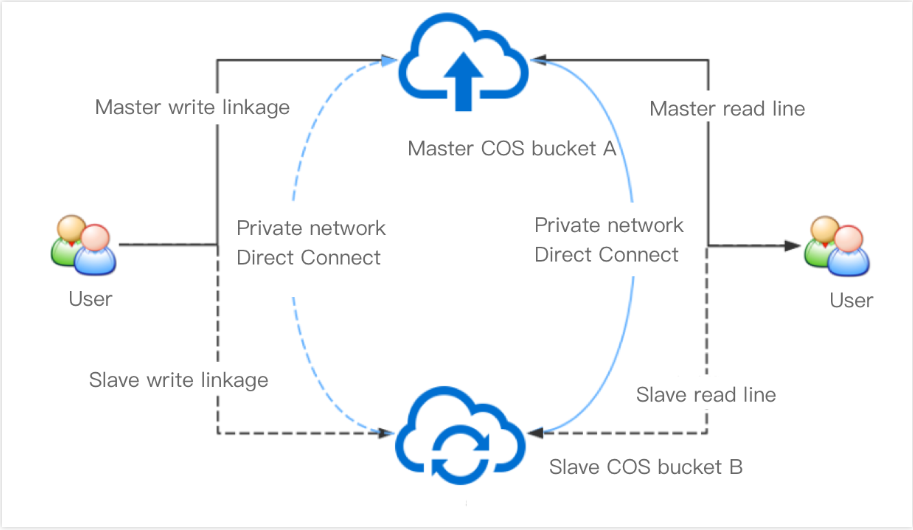
Limiting Object Lock Retention Days (cos:object-lock-remaining-retention-days)

Condition Key cos:object-lock-remaining-retention-days

You can use the condition key cos:object-lock-remaining-retention-days to limit user uploads to objects that must use object lock with the number of days set.
Retention Days Verification Principle
The value passed in for this condition key must be an integer (assumed as A). Let the timestamp of retain-until-date in the actual request be ts1 (in seconds), and the current system time timestamp be ts2 (in seconds). The conversion to retention days is (assumed as B).
Retention days (B) = round down[(ts1 - ts2)/(3600*24)]
Example 1: If retain-until-date is 2022-11-17T10:10:11 and the current time is 2022-11-15T09:00:00, the retention days (B) is 2.
Example 2: If retain-until-date is 2022-11-17T10:10:11 and the current time is 2022-11-15T12:00:00, the retention days (B) is 1.
Whether the conditions are met depends on comparing the size of values A and B.

Example: PutObject Lock Retention Days Must Be Greater Than N Days

For example, the remaining days of the lock must be greater than 3 (excluding 3).
Note:
The remaining days specified by the condition key must be more than 3 days, or at least 4 days. If the request time is 16:00:00 on October 1, 2022, the RetainUntilDate set in the user request must be after 16:00:00 on October 5, 2022.
{
"statement": [
{
"action": [
"name/cos:PutObject",
"name/cos:InitiateMultipartUpload",
"name/cos:PutObjectRetention"
],
"effect": "allow",
"principal": {
"qcs": [
"qcs::cam::uin/1250000000:uin/1250000001"
]
},
"resource": [
"qcs::cos:ap-beijing:uid/1250000000:bjtest-1250000000/*"
],
"condition": {
"numeric_greater_than": {
"cos:object-lock-remaining-retention-days": 3
}
}
}
],
"version": "2.0"
}
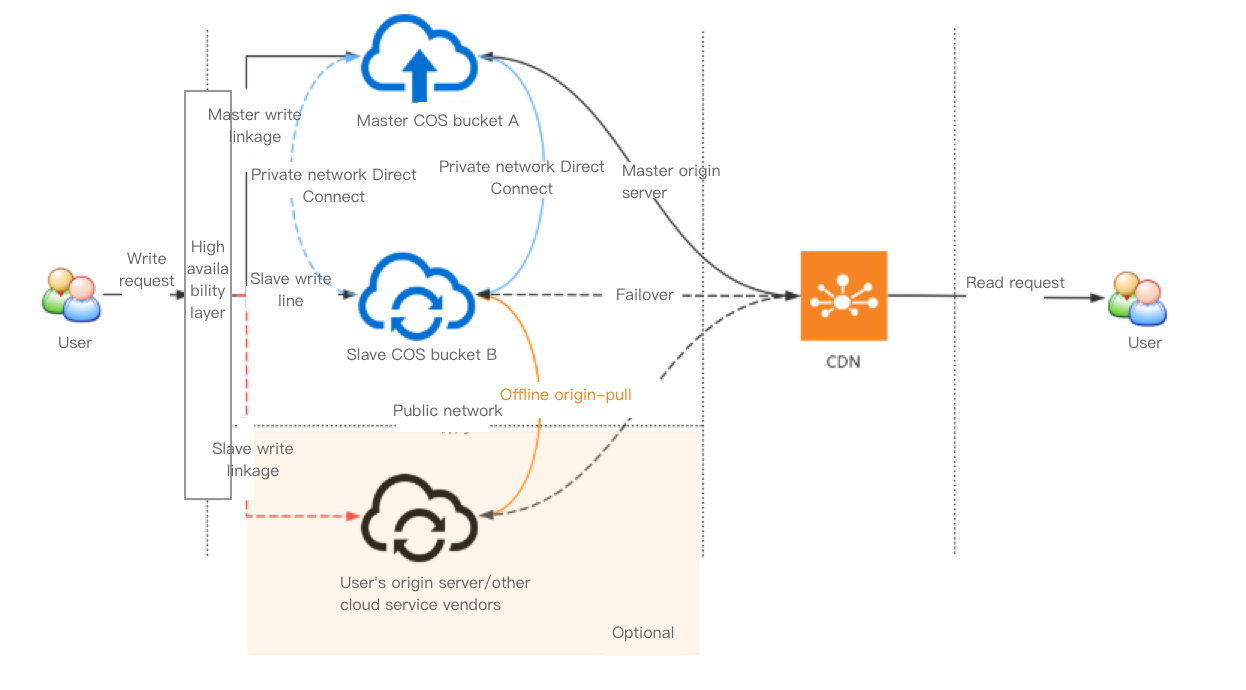
Use conditional operators. A valid RetainUntilDate is as follows:
Condition Key
Description
Request Current Time
Input Parameter: Valid Time for Retain-Until-Date
Remarks
"numeric_equal":
{
"cos: x-cos-object-lock-remaining-retention-days": 3
}
equal to 3 days
2022-11-01T12:00:00Z
[ 2022-11-04T12:00:00Z, 2022-11-05T11:59:59Z ]
closed interval
"numeric_greater_than":
{
"cos: x-cos-object-lock-remaining-retention-days": 3
}
more than 3 days (excluding 3 days)
2022-11-01T12:00:00Z
[ 2022-11-05T12:00:00Z, later ]
closed interval
"numeric_less_than":
{
"cos: x-cos-object-lock-remaining-retention-days": 3
}
less than 3 days (excluding 3 days)
2022-11-01T12:00:00Z
[ 2022-11-01T12:00:01Z, 2022-11-04T11:59:59Z ]
closed interval

Restrict Access Based on Object Lock Retain until Date (cos:object-lock-retain-until-date)

Condition Key cos:object-lock-retain-until-date

You can use the condition key cos:object-lock-retain-until-date to limit user uploads to objects that must use object lock with a specified date, supporting a minimum setting precision of whole seconds.

Example: Restricting the Specified Lock Date for PutObject Uploads

The request indicates that RetainUntilDate must be after 2022-11-11T12:00:00Z.
{
"statement": [
{
"action": [
"name/cos:PutObject",
"name/cos:InitiateMultipartUpload",
"name/cos:PutObjectRetention"
],
"effect": "allow",
"principal": {
"qcs": [
"qcs::cam::uin/1250000000:uin/1250000001"
]
},
"resource": [
"qcs::cos:ap-beijing:uid/1250000000:bjtest-1250000000/*"
],
"condition": {
"date_greater_than": {
"cos:object-lock-retain-until-date": "2022-11-11T12:00:00Z"
}
}
}
],
"version": "2.0"
}
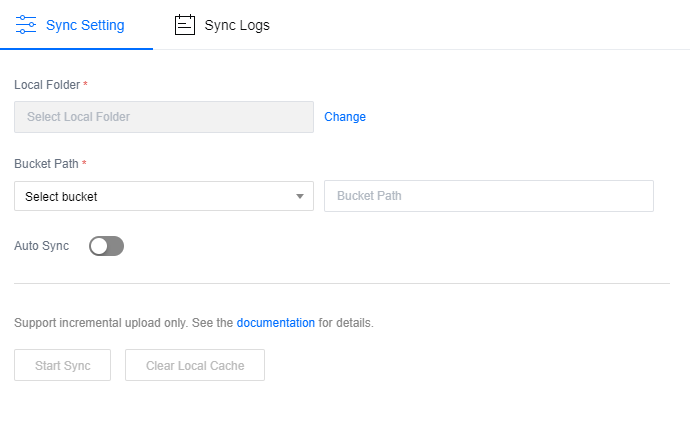
Restricting ACL Authorization Header in Request

Condition Key

Request headers x-cos-grant-full-control, x-cos-grant-read, x-cos-grant-write, x-cos-grant-read-acp, and x-cos-grant-write-acp are used in requests for object upload, object replication, and object ACL modification to specify ACL permission information. For details, see PutObject request headers. As shown in the table below, corresponding condition keys can respectively limit whether to allow carrying these headers or restrict the content of corresponding headers.
Condition Key
Corresponding Request Header
cos:x-cos-grant-full-control
x-cos-grant-full-control
cos:x-cos-grant-read
x-cos-grant-read
cos:x-cos-grant-write
x-cos-grant-write
cos:x-cos-grant-read-acp
x-cos-grant-read-acp
cos:x-cos-grant-write-acp
x-cos-grant-write-acp
The following example uses cos:x-cos-grant-full-control to demonstrate how to limit the usage of ACL authorization headers. Other condition keys follow a similar method. These condition keys have two main usage scenarios:
Limit this header to account authorization only. See example 1.
Restrict the use of this header for authorization to prevent users from tampering with the object's ACL permissions by leveraging PutObject permissions. See example 2.

Example 1: Limiting Accounts Authorized by X-Cos-Grant-Full-Control

The effect of the following policy is: Grant the subaccount permission to upload objects, but the user-uploaded objects must carry the x-cos-grant-full-control header, and the authorized account must be the root account 100000000001. The x-cos-grant-full-control header contains the " symbol, which should be passed as a string literal in the policy. Note that it needs to be escaped as \\".
{
\t"statement": [{
\t\t\t"action": [
\t\t\t\t"name/cos:PutObject",
\t\t\t\t"name/cos:PostObject",
\t\t\t\t"name/cos:AppendObject",
\t\t\t\t"name/cos:InitiateMultipartUpload"
\t\t\t],
\t\t\t"effect": "allow",
\t\t\t"principal": {
\t\t\t\t"qcs": [
\t\t\t\t\t"qcs::cam::uin/1250000000:uin/1250000001"
\t\t\t\t]
\t\t\t},
\t\t\t"resource": [
\t\t\t\t"qcs::cos:ap-beijing:uid/1250000000:bjtest-1250000000/*"
\t\t\t],
\t\t\t"condition": {
\t\t\t\t"string_equal": {
\t\t\t\t\t"cos:x-cos-grant-full-control": "id=\\"100000000001\\""
\t\t\t\t}
\t\t\t}
\t\t},
\t\t{
\t\t\t"action": [
\t\t\t\t"name/cos:PutObject",
\t\t\t\t"name/cos:PostObject",
\t\t\t\t"name/cos:AppendObject",
\t\t\t\t"name/cos:InitiateMultipartUpload"
\t\t\t],
\t\t\t"effect": "deny",
\t\t\t"principal": {
\t\t\t\t"qcs": [
\t\t\t\t\t"qcs::cam::uin/1250000000:uin/1250000001"
\t\t\t\t]
\t\t\t},
\t\t\t"resource": [
\t\t\t\t"qcs::cos:ap-beijing:uid/1250000000:bjtest-1250000000/*"
\t\t\t],
\t\t\t"condition": {
\t\t\t\t"string_not_equal_if_exist": {
\t\t\t\t\t"cos:x-cos-grant-full-control": "id=\\"100000000001\\""
\t\t\t\t}
\t\t\t}
\t\t}
\t],
\t"version": "2.0"
}
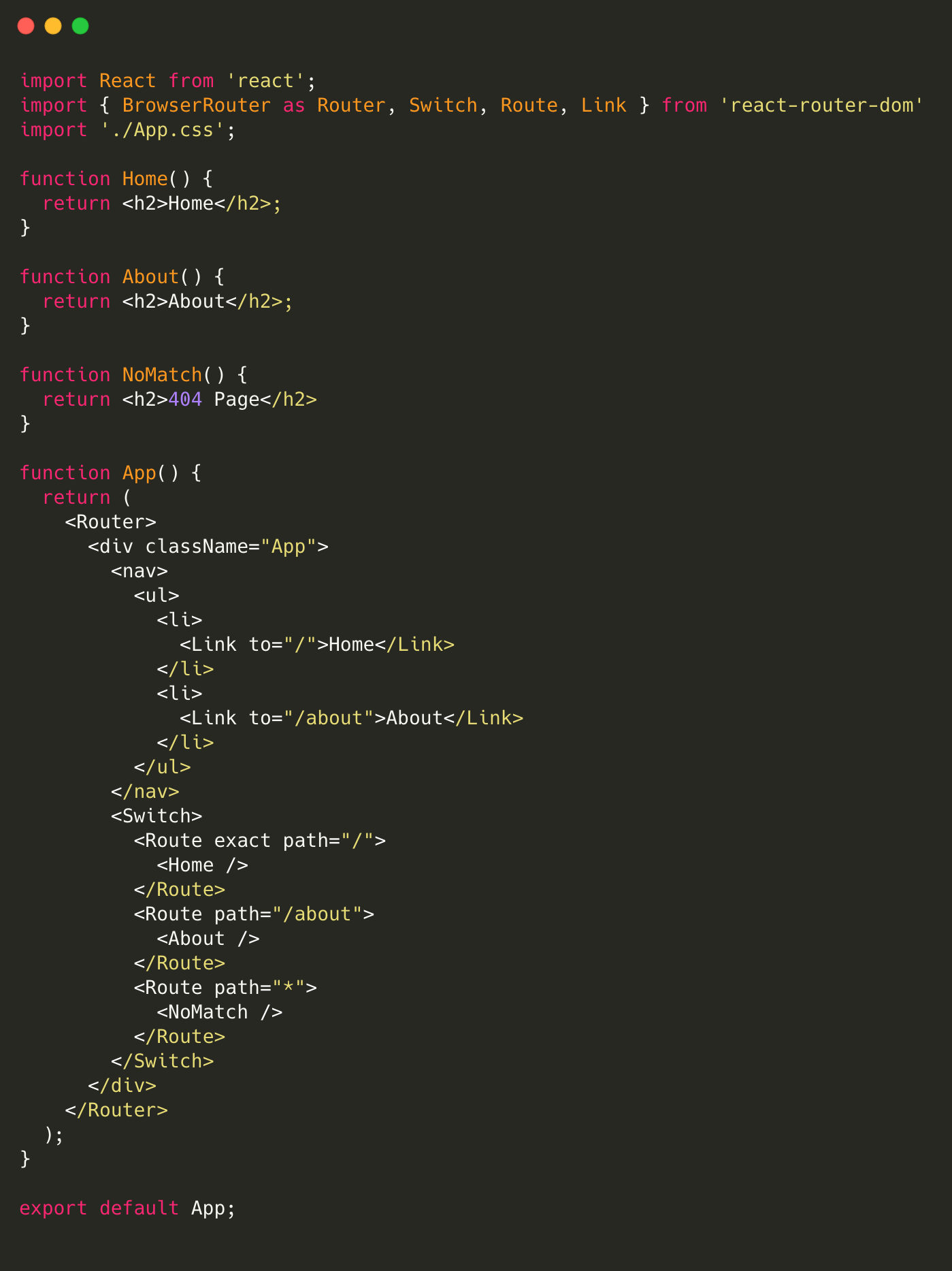
Example 2: Disallow Authorization Via x-cos-grant-full-control

The effect of the following policy is: Grant the subaccount permission to upload objects, but forbid users from carrying the x-cos-grant-full-control header or only allow this header to be set as empty.
{
\t"statement": [{
\t\t\t"action": [
\t\t\t\t"name/cos:PutObject",
\t\t\t\t"name/cos:PostObject",
\t\t\t\t"name/cos:AppendObject",
\t\t\t\t"name/cos:InitiateMultipartUpload"
\t\t\t],
\t\t\t"effect": "allow",
\t\t\t"principal": {
\t\t\t\t"qcs": [
\t\t\t\t\t"qcs::cam::uin/1250000000:uin/1250000001"
\t\t\t\t]
\t\t\t},
\t\t\t"resource": [
\t\t\t\t"qcs::cos:ap-beijing:uid/1250000000:bjtest-1250000000/*"
\t\t\t],
\t\t\t"condition": {
\t\t\t\t"string_equal_if_exist": {
\t\t\t\t\t"cos:x-cos-grant-full-control": ""
\t\t\t\t}
\t\t\t}
\t\t},
\t\t{
\t\t\t"action": [
\t\t\t\t"name/cos:PutObject",
\t\t\t\t"name/cos:PostObject",
\t\t\t\t"name/cos:AppendObject",
\t\t\t\t"name/cos:InitiateMultipartUpload"
\t\t\t],
\t\t\t"effect": "deny",
\t\t\t"principal": {
\t\t\t\t"qcs": [
\t\t\t\t\t"qcs::cam::uin/1250000000:uin/1250000001"
\t\t\t\t]
\t\t\t},
\t\t\t"resource": [
\t\t\t\t"qcs::cos:ap-beijing:uid/1250000000:bjtest-1250000000/*"
\t\t\t],
\t\t\t"condition": {
\t\t\t\t"string_not_equal": {
\t\t\t\t\t"cos:x-cos-grant-full-control": ""
\t\t\t\t}
\t\t\t}
\t\t}
\t],
\t"version": "2.0"
}
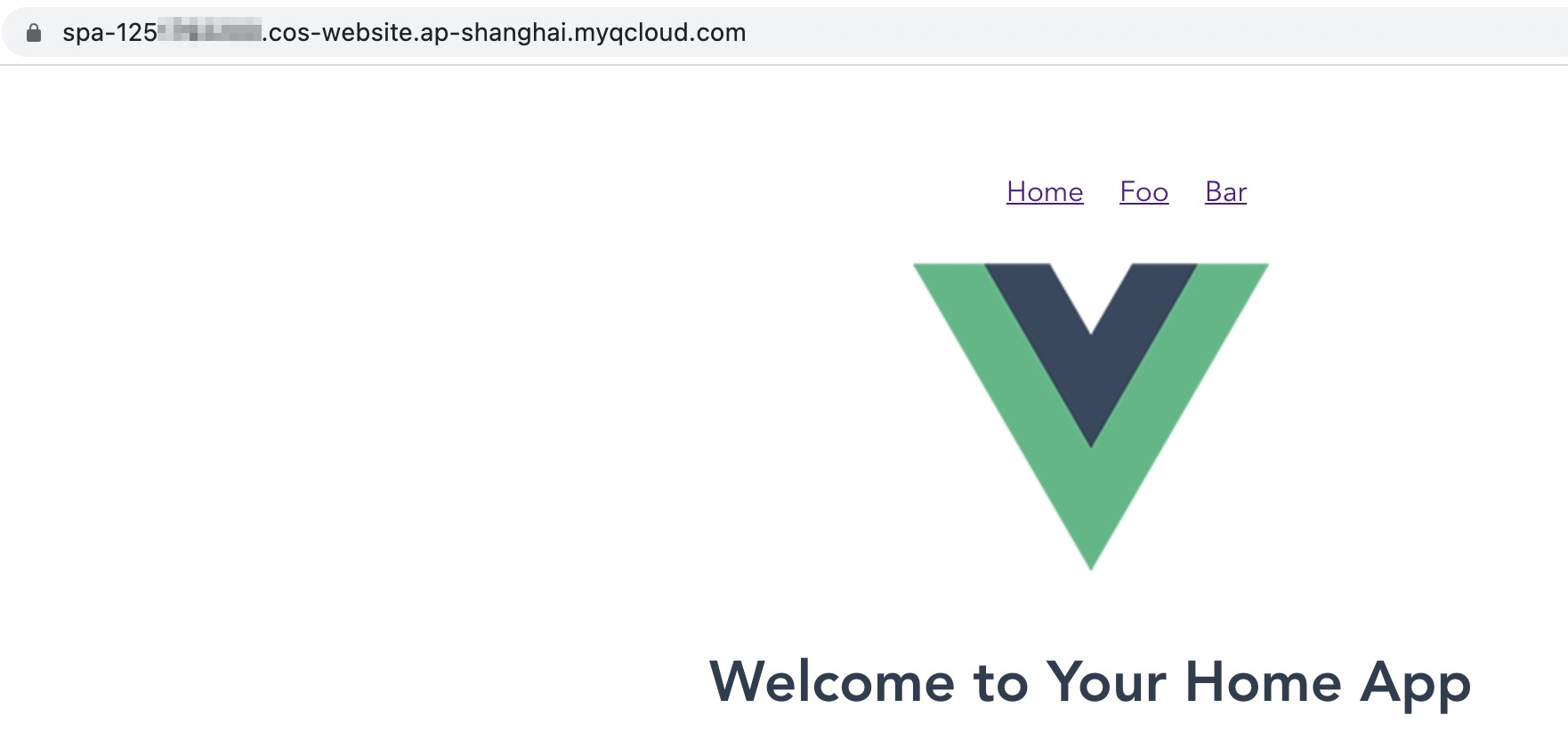
","recentReleaseTime":"2025-07-10 10:52:48","slate":"[{\"id\":\"S55SZcBcRhrlGJem1o9yM\",\"children\":[{\"text\":\"When using access policies to grant permissions, you can specify policy conditions to restrict user access sources and the storage classes of uploaded files as instructed in \"},{\"id\":\"Ofc-cUcVSMvIe4V5SA-hh\",\"children\":[{\"text\":\"Access Policy Language > Overview\"}],\"linkTarget\":\"blank\",\"linkTitle\":\"https://intl.cloud.tencent.com/document/product/436/18023\",\"props\":{\"type\":\"link\",\"url\":\"https://intl.cloud.tencent.com/document/product/436/18023\"},\"type\":\"ref\"},{\"text\":\".\"}],\"type\":\"p\"},{\"id\":\"it3L2-p8UBG4nmJNbRPlJ\",\"children\":[{\"text\":\"This document provides common examples of using COS condition keys in bucket policies. You can view all the condition keys supported by COS and applicable requests \"},{\"id\":\"c3g-jKhm-T-DSJVxyr21f\",\"children\":[{\"text\":\"here\"}],\"linkTarget\":\"blank\",\"linkTitle\":\"https://intl.cloud.tencent.com/document/product/436/46205\",\"props\":{\"type\":\"link\",\"url\":\"https://intl.cloud.tencent.com/document/product/436/46205\"},\"type\":\"ref\"},{\"text\":\".\"}],\"type\":\"p\"},{\"id\":\"n_VWepLangnYFlyaEOOfR\",\"children\":[{\"id\":\"62Q4djLNxkJtMU6jbSWCi\",\"children\":[{\"b\":1,\"color\":\"inherit\",\"text\":\"Note: \",\"type\":\"text\"}],\"type\":\"p\"},{\"id\":\"ri8lEXzGEbACYm_TU7kSy\",\"children\":[{\"text\":\"When using condition keys in writing a bucket policy, comply with the principle of least privilege, add the corresponding condition keys only applicable requests (actions), and avoid using the \"},{\"text\":\"*\"},{\"text\":\" wildcard when specifying the actions. Using the wildcard will cause the requests to fail. For more information about condition keys, see \"},{\"id\":\"CttYl407ia1DDLUTFolJ6\",\"children\":[{\"text\":\"here\"}],\"linkTarget\":\"blank\",\"linkTitle\":\"https://intl.cloud.tencent.com/document/product/436/46205\",\"props\":{\"type\":\"link\",\"url\":\"https://intl.cloud.tencent.com/document/product/436/46205\"},\"type\":\"ref\"},{\"text\":\".\"}],\"start\":false,\"type\":\"uli\"},{\"id\":\"y6nxvC_cZmbbnMb_H1BIz\",\"children\":[{\"text\":\"When you create a policy in the CAM console, pay attention to the syntax format. The syntax elements of \"},{\"code\":1,\"text\":\"version\"},{\"text\":\", \"},{\"code\":1,\"text\":\"principal\"},{\"text\":\", \"},{\"code\":1,\"text\":\"statement\"},{\"text\":\", \"},{\"code\":1,\"text\":\"effect\"},{\"text\":\", \"},{\"code\":1,\"text\":\"action\"},{\"text\":\", \"},{\"code\":1,\"text\":\"resource\"},{\"text\":\", and \"},{\"code\":1,\"text\":\"condition\"},{\"text\":\" must be lowercase.\"}],\"start\":false,\"type\":\"uli\"}],\"hintType\":\"info\",\"type\":\"hint\"},{\"id\":\"av5wK4fP6Jhja7kUWyYsX\",\"children\":[{\"text\":\"Restricting user access IPs (qcs:ip)\"}],\"nodeId\":\"restricting-user-access-ips-(qcs.3Aip)\",\"type\":\"h2\"},{\"id\":\"UE3dvjsogJ3RJ2eUAQyGS\",\"children\":[{\"text\":\"Condition key qcs:ip\"}],\"nodeId\":\"condition-key-qcs.3Aip\",\"type\":\"h4\"},{\"id\":\"XBB7P7ldEPt-07EGAeMgt\",\"children\":[{\"text\":\"You can use the \"},{\"code\":1,\"text\":\"qcs:ip\"},{\"text\":\" condition key to restrict user access IPs. This condition key is applicable to all requests.\"}],\"type\":\"p\"},{\"id\":\"RP3X0_ssYwgjGFSZGORjT\",\"children\":[{\"text\":\"Example: allowing only user access from specified IPs\"}],\"nodeId\":\"example.3A-allowing-only-user-access-from-specified-ips\",\"type\":\"h4\"},{\"id\":\"RkZ52CXTihJFpboC6IXX7\",\"children\":[{\"text\":\"The policy in this example allows the sub-account with ID 100000000002 under the root account with ID 100000000001 (APPID: 1250000000) to upload and download objects regarding the \"},{\"code\":1,\"text\":\"examplebucket-bj\"},{\"text\":\" bucket in Beijing region and the \"},{\"code\":1,\"text\":\"exampleobject\"},{\"text\":\" object in the \"},{\"code\":1,\"text\":\"examplebucket-gz\"},{\"text\":\" bucket in Guangzhou region, on condition that the access IP falls within the IP range \"},{\"code\":1,\"text\":\"192.168.1.0/24\"},{\"text\":\" or is \"},{\"code\":1,\"text\":\"101.226.100.185\"},{\"text\":\" or \"},{\"code\":1,\"text\":\"101.226.100.186\"},{\"text\":\".\"}],\"type\":\"p\"},{\"id\":\"-B0mDJjWYqm23_dIMgLcR\",\"children\":[{\"type\":\"code-line\",\"children\":[{\"text\":\"{\"}],\"id\":\"C1QMIgU3-IPY0oaBpcAOC\"},{\"type\":\"code-line\",\"children\":[{\"text\":\" \\\"version\\\": \\\"2.0\\\",\"}],\"id\":\"5Ikr7k2KqYefuMuq3ixBt\"},{\"type\":\"code-line\",\"children\":[{\"text\":\" \\\"principal\\\": {\"}],\"id\":\"tpN8CC-eni-dskSXnWBZF\"},{\"type\":\"code-line\",\"children\":[{\"text\":\" \\\"qcs\\\": [\"}],\"id\":\"zqKZLbCy3u4jonNFA5eEc\"},{\"type\":\"code-line\",\"children\":[{\"text\":\" \\\"qcs::cam::uin/100000000001:uin/100000000002\\\"\"}],\"id\":\"iz-56Ne1YhjhH8jE_ekDp\"},{\"type\":\"code-line\",\"children\":[{\"text\":\" ]\"}],\"id\":\"f9gCq6ZVFalrMvDLWrPF-\"},{\"type\":\"code-line\",\"children\":[{\"text\":\" },\"}],\"id\":\"MSYB5ZcBbu-bbxwz9KJJP\"},{\"type\":\"code-line\",\"children\":[{\"text\":\" \\\"statement\\\": [\"}],\"id\":\"TAUrtSfDW65qC7agiM2_o\"},{\"type\":\"code-line\",\"children\":[{\"text\":\" {\"}],\"id\":\"Dz0IAcPP7bg4x9TSmdnYB\"},{\"type\":\"code-line\",\"children\":[{\"text\":\" \\\"effect\\\": \\\"allow\\\",\"}],\"id\":\"xULU6JvK47XS5GeX7Z-Kk\"},{\"type\":\"code-line\",\"children\":[{\"text\":\" \\\"action\\\": [\"}],\"id\":\"9A6ozalSCPNgYZ9RZbqd_\"},{\"type\":\"code-line\",\"children\":[{\"text\":\" \\\"name/cos:PutObject\\\",\"}],\"id\":\"LfJtS8NXhfP8X281qpo0G\"},{\"type\":\"code-line\",\"children\":[{\"text\":\" \\\"name/cos:GetObject\\\"\"}],\"id\":\"mGuF4-4Gl7V6aVgOBbdGO\"},{\"type\":\"code-line\",\"children\":[{\"text\":\" ],\"}],\"id\":\"A10kmEmpvhlyaHLV24Taq\"},{\"type\":\"code-line\",\"children\":[{\"text\":\" \\\"resource\\\": [\"}],\"id\":\"fFpHv5biy68Z7cxBhpXyY\"},{\"type\":\"code-line\",\"children\":[{\"text\":\" \\\"qcs::cos:ap-beijing:uid/1250000000:examplebucket-bj-1250000000/*\\\",\"}],\"id\":\"FW_aVtCgv8CKO2SNS0BHW\"},{\"type\":\"code-line\",\"children\":[{\"text\":\" \\\"qcs::cos:ap-guangzhou:uid/1250000000:examplebucket-gz-1250000000/exampleobject\\\"\"}],\"id\":\"UkhO8xH10d4A_-tlKkeJ0\"},{\"type\":\"code-line\",\"children\":[{\"text\":\" ],\"}],\"id\":\"GC8KAmNQdx8qp0Qaas4-V\"},{\"type\":\"code-line\",\"children\":[{\"text\":\" \\\"condition\\\": {\"}],\"id\":\"KeU1neWB-pUVzsgUQntn6\"},{\"type\":\"code-line\",\"children\":[{\"text\":\" \\\"ip_equal\\\": {\"}],\"id\":\"pUYC_gXbwOtbDrG0TS0I6\"},{\"type\":\"code-line\",\"children\":[{\"text\":\" \\\"qcs:ip\\\": [\"}],\"id\":\"H0EX7hfRznGLvE2ghNt2i\"},{\"type\":\"code-line\",\"children\":[{\"text\":\" \\\"192.168.1.0/24\\\",\"}],\"id\":\"PJX1vUhiScsiPewz4_sa4\"},{\"type\":\"code-line\",\"children\":[{\"text\":\" \\\"101.226.100.185\\\",\"}],\"id\":\"XCup-PCHRaza6CvP0_bGe\"},{\"type\":\"code-line\",\"children\":[{\"text\":\" \\\"101.226.100.186\\\"\"}],\"id\":\"V3nfKYcxIJthXcjiB6Fjp\"},{\"type\":\"code-line\",\"children\":[{\"text\":\" ]\"}],\"id\":\"GUQbuXm3dj6VqtIBFbrxp\"},{\"type\":\"code-line\",\"children\":[{\"text\":\" }\"}],\"id\":\"EvDNT3Gvl8ux3se3j4Lyd\"},{\"type\":\"code-line\",\"children\":[{\"text\":\" }\"}],\"id\":\"4hm41jYq7P_YsFMZgyfLJ\"},{\"type\":\"code-line\",\"children\":[{\"text\":\" }\"}],\"id\":\"jzx83V1iSn5OaI-f8uzVg\"},{\"type\":\"code-line\",\"children\":[{\"text\":\" ]\"}],\"id\":\"hlR7LpmrJEIzgScpdqBjP\"},{\"type\":\"code-line\",\"children\":[{\"text\":\"}\"}],\"id\":\"sZYkk-ZmsydIHRisv-4nD\"}],\"language\":\"json\",\"type\":\"code-block\",\"autoWrap\":false},{\"id\":\"QPwXmdQgOUX2F-qSMTu0U\",\"children\":[{\"text\":\"Allowing access only to the latest or specified version of an object (cos:versionid)\"}],\"nodeId\":\"allowing-access-only-to-the-latest-or-specified-version-of-an-object-(cos.3Aversionid)\",\"type\":\"h2\"},{\"id\":\"dOtnZZuh2XzRFl76yz2YG\",\"children\":[{\"text\":\"Request parameter versionid\"}],\"nodeId\":\"request-parameter-versionid\",\"type\":\"h4\"},{\"id\":\"2lq1eDVRWqwvCHHCv1Hfc\",\"children\":[{\"text\":\"The \"},{\"code\":1,\"text\":\"versionid\"},{\"text\":\" request parameter specifies the version number of the object. For more information on versioning, see \"},{\"id\":\"1sU4IuD4S036rcdiW3ZTC\",\"children\":[{\"text\":\"Overview\"}],\"linkTarget\":\"blank\",\"linkTitle\":\"https://intl.cloud.tencent.com/document/product/436/19883\",\"props\":{\"type\":\"link\",\"url\":\"https://intl.cloud.tencent.com/document/product/436/19883\"},\"type\":\"ref\"},{\"text\":\". When downloading an object (\"},{\"code\":1,\"text\":\"GetObject\"},{\"text\":\") or deleting an object (\"},{\"code\":1,\"text\":\"DeleteObject\"},{\"text\":\"), you can use \"},{\"code\":1,\"text\":\"versionid\"},{\"text\":\" to specify the object version to be manipulated. There are three different cases with \"},{\"code\":1,\"text\":\"versionid\"},{\"text\":\":\"}],\"type\":\"p\"},{\"id\":\"KsS2PeHHrLj7xNfstrl1w\",\"children\":[{\"text\":\"If \"},{\"code\":1,\"text\":\"versionid\"},{\"text\":\" is not carried, requests will apply to the latest version of the object by default.\"}],\"start\":false,\"type\":\"uli\"},{\"id\":\"dk8d5AhrQb7dsl6MmmD9S\",\"children\":[{\"text\":\"If \"},{\"code\":1,\"text\":\"versionid\"},{\"text\":\" is an empty string, this is equivalent to the case where \"},{\"code\":1,\"text\":\"versionId\"},{\"text\":\" is not carried.\"}],\"start\":false,\"type\":\"uli\"},{\"id\":\"jfOsCf4zcpWYSraag2X2X\",\"children\":[{\"text\":\"If \"},{\"code\":1,\"text\":\"versionid\"},{\"text\":\" is \"},{\"code\":1,\"text\":\"\\\"null\\\"\"},{\"text\":\", for objects that are uploaded before versioning is enabled for a bucket, their version numbers will become the \"},{\"code\":1,\"text\":\"\\\"null\\\"\"},{\"text\":\" string after versioning is enabled.\"}],\"start\":false,\"type\":\"uli\"},{\"id\":\"U73mvH8ZGdqUzHz06QZMy\",\"children\":[{\"text\":\"Condition key cos:versionid\"}],\"nodeId\":\"condition-key-cos.3Aversionid\",\"type\":\"h4\"},{\"id\":\"2azxcCrodzmFQ1-ZfIm-F\",\"children\":[{\"text\":\"You can use the \"},{\"code\":1,\"text\":\"cos:versionid\"},{\"text\":\" condition key to restrict the \"},{\"code\":1,\"text\":\"versionid\"},{\"text\":\" request parameter.\"}],\"type\":\"p\"},{\"id\":\"cT0DWVPL5KFNTlwfA-qFx\",\"children\":[{\"text\":\"Example 1: allowing users to get objects of a specified version\"}],\"nodeId\":\"example-1.3A-allowing-users-to-get-objects-of-a-specified-version\",\"type\":\"h4\"},{\"id\":\"Hxzg5Tbs_ItfIuMwB6W1q\",\"children\":[{\"text\":\"Assume that the root account with UIN 100000000001 that owns the bucket \"},{\"code\":1,\"text\":\"examplebucket-1250000000\"},{\"text\":\" uses the following bucket policy to allow the sub-account with UIN 100000000002 to get objects of a specified version only.\"}],\"type\":\"p\"},{\"id\":\"pVPEI3K-d4gnxpKyuolIC\",\"children\":[{\"text\":\"According to the policy, object download requests sent the sub-account with UIN 100000000002 can be successful only when they carry the \"},{\"code\":1,\"text\":\"versionid\"},{\"text\":\" parameter and the value of \"},{\"code\":1,\"text\":\"versionid\"},{\"text\":\" is the version number \"},{\"code\":1,\"text\":\"Tg0NDUxNTc1NjIzMTQ1MDAwODg\"},{\"text\":\".\"}],\"type\":\"p\"},{\"id\":\"JvRfWZWZpDPRH5BX865C_\",\"children\":[{\"id\":\"qZ0B2QmhWuKVoPG062leZ\",\"children\":[{\"text\":\"{\"}],\"type\":\"code-line\"},{\"id\":\"oBJIgTQPs16mZshqQucE3\",\"children\":[{\"text\":\" \\\"version\\\":\\\"2.0\\\",\"}],\"type\":\"code-line\"},{\"id\":\"A8AeBlLmLopJQcvEL95aN\",\"children\":[{\"text\":\" \\\"statement\\\":[\"}],\"type\":\"code-line\"},{\"id\":\"SKGkIYhRCKaFq5Qk-Fcdw\",\"children\":[{\"text\":\" {\"}],\"type\":\"code-line\"},{\"id\":\"Mvm1Ws-kvORN-kTIguVM1\",\"children\":[{\"text\":\" \\\"principal\\\":{\"}],\"type\":\"code-line\"},{\"id\":\"FVkRdt_3yoHBnex2ilOy-\",\"children\":[{\"text\":\" \\\"qcs\\\":[\"}],\"type\":\"code-line\"},{\"id\":\"Mys6bwRDaFFDRDVT40NBv\",\"children\":[{\"text\":\" \\\"qcs::cam::uin/100000000001:uin/100000000002\\\"\"}],\"type\":\"code-line\"},{\"id\":\"kjlI-5lMat3RnFPBqED6A\",\"children\":[{\"text\":\" ]\"}],\"type\":\"code-line\"},{\"id\":\"0oFDbsvk1QEIP94I1vn8Q\",\"children\":[{\"text\":\" },\"}],\"type\":\"code-line\"},{\"id\":\"Q4dYPOcOmMaJp4ILm9xmZ\",\"children\":[{\"text\":\" \\\"effect\\\":\\\"allow\\\",\"}],\"type\":\"code-line\"},{\"id\":\"-UoqysQdztBk1mKd4vEEj\",\"children\":[{\"text\":\" \\\"action\\\":[\"}],\"type\":\"code-line\"},{\"id\":\"ERoS8rS4ddB4NbR9Ugd0a\",\"children\":[{\"text\":\" \\\"name/cos:GetObject\\\"\"}],\"type\":\"code-line\"},{\"id\":\"KBEf8xJAsTYcYAoFkCWKy\",\"children\":[{\"text\":\" ],\"}],\"type\":\"code-line\"},{\"id\":\"E2ypc-oKWwrhRJ_3W9lMe\",\"children\":[{\"text\":\" \\\"condition\\\":{\"}],\"type\":\"code-line\"},{\"id\":\"OFQEwa7hhNj_WnZ2m7Os7\",\"children\":[{\"text\":\" \\\"string_equal\\\":{\"}],\"type\":\"code-line\"},{\"id\":\"OBKATXTKju7T1AwYK5cQ8\",\"children\":[{\"text\":\" \\\"cos:versionid\\\":\\\"MTg0NDUxNTc1NjIzMTQ1MDAwODg\\\"\"}],\"type\":\"code-line\"},{\"id\":\"k8rfJ4OBJWhStV38cealG\",\"children\":[{\"text\":\" }\"}],\"type\":\"code-line\"},{\"id\":\"14r_iY9P1SF8CdelFm8GT\",\"children\":[{\"text\":\" },\"}],\"type\":\"code-line\"},{\"id\":\"gowlxl8XhBWHQ8-6lJpE5\",\"children\":[{\"text\":\" \\\"resource\\\":[\"}],\"type\":\"code-line\"},{\"id\":\"7dctcaMjRM7idVkGD5SYh\",\"children\":[{\"text\":\" \\\"qcs::cos:ap-guangzhou:uid/1250000000:examplebucket-1250000000/*\\\"\"}],\"type\":\"code-line\"},{\"id\":\"yfyKBlJbGWRAk6by5JxXD\",\"children\":[{\"text\":\" ]\"}],\"type\":\"code-line\"},{\"id\":\"RJ4HCgBZe_JTs2oPRZjj2\",\"children\":[{\"text\":\" }\"}],\"type\":\"code-line\"},{\"id\":\"ai9dbSoH7ta3d7CZaLgcF\",\"children\":[{\"text\":\" ]\"}],\"type\":\"code-line\"},{\"id\":\"khDTJfZsJkkFa1dtkrSra\",\"children\":[{\"text\":\"}\"}],\"type\":\"code-line\"}],\"language\":\"json\",\"type\":\"code-block\",\"autoWrap\":false},{\"id\":\"Uk5ztgc2npdOlMQaIJ5yk\",\"children\":[{\"text\":\"Adding a deny policy\"}],\"nodeId\":\"adding-a-deny-policy\",\"type\":\"h4\"},{\"id\":\"TwBeBoJ0VPWvsf-pHrxRG\",\"children\":[{\"text\":\"If you use the above policy to grant the sub-user permissions, and the sub-user obtains the same permissions without any conditions attached through other means, the broader authorization policy takes effect. For example, if a sub-user is in a user group and the root account grants the GetObject permission to the user group without any conditions attached, the restriction on the version number of the above policy does not take effect.\"}],\"type\":\"p\"},{\"id\":\"BZemEteof6F8youxx-3VL\",\"children\":[{\"text\":\"To cope with this, you can add an explicit deny policy based on the above policy to achieve tighter permission restrictions. The following deny policy specifies that, when a sub-user initiates an object download request that does not carry the \"},{\"code\":1,\"text\":\"versionid\"},{\"text\":\" parameter or that the version number specified by \"},{\"code\":1,\"text\":\"versionid\"},{\"text\":\" is not \"},{\"code\":1,\"text\":\"MTg0NDUxNTc1NjIzMTQ1MDAwODg\"},{\"text\":\", the request will be denied. Because the priority of the deny policy is higher than other policies, adding a deny policy can avoid permission vulnerabilities to the maximum extent.\"}],\"type\":\"p\"},{\"id\":\"Pg-lmcz27jSsQVP-_8S0S\",\"children\":[{\"id\":\"TP-kZBxIOQCfcpJdruDNG\",\"children\":[{\"text\":\"{\"}],\"type\":\"code-line\"},{\"id\":\"aK6ZweKDoYz2z-q-eB5kC\",\"children\":[{\"text\":\" \\\"statement\\\":[\"}],\"type\":\"code-line\"},{\"id\":\"dcW-Z0VnWqsJeGVAcC_7L\",\"children\":[{\"text\":\" {\"}],\"type\":\"code-line\"},{\"id\":\"wafaRm5jMm2_ZNH93054z\",\"children\":[{\"text\":\" \\\"principal\\\":{\"}],\"type\":\"code-line\"},{\"id\":\"rHvdKrlkuY1KbhC-wLWtD\",\"children\":[{\"text\":\" \\\"qcs\\\":[\"}],\"type\":\"code-line\"},{\"id\":\"37uRFtQvsL9PROebG4JDW\",\"children\":[{\"text\":\" \\\"qcs::cam::uin/100000000001:uin/100000000002\\\"\"}],\"type\":\"code-line\"},{\"id\":\"ud_DmCK0mNAJcFXXmFMoa\",\"children\":[{\"text\":\" ]\"}],\"type\":\"code-line\"},{\"id\":\"fwGXIgk-U8uMvB1KZiTRl\",\"children\":[{\"text\":\" },\"}],\"type\":\"code-line\"},{\"id\":\"9HIdWW9hTH8scfixO4ZyE\",\"children\":[{\"text\":\" \\\"effect\\\":\\\"allow\\\",\"}],\"type\":\"code-line\"},{\"id\":\"0tfzdBlibAM8H5prMbwva\",\"children\":[{\"text\":\" \\\"action\\\":[\"}],\"type\":\"code-line\"},{\"id\":\"UiuyyJc8dPrtxH1_ugsMT\",\"children\":[{\"text\":\" \\\"name/cos:GetObject\\\"\"}],\"type\":\"code-line\"},{\"id\":\"31EjER7JF10l9-KhBCyAT\",\"children\":[{\"text\":\" ],\"}],\"type\":\"code-line\"},{\"id\":\"3g4NMLjV1YMjHOkyUbZQx\",\"children\":[{\"text\":\" \\\"condition\\\":{\"}],\"type\":\"code-line\"},{\"id\":\"cBaoH4zuHG1Cb2KhfLwdS\",\"children\":[{\"text\":\" \\\"string_equal\\\":{\"}],\"type\":\"code-line\"},{\"id\":\"xs4va-IJAVj6MQDXRVWoT\",\"children\":[{\"text\":\" \\\"cos:versionid\\\":\\\"MTg0NDUxNTc1NjIzMTQ1MDAwODg\\\"\"}],\"type\":\"code-line\"},{\"id\":\"mGCr6h3Ysq0WpPOfO2qfm\",\"children\":[{\"text\":\" }\"}],\"type\":\"code-line\"},{\"id\":\"RXKLc6O_grAZaYMiHgkXY\",\"children\":[{\"text\":\" },\"}],\"type\":\"code-line\"},{\"id\":\"6MrHZOvSw1_XiVStXXv5w\",\"children\":[{\"text\":\" \\\"resource\\\":[\"}],\"type\":\"code-line\"},{\"id\":\"CMyBNN94imTuwqHutZ0-e\",\"children\":[{\"text\":\" \\\"qcs::cos:ap-guangzhou:uid/1250000000:examplebucket-1250000000/*\\\"\"}],\"type\":\"code-line\"},{\"id\":\"wmOB3xZZzKeEyv_DtjKvy\",\"children\":[{\"text\":\" ]\"}],\"type\":\"code-line\"},{\"id\":\"e2eEnvkDNZg9ovL245nVO\",\"children\":[{\"text\":\" },\"}],\"type\":\"code-line\"},{\"id\":\"MHptbeH6WdiR6OuVhvX-T\",\"children\":[{\"text\":\" {\"}],\"type\":\"code-line\"},{\"id\":\"F9EAaW3sXI6-Fvx4CLRwq\",\"children\":[{\"text\":\" \\\"principal\\\":{\"}],\"type\":\"code-line\"},{\"id\":\"AYs6DjwOHq7ceH5Ifv2XO\",\"children\":[{\"text\":\" \\\"qcs\\\":[\"}],\"type\":\"code-line\"},{\"id\":\"LuCarop5Sw3yupL5T3pJR\",\"children\":[{\"text\":\" \\\"qcs::cam::uin/100000000001:uin/100000000002\\\"\"}],\"type\":\"code-line\"},{\"id\":\"YZtxFfIx613_4lqNlIQLZ\",\"children\":[{\"text\":\" ]\"}],\"type\":\"code-line\"},{\"id\":\"XVedxjMylQWhfePt5u7b5\",\"children\":[{\"text\":\" },\"}],\"type\":\"code-line\"},{\"id\":\"c9tbODtF5yW04AhhzKoys\",\"children\":[{\"text\":\" \\\"effect\\\":\\\"deny\\\",\"}],\"type\":\"code-line\"},{\"id\":\"XSIBaYqStq1gKPuxBZX3s\",\"children\":[{\"text\":\" \\\"action\\\":[\"}],\"type\":\"code-line\"},{\"id\":\"0MMtabSjRWqUNvo2OnoDW\",\"children\":[{\"text\":\" \\\"name/cos:GetObject\\\"\"}],\"type\":\"code-line\"},{\"id\":\"tEXbktwlMYOQDpAZE2IkW\",\"children\":[{\"text\":\" ],\"}],\"type\":\"code-line\"},{\"id\":\"GbgHjWn5OZci99iX45b84\",\"children\":[{\"text\":\" \\\"condition\\\":{\"}],\"type\":\"code-line\"},{\"id\":\"Kub63XgkABipxDJl8GMU-\",\"children\":[{\"text\":\" \\\"string_not_equal_if_exist\\\":{\"}],\"type\":\"code-line\"},{\"id\":\"IOsrjY_rXE56OIOBRa4vf\",\"children\":[{\"text\":\" \\\"cos:versionid\\\":\\\"MTg0NDUxNTc1NjIzMTQ1MDAwODg\\\"\"}],\"type\":\"code-line\"},{\"id\":\"JDS6erzcHREdZulyzDjeF\",\"children\":[{\"text\":\" }\"}],\"type\":\"code-line\"},{\"id\":\"9TFsiYJU5nmNCzqzbGGMi\",\"children\":[{\"text\":\" },\"}],\"type\":\"code-line\"},{\"id\":\"XYqM2K7UFKm_icTat8Yil\",\"children\":[{\"text\":\" \\\"resource\\\":[\"}],\"type\":\"code-line\"},{\"id\":\"gT9E8vPPLDNSkwGENDjlY\",\"children\":[{\"text\":\" \\\"qcs::cos:ap-guangzhou:uid/1250000000:examplebucket-1250000000/*\\\"\"}],\"type\":\"code-line\"},{\"id\":\"2OontOnE6QNl8zDDoS0oQ\",\"children\":[{\"text\":\" ]\"}],\"type\":\"code-line\"},{\"id\":\"QzHdlkNwEeHInRUyZFCMX\",\"children\":[{\"text\":\" }\"}],\"type\":\"code-line\"},{\"id\":\"l1t-7naQ3ldx3nDrMQLYW\",\"children\":[{\"text\":\" ],\"}],\"type\":\"code-line\"},{\"id\":\"Xwio3BFExMudfYuq3LLaH\",\"children\":[{\"text\":\" \\\"version\\\":\\\"2.0\\\"\"}],\"type\":\"code-line\"},{\"id\":\"tMchJedTKUnN2lnvDuzRc\",\"children\":[{\"text\":\"}\"}],\"type\":\"code-line\"}],\"language\":\"json\",\"type\":\"code-block\",\"autoWrap\":false},{\"id\":\"p9VraBX3HBShBX_zfsJZp\",\"children\":[{\"text\":\"Example 2: allowing users to get objects of the latest version\"}],\"nodeId\":\"example-2.3A-allowing-users-to-get-objects-of-the-latest-version\",\"type\":\"h4\"},{\"id\":\"yho75qD5KDoqCmO3_iFf1\",\"children\":[{\"text\":\"Assume that the root account with UIN 100000000001 that owns the bucket \"},{\"code\":1,\"text\":\"examplebucket-1250000000\"},{\"text\":\" uses the following bucket policy to allow the sub-account with UIN 100000000002 to get objects of the latest version only.\"}],\"type\":\"p\"},{\"id\":\"FlnuPX0abpRW5-JcO8VKG\",\"children\":[{\"text\":\"According to the policy, if \"},{\"code\":1,\"text\":\"versionid\"},{\"text\":\" is not carried or its value is an empty string, a \"},{\"code\":1,\"text\":\"GetObject\"},{\"text\":\" request will download an object of the latest version by default. Therefore, you can use \"},{\"code\":1,\"text\":\"string_equal_if_exist \"},{\"text\":\"in the condition:\"}],\"type\":\"p\"},{\"id\":\"y5mJLbZJFiB-k9mEDIQkW\",\"children\":[{\"text\":\"If \"},{\"code\":1,\"text\":\"versionid\"},{\"text\":\" is not carried, it is considered that the condition is met (\"},{\"code\":1,\"text\":\"True\"},{\"text\":\") by default, the \"},{\"code\":1,\"text\":\"allow\"},{\"text\":\" policy is hit, and requests are allowed.\"}],\"start\":true,\"type\":\"oli\"},{\"id\":\"Q666YTbYB5t8qIx3156Uu\",\"children\":[{\"text\":\"If \"},{\"code\":1,\"text\":\"versionid\"},{\"text\":\" is an empty string (\"},{\"code\":1,\"text\":\"\\\"\\\"\"},{\"text\":\"), the \"},{\"code\":1,\"text\":\"allow\"},{\"text\":\" policy will also be hit, and only requests for downloading objects of the latest version will be authorized.\"}],\"start\":false,\"type\":\"oli\"},{\"id\":\"8cYAuFKBOYDI4QISvhHh-\",\"children\":[{\"id\":\"nTMqIndaMRHJBV2yw2PnA\",\"children\":[{\"text\":\" \\\"condition\\\":{\"}],\"type\":\"code-line\"},{\"id\":\"AmyQiJYCInPy-uyS3QuGv\",\"children\":[{\"text\":\" \\\"string_equal_if_exist\\\":{\"}],\"type\":\"code-line\"},{\"id\":\"aFAeuo7zsza4F3U1SAKy3\",\"children\":[{\"text\":\" \\\"cos:versionid\\\": \\\"\\\"\"}],\"type\":\"code-line\"},{\"id\":\"aHwRU3BCt7-25Q3_3AkQm\",\"children\":[{\"text\":\" }\"}],\"type\":\"code-line\"},{\"id\":\"-qUVsMEAUX5Jnc01JyeaQ\",\"children\":[{\"text\":\" }\"}],\"type\":\"code-line\"}],\"indent\":1,\"language\":\"json\",\"type\":\"code-block\",\"autoWrap\":false},{\"id\":\"DpRHXZR73qPB6ZuImV4aS\",\"children\":[{\"text\":\"After the explicit deny policy is added, the complete bucket policy is as follows:\"}],\"indent\":1,\"type\":\"p\"},{\"id\":\"xTpgTMCt-7tFThwj30Xbu\",\"children\":[{\"id\":\"mXF5VZLvdSoIKMam3A_Aw\",\"children\":[{\"text\":\"{\"}],\"type\":\"code-line\"},{\"id\":\"ThpSXSKc0aEXA6JBkP39f\",\"children\":[{\"text\":\" \\\"statement\\\":[\"}],\"type\":\"code-line\"},{\"id\":\"wPVKweQdlJ-U9kVnwB02Y\",\"children\":[{\"text\":\" {\"}],\"type\":\"code-line\"},{\"id\":\"gwVeM8yQ94b8Z5ErHhfGh\",\"children\":[{\"text\":\" \\\"principal\\\":{\"}],\"type\":\"code-line\"},{\"id\":\"7TkTJ_WUE34tT7lkLr6J5\",\"children\":[{\"text\":\" \\\"qcs\\\":[\"}],\"type\":\"code-line\"},{\"id\":\"_PusLvdvK4yl-oPsfv02a\",\"children\":[{\"text\":\" \\\"qcs::cam::uin/100000000001:uin/100000000002\\\"\"}],\"type\":\"code-line\"},{\"id\":\"h80-gM4fa1HJkYwKtCG4c\",\"children\":[{\"text\":\" ]\"}],\"type\":\"code-line\"},{\"id\":\"n9o0xM2gJ6jX85PHU-AvU\",\"children\":[{\"text\":\" },\"}],\"type\":\"code-line\"},{\"id\":\"Ot4BGbGo16eK3KVWwWdAX\",\"children\":[{\"text\":\" \\\"effect\\\":\\\"allow\\\",\"}],\"type\":\"code-line\"},{\"id\":\"bJfZGIt-qYaQ-n-b0P41v\",\"children\":[{\"text\":\" \\\"action\\\":[\"}],\"type\":\"code-line\"},{\"id\":\"X5wK_4X-Dkg8rKeFzEaEL\",\"children\":[{\"text\":\" \\\"name/cos:GetObject\\\"\"}],\"type\":\"code-line\"},{\"id\":\"muE4D7p5KhOyCuXqec1fq\",\"children\":[{\"text\":\" ],\"}],\"type\":\"code-line\"},{\"id\":\"tWJUXCBvMkUbdO5fov7Qt\",\"children\":[{\"text\":\" \\\"condition\\\":{\"}],\"type\":\"code-line\"},{\"id\":\"0OVWd1hWRwcFo00rtJUHN\",\"children\":[{\"text\":\" \\\"string_equal_if_exist\\\":{\"}],\"type\":\"code-line\"},{\"id\":\"4VMq2Vj961WyEDjh5wj2n\",\"children\":[{\"text\":\" \\\"cos:versionid\\\":\\\"\\\"\"}],\"type\":\"code-line\"},{\"id\":\"WCG7tmT0sSayiy_7oum-F\",\"children\":[{\"text\":\" }\"}],\"type\":\"code-line\"},{\"id\":\"JgglGHhZ1KQTHp-N4LtXZ\",\"children\":[{\"text\":\" },\"}],\"type\":\"code-line\"},{\"id\":\"ohx_HWItWYHU5Slju3i78\",\"children\":[{\"text\":\" \\\"resource\\\":[\"}],\"type\":\"code-line\"},{\"id\":\"lG_tWDKX8nSwruuUashDj\",\"children\":[{\"text\":\" \\\"qcs::cos:ap-guangzhou:uid/1250000000:examplebucket-1250000000/*\\\"\"}],\"type\":\"code-line\"},{\"id\":\"Vb0ZOkWCloGzxqwrepFH3\",\"children\":[{\"text\":\" ]\"}],\"type\":\"code-line\"},{\"id\":\"zu38cwur9zq7kEpqho4sA\",\"children\":[{\"text\":\" },\"}],\"type\":\"code-line\"},{\"id\":\"S1jE08ALK4hee9No-lZmH\",\"children\":[{\"text\":\" {\"}],\"type\":\"code-line\"},{\"id\":\"QhGAwajVq1_ByPAN7mECX\",\"children\":[{\"text\":\" \\\"principal\\\":{\"}],\"type\":\"code-line\"},{\"id\":\"ZZ17jMXVueLmbCNSha4e7\",\"children\":[{\"text\":\" \\\"qcs\\\":[\"}],\"type\":\"code-line\"},{\"id\":\"vJKj5VrQ9V-ajlBTXnQe6\",\"children\":[{\"text\":\" \\\"qcs::cam::uin/100000000001:uin/100000000002\\\"\"}],\"type\":\"code-line\"},{\"id\":\"wkP53KrgssrH3g9P3jzUW\",\"children\":[{\"text\":\" ]\"}],\"type\":\"code-line\"},{\"id\":\"BxF1a1144CNQdL-9bQd-K\",\"children\":[{\"text\":\" },\"}],\"type\":\"code-line\"},{\"id\":\"cNKJpMohM843YW_52skaX\",\"children\":[{\"text\":\" \\\"effect\\\":\\\"deny\\\",\"}],\"type\":\"code-line\"},{\"id\":\"03QY-6G4X40PKbYubz3FI\",\"children\":[{\"text\":\" \\\"action\\\":[\"}],\"type\":\"code-line\"},{\"id\":\"kAHWTBUpjVqEnriepg7Hj\",\"children\":[{\"text\":\" \\\"name/cos:GetObject\\\"\"}],\"type\":\"code-line\"},{\"id\":\"fB6NVZROSoQf0odFAje8T\",\"children\":[{\"text\":\" ],\"}],\"type\":\"code-line\"},{\"id\":\"HIBbDl1FAILKIi98ltFkh\",\"children\":[{\"text\":\" \\\"condition\\\":{\"}],\"type\":\"code-line\"},{\"id\":\"TSHlK8yZdzrH-rqr0UuPD\",\"children\":[{\"text\":\" \\\"string_not_equal\\\":{\"}],\"type\":\"code-line\"},{\"id\":\"fu26Zs074Xd423PlgGOsx\",\"children\":[{\"text\":\" \\\"cos:versionid\\\":\\\"\\\"\"}],\"type\":\"code-line\"},{\"id\":\"X9f140r1RQA_P9yuXUJwD\",\"children\":[{\"text\":\" }\"}],\"type\":\"code-line\"},{\"id\":\"uD-YfQgSarpaeQ4xyrbp2\",\"children\":[{\"text\":\" },\"}],\"type\":\"code-line\"},{\"id\":\"mC6aJXmWYkYe19gm30ikh\",\"children\":[{\"text\":\" \\\"resource\\\":[\"}],\"type\":\"code-line\"},{\"id\":\"lDhn1RNPt1SFSL-mxJqcP\",\"children\":[{\"text\":\" \\\"qcs::cos:ap-guangzhou:uid/1250000000:examplebucket-1250000000/*\\\"\"}],\"type\":\"code-line\"},{\"id\":\"TraVeXDI4HDFr7kJVeyEz\",\"children\":[{\"text\":\" ]\"}],\"type\":\"code-line\"},{\"id\":\"QLSgbUzA4BRXW36nFadMQ\",\"children\":[{\"text\":\" }\"}],\"type\":\"code-line\"},{\"id\":\"1hWzfQPJiYOqlv8E2jyzV\",\"children\":[{\"text\":\" ],\"}],\"type\":\"code-line\"},{\"id\":\"n3LLadSbKjFTDmnjAPWlk\",\"children\":[{\"text\":\" \\\"version\\\":\\\"2.0\\\"\"}],\"type\":\"code-line\"},{\"id\":\"1PMqH44FPgL9409CtMCd7\",\"children\":[{\"text\":\"}\"}],\"type\":\"code-line\"}],\"indent\":1,\"language\":\"json\",\"type\":\"code-block\",\"autoWrap\":false},{\"id\":\"Y1O-arGon4nijaOyH9rOZ\",\"children\":[{\"text\":\"Example 3: disallowing users from deleting objects uploaded before versioning is enabled\"}],\"nodeId\":\"example-3.3A-disallowing-users-from-deleting-objects-uploaded-before-versioning-is-enabled\",\"type\":\"h4\"},{\"id\":\"dzLkUM182Yr064aQHAYJI\",\"children\":[{\"text\":\"Your bucket may have some objects uploaded before versioning is enabled, and the version numbers of these objects become \\\"null\\\" after versioning is enabled. Sometimes, you may need to enable additional protection for these objects, for example, to prevent users from permanently deleting these objects, that is, to deny deletion of objects with version numbers.\"}],\"type\":\"p\"},{\"id\":\"8EFARR_OV3_KyeWh3-8-u\",\"children\":[{\"text\":\"In the example below, there are two bucket policies:\"}],\"type\":\"p\"},{\"id\":\"RQvnL6KaQqHyEkiGUnCR4\",\"children\":[{\"text\":\"Authorize the sub-account to use \"},{\"code\":1,\"text\":\"DeleteObject\"},{\"text\":\" requests to delete objects in the bucket.\"}],\"start\":true,\"type\":\"oli\"},{\"id\":\"jJoQFTF1CnboEu-h6O2Q-\",\"children\":[{\"text\":\"Restrict the condition for \"},{\"code\":1,\"text\":\"DeleteObject\"},{\"text\":\" requests. If a \"},{\"code\":1,\"text\":\"DeleteObject\"},{\"text\":\" request carries the request parameter \"},{\"code\":1,\"text\":\"versionid\"},{\"text\":\" with the value \"},{\"code\":1,\"text\":\"\\\"null\\\"\"},{\"text\":\", the request will be denied.\"}],\"start\":false,\"type\":\"oli\"},{\"id\":\"CU1Tv16z_xYe-VtXXBpC2\",\"children\":[{\"text\":\"Therefore, if object A was uploaded to the bucket \"},{\"code\":1,\"text\":\"examplebucket-1250000000\"},{\"text\":\" before versioning is enabled, the version number of object A becomes a \\\"null\\\" string after versioning is enabled.\"}],\"type\":\"p\"},{\"id\":\"_oD8tlexoL5dNSDXqQeAx\",\"children\":[{\"text\":\"After the bucket policy is added, object A will be protected. If a \"},{\"code\":1,\"text\":\"DeleteObject\"},{\"text\":\" request initiated by a sub-user to delete object A does not carry a version number, object A will not be permanently deleted because versioning is enabled. Instead, a delete marker will be added for object A. If the request contains the \\\"null\\\" version number of object A, the request will be denied, and object A will not be permanently deleted.\"}],\"type\":\"p\"},{\"id\":\"ROmiM3Qid0DzjgGS6wAGv\",\"children\":[{\"id\":\"GL0u1qDlA3rZ8OWVSqV_S\",\"children\":[{\"text\":\"{\"}],\"type\":\"code-line\"},{\"id\":\"lKU8mFYlnT87h0IPsNm9a\",\"children\":[{\"text\":\" \\\"statement\\\":[\"}],\"type\":\"code-line\"},{\"id\":\"_NG5jKD12rRveax2SZTj-\",\"children\":[{\"text\":\" {\"}],\"type\":\"code-line\"},{\"id\":\"Ba7daRE82vtljvbGsK7SS\",\"children\":[{\"text\":\" \\\"principal\\\":{\"}],\"type\":\"code-line\"},{\"id\":\"Gku3IZmm98nURu0H3hODv\",\"children\":[{\"text\":\" \\\"qcs\\\":[\"}],\"type\":\"code-line\"},{\"id\":\"MQmr1Y6pHh2z_Zel-fvXi\",\"children\":[{\"text\":\" \\\"qcs::cam::uin/100000000001:uin/100000000002\\\"\"}],\"type\":\"code-line\"},{\"id\":\"Y24PPtbqId706YAWfT1tX\",\"children\":[{\"text\":\" ]\"}],\"type\":\"code-line\"},{\"id\":\"n-jCYnjhrWGSQheUfvm9H\",\"children\":[{\"text\":\" },\"}],\"type\":\"code-line\"},{\"id\":\"x0fkyqXEAVjRUm80uCQ_o\",\"children\":[{\"text\":\" \\\"effect\\\":\\\"allow\\\",\"}],\"type\":\"code-line\"},{\"id\":\"QQhtPaxh8V9jPzz3V9w7g\",\"children\":[{\"text\":\" \\\"action\\\":[\"}],\"type\":\"code-line\"},{\"id\":\"jnk_iEMlai4Gs7Eaawr33\",\"children\":[{\"text\":\" \\\"name/cos:DeleteObject\\\"\"}],\"type\":\"code-line\"},{\"id\":\"toA5RI69rQZapXgCuGyHI\",\"children\":[{\"text\":\" ],\"}],\"type\":\"code-line\"},{\"id\":\"M8pmmqnoTirCbnj_RZ237\",\"children\":[{\"text\":\" \\\"resource\\\":[\"}],\"type\":\"code-line\"},{\"id\":\"VEN9Iv0JVvshSJ6tidZt5\",\"children\":[{\"text\":\" \\\"qcs::cos:ap-guangzhou:uid/1250000000:examplebucket-1250000000/*\\\"\"}],\"type\":\"code-line\"},{\"id\":\"uHI5GhjhlDP7GtvOqBsmq\",\"children\":[{\"text\":\" ]\"}],\"type\":\"code-line\"},{\"id\":\"ADBlpYECoJvap9KMwNcBf\",\"children\":[{\"text\":\" },\"}],\"type\":\"code-line\"},{\"id\":\"L7ppoVqLeaEZbcfc3J0pa\",\"children\":[{\"text\":\" {\"}],\"type\":\"code-line\"},{\"id\":\"-6h7fJUebSfzRy89OdHto\",\"children\":[{\"text\":\" \\\"principal\\\":{\"}],\"type\":\"code-line\"},{\"id\":\"ZEwNdEKfqZOUc3E4Ns-rK\",\"children\":[{\"text\":\" \\\"qcs\\\":[\"}],\"type\":\"code-line\"},{\"id\":\"SKmudHvYn4AxkvatbebHY\",\"children\":[{\"text\":\" \\\"qcs::cam::uin/100000000001:uin/100000000002\\\"\"}],\"type\":\"code-line\"},{\"id\":\"ByoaQIImWf3qiLiGzCqSq\",\"children\":[{\"text\":\" ]\"}],\"type\":\"code-line\"},{\"id\":\"V4LdWKoqlZ41ttu89a5rg\",\"children\":[{\"text\":\" },\"}],\"type\":\"code-line\"},{\"id\":\"LyUuAMxXRIk_AX3W-EWQZ\",\"children\":[{\"text\":\" \\\"effect\\\":\\\"deny\\\",\"}],\"type\":\"code-line\"},{\"id\":\"DcY6FCbD-xiv0G1W442EK\",\"children\":[{\"text\":\" \\\"action\\\":[\"}],\"type\":\"code-line\"},{\"id\":\"nsYjD28GGCHm1-1cqpUaT\",\"children\":[{\"text\":\" \\\"name/cos:DeleteObject\\\"\"}],\"type\":\"code-line\"},{\"id\":\"lffU8m7CvJWGXPHMp5wxh\",\"children\":[{\"text\":\" ],\"}],\"type\":\"code-line\"},{\"id\":\"AG6dQbnrSRixpfrbnbkQy\",\"children\":[{\"text\":\" \\\"condition\\\":{\"}],\"type\":\"code-line\"},{\"id\":\"F1xx2Klhwbt2tnNC5sdKW\",\"children\":[{\"text\":\" \\\"string_equal\\\":{\"}],\"type\":\"code-line\"},{\"id\":\"UP6ElAgaqmxb8fcecvICp\",\"children\":[{\"text\":\" \\\"cos:versionid\\\":\\\"null\\\"\"}],\"type\":\"code-line\"},{\"id\":\"kCpa1ZLUWuSgdQGyN30Ao\",\"children\":[{\"text\":\" }\"}],\"type\":\"code-line\"},{\"id\":\"4JSyWQCbadzVMeqhWjMB3\",\"children\":[{\"text\":\" },\"}],\"type\":\"code-line\"},{\"id\":\"bmyfIJ7-Ggjl41REMOPTj\",\"children\":[{\"text\":\" \\\"resource\\\":[\"}],\"type\":\"code-line\"},{\"id\":\"1FMNtskMT8H-239lN-TbI\",\"children\":[{\"text\":\" \\\"qcs::cos:ap-guangzhou:uid/1250000000:examplebucket-1250000000/*\\\"\"}],\"type\":\"code-line\"},{\"id\":\"5ApwU_33P6qYYCft8zqWg\",\"children\":[{\"text\":\" ]\"}],\"type\":\"code-line\"},{\"id\":\"oUHUKENGjbjE6nii6zwHl\",\"children\":[{\"text\":\" }\"}],\"type\":\"code-line\"},{\"id\":\"cl9SLAqluu2Br5Y6_jgXl\",\"children\":[{\"text\":\" ],\"}],\"type\":\"code-line\"},{\"id\":\"bX24NypeMMshXupaJYXzG\",\"children\":[{\"text\":\" \\\"version\\\":\\\"2.0\\\"\"}],\"type\":\"code-line\"},{\"id\":\"BzO70tGJ2KT261fUNSLwY\",\"children\":[{\"text\":\"}\"}],\"type\":\"code-line\"}],\"language\":\"json\",\"type\":\"code-block\",\"autoWrap\":false},{\"id\":\"b56XX3ceV4LVn09O83P0Z\",\"children\":[{\"text\":\"Restricting the size of the file to upload (cos:content-length)\"}],\"nodeId\":\"restricting-the-size-of-the-file-to-upload-(cos.3Acontent-length)\",\"type\":\"h2\"},{\"id\":\"xiCk8q-saBZtYY-cMXqR8\",\"children\":[{\"text\":\"Request header Content-Length\"}],\"nodeId\":\"request-header-content-length\",\"type\":\"h4\"},{\"id\":\"xhZ5WemGmcIF_rDldk3CJ\",\"children\":[{\"text\":\"The length of the content of an HTTP request in bytes defined in RFC 2616 is often used in PUT and POST requests. For more information, see \"},{\"id\":\"dBLw_DM8-HE1-adNTB3mG\",\"children\":[{\"text\":\"Common Request Headers\"}],\"linkTarget\":\"blank\",\"linkTitle\":\"https://intl.cloud.tencent.com/document/product/436/7728\",\"props\":{\"type\":\"link\",\"url\":\"https://intl.cloud.tencent.com/document/product/436/7728\"},\"type\":\"ref\"},{\"text\":\".\"}],\"type\":\"p\"},{\"id\":\"xVgvZb0Vhn9D9bGFUYAC1\",\"children\":[{\"text\":\"Condition key cos:content-length\"}],\"nodeId\":\"condition-key-cos.3Acontent-length\",\"type\":\"h4\"},{\"id\":\"tGojvde_YUrOw4TNCftpn\",\"children\":[{\"text\":\"When uploading an object, you can use the \"},{\"code\":1,\"text\":\"cos:content-length\"},{\"text\":\" condition key to restrict the \"},{\"code\":1,\"text\":\"Content-Length\"},{\"text\":\" request header to limit the file size of the uploaded object. In this way, you can flexibly manage storage space and avoid wasting storage space and network bandwidth by uploading files that are too large or too small.\"}],\"type\":\"p\"},{\"id\":\"x3hgptXDa0AJsdb36f-Bn\",\"children\":[{\"text\":\"In the two examples below, the root account with UIN 100000000001 that owns the \"},{\"code\":1,\"text\":\"examplebucket-1250000000\"},{\"text\":\" bucket uses the \"},{\"code\":1,\"text\":\"cos:content-length\"},{\"text\":\" condition key to restrict the value of the \"},{\"code\":1,\"text\":\"Content-Length\"},{\"text\":\" header in upload requests initiated by the sub-account with UIN 100000000002.\"}],\"type\":\"p\"},{\"id\":\"kEZK0wEv-X0HWLhy9dvL4\",\"children\":[{\"text\":\"Example 1: restricting the maximum value of the request header Content-Length\"}],\"nodeId\":\"example-1.3A-restricting-the-maximum-value-of-the-request-header-content-length\",\"type\":\"h4\"},{\"id\":\"lqsXyw3QHHs5rkdSQ38so\",\"children\":[{\"text\":\"Require that \"},{\"code\":1,\"text\":\"PutObject\"},{\"text\":\" and \"},{\"code\":1,\"text\":\"PostObject\"},{\"text\":\" upload requests carry the \"},{\"code\":1,\"text\":\"Content-Length\"},{\"text\":\" header with a value less than or equal to 10 bytes.\"}],\"type\":\"p\"},{\"id\":\"atKVz1cZiURUy5mgdeR5m\",\"children\":[{\"id\":\"LDQenHtGz6z13PLo61S7c\",\"children\":[{\"text\":\"{\"}],\"type\":\"code-line\"},{\"id\":\"fn827LOVGY8qx0FeVESgN\",\"children\":[{\"text\":\" \\\"version\\\":\\\"2.0\\\",\"}],\"type\":\"code-line\"},{\"id\":\"pHpQRCWPrF2vAiHaXWV0X\",\"children\":[{\"text\":\" \\\"statement\\\":[\"}],\"type\":\"code-line\"},{\"id\":\"CNfC2Pp0ijZo2i9i8ORBB\",\"children\":[{\"text\":\" {\"}],\"type\":\"code-line\"},{\"id\":\"aTZoQxkrDN6hjAFTgPQ52\",\"children\":[{\"text\":\" \\\"principal\\\":{\"}],\"type\":\"code-line\"},{\"id\":\"3ZrRK_3BiZ_tV1Vxenysf\",\"children\":[{\"text\":\" \\\"qcs\\\":[\"}],\"type\":\"code-line\"},{\"id\":\"AFM542BpRV3JL2YhgP9mh\",\"children\":[{\"text\":\" \\\"qcs::cam::uin/100000000001:uin/100000000002\\\"\"}],\"type\":\"code-line\"},{\"id\":\"EoeZYRCMBULR0wGexjB67\",\"children\":[{\"text\":\" ]\"}],\"type\":\"code-line\"},{\"id\":\"jglymxsoMN0Tnr3OWzUGD\",\"children\":[{\"text\":\" },\"}],\"type\":\"code-line\"},{\"id\":\"5jKIqLiW_Lm4mkGu5fVBc\",\"children\":[{\"text\":\" \\\"effect\\\":\\\"allow\\\",\"}],\"type\":\"code-line\"},{\"id\":\"ScNUvNjtqbDk_Un0GxV0V\",\"children\":[{\"text\":\" \\\"action\\\":[\"}],\"type\":\"code-line\"},{\"id\":\"Y2QFpCR7a2UKwOXRyb_xr\",\"children\":[{\"text\":\" \\\"name/cos:PutObject\\\",\"}],\"type\":\"code-line\"},{\"id\":\"BiAY5-WXkmx9Wi2n0AcgC\",\"children\":[{\"text\":\" \\\"name/cos:PostObject\\\"\"}],\"type\":\"code-line\"},{\"id\":\"9deHHT-v2Ixvd23t0UQ9Q\",\"children\":[{\"text\":\" ],\"}],\"type\":\"code-line\"},{\"id\":\"eyxNb9QO8Ky0eOIPvf00p\",\"children\":[{\"text\":\" \\\"resource\\\":[\"}],\"type\":\"code-line\"},{\"id\":\"yF5WgeJzVbYEsixVSN8lf\",\"children\":[{\"text\":\" \\\"qcs::cos:ap-guangzhou:uid/1250000000:examplebucket-1250000000/*\\\"\"}],\"type\":\"code-line\"},{\"id\":\"jqzHb7d3opDRn7ytGyzb7\",\"children\":[{\"text\":\" ],\"}],\"type\":\"code-line\"},{\"id\":\"j3QsJNi1oPK4E0F9sXtQl\",\"children\":[{\"text\":\" \\\"condition\\\":{\"}],\"type\":\"code-line\"},{\"id\":\"UbzSzFYAAQA5ZKj12ggKy\",\"children\":[{\"text\":\" \\\"numeric_less_than_equal\\\":{\"}],\"type\":\"code-line\"},{\"id\":\"QmDz-VJgO8H22OLKbRv9g\",\"children\":[{\"text\":\" \\\"cos:content-length\\\":10\"}],\"type\":\"code-line\"},{\"id\":\"u7H3uGCXgXVE4szIq3-i9\",\"children\":[{\"text\":\" }\"}],\"type\":\"code-line\"},{\"id\":\"B4DvkV9cudXrrxafeFLkD\",\"children\":[{\"text\":\" }\"}],\"type\":\"code-line\"},{\"id\":\"HOp7v0xrf_wwKoNRnxt_k\",\"children\":[{\"text\":\" },\"}],\"type\":\"code-line\"},{\"id\":\"M_wuV7aiSWfah9QgqYp_k\",\"children\":[{\"text\":\" {\"}],\"type\":\"code-line\"},{\"id\":\"wRS1F-pNCgPtGC_bRJdCJ\",\"children\":[{\"text\":\" \\\"principal\\\":{\"}],\"type\":\"code-line\"},{\"id\":\"G5-CNA5xd5QQpA3SY8XzS\",\"children\":[{\"text\":\" \\\"qcs\\\":[\"}],\"type\":\"code-line\"},{\"id\":\"tZDXcfyO_1ihEPql6j3KY\",\"children\":[{\"text\":\" \\\"qcs::cam::uin/100000000001:uin/100000000002\\\"\"}],\"type\":\"code-line\"},{\"id\":\"eqGOmS-_QixHXP_Cfq03r\",\"children\":[{\"text\":\" ]\"}],\"type\":\"code-line\"},{\"id\":\"4y_blZ1ZfMtBISNG7a0-N\",\"children\":[{\"text\":\" },\"}],\"type\":\"code-line\"},{\"id\":\"tYTLwCQfrmYbwNNxsLi6h\",\"children\":[{\"text\":\" \\\"effect\\\":\\\"deny\\\",\"}],\"type\":\"code-line\"},{\"id\":\"ej18NH4mZDmrsNhUK23cj\",\"children\":[{\"text\":\" \\\"action\\\":[\"}],\"type\":\"code-line\"},{\"id\":\"8fND9FCGIyIyj87PZMs50\",\"children\":[{\"text\":\" \\\"name/cos:PutObject\\\",\"}],\"type\":\"code-line\"},{\"id\":\"9tAzQnV02U7pFMtGeUbbs\",\"children\":[{\"text\":\" \\\"name/cos:PostObject\\\"\"}],\"type\":\"code-line\"},{\"id\":\"aEWSZqTZ3zzVDq9XKsAqJ\",\"children\":[{\"text\":\" ],\"}],\"type\":\"code-line\"},{\"id\":\"U-lepq3-Bip8Doc3yi5UD\",\"children\":[{\"text\":\" \\\"resource\\\":[\"}],\"type\":\"code-line\"},{\"id\":\"iAk0QYOwEP0ehh4b0rI5O\",\"children\":[{\"text\":\" \\\"qcs::cos:ap-guangzhou:uid/1250000000:examplebucket-1250000000/*\\\"\"}],\"type\":\"code-line\"},{\"id\":\"H30gfXDZWmOVkhtgN6mDU\",\"children\":[{\"text\":\" ],\"}],\"type\":\"code-line\"},{\"id\":\"orzKmLM6wXi8p3e8Ny6JV\",\"children\":[{\"text\":\" \\\"condition\\\":{\"}],\"type\":\"code-line\"},{\"id\":\"eq-SXbrBtpMr6RrspvfHV\",\"children\":[{\"text\":\" \\\"numeric_greater_than_if_exist\\\":{\"}],\"type\":\"code-line\"},{\"id\":\"h3URfDUyeOpZBgKfUdihH\",\"children\":[{\"text\":\" \\\"cos:content-length\\\":10\"}],\"type\":\"code-line\"},{\"id\":\"kZW-ajntiqGpOPfxNdVSn\",\"children\":[{\"text\":\" }\"}],\"type\":\"code-line\"},{\"id\":\"QQr4hahNoCHQ488dyw2Ob\",\"children\":[{\"text\":\" }\"}],\"type\":\"code-line\"},{\"id\":\"hlmuNUnMZNtdimsF7Bgsd\",\"children\":[{\"text\":\" }\"}],\"type\":\"code-line\"},{\"id\":\"zzG7LDGK41cH806n6568I\",\"children\":[{\"text\":\" ]\"}],\"type\":\"code-line\"},{\"id\":\"XJ5uZGi_fCZLMC9vB5-R3\",\"children\":[{\"text\":\"}\"}],\"type\":\"code-line\"}],\"language\":\"json\",\"type\":\"code-block\",\"autoWrap\":false},{\"id\":\"slEkqMQBxNKPgciG_mKfX\",\"children\":[{\"text\":\"Example 2: restricting the minimum value of the request header Content-Length\"}],\"nodeId\":\"example-2.3A-restricting-the-minimum-value-of-the-request-header-content-length\",\"type\":\"h4\"},{\"id\":\"t-KifSQagMYAKiddS7Y4_\",\"children\":[{\"text\":\"Require that \"},{\"code\":1,\"text\":\"PutObject\"},{\"text\":\" and \"},{\"code\":1,\"text\":\"PostObject\"},{\"text\":\" upload requests carry the \"},{\"code\":1,\"text\":\"Content-Length\"},{\"text\":\" header with a value not less than 2 bytes.\"}],\"type\":\"p\"},{\"id\":\"qaUBg81JjKTVk2ZXpxdzq\",\"children\":[{\"id\":\"D0T9ihL2Q2HQeTi9-mjnO\",\"children\":[{\"text\":\"{\"}],\"type\":\"code-line\"},{\"id\":\"32_3teCvT4YoyBjikEXT2\",\"children\":[{\"text\":\" \\\"version\\\":\\\"2.0\\\",\"}],\"type\":\"code-line\"},{\"id\":\"sQm0j3zGW-u-LhmE9jEH_\",\"children\":[{\"text\":\" \\\"statement\\\":[\"}],\"type\":\"code-line\"},{\"id\":\"aqx8b4uHaPX-qgFGJUZ9Y\",\"children\":[{\"text\":\" {\"}],\"type\":\"code-line\"},{\"id\":\"ELvEDM2zqGHtU3Xi9I3mU\",\"children\":[{\"text\":\" \\\"principal\\\":{\"}],\"type\":\"code-line\"},{\"id\":\"cLGxgSRUyz1qG2nCGsbsV\",\"children\":[{\"text\":\" \\\"qcs\\\":[\"}],\"type\":\"code-line\"},{\"id\":\"YlY-vD8MMf05jSuovyzKT\",\"children\":[{\"text\":\" \\\"qcs::cam::uin/100000000001:uin/100000000002\\\"\"}],\"type\":\"code-line\"},{\"id\":\"XOxEAaMychi700mwkHot0\",\"children\":[{\"text\":\" ]\"}],\"type\":\"code-line\"},{\"id\":\"62IkWY6XzuIUbxVELIcPH\",\"children\":[{\"text\":\" },\"}],\"type\":\"code-line\"},{\"id\":\"7u5A5xuxzvzu2fyHXaJeS\",\"children\":[{\"text\":\" \\\"effect\\\":\\\"allow\\\",\"}],\"type\":\"code-line\"},{\"id\":\"w3xu-9lJfjXN69Xlr75Qe\",\"children\":[{\"text\":\" \\\"action\\\":[\"}],\"type\":\"code-line\"},{\"id\":\"0jZFVE8zXebFOC71m24pt\",\"children\":[{\"text\":\" \\\"name/cos:PutObject\\\",\"}],\"type\":\"code-line\"},{\"id\":\"40-FelI9W9k1YeGIZ9bOD\",\"children\":[{\"text\":\" \\\"name/cos:PostObject\\\"\"}],\"type\":\"code-line\"},{\"id\":\"vM1D2E2_0_1Um2kEkvP1k\",\"children\":[{\"text\":\" ],\"}],\"type\":\"code-line\"},{\"id\":\"2-n_5G8KN1D2mq-mLBFNi\",\"children\":[{\"text\":\" \\\"resource\\\":[\"}],\"type\":\"code-line\"},{\"id\":\"D9PQmLd3D5gCZMziD3Fpc\",\"children\":[{\"text\":\" \\\"qcs::cos:ap-guangzhou:uid/1250000000:examplebucket-1250000000/*\\\"\"}],\"type\":\"code-line\"},{\"id\":\"h2p1HqJaKuXNHCu_bQT3-\",\"children\":[{\"text\":\" ],\"}],\"type\":\"code-line\"},{\"id\":\"NQSl7ian22W-ZgxUleY3N\",\"children\":[{\"text\":\" \\\"condition\\\":{\"}],\"type\":\"code-line\"},{\"id\":\"rX1fMC-hiBGw9VQcixcHj\",\"children\":[{\"text\":\" \\\"numeric_greater_than_equal\\\":{\"}],\"type\":\"code-line\"},{\"id\":\"fdJ4z-LiaDlUahCqzRTyN\",\"children\":[{\"text\":\" \\\"cos:content-length\\\":2\"}],\"type\":\"code-line\"},{\"id\":\"0T26agulzCMXwojorgS5t\",\"children\":[{\"text\":\" }\"}],\"type\":\"code-line\"},{\"id\":\"ay92eKH-HQFUIrCDHeQVA\",\"children\":[{\"text\":\" }\"}],\"type\":\"code-line\"},{\"id\":\"Oo1tgEqU6r0cN5rgpnr0k\",\"children\":[{\"text\":\" },\"}],\"type\":\"code-line\"},{\"id\":\"PEt-LayfVDpDZaDgzRqWS\",\"children\":[{\"text\":\" {\"}],\"type\":\"code-line\"},{\"id\":\"ZCJYoaTD0FrCVsUvVqeqD\",\"children\":[{\"text\":\" \\\"principal\\\":{\"}],\"type\":\"code-line\"},{\"id\":\"XPZpX6twxZ0T0hPnmmWX7\",\"children\":[{\"text\":\" \\\"qcs\\\":[\"}],\"type\":\"code-line\"},{\"id\":\"lHK09Amd00nruWSHpdqsp\",\"children\":[{\"text\":\" \\\"qcs::cam::uin/100000000001:uin/100000000002\\\"\"}],\"type\":\"code-line\"},{\"id\":\"gpObKgyASt4zCcVWwFx7j\",\"children\":[{\"text\":\" ]\"}],\"type\":\"code-line\"},{\"id\":\"QQTlTLSd-sl9mb9BbbBzG\",\"children\":[{\"text\":\" },\"}],\"type\":\"code-line\"},{\"id\":\"LiHf8fdyIgnmw0wI1CN-e\",\"children\":[{\"text\":\" \\\"effect\\\":\\\"deny\\\",\"}],\"type\":\"code-line\"},{\"id\":\"fky06kY5sOElr0BIdmK6d\",\"children\":[{\"text\":\" \\\"action\\\":[\"}],\"type\":\"code-line\"},{\"id\":\"w0Ox_LXQrWFo03CVOfcfz\",\"children\":[{\"text\":\" \\\"name/cos:PutObject\\\",\"}],\"type\":\"code-line\"},{\"id\":\"jKjJU1F9CMsbQiTBdbzkC\",\"children\":[{\"text\":\" \\\"name/cos:PostObject\\\"\"}],\"type\":\"code-line\"},{\"id\":\"N7sW038AP0hjc2DLlv0YH\",\"children\":[{\"text\":\" ],\"}],\"type\":\"code-line\"},{\"id\":\"DyPYC_7Fm1Xc5JWvXvdz7\",\"children\":[{\"text\":\" \\\"resource\\\":[\"}],\"type\":\"code-line\"},{\"id\":\"S6r8VQqeJCZL6V2n_G7eD\",\"children\":[{\"text\":\" \\\"qcs::cos:ap-guangzhou:uid/1250000000:examplebucket-1250000000/*\\\"\"}],\"type\":\"code-line\"},{\"id\":\"H5tbykZkPYaaq4pak16cq\",\"children\":[{\"text\":\" ],\"}],\"type\":\"code-line\"},{\"id\":\"cN-5dMCcRQ0Sr38o4dV7P\",\"children\":[{\"text\":\" \\\"condition\\\":{\"}],\"type\":\"code-line\"},{\"id\":\"SpcYuTv3FFl7XfXh6S8_O\",\"children\":[{\"text\":\" \\\"numeric_less_than_if_exist\\\":{\"}],\"type\":\"code-line\"},{\"id\":\"rdiUtDl61_7ubqpI6gptS\",\"children\":[{\"text\":\" \\\"cos:content-length\\\":2\"}],\"type\":\"code-line\"},{\"id\":\"OTHYsE9V_4ySSVEbrU2pP\",\"children\":[{\"text\":\" }\"}],\"type\":\"code-line\"},{\"id\":\"uiy_WV7BN-DlIf_wNn4WM\",\"children\":[{\"text\":\" }\"}],\"type\":\"code-line\"},{\"id\":\"Pi4rEL-CreI-PNMPd7UBR\",\"children\":[{\"text\":\" }\"}],\"type\":\"code-line\"},{\"id\":\"CPN_gD6F0b43xBQyuF3h3\",\"children\":[{\"text\":\" ]\"}],\"type\":\"code-line\"},{\"id\":\"u9K6yKdrFior9g5ItkPZw\",\"children\":[{\"text\":\"}\"}],\"type\":\"code-line\"}],\"language\":\"json\",\"type\":\"code-block\",\"autoWrap\":false},{\"id\":\"2I8KVsXCtyWwBPjhbcaBF\",\"children\":[{\"text\":\"Restricting the type of the file to upload (cos:content-type)\"}],\"nodeId\":\"restricting-the-type-of-the-file-to-upload-(cos.3Acontent-type)\",\"type\":\"h2\"},{\"id\":\"OCOMPAt9-1XVW8MbtHzwk\",\"children\":[{\"text\":\"Request header Content-Type\"}],\"nodeId\":\"request-header-content-type\",\"type\":\"h4\"},{\"id\":\"BTNsS7uK58PsMBBuMOjcn\",\"children\":[{\"code\":1,\"text\":\"Content-Type\"},{\"text\":\" must be an HTTP request content type as defined in RFC 2616 (MIME), such as \"},{\"code\":1,\"text\":\"application/xml\"},{\"text\":\" and \"},{\"code\":1,\"text\":\"image/jpeg\"},{\"text\":\". For more information, see \"},{\"id\":\"ZlzxSjp0vF-lUNyx09ff_\",\"children\":[{\"text\":\"Common Request Headers\"}],\"linkTarget\":\"blank\",\"linkTitle\":\"https://intl.cloud.tencent.com/document/product/436/7728\",\"props\":{\"type\":\"link\",\"url\":\"https://intl.cloud.tencent.com/document/product/436/7728\"},\"type\":\"ref\"},{\"text\":\".\"}],\"type\":\"p\"},{\"id\":\"3qhCZA1Hf434h5Yhwm73b\",\"children\":[{\"text\":\"Condition key cos:content-type\"}],\"nodeId\":\"condition-key-cos.3Acontent-type\",\"type\":\"h4\"},{\"id\":\"Kznj-bnSet3NPkOLDQmy0\",\"children\":[{\"text\":\"You can use the \"},{\"code\":1,\"text\":\"cos:content-type\"},{\"text\":\" condition key to restrict the \"},{\"code\":1,\"text\":\"Content-Type\"},{\"text\":\" request header.\"}],\"type\":\"p\"},{\"id\":\"vTOD_7TaxKH7FMYj8vdvL\",\"children\":[{\"text\":\"Example : restricting Content-Type of PutObject requests to \\\"image/jpeg\\\"\"}],\"nodeId\":\"example-1.3A-restricting-content-type-of-putobject-requests-to-.22image.2Fjpeg.22\",\"type\":\"h4\"},{\"id\":\"ZRTSUMmMs3qZjOT3W61md\",\"children\":[{\"text\":\"Assume that the root account with UIN 100000000001 that owns the \"},{\"code\":1,\"text\":\"examplebucket-1250000000\"},{\"text\":\" bucket uses the \"},{\"code\":1,\"text\":\"cos:content-type\"},{\"text\":\" condition key to restrict the content of the \"},{\"code\":1,\"text\":\"Content-Type\"},{\"text\":\" header in upload requests initiated by the sub-account with UIN 100000000002.\"}],\"type\":\"p\"},{\"id\":\"Xos_UEl_BiWro6yirFloi\",\"children\":[{\"text\":\"The bucket policy in this example is to restrict that object upload requests (\"},{\"code\":1,\"text\":\"PutObject\"},{\"text\":\") must carry the \"},{\"code\":1,\"text\":\"Content-Type\"},{\"text\":\" header and with the value \"},{\"code\":1,\"text\":\"image/jpeg\"},{\"text\":\".\"}],\"type\":\"p\"},{\"id\":\"W0BCTbWOQR9HbiZ0EqJzR\",\"children\":[{\"text\":\"Note that \"},{\"code\":1,\"text\":\"string_equal\"},{\"text\":\" requires that the request must carry the \"},{\"code\":1,\"text\":\"Content-Type\"},{\"text\":\" header with a value exactly the same as the specified value. In a real request, you need to \"},{\"b\":1,\"text\":\"explicitly specify the Content-Type header of the request\"},{\"text\":\". Otherwise, if your request does not carry the \"},{\"code\":1,\"text\":\"Content-Type\"},{\"text\":\" header, the request will fail. In addition, if you use a certain tool to initiate a request and do not explicitly specify \"},{\"code\":1,\"text\":\"Content-Type\"},{\"text\":\", the tool may automatically add an unexpected \"},{\"code\":1,\"text\":\"Content-Type\"},{\"text\":\" header to the request, the request may also fail.\"}],\"type\":\"p\"},{\"type\":\"p\",\"children\":[{\"text\":\"In addition, it is recommended to use case-insensitive conditional operators \"},{\"code\":1,\"text\":\"string_equal_ignore_case\"},{\"text\":\" and \"},{\"code\":1,\"text\":\"string_not_equal_ignore_case\"},{\"text\":\". The reason is: if you use \"},{\"code\":1,\"text\":\"string_equal\"},{\"text\":\" and \"},{\"code\":1,\"text\":\"string_not_equal\"},{\"text\":\", when the target is to forbid file uploads of type \"},{\"code\":1,\"text\":\"text/html\"},{\"text\":\", it cannot strictly forbid Content-Type settings such as \"},{\"code\":1,\"text\":\"text/Html\"},{\"text\":\" or \"},{\"code\":1,\"text\":\"tExt/html\"},{\"text\":\". Using case-insensitive operators ensures strict prohibition. For more information about conditional operators, see \"},{\"__nid\":\"a631c87b6939a29dd26b83cc84ee4e5edae8d223\",\"children\":[{\"text\":\"Conditional Operators\"}],\"id\":\"YRKBJoNa2OKGxNxWfNmV4\",\"props\":{\"type\":\"link\",\"url\":\"https://www.tencentcloud.com/document/product/598/58420#.E8.BF.90.E7.AE.97.E7.AC.A6\"},\"type\":\"ref\"},{\"text\":\".\"}],\"id\":\"B8H_7-gYVbdelqkXkuwU4\"},{\"id\":\"xVwYumllIW2yQS3hCa1TG\",\"children\":[{\"type\":\"code-line\",\"children\":[{\"text\":\"{\"}],\"id\":\"GH6dinjBD_D1Oa6BuzdfZ\"},{\"type\":\"code-line\",\"children\":[{\"text\":\" \\\"version\\\":\\\"2.0\\\",\"}],\"id\":\"Y4zhaFr87nK18kC6EhoAV\"},{\"type\":\"code-line\",\"children\":[{\"text\":\" \\\"statement\\\":[\"}],\"id\":\"B05VjtG73bvNzKC2xRsbK\"},{\"type\":\"code-line\",\"children\":[{\"text\":\" {\"}],\"id\":\"_D0__cHaWbGtIiyMZt4BV\"},{\"type\":\"code-line\",\"children\":[{\"text\":\" \\\"principal\\\":{\"}],\"id\":\"BhEHR2ta_qMz57WdLOagD\"},{\"type\":\"code-line\",\"children\":[{\"text\":\" \\\"qcs\\\":[\"}],\"id\":\"Jw3FONNTEpWllyHw7hSXe\"},{\"type\":\"code-line\",\"children\":[{\"text\":\" \\\"qcs::cam::uin/100000000001:uin/100000000002\\\"\"}],\"id\":\"UCv2gFXm_ZPVjyLc9i6o_\"},{\"type\":\"code-line\",\"children\":[{\"text\":\" ]\"}],\"id\":\"6rqZ7GpnfxcoL6PtO24vU\"},{\"type\":\"code-line\",\"children\":[{\"text\":\" },\"}],\"id\":\"fCfKOGlP5lQP1RbEd3FsH\"},{\"type\":\"code-line\",\"children\":[{\"text\":\" \\\"effect\\\":\\\"allow\\\",\"}],\"id\":\"cnuneS6PRs5fnV1JNmTIe\"},{\"type\":\"code-line\",\"children\":[{\"text\":\" \\\"action\\\":[\"}],\"id\":\"5ALVmHuAE4E33k1ww2Xif\"},{\"type\":\"code-line\",\"children\":[{\"text\":\" \\\"name/cos:PutObject\\\"\"}],\"id\":\"uoqrAhLdA6U3H-XsvcDNW\"},{\"type\":\"code-line\",\"children\":[{\"text\":\" ],\"}],\"id\":\"trGMFfpUepTjcduUmcTRa\"},{\"type\":\"code-line\",\"children\":[{\"text\":\" \\\"resource\\\":[\"}],\"id\":\"ioVBgKOYPE-7uvW2iOf9b\"},{\"type\":\"code-line\",\"children\":[{\"text\":\" \\\"qcs::cos:ap-guangzhou:uid/1250000000:examplebucket-1250000000/*\\\"\"}],\"id\":\"gY2DBDZYVWelqa85-spW0\"},{\"type\":\"code-line\",\"children\":[{\"text\":\" ],\"}],\"id\":\"GvBdq0Vbi-wO85oZ-CrmC\"},{\"type\":\"code-line\",\"children\":[{\"text\":\" \\\"condition\\\":{\"}],\"id\":\"xOrPAcledcAw342Yfxjnr\"},{\"type\":\"code-line\",\"children\":[{\"text\":\" \\\"string_equal_ignore_case\\\":{\"}],\"id\":\"aV_NyuO-8uuZql5eNRZT6\"},{\"type\":\"code-line\",\"children\":[{\"text\":\" \\\"cos:content-type\\\":\\\"image/jpeg\\\"\"}],\"id\":\"U_Ud8t8uHH3u_Id_cpe-b\"},{\"type\":\"code-line\",\"children\":[{\"text\":\" }\"}],\"id\":\"vTmxn6GDMAtJi78AyEzLC\"},{\"type\":\"code-line\",\"children\":[{\"text\":\" }\"}],\"id\":\"AWsSmSzLh0DutMsSIGvbe\"},{\"type\":\"code-line\",\"children\":[{\"text\":\" },\"}],\"id\":\"e0l0KSyBo9lJkF7VhFekx\"},{\"type\":\"code-line\",\"children\":[{\"text\":\" {\"}],\"id\":\"Rh1EIF89dXJNND9NwIGEn\"},{\"type\":\"code-line\",\"children\":[{\"text\":\" \\\"principal\\\":{\"}],\"id\":\"6XB5BQzW0qkon7HycML_j\"},{\"type\":\"code-line\",\"children\":[{\"text\":\" \\\"qcs\\\":[\"}],\"id\":\"i1tPqA81wwYqhBUd08929\"},{\"type\":\"code-line\",\"children\":[{\"text\":\" \\\"qcs::cam::uin/100000000001:uin/100000000002\\\"\"}],\"id\":\"ld95Ws1KB-Emp7wexqKRN\"},{\"type\":\"code-line\",\"children\":[{\"text\":\" ]\"}],\"id\":\"kb5vLUHzYi5jO90cCLnjo\"},{\"type\":\"code-line\",\"children\":[{\"text\":\" },\"}],\"id\":\"wbiC1_SUaLiICx538LQhK\"},{\"type\":\"code-line\",\"children\":[{\"text\":\" \\\"effect\\\":\\\"deny\\\",\"}],\"id\":\"4ILyRET9Rqrr79Pzmd94v\"},{\"type\":\"code-line\",\"children\":[{\"text\":\" \\\"action\\\":[\"}],\"id\":\"HtLKVSFUSH-j5Tjdlss1b\"},{\"type\":\"code-line\",\"children\":[{\"text\":\" \\\"name/cos:PutObject\\\"\"}],\"id\":\"uj1H2jisr8N_4WdJkfz7L\"},{\"type\":\"code-line\",\"children\":[{\"text\":\" ],\"}],\"id\":\"_0UUawQR5x6R-ijULthfX\"},{\"type\":\"code-line\",\"children\":[{\"text\":\" \\\"resource\\\":[\"}],\"id\":\"CBy9U8I2p6eZm8YBHl3Ts\"},{\"type\":\"code-line\",\"children\":[{\"text\":\" \\\"qcs::cos:ap-guangzhou:uid/1250000000:examplebucket-1250000000/*\\\"\"}],\"id\":\"21UvEwSzgn9CURLB051-X\"},{\"type\":\"code-line\",\"children\":[{\"text\":\" ],\"}],\"id\":\"6hCGkzVsSz4DeKiloZNAW\"},{\"type\":\"code-line\",\"children\":[{\"text\":\" \\\"condition\\\":{\"}],\"id\":\"Sk37SXqdUP1Tr3foP0qpp\"},{\"type\":\"code-line\",\"children\":[{\"text\":\" \\\"string_not_equal_ignore_case_if_exist\\\":{\"}],\"id\":\"NX6z3ANRk8GY33D0wOE80\"},{\"type\":\"code-line\",\"children\":[{\"text\":\" \\\"cos:content-type\\\":\\\"image/jpeg\\\"\"}],\"id\":\"gUacZRX6WGzYV53IFylJM\"},{\"type\":\"code-line\",\"children\":[{\"text\":\" }\"}],\"id\":\"yAMRtiJRDzYlexO0wH4xa\"},{\"type\":\"code-line\",\"children\":[{\"text\":\" }\"}],\"id\":\"65ALtCUAzn4dTVaOTnTsZ\"},{\"type\":\"code-line\",\"children\":[{\"text\":\" }\"}],\"id\":\"SxNcx9tt1E6Kv42FN95g5\"},{\"type\":\"code-line\",\"children\":[{\"text\":\" ]\"}],\"id\":\"3crDFJmJMKkuVqJv5d2kn\"},{\"type\":\"code-line\",\"children\":[{\"text\":\"}\"}],\"id\":\"7jvWpn7dk9ZobGTMiK95L\"}],\"language\":\"json\",\"type\":\"code-block\",\"autoWrap\":false},{\"id\":\"rdf_Q6ljzz-O7OTk4Z60c\",\"children\":[{\"text\":\"Restricting the file type returned by download request (cos:response-content-type)\"}],\"nodeId\":\"restricting-the-file-type-returned-by-download-request-(cos.3Aresponse-content-type)\",\"type\":\"h2\"},{\"id\":\"YCZn7wgCHMMItYuLPH47U\",\"children\":[{\"text\":\"Request parameter response-content-type\"}],\"nodeId\":\"request-parameter-response-content-type\",\"type\":\"h4\"},{\"id\":\"0_qmrP1YTHZ8JCo9tKRWb\",\"children\":[{\"text\":\"The \"},{\"code\":1,\"text\":\"GetObject\"},{\"text\":\" API allows you to add the \"},{\"code\":1,\"text\":\"response-content-type\"},{\"text\":\" request parameter to specify the value of the \"},{\"code\":1,\"text\":\"Content-Type\"},{\"text\":\" header in the response.\"}],\"type\":\"p\"},{\"id\":\"JMtnDFumvy7kAYMFnn0vw\",\"children\":[{\"text\":\"Condition key cos:response-content-type\"}],\"nodeId\":\"condition-key-cos.3Aresponse-content-type\",\"type\":\"h4\"},{\"id\":\"CrSwx8aE8aah2rPFPLZRu\",\"children\":[{\"text\":\"You can use the \"},{\"code\":1,\"text\":\"cos:response-content-type\"},{\"text\":\" condition key to specify whether requests need to carry \"},{\"code\":1,\"text\":\"response-content-type\"},{\"text\":\".\"}],\"type\":\"p\"},{\"id\":\"4cPI2bZ8RnMN7qzdV5fGT\",\"children\":[{\"text\":\"Example : restricting the GetObject request parameter response-content-type to be \\\"image/jpeg\\\"\"}],\"nodeId\":\"example-1.3A-restricting-the-getobject-request-parameter-response-content-type-to-be-.22image.2Fjpeg.22\",\"type\":\"h4\"},{\"id\":\"0eScS673Y4JENGonjo_UY\",\"children\":[{\"text\":\"Assume that the root account with UIN 100000000001 that owns the \"},{\"code\":1,\"text\":\"examplebucket-1250000000\"},{\"text\":\" bucket uses the following bucket policy to require that \"},{\"code\":1,\"text\":\"GetObject\"},{\"text\":\" requests initiated by the sub-account with UIN 100000000002 carry the \"},{\"code\":1,\"text\":\"response-content-type\"},{\"text\":\" request parameter with the value \"},{\"code\":1,\"text\":\"image/jpeg\"},{\"text\":\". \"},{\"code\":1,\"text\":\"response-content-type\"},{\"text\":\" is a request parameter and needs to be URL-encoded when the request is initiated (encoded value: \"},{\"code\":1,\"text\":\"response-content-type=image%2Fjpeg\"},{\"text\":\"). Therefore, when you set the policy, \\\"image/jpeg\\\" also needs to be URL-encoded, that is, \"},{\"code\":1,\"text\":\"image%2Fjpeg\"},{\"text\":\" needs to be entered.\"}],\"type\":\"p\"},{\"id\":\"1cdMjSg23fe9W0m-6qYXI\",\"children\":[{\"id\":\"aATWMH0zWy268Od5SXSbo\",\"children\":[{\"text\":\"{\"}],\"type\":\"code-line\"},{\"id\":\"3uvThCFWaeDjJEhOr92ja\",\"children\":[{\"text\":\" \\\"version\\\":\\\"2.0\\\",\"}],\"type\":\"code-line\"},{\"id\":\"rQYKVOoOiFVIpXdGkx0xC\",\"children\":[{\"text\":\" \\\"statement\\\":[\"}],\"type\":\"code-line\"},{\"id\":\"OUeKAgSOtVOuJLEuquq8b\",\"children\":[{\"text\":\" {\"}],\"type\":\"code-line\"},{\"id\":\"CYTLpYVGQSQBSQ6YaSqi9\",\"children\":[{\"text\":\" \\\"principal\\\":{\"}],\"type\":\"code-line\"},{\"id\":\"I7-cWakS6xwMIPQ6HiRTG\",\"children\":[{\"text\":\" \\\"qcs\\\":[\"}],\"type\":\"code-line\"},{\"id\":\"BzH9cHL6gEP-miMr5HUAB\",\"children\":[{\"text\":\" \\\"qcs::cam::uin/100000000001:uin/100000000002\\\"\"}],\"type\":\"code-line\"},{\"id\":\"5LJCMOKY8wvgrIQfRKdVO\",\"children\":[{\"text\":\" ]\"}],\"type\":\"code-line\"},{\"id\":\"IOz8gMfAcX8Nwiitp71cQ\",\"children\":[{\"text\":\" },\"}],\"type\":\"code-line\"},{\"id\":\"0M9zIOmN4nOiKnXTXGOF7\",\"children\":[{\"text\":\" \\\"effect\\\":\\\"allow\\\",\"}],\"type\":\"code-line\"},{\"id\":\"pidIVKOKkFbjSYncComfv\",\"children\":[{\"text\":\" \\\"action\\\":[\"}],\"type\":\"code-line\"},{\"id\":\"pctwWMbeanzwNkfzZzQl9\",\"children\":[{\"text\":\" \\\"name/cos:GetObject\\\"\"}],\"type\":\"code-line\"},{\"id\":\"J6JoTYKA-M0lfp9ZZSl9I\",\"children\":[{\"text\":\" ],\"}],\"type\":\"code-line\"},{\"id\":\"p2qk1KGNG-cJC25c8MVdT\",\"children\":[{\"text\":\" \\\"resource\\\":[\"}],\"type\":\"code-line\"},{\"id\":\"aekKzeJRJUbMOmlUdE9oG\",\"children\":[{\"text\":\" \\\"qcs::cos:ap-guangzhou:uid/1250000000:examplebucket-1250000000/*\\\"\"}],\"type\":\"code-line\"},{\"id\":\"4-Piq8VdaEW_igFIwhQTd\",\"children\":[{\"text\":\" ],\"}],\"type\":\"code-line\"},{\"id\":\"I8fL8SVuZmAF02_N8zkKJ\",\"children\":[{\"text\":\" \\\"condition\\\":{\"}],\"type\":\"code-line\"},{\"id\":\"3iktdaW97ZpEkWkErxiVj\",\"children\":[{\"text\":\" \\\"string_equal\\\":{\"}],\"type\":\"code-line\"},{\"id\":\"yXrFe5HTujgcv2_yjq5cB\",\"children\":[{\"text\":\" \\\"cos:response-content-type\\\":\\\"image%2Fjpeg\\\"\"}],\"type\":\"code-line\"},{\"id\":\"6Nh8joaVRNqwpyuk-atrJ\",\"children\":[{\"text\":\" }\"}],\"type\":\"code-line\"},{\"id\":\"Uc2CGR6BYWPC9MosgbeI7\",\"children\":[{\"text\":\" }\"}],\"type\":\"code-line\"},{\"id\":\"Ino_zQ1GOz02xQjoBnQt-\",\"children\":[{\"text\":\" },\"}],\"type\":\"code-line\"},{\"id\":\"POsQXGNpC0Y8OU57Ya738\",\"children\":[{\"text\":\" {\"}],\"type\":\"code-line\"},{\"id\":\"ZZR3c6L0R3aWmLjTwyLlY\",\"children\":[{\"text\":\" \\\"principal\\\":{\"}],\"type\":\"code-line\"},{\"id\":\"jTSGMUnACbQEJDNj5gKwa\",\"children\":[{\"text\":\" \\\"qcs\\\":[\"}],\"type\":\"code-line\"},{\"id\":\"okXsKI1WDox62yCR6buqq\",\"children\":[{\"text\":\" \\\"qcs::cam::uin/100000000001:uin/100000000002\\\"\"}],\"type\":\"code-line\"},{\"id\":\"Mq9vzK5Xu0wUqbDFWPupA\",\"children\":[{\"text\":\" ]\"}],\"type\":\"code-line\"},{\"id\":\"NNoVOHyrrWr7ouYDLcGxH\",\"children\":[{\"text\":\" },\"}],\"type\":\"code-line\"},{\"id\":\"0LjOhuZqvUxQgt5qqfvSx\",\"children\":[{\"text\":\" \\\"effect\\\":\\\"deny\\\",\"}],\"type\":\"code-line\"},{\"id\":\"eD0st3qzU6VEXGWezp_7o\",\"children\":[{\"text\":\" \\\"action\\\":[\"}],\"type\":\"code-line\"},{\"id\":\"MgatJ4cx4uYg3avRkbHnd\",\"children\":[{\"text\":\" \\\"name/cos:GetObject\\\"\"}],\"type\":\"code-line\"},{\"id\":\"CHtkWEEnaJKNW3lWoV8h8\",\"children\":[{\"text\":\" ],\"}],\"type\":\"code-line\"},{\"id\":\"XFwSoV6NCgkljvs0lm9yP\",\"children\":[{\"text\":\" \\\"resource\\\":[\"}],\"type\":\"code-line\"},{\"id\":\"E8N1LXF2Vy5gGeQlaNWme\",\"children\":[{\"text\":\" \\\"qcs::cos:ap-guangzhou:uid/1250000000:examplebucket-1250000000/*\\\"\"}],\"type\":\"code-line\"},{\"id\":\"dr_HRgv_Oj3MmcHyDUcmL\",\"children\":[{\"text\":\" ],\"}],\"type\":\"code-line\"},{\"id\":\"eX0re2nLVh4LOe3xA8vpP\",\"children\":[{\"text\":\" \\\"condition\\\":{\"}],\"type\":\"code-line\"},{\"id\":\"9Bdm2NyfD6pVFy0jQcny9\",\"children\":[{\"text\":\" \\\"string_not_equal_if_exist\\\":{\"}],\"type\":\"code-line\"},{\"id\":\"06idkLCiIGrSY02qHg7SL\",\"children\":[{\"text\":\" \\\"cos:response-content-type\\\":\\\"image%2Fjpeg\\\"\"}],\"type\":\"code-line\"},{\"id\":\"s-nHpGMmJg541147XxmdW\",\"children\":[{\"text\":\" }\"}],\"type\":\"code-line\"},{\"id\":\"jspnw5T9FujKRUw1q1hqO\",\"children\":[{\"text\":\" }\"}],\"type\":\"code-line\"},{\"id\":\"LdJO5yrvDALnGwWeL-oPI\",\"children\":[{\"text\":\" }\"}],\"type\":\"code-line\"},{\"id\":\"TdgzoTEOEtSZBYPC3FsXk\",\"children\":[{\"text\":\" ]\"}],\"type\":\"code-line\"},{\"id\":\"MuztVAD7nW9sxx_HpWa73\",\"children\":[{\"text\":\"}\"}],\"type\":\"code-line\"}],\"language\":\"json\",\"type\":\"code-block\",\"autoWrap\":false},{\"id\":\"vzB0jCShncaEnhhaWY0IO\",\"children\":[{\"text\":\"Allowing only HTTPS requests (cos:secure-transport)\"}],\"nodeId\":\"allowing-only-https-requests-(cos.3Asecure-transport)\",\"type\":\"h2\"},{\"id\":\"qEz8IBnb6MvQAWAliP4pA\",\"children\":[{\"text\":\"Condition key cos:secure-transport\"}],\"nodeId\":\"condition-key-cos.3Asecure-transport\",\"type\":\"h4\"},{\"id\":\"CfEWGCiVtCzEDzr0Hip9Y\",\"children\":[{\"text\":\"You can use the \"},{\"code\":1,\"text\":\"cos:secure-transport\"},{\"text\":\" condition key to require requests to use the HTTPS protocol.\"}],\"type\":\"p\"},{\"id\":\"PQo8HHq1ZJXASvequa1hs\",\"children\":[{\"text\":\"Example 1: restricting download requests to use HTTPS\"}],\"nodeId\":\"example-1.3A-restricting-download-requests-to-use-https\",\"type\":\"h4\"},{\"id\":\"go_RYH-kzd_ls6G_tPmfo\",\"children\":[{\"text\":\"Assume that the root account with UIN 100000000001 that owns the \"},{\"code\":1,\"text\":\"examplebucket-1250000000\"},{\"text\":\" bucket uses the following bucket policy to allow only HTTPS-based \"},{\"code\":1,\"text\":\"GetObject\"},{\"text\":\" requests sent by the sub-account with UIN 100000000002.\"}],\"type\":\"p\"},{\"id\":\"azTsI9368_Q43O_BWO_WD\",\"children\":[{\"id\":\"sTTQgKQNlnBs_99l42XA0\",\"children\":[{\"text\":\"{\"}],\"type\":\"code-line\"},{\"id\":\"hf7GlqwPibqLye89CWcWf\",\"children\":[{\"text\":\" \\\"version\\\":\\\"2.0\\\",\"}],\"type\":\"code-line\"},{\"id\":\"DmzvXbBnHyyvr1DgYgopN\",\"children\":[{\"text\":\" \\\"statement\\\":[\"}],\"type\":\"code-line\"},{\"id\":\"SYsctJhFzM-ZIJOjC56T8\",\"children\":[{\"text\":\" {\"}],\"type\":\"code-line\"},{\"id\":\"W90Py-m8xzvlbtrIsbvxK\",\"children\":[{\"text\":\" \\\"principal\\\":{\"}],\"type\":\"code-line\"},{\"id\":\"_LoF9MH7Hj1BDd8mdMHqw\",\"children\":[{\"text\":\" \\\"qcs\\\":[\"}],\"type\":\"code-line\"},{\"id\":\"CwSvk_AO3y1v9TV7inY7m\",\"children\":[{\"text\":\" \\\"qcs::cam::uin/100000000001:uin/100000000002\\\"\"}],\"type\":\"code-line\"},{\"id\":\"jhmbNW0IfI0Pap8BIYBcC\",\"children\":[{\"text\":\" ]\"}],\"type\":\"code-line\"},{\"id\":\"ydF7WUfGa67bQgJwXWiRz\",\"children\":[{\"text\":\" },\"}],\"type\":\"code-line\"},{\"id\":\"7-n2nvll2O5j3H2GPoIVw\",\"children\":[{\"text\":\" \\\"effect\\\":\\\"allow\\\",\"}],\"type\":\"code-line\"},{\"id\":\"USZydjbJG_rGgCAKlnwve\",\"children\":[{\"text\":\" \\\"action\\\":[\"}],\"type\":\"code-line\"},{\"id\":\"G7KdrOecb8ohQjwJ6wdk9\",\"children\":[{\"text\":\" \\\"name/cos:GetObject\\\"\"}],\"type\":\"code-line\"},{\"id\":\"z4uZ_twHVyWgheuxzBuSa\",\"children\":[{\"text\":\" ],\"}],\"type\":\"code-line\"},{\"id\":\"mrvtEnQTVIMXJNEFtar6j\",\"children\":[{\"text\":\" \\\"resource\\\":[\"}],\"type\":\"code-line\"},{\"id\":\"XS-APwI7OFygPJQFpDvAW\",\"children\":[{\"text\":\" \\\"qcs::cos:ap-guangzhou:uid/1250000000:examplebucket-1250000000/*\\\"\"}],\"type\":\"code-line\"},{\"id\":\"OU90mmO1BfgVG3Vah_axQ\",\"children\":[{\"text\":\" ],\"}],\"type\":\"code-line\"},{\"id\":\"kwCpwm3b74-BPQ_UWlSNf\",\"children\":[{\"text\":\" \\\"condition\\\":{\"}],\"type\":\"code-line\"},{\"id\":\"z5jvhK0NkWOYrNIortVhl\",\"children\":[{\"text\":\" \\\"bool_equal\\\":{\"}],\"type\":\"code-line\"},{\"id\":\"Vi49h5RKZlF3ycfl_8ZEQ\",\"children\":[{\"text\":\" \\\"cos:secure-transport\\\":\\\"true\\\"\"}],\"type\":\"code-line\"},{\"id\":\"XZAxwpJyjMlBsySCARPn6\",\"children\":[{\"text\":\" }\"}],\"type\":\"code-line\"},{\"id\":\"LZQu49UgerviNcALwZtVj\",\"children\":[{\"text\":\" }\"}],\"type\":\"code-line\"},{\"id\":\"i8_H6mqe4PHjq54cyvjZP\",\"children\":[{\"text\":\" }\"}],\"type\":\"code-line\"},{\"id\":\"wnjW4XzDHhhTjgYEyhfvt\",\"children\":[{\"text\":\" ]\"}],\"type\":\"code-line\"},{\"id\":\"uyVweRYnLV6Snn2iIWpzy\",\"children\":[{\"text\":\"}\"}],\"type\":\"code-line\"}],\"language\":\"json\",\"type\":\"code-block\",\"autoWrap\":false},{\"id\":\"_AqspVEIBvzD5OM5HRlVa\",\"children\":[{\"text\":\"Example 2: denying any non-HTTPS request\"}],\"nodeId\":\"example-2.3A-denying-any-non-https-request\",\"type\":\"h4\"},{\"id\":\"VAcjDw6PmHocQYrTl8pyP\",\"children\":[{\"text\":\"Assume that the root account with UIN 100000000001 that owns the bucket \"},{\"code\":1,\"text\":\"examplebucket-1250000000\"},{\"text\":\" uses the following bucket policy to deny any non-HTTPS requests sent by the sub-account with UIN 100000000002.\"}],\"type\":\"p\"},{\"id\":\"rO-yaRfNFPdyRUS0FmcTF\",\"children\":[{\"id\":\"eWecKs6FiqMcqsNatA8Pj\",\"children\":[{\"text\":\"{\"}],\"type\":\"code-line\"},{\"id\":\"wV-v8yfJBOdwBus8DJxPt\",\"children\":[{\"text\":\" \\\"version\\\":\\\"2.0\\\",\"}],\"type\":\"code-line\"},{\"id\":\"QyVvUmnZXZKOGzH5f_XiA\",\"children\":[{\"text\":\" \\\"statement\\\":[\"}],\"type\":\"code-line\"},{\"id\":\"SiUrZmqmyfXM8s0Xb8-1D\",\"children\":[{\"text\":\" {\"}],\"type\":\"code-line\"},{\"id\":\"9h6gTvcp7k7GOiOqq-8jl\",\"children\":[{\"text\":\" \\\"principal\\\":{\"}],\"type\":\"code-line\"},{\"id\":\"DLtTBPgbTHXKw0_ONu6B1\",\"children\":[{\"text\":\" \\\"qcs\\\":[\"}],\"type\":\"code-line\"},{\"id\":\"Ch1RnETyDBK0BmA7Zr-1E\",\"children\":[{\"text\":\" \\\"qcs::cam::uin/100000000001:uin/100000000002\\\"\"}],\"type\":\"code-line\"},{\"id\":\"ov1IafHyNrnsYBQhjh-qg\",\"children\":[{\"text\":\" ]\"}],\"type\":\"code-line\"},{\"id\":\"_y3rUfULYs5gB0CQhAalc\",\"children\":[{\"text\":\" },\"}],\"type\":\"code-line\"},{\"id\":\"Bw31BKZ73yQHHHLaj_qwt\",\"children\":[{\"text\":\" \\\"effect\\\":\\\"deny\\\",\"}],\"type\":\"code-line\"},{\"id\":\"kSWGoDftyT4UmnMSsnWqj\",\"children\":[{\"text\":\" \\\"action\\\":[\"}],\"type\":\"code-line\"},{\"id\":\"HZiaWEUGFy7SOOZOOooyy\",\"children\":[{\"text\":\" \\\"*\\\"\"}],\"type\":\"code-line\"},{\"id\":\"HZHAFq8QdKCaA6tzCGmGi\",\"children\":[{\"text\":\" ],\"}],\"type\":\"code-line\"},{\"id\":\"NKqaT5kvGWNmNOGKxLpBP\",\"children\":[{\"text\":\" \\\"resource\\\":[\"}],\"type\":\"code-line\"},{\"id\":\"Ir88m_W0bbYrOUfnPN4_S\",\"children\":[{\"text\":\" \\\"qcs::cos:ap-guangzhou:uid/1250000000:examplebucket-1250000000/*\\\"\"}],\"type\":\"code-line\"},{\"id\":\"nspFF99tlyvXqGjmBUhK_\",\"children\":[{\"text\":\" ],\"}],\"type\":\"code-line\"},{\"id\":\"DcQnaKzLkj10Y-FlIi1gJ\",\"children\":[{\"text\":\" \\\"condition\\\":{\"}],\"type\":\"code-line\"},{\"id\":\"iqr3oH-ct0p4XNTFvvelX\",\"children\":[{\"text\":\" \\\"bool_equal\\\":{\"}],\"type\":\"code-line\"},{\"id\":\"LPVplrk-m1fGPFwAhwbyS\",\"children\":[{\"text\":\" \\\"cos:secure-transport\\\":\\\"false\\\"\"}],\"type\":\"code-line\"},{\"id\":\"s8tr9nGNTdoRgjTgh_wRG\",\"children\":[{\"text\":\" }\"}],\"type\":\"code-line\"},{\"id\":\"2_tIYYtpRVp-u4ScLWlJM\",\"children\":[{\"text\":\" }\"}],\"type\":\"code-line\"},{\"id\":\"knsbCwxDm0wJf_AzpLFbr\",\"children\":[{\"text\":\" }\"}],\"type\":\"code-line\"},{\"id\":\"SOMD-BnN_0iLh8J4Zd96V\",\"children\":[{\"text\":\" ]\"}],\"type\":\"code-line\"},{\"id\":\"52-hjcZvvi3TcVSYmVnzW\",\"children\":[{\"text\":\"}\"}],\"type\":\"code-line\"}],\"language\":\"json\",\"type\":\"code-block\",\"autoWrap\":false},{\"id\":\"uD1IetUA0Vl87UD6fDVv_\",\"children\":[{\"text\":\"Allowing setting a specified storage class (cos:x-cos-storage-class)\"}],\"nodeId\":\"allowing-setting-a-specified-storage-class-(cos.3Ax-cos-storage-class)\",\"type\":\"h2\"},{\"id\":\"Yfax74PJzcS_VpzxkNMlG\",\"children\":[{\"text\":\"Request header x-cos-storage-class\"}],\"nodeId\":\"request-header-x-cos-storage-class\",\"type\":\"h4\"},{\"id\":\"g1Yj_9nwbObiU8w6f6CbF\",\"children\":[{\"text\":\"You can use the \"},{\"code\":1,\"text\":\"x-cos-storage-class\"},{\"text\":\" request parameter to specify or modify the storage class of an object when uploading the object.\"}],\"type\":\"p\"},{\"id\":\"1vr8biBBcw88wFm57o898\",\"children\":[{\"text\":\"Condition key cos:x-cos-storage-class\"}],\"nodeId\":\"condition-key-cos.3Ax-cos-storage-class\",\"type\":\"h4\"},{\"id\":\"4FBKnL-X6wFJKJBKi2x5Y\",\"children\":[{\"text\":\"You can use the \"},{\"code\":1,\"text\":\"cos:x-cos-storage-class\"},{\"text\":\" condition key to restrict the \"},{\"code\":1,\"text\":\"x-cos-storage-class\"},{\"text\":\" request header to restrict storage class modification requests.\"}],\"type\":\"p\"},{\"id\":\"aim2cOZmzrFx7YnQ49kTE\",\"children\":[{\"text\":\"COS's storage class fields include \"},{\"code\":1,\"text\":\"STANDARD\"},{\"text\":\", \"},{\"code\":1,\"text\":\"MAZ_STANDARD\"},{\"text\":\", \"},{\"code\":1,\"text\":\"STANDARD_IA\"},{\"text\":\", \"},{\"code\":1,\"text\":\"MAZ_STANDARD_IA\"},{\"text\":\", \"},{\"code\":1,\"text\":\"INTELLIGENT_TIERING\"},{\"text\":\", \"},{\"code\":1,\"text\":\"MAZ_INTELLIGENT_TIERING\"},{\"text\":\", \"},{\"code\":1,\"text\":\"ARCHIVE\"},{\"text\":\", and \"},{\"code\":1,\"text\":\"DEEP_ARCHIVE\"},{\"text\":\".\"}],\"type\":\"p\"},{\"id\":\"Y8rsRVimNJ-kCUdGh62YF\",\"children\":[{\"text\":\"Example: requiring PutObject requests to set the storage class to STANDARD\"}],\"nodeId\":\"example-1.3A-requiring-putobject-requests-to-set-the-storage-class-to-standard\",\"type\":\"h4\"},{\"id\":\"Ponuy2TQTL8pLiD57R1LA\",\"children\":[{\"text\":\"Assume that the root account with UIN 100000000001 that owns the \"},{\"code\":1,\"text\":\"examplebucket-1250000000\"},{\"text\":\" bucket uses the following bucket policy to require \"},{\"code\":1,\"text\":\"PutObject\"},{\"text\":\" requests sent by the sub-account with UIN 100000000002 to carry the \"},{\"code\":1,\"text\":\"x-cos-storage-class\"},{\"text\":\" header with the value \"},{\"code\":1,\"text\":\"STANDARD\"},{\"text\":\".\"}],\"type\":\"p\"},{\"id\":\"IIMK8s81O1zh0UE5aVDg0\",\"children\":[{\"id\":\"ZO4wn32N4Nf5dimeBGrgW\",\"children\":[{\"text\":\"{\"}],\"type\":\"code-line\"},{\"id\":\"XbhLJIbS12SHEkizs6BZV\",\"children\":[{\"text\":\" \\\"version\\\":\\\"2.0\\\",\"}],\"type\":\"code-line\"},{\"id\":\"ThIG13bqaPHJhm4ordKjj\",\"children\":[{\"text\":\" \\\"statement\\\":[\"}],\"type\":\"code-line\"},{\"id\":\"V6ADQzO-dibjYOiydTWsn\",\"children\":[{\"text\":\" {\"}],\"type\":\"code-line\"},{\"id\":\"J_jJigvK7iVsH4A4biAmD\",\"children\":[{\"text\":\" \\\"principal\\\":{\"}],\"type\":\"code-line\"},{\"id\":\"pB7VXPcumV-pI59twxIJL\",\"children\":[{\"text\":\" \\\"qcs\\\":[\"}],\"type\":\"code-line\"},{\"id\":\"B5gfvtpTvqto61ijOM2Lo\",\"children\":[{\"text\":\" \\\"qcs::cam::uin/100000000001:uin/100000000002\\\"\"}],\"type\":\"code-line\"},{\"id\":\"IejECA48qVW5XJdTCGxet\",\"children\":[{\"text\":\" ]\"}],\"type\":\"code-line\"},{\"id\":\"UQtiaVjzOuGQd8wukznRL\",\"children\":[{\"text\":\" },\"}],\"type\":\"code-line\"},{\"id\":\"5yZjdNZWU0lzK86c1kdBG\",\"children\":[{\"text\":\" \\\"effect\\\":\\\"allow\\\",\"}],\"type\":\"code-line\"},{\"id\":\"OTqvbZSgQslB-9JPHk5cP\",\"children\":[{\"text\":\" \\\"action\\\":[\"}],\"type\":\"code-line\"},{\"id\":\"RrVw_zfNSlKDPq9_Z_Ava\",\"children\":[{\"text\":\" \\\"name/cos:PutObject\\\"\"}],\"type\":\"code-line\"},{\"id\":\"AtQ_18ROjQj3Fonpa3F8H\",\"children\":[{\"text\":\" ],\"}],\"type\":\"code-line\"},{\"id\":\"_4LX8s5QOH-C-vWZlmkwJ\",\"children\":[{\"text\":\" \\\"resource\\\":[\"}],\"type\":\"code-line\"},{\"id\":\"ZwMJhovt2JePO-hwVkjLK\",\"children\":[{\"text\":\" \\\"qcs::cos:ap-guangzhou:uid/1250000000:examplebucket-1250000000/*\\\"\"}],\"type\":\"code-line\"},{\"id\":\"_036bDU1id5I2itNV8o3o\",\"children\":[{\"text\":\" ],\"}],\"type\":\"code-line\"},{\"id\":\"Soeb9RMX2b5VbIPXt53O3\",\"children\":[{\"text\":\" \\\"condition\\\":{\"}],\"type\":\"code-line\"},{\"id\":\"yR65L8fKPKRlnfQ9l8eg4\",\"children\":[{\"text\":\" \\\"string_equal\\\":{\"}],\"type\":\"code-line\"},{\"id\":\"umyIs3N1CfNOqZpqRW3hS\",\"children\":[{\"text\":\" \\\"cos:x-cos-storage-class\\\":\\\"STANDARD\\\"\"}],\"type\":\"code-line\"},{\"id\":\"CBxaaBpK1s3JSN9QoY0HN\",\"children\":[{\"text\":\" }\"}],\"type\":\"code-line\"},{\"id\":\"AxE3VgzgH4WmSHIkl_S9S\",\"children\":[{\"text\":\" }\"}],\"type\":\"code-line\"},{\"id\":\"J-raU6Ht-n40Jk2WHxSVr\",\"children\":[{\"text\":\" },\"}],\"type\":\"code-line\"},{\"id\":\"xycb9cRy5Lzzy4TLKXMf0\",\"children\":[{\"text\":\" {\"}],\"type\":\"code-line\"},{\"id\":\"yMjqRSUSKJwp9GujgPy9p\",\"children\":[{\"text\":\" \\\"principal\\\":{\"}],\"type\":\"code-line\"},{\"id\":\"82hVx7MVg2KSYr7tVgADe\",\"children\":[{\"text\":\" \\\"qcs\\\":[\"}],\"type\":\"code-line\"},{\"id\":\"SeIixMv-AIIBBo9c8GBmv\",\"children\":[{\"text\":\" \\\"qcs::cam::uin/100000000001:uin/100000000002\\\"\"}],\"type\":\"code-line\"},{\"id\":\"UX1SKBOs0UlwMH52jImX_\",\"children\":[{\"text\":\" ]\"}],\"type\":\"code-line\"},{\"id\":\"6dEqSkfvxWyLdXWHljPcU\",\"children\":[{\"text\":\" },\"}],\"type\":\"code-line\"},{\"id\":\"dup6ATvKRzruSBHmbgaeS\",\"children\":[{\"text\":\" \\\"effect\\\":\\\"deny\\\",\"}],\"type\":\"code-line\"},{\"id\":\"CTif6kvs6rO3mShKoxYxw\",\"children\":[{\"text\":\" \\\"action\\\":[\"}],\"type\":\"code-line\"},{\"id\":\"ZzfD2VwwzvPDaSC0L_d6N\",\"children\":[{\"text\":\" \\\"name/cos:PutObject\\\"\"}],\"type\":\"code-line\"},{\"id\":\"YQHdG1ZIPzATAlTiniSJY\",\"children\":[{\"text\":\" ],\"}],\"type\":\"code-line\"},{\"id\":\"8AKK7y2l7qGJndLjAV22z\",\"children\":[{\"text\":\" \\\"resource\\\":[\"}],\"type\":\"code-line\"},{\"id\":\"HoEmNGI44VznQYTPwZX-0\",\"children\":[{\"text\":\" \\\"qcs::cos:ap-guangzhou:uid/1250000000:examplebucket-1250000000/*\\\"\"}],\"type\":\"code-line\"},{\"id\":\"AkuDjYXJtdgFebDiu8a4v\",\"children\":[{\"text\":\" ],\"}],\"type\":\"code-line\"},{\"id\":\"_5SLla-kNI5vPRClLuF7c\",\"children\":[{\"text\":\" \\\"condition\\\":{\"}],\"type\":\"code-line\"},{\"id\":\"xY2ACtCd3RWmT8PXVJMN-\",\"children\":[{\"text\":\" \\\"string_not_equal_if_exist\\\":{\"}],\"type\":\"code-line\"},{\"id\":\"dxeIjfW5kKk0sKMJ97fdz\",\"children\":[{\"text\":\" \\\"cos:x-cos-storage-class\\\":\\\"STANDARD\\\"\"}],\"type\":\"code-line\"},{\"id\":\"-1yHqXHDSHPJ3ZVGJfhUj\",\"children\":[{\"text\":\" }\"}],\"type\":\"code-line\"},{\"id\":\"VPFK9mBgORh6YOQiug_s3\",\"children\":[{\"text\":\" }\"}],\"type\":\"code-line\"},{\"id\":\"kVoPLKZrq5Eq8Y0bLgnKD\",\"children\":[{\"text\":\" }\"}],\"type\":\"code-line\"},{\"id\":\"GcOSf_spcwBBRRZE-ch_u\",\"children\":[{\"text\":\" ]\"}],\"type\":\"code-line\"},{\"id\":\"FBYyh8uzp7lMnLPqFUmm8\",\"children\":[{\"text\":\"}\"}],\"type\":\"code-line\"}],\"language\":\"json\",\"type\":\"code-block\",\"autoWrap\":false},{\"id\":\"EO_ybixlG9CjAIJYhn165\",\"children\":[{\"text\":\"Allowing setting a specified bucket/object ACL (cos:x-cos-acl)\"}],\"nodeId\":\"allowing-setting-a-specified-bucket.2Fobject-acl-(cos.3Ax-cos-acl)\",\"type\":\"h2\"},{\"id\":\"MHvoM9izAr5tQwxfCJKUM\",\"children\":[{\"text\":\"Request header x-cos-acl\"}],\"nodeId\":\"request-header-x-cos-acl\",\"type\":\"h4\"},{\"id\":\"_CnL8_uz5bjUqDR6tjrkR\",\"children\":[{\"text\":\"When uploading an object or creating a bucket, you can use the \"},{\"code\":1,\"text\":\"x-cos-acl\"},{\"text\":\" request header to specify an ACL or modify the object or bucket ACL. For more information, see \"},{\"id\":\"Xbq6RCZKFc_MQPhMtJs_I\",\"children\":[{\"text\":\"ACL\"}],\"linkTarget\":\"blank\",\"linkTitle\":\"https://intl.cloud.tencent.com/document/product/436/30583\",\"props\":{\"type\":\"link\",\"url\":\"https://intl.cloud.tencent.com/document/product/436/30583\"},\"type\":\"ref\"},{\"text\":\".\"}],\"type\":\"p\"},{\"id\":\"wQPlqUt-tNRHHwWhypSXk\",\"children\":[{\"text\":\"Preset ACLs for buckets: \"},{\"code\":1,\"text\":\"private\"},{\"text\":\", \"},{\"code\":1,\"text\":\"public-read\"},{\"text\":\", \"},{\"code\":1,\"text\":\"public-read-write\"},{\"text\":\", \"},{\"code\":1,\"text\":\"authenticated-read\"}],\"start\":false,\"type\":\"uli\"},{\"id\":\"uAD3KKhJ1Af6XKpx89_Vj\",\"children\":[{\"text\":\"Preset ACLs for objects: \"},{\"code\":1,\"text\":\"default\"},{\"text\":\", \"},{\"code\":1,\"text\":\"private\"},{\"text\":\", \"},{\"code\":1,\"text\":\"public-read\"},{\"text\":\", \"},{\"code\":1,\"text\":\"authenticated-read\"},{\"text\":\", \"},{\"code\":1,\"text\":\"bucket-owner-read\"},{\"text\":\", \"},{\"code\":1,\"text\":\"bucket-owner-full-control\"}],\"start\":false,\"type\":\"uli\"},{\"id\":\"THCuwoQ2OsBgFJsp8l5Um\",\"children\":[{\"text\":\"Condition key cos:x-cos-acl\"}],\"nodeId\":\"condition-key-cos.3Ax-cos-acl\",\"type\":\"h4\"},{\"id\":\"_DHb198PSmFNjTBRDR7dz\",\"children\":[{\"text\":\"You can use the \"},{\"code\":1,\"text\":\"cos:x-cos-acl\"},{\"text\":\" condition key to restrict the \"},{\"code\":1,\"text\":\"x-cos-acl\"},{\"text\":\" request header to restrict object/bucket ACL modification requests.\"}],\"type\":\"p\"},{\"id\":\"BH3pkodoeyecYnEws57__\",\"children\":[{\"text\":\"Example: The object ACL must be set to private in a PutObject request\"}],\"nodeId\":\"example-1.3A-the-object-acl-must-be-set-to-private-in-a-putobject-request\",\"type\":\"h4\"},{\"id\":\"zzsJqq4FNG5HvOLVMSQmn\",\"children\":[{\"text\":\"Assume that the root account with UIN 100000000001 that owns the \"},{\"code\":1,\"text\":\"examplebucket-1250000000\"},{\"text\":\" bucket uses the following bucket policy to allow the sub-account with UIN 100000000002 to upload private objects only. The policy requires that all \"},{\"code\":1,\"text\":\"PutObject\"},{\"text\":\" requests carry the \"},{\"code\":1,\"text\":\"x-cos-acl\"},{\"text\":\" header with the value \"},{\"code\":1,\"text\":\"private\"},{\"text\":\".\"}],\"type\":\"p\"},{\"id\":\"9sGs33PvSfosN8JjqxYGk\",\"children\":[{\"id\":\"R-nWT46YIA06KBAtUbB8Y\",\"children\":[{\"text\":\"{\"}],\"type\":\"code-line\"},{\"id\":\"AoCtvjHWDXu6XnZSdwuMM\",\"children\":[{\"text\":\" \\\"version\\\":\\\"2.0\\\",\"}],\"type\":\"code-line\"},{\"id\":\"iPvMbzJyEs7DqX-7zupWV\",\"children\":[{\"text\":\" \\\"statement\\\":[\"}],\"type\":\"code-line\"},{\"id\":\"IQxNK0zDWLgZbM5ixC9y_\",\"children\":[{\"text\":\" {\"}],\"type\":\"code-line\"},{\"id\":\"sPe4xcCBzrwl8JN3-IIlR\",\"children\":[{\"text\":\" \\\"principal\\\":{\"}],\"type\":\"code-line\"},{\"id\":\"N6yA0-q8kf8XL5ON0VGyI\",\"children\":[{\"text\":\" \\\"qcs\\\":[\"}],\"type\":\"code-line\"},{\"id\":\"W_WmWZwsjRnD29HG2jZmM\",\"children\":[{\"text\":\" \\\"qcs::cam::uin/100000000001:uin/100000000002\\\"\"}],\"type\":\"code-line\"},{\"id\":\"mashkdqggxp5Md9Z6wPhn\",\"children\":[{\"text\":\" ]\"}],\"type\":\"code-line\"},{\"id\":\"4SWgsw2-HrSf0EdMi39zJ\",\"children\":[{\"text\":\" },\"}],\"type\":\"code-line\"},{\"id\":\"auTRvN-bhmt3XZNKjdICG\",\"children\":[{\"text\":\" \\\"effect\\\":\\\"allow\\\",\"}],\"type\":\"code-line\"},{\"id\":\"xbyDt3ADMqEhiswj2J5OM\",\"children\":[{\"text\":\" \\\"action\\\":[\"}],\"type\":\"code-line\"},{\"id\":\"8K1SaNe3fPPyGpr2wZAer\",\"children\":[{\"text\":\" \\\"name/cos:PutObject\\\"\"}],\"type\":\"code-line\"},{\"id\":\"YW_aAmFgofHWIv1gGxNvF\",\"children\":[{\"text\":\" ],\"}],\"type\":\"code-line\"},{\"id\":\"9p38xzWZdpZh-GZimdEy5\",\"children\":[{\"text\":\" \\\"resource\\\":[\"}],\"type\":\"code-line\"},{\"id\":\"buHSJZzR8b0PjEt462O3R\",\"children\":[{\"text\":\" \\\"qcs::cos:ap-guangzhou:uid/1250000000:examplebucket-1250000000/*\\\"\"}],\"type\":\"code-line\"},{\"id\":\"gtlMt3EuvqCZoSvhJ167x\",\"children\":[{\"text\":\" ],\"}],\"type\":\"code-line\"},{\"id\":\"KVlE6qfWE-weTwqYc3ary\",\"children\":[{\"text\":\" \\\"condition\\\":{\"}],\"type\":\"code-line\"},{\"id\":\"2k5zZ2X-onV10HP5wIa5_\",\"children\":[{\"text\":\" \\\"string_equal\\\":{\"}],\"type\":\"code-line\"},{\"id\":\"8dE1xcWAyJcq4HhWNyOe7\",\"children\":[{\"text\":\" \\\"cos:x-cos-acl\\\":\\\"private\\\"\"}],\"type\":\"code-line\"},{\"id\":\"6QgoLaFg0BHOSyOA9CBrj\",\"children\":[{\"text\":\" }\"}],\"type\":\"code-line\"},{\"id\":\"Mn6lPQGahFcZRvZKTTfkF\",\"children\":[{\"text\":\" }\"}],\"type\":\"code-line\"},{\"id\":\"_gwUI3A2HIWL-7JCnwXFz\",\"children\":[{\"text\":\" },\"}],\"type\":\"code-line\"},{\"id\":\"rTDQdnR16TNpaeQGa6p1g\",\"children\":[{\"text\":\" {\"}],\"type\":\"code-line\"},{\"id\":\"_poniIHkCLm4uyg-oAyKb\",\"children\":[{\"text\":\" \\\"principal\\\":{\"}],\"type\":\"code-line\"},{\"id\":\"3sqMpHhyugTAyNoVj3pB3\",\"children\":[{\"text\":\" \\\"qcs\\\":[\"}],\"type\":\"code-line\"},{\"id\":\"AYpzG7lU1j7r40k7kaHGs\",\"children\":[{\"text\":\" \\\"qcs::cam::uin/100000000001:uin/100000000002\\\"\"}],\"type\":\"code-line\"},{\"id\":\"N1UJsjS0tqY-_HGx9Ew1z\",\"children\":[{\"text\":\" ]\"}],\"type\":\"code-line\"},{\"id\":\"uIFcyIhHGklB7aWXA0swY\",\"children\":[{\"text\":\" },\"}],\"type\":\"code-line\"},{\"id\":\"OgWP34PfH-ATteViSVg5j\",\"children\":[{\"text\":\" \\\"effect\\\":\\\"deny\\\",\"}],\"type\":\"code-line\"},{\"id\":\"9GJjStJ_pBqnNB6j8Ls9u\",\"children\":[{\"text\":\" \\\"action\\\":[\"}],\"type\":\"code-line\"},{\"id\":\"UF8uRPlHjThcio8Kmkyw9\",\"children\":[{\"text\":\" \\\"name/cos:PutObject\\\"\"}],\"type\":\"code-line\"},{\"id\":\"j0u8vW5QiGj5Ca2_vjxrX\",\"children\":[{\"text\":\" ],\"}],\"type\":\"code-line\"},{\"id\":\"rQnwrzQ4C6RDsfpt01IMJ\",\"children\":[{\"text\":\" \\\"resource\\\":[\"}],\"type\":\"code-line\"},{\"id\":\"9we2mCgiV_dHDJN7fFpzE\",\"children\":[{\"text\":\" \\\"qcs::cos:ap-guangzhou:uid/1250000000:examplebucket-1250000000/*\\\"\"}],\"type\":\"code-line\"},{\"id\":\"JgKXvMmDv4j_RSBOARaEP\",\"children\":[{\"text\":\" ],\"}],\"type\":\"code-line\"},{\"id\":\"Zt4HR1quM29DRWMrPnT61\",\"children\":[{\"text\":\" \\\"condition\\\":{\"}],\"type\":\"code-line\"},{\"id\":\"5FNcsSWRJKb1uB2yE8uOf\",\"children\":[{\"text\":\" \\\"string_not_equal_if_exist\\\":{\"}],\"type\":\"code-line\"},{\"id\":\"IzIXp_rMkJJWb0pnnZpHS\",\"children\":[{\"text\":\" \\\"cos:x-cos-acl\\\":\\\"private\\\"\"}],\"type\":\"code-line\"},{\"id\":\"TLUvFZ7mduy6SaDLzZpi_\",\"children\":[{\"text\":\" }\"}],\"type\":\"code-line\"},{\"id\":\"QKuZafdx3fWP0ikx1XPcj\",\"children\":[{\"text\":\" }\"}],\"type\":\"code-line\"},{\"id\":\"v2ot8ivu3y-VJzlmqOeCQ\",\"children\":[{\"text\":\" }\"}],\"type\":\"code-line\"},{\"id\":\"88_WXqbvg-P_1rsdrydqQ\",\"children\":[{\"text\":\" ]\"}],\"type\":\"code-line\"},{\"id\":\"8INQpEW2R8Fcy5vmhg2qk\",\"children\":[{\"text\":\"}\"}],\"type\":\"code-line\"}],\"language\":\"json\",\"type\":\"code-block\",\"autoWrap\":false},{\"id\":\"Mre6h_nsovK-PLOQi6EHy\",\"children\":[{\"text\":\"Allowing listing objects in a specified directory only (cos:prefix)\"}],\"nodeId\":\"allowing-listing-objects-in-a-specified-directory-only-(cos.3Aprefix)\",\"type\":\"h2\"},{\"id\":\"_uOplJq3PrRdIl6j6Vcf6\",\"children\":[{\"text\":\"Condition key cos:prefix\"}],\"nodeId\":\"condition-key-cos.3Aprefix\",\"type\":\"h4\"},{\"id\":\"4cmukZIfcYV2TAlOw4KQn\",\"children\":[{\"text\":\"You can use the \"},{\"code\":1,\"text\":\"cos:prefix\"},{\"text\":\" condition key to restrict the \"},{\"code\":1,\"text\":\"prefix\"},{\"text\":\" request parameter.\"}],\"type\":\"p\"},{\"id\":\"Krrl-nOX_eYLsU6ytFit2\",\"children\":[{\"id\":\"9ufVGqAKkKOcW1WPfb0sv\",\"children\":[{\"b\":1,\"color\":\"#04C8DC\",\"text\":\"Note: \",\"type\":\"text\"}],\"type\":\"p\"},{\"id\":\"YBb19f5230x-uAYZCMY3y\",\"children\":[{\"text\":\"If the value of \"},{\"code\":1,\"text\":\"prefix\"},{\"text\":\" contains special characters such as \"},{\"code\":1,\"text\":\"/\"},{\"text\":\", the value must be URL-encoded before being written into the bucket policy.\"}],\"type\":\"p\"}],\"hintType\":\"alert\",\"type\":\"hint\"},{\"id\":\"N6t3YmJ6mAyzXLVvs9S56\",\"children\":[{\"text\":\"Example: Allowing listing only objects in a specified directory of the bucket\"}],\"nodeId\":\"example-1.3A-allowing-listing-only-objects-in-a-specified-directory-of-the-bucket\",\"type\":\"h4\"},{\"children\":[{\"text\":\"Assume that the primary account (uin:100000000001) owns the storage bucket examplebucket-1250000000 and needs to restrict the sub-user (uin:100000000002) to only listing objects within the folder1 directory of the bucket. The following bucket policy stipulates that when the sub-user initiates a GetBucket request, it must include the prefix parameter with the value \"},{\"text\":\"folder1/\",\"code\":1},{\"text\":\". Since the prefix value contains the special character \"},{\"text\":\"/\",\"code\":1},{\"text\":\", it must be URL-encoded before being written into the bucket policy. Consequently, the policy syntax is described as \"},{\"text\":\"folder1%2F\",\"code\":1},{\"text\":\".\"}],\"type\":\"p\",\"id\":\"mlX8vi3iFJ8I2CylsFuAr\"},{\"id\":\"-V7AuNQibc5IxqIB5_YNU\",\"children\":[{\"type\":\"code-line\",\"children\":[{\"text\":\"{\"}],\"id\":\"rSqUIoEWx-PbdUXDNATs1\"},{\"type\":\"code-line\",\"children\":[{\"text\":\" \\\"statement\\\":[\"}],\"id\":\"On3J_wi9aw8hWEDOJ9ptX\"},{\"type\":\"code-line\",\"children\":[{\"text\":\" {\"}],\"id\":\"lbfuUl3xFWOq50PxMdDsh\"},{\"type\":\"code-line\",\"children\":[{\"text\":\" \\\"principal\\\":{\"}],\"id\":\"iz3POx0oTKRWWfyI0ibBu\"},{\"type\":\"code-line\",\"children\":[{\"text\":\" \\\"qcs\\\":[\"}],\"id\":\"rXq3paWTQl8cLnoZclFJI\"},{\"type\":\"code-line\",\"children\":[{\"text\":\" \\\"qcs::cam::uin/100000000001:uin/100000000002\\\"\"}],\"id\":\"wZPej-Na3tEe72APJX5oX\"},{\"type\":\"code-line\",\"children\":[{\"text\":\" ]\"}],\"id\":\"ARKMkU-uVMYmfPovBuphi\"},{\"type\":\"code-line\",\"children\":[{\"text\":\" },\"}],\"id\":\"M4xJwK5fvkly36bq0yrE7\"},{\"type\":\"code-line\",\"children\":[{\"text\":\" \\\"effect\\\":\\\"allow\\\",\"}],\"id\":\"BnTSh3PQi3B5tzyFUrjYk\"},{\"type\":\"code-line\",\"children\":[{\"text\":\" \\\"action\\\":[\"}],\"id\":\"H5hyDNCd1R5pFoVx2kfaj\"},{\"type\":\"code-line\",\"children\":[{\"text\":\" \\\"name/cos:GetBucket\\\"\"}],\"id\":\"4jf4RrYV4TPzaNyCbE7MR\"},{\"type\":\"code-line\",\"children\":[{\"text\":\" ],\"}],\"id\":\"pfHod6romlo-pFvESm59V\"},{\"type\":\"code-line\",\"children\":[{\"text\":\" \\\"resource\\\":[\"}],\"id\":\"J_K-WI_91qhNHN0IQAQ0H\"},{\"type\":\"code-line\",\"children\":[{\"text\":\" \\\"qcs::cos:ap-guangzhou:uid/1250000000:examplebucket-1250000000/*\\\"\"}],\"id\":\"HeLfU55sDHM5xVmaUWvzg\"},{\"type\":\"code-line\",\"children\":[{\"text\":\" ],\"}],\"id\":\"DzafIo4XPkJGLCWTIze2o\"},{\"type\":\"code-line\",\"children\":[{\"text\":\" \\\"condition\\\":{\"}],\"id\":\"8flLup5A3Wkh1i7g8xpwY\"},{\"type\":\"code-line\",\"children\":[{\"text\":\" \\\"string_equal\\\":{\"}],\"id\":\"kCsQnLhAhJs1sw9kJvRfz\"},{\"type\":\"code-line\",\"children\":[{\"text\":\" \\\"cos:prefix\\\":\\\"folder1%2F\\\"\"}],\"id\":\"bqbEpm1GWEBtAhXvbOuxR\"},{\"type\":\"code-line\",\"children\":[{\"text\":\" }\"}],\"id\":\"pfL-5mRg7pTJpRebE9NeL\"},{\"type\":\"code-line\",\"children\":[{\"text\":\" }\"}],\"id\":\"Rx_XGZ5AZM0LUKIUNDmQj\"},{\"type\":\"code-line\",\"children\":[{\"text\":\" },\"}],\"id\":\"_-mOz45puqR1hHfIiK8_X\"},{\"type\":\"code-line\",\"children\":[{\"text\":\" {\"}],\"id\":\"K8CTudUenLodAxSkc2fls\"},{\"type\":\"code-line\",\"children\":[{\"text\":\" \\\"principal\\\":{\"}],\"id\":\"ktt4QsAjNJt4QyDfTSFDe\"},{\"type\":\"code-line\",\"children\":[{\"text\":\" \\\"qcs\\\":[\"}],\"id\":\"oOsqECtWiIWRtquKNUyhv\"},{\"type\":\"code-line\",\"children\":[{\"text\":\" \\\"qcs::cam::uin/100000000001:uin/100000000002\\\"\"}],\"id\":\"Tt3oFd0mxYc_efbIU34eD\"},{\"type\":\"code-line\",\"children\":[{\"text\":\" ]\"}],\"id\":\"JIL5TzSIg0psbcLWctg_s\"},{\"type\":\"code-line\",\"children\":[{\"text\":\" },\"}],\"id\":\"8lko_1QsPSX4KJlxeSyFa\"},{\"type\":\"code-line\",\"children\":[{\"text\":\" \\\"effect\\\":\\\"deny\\\",\"}],\"id\":\"7fGB7NrF25Llw9Anw2aaY\"},{\"type\":\"code-line\",\"children\":[{\"text\":\" \\\"action\\\":[\"}],\"id\":\"f0GmMfBZkDiFiI-SbHM27\"},{\"type\":\"code-line\",\"children\":[{\"text\":\" \\\"name/cos:GetBucket\\\"\"}],\"id\":\"RpXnRi6osb6LSwlAf7MQZ\"},{\"type\":\"code-line\",\"children\":[{\"text\":\" ],\"}],\"id\":\"1mmVe504ocoYSK26EEnOe\"},{\"type\":\"code-line\",\"children\":[{\"text\":\" \\\"resource\\\":[\"}],\"id\":\"pl-BZqpWucNpgLmnw9Onc\"},{\"type\":\"code-line\",\"children\":[{\"text\":\" \\\"qcs::cos:ap-guangzhou:uid/1250000000:examplebucket-1250000000/*\\\"\"}],\"id\":\"FLxTr0FIhAtuuf71UOeXh\"},{\"type\":\"code-line\",\"children\":[{\"text\":\" ],\"}],\"id\":\"V6vaMInOAR11Wx3CrCp8q\"},{\"type\":\"code-line\",\"children\":[{\"text\":\" \\\"condition\\\":{\"}],\"id\":\"TTZIv_cQclXoipPgKUIlY\"},{\"type\":\"code-line\",\"children\":[{\"text\":\" \\\"string_not_equal_if_exist\\\":{\"}],\"id\":\"aRDR_FKqDmk1QZNAMzR9P\"},{\"type\":\"code-line\",\"children\":[{\"text\":\" \\\"cos:prefix\\\":\\\"folder1%2F\\\"\"}],\"id\":\"UabA6PdnxaUHlO3PqTyZa\"},{\"type\":\"code-line\",\"children\":[{\"text\":\" }\"}],\"id\":\"6gHxpH2muMaDYanovo1tD\"},{\"type\":\"code-line\",\"children\":[{\"text\":\" }\"}],\"id\":\"4ywilk1fCIABI2rqVL9YA\"},{\"type\":\"code-line\",\"children\":[{\"text\":\" }\"}],\"id\":\"A0bZAo7S0xGtKWQY6n90m\"},{\"type\":\"code-line\",\"children\":[{\"text\":\" ],\"}],\"id\":\"XBfnAbW3UYI-vgvjJ3_aN\"},{\"type\":\"code-line\",\"children\":[{\"text\":\" \\\"version\\\":\\\"2.0\\\"\"}],\"id\":\"5tHCc5NMKBjp3T4xMyKYC\"},{\"type\":\"code-line\",\"children\":[{\"text\":\"}\"}],\"id\":\"mOPwTm6jaimiUYG81QbER\"}],\"language\":\"json\",\"type\":\"code-block\",\"autoWrap\":false},{\"id\":\"8SOpJCtAroEMaVN7aBCLp\",\"children\":[{\"text\":\"Allowing using the TLS protocol of a specified version only (cos:tls-version)\"}],\"nodeId\":\"allowing-using-the-tls-protocol-of-a-specified-version-only-(cos.3Atls-version)\",\"type\":\"h2\"},{\"id\":\"IzFoBiBkArdd9j9TDLY0R\",\"children\":[{\"text\":\"Condition key cos:tls-version\"}],\"nodeId\":\"condition-key-cos.3Atls-version\",\"type\":\"h4\"},{\"id\":\"uKhJsvgFH8YS4o6EHRoSK\",\"children\":[{\"text\":\"You can use the \"},{\"code\":1,\"text\":\"cos:tls-version\"},{\"text\":\" condition key to restrict the TLS version of HTTPS requests. Its value is of the numeric type and supports floating points, such as 1.0, 1.1, or 1.2.\"}],\"type\":\"p\"},{\"id\":\"LoKuLb8ADJ4rKzSnHvBaP\",\"children\":[{\"text\":\"Example 1: Authorizing only HTTP requests that use TLS v1.2\"}],\"nodeId\":\"example-1.3A-authorizing-only-http-requests-that-use-tls-v1.2\",\"type\":\"h4\"},{\"id\":\"fzoBnC39M0D3bhmXbdqBs\",\"children\":[{\"id\":\"vPDNsqn0o0Hw8aUTKFWe0\",\"children\":[{\"id\":\"Y0N1OaNVADz8XEpsVHw8Z\",\"children\":[{\"id\":\"NI-08finBDwVETTP4ylvE\",\"children\":[{\"text\":\"Request Scenario\"}],\"type\":\"p\"}],\"type\":\"cell\"},{\"id\":\"-ZbI5PjAascQRhT2liTKK\",\"children\":[{\"id\":\"FNn7vlihYaSjUPZEweZG-\",\"children\":[{\"text\":\"Expected Result\"}],\"type\":\"p\"}],\"type\":\"cell\"}],\"type\":\"row\"},{\"id\":\"sxwCuBLUO_Fx4_Hecm4SH\",\"children\":[{\"id\":\"kExfsQ96KsjSCml2OzsLZ\",\"children\":[{\"id\":\"Ew_6ijnSXyHYs9QeYG_3H\",\"children\":[{\"id\":\"0h7LO2JO_MBGfqiXaoNGJ\",\"children\":[{\"text\":\"HTTPS request using TLS v1.0\"}],\"type\":\"p\"}],\"type\":\"p\"}],\"type\":\"cell\"},{\"id\":\"8SAVIZGD9SvpOT78xsXOp\",\"children\":[{\"id\":\"p9EKluApKjIg1vtTLwVEO\",\"children\":[{\"id\":\"evHNctdmN5dEPyGspnuNU\",\"children\":[{\"text\":\"403, failed\"}],\"type\":\"p\"}],\"type\":\"p\"}],\"type\":\"cell\"}],\"type\":\"row\"},{\"id\":\"doIp398SH9FNEIwQK-rs3\",\"children\":[{\"id\":\"Q9OOTFKXC87mCfLuCUHEM\",\"children\":[{\"id\":\"rQ7KPthL2V6Z_glwOsSS5\",\"children\":[{\"id\":\"I5MlFoEnCz7RApd0i2j0G\",\"children\":[{\"text\":\"HTTPS request using TLS v1.2\"}],\"type\":\"p\"}],\"type\":\"p\"}],\"type\":\"cell\"},{\"id\":\"HcS-jhdA5WhrnQGKIV5K5\",\"children\":[{\"id\":\"HCw1pclIkuwgp1tUj_Br3\",\"children\":[{\"id\":\"zw2P4ywUkbSY5o9B0Lnmw\",\"children\":[{\"text\":\"200, successful\"}],\"type\":\"p\"}],\"type\":\"p\"}],\"type\":\"cell\"}],\"type\":\"row\"}],\"columnHeader\":false,\"rowHeader\":true,\"type\":\"table\",\"widths\":[50,50],\"widthMode\":\"percentage\"},{\"id\":\"6EKb4VHgMKMpyiPGi2axi\",\"children\":[{\"text\":\"A policy example is as follows:\"}],\"type\":\"p\"},{\"id\":\"T3PNMDYcdtwKBl9yNVrwK\",\"children\":[{\"id\":\"76hoLfL8fuIOdNLqBWqgq\",\"children\":[{\"text\":\"{\"}],\"type\":\"code-line\"},{\"id\":\"wSL9ATR43R_T62ZaRJ_BN\",\"children\":[{\"text\":\" \\\"version\\\":\\\"2.0\\\",\"}],\"type\":\"code-line\"},{\"id\":\"oEwfim36d_Kb3mXUKtH5c\",\"children\":[{\"text\":\" \\\"statement\\\":[\"}],\"type\":\"code-line\"},{\"id\":\"YF1d5L28IWCY1pYOn-zdw\",\"children\":[{\"text\":\" {\"}],\"type\":\"code-line\"},{\"id\":\"S-uycmmOnxuo6sKzpeWM3\",\"children\":[{\"text\":\" \\\"principal\\\":{\"}],\"type\":\"code-line\"},{\"id\":\"q4wZhW0L-nSdrZwiSPdcy\",\"children\":[{\"text\":\" \\\"qcs\\\":[\"}],\"type\":\"code-line\"},{\"id\":\"XnsY6-SmkhcoTs0NV-8Ys\",\"children\":[{\"text\":\" \\\"qcs::cam::uin/100000000001:uin/100000000002\\\"\"}],\"type\":\"code-line\"},{\"id\":\"xU4eTeh9FNoZBjnGJOBd7\",\"children\":[{\"text\":\" ]\"}],\"type\":\"code-line\"},{\"id\":\"6aPCMBj5hXiClosfl9VX3\",\"children\":[{\"text\":\" },\"}],\"type\":\"code-line\"},{\"id\":\"ocFjZmvIVs9mGZn1E8wgH\",\"children\":[{\"text\":\" \\\"effect\\\":\\\"allow\\\",\"}],\"type\":\"code-line\"},{\"id\":\"5Lc022AmUF4fNIWkc6_wi\",\"children\":[{\"text\":\" \\\"action\\\":[\"}],\"type\":\"code-line\"},{\"id\":\"a9xFOvKjh0tbd8Et44los\",\"children\":[{\"text\":\" \\\"*\\\"\"}],\"type\":\"code-line\"},{\"id\":\"RQ02-VcfvihS7hlK0Ia3i\",\"children\":[{\"text\":\" ],\"}],\"type\":\"code-line\"},{\"id\":\"oF15uPQ2e4TFDKL3Mh27m\",\"children\":[{\"text\":\" \\\"resource\\\":[\"}],\"type\":\"code-line\"},{\"id\":\"Lhma9l7s-hCc03lFTKMeD\",\"children\":[{\"text\":\" \\\"qcs::cos:ap-guangzhou:uid/1250000000:examplebucket-1250000000/*\\\"\"}],\"type\":\"code-line\"},{\"id\":\"MLJpiSnRvc52miw5OAMb_\",\"children\":[{\"text\":\" ],\"}],\"type\":\"code-line\"},{\"id\":\"wY6dQEeA5GJEFgfnJGnRu\",\"children\":[{\"text\":\" \\\"condition\\\":{\"}],\"type\":\"code-line\"},{\"id\":\"irDrRcw_1sEJmmrdIFCld\",\"children\":[{\"text\":\" \\\"numeric_equal\\\":{\"}],\"type\":\"code-line\"},{\"id\":\"tl0ZiP4VUyDn7hN5g-YoQ\",\"children\":[{\"text\":\" \\\"cos:tls-version\\\":1.2\"}],\"type\":\"code-line\"},{\"id\":\"JDWQC5s9m3_HDDg6rOQFY\",\"children\":[{\"text\":\" }\"}],\"type\":\"code-line\"},{\"id\":\"IgiFIjEgo0-XYhfCkvGG-\",\"children\":[{\"text\":\" }\"}],\"type\":\"code-line\"},{\"id\":\"D0M9heGmHCLcxBtGyE0ec\",\"children\":[{\"text\":\" }\"}],\"type\":\"code-line\"},{\"id\":\"e7qswLEYV_y-MfrtkisJX\",\"children\":[{\"text\":\" ]\"}],\"type\":\"code-line\"},{\"id\":\"yvHBpMs9410gy58g6u3OR\",\"children\":[{\"text\":\"}\"}],\"type\":\"code-line\"}],\"language\":\"json\",\"type\":\"code-block\",\"autoWrap\":false},{\"id\":\"Cfx5cwNtYsr_K6BIVRSr2\",\"children\":[{\"text\":\"Example 2: Rejecting HTTP requests that use TLS earlier than v1.2\"}],\"nodeId\":\"example-2.3A-rejecting-http-requests-that-use-tls-earlier-than-v1.2\",\"type\":\"h4\"},{\"id\":\"r9QBzhORVBq8GNwZ5z3aS\",\"children\":[{\"id\":\"HqBCg3tO2jjlO0xFFXNbE\",\"children\":[{\"id\":\"VhF1CIl_hkOs-jkOIXtET\",\"children\":[{\"id\":\"4W5vTlFmGQ124QpV1JPYs\",\"children\":[{\"text\":\"Request Scenario\"}],\"type\":\"p\"}],\"type\":\"cell\"},{\"id\":\"_OTegLQi9RPVgWyVtF9Pc\",\"children\":[{\"id\":\"u4WoD7SpQ1da77siCvmBC\",\"children\":[{\"text\":\"Expected Result\"}],\"type\":\"p\"}],\"type\":\"cell\"}],\"type\":\"row\"},{\"id\":\"3Dla1F0K-oAxJI148kvZa\",\"children\":[{\"id\":\"VJNR8F7qZp_9wbUpFYOOV\",\"children\":[{\"id\":\"pzuELqoTRJENt2ROWvzZk\",\"children\":[{\"id\":\"PTEZU6ZFVELcNzyl31gtl\",\"children\":[{\"text\":\"HTTPS request using TLS v1.0\"}],\"type\":\"p\"}],\"type\":\"p\"}],\"type\":\"cell\"},{\"id\":\"-fkL3bon9V5XXIgW4p2Bv\",\"children\":[{\"id\":\"ud-7IJpz6oi8VLx2-Qkkl\",\"children\":[{\"id\":\"qVJYjOnr0wPKQhIvnvLzo\",\"children\":[{\"text\":\"403, failed\"}],\"type\":\"p\"}],\"type\":\"p\"}],\"type\":\"cell\"}],\"type\":\"row\"},{\"id\":\"mtnnxtltKUZcG8zLYPsBX\",\"children\":[{\"id\":\"BoNdb9ea-yPBn53TSBy2_\",\"children\":[{\"id\":\"4HR0vBnctHo9WsUarHNqK\",\"children\":[{\"id\":\"JMAwLfRgHhwndApFO-NMb\",\"children\":[{\"text\":\"HTTPS request using TLS v1.2\"}],\"type\":\"p\"}],\"type\":\"p\"}],\"type\":\"cell\"},{\"id\":\"GY8SzdcwCRn-bLWcYKn7S\",\"children\":[{\"id\":\"E-YgrF7Kq1YfEJY4qc3Om\",\"children\":[{\"id\":\"bDshY3rfWGuTLgVsY5FAx\",\"children\":[{\"text\":\"200, successful\"}],\"type\":\"p\"}],\"type\":\"p\"}],\"type\":\"cell\"}],\"type\":\"row\"}],\"columnHeader\":false,\"rowHeader\":true,\"type\":\"table\",\"widths\":[50,50],\"widthMode\":\"percentage\"},{\"id\":\"7vtQhC2vs41-iQKuFdC8M\",\"children\":[{\"text\":\"A policy example is as follows:\"}],\"type\":\"p\"},{\"id\":\"mBDbItZTvo5z3uMhUbV1Z\",\"children\":[{\"id\":\"C5f0Teb7ylXvR9Gqk-YSg\",\"children\":[{\"text\":\"{\"}],\"type\":\"code-line\"},{\"id\":\"ELEO_OCN6EjvwVbFHI48E\",\"children\":[{\"text\":\" \\\"version\\\":\\\"2.0\\\",\"}],\"type\":\"code-line\"},{\"id\":\"zAx2JQhsr6wrPnAOhngaa\",\"children\":[{\"text\":\" \\\"statement\\\":[\"}],\"type\":\"code-line\"},{\"id\":\"_E5Y9wSVTpDw_uxQTF0kC\",\"children\":[{\"text\":\" {\"}],\"type\":\"code-line\"},{\"id\":\"PIxoXlKP1W1NrScrEhit6\",\"children\":[{\"text\":\" \\\"principal\\\":{\"}],\"type\":\"code-line\"},{\"id\":\"IeYTLDMTptdR_NHJlnCs5\",\"children\":[{\"text\":\" \\\"qcs\\\":[\"}],\"type\":\"code-line\"},{\"id\":\"3XA-PH7uTFn63rVXQDeCp\",\"children\":[{\"text\":\" \\\"qcs::cam::uin/100000000001:uin/100000000002\\\"\"}],\"type\":\"code-line\"},{\"id\":\"AcVxKXTJZTGidwgxXRl_L\",\"children\":[{\"text\":\" ]\"}],\"type\":\"code-line\"},{\"id\":\"BtFJLVv4ze0wRu7PgOsDk\",\"children\":[{\"text\":\" },\"}],\"type\":\"code-line\"},{\"id\":\"edKn7NDIzNPJfS23VXvbt\",\"children\":[{\"text\":\" \\\"effect\\\":\\\"allow\\\",\"}],\"type\":\"code-line\"},{\"id\":\"nyHDLzL8N4UjV0giFXAwn\",\"children\":[{\"text\":\" \\\"action\\\":[\"}],\"type\":\"code-line\"},{\"id\":\"mTjnqXekkkThr_HjUhXw_\",\"children\":[{\"text\":\" \\\"*\\\"\"}],\"type\":\"code-line\"},{\"id\":\"UdHVkxMbmEYbtNwTQNOKa\",\"children\":[{\"text\":\" ],\"}],\"type\":\"code-line\"},{\"id\":\"hCFxfbEqXZkT0zqFGLyKj\",\"children\":[{\"text\":\" \\\"resource\\\":[\"}],\"type\":\"code-line\"},{\"id\":\"z0KqGBheaq86o5cuRmoa_\",\"children\":[{\"text\":\" \\\"qcs::cos:ap-guangzhou:uid/1250000000:examplebucket-1250000000/*\\\"\"}],\"type\":\"code-line\"},{\"id\":\"Ne7YGzPW5g6nY9uIA7o2C\",\"children\":[{\"text\":\" ],\"}],\"type\":\"code-line\"},{\"id\":\"TEiLUelXwim-KaQea1dmb\",\"children\":[{\"text\":\" \\\"condition\\\":{\"}],\"type\":\"code-line\"},{\"id\":\"DhNId5mCRpIzGAutcxxle\",\"children\":[{\"text\":\" \\\"numeric_greater_than_equal\\\":{\"}],\"type\":\"code-line\"},{\"id\":\"y_LGNsy4LiXmCm7jZ9RwY\",\"children\":[{\"text\":\" \\\"cos:tls-version\\\":1.2\"}],\"type\":\"code-line\"},{\"id\":\"5nqOuorz36TpFBPB2lIVT\",\"children\":[{\"text\":\" }\"}],\"type\":\"code-line\"},{\"id\":\"7cBk7maxx_5-3Y2eS5XHV\",\"children\":[{\"text\":\" }\"}],\"type\":\"code-line\"},{\"id\":\"_fH4JeUfY-DVz7kBIkxr4\",\"children\":[{\"text\":\" },\"}],\"type\":\"code-line\"},{\"id\":\"1XbsvwOX77vKUpthlu95L\",\"children\":[{\"text\":\" {\"}],\"type\":\"code-line\"},{\"id\":\"7kBpjaScGIcGwD22IK-F5\",\"children\":[{\"text\":\" \\\"principal\\\":{\"}],\"type\":\"code-line\"},{\"id\":\"TIQflAb5s8jyAzt7F6134\",\"children\":[{\"text\":\" \\\"qcs\\\":[\"}],\"type\":\"code-line\"},{\"id\":\"6fDdNO6yL9e69RnV2W3Po\",\"children\":[{\"text\":\" \\\"qcs::cam::uin/100000000001:uin/100000000002\\\"\"}],\"type\":\"code-line\"},{\"id\":\"DDLKvq-YxNtZKvn9RspGz\",\"children\":[{\"text\":\" ]\"}],\"type\":\"code-line\"},{\"id\":\"nIXrr9rAjGxQAGY3pMGr8\",\"children\":[{\"text\":\" },\"}],\"type\":\"code-line\"},{\"id\":\"evK7qsUMDoKQzitDVjywj\",\"children\":[{\"text\":\" \\\"effect\\\":\\\"deny\\\",\"}],\"type\":\"code-line\"},{\"id\":\"b3U9z6ks5HtEZZrvfp8NY\",\"children\":[{\"text\":\" \\\"action\\\":[\"}],\"type\":\"code-line\"},{\"id\":\"oy0Xtv9vreJLwh_wZireV\",\"children\":[{\"text\":\" \\\"*\\\"\"}],\"type\":\"code-line\"},{\"id\":\"psH9kR2qA_F1pS6Urpowh\",\"children\":[{\"text\":\" ],\"}],\"type\":\"code-line\"},{\"id\":\"rPqEmkfghDEAqIHIA5sCs\",\"children\":[{\"text\":\" \\\"resource\\\":[\"}],\"type\":\"code-line\"},{\"id\":\"GI7LOUwHDaWNVHDNLuodb\",\"children\":[{\"text\":\" \\\"qcs::cos:ap-guangzhou:uid/1250000000:examplebucket-1250000000/*\\\"\"}],\"type\":\"code-line\"},{\"id\":\"AXe8V4eLQhe3vy9UFDCuV\",\"children\":[{\"text\":\" ],\"}],\"type\":\"code-line\"},{\"id\":\"lucKZyLVssnjtHg46lFzr\",\"children\":[{\"text\":\" \\\"condition\\\":{\"}],\"type\":\"code-line\"},{\"id\":\"rrFbtq4128GH8GB-BjJq4\",\"children\":[{\"text\":\" \\\"numeric_less_than_if_exist\\\":{\"}],\"type\":\"code-line\"},{\"id\":\"QGUn7qcsRJr_Abx8F7agQ\",\"children\":[{\"text\":\" \\\"cos:tls-version\\\":1.2\"}],\"type\":\"code-line\"},{\"id\":\"3z-ouuyl6roVtnf5-eOPW\",\"children\":[{\"text\":\" }\"}],\"type\":\"code-line\"},{\"id\":\"ECO-lpupplDi9uz-zkCkg\",\"children\":[{\"text\":\" }\"}],\"type\":\"code-line\"},{\"id\":\"JJj3rciaJ--9ZH2-JxEkL\",\"children\":[{\"text\":\" }\"}],\"type\":\"code-line\"},{\"id\":\"PZALeVKJbqTljP-Y1NZ1g\",\"children\":[{\"text\":\" ]\"}],\"type\":\"code-line\"},{\"id\":\"Fo2Yfs84_D-oLxIe6ElIn\",\"children\":[{\"text\":\"}\"}],\"type\":\"code-line\"}],\"language\":\"json\",\"type\":\"code-block\",\"autoWrap\":false},{\"id\":\"6YBoyi3L10SIZS_yGeczD\",\"children\":[{\"text\":\"Forcibly setting a specified bucket tag when creating a bucket (qcs:request_tag)\"}],\"nodeId\":\"forcibly-setting-a-specified-bucket-tag-when-creating-a-bucket-(qcs.3Arequest_tag)\",\"type\":\"h2\"},{\"id\":\"cfB9FtVRsShvTgGaJd6z9\",\"children\":[{\"id\":\"hG4Zu3iG_5-AnK5yySZSl\",\"children\":[{\"b\":1,\"color\":\"inherit\",\"text\":\"Note: \",\"type\":\"text\"}],\"type\":\"p\"},{\"id\":\"A7VReybt5pheG7J74SUzi\",\"children\":[{\"text\":\"\\nThe \"},{\"code\":1,\"text\":\"request_tag\"},{\"text\":\" condition key is only applicable to \"},{\"code\":1,\"text\":\"PutBucket\"},{\"text\":\" and \"},{\"code\":1,\"text\":\"PutBucketTagging\"},{\"text\":\" operations but not \"},{\"code\":1,\"text\":\"GetService\"},{\"text\":\", \"},{\"code\":1,\"text\":\"PutObject\"},{\"text\":\", or \"},{\"code\":1,\"text\":\"PutObjectTagging\"},{\"text\":\".\"}],\"type\":\"p\"}],\"hintType\":\"info\",\"type\":\"hint\"},{\"id\":\"Nh4QZRPg6zEcDeHWaW4xT\",\"children\":[{\"text\":\"Condition key qcs:request_tag\"}],\"nodeId\":\"condition-key-qcs.3Arequest_tag\",\"type\":\"h4\"},{\"id\":\"qWhY7d95IZELtu9pbOGpZ\",\"children\":[{\"text\":\"You can use the \"},{\"code\":1,\"text\":\"qcs:request_tag\"},{\"text\":\" condition key to restrict that a user must include a specified bucket tag when initiating a \"},{\"code\":1,\"text\":\"PutBucket\"},{\"text\":\" or \"},{\"code\":1,\"text\":\"PutBucketTagging\"},{\"text\":\" request.\"}],\"type\":\"p\"},{\"id\":\"Nq6W-8YQvId8t4_ezwWHk\",\"children\":[{\"text\":\"Example: Restricting that a user must include a specified bucket tag when creating a bucket\"}],\"nodeId\":\"example.3A-restricting-that-a-user-must-include-a-specified-bucket-tag-when-creating-a-bucket\",\"type\":\"h4\"},{\"id\":\"V5vba6E2v36K9WOBcP_1V\",\"children\":[{\"text\":\"Many users may manage their buckets using bucket tags. The following policy example indicates that the user can get authorization only after the user sets the specified bucket tags \"},{\"code\":1,\"text\":\"\"},{\"text\":\" and \"},{\"code\":1,\"text\":\"\"},{\"text\":\" when creating a bucket.\"}],\"type\":\"p\"},{\"id\":\"gSKw4fkaiPf7bv5GmPUaf\",\"children\":[{\"text\":\"Multiple bucket tags can be set. Different bucket tag keys/values and tag quantities will be used as different combinations. Assume that multiple parameter values carried by the user in the request form set A and multiple parameter values specified in the condition form set B. With this condition key, the user can use different combinations of qualifiers \"},{\"code\":1,\"text\":\"for_any_value\"},{\"text\":\" and \"},{\"code\":1,\"text\":\"for_all_value\"},{\"text\":\" to indicate different meanings.\"}],\"type\":\"p\"},{\"id\":\"YOHjIxRANDd6CQchZlnC6\",\"children\":[{\"code\":1,\"text\":\"for_any_value:string_equal\"},{\"text\":\" indicates that the request takes effect if A and B have an intersection.\"}],\"start\":false,\"type\":\"uli\"},{\"id\":\"amGU2UhmVRmLmXxEbI1SQ\",\"children\":[{\"code\":1,\"text\":\"for_all_value:string_equal\"},{\"text\":\" indicates that the request takes effect if A is a subset of B.\"}],\"start\":false,\"type\":\"uli\"},{\"id\":\"jYlS9lXpgUCGar0uud7C_\",\"children\":[{\"text\":\"If \"},{\"code\":1,\"text\":\"for_any_value:string_equal\"},{\"text\":\" is used, the corresponding policy and request are as shown below:\"}],\"type\":\"p\"},{\"id\":\"tebC4-5y-IcmQqIa4mmUr\",\"children\":[{\"id\":\"y5-6WvNS7q-VJjmra10w7\",\"children\":[{\"id\":\"uWxx546QkPsgXTj-87Jy7\",\"children\":[{\"id\":\"MQMx7girT0EG9Q4BS0ZtJ\",\"children\":[{\"text\":\"Request Scenario\"}],\"type\":\"p\"}],\"type\":\"cell\"},{\"id\":\"XpDXiGyIL6TCiT_VXNy2t\",\"children\":[{\"id\":\"hy8jIvugF2NJF5kKNsA2t\",\"children\":[{\"text\":\"Expected Result\"}],\"type\":\"p\"}],\"type\":\"cell\"}],\"type\":\"row\"},{\"id\":\"8-6MdiqOWBkWbHQx3fA7J\",\"children\":[{\"id\":\"UIzfYVA3IuD4AvwMorR9j\",\"children\":[{\"id\":\"16hD0HVN62ZmWk2PyBQTY\",\"children\":[{\"id\":\"QPcMGuEbdO_TND76dXK4W\",\"children\":[{\"text\":\"PutBucket, request header \"},{\"code\":1,\"text\":\"x-cos-tagging: a=b&c=d\"}],\"type\":\"p\"}],\"type\":\"p\"}],\"type\":\"cell\"},{\"id\":\"mKquZqIjqq8zuJUHsnlus\",\"children\":[{\"id\":\"GDGNs7mbY9R0NaS8MQxDc\",\"children\":[{\"id\":\"8Bydrb_2He9asRYXBuprL\",\"children\":[{\"text\":\"200, successful\"}],\"type\":\"p\"}],\"type\":\"p\"}],\"type\":\"cell\"}],\"type\":\"row\"},{\"id\":\"Fju1121A6VZX9ApPvtgqG\",\"children\":[{\"id\":\"1INfGqs31fa5PvI5WadTz\",\"children\":[{\"id\":\"ulzK-6hGPJoCKv0kd67mE\",\"children\":[{\"id\":\"IIC2Q9zU9djLbPrynz-kU\",\"children\":[{\"text\":\"PutBucket, request header \"},{\"code\":1,\"text\":\"x-cos-tagging: a=b\"}],\"type\":\"p\"}],\"type\":\"p\"}],\"type\":\"cell\"},{\"id\":\"4XhHX8f_QFmhwyGZduf4O\",\"children\":[{\"id\":\"6CDqqe54SyjIsWHzR9F3Q\",\"children\":[{\"id\":\"uZ1hUSDwLPM-8FMPpHYO1\",\"children\":[{\"text\":\"200, successful\"}],\"type\":\"p\"}],\"type\":\"p\"}],\"type\":\"cell\"}],\"type\":\"row\"},{\"id\":\"REy7B4yvUl_SNAiguxDD_\",\"children\":[{\"id\":\"o3BWAiMGsyU6sijQr1VzS\",\"children\":[{\"id\":\"dm6xr2A-RGRpZo0jpszgf\",\"children\":[{\"id\":\"ULrg1Xz9FOD8yPxV3khjl\",\"children\":[{\"text\":\"PutBucket, request header \"},{\"code\":1,\"text\":\"x-cos-tagging: a=b&c=d&e=f\"}],\"type\":\"p\"}],\"type\":\"p\"}],\"type\":\"cell\"},{\"id\":\"RGZSzYLbyoH3x_IJMKeXW\",\"children\":[{\"id\":\"2ZUO4Ztj06rhsOZYNzcLc\",\"children\":[{\"id\":\"Va7KzZo-rDU81A2jQQeat\",\"children\":[{\"text\":\"200, successful\"}],\"type\":\"p\"}],\"type\":\"p\"}],\"type\":\"cell\"}],\"type\":\"row\"}],\"columnHeader\":false,\"rowHeader\":true,\"type\":\"table\",\"widths\":[50,50],\"widthMode\":\"percentage\"},{\"id\":\"E_xQskNDAyYkwQH-a5l6a\",\"children\":[{\"text\":\"A policy example is as follows:\"}],\"type\":\"p\"},{\"id\":\"qJeMkkdI2YT7FTynTE1Si\",\"children\":[{\"id\":\"2hv_7HnHdloNnYa8aEQsq\",\"children\":[{\"text\":\"{\"}],\"type\":\"code-line\"},{\"id\":\"w2jyXBFBqykrM5a66rybG\",\"children\":[{\"text\":\" \\\"version\\\": \\\"2.0\\\",\"}],\"type\":\"code-line\"},{\"id\":\"oO0YMQ_Kxdv_O4G84NnCb\",\"children\":[{\"text\":\" \\\"statement\\\": [\"}],\"type\":\"code-line\"},{\"id\":\"yAu7aCX7L-Uxe_KkDjSav\",\"children\":[{\"text\":\" {\"}],\"type\":\"code-line\"},{\"id\":\"onJIkklppBY56JGIpszRl\",\"children\":[{\"text\":\" \\\"principal\\\":{\"}],\"type\":\"code-line\"},{\"id\":\"EvI9C2rsCOEeVOk1Db5To\",\"children\":[{\"text\":\" \\\"qcs\\\":[\"}],\"type\":\"code-line\"},{\"id\":\"vP0AfxVtE3X-AZ1UnvVfA\",\"children\":[{\"text\":\" \\\"qcs::cam::uin/100000000001:uin/100000000002\\\"\"}],\"type\":\"code-line\"},{\"id\":\"ak5vd39A0hJWPl3iuVTe2\",\"children\":[{\"text\":\" ]\"}],\"type\":\"code-line\"},{\"id\":\"A9R_g5AON1S-FcJilOYYi\",\"children\":[{\"text\":\" },\"}],\"type\":\"code-line\"},{\"id\":\"eZSHEKquCKb2RYOUFcip6\",\"children\":[{\"text\":\" \\\"effect\\\": \\\"allow\\\",\"}],\"type\":\"code-line\"},{\"id\":\"BuKm5Jj65fc8Tgrv0LPS2\",\"children\":[{\"text\":\" \\\"action\\\":[\"}],\"type\":\"code-line\"},{\"id\":\"LZPN6oqLQZ2dzs3jU-Rsu\",\"children\":[{\"text\":\" \\\"name/cos:PutBucket\\\"\"}],\"type\":\"code-line\"},{\"id\":\"cKeeWRrMG4WyMNNMvTPXJ\",\"children\":[{\"text\":\" ],\"}],\"type\":\"code-line\"},{\"id\":\"_b0St6p5S-UEAI0C-AO5y\",\"children\":[{\"text\":\" \\\"resource\\\": \\\"*\\\",\"}],\"type\":\"code-line\"},{\"id\":\"828g_7cTPI5kJFejeIEEP\",\"children\":[{\"text\":\" \\\"condition\\\":{\"}],\"type\":\"code-line\"},{\"id\":\"fbo3OLCHHwjJeiA11xAaf\",\"children\":[{\"text\":\" \\\"for_any_value:string_equal\\\": {\"}],\"type\":\"code-line\"},{\"id\":\"KHvuF9TxOZNZac-bkY9DB\",\"children\":[{\"text\":\" \\\"qcs:request_tag\\\": [\"}],\"type\":\"code-line\"},{\"id\":\"QQ7V9ePY6K4cb70JUx3Nt\",\"children\":[{\"text\":\" \\\"a&b\\\",\"}],\"type\":\"code-line\"},{\"id\":\"MW-vz5PkPuxK_vY-9ulIP\",\"children\":[{\"text\":\" \\\"c&d\\\"\"}],\"type\":\"code-line\"},{\"id\":\"kPpa_66SK4E_GDBdms1kM\",\"children\":[{\"text\":\" ]\"}],\"type\":\"code-line\"},{\"id\":\"Y9H3bVevh4xXi5SJe1aVE\",\"children\":[{\"text\":\" }\"}],\"type\":\"code-line\"},{\"id\":\"PTx5J9qbcNN9ZA7PO-IA5\",\"children\":[{\"text\":\" }\"}],\"type\":\"code-line\"},{\"id\":\"OFYdm2uGkhzXpnbpxc2MU\",\"children\":[{\"text\":\" }\"}],\"type\":\"code-line\"},{\"id\":\"MiXN3f5lPiAt66IfdbmIF\",\"children\":[{\"text\":\" ]\"}],\"type\":\"code-line\"},{\"id\":\"-JXJUjOCookbR5e3qrLu8\",\"children\":[{\"text\":\"}\"}],\"type\":\"code-line\"}],\"language\":\"json\",\"type\":\"code-block\",\"autoWrap\":false},{\"id\":\"-SjuuC-TzdesvN6TWOMhR\",\"children\":[{\"text\":\"If \"},{\"code\":1,\"text\":\"for_all_value:string_equal\"},{\"text\":\" is used, the corresponding policy and request are as shown below:\"}],\"type\":\"p\"},{\"id\":\"7cm7US2BIYc6CKS3-pVIK\",\"children\":[{\"id\":\"F_goa_cjVWBPUyNBCBK_v\",\"children\":[{\"id\":\"lWvnA_qIYW3Sla_6KfTi6\",\"children\":[{\"id\":\"qV4Nu7Iwd0weoK6tXwCJS\",\"children\":[{\"text\":\"Request Scenario\"}],\"type\":\"p\"}],\"type\":\"cell\"},{\"id\":\"HLYUGe4t2MlrMvv8CsHa2\",\"children\":[{\"id\":\"dBZAeHBaSudyjoGB_Gnpo\",\"children\":[{\"text\":\"Expected Result\"}],\"type\":\"p\"}],\"type\":\"cell\"}],\"type\":\"row\"},{\"id\":\"99htS8j1GlOfFrphho5g8\",\"children\":[{\"id\":\"axNup3tUMILMVnz0_Eud_\",\"children\":[{\"id\":\"xfXMoDjBhHQw2LzRWXNCC\",\"children\":[{\"id\":\"UHwruFkXOXW75VPKWLqtG\",\"children\":[{\"text\":\"PutBucket, request header \"},{\"code\":1,\"text\":\"x-cos-tagging: a=b&c=d\"}],\"type\":\"p\"}],\"type\":\"p\"}],\"type\":\"cell\"},{\"id\":\"ky9Rd1aKoGXm6l90GDa0L\",\"children\":[{\"id\":\"On91h0BK4CR8HOKhRTWeF\",\"children\":[{\"id\":\"ImHbG759rPhoClgm1btt4\",\"children\":[{\"text\":\"200, successful\"}],\"type\":\"p\"}],\"type\":\"p\"}],\"type\":\"cell\"}],\"type\":\"row\"},{\"id\":\"ZhHU5Ni4l3upcwIjbRxQh\",\"children\":[{\"id\":\"2AqPWjVVE0lCoNi7lTWBP\",\"children\":[{\"id\":\"RwsogNIoaWgmc4j-sqYoW\",\"children\":[{\"id\":\"95lWQuE689wc8C40YKaIw\",\"children\":[{\"text\":\"PutBucket, request header \"},{\"code\":1,\"text\":\"x-cos-tagging: a=b\"}],\"type\":\"p\"}],\"type\":\"p\"}],\"type\":\"cell\"},{\"id\":\"mjP80qeAer75kVz3bmZKq\",\"children\":[{\"id\":\"PGqFX5LFurIic-WYhUnKm\",\"children\":[{\"id\":\"etpUioIXPueuv1ybT2yZO\",\"children\":[{\"text\":\"200, successful\"}],\"type\":\"p\"}],\"type\":\"p\"}],\"type\":\"cell\"}],\"type\":\"row\"},{\"id\":\"PCQeAgTdHXzW8MsiCXQnF\",\"children\":[{\"id\":\"aOxMgfveIbV32TAbXJCAn\",\"children\":[{\"id\":\"1W1kDReqzbH2lMvPqhYWm\",\"children\":[{\"id\":\"B8hruWWhBsQzW8_GgoDzr\",\"children\":[{\"text\":\"PutBucket, request header \"},{\"code\":1,\"text\":\"x-cos-tagging: a=b&c=d&e=f\"}],\"type\":\"p\"}],\"type\":\"p\"}],\"type\":\"cell\"},{\"id\":\"igs6VEZ28js29wBN0XkVn\",\"children\":[{\"id\":\"6ReSFUemnMtV9TWlTbR1F\",\"children\":[{\"id\":\"krtRNKBwscga6kA1qVIgn\",\"children\":[{\"text\":\"403, failed\"}],\"type\":\"p\"}],\"type\":\"p\"}],\"type\":\"cell\"}],\"type\":\"row\"}],\"columnHeader\":false,\"rowHeader\":true,\"type\":\"table\",\"widths\":[50,50],\"widthMode\":\"percentage\"},{\"id\":\"VEi8KofSaAr-iucSBup-F\",\"children\":[{\"text\":\"A policy example is as follows:\"}],\"type\":\"p\"},{\"id\":\"wd5T0UrtWe9n2ZqvhLWPQ\",\"children\":[{\"id\":\"ltETFJIT234YleFyqVX9C\",\"children\":[{\"text\":\"{\"}],\"type\":\"code-line\"},{\"id\":\"wvS2rRCwxA894cZ1SB-Qm\",\"children\":[{\"text\":\" \\\"version\\\": \\\"2.0\\\",\"}],\"type\":\"code-line\"},{\"id\":\"YI4e-e9Oc_XLn5GT-Z6LX\",\"children\":[{\"text\":\" \\\"statement\\\": [\"}],\"type\":\"code-line\"},{\"id\":\"Yvq6fxfma3Cj09fUKd5Gb\",\"children\":[{\"text\":\" {\"}],\"type\":\"code-line\"},{\"id\":\"y7KD0VhI5HXNUUM6Nm2kU\",\"children\":[{\"text\":\" \\\"principal\\\":{\"}],\"type\":\"code-line\"},{\"id\":\"F5kKosdnG8gTkvuL9xfmI\",\"children\":[{\"text\":\" \\\"qcs\\\":[\"}],\"type\":\"code-line\"},{\"id\":\"9HG1vdND-05NExob-K-Ld\",\"children\":[{\"text\":\" \\\"qcs::cam::uin/100000000001:uin/100000000002\\\"\"}],\"type\":\"code-line\"},{\"id\":\"htOmXTknJaZ-rIlMh0zm8\",\"children\":[{\"text\":\" ]\"}],\"type\":\"code-line\"},{\"id\":\"QFXIOom8UhcZBG1wbh8zt\",\"children\":[{\"text\":\" },\"}],\"type\":\"code-line\"},{\"id\":\"gbdFssjV3Qh8bVyDvkaCB\",\"children\":[{\"text\":\" \\\"effect\\\": \\\"allow\\\",\"}],\"type\":\"code-line\"},{\"id\":\"rhDtgqQIL-o0VwEt7ongB\",\"children\":[{\"text\":\" \\\"action\\\":[\"}],\"type\":\"code-line\"},{\"id\":\"VuVxc7grp73ex4WbAqZnR\",\"children\":[{\"text\":\" \\\"name/cos:PutBucket\\\"\"}],\"type\":\"code-line\"},{\"id\":\"fE4aMDOfeZ3V9SZQwX6rw\",\"children\":[{\"text\":\" ],\"}],\"type\":\"code-line\"},{\"id\":\"sbUDP3tCwa3ZTSFwAU5mj\",\"children\":[{\"text\":\" \\\"resource\\\": \\\"*\\\",\"}],\"type\":\"code-line\"},{\"id\":\"vKvaiZEwjnhGQBH-SLO1e\",\"children\":[{\"text\":\" \\\"condition\\\":{\"}],\"type\":\"code-line\"},{\"id\":\"yZk_t4T5XyFNuz09mke53\",\"children\":[{\"text\":\" \\\"for_all_value:string_equal\\\": {\"}],\"type\":\"code-line\"},{\"id\":\"Ki9bLUMaWMIypVNG-NjcR\",\"children\":[{\"text\":\" \\\"qcs:request_tag\\\": [\"}],\"type\":\"code-line\"},{\"id\":\"OFB9u2hbnFIegEqFRh3tA\",\"children\":[{\"text\":\" \\\"a&b\\\",\"}],\"type\":\"code-line\"},{\"id\":\"tKAEdaFhGriXOoGKdj2gc\",\"children\":[{\"text\":\" \\\"c&d\\\"\"}],\"type\":\"code-line\"},{\"id\":\"uiZ0jYMhbmwb30yy2lYhy\",\"children\":[{\"text\":\" ]\"}],\"type\":\"code-line\"},{\"id\":\"nl6kKCldZvyr_btDJi1HG\",\"children\":[{\"text\":\" }\"}],\"type\":\"code-line\"},{\"id\":\"OpSoG2Jz2OyN2VmD0ma4W\",\"children\":[{\"text\":\" }\"}],\"type\":\"code-line\"},{\"id\":\"eCwPhh51I9tgRAU-GtCg3\",\"children\":[{\"text\":\" }\"}],\"type\":\"code-line\"},{\"id\":\"_zQyuxr2fjWAH8hLzx8BW\",\"children\":[{\"text\":\" ]\"}],\"type\":\"code-line\"},{\"id\":\"-rod429zCIeM8eQJA-2Ou\",\"children\":[{\"text\":\"}\"}],\"type\":\"code-line\"}],\"language\":\"json\",\"type\":\"code-block\",\"autoWrap\":false},{\"__nid\":\"d78133e3b4d80ef27f400d8c1bbaba6e146f6175\",\"children\":[{\"text\":\"Forcing the Request Header (cos:x-cos-forbid-overwrite) to Prevent File Overwrite When Uploading Files\"}],\"diff\":{\"type\":\"insert\"},\"dir\":\"right\",\"id\":\"TY34afEQdQF2M1pnYj_Ii\",\"nodeId\":\"bebe752d-5367-443d-aad4-51ab7b4a966c\",\"type\":\"h2\"},{\"__nid\":\"2d944d8d4075f3893a7f54546a903d3ed1d627aa\",\"children\":[{\"text\":\"Condition Key cos:x-cos-forbid-overwrite\"}],\"diff\":{\"type\":\"insert\"},\"dir\":\"right\",\"id\":\"SAa2XQmZrgDdPFcNyn1ag\",\"nodeId\":\"e4040cb7-e2fd-401c-839c-868773369196\",\"type\":\"h4\"},{\"__nid\":\"a89df5af95967ec311fb5a34640f00e3548ce66d\",\"children\":[{\"text\":\"The condition key cos:x-cos-forbid-overwrite can limit upload requests (PutObject, PutObject-Copy, InitiateMultipartUpload, CompleteMultipartUpload) to must carry the request header x-cos-forbid-overwrite, furthermore strictly forbidding users from triggering requests that may overwrite original objects.\"}],\"diff\":{\"type\":\"insert\"},\"dir\":\"right\",\"id\":\"IvOgggKU3oo7SkFKTsvTB\",\"type\":\"p\"},{\"__nid\":\"6346f053b057e26c921c37d605476015239fa1ef\",\"children\":[{\"text\":\"Upload File Request Must Specify x-cos-forbid-overwrite As true\"}],\"diff\":{\"type\":\"insert\"},\"dir\":\"right\",\"id\":\"b7rGOoJ0GQuky73xyycTh\",\"nodeId\":\"a7db9c0e-b330-47e1-910a-6f1ba1c1ab2b\",\"type\":\"h4\"},{\"__nid\":\"063dc41985bd68264a094dcd1fa60427c5fc3a3d\",\"children\":[{\"text\":\"Assuming the root account (uin:100000000001) owns the bucket examplebucket-1250000000 and needs to limit the Sub-user (uin:100000000002) from overwriting existing objects with the same name during object upload. The following policy restricts the Sub-user to must carry the \"},{\"code\":1,\"text\":\"x-cos-forbid-overwrite\"},{\"text\":\" header with the value \"},{\"code\":1,\"text\":\"true\"},{\"text\":\" when initiating upload requests (PutObject, PutObject-Copy, InitiateMultipartUpload, CompleteMultipartUpload).\"}],\"diff\":{\"type\":\"insert\"},\"dir\":\"right\",\"id\":\"a31W9pGN5vXSqqriPBAJD\",\"type\":\"p\"},{\"dir\":\"right\",\"type\":\"code-block\",\"language\":\"json\",\"children\":[{\"type\":\"code-line\",\"children\":[{\"text\":\"{\"}],\"id\":\"slo52i24AgMl4vaDGdlg7\",\"__nid\":\"b260076e980ec3d09298af1f4fefac3718effe26\"},{\"type\":\"code-line\",\"id\":\"8eWUv0zNZx9PFMCxMlq2B\",\"children\":[{\"text\":\"\\t\\\"version\\\": \\\"2.0\\\",\"}],\"__nid\":\"25ef2603ca8b1b91d731197c4df9c2c6db74bc54\"},{\"type\":\"code-line\",\"id\":\"9r4WhaNv-Za70MVpqTTIu\",\"children\":[{\"text\":\"\\t\\\"statement\\\": [{\"}],\"__nid\":\"f83f8b90759b5dbf448951255057129f86e771b8\"},{\"type\":\"code-line\",\"id\":\"DYJ-oYUcq5Zcloi47VrhD\",\"children\":[{\"text\":\"\\t\\t\\t\\\"principal\\\": {\"}],\"__nid\":\"a59c2736771ee3a3b564803c99776dfa7b721046\"},{\"type\":\"code-line\",\"id\":\"auZQNpDg-z5XyqyLTyJlf\",\"children\":[{\"text\":\"\\t\\t\\t\\t\\\"qcs\\\": [\"}],\"__nid\":\"2a29f208f1985b3e499dda357bc2ca62f54fc35b\"},{\"type\":\"code-line\",\"id\":\"XwTSRbbOU0kXXrcfrDvuC\",\"children\":[{\"text\":\"\\t\\t\\t\\t\\t\\\"qcs::cam::uin/100000000001:uin/100000000002\\\"\"}],\"__nid\":\"926df8f5d219506c00c6a83a34a0d5522848b1a8\"},{\"type\":\"code-line\",\"id\":\"r7Rh9WUPwkSY_OK9SifQ-\",\"children\":[{\"text\":\"\\t\\t\\t\\t]\"}],\"__nid\":\"f058e113345ac72a8b218f68132f8f422de810d4\"},{\"type\":\"code-line\",\"id\":\"08J-Nf-4E5qwvMCxDj0L8\",\"children\":[{\"text\":\"\\t\\t\\t},\"}],\"__nid\":\"24fc499c43548f991b1c2271e1ba41f95336c498\"},{\"type\":\"code-line\",\"id\":\"or3GpTzNQHQ58SigZPRWp\",\"children\":[{\"text\":\"\\t\\t\\t\\\"effect\\\": \\\"allow\\\",\"}],\"__nid\":\"e7e4a5a367ee941bb23ecf4e6d21360307c0e99c\"},{\"type\":\"code-line\",\"id\":\"MnwtDOdr0uV5CSXxblB7c\",\"children\":[{\"text\":\"\\t\\t\\t\\\"action\\\": [\"}],\"__nid\":\"11a3a0365fe1080ab2ce5e77d830baac36a66791\"},{\"type\":\"code-line\",\"id\":\"zEuHnwYFy1jDis4ZYX_eW\",\"children\":[{\"text\":\"\\t\\t\\t\\t\\\"name/cos:PutObject\\\"\"}],\"__nid\":\"a8b475d4b6f71dcdcc92a4f429138eda61179ea8\"},{\"type\":\"code-line\",\"id\":\"2X94uN-mBzgWUSgqGi7ny\",\"children\":[{\"text\":\"\\t\\t\\t],\"}],\"__nid\":\"542152568566feb11c5dd964652814eab74ea416\"},{\"type\":\"code-line\",\"id\":\"obloWx2PhvNVBKULCP53B\",\"children\":[{\"text\":\"\\t\\t\\t\\\"resource\\\": [\"}],\"__nid\":\"3c118abbcd3715af1b41634dd0e0f22cbd1492bb\"},{\"type\":\"code-line\",\"id\":\"HM5XVV-UJ4EeY5r4-S5o9\",\"children\":[{\"text\":\"\\t\\t\\t\\t\\\"qcs::cos:ap-guangzhou:uid/1250000000:examplebucket-1250000000/*\\\"\"}],\"__nid\":\"236c10efa2d07f03d75c355780027e6bff94d79f\"},{\"type\":\"code-line\",\"id\":\"JLVQKznZ2w06sNxkyYq6Q\",\"children\":[{\"text\":\"\\t\\t\\t],\"}],\"__nid\":\"542152568566feb11c5dd964652814eab74ea416_140_14\"},{\"type\":\"code-line\",\"id\":\"h8nKex4JcOgLtIUuoO2Tz\",\"children\":[{\"text\":\"\\t\\t\\t\\\"condition\\\": {\"}],\"__nid\":\"fe1e4c0440d22c05b996618a8cabeb668ff13257\"},{\"type\":\"code-line\",\"id\":\"BpzJ710jT-B89nc_kaoqc\",\"children\":[{\"text\":\"\\t\\t\\t\\t\\\"string_equal\\\": {\"}],\"__nid\":\"3ce81c0db4ef8fb59f8b1ffd4a54fa6b67d9812b\"},{\"type\":\"code-line\",\"id\":\"61iJoACdPRE7US2pABH5w\",\"children\":[{\"text\":\"\\t\\t\\t\\t\\t\\\"cos:x-cos-forbid-overwrite\\\": \\\"true\\\"\"}],\"__nid\":\"4c24f7fd205b168c97b4ece75064dcd840e0c263\"},{\"type\":\"code-line\",\"id\":\"u7AZBghifL87-dzdgJqgc\",\"children\":[{\"text\":\"\\t\\t\\t\\t}\"}],\"__nid\":\"df94564ba317e6dadf47532cd5d9c61a5cbb4fa0\"},{\"type\":\"code-line\",\"id\":\"03ImrJ0Hs1Lohpxkm3DSY\",\"children\":[{\"text\":\"\\t\\t\\t}\"}],\"__nid\":\"f255231793c82495529dd40bed95adf5b2ea14d5\"},{\"type\":\"code-line\",\"id\":\"3Xf4z-SEnk9KL3NBhK9S1\",\"children\":[{\"text\":\"\\t\\t},\"}],\"__nid\":\"5c71c4b53dd13d43ca331c82e0cc16c5e75a1ed5\"},{\"type\":\"code-line\",\"id\":\"7w7ilqKduspXRLG_b_vFe\",\"children\":[{\"text\":\"\\t\\t{\"}],\"__nid\":\"4a788153c4cdb05ac760af6a4f57ea1dd55e049c\"},{\"type\":\"code-line\",\"id\":\"LCjCLfRWgV2XM8L-fm3wo\",\"children\":[{\"text\":\"\\t\\t\\t\\\"principal\\\": {\"}],\"__nid\":\"a59c2736771ee3a3b564803c99776dfa7b721046_140_22\"},{\"type\":\"code-line\",\"id\":\"2YV87qixxr2USbYvybPi9\",\"children\":[{\"text\":\"\\t\\t\\t\\t\\\"qcs\\\": [\"}],\"__nid\":\"2a29f208f1985b3e499dda357bc2ca62f54fc35b_140_23\"},{\"type\":\"code-line\",\"id\":\"Y55gJ2IVkIh4G2lTZnZTp\",\"children\":[{\"text\":\"\\t\\t\\t\\t\\t\\\"qcs::cam::uin/100000000001:uin/100000000002\\\"\"}],\"__nid\":\"926df8f5d219506c00c6a83a34a0d5522848b1a8_140_24\"},{\"type\":\"code-line\",\"id\":\"nONDy3qXSh9JcY9vNXMMD\",\"children\":[{\"text\":\"\\t\\t\\t\\t]\"}],\"__nid\":\"f058e113345ac72a8b218f68132f8f422de810d4_140_25\"},{\"type\":\"code-line\",\"id\":\"cezguNGT1GJlHDlbVnex5\",\"children\":[{\"text\":\"\\t\\t\\t},\"}],\"__nid\":\"24fc499c43548f991b1c2271e1ba41f95336c498_140_26\"},{\"type\":\"code-line\",\"id\":\"cCp0Og2CuA9oMGBh-LgF3\",\"children\":[{\"text\":\"\\t\\t\\t\\\"effect\\\": \\\"deny\\\",\"}],\"__nid\":\"0dd69b92f1843af376cbc34076766ba074e79a49\"},{\"type\":\"code-line\",\"id\":\"REoPBdcm7DMbUZwVz31nv\",\"children\":[{\"text\":\"\\t\\t\\t\\\"action\\\": [\"}],\"__nid\":\"11a3a0365fe1080ab2ce5e77d830baac36a66791_140_28\"},{\"type\":\"code-line\",\"id\":\"v6jKdzDbfDFDlNSUdM4ns\",\"children\":[{\"text\":\"\\t\\t\\t\\t\\\"name/cos:PutObject\\\"\"}],\"__nid\":\"a8b475d4b6f71dcdcc92a4f429138eda61179ea8_140_29\"},{\"type\":\"code-line\",\"id\":\"AvOMP8zLjQeL3ayHPBukD\",\"children\":[{\"text\":\"\\t\\t\\t],\"}],\"__nid\":\"542152568566feb11c5dd964652814eab74ea416_140_30\"},{\"type\":\"code-line\",\"id\":\"rI-q3p07FOeL_Y_vEKAc3\",\"children\":[{\"text\":\"\\t\\t\\t\\\"resource\\\": [\"}],\"__nid\":\"3c118abbcd3715af1b41634dd0e0f22cbd1492bb_140_31\"},{\"type\":\"code-line\",\"id\":\"uCCn_6TvAZ4Iv-IQCqOUj\",\"children\":[{\"text\":\"\\t\\t\\t\\t\\\"qcs::cos:ap-guangzhou:uid/1250000000:examplebucket-1250000000/*\\\"\"}],\"__nid\":\"236c10efa2d07f03d75c355780027e6bff94d79f_140_32\"},{\"type\":\"code-line\",\"id\":\"g_qIB0qdJpvtUhY5NcfCG\",\"children\":[{\"text\":\"\\t\\t\\t],\"}],\"__nid\":\"542152568566feb11c5dd964652814eab74ea416_140_33\"},{\"type\":\"code-line\",\"id\":\"3m8Hi1hqGqBaJKeq3k56o\",\"children\":[{\"text\":\"\\t\\t\\t\\\"condition\\\": {\"}],\"__nid\":\"fe1e4c0440d22c05b996618a8cabeb668ff13257_140_34\"},{\"type\":\"code-line\",\"id\":\"BV8DOzcQwUySDWsX_X1QP\",\"children\":[{\"text\":\"\\t\\t\\t\\t\\\"string_not_equal_if_exist\\\": {\"}],\"__nid\":\"b87fc7cb2a5ac96d8a25b4da54f6db47d073e499\"},{\"type\":\"code-line\",\"id\":\"ikunZLY10hFJPOBCeUf3d\",\"children\":[{\"text\":\"\\t\\t\\t\\t\\t\\\"cos:x-cos-forbid-overwrite\\\": \\\"true\\\"\"}],\"__nid\":\"4c24f7fd205b168c97b4ece75064dcd840e0c263_140_36\"},{\"type\":\"code-line\",\"id\":\"GuT-3polZaT1Rqg2CE1LY\",\"children\":[{\"text\":\"\\t\\t\\t\\t}\"}],\"__nid\":\"df94564ba317e6dadf47532cd5d9c61a5cbb4fa0_140_37\"},{\"type\":\"code-line\",\"id\":\"KhzynV_Td7CMOG1q5Tw-H\",\"children\":[{\"text\":\"\\t\\t\\t}\"}],\"__nid\":\"f255231793c82495529dd40bed95adf5b2ea14d5_140_38\"},{\"type\":\"code-line\",\"id\":\"f9K29wYF51g6msOkLxcVI\",\"children\":[{\"text\":\"\\t\\t}\"}],\"__nid\":\"f59d9a1ddc900c29ba91e554d276dd09622558d6\"},{\"type\":\"code-line\",\"id\":\"NGWvmHzpkYR_C4ApUtKqC\",\"children\":[{\"text\":\"\\t]\"}],\"__nid\":\"afcecf02e6372a0c0f06464f129701d262e2d58a\"},{\"type\":\"code-line\",\"id\":\"NJVgZkkw_DsxVa4eqGYrO\",\"children\":[{\"text\":\"}\"}],\"__nid\":\"29654058b578f4476937a1bcb3c2e5c295772e88\"}],\"id\":\"uMc5rA4eODmTECBocypFZ\",\"autoWrap\":false,\"__nid\":\"9ec12ea7fc8967557657b0b4470195df3025f555\",\"diff\":{\"type\":\"insert\"}},{\"__nid\":\"836640618dfe71d7961d1a6444407c1737bd6316\",\"children\":[{\"text\":\"Restricting Request Access Domain (cos:host)\"}],\"diff\":{\"type\":\"insert\"},\"dir\":\"right\",\"id\":\"D6l0MJDdUN36jmfh_YDED\",\"nodeId\":\"89045614-2f06-4de7-9570-52da23bdce3e\",\"type\":\"h2\"},{\"__nid\":\"5da1e8020d2c50ce0ce9d618650f158d5ca27881\",\"children\":[{\"text\":\"Condition Key Cos:Host\"}],\"diff\":{\"type\":\"insert\"},\"dir\":\"right\",\"id\":\"rg9egWoowL6iIesPuNXzb\",\"nodeId\":\"19676930-b29f-4e83-bbbd-06c8b8f0c5fc\",\"type\":\"h4\"},{\"__nid\":\"64306b081ce37d6d844952774a1470576b25965f\",\"children\":[{\"text\":\"You can use the condition key cos:host to limit the Host header in user requests, thereby restricting user access to domain names.\"}],\"diff\":{\"type\":\"insert\"},\"dir\":\"right\",\"id\":\"6N1RR6MQa6rZpUzMpkgbt\",\"type\":\"p\"},{\"__nid\":\"448b86d674f3f350761fb16db38c18abbde6d14c\",\"children\":[{\"text\":\"Example 1: Forbid Users From Accessing COS through Specified Domains\"}],\"diff\":{\"type\":\"insert\"},\"dir\":\"right\",\"id\":\"DN0qiSqIAaByJjvKaolby\",\"nodeId\":\"9e05cbc2-4cac-4e85-b047-f05fa64eeeeb\",\"type\":\"h4\"},{\"__nid\":\"581e701bd83f0f858e5d5f612d78881604d7f0e4\",\"children\":[{\"text\":\"The following policy means users are forbidden from accessing COS through the default domain name examplebucket-1250000000.cos.ap-guangzhou.myqcloud.com, but they can access COS using other domain names.\"}],\"diff\":{\"type\":\"insert\"},\"dir\":\"right\",\"id\":\"ZahH9bxUp7zZHwNkkLxtv\",\"type\":\"p\"},{\"dir\":\"right\",\"type\":\"code-block\",\"language\":\"json\",\"children\":[{\"type\":\"code-line\",\"children\":[{\"text\":\"{\"}],\"id\":\"CB4uEkRS90Y_qZCrDEziK\",\"__nid\":\"b260076e980ec3d09298af1f4fefac3718effe26_146_0\"},{\"type\":\"code-line\",\"children\":[{\"text\":\" \\\"version\\\": \\\"2.0\\\",\"}],\"id\":\"YlrvVfmdyd6943apNeaY3\",\"__nid\":\"53ddbe9f54041b29510f61729bdb4b8a320f1466\"},{\"type\":\"code-line\",\"children\":[{\"text\":\" \\\"statement\\\": [{\"}],\"id\":\"OXhXbjF6g4CAoCBlEvNPf\",\"__nid\":\"98933de54fd6febd02cf83b7fee4206f97475a03\"},{\"type\":\"code-line\",\"children\":[{\"text\":\" \\\"principal\\\": {\"}],\"id\":\"C1JgJ9cS5Vrp3gTqkZ1jk\",\"__nid\":\"5e21454506bebc1f7ac7cdc2c645f01c30c7bf7c\"},{\"type\":\"code-line\",\"children\":[{\"text\":\" \\\"qcs\\\": [\"}],\"id\":\"k8e05cw3ywDZMk1l5fc_F\",\"__nid\":\"1b77ad392dc7a1eef2b1e8b618b82f72eabba79e\"},{\"type\":\"code-line\",\"children\":[{\"text\":\" \\\"qcs::cam::uin/100000000001:uin/100000000002\\\"\"}],\"id\":\"sWEzNPl6AB_96ceuHDSYi\",\"__nid\":\"36511ba2a73de0d15a68745f0ac11b69308b713d\"},{\"type\":\"code-line\",\"children\":[{\"text\":\" ]\"}],\"id\":\"oHRCvo6uaFyuc5QTOrjJb\",\"__nid\":\"b7e9d7634f2faf81b43ca18011d69ba3c122ac55\"},{\"type\":\"code-line\",\"children\":[{\"text\":\" },\"}],\"id\":\"cgRb5KXdr7QQpywkpUAz3\",\"__nid\":\"2f4363336c0afb40e7d998780114f4708a81dbbe\"},{\"type\":\"code-line\",\"children\":[{\"text\":\" \\\"effect\\\": \\\"deny\\\",\"}],\"id\":\"NvaLyz2PFQ85a2GSrLb8A\",\"__nid\":\"05a9c1e9927531f8d9828a6670a1a95a35aaffbf\"},{\"type\":\"code-line\",\"children\":[{\"text\":\" \\\"action\\\": [\"}],\"id\":\"zOwf-an2IlgqEsaT5ROZm\",\"__nid\":\"b5b78cdaea010c07bf00e016d921f25e841b3690\"},{\"type\":\"code-line\",\"children\":[{\"text\":\" \\\"*\\\"\"}],\"id\":\"CkNYvqKtfCIUDAYoWhfBZ\",\"__nid\":\"ff33aa50b10cd90ab53bc64a1fab99cb3a090c41\"},{\"type\":\"code-line\",\"children\":[{\"text\":\" ],\"}],\"id\":\"898VufGQ6L8_ysYNhX7pi\",\"__nid\":\"daa7b5b026c01092f80e905a5bc143c4e501ed8a\"},{\"type\":\"code-line\",\"children\":[{\"text\":\" \\\"resource\\\": [\"}],\"id\":\"IXcdNU7JjbrWRFJ2d53LA\",\"__nid\":\"4bb40ebf456e1fbb4afdf67da2f95b6b540a9a60\"},{\"type\":\"code-line\",\"children\":[{\"text\":\" \\\"qcs::cos:ap-guangzhou:uid/1250000000:examplebucket-1250000000/*\\\"\"}],\"id\":\"LyIjVZvAeNXRwlU1VhErs\",\"__nid\":\"abd6ff0f6fc787de05164abe9261f440fc7c9f7d\"},{\"type\":\"code-line\",\"children\":[{\"text\":\" ],\"}],\"id\":\"i_IKbC8NIDwdVKSzKLXqH\",\"__nid\":\"daa7b5b026c01092f80e905a5bc143c4e501ed8a_146_14\"},{\"type\":\"code-line\",\"children\":[{\"text\":\" \\\"condition\\\": {\"}],\"id\":\"LZ1Zx5UCKl2Cr80ZM9HFk\",\"__nid\":\"5c03a58d41a704f105ea621d43196805a3f803d5\"},{\"type\":\"code-line\",\"children\":[{\"text\":\" \\\"string_equal\\\": {\"}],\"id\":\"DIcd5_vkXkCEAhoWctTo7\",\"__nid\":\"c6cf364c86621307867dde59297ec74c32fa0247\"},{\"type\":\"code-line\",\"children\":[{\"text\":\" \\\"cos:host\\\": \\\"examplebucket-1250000000.cos.ap-guangzhou.myqcloud.com\\\"\"}],\"id\":\"91xIyO2JqwOdpc3026sbH\",\"__nid\":\"45d5ef2365d86fe38cc711adef8e67feff312920\"},{\"type\":\"code-line\",\"children\":[{\"text\":\" }\"}],\"id\":\"tRyoPvQ19mDJyjBhgWkrx\",\"__nid\":\"74c8071d576a47f52e253ddadebb59bf07516732\"},{\"type\":\"code-line\",\"children\":[{\"text\":\" }\"}],\"id\":\"3I4tLTEL-7YFIfmZmpFWc\",\"__nid\":\"45fa8c764ea3f60b0f2ac34a047b5f7769b6b4ce\"},{\"type\":\"code-line\",\"children\":[{\"text\":\" },\"}],\"id\":\"qlZDFuhXr9UJVwuhIoNBC\",\"__nid\":\"128206f388b7ffa001135231a74394636768e5b6\"},{\"type\":\"code-line\",\"children\":[{\"text\":\" {\"}],\"id\":\"_SViM8Jx6wE2YxTgy55lv\",\"__nid\":\"f81f4bcb12a3beb9b6c7c148af1af9aeee1d2402\"},{\"type\":\"code-line\",\"children\":[{\"text\":\" \\\"principal\\\": {\"}],\"id\":\"c0Mey5RAGi_th9gruYHky\",\"__nid\":\"5e21454506bebc1f7ac7cdc2c645f01c30c7bf7c_146_22\"},{\"type\":\"code-line\",\"children\":[{\"text\":\" \\\"qcs\\\": [\"}],\"id\":\"WI-wVQuk1kP9c0eATcj49\",\"__nid\":\"1b77ad392dc7a1eef2b1e8b618b82f72eabba79e_146_23\"},{\"type\":\"code-line\",\"children\":[{\"text\":\" \\\"qcs::cam::uin/100000000001:uin/100000000002\\\"\"}],\"id\":\"HSpwlx9tIMOLrptaFxvIJ\",\"__nid\":\"36511ba2a73de0d15a68745f0ac11b69308b713d_146_24\"},{\"type\":\"code-line\",\"children\":[{\"text\":\" ]\"}],\"id\":\"bcic2rMEMKv2kI9yapw98\",\"__nid\":\"b7e9d7634f2faf81b43ca18011d69ba3c122ac55_146_25\"},{\"type\":\"code-line\",\"children\":[{\"text\":\" },\"}],\"id\":\"SAv7YgMQvCwijIPrlIie0\",\"__nid\":\"2f4363336c0afb40e7d998780114f4708a81dbbe_146_26\"},{\"type\":\"code-line\",\"children\":[{\"text\":\" \\\"effect\\\": \\\"allow\\\",\"}],\"id\":\"iXQkTFOfkc8wKqK6-i61j\",\"__nid\":\"4069a62e1c175c43b6ef8a628872c5e0ea902525\"},{\"type\":\"code-line\",\"children\":[{\"text\":\" \\\"action\\\": [\"}],\"id\":\"XOVG1cnhWBfXd7v4g4AZp\",\"__nid\":\"b5b78cdaea010c07bf00e016d921f25e841b3690_146_28\"},{\"type\":\"code-line\",\"children\":[{\"text\":\" \\\"*\\\"\"}],\"id\":\"gcwuVcUHWTilg0Rr53n_J\",\"__nid\":\"ff33aa50b10cd90ab53bc64a1fab99cb3a090c41_146_29\"},{\"type\":\"code-line\",\"children\":[{\"text\":\" ],\"}],\"id\":\"-Ol3EJND8QGJtI1mVYdv9\",\"__nid\":\"daa7b5b026c01092f80e905a5bc143c4e501ed8a_146_30\"},{\"type\":\"code-line\",\"children\":[{\"text\":\" \\\"resource\\\": [\"}],\"id\":\"1enkWAJ_-W8fLPbEE8_AT\",\"__nid\":\"4bb40ebf456e1fbb4afdf67da2f95b6b540a9a60_146_31\"},{\"type\":\"code-line\",\"children\":[{\"text\":\" \\\"qcs::cos:ap-guangzhou:uid/1250000000:examplebucket-1250000000/*\\\"\"}],\"id\":\"tDwI9F7JM0clnrJtjfOHu\",\"__nid\":\"abd6ff0f6fc787de05164abe9261f440fc7c9f7d_146_32\"},{\"type\":\"code-line\",\"children\":[{\"text\":\" ],\"}],\"id\":\"6t1M8qXOYA9OYBIZ9Mjhd\",\"__nid\":\"daa7b5b026c01092f80e905a5bc143c4e501ed8a_146_33\"},{\"type\":\"code-line\",\"children\":[{\"text\":\" \\\"condition\\\": {\"}],\"id\":\"sicyPPC9SInNYbwwvr6WD\",\"__nid\":\"5c03a58d41a704f105ea621d43196805a3f803d5_146_34\"},{\"type\":\"code-line\",\"children\":[{\"text\":\" \\\"string_not_equal\\\": {\"}],\"id\":\"cvba2JLK9pH3AWfHtF3SF\",\"__nid\":\"ca40aa56068fb237bcf0061c6ddcd5089e0be0d0\"},{\"type\":\"code-line\",\"children\":[{\"text\":\" \\\"cos:host\\\": \\\"examplebucket-1250000000.cos.ap-guangzhou.myqcloud.com\\\"\"}],\"id\":\"tiA6rS2ZnRxLFtvqFFmCk\",\"__nid\":\"45d5ef2365d86fe38cc711adef8e67feff312920_146_36\"},{\"type\":\"code-line\",\"children\":[{\"text\":\" }\"}],\"id\":\"qYmy71ri_jN5PZmav01QI\",\"__nid\":\"74c8071d576a47f52e253ddadebb59bf07516732_146_37\"},{\"type\":\"code-line\",\"children\":[{\"text\":\" }\"}],\"id\":\"djdt3V5cyWGWBxjStYeK5\",\"__nid\":\"45fa8c764ea3f60b0f2ac34a047b5f7769b6b4ce_146_38\"},{\"type\":\"code-line\",\"children\":[{\"text\":\" }\"}],\"id\":\"Vsgah1V-4b8wIxElpuNCP\",\"__nid\":\"7efeaff51e6e43fc5b2005e73ae9678fd7d4e69d\"},{\"type\":\"code-line\",\"children\":[{\"text\":\" ]\"}],\"id\":\"llRdJBbWR0tKoSzMF2X_q\",\"__nid\":\"351e9112bfee6e75a97c389cb5dd46764df9327d\"},{\"type\":\"code-line\",\"children\":[{\"text\":\"}\"}],\"id\":\"Z0MQ6FN5KtyGvYecZzFD7\",\"__nid\":\"29654058b578f4476937a1bcb3c2e5c295772e88_146_41\"}],\"id\":\"vNSRtewDUmgUq444ESzho\",\"autoWrap\":false,\"__nid\":\"3d326e685a1e6824c65741e1cd73123fc0c294d5\",\"diff\":{\"type\":\"insert\"}},{\"__nid\":\"b934caecb0e9a72e325eccb1cb9a9110baaa7d74\",\"children\":[{\"text\":\"Example 2: Restricting Users to Download Objects Only Via Custom Domain Names\"}],\"diff\":{\"type\":\"insert\"},\"dir\":\"right\",\"id\":\"fdbFFaP6juRXIeC3prkIB\",\"type\":\"h4\",\"nodeId\":\"557fd954-9efa-41f7-9b3e-06bc47f77ce0\"},{\"__nid\":\"4cdb70035626dd77407c96fe2ad4fc46daf01f4d\",\"children\":[{\"text\":\"The following policy means users are only able to download objects (GetObject) from the bucket directory folder1 via the custom domain name mydomain1.com.\"}],\"diff\":{\"type\":\"insert\"},\"dir\":\"right\",\"id\":\"XdsRQPoQb1z3VVtBpVSn2\",\"type\":\"p\"},{\"dir\":\"right\",\"type\":\"code-block\",\"language\":\"json\",\"children\":[{\"type\":\"code-line\",\"id\":\"oZPJfr6D0wb7p1IGkl7cR\",\"children\":[{\"text\":\"{\"}],\"__nid\":\"b260076e980ec3d09298af1f4fefac3718effe26_149_0\"},{\"type\":\"code-line\",\"id\":\"9abWKk7hV-Qgk6WRSSE1G\",\"children\":[{\"text\":\"\\t\\\"version\\\": \\\"2.0\\\",\"}],\"__nid\":\"25ef2603ca8b1b91d731197c4df9c2c6db74bc54_149_1\"},{\"type\":\"code-line\",\"id\":\"KNIg386XGSkFWRJXITB0D\",\"children\":[{\"text\":\"\\t\\\"statement\\\": [{\"}],\"__nid\":\"f83f8b90759b5dbf448951255057129f86e771b8_149_2\"},{\"type\":\"code-line\",\"id\":\"Bhklj8UHfvhczMvcW0oif\",\"children\":[{\"text\":\"\\t\\t\\t\\\"principal\\\": {\"}],\"__nid\":\"a59c2736771ee3a3b564803c99776dfa7b721046_149_3\"},{\"type\":\"code-line\",\"id\":\"QiuxP7qFX02WWAey5VYO-\",\"children\":[{\"text\":\"\\t\\t\\t\\t\\\"qcs\\\": [\"}],\"__nid\":\"2a29f208f1985b3e499dda357bc2ca62f54fc35b_149_4\"},{\"type\":\"code-line\",\"id\":\"wrv1nMA0Quooo0FAMYPXZ\",\"children\":[{\"text\":\"\\t\\t\\t\\t\\t\\\"qcs::cam::uin/100000000001:uin/100000000002\\\"\"}],\"__nid\":\"926df8f5d219506c00c6a83a34a0d5522848b1a8_149_5\"},{\"type\":\"code-line\",\"id\":\"HuycXiNG1ELWLRzsy1faV\",\"children\":[{\"text\":\"\\t\\t\\t\\t]\"}],\"__nid\":\"f058e113345ac72a8b218f68132f8f422de810d4_149_6\"},{\"type\":\"code-line\",\"id\":\"Ew4vTCQYTjqQN9QtlkahA\",\"children\":[{\"text\":\"\\t\\t\\t},\"}],\"__nid\":\"24fc499c43548f991b1c2271e1ba41f95336c498_149_7\"},{\"type\":\"code-line\",\"id\":\"-kGtKJpXxU-PUkEufOIV1\",\"children\":[{\"text\":\"\\t\\t\\t\\\"effect\\\": \\\"allow\\\",\"}],\"__nid\":\"e7e4a5a367ee941bb23ecf4e6d21360307c0e99c_149_8\"},{\"type\":\"code-line\",\"id\":\"Qksy3reyn5Ev_o4vdZ4Kx\",\"children\":[{\"text\":\"\\t\\t\\t\\\"action\\\": [\"}],\"__nid\":\"11a3a0365fe1080ab2ce5e77d830baac36a66791_149_9\"},{\"type\":\"code-line\",\"id\":\"8bpjHJesL7BvJLECMK0fS\",\"children\":[{\"text\":\"\\t\\t\\t\\t\\\"name/cos:GetObject\\\"\"}],\"__nid\":\"f40c7edd55a0a4440074cacc1fc6778e68f34e5b\"},{\"type\":\"code-line\",\"id\":\"cpOws4sGIzz9hxy1ILJQu\",\"children\":[{\"text\":\"\\t\\t\\t],\"}],\"__nid\":\"542152568566feb11c5dd964652814eab74ea416_149_11\"},{\"type\":\"code-line\",\"id\":\"slJddpb8USWBDd5cxE5CU\",\"children\":[{\"text\":\"\\t\\t\\t\\\"resource\\\": [\"}],\"__nid\":\"3c118abbcd3715af1b41634dd0e0f22cbd1492bb_149_12\"},{\"type\":\"code-line\",\"id\":\"aXPT_ZnnhRe_eI3aq4yq_\",\"children\":[{\"text\":\"\\t\\t\\t\\t\\\"qcs::cos:ap-guangzhou:uid/1250000000:examplebucket-1250000000/folder1/*\\\"\"}],\"__nid\":\"65aee5c216d439c97ae5f0b7ff844652f6380801\"},{\"type\":\"code-line\",\"id\":\"VZb8WiRxS6P9kdpeq0dXd\",\"children\":[{\"text\":\"\\t\\t\\t],\"}],\"__nid\":\"542152568566feb11c5dd964652814eab74ea416_149_14\"},{\"type\":\"code-line\",\"id\":\"8GDzqr1eUlwMBq7xeiu7-\",\"children\":[{\"text\":\"\\t\\t\\t\\\"condition\\\": {\"}],\"__nid\":\"fe1e4c0440d22c05b996618a8cabeb668ff13257_149_15\"},{\"type\":\"code-line\",\"id\":\"DvjfWoxXD-7tMG6LQs34U\",\"children\":[{\"text\":\"\\t\\t\\t\\t\\\"string_equal\\\": {\"}],\"__nid\":\"3ce81c0db4ef8fb59f8b1ffd4a54fa6b67d9812b_149_16\"},{\"type\":\"code-line\",\"id\":\"Fvl05OIABnxrlSTLUSC6a\",\"children\":[{\"text\":\"\\t\\t\\t\\t\\t\\\"cos:host\\\": \\\"mydomain1.com\\\"\"}],\"__nid\":\"c3f9e0feecec4292caaa87f1f5659089d59d5177\"},{\"type\":\"code-line\",\"id\":\"5TsS1-IKKKRzF3qdz--qj\",\"children\":[{\"text\":\"\\t\\t\\t\\t}\"}],\"__nid\":\"df94564ba317e6dadf47532cd5d9c61a5cbb4fa0_149_18\"},{\"type\":\"code-line\",\"id\":\"ZZM7zSoTaHayO9LCnVEt4\",\"children\":[{\"text\":\"\\t\\t\\t}\"}],\"__nid\":\"f255231793c82495529dd40bed95adf5b2ea14d5_149_19\"},{\"type\":\"code-line\",\"id\":\"Gt5EP105aTKx0iGpawEdH\",\"children\":[{\"text\":\"\\t\\t},\"}],\"__nid\":\"5c71c4b53dd13d43ca331c82e0cc16c5e75a1ed5_149_20\"},{\"type\":\"code-line\",\"id\":\"-eVPh4Bo_8TWs1iajV9so\",\"children\":[{\"text\":\"\\t\\t{\"}],\"__nid\":\"4a788153c4cdb05ac760af6a4f57ea1dd55e049c_149_21\"},{\"type\":\"code-line\",\"id\":\"J0lC0ljeJqoG-DoDk0I6S\",\"children\":[{\"text\":\"\\t\\t\\t\\\"principal\\\": {\"}],\"__nid\":\"a59c2736771ee3a3b564803c99776dfa7b721046_149_22\"},{\"type\":\"code-line\",\"id\":\"AAu60j3EyRpiFYVl7gdiT\",\"children\":[{\"text\":\"\\t\\t\\t\\t\\\"qcs\\\": [\"}],\"__nid\":\"2a29f208f1985b3e499dda357bc2ca62f54fc35b_149_23\"},{\"type\":\"code-line\",\"id\":\"PHfCjAJdM9d1lTMzAxjuk\",\"children\":[{\"text\":\"\\t\\t\\t\\t\\t\\\"qcs::cam::uin/100000000001:uin/100000000002\\\"\"}],\"__nid\":\"926df8f5d219506c00c6a83a34a0d5522848b1a8_149_24\"},{\"type\":\"code-line\",\"id\":\"4ZUoyuGHCo6v4F55V6vG9\",\"children\":[{\"text\":\"\\t\\t\\t\\t]\"}],\"__nid\":\"f058e113345ac72a8b218f68132f8f422de810d4_149_25\"},{\"type\":\"code-line\",\"id\":\"9nbY6vjCdjx4jXcLTE_EX\",\"children\":[{\"text\":\"\\t\\t\\t},\"}],\"__nid\":\"24fc499c43548f991b1c2271e1ba41f95336c498_149_26\"},{\"type\":\"code-line\",\"id\":\"PQHtVVXvMg-sqyYygSwx4\",\"children\":[{\"text\":\"\\t\\t\\t\\\"effect\\\": \\\"deny\\\",\"}],\"__nid\":\"0dd69b92f1843af376cbc34076766ba074e79a49_149_27\"},{\"type\":\"code-line\",\"id\":\"xDUW_TMw8tUGXWHI_jQZP\",\"children\":[{\"text\":\"\\t\\t\\t\\\"action\\\": [\"}],\"__nid\":\"11a3a0365fe1080ab2ce5e77d830baac36a66791_149_28\"},{\"type\":\"code-line\",\"id\":\"TyB15LDTWt9oEAa9kl3AC\",\"children\":[{\"text\":\"\\t\\t\\t\\t\\\"name/cos:GetObject\\\"\"}],\"__nid\":\"f40c7edd55a0a4440074cacc1fc6778e68f34e5b_149_29\"},{\"type\":\"code-line\",\"id\":\"3Lv6ugan0VDVaeGKRlyMd\",\"children\":[{\"text\":\"\\t\\t\\t],\"}],\"__nid\":\"542152568566feb11c5dd964652814eab74ea416_149_30\"},{\"type\":\"code-line\",\"id\":\"kwTvqoJDoXbZOoFmxpPrF\",\"children\":[{\"text\":\"\\t\\t\\t\\\"resource\\\": [\"}],\"__nid\":\"3c118abbcd3715af1b41634dd0e0f22cbd1492bb_149_31\"},{\"type\":\"code-line\",\"id\":\"PmvQk2OY0c-BlJb3V0Gwv\",\"children\":[{\"text\":\"\\t\\t\\t\\t\\\"qcs::cos:ap-guangzhou:uid/1250000000:examplebucket-1250000000/folder1/*\\\"\"}],\"__nid\":\"65aee5c216d439c97ae5f0b7ff844652f6380801_149_32\"},{\"type\":\"code-line\",\"id\":\"39NW8mfwPEdKylmcapCE7\",\"children\":[{\"text\":\"\\t\\t\\t],\"}],\"__nid\":\"542152568566feb11c5dd964652814eab74ea416_149_33\"},{\"type\":\"code-line\",\"id\":\"ImQfnPadSirqioG6IKjXo\",\"children\":[{\"text\":\"\\t\\t\\t\\\"condition\\\": {\"}],\"__nid\":\"fe1e4c0440d22c05b996618a8cabeb668ff13257_149_34\"},{\"type\":\"code-line\",\"id\":\"vPApgcNiYmU0hfLvwDvwW\",\"children\":[{\"text\":\"\\t\\t\\t\\t\\\"string_not_equal\\\": {\"}],\"__nid\":\"bdeddd8b1d9c396751fa75afe43e822e657627b4\"},{\"type\":\"code-line\",\"id\":\"UUdUHWPnfBOiQ_sHPoquF\",\"children\":[{\"text\":\"\\t\\t\\t\\t\\t\\\"cos:host\\\": \\\"mydomain1.com\\\"\"}],\"__nid\":\"c3f9e0feecec4292caaa87f1f5659089d59d5177_149_36\"},{\"type\":\"code-line\",\"id\":\"z0INXOjV_KbrnTJLfvlhI\",\"children\":[{\"text\":\"\\t\\t\\t\\t}\"}],\"__nid\":\"df94564ba317e6dadf47532cd5d9c61a5cbb4fa0_149_37\"},{\"type\":\"code-line\",\"id\":\"IVQ0NoAUthDpm3nx9KAi6\",\"children\":[{\"text\":\"\\t\\t\\t}\"}],\"__nid\":\"f255231793c82495529dd40bed95adf5b2ea14d5_149_38\"},{\"type\":\"code-line\",\"id\":\"cMbAj7uRArYr3TusVrFPd\",\"children\":[{\"text\":\"\\t\\t}\"}],\"__nid\":\"f59d9a1ddc900c29ba91e554d276dd09622558d6_149_39\"},{\"type\":\"code-line\",\"id\":\"zdBV2u7jqauLYlbb5kjwa\",\"children\":[{\"text\":\"\\t]\"}],\"__nid\":\"afcecf02e6372a0c0f06464f129701d262e2d58a_149_40\"},{\"type\":\"code-line\",\"id\":\"aAtlYOoJIJ0m4sSpg6j4p\",\"children\":[{\"text\":\"}\"}],\"__nid\":\"29654058b578f4476937a1bcb3c2e5c295772e88_149_41\"}],\"id\":\"ybT-V6uotlC_wbRaN-Mxn\",\"autoWrap\":false,\"__nid\":\"fa3f6838ec9a7a5094337842375f03525618efd2\",\"diff\":{\"type\":\"insert\"}},{\"__nid\":\"b4bebe3ed89d28e8c81cfab2ab93f0a1d7b4b399\",\"children\":[{\"text\":\"Limit Object Lock Mode (cos:object-lock-mode)\"}],\"diff\":{\"type\":\"insert\"},\"dir\":\"right\",\"id\":\"iOJ4ZuL4Z7MZRNN4lSqmO\",\"nodeId\":\"6ac2508f-fb89-4ed3-ae1e-3dfe2246bbfe\",\"type\":\"h2\"},{\"__nid\":\"b2140afc32c7e2937e36c4ba8add73583cf93587\",\"children\":[{\"text\":\"Condition Key cos:object-lock-mode\"}],\"diff\":{\"type\":\"insert\"},\"dir\":\"right\",\"id\":\"2IElaa3S-0OFc8xz164Yb\",\"nodeId\":\"551472b9-3989-4bb8-9766-2d6d5ece5631\",\"type\":\"h4\"},{\"__nid\":\"ec994885858832dce808f07a5939d1d968046867\",\"children\":[{\"text\":\"You can use the condition key \"},{\"code\":1,\"text\":\"cos:object-lock-mode\"},{\"text\":\" to limit user uploads to objects that must use object lock with a fixed mode.\"}],\"diff\":{\"type\":\"insert\"},\"dir\":\"right\",\"id\":\"htWE-NYWSgjFuyDS3xA_x\",\"type\":\"p\"},{\"__nid\":\"440f6764be9492e9bea22c7ed9a346a64e7efc60\",\"children\":[{\"text\":\"Example: Authorizing Users to Set COMPLIANCE Mode Only\"}],\"diff\":{\"type\":\"insert\"},\"dir\":\"right\",\"id\":\"s79N3vF4qNv5ZIB2oWavc\",\"nodeId\":\"8486397a-f2b9-4dca-afdd-f656a61b8e23\",\"type\":\"h4\"},{\"dir\":\"right\",\"children\":[{\"children\":[{\"text\":\"{\"}],\"type\":\"code-line\",\"id\":\"ZWpH3zL28co9C_nwmhWCZ\",\"__nid\":\"b260076e980ec3d09298af1f4fefac3718effe26_154_0\"},{\"children\":[{\"text\":\" \\\"statement\\\": [\"}],\"type\":\"code-line\",\"id\":\"GX94PiPBotYhz4MZZacHM\",\"__nid\":\"214141d2ce8f4f741abfe9e367643d39fd4d109e\"},{\"children\":[{\"text\":\" {\"}],\"type\":\"code-line\",\"id\":\"xij6sT8S3TUUAy-Z1uYXH\",\"__nid\":\"b0d6985b1345aa333a72b194214aef229d6f27a2\"},{\"children\":[{\"text\":\" \\\"action\\\": [\"}],\"type\":\"code-line\",\"id\":\"2jMDmUD8AddwvZGoxcVDG\",\"__nid\":\"7a2ddeea681320dba5c549d5e4dafb3215cbd578\"},{\"children\":[{\"text\":\" \\\"name/cos:PutObject\\\",\"}],\"type\":\"code-line\",\"id\":\"dDdofwd70z9_4s7Le0YEC\",\"__nid\":\"9bcda3a26ad2a2e598c383aff1d400f2d33165aa\"},{\"children\":[{\"text\":\" \\\"name/cos:InitiateMultipartUpload\\\",\"}],\"type\":\"code-line\",\"id\":\"Xaql5S7wxx07kxXblAAWA\",\"__nid\":\"62fa7145b6cad831bc62da3c43f5de0cd97f195b\"},{\"children\":[{\"text\":\" \\\"name/cos:PutObjectRetention\\\"\"}],\"type\":\"code-line\",\"id\":\"AcRxpl_xEpm1M1Rw6PY7p\",\"__nid\":\"c52a15c0ee1a332fa51994ab162317658f54c0da\"},{\"children\":[{\"text\":\" ],\"}],\"type\":\"code-line\",\"id\":\"ggpK08aA3dHOn2BLHRv0M\",\"__nid\":\"a239c0f2ac8d3fa9d48ebe3717fb97a4afff19c2\"},{\"children\":[{\"text\":\" \\\"effect\\\": \\\"allow\\\",\"}],\"type\":\"code-line\",\"id\":\"7p55w8drakezmXBQllnQ-\",\"__nid\":\"b5dda8da8e0d059b6ab52c934ba61cc1714e9133\"},{\"children\":[{\"text\":\" \\\"principal\\\": {\"}],\"type\":\"code-line\",\"id\":\"528tzwXGmNN--7BivSYAo\",\"__nid\":\"c5ab2b1cb115dfb1c4f2ae6c7fd6f3dad474a506\"},{\"children\":[{\"text\":\" \\\"qcs\\\": [\"}],\"type\":\"code-line\",\"id\":\"A76rwqsIk837phdjJSzQz\",\"__nid\":\"c4872553d301d5b9c35a445b626e7cd6b80b3fa4\"},{\"children\":[{\"text\":\" \\\"qcs::cam::uin/1250000000:uin/1250000001\\\"\"}],\"type\":\"code-line\",\"id\":\"WspKFB4omSaSv9udFX6ty\",\"__nid\":\"55c1aa55d7526e025fc7d54b623249d7149b03c3\"},{\"children\":[{\"text\":\" ]\"}],\"type\":\"code-line\",\"id\":\"LuVgdbUh31j2ppStJURo-\",\"__nid\":\"4276eda18d83fbe2a05b840ef2e6fbcb23429dbb\"},{\"children\":[{\"text\":\" },\"}],\"type\":\"code-line\",\"id\":\"USIwjbZi_MhGmO9Z1CHVw\",\"__nid\":\"f56f53429d20455055075ad64946907a6622f487\"},{\"children\":[{\"text\":\" \\\"resource\\\": [\"}],\"type\":\"code-line\",\"id\":\"AD6vHU8tv9qbdK-tJf-q6\",\"__nid\":\"0859e58de990de72b787ca69843d37c01a2928c3\"},{\"children\":[{\"text\":\" \\\"qcs::cos:ap-beijing:uid/1250000000:bjtest-1250000000/*\\\"\"}],\"type\":\"code-line\",\"id\":\"26dPMhcwa7SV72dFqolev\",\"__nid\":\"e7aefbde55b5f0ecbdd413ffcef7486e497cb8ab\"},{\"children\":[{\"text\":\" ],\"}],\"type\":\"code-line\",\"id\":\"xrQLZOf4OGGPH7G5jBQr2\",\"__nid\":\"a239c0f2ac8d3fa9d48ebe3717fb97a4afff19c2_154_16\"},{\"children\":[{\"text\":\" \\\"condition\\\": {\"}],\"type\":\"code-line\",\"id\":\"1ttIZQEEKRwmYeHY4BaU8\",\"__nid\":\"2fdd36b4788b9a8959ac6de3907a2bf265754174\"},{\"children\":[{\"text\":\" \\\"string_equal\\\": {\"}],\"type\":\"code-line\",\"id\":\"y611YwTlR1tOJIg5HtXcl\",\"__nid\":\"72e075892158a806e7889673340a72f3ca0b8022\"},{\"children\":[{\"text\":\" \\\"cos:object-lock-mode\\\": \\\"COMPLIANCE\\\"\"}],\"type\":\"code-line\",\"id\":\"XxMV-GgTXTeS9kYhju9GV\",\"__nid\":\"5e6b4862145bddc022c5b4a997f44f7bdf57b6b5\"},{\"children\":[{\"text\":\" }\"}],\"type\":\"code-line\",\"id\":\"9SXY5Ss6F9NHHZ0SU1Xom\",\"__nid\":\"7efeaff51e6e43fc5b2005e73ae9678fd7d4e69d_154_20\"},{\"children\":[{\"text\":\" }\"}],\"type\":\"code-line\",\"id\":\"-0XyrqXBgkwuM3Pd-ApmM\",\"__nid\":\"9680fba25ec39dfaea29a6e8d9999b19c31e25cf\"},{\"children\":[{\"text\":\" }\"}],\"type\":\"code-line\",\"id\":\"NKoWdDUoWAKTzVIuTHi22\",\"__nid\":\"0360ccfaa913899d6e51da103b35015b8c9120ec\"},{\"children\":[{\"text\":\" ],\"}],\"type\":\"code-line\",\"id\":\"OjNm1B2SDLJAe1iXnlCzI\",\"__nid\":\"5593b3b3bfcdfaf50edd1708cfc10a913a3c9f15\"},{\"children\":[{\"text\":\" \\\"version\\\": \\\"2.0\\\"\"}],\"type\":\"code-line\",\"id\":\"rb9ve3xKc2WLoo9wxHoJq\",\"__nid\":\"e8e556f623affac786815ba5ad474cf14e5f6eef\"},{\"children\":[{\"text\":\"}\"}],\"type\":\"code-line\",\"id\":\"dCBNz55BCeqNayCB0z97S\",\"__nid\":\"29654058b578f4476937a1bcb3c2e5c295772e88_154_25\"}],\"type\":\"code-block\",\"language\":\"json\",\"id\":\"duL17rnjPAJx39LtCJCJX\",\"autoWrap\":false,\"__nid\":\"057c9eebed9f0708a74cc34746e4e1f497ffbd2b\",\"diff\":{\"type\":\"insert\"}},{\"__nid\":\"76442fac13c37dc6a7391eb61e984c0c766ac759\",\"children\":[{\"text\":\"Limiting Object Lock Retention Days (cos:object-lock-remaining-retention-days)\"}],\"diff\":{\"type\":\"insert\"},\"dir\":\"right\",\"id\":\"6VZ71-w1uvadetMI29XTj\",\"nodeId\":\"dc894f1c-1a88-4cce-a112-22d9479652f2\",\"type\":\"h2\"},{\"__nid\":\"a0101bf2982e145f74a743da874f97e62bbff80f\",\"children\":[{\"text\":\"Condition Key cos:object-lock-remaining-retention-days\"}],\"diff\":{\"type\":\"insert\"},\"dir\":\"right\",\"id\":\"DC4ZV5OJuauOH3P7dr-F3\",\"nodeId\":\"16f989cb-61b0-40ae-80c1-3d82f1f762ba\",\"type\":\"h4\"},{\"__nid\":\"12c88e3564095908fd32bdcb68ab7b43b380cef2\",\"children\":[{\"text\":\"You can use the condition key \"},{\"code\":1,\"text\":\"cos:object-lock-remaining-retention-days\"},{\"text\":\" to limit user uploads to objects that must use object lock with the number of days set.\"}],\"diff\":{\"type\":\"insert\"},\"dir\":\"right\",\"id\":\"aCeWqtmazCABI9CiXx4N2\",\"type\":\"p\"},{\"__nid\":\"c14e5753afe5b5436d08f241ffed16c109574f21\",\"children\":[{\"text\":\"Retention Days Verification Principle\"}],\"diff\":{\"type\":\"insert\"},\"dir\":\"right\",\"id\":\"HTKyBxNQQCko60UPu2EwC\",\"nodeId\":\"b80c4365-50c2-47ac-bb8e-2869e9b0be99\",\"type\":\"h5\"},{\"__nid\":\"6681759939175f6cd136f6cbbce0788c4f280b41\",\"children\":[{\"text\":\"The value passed in for this condition key must be an integer (assumed as A). Let the timestamp of retain-until-date in the actual request be ts1 (in seconds), and the current system time timestamp be ts2 (in seconds). The conversion to retention days is (assumed as B).\"}],\"diff\":{\"type\":\"insert\"},\"dir\":\"right\",\"id\":\"60gg-OAm4AG8PtM9WCpfM\",\"type\":\"p\"},{\"__nid\":\"6a2d1a9fc1e32fb7cd1f02773ce96f976285cb9f\",\"autoWrap\":false,\"children\":[{\"__nid\":\"f75df1fccc83bba97d7a3049d8a60945315525c9\",\"children\":[{\"text\":\"Retention days (B) = round down[(ts1 - ts2)/(3600*24)]\"}],\"id\":\"I451rhWxN6uEIgy-GzXgO\",\"type\":\"code-line\"}],\"diff\":{\"type\":\"insert\"},\"dir\":\"right\",\"id\":\"qunCUCgf7ijcpFKPNw3De\",\"language\":\"bash\",\"type\":\"code-block\"},{\"__nid\":\"50c08e30d9d37c9ebf9f3aa18a5c0f5dcae387a1\",\"children\":[{\"text\":\"Example 1: If retain-until-date is 2022-11-17T10:10:11 and the current time is 2022-11-15T09:00:00, the retention days (B) is 2.\"}],\"diff\":{\"type\":\"insert\"},\"dir\":\"right\",\"id\":\"FXnzWow0SpDLbNoXk99o_\",\"type\":\"p\"},{\"__nid\":\"90225cdc3e9bcf6de6ccf6cfba3b09d34d8372ec\",\"children\":[{\"text\":\"Example 2: If retain-until-date is 2022-11-17T10:10:11 and the current time is 2022-11-15T12:00:00, the retention days (B) is 1.\"}],\"diff\":{\"type\":\"insert\"},\"dir\":\"right\",\"id\":\"DHoaLXqEXyJXzYDwmcZOY\",\"type\":\"p\"},{\"__nid\":\"ebccf4cfb522842554f45457f1cdac825b28f285\",\"children\":[{\"text\":\"Whether the conditions are met depends on comparing the size of values A and B.\"}],\"diff\":{\"type\":\"insert\"},\"dir\":\"right\",\"id\":\"jS0qmlUQwBzpbtqyK5IJP\",\"type\":\"p\"},{\"__nid\":\"c8c49d80faf7af77c47d84420c6e07eddada4cd8\",\"children\":[{\"text\":\"Example: PutObject Lock Retention Days Must Be Greater Than N Days\"}],\"diff\":{\"type\":\"insert\"},\"dir\":\"right\",\"id\":\"gz1pbn83o6pvV2uCm4kFW\",\"nodeId\":\"4899a8ac-75ee-410f-b948-040865092470\",\"type\":\"h4\"},{\"__nid\":\"12b627a8ced9bc9b10d566262bbb5bbef9ad5f84\",\"children\":[{\"text\":\"For example, the remaining days of the lock must be greater than 3 (excluding 3).\"}],\"diff\":{\"type\":\"insert\"},\"dir\":\"right\",\"id\":\"Ri5fi4w8hMEFwvJSjwQEp\",\"type\":\"p\"},{\"__nid\":\"d78daddc965cd084c58b54585c5c3817145a626c\",\"children\":[{\"__nid\":\"916343267094055ab71529ed6364452e93c102d1\",\"children\":[{\"b\":1,\"text\":\"Note:\"}],\"id\":\"IQEAp59cNQS1JPPhXIgM7\",\"type\":\"p\"},{\"__nid\":\"9d080fcf97c6eb4b68e812b5c8aae589659cfc67\",\"children\":[{\"text\":\"The remaining days specified by the condition key must be more than 3 days, or at least 4 days. If the request time is 16:00:00 on October 1, 2022, the RetainUntilDate set in the user request must be after 16:00:00 on October 5, 2022.\"}],\"id\":\"IFkVkWo9kFD_72NYc9gDl\",\"type\":\"p\"}],\"diff\":{\"type\":\"insert\"},\"dir\":\"right\",\"hintType\":\"info\",\"id\":\"bJfT7_KpPB1RaIbWsKjPj\",\"type\":\"hint\"},{\"dir\":\"right\",\"children\":[{\"children\":[{\"text\":\"{\"}],\"type\":\"code-line\",\"id\":\"47PZ9msYgGiY7ZHi73G4B\",\"__nid\":\"b260076e980ec3d09298af1f4fefac3718effe26_167_0\"},{\"children\":[{\"text\":\" \\\"statement\\\": [\"}],\"type\":\"code-line\",\"id\":\"98lXuSbZ7SO5ErtZ53bA2\",\"__nid\":\"214141d2ce8f4f741abfe9e367643d39fd4d109e_167_1\"},{\"children\":[{\"text\":\" {\"}],\"type\":\"code-line\",\"id\":\"cXuOlQ9pYViaIo5Xi6Tkv\",\"__nid\":\"b0d6985b1345aa333a72b194214aef229d6f27a2_167_2\"},{\"children\":[{\"text\":\" \\\"action\\\": [\"}],\"type\":\"code-line\",\"id\":\"syt69ffknk9Rsm5gzsBjZ\",\"__nid\":\"7a2ddeea681320dba5c549d5e4dafb3215cbd578_167_3\"},{\"children\":[{\"text\":\" \\\"name/cos:PutObject\\\",\"}],\"type\":\"code-line\",\"id\":\"J3USJ5OR43pbiowd7PvhN\",\"__nid\":\"9bcda3a26ad2a2e598c383aff1d400f2d33165aa_167_4\"},{\"children\":[{\"text\":\" \\\"name/cos:InitiateMultipartUpload\\\",\"}],\"type\":\"code-line\",\"id\":\"uwizpPe4DJDfzJ-rCI3t8\",\"__nid\":\"62fa7145b6cad831bc62da3c43f5de0cd97f195b_167_5\"},{\"children\":[{\"text\":\" \\\"name/cos:PutObjectRetention\\\"\"}],\"type\":\"code-line\",\"id\":\"a6WScDgHpGveb-15kQ-bV\",\"__nid\":\"c52a15c0ee1a332fa51994ab162317658f54c0da_167_6\"},{\"children\":[{\"text\":\" ],\"}],\"type\":\"code-line\",\"id\":\"FslPCLCFKNImDEujPWRpA\",\"__nid\":\"a239c0f2ac8d3fa9d48ebe3717fb97a4afff19c2_167_7\"},{\"children\":[{\"text\":\" \\\"effect\\\": \\\"allow\\\",\"}],\"type\":\"code-line\",\"id\":\"7meM3fJKYiYfer34YV-Tl\",\"__nid\":\"b5dda8da8e0d059b6ab52c934ba61cc1714e9133_167_8\"},{\"children\":[{\"text\":\" \\\"principal\\\": {\"}],\"type\":\"code-line\",\"id\":\"gAqE8phkhkRuOZSjQbD1g\",\"__nid\":\"c5ab2b1cb115dfb1c4f2ae6c7fd6f3dad474a506_167_9\"},{\"children\":[{\"text\":\" \\\"qcs\\\": [\"}],\"type\":\"code-line\",\"id\":\"uiDjL4Ohweo0BK7k6MX6s\",\"__nid\":\"c4872553d301d5b9c35a445b626e7cd6b80b3fa4_167_10\"},{\"children\":[{\"text\":\" \\\"qcs::cam::uin/1250000000:uin/1250000001\\\"\"}],\"type\":\"code-line\",\"id\":\"XF2YAt_430EPOLRTu39bN\",\"__nid\":\"55c1aa55d7526e025fc7d54b623249d7149b03c3_167_11\"},{\"children\":[{\"text\":\" ]\"}],\"type\":\"code-line\",\"id\":\"HsemCSvbsHxBknAd2FL_P\",\"__nid\":\"4276eda18d83fbe2a05b840ef2e6fbcb23429dbb_167_12\"},{\"children\":[{\"text\":\" },\"}],\"type\":\"code-line\",\"id\":\"0rtsAMyeWfpF_ZXwNi1WO\",\"__nid\":\"f56f53429d20455055075ad64946907a6622f487_167_13\"},{\"children\":[{\"text\":\" \\\"resource\\\": [\"}],\"type\":\"code-line\",\"id\":\"LCkgtHG88MhyW3ZVgP_F6\",\"__nid\":\"0859e58de990de72b787ca69843d37c01a2928c3_167_14\"},{\"children\":[{\"text\":\" \\\"qcs::cos:ap-beijing:uid/1250000000:bjtest-1250000000/*\\\"\"}],\"type\":\"code-line\",\"id\":\"iEm5GP9TODyauEstzmE_-\",\"__nid\":\"e7aefbde55b5f0ecbdd413ffcef7486e497cb8ab_167_15\"},{\"children\":[{\"text\":\" ],\"}],\"type\":\"code-line\",\"id\":\"N1OAexQto9vBVXi_pp2Fm\",\"__nid\":\"a239c0f2ac8d3fa9d48ebe3717fb97a4afff19c2_167_16\"},{\"children\":[{\"text\":\" \\\"condition\\\": {\"}],\"type\":\"code-line\",\"id\":\"VpAftozbaXa_qBpXwuOnj\",\"__nid\":\"2fdd36b4788b9a8959ac6de3907a2bf265754174_167_17\"},{\"children\":[{\"text\":\" \\\"numeric_greater_than\\\": {\"}],\"type\":\"code-line\",\"id\":\"vAtFOet89KBi9f6_mk1oB\",\"__nid\":\"a1b4ac584ba6545f2f83e3456c57fc6062c1f908\"},{\"children\":[{\"text\":\" \\\"cos:object-lock-remaining-retention-days\\\": 3\"}],\"type\":\"code-line\",\"id\":\"eJaXGO0wKoC7jZT31HnC8\",\"__nid\":\"63f3473d1c7ca91f2a4fd90419d2d202702c9dc4\"},{\"children\":[{\"text\":\" }\"}],\"type\":\"code-line\",\"id\":\"XEA5k88z0C1jJxIfx-24B\",\"__nid\":\"7efeaff51e6e43fc5b2005e73ae9678fd7d4e69d_167_20\"},{\"children\":[{\"text\":\" }\"}],\"type\":\"code-line\",\"id\":\"7ScfQkTWdYolYqpI_710t\",\"__nid\":\"9680fba25ec39dfaea29a6e8d9999b19c31e25cf_167_21\"},{\"children\":[{\"text\":\" }\"}],\"type\":\"code-line\",\"id\":\"cMoDiql7O-rSE8eFfi-Bl\",\"__nid\":\"0360ccfaa913899d6e51da103b35015b8c9120ec_167_22\"},{\"children\":[{\"text\":\" ],\"}],\"type\":\"code-line\",\"id\":\"Y3IQ0eG8wqXa03ro1K0T_\",\"__nid\":\"5593b3b3bfcdfaf50edd1708cfc10a913a3c9f15_167_23\"},{\"children\":[{\"text\":\" \\\"version\\\": \\\"2.0\\\"\"}],\"type\":\"code-line\",\"id\":\"FXEHGsytdcL0c_3uy_6Po\",\"__nid\":\"e8e556f623affac786815ba5ad474cf14e5f6eef_167_24\"},{\"children\":[{\"text\":\"}\"}],\"type\":\"code-line\",\"id\":\"Xx79A0oaSmUKKF96UHEuU\",\"__nid\":\"29654058b578f4476937a1bcb3c2e5c295772e88_167_25\"}],\"type\":\"code-block\",\"language\":\"json\",\"id\":\"tSe9QrdBbxjSz8DuOiThO\",\"autoWrap\":false,\"__nid\":\"c3ce02f1b99e7c1b4116a2e4ba20529d049622e3\",\"diff\":{\"type\":\"insert\"}},{\"__nid\":\"aa5f4c6709b42a6fdc31ea10949d467d6e508509\",\"children\":[{\"text\":\"Use conditional operators. A valid RetainUntilDate is as follows:\"}],\"diff\":{\"type\":\"insert\"},\"dir\":\"right\",\"id\":\"Mg0Yu2IMUQKlIqkMBrZgY\",\"type\":\"p\"},{\"__nid\":\"1526e6ea3fee7f5ded7cb6d549d28b6d736c49c1\",\"children\":[{\"__nid\":\"1abd57e31e72110a7b3eccedfcc6d029cc0e8b31\",\"children\":[{\"__nid\":\"0dada3156a6e09f55d1a382b913e24fa75aa78ff\",\"children\":[{\"__nid\":\"e5b91e1b2504884333a380706e67f537f1630318\",\"children\":[{\"text\":\"Condition Key\"}],\"id\":\"1wmdarq5MHXh9h8xdjEJB\",\"type\":\"p\"}],\"id\":\"uP8NnBt_1SS178fZ2dB-Y\",\"type\":\"cell\"},{\"__nid\":\"5c56e8ff10c65ed711c3e058cd00d824426efcb7\",\"children\":[{\"__nid\":\"e8eb81872186355a3d1b0c1593f2dc26d3d0d58a\",\"children\":[{\"text\":\"Description\"}],\"id\":\"figscyoE7rckC2ZzmAXqh\",\"type\":\"p\"}],\"id\":\"JL398JEv_WXcF0iGIc-zA\",\"type\":\"cell\"},{\"__nid\":\"9dd49df417ff970955eb134e9b1110ac27215f3d\",\"children\":[{\"__nid\":\"4c85a4f1e8a26812ff95faad5ec522317d786d5f\",\"children\":[{\"text\":\"Request Current Time\"}],\"id\":\"d6wyO1JKsCYaFGzYATp--\",\"type\":\"p\"}],\"id\":\"_r9UOdHPNZSMpRYQqYWBF\",\"type\":\"cell\"},{\"__nid\":\"0faad958e11c3e99d0e0386be60e52912aa981a6\",\"children\":[{\"__nid\":\"52e5ed503887727216c3baaf001c0e1d032ad31c\",\"children\":[{\"text\":\"Input Parameter: Valid Time for Retain-Until-Date\"}],\"id\":\"JMyU9KR-y6j2wj1IpfTU0\",\"type\":\"p\"}],\"id\":\"gSZL9uFd_2EbhkoCgD08b\",\"type\":\"cell\"},{\"__nid\":\"a896130f0ee141cdf76fe816193c414d51264310\",\"children\":[{\"__nid\":\"7981e598bcaed15b68074338785716dc765e475d\",\"children\":[{\"text\":\"Remarks\"}],\"id\":\"JeEZnGU9y8m9DCY8uqdMw\",\"type\":\"p\"}],\"id\":\"MW5ube4iuC7NOBS-eznjJ\",\"type\":\"cell\"}],\"id\":\"ZOzATb28N8wJDOG5cdfiJ\",\"type\":\"row\"},{\"__nid\":\"df54989e5e19d5d109886e2a9498a05a07fd028f\",\"children\":[{\"__nid\":\"099fa4708eb17b20b30b57e26bec6f4b5e9a21e8\",\"children\":[{\"__nid\":\"3b33de4eefedeb3519b58066a9fc9046cc87e508\",\"children\":[{\"text\":\"\\\"numeric_equal\\\":\"}],\"id\":\"xJInzV4M6H3zPZbY431eC\",\"type\":\"p\"},{\"__nid\":\"456bd7789db748ae8663cc87355f6b464f32b87d\",\"children\":[{\"text\":\"{\"}],\"id\":\"bpfORaIbbJNFtoiCzMoPi\",\"type\":\"p\"},{\"__nid\":\"c24b321f495ae2c928e451e2d30f0d1c7529fb40\",\"children\":[{\"text\":\"\\\"cos: x-cos-object-lock-remaining-retention-days\\\": 3\"}],\"id\":\"ivUvh1pt3zWzso0Hy4-oN\",\"type\":\"p\"},{\"__nid\":\"1bb0b8cd267fbafdac43448f20e0b2121b5598aa\",\"children\":[{\"text\":\"}\"}],\"id\":\"CLSid8IjqbH0hVQ1-gJvE\",\"type\":\"p\"}],\"id\":\"5ZmMIJqliKWvO22rAkgey\",\"type\":\"cell\"},{\"__nid\":\"bd5d1f9fb2ec66376f8e5e3444cbb3b6b538e2ee\",\"children\":[{\"__nid\":\"98e78ea72e722b90deb658d634de41394a080a4c\",\"children\":[{\"text\":\"equal to 3 days\"}],\"id\":\"Yx-tvqMbRseIp65uM-Jdy\",\"type\":\"p\"}],\"id\":\"-tv17Fl_Jn_Mqd0Y_xQ6m\",\"type\":\"cell\"},{\"__nid\":\"c288879df569f34561d46bc77d2f90a05e007312\",\"children\":[{\"__nid\":\"77859da8cf2b84cb9b6f42fedd0def910c57efaf\",\"children\":[{\"text\":\"2022-11-01T12:00:00Z\"}],\"id\":\"y599piRC_Xypst_Mtr6Bg\",\"type\":\"p\"}],\"id\":\"Vd8QoyKpwNpj2DCRBSl1D\",\"type\":\"cell\"},{\"__nid\":\"aa26da40011014094bdaed5566a8a74fc79cb44b\",\"children\":[{\"__nid\":\"ee50d836ded813b2eba08a23ab5b50b560edb849\",\"children\":[{\"text\":\"[ 2022-11-04T12:00:00Z, 2022-11-05T11:59:59Z ]\"}],\"id\":\"FJoUi_1gNjeRBi2yBW6pW\",\"type\":\"p\"}],\"id\":\"q0FbKfboedVcOMlfp6do_\",\"type\":\"cell\"},{\"__nid\":\"6672e8862e78a998dd646745c5da1bf69288c8e6\",\"children\":[{\"__nid\":\"64a519b5eb167f107c35931326c331349bb95fec\",\"children\":[{\"text\":\"closed interval\"}],\"id\":\"gqC7eq3_nilCCaH-etgmX\",\"type\":\"p\"}],\"id\":\"68BydgddbUrpHD3QbbBSY\",\"type\":\"cell\"}],\"id\":\"lNCN6ti7amQWeHqpDxO22\",\"type\":\"row\"},{\"__nid\":\"7dc222e72d6cb5f94f15a46a4665cbc4850111ae\",\"children\":[{\"__nid\":\"bc96d878b6bd4035f5c0d58032ad72e8eb5fdb01\",\"children\":[{\"__nid\":\"bfa557b4ffed166e37635ed14b0c2d6431a49efd\",\"children\":[{\"text\":\"\\\"numeric_greater_than\\\":\"}],\"id\":\"Y0_RKevt__SRWHaitdhQR\",\"type\":\"p\"},{\"__nid\":\"456bd7789db748ae8663cc87355f6b464f32b87d_169_2_0_1\",\"children\":[{\"text\":\"{\"}],\"id\":\"65mDf0hO3rhGiRHlGHZDE\",\"type\":\"p\"},{\"__nid\":\"c24b321f495ae2c928e451e2d30f0d1c7529fb40_169_2_0_2\",\"children\":[{\"text\":\"\\\"cos: x-cos-object-lock-remaining-retention-days\\\": 3\"}],\"id\":\"jZTbSkuG5hRXom9y6Gxb0\",\"type\":\"p\"},{\"__nid\":\"1bb0b8cd267fbafdac43448f20e0b2121b5598aa_169_2_0_3\",\"children\":[{\"text\":\"}\"}],\"id\":\"slumcSovvjQlCUNLWdNYt\",\"type\":\"p\"}],\"id\":\"PxajiLUOlEZddjso39_pO\",\"type\":\"cell\"},{\"__nid\":\"4818989751eb23bf7929e627a2e0fef7549dc148\",\"children\":[{\"__nid\":\"0e481b9f0d64273b99486c4563dae6d921253e1d\",\"children\":[{\"text\":\"more than 3 days (excluding 3 days)\"}],\"id\":\"wQBND4jH9_g9fzWu7vkVG\",\"type\":\"p\"}],\"id\":\"BG1CjdzRl_H_NUUPrZfDQ\",\"type\":\"cell\"},{\"__nid\":\"c288879df569f34561d46bc77d2f90a05e007312_169_2_2\",\"children\":[{\"__nid\":\"77859da8cf2b84cb9b6f42fedd0def910c57efaf_169_2_2_0\",\"children\":[{\"text\":\"2022-11-01T12:00:00Z\"}],\"id\":\"IARlRERix3PvVGjmetaH-\",\"type\":\"p\"}],\"id\":\"CKttQ-QGEy6qXI-P9d4Lg\",\"type\":\"cell\"},{\"__nid\":\"8b821ad2b5e2ba114e3ab3c3c033ccb935c21f47\",\"children\":[{\"__nid\":\"d64526fdb621ed73e7917c2b30ecd81e99ae8e3b\",\"children\":[{\"text\":\"[ 2022-11-05T12:00:00Z, later ]\"}],\"id\":\"uCjOKbutfhtGVCCXIXNNj\",\"type\":\"p\"}],\"id\":\"ornZsxP78Rn_arkJekpE3\",\"type\":\"cell\"},{\"__nid\":\"6672e8862e78a998dd646745c5da1bf69288c8e6_169_2_4\",\"children\":[{\"__nid\":\"64a519b5eb167f107c35931326c331349bb95fec_169_2_4_0\",\"children\":[{\"text\":\"closed interval\"}],\"id\":\"ySQBFISqReD3wSWM7PsCB\",\"type\":\"p\"}],\"id\":\"FzUYiyyx28MuNUZ0rMINr\",\"type\":\"cell\"}],\"id\":\"eBluRJPNc4r4m0XtDd74V\",\"type\":\"row\"},{\"__nid\":\"6f058e47b58fa4f3be468081d47f2a11795342c1\",\"children\":[{\"__nid\":\"163daeca3d48f80f3cd22185395742e7bc162b4c\",\"children\":[{\"__nid\":\"ff9939c5b9f81685d743ea040fed58e2731f7b7d\",\"children\":[{\"text\":\"\\\"numeric_less_than\\\":\"}],\"id\":\"_CfHQVuD96J55kt-8ZGVo\",\"type\":\"p\"},{\"__nid\":\"456bd7789db748ae8663cc87355f6b464f32b87d_169_3_0_1\",\"children\":[{\"text\":\"{\"}],\"id\":\"JqVZlDI18AE4eJ-6ECXLK\",\"type\":\"p\"},{\"__nid\":\"c24b321f495ae2c928e451e2d30f0d1c7529fb40_169_3_0_2\",\"children\":[{\"text\":\"\\\"cos: x-cos-object-lock-remaining-retention-days\\\": 3\"}],\"id\":\"oCUnrtepaJPHhuP3fkLX9\",\"type\":\"p\"},{\"__nid\":\"1bb0b8cd267fbafdac43448f20e0b2121b5598aa_169_3_0_3\",\"children\":[{\"text\":\"}\"}],\"id\":\"Uf3M7XvIgH_9kTo03OOYB\",\"type\":\"p\"}],\"id\":\"i0TgC5sYTjaFMmqXqtijd\",\"type\":\"cell\"},{\"__nid\":\"b4f2fab2da7d1993d53bd1fed3d8c74d088e90fb\",\"children\":[{\"__nid\":\"98d7605c56ffea2b619a1b4aad690997289f203c\",\"children\":[{\"text\":\"less than 3 days (excluding 3 days)\"}],\"id\":\"7TurVUFpcSNTGiccOBJNI\",\"type\":\"p\"}],\"id\":\"SSialjqqrsEFEsNh03Mlk\",\"type\":\"cell\"},{\"__nid\":\"c288879df569f34561d46bc77d2f90a05e007312_169_3_2\",\"children\":[{\"__nid\":\"77859da8cf2b84cb9b6f42fedd0def910c57efaf_169_3_2_0\",\"children\":[{\"text\":\"2022-11-01T12:00:00Z\"}],\"id\":\"BetFwvzmWCyb6gmmGLaX7\",\"type\":\"p\"}],\"id\":\"Ouq1o5RL7aUJy-Y2v7Zt6\",\"type\":\"cell\"},{\"__nid\":\"f28a680890b3f7e55f015d8b0efe580143f954cb\",\"children\":[{\"__nid\":\"baf42705b62faef95c40c26b348b90f1c83bb382\",\"children\":[{\"text\":\"[ 2022-11-01T12:00:01Z, 2022-11-04T11:59:59Z ]\"}],\"id\":\"nR7ANIShD-Kvs2mbbVng7\",\"type\":\"p\"}],\"id\":\"ahFw_zuR7jo9JGPS3zDmi\",\"type\":\"cell\"},{\"__nid\":\"6672e8862e78a998dd646745c5da1bf69288c8e6_169_3_4\",\"children\":[{\"__nid\":\"64a519b5eb167f107c35931326c331349bb95fec_169_3_4_0\",\"children\":[{\"text\":\"closed interval\"}],\"id\":\"zpRhDD7vN1DcE1LCKl0Gi\",\"type\":\"p\"}],\"id\":\"DxhahhfkCH6uZ8X9Vawi4\",\"type\":\"cell\"}],\"id\":\"ff75OZcRDPPvpZD4M92pt\",\"type\":\"row\"}],\"columnHeader\":false,\"diff\":{\"type\":\"insert\"},\"dir\":\"right\",\"id\":\"3a-QF8Np541qxa15hBvZ3\",\"rowHeader\":true,\"type\":\"table\",\"widthMode\":\"percentage\",\"widths\":[24,18,19,26,13]},{\"__nid\":\"cdcfbdbf463db63fbbe009bed69d99a56768b7b9\",\"children\":[{\"text\":\"Restrict Access Based on Object Lock Retain until Date (cos:object-lock-retain-until-date)\"}],\"diff\":{\"type\":\"insert\"},\"dir\":\"right\",\"id\":\"KJwCA3gddYx81jR_wj7VZ\",\"nodeId\":\"4a7a32ed-4f7b-412e-b3ef-373e4c25e570\",\"type\":\"h2\"},{\"__nid\":\"6c3e0b0d498621f656323d40fb649fe4e8bee7e5\",\"children\":[{\"text\":\"Condition Key cos:object-lock-retain-until-date\"}],\"diff\":{\"type\":\"insert\"},\"dir\":\"right\",\"id\":\"o23zye3VmYIxgseWwEkl9\",\"nodeId\":\"2a73e825-2c41-479c-9fa3-d6bf5136dcfc\",\"type\":\"h4\"},{\"__nid\":\"e06007bdc2ea3e43642ef4ddca9ef74ab92bdc1a\",\"children\":[{\"text\":\"You can use the condition key \"},{\"code\":1,\"text\":\"cos:object-lock-retain-until-date\"},{\"text\":\" to limit user uploads to objects that must use object lock with a specified date, supporting a minimum setting precision of whole seconds.\"}],\"diff\":{\"type\":\"insert\"},\"dir\":\"right\",\"id\":\"aTbU_b_J1n_CLBuOYrD3V\",\"type\":\"p\"},{\"__nid\":\"44e65fd15a2302496a12a6c6a8bf48b947f8f1ed\",\"children\":[{\"text\":\"Example: Restricting the Specified Lock Date for PutObject Uploads\"}],\"diff\":{\"type\":\"insert\"},\"dir\":\"right\",\"id\":\"8dG0DI1AG_-AqHkDUVQQ4\",\"nodeId\":\"8fb4865d-b60e-4521-8f6f-d0c05a353be6\",\"type\":\"h4\"},{\"__nid\":\"ce134902c030aaf9ebe721516afc16d86b7fc8ba\",\"children\":[{\"text\":\"The request indicates that RetainUntilDate must be after \"},{\"code\":1,\"text\":\"2022-11-11T12:00:00Z\"},{\"text\":\".\"}],\"diff\":{\"type\":\"insert\"},\"dir\":\"right\",\"id\":\"TzkDZTE5O9ZfsYFZvQhtk\",\"type\":\"p\"},{\"dir\":\"right\",\"children\":[{\"children\":[{\"text\":\"{\"}],\"type\":\"code-line\",\"id\":\"hYAN8S_yxXOnVmeO4DBzy\",\"__nid\":\"b260076e980ec3d09298af1f4fefac3718effe26_175_0\"},{\"children\":[{\"text\":\" \\\"statement\\\": [\"}],\"type\":\"code-line\",\"id\":\"jkZ1BT-HYrZSLnmNue0HY\",\"__nid\":\"214141d2ce8f4f741abfe9e367643d39fd4d109e_175_1\"},{\"children\":[{\"text\":\" {\"}],\"type\":\"code-line\",\"id\":\"jIdCan4RephTqEDHOctYu\",\"__nid\":\"b0d6985b1345aa333a72b194214aef229d6f27a2_175_2\"},{\"children\":[{\"text\":\" \\\"action\\\": [\"}],\"type\":\"code-line\",\"id\":\"gFQ09PD9movgjQgd2MPqu\",\"__nid\":\"7a2ddeea681320dba5c549d5e4dafb3215cbd578_175_3\"},{\"children\":[{\"text\":\" \\\"name/cos:PutObject\\\",\"}],\"type\":\"code-line\",\"id\":\"-A5GVjOa3uumS_FezacdU\",\"__nid\":\"9bcda3a26ad2a2e598c383aff1d400f2d33165aa_175_4\"},{\"children\":[{\"text\":\" \\\"name/cos:InitiateMultipartUpload\\\",\"}],\"type\":\"code-line\",\"id\":\"RSU-L5rICjqF7TkVbDoKO\",\"__nid\":\"62fa7145b6cad831bc62da3c43f5de0cd97f195b_175_5\"},{\"children\":[{\"text\":\" \\\"name/cos:PutObjectRetention\\\"\"}],\"type\":\"code-line\",\"id\":\"qPPmUbX4-qRaJoqi2mVSv\",\"__nid\":\"c52a15c0ee1a332fa51994ab162317658f54c0da_175_6\"},{\"children\":[{\"text\":\" ],\"}],\"type\":\"code-line\",\"id\":\"eUADB8x-A0HhjgQ_hyYW2\",\"__nid\":\"a239c0f2ac8d3fa9d48ebe3717fb97a4afff19c2_175_7\"},{\"children\":[{\"text\":\" \\\"effect\\\": \\\"allow\\\",\"}],\"type\":\"code-line\",\"id\":\"Qk6WKZbdEa4QvX9Ug3O91\",\"__nid\":\"b5dda8da8e0d059b6ab52c934ba61cc1714e9133_175_8\"},{\"children\":[{\"text\":\" \\\"principal\\\": {\"}],\"type\":\"code-line\",\"id\":\"VNG6RUWqrf4dH77jbSWpo\",\"__nid\":\"c5ab2b1cb115dfb1c4f2ae6c7fd6f3dad474a506_175_9\"},{\"children\":[{\"text\":\" \\\"qcs\\\": [\"}],\"type\":\"code-line\",\"id\":\"3Ej6UAXIr79Se8bN32W72\",\"__nid\":\"c4872553d301d5b9c35a445b626e7cd6b80b3fa4_175_10\"},{\"children\":[{\"text\":\" \\\"qcs::cam::uin/1250000000:uin/1250000001\\\"\"}],\"type\":\"code-line\",\"id\":\"VbcZOK3HL6bJ69QERFENb\",\"__nid\":\"55c1aa55d7526e025fc7d54b623249d7149b03c3_175_11\"},{\"children\":[{\"text\":\" ]\"}],\"type\":\"code-line\",\"id\":\"X2HVMeiRjVytUDieg_1s1\",\"__nid\":\"4276eda18d83fbe2a05b840ef2e6fbcb23429dbb_175_12\"},{\"children\":[{\"text\":\" },\"}],\"type\":\"code-line\",\"id\":\"OSl5dNzu-nuFag_QnV1tV\",\"__nid\":\"f56f53429d20455055075ad64946907a6622f487_175_13\"},{\"children\":[{\"text\":\" \\\"resource\\\": [\"}],\"type\":\"code-line\",\"id\":\"T2ZI8Tdv3RrcXv3h0nrmU\",\"__nid\":\"0859e58de990de72b787ca69843d37c01a2928c3_175_14\"},{\"children\":[{\"text\":\" \\\"qcs::cos:ap-beijing:uid/1250000000:bjtest-1250000000/*\\\"\"}],\"type\":\"code-line\",\"id\":\"jreUe1QImHxXSkWb9Oomq\",\"__nid\":\"e7aefbde55b5f0ecbdd413ffcef7486e497cb8ab_175_15\"},{\"children\":[{\"text\":\" ],\"}],\"type\":\"code-line\",\"id\":\"uESDwKAqdieasRylcsd5O\",\"__nid\":\"a239c0f2ac8d3fa9d48ebe3717fb97a4afff19c2_175_16\"},{\"children\":[{\"text\":\" \\\"condition\\\": {\"}],\"type\":\"code-line\",\"id\":\"g4F1JHNjOUzN9lAeFE93n\",\"__nid\":\"2fdd36b4788b9a8959ac6de3907a2bf265754174_175_17\"},{\"children\":[{\"text\":\" \\\"date_greater_than\\\": {\"}],\"type\":\"code-line\",\"id\":\"fdWUIOcVaStbwNV3SIj9_\",\"__nid\":\"bf858bbf2b412ea3469663cef200af4b94932ee7\"},{\"children\":[{\"text\":\" \\\"cos:object-lock-retain-until-date\\\": \\\"2022-11-11T12:00:00Z\\\"\"}],\"type\":\"code-line\",\"id\":\"OnFDCfUn04PZKsVw8VVas\",\"__nid\":\"df4e32eea8a26df7e0c9aa0b26150f54bcbf9797\"},{\"children\":[{\"text\":\" }\"}],\"type\":\"code-line\",\"id\":\"y2HQdvvBiHKlNTHbjJz0q\",\"__nid\":\"7efeaff51e6e43fc5b2005e73ae9678fd7d4e69d_175_20\"},{\"children\":[{\"text\":\" }\"}],\"type\":\"code-line\",\"id\":\"-NtUNkN3QgBpoJ0G5md9v\",\"__nid\":\"9680fba25ec39dfaea29a6e8d9999b19c31e25cf_175_21\"},{\"children\":[{\"text\":\" }\"}],\"type\":\"code-line\",\"id\":\"Ma8BPAcwUg0Fa4ZCyhtk4\",\"__nid\":\"0360ccfaa913899d6e51da103b35015b8c9120ec_175_22\"},{\"children\":[{\"text\":\" ],\"}],\"type\":\"code-line\",\"id\":\"HznwsEMFN2g_fAUK2ClcD\",\"__nid\":\"5593b3b3bfcdfaf50edd1708cfc10a913a3c9f15_175_23\"},{\"children\":[{\"text\":\" \\\"version\\\": \\\"2.0\\\"\"}],\"type\":\"code-line\",\"id\":\"n6ygngxZDN7Oo70q-JclD\",\"__nid\":\"e8e556f623affac786815ba5ad474cf14e5f6eef_175_24\"},{\"children\":[{\"text\":\"}\"}],\"type\":\"code-line\",\"id\":\"IjW7uOTyRDwNGs6caRpND\",\"__nid\":\"29654058b578f4476937a1bcb3c2e5c295772e88_175_25\"}],\"type\":\"code-block\",\"language\":\"json\",\"id\":\"tbKt0JEvsQVaCrlypnJjx\",\"autoWrap\":false,\"__nid\":\"21cb517f9c9cc6334cfe318dbedfe6bb1363eb6d\",\"diff\":{\"type\":\"insert\"}},{\"__nid\":\"38a1a0f38f1fef7a560a9b0527bac324fe04d714\",\"children\":[{\"text\":\"Restricting ACL Authorization Header in Request\"}],\"diff\":{\"type\":\"insert\"},\"dir\":\"right\",\"id\":\"VzbHdcB2h-rRuIgvkkpXZ\",\"nodeId\":\"f1d8887f-6ac9-4946-a11e-2a2405947984\",\"type\":\"h2\"},{\"__nid\":\"960be44bfed0a26daed18a765f06a81442a3c8af\",\"children\":[{\"text\":\"Condition Key\"}],\"diff\":{\"type\":\"insert\"},\"dir\":\"right\",\"id\":\"1KKnqokFJeEbmUzIbTRoP\",\"nodeId\":\"d96863c9-0c91-4f17-bc3b-51a9b15a84f5\",\"type\":\"h4\"},{\"__nid\":\"df74640031468375f155e41ba1a3db19fe1bc5c1\",\"children\":[{\"text\":\"Request headers x-cos-grant-full-control, x-cos-grant-read, x-cos-grant-write, x-cos-grant-read-acp, and x-cos-grant-write-acp are used in requests for object upload, object replication, and object ACL modification to specify ACL permission information. For details, see \"},{\"__nid\":\"0c9d7a8770a95c36a93400b9ade3620b7a6e34f6\",\"children\":[{\"text\":\"PutObject request headers\"}],\"id\":\"ITo19sxRMWO8zSKI5GKth\",\"props\":{\"type\":\"link\",\"url\":\"https://www.tencentcloud.com/document/product/436/7749#.E8.AF.B7.E6.B1.82.E5.A4.B4\"},\"type\":\"ref\"},{\"text\":\". As shown in the table below, corresponding condition keys can respectively limit whether to allow carrying these headers or restrict the content of corresponding headers.\"}],\"diff\":{\"type\":\"insert\"},\"dir\":\"right\",\"id\":\"YMdWjsZIrjDGUWefDV_oJ\",\"type\":\"p\"},{\"dir\":\"right\",\"type\":\"table\",\"children\":[{\"type\":\"row\",\"children\":[{\"__nid\":\"d8c441729efd7276c33a49a5c7846037d641546f\",\"children\":[{\"__nid\":\"7ea0e1a293f82073cd0de291c9d3e50ab607af4a\",\"align\":\"center\",\"children\":[{\"b\":1,\"text\":\"Condition Key\"}],\"id\":\"B7GJAoBXVhgS7sWcAUxFj\",\"type\":\"p\"}],\"id\":\"mPtj5Cohu8T3KHvjSScqS\",\"type\":\"cell\",\"rowSpan\":1,\"colSpan\":1},{\"__nid\":\"871280d6efe01307d6c127f7dfee90bb14e170a0\",\"children\":[{\"__nid\":\"7c461733d93ed0bd5c654881665aab6c2aed15b6\",\"align\":\"center\",\"children\":[{\"b\":1,\"text\":\"Corresponding Request Header\"}],\"id\":\"0Ng4Vl6tW7xApgjzdwMU4\",\"type\":\"p\"}],\"id\":\"J1Fg8WogXwAbvPc7BMouk\",\"type\":\"cell\",\"rowSpan\":1,\"colSpan\":1}],\"id\":\"UhyVrohh4y19A2O4NyDvo\",\"__nid\":\"7710f2b8264b909230cbf56294097a10b36c8720\"},{\"type\":\"row\",\"children\":[{\"__nid\":\"a61574972f8e2de9ac15b2e6c11bcd3c8f20be73\",\"children\":[{\"__nid\":\"226ac67c54ef80e3f07bab41f4a4083d7a899a96\",\"children\":[{\"text\":\"cos:x-cos-grant-full-control\"}],\"id\":\"ePVcDJn5_0OpkfmB5z6MR\",\"type\":\"p\"}],\"id\":\"qLGm1eA1T2rl6MGGVS1v8\",\"type\":\"cell\",\"rowSpan\":1,\"colSpan\":1},{\"__nid\":\"6bf8f351b2d53921be9c29a70e6d5775941866b6\",\"children\":[{\"__nid\":\"603a222ce24792c7345dd0d19a6c10f1acc23153\",\"children\":[{\"text\":\"x-cos-grant-full-control\"}],\"id\":\"Qx0AFt_a5iJhn2DPnqrJx\",\"type\":\"p\"}],\"id\":\"DyAheJottJgnMIsKX8mkt\",\"type\":\"cell\",\"rowSpan\":1,\"colSpan\":1}],\"id\":\"OObVjXgrr0BUt_a4J4pG5\",\"__nid\":\"8c118df25e9eabfa3a3fd89ea07bf60099093f28\"},{\"type\":\"row\",\"children\":[{\"type\":\"cell\",\"children\":[{\"type\":\"p\",\"children\":[{\"text\":\"cos:x-cos-grant-read\"}],\"id\":\"e_WsJYHEXXfHXvoiOosj3\",\"__nid\":\"da084dfa0375096dcc9bd150bae7b637cda0a8a7\"}],\"id\":\"e4oft_jFG0-13ybP5BL9w\",\"__nid\":\"554d2e3a83a63bbd010df150e80289d8425a57da\"},{\"type\":\"cell\",\"children\":[{\"type\":\"p\",\"children\":[{\"text\":\"x-cos-grant-read\"}],\"id\":\"BEKx3-SQ_SgmcTsLrUfEk\",\"__nid\":\"9252e857251f6d7ea46459cf739429fb7f982f30\"}],\"id\":\"EKruV8ONxQkSnqqNtBkwW\",\"__nid\":\"d7ab2dbbf92304a7c00ac4d11d62685da57f07ff\"}],\"id\":\"MvNf_fMtn43dy2JnD9nwL\",\"__nid\":\"0d26fc2cf594f9e556ea6957826882225bd2a8a5\"},{\"type\":\"row\",\"children\":[{\"type\":\"cell\",\"children\":[{\"type\":\"p\",\"children\":[{\"text\":\"cos:x-cos-grant-write\"}],\"id\":\"ifLErLWX7jb-TNt18pAE1\",\"__nid\":\"177e04f766a42d072e1e03d27b1d61e7ddbeaa55\"}],\"id\":\"0ZuXpla5YWOtFGD_pFD_v\",\"__nid\":\"7b6c7f027d20ed7ca2659d2df7071ea843f4ee56\"},{\"type\":\"cell\",\"children\":[{\"type\":\"p\",\"children\":[{\"text\":\"x-cos-grant-write\"}],\"id\":\"ZLWoXKlbvivy89-1770fi\",\"__nid\":\"c83e54984b6abf1e3aa7e537a357d8b4f4a14352\"}],\"id\":\"xZ3r81wVub4QFANLsE-t_\",\"__nid\":\"1ff03e7a2f6b738402465a86ec40eca3c2f016d3\"}],\"id\":\"vbAQK_ASI0RA7El4CvaaK\",\"__nid\":\"d3a2a088ba0bd569514835b0aff7db9e4232876f\"},{\"type\":\"row\",\"children\":[{\"type\":\"cell\",\"children\":[{\"type\":\"p\",\"children\":[{\"text\":\"cos:x-cos-grant-read-acp\"}],\"id\":\"HQHcxmuhY6CcC7PPQlC04\",\"__nid\":\"22f0ab10700fa801dfed9b72edae55009e0e7e46\"}],\"id\":\"j6zu480CY5DkiTnVzE4Ao\",\"__nid\":\"0702fce16ca68573fdfb6980956bba767b2171f5\"},{\"type\":\"cell\",\"children\":[{\"type\":\"p\",\"children\":[{\"text\":\"x-cos-grant-read-acp\"}],\"id\":\"Dm9DHWR2sSRg3uubBcOf0\",\"__nid\":\"31f02ab3a32790739ef767e8a9efa4e23fd162d6\"}],\"id\":\"-fVD-qRTCIyzY6OK9GZTv\",\"__nid\":\"fb23b611dcee4afc869f155695c039a65e20edc9\"}],\"id\":\"lECJ4jrlaB8ei0bAfH_Cw\",\"__nid\":\"10f25345fcc8d7018de058a1fbc916770dcde1fd\"},{\"type\":\"row\",\"children\":[{\"type\":\"cell\",\"children\":[{\"type\":\"p\",\"children\":[{\"text\":\"cos:x-cos-grant-write-acp\"}],\"id\":\"xqAeNlNoTFq0Gx9xaCn8n\",\"__nid\":\"d059fb3a1ffdd68648c662922985af3d35391dbf\"}],\"id\":\"IeOiI8DLaxhrkdfSSBbFS\",\"__nid\":\"1f9d13c91d23ed812eaea4e0658db5b98e61fbb1\"},{\"type\":\"cell\",\"children\":[{\"type\":\"p\",\"children\":[{\"text\":\"x-cos-grant-write-acp\"}],\"id\":\"ngfqfZYMwSVqUFD3zPt04\",\"__nid\":\"d81a1665b8400aca2905583720e8a531d031f3f5\"}],\"id\":\"UTcbSOLqfHemprrGjMUm4\",\"__nid\":\"295c25dd905b2487e62f141050b4a940cf39fca0\"}],\"id\":\"pVlG-B51yTWtrHe7T3oVp\",\"__nid\":\"306fd7a3962b34939c1cf4c8ef76d265f3e766cc\"}],\"widthMode\":\"percentage\",\"widths\":[47,53],\"id\":\"N0RiJRHLb1Hfoy4O7YE-h\",\"rowHeader\":true,\"__nid\":\"8accc377b6a489ea304b9c2a3bc73fe51030edf1\",\"diff\":{\"type\":\"insert\"}},{\"dir\":\"right\",\"type\":\"p\",\"children\":[{\"text\":\"The following example uses cos:x-cos-grant-full-control to demonstrate how to limit the usage of ACL authorization headers. Other condition keys follow a similar method. These condition keys have two main usage scenarios:\"}],\"id\":\"HPT1Sc_op-KZQj9DrB9kZ\",\"__nid\":\"5572567c68bff3006e8deaf374547a5688311f6a\",\"diff\":{\"type\":\"insert\"}},{\"__nid\":\"fc9beb6e3e29190398dd90efa3a08ad2491179c1\",\"children\":[{\"text\":\"Limit this header to account authorization only. See \"},{\"type\":\"ref\",\"props\":{\"type\":\"link\",\"url\":\"#bd2e2666-75e9-44e0-a557-54904d30cfff\"},\"children\":[{\"text\":\"example 1\"}],\"id\":\"hO4E8vx134Y8VUrSlAnS_\"},{\"text\":\".\"}],\"diff\":{\"type\":\"insert\"},\"dir\":\"right\",\"id\":\"2ZM9rPyBD3wproJg78I8g\",\"type\":\"uli\"},{\"__nid\":\"3201df682410a0ba4748412dda44a7b82ba30d45\",\"children\":[{\"text\":\"Restrict the use of this header for authorization to prevent users from tampering with the object's ACL permissions by leveraging PutObject permissions. See \"},{\"type\":\"ref\",\"props\":{\"type\":\"link\",\"url\":\"#e8fbee38-04c4-485d-bf93-83f88c143a43\"},\"children\":[{\"text\":\"example 2\"}],\"id\":\"tBKCst24Anw2NIufzApVM\"},{\"text\":\".\"}],\"diff\":{\"type\":\"insert\"},\"dir\":\"right\",\"id\":\"85K6KV6vl6Ur3GI_gA7JC\",\"type\":\"uli\"},{\"__nid\":\"3d4e88fc05323e5d826f33abb031c38fc2ee55d0\",\"children\":[{\"text\":\"Example 1: Limiting Accounts Authorized by X-Cos-Grant-Full-Control\"}],\"diff\":{\"type\":\"insert\"},\"dir\":\"right\",\"id\":\"THV0kwzRsSSU1WjmNgEli\",\"nodeId\":\"bd2e2666-75e9-44e0-a557-54904d30cfff\",\"type\":\"h4\"},{\"__nid\":\"5ebcbe3b41160ba74d5871a8269bdce27fd0b4f7\",\"children\":[{\"text\":\"The effect of the following policy is: Grant the subaccount permission to upload objects, but the user-uploaded objects must carry the x-cos-grant-full-control header, and the authorized account must be the root account 100000000001. The x-cos-grant-full-control header contains the \"},{\"code\":1,\"text\":\"\\\"\"},{\"text\":\" symbol, which should be passed as a string literal in the policy. Note that it needs to be escaped as \"},{\"code\":1,\"text\":\"\\\\\\\"\"},{\"text\":\".\"}],\"diff\":{\"type\":\"insert\"},\"dir\":\"right\",\"id\":\"AYyj5omcAzi7bi75BoDw-\",\"type\":\"p\"},{\"dir\":\"right\",\"type\":\"code-block\",\"language\":\"json\",\"children\":[{\"type\":\"code-line\",\"id\":\"aswm-2VFjoPqLIsyFiPQp\",\"children\":[{\"text\":\"{\"}],\"__nid\":\"b260076e980ec3d09298af1f4fefac3718effe26_185_0\"},{\"type\":\"code-line\",\"id\":\"GwPoPzPAmqT_ZeknFvoGy\",\"children\":[{\"text\":\"\\t\\\"statement\\\": [{\"}],\"__nid\":\"f83f8b90759b5dbf448951255057129f86e771b8_185_1\"},{\"type\":\"code-line\",\"id\":\"OlbSbn9WJCEzaYYE1eSCh\",\"children\":[{\"text\":\"\\t\\t\\t\\\"action\\\": [\"}],\"__nid\":\"11a3a0365fe1080ab2ce5e77d830baac36a66791_185_2\"},{\"type\":\"code-line\",\"id\":\"EgPuV5SmcfeWXqfj_BHln\",\"children\":[{\"text\":\"\\t\\t\\t\\t\\\"name/cos:PutObject\\\",\"}],\"__nid\":\"14168f8b68970b13ced1b67290c089587f62b9ac\"},{\"type\":\"code-line\",\"id\":\"8JMwynYDHWJlEZG_jPUz1\",\"children\":[{\"text\":\"\\t\\t\\t\\t\\\"name/cos:PostObject\\\",\"}],\"__nid\":\"6b98b2da9a0ebf1bb07627fe5b51d4082137786f\"},{\"type\":\"code-line\",\"id\":\"3FzY7kG9FpwFS963b1Dk0\",\"children\":[{\"text\":\"\\t\\t\\t\\t\\\"name/cos:AppendObject\\\",\"}],\"__nid\":\"119f6e97a387310d567f5ef4a57dff271a707828\"},{\"type\":\"code-line\",\"id\":\"kJ6nxgD3iWFNmYz1AMBOk\",\"children\":[{\"text\":\"\\t\\t\\t\\t\\\"name/cos:InitiateMultipartUpload\\\"\"}],\"__nid\":\"bd6eb4228641abfd325bbc3e155d8f17224dfd24\"},{\"type\":\"code-line\",\"id\":\"b1yVAJRnczM9L7EgKXqc_\",\"children\":[{\"text\":\"\\t\\t\\t],\"}],\"__nid\":\"542152568566feb11c5dd964652814eab74ea416_185_7\"},{\"type\":\"code-line\",\"id\":\"_YljwvuZa78tOrWwomWkF\",\"children\":[{\"text\":\"\\t\\t\\t\\\"effect\\\": \\\"allow\\\",\"}],\"__nid\":\"e7e4a5a367ee941bb23ecf4e6d21360307c0e99c_185_8\"},{\"type\":\"code-line\",\"id\":\"mmGdMhi_rfqNQFkJpOZpY\",\"children\":[{\"text\":\"\\t\\t\\t\\\"principal\\\": {\"}],\"__nid\":\"a59c2736771ee3a3b564803c99776dfa7b721046_185_9\"},{\"type\":\"code-line\",\"id\":\"3SI-HWTPreHJZsSGyjt0N\",\"children\":[{\"text\":\"\\t\\t\\t\\t\\\"qcs\\\": [\"}],\"__nid\":\"2a29f208f1985b3e499dda357bc2ca62f54fc35b_185_10\"},{\"type\":\"code-line\",\"id\":\"9X6Rw8UfCZOhVcbiOgFLb\",\"children\":[{\"text\":\"\\t\\t\\t\\t\\t\\\"qcs::cam::uin/1250000000:uin/1250000001\\\"\"}],\"__nid\":\"7c58c1c767d3bd6741edc8ffbe686fde492ed46c\"},{\"type\":\"code-line\",\"id\":\"q0V5HR71LxCPeI5Yxsz6N\",\"children\":[{\"text\":\"\\t\\t\\t\\t]\"}],\"__nid\":\"f058e113345ac72a8b218f68132f8f422de810d4_185_12\"},{\"type\":\"code-line\",\"id\":\"zhImXlD5RU0XRB5JI_RXm\",\"children\":[{\"text\":\"\\t\\t\\t},\"}],\"__nid\":\"24fc499c43548f991b1c2271e1ba41f95336c498_185_13\"},{\"type\":\"code-line\",\"id\":\"HWaivRVck4d7yT20oCqP_\",\"children\":[{\"text\":\"\\t\\t\\t\\\"resource\\\": [\"}],\"__nid\":\"3c118abbcd3715af1b41634dd0e0f22cbd1492bb_185_14\"},{\"type\":\"code-line\",\"id\":\"GXNCjnyygUU_rZSsJSBOb\",\"children\":[{\"text\":\"\\t\\t\\t\\t\\\"qcs::cos:ap-beijing:uid/1250000000:bjtest-1250000000/*\\\"\"}],\"__nid\":\"4dbef0429de40e30f6bc3827612e8a406df65b4d\"},{\"type\":\"code-line\",\"id\":\"fUEMg_kl-j_EqhTlYYtzV\",\"children\":[{\"text\":\"\\t\\t\\t],\"}],\"__nid\":\"542152568566feb11c5dd964652814eab74ea416_185_16\"},{\"type\":\"code-line\",\"id\":\"9YBtKM-a70mh-9Re4jo-s\",\"children\":[{\"text\":\"\\t\\t\\t\\\"condition\\\": {\"}],\"__nid\":\"fe1e4c0440d22c05b996618a8cabeb668ff13257_185_17\"},{\"type\":\"code-line\",\"id\":\"EzbusYo_uCrWUrC7HVwv9\",\"children\":[{\"text\":\"\\t\\t\\t\\t\\\"string_equal\\\": {\"}],\"__nid\":\"3ce81c0db4ef8fb59f8b1ffd4a54fa6b67d9812b_185_18\"},{\"type\":\"code-line\",\"id\":\"F0WK2yQht13E1r4zsaYuy\",\"children\":[{\"text\":\"\\t\\t\\t\\t\\t\\\"cos:x-cos-grant-full-control\\\": \\\"id=\\\\\\\"100000000001\\\\\\\"\\\"\"}],\"__nid\":\"390c67b72ff2684d06ce6c688e57a4141145841a\"},{\"type\":\"code-line\",\"id\":\"iZpeL2fgu6WJpp5TTCntD\",\"children\":[{\"text\":\"\\t\\t\\t\\t}\"}],\"__nid\":\"df94564ba317e6dadf47532cd5d9c61a5cbb4fa0_185_20\"},{\"type\":\"code-line\",\"id\":\"uDoAnSVK2Hwjvw-JOqd0y\",\"children\":[{\"text\":\"\\t\\t\\t}\"}],\"__nid\":\"f255231793c82495529dd40bed95adf5b2ea14d5_185_21\"},{\"type\":\"code-line\",\"id\":\"nTpg3-gvCvllInJOphqsW\",\"children\":[{\"text\":\"\\t\\t},\"}],\"__nid\":\"5c71c4b53dd13d43ca331c82e0cc16c5e75a1ed5_185_22\"},{\"type\":\"code-line\",\"id\":\"aZ5SDkld8ERX4_eE4USV6\",\"children\":[{\"text\":\"\\t\\t{\"}],\"__nid\":\"4a788153c4cdb05ac760af6a4f57ea1dd55e049c_185_23\"},{\"type\":\"code-line\",\"id\":\"_8ZUn7r4Mg8MyUjEwkhDd\",\"children\":[{\"text\":\"\\t\\t\\t\\\"action\\\": [\"}],\"__nid\":\"11a3a0365fe1080ab2ce5e77d830baac36a66791_185_24\"},{\"type\":\"code-line\",\"id\":\"LiGeUeKpJC-oBoSde5qv2\",\"children\":[{\"text\":\"\\t\\t\\t\\t\\\"name/cos:PutObject\\\",\"}],\"__nid\":\"14168f8b68970b13ced1b67290c089587f62b9ac_185_25\"},{\"type\":\"code-line\",\"id\":\"Ssu8uY4u-_ETqNut8FnIE\",\"children\":[{\"text\":\"\\t\\t\\t\\t\\\"name/cos:PostObject\\\",\"}],\"__nid\":\"6b98b2da9a0ebf1bb07627fe5b51d4082137786f_185_26\"},{\"type\":\"code-line\",\"id\":\"q5CLBkjGilOdygjVkqYw2\",\"children\":[{\"text\":\"\\t\\t\\t\\t\\\"name/cos:AppendObject\\\",\"}],\"__nid\":\"119f6e97a387310d567f5ef4a57dff271a707828_185_27\"},{\"type\":\"code-line\",\"id\":\"qp3lnQJxWQSgqX7lvcS57\",\"children\":[{\"text\":\"\\t\\t\\t\\t\\\"name/cos:InitiateMultipartUpload\\\"\"}],\"__nid\":\"bd6eb4228641abfd325bbc3e155d8f17224dfd24_185_28\"},{\"type\":\"code-line\",\"id\":\"6qqcyxBAxRr26MWoGF_wR\",\"children\":[{\"text\":\"\\t\\t\\t],\"}],\"__nid\":\"542152568566feb11c5dd964652814eab74ea416_185_29\"},{\"type\":\"code-line\",\"id\":\"XNZLAIuv_6lQST0Rg2-tX\",\"children\":[{\"text\":\"\\t\\t\\t\\\"effect\\\": \\\"deny\\\",\"}],\"__nid\":\"0dd69b92f1843af376cbc34076766ba074e79a49_185_30\"},{\"type\":\"code-line\",\"id\":\"PDkNdYl50EbktK9dDgCCb\",\"children\":[{\"text\":\"\\t\\t\\t\\\"principal\\\": {\"}],\"__nid\":\"a59c2736771ee3a3b564803c99776dfa7b721046_185_31\"},{\"type\":\"code-line\",\"id\":\"1Zi6BOYO14LohYfcZ2U2U\",\"children\":[{\"text\":\"\\t\\t\\t\\t\\\"qcs\\\": [\"}],\"__nid\":\"2a29f208f1985b3e499dda357bc2ca62f54fc35b_185_32\"},{\"type\":\"code-line\",\"id\":\"sqVu84XL5rV2ygB0c1P9b\",\"children\":[{\"text\":\"\\t\\t\\t\\t\\t\\\"qcs::cam::uin/1250000000:uin/1250000001\\\"\"}],\"__nid\":\"7c58c1c767d3bd6741edc8ffbe686fde492ed46c_185_33\"},{\"type\":\"code-line\",\"id\":\"YkBIODz91wux7UHQHcLf1\",\"children\":[{\"text\":\"\\t\\t\\t\\t]\"}],\"__nid\":\"f058e113345ac72a8b218f68132f8f422de810d4_185_34\"},{\"type\":\"code-line\",\"id\":\"PmW463nI4G5ZuaZgsjJlE\",\"children\":[{\"text\":\"\\t\\t\\t},\"}],\"__nid\":\"24fc499c43548f991b1c2271e1ba41f95336c498_185_35\"},{\"type\":\"code-line\",\"id\":\"RhOxecPHzFvGzOZIMjVTr\",\"children\":[{\"text\":\"\\t\\t\\t\\\"resource\\\": [\"}],\"__nid\":\"3c118abbcd3715af1b41634dd0e0f22cbd1492bb_185_36\"},{\"type\":\"code-line\",\"id\":\"g67GtizmhaNLKJh2Yx4vG\",\"children\":[{\"text\":\"\\t\\t\\t\\t\\\"qcs::cos:ap-beijing:uid/1250000000:bjtest-1250000000/*\\\"\"}],\"__nid\":\"4dbef0429de40e30f6bc3827612e8a406df65b4d_185_37\"},{\"type\":\"code-line\",\"id\":\"nNxm6vq0m1w5bIQxZKVOq\",\"children\":[{\"text\":\"\\t\\t\\t],\"}],\"__nid\":\"542152568566feb11c5dd964652814eab74ea416_185_38\"},{\"type\":\"code-line\",\"id\":\"kZ02bFmWfc8SImWwcqvtH\",\"children\":[{\"text\":\"\\t\\t\\t\\\"condition\\\": {\"}],\"__nid\":\"fe1e4c0440d22c05b996618a8cabeb668ff13257_185_39\"},{\"type\":\"code-line\",\"id\":\"ExL_7A3-ueWfvTF0sSBnG\",\"children\":[{\"text\":\"\\t\\t\\t\\t\\\"string_not_equal_if_exist\\\": {\"}],\"__nid\":\"b87fc7cb2a5ac96d8a25b4da54f6db47d073e499_185_40\"},{\"type\":\"code-line\",\"id\":\"y33ANvtaaraEccZbKoiWf\",\"children\":[{\"text\":\"\\t\\t\\t\\t\\t\\\"cos:x-cos-grant-full-control\\\": \\\"id=\\\\\\\"100000000001\\\\\\\"\\\"\"}],\"__nid\":\"390c67b72ff2684d06ce6c688e57a4141145841a_185_41\"},{\"type\":\"code-line\",\"id\":\"aIq8g3HRRHnbtcmbMEuFG\",\"children\":[{\"text\":\"\\t\\t\\t\\t}\"}],\"__nid\":\"df94564ba317e6dadf47532cd5d9c61a5cbb4fa0_185_42\"},{\"type\":\"code-line\",\"id\":\"H4wrDSXjWPD1LyLKBhvfv\",\"children\":[{\"text\":\"\\t\\t\\t}\"}],\"__nid\":\"f255231793c82495529dd40bed95adf5b2ea14d5_185_43\"},{\"type\":\"code-line\",\"id\":\"uuY6VGIq2tzMDn-hcRVPq\",\"children\":[{\"text\":\"\\t\\t}\"}],\"__nid\":\"f59d9a1ddc900c29ba91e554d276dd09622558d6_185_44\"},{\"type\":\"code-line\",\"id\":\"dpIsw3zWfSxTSfUTNljQf\",\"children\":[{\"text\":\"\\t],\"}],\"__nid\":\"1de72e57d44f4185fe1693d55f6bbba4fc36bd6b\"},{\"type\":\"code-line\",\"id\":\"pWqA7n3Zu7Z2svkTUxV96\",\"children\":[{\"text\":\"\\t\\\"version\\\": \\\"2.0\\\"\"}],\"__nid\":\"3113fa4f78898c56868c76dbe7f4f58512db38f2\"},{\"type\":\"code-line\",\"id\":\"mnOqusMeGIs3iHP4DW50o\",\"children\":[{\"text\":\"}\"}],\"__nid\":\"29654058b578f4476937a1bcb3c2e5c295772e88_185_47\"}],\"id\":\"JbiUinXgb2QkE2UUmioYK\",\"autoWrap\":false,\"__nid\":\"b3ffd4a2a8cc9b2b6fd836f65d55ac372458c8a3\",\"diff\":{\"type\":\"insert\"}},{\"__nid\":\"c7407530ea51681ab09ddc10a0e9d25ad868d363\",\"children\":[{\"text\":\"Example 2: Disallow Authorization Via x-cos-grant-full-control\"}],\"diff\":{\"type\":\"insert\"},\"dir\":\"right\",\"id\":\"8vxolUMZ_7yYHh37LW21-\",\"nodeId\":\"e8fbee38-04c4-485d-bf93-83f88c143a43\",\"type\":\"h4\"},{\"__nid\":\"19162785b1fd3d419fa7675a9a6ba20764ef94df\",\"children\":[{\"text\":\"The effect of the following policy is: Grant the subaccount permission to upload objects, but forbid users from carrying the x-cos-grant-full-control header or only allow this header to be set as empty.\"}],\"diff\":{\"type\":\"insert\"},\"dir\":\"right\",\"id\":\"1SVeX1vZXa8aRWCsY1gh3\",\"type\":\"p\"},{\"dir\":\"right\",\"type\":\"code-block\",\"language\":\"json\",\"children\":[{\"type\":\"code-line\",\"children\":[{\"text\":\"{\"}],\"id\":\"WG7gyfdXz3s_DcwZM2Mk0\",\"__nid\":\"b260076e980ec3d09298af1f4fefac3718effe26_188_0\"},{\"type\":\"code-line\",\"id\":\"G9UAFOlKaOIrk6OV61q_L\",\"children\":[{\"text\":\"\\t\\\"statement\\\": [{\"}],\"__nid\":\"f83f8b90759b5dbf448951255057129f86e771b8_188_1\"},{\"type\":\"code-line\",\"id\":\"NOmxkPs9mir_PlPWhmHAR\",\"children\":[{\"text\":\"\\t\\t\\t\\\"action\\\": [\"}],\"__nid\":\"11a3a0365fe1080ab2ce5e77d830baac36a66791_188_2\"},{\"type\":\"code-line\",\"id\":\"jIx6_w4xu8LQBg0pck9bO\",\"children\":[{\"text\":\"\\t\\t\\t\\t\\\"name/cos:PutObject\\\",\"}],\"__nid\":\"14168f8b68970b13ced1b67290c089587f62b9ac_188_3\"},{\"type\":\"code-line\",\"id\":\"c-bZ1WkpIrSkOF0GN_A7j\",\"children\":[{\"text\":\"\\t\\t\\t\\t\\\"name/cos:PostObject\\\",\"}],\"__nid\":\"6b98b2da9a0ebf1bb07627fe5b51d4082137786f_188_4\"},{\"type\":\"code-line\",\"id\":\"xFGnHdT8_E5vdSGC4nNOP\",\"children\":[{\"text\":\"\\t\\t\\t\\t\\\"name/cos:AppendObject\\\",\"}],\"__nid\":\"119f6e97a387310d567f5ef4a57dff271a707828_188_5\"},{\"type\":\"code-line\",\"id\":\"6Lx_4tW14tlLSVuEir-4Z\",\"children\":[{\"text\":\"\\t\\t\\t\\t\\\"name/cos:InitiateMultipartUpload\\\"\"}],\"__nid\":\"bd6eb4228641abfd325bbc3e155d8f17224dfd24_188_6\"},{\"type\":\"code-line\",\"id\":\"EdivjdVJQXs0T3ZQzo3Vb\",\"children\":[{\"text\":\"\\t\\t\\t],\"}],\"__nid\":\"542152568566feb11c5dd964652814eab74ea416_188_7\"},{\"type\":\"code-line\",\"id\":\"N02Qz-x8Y6OQ14IBXEkRm\",\"children\":[{\"text\":\"\\t\\t\\t\\\"effect\\\": \\\"allow\\\",\"}],\"__nid\":\"e7e4a5a367ee941bb23ecf4e6d21360307c0e99c_188_8\"},{\"type\":\"code-line\",\"id\":\"VsuGOIHAMHCmJzMIeMu4F\",\"children\":[{\"text\":\"\\t\\t\\t\\\"principal\\\": {\"}],\"__nid\":\"a59c2736771ee3a3b564803c99776dfa7b721046_188_9\"},{\"type\":\"code-line\",\"id\":\"mUcc7kZ2O4crto6RYR8vC\",\"children\":[{\"text\":\"\\t\\t\\t\\t\\\"qcs\\\": [\"}],\"__nid\":\"2a29f208f1985b3e499dda357bc2ca62f54fc35b_188_10\"},{\"type\":\"code-line\",\"id\":\"YCQlW-agzczuILByA63h9\",\"children\":[{\"text\":\"\\t\\t\\t\\t\\t\\\"qcs::cam::uin/1250000000:uin/1250000001\\\"\"}],\"__nid\":\"7c58c1c767d3bd6741edc8ffbe686fde492ed46c_188_11\"},{\"type\":\"code-line\",\"id\":\"xDIC_nqmx5tGcAc2EOv7X\",\"children\":[{\"text\":\"\\t\\t\\t\\t]\"}],\"__nid\":\"f058e113345ac72a8b218f68132f8f422de810d4_188_12\"},{\"type\":\"code-line\",\"id\":\"aEGxJRm9nDBwodT9swPGH\",\"children\":[{\"text\":\"\\t\\t\\t},\"}],\"__nid\":\"24fc499c43548f991b1c2271e1ba41f95336c498_188_13\"},{\"type\":\"code-line\",\"id\":\"J94mz7e8VPrqQARm6Qmbz\",\"children\":[{\"text\":\"\\t\\t\\t\\\"resource\\\": [\"}],\"__nid\":\"3c118abbcd3715af1b41634dd0e0f22cbd1492bb_188_14\"},{\"type\":\"code-line\",\"id\":\"6DO3302wHkM01Jp0urcK6\",\"children\":[{\"text\":\"\\t\\t\\t\\t\\\"qcs::cos:ap-beijing:uid/1250000000:bjtest-1250000000/*\\\"\"}],\"__nid\":\"4dbef0429de40e30f6bc3827612e8a406df65b4d_188_15\"},{\"type\":\"code-line\",\"id\":\"P3vXshkvZApFwpZM3AXvv\",\"children\":[{\"text\":\"\\t\\t\\t],\"}],\"__nid\":\"542152568566feb11c5dd964652814eab74ea416_188_16\"},{\"type\":\"code-line\",\"id\":\"y_HIexvYzBWcykWUhTaJe\",\"children\":[{\"text\":\"\\t\\t\\t\\\"condition\\\": {\"}],\"__nid\":\"fe1e4c0440d22c05b996618a8cabeb668ff13257_188_17\"},{\"type\":\"code-line\",\"id\":\"yy_rCkdHVGDE8c7dzxTzf\",\"children\":[{\"text\":\"\\t\\t\\t\\t\\\"string_equal_if_exist\\\": {\"}],\"__nid\":\"a1c9e572d2004adc6b041c75b736718acef9f208\"},{\"type\":\"code-line\",\"id\":\"LVKhtBsj99D1pc2nr9OeU\",\"children\":[{\"text\":\"\\t\\t\\t\\t\\t\\\"cos:x-cos-grant-full-control\\\": \\\"\\\"\"}],\"__nid\":\"705e7a406b1d6c55ff6accb7e8d8e1150b66d2dc\"},{\"type\":\"code-line\",\"id\":\"N0M5_AEd10_VftwOLbQ-S\",\"children\":[{\"text\":\"\\t\\t\\t\\t}\"}],\"__nid\":\"df94564ba317e6dadf47532cd5d9c61a5cbb4fa0_188_20\"},{\"type\":\"code-line\",\"id\":\"wL5MnC5myZC0BiwON8xsy\",\"children\":[{\"text\":\"\\t\\t\\t}\"}],\"__nid\":\"f255231793c82495529dd40bed95adf5b2ea14d5_188_21\"},{\"type\":\"code-line\",\"id\":\"vto6o1hzeGNDciBP7Z52m\",\"children\":[{\"text\":\"\\t\\t},\"}],\"__nid\":\"5c71c4b53dd13d43ca331c82e0cc16c5e75a1ed5_188_22\"},{\"type\":\"code-line\",\"id\":\"CyJu0LMNvD2FYBNNEHJaF\",\"children\":[{\"text\":\"\\t\\t{\"}],\"__nid\":\"4a788153c4cdb05ac760af6a4f57ea1dd55e049c_188_23\"},{\"type\":\"code-line\",\"id\":\"hLfXOG1syEAZILw4rUJuj\",\"children\":[{\"text\":\"\\t\\t\\t\\\"action\\\": [\"}],\"__nid\":\"11a3a0365fe1080ab2ce5e77d830baac36a66791_188_24\"},{\"type\":\"code-line\",\"id\":\"Zu3gTwXcttrynypPpS9OR\",\"children\":[{\"text\":\"\\t\\t\\t\\t\\\"name/cos:PutObject\\\",\"}],\"__nid\":\"14168f8b68970b13ced1b67290c089587f62b9ac_188_25\"},{\"type\":\"code-line\",\"id\":\"LLtNSspLXcg41NLbMEuhj\",\"children\":[{\"text\":\"\\t\\t\\t\\t\\\"name/cos:PostObject\\\",\"}],\"__nid\":\"6b98b2da9a0ebf1bb07627fe5b51d4082137786f_188_26\"},{\"type\":\"code-line\",\"id\":\"bOiLqMtLoLJp_moko8y_y\",\"children\":[{\"text\":\"\\t\\t\\t\\t\\\"name/cos:AppendObject\\\",\"}],\"__nid\":\"119f6e97a387310d567f5ef4a57dff271a707828_188_27\"},{\"type\":\"code-line\",\"id\":\"zJNFNvt9FMRXDIB6O1Gc0\",\"children\":[{\"text\":\"\\t\\t\\t\\t\\\"name/cos:InitiateMultipartUpload\\\"\"}],\"__nid\":\"bd6eb4228641abfd325bbc3e155d8f17224dfd24_188_28\"},{\"type\":\"code-line\",\"id\":\"LktMYdxoLBAa5Wpu9FIGm\",\"children\":[{\"text\":\"\\t\\t\\t],\"}],\"__nid\":\"542152568566feb11c5dd964652814eab74ea416_188_29\"},{\"type\":\"code-line\",\"id\":\"GlGT-4TkV_zCja2qV58GF\",\"children\":[{\"text\":\"\\t\\t\\t\\\"effect\\\": \\\"deny\\\",\"}],\"__nid\":\"0dd69b92f1843af376cbc34076766ba074e79a49_188_30\"},{\"type\":\"code-line\",\"id\":\"NOTzz2Tp9Mvg3ZvYTPRbp\",\"children\":[{\"text\":\"\\t\\t\\t\\\"principal\\\": {\"}],\"__nid\":\"a59c2736771ee3a3b564803c99776dfa7b721046_188_31\"},{\"type\":\"code-line\",\"id\":\"XbPBxH4aWd5A-PGSfabPn\",\"children\":[{\"text\":\"\\t\\t\\t\\t\\\"qcs\\\": [\"}],\"__nid\":\"2a29f208f1985b3e499dda357bc2ca62f54fc35b_188_32\"},{\"type\":\"code-line\",\"id\":\"u-lwbSe0hJcoEuVorkind\",\"children\":[{\"text\":\"\\t\\t\\t\\t\\t\\\"qcs::cam::uin/1250000000:uin/1250000001\\\"\"}],\"__nid\":\"7c58c1c767d3bd6741edc8ffbe686fde492ed46c_188_33\"},{\"type\":\"code-line\",\"id\":\"US_CFNOZCIp9R3x2wZkX4\",\"children\":[{\"text\":\"\\t\\t\\t\\t]\"}],\"__nid\":\"f058e113345ac72a8b218f68132f8f422de810d4_188_34\"},{\"type\":\"code-line\",\"id\":\"xpblvoTJGBHjrT8ZrXrhC\",\"children\":[{\"text\":\"\\t\\t\\t},\"}],\"__nid\":\"24fc499c43548f991b1c2271e1ba41f95336c498_188_35\"},{\"type\":\"code-line\",\"id\":\"rokuUKuitU7Xttx8amRiR\",\"children\":[{\"text\":\"\\t\\t\\t\\\"resource\\\": [\"}],\"__nid\":\"3c118abbcd3715af1b41634dd0e0f22cbd1492bb_188_36\"},{\"type\":\"code-line\",\"id\":\"mqTElm-278VefqnX4xXDn\",\"children\":[{\"text\":\"\\t\\t\\t\\t\\\"qcs::cos:ap-beijing:uid/1250000000:bjtest-1250000000/*\\\"\"}],\"__nid\":\"4dbef0429de40e30f6bc3827612e8a406df65b4d_188_37\"},{\"type\":\"code-line\",\"id\":\"sHUNzBQxs8k2gJFJaCCwN\",\"children\":[{\"text\":\"\\t\\t\\t],\"}],\"__nid\":\"542152568566feb11c5dd964652814eab74ea416_188_38\"},{\"type\":\"code-line\",\"id\":\"cyXZd5coLqyqTkgn7FE_y\",\"children\":[{\"text\":\"\\t\\t\\t\\\"condition\\\": {\"}],\"__nid\":\"fe1e4c0440d22c05b996618a8cabeb668ff13257_188_39\"},{\"type\":\"code-line\",\"id\":\"0H7Htte9ug4J3MFIFdjok\",\"children\":[{\"text\":\"\\t\\t\\t\\t\\\"string_not_equal\\\": {\"}],\"__nid\":\"bdeddd8b1d9c396751fa75afe43e822e657627b4_188_40\"},{\"type\":\"code-line\",\"id\":\"jcYcmsE4MPluIompaciaj\",\"children\":[{\"text\":\"\\t\\t\\t\\t\\t\\\"cos:x-cos-grant-full-control\\\": \\\"\\\"\"}],\"__nid\":\"705e7a406b1d6c55ff6accb7e8d8e1150b66d2dc_188_41\"},{\"type\":\"code-line\",\"id\":\"UuFh5kyIj2hJ2T24RJ2Zd\",\"children\":[{\"text\":\"\\t\\t\\t\\t}\"}],\"__nid\":\"df94564ba317e6dadf47532cd5d9c61a5cbb4fa0_188_42\"},{\"type\":\"code-line\",\"id\":\"ow2ehHHa9b4-QaJwvU8Gp\",\"children\":[{\"text\":\"\\t\\t\\t}\"}],\"__nid\":\"f255231793c82495529dd40bed95adf5b2ea14d5_188_43\"},{\"type\":\"code-line\",\"id\":\"oOSF8Rh12eqvkaHhuVn3Z\",\"children\":[{\"text\":\"\\t\\t}\"}],\"__nid\":\"f59d9a1ddc900c29ba91e554d276dd09622558d6_188_44\"},{\"type\":\"code-line\",\"id\":\"fmUcG12R9_V0XRclwWSFR\",\"children\":[{\"text\":\"\\t],\"}],\"__nid\":\"1de72e57d44f4185fe1693d55f6bbba4fc36bd6b_188_45\"},{\"type\":\"code-line\",\"id\":\"dAbK58pKMMr2uG3d7maIu\",\"children\":[{\"text\":\"\\t\\\"version\\\": \\\"2.0\\\"\"}],\"__nid\":\"3113fa4f78898c56868c76dbe7f4f58512db38f2_188_46\"},{\"type\":\"code-line\",\"id\":\"cuaIBQzOj3ylfNaw9uLfy\",\"children\":[{\"text\":\"}\"}],\"__nid\":\"29654058b578f4476937a1bcb3c2e5c295772e88_188_47\"}],\"id\":\"zO1y9v1myykN4_yNjAwGA\",\"autoWrap\":false,\"__nid\":\"b5bc26f3131963157eb51e21800890f12791f33c\",\"diff\":{\"type\":\"insert\"}},{\"type\":\"p\",\"children\":[{\"text\":\"\"}],\"id\":\"A4BiqGC8INqk7FnwzE8fx\"}]"}},"46466":{"categoryId":436,"weight":40,"type":"page","extension":"","pid":33419,"id":46466,"lang":"en","title":"uni-app Direct Upload Practice","pdfUrl":"","docType":"default","children":[],"firstReleaseTime":"2022-04-18 20:32:38","recentReleaseTime":"2022-04-18 20:32:38","content":{"title":"uni-app Direct Upload Practice","body":"

Introduction

This document describes how to upload files directly to a Cloud Object Storage (COS) bucket in uni-app without relying on an SDK, using simple code.
Note:
This document is based on the PostObject and PutObject interfaces of the XML API.

Solution Description

Implementation Process

1. Select a file on the front end, and the front end will send the suffix to the server.
2. The server-side generates a timestamp-based random COS file path based on the suffix, computes the corresponding PostObject policy signature, and returns the URL and signature information to the frontend.
3. frontend calls the PostObject interface or the PutObject interface to directly upload files to COS.

Solution strengths

Path security: The random COS file path is determined by the server, which can effectively avoid the problem of existing files being overwritten and security risks.
Multi-platform compatibility: Using the file selection and upload interfaces provided by uni-app, one codebase can be compatible across multiple platforms (Web/Mini Programs/App).

Prerequisites

1. Log in to the COS console and create a bucket to obtain the Bucket (bucket name) and Region (region name). For details, see the Creating a bucket documentation.
2. Log in to the CAM console to obtain your project's SecretId and SecretKey.
3. Go to the details page of the newly created bucket. On the Security Management > Cross-Origin Access CORS Settings page, click Add Rule. A configuration example is shown in the figure below. For details, see the Setting Cross-Origin Access documentation.
\"\"


Practical Steps

Note:
Before official deployment, it is recommended that you add a layer of permission verification for the website itself on the server-side.

Frontend Upload

1. Refer to the post-policy example (PostObject server-side interface) or the put-sign example (PutObject server-side interface) to generate a random file path, compute the signature, and return them to the frontend.
2. Create a uni-app application using the default template in HBuilderX (see the HBuilderX official website for details).
3. Choose File > New > Project. After creation is complete, the application will be a Vue-based project.
4. Copy the following code to replace the content of the pages/index/index.vue file, and modify the called post-policy interface link to point to your own server address (that is, the server interface in step 1).
PostObject Upload
<template>
<view class="content">
<button type="default" @click="selectUpload">Select Files to Upload</button>
<image v-if="fileUrl" class="image" :src="fileUrl"></image>
</view>
</template>

<script>
export default {
data() {
return {
title: 'Hello',
fileUrl: ''
};
},
onLoad() {

},
methods: {
selectUpload() {

var vm = this;

// url encode format for encoding more characters
var camSafeUrlEncode = function (str) {
return encodeURIComponent(str)
.replace(/!/g, '%21')
.replace(/'/g, '%27')
.replace(/\\(/g, '%28')
.replace(/\\)/g, '%29')
.replace(/\\*/g, '%2A');
};

// Obtain the upload path and upload credentials
var getUploadInfo = function (extName, callback) {
// Pass in the file suffix to let the backend generate a random COS object path, and return the upload domain name and policy signature required for the PostObject interface
// Server example reference: https://github.com/tencentyun/cos-demo/tree/main/server/post-policy
uni.request({
url: 'http://127.0.0.1:3000/post-policy?ext=' + extName,
success: (res) => {
// Check whether the return format is correct
console.log(res);
callback && callback(null, res.data);
},
error(err) {
callback && callback(err);
},
});
};

// Initiate the upload request using the PostObject interface with policy signature protection
// Interface documentation: https://www.tencentcloud.com/document/product/436/14690#.E7.AD.BE.E5.90.8D.E4.BF.9D.E6.8A.A4
var uploadFile = function (opt, callback) {
var formData = {
key: opt.cosKey,
policy: opt.policy, // This passes the base64 string of the policy
success_action_status: 200,
'q-sign-algorithm': opt.qSignAlgorithm,
'q-ak': opt.qAk,
'q-key-time': opt.qKeyTime,
'q-signature': opt.qSignature,
};
// If the server uses temporary key calculation, you need to pass x-cos-security-token
if (opt.securityToken) formData['x-cos-security-token'] = opt.securityToken;
uni.uploadFile({
url: 'https://' + opt.cosHost, // This is only an example, not a real interface address
filePath: opt.filePath,
name: 'file',
formData: formData,
success: (res) => {
if (![200, 204].includes(res.statusCode)) return callback && callback(res);
var fileUrl = 'https://' + opt.cosHost + '/' + camSafeUrlEncode(opt.cosKey).replace(/%2F/g, '/');
callback && callback(null, fileUrl);
},
error(err) {
callback && callback(err);
},
});
};

// Select file
uni.chooseImage({
success: (chooseImageRes) => {
var file = chooseImageRes.tempFiles[0];
if (!file) return;
// Obtain the local file path to be uploaded
var filePath = chooseImageRes.tempFilePaths[0];
// Obtain the file suffix to be uploaded, and let the backend generate a random COS object path
var fileName = file.name;
var lastIndex = fileName.lastIndexOf('.');
var extName = lastIndex > -1 ? fileName.slice(lastIndex + 1) : '';
// Obtain domain, path, and credentials for pre-upload.
getUploadInfo(extName, function (err, info) {
// Confirm whether the info format is correct
console.log(info);
// Upload documents.
info.filePath = filePath;
uploadFile(info, function (err, fileUrl) {
vm.fileUrl = fileUrl;
});
});
}
});
},
}
}
</script>

<style>
.content {
padding: 20px 0;
display: flex;
flex-direction: column;
align-items: center;
justify-content: center;
}

.image {
margin-top: 20px;
margin-left: auto;
margin-right: auto;
}
</style>
PutObject Upload
<template>
<view class="content">
<button type="default" @click="selectUpload">Select Files to Upload</button>
<image v-if="fileUrl" class="image" :src="fileUrl"></image>
</view>
</template>

<script>
export default {
data() {
return {
title: 'Hello',
fileUrl: ''
};
},
onLoad() {

},
methods: {
selectUpload() {
var vm = this;
// url encode format for encoding more characters
var camSafeUrlEncode = function (str) {
return encodeURIComponent(str)
.replace(/!/g, '%21')
.replace(/'/g, '%27')
.replace(/\\(/g, '%28')
.replace(/\\)/g, '%29')
.replace(/\\*/g, '%2A');
};
// Obtain the upload path and upload credentials
var getUploadInfo = function (extName, callback) {
// Pass in the file suffix to let the backend generate a random COS object path, and return the signature required for the PUT Object interface
// backend needs to return: cosHost, cosKey, authorization, securityToken (optional)
uni.request({
url: 'http://127.0.0.1:3000/put-signature?ext=' + extName,
success: (res) => {
// Check whether the return format is correct
console.log(res);
callback && callback(null, res.data);
},
fail(err) {
callback && callback(err);
},
});
};
// Read file as ArrayBuffer
var readFileAsArrayBuffer = function (filePath, callback) {
uni.getFileSystemManager().readFile({
filePath: filePath,
success: (res) => {
callback && callback(null, res.data); // res.data is ArrayBuffer
},
fail(err) {
callback && callback(err);
}
});
};
// Initiate the upload request using the PUT Object interface
// Interface documentation: https://www.tencentcloud.com/document/product/436/7749
var uploadFile = function (opt, fileData, callback) {
var headers = {
'Authorization': opt.authorization, // Signature
'Content-Type': opt.contentType || 'application/octet-stream'
};
// If the server uses temporary key calculation, you need to pass x-cos-security-token
if (opt.securityToken) {
headers['x-cos-security-token'] = opt.securityToken;
}
console.log('Upload request information:', {
url: 'https://' + opt.cosHost + '/' + opt.cosKey,
headers: headers
});

uni.request({
url: 'https://' + opt.cosHost + '/' + opt.cosKey,
method: 'PUT',
header: headers,
data: fileData, // in ArrayBuffer format
success: (res) => {
console.log('Upload response:', res);
if (![200, 204].includes(res.statusCode)) {
console.error('Upload failed, status code:', res.statusCode);
return callback && callback(res);
}
var fileUrl = 'https://' + opt.cosHost + '/' + camSafeUrlEncode(opt.cosKey).replace(/%2F/g, '/');
callback && callback(null, fileUrl);
},
fail(err) {
console.error('Upload request failed:', err);
callback && callback(err);
},
});
};

// Select file
uni.chooseImage({
success: (chooseImageRes) => {
var file = chooseImageRes.tempFiles[0];
if (!file) return;
// Obtain the local file path to be uploaded
var filePath = chooseImageRes.tempFilePaths[0];
// Obtain the file suffix to be uploaded, and let the backend generate a random COS object path
var fileName = file.name;
var lastIndex = fileName.lastIndexOf('.');
var extName = lastIndex > -1 ? fileName.slice(lastIndex + 1) : '';
// Obtain the domain, path, and signature for pre-upload
getUploadInfo(extName, function (err, info) {
if (err) {
console.error('Failed to obtain upload information:', err);
return;
}
// Confirm whether the info format is correct
console.log(info);
// Read file as ArrayBuffer
readFileAsArrayBuffer(filePath, function (err, fileData) {
if (err) {
console.error('Failed to read the file:', err);
return;
}
// Upload documents.
uploadFile(info, fileData, function (err, fileUrl) {
if (err) {
console.error('Upload failed:', err);
return;
}
vm.fileUrl = fileUrl;
console.log('Upload succeeded:', fileUrl);
});
});
});
}
});
},
}
}
</script>

<style>
.content {
padding: 20px 0;
display: flex;
flex-direction: column;
align-items: center;
justify-content: center;
}

.image {
margin-top: 20px;
margin-left: auto;
margin-right: auto;
}
</style>
5. On HBuilderX, choose Run > Run to Browser > Chrome, then you can select files to upload in the browser.
6. The execution result is as shown in the figure below:
Create a project: \n
\"Create


Direct upload effect: \n
\"uni-app


References

","recentReleaseTime":"2026-02-09 15:12:38","slate":"[{\"children\":[{\"text\":\"Introduction\"}],\"id\":\"ohcXa9ZvLDu05RR3h8d1B\",\"nodeId\":\".E7.AE.80.E4.BB.8B\",\"type\":\"h2\"},{\"children\":[{\"text\":\"This document describes how to upload files directly to a Cloud Object Storage (COS) bucket in uni-app without relying on an SDK, using simple code.\"}],\"id\":\"II4ozhV00FMVZBWNI1aNU\",\"type\":\"p\"},{\"children\":[{\"children\":[{\"b\":1,\"color\":\"inherit\",\"text\":\"Note:\",\"type\":\"text\"}],\"id\":\"HMedQePH0YrTWE86ChDcK\",\"type\":\"p\"},{\"children\":[{\"text\":\"This document is based on the \"},{\"children\":[{\"text\":\"PostObject\"}],\"id\":\"8-9MwWxo653Vt0MdqDN3N\",\"linkTarget\":\"blank\",\"props\":{\"type\":\"link\",\"url\":\"https://www.tencentcloud.com/document/product/436/14690\"},\"type\":\"ref\"},{\"text\":\" and \"},{\"children\":[{\"text\":\"PutObject\"}],\"id\":\"KhPyG317792-o3HiBooyV\",\"props\":{\"type\":\"link\",\"url\":\"https://www.tencentcloud.com/document/product/436/7749\"},\"type\":\"ref\"},{\"text\":\" interfaces of the XML API.\"}],\"id\":\"7hai9jA0A-Q-ri1w4Up5i\",\"type\":\"p\"}],\"hintType\":\"info\",\"id\":\"9tD0HU_XVVkH4KJDb-rUF\",\"type\":\"hint\"},{\"children\":[{\"text\":\"Solution Description\"}],\"id\":\"Xwg2OjRmAHk5S-pEVvqna\",\"nodeId\":\".E6.96.B9.E6.A1.88.E8.AF.B4.E6.98.8E\",\"type\":\"h2\"},{\"children\":[{\"text\":\"Implementation Process\"}],\"id\":\"69i9kH9JYs445q-HnQmtu\",\"nodeId\":\".E6.89.A7.E8.A1.8C.E8.BF.87.E7.A8.8B\",\"type\":\"h3\"},{\"children\":[{\"text\":\"Select a file on the front end, and the front end will send the suffix to the server.\"}],\"id\":\"bIl7gm9l2LEb7_dSG0iD_\",\"start\":true,\"type\":\"oli\"},{\"children\":[{\"text\":\"The server-side generates a timestamp-based random COS file path based on the suffix, computes the corresponding PostObject policy signature, and returns the URL and signature information to the frontend.\"}],\"id\":\"fSawqkh3uxGDAWztb7_Pa\",\"start\":false,\"type\":\"oli\"},{\"children\":[{\"text\":\"frontend calls the \"},{\"children\":[{\"text\":\"PostObject interface\"}],\"id\":\"M0gs-UQWiHTirdWqV3yqL\",\"linkTarget\":\"blank\",\"props\":{\"type\":\"link\",\"url\":\"https://www.tencentcloud.com/document/product/436/14690\"},\"type\":\"ref\"},{\"text\":\" or the \"},{\"children\":[{\"text\":\"PutObject interface\"}],\"id\":\"ycnGLbfmz8dAwrEbOXf8v\",\"props\":{\"type\":\"link\",\"url\":\"https://www.tencentcloud.com/document/product/436/7749\"},\"type\":\"ref\"},{\"text\":\" to directly upload files to COS.\"}],\"id\":\"zBb-E6L2zMSgD1Da_XAc4\",\"start\":false,\"type\":\"oli\"},{\"children\":[{\"text\":\"Solution strengths\"}],\"id\":\"4YT7GI67haSdSgY5kkSMT\",\"nodeId\":\"750a6007-3fbf-45b3-aebb-342ca91d5275\",\"type\":\"h3\"},{\"children\":[{\"text\":\"Path security: The random COS file path is determined by the server, which can effectively avoid the problem of existing files being overwritten and security risks.\"}],\"id\":\"UIHCVcaHdcSqO59MUZ8qm\",\"start\":false,\"type\":\"uli\"},{\"children\":[{\"text\":\"Multi-platform compatibility: Using the file selection and upload interfaces provided by uni-app, one codebase can be compatible across multiple platforms (Web/Mini Programs/App).\"}],\"id\":\"QbB9Uga-nVhKZDJDaN1ZA\",\"start\":false,\"type\":\"uli\"},{\"children\":[{\"text\":\"Prerequisites\"}],\"id\":\"WHGLsFBgYOuC9fgTLPtP2\",\"nodeId\":\".E5.89.8D.E6.8F.90.E6.9D.A1.E4.BB.B6\",\"type\":\"h2\"},{\"children\":[{\"text\":\"Log in to the \"},{\"children\":[{\"text\":\"COS console\"}],\"id\":\"aiZ_ZW7AWCI4_4RkCQ9t0\",\"linkTarget\":\"blank\",\"props\":{\"type\":\"link\",\"url\":\"https://console.tencentcloud.com/cos5\"},\"type\":\"ref\"},{\"text\":\" and create a bucket to obtain the Bucket (bucket name) and Region (region name). For details, see the \"},{\"children\":[{\"text\":\"Creating a bucket\"}],\"id\":\"3j7J-O6fs_wSRjcZHWc49\",\"linkTarget\":\"blank\",\"props\":{\"type\":\"link\",\"url\":\"https://www.tencentcloud.com/document/product/436/14106\"},\"type\":\"ref\"},{\"text\":\" documentation.\"}],\"id\":\"UXGMj_clo-4f6TBijHT6d\",\"start\":true,\"type\":\"oli\"},{\"children\":[{\"text\":\"Log in to the \"},{\"children\":[{\"text\":\"CAM console\"}],\"id\":\"E-ACLX20kyia9ZB8zbncR\",\"linkTarget\":\"blank\",\"props\":{\"type\":\"link\",\"url\":\"https://console.tencentcloud.com/cam/capi\"},\"type\":\"ref\"},{\"text\":\" to obtain your project's SecretId and SecretKey.\"}],\"id\":\"vNqc5EHFRpJQ9wiuleJca\",\"start\":false,\"type\":\"oli\"},{\"children\":[{\"text\":\"Go to the details page of the newly created bucket. On the \"},{\"b\":1,\"text\":\"Security Management\"},{\"text\":\" \\u003e \"},{\"b\":1,\"text\":\"Cross-Origin Access CORS Settings\"},{\"text\":\" page, click \"},{\"b\":1,\"text\":\"Add Rule\"},{\"text\":\". A configuration example is shown in the figure below. For details, see the \"},{\"children\":[{\"text\":\"Setting Cross-Origin Access\"}],\"id\":\"ct1j2AK8PXNuTcl8mCqdj\",\"linkTarget\":\"blank\",\"props\":{\"type\":\"link\",\"url\":\"https://www.tencentcloud.com/document/product/436/13318\"},\"type\":\"ref\"},{\"text\":\" documentation.\"}],\"id\":\"tg14W8rri-aqhSPjyllsw\",\"start\":false,\"type\":\"oli\"},{\"alt\":\"\",\"children\":[{\"text\":\"\"}],\"id\":\"IV3a18s_V92Rw9A8cf6HM\",\"indent\":1,\"inline\":false,\"naturalSize\":[958,796],\"size\":[635,527.6200417536535],\"type\":\"image\",\"url\":\"https://cloudcache.intl.tencent-cloud.com/cms/backend-cms/0837675bf5e611f09af3525400a31896.png\"},{\"children\":[{\"text\":\"Practical Steps\"}],\"id\":\"0SpHk6jjWCUAhTLryfb2y\",\"nodeId\":\".E5.AE.9E.E8.B7.B5.E6.AD.A5.E9.AA.A4\",\"type\":\"h2\"},{\"children\":[{\"children\":[{\"b\":1,\"color\":\"#04C8DC\",\"text\":\"Note:\",\"type\":\"text\"}],\"id\":\"2qYsLC5M3yXzPAKGjsdwH\",\"type\":\"p\"},{\"children\":[{\"text\":\"Before official deployment, it is recommended that you add a layer of permission verification for the website itself on the server-side.\"}],\"id\":\"Xy6qu6qLFPIgY7xw2UeNo\",\"type\":\"p\"}],\"hintType\":\"alert\",\"id\":\"KUwPs0VZ-WcB6SVQHWBi6\",\"type\":\"hint\"},{\"children\":[{\"text\":\"Frontend Upload\"}],\"id\":\"axu1ysUzDvHuBPXRdqIKU\",\"nodeId\":\".E5.89.8D.E7.AB.AF.E4.B8.8A.E4.BC.A0\",\"type\":\"h3\"},{\"children\":[{\"text\":\"Refer to the \"},{\"children\":[{\"text\":\"post-policy example\"}],\"id\":\"AdrPUZ7DylF4ArvsJELCW\",\"linkTarget\":\"blank\",\"props\":{\"type\":\"link\",\"url\":\"https://github.com/tencentyun/cos-demo/tree/main/server/post-policy/\"},\"type\":\"ref\"},{\"text\":\" (PostObject server-side interface) or the \"},{\"children\":[{\"text\":\"put-sign example\"}],\"id\":\"Rx9aLrLz1hk3xijBCb8jE\",\"props\":{\"type\":\"link\",\"url\":\"https://github.com/tencentyun/cos-demo/blob/main/server/upload-sign/nodejs/app.js\"},\"type\":\"ref\"},{\"text\":\" (PutObject server-side interface) to generate a random file path, compute the signature, and return them to the frontend.\"}],\"id\":\"HkhPUxXu3qu1-aIcZiZof\",\"start\":true,\"type\":\"oli\"},{\"children\":[{\"text\":\"Create a uni-app application using the default template in HBuilderX (see the \"},{\"children\":[{\"text\":\"HBuilderX official website\"}],\"id\":\"J8VVs4SW_cVtTOqgfOsCz\",\"props\":{\"type\":\"link\",\"url\":\"https://www.dcloud.io/hbuilderx.html\"},\"type\":\"ref\"},{\"text\":\" for details).\"}],\"id\":\"mnPZMX4W7L_kn1HSuIbrR\",\"start\":false,\"type\":\"oli\"},{\"children\":[{\"text\":\"Choose \"},{\"b\":1,\"text\":\"File\"},{\"text\":\" \\u003e \"},{\"b\":1,\"text\":\"New\"},{\"text\":\" \\u003e \"},{\"b\":1,\"text\":\"Project\"},{\"text\":\". After creation is complete, the application will be a Vue-based project.\"}],\"id\":\"ogm7NvYXe1JRWFfULGTw_\",\"start\":false,\"type\":\"oli\"},{\"children\":[{\"text\":\"Copy the following code to replace the content of the pages/index/index.vue file, and modify the called post-policy interface link to point to your own server address (that is, the server interface in step 1).\"}],\"id\":\"JfhJ-f3pcH0yN5TiI9jwH\",\"start\":false,\"type\":\"oli\"},{\"children\":[{\"children\":[{\"autoWrap\":false,\"children\":[{\"children\":[{\"text\":\"\\u003ctemplate\\u003e\"}],\"id\":\"RU_TbaCQDeViUdWJkDhw_\",\"type\":\"code-line\"},{\"children\":[{\"text\":\"\\u003cview class=\\\"content\\\"\\u003e\"}],\"id\":\"BBwF6RHPOZiNnF8vf7GX1\",\"type\":\"code-line\"},{\"children\":[{\"text\":\" \\u003cbutton type=\\\"default\\\" @click=\\\"selectUpload\\\"\\u003eSelect Files to Upload\\u003c/button\\u003e\"}],\"id\":\"fHuY6XkIzIOhzLIs5R2pG\",\"type\":\"code-line\"},{\"children\":[{\"text\":\" \\u003cimage v-if=\\\"fileUrl\\\" class=\\\"image\\\" :src=\\\"fileUrl\\\"\\u003e\\u003c/image\\u003e\"}],\"id\":\"TQyFhhNY8xeg95g52zr8H\",\"type\":\"code-line\"},{\"children\":[{\"text\":\"\\u003c/view\\u003e\"}],\"id\":\"aA0THKUEOHtmm4QuTHGGL\",\"type\":\"code-line\"},{\"children\":[{\"text\":\"\\u003c/template\\u003e\"}],\"id\":\"G90I0CCAMg-3uVWy7KsL-\",\"type\":\"code-line\"},{\"children\":[{\"text\":\"\"}],\"id\":\"hGjqRZGmGxsMq2NgUUgCR\",\"type\":\"code-line\"},{\"children\":[{\"text\":\"\\u003cscript\\u003e\"}],\"id\":\"zmcWQSM_l-6HV3uVd3IRQ\",\"type\":\"code-line\"},{\"children\":[{\"text\":\"export default {\"}],\"id\":\"ldfZIffeXNuzdR961xdY1\",\"type\":\"code-line\"},{\"children\":[{\"text\":\" data() {\"}],\"id\":\"8bm-gSddMdUgvgocgCNxM\",\"type\":\"code-line\"},{\"children\":[{\"text\":\" return {\"}],\"id\":\"tXdWyxLFKVfvsk_AMkiTD\",\"type\":\"code-line\"},{\"children\":[{\"text\":\" title: 'Hello',\"}],\"id\":\"kwfeCNNqxdA6060WlafsM\",\"type\":\"code-line\"},{\"children\":[{\"text\":\" fileUrl: ''\"}],\"id\":\"N99mMxfXcR_UfGR0VUWyg\",\"type\":\"code-line\"},{\"children\":[{\"text\":\" };\"}],\"id\":\"fVAKQBta4ZGF2EFeX1xpe\",\"type\":\"code-line\"},{\"children\":[{\"text\":\" },\"}],\"id\":\"M8Ao7O-q_8uzo1mXo94RM\",\"type\":\"code-line\"},{\"children\":[{\"text\":\" onLoad() {\"}],\"id\":\"r9SeltAkb2nHbrJwXOf4J\",\"type\":\"code-line\"},{\"children\":[{\"text\":\"\"}],\"id\":\"FBOTy2g-Lg1hcgCdHeOLd\",\"type\":\"code-line\"},{\"children\":[{\"text\":\" },\"}],\"id\":\"0t96yjEr9WY4ps3_J42DN\",\"type\":\"code-line\"},{\"children\":[{\"text\":\" methods: {\"}],\"id\":\"TWHkXVj83mM-7ZEUQOdZG\",\"type\":\"code-line\"},{\"children\":[{\"text\":\" selectUpload() {\"}],\"id\":\"cHk6rufY2RXqJepxdkMU3\",\"type\":\"code-line\"},{\"children\":[{\"text\":\"\"}],\"id\":\"YIo8NrOx8pO07AR-75yZZ\",\"type\":\"code-line\"},{\"children\":[{\"text\":\" var vm = this;\"}],\"id\":\"4REGYK6I8tzoFC0_HJIpK\",\"type\":\"code-line\"},{\"children\":[{\"text\":\"\"}],\"id\":\"igits09x35PzhC81A2qvq\",\"type\":\"code-line\"},{\"children\":[{\"text\":\" // url encode format for encoding more characters\"}],\"id\":\"Zc4FWgL6DRRESYKvvPOeU\",\"type\":\"code-line\"},{\"children\":[{\"text\":\" var camSafeUrlEncode = function (str) {\"}],\"id\":\"0YwgcfABVLkz9-x3AWgDM\",\"type\":\"code-line\"},{\"children\":[{\"text\":\" return encodeURIComponent(str)\"}],\"id\":\"ut_g8KtazPrBASP4aIXsr\",\"type\":\"code-line\"},{\"children\":[{\"text\":\" .replace(/!/g, '%21')\"}],\"id\":\"MD7Li8pC5Wg2jxa3VEXEx\",\"type\":\"code-line\"},{\"children\":[{\"text\":\" .replace(/'/g, '%27')\"}],\"id\":\"Z0xcgyiJN6K30kPaeX1ns\",\"type\":\"code-line\"},{\"children\":[{\"text\":\" .replace(/\\\\(/g, '%28')\"}],\"id\":\"6yrgIGBy5F_zPS35n7v_b\",\"type\":\"code-line\"},{\"children\":[{\"text\":\" .replace(/\\\\)/g, '%29')\"}],\"id\":\"hNidLDl1V4g5gBRBuDLMQ\",\"type\":\"code-line\"},{\"children\":[{\"text\":\" .replace(/\\\\*/g, '%2A');\"}],\"id\":\"gxVEbAMhf0HsZwQyPb4z1\",\"type\":\"code-line\"},{\"children\":[{\"text\":\" };\"}],\"id\":\"oIrt_OdMxUz9f8Yu1T3oZ\",\"type\":\"code-line\"},{\"children\":[{\"text\":\"\"}],\"id\":\"4SuQwVjIHqerQU8OGTas9\",\"type\":\"code-line\"},{\"children\":[{\"text\":\" // Obtain the upload path and upload credentials\"}],\"id\":\"KbDzBmVXuuHAFPi2iFHsa\",\"type\":\"code-line\"},{\"children\":[{\"text\":\" var getUploadInfo = function (extName, callback) {\"}],\"id\":\"tJPppPHNOrNBBmYbpGlC-\",\"type\":\"code-line\"},{\"children\":[{\"text\":\" // Pass in the file suffix to let the backend generate a random COS object path, and return the upload domain name and policy signature required for the PostObject interface\"}],\"id\":\"-4iSkd4x1i-0P9LSDaUHh\",\"type\":\"code-line\"},{\"children\":[{\"text\":\" // Server example reference: https://github.com/tencentyun/cos-demo/tree/main/server/post-policy\"}],\"id\":\"puvJKw7KFipUx4i6kuNmV\",\"type\":\"code-line\"},{\"children\":[{\"text\":\" uni.request({\"}],\"id\":\"J5R2EptDC4CH3uzprQA7J\",\"type\":\"code-line\"},{\"children\":[{\"text\":\" url: 'http://127.0.0.1:3000/post-policy?ext=' + extName,\"}],\"id\":\"o2L05wtRl2h7WpIH3xNCW\",\"type\":\"code-line\"},{\"children\":[{\"text\":\" success: (res) =\\u003e {\"}],\"id\":\"d9zBnyejAWnjdn5PJBIPi\",\"type\":\"code-line\"},{\"children\":[{\"text\":\" // Check whether the return format is correct\"}],\"id\":\"rlzMcYPpi6VgVjjWVLU8F\",\"type\":\"code-line\"},{\"children\":[{\"text\":\" console.log(res);\"}],\"id\":\"7c9IRUioUB194RlfiaZ5p\",\"type\":\"code-line\"},{\"children\":[{\"text\":\" callback \\u0026\\u0026 callback(null, res.data);\"}],\"id\":\"qOK6CgIcL27WoiwluvSCt\",\"type\":\"code-line\"},{\"children\":[{\"text\":\" },\"}],\"id\":\"dU-V4JLMzIjAFWHR0sGcS\",\"type\":\"code-line\"},{\"children\":[{\"text\":\" error(err) {\"}],\"id\":\"d16ZpF_2jx9zkQz_L7dJh\",\"type\":\"code-line\"},{\"children\":[{\"text\":\" callback \\u0026\\u0026 callback(err);\"}],\"id\":\"x2nL2YNMYNthxt-tCYHto\",\"type\":\"code-line\"},{\"children\":[{\"text\":\" },\"}],\"id\":\"vECuF41zNhm_YKZUj3YiK\",\"type\":\"code-line\"},{\"children\":[{\"text\":\" });\"}],\"id\":\"F5ONacUyyi5CV840E-i2C\",\"type\":\"code-line\"},{\"children\":[{\"text\":\" };\"}],\"id\":\"GPJ67Ke-E-S3upXPnWyzN\",\"type\":\"code-line\"},{\"children\":[{\"text\":\"\"}],\"id\":\"A7rwmiIVGEyfXmhjcHF9z\",\"type\":\"code-line\"},{\"children\":[{\"text\":\" // Initiate the upload request using the PostObject interface with policy signature protection\"}],\"id\":\"PhObRf_YVJkKPGjZvhmTo\",\"type\":\"code-line\"},{\"children\":[{\"text\":\" // Interface documentation: https://www.tencentcloud.com/document/product/436/14690#.E7.AD.BE.E5.90.8D.E4.BF.9D.E6.8A.A4\"}],\"id\":\"TMKxp0A5RvO9EaMoBdqBE\",\"type\":\"code-line\"},{\"children\":[{\"text\":\" var uploadFile = function (opt, callback) {\"}],\"id\":\"RKw8kl4URw0a5bAE2eqnR\",\"type\":\"code-line\"},{\"children\":[{\"text\":\" var formData = {\"}],\"id\":\"Xq2qeI3oXoLhUw-RCxyZq\",\"type\":\"code-line\"},{\"children\":[{\"text\":\" key: opt.cosKey,\"}],\"id\":\"ePJsgnMdqqTD_cCj1fMyw\",\"type\":\"code-line\"},{\"children\":[{\"text\":\" policy: opt.policy, // This passes the base64 string of the policy\"}],\"id\":\"AwDHHcFPdX2tLKLdxA5RX\",\"type\":\"code-line\"},{\"children\":[{\"text\":\" success_action_status: 200,\"}],\"id\":\"-vLP6Hvsn1-3GbBcZh-pu\",\"type\":\"code-line\"},{\"children\":[{\"text\":\" 'q-sign-algorithm': opt.qSignAlgorithm,\"}],\"id\":\"bHnc6ylkw3jjIZ7rBLvyC\",\"type\":\"code-line\"},{\"children\":[{\"text\":\" 'q-ak': opt.qAk,\"}],\"id\":\"HMBUU7eMBiUemE1Wmp18z\",\"type\":\"code-line\"},{\"children\":[{\"text\":\" 'q-key-time': opt.qKeyTime,\"}],\"id\":\"jYeAo19XocGLpuQR6tZ5J\",\"type\":\"code-line\"},{\"children\":[{\"text\":\" 'q-signature': opt.qSignature,\"}],\"id\":\"xXp5m6wWlTlVh5rkULFWw\",\"type\":\"code-line\"},{\"children\":[{\"text\":\" };\"}],\"id\":\"LZbZBm-PN3hfgOn3-ecd8\",\"type\":\"code-line\"},{\"children\":[{\"text\":\" // If the server uses temporary key calculation, you need to pass x-cos-security-token\"}],\"id\":\"6WXoKdwI_qf3yYTzaNkPS\",\"type\":\"code-line\"},{\"children\":[{\"text\":\" if (opt.securityToken) formData['x-cos-security-token'] = opt.securityToken;\"}],\"id\":\"vyVgERM5v1Ki1MXI0LUWX\",\"type\":\"code-line\"},{\"children\":[{\"text\":\" uni.uploadFile({\"}],\"id\":\"tTGKfc6mDLNtByQ90VBk3\",\"type\":\"code-line\"},{\"children\":[{\"text\":\" url: 'https://' + opt.cosHost, // This is only an example, not a real interface address\"}],\"id\":\"2qXyB-gW3v5zkCPcro3Kx\",\"type\":\"code-line\"},{\"children\":[{\"text\":\" filePath: opt.filePath,\"}],\"id\":\"Hk7W7zmxzXfpcgwrAcZYu\",\"type\":\"code-line\"},{\"children\":[{\"text\":\" name: 'file',\"}],\"id\":\"raZXoOMjeCSBMaWeciZYN\",\"type\":\"code-line\"},{\"children\":[{\"text\":\" formData: formData,\"}],\"id\":\"4IuDvQpOuELOSdQPUhUR9\",\"type\":\"code-line\"},{\"children\":[{\"text\":\" success: (res) =\\u003e {\"}],\"id\":\"s1_k26RPic8W-EyivnrwL\",\"type\":\"code-line\"},{\"children\":[{\"text\":\" if (![200, 204].includes(res.statusCode)) return callback \\u0026\\u0026 callback(res);\"}],\"id\":\"bMbW72RAs7sG7wGTElfQr\",\"type\":\"code-line\"},{\"children\":[{\"text\":\" var fileUrl = 'https://' + opt.cosHost + '/' + camSafeUrlEncode(opt.cosKey).replace(/%2F/g, '/');\"}],\"id\":\"KsiSM0nGcg0BXW7mF6UVZ\",\"type\":\"code-line\"},{\"children\":[{\"text\":\" callback \\u0026\\u0026 callback(null, fileUrl);\"}],\"id\":\"MvBCBeXrMrkn4-x_qhzvy\",\"type\":\"code-line\"},{\"children\":[{\"text\":\" },\"}],\"id\":\"8zPorCmwGleKwx6z4gAjA\",\"type\":\"code-line\"},{\"children\":[{\"text\":\" error(err) {\"}],\"id\":\"rjeZMxjgy832Ecze8Fggy\",\"type\":\"code-line\"},{\"children\":[{\"text\":\" callback \\u0026\\u0026 callback(err);\"}],\"id\":\"2cIzaqFGWR7axC75KBdno\",\"type\":\"code-line\"},{\"children\":[{\"text\":\" },\"}],\"id\":\"2Ss0wyGlCUVBY93m5s9qJ\",\"type\":\"code-line\"},{\"children\":[{\"text\":\" });\"}],\"id\":\"j8AUUkM6fA9xWAjBAkYBI\",\"type\":\"code-line\"},{\"children\":[{\"text\":\" };\"}],\"id\":\"sAEj7N7CkMkhgYBejxl3L\",\"type\":\"code-line\"},{\"children\":[{\"text\":\"\"}],\"id\":\"NWpJbYBTqRw8rQwQQohcq\",\"type\":\"code-line\"},{\"children\":[{\"text\":\" // Select file\"}],\"id\":\"xJQ7bc42oYQ-yxGbRUscD\",\"type\":\"code-line\"},{\"children\":[{\"text\":\" uni.chooseImage({\"}],\"id\":\"NYS1pZ4M7DYnjFYK27U5l\",\"type\":\"code-line\"},{\"children\":[{\"text\":\" success: (chooseImageRes) =\\u003e {\"}],\"id\":\"n5vZvDezxDDJPZ32-5hE2\",\"type\":\"code-line\"},{\"children\":[{\"text\":\" var file = chooseImageRes.tempFiles[0];\"}],\"id\":\"q0XO18bHGZ0FBgFxaB76u\",\"type\":\"code-line\"},{\"children\":[{\"text\":\" if (!file) return;\"}],\"id\":\"J7LPNqIJs2DfjaZ0vTCob\",\"type\":\"code-line\"},{\"children\":[{\"text\":\" // Obtain the local file path to be uploaded\"}],\"id\":\"v2aXan8_-Ycc8-egPhws2\",\"type\":\"code-line\"},{\"children\":[{\"text\":\" var filePath = chooseImageRes.tempFilePaths[0];\"}],\"id\":\"9HhJ1q5z3w8RN9bwgnsxb\",\"type\":\"code-line\"},{\"children\":[{\"text\":\" // Obtain the file suffix to be uploaded, and let the backend generate a random COS object path\"}],\"id\":\"vilGRs0JOZN2SNsmU6Ltt\",\"type\":\"code-line\"},{\"children\":[{\"text\":\" var fileName = file.name;\"}],\"id\":\"scKXrGmChd0E5bZEncb_7\",\"type\":\"code-line\"},{\"children\":[{\"text\":\" var lastIndex = fileName.lastIndexOf('.');\"}],\"id\":\"GN1kYQhoOLxEzYZqQE9Ei\",\"type\":\"code-line\"},{\"children\":[{\"text\":\" var extName = lastIndex \\u003e -1 ? fileName.slice(lastIndex + 1) : '';\"}],\"id\":\"BHoIIxXFWyi3G4CycMGwq\",\"type\":\"code-line\"},{\"children\":[{\"text\":\" // Obtain domain, path, and credentials for pre-upload.\"}],\"id\":\"9rUn2RgPaGCKKLkohlr6i\",\"type\":\"code-line\"},{\"children\":[{\"text\":\" getUploadInfo(extName, function (err, info) {\"}],\"id\":\"cp3Gunyl9SNKAGagjfxYp\",\"type\":\"code-line\"},{\"children\":[{\"text\":\" // Confirm whether the info format is correct\"}],\"id\":\"eG-Cu2T7u7T8Q8N0X2G1W\",\"type\":\"code-line\"},{\"children\":[{\"text\":\" console.log(info);\"}],\"id\":\"Jt3FNLjlquu2fLU_ib6v6\",\"type\":\"code-line\"},{\"children\":[{\"text\":\" // Upload documents.\"}],\"id\":\"vV5RzKBl2yJKX9ceQB3g2\",\"type\":\"code-line\"},{\"children\":[{\"text\":\" info.filePath = filePath;\"}],\"id\":\"yG_znkST6lKUKQ9e0jRkt\",\"type\":\"code-line\"},{\"children\":[{\"text\":\" uploadFile(info, function (err, fileUrl) {\"}],\"id\":\"rHnRuWHhHCS481UsPjfk9\",\"type\":\"code-line\"},{\"children\":[{\"text\":\" vm.fileUrl = fileUrl;\"}],\"id\":\"4XT-ypsT7RbbOtusP1oVc\",\"type\":\"code-line\"},{\"children\":[{\"text\":\" });\"}],\"id\":\"VL9FdKR4IRzAf-ANCQzc7\",\"type\":\"code-line\"},{\"children\":[{\"text\":\" });\"}],\"id\":\"FACMebWYU0HbtRjw69gIq\",\"type\":\"code-line\"},{\"children\":[{\"text\":\" }\"}],\"id\":\"TZvgNUizv9Xa_UoWDX47f\",\"type\":\"code-line\"},{\"children\":[{\"text\":\" });\"}],\"id\":\"zWzjNSWw7DxgJK8Sm2STX\",\"type\":\"code-line\"},{\"children\":[{\"text\":\" },\"}],\"id\":\"vh1fEv687Q1o9OYPf5Jt1\",\"type\":\"code-line\"},{\"children\":[{\"text\":\" }\"}],\"id\":\"z3U1QX2Y--YMZn7D5jHZJ\",\"type\":\"code-line\"},{\"children\":[{\"text\":\"}\"}],\"id\":\"uLWlS2jHMYTdwPFJR74K1\",\"type\":\"code-line\"},{\"children\":[{\"text\":\"\\u003c/script\\u003e\"}],\"id\":\"SaRYcY_yCT7urB_9ldvkX\",\"type\":\"code-line\"},{\"children\":[{\"text\":\"\"}],\"id\":\"2uVmVyEJolokskoiSyfb0\",\"type\":\"code-line\"},{\"children\":[{\"text\":\"\\u003cstyle\\u003e\"}],\"id\":\"LuRVkiQEf3PMhU9w-dbw-\",\"type\":\"code-line\"},{\"children\":[{\"text\":\".content {\"}],\"id\":\"M_l5u_RgtKGIxZ5E9pNas\",\"type\":\"code-line\"},{\"children\":[{\"text\":\" padding: 20px 0;\"}],\"id\":\"Akqy00Hc4ilUwOcKFnRf_\",\"type\":\"code-line\"},{\"children\":[{\"text\":\" display: flex;\"}],\"id\":\"baFMXz-H-L_LAVtgQHCoM\",\"type\":\"code-line\"},{\"children\":[{\"text\":\" flex-direction: column;\"}],\"id\":\"NOhFo81r9riuCUl73Llcy\",\"type\":\"code-line\"},{\"children\":[{\"text\":\" align-items: center;\"}],\"id\":\"I5Kfm-fkYRV-RMIQnIAoo\",\"type\":\"code-line\"},{\"children\":[{\"text\":\" justify-content: center;\"}],\"id\":\"iOuyHMr0d0RULmZJ1bq3_\",\"type\":\"code-line\"},{\"children\":[{\"text\":\"}\"}],\"id\":\"6R5xVxXj8-b6HFiX14EMC\",\"type\":\"code-line\"},{\"children\":[{\"text\":\"\"}],\"id\":\"SzLmAIxaUkXTDpTaBT1tS\",\"type\":\"code-line\"},{\"children\":[{\"text\":\".image {\"}],\"id\":\"aERUl4WusuiglIOjZab4z\",\"type\":\"code-line\"},{\"children\":[{\"text\":\" margin-top: 20px;\"}],\"id\":\"DGgGKZP1Av4jlFTlea7Mb\",\"type\":\"code-line\"},{\"children\":[{\"text\":\" margin-left: auto;\"}],\"id\":\"-zdV1muG_T9wY4ZdD10VO\",\"type\":\"code-line\"},{\"children\":[{\"text\":\" margin-right: auto;\"}],\"id\":\"npjZzJmXq7-WepCEYsCb4\",\"type\":\"code-line\"},{\"children\":[{\"text\":\"}\"}],\"id\":\"sHqWwHoMzVRI2xljaq2Gr\",\"type\":\"code-line\"},{\"children\":[{\"text\":\"\\u003c/style\\u003e\"}],\"id\":\"EesIbpkQIMkqsT9YIM-dQ\",\"type\":\"code-line\"}],\"executionContext\":{},\"id\":\"A9MfCIGDOuW3Rz3QsEqJt\",\"language\":\"java\",\"type\":\"code-block\"}],\"id\":\"qx9KsmPn2y8PubNsuvbYp\",\"name\":\"PostObject Upload\",\"type\":\"tab\"},{\"children\":[{\"autoWrap\":false,\"children\":[{\"children\":[{\"text\":\"\\u003ctemplate\\u003e\"}],\"id\":\"KvA69kOgwUX87xT3A79Px\",\"type\":\"code-line\"},{\"children\":[{\"text\":\"\\u003cview class=\\\"content\\\"\\u003e\"}],\"id\":\"PaHuj27rja_yM8TjOfhLn\",\"type\":\"code-line\"},{\"children\":[{\"text\":\" \\u003cbutton type=\\\"default\\\" @click=\\\"selectUpload\\\"\\u003eSelect Files to Upload\\u003c/button\\u003e\"}],\"id\":\"smFTASRc5fnMfnQS_ECvQ\",\"type\":\"code-line\"},{\"children\":[{\"text\":\" \\u003cimage v-if=\\\"fileUrl\\\" class=\\\"image\\\" :src=\\\"fileUrl\\\"\\u003e\\u003c/image\\u003e\"}],\"id\":\"SJRXA7_PmzBz-BbS8k7Pk\",\"type\":\"code-line\"},{\"children\":[{\"text\":\"\\u003c/view\\u003e\"}],\"id\":\"SYxfR7_8q3o-1I9szXeHz\",\"type\":\"code-line\"},{\"children\":[{\"text\":\"\\u003c/template\\u003e\"}],\"id\":\"NBI13L-Ub3PkEbHvaX1-L\",\"type\":\"code-line\"},{\"children\":[{\"text\":\"\"}],\"id\":\"8OEr46Wu8_oJVTB7Jtn6G\",\"type\":\"code-line\"},{\"children\":[{\"text\":\"\\u003cscript\\u003e\"}],\"id\":\"A49hDTS0iABK9vPnnL4nW\",\"type\":\"code-line\"},{\"children\":[{\"text\":\"export default {\"}],\"id\":\"AwKq1kKJ-c_HtIb9D_IGW\",\"type\":\"code-line\"},{\"children\":[{\"text\":\" data() {\"}],\"id\":\"CsOmayJb_lN5n9Fb_AHSi\",\"type\":\"code-line\"},{\"children\":[{\"text\":\" return {\"}],\"id\":\"KIkhsmChU2UtTenWLF0Dr\",\"type\":\"code-line\"},{\"children\":[{\"text\":\" title: 'Hello',\"}],\"id\":\"Z1a6hN1upVWJ4xhNK0DuY\",\"type\":\"code-line\"},{\"children\":[{\"text\":\" fileUrl: ''\"}],\"id\":\"adgCVsihEfQ2F3RyFFjv3\",\"type\":\"code-line\"},{\"children\":[{\"text\":\" };\"}],\"id\":\"6bI1aXS1lszx4VL6aYoRC\",\"type\":\"code-line\"},{\"children\":[{\"text\":\" },\"}],\"id\":\"6y5ftndmTHcUIl9hyQdVC\",\"type\":\"code-line\"},{\"children\":[{\"text\":\" onLoad() {\"}],\"id\":\"ONXxFVQobpYaafjbpkxX1\",\"type\":\"code-line\"},{\"children\":[{\"text\":\"\"}],\"id\":\"EMLJGMgMwsK3TrJ4j01-c\",\"type\":\"code-line\"},{\"children\":[{\"text\":\" },\"}],\"id\":\"k2UejkmMYqWAgoBlHKSwR\",\"type\":\"code-line\"},{\"children\":[{\"text\":\" methods: {\"}],\"id\":\"F56zyoaAA6tgBmrkq-Ci4\",\"type\":\"code-line\"},{\"children\":[{\"text\":\" selectUpload() {\"}],\"id\":\"K8pPHGOj1yo3oWkPuuzwz\",\"type\":\"code-line\"},{\"children\":[{\"text\":\" var vm = this;\"}],\"id\":\"zepPF1eCzP6D-jrD1tcOF\",\"type\":\"code-line\"},{\"children\":[{\"text\":\" // url encode format for encoding more characters\"}],\"id\":\"KbZTcHKLmY5FySaAU-hii\",\"type\":\"code-line\"},{\"children\":[{\"text\":\" var camSafeUrlEncode = function (str) {\"}],\"id\":\"TM5pgaaTcrubFxiicGxWS\",\"type\":\"code-line\"},{\"children\":[{\"text\":\" return encodeURIComponent(str)\"}],\"id\":\"WZB_uELeSLIqrl0S-vGJF\",\"type\":\"code-line\"},{\"children\":[{\"text\":\" .replace(/!/g, '%21')\"}],\"id\":\"-m2zVf955LXqRU_01ClnD\",\"type\":\"code-line\"},{\"children\":[{\"text\":\" .replace(/'/g, '%27')\"}],\"id\":\"vmm513UmOgcTuWNQHSLUH\",\"type\":\"code-line\"},{\"children\":[{\"text\":\" .replace(/\\\\(/g, '%28')\"}],\"id\":\"patELmO_rVlBQ_OtEoS1p\",\"type\":\"code-line\"},{\"children\":[{\"text\":\" .replace(/\\\\)/g, '%29')\"}],\"id\":\"j1JEcPTlcCBseg3GSZAUr\",\"type\":\"code-line\"},{\"children\":[{\"text\":\" .replace(/\\\\*/g, '%2A');\"}],\"id\":\"8sdLlVU6TzoedLP0yrjM4\",\"type\":\"code-line\"},{\"children\":[{\"text\":\" };\"}],\"id\":\"bY2eQ9RQ3PCWAkDvVkUkC\",\"type\":\"code-line\"},{\"children\":[{\"text\":\" // Obtain the upload path and upload credentials\"}],\"id\":\"UGPZbBeIOyb8fFaM7RRTg\",\"type\":\"code-line\"},{\"children\":[{\"text\":\" var getUploadInfo = function (extName, callback) {\"}],\"id\":\"66pd3UfHNP6HJk1rAZOwQ\",\"type\":\"code-line\"},{\"children\":[{\"text\":\" // Pass in the file suffix to let the backend generate a random COS object path, and return the signature required for the PUT Object interface\"}],\"id\":\"ISUx5XYHg5sR05fporzr4\",\"type\":\"code-line\"},{\"children\":[{\"text\":\" // backend needs to return: cosHost, cosKey, authorization, securityToken (optional)\"}],\"id\":\"s2mHdek_DKFta4DY0b0za\",\"type\":\"code-line\"},{\"children\":[{\"text\":\" uni.request({\"}],\"id\":\"C2QpkePHpoKjoQVL69vq0\",\"type\":\"code-line\"},{\"children\":[{\"text\":\" url: 'http://127.0.0.1:3000/put-signature?ext=' + extName,\"}],\"id\":\"Y3lohhmnK2goow4z6G-X6\",\"type\":\"code-line\"},{\"children\":[{\"text\":\" success: (res) =\\u003e {\"}],\"id\":\"7e_RLEM1K6F4sWrJMB_Tj\",\"type\":\"code-line\"},{\"children\":[{\"text\":\" // Check whether the return format is correct\"}],\"id\":\"GeMV4ZXIiklJ1kU-Jwf0R\",\"type\":\"code-line\"},{\"children\":[{\"text\":\" console.log(res);\"}],\"id\":\"BZUr9QXoesLcoqNgmdyBV\",\"type\":\"code-line\"},{\"children\":[{\"text\":\" callback \\u0026\\u0026 callback(null, res.data);\"}],\"id\":\"OBSWLDpbxalZrX3V3eHzM\",\"type\":\"code-line\"},{\"children\":[{\"text\":\" },\"}],\"id\":\"kpkdNiUqLQF4GkIeezBJE\",\"type\":\"code-line\"},{\"children\":[{\"text\":\" fail(err) {\"}],\"id\":\"VSZ5zij6g30ScNXtlSJK_\",\"type\":\"code-line\"},{\"children\":[{\"text\":\" callback \\u0026\\u0026 callback(err);\"}],\"id\":\"NhgYfsXZdMKI6Z58vBCdN\",\"type\":\"code-line\"},{\"children\":[{\"text\":\" },\"}],\"id\":\"tGP0C3D7sFOD_IG5syG65\",\"type\":\"code-line\"},{\"children\":[{\"text\":\" });\"}],\"id\":\"gSgKb2w_CIsHoZhSSljRa\",\"type\":\"code-line\"},{\"children\":[{\"text\":\" };\"}],\"id\":\"7IgNi9hMiT_rSl8gSTe1e\",\"type\":\"code-line\"},{\"children\":[{\"text\":\" // Read file as ArrayBuffer\"}],\"id\":\"3N25KqV1YhfbP8nUzYLHC\",\"type\":\"code-line\"},{\"children\":[{\"text\":\" var readFileAsArrayBuffer = function (filePath, callback) {\"}],\"id\":\"TzdW3GpPNGfLGh-Nycj7w\",\"type\":\"code-line\"},{\"children\":[{\"text\":\" uni.getFileSystemManager().readFile({\"}],\"id\":\"PkziVewJWWKtYyJuuGlNS\",\"type\":\"code-line\"},{\"children\":[{\"text\":\" filePath: filePath,\"}],\"id\":\"lQ7gqJSTwsdNeVYdRK7l5\",\"type\":\"code-line\"},{\"children\":[{\"text\":\" success: (res) =\\u003e {\"}],\"id\":\"ULe5YJOKUCEs7I0mGL2Mf\",\"type\":\"code-line\"},{\"children\":[{\"text\":\" callback \\u0026\\u0026 callback(null, res.data); // res.data is ArrayBuffer\"}],\"id\":\"rlJ3dy8QPQGAffb6sgKIX\",\"type\":\"code-line\"},{\"children\":[{\"text\":\" },\"}],\"id\":\"4Zcrae-Q_Z9tjhJsrbCdO\",\"type\":\"code-line\"},{\"children\":[{\"text\":\" fail(err) {\"}],\"id\":\"jRAxf4KE3pDQ5CkrFnLhd\",\"type\":\"code-line\"},{\"children\":[{\"text\":\" callback \\u0026\\u0026 callback(err);\"}],\"id\":\"-TcWJyHaU-nu_OX1bs7Mg\",\"type\":\"code-line\"},{\"children\":[{\"text\":\" }\"}],\"id\":\"7PcvqT7AIUfVfojRsYBxC\",\"type\":\"code-line\"},{\"children\":[{\"text\":\" });\"}],\"id\":\"37jo-C7ZXWZTO2btDlEzL\",\"type\":\"code-line\"},{\"children\":[{\"text\":\" };\"}],\"id\":\"hGDJCTfbx_WmpDLjgYVuW\",\"type\":\"code-line\"},{\"children\":[{\"text\":\" // Initiate the upload request using the PUT Object interface\"}],\"id\":\"nGEAaWVN2pcUO2TW216po\",\"type\":\"code-line\"},{\"children\":[{\"text\":\" // Interface documentation: https://www.tencentcloud.com/document/product/436/7749\"}],\"id\":\"kh17CGSitKvv8CMyUecV9\",\"type\":\"code-line\"},{\"children\":[{\"text\":\" var uploadFile = function (opt, fileData, callback) {\"}],\"id\":\"tXJVy3UvJMveVOiucsOro\",\"type\":\"code-line\"},{\"children\":[{\"text\":\" var headers = {\"}],\"id\":\"xomcVyuQ_PL1St_Z16Ayf\",\"type\":\"code-line\"},{\"children\":[{\"text\":\" 'Authorization': opt.authorization, // Signature\"}],\"id\":\"TXJ0M8L7VSo-XmMtBktSp\",\"type\":\"code-line\"},{\"children\":[{\"text\":\" 'Content-Type': opt.contentType || 'application/octet-stream'\"}],\"id\":\"IXTHft6xi5jDQ3Gs3hpS8\",\"type\":\"code-line\"},{\"children\":[{\"text\":\" };\"}],\"id\":\"XJ4zJMZAFL5JOCGkySmOw\",\"type\":\"code-line\"},{\"children\":[{\"text\":\" // If the server uses temporary key calculation, you need to pass x-cos-security-token\"}],\"id\":\"8WTdkRvNSmSx5Jq9x1dlj\",\"type\":\"code-line\"},{\"children\":[{\"text\":\" if (opt.securityToken) {\"}],\"id\":\"xTpSDZ8akmO070UljjI69\",\"type\":\"code-line\"},{\"children\":[{\"text\":\" headers['x-cos-security-token'] = opt.securityToken;\"}],\"id\":\"DN9Sp9-x4UPAn5hrwnxRp\",\"type\":\"code-line\"},{\"children\":[{\"text\":\" }\"}],\"id\":\"jzw8gEZqJ-mf82u6tZffS\",\"type\":\"code-line\"},{\"children\":[{\"text\":\" console.log('Upload request information:', {\"}],\"id\":\"xDT_98bZ90VvRT6booUL0\",\"type\":\"code-line\"},{\"children\":[{\"text\":\" url: 'https://' + opt.cosHost + '/' + opt.cosKey,\"}],\"id\":\"_PrnwndviR3A8vlSIsQyi\",\"type\":\"code-line\"},{\"children\":[{\"text\":\" headers: headers\"}],\"id\":\"oOCUcB0mTbeYOJWsmuA_F\",\"type\":\"code-line\"},{\"children\":[{\"text\":\" });\"}],\"id\":\"KQwZJKqeQyA86cDv6N_Tg\",\"type\":\"code-line\"},{\"children\":[{\"text\":\"\"}],\"id\":\"MhFg4XR0MsQaPZ6Z6YkjD\",\"type\":\"code-line\"},{\"children\":[{\"text\":\" uni.request({\"}],\"id\":\"Tb0VqevMsKPE2bQ_Kx2SO\",\"type\":\"code-line\"},{\"children\":[{\"text\":\" url: 'https://' + opt.cosHost + '/' + opt.cosKey,\"}],\"id\":\"b4_h4mMHKsx39MFzSP3ZM\",\"type\":\"code-line\"},{\"children\":[{\"text\":\" method: 'PUT',\"}],\"id\":\"4IObVJl7dnBsr1XBec0aX\",\"type\":\"code-line\"},{\"children\":[{\"text\":\" header: headers,\"}],\"id\":\"zK6R4ZTHxPw970nw50UDP\",\"type\":\"code-line\"},{\"children\":[{\"text\":\" data: fileData, // in ArrayBuffer format\"}],\"id\":\"YwJExOqqoZakPeUKIvhK1\",\"type\":\"code-line\"},{\"children\":[{\"text\":\" success: (res) =\\u003e {\"}],\"id\":\"s7oSaQvLtOaGn769hoHSj\",\"type\":\"code-line\"},{\"children\":[{\"text\":\" console.log('Upload response:', res);\"}],\"id\":\"a_Vh89FwlDqbb6buE_jsF\",\"type\":\"code-line\"},{\"children\":[{\"text\":\" if (![200, 204].includes(res.statusCode)) {\"}],\"id\":\"fCJnNaUbUgOHiN7zAIDBM\",\"type\":\"code-line\"},{\"children\":[{\"text\":\" console.error('Upload failed, status code:', res.statusCode);\"}],\"id\":\"1zK9WUQjjKtMnY_vAdR1T\",\"type\":\"code-line\"},{\"children\":[{\"text\":\" return callback \\u0026\\u0026 callback(res);\"}],\"id\":\"sDrVqYlrKNNnrB7GSgU8p\",\"type\":\"code-line\"},{\"children\":[{\"text\":\" }\"}],\"id\":\"ZMTH8VDjC6H9Lfg1sqn6m\",\"type\":\"code-line\"},{\"children\":[{\"text\":\" var fileUrl = 'https://' + opt.cosHost + '/' + camSafeUrlEncode(opt.cosKey).replace(/%2F/g, '/');\"}],\"id\":\"cuL7WLXkP1avoAaF6rQEp\",\"type\":\"code-line\"},{\"children\":[{\"text\":\" callback \\u0026\\u0026 callback(null, fileUrl);\"}],\"id\":\"-uEtssNNyLmDHcwyfiu0a\",\"type\":\"code-line\"},{\"children\":[{\"text\":\" },\"}],\"id\":\"acEXflzYnL9-6k00GluJC\",\"type\":\"code-line\"},{\"children\":[{\"text\":\" fail(err) {\"}],\"id\":\"UgI4Xq7068n8U7FHNSbKB\",\"type\":\"code-line\"},{\"children\":[{\"text\":\" console.error('Upload request failed:', err);\"}],\"id\":\"0YazIy0o2e9EPF_W67L32\",\"type\":\"code-line\"},{\"children\":[{\"text\":\" callback \\u0026\\u0026 callback(err);\"}],\"id\":\"JVR82CynCMmUeHq-VPSbv\",\"type\":\"code-line\"},{\"children\":[{\"text\":\" },\"}],\"id\":\"290X-OwnV1eEDQn4xtfQe\",\"type\":\"code-line\"},{\"children\":[{\"text\":\" });\"}],\"id\":\"yb4eUlUf7oRfo4w6WpIRe\",\"type\":\"code-line\"},{\"children\":[{\"text\":\" };\"}],\"id\":\"EH65pupA5Cwls3oPNKNcp\",\"type\":\"code-line\"},{\"children\":[{\"text\":\"\"}],\"id\":\"UhkDnS3Mm6cGzjtPsBurM\",\"type\":\"code-line\"},{\"children\":[{\"text\":\" // Select file\"}],\"id\":\"su3gBDLBGlZi0wURyj9vw\",\"type\":\"code-line\"},{\"children\":[{\"text\":\" uni.chooseImage({\"}],\"id\":\"ABsam3hqRDzdLZpY9fsjB\",\"type\":\"code-line\"},{\"children\":[{\"text\":\" success: (chooseImageRes) =\\u003e {\"}],\"id\":\"uCtuQ2E_1k_fxFHcI707F\",\"type\":\"code-line\"},{\"children\":[{\"text\":\" var file = chooseImageRes.tempFiles[0];\"}],\"id\":\"L6L9n7wj_tLvtzYOznksd\",\"type\":\"code-line\"},{\"children\":[{\"text\":\" if (!file) return;\"}],\"id\":\"Nv7y8HBMJvEekgD6dunQe\",\"type\":\"code-line\"},{\"children\":[{\"text\":\" // Obtain the local file path to be uploaded\"}],\"id\":\"pGrpFYF5f01LvvYp57g1V\",\"type\":\"code-line\"},{\"children\":[{\"text\":\" var filePath = chooseImageRes.tempFilePaths[0];\"}],\"id\":\"SjlSqDulVTx4KwsNjYqcf\",\"type\":\"code-line\"},{\"children\":[{\"text\":\" // Obtain the file suffix to be uploaded, and let the backend generate a random COS object path\"}],\"id\":\"vvj2ZLlBjCP-AEpmCvIlM\",\"type\":\"code-line\"},{\"children\":[{\"text\":\" var fileName = file.name;\"}],\"id\":\"Ezbv9TEB8ARN10XUeBVWg\",\"type\":\"code-line\"},{\"children\":[{\"text\":\" var lastIndex = fileName.lastIndexOf('.');\"}],\"id\":\"XzwMB4O2hQSMwQ8zLiPZu\",\"type\":\"code-line\"},{\"children\":[{\"text\":\" var extName = lastIndex \\u003e -1 ? fileName.slice(lastIndex + 1) : '';\"}],\"id\":\"e_XqfFIP0EeEEXaS6mv03\",\"type\":\"code-line\"},{\"children\":[{\"text\":\" \"}],\"id\":\"wsPbP_ywrZCEPjRw5jp2B\",\"type\":\"code-line\"},{\"children\":[{\"text\":\" // Obtain the domain, path, and signature for pre-upload\"}],\"id\":\"oq_I5nZh1_Cd6bDGA1uwG\",\"type\":\"code-line\"},{\"children\":[{\"text\":\" getUploadInfo(extName, function (err, info) {\"}],\"id\":\"szKL8cruHJbkNo-94ea2Q\",\"type\":\"code-line\"},{\"children\":[{\"text\":\" if (err) {\"}],\"id\":\"R0R3QPQvOdn6oRd48VIjn\",\"type\":\"code-line\"},{\"children\":[{\"text\":\" console.error('Failed to obtain upload information:', err);\"}],\"id\":\"04tjF4i1VDC1YTaAU9UaT\",\"type\":\"code-line\"},{\"children\":[{\"text\":\" return;\"}],\"id\":\"MQCB1pjXEc-K3jMhvqO6_\",\"type\":\"code-line\"},{\"children\":[{\"text\":\" }\"}],\"id\":\"AU2Zk-uY58Fk45XRYirep\",\"type\":\"code-line\"},{\"children\":[{\"text\":\" // Confirm whether the info format is correct\"}],\"id\":\"vzsgNTDEYxJYf4D-QwxZV\",\"type\":\"code-line\"},{\"children\":[{\"text\":\" console.log(info);\"}],\"id\":\"tKOG88fmZGiW5OoCmXYvn\",\"type\":\"code-line\"},{\"children\":[{\"text\":\" \"}],\"id\":\"uCCmYpXo2BaaHdcvNCTww\",\"type\":\"code-line\"},{\"children\":[{\"text\":\" // Read file as ArrayBuffer\"}],\"id\":\"ZqOjjgRUHl_sWg-fSE0XJ\",\"type\":\"code-line\"},{\"children\":[{\"text\":\" readFileAsArrayBuffer(filePath, function (err, fileData) {\"}],\"id\":\"iiCxb-ULaSyiy9qrynLh4\",\"type\":\"code-line\"},{\"children\":[{\"text\":\" if (err) {\"}],\"id\":\"mn-ap66xHSjrfrq0_eldH\",\"type\":\"code-line\"},{\"children\":[{\"text\":\" console.error('Failed to read the file:', err);\"}],\"id\":\"_Cru7FjjbTKILVDzDL0Re\",\"type\":\"code-line\"},{\"children\":[{\"text\":\" return;\"}],\"id\":\"ULA9dgqz4_YinWHS5V_ZX\",\"type\":\"code-line\"},{\"children\":[{\"text\":\" }\"}],\"id\":\"3aEtiR1J0GeHPeMMMZW1a\",\"type\":\"code-line\"},{\"children\":[{\"text\":\" \"}],\"id\":\"vd1gDwfkt88ASWjefdrbr\",\"type\":\"code-line\"},{\"children\":[{\"text\":\" // Upload documents.\"}],\"id\":\"yBY8FS_UVMtRK9TdSxqs4\",\"type\":\"code-line\"},{\"children\":[{\"text\":\" uploadFile(info, fileData, function (err, fileUrl) {\"}],\"id\":\"6FZGSfJnLepat9HS1b0XH\",\"type\":\"code-line\"},{\"children\":[{\"text\":\" if (err) {\"}],\"id\":\"mHKuWyOfZauU_y5ViwNjC\",\"type\":\"code-line\"},{\"children\":[{\"text\":\" console.error('Upload failed:', err);\"}],\"id\":\"H_YUEkGva-YNEjDiBdrWK\",\"type\":\"code-line\"},{\"children\":[{\"text\":\" return;\"}],\"id\":\"x-BtztkE0_1Vv9LXfJOTF\",\"type\":\"code-line\"},{\"children\":[{\"text\":\" }\"}],\"id\":\"0Jvg-cxYlNAiLiCiyl_za\",\"type\":\"code-line\"},{\"children\":[{\"text\":\" vm.fileUrl = fileUrl;\"}],\"id\":\"vqZGgoDSwNPx0m4skZCr-\",\"type\":\"code-line\"},{\"children\":[{\"text\":\" console.log('Upload succeeded:', fileUrl);\"}],\"id\":\"ZX8F5RV9HOFeVCBR6n8L7\",\"type\":\"code-line\"},{\"children\":[{\"text\":\" });\"}],\"id\":\"j9S6wRx4wFJYaa38Y87Wg\",\"type\":\"code-line\"},{\"children\":[{\"text\":\" });\"}],\"id\":\"vSvt39_MNgnxlJP1kn4Iu\",\"type\":\"code-line\"},{\"children\":[{\"text\":\" });\"}],\"id\":\"4NL54P4a4saVZqgbawNTu\",\"type\":\"code-line\"},{\"children\":[{\"text\":\" }\"}],\"id\":\"4WE1DxeN3uD-C2_3m9N3o\",\"type\":\"code-line\"},{\"children\":[{\"text\":\" });\"}],\"id\":\"Bv3djv8DOStnnedY4TVgi\",\"type\":\"code-line\"},{\"children\":[{\"text\":\" },\"}],\"id\":\"vghNP3jlDrE_N45gqnHAz\",\"type\":\"code-line\"},{\"children\":[{\"text\":\" }\"}],\"id\":\"WA-JfXhvlWsRUBseju6HC\",\"type\":\"code-line\"},{\"children\":[{\"text\":\"}\"}],\"id\":\"FnhKbX24zN5OSaoQxHjbc\",\"type\":\"code-line\"},{\"children\":[{\"text\":\"\\u003c/script\\u003e\"}],\"id\":\"G7w75E4za64GEpLqtRjrp\",\"type\":\"code-line\"},{\"children\":[{\"text\":\"\"}],\"id\":\"2PI2CV-ArKmnRN5p7a7-P\",\"type\":\"code-line\"},{\"children\":[{\"text\":\"\\u003cstyle\\u003e\"}],\"id\":\"W8Znupa1W6DXl2XsUA492\",\"type\":\"code-line\"},{\"children\":[{\"text\":\".content {\"}],\"id\":\"rQij5H44Wp4EomnlNAOhU\",\"type\":\"code-line\"},{\"children\":[{\"text\":\" padding: 20px 0;\"}],\"id\":\"AjFrxzFvHVUWpZ80Ny86G\",\"type\":\"code-line\"},{\"children\":[{\"text\":\" display: flex;\"}],\"id\":\"jsWoPF9dLxnpQOiyer1XY\",\"type\":\"code-line\"},{\"children\":[{\"text\":\" flex-direction: column;\"}],\"id\":\"F6dp7wn5SMrQ4tXMFvatY\",\"type\":\"code-line\"},{\"children\":[{\"text\":\" align-items: center;\"}],\"id\":\"AXcGEfV30rIj30J84Di6X\",\"type\":\"code-line\"},{\"children\":[{\"text\":\" justify-content: center;\"}],\"id\":\"v1QUGKlazVvkxLf4l6mWG\",\"type\":\"code-line\"},{\"children\":[{\"text\":\"}\"}],\"id\":\"2BJlxVSeMSCTh6eQup_sn\",\"type\":\"code-line\"},{\"children\":[{\"text\":\"\"}],\"id\":\"aLeBDY5pQrz9gxuIGn_GZ\",\"type\":\"code-line\"},{\"children\":[{\"text\":\".image {\"}],\"id\":\"y4dMxzgxhBp6RXXMcFOUW\",\"type\":\"code-line\"},{\"children\":[{\"text\":\" margin-top: 20px;\"}],\"id\":\"Z-IauIL2_f8Cu0l_bZ-eB\",\"type\":\"code-line\"},{\"children\":[{\"text\":\" margin-left: auto;\"}],\"id\":\"V12NyEm5oh86GcWeNBAu5\",\"type\":\"code-line\"},{\"children\":[{\"text\":\" margin-right: auto;\"}],\"id\":\"4Cmv6WmDZgrIhu-zy3Oor\",\"type\":\"code-line\"},{\"children\":[{\"text\":\"}\"}],\"id\":\"sOfVMMdsBFerp5Is6r_vf\",\"type\":\"code-line\"},{\"children\":[{\"text\":\"\\u003c/style\\u003e\"}],\"id\":\"9E54HdixhWm5u4Ab-i6yZ\",\"type\":\"code-line\"}],\"executionContext\":{},\"id\":\"RsmhbU70GMN04HjpHQn3h\",\"language\":\"java\",\"type\":\"code-block\"}],\"id\":\"tab_xa1p9F\",\"name\":\"PutObject Upload\",\"type\":\"tab\"}],\"id\":\"yYwAxv29udNa-hlJFseYd\",\"type\":\"tabs\"},{\"children\":[{\"text\":\"On HBuilderX, choose \"},{\"b\":1,\"text\":\"Run\"},{\"text\":\" \\u003e \"},{\"b\":1,\"text\":\"Run to Browser\"},{\"text\":\" \\u003e \"},{\"b\":1,\"text\":\"Chrome\"},{\"text\":\", then you can select files to upload in the browser.\"}],\"id\":\"PjIVvFQ8T1srAeSrrwKAy\",\"start\":false,\"type\":\"oli\"},{\"children\":[{\"text\":\"The execution result is as shown in the figure below:\"}],\"id\":\"w5eX3vcyVJOIyHe6bmscG\",\"start\":false,\"type\":\"oli\"},{\"children\":[{\"text\":\"Create a project: \\n\"},{\"alt\":\"Create a uni-app project\",\"children\":[{\"text\":\"\"}],\"id\":\"2ksuu9Bs43sDGnMqhKJkD\",\"inline\":true,\"naturalSize\":[1114,996],\"size\":[546,488.165170556553],\"type\":\"image\",\"url\":\"https://cloudcache.intl.tencent-cloud.com/cms/backend-cms/3ebde3ccf5e611f0a74f5254001d6acc.jpg\"},{\"text\":\"\"}],\"id\":\"ygVRI_seLdYZjK13I3W4f\",\"start\":false,\"type\":\"uli\"},{\"children\":[{\"text\":\"Direct upload effect: \\n\"},{\"alt\":\"uni-app direct upload effect\",\"children\":[{\"text\":\"\"}],\"id\":\"Cht0XWRs-hHIievDlfY36\",\"inline\":true,\"naturalSize\":[925,847],\"size\":[564,516.441081081081],\"type\":\"image\",\"url\":\"https://cloudcache.intl.tencent-cloud.com/cms/backend-cms/4ed95916f5e611f0a760525400074c32.jpg\"},{\"text\":\"\"}],\"id\":\"eKDmg9_XeH5UOMmon53rA\",\"start\":false,\"type\":\"uli\"},{\"children\":[{\"text\":\"References\"}],\"id\":\"4e2Qw612aGPtFY7ngPHIT\",\"nodeId\":\"27901a06-9c34-4607-8817-6232e7b48513\",\"type\":\"h2\"},{\"children\":[{\"children\":[{\"text\":\"Upload Security Restrictions\"}],\"id\":\"rArhWOYvNBINKipCqUD6J\",\"props\":{\"anchor\":\"\",\"id\":\"137498679378300928\",\"type\":\"link\",\"url\":\"https://www.tencentcloud.com/document/product/436/73579\"},\"type\":\"ref\"}],\"id\":\"GKPALm1HmawfigIdLbwb4\",\"type\":\"p\"}]"}},"47215":{"categoryId":436,"weight":40,"type":"page","extension":"","pid":53745,"id":47215,"lang":"en","title":"Using Custom Function to Manage COS Files","pdfUrl":"","docType":"default","children":[],"firstReleaseTime":"2022-05-23 22:36:39","recentReleaseTime":"2022-05-23 22:36:39","content":{"title":"Using Custom Function to Manage COS Files","body":"

Overview

COS workflow provides a series of processing capabilities for media files such as audios, videos, and images. You can flexibly and quickly create a media processing workflow as needed. To satisfy your needs for customization and guarantee the flexibility, COS workflow offers the custom function feature for you to implement custom logic in SCF by configuring function nodes in a workflow.\nTo make this feature easier to use, COS workflow provides common function feature templates and integrates their creation to node configuration steps, facilitating subsequent processing of source and output files. Currently, supported basic operations include modifying object attributes, moving objects, and deleting objects.

Use Cases

You want to move or transition source files after media processing to reduce the storage costs.
You want to tag output files or modify their headers after media processing to facilitate subsequent business use.

Solution Strengths

Out-of-the-box service: You can use the service after simple configuration, with no need to develop the function logic or care about the complex deployment process.
Flexible configuration: You can configure nodes of common features as needed to perform different business operations on source and output files.
Easy extension: You can modify the function logic to meet more customization requirements.

Directions

1. Log in to the COS console.
2. Click Bucket List on the left sidebar.
3. Click the target bucket to enter the bucket details page.
4. On the left sidebar, select Data Processing Workflow > Workflow and click Create Workflow.
5. On the workflow creation page, configure the media processing node required by the business such as Audio/Video Transcoding. For more information, see Workflow.
6. On the workflow creation page, add the Custom Function node and select a required common feature function.
If you haven't created a function of this type, click Create.
Create a common feature function as follows:
1. Enter the basic function configuration: Enter the function name prefix, select Authorize SCF Service, and click Next.
2. Configure attributes: Set the storage class and custom header based on the business needs and click Next.
3. Select the object to be processed. You can perform this operation only on the workflow source file.
4. Click OK.
5. COS workflow encapsulates processes such as function creation, version release, and alias-based stream switch. Wait for the workflow to be created.
6. After the creation, select the function instance just created and click OK.
7. Click Save.

Operation Verification

1. Log in to the COS console.
2. Click Bucket List on the left sidebar.
3. Click the target bucket to enter the bucket details page.
4. On the left sidebar, select Data Processing Workflow > Workflow to enter the workflow management page.
5. Enable the workflow just created, go to the specified bucket, upload a media file, and wait for the workflow to be executed.
6. After the workflow execution is completed:\nYou can see that media processing succeeded, and the output file was generated.
The storage class and custom header have been set for the source file.
","recentReleaseTime":"2024-03-25 15:16:26","slate":"[{\"children\":[{\"text\":\"Overview\"}],\"nodeId\":\"overview\",\"type\":\"h2\"},{\"children\":[{\"text\":\"COS workflow provides a series of processing capabilities for media files such as audios, videos, and images. You can flexibly and quickly create a media processing workflow as needed. To satisfy your needs for customization and guarantee the flexibility, COS workflow offers the custom function feature for you to implement custom logic in SCF by configuring function nodes in a workflow.\\nTo make this feature easier to use, COS workflow provides common function feature templates and integrates their creation to node configuration steps, facilitating subsequent processing of source and output files. Currently, supported basic operations include modifying object attributes, moving objects, and deleting objects.\"}],\"type\":\"p\"},{\"children\":[{\"text\":\"Use Cases\"}],\"nodeId\":\"use-cases\",\"type\":\"h2\"},{\"children\":[{\"text\":\"You want to move or transition source files after media processing to reduce the storage costs.\"}],\"start\":false,\"type\":\"uli\"},{\"children\":[{\"text\":\"You want to tag output files or modify their headers after media processing to facilitate subsequent business use.\"}],\"start\":false,\"type\":\"uli\"},{\"children\":[{\"text\":\"Solution Strengths\"}],\"nodeId\":\"solution-strengths\",\"type\":\"h2\"},{\"children\":[{\"text\":\"Out-of-the-box service: You can use the service after simple configuration, with no need to develop the function logic or care about the complex deployment process.\"}],\"start\":false,\"type\":\"uli\"},{\"children\":[{\"text\":\"Flexible configuration: You can configure nodes of common features as needed to perform different business operations on source and output files.\"}],\"start\":false,\"type\":\"uli\"},{\"children\":[{\"text\":\"Easy extension: You can modify the function logic to meet more customization requirements.\"}],\"start\":false,\"type\":\"uli\"},{\"children\":[{\"text\":\"Directions\"}],\"nodeId\":\"directions\",\"type\":\"h2\"},{\"children\":[{\"text\":\"Log in to the \"},{\"children\":[{\"text\":\"COS console\"}],\"linkTarget\":\"blank\",\"linkTitle\":\"https://console.tencentcloud.com/cos5\",\"props\":{\"type\":\"link\",\"url\":\"https://console.tencentcloud.com/cos5\"},\"type\":\"ref\"},{\"text\":\".\"}],\"start\":true,\"type\":\"oli\"},{\"children\":[{\"text\":\"Click \"},{\"b\":1,\"text\":\"Bucket List\"},{\"text\":\" on the left sidebar.\"}],\"start\":false,\"type\":\"oli\"},{\"children\":[{\"text\":\"Click the target bucket to enter the bucket details page.\"}],\"start\":false,\"type\":\"oli\"},{\"children\":[{\"text\":\"On the left sidebar, select \"},{\"b\":1,\"text\":\"Data Processing Workflow\"},{\"text\":\" \\u003e \"},{\"b\":1,\"text\":\"Workflow\"},{\"text\":\" and click \"},{\"b\":1,\"text\":\"Create Workflow\"},{\"text\":\".\"}],\"start\":false,\"type\":\"oli\"},{\"children\":[{\"text\":\"On the workflow creation page, configure the media processing node required by the business such as \"},{\"b\":1,\"text\":\"Audio/Video Transcoding\"},{\"text\":\". For more information, see Workflow.\"}],\"start\":false,\"type\":\"oli\"},{\"children\":[{\"text\":\"On the workflow creation page, add the \"},{\"b\":1,\"text\":\"Custom Function\"},{\"text\":\" node and select a required common feature function.\"}],\"start\":false,\"type\":\"oli\"},{\"children\":[{\"text\":\"If you haven't created a function of this type, click \"},{\"b\":1,\"text\":\"Create\"},{\"text\":\".\"}],\"type\":\"p\"},{\"children\":[{\"text\":\"Create a common feature function as follows:\"}],\"type\":\"p\"},{\"children\":[{\"text\":\"Enter the basic function configuration: Enter the function name prefix, select \"},{\"b\":1,\"text\":\"Authorize SCF Service\"},{\"text\":\", and click \"},{\"b\":1,\"text\":\"Next\"},{\"text\":\".\"}],\"start\":true,\"type\":\"oli\"},{\"children\":[{\"text\":\"Configure attributes: Set the storage class and custom header based on the business needs and click \"},{\"b\":1,\"text\":\"Next\"},{\"text\":\".\"}],\"start\":false,\"type\":\"oli\"},{\"children\":[{\"text\":\"Select the object to be processed. You can perform this operation only on the workflow source file.\"}],\"start\":false,\"type\":\"oli\"},{\"children\":[{\"text\":\"Click \"},{\"b\":1,\"text\":\"OK\"},{\"text\":\".\"}],\"start\":false,\"type\":\"oli\"},{\"children\":[{\"text\":\"COS workflow encapsulates processes such as function creation, version release, and alias-based stream switch. Wait for the workflow to be created.\"}],\"start\":false,\"type\":\"oli\"},{\"children\":[{\"text\":\"After the creation, select the function instance just created and click \"},{\"b\":1,\"text\":\"OK\"},{\"text\":\".\"}],\"start\":false,\"type\":\"oli\"},{\"children\":[{\"text\":\"Click \"},{\"b\":1,\"text\":\"Save\"},{\"text\":\".\"}],\"start\":false,\"type\":\"oli\"},{\"children\":[{\"text\":\"Operation Verification\"}],\"nodeId\":\"operation-verification\",\"type\":\"h2\"},{\"children\":[{\"text\":\"Log in to the \"},{\"children\":[{\"text\":\"COS console\"}],\"linkTarget\":\"blank\",\"linkTitle\":\"https://console.tencentcloud.com/cos5\",\"props\":{\"type\":\"link\",\"url\":\"https://console.tencentcloud.com/cos5\"},\"type\":\"ref\"},{\"text\":\".\"}],\"start\":true,\"type\":\"oli\"},{\"children\":[{\"text\":\"Click \"},{\"b\":1,\"text\":\"Bucket List\"},{\"text\":\" on the left sidebar.\"}],\"start\":false,\"type\":\"oli\"},{\"children\":[{\"text\":\"Click the target bucket to enter the bucket details page.\"}],\"start\":false,\"type\":\"oli\"},{\"children\":[{\"text\":\"On the left sidebar, select \"},{\"b\":1,\"text\":\"Data Processing Workflow\"},{\"text\":\" \\u003e \"},{\"b\":1,\"text\":\"Workflow\"},{\"text\":\" to enter the workflow management page.\"}],\"start\":false,\"type\":\"oli\"},{\"children\":[{\"text\":\"Enable the workflow just created, go to the specified bucket, upload a media file, and wait for the workflow to be executed.\"}],\"start\":false,\"type\":\"oli\"},{\"children\":[{\"text\":\"After the workflow execution is completed:\\nYou can see that media processing succeeded, and the output file was generated.\"}],\"start\":false,\"type\":\"oli\"},{\"children\":[{\"text\":\"The storage class and custom header have been set for the source file.\"}],\"type\":\"p\"}]"}},"47422":{"categoryId":436,"weight":5,"type":"page","extension":"","pid":32969,"id":47422,"lang":"en","title":"Connecting Oceanus to COS","pdfUrl":"","docType":"default","children":[],"firstReleaseTime":"2022-05-31 23:41:01","recentReleaseTime":"2022-05-31 23:41:01","content":{"title":"Connecting Oceanus to COS","body":"

Oceanus Overview

Oceanus is a powerful real-time analysis tool in the big data ecosystem. With it, you can easily build various applications in just a few minutes, such as website clickstream analysis, targeted ecommerce recommendation, and IoT. Oceanus is developed based on Apache Flink and provides fully managed cloud services, so you don't need to care about the Ops of infrastructure. It can also be connected to data sources in the cloud for a complete set of supporting services.
Oceanus comes with a convenient console for you to write SQL analysis statements, upload and run custom JAR packages, and manage jobs. Based on the Flink technology, it can achieve a sub-second processing latency in datasets at the petabyte level.
This document describes how to connect Oceanus to COS. Currently, Oceanus is available in the dedicated cluster mode, where you can run various jobs and manage related resources in your own cluster.

Prerequisites

Creating Oceanus cluster

Log in to the Oceanus console and create an Oceanus cluster.

Creating COS bucket

1. Log in to the COS console.
2. Click Bucket List on the left sidebar.
3. Click Create Bucket to create a bucket as instructed in Creating a Bucket.
Note:
When you write data to COS, the Oceanus job must run in the same region as COS.

Directions

Go to the Oceanus console, create an SQL job, and select a cluster in the same region as COS.

1. Create a source

CREATE TABLE `random_source` (
f_sequence INT,
f_random INT,
f_random_str VARCHAR
) WITH (
'connector' = 'datagen',
'rows-per-second'='10', -- Number of date rows generated per second
'fields.f_sequence.kind'='random', -- Random number
'fields.f_sequence.min'='1', -- Minimum sequential number
'fields.f_sequence.max'='10', -- Maximum sequential number
'fields.f_random.kind'='random', -- Random number
'fields.f_random.min'='1', -- Minimum random number
'fields.f_random.max'='100', -- Maximum random number
'fields.f_random_str.length'='10' -- Random string length
);
Note:
Here, the built-in connector datagen is selected. Select a data source based on your actual business needs.

2. Create a sink

-- Replace `<bucket name>` and `<folder name>` with your actual bucket and folder names.
CREATE TABLE `cos_sink` (
f_sequence INT,
f_random INT,
f_random_str VARCHAR
) PARTITIONED BY (f_sequence) WITH (
'connector' = 'filesystem',
'path'='cosn://<bucket name>/<folder name>/', --- Directory path to which data is to be written
'format' = 'json', --- Format of written data
'sink.rolling-policy.file-size' = '128MB', --- Maximum file size
'sink.rolling-policy.rollover-interval' = '30 min', --- Maximum file write time
'sink.partition-commit.delay' = '1 s', --- Partition commit delay
'sink.partition-commit.policy.kind' = 'success-file' --- Partition commit method
);
Note:
For more WITH parameters of a sink, see "Filesystem (HDFS/COS)".

3. Configure the business logic

INSERT INTO `cos_sink`
SELECT * FROM `random_source`;
Note:
This is for demonstration only and has no actual business purposes.

4. Set job parameters

Select flink-connector-cos as the Built-in Connector and configure the COS URL in Advanced Parameters as follows:
fs.AbstractFileSystem.cosn.impl: org.apache.hadoop.fs.CosN
fs.cosn.impl: org.apache.hadoop.fs.CosFileSystem
fs.cosn.credentials.provider: org.apache.flink.fs.cos.OceanusCOSCredentialsProvider
fs.cosn.bucket.region: <COS region>
fs.cosn.userinfo.appid: <COS user appid>
The job is configured as follows:
Replace <COS region> with your actual COS region, such as ap-guangzhou.
Replace <COS user appid> with your actual APPID, which can be viewed in Account Center.
Note:
For more information on job parameter settings, see "File System (HDFS/COS)".

5. Start the job

Click Save > Check Syntax > Release Draft, wait for the SQL job to start, and go to the corresponding COS directory to view the written data.
","recentReleaseTime":"2024-03-25 15:16:26","slate":"[{\"children\":[{\"text\":\"Oceanus Overview\"}],\"nodeId\":\"oceanus-overview\",\"type\":\"h2\"},{\"children\":[{\"text\":\"Oceanus is a powerful real-time analysis tool in the big data ecosystem. With it, you can easily build various applications in just a few minutes, such as website clickstream analysis, targeted ecommerce recommendation, and IoT. Oceanus is developed based on Apache Flink and provides fully managed cloud services, so you don't need to care about the Ops of infrastructure. It can also be connected to data sources in the cloud for a complete set of supporting services.\"}],\"type\":\"p\"},{\"children\":[{\"text\":\"Oceanus comes with a convenient console for you to write SQL analysis statements, upload and run custom JAR packages, and manage jobs. Based on the Flink technology, it can achieve a sub-second processing latency in datasets at the petabyte level.\"}],\"type\":\"p\"},{\"children\":[{\"text\":\"This document describes how to connect Oceanus to COS. Currently, Oceanus is available in the dedicated cluster mode, where you can run various jobs and manage related resources in your own cluster.\"}],\"type\":\"p\"},{\"children\":[{\"text\":\"Prerequisites\"}],\"nodeId\":\"prerequisites\",\"type\":\"h2\"},{\"children\":[{\"text\":\"Creating Oceanus cluster\"}],\"nodeId\":\"creating-oceanus-cluster\",\"type\":\"h4\"},{\"children\":[{\"text\":\"Log in to the \"},{\"children\":[{\"text\":\"Oceanus console\"}],\"linkTarget\":\"blank\",\"linkTitle\":\"https://console.tencentcloud.com/oceanus/workspace\",\"props\":{\"type\":\"link\",\"url\":\"https://console.tencentcloud.com/oceanus/workspace\"},\"type\":\"ref\"},{\"text\":\" and create an Oceanus cluster.\"}],\"type\":\"p\"},{\"children\":[{\"text\":\"Creating COS bucket\"}],\"nodeId\":\"creating-cos-bucket\",\"type\":\"h4\"},{\"children\":[{\"text\":\"Log in to the \"},{\"children\":[{\"text\":\"COS console\"}],\"linkTarget\":\"blank\",\"linkTitle\":\"https://console.tencentcloud.com/cos5\",\"props\":{\"type\":\"link\",\"url\":\"https://console.tencentcloud.com/cos5\"},\"type\":\"ref\"},{\"text\":\".\"}],\"start\":true,\"type\":\"oli\"},{\"children\":[{\"text\":\"Click \"},{\"b\":1,\"text\":\"Bucket List\"},{\"text\":\" on the left sidebar.\"}],\"start\":false,\"type\":\"oli\"},{\"children\":[{\"text\":\"Click \"},{\"b\":1,\"text\":\"Create Bucket\"},{\"text\":\" to create a bucket as instructed in \"},{\"children\":[{\"text\":\"Creating a Bucket\"}],\"linkTarget\":\"blank\",\"linkTitle\":\"https://intl.cloud.tencent.com/document/product/436/13309\",\"props\":{\"type\":\"link\",\"url\":\"https://intl.cloud.tencent.com/document/product/436/13309\"},\"type\":\"ref\"},{\"text\":\".\"}],\"start\":false,\"type\":\"oli\"},{\"children\":[{\"children\":[{\"b\":1,\"color\":\"inherit\",\"text\":\"Note: \",\"type\":\"text\"}],\"type\":\"p\"},{\"children\":[{\"text\":\" When you write data to COS, the Oceanus job must run in the same region as COS.\"}],\"type\":\"p\"}],\"hintType\":\"info\",\"indent\":1,\"type\":\"hint\"},{\"children\":[{\"text\":\"Directions\"}],\"nodeId\":\"directions\",\"type\":\"h2\"},{\"children\":[{\"text\":\"Go to the \"},{\"children\":[{\"text\":\"Oceanus console\"}],\"linkTarget\":\"blank\",\"linkTitle\":\"https://console.tencentcloud.com/oceanus/overview\",\"props\":{\"type\":\"link\",\"url\":\"https://console.tencentcloud.com/oceanus/overview\"},\"type\":\"ref\"},{\"text\":\", create an SQL job, and select a cluster in the same region as COS.\"}],\"type\":\"p\"},{\"children\":[{\"text\":\"1. Create a source\"}],\"nodeId\":\"1.-create-a-source\",\"type\":\"h4\"},{\"children\":[{\"children\":[{\"text\":\"CREATE TABLE `random_source` ( \"}],\"type\":\"code-line\"},{\"children\":[{\"text\":\" f_sequence INT, \"}],\"type\":\"code-line\"},{\"children\":[{\"text\":\" f_random INT, \"}],\"type\":\"code-line\"},{\"children\":[{\"text\":\" f_random_str VARCHAR \"}],\"type\":\"code-line\"},{\"children\":[{\"text\":\" ) WITH ( \"}],\"type\":\"code-line\"},{\"children\":[{\"text\":\" 'connector' = 'datagen', \"}],\"type\":\"code-line\"},{\"children\":[{\"text\":\" 'rows-per-second'='10', -- Number of date rows generated per second\"}],\"type\":\"code-line\"},{\"children\":[{\"text\":\" 'fields.f_sequence.kind'='random', -- Random number\"}],\"type\":\"code-line\"},{\"children\":[{\"text\":\" 'fields.f_sequence.min'='1', -- Minimum sequential number\"}],\"type\":\"code-line\"},{\"children\":[{\"text\":\" 'fields.f_sequence.max'='10', -- Maximum sequential number\"}],\"type\":\"code-line\"},{\"children\":[{\"text\":\" 'fields.f_random.kind'='random', -- Random number\"}],\"type\":\"code-line\"},{\"children\":[{\"text\":\" 'fields.f_random.min'='1', -- Minimum random number\"}],\"type\":\"code-line\"},{\"children\":[{\"text\":\" 'fields.f_random.max'='100', -- Maximum random number\"}],\"type\":\"code-line\"},{\"children\":[{\"text\":\" 'fields.f_random_str.length'='10' -- Random string length\"}],\"type\":\"code-line\"},{\"children\":[{\"text\":\");\"}],\"type\":\"code-line\"}],\"language\":\"sql\",\"type\":\"code-block\"},{\"children\":[{\"children\":[{\"b\":1,\"color\":\"inherit\",\"text\":\"Note: \",\"type\":\"text\"}],\"type\":\"p\"},{\"children\":[{\"text\":\" Here, the built-in connector \"},{\"code\":1,\"text\":\"datagen\"},{\"text\":\" is selected. Select a data source based on your actual business needs.\"}],\"type\":\"p\"}],\"hintType\":\"info\",\"type\":\"hint\"},{\"children\":[{\"text\":\"2. Create a sink\"}],\"nodeId\":\"2.-create-a-sink\",\"type\":\"h4\"},{\"children\":[{\"children\":[{\"text\":\"-- Replace `\\u003cbucket name\\u003e` and `\\u003cfolder name\\u003e` with your actual bucket and folder names.\"}],\"type\":\"code-line\"},{\"children\":[{\"text\":\"CREATE TABLE `cos_sink` (\"}],\"type\":\"code-line\"},{\"children\":[{\"text\":\" f_sequence INT, \"}],\"type\":\"code-line\"},{\"children\":[{\"text\":\" f_random INT, \"}],\"type\":\"code-line\"},{\"children\":[{\"text\":\" f_random_str VARCHAR\"}],\"type\":\"code-line\"},{\"children\":[{\"text\":\") PARTITIONED BY (f_sequence) WITH (\"}],\"type\":\"code-line\"},{\"children\":[{\"text\":\" 'connector' = 'filesystem',\"}],\"type\":\"code-line\"},{\"children\":[{\"text\":\" 'path'='cosn://\\u003cbucket name\\u003e/\\u003cfolder name\\u003e/', --- Directory path to which data is to be written\"}],\"type\":\"code-line\"},{\"children\":[{\"text\":\" 'format' = 'json', --- Format of written data\"}],\"type\":\"code-line\"},{\"children\":[{\"text\":\" 'sink.rolling-policy.file-size' = '128MB', --- Maximum file size\"}],\"type\":\"code-line\"},{\"children\":[{\"text\":\" 'sink.rolling-policy.rollover-interval' = '30 min', --- Maximum file write time\"}],\"type\":\"code-line\"},{\"children\":[{\"text\":\" 'sink.partition-commit.delay' = '1 s', --- Partition commit delay\"}],\"type\":\"code-line\"},{\"children\":[{\"text\":\" 'sink.partition-commit.policy.kind' = 'success-file' --- Partition commit method\"}],\"type\":\"code-line\"},{\"children\":[{\"text\":\");\"}],\"type\":\"code-line\"}],\"language\":\"sql\",\"type\":\"code-block\"},{\"children\":[{\"children\":[{\"b\":1,\"color\":\"inherit\",\"text\":\"Note: \",\"type\":\"text\"}],\"type\":\"p\"},{\"children\":[{\"text\":\" For more \"},{\"code\":1,\"text\":\"WITH\"},{\"text\":\" parameters of a sink, see \\\"Filesystem (HDFS/COS)\\\".\"}],\"type\":\"p\"}],\"hintType\":\"info\",\"type\":\"hint\"},{\"children\":[{\"text\":\"3. Configure the business logic\"}],\"nodeId\":\"3.-configure-the-business-logic\",\"type\":\"h4\"},{\"children\":[{\"children\":[{\"text\":\"INSERT INTO `cos_sink`\"}],\"type\":\"code-line\"},{\"children\":[{\"text\":\"SELECT * FROM `random_source`;\"}],\"type\":\"code-line\"}],\"language\":\"sql\",\"type\":\"code-block\"},{\"children\":[{\"children\":[{\"b\":1,\"color\":\"#04C8DC\",\"text\":\"Note: \",\"type\":\"text\"}],\"type\":\"p\"},{\"children\":[{\"text\":\" This is for demonstration only and has no actual business purposes.\"}],\"type\":\"p\"}],\"hintType\":\"alert\",\"type\":\"hint\"},{\"children\":[{\"text\":\"4. Set job parameters\"}],\"nodeId\":\"4.-set-job-parameters\",\"type\":\"h4\"},{\"children\":[{\"text\":\"Select \"},{\"code\":1,\"text\":\"flink-connector-cos\"},{\"text\":\" as the \"},{\"b\":1,\"text\":\"Built-in Connector\"},{\"text\":\" and configure the COS URL in \"},{\"b\":1,\"text\":\"Advanced Parameters\"},{\"text\":\" as follows:\"}],\"type\":\"p\"},{\"children\":[{\"children\":[{\"text\":\"fs.AbstractFileSystem.cosn.impl: org.apache.hadoop.fs.CosN\"}],\"type\":\"code-line\"},{\"children\":[{\"text\":\"fs.cosn.impl: org.apache.hadoop.fs.CosFileSystem\"}],\"type\":\"code-line\"},{\"children\":[{\"text\":\"fs.cosn.credentials.provider: org.apache.flink.fs.cos.OceanusCOSCredentialsProvider\"}],\"type\":\"code-line\"},{\"children\":[{\"text\":\"fs.cosn.bucket.region: \\u003cCOS region\\u003e\"}],\"type\":\"code-line\"},{\"children\":[{\"text\":\"fs.cosn.userinfo.appid: \\u003cCOS user appid\\u003e\"}],\"type\":\"code-line\"}],\"language\":\"shell\",\"type\":\"code-block\"},{\"children\":[{\"text\":\"The job is configured as follows:\"}],\"type\":\"p\"},{\"children\":[{\"text\":\"Replace \"},{\"code\":1,\"text\":\"\\u003cCOS region\\u003e\"},{\"text\":\" with your actual COS region, such as \"},{\"code\":1,\"text\":\"ap-guangzhou\"},{\"text\":\".\"}],\"start\":false,\"type\":\"uli\"},{\"children\":[{\"text\":\"Replace \"},{\"code\":1,\"text\":\"\\u003cCOS user appid\\u003e\"},{\"text\":\" with your actual \"},{\"code\":1,\"text\":\"APPID\"},{\"text\":\", which can be viewed in \"},{\"children\":[{\"text\":\"Account Center\"}],\"linkTarget\":\"blank\",\"linkTitle\":\"https://console.tencentcloud.com/developer\",\"props\":{\"type\":\"link\",\"url\":\"https://console.tencentcloud.com/developer\"},\"type\":\"ref\"},{\"text\":\".\"}],\"start\":false,\"type\":\"uli\"},{\"children\":[{\"children\":[{\"b\":1,\"color\":\"inherit\",\"text\":\"Note: \",\"type\":\"text\"}],\"type\":\"p\"},{\"children\":[{\"text\":\" For more information on job parameter settings, see \\\"File System (HDFS/COS)\\\".\"}],\"type\":\"p\"}],\"hintType\":\"info\",\"type\":\"hint\"},{\"children\":[{\"text\":\"5. Start the job\"}],\"nodeId\":\"5.-start-the-job\",\"type\":\"h4\"},{\"children\":[{\"text\":\"Click \"},{\"b\":1,\"text\":\"Save\"},{\"text\":\" \\u003e \"},{\"b\":1,\"text\":\"Check Syntax\"},{\"text\":\" \\u003e \"},{\"b\":1,\"text\":\"Release Draft\"},{\"text\":\", wait for the SQL job to start, and go to the corresponding COS directory to view the written data.\"}],\"type\":\"p\"}]"}},"49774":{"categoryId":436,"weight":16,"type":"page","extension":"","pid":34079,"id":49774,"lang":"en","title":"Setting up Image Hosting Service with PicGo, Typora, and COS","pdfUrl":"","docType":"default","children":[],"firstReleaseTime":"2022-09-01 23:56:22","recentReleaseTime":"2022-09-01 23:56:22","content":{"title":"Setting up Image Hosting Service with PicGo, Typora, and COS","body":"

Overview

The image hosting service provides various features such as image storage, processing, and distribution to sustain countless blog sites and community forums worldwide on the backend. COS is a distributed storage service launched by Tencent Cloud to store massive numbers of files, with higher performance and reliability guaranteed. You can use COS to set up an image hosting service.
The strengths of COS in the image hosting scenarios include:
Low costs: The unit price of storage is low, and you only need to pay for what you use.
Unrestricted speed: Upload and download speeds are not restricted, so users no longer need to wait for slow loading, enjoying a better access experience.
High availability: COS offers an SLA for high availability, where stored data has a guaranteed durability of up to 99.9999999999%.
Unlimited capacity: COS stores high numbers of files in a distributed manner for on-demand capacity use.

Practice Scenario

Scenario 1: Adding images to set up an image hosting service with COS

The following tools are used in this scenario:
PicGo: A tool that supports multiple cloud storage configurations and quickly generates image URLs.
Typora: A lightweight Markdown file editor that supports multiple output formats and allows you to quickly upload local images to an image hosting service.

Directions

1. Install PicGo and set relevant COS parameters.
Note:
PicGo 2.3.1 is used in this scenario. Note that the configuration process may vary by version.
After downloading PicGo from PicGo website and installing it, find Tencent Cloud COS in the image hosting service settings and configure the following parameters:
Choose COS version: Select COS v5.
Set Secretld: A developer-owned secret ID used for the project. It can be created and obtained at Manage API Key.
Set SecretKey: A developer-owned secret key used for the project. It can be obtained at Manage API Key.
Set Bucket: It is a bucket, i.e., a container used for data storage. For more information, see Bucket Overview.
Set AppId: It is a unique user-level resource identifier for COS access, which can be obtained on the Manage API Key page.
Set Storage Region: It is the region information of the bucket. For enumerated values such as ap-beijing, ap-hongkong, and eu-frankfurt, see Regions and Access Endpoints.
Set Storage Path: It is the path where the image is stored in the COS bucket.
Set Custom URL: This parameter is optional. If you have configured a custom origin domain name for the storage space specified above, you can enter it here. For more information, see Enabling Custom Origin Domains.
Set URL Suffix: Add a COS data processing parameter to the URL suffix to implement image compression, cropping, format conversion, and other operations. For more information, see Image Processing.
2. Configure Typora (optional).
Note:
If your editing requirement does not involve Markdown, you can skip this step and just use the PicGo tool installed in the previous step as the image hosting tool.
Configure as follows:
1. In Image of Typora's preferences, configure the following:
Select Upload image for When Insert....
In Image Upload Settings, select PicGo.app and set the location of PicGo.exe you just installed.
2. Restart Typora for the settings to take effect.
3. Enter the Typora editor area, drag and drop or paste an image directly to upload it and automatically replace it with a COS file URL. (If it is not automatically replaced with a COS URL after pasting, check whether the server in PicGo is enabled.)

Scenario 2: Quickly migrating images in an image hosting repository to COS

Taking an image hosting service as an example, you can find the local image hosting folder, or download the entire folder from the internet, and then transfer all the images in the folder to a COS bucket. Then, uniformly replace the URL domain name to restore the website.

Directions

Step 1. Download images in the original image hosting service

Log in to the original image hosting website and download the previously uploaded image folder.
1. Sign up for a Tencent Cloud account and create a bucket with access permissions of public read/private write as instructed in Creating a Bucket.
2. After the bucket is created, enable hotlink protection in the bucket as instructed in Setting Hotlink Protection to avoid images from being hotlinked.

Step 3. Upload the folder to the bucket

In the COS bucket you just created, click Upload Folder to upload the prepared image folder to the bucket.
Note:
If the number of images is high, you can also use COSBrowser to upload images quickly.

Step 4. Globally replace the domain name

On the bucket overview page in the COS console, copy the default domain name of the bucket (you can also associate a custom CDN acceleration domain name). Then, use a common code editor to search for and replace the invalid URL prefix globally with the default domain name of the COS bucket.
Note:
For more information on the default domain name, see Regions and Access Endpoints.
Example search-and-replace with Visual Studio Code:\n
\"\"

Example search-and-replace with Sublime Text:\n
\"\"

","recentReleaseTime":"2024-03-25 15:16:26","slate":"[{\"children\":[{\"text\":\"Overview\"}],\"nodeId\":\"overview\",\"type\":\"h2\"},{\"children\":[{\"text\":\"The image hosting service provides various features such as image storage, processing, and distribution to sustain countless blog sites and community forums worldwide on the backend. COS is a distributed storage service launched by Tencent Cloud to store massive numbers of files, with higher performance and reliability guaranteed. You can use \"},{\"b\":1,\"text\":\"COS\"},{\"text\":\" to set up an image hosting service.\"}],\"type\":\"p\"},{\"children\":[{\"text\":\"The strengths of COS in the image hosting scenarios include:\"}],\"type\":\"p\"},{\"children\":[{\"b\":1,\"text\":\"Low costs\"},{\"text\":\": The unit price of storage is low, and you only need to pay for what you use.\"}],\"start\":false,\"type\":\"uli\"},{\"children\":[{\"b\":1,\"text\":\"Unrestricted speed\"},{\"text\":\": Upload and download speeds are not restricted, so users no longer need to wait for slow loading, enjoying a better access experience.\"}],\"start\":false,\"type\":\"uli\"},{\"children\":[{\"b\":1,\"text\":\"High availability\"},{\"text\":\": COS offers an SLA for high availability, where stored data has a guaranteed durability of up to 99.9999999999%.\"}],\"start\":false,\"type\":\"uli\"},{\"children\":[{\"b\":1,\"text\":\"Unlimited capacity\"},{\"text\":\": COS stores high numbers of files in a distributed manner for on-demand capacity use.\"}],\"start\":false,\"type\":\"uli\"},{\"children\":[{\"text\":\"Practice Scenario\"}],\"nodeId\":\"practice-scenario\",\"type\":\"h2\"},{\"children\":[{\"text\":\"Scenario 1: Adding images to set up an image hosting service with COS\"}],\"nodeId\":\"scenario-1.3A-adding-images-to-set-up-an-image-hosting-service-with-cos\",\"type\":\"h3\"},{\"children\":[{\"text\":\"The following tools are used in this scenario:\"}],\"type\":\"p\"},{\"children\":[{\"text\":\"PicGo: A tool that supports multiple cloud storage configurations and quickly generates image URLs.\"}],\"start\":false,\"type\":\"uli\"},{\"children\":[{\"text\":\"Typora: A lightweight Markdown file editor that supports multiple output formats and allows you to quickly upload local images to an image hosting service.\"}],\"start\":false,\"type\":\"uli\"},{\"children\":[{\"text\":\"Directions\"}],\"nodeId\":\"directions\",\"type\":\"h3\"},{\"children\":[{\"text\":\"Install PicGo and set relevant COS parameters.\"}],\"start\":true,\"type\":\"oli\"},{\"children\":[{\"children\":[{\"b\":1,\"color\":\"inherit\",\"text\":\"Note: \",\"type\":\"text\"}],\"type\":\"p\"},{\"children\":[{\"text\":\"PicGo 2.3.1 is used in this scenario. Note that the configuration process may vary by version.\"}],\"type\":\"p\"}],\"hintType\":\"info\",\"indent\":1,\"type\":\"hint\"},{\"children\":[{\"text\":\"After downloading PicGo from \"},{\"children\":[{\"text\":\"PicGo website\"}],\"linkTarget\":\"blank\",\"linkTitle\":\"https://molunerfinn.com/PicGo/\",\"props\":{\"type\":\"link\",\"url\":\"https://molunerfinn.com/PicGo/\"},\"type\":\"ref\"},{\"text\":\" and installing it, find \"},{\"b\":1,\"text\":\"Tencent Cloud COS\"},{\"text\":\" in the image hosting service settings and configure the following parameters:\"}],\"indent\":1,\"type\":\"p\"},{\"children\":[{\"text\":\"Choose COS version: Select COS v5.\"}],\"start\":false,\"type\":\"uli\"},{\"children\":[{\"text\":\"Set Secretld: A developer-owned secret ID used for the project. It can be created and obtained at \"},{\"children\":[{\"text\":\"Manage API Key\"}],\"linkTarget\":\"blank\",\"linkTitle\":\"https://console.tencentcloud.com/capi\",\"props\":{\"type\":\"link\",\"url\":\"https://console.tencentcloud.com/capi\"},\"type\":\"ref\"},{\"text\":\".\"}],\"start\":false,\"type\":\"uli\"},{\"children\":[{\"text\":\"Set SecretKey: A developer-owned secret key used for the project. It can be obtained at \"},{\"children\":[{\"text\":\"Manage API Key\"}],\"linkTarget\":\"blank\",\"linkTitle\":\"https://console.tencentcloud.com/capi\",\"props\":{\"type\":\"link\",\"url\":\"https://console.tencentcloud.com/capi\"},\"type\":\"ref\"},{\"text\":\". \"}],\"start\":false,\"type\":\"uli\"},{\"children\":[{\"text\":\"Set Bucket: It is a bucket, i.e., a container used for data storage. For more information, see \"},{\"children\":[{\"text\":\"Bucket Overview\"}],\"linkTarget\":\"blank\",\"linkTitle\":\"https://intl.cloud.tencent.com/document/product/436/13312\",\"props\":{\"type\":\"link\",\"url\":\"https://intl.cloud.tencent.com/document/product/436/13312\"},\"type\":\"ref\"},{\"text\":\".\"}],\"start\":false,\"type\":\"uli\"},{\"children\":[{\"text\":\"Set AppId: It is a unique user-level resource identifier for COS access, which can be obtained on the \"},{\"children\":[{\"text\":\"Manage API Key\"}],\"linkTarget\":\"blank\",\"linkTitle\":\"https://console.tencentcloud.com/capi\",\"props\":{\"type\":\"link\",\"url\":\"https://console.tencentcloud.com/capi\"},\"type\":\"ref\"},{\"text\":\" page.\"}],\"start\":false,\"type\":\"uli\"},{\"children\":[{\"text\":\"Set Storage Region: It is the region information of the bucket. For enumerated values such as \"},{\"code\":1,\"text\":\"ap-beijing\"},{\"text\":\", \"},{\"code\":1,\"text\":\"ap-hongkong\"},{\"text\":\", and \"},{\"code\":1,\"text\":\"eu-frankfurt\"},{\"text\":\", see \"},{\"children\":[{\"text\":\"Regions and Access Endpoints\"}],\"linkTarget\":\"blank\",\"linkTitle\":\"https://intl.cloud.tencent.com/document/product/436/6224\",\"props\":{\"type\":\"link\",\"url\":\"https://intl.cloud.tencent.com/document/product/436/6224\"},\"type\":\"ref\"},{\"text\":\".\"}],\"start\":false,\"type\":\"uli\"},{\"children\":[{\"text\":\"Set Storage Path: It is the path where the image is stored in the COS bucket.\"}],\"start\":false,\"type\":\"uli\"},{\"children\":[{\"text\":\"Set Custom URL: This parameter is optional. If you have configured a custom origin domain name for the storage space specified above, you can enter it here. For more information, see \"},{\"children\":[{\"text\":\"Enabling Custom Origin Domains\"}],\"linkTarget\":\"blank\",\"linkTitle\":\"https://intl.cloud.tencent.com/document/product/436/31507\",\"props\":{\"type\":\"link\",\"url\":\"https://intl.cloud.tencent.com/document/product/436/31507\"},\"type\":\"ref\"},{\"text\":\".\"}],\"start\":false,\"type\":\"uli\"},{\"children\":[{\"text\":\"Set URL Suffix: Add a COS data processing parameter to the URL suffix to implement image compression, cropping, format conversion, and other operations. For more information, see \"},{\"children\":[{\"text\":\"Image Processing\"}],\"linkTarget\":\"blank\",\"linkTitle\":\"https://www.tencentcloud.com/document/product/436/40118\",\"props\":{\"type\":\"link\",\"url\":\"https://www.tencentcloud.com/document/product/436/40118\"},\"type\":\"ref\"},{\"text\":\".\"}],\"start\":false,\"type\":\"uli\"},{\"children\":[{\"text\":\"Configure Typora (optional).\"}],\"indent\":0,\"start\":false,\"type\":\"oli\"},{\"children\":[{\"children\":[{\"b\":1,\"color\":\"inherit\",\"text\":\"Note: \",\"type\":\"text\"}],\"type\":\"p\"},{\"children\":[{\"text\":\" If your editing requirement does not involve Markdown, you can skip this step and just use the PicGo tool installed in the previous step as the image hosting tool.\"}],\"type\":\"p\"}],\"hintType\":\"info\",\"indent\":1,\"type\":\"hint\"},{\"children\":[{\"text\":\"Configure as follows:\"}],\"indent\":1,\"type\":\"p\"},{\"children\":[{\"text\":\"In \"},{\"b\":1,\"text\":\"Image\"},{\"text\":\" of Typora's preferences, configure the following:\"}],\"indent\":0,\"start\":true,\"type\":\"oli\"},{\"children\":[{\"text\":\"Select \"},{\"b\":1,\"text\":\"Upload image\"},{\"text\":\" for \"},{\"b\":1,\"text\":\"When Insert...\"},{\"text\":\".\"}],\"indent\":1,\"start\":false,\"type\":\"uli\"},{\"children\":[{\"text\":\"In \"},{\"b\":1,\"text\":\"Image Upload Settings\"},{\"text\":\", select \"},{\"b\":1,\"text\":\"PicGo.app\"},{\"text\":\" and set the location of PicGo.exe you just installed.\"}],\"indent\":1,\"start\":false,\"type\":\"uli\"},{\"children\":[{\"text\":\"Restart Typora for the settings to take effect.\"}],\"indent\":0,\"start\":false,\"type\":\"oli\"},{\"children\":[{\"text\":\"Enter the Typora editor area, drag and drop or paste an image directly to upload it and automatically replace it with a COS file URL. (If it is not automatically replaced with a COS URL after pasting, check whether the server in PicGo is enabled.)\"}],\"indent\":0,\"start\":false,\"type\":\"oli\"},{\"children\":[{\"text\":\"Scenario 2: Quickly migrating images in an image hosting repository to COS\"}],\"nodeId\":\"scenario-2.3A-quickly-migrating-images-in-an-image-hosting-repository-to-cos\",\"type\":\"h3\"},{\"children\":[{\"text\":\"Taking an image hosting service as an example, you can find the local image hosting folder, or download the entire folder from the internet, and then transfer all the images in the folder to a COS bucket. Then, uniformly replace the URL domain name to restore the website.\"}],\"type\":\"p\"},{\"children\":[{\"text\":\"Directions\"}],\"nodeId\":\"directions2\",\"type\":\"h3\"},{\"children\":[{\"text\":\"Step 1. Download images in the original image hosting service\"}],\"nodeId\":\"step-1.-download-images-in-the-original-image-hosting-service\",\"type\":\"h4\"},{\"children\":[{\"text\":\"Log in to the original image hosting website and download the previously uploaded image folder.\"}],\"type\":\"p\"},{\"children\":[{\"text\":\"Step 2. Create a COS bucket and set up hotlink protection\"}],\"nodeId\":\"step-2.-create-a-cos-bucket-and-set-up-hotlink-protection\",\"type\":\"h4\"},{\"children\":[{\"text\":\"Sign up for a Tencent Cloud account and create a bucket with access permissions of \"},{\"b\":1,\"text\":\"public read/private write\"},{\"text\":\" as instructed in \"},{\"children\":[{\"text\":\"Creating a Bucket\"}],\"linkTarget\":\"blank\",\"linkTitle\":\"https://intl.cloud.tencent.com/document/product/436/13309\",\"props\":{\"type\":\"link\",\"url\":\"https://intl.cloud.tencent.com/document/product/436/13309\"},\"type\":\"ref\"},{\"text\":\".\"}],\"start\":true,\"type\":\"oli\"},{\"children\":[{\"text\":\"After the bucket is created, enable hotlink protection in the bucket as instructed in \"},{\"children\":[{\"text\":\"Setting Hotlink Protection\"}],\"linkTarget\":\"blank\",\"linkTitle\":\"https://intl.cloud.tencent.com/document/product/436/13319\",\"props\":{\"type\":\"link\",\"url\":\"https://intl.cloud.tencent.com/document/product/436/13319\"},\"type\":\"ref\"},{\"text\":\" to avoid images from being hotlinked.\"}],\"start\":false,\"type\":\"oli\"},{\"children\":[{\"text\":\"Step 3. Upload the folder to the bucket\"}],\"nodeId\":\"step-3.-upload-the-folder-to-the-bucket\",\"type\":\"h4\"},{\"children\":[{\"text\":\"In the COS bucket you just created, click \"},{\"b\":1,\"text\":\"Upload Folder\"},{\"text\":\" to upload the prepared image folder to the bucket.\"}],\"type\":\"p\"},{\"children\":[{\"children\":[{\"b\":1,\"color\":\"inherit\",\"text\":\"Note: \",\"type\":\"text\"}],\"type\":\"p\"},{\"children\":[{\"text\":\"If the number of images is high, you can also use \"},{\"children\":[{\"text\":\"COSBrowser\"}],\"linkTarget\":\"blank\",\"linkTitle\":\"https://intl.cloud.tencent.com/document/product/436/11366\",\"props\":{\"type\":\"link\",\"url\":\"https://intl.cloud.tencent.com/document/product/436/11366\"},\"type\":\"ref\"},{\"text\":\" to upload images quickly.\"}],\"type\":\"p\"}],\"hintType\":\"info\",\"type\":\"hint\"},{\"children\":[{\"text\":\"Step 4. Globally replace the domain name\"}],\"nodeId\":\"step-4.-globally-replace-the-domain-name\",\"type\":\"h4\"},{\"children\":[{\"text\":\"On the bucket overview page in the COS console, copy the default domain name of the bucket (you can also associate a custom CDN acceleration domain name). Then, use a common code editor to search for and replace the invalid URL prefix globally with the default domain name of the COS bucket.\"}],\"type\":\"p\"},{\"children\":[{\"children\":[{\"b\":1,\"color\":\"inherit\",\"text\":\"Note: \",\"type\":\"text\"}],\"type\":\"p\"},{\"children\":[{\"text\":\" For more information on the default domain name, see \"},{\"children\":[{\"text\":\"Regions and Access Endpoints\"}],\"linkTarget\":\"blank\",\"linkTitle\":\"https://intl.cloud.tencent.com/document/product/436/6224\",\"props\":{\"type\":\"link\",\"url\":\"https://intl.cloud.tencent.com/document/product/436/6224\"},\"type\":\"ref\"},{\"text\":\".\"}],\"type\":\"p\"}],\"hintType\":\"info\",\"type\":\"hint\"},{\"children\":[{\"text\":\"Example search-and-replace with Visual Studio Code:\\n\"},{\"alt\":\"\",\"children\":[{\"text\":\"\"}],\"inline\":true,\"type\":\"image\",\"url\":\"https://qcloudimg.tencent-cloud.cn/raw/6d0707a821a6c7f0a978f113afdf05b9.png\"}],\"start\":false,\"type\":\"uli\"},{\"children\":[{\"text\":\"Example search-and-replace with Sublime Text:\\n\"},{\"alt\":\"\",\"children\":[{\"text\":\"\"}],\"inline\":true,\"type\":\"image\",\"url\":\"https://qcloudimg.tencent-cloud.cn/raw/97855e83ce68cd23254c98f4849e2d41.png\"}],\"start\":false,\"type\":\"uli\"}]"}},"49775":{"categoryId":436,"weight":15,"type":"page","extension":"","pid":34079,"id":49775,"lang":"en","title":"Managing COS Resource with CloudBerry Explorer","pdfUrl":"","docType":"default","children":[],"firstReleaseTime":"2022-08-31 23:02:30","recentReleaseTime":"2022-08-31 23:02:30","content":{"title":"Managing COS Resource with CloudBerry Explorer","body":"

Overview

CloudBerry Explorer is a client tool for COS management. It can mount COS on Windows and other operating systems for you to easily access, move, and manage files in COS.

Supported Systems

Windows and macOS.

Download Address

Download CloudBerry Explorer here.

Installation and Configuration

Note:
The following configuration process takes CloudBerry Explorer Windows v6.3 as an example. Note that the configuration process may vary by version.
1. Double-click the installation package and complete the installation as prompted.
2. Open the tool and double-click S3 Compatible.
3. Configure the following information in the pop-up window, click Test Connection, and wait until the connection is successful.\n
\"\"

\nThe configuration items are as described below:
Display name: Enter a custom username.
Service point: The format is cos.<Region>.myqcloud.com; for example, to access a bucket in Chengdu region, enter cos.ap-chengdu.myqcloud.com. For applicable region abbreviations, see Regions and Access Endpoints.
Access key: Enter the SecretId, which can be created and obtained on the Manage API Key page.
Secret key: Enter the Secretkey, which can be created and obtained on the Manage API Key page.
4. After adding the account information, select the configured username in Source to view the list of buckets under the username. At this point, the configuration is completed.\n
\"\"


Managing COS File

Querying bucket list

Select the configured username in Source to view the list of buckets under the username.
Note:
With this operation, you can only view the buckets in the region configured by the Service point. To view buckets in other regions, click File > Edit Accounts, select a username, and change Service point to another region.

Creating a bucket

Click the icon as shown below, enter the full bucket name in the pop-up window such as examplebucket-1250000000, and click OK.\nFor bucket naming conventions, see Bucket Overview.\n
\"\"


Deleting a bucket

Right-click the target bucket in the bucket list and select Delete in the context menu.

Uploading an object

In the bucket list, select the destination bucket or path, select the object to be uploaded on the local computer, and drag and drop it to window on the left.\n
\"\"


Downloading an object

Select the target object in the window on the left and drag and drop it to a folder on the local computer on the right.\n
\"\"


Copying an object

Select the destination path in the right window of the tool, right-click the target object in the left window, select Copy, and confirm in the pop-up window.\n
\"\"


Renaming an object

Right-click the target object in the bucket, select Rename, and enter a new name.

Deleting an object

Right-click the target object in the bucket and select Delete.

Moving an object

Select the destination path in the right window of the tool, right-click the target object in the left window, select Move, and confirm in the pop-up window.\n
\"\"


Other features

In addition to the above features, CloudBerry Explorer also allows you to set object ACLs, view object metadata, customize headers, and get object URLs.
","recentReleaseTime":"2025-04-18 17:26:02","slate":"[{\"children\":[{\"text\":\"Overview\"}],\"nodeId\":\"overview\",\"type\":\"h2\",\"id\":\"x0OJesD8JzUE0JodyOjLH\"},{\"children\":[{\"text\":\"CloudBerry Explorer is a client tool for COS management. It can mount COS on Windows and other operating systems for you to easily access, move, and manage files in COS.\"}],\"type\":\"p\",\"id\":\"EO3n_CXnbFKfZxzHFqyZP\"},{\"children\":[{\"text\":\"Supported Systems\"}],\"nodeId\":\"supported-systems\",\"type\":\"h2\",\"id\":\"ea71zf8r588lfCM7330bQ\"},{\"children\":[{\"text\":\"Windows and macOS.\"}],\"type\":\"p\",\"id\":\"BXGh4OmK_MDyc_oYyg2jz\"},{\"children\":[{\"text\":\"Download Address\"}],\"nodeId\":\"download-address\",\"type\":\"h2\",\"id\":\"fOsTzgn0qmoirK2NbutNe\"},{\"children\":[{\"text\":\"Download CloudBerry Explorer \"},{\"type\":\"ref\",\"props\":{\"type\":\"link\",\"url\":\"https://www.msp360.com/explorer/\"},\"children\":[{\"text\":\"here\"}],\"id\":\"Chaw_geoJmGfsap74Qthw\"},{\"text\":\".\"}],\"type\":\"p\",\"id\":\"FsTd8h2dB2_aqtAbvcBlf\"},{\"children\":[{\"text\":\"Installation and Configuration\"}],\"nodeId\":\"installation-and-configuration\",\"type\":\"h2\",\"id\":\"5owKtiTV7TMcFWXnm0t67\"},{\"children\":[{\"children\":[{\"b\":1,\"color\":\"#04C8DC\",\"text\":\"Note: \",\"type\":\"text\"}],\"type\":\"p\",\"id\":\"b1yyaE1V9mXERJL94Xmek\"},{\"children\":[{\"text\":\"The following configuration process takes CloudBerry Explorer Windows v6.3 as an example. Note that the configuration process may vary by version.\"}],\"type\":\"p\",\"id\":\"LiQ8rYJpJIUVBPTzcMVvY\"}],\"hintType\":\"alert\",\"type\":\"hint\",\"id\":\"2ALvobMhoyW3s11a5a4o7\"},{\"children\":[{\"text\":\"Double-click the installation package and complete the installation as prompted.\"}],\"start\":true,\"type\":\"oli\",\"id\":\"PWWYdYM6yQReMXK-bvJi3\"},{\"children\":[{\"text\":\"Open the tool and double-click \"},{\"b\":1,\"text\":\"S3 Compatible\"},{\"text\":\".\"}],\"start\":false,\"type\":\"oli\",\"id\":\"h2xtypt7bQNev_hXcmnSn\"},{\"children\":[{\"text\":\"Configure the following information in the pop-up window, click \"},{\"b\":1,\"text\":\"Test Connection\"},{\"text\":\", and wait until the connection is successful.\\n\"},{\"alt\":\"\",\"children\":[{\"text\":\"\"}],\"inline\":true,\"type\":\"image\",\"url\":\"https://cloudcache.intl.tencent-cloud.com/cms/backend-cms/9f8a8b8a1c3411f099e05254005ef0f7.png\",\"id\":\"uR0E3p6kLz4eb-kUAHdd9\",\"naturalSize\":[554,415],\"size\":[554,415]},{\"text\":\"\\nThe configuration items are as described below:\"}],\"start\":false,\"type\":\"oli\",\"id\":\"4MYwHO5pN4kELLDTNbIJ_\"},{\"children\":[{\"text\":\"Display name: Enter a custom username.\"}],\"indent\":1,\"start\":false,\"type\":\"uli\",\"id\":\"R1C5ZEQdp6o136siUrdLw\"},{\"children\":[{\"text\":\"Service point: The format is \"},{\"code\":1,\"text\":\"cos..myqcloud.com\"},{\"text\":\"; for example, to access a bucket in Chengdu region, enter \"},{\"code\":1,\"text\":\"cos.ap-chengdu.myqcloud.com\"},{\"text\":\". For applicable region abbreviations, see \"},{\"children\":[{\"text\":\"Regions and Access Endpoints\"}],\"linkTarget\":\"blank\",\"linkTitle\":\"https://intl.cloud.tencent.com/document/product/436/6224\",\"props\":{\"type\":\"link\",\"url\":\"https://intl.cloud.tencent.com/document/product/436/6224\"},\"type\":\"ref\",\"id\":\"BvwLGmAN5QS2K0sHgp_zV\"},{\"text\":\".\"}],\"indent\":1,\"start\":false,\"type\":\"uli\",\"id\":\"xMgxIYqR0DHNtrfG57Ytd\"},{\"children\":[{\"text\":\"Access key: Enter the \"},{\"code\":1,\"text\":\"SecretId\"},{\"text\":\", which can be created and obtained on the \"},{\"children\":[{\"text\":\"Manage API Key\"}],\"linkTarget\":\"blank\",\"linkTitle\":\"https://console.tencentcloud.com/capi\",\"props\":{\"type\":\"link\",\"url\":\"https://console.tencentcloud.com/capi\"},\"type\":\"ref\",\"id\":\"mJooH7bair5MTSIZsjgEc\"},{\"text\":\" page.\"}],\"indent\":1,\"start\":false,\"type\":\"uli\",\"id\":\"Pqp8P1uzvSCSZy7SWf7sq\"},{\"children\":[{\"text\":\"Secret key: Enter the \"},{\"code\":1,\"text\":\"Secretkey\"},{\"text\":\", which can be created and obtained on the \"},{\"children\":[{\"text\":\"Manage API Key\"}],\"linkTarget\":\"blank\",\"linkTitle\":\"https://console.tencentcloud.com/capi\",\"props\":{\"type\":\"link\",\"url\":\"https://console.tencentcloud.com/capi\"},\"type\":\"ref\",\"id\":\"bKNMeV0e7t9OsG0KmvNW_\"},{\"text\":\" page.\"}],\"indent\":1,\"start\":false,\"type\":\"uli\",\"id\":\"ATqIzXJ4mKh-6mCQbqh04\"},{\"children\":[{\"text\":\"After adding the account information, select the configured username in \"},{\"b\":1,\"text\":\"Source\"},{\"text\":\" to view the list of buckets under the username. At this point, the configuration is completed.\\n\"},{\"alt\":\"\",\"children\":[{\"text\":\"\"}],\"inline\":true,\"type\":\"image\",\"url\":\"https://cloudcache.intl.tencent-cloud.com/cms/backend-cms/9f8f69321c3411f081f552540099c741.png\",\"id\":\"UCPnknpdY_cNzUsMG0aPM\",\"naturalSize\":[479,124],\"size\":[479,124]},{\"text\":\"\"}],\"indent\":0,\"start\":false,\"type\":\"oli\",\"id\":\"aMFn9P8c3yIstqmYmKfar\"},{\"children\":[{\"text\":\"Managing COS File\"}],\"nodeId\":\"managing-cos-file\",\"type\":\"h2\",\"id\":\"js9mxQzcKoypipBtronsy\"},{\"children\":[{\"text\":\"Querying bucket list\"}],\"nodeId\":\"querying-bucket-list\",\"type\":\"h3\",\"id\":\"I__IEdO8AD--AWKphfKfG\"},{\"children\":[{\"text\":\"Select the configured username in \"},{\"b\":1,\"text\":\"Source\"},{\"text\":\" to view the list of buckets under the username.\"}],\"type\":\"p\",\"id\":\"HiTlflt8_dlJi7v2NIRMl\"},{\"children\":[{\"children\":[{\"b\":1,\"color\":\"#04C8DC\",\"text\":\"Note: \",\"type\":\"text\"}],\"type\":\"p\",\"id\":\"tlFNgZnKbrbpVW19a3yU9\"},{\"children\":[{\"text\":\" With this operation, you can only view the buckets in the region configured by the \"},{\"b\":1,\"text\":\"Service point\"},{\"text\":\". To view buckets in other regions, click \"},{\"b\":1,\"text\":\"File\"},{\"text\":\" > \"},{\"b\":1,\"text\":\"Edit Accounts\"},{\"text\":\", select a username, and change \"},{\"b\":1,\"text\":\"Service point\"},{\"text\":\" to another region.\"}],\"type\":\"p\",\"id\":\"Mt4KJBRZhN8VzdwCnYYKk\"}],\"hintType\":\"alert\",\"type\":\"hint\",\"id\":\"zpp3J3u-_1WY81JglBf28\"},{\"children\":[{\"text\":\"Creating a bucket\"}],\"nodeId\":\"creating-a-bucket\",\"type\":\"h3\",\"id\":\"QWXdm2OtRIBwWQUuVyvGj\"},{\"children\":[{\"text\":\"Click the icon as shown below, enter the full bucket name in the pop-up window such as \"},{\"code\":1,\"text\":\"examplebucket-1250000000\"},{\"text\":\", and click \"},{\"b\":1,\"text\":\"OK\"},{\"text\":\".\\nFor bucket naming conventions, see \"},{\"children\":[{\"text\":\"Bucket Overview\"}],\"linkTarget\":\"blank\",\"linkTitle\":\"https://intl.cloud.tencent.com/document/product/436/13312\",\"props\":{\"type\":\"link\",\"url\":\"https://intl.cloud.tencent.com/document/product/436/13312\"},\"type\":\"ref\",\"id\":\"uk-11sv1uzr03bsYWONGF\"},{\"text\":\".\\n\"},{\"alt\":\"\",\"children\":[{\"text\":\"\"}],\"inline\":true,\"type\":\"image\",\"url\":\"https://cloudcache.intl.tencent-cloud.com/cms/backend-cms/9f8bf0d11c3411f0bda3525400e889b2.png\",\"id\":\"N49a1HoHfKp4fBIWUgnq8\",\"naturalSize\":[478,312],\"size\":[478,312]},{\"text\":\"\"}],\"type\":\"p\",\"id\":\"iGefXFIrF5ZihwdbtqOa6\"},{\"children\":[{\"text\":\"Deleting a bucket\"}],\"nodeId\":\"deleting-a-bucket\",\"type\":\"h3\",\"id\":\"MnDTERPa31dqOhnam_4QF\"},{\"children\":[{\"text\":\"Right-click the target bucket in the bucket list and select \"},{\"b\":1,\"text\":\"Delete\"},{\"text\":\" in the context menu.\"}],\"type\":\"p\",\"id\":\"shJJ7OXRVaYI5ETteobXu\"},{\"children\":[{\"text\":\"Uploading an object\"}],\"nodeId\":\"uploading-an-object\",\"type\":\"h3\",\"id\":\"734dIdypMLaJ3zbnHjrvh\"},{\"children\":[{\"text\":\"In the bucket list, select the destination bucket or path, select the object to be uploaded on the local computer, and drag and drop it to window on the left.\\n\"},{\"alt\":\"\",\"children\":[{\"text\":\"\"}],\"inline\":true,\"type\":\"image\",\"url\":\"https://cloudcache.intl.tencent-cloud.com/cms/backend-cms/9f87ad221c3411f0bda3525400e889b2.png\",\"id\":\"vq5Wz-gBbSgRG-BHeu_oq\",\"naturalSize\":[1192,327],\"size\":[974,267]},{\"text\":\"\"}],\"type\":\"p\",\"id\":\"2Hl71pOPOLrCS4kMERl4H\"},{\"children\":[{\"text\":\"Downloading an object\"}],\"nodeId\":\"downloading-an-object\",\"type\":\"h3\",\"id\":\"8XBqYHdyWHaH_nabT-3J6\"},{\"children\":[{\"text\":\"Select the target object in the window on the left and drag and drop it to a folder on the local computer on the right.\\n\"},{\"alt\":\"\",\"children\":[{\"text\":\"\"}],\"inline\":true,\"type\":\"image\",\"url\":\"https://cloudcache.intl.tencent-cloud.com/cms/backend-cms/9f8ef5391c3411f0aec7525400454e06.png\",\"id\":\"9yIyxqqJtutWiH_vbbq-u\",\"naturalSize\":[1194,378],\"size\":[974,308]},{\"text\":\"\"}],\"type\":\"p\",\"id\":\"TXP0LkMenocIDd58C2z0Q\"},{\"children\":[{\"text\":\"Copying an object\"}],\"nodeId\":\"copying-an-object\",\"type\":\"h3\",\"id\":\"6JRknS48NKd82XwEEEjCh\"},{\"children\":[{\"text\":\"Select the destination path in the right window of the tool, right-click the target object in the left window, select \"},{\"b\":1,\"text\":\"Copy\"},{\"text\":\", and confirm in the pop-up window.\\n\"},{\"alt\":\"\",\"children\":[{\"text\":\"\"}],\"inline\":true,\"type\":\"image\",\"url\":\"https://cloudcache.intl.tencent-cloud.com/cms/backend-cms/9f8eb1671c3411f0a7ba5254001c06ec.png\",\"id\":\"YTSAVQPT9GV8djodIUMI8\",\"naturalSize\":[1101,233],\"size\":[974,206]},{\"text\":\"\"}],\"type\":\"p\",\"id\":\"-AVWfDEPn6H1LxqFV5W0z\"},{\"children\":[{\"text\":\"Renaming an object\"}],\"nodeId\":\"renaming-an-object\",\"type\":\"h3\",\"id\":\"RLnKV_QizYNGSWk80TGkj\"},{\"children\":[{\"text\":\"Right-click the target object in the bucket, select \"},{\"b\":1,\"text\":\"Rename\"},{\"text\":\", and enter a new name.\"}],\"type\":\"p\",\"id\":\"CQ2eK9HSsYGS8_9ttp1pM\"},{\"children\":[{\"text\":\"Deleting an object\"}],\"nodeId\":\"deleting-an-object\",\"type\":\"h3\",\"id\":\"BrNupLpQNuvwJX3lmjEFI\"},{\"children\":[{\"text\":\"Right-click the target object in the bucket and select \"},{\"b\":1,\"text\":\"Delete\"},{\"text\":\".\"}],\"type\":\"p\",\"id\":\"7qhM793-SAtbfWUWBCb26\"},{\"children\":[{\"text\":\"Moving an object\"}],\"nodeId\":\"moving-an-object\",\"type\":\"h3\",\"id\":\"tr_XB_0skaq60zU6vZqKS\"},{\"children\":[{\"text\":\"Select the destination path in the right window of the tool, right-click the target object in the left window, select \"},{\"b\":1,\"text\":\"Move\"},{\"text\":\", and confirm in the pop-up window.\\n\"},{\"alt\":\"\",\"children\":[{\"text\":\"\"}],\"inline\":true,\"type\":\"image\",\"url\":\"https://cloudcache.intl.tencent-cloud.com/cms/backend-cms/9f8cda5f1c3411f08c8d525400bf7822.png\",\"id\":\"y-uTp67KALiIamXcvL0Rj\",\"naturalSize\":[1099,135],\"size\":[974,119]},{\"text\":\"\"}],\"type\":\"p\",\"id\":\"LDGR7goEQ-Fr-GzfUQ1MO\"},{\"children\":[{\"text\":\"Other features\"}],\"nodeId\":\"other-features\",\"type\":\"h3\",\"id\":\"UPxycVATTXxp38nm2ORsU\"},{\"children\":[{\"text\":\"In addition to the above features, CloudBerry Explorer also allows you to set object ACLs, view object metadata, customize headers, and get object URLs.\"}],\"type\":\"p\",\"id\":\"JzxtbEyRKBPNmwWxCLpMn\"}]"}},"50138":{"categoryId":436,"weight":60,"type":"page","extension":"","pid":50804,"id":50138,"lang":"en","title":"Blocking CDN Cache Based on Moderation Result","pdfUrl":"","docType":"default","children":[],"firstReleaseTime":"2022-09-14 23:35:19","recentReleaseTime":"2022-09-14 23:35:19","content":{"title":"Blocking CDN Cache Based on Moderation Result","body":"

Overview

The content moderation feature can automatically block non-compliant files. It only applies to data stored on COS origins rather than data cached on CDN nodes.
This document describes how to promptly block non-compliant data cached in CDN through SCF and API Gateway.

Directions

1. Log in to the SCF console, select Functions, and click Create to create a function.
2. Select Create from scratch and set the following basic configuration items:
Function type: Select Event-triggered function.
Function name: Enter a custom function name.
Region: Select the region of the bucket with the moderation feature enabled.
Runtime environment: Select Python 2.7.
3. Configure the function code as follows:
Submitting method: Select Local ZIP file or Upload a ZIP pack via COS. You can download the ZIP package here.
Execution: Enter index.main_handler.
4. Click Advanced configuration to configure Environment configuration. You can modify all configuration items except the environment variables as needed.
Resource type: CPU
MEM: 512 MB
Initialization timeout period: 65
Execution timeout period: 30
Environment variable:
CI_AUDITING_CALLBACK: Enter the callback address configured in the callback settings of content moderation here. The callback will be performed only if the callback address is set.
CDN_URL: Set the required CDN address to purge the CDN cache.
REGION: Set the required region where the bucket resides.
BUCKET_ID: Set the required bucket ID (i.e., bucket name), which is used to query the image style. Entering an incorrect value will result in an error during style query.
IMAGE_STYLE_SEPARATORS: Set the image style separator if you want to purge image style. You can enter multiple separators consecutively with no need to separate them.
CDN_REFRESH_TYPE: Set the image object cache purge method, which is purge by URL by default (that is, only the style will be purged). If you set this variable to path, the cache accessed by image processing parameters will be purged. Note that purge by path will remove files with longer filenames containing this filename.\nBe sure to configure the above environment variables correctly so that cache purge can work as expected.
5. Select Execution Role for Permission configuration and click Create execution role to enter the Create custom role page.
6. Select Serverless Cloud Function (SCF) as the role entity and click Next.
7. Select the QcloudCDNFullAccess and QcloudCIReadOnlyAccess role policies and click Next.
8. Name the role and click Complete.
9. After creating the custom role, go back to the function creation page, refresh the role drop-down list, and select the newly created role.
10. Click Complete.
11. Go to the API Gateway console to activate the API Gateway service.
12. Create an API gateway as instructed in Creating APIs Connecting to the SCF Backend.
13. Select Publish for Release Environment and click Publish service.
14. On the content moderation page in the CI console, set callback parameters for image or other target types, and set the address of the API gateway created in the previous step as the callback URL.
15. After the callback is configured, resource cache in CDN will be automatically purged based on the moderation callback result.
","recentReleaseTime":"2024-03-25 15:16:26","slate":"[{\"children\":[{\"text\":\"Overview\"}],\"nodeId\":\"overview\",\"type\":\"h2\"},{\"children\":[{\"text\":\"The content moderation feature can automatically block non-compliant files. It only applies to data stored on COS origins rather than data cached on CDN nodes.\"}],\"type\":\"p\"},{\"children\":[{\"text\":\"This document describes how to promptly block non-compliant data cached in CDN through SCF and API Gateway.\"}],\"type\":\"p\"},{\"children\":[{\"text\":\"Directions\"}],\"nodeId\":\"directions\",\"type\":\"h2\"},{\"children\":[{\"text\":\"Log in to the \"},{\"children\":[{\"text\":\"SCF console\"}],\"linkTarget\":\"blank\",\"linkTitle\":\"https://console.tencentcloud.com/scf/list\",\"props\":{\"type\":\"link\",\"url\":\"https://console.tencentcloud.com/scf/list\"},\"type\":\"ref\"},{\"text\":\", select \"},{\"b\":1,\"text\":\"Functions\"},{\"text\":\", and click \"},{\"b\":1,\"text\":\"Create\"},{\"text\":\" to create a function.\"}],\"start\":true,\"type\":\"oli\"},{\"children\":[{\"text\":\"Select \"},{\"b\":1,\"text\":\"Create from scratch\"},{\"text\":\" and set the following basic configuration items:\"}],\"start\":false,\"type\":\"oli\"},{\"children\":[{\"text\":\"Function type: Select \"},{\"b\":1,\"text\":\"Event-triggered function\"},{\"text\":\".\"}],\"start\":false,\"type\":\"uli\"},{\"children\":[{\"text\":\"Function name: Enter a custom function name.\"}],\"start\":false,\"type\":\"uli\"},{\"children\":[{\"text\":\"Region: Select the region of the bucket with the moderation feature enabled.\"}],\"start\":false,\"type\":\"uli\"},{\"children\":[{\"text\":\"Runtime environment: Select \"},{\"b\":1,\"text\":\"Python 2.7\"},{\"text\":\".\"}],\"start\":false,\"type\":\"uli\"},{\"children\":[{\"text\":\"Configure the function code as follows:\"}],\"indent\":0,\"start\":false,\"type\":\"oli\"},{\"children\":[{\"text\":\"Submitting method: Select \"},{\"b\":1,\"text\":\"Local ZIP file\"},{\"text\":\" or \"},{\"b\":1,\"text\":\"Upload a ZIP pack via COS\"},{\"text\":\". You can download the ZIP package \"},{\"children\":[{\"text\":\"here\"}],\"linkTarget\":\"blank\",\"linkTitle\":\"https://cos5.cloud.tencent.com/cosbrowser/code/scf/cos_audit_cdn_refresh.zip\",\"props\":{\"type\":\"link\",\"url\":\"https://cos5.cloud.tencent.com/cosbrowser/code/scf/cos_audit_cdn_refresh.zip\"},\"type\":\"ref\"},{\"text\":\".\"}],\"indent\":1,\"start\":false,\"type\":\"uli\"},{\"children\":[{\"text\":\"Execution: Enter \"},{\"b\":1,\"text\":\"index.main_handler\"},{\"text\":\".\"}],\"indent\":1,\"start\":false,\"type\":\"uli\"},{\"children\":[{\"text\":\"Click \"},{\"b\":1,\"text\":\"Advanced configuration\"},{\"text\":\" to configure \"},{\"b\":1,\"text\":\"Environment configuration\"},{\"text\":\". You can modify all configuration items except the environment variables as needed.\"}],\"indent\":0,\"start\":false,\"type\":\"oli\"},{\"children\":[{\"text\":\"Resource type: CPU\"}],\"indent\":1,\"start\":false,\"type\":\"uli\"},{\"children\":[{\"text\":\"MEM: 512 MB\"}],\"indent\":1,\"start\":false,\"type\":\"uli\"},{\"children\":[{\"text\":\"Initialization timeout period: 65\"}],\"indent\":1,\"start\":false,\"type\":\"uli\"},{\"children\":[{\"text\":\"Execution timeout period: 30\"}],\"indent\":1,\"start\":false,\"type\":\"uli\"},{\"children\":[{\"text\":\"Environment variable:\"}],\"indent\":1,\"start\":false,\"type\":\"uli\"},{\"children\":[{\"text\":\"CI_AUDITING_CALLBACK: Enter the callback address configured in the callback settings of content moderation here. The callback will be performed only if the callback address is set.\"}],\"indent\":2,\"start\":false,\"type\":\"uli\"},{\"children\":[{\"text\":\"CDN_URL: Set the required CDN address to purge the CDN cache.\"}],\"indent\":2,\"start\":false,\"type\":\"uli\"},{\"children\":[{\"text\":\"REGION: Set the required region where the bucket resides.\"}],\"indent\":2,\"start\":false,\"type\":\"uli\"},{\"children\":[{\"text\":\"BUCKET_ID: Set the required bucket ID (i.e., bucket name), which is used to query the image style. Entering an incorrect value will result in an error during style query.\"}],\"indent\":2,\"start\":false,\"type\":\"uli\"},{\"children\":[{\"text\":\"IMAGE_STYLE_SEPARATORS: Set the image style separator if you want to purge image style. You can enter multiple separators consecutively with no need to separate them.\"}],\"indent\":2,\"start\":false,\"type\":\"uli\"},{\"children\":[{\"text\":\"CDN_REFRESH_TYPE: Set the image object cache purge method, which is purge by URL by default (that is, only the style will be purged). If you set this variable to \"},{\"b\":1,\"text\":\"path\"},{\"text\":\", the cache accessed by image processing parameters will be purged. Note that purge by path will remove files with longer filenames containing this filename.\\nBe sure to configure the above environment variables correctly so that cache purge can work as expected.\"}],\"indent\":2,\"start\":false,\"type\":\"uli\"},{\"children\":[{\"text\":\"Select \"},{\"b\":1,\"text\":\"Execution Role\"},{\"text\":\" for \"},{\"b\":1,\"text\":\"Permission configuration\"},{\"text\":\" and click \"},{\"b\":1,\"text\":\"Create execution role\"},{\"text\":\" to enter the \"},{\"b\":1,\"text\":\"Create custom role\"},{\"text\":\" page.\"}],\"start\":false,\"type\":\"oli\"},{\"children\":[{\"text\":\"Select \"},{\"b\":1,\"text\":\"Serverless Cloud Function (SCF)\"},{\"text\":\" as the role entity and click \"},{\"b\":1,\"text\":\"Next\"},{\"text\":\".\"}],\"start\":false,\"type\":\"oli\"},{\"children\":[{\"text\":\"Select the \"},{\"code\":1,\"text\":\"QcloudCDNFullAccess\"},{\"text\":\" and \"},{\"code\":1,\"text\":\"QcloudCIReadOnlyAccess\"},{\"text\":\" role policies and click \"},{\"b\":1,\"text\":\"Next\"},{\"text\":\".\"}],\"start\":false,\"type\":\"oli\"},{\"children\":[{\"text\":\"Name the role and click \"},{\"b\":1,\"text\":\"Complete\"},{\"text\":\".\"}],\"start\":false,\"type\":\"oli\"},{\"children\":[{\"text\":\"After creating the custom role, go back to the function creation page, refresh the role drop-down list, and select the newly created role.\"}],\"start\":false,\"type\":\"oli\"},{\"children\":[{\"text\":\"Click \"},{\"b\":1,\"text\":\"Complete\"},{\"text\":\".\"}],\"start\":false,\"type\":\"oli\"},{\"children\":[{\"text\":\"Go to the \"},{\"children\":[{\"text\":\"API Gateway console\"}],\"linkTarget\":\"blank\",\"linkTitle\":\"https://console.tencentcloud.com/apigateway/service\",\"props\":{\"type\":\"link\",\"url\":\"https://console.tencentcloud.com/apigateway/service\"},\"type\":\"ref\"},{\"text\":\" to activate the API Gateway service.\"}],\"start\":false,\"type\":\"oli\"},{\"children\":[{\"text\":\"Create an API gateway as instructed in \"},{\"children\":[{\"text\":\"Creating APIs Connecting to the SCF Backend\"}],\"linkTarget\":\"blank\",\"linkTitle\":\"https://intl.cloud.tencent.com/document/product/628/39486\",\"props\":{\"type\":\"link\",\"url\":\"https://intl.cloud.tencent.com/document/product/628/39486\"},\"type\":\"ref\"},{\"text\":\".\"}],\"start\":false,\"type\":\"oli\"},{\"children\":[{\"text\":\"Select \"},{\"b\":1,\"text\":\"Publish\"},{\"text\":\" for \"},{\"b\":1,\"text\":\"Release Environment\"},{\"text\":\" and click \"},{\"b\":1,\"text\":\"Publish service\"},{\"text\":\".\"}],\"start\":false,\"type\":\"oli\"},{\"children\":[{\"text\":\"On the content moderation page in the CI console, set callback parameters for image or other target types, and set the address of the API gateway created in the previous step as the callback URL.\"}],\"start\":false,\"type\":\"oli\"},{\"children\":[{\"text\":\"After the callback is configured, resource cache in CDN will be automatically purged based on the moderation callback result.\"}],\"start\":false,\"type\":\"oli\"}]"}},"51186":{"categoryId":436,"weight":90,"type":"page","extension":"","pid":48291,"id":51186,"lang":"en","title":"Playing back COS Video File with TCPlayer","pdfUrl":"","docType":"default","children":[],"firstReleaseTime":"2022-11-07 23:17:41","recentReleaseTime":"2022-11-07 23:17:41","content":{"title":"Playing back COS Video File with TCPlayer","body":"

Overview

This document describes how to use the TCPlayer integrated in the TCToolkit SDK together with the rich audio/video capabilities of Cloud Infinite (CI) to play back video files stored in COS in a web browser.

Integration Guide

Step 1. Import player style and script files into the page

<!--Player style file-->
<link href="https://web.sdk.qcloud.com/player/tcplayer/release/v4.2.1/tcplayer.min.css" rel="stylesheet">
<!--Player script file-->
<script src="https://web.sdk.qcloud.com/player/tcplayer/release/v4.5.0/tcplayer.v4.5.0.min.js"></script>
Note:
We recommend you deploy the above static resources on your own when using the player SDK. Click here to download the player resources.
Deploy the folder generated after decompression. Do not adjust the directories in the folder; otherwise, resource import exceptions may occur.

Step 2. Set the player container node

Place the player container in the desired place on the page. For example, add the following code to index.html (the container ID, width, and height can be customized).
<video id="player-container-id" width="414" height="270" preload="auto" playsinline webkit-playsinline>
</video>
Note:
The player container must be a <video> tag.
The player-container-id in the sample is the ID of the player container, which can be customized.
We recommend you set the size of the player container zone through CSS, which is more flexible than the attribute and can achieve effects such as fit to full screen and container adaption.
The preload attribute in the sample specifies whether to load the video after the page is loaded, which is usually set to auto for faster playback start. Other options include meta (to only load the metadata after the page is loaded) and none (to not load the video after the page is loaded). Due to system restrictions, videos will not be automatically loaded on mobile devices.
The playsinline and webkit-playsinline attributes are used to implement inline playback if the standard mobile browser does not hijack the video playback. They are just for reference here and can be used as needed.
If the x5-playsinline attribute is set, the X5 UI player will be used in the TBS kernel.

Step 3. Get the video file object address

3. Get the video file object address in the format of https://<BucketName-APPID>.cos.<Region>.myqcloud.com/xxx.<video format>.
Note:
If cross-origin access is involved, you need to set CORS for the bucket as instructed in Setting CORS.
If the bucket permission is private read/write, the object address needs to carry a signature. For more information, see Request Signature.

Step 4. Initialize the player and pass in the COS video file object URL

var player = TCPlayer("player-container-id", {}); // `player-container-id` is the player container ID, which must be the same as that in HTML.
player.src("https://<BucketName-APPID>.cos.<Region>.myqcloud.com/xxx.mp4"); // COS video object address

Feature Guide


Playing back video files in different formats

1. Get the object address of the video file in the COS bucket.
Note:
We recommend you transcode videos for playback because untranscoded videos may experience compatibility issues during playback. You can get video files in different formats with CI's audio/video transcoding feature.
2. For different video formats, in order to ensure the compatibility with different browsers, corresponding dependencies need to be imported.
MP4: There is no need to import other dependencies.
HLS: If you want to play back HLS videos through HTML5 in a modern browser such as Chrome and Firefox, you need to import hls.min.js before importing tcplayer.min.js.
<script src="https://web.sdk.qcloud.com/player/tcplayer/release/v4.2.1/libs/hls.min.0.13.2m.js"></script>
FLV: If you want to play back FLV videos through HTML5 in a modern browser such as Chrome and Firefox, you need to import flv.min.js before importing tcplayer.min.js.
<script src="https://web.sdk.qcloud.com/player/tcplayer/release/v4.5.2/libs/flv.min.1.6.2.js"></script>
DASH: You need to import the dash.all.min.js file.
<script src="https://cos-video-1258344699.cos.ap-guangzhou.myqcloud.com/lib/dash.all.min.js"></script>
3. Initialize the player and pass in the object address.
var player = TCPlayer("player-container-id", {}); // `player-container-id` is the player container ID, which must be the same as that in HTML.
player.src("https://<BucketName-APPID>.cos.<Region>.myqcloud.com/xxx.mp4"); // COS video address
Get code samples:


Playing back PM3U8 video

PM3U8 refers to private M3U8 video file. COS provides a download authorization API for getting private M3U8 TS resources. For more information, see Private M3U8 API.
var player = TCPlayer("player-container-id", {
poster: "https://<BucketName-APPID>.cos.<Region>.myqcloud.com/xxx.m3u8?ci-process=pm3u8&expires=3600" // Relative validity period of the download credential for the private TS resource URL, which is 3,600 seconds.
});
Get code samples:


Setting thumbnail

1. Get the object address of the thumbnail in the COS bucket.
Note:
CI's intelligent thumbnail feature can extract optimal frames to generate thumbnails to make the video content more engaging.
2. Set the thumbnail.
var player = TCPlayer("player-container-id", {
poster: "https://<BucketName-APPID>.cos.<Region>.myqcloud.com/xxx.png"
});
Get code samples:


Playing back HLS encrypted video

To ensure the security of video content and prevent unauthorized download and distribution of videos, CI provides the feature of encrypting HLS video content, which is more secure than privately readable files. Encrypted videos cannot be distributed to users without access for playback. Even if they are downloaded, they are still encrypted and cannot be redistributed maliciously. This protects your video copyrights from being infringed upon.
The steps are as follows:
1. Generate an encrypted video as instructed in Playing back HLS Encrypted Video.
2. Initialize the player and pass in the video object address.
var player = TCPlayer("player-container-id", {}); // `player-container-id` is the player container ID, which must be the same as that in HTML.
player.src("https://<BucketName-APPID>.cos.<Region>.myqcloud.com/xxx.m3u8"); // HLS encrypted video address
Get code samples:


Switching definition

CI's adaptive bitrate streaming feature can transcode a video and remux it into adaptive bitstreams for output, helping you quickly distribute video content in different network conditions. The player can dynamically select the most appropriate bitrate to play back the video based on the current bandwidth.\nThe steps are as follows:
1. Generate the multi-bitrate adaptive HLS or DASH target file with CI's adaptive bitrate streaming feature.
2. Initialize the player and pass in the video object address.
var player = TCPlayer("player-container-id", {}); // `player-container-id` is the player container ID, which must be the same as that in HTML.
player.src("https://<BucketName-APPID>.cos.<Region>.myqcloud.com/xxx.m3u8"); // Multi-bitrate video address
Get code samples:


Setting dynamic watermark

The player supports adding a dynamic watermark that changes its position and speed to a video. When using the dynamic watermark feature, the reference of the player object should not be exposed to the global environment; otherwise, the dynamic watermark can be easily removed. CI also allows you to add a dynamic watermark to a video in the cloud. For more information, see Watermark Template APIs.
var player = TCPlayer("player-container-id", {
plugins:{
DynamicWatermark: {
speed: 0.2, // Speed
content: "Tencent Cloud CI", // Text
opacity: 0.7 // Opacity
}
}
});
Get code samples:


Setting roll image ad

The steps are as follows:
1. Prepare the ad thumbnail and link.
2. Initialize the player, set the ad thumbnail and link, and set the ad node.
var PosterImage = TCPlayer.getComponent('PosterImage');
PosterImage.prototype.handleClick = function () {
window.open('https://www.tencentcloud.com/products/ci'); // Set the ad link
};

var player = TCPlayer('player-container-id', {
poster: 'https://<BucketName-APPID>.cos.<Region>.myqcloud.com/xxx..png', // Ad thumbnail
});
player.src('https://<BucketName-APPID>.cos.<Region>.myqcloud.com/xxx.mp4');

var adTextNode = document.createElement('span');
adTextNode.className = 'ad-text-node';
adTextNode.innerHTML = 'Ad';

var adCloseIconNode = document.createElement('i');
adCloseIconNode.className = 'ad-close-icon-node';
adCloseIconNode.onclick = function (e) {
e.stopPropagation();
player.posterImage.hide();
};

player.posterImage.el_.appendChild(adTextNode);
player.posterImage.el_.appendChild(adCloseIconNode);
Get code samples:


Setting video progress thumbnail (image sprite)

The steps are as follows:
1. Generate an image sprite with CI's video frame capturing feature.
2. Get the object addresses of the image sprite and VTT (image sprite location description file) generated in step 1.
3. Initialize the player and set the video and VTT file addresses.
var player = TCPlayer('player-container-id', {
plugins: {
VttThumbnail: {
vttUrl: 'https://<BucketName-APPID>.cos.<Region>.myqcloud.com/xxx.vtt' // VTT file
},
},
});
player.src('https://<BucketName-APPID>.cos.<Region>.myqcloud.com/xxx.mp4');
Get code samples:


Setting video subtitles

The steps are as follows:
1. Generate a subtitle file with CI's speech recognition feature.
2. Get the object address of the SRT file generated in step 1.
3. Initialize the player and set the video and SRT file addresses.
var player = TCPlayer('player-container-id', {});
player.src('https://<BucketName-APPID>.cos.<Region>.myqcloud.com/xxx.mp4');
player.on('ready', function () {
// Add the subtitles file
var subTrack = player.addRemoteTextTrack({
src: 'https://<BucketName-APPID>.cos.<Region>.myqcloud.com/xxx.srt', // Subtitles file
kind: 'subtitles',
srclang: 'zh-cn',
label: 'Chinese',
default: 'true',
}, true);
});
Get code samples:


Setting multilingual video subtitles

The steps are as follows:
1. Generate a subtitles file with CI's speech recognition feature and translate it into multiple languages.
2. Get the object address of the multilingual SRT file generated in step 1.
3. Initialize the player and set the video and multilingual SRT file addresses.
var player = TCPlayer('player-container-id', {});
player.src('https://<BucketName-APPID>.cos.<Region>.myqcloud.com/xxx.mp4');
player.on('ready', function () {
// Set Chinese subtitles
var subTrack = player.addRemoteTextTrack({
src: 'https://<BucketName-APPID>.cos.<Region>.myqcloud.com/zh.srt', // Subtitles file
kind: 'subtitles',
srclang: 'zh-cn',
label: 'Chinese',
default: 'true',
}, true);
// Set English subtitles
var subTrack = player.addRemoteTextTrack({
src: 'https://<BucketName-APPID>.cos.<Region>.myqcloud.com/en.srt', // Subtitles file
kind: 'subtitles',
srclang: 'en',
label: 'English',
default: 'false',
}, true);
});
Get code samples:
","recentReleaseTime":"2024-03-25 15:11:19","slate":"[{\"children\":[{\"text\":\"Overview\"}],\"nodeId\":\"overview\",\"type\":\"h2\"},{\"children\":[{\"text\":\"This document describes how to use the TCPlayer integrated in the TCToolkit SDK together with the rich audio/video capabilities of \"},{\"children\":[{\"text\":\"Cloud Infinite (CI)\"}],\"linkTarget\":\"blank\",\"linkTitle\":\"https://www.tencentcloud.com/document/product/1045/46980\",\"props\":{\"type\":\"link\",\"url\":\"https://www.tencentcloud.com/document/product/1045/46980\"},\"type\":\"ref\"},{\"text\":\" to play back video files stored in COS in a web browser.\"}],\"type\":\"p\"},{\"children\":[{\"text\":\"Integration Guide\"}],\"nodeId\":\"integration-guide\",\"type\":\"h2\"},{\"children\":[{\"text\":\"Step 1. Import player style and script files into the page\"}],\"nodeId\":\"step-1.-import-player-style-and-script-files-into-the-page\",\"type\":\"h4\"},{\"children\":[{\"children\":[{\"text\":\"\\u003c!--Player style file--\\u003e\"}],\"type\":\"code-line\"},{\"children\":[{\"text\":\"\\u003clink href=\\\"https://web.sdk.qcloud.com/player/tcplayer/release/v4.2.1/tcplayer.min.css\\\" rel=\\\"stylesheet\\\"\\u003e\"}],\"type\":\"code-line\"},{\"children\":[{\"text\":\"\\u003c!--Player script file--\\u003e\"}],\"type\":\"code-line\"},{\"children\":[{\"text\":\"\\u003cscript src=\\\"https://web.sdk.qcloud.com/player/tcplayer/release/v4.5.0/tcplayer.v4.5.0.min.js\\\"\\u003e\\u003c/script\\u003e\"}],\"type\":\"code-line\"}],\"language\":\"bash\",\"type\":\"code-block\"},{\"children\":[{\"children\":[{\"b\":1,\"color\":\"inherit\",\"text\":\"Note: \",\"type\":\"text\"}],\"type\":\"p\"},{\"children\":[{\"text\":\"We recommend you deploy the above static resources on your own when using the player SDK. Click \"},{\"children\":[{\"text\":\"here\"}],\"linkTarget\":\"blank\",\"linkTitle\":\"https://web.sdk.qcloud.com/player/tcplayer/release/v4.2.2/release.zip\",\"props\":{\"type\":\"link\",\"url\":\"https://web.sdk.qcloud.com/player/tcplayer/release/v4.2.2/release.zip\"},\"type\":\"ref\"},{\"text\":\" to download the player resources.\"}],\"start\":false,\"type\":\"uli\"},{\"children\":[{\"text\":\"Deploy the folder generated after decompression. Do not adjust the directories in the folder; otherwise, resource import exceptions may occur.\"}],\"start\":false,\"type\":\"uli\"}],\"hintType\":\"info\",\"type\":\"hint\"},{\"children\":[{\"text\":\"Step 2. Set the player container node\"}],\"nodeId\":\"step-2.-set-the-player-container-node\",\"type\":\"h4\"},{\"children\":[{\"text\":\"Place the player container in the desired place on the page. For example, add the following code to \"},{\"code\":1,\"text\":\"index.html\"},{\"text\":\" (the container ID, width, and height can be customized).\"}],\"type\":\"p\"},{\"children\":[{\"children\":[{\"text\":\"\\u003cvideo id=\\\"player-container-id\\\" width=\\\"414\\\" height=\\\"270\\\" preload=\\\"auto\\\" playsinline webkit-playsinline\\u003e\"}],\"type\":\"code-line\"},{\"children\":[{\"text\":\"\\u003c/video\\u003e\"}],\"type\":\"code-line\"}],\"language\":\"bash\",\"type\":\"code-block\"},{\"children\":[{\"children\":[{\"b\":1,\"color\":\"inherit\",\"text\":\"Note: \",\"type\":\"text\"}],\"type\":\"p\"},{\"children\":[{\"text\":\"The player container must be a \"},{\"code\":1,\"text\":\"\\u003cvideo\\u003e\"},{\"text\":\" tag.\"}],\"start\":false,\"type\":\"uli\"},{\"children\":[{\"text\":\"The \"},{\"code\":1,\"text\":\"player-container-id\"},{\"text\":\" in the sample is the ID of the player container, which can be customized.\"}],\"start\":false,\"type\":\"uli\"},{\"children\":[{\"text\":\"We recommend you set the size of the player container zone through CSS, which is more flexible than the attribute and can achieve effects such as fit to full screen and container adaption.\"}],\"start\":false,\"type\":\"uli\"},{\"children\":[{\"text\":\"The \"},{\"code\":1,\"text\":\"preload\"},{\"text\":\" attribute in the sample specifies whether to load the video after the page is loaded, which is usually set to \"},{\"code\":1,\"text\":\"auto\"},{\"text\":\" for faster playback start. Other options include \"},{\"code\":1,\"text\":\"meta\"},{\"text\":\" (to only load the metadata after the page is loaded) and \"},{\"code\":1,\"text\":\"none\"},{\"text\":\" (to not load the video after the page is loaded). Due to system restrictions, videos will not be automatically loaded on mobile devices.\"}],\"start\":false,\"type\":\"uli\"},{\"children\":[{\"text\":\"The \"},{\"code\":1,\"text\":\"playsinline\"},{\"text\":\" and \"},{\"code\":1,\"text\":\"webkit-playsinline\"},{\"text\":\" attributes are used to implement inline playback if the standard mobile browser does not hijack the video playback. They are just for reference here and can be used as needed.\"}],\"start\":false,\"type\":\"uli\"},{\"children\":[{\"text\":\"If the \"},{\"code\":1,\"text\":\"x5-playsinline\"},{\"text\":\" attribute is set, the X5 UI player will be used in the TBS kernel.\"}],\"start\":false,\"type\":\"uli\"}],\"hintType\":\"info\",\"type\":\"hint\"},{\"children\":[{\"text\":\"Step 3. Get the video file object address\"}],\"nodeId\":\"step-3.-get-the-video-file-object-address\",\"type\":\"h4\"},{\"children\":[{\"children\":[{\"text\":\"Create a bucket\"}],\"linkTarget\":\"blank\",\"linkTitle\":\"https://intl.cloud.tencent.com/document/product/436/13309\",\"props\":{\"type\":\"link\",\"url\":\"https://intl.cloud.tencent.com/document/product/436/13309\"},\"type\":\"ref\"},{\"text\":\".\"}],\"start\":true,\"type\":\"oli\"},{\"children\":[{\"children\":[{\"text\":\"Upload a video file object\"}],\"linkTarget\":\"blank\",\"linkTitle\":\"https://intl.cloud.tencent.com/document/product/436/13321\",\"props\":{\"type\":\"link\",\"url\":\"https://intl.cloud.tencent.com/document/product/436/13321\"},\"type\":\"ref\"},{\"text\":\".\"}],\"start\":false,\"type\":\"oli\"},{\"children\":[{\"text\":\"Get the video file object address in the format of \"},{\"code\":1,\"text\":\"https://\\u003cBucketName-APPID\\u003e.cos.\\u003cRegion\\u003e.myqcloud.com/xxx.\\u003cvideo format\\u003e\"},{\"text\":\".\"}],\"start\":false,\"type\":\"oli\"},{\"children\":[{\"children\":[{\"b\":1,\"color\":\"inherit\",\"text\":\"Note: \",\"type\":\"text\"}],\"type\":\"p\"},{\"children\":[{\"text\":\"If cross-origin access is involved, you need to set CORS for the bucket as instructed in \"},{\"children\":[{\"text\":\"Setting CORS\"}],\"linkTarget\":\"blank\",\"linkTitle\":\"https://intl.cloud.tencent.com/document/product/436/13318\",\"props\":{\"type\":\"link\",\"url\":\"https://intl.cloud.tencent.com/document/product/436/13318\"},\"type\":\"ref\"},{\"text\":\".\"}],\"start\":false,\"type\":\"uli\"},{\"children\":[{\"text\":\"If the bucket permission is private read/write, the object address needs to carry a signature. For more information, see \"},{\"children\":[{\"text\":\"Request Signature\"}],\"linkTarget\":\"blank\",\"linkTitle\":\"https://intl.cloud.tencent.com/document/product/436/7778\",\"props\":{\"type\":\"link\",\"url\":\"https://intl.cloud.tencent.com/document/product/436/7778\"},\"type\":\"ref\"},{\"text\":\".\"}],\"start\":false,\"type\":\"uli\"}],\"hintType\":\"info\",\"type\":\"hint\"},{\"children\":[{\"text\":\"Step 4. Initialize the player and pass in the COS video file object URL\"}],\"nodeId\":\"step-4.-initialize-the-player-and-pass-in-the-cos-video-file-object-url\",\"type\":\"h4\"},{\"children\":[{\"children\":[{\"text\":\"var player = TCPlayer(\\\"player-container-id\\\", {}); // `player-container-id` is the player container ID, which must be the same as that in HTML.\"}],\"type\":\"code-line\"},{\"children\":[{\"text\":\"player.src(\\\"https://\\u003cBucketName-APPID\\u003e.cos.\\u003cRegion\\u003e.myqcloud.com/xxx.mp4\\\"); // COS video object address\"}],\"type\":\"code-line\"}],\"language\":\"bash\",\"type\":\"code-block\"},{\"children\":[{\"text\":\"Feature Guide\"}],\"nodeId\":\"feature-guide\",\"type\":\"h2\"},{\"children\":[{\"text\":\"\"}],\"type\":\"p\"},{\"children\":[{\"text\":\"Playing back video files in different formats\"}],\"nodeId\":\"playing-back-video-files-in-different-formats\",\"type\":\"h3\"},{\"children\":[{\"text\":\"Get the object address of the video file in the COS bucket.\"}],\"nodeId\":\"1\",\"start\":true,\"type\":\"oli\"},{\"children\":[{\"children\":[{\"b\":1,\"color\":\"inherit\",\"text\":\"Note: \",\"type\":\"text\"}],\"type\":\"p\"},{\"children\":[{\"text\":\" We recommend you transcode videos for playback because untranscoded videos may experience compatibility issues during playback. You can get video files in different formats with CI's \"},{\"children\":[{\"text\":\"audio/video transcoding\"}],\"linkTarget\":\"blank\",\"linkTitle\":\"https://intl.cloud.tencent.com/document/product/1045/49543\",\"props\":{\"type\":\"link\",\"url\":\"https://intl.cloud.tencent.com/document/product/1045/49543\"},\"type\":\"ref\"},{\"text\":\" feature.\"}],\"type\":\"p\"}],\"hintType\":\"info\",\"indent\":1,\"type\":\"hint\"},{\"children\":[{\"text\":\"For different video formats, in order to ensure the compatibility with different browsers, corresponding dependencies need to be imported.\"}],\"start\":false,\"type\":\"oli\"},{\"children\":[{\"text\":\"MP4: There is no need to import other dependencies.\"}],\"indent\":1,\"start\":false,\"type\":\"uli\"},{\"children\":[{\"text\":\"HLS: If you want to play back HLS videos through HTML5 in a modern browser such as Chrome and Firefox, you need to import \"},{\"code\":1,\"text\":\"hls.min.js\"},{\"text\":\" before importing \"},{\"code\":1,\"text\":\"tcplayer.min.js\"},{\"text\":\".\"}],\"indent\":1,\"start\":false,\"type\":\"uli\"},{\"children\":[{\"children\":[{\"text\":\" \\u003cscript src=\\\"https://web.sdk.qcloud.com/player/tcplayer/release/v4.2.1/libs/hls.min.0.13.2m.js\\\"\\u003e\\u003c/script\\u003e\"}],\"type\":\"code-line\"}],\"indent\":2,\"language\":\"bash\",\"type\":\"code-block\"},{\"children\":[{\"text\":\"FLV: If you want to play back FLV videos through HTML5 in a modern browser such as Chrome and Firefox, you need to import \"},{\"code\":1,\"text\":\"flv.min.js\"},{\"text\":\" before importing \"},{\"code\":1,\"text\":\"tcplayer.min.js\"},{\"text\":\".\"}],\"indent\":1,\"start\":false,\"type\":\"uli\"},{\"children\":[{\"children\":[{\"text\":\" \\u003cscript src=\\\"https://web.sdk.qcloud.com/player/tcplayer/release/v4.5.2/libs/flv.min.1.6.2.js\\\"\\u003e\\u003c/script\\u003e\"}],\"type\":\"code-line\"}],\"indent\":2,\"language\":\"bash\",\"type\":\"code-block\"},{\"children\":[{\"text\":\"DASH: You need to import the \"},{\"code\":1,\"text\":\"dash.all.min.js\"},{\"text\":\" file.\"}],\"indent\":1,\"start\":false,\"type\":\"uli\"},{\"children\":[{\"children\":[{\"text\":\" \\u003cscript src=\\\"https://cos-video-1258344699.cos.ap-guangzhou.myqcloud.com/lib/dash.all.min.js\\\"\\u003e\\u003c/script\\u003e\"}],\"type\":\"code-line\"}],\"indent\":2,\"language\":\"bash\",\"type\":\"code-block\"},{\"children\":[{\"text\":\"Initialize the player and pass in the object address.\"}],\"indent\":0,\"start\":false,\"type\":\"oli\"},{\"children\":[{\"children\":[{\"text\":\"var player = TCPlayer(\\\"player-container-id\\\", {}); // `player-container-id` is the player container ID, which must be the same as that in HTML.\"}],\"type\":\"code-line\"},{\"children\":[{\"text\":\"player.src(\\\"https://\\u003cBucketName-APPID\\u003e.cos.\\u003cRegion\\u003e.myqcloud.com/xxx.mp4\\\"); // COS video address\"}],\"type\":\"code-line\"}],\"indent\":1,\"language\":\"bash\",\"type\":\"code-block\"},{\"children\":[{\"text\":\"Get code samples:\"}],\"type\":\"p\"},{\"children\":[{\"children\":[{\"text\":\"Sample code for MP4 playback\"}],\"linkTarget\":\"blank\",\"linkTitle\":\"https://github.com/tencentyun/cos-demo/blob/main/cos-video/examples/web/tcplayer/mp4.html\",\"props\":{\"type\":\"link\",\"url\":\"https://github.com/tencentyun/cos-demo/blob/main/cos-video/examples/web/tcplayer/mp4.html\"},\"type\":\"ref\"}],\"start\":false,\"type\":\"uli\"},{\"children\":[{\"children\":[{\"text\":\"Sample code for FLV playback\"}],\"linkTarget\":\"blank\",\"linkTitle\":\"https://github.com/tencentyun/cos-demo/blob/main/cos-video/examples/web/tcplayer/flv.html\",\"props\":{\"type\":\"link\",\"url\":\"https://github.com/tencentyun/cos-demo/blob/main/cos-video/examples/web/tcplayer/flv.html\"},\"type\":\"ref\"}],\"start\":false,\"type\":\"uli\"},{\"children\":[{\"children\":[{\"text\":\"Sample code for HLS playback\"}],\"linkTarget\":\"blank\",\"linkTitle\":\"https://github.com/tencentyun/cos-demo/blob/main/cos-video/examples/web/tcplayer/m3u8.html\",\"props\":{\"type\":\"link\",\"url\":\"https://github.com/tencentyun/cos-demo/blob/main/cos-video/examples/web/tcplayer/m3u8.html\"},\"type\":\"ref\"}],\"start\":false,\"type\":\"uli\"},{\"children\":[{\"children\":[{\"text\":\"Sample code for DASH playback\"}],\"linkTarget\":\"blank\",\"linkTitle\":\"https://github.com/tencentyun/cos-demo/blob/main/cos-video/examples/web/tcplayer/dash.html\",\"props\":{\"type\":\"link\",\"url\":\"https://github.com/tencentyun/cos-demo/blob/main/cos-video/examples/web/tcplayer/dash.html\"},\"type\":\"ref\"}],\"start\":false,\"type\":\"uli\"},{\"children\":[{\"text\":\"\"}],\"type\":\"p\"},{\"children\":[{\"text\":\"Playing back PM3U8 video\"}],\"nodeId\":\"playing-back-pm3u8-video\",\"type\":\"h3\"},{\"children\":[{\"text\":\"PM3U8 refers to private M3U8 video file. COS provides a download authorization API for getting private M3U8 TS resources. For more information, see \"},{\"children\":[{\"text\":\"Private M3U8 API\"}],\"linkTarget\":\"blank\",\"linkTitle\":\"https://intl.cloud.tencent.com/document/product/436/47220\",\"props\":{\"type\":\"link\",\"url\":\"https://intl.cloud.tencent.com/document/product/436/47220\"},\"type\":\"ref\"},{\"text\":\".\"}],\"nodeId\":\"2\",\"type\":\"p\"},{\"children\":[{\"children\":[{\"text\":\"var player = TCPlayer(\\\"player-container-id\\\", {\"}],\"type\":\"code-line\"},{\"children\":[{\"text\":\" poster: \\\"https://\\u003cBucketName-APPID\\u003e.cos.\\u003cRegion\\u003e.myqcloud.com/xxx.m3u8?ci-process=pm3u8\\u0026expires=3600\\\" // Relative validity period of the download credential for the private TS resource URL, which is 3,600 seconds.\"}],\"type\":\"code-line\"},{\"children\":[{\"text\":\"});\"}],\"type\":\"code-line\"}],\"language\":\"bash\",\"type\":\"code-block\"},{\"children\":[{\"text\":\"Get code samples:\"}],\"type\":\"p\"},{\"children\":[{\"children\":[{\"text\":\"Sample code for PM3U8 playback\"}],\"linkTarget\":\"blank\",\"linkTitle\":\"https://github.com/tencentyun/cos-demo/blob/main/cos-video/examples/web/tcplayer/pm3u8.html\",\"props\":{\"type\":\"link\",\"url\":\"https://github.com/tencentyun/cos-demo/blob/main/cos-video/examples/web/tcplayer/pm3u8.html\"},\"type\":\"ref\"}],\"start\":false,\"type\":\"uli\"},{\"children\":[{\"text\":\"\"}],\"type\":\"p\"},{\"children\":[{\"text\":\"Setting thumbnail\"}],\"nodeId\":\"setting-thumbnail\",\"type\":\"h3\"},{\"children\":[{\"text\":\"Get the object address of the thumbnail in the COS bucket.\"}],\"nodeId\":\"3\",\"start\":true,\"type\":\"oli\"},{\"children\":[{\"children\":[{\"b\":1,\"color\":\"#04C8DC\",\"text\":\"Note: \",\"type\":\"text\"}],\"type\":\"p\"},{\"children\":[{\"text\":\"CI's \"},{\"children\":[{\"text\":\"intelligent thumbnail\"}],\"linkTarget\":\"blank\",\"linkTitle\":\"https://intl.cloud.tencent.com/document/product/1045/47740\",\"props\":{\"type\":\"link\",\"url\":\"https://intl.cloud.tencent.com/document/product/1045/47740\"},\"type\":\"ref\"},{\"text\":\" feature can extract optimal frames to generate thumbnails to make the video content more engaging.\"}],\"type\":\"p\"}],\"hintType\":\"alert\",\"indent\":1,\"type\":\"hint\"},{\"children\":[{\"text\":\"Set the thumbnail.\"}],\"start\":false,\"type\":\"oli\"},{\"children\":[{\"children\":[{\"text\":\"var player = TCPlayer(\\\"player-container-id\\\", {\"}],\"type\":\"code-line\"},{\"children\":[{\"text\":\" poster: \\\"https://\\u003cBucketName-APPID\\u003e.cos.\\u003cRegion\\u003e.myqcloud.com/xxx.png\\\"\"}],\"type\":\"code-line\"},{\"children\":[{\"text\":\"});\"}],\"type\":\"code-line\"}],\"indent\":1,\"language\":\"bash\",\"type\":\"code-block\"},{\"children\":[{\"text\":\"Get code samples:\"}],\"type\":\"p\"},{\"children\":[{\"children\":[{\"text\":\"Sample code for thumbnail configuration\"}],\"linkTarget\":\"blank\",\"linkTitle\":\"https://github.com/tencentyun/cos-demo/blob/main/cos-video/examples/web/tcplayer/poster.html\",\"props\":{\"type\":\"link\",\"url\":\"https://github.com/tencentyun/cos-demo/blob/main/cos-video/examples/web/tcplayer/poster.html\"},\"type\":\"ref\"}],\"start\":false,\"type\":\"uli\"},{\"children\":[{\"text\":\"\"}],\"type\":\"p\"},{\"children\":[{\"text\":\"Playing back HLS encrypted video\"}],\"nodeId\":\"playing-back-hls-encrypted-video\",\"type\":\"h3\"},{\"children\":[{\"text\":\"To ensure the security of video content and prevent unauthorized download and distribution of videos, CI provides the feature of encrypting HLS video content, which is more secure than privately readable files. Encrypted videos cannot be distributed to users without access for playback. Even if they are downloaded, they are still encrypted and cannot be redistributed maliciously. This protects your video copyrights from being infringed upon.\"}],\"nodeId\":\"4\",\"type\":\"p\"},{\"children\":[{\"text\":\"The steps are as follows:\"}],\"type\":\"p\"},{\"children\":[{\"text\":\"Generate an encrypted video as instructed in \"},{\"children\":[{\"text\":\"Playing back HLS Encrypted Video\"}],\"linkTarget\":\"blank\",\"linkTitle\":\"https://www.tencentcloud.com/document/product/436/48293\",\"props\":{\"type\":\"link\",\"url\":\"https://www.tencentcloud.com/document/product/436/48293\"},\"type\":\"ref\"},{\"text\":\".\"}],\"start\":true,\"type\":\"oli\"},{\"children\":[{\"text\":\"Initialize the player and pass in the video object address.\"}],\"start\":false,\"type\":\"oli\"},{\"children\":[{\"children\":[{\"text\":\"var player = TCPlayer(\\\"player-container-id\\\", {}); // `player-container-id` is the player container ID, which must be the same as that in HTML.\"}],\"type\":\"code-line\"},{\"children\":[{\"text\":\"player.src(\\\"https://\\u003cBucketName-APPID\\u003e.cos.\\u003cRegion\\u003e.myqcloud.com/xxx.m3u8\\\"); // HLS encrypted video address\"}],\"type\":\"code-line\"}],\"indent\":1,\"language\":\"bash\",\"type\":\"code-block\"},{\"children\":[{\"text\":\"Get code samples:\"}],\"type\":\"p\"},{\"children\":[{\"children\":[{\"text\":\"Sample code for HLS encrypted playback\"}],\"linkTarget\":\"blank\",\"linkTitle\":\"https://github.com/tencentyun/cos-demo/blob/main/cos-video/examples/web/tcplayer/m3u8.html\",\"props\":{\"type\":\"link\",\"url\":\"https://github.com/tencentyun/cos-demo/blob/main/cos-video/examples/web/tcplayer/m3u8.html\"},\"type\":\"ref\"}],\"start\":false,\"type\":\"uli\"},{\"children\":[{\"text\":\"\"}],\"type\":\"p\"},{\"children\":[{\"text\":\"Switching definition\"}],\"nodeId\":\"switching-definition\",\"type\":\"h3\"},{\"children\":[{\"text\":\"CI's \"},{\"children\":[{\"text\":\"adaptive bitrate streaming\"}],\"linkTarget\":\"blank\",\"linkTitle\":\"https://intl.cloud.tencent.com/document/product/1045/47745\",\"props\":{\"type\":\"link\",\"url\":\"https://intl.cloud.tencent.com/document/product/1045/47745\"},\"type\":\"ref\"},{\"text\":\" feature can transcode a video and remux it into adaptive bitstreams for output, helping you quickly distribute video content in different network conditions. The player can dynamically select the most appropriate bitrate to play back the video based on the current bandwidth.\\nThe steps are as follows:\"}],\"nodeId\":\"5\",\"type\":\"p\"},{\"children\":[{\"text\":\"Generate the multi-bitrate adaptive HLS or DASH target file with CI's \"},{\"children\":[{\"text\":\"adaptive bitrate streaming\"}],\"linkTarget\":\"blank\",\"linkTitle\":\"https://intl.cloud.tencent.com/document/product/1045/47745\",\"props\":{\"type\":\"link\",\"url\":\"https://intl.cloud.tencent.com/document/product/1045/47745\"},\"type\":\"ref\"},{\"text\":\" feature.\"}],\"start\":true,\"type\":\"oli\"},{\"children\":[{\"text\":\"Initialize the player and pass in the video object address.\"}],\"start\":false,\"type\":\"oli\"},{\"children\":[{\"children\":[{\"text\":\"var player = TCPlayer(\\\"player-container-id\\\", {}); // `player-container-id` is the player container ID, which must be the same as that in HTML.\"}],\"type\":\"code-line\"},{\"children\":[{\"text\":\"player.src(\\\"https://\\u003cBucketName-APPID\\u003e.cos.\\u003cRegion\\u003e.myqcloud.com/xxx.m3u8\\\"); // Multi-bitrate video address\"}],\"type\":\"code-line\"}],\"indent\":1,\"language\":\"bash\",\"type\":\"code-block\"},{\"children\":[{\"text\":\"Get code samples:\"}],\"type\":\"p\"},{\"children\":[{\"children\":[{\"text\":\"Sample code for definition switching\"}],\"linkTarget\":\"blank\",\"linkTitle\":\"https://github.com/tencentyun/cos-demo/blob/main/cos-video/examples/web/tcplayer/multiDefinition.html\",\"props\":{\"type\":\"link\",\"url\":\"https://github.com/tencentyun/cos-demo/blob/main/cos-video/examples/web/tcplayer/multiDefinition.html\"},\"type\":\"ref\"}],\"start\":false,\"type\":\"uli\"},{\"children\":[{\"text\":\"\"}],\"type\":\"p\"},{\"children\":[{\"text\":\"Setting dynamic watermark\"}],\"nodeId\":\"setting-dynamic-watermark\",\"type\":\"h3\"},{\"children\":[{\"text\":\"The player supports adding a dynamic watermark that changes its position and speed to a video. When using the dynamic watermark feature, the reference of the player object should not be exposed to the global environment; otherwise, the dynamic watermark can be easily removed. CI also allows you to add a dynamic watermark to a video in the cloud. For more information, see Watermark Template APIs.\"}],\"nodeId\":\"6\",\"type\":\"p\"},{\"children\":[{\"children\":[{\"text\":\"var player = TCPlayer(\\\"player-container-id\\\", {\"}],\"type\":\"code-line\"},{\"children\":[{\"text\":\" plugins:{\"}],\"type\":\"code-line\"},{\"children\":[{\"text\":\" DynamicWatermark: {\"}],\"type\":\"code-line\"},{\"children\":[{\"text\":\" speed: 0.2, // Speed\"}],\"type\":\"code-line\"},{\"children\":[{\"text\":\" content: \\\"Tencent Cloud CI\\\", // Text\"}],\"type\":\"code-line\"},{\"children\":[{\"text\":\" opacity: 0.7 // Opacity\"}],\"type\":\"code-line\"},{\"children\":[{\"text\":\" }\"}],\"type\":\"code-line\"},{\"children\":[{\"text\":\" }\"}],\"type\":\"code-line\"},{\"children\":[{\"text\":\" });\"}],\"type\":\"code-line\"}],\"language\":\"bash\",\"type\":\"code-block\"},{\"children\":[{\"text\":\"Get code samples:\"}],\"type\":\"p\"},{\"children\":[{\"children\":[{\"text\":\"Sample code for dynamic watermark configuration\"}],\"linkTarget\":\"blank\",\"linkTitle\":\"https://github.com/tencentyun/cos-demo/blob/main/cos-video/examples/web/tcplayer/dynamicWatermark.html\",\"props\":{\"type\":\"link\",\"url\":\"https://github.com/tencentyun/cos-demo/blob/main/cos-video/examples/web/tcplayer/dynamicWatermark.html\"},\"type\":\"ref\"}],\"start\":false,\"type\":\"uli\"},{\"children\":[{\"text\":\"\"}],\"type\":\"p\"},{\"children\":[{\"text\":\"Setting roll image ad\"}],\"nodeId\":\"setting-roll-image-ad\",\"type\":\"h3\"},{\"children\":[{\"text\":\"The steps are as follows:\"}],\"nodeId\":\"7\",\"type\":\"p\"},{\"children\":[{\"text\":\"Prepare the ad thumbnail and link.\"}],\"start\":true,\"type\":\"oli\"},{\"children\":[{\"text\":\"Initialize the player, set the ad thumbnail and link, and set the ad node.\"}],\"start\":false,\"type\":\"oli\"},{\"children\":[{\"children\":[{\"text\":\"var PosterImage = TCPlayer.getComponent('PosterImage');\"}],\"type\":\"code-line\"},{\"children\":[{\"text\":\"PosterImage.prototype.handleClick = function () {\"}],\"type\":\"code-line\"},{\"children\":[{\"text\":\" window.open('https://www.tencentcloud.com/products/ci'); // Set the ad link\"}],\"type\":\"code-line\"},{\"children\":[{\"text\":\"};\"}],\"type\":\"code-line\"},{\"children\":[{\"text\":\"\"}],\"type\":\"code-line\"},{\"children\":[{\"text\":\"var player = TCPlayer('player-container-id', {\"}],\"type\":\"code-line\"},{\"children\":[{\"text\":\" poster: 'https://\\u003cBucketName-APPID\\u003e.cos.\\u003cRegion\\u003e.myqcloud.com/xxx..png', // Ad thumbnail\"}],\"type\":\"code-line\"},{\"children\":[{\"text\":\"});\"}],\"type\":\"code-line\"},{\"children\":[{\"text\":\"player.src('https://\\u003cBucketName-APPID\\u003e.cos.\\u003cRegion\\u003e.myqcloud.com/xxx.mp4');\"}],\"type\":\"code-line\"},{\"children\":[{\"text\":\"\"}],\"type\":\"code-line\"},{\"children\":[{\"text\":\"var adTextNode = document.createElement('span');\"}],\"type\":\"code-line\"},{\"children\":[{\"text\":\"adTextNode.className = 'ad-text-node';\"}],\"type\":\"code-line\"},{\"children\":[{\"text\":\"adTextNode.innerHTML = 'Ad';\"}],\"type\":\"code-line\"},{\"children\":[{\"text\":\"\"}],\"type\":\"code-line\"},{\"children\":[{\"text\":\"var adCloseIconNode = document.createElement('i');\"}],\"type\":\"code-line\"},{\"children\":[{\"text\":\"adCloseIconNode.className = 'ad-close-icon-node';\"}],\"type\":\"code-line\"},{\"children\":[{\"text\":\"adCloseIconNode.onclick = function (e) {\"}],\"type\":\"code-line\"},{\"children\":[{\"text\":\" e.stopPropagation();\"}],\"type\":\"code-line\"},{\"children\":[{\"text\":\" player.posterImage.hide();\"}],\"type\":\"code-line\"},{\"children\":[{\"text\":\"};\"}],\"type\":\"code-line\"},{\"children\":[{\"text\":\"\"}],\"type\":\"code-line\"},{\"children\":[{\"text\":\"player.posterImage.el_.appendChild(adTextNode);\"}],\"type\":\"code-line\"},{\"children\":[{\"text\":\"player.posterImage.el_.appendChild(adCloseIconNode);\"}],\"type\":\"code-line\"}],\"indent\":1,\"language\":\"bash\",\"type\":\"code-block\"},{\"children\":[{\"text\":\"Get code samples:\"}],\"type\":\"p\"},{\"children\":[{\"children\":[{\"text\":\"Sample code for roll image ad configuration\"}],\"linkTarget\":\"blank\",\"linkTitle\":\"https://github.com/tencentyun/cos-demo/blob/main/cos-video/examples/web/tcplayer/advertise.html\",\"props\":{\"type\":\"link\",\"url\":\"https://github.com/tencentyun/cos-demo/blob/main/cos-video/examples/web/tcplayer/advertise.html\"},\"type\":\"ref\"}],\"start\":false,\"type\":\"uli\"},{\"children\":[{\"text\":\"\"}],\"type\":\"p\"},{\"children\":[{\"text\":\"Setting video progress thumbnail (image sprite)\"}],\"nodeId\":\"setting-video-progress-thumbnail-(image-sprite)\",\"type\":\"h3\"},{\"children\":[{\"text\":\"The steps are as follows:\"}],\"nodeId\":\"8\",\"type\":\"p\"},{\"children\":[{\"text\":\"Generate an image sprite with CI's \"},{\"children\":[{\"text\":\"video frame capturing\"}],\"linkTarget\":\"blank\",\"linkTitle\":\"https://intl.cloud.tencent.com/document/product/1045/47736\",\"props\":{\"type\":\"link\",\"url\":\"https://intl.cloud.tencent.com/document/product/1045/47736\"},\"type\":\"ref\"},{\"text\":\" feature.\"}],\"start\":true,\"type\":\"oli\"},{\"children\":[{\"text\":\"Get the object addresses of the image sprite and VTT (image sprite location description file) generated in step 1.\"}],\"start\":false,\"type\":\"oli\"},{\"children\":[{\"text\":\"Initialize the player and set the video and VTT file addresses.\"}],\"start\":false,\"type\":\"oli\"},{\"children\":[{\"children\":[{\"text\":\"var player = TCPlayer('player-container-id', {\"}],\"type\":\"code-line\"},{\"children\":[{\"text\":\" plugins: {\"}],\"type\":\"code-line\"},{\"children\":[{\"text\":\" VttThumbnail: {\"}],\"type\":\"code-line\"},{\"children\":[{\"text\":\" vttUrl: 'https://\\u003cBucketName-APPID\\u003e.cos.\\u003cRegion\\u003e.myqcloud.com/xxx.vtt' // VTT file\"}],\"type\":\"code-line\"},{\"children\":[{\"text\":\" },\"}],\"type\":\"code-line\"},{\"children\":[{\"text\":\" },\"}],\"type\":\"code-line\"},{\"children\":[{\"text\":\"});\"}],\"type\":\"code-line\"},{\"children\":[{\"text\":\"player.src('https://\\u003cBucketName-APPID\\u003e.cos.\\u003cRegion\\u003e.myqcloud.com/xxx.mp4');\"}],\"type\":\"code-line\"}],\"indent\":1,\"language\":\"bash\",\"type\":\"code-block\"},{\"children\":[{\"text\":\"Get code samples:\"}],\"type\":\"p\"},{\"children\":[{\"children\":[{\"text\":\"Sample code for image sprite configuration\"}],\"linkTarget\":\"blank\",\"linkTitle\":\"https://github.com/tencentyun/cos-demo/blob/main/cos-video/examples/web/tcplayer/preview.html\",\"props\":{\"type\":\"link\",\"url\":\"https://github.com/tencentyun/cos-demo/blob/main/cos-video/examples/web/tcplayer/preview.html\"},\"type\":\"ref\"}],\"start\":false,\"type\":\"uli\"},{\"children\":[{\"text\":\"\"}],\"type\":\"p\"},{\"children\":[{\"text\":\"Setting video subtitles\"}],\"nodeId\":\"setting-video-subtitles\",\"type\":\"h3\"},{\"children\":[{\"text\":\"The steps are as follows:\"}],\"nodeId\":\"9\",\"type\":\"p\"},{\"children\":[{\"text\":\"Generate a subtitle file with CI's speech recognition feature.\"}],\"start\":true,\"type\":\"oli\"},{\"children\":[{\"text\":\"Get the object address of the SRT file generated in step 1.\"}],\"start\":false,\"type\":\"oli\"},{\"children\":[{\"text\":\"Initialize the player and set the video and SRT file addresses.\"}],\"start\":false,\"type\":\"oli\"},{\"children\":[{\"children\":[{\"text\":\"var player = TCPlayer('player-container-id', {});\"}],\"type\":\"code-line\"},{\"children\":[{\"text\":\"player.src('https://\\u003cBucketName-APPID\\u003e.cos.\\u003cRegion\\u003e.myqcloud.com/xxx.mp4');\"}],\"type\":\"code-line\"},{\"children\":[{\"text\":\"player.on('ready', function () {\"}],\"type\":\"code-line\"},{\"children\":[{\"text\":\" // Add the subtitles file\"}],\"type\":\"code-line\"},{\"children\":[{\"text\":\" var subTrack = player.addRemoteTextTrack({\"}],\"type\":\"code-line\"},{\"children\":[{\"text\":\" src: 'https://\\u003cBucketName-APPID\\u003e.cos.\\u003cRegion\\u003e.myqcloud.com/xxx.srt', // Subtitles file\"}],\"type\":\"code-line\"},{\"children\":[{\"text\":\" kind: 'subtitles',\"}],\"type\":\"code-line\"},{\"children\":[{\"text\":\" srclang: 'zh-cn',\"}],\"type\":\"code-line\"},{\"children\":[{\"text\":\" label: 'Chinese',\"}],\"type\":\"code-line\"},{\"children\":[{\"text\":\" default: 'true',\"}],\"type\":\"code-line\"},{\"children\":[{\"text\":\" }, true);\"}],\"type\":\"code-line\"},{\"children\":[{\"text\":\"});\"}],\"type\":\"code-line\"}],\"indent\":1,\"language\":\"bash\",\"type\":\"code-block\"},{\"children\":[{\"text\":\"Get code samples:\"}],\"type\":\"p\"},{\"children\":[{\"children\":[{\"text\":\"Sample code for video subtitles configuration\"}],\"linkTarget\":\"blank\",\"linkTitle\":\"https://github.com/tencentyun/cos-demo/blob/main/cos-video/examples/web/tcplayer/subtitle.html\",\"props\":{\"type\":\"link\",\"url\":\"https://github.com/tencentyun/cos-demo/blob/main/cos-video/examples/web/tcplayer/subtitle.html\"},\"type\":\"ref\"}],\"start\":false,\"type\":\"uli\"},{\"children\":[{\"text\":\"\"}],\"type\":\"p\"},{\"children\":[{\"text\":\"Setting multilingual video subtitles\"}],\"nodeId\":\"setting-multilingual-video-subtitles\",\"type\":\"h3\"},{\"children\":[{\"text\":\"The steps are as follows:\"}],\"nodeId\":\"10\",\"type\":\"p\"},{\"children\":[{\"text\":\"Generate a subtitles file with CI's speech recognition feature and translate it into multiple languages.\"}],\"start\":true,\"type\":\"oli\"},{\"children\":[{\"text\":\"Get the object address of the multilingual SRT file generated in step 1.\"}],\"start\":false,\"type\":\"oli\"},{\"children\":[{\"text\":\"Initialize the player and set the video and multilingual SRT file addresses.\"}],\"start\":false,\"type\":\"oli\"},{\"children\":[{\"children\":[{\"text\":\"var player = TCPlayer('player-container-id', {});\"}],\"type\":\"code-line\"},{\"children\":[{\"text\":\"player.src('https://\\u003cBucketName-APPID\\u003e.cos.\\u003cRegion\\u003e.myqcloud.com/xxx.mp4');\"}],\"type\":\"code-line\"},{\"children\":[{\"text\":\"player.on('ready', function () {\"}],\"type\":\"code-line\"},{\"children\":[{\"text\":\" // Set Chinese subtitles\"}],\"type\":\"code-line\"},{\"children\":[{\"text\":\" var subTrack = player.addRemoteTextTrack({\"}],\"type\":\"code-line\"},{\"children\":[{\"text\":\" src: 'https://\\u003cBucketName-APPID\\u003e.cos.\\u003cRegion\\u003e.myqcloud.com/zh.srt', // Subtitles file\"}],\"type\":\"code-line\"},{\"children\":[{\"text\":\" kind: 'subtitles',\"}],\"type\":\"code-line\"},{\"children\":[{\"text\":\" srclang: 'zh-cn',\"}],\"type\":\"code-line\"},{\"children\":[{\"text\":\" label: 'Chinese',\"}],\"type\":\"code-line\"},{\"children\":[{\"text\":\" default: 'true',\"}],\"type\":\"code-line\"},{\"children\":[{\"text\":\" }, true);\"}],\"type\":\"code-line\"},{\"children\":[{\"text\":\" // Set English subtitles\"}],\"type\":\"code-line\"},{\"children\":[{\"text\":\" var subTrack = player.addRemoteTextTrack({\"}],\"type\":\"code-line\"},{\"children\":[{\"text\":\" src: 'https://\\u003cBucketName-APPID\\u003e.cos.\\u003cRegion\\u003e.myqcloud.com/en.srt', // Subtitles file\"}],\"type\":\"code-line\"},{\"children\":[{\"text\":\" kind: 'subtitles',\"}],\"type\":\"code-line\"},{\"children\":[{\"text\":\" srclang: 'en',\"}],\"type\":\"code-line\"},{\"children\":[{\"text\":\" label: 'English',\"}],\"type\":\"code-line\"},{\"children\":[{\"text\":\" default: 'false',\"}],\"type\":\"code-line\"},{\"children\":[{\"text\":\" }, true);\"}],\"type\":\"code-line\"},{\"children\":[{\"text\":\"});\"}],\"type\":\"code-line\"}],\"indent\":1,\"language\":\"]\",\"type\":\"code-block\"},{\"children\":[{\"text\":\"Get code samples:\"}],\"type\":\"p\"},{\"children\":[{\"children\":[{\"text\":\"Sample code for multilingual subtitles configuration\"}],\"linkTarget\":\"blank\",\"linkTitle\":\"https://github.com/tencentyun/cos-demo/blob/main/cos-video/examples/web/tcplayer/multiLanguage.html\",\"props\":{\"type\":\"link\",\"url\":\"https://github.com/tencentyun/cos-demo/blob/main/cos-video/examples/web/tcplayer/multiLanguage.html\"},\"type\":\"ref\"}],\"start\":false,\"type\":\"uli\"}]"}},"53812":{"categoryId":436,"weight":60,"type":"page","extension":"","pid":48291,"id":53812,"lang":"en","title":"Playing back Video in COS with DPlayer","pdfUrl":"","docType":"default","children":[],"firstReleaseTime":"2023-02-28 01:11:55","recentReleaseTime":"2023-02-28 01:11:55","content":{"title":"Playing back Video in COS with DPlayer","body":"

Overview

This document describes how to use DPlayer together with the rich audio/video capabilities of Cloud Infinite (CI) to play back video files stored in COS in a web browser.

Integration Guide

Step 1. Import player script files and required dependency files into the page

<!-- Player script file -->
<script src="https://cdn.jsdelivr.net/npm/dplayer@1.26.0/dist/DPlayer.min.js"></script>
Note:
We recommend you deploy the above static resources on your own when using the player.

Step 2. Set the player container node

Place the player container in the desired place on the page. For example, add the following code to index.html (the container ID, width, and height can be customized).
<div id="dplayer" style="width: 100%; height: 100%"></div>

Step 3. Get the video file object address

3. Get the video file object address in the format of https://<BucketName-APPID>.cos.<Region>.myqcloud.com/xxx.<video format>.
Note:
If cross-origin access is involved, you need to set CORS for the bucket as instructed in Setting CORS.
If the bucket permission is private read/write, the object address needs to carry a signature. For more information, see Request Signature.

Step 4. Initialize the player and pass in the COS video file object URL

const dp = new DPlayer({
container: document.getElementById('dplayer'),
video: {
url: 'https://<BucketName-APPID>.cos.<Region>.myqcloud.com/xxx.mp4', // COS video object address
},
});

Function Guide


Playing back video files in different formats

1. Get the object address of the video file in the COS bucket.
Note:
We recommend you transcode videos for playback because untranscoded videos may experience compatibility issues during playback. You can get video files in different formats with CI's audio/video transcoding feature.
2. For different video formats, in order to ensure the compatibility with different browsers, corresponding dependencies need to be imported.
MP4: There is no need to import other dependencies.
HLS: If you want to play back HLS videos through HTML5 in a modern browser such as Chrome and Firefox, you need to import hls.min.js before importing tcplayer.min.js.
<script src="https://web.sdk.qcloud.com/player/tcplayer/release/v4.2.1/libs/hls.min.0.13.2m.js"></script>
FLV: If you want to play back FLV videos through HTML5 in a modern browser such as Chrome and Firefox, you need to import flv.min.js before importing tcplayer.min.js.
<script src="https://web.sdk.qcloud.com/player/tcplayer/release/v4.5.2/libs/flv.min.1.6.2.js"></script>
DASH: You need to import the dash.all.min.js file.
<script src="https://cos-video-1258344699.cos.ap-guangzhou.myqcloud.com/lib/dash.all.min.js"></script>
3. Initialize the player and pass in the object address.
const dp = new DPlayer({
container: document.getElementById('dplayer'),
video: {
url: 'https://<BucketName-APPID>.cos.<Region>.myqcloud.com/xxx.mp4', // COS video object address
},
});
Get code samples:


Playing back PM3U8 video

PM3U8 refers to private M3U8 video file. COS provides a download authorization API for getting private M3U8 TS resources. For more information, see Private M3U8 API.
const dp = new DPlayer({
container: document.getElementById('dplayer'),
// For more information on pm3u8, visit https://www.tencentcloud.com/document/product/436/47220.
video: {
url: 'https://<BucketName-APPID>.cos.<Region>.myqcloud.com/xxx.m3u8?ci-process=pm3u8&expires=3600' // Relative validity period of the download credential for the private TS resource URL, which is 3,600 seconds.
}
});
Get code samples:


Setting thumbnail

1. Get the object address of the thumbnail in the COS bucket.
Note:
CI's intelligent thumbnail feature can extract optimal frames to generate thumbnails to make the video content more engaging.
2. Initialize the player and set the thumbnail image.
const dp = new DPlayer({
container: document.getElementById('dplayer'),
video: {
url: 'https://<BucketName-APPID>.cos.<Region>.myqcloud.com/xxx.mp4',
pic: 'https://<BucketName-APPID>.cos.<Region>.myqcloud.com/xxx.png',
},
});
Get code samples:


Playing back HLS encrypted video

To ensure the security of video content and prevent unauthorized download and distribution of videos, CI provides the feature of encrypting HLS video content, which is more secure than privately readable files. Encrypted videos cannot be distributed to users without access for playback. Even if they are downloaded, they are still encrypted and cannot be redistributed maliciously. This protects your video copyrights from being infringed upon.\nFollow the steps below:
1. Generate an encrypted video as instructed in Playing back HLS Encrypted Video and COS Audio/Video Practice | Encrypting Your Video.
2. Initialize the player and pass in the video object address.
const dp = new DPlayer({
container: document.getElementById('dplayer'),
video: {
url: 'https://<BucketName-APPID>.cos.<Region>.myqcloud.com/xxx.m3u8' // Encrypted video address
}
});
Get code samples:


Switching definition

CI's adaptive bitrate streaming feature can transcode a video and remux it into adaptive bitstreams for output, helping you quickly distribute video content in different network conditions. The player can dynamically select the most appropriate bitrate to play back the video based on the current bandwidth. For more information, see COS Audio/Video Practice | Playing back Multi-Definition Video with Data Processing Workflow.
Follow the steps below:
1. Generate the multi-bitrate adaptive HLS or DASH target file with CI's adaptive bitrate streaming feature.
2. Initialize the player and pass in the video object address.
const dp = new DPlayer({
container: document.getElementById('dplayer'),
video: {
url: 'https://<BucketName-APPID>.cos.<Region>.myqcloud.com/xxx.m3u8', // Multi-bitrate HLS/DASH video
},
});
Get code samples:


Setting the top-left logo

The player allows you to set a logo in the top-left corner.\nFollow the steps below:
1. Get the object address of the logo in the COS bucket.
2. Initialize the player and set the logo.
const dp = new DPlayer({
container: document.getElementById('dplayer'),
video: {
url: 'https://<BucketName-APPID>.cos.<Region>.myqcloud.com/xxx.mp4',
},
logo: 'https://<BucketName-APPID>.cos.<Region>.myqcloud.com/xxx.svg'
});
Get code samples:
","recentReleaseTime":"2024-03-25 15:11:17","slate":"[{\"children\":[{\"text\":\"Overview\"}],\"nodeId\":\"overview\",\"type\":\"h2\"},{\"children\":[{\"text\":\"This document describes how to use \"},{\"children\":[{\"text\":\"DPlayer\"}],\"linkTarget\":\"blank\",\"linkTitle\":\"https://dplayer.js.org/\",\"props\":{\"type\":\"link\",\"url\":\"https://dplayer.js.org/\"},\"type\":\"ref\"},{\"text\":\" together with the rich audio/video capabilities of \"},{\"children\":[{\"text\":\"Cloud Infinite (CI)\"}],\"linkTarget\":\"blank\",\"linkTitle\":\"https://www.tencentcloud.com/document/product/1045/46980\",\"props\":{\"type\":\"link\",\"url\":\"https://www.tencentcloud.com/document/product/1045/46980\"},\"type\":\"ref\"},{\"text\":\" to play back video files stored in COS in a web browser.\"}],\"type\":\"p\"},{\"children\":[{\"text\":\"Integration Guide\"}],\"nodeId\":\"integration-guide\",\"type\":\"h2\"},{\"children\":[{\"text\":\"Step 1. Import player script files and required dependency files into the page\"}],\"nodeId\":\"step-1.-import-player-script-files-and-required-dependency-files-into-the-page\",\"type\":\"h4\"},{\"children\":[{\"children\":[{\"text\":\"\\u003c!-- Player script file --\\u003e\"}],\"type\":\"code-line\"},{\"children\":[{\"text\":\"\\u003cscript src=\\\"https://cdn.jsdelivr.net/npm/dplayer@1.26.0/dist/DPlayer.min.js\\\"\\u003e\\u003c/script\\u003e\"}],\"type\":\"code-line\"}],\"language\":\"bash\",\"type\":\"code-block\"},{\"children\":[{\"children\":[{\"b\":1,\"color\":\"inherit\",\"text\":\"Note: \",\"type\":\"text\"}],\"type\":\"p\"},{\"children\":[{\"text\":\"We recommend you deploy the above static resources on your own when using the player.\"}],\"type\":\"p\"}],\"hintType\":\"info\",\"type\":\"hint\"},{\"children\":[{\"text\":\"Step 2. Set the player container node\"}],\"nodeId\":\"step-2.-set-the-player-container-node\",\"type\":\"h4\"},{\"children\":[{\"text\":\"Place the player container in the desired place on the page. For example, add the following code to \"},{\"code\":1,\"text\":\"index.html\"},{\"text\":\" (the container ID, width, and height can be customized).\"}],\"type\":\"p\"},{\"children\":[{\"children\":[{\"text\":\"\\u003cdiv id=\\\"dplayer\\\" style=\\\"width: 100%; height: 100%\\\"\\u003e\\u003c/div\\u003e\"}],\"type\":\"code-line\"}],\"language\":\"bash\",\"type\":\"code-block\"},{\"children\":[{\"text\":\"Step 3. Get the video file object address\"}],\"nodeId\":\"step-3.-get-the-video-file-object-address\",\"type\":\"h4\"},{\"children\":[{\"children\":[{\"text\":\"Create a bucket\"}],\"linkTarget\":\"blank\",\"linkTitle\":\"https://intl.cloud.tencent.com/document/product/436/13309\",\"props\":{\"type\":\"link\",\"url\":\"https://intl.cloud.tencent.com/document/product/436/13309\"},\"type\":\"ref\"},{\"text\":\".\"}],\"start\":true,\"type\":\"oli\"},{\"children\":[{\"children\":[{\"text\":\"Upload a video file object\"}],\"linkTarget\":\"blank\",\"linkTitle\":\"https://intl.cloud.tencent.com/document/product/436/13321\",\"props\":{\"type\":\"link\",\"url\":\"https://intl.cloud.tencent.com/document/product/436/13321\"},\"type\":\"ref\"},{\"text\":\".\"}],\"start\":false,\"type\":\"oli\"},{\"children\":[{\"text\":\"Get the video file object address in the format of \"},{\"code\":1,\"text\":\"https://\\u003cBucketName-APPID\\u003e.cos.\\u003cRegion\\u003e.myqcloud.com/xxx.\\u003cvideo format\\u003e\"},{\"text\":\".\"}],\"start\":false,\"type\":\"oli\"},{\"children\":[{\"children\":[{\"b\":1,\"color\":\"inherit\",\"text\":\"Note: \",\"type\":\"text\"}],\"type\":\"p\"},{\"children\":[{\"text\":\"If cross-origin access is involved, you need to set CORS for the bucket as instructed in \"},{\"children\":[{\"text\":\"Setting CORS\"}],\"linkTarget\":\"blank\",\"linkTitle\":\"https://intl.cloud.tencent.com/document/product/436/13318\",\"props\":{\"type\":\"link\",\"url\":\"https://intl.cloud.tencent.com/document/product/436/13318\"},\"type\":\"ref\"},{\"text\":\".\"}],\"start\":false,\"type\":\"uli\"},{\"children\":[{\"text\":\"If the bucket permission is private read/write, the object address needs to carry a signature. For more information, see \"},{\"children\":[{\"text\":\"Request Signature\"}],\"linkTarget\":\"blank\",\"linkTitle\":\"https://intl.cloud.tencent.com/document/product/436/7778\",\"props\":{\"type\":\"link\",\"url\":\"https://intl.cloud.tencent.com/document/product/436/7778\"},\"type\":\"ref\"},{\"text\":\".\"}],\"start\":false,\"type\":\"uli\"}],\"hintType\":\"info\",\"type\":\"hint\"},{\"children\":[{\"text\":\"Step 4. Initialize the player and pass in the COS video file object URL\"}],\"nodeId\":\"step-4.-initialize-the-player-and-pass-in-the-cos-video-file-object-url\",\"type\":\"h4\"},{\"children\":[{\"children\":[{\"text\":\"const dp = new DPlayer({\"}],\"type\":\"code-line\"},{\"children\":[{\"text\":\" container: document.getElementById('dplayer'),\"}],\"type\":\"code-line\"},{\"children\":[{\"text\":\" video: {\"}],\"type\":\"code-line\"},{\"children\":[{\"text\":\" url: 'https://\\u003cBucketName-APPID\\u003e.cos.\\u003cRegion\\u003e.myqcloud.com/xxx.mp4', // COS video object address\"}],\"type\":\"code-line\"},{\"children\":[{\"text\":\" },\"}],\"type\":\"code-line\"},{\"children\":[{\"text\":\"});\"}],\"type\":\"code-line\"}],\"language\":\"bash\",\"type\":\"code-block\"},{\"children\":[{\"text\":\"Function Guide\"}],\"nodeId\":\"function-guide\",\"type\":\"h2\"},{\"children\":[{\"text\":\"\"}],\"type\":\"p\"},{\"children\":[{\"text\":\"Playing back video files in different formats\"}],\"nodeId\":\"playing-back-video-files-in-different-formats\",\"type\":\"h3\"},{\"children\":[{\"text\":\"Get the object address of the video file in the COS bucket.\"}],\"nodeId\":\"1\",\"start\":true,\"type\":\"oli\"},{\"children\":[{\"children\":[{\"b\":1,\"color\":\"inherit\",\"text\":\"Note: \",\"type\":\"text\"}],\"type\":\"p\"},{\"children\":[{\"text\":\" We recommend you transcode videos for playback because untranscoded videos may experience compatibility issues during playback. You can get video files in different formats with CI's \"},{\"children\":[{\"text\":\"audio/video transcoding\"}],\"linkTarget\":\"blank\",\"linkTitle\":\"https://intl.cloud.tencent.com/document/product/1045/49543\",\"props\":{\"type\":\"link\",\"url\":\"https://intl.cloud.tencent.com/document/product/1045/49543\"},\"type\":\"ref\"},{\"text\":\" feature.\"}],\"type\":\"p\"}],\"hintType\":\"info\",\"indent\":1,\"type\":\"hint\"},{\"children\":[{\"text\":\"For different video formats, in order to ensure the compatibility with different browsers, corresponding dependencies need to be imported.\"}],\"start\":false,\"type\":\"oli\"},{\"children\":[{\"text\":\"MP4: There is no need to import other dependencies.\"}],\"indent\":1,\"start\":false,\"type\":\"uli\"},{\"children\":[{\"text\":\"HLS: If you want to play back HLS videos through HTML5 in a modern browser such as Chrome and Firefox, you need to import \"},{\"code\":1,\"text\":\"hls.min.js\"},{\"text\":\" before importing \"},{\"code\":1,\"text\":\"tcplayer.min.js\"},{\"text\":\".\"}],\"indent\":1,\"start\":false,\"type\":\"uli\"},{\"children\":[{\"children\":[{\"text\":\" \\u003cscript src=\\\"https://web.sdk.qcloud.com/player/tcplayer/release/v4.2.1/libs/hls.min.0.13.2m.js\\\"\\u003e\\u003c/script\\u003e\"}],\"type\":\"code-line\"}],\"indent\":2,\"language\":\"bash\",\"type\":\"code-block\"},{\"children\":[{\"text\":\"FLV: If you want to play back FLV videos through HTML5 in a modern browser such as Chrome and Firefox, you need to import \"},{\"code\":1,\"text\":\"flv.min.js\"},{\"text\":\" before importing \"},{\"code\":1,\"text\":\"tcplayer.min.js\"},{\"text\":\".\"}],\"indent\":1,\"start\":false,\"type\":\"uli\"},{\"children\":[{\"children\":[{\"text\":\" \\u003cscript src=\\\"https://web.sdk.qcloud.com/player/tcplayer/release/v4.5.2/libs/flv.min.1.6.2.js\\\"\\u003e\\u003c/script\\u003e\"}],\"type\":\"code-line\"}],\"indent\":2,\"language\":\"bash\",\"type\":\"code-block\"},{\"children\":[{\"text\":\"DASH: You need to import the \"},{\"code\":1,\"text\":\"dash.all.min.js\"},{\"text\":\" file.\"}],\"indent\":1,\"start\":false,\"type\":\"uli\"},{\"children\":[{\"children\":[{\"text\":\" \\u003cscript src=\\\"https://cos-video-1258344699.cos.ap-guangzhou.myqcloud.com/lib/dash.all.min.js\\\"\\u003e\\u003c/script\\u003e\"}],\"type\":\"code-line\"}],\"indent\":2,\"language\":\"bash\",\"type\":\"code-block\"},{\"children\":[{\"text\":\"Initialize the player and pass in the object address.\"}],\"indent\":0,\"start\":false,\"type\":\"oli\"},{\"children\":[{\"children\":[{\"text\":\"const dp = new DPlayer({\"}],\"type\":\"code-line\"},{\"children\":[{\"text\":\" container: document.getElementById('dplayer'),\"}],\"type\":\"code-line\"},{\"children\":[{\"text\":\" video: {\"}],\"type\":\"code-line\"},{\"children\":[{\"text\":\" url: 'https://\\u003cBucketName-APPID\\u003e.cos.\\u003cRegion\\u003e.myqcloud.com/xxx.mp4', // COS video object address\"}],\"type\":\"code-line\"},{\"children\":[{\"text\":\" },\"}],\"type\":\"code-line\"},{\"children\":[{\"text\":\"});\"}],\"type\":\"code-line\"}],\"indent\":1,\"language\":\"bash\",\"type\":\"code-block\"},{\"children\":[{\"text\":\"Get code samples:\"}],\"type\":\"p\"},{\"children\":[{\"children\":[{\"text\":\"Sample code for MP4 playback\"}],\"linkTarget\":\"blank\",\"linkTitle\":\"https://github.com/tencentyun/cos-demo/blob/main/cos-video/examples/web/dplayer/mp4.html\",\"props\":{\"type\":\"link\",\"url\":\"https://github.com/tencentyun/cos-demo/blob/main/cos-video/examples/web/dplayer/mp4.html\"},\"type\":\"ref\"}],\"start\":false,\"type\":\"uli\"},{\"children\":[{\"children\":[{\"text\":\"Sample code for FLV playback\"}],\"linkTarget\":\"blank\",\"linkTitle\":\"https://github.com/tencentyun/cos-demo/blob/main/cos-video/examples/web/dplayer/flv.html\",\"props\":{\"type\":\"link\",\"url\":\"https://github.com/tencentyun/cos-demo/blob/main/cos-video/examples/web/dplayer/flv.html\"},\"type\":\"ref\"}],\"start\":false,\"type\":\"uli\"},{\"children\":[{\"children\":[{\"text\":\"Sample code for HLS playback\"}],\"linkTarget\":\"blank\",\"linkTitle\":\"https://github.com/tencentyun/cos-demo/blob/main/cos-video/examples/web/dplayer/m3u8.html\",\"props\":{\"type\":\"link\",\"url\":\"https://github.com/tencentyun/cos-demo/blob/main/cos-video/examples/web/dplayer/m3u8.html\"},\"type\":\"ref\"}],\"start\":false,\"type\":\"uli\"},{\"children\":[{\"children\":[{\"text\":\"Sample code for DASH playback\"}],\"linkTarget\":\"blank\",\"linkTitle\":\"https://github.com/tencentyun/cos-demo/blob/main/cos-video/examples/web/dplayer/dash.html\",\"props\":{\"type\":\"link\",\"url\":\"https://github.com/tencentyun/cos-demo/blob/main/cos-video/examples/web/dplayer/dash.html\"},\"type\":\"ref\"}],\"start\":false,\"type\":\"uli\"},{\"children\":[{\"text\":\"\"}],\"type\":\"p\"},{\"children\":[{\"text\":\"Playing back PM3U8 video\"}],\"nodeId\":\"playing-back-pm3u8-video\",\"type\":\"h3\"},{\"children\":[{\"text\":\"PM3U8 refers to private M3U8 video file. COS provides a download authorization API for getting private M3U8 TS resources. For more information, see \"},{\"children\":[{\"text\":\"Private M3U8 API\"}],\"linkTarget\":\"blank\",\"linkTitle\":\"https://intl.cloud.tencent.com/document/product/436/47220\",\"props\":{\"type\":\"link\",\"url\":\"https://intl.cloud.tencent.com/document/product/436/47220\"},\"type\":\"ref\"},{\"text\":\".\"}],\"nodeId\":\"2\",\"type\":\"p\"},{\"children\":[{\"children\":[{\"text\":\" const dp = new DPlayer({\"}],\"type\":\"code-line\"},{\"children\":[{\"text\":\" container: document.getElementById('dplayer'),\"}],\"type\":\"code-line\"},{\"children\":[{\"text\":\" // For more information on pm3u8, visit https://intl.cloud.tencent.com/document/product/436/47220.\"}],\"type\":\"code-line\"},{\"children\":[{\"text\":\" video: {\"}],\"type\":\"code-line\"},{\"children\":[{\"text\":\" url: 'https://\\u003cBucketName-APPID\\u003e.cos.\\u003cRegion\\u003e.myqcloud.com/xxx.m3u8?ci-process=pm3u8\\u0026expires=3600' // Relative validity period of the download credential for the private TS resource URL, which is 3,600 seconds.\"}],\"type\":\"code-line\"},{\"children\":[{\"text\":\" }\"}],\"type\":\"code-line\"},{\"children\":[{\"text\":\" });\"}],\"type\":\"code-line\"}],\"language\":\"bash\",\"type\":\"code-block\"},{\"children\":[{\"text\":\"Get code samples:\"}],\"type\":\"p\"},{\"children\":[{\"children\":[{\"text\":\"Sample code for PM3U8 playback\"}],\"linkTarget\":\"blank\",\"linkTitle\":\"https://github.com/tencentyun/cos-demo/blob/main/cos-video/examples/web/dplayer/pm3u8.html\",\"props\":{\"type\":\"link\",\"url\":\"https://github.com/tencentyun/cos-demo/blob/main/cos-video/examples/web/dplayer/pm3u8.html\"},\"type\":\"ref\"}],\"start\":false,\"type\":\"uli\"},{\"children\":[{\"text\":\"\"}],\"type\":\"p\"},{\"children\":[{\"text\":\"Setting thumbnail\"}],\"nodeId\":\"setting-thumbnail\",\"type\":\"h3\"},{\"children\":[{\"text\":\"Get the object address of the thumbnail in the COS bucket.\"}],\"nodeId\":\"3\",\"start\":true,\"type\":\"oli\"},{\"children\":[{\"children\":[{\"b\":1,\"color\":\"#04C8DC\",\"text\":\"Note: \",\"type\":\"text\"}],\"type\":\"p\"},{\"children\":[{\"text\":\"CI's \"},{\"children\":[{\"text\":\"intelligent thumbnail\"}],\"linkTarget\":\"blank\",\"linkTitle\":\"https://intl.cloud.tencent.com/document/product/1045/47740\",\"props\":{\"type\":\"link\",\"url\":\"https://intl.cloud.tencent.com/document/product/1045/47740\"},\"type\":\"ref\"},{\"text\":\" feature can extract optimal frames to generate thumbnails to make the video content more engaging.\"}],\"type\":\"p\"}],\"hintType\":\"alert\",\"indent\":1,\"type\":\"hint\"},{\"children\":[{\"text\":\"Initialize the player and set the thumbnail image.\"}],\"start\":false,\"type\":\"oli\"},{\"children\":[{\"children\":[{\"text\":\"const dp = new DPlayer({\"}],\"type\":\"code-line\"},{\"children\":[{\"text\":\" container: document.getElementById('dplayer'),\"}],\"type\":\"code-line\"},{\"children\":[{\"text\":\" video: {\"}],\"type\":\"code-line\"},{\"children\":[{\"text\":\" url: 'https://\\u003cBucketName-APPID\\u003e.cos.\\u003cRegion\\u003e.myqcloud.com/xxx.mp4',\"}],\"type\":\"code-line\"},{\"children\":[{\"text\":\" pic: 'https://\\u003cBucketName-APPID\\u003e.cos.\\u003cRegion\\u003e.myqcloud.com/xxx.png',\"}],\"type\":\"code-line\"},{\"children\":[{\"text\":\" },\"}],\"type\":\"code-line\"},{\"children\":[{\"text\":\"});\"}],\"type\":\"code-line\"}],\"indent\":1,\"language\":\"bash\",\"type\":\"code-block\"},{\"children\":[{\"text\":\"Get code samples:\"}],\"type\":\"p\"},{\"children\":[{\"children\":[{\"text\":\"Sample code for thumbnail configuration\"}],\"linkTarget\":\"blank\",\"linkTitle\":\"https://github.com/tencentyun/cos-demo/blob/main/cos-video/examples/web/dplayer/poster.html\",\"props\":{\"type\":\"link\",\"url\":\"https://github.com/tencentyun/cos-demo/blob/main/cos-video/examples/web/dplayer/poster.html\"},\"type\":\"ref\"}],\"start\":false,\"type\":\"uli\"},{\"children\":[{\"text\":\"\"}],\"type\":\"p\"},{\"children\":[{\"text\":\"Playing back HLS encrypted video\"}],\"nodeId\":\"playing-back-hls-encrypted-video\",\"type\":\"h3\"},{\"children\":[{\"text\":\"To ensure the security of video content and prevent unauthorized download and distribution of videos, CI provides the feature of encrypting HLS video content, which is more secure than privately readable files. Encrypted videos cannot be distributed to users without access for playback. Even if they are downloaded, they are still encrypted and cannot be redistributed maliciously. This protects your video copyrights from being infringed upon.\\nFollow the steps below:\"}],\"nodeId\":\"4\",\"type\":\"p\"},{\"children\":[{\"text\":\"Generate an encrypted video as instructed in \"},{\"children\":[{\"text\":\"Playing back HLS Encrypted Video\"}],\"linkTarget\":\"blank\",\"linkTitle\":\"https://intl.cloud.tencent.com/document/product/436/48293\",\"props\":{\"type\":\"link\",\"url\":\"https://intl.cloud.tencent.com/document/product/436/48293\"},\"type\":\"ref\"},{\"text\":\" and \"},{\"children\":[{\"text\":\"COS Audio/Video Practice | Encrypting Your Video\"}],\"linkTarget\":\"blank\",\"linkTitle\":\"https://mp.weixin.qq.com/s/4f-GKyAG0S-FcZ2BZCn7jA\",\"props\":{\"type\":\"link\",\"url\":\"https://mp.weixin.qq.com/s/4f-GKyAG0S-FcZ2BZCn7jA\"},\"type\":\"ref\"},{\"text\":\".\"}],\"start\":true,\"type\":\"oli\"},{\"children\":[{\"text\":\"Initialize the player and pass in the video object address.\"}],\"start\":false,\"type\":\"oli\"},{\"children\":[{\"children\":[{\"text\":\" const dp = new DPlayer({\"}],\"type\":\"code-line\"},{\"children\":[{\"text\":\"container: document.getElementById('dplayer'),\"}],\"type\":\"code-line\"},{\"children\":[{\"text\":\"video: {\"}],\"type\":\"code-line\"},{\"children\":[{\"text\":\" url: 'https://\\u003cBucketName-APPID\\u003e.cos.\\u003cRegion\\u003e.myqcloud.com/xxx.m3u8' // Encrypted video address\"}],\"type\":\"code-line\"},{\"children\":[{\"text\":\"}\"}],\"type\":\"code-line\"},{\"children\":[{\"text\":\" });\"}],\"type\":\"code-line\"}],\"indent\":1,\"language\":\"bash\",\"type\":\"code-block\"},{\"children\":[{\"text\":\"Get code samples:\"}],\"type\":\"p\"},{\"children\":[{\"children\":[{\"text\":\"Sample code for HLS encrypted playback\"}],\"linkTarget\":\"blank\",\"linkTitle\":\"https://github.com/tencentyun/cos-demo/blob/main/cos-video/examples/web/dplayer/m3u8.html\",\"props\":{\"type\":\"link\",\"url\":\"https://github.com/tencentyun/cos-demo/blob/main/cos-video/examples/web/dplayer/m3u8.html\"},\"type\":\"ref\"}],\"start\":false,\"type\":\"uli\"},{\"children\":[{\"text\":\"\"}],\"type\":\"p\"},{\"children\":[{\"text\":\"Switching definition\"}],\"nodeId\":\"switching-definition\",\"type\":\"h3\"},{\"children\":[{\"text\":\"CI's \"},{\"children\":[{\"text\":\"adaptive bitrate streaming\"}],\"linkTarget\":\"blank\",\"linkTitle\":\"https://intl.cloud.tencent.com/document/product/1045/47745\",\"props\":{\"type\":\"link\",\"url\":\"https://intl.cloud.tencent.com/document/product/1045/47745\"},\"type\":\"ref\"},{\"text\":\" feature can transcode a video and remux it into adaptive bitstreams for output, helping you quickly distribute video content in different network conditions. The player can dynamically select the most appropriate bitrate to play back the video based on the current bandwidth. For more information, see \"},{\"children\":[{\"text\":\"COS Audio/Video Practice | Playing back Multi-Definition Video with Data Processing Workflow\"}],\"linkTarget\":\"blank\",\"linkTitle\":\"https://mp.weixin.qq.com/s/THUhur1FV_55T9zzqT2MFQ\",\"props\":{\"type\":\"link\",\"url\":\"https://mp.weixin.qq.com/s/THUhur1FV_55T9zzqT2MFQ\"},\"type\":\"ref\"},{\"text\":\".\"}],\"nodeId\":\"5\",\"type\":\"p\"},{\"children\":[{\"text\":\"Follow the steps below:\"}],\"type\":\"p\"},{\"children\":[{\"text\":\"Generate the multi-bitrate adaptive HLS or DASH target file with CI's \"},{\"children\":[{\"text\":\"adaptive bitrate streaming\"}],\"linkTarget\":\"blank\",\"linkTitle\":\"https://intl.cloud.tencent.com/document/product/1045/47745\",\"props\":{\"type\":\"link\",\"url\":\"https://intl.cloud.tencent.com/document/product/1045/47745\"},\"type\":\"ref\"},{\"text\":\" feature.\"}],\"start\":true,\"type\":\"oli\"},{\"children\":[{\"text\":\"Initialize the player and pass in the video object address.\"}],\"start\":false,\"type\":\"oli\"},{\"children\":[{\"children\":[{\"text\":\"const dp = new DPlayer({\"}],\"type\":\"code-line\"},{\"children\":[{\"text\":\" container: document.getElementById('dplayer'),\"}],\"type\":\"code-line\"},{\"children\":[{\"text\":\" video: {\"}],\"type\":\"code-line\"},{\"children\":[{\"text\":\" url: 'https://\\u003cBucketName-APPID\\u003e.cos.\\u003cRegion\\u003e.myqcloud.com/xxx.m3u8', // Multi-bitrate HLS/DASH video\"}],\"type\":\"code-line\"},{\"children\":[{\"text\":\" },\"}],\"type\":\"code-line\"},{\"children\":[{\"text\":\"});\"}],\"type\":\"code-line\"}],\"indent\":1,\"language\":\"bash\",\"type\":\"code-block\"},{\"children\":[{\"text\":\"Get code samples:\"}],\"type\":\"p\"},{\"children\":[{\"children\":[{\"text\":\"Sample code for definition switching\"}],\"linkTarget\":\"blank\",\"linkTitle\":\"https://github.com/tencentyun/cos-demo/blob/main/cos-video/examples/web/dplayer/multiDefinition.html\",\"props\":{\"type\":\"link\",\"url\":\"https://github.com/tencentyun/cos-demo/blob/main/cos-video/examples/web/dplayer/multiDefinition.html\"},\"type\":\"ref\"}],\"start\":false,\"type\":\"uli\"},{\"children\":[{\"text\":\"\"}],\"type\":\"p\"},{\"children\":[{\"text\":\"Setting the top-left logo\"}],\"nodeId\":\"setting-the-top-left-logo\",\"type\":\"h3\"},{\"children\":[{\"text\":\"The player allows you to set a logo in the top-left corner.\\nFollow the steps below:\"}],\"nodeId\":\"6\",\"type\":\"p\"},{\"children\":[{\"text\":\"Get the object address of the logo in the COS bucket.\"}],\"start\":true,\"type\":\"oli\"},{\"children\":[{\"text\":\"Initialize the player and set the logo.\"}],\"start\":false,\"type\":\"oli\"},{\"children\":[{\"children\":[{\"text\":\"const dp = new DPlayer({\"}],\"type\":\"code-line\"},{\"children\":[{\"text\":\" container: document.getElementById('dplayer'),\"}],\"type\":\"code-line\"},{\"children\":[{\"text\":\" video: {\"}],\"type\":\"code-line\"},{\"children\":[{\"text\":\" url: 'https://\\u003cBucketName-APPID\\u003e.cos.\\u003cRegion\\u003e.myqcloud.com/xxx.mp4',\"}],\"type\":\"code-line\"},{\"children\":[{\"text\":\" },\"}],\"type\":\"code-line\"},{\"children\":[{\"text\":\" logo: 'https://\\u003cBucketName-APPID\\u003e.cos.\\u003cRegion\\u003e.myqcloud.com/xxx.svg'\"}],\"type\":\"code-line\"},{\"children\":[{\"text\":\"});\"}],\"type\":\"code-line\"}],\"indent\":1,\"language\":\"bash\",\"type\":\"code-block\"},{\"children\":[{\"text\":\"Get code samples:\"}],\"type\":\"p\"},{\"children\":[{\"children\":[{\"text\":\"Sample code for setting the top-left logo\"}],\"linkTarget\":\"blank\",\"linkTitle\":\"https://github.com/tencentyun/cos-demo/blob/main/cos-video/examples/web/dplayer/logo.html\",\"props\":{\"type\":\"link\",\"url\":\"https://github.com/tencentyun/cos-demo/blob/main/cos-video/examples/web/dplayer/logo.html\"},\"type\":\"ref\"}],\"start\":false,\"type\":\"uli\"}]"}},"53813":{"categoryId":436,"weight":50,"type":"page","extension":"","pid":48291,"id":53813,"lang":"en","title":"Playing back Video in COS with VideojsPlayer","pdfUrl":"","docType":"default","children":[],"firstReleaseTime":"2023-02-28 01:11:55","recentReleaseTime":"2023-02-28 01:11:55","content":{"title":"Playing back Video in COS with VideojsPlayer","body":"

Overview

This document describes how to use VideojsPlayer together with the rich audio/video capabilities of Cloud Infinite (CI) to play back video files stored in COS in a web browser.

Integration Guide

Step 1. Import player style and script files into the page

<!-- Player style file -->
<link href="https://vjs.zencdn.net/7.19.2/video-js.css" rel="stylesheet" />
<!-- Player script file -->
<script src="https://vjs.zencdn.net/7.19.2/video.min.js"></script>
Note:
We recommend you deploy the above static resources on your own when using the player.

Step 2. Set the player container node

Place the player container in the desired place on the page. For example, add the following code to index.html (the container ID, width, and height can be customized).
<video
id="my-video"
class="video-js"
controls
preload="auto"
width="100%"
height="100%"
data-setup="{}"
></video>

Step 3. Get the video file object address

3. Get the video file object address in the format of https://<BucketName-APPID>.cos.<Region>.myqcloud.com/xxx.<video format>.
Note:
If cross-origin access is involved, you need to set CORS for the bucket as instructed in Setting CORS.
If the bucket permission is private read/write, the object address needs to carry a signature. For more information, see Request Signature.

Step 4: Set the video address in the player container and pass in the COS video file object URL

<video
id="my-video"
class="video-js"
controls
preload="auto"
width="100%"
height="100%"
data-setup="{}"
>
<source
src="https://<BucketName-APPID>.cos.<Region>.myqcloud.com/xxx.mp4"
type="video/mp4"
/>
</video>

Function Guide


Playing back video files in different formats

1. Get the object address of the video file in the COS bucket.
Note:
We recommend you transcode videos for playback because untranscoded videos may experience compatibility issues during playback. You can get video files in different formats with CI's audio/video transcoding feature.
2. For different video formats, in order to ensure the compatibility with different browsers, corresponding dependencies need to be imported.
MP4: There is no need to import other dependencies.
HLS: If you want to play back HLS videos through HTML5 in a modern browser such as Chrome and Firefox, you need to import hls.min.js before importing tcplayer.min.js.
<script src="https://web.sdk.qcloud.com/player/tcplayer/release/v4.2.1/libs/hls.min.0.13.2m.js"></script>
FLV: If you want to play back FLV videos through HTML5 in a modern browser such as Chrome and Firefox, you need to import flv.min.js before importing tcplayer.min.js.
<script src="https://web.sdk.qcloud.com/player/tcplayer/release/v4.5.2/libs/flv.min.1.6.2.js"></script>
DASH: You need to import the dash.all.min.js file.
<script src="https://cos-video-1258344699.cos.ap-guangzhou.myqcloud.com/lib/dash.all.min.js"></script>
3. Initialize the player and pass in the object address.
<!-- MP4 -->
<source
src="https://<BucketName-APPID>.cos.<Region>.myqcloud.com/xxx.mp4"
type="video/mp4"
/>

<!-- HLS -->
<source
src="https://<BucketName-APPID>.cos.<Region>.myqcloud.com/xxx.m3u8"
type="application/x-mpegURL"
/>

<!-- FLV -->
<source
src="https://<BucketName-APPID>.cos.<Region>.myqcloud.com/xxx.flv"
type="video/x-flv"
/>

<!-- DASH -->
<source
src="https://<BucketName-APPID>.cos.<Region>.myqcloud.com/xxx.mpd"
type="application/dash+xml"
/>
Get code samples:


Playing back PM3U8 video

PM3U8 refers to private M3U8 video file. COS provides a download authorization API for getting private M3U8 TS resources. For more information, see Private M3U8 API.
<source
src="https://<BucketName-APPID>.cos.<Region>.myqcloud.com/xxx.m3u8?ci-process=pm3u8&expires=3600"
type="application/x-mpegURL"
/>
Get code samples:


Setting thumbnail

1. Get the object address of the thumbnail in the COS bucket.
Note:
CI's intelligent thumbnail feature can extract optimal frames to generate thumbnails to make the video content more engaging.
2. Initialize the player and set the thumbnail image.
<video
id="my-video"
class="video-js"
controls
preload="auto"
width="100%"
height="100%"
data-setup="{}"
poster="https://<BucketName-APPID>.cos.<Region>.myqcloud.com/poster.png"
>
<source
src="https://<BucketName-APPID>.cos.<Region>.myqcloud.com/xxx.mp4"
type="video/mp4"
/>
</video>
Get code samples:


Playing back HLS encrypted video

To ensure the security of video content and prevent unauthorized download and distribution of videos, CI provides the feature of encrypting HLS video content, which is more secure than privately readable files. Encrypted videos cannot be distributed to users without access for playback. Even if they are downloaded, they are still encrypted and cannot be redistributed maliciously. This protects your video copyrights from being infringed upon.\nFollow the steps below:
1. Generate an encrypted video as instructed in Playing back HLS Encrypted Video and COS Audio/Video Practice | Encrypting Your Video.
2. Initialize the player and pass in the video object address.
<source
src="https://<BucketName-APPID>.cos.<Region>.myqcloud.com/xxx.m3u8"
type="application/x-mpegURL"
/>
Get code samples:
","recentReleaseTime":"2024-03-25 15:11:19","slate":"[{\"children\":[{\"text\":\"Overview\"}],\"nodeId\":\"overview\",\"type\":\"h2\"},{\"children\":[{\"text\":\"This document describes how to use \"},{\"children\":[{\"text\":\"VideojsPlayer\"}],\"linkTarget\":\"blank\",\"linkTitle\":\"https://videojs.com/\",\"props\":{\"type\":\"link\",\"url\":\"https://videojs.com/\"},\"type\":\"ref\"},{\"text\":\" together with the rich audio/video capabilities of \"},{\"children\":[{\"text\":\"Cloud Infinite (CI)\"}],\"linkTarget\":\"blank\",\"linkTitle\":\"https://www.tencentcloud.com/document/product/1045/46980\",\"props\":{\"type\":\"link\",\"url\":\"https://www.tencentcloud.com/document/product/1045/46980\"},\"type\":\"ref\"},{\"text\":\" to play back video files stored in COS in a web browser.\"}],\"type\":\"p\"},{\"children\":[{\"text\":\"Integration Guide\"}],\"nodeId\":\"integration-guide\",\"type\":\"h2\"},{\"children\":[{\"text\":\"Step 1. Import player style and script files into the page\"}],\"nodeId\":\"step-1.-import-player-style-and-script-files-into-the-page\",\"type\":\"h4\"},{\"children\":[{\"children\":[{\"text\":\"\\u003c!-- Player style file --\\u003e\"}],\"type\":\"code-line\"},{\"children\":[{\"text\":\"\\u003clink href=\\\"https://vjs.zencdn.net/7.19.2/video-js.css\\\" rel=\\\"stylesheet\\\" /\\u003e\"}],\"type\":\"code-line\"},{\"children\":[{\"text\":\"\\u003c!-- Player script file --\\u003e\"}],\"type\":\"code-line\"},{\"children\":[{\"text\":\"\\u003cscript src=\\\"https://vjs.zencdn.net/7.19.2/video.min.js\\\"\\u003e\\u003c/script\\u003e\"}],\"type\":\"code-line\"}],\"language\":\"bash\",\"type\":\"code-block\"},{\"children\":[{\"children\":[{\"b\":1,\"color\":\"inherit\",\"text\":\"Note: \",\"type\":\"text\"}],\"type\":\"p\"},{\"children\":[{\"text\":\"We recommend you deploy the above static resources on your own when using the player.\"}],\"type\":\"p\"}],\"hintType\":\"info\",\"type\":\"hint\"},{\"children\":[{\"text\":\"Step 2. Set the player container node\"}],\"nodeId\":\"step-2.-set-the-player-container-node\",\"type\":\"h4\"},{\"children\":[{\"text\":\"Place the player container in the desired place on the page. For example, add the following code to \"},{\"code\":1,\"text\":\"index.html\"},{\"text\":\" (the container ID, width, and height can be customized).\"}],\"type\":\"p\"},{\"children\":[{\"children\":[{\"text\":\"\\u003cvideo\"}],\"type\":\"code-line\"},{\"children\":[{\"text\":\" id=\\\"my-video\\\"\"}],\"type\":\"code-line\"},{\"children\":[{\"text\":\" class=\\\"video-js\\\"\"}],\"type\":\"code-line\"},{\"children\":[{\"text\":\" controls\"}],\"type\":\"code-line\"},{\"children\":[{\"text\":\" preload=\\\"auto\\\"\"}],\"type\":\"code-line\"},{\"children\":[{\"text\":\" width=\\\"100%\\\"\"}],\"type\":\"code-line\"},{\"children\":[{\"text\":\" height=\\\"100%\\\"\"}],\"type\":\"code-line\"},{\"children\":[{\"text\":\" data-setup=\\\"{}\\\"\"}],\"type\":\"code-line\"},{\"children\":[{\"text\":\"\\u003e\\u003c/video\\u003e\"}],\"type\":\"code-line\"}],\"language\":\"bash\",\"type\":\"code-block\"},{\"children\":[{\"text\":\"Step 3. Get the video file object address\"}],\"nodeId\":\"step-3.-get-the-video-file-object-address\",\"type\":\"h4\"},{\"children\":[{\"children\":[{\"text\":\"Create a bucket\"}],\"linkTarget\":\"blank\",\"linkTitle\":\"https://intl.cloud.tencent.com/document/product/436/13309\",\"props\":{\"type\":\"link\",\"url\":\"https://intl.cloud.tencent.com/document/product/436/13309\"},\"type\":\"ref\"},{\"text\":\".\"}],\"start\":true,\"type\":\"oli\"},{\"children\":[{\"children\":[{\"text\":\"Upload a video file object\"}],\"linkTarget\":\"blank\",\"linkTitle\":\"https://intl.cloud.tencent.com/document/product/436/13321\",\"props\":{\"type\":\"link\",\"url\":\"https://intl.cloud.tencent.com/document/product/436/13321\"},\"type\":\"ref\"},{\"text\":\".\"}],\"start\":false,\"type\":\"oli\"},{\"children\":[{\"text\":\"Get the video file object address in the format of \"},{\"code\":1,\"text\":\"https://\\u003cBucketName-APPID\\u003e.cos.\\u003cRegion\\u003e.myqcloud.com/xxx.\\u003cvideo format\\u003e\"},{\"text\":\".\"}],\"start\":false,\"type\":\"oli\"},{\"children\":[{\"children\":[{\"b\":1,\"color\":\"inherit\",\"text\":\"Note: \",\"type\":\"text\"}],\"type\":\"p\"},{\"children\":[{\"text\":\"If cross-origin access is involved, you need to set CORS for the bucket as instructed in \"},{\"children\":[{\"text\":\"Setting CORS\"}],\"linkTarget\":\"blank\",\"linkTitle\":\"https://intl.cloud.tencent.com/document/product/436/13318\",\"props\":{\"type\":\"link\",\"url\":\"https://intl.cloud.tencent.com/document/product/436/13318\"},\"type\":\"ref\"},{\"text\":\".\"}],\"start\":false,\"type\":\"uli\"},{\"children\":[{\"text\":\"If the bucket permission is private read/write, the object address needs to carry a signature. For more information, see \"},{\"children\":[{\"text\":\"Request Signature\"}],\"linkTarget\":\"blank\",\"linkTitle\":\"https://intl.cloud.tencent.com/document/product/436/7778\",\"props\":{\"type\":\"link\",\"url\":\"https://intl.cloud.tencent.com/document/product/436/7778\"},\"type\":\"ref\"},{\"text\":\".\"}],\"start\":false,\"type\":\"uli\"}],\"hintType\":\"info\",\"type\":\"hint\"},{\"children\":[{\"text\":\"Step 4: Set the video address in the player container and pass in the COS video file object URL\"}],\"nodeId\":\"step-4.3A-set-the-video-address-in-the-player-container-and-pass-in-the-cos-video-file-object-url\",\"type\":\"h4\"},{\"children\":[{\"children\":[{\"text\":\"\\u003cvideo\"}],\"type\":\"code-line\"},{\"children\":[{\"text\":\" id=\\\"my-video\\\"\"}],\"type\":\"code-line\"},{\"children\":[{\"text\":\" class=\\\"video-js\\\"\"}],\"type\":\"code-line\"},{\"children\":[{\"text\":\" controls\"}],\"type\":\"code-line\"},{\"children\":[{\"text\":\" preload=\\\"auto\\\"\"}],\"type\":\"code-line\"},{\"children\":[{\"text\":\" width=\\\"100%\\\"\"}],\"type\":\"code-line\"},{\"children\":[{\"text\":\" height=\\\"100%\\\"\"}],\"type\":\"code-line\"},{\"children\":[{\"text\":\" data-setup=\\\"{}\\\"\"}],\"type\":\"code-line\"},{\"children\":[{\"text\":\"\\u003e\"}],\"type\":\"code-line\"},{\"children\":[{\"text\":\" \\u003csource\"}],\"type\":\"code-line\"},{\"children\":[{\"text\":\" src=\\\"https://\\u003cBucketName-APPID\\u003e.cos.\\u003cRegion\\u003e.myqcloud.com/xxx.mp4\\\"\"}],\"type\":\"code-line\"},{\"children\":[{\"text\":\" type=\\\"video/mp4\\\"\"}],\"type\":\"code-line\"},{\"children\":[{\"text\":\" /\\u003e\"}],\"type\":\"code-line\"},{\"children\":[{\"text\":\"\\u003c/video\\u003e\"}],\"type\":\"code-line\"}],\"language\":\"bash\",\"type\":\"code-block\"},{\"children\":[{\"text\":\"Function Guide\"}],\"nodeId\":\"function-guide\",\"type\":\"h2\"},{\"children\":[{\"text\":\"\"}],\"type\":\"p\"},{\"children\":[{\"text\":\"Playing back video files in different formats\"}],\"nodeId\":\"playing-back-video-files-in-different-formats\",\"type\":\"h3\"},{\"children\":[{\"text\":\"Get the object address of the video file in the COS bucket.\"}],\"nodeId\":\"1\",\"start\":true,\"type\":\"oli\"},{\"children\":[{\"children\":[{\"b\":1,\"color\":\"inherit\",\"text\":\"Note: \",\"type\":\"text\"}],\"type\":\"p\"},{\"children\":[{\"text\":\" We recommend you transcode videos for playback because untranscoded videos may experience compatibility issues during playback. You can get video files in different formats with CI's \"},{\"children\":[{\"text\":\"audio/video transcoding\"}],\"linkTarget\":\"blank\",\"linkTitle\":\"https://intl.cloud.tencent.com/document/product/1045/49543\",\"props\":{\"type\":\"link\",\"url\":\"https://intl.cloud.tencent.com/document/product/1045/49543\"},\"type\":\"ref\"},{\"text\":\" feature.\"}],\"type\":\"p\"}],\"hintType\":\"info\",\"indent\":1,\"type\":\"hint\"},{\"children\":[{\"text\":\"For different video formats, in order to ensure the compatibility with different browsers, corresponding dependencies need to be imported.\"}],\"start\":false,\"type\":\"oli\"},{\"children\":[{\"text\":\"MP4: There is no need to import other dependencies.\"}],\"indent\":1,\"start\":false,\"type\":\"uli\"},{\"children\":[{\"text\":\"HLS: If you want to play back HLS videos through HTML5 in a modern browser such as Chrome and Firefox, you need to import \"},{\"code\":1,\"text\":\"hls.min.js\"},{\"text\":\" before importing \"},{\"code\":1,\"text\":\"tcplayer.min.js\"},{\"text\":\".\"}],\"indent\":1,\"start\":false,\"type\":\"uli\"},{\"children\":[{\"children\":[{\"text\":\" \\u003cscript src=\\\"https://web.sdk.qcloud.com/player/tcplayer/release/v4.2.1/libs/hls.min.0.13.2m.js\\\"\\u003e\\u003c/script\\u003e\"}],\"type\":\"code-line\"}],\"language\":\"bash\",\"type\":\"code-block\"},{\"children\":[{\"text\":\"FLV: If you want to play back FLV videos through HTML5 in a modern browser such as Chrome and Firefox, you need to import \"},{\"code\":1,\"text\":\"flv.min.js\"},{\"text\":\" before importing \"},{\"code\":1,\"text\":\"tcplayer.min.js\"},{\"text\":\".\"}],\"start\":false,\"type\":\"uli\"},{\"children\":[{\"children\":[{\"text\":\" \\u003cscript src=\\\"https://web.sdk.qcloud.com/player/tcplayer/release/v4.5.2/libs/flv.min.1.6.2.js\\\"\\u003e\\u003c/script\\u003e\"}],\"type\":\"code-line\"}],\"language\":\"bash\",\"type\":\"code-block\"},{\"children\":[{\"text\":\"DASH: You need to import the \"},{\"code\":1,\"text\":\"dash.all.min.js\"},{\"text\":\" file.\"}],\"start\":false,\"type\":\"uli\"},{\"children\":[{\"children\":[{\"text\":\" \\u003cscript src=\\\"https://cos-video-1258344699.cos.ap-guangzhou.myqcloud.com/lib/dash.all.min.js\\\"\\u003e\\u003c/script\\u003e\"}],\"type\":\"code-line\"}],\"language\":\"bash\",\"type\":\"code-block\"},{\"children\":[{\"text\":\"Initialize the player and pass in the object address.\"}],\"start\":false,\"type\":\"oli\"},{\"children\":[{\"children\":[{\"text\":\"\\u003c!-- MP4 --\\u003e\"}],\"type\":\"code-line\"},{\"children\":[{\"text\":\"\\u003csource\"}],\"type\":\"code-line\"},{\"children\":[{\"text\":\" src=\\\"https://\\u003cBucketName-APPID\\u003e.cos.\\u003cRegion\\u003e.myqcloud.com/xxx.mp4\\\"\"}],\"type\":\"code-line\"},{\"children\":[{\"text\":\" type=\\\"video/mp4\\\"\"}],\"type\":\"code-line\"},{\"children\":[{\"text\":\"/\\u003e\"}],\"type\":\"code-line\"},{\"children\":[{\"text\":\"\"}],\"type\":\"code-line\"},{\"children\":[{\"text\":\"\\u003c!-- HLS --\\u003e\"}],\"type\":\"code-line\"},{\"children\":[{\"text\":\"\\u003csource\"}],\"type\":\"code-line\"},{\"children\":[{\"text\":\" src=\\\"https://\\u003cBucketName-APPID\\u003e.cos.\\u003cRegion\\u003e.myqcloud.com/xxx.m3u8\\\"\"}],\"type\":\"code-line\"},{\"children\":[{\"text\":\" type=\\\"application/x-mpegURL\\\"\"}],\"type\":\"code-line\"},{\"children\":[{\"text\":\"/\\u003e\"}],\"type\":\"code-line\"},{\"children\":[{\"text\":\"\"}],\"type\":\"code-line\"},{\"children\":[{\"text\":\"\\u003c!-- FLV --\\u003e\"}],\"type\":\"code-line\"},{\"children\":[{\"text\":\"\\u003csource\"}],\"type\":\"code-line\"},{\"children\":[{\"text\":\" src=\\\"https://\\u003cBucketName-APPID\\u003e.cos.\\u003cRegion\\u003e.myqcloud.com/xxx.flv\\\"\"}],\"type\":\"code-line\"},{\"children\":[{\"text\":\" type=\\\"video/x-flv\\\"\"}],\"type\":\"code-line\"},{\"children\":[{\"text\":\"/\\u003e\"}],\"type\":\"code-line\"},{\"children\":[{\"text\":\"\"}],\"type\":\"code-line\"},{\"children\":[{\"text\":\"\\u003c!-- DASH --\\u003e\"}],\"type\":\"code-line\"},{\"children\":[{\"text\":\"\\u003csource\"}],\"type\":\"code-line\"},{\"children\":[{\"text\":\" src=\\\"https://\\u003cBucketName-APPID\\u003e.cos.\\u003cRegion\\u003e.myqcloud.com/xxx.mpd\\\"\"}],\"type\":\"code-line\"},{\"children\":[{\"text\":\" type=\\\"application/dash+xml\\\"\"}],\"type\":\"code-line\"},{\"children\":[{\"text\":\"/\\u003e\"}],\"type\":\"code-line\"}],\"language\":\"bash\",\"type\":\"code-block\"},{\"children\":[{\"text\":\"Get code samples:\"}],\"type\":\"p\"},{\"children\":[{\"children\":[{\"text\":\"Sample code for MP4 playback\"}],\"linkTarget\":\"blank\",\"linkTitle\":\"https://github.com/tencentyun/cos-demo/blob/main/cos-video/examples/web/videojs/mp4.html\",\"props\":{\"type\":\"link\",\"url\":\"https://github.com/tencentyun/cos-demo/blob/main/cos-video/examples/web/videojs/mp4.html\"},\"type\":\"ref\"}],\"start\":false,\"type\":\"uli\"},{\"children\":[{\"children\":[{\"text\":\"Sample code for FLV playback\"}],\"linkTarget\":\"blank\",\"linkTitle\":\"https://github.com/tencentyun/cos-demo/blob/main/cos-video/examples/web/videojs/flv.html\",\"props\":{\"type\":\"link\",\"url\":\"https://github.com/tencentyun/cos-demo/blob/main/cos-video/examples/web/videojs/flv.html\"},\"type\":\"ref\"}],\"start\":false,\"type\":\"uli\"},{\"children\":[{\"children\":[{\"text\":\"Sample code for HLS playback\"}],\"linkTarget\":\"blank\",\"linkTitle\":\"https://github.com/tencentyun/cos-demo/blob/main/cos-video/examples/web/videojs/m3u8.html\",\"props\":{\"type\":\"link\",\"url\":\"https://github.com/tencentyun/cos-demo/blob/main/cos-video/examples/web/videojs/m3u8.html\"},\"type\":\"ref\"}],\"start\":false,\"type\":\"uli\"},{\"children\":[{\"children\":[{\"text\":\"Sample code for DASH playback\"}],\"linkTarget\":\"blank\",\"linkTitle\":\"https://github.com/tencentyun/cos-demo/blob/main/cos-video/examples/web/videojs/dash.html\",\"props\":{\"type\":\"link\",\"url\":\"https://github.com/tencentyun/cos-demo/blob/main/cos-video/examples/web/videojs/dash.html\"},\"type\":\"ref\"}],\"start\":false,\"type\":\"uli\"},{\"children\":[{\"text\":\"\"}],\"type\":\"p\"},{\"children\":[{\"text\":\"Playing back PM3U8 video\"}],\"nodeId\":\"playing-back-pm3u8-video\",\"type\":\"h3\"},{\"children\":[{\"text\":\"PM3U8 refers to private M3U8 video file. COS provides a download authorization API for getting private M3U8 TS resources. For more information, see \"},{\"children\":[{\"text\":\"Private M3U8 API\"}],\"linkTarget\":\"blank\",\"linkTitle\":\"https://intl.cloud.tencent.com/document/product/436/47220\",\"props\":{\"type\":\"link\",\"url\":\"https://intl.cloud.tencent.com/document/product/436/47220\"},\"type\":\"ref\"},{\"text\":\".\"}],\"nodeId\":\"2\",\"type\":\"p\"},{\"children\":[{\"children\":[{\"text\":\"\\u003csource\"}],\"type\":\"code-line\"},{\"children\":[{\"text\":\" src=\\\"https://\\u003cBucketName-APPID\\u003e.cos.\\u003cRegion\\u003e.myqcloud.com/xxx.m3u8?ci-process=pm3u8\\u0026expires=3600\\\"\"}],\"type\":\"code-line\"},{\"children\":[{\"text\":\" type=\\\"application/x-mpegURL\\\"\"}],\"type\":\"code-line\"},{\"children\":[{\"text\":\"/\\u003e\"}],\"type\":\"code-line\"}],\"language\":\"bash\",\"type\":\"code-block\"},{\"children\":[{\"text\":\"Get code samples:\"}],\"type\":\"p\"},{\"children\":[{\"children\":[{\"text\":\"Sample code for PM3U8 playback\"}],\"linkTarget\":\"blank\",\"linkTitle\":\"https://github.com/tencentyun/cos-demo/blob/main/cos-video/examples/web/videojs/pm3u8.html\",\"props\":{\"type\":\"link\",\"url\":\"https://github.com/tencentyun/cos-demo/blob/main/cos-video/examples/web/videojs/pm3u8.html\"},\"type\":\"ref\"}],\"start\":false,\"type\":\"uli\"},{\"children\":[{\"text\":\"\"}],\"type\":\"p\"},{\"children\":[{\"text\":\"Setting thumbnail\"}],\"nodeId\":\"setting-thumbnail\",\"type\":\"h3\"},{\"children\":[{\"text\":\"Get the object address of the thumbnail in the COS bucket.\"}],\"nodeId\":\"3\",\"start\":true,\"type\":\"oli\"},{\"children\":[{\"children\":[{\"b\":1,\"color\":\"#04C8DC\",\"text\":\"Note: \",\"type\":\"text\"}],\"type\":\"p\"},{\"children\":[{\"text\":\"CI's \"},{\"children\":[{\"text\":\"intelligent thumbnail\"}],\"linkTarget\":\"blank\",\"linkTitle\":\"https://intl.cloud.tencent.com/document/product/1045/47740\",\"props\":{\"type\":\"link\",\"url\":\"https://intl.cloud.tencent.com/document/product/1045/47740\"},\"type\":\"ref\"},{\"text\":\" feature can extract optimal frames to generate thumbnails to make the video content more engaging.\"}],\"type\":\"p\"}],\"hintType\":\"alert\",\"indent\":1,\"type\":\"hint\"},{\"children\":[{\"text\":\"Initialize the player and set the thumbnail image.\"}],\"start\":false,\"type\":\"oli\"},{\"children\":[{\"children\":[{\"text\":\"\\u003cvideo\"}],\"type\":\"code-line\"},{\"children\":[{\"text\":\" id=\\\"my-video\\\"\"}],\"type\":\"code-line\"},{\"children\":[{\"text\":\" class=\\\"video-js\\\"\"}],\"type\":\"code-line\"},{\"children\":[{\"text\":\" controls\"}],\"type\":\"code-line\"},{\"children\":[{\"text\":\" preload=\\\"auto\\\"\"}],\"type\":\"code-line\"},{\"children\":[{\"text\":\" width=\\\"100%\\\"\"}],\"type\":\"code-line\"},{\"children\":[{\"text\":\" height=\\\"100%\\\"\"}],\"type\":\"code-line\"},{\"children\":[{\"text\":\" data-setup=\\\"{}\\\"\"}],\"type\":\"code-line\"},{\"children\":[{\"text\":\" poster=\\\"https://\\u003cBucketName-APPID\\u003e.cos.\\u003cRegion\\u003e.myqcloud.com/poster.png\\\"\"}],\"type\":\"code-line\"},{\"children\":[{\"text\":\"\\u003e\"}],\"type\":\"code-line\"},{\"children\":[{\"text\":\" \\u003csource\"}],\"type\":\"code-line\"},{\"children\":[{\"text\":\" src=\\\"https://\\u003cBucketName-APPID\\u003e.cos.\\u003cRegion\\u003e.myqcloud.com/xxx.mp4\\\"\"}],\"type\":\"code-line\"},{\"children\":[{\"text\":\" type=\\\"video/mp4\\\"\"}],\"type\":\"code-line\"},{\"children\":[{\"text\":\" /\\u003e\"}],\"type\":\"code-line\"},{\"children\":[{\"text\":\"\\u003c/video\\u003e\"}],\"type\":\"code-line\"}],\"language\":\"bash\",\"type\":\"code-block\"},{\"children\":[{\"text\":\"Get code samples:\"}],\"type\":\"p\"},{\"children\":[{\"children\":[{\"text\":\"Sample code for thumbnail configuration\"}],\"linkTarget\":\"blank\",\"linkTitle\":\"https://github.com/tencentyun/cos-demo/blob/main/cos-video/examples/web/videojs/poster.html\",\"props\":{\"type\":\"link\",\"url\":\"https://github.com/tencentyun/cos-demo/blob/main/cos-video/examples/web/videojs/poster.html\"},\"type\":\"ref\"}],\"start\":false,\"type\":\"uli\"},{\"children\":[{\"text\":\"\"}],\"type\":\"p\"},{\"children\":[{\"text\":\"Playing back HLS encrypted video\"}],\"nodeId\":\"playing-back-hls-encrypted-video\",\"type\":\"h3\"},{\"children\":[{\"text\":\"To ensure the security of video content and prevent unauthorized download and distribution of videos, CI provides the feature of encrypting HLS video content, which is more secure than privately readable files. Encrypted videos cannot be distributed to users without access for playback. Even if they are downloaded, they are still encrypted and cannot be redistributed maliciously. This protects your video copyrights from being infringed upon.\\nFollow the steps below:\"}],\"nodeId\":\"4\",\"type\":\"p\"},{\"children\":[{\"text\":\"Generate an encrypted video as instructed in \"},{\"children\":[{\"text\":\"Playing back HLS Encrypted Video\"}],\"linkTarget\":\"blank\",\"linkTitle\":\"https://intl.cloud.tencent.com/document/product/436/48293\",\"props\":{\"type\":\"link\",\"url\":\"https://intl.cloud.tencent.com/document/product/436/48293\"},\"type\":\"ref\"},{\"text\":\" and \"},{\"children\":[{\"text\":\"COS Audio/Video Practice | Encrypting Your Video\"}],\"linkTarget\":\"blank\",\"linkTitle\":\"https://mp.weixin.qq.com/s/4f-GKyAG0S-FcZ2BZCn7jA\",\"props\":{\"type\":\"link\",\"url\":\"https://mp.weixin.qq.com/s/4f-GKyAG0S-FcZ2BZCn7jA\"},\"type\":\"ref\"},{\"text\":\".\"}],\"start\":true,\"type\":\"oli\"},{\"children\":[{\"text\":\"Initialize the player and pass in the video object address.\"}],\"start\":false,\"type\":\"oli\"},{\"children\":[{\"children\":[{\"text\":\"\\u003csource\"}],\"type\":\"code-line\"},{\"children\":[{\"text\":\" src=\\\"https://\\u003cBucketName-APPID\\u003e.cos.\\u003cRegion\\u003e.myqcloud.com/xxx.m3u8\\\"\"}],\"type\":\"code-line\"},{\"children\":[{\"text\":\" type=\\\"application/x-mpegURL\\\"\"}],\"type\":\"code-line\"},{\"children\":[{\"text\":\"/\\u003e\"}],\"type\":\"code-line\"}],\"language\":\"bash\",\"type\":\"code-block\"},{\"children\":[{\"text\":\"Get code samples:\"}],\"type\":\"p\"},{\"children\":[{\"children\":[{\"text\":\"Sample code for HLS encrypted playback\"}],\"linkTarget\":\"blank\",\"linkTitle\":\"https://github.com/tencentyun/cos-demo/blob/main/cos-video/examples/web/videojs/m3u8.html\",\"props\":{\"type\":\"link\",\"url\":\"https://github.com/tencentyun/cos-demo/blob/main/cos-video/examples/web/videojs/m3u8.html\"},\"type\":\"ref\"}],\"start\":false,\"type\":\"uli\"}]"}},"53924":{"categoryId":436,"weight":45,"type":"page","extension":"","pid":34079,"id":53924,"lang":"en","title":"Storing Ghost Attachment to COS","pdfUrl":"","docType":"default","children":[],"firstReleaseTime":"2023-03-03 00:42:08","recentReleaseTime":"2023-03-03 00:42:08","content":{"title":"Storing Ghost Attachment to COS","body":"

Overview

Ghost is a Node.js-based framework for quickly building a blog website. You can use its official CLI tool to quickly generate your personal website and deploy it in CVM or Docker.
As a blog website, attachment upload is a necessary feature. Ghost stores attachments locally by default. This document describes how to save an attachment in COS through the plugin. Saving forum attachments in COS has the following benefits:
Higher reliability for your attachments.
No need to prepare additional storage capacity on your server for forum attachments.
Faster access to image attachments through the COS server rather than taking up downstream bandwidth/increasing the traffic on your own server.
Accelerated forum user access to image attachments through CDN.

Preparations

Building a Ghost website

1. Install the Node.js environment.
2. Install ghost-cli.
npm install ghost-cli@latest -g
3. Create a project and run the following command in the project's root directory:
ghost install local
After successful creation, the project structure is as shown below:\n
\"\"

4. Open the browser and access localhost:2368. On the sign-up page, sign up for an account and go to the management backend.\n
\"\"


Creating a COS bucket

1. In the COS console, create a bucket with access permissions of public read/private write as instructed in Creating Bucket.
2. Click Security Management > CORS (Cross-Origin Resource Sharing) and add a CORS configuration as instructed in Setting Cross-Origin Resource Sharing (CORS). You can use the following configuration to facilitate debugging:

Associating Ghost with a COS Bucket

Note:
We recommend you use a sub-account key and follow the principle of least privilege to reduce risks. For information about how to obtain a sub-account key, see Access Key.
1. Add the following configuration to the config.development.json configuration file in the Ghost project's root directory:
"storage": {
"active": "ghost-cos-store",
"ghost-cos-store": {
"BasePath": "ghost/", // You can change it to your directory name. If you leave it empty, the root directory will be used by default.
"SecretId": "AKID*************",
"SecretKey": "***************",
"Bucket": "xxx-125********",
"Region": "**-*******"
}
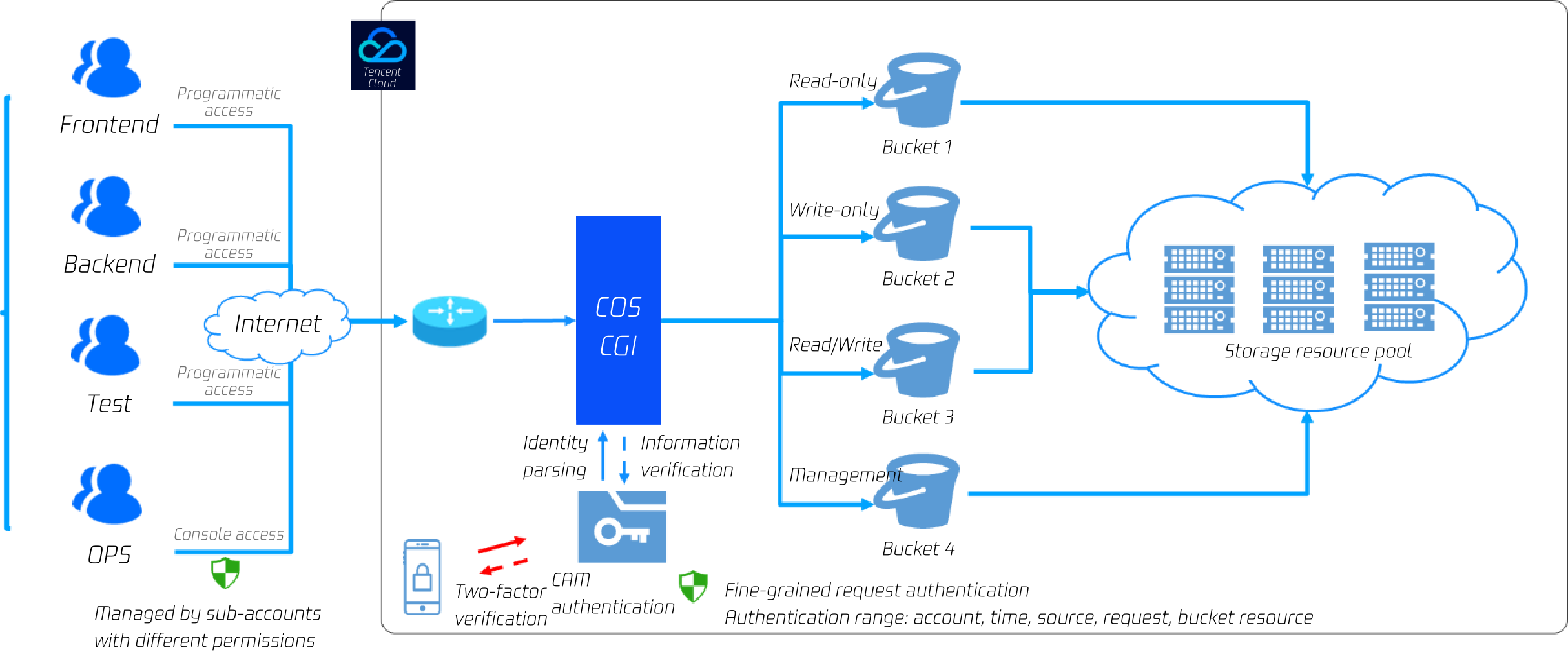
}
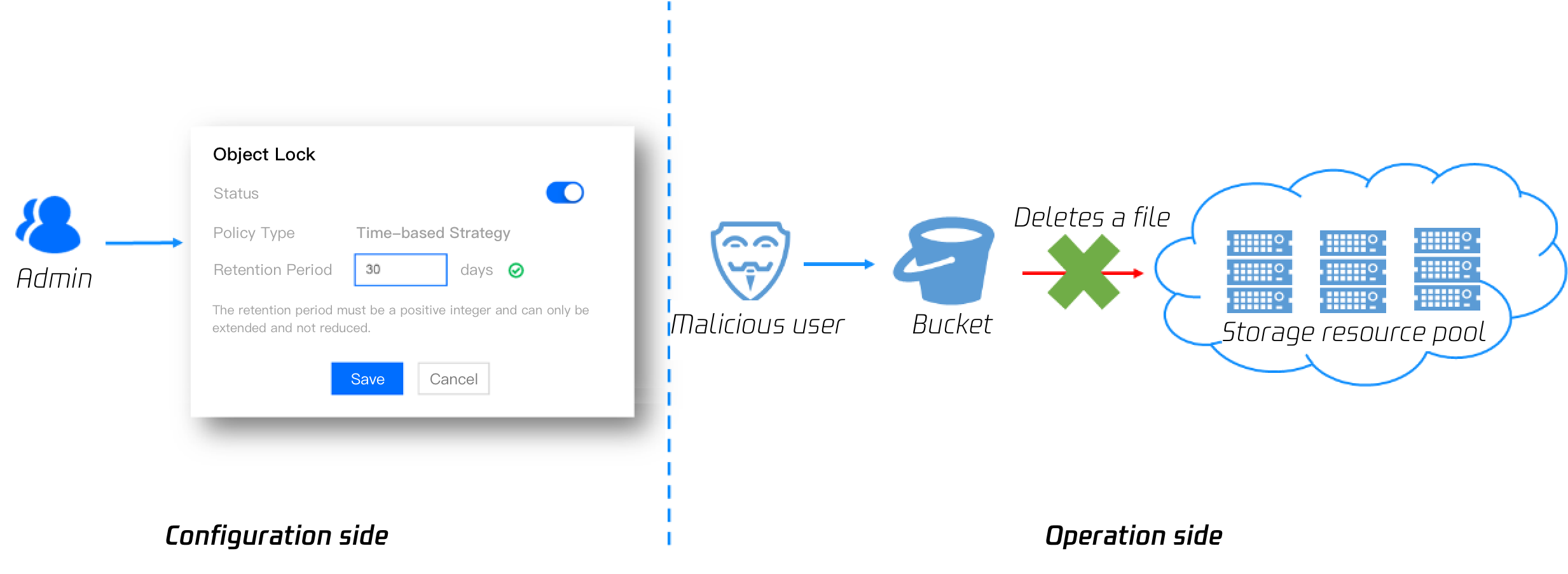
The parameters are described as follows:
Configuration Item
Value
BasePath
The COS path where files are stored. You can modify it as needed. If you leave it empty, the root directory will be used by default.
SecretId
Enter the access key information, which can be created and obtained on the Manage API Key page.
SecretKey
Your access key information, which can be created and obtained on the Manage API Key page.
Bucket
The name customized during bucket creation such as `examplebucket-1250000000`.
Region
The region selected during bucket creation
2. Create a custom storage directory and run the following command in the project's root directory:
mkdir -p content/adapters/storage
3. Install the ghost-cos-store plugin provide by Tencent Cloud.
3.1 Install it through npm.
npm install ghost-cos-store
3.2 Create the ghost-cos-store.js file with the following content in the storage directory:
// content/adapters/storage/ghost-cos-store.js
module.exports = require('ghost-cos-store');
3.3 Run git clone for installation.
cd content/adapters/storage
git clone https://github.com/tencentyun/ghost-cos-store.git
cd ghost-cos-store
npm i
3.4 After the installation, restart Ghost.
ghost restart

Publishing a Post and Testing Upload

1. In the Ghost console, click + to publish a post.\n
\"\"

2. Click + to upload an image. From the packets captured by the browser, you can see that the upload request succeeds and the COS URL of the image is returned.
","recentReleaseTime":"2024-03-25 15:16:26","slate":"[{\"children\":[{\"text\":\"Overview\"}],\"nodeId\":\"overview\",\"type\":\"h2\"},{\"children\":[{\"children\":[{\"text\":\"Ghost\"}],\"linkTarget\":\"blank\",\"linkTitle\":\"https://ghost.org/docs\",\"props\":{\"type\":\"link\",\"url\":\"https://ghost.org/docs\"},\"type\":\"ref\"},{\"text\":\" is a Node.js-based framework for quickly building a blog website. You can use its official CLI tool to quickly generate your personal website and deploy it in CVM or Docker.\"}],\"type\":\"p\"},{\"children\":[{\"text\":\"As a blog website, attachment upload is a necessary feature. Ghost stores attachments locally by default. This document describes how to save an attachment in \"},{\"children\":[{\"text\":\"COS\"}],\"linkTarget\":\"blank\",\"linkTitle\":\"https://www.tencentcloud.com/products/cos\",\"props\":{\"type\":\"link\",\"url\":\"https://www.tencentcloud.com/products/cos\"},\"type\":\"ref\"},{\"text\":\" through the plugin. Saving forum attachments in COS has the following benefits:\"}],\"type\":\"p\"},{\"children\":[{\"text\":\"Higher reliability for your attachments.\"}],\"start\":false,\"type\":\"uli\"},{\"children\":[{\"text\":\"No need to prepare additional storage capacity on your server for forum attachments.\"}],\"start\":false,\"type\":\"uli\"},{\"children\":[{\"text\":\"Faster access to image attachments through the COS server rather than taking up downstream bandwidth/increasing the traffic on your own server.\"}],\"start\":false,\"type\":\"uli\"},{\"children\":[{\"text\":\"Accelerated forum user access to image attachments through \"},{\"children\":[{\"text\":\"CDN\"}],\"linkTarget\":\"blank\",\"linkTitle\":\"https://www.tencentcloud.com/products/cdn\",\"props\":{\"type\":\"link\",\"url\":\"https://www.tencentcloud.com/products/cdn\"},\"type\":\"ref\"},{\"text\":\".\"}],\"start\":false,\"type\":\"uli\"},{\"children\":[{\"text\":\"Preparations\"}],\"nodeId\":\"preparations\",\"type\":\"h2\"},{\"children\":[{\"text\":\"Building a Ghost website\"}],\"nodeId\":\"building-a-ghost-website\",\"type\":\"h3\"},{\"children\":[{\"text\":\"Install the \"},{\"children\":[{\"text\":\"Node.js\"}],\"linkTarget\":\"blank\",\"linkTitle\":\"https://nodejs.org/en/download/\",\"props\":{\"type\":\"link\",\"url\":\"https://nodejs.org/en/download/\"},\"type\":\"ref\"},{\"text\":\" environment.\"}],\"start\":true,\"type\":\"oli\"},{\"children\":[{\"text\":\"Install ghost-cli.\"}],\"start\":false,\"type\":\"oli\"},{\"children\":[{\"children\":[{\"text\":\"npm install ghost-cli@latest -g\"}],\"type\":\"code-line\"}],\"indent\":1,\"language\":\"js\",\"type\":\"code-block\"},{\"children\":[{\"text\":\"Create a project and run the following command in the project's root directory:\"}],\"start\":false,\"type\":\"oli\"},{\"children\":[{\"children\":[{\"text\":\"ghost install local\"}],\"type\":\"code-line\"}],\"indent\":1,\"language\":\"js\",\"type\":\"code-block\"},{\"children\":[{\"text\":\"After successful creation, the project structure is as shown below:\\n\"},{\"alt\":\"\",\"children\":[{\"text\":\"\"}],\"inline\":true,\"type\":\"image\",\"url\":\"https://qcloudimg.tencent-cloud.cn/raw/76e74eff7779379f2e40c5c9220453fc.jpg\"}],\"indent\":1,\"type\":\"p\"},{\"children\":[{\"text\":\"Open the browser and access \"},{\"code\":1,\"text\":\"localhost:2368\"},{\"text\":\". On the sign-up page, sign up for an account and go to the management backend.\\n\"},{\"alt\":\"\",\"children\":[{\"text\":\"\"}],\"inline\":true,\"type\":\"image\",\"url\":\"https://qcloudimg.tencent-cloud.cn/raw/16c412b34d8d9eda9525d12b7e34f5cf.jpg\"}],\"start\":false,\"type\":\"oli\"},{\"children\":[{\"text\":\"Creating a COS bucket\"}],\"nodeId\":\"creating-a-cos-bucket\",\"type\":\"h3\"},{\"children\":[{\"text\":\"In the \"},{\"children\":[{\"text\":\"COS console\"}],\"linkTarget\":\"blank\",\"linkTitle\":\"https://console.tencentcloud.com/cos/bucket\",\"props\":{\"type\":\"link\",\"url\":\"https://console.tencentcloud.com/cos/bucket\"},\"type\":\"ref\"},{\"text\":\", create a bucket with access permissions of \"},{\"b\":1,\"text\":\"public read/private write\"},{\"text\":\" as instructed in \"},{\"children\":[{\"text\":\"Creating Bucket\"}],\"linkTarget\":\"blank\",\"linkTitle\":\"https://intl.cloud.tencent.com/document/product/436/13309\",\"props\":{\"type\":\"link\",\"url\":\"https://intl.cloud.tencent.com/document/product/436/13309\"},\"type\":\"ref\"},{\"text\":\".\"}],\"start\":true,\"type\":\"oli\"},{\"children\":[{\"text\":\"Click \"},{\"b\":1,\"text\":\"Security Management\"},{\"text\":\" \\u003e \"},{\"b\":1,\"text\":\"CORS (Cross-Origin Resource Sharing)\"},{\"text\":\" and add a CORS configuration as instructed in \"},{\"children\":[{\"text\":\"Setting Cross-Origin Resource Sharing (CORS)\"}],\"linkTarget\":\"blank\",\"linkTitle\":\"https://intl.cloud.tencent.com/document/product/436/13318\",\"props\":{\"type\":\"link\",\"url\":\"https://intl.cloud.tencent.com/document/product/436/13318\"},\"type\":\"ref\"},{\"text\":\". You can use the following configuration to facilitate debugging:\"}],\"start\":false,\"type\":\"oli\"},{\"children\":[{\"text\":\"Associating Ghost with a COS Bucket\"}],\"nodeId\":\"associating-ghost-with-a-cos-bucket\",\"type\":\"h2\"},{\"children\":[{\"children\":[{\"b\":1,\"color\":\"#04C8DC\",\"text\":\"Note: \",\"type\":\"text\"}],\"type\":\"p\"},{\"children\":[{\"text\":\"We recommend you use a sub-account key and follow the \"},{\"children\":[{\"text\":\"principle of least privilege\"}],\"linkTarget\":\"blank\",\"linkTitle\":\"https://intl.cloud.tencent.com/document/product/436/32972\",\"props\":{\"type\":\"link\",\"url\":\"https://intl.cloud.tencent.com/document/product/436/32972\"},\"type\":\"ref\"},{\"text\":\" to reduce risks. For information about how to obtain a sub-account key, see \"},{\"children\":[{\"text\":\"Access Key\"}],\"linkTarget\":\"blank\",\"linkTitle\":\"https://intl.cloud.tencent.com/document/product/598/32675\",\"props\":{\"type\":\"link\",\"url\":\"https://intl.cloud.tencent.com/document/product/598/32675\"},\"type\":\"ref\"},{\"text\":\".\"}],\"type\":\"p\"}],\"hintType\":\"alert\",\"type\":\"hint\"},{\"children\":[{\"text\":\"Add the following configuration to the \"},{\"code\":1,\"text\":\"config.development.json\"},{\"text\":\" configuration file in the Ghost project's root directory:\"}],\"start\":true,\"type\":\"oli\"},{\"children\":[{\"children\":[{\"text\":\" \\\"storage\\\": {\"}],\"type\":\"code-line\"},{\"children\":[{\"text\":\" \\\"active\\\": \\\"ghost-cos-store\\\",\"}],\"type\":\"code-line\"},{\"children\":[{\"text\":\" \\\"ghost-cos-store\\\": { \"}],\"type\":\"code-line\"},{\"children\":[{\"text\":\" \\\"BasePath\\\": \\\"ghost/\\\", // You can change it to your directory name. If you leave it empty, the root directory will be used by default. \"}],\"type\":\"code-line\"},{\"children\":[{\"text\":\" \\\"SecretId\\\": \\\"AKID*************\\\",\"}],\"type\":\"code-line\"},{\"children\":[{\"text\":\" \\\"SecretKey\\\": \\\"***************\\\",\"}],\"type\":\"code-line\"},{\"children\":[{\"text\":\" \\\"Bucket\\\": \\\"xxx-125********\\\", \"}],\"type\":\"code-line\"},{\"children\":[{\"text\":\" \\\"Region\\\": \\\"**-*******\\\"\"}],\"type\":\"code-line\"},{\"children\":[{\"text\":\" }\"}],\"type\":\"code-line\"},{\"children\":[{\"text\":\" }\"}],\"type\":\"code-line\"}],\"indent\":1,\"language\":\"json\",\"type\":\"code-block\"},{\"children\":[{\"text\":\"The parameters are described as follows:\"}],\"indent\":1,\"type\":\"p\"},{\"children\":[{\"children\":[{\"children\":[{\"children\":[{\"text\":\"Configuration Item \"}],\"type\":\"p\"}],\"type\":\"cell\"},{\"children\":[{\"children\":[{\"text\":\"Value\"}],\"type\":\"p\"}],\"type\":\"cell\"}],\"type\":\"row\"},{\"children\":[{\"children\":[{\"children\":[{\"text\":\"BasePath\"}],\"type\":\"p\"}],\"type\":\"cell\"},{\"children\":[{\"children\":[{\"text\":\"The COS path where files are stored. You can modify it as needed. If you leave it empty, the root directory will be used by default.\"}],\"type\":\"p\"}],\"type\":\"cell\"}],\"type\":\"row\"},{\"children\":[{\"children\":[{\"children\":[{\"text\":\"SecretId\"}],\"type\":\"p\"}],\"type\":\"cell\"},{\"children\":[{\"children\":[{\"text\":\"Enter the access key information, which can be created and obtained on the \"},{\"children\":[{\"text\":\"Manage API Key\"}],\"linkTarget\":\"self\",\"props\":{\"type\":\"link\",\"url\":\"https://console.tencentcloud.com/capi\"},\"type\":\"ref\"},{\"text\":\" page.\"}],\"type\":\"p\"}],\"type\":\"cell\"}],\"type\":\"row\"},{\"children\":[{\"children\":[{\"children\":[{\"text\":\"SecretKey\"}],\"type\":\"p\"}],\"type\":\"cell\"},{\"children\":[{\"children\":[{\"text\":\"Your access key information, which can be created and obtained on the \"},{\"children\":[{\"text\":\"Manage API Key\"}],\"linkTarget\":\"self\",\"props\":{\"type\":\"link\",\"url\":\"https://console.tencentcloud.com/capi\"},\"type\":\"ref\"},{\"text\":\" page.\"}],\"type\":\"p\"}],\"type\":\"cell\"}],\"type\":\"row\"},{\"children\":[{\"children\":[{\"children\":[{\"text\":\"Bucket\"}],\"type\":\"p\"}],\"type\":\"cell\"},{\"children\":[{\"children\":[{\"text\":\"The name customized during bucket creation such as `examplebucket-1250000000`.\"}],\"type\":\"p\"}],\"type\":\"cell\"}],\"type\":\"row\"},{\"children\":[{\"children\":[{\"children\":[{\"text\":\"Region\"}],\"type\":\"p\"}],\"type\":\"cell\"},{\"children\":[{\"children\":[{\"text\":\"The region selected during bucket creation\"}],\"type\":\"p\"}],\"type\":\"cell\"}],\"type\":\"row\"}],\"rowHeader\":true,\"type\":\"table\",\"widths\":[]},{\"children\":[{\"text\":\"Create a custom storage directory and run the following command in the project's root directory:\"}],\"start\":false,\"type\":\"oli\"},{\"children\":[{\"children\":[{\"text\":\"mkdir -p content/adapters/storage\"}],\"type\":\"code-line\"}],\"indent\":1,\"language\":\"js\",\"type\":\"code-block\"},{\"children\":[{\"text\":\"Install the \"},{\"children\":[{\"text\":\"ghost-cos-store\"}],\"linkTarget\":\"blank\",\"linkTitle\":\"https://github.com/tencentyun/ghost-cos-store\",\"props\":{\"type\":\"link\",\"url\":\"https://github.com/tencentyun/ghost-cos-store\"},\"type\":\"ref\"},{\"text\":\" plugin provide by Tencent Cloud.\"}],\"start\":false,\"type\":\"oli\"},{\"children\":[{\"text\":\"Install it through npm.\"}],\"indent\":1,\"start\":true,\"type\":\"oli\"},{\"children\":[{\"children\":[{\"text\":\"npm install ghost-cos-store\"}],\"type\":\"code-line\"}],\"indent\":2,\"language\":\"js\",\"type\":\"code-block\"},{\"children\":[{\"text\":\"Create the \"},{\"code\":1,\"text\":\"ghost-cos-store.js\"},{\"text\":\" file with the following content in the \"},{\"code\":1,\"text\":\"storage\"},{\"text\":\" directory:\"}],\"indent\":1,\"start\":false,\"type\":\"oli\"},{\"children\":[{\"children\":[{\"text\":\"// content/adapters/storage/ghost-cos-store.js\"}],\"type\":\"code-line\"},{\"children\":[{\"text\":\"module.exports = require('ghost-cos-store');\"}],\"type\":\"code-line\"}],\"indent\":2,\"language\":\"js\",\"type\":\"code-block\"},{\"children\":[{\"text\":\"Run \"},{\"code\":1,\"text\":\"git clone\"},{\"text\":\" for installation.\"}],\"indent\":1,\"start\":false,\"type\":\"oli\"},{\"children\":[{\"children\":[{\"text\":\"cd content/adapters/storage\"}],\"type\":\"code-line\"},{\"children\":[{\"text\":\"git clone https://github.com/tencentyun/ghost-cos-store.git\"}],\"type\":\"code-line\"},{\"children\":[{\"text\":\"cd ghost-cos-store \"}],\"type\":\"code-line\"},{\"children\":[{\"text\":\"npm i\"}],\"type\":\"code-line\"}],\"indent\":2,\"language\":\"js\",\"type\":\"code-block\"},{\"children\":[{\"text\":\"After the installation, restart Ghost.\"}],\"indent\":1,\"start\":false,\"type\":\"oli\"},{\"children\":[{\"children\":[{\"text\":\"ghost restart\"}],\"type\":\"code-line\"}],\"indent\":2,\"language\":\"js\",\"type\":\"code-block\"},{\"children\":[{\"text\":\"Publishing a Post and Testing Upload\"}],\"nodeId\":\"publishing-a-post-and-testing-upload\",\"type\":\"h2\"},{\"children\":[{\"text\":\"In the Ghost console, click \"},{\"b\":1,\"text\":\"+\"},{\"text\":\" to publish a post.\\n\"},{\"alt\":\"\",\"children\":[{\"text\":\"\"}],\"inline\":true,\"type\":\"image\",\"url\":\"https://qcloudimg.tencent-cloud.cn/raw/27dc54b218009f64bd319707700dba71.jpg\"}],\"start\":true,\"type\":\"oli\"},{\"children\":[{\"text\":\"Click \"},{\"b\":1,\"text\":\"+\"},{\"text\":\" to upload an image. From the packets captured by the browser, you can see that the \"},{\"code\":1,\"text\":\"upload\"},{\"text\":\" request succeeds and the COS URL of the image is returned.\"}],\"start\":false,\"type\":\"oli\"}]"}},"53925":{"categoryId":436,"weight":100,"type":"page","extension":"","pid":48291,"id":53925,"lang":"en","title":"COS Audio/Video Player Overview","pdfUrl":"","docType":"default","children":[],"firstReleaseTime":"2023-03-03 00:49:44","recentReleaseTime":"2023-03-03 00:49:44","content":{"title":"COS Audio/Video Player Overview","body":"
This document describes how to process COS audio/video files in the cloud and play back them on the client. Examples in this document cover protocols and features supported for audio/video processing and offer you more ideas on using the product features based on the rich audio/video processing capabilities of the media processing service in CI to help you improve the playback performance.

Supported protocols

Audio/Video Protocol
URL Format
PC Browser
Mobile Browser
MP3
https://<BucketName-APPID>.cos.<Region>.myqcloud.com/xxx.mp3
Supported
Supported
MP4
https://<BucketName-APPID>.cos.<Region>.myqcloud.com/xxx.mp4
Supported
Supported
HLS
(M3U8)
https://<BucketName-APPID>.cos.<Region>.myqcloud.com/xxx.m3u8
Supported
Supported
FLV
https://<BucketName-APPID>.cos.<Region>.myqcloud.com/xxx.flv
Supported
Supported
DASH
https://<BucketName-APPID>.cos.<Region>.myqcloud.com/xxx.mpd
Supported
Supported
Note:
In some browser environments, HLS, FLV, and DASH video playback depends on Media Source Extensions.

Supported features

Feature
TCPlayer
DPlayer
VideojsPlayer
MP4 video playback
View details
View details
View details
HLS video playback
View details
View details
View details
FLV video playback
View details
View details
View details
DASH video playback
View details
View details
View details
PM3U8 (private M3U8) video playback
View details
View details
View details
Thumbnail configuration
View details
View details
View details
Standard HLS encryption configuration
View details
View details
View details
Definition switch
View details
View details
-
Dynamic watermark configuration
View details
-
-
Top-left logo configuration
-
View details
-
Progress preview image configuration
View details
-
-
Subtitles configuration
View details
-
-
Multilingual configuration
View details
-
-
Roll image ad configuration
View details
-
-
Note:
The player is compatible with mainstream browsers and can automatically select the optimal playback scheme depending on the browser used. For example, for modern browsers such as Chrome, the player uses the HTML5 technology for playback, and for mobile browsers, it uses the HTML5 technology or the browser's built-in capabilities.

Usage guide

Playing back COS Video File with TCPlayer
Playing back Video in COS with DPlayer
Playing back Video in COS with VideojsPlayer
","recentReleaseTime":"2024-03-25 15:11:17","slate":"[{\"children\":[{\"text\":\"This document describes how to process COS audio/video files in the cloud and play back them on the client. Examples in this document cover protocols and features supported for audio/video processing and offer you more ideas on using the product features based on the rich audio/video processing capabilities of the \"},{\"children\":[{\"text\":\"media processing service\"}],\"linkTarget\":\"blank\",\"linkTitle\":\"https://www.tencentcloud.com/document/product/1045/46980\",\"props\":{\"type\":\"link\",\"url\":\"https://www.tencentcloud.com/document/product/1045/46980\"},\"type\":\"ref\",\"id\":\"I3uUBpXf_NWcHLD4Qvq4v\"},{\"text\":\" in CI to help you improve the playback performance.\"}],\"type\":\"p\",\"id\":\"nkAagb5UCpzNtPGU1WGd2\"},{\"children\":[{\"text\":\"Supported protocols\"}],\"nodeId\":\"supported-protocols\",\"type\":\"h2\",\"id\":\"Fvpcmp6qrWAklzrDgZmax\"},{\"children\":[{\"children\":[{\"children\":[{\"children\":[{\"text\":\"Audio/Video Protocol\"}],\"type\":\"p\",\"id\":\"iO-cZR3K3NyazhWYojp58\"}],\"type\":\"cell\",\"id\":\"F03HVwXd57EADoY40mHqe\"},{\"children\":[{\"children\":[{\"text\":\"URL Format\"}],\"type\":\"p\",\"id\":\"Hj6J4-socI-s0B9cW53y4\"}],\"type\":\"cell\",\"id\":\"jAp7TadGjapo7_e7w36lu\"},{\"children\":[{\"children\":[{\"text\":\"PC Browser\"}],\"type\":\"p\",\"id\":\"ven3WtXmzforaJKg8cJTu\"}],\"type\":\"cell\",\"id\":\"E69uGeo-wa9gH6qif0khQ\"},{\"children\":[{\"children\":[{\"text\":\"Mobile Browser\"}],\"type\":\"p\",\"id\":\"4hYJf-x5xJ0QstZ6mnzDs\"}],\"type\":\"cell\",\"id\":\"IVCv1kkkkddyX2aMaadCU\"}],\"type\":\"row\",\"id\":\"LtJS7vHSKq85DjQOZQz9X\"},{\"children\":[{\"children\":[{\"children\":[{\"children\":[{\"text\":\"MP3\"}],\"type\":\"p\",\"id\":\"9iHeGm89PhDlzSYLn5rR0\"}],\"type\":\"p\",\"id\":\"m6UswKzowlrvQvtcE1RG-\"}],\"type\":\"cell\",\"id\":\"XEoAiCfTMSg3dMorO5UgE\"},{\"children\":[{\"children\":[{\"children\":[{\"text\":\"https://.cos..myqcloud.com/xxx.mp3\"}],\"type\":\"p\",\"id\":\"0yozqu5h5yWKAVgQf6ig7\"}],\"type\":\"p\",\"id\":\"PEaXyVOCoppma7IiYx-rl\"}],\"type\":\"cell\",\"id\":\"CnKE6OmWO3vEUmFRM3igl\"},{\"children\":[{\"children\":[{\"children\":[{\"text\":\"Supported\"}],\"type\":\"p\",\"id\":\"uHKd5odCZWexbaXkCcdSC\"}],\"type\":\"p\",\"id\":\"4JFRzcL6sKfK71q8xNcEI\"}],\"type\":\"cell\",\"id\":\"vZSMyQguO0ioPntw9pqiz\"},{\"children\":[{\"children\":[{\"children\":[{\"text\":\"Supported\"}],\"type\":\"p\",\"id\":\"HPE_1pc44YHgnFGJx5KKO\"}],\"type\":\"p\",\"id\":\"fD7A4-_71DdEgCYNtkkze\"}],\"type\":\"cell\",\"id\":\"Y4NgnfxGCqZcBJEdlD-pt\"}],\"type\":\"row\",\"id\":\"aJi4nV7GS6Y7Pqp-SRO6A\"},{\"children\":[{\"children\":[{\"children\":[{\"children\":[{\"text\":\"MP4\"}],\"type\":\"p\",\"id\":\"THxUuO4YKHonGb-_OazEg\"}],\"type\":\"p\",\"id\":\"Fw3doodnaVFW2f3qnMhQj\"}],\"type\":\"cell\",\"id\":\"CvbgaJZtF1Wo0aZH-h2ag\"},{\"children\":[{\"children\":[{\"children\":[{\"text\":\"https://.cos..myqcloud.com/xxx.mp4\"}],\"type\":\"p\",\"id\":\"E2Y_3MeR59Ge-mZ07cncs\"}],\"type\":\"p\",\"id\":\"5WvGhfyueV3h-b5dYLJ-T\"}],\"type\":\"cell\",\"id\":\"_us66oBnW_dte_GhEw1VJ\"},{\"children\":[{\"children\":[{\"children\":[{\"text\":\"Supported\"}],\"type\":\"p\",\"id\":\"ZK0hkxGeSaYj45R-YUaoa\"}],\"type\":\"p\",\"id\":\"uB4wr88ZUDMj6uWX2aAbr\"}],\"type\":\"cell\",\"id\":\"ABJuGTM3-yJLpb7iqPM7T\"},{\"children\":[{\"children\":[{\"children\":[{\"text\":\"Supported\"}],\"type\":\"p\",\"id\":\"t1X3-4mQ9DFep8M4FesZm\"}],\"type\":\"p\",\"id\":\"NjW5E3YsGwvzuO5zl_Xcx\"}],\"type\":\"cell\",\"id\":\"2u_d6I1xITNB9MBexX1Jl\"}],\"type\":\"row\",\"id\":\"SslBy_KgyPQGXjrly-_6X\"},{\"children\":[{\"children\":[{\"children\":[{\"text\":\"HLS\"}],\"type\":\"p\",\"id\":\"TalujxVBYBJJUjwNnHFX-\"},{\"type\":\"p\",\"id\":\"Z9WS5YS1MlvxnpMviw6XT\",\"children\":[{\"text\":\"(M3U8)\"}]}],\"type\":\"cell\",\"id\":\"KvnII3JerzIecBwc7ttSU\"},{\"children\":[{\"children\":[{\"children\":[{\"text\":\"https://.cos..myqcloud.com/xxx.m3u8\"}],\"type\":\"p\",\"id\":\"fn97MTpF2KYB3Duw8trDf\"}],\"type\":\"p\",\"id\":\"WXN_ZHUd3IcVocKjUGoOw\"}],\"type\":\"cell\",\"id\":\"YiFN_SUpaamZHVOxr_AV7\"},{\"children\":[{\"children\":[{\"children\":[{\"text\":\"Supported\"}],\"type\":\"p\",\"id\":\"2SKl7pQ9TuPM0ChMhtqRc\"}],\"type\":\"p\",\"id\":\"yypatm9ztArVIDQ8MAS7u\"}],\"type\":\"cell\",\"id\":\"OxUS-rGcTjrn48FHG7q73\"},{\"children\":[{\"children\":[{\"children\":[{\"text\":\"Supported\"}],\"type\":\"p\",\"id\":\"fpfjqgxtnEd2aCgxr_3Wo\"}],\"type\":\"p\",\"id\":\"t3fpisnj7JgvBpX0ivXRm\"}],\"type\":\"cell\",\"id\":\"8TZty-7EPUK9OXgahBBQj\"}],\"type\":\"row\",\"id\":\"G199scdgON0eS_n_4lcCD\"},{\"children\":[{\"children\":[{\"children\":[{\"children\":[{\"text\":\"FLV\"}],\"type\":\"p\",\"id\":\"GObnR_B45fZhe4EUmNSGE\"}],\"type\":\"p\",\"id\":\"uoePB9KdTwguTZjN9qONQ\"}],\"type\":\"cell\",\"id\":\"CD7X_OEY0PEoljkI093aM\"},{\"children\":[{\"children\":[{\"children\":[{\"text\":\"https://.cos..myqcloud.com/xxx.flv\"}],\"type\":\"p\",\"id\":\"3c5lDUg4IsTWAmwBUNULj\"}],\"type\":\"p\",\"id\":\"ASucu4zm8vPZr67JP-87p\"}],\"type\":\"cell\",\"id\":\"Ke-8-AwNJUH2xMD43PAIZ\"},{\"children\":[{\"children\":[{\"children\":[{\"text\":\"Supported\"}],\"type\":\"p\",\"id\":\"BknhdIA3wQv630u7qbTFC\"}],\"type\":\"p\",\"id\":\"quEmN99A16-KUSLbjhmu9\"}],\"type\":\"cell\",\"id\":\"ScVNhaHhVyqxVD4BCgfg7\"},{\"children\":[{\"children\":[{\"children\":[{\"text\":\"Supported\"}],\"type\":\"p\",\"id\":\"C2fs2OIgtJrxs45xLYbl2\"}],\"type\":\"p\",\"id\":\"bLeb4jDqyjpn5mswKnT8r\"}],\"type\":\"cell\",\"id\":\"EuEvJIhzzH6SzjgAivQvv\"}],\"type\":\"row\",\"id\":\"j-NGlyc4VbkG9K_vE76GL\"},{\"children\":[{\"children\":[{\"children\":[{\"children\":[{\"text\":\"DASH\"}],\"type\":\"p\",\"id\":\"WnKslmtm_74fnb9d3AR1U\"}],\"type\":\"p\",\"id\":\"q93B3-7LRXbH0aKDdo_rM\"}],\"type\":\"cell\",\"id\":\"STH0r2TdVZlhPfI4olFXx\"},{\"children\":[{\"children\":[{\"children\":[{\"text\":\"https://.cos..myqcloud.com/xxx.mpd\"}],\"type\":\"p\",\"id\":\"1_ijQPUGgK7EnU1H_4zDF\"}],\"type\":\"p\",\"id\":\"7OSImxwMoUVpdiuYwIpS-\"}],\"type\":\"cell\",\"id\":\"_0AYY6BB46Gxf3rUAJD9W\"},{\"children\":[{\"children\":[{\"children\":[{\"text\":\"Supported\"}],\"type\":\"p\",\"id\":\"1ZFUNrQcALw-NZwweAh7T\"}],\"type\":\"p\",\"id\":\"RS9o2FrnpMJghbuyTSI4G\"}],\"type\":\"cell\",\"id\":\"38w4y9SXeolCAPLoGHKoX\"},{\"children\":[{\"children\":[{\"children\":[{\"text\":\"Supported\"}],\"type\":\"p\",\"id\":\"tnJmH0ythV2APYMNa8P5D\"}],\"type\":\"p\",\"id\":\"cpFNbrkBg2efOHMq8Qzvl\"}],\"type\":\"cell\",\"id\":\"JutS370x2pV-amioG7qXR\"}],\"type\":\"row\",\"id\":\"1RxTgRx9L7HJpKBMQWPiH\"}],\"columnHeader\":false,\"rowHeader\":true,\"type\":\"table\",\"id\":\"LJDcM6nSrj-pXpZXdqEoq\"},{\"children\":[{\"children\":[{\"b\":1,\"color\":\"#04C8DC\",\"text\":\"Note: \",\"type\":\"text\"}],\"type\":\"p\",\"id\":\"KKRWOcvvhWJQfqLrIuYEg\"},{\"children\":[{\"text\":\"In some browser environments, HLS, FLV, and DASH video playback depends on \"},{\"type\":\"ref\",\"id\":\"hXfi1ZsjD7OSRqQMl6X04\",\"props\":{\"type\":\"link\",\"url\":\"https://caniuse.com/?search=Media Source Extensions\"},\"children\":[{\"text\":\"Media Source Extensions\"}]},{\"text\":\".\"}],\"type\":\"p\",\"id\":\"a2sK7_LMaRvnpx7RuM12l\"}],\"hintType\":\"alert\",\"type\":\"hint\",\"id\":\"OkxfXVYiOCtkYiXWSMwaN\"},{\"children\":[{\"text\":\"Supported features\"}],\"nodeId\":\"supported-features\",\"type\":\"h2\",\"id\":\"YIMsNDjcHwtyFdPTBdKBF\"},{\"children\":[{\"children\":[{\"children\":[{\"children\":[{\"text\":\"Feature\"}],\"type\":\"p\",\"id\":\"QPAfkzn2kjz8sGts5xBgT\"}],\"type\":\"cell\",\"id\":\"NMN2ErjXUqm7S_se6oteO\"},{\"children\":[{\"children\":[{\"text\":\"TCPlayer\"}],\"type\":\"p\",\"id\":\"LlYw4KGBu4TuSO0eGU90U\"}],\"type\":\"cell\",\"id\":\"FwWdZlNyAvuRejh8IJ7T6\"},{\"children\":[{\"children\":[{\"text\":\"DPlayer\"}],\"type\":\"p\",\"id\":\"uHUv9b0_qXRnygZ-Pw-tg\"}],\"type\":\"cell\",\"id\":\"FlJgBtVMs6ee8l00iOsL-\"},{\"children\":[{\"children\":[{\"text\":\"VideojsPlayer\"}],\"type\":\"p\",\"id\":\"iKsVCMq-9AzfcRPLu0nb0\"}],\"type\":\"cell\",\"id\":\"WRqgO_3rizewDOo610kgG\"}],\"type\":\"row\",\"id\":\"Wmb19IOyM2kprFUpdHGF_\"},{\"children\":[{\"children\":[{\"children\":[{\"children\":[{\"text\":\"MP4 video playback\"}],\"type\":\"p\",\"id\":\"S8fkugT17BIsYI0Ul3wlI\"}],\"type\":\"p\",\"id\":\"PjcqGaD20Yf997lcqwBnZ\"}],\"type\":\"cell\",\"id\":\"pHlmQedKYNYNqRKXkhCOO\"},{\"children\":[{\"children\":[{\"children\":[{\"text\":\"View details\"}],\"type\":\"p\",\"id\":\"H-WAMUbY41FJowalb6F2V\"}],\"type\":\"p\",\"id\":\"hynn2HI63sf3Xb464AnMq\"}],\"type\":\"cell\",\"id\":\"re16Q5vbgTdZ7y_1Z1fSk\"},{\"children\":[{\"children\":[{\"children\":[{\"text\":\"View details\"}],\"type\":\"p\",\"id\":\"lx6sp6aZHkLSCAxawyL9a\"}],\"type\":\"p\",\"id\":\"c_vUU07r3GVqZPoTwMZWt\"}],\"type\":\"cell\",\"id\":\"lmu0B1qVTaI04qHd09ygO\"},{\"children\":[{\"children\":[{\"children\":[{\"text\":\"View details\"}],\"type\":\"p\",\"id\":\"TSZQqtSZV9i93-UEVkutZ\"}],\"type\":\"p\",\"id\":\"iqr6SOC_-HKrAG8WwbcTl\"}],\"type\":\"cell\",\"id\":\"oJ9y7CVb0cGCzDYSupv0V\"}],\"type\":\"row\",\"id\":\"WLQF_t_4tIBe0EmjAtnc8\"},{\"children\":[{\"children\":[{\"children\":[{\"children\":[{\"text\":\"HLS video playback\"}],\"type\":\"p\",\"id\":\"xcIYVoc-Fxk5FbE-pnUsT\"}],\"type\":\"p\",\"id\":\"C6EywE393LTec7ScSN2QS\"}],\"type\":\"cell\",\"id\":\"txtN6lS8m0y-aVReouZ_s\"},{\"children\":[{\"children\":[{\"children\":[{\"text\":\"View details\"}],\"type\":\"p\",\"id\":\"3KNkTQmRfjD1ywlYcwFqY\"}],\"type\":\"p\",\"id\":\"mmhORg9_hsi8FwIRauyJb\"}],\"type\":\"cell\",\"id\":\"G4cdnrjYLhz2WhC1LiBMu\"},{\"children\":[{\"children\":[{\"children\":[{\"text\":\"View details\"}],\"type\":\"p\",\"id\":\"id4FzaQBJ4F1zgaKGs_F3\"}],\"type\":\"p\",\"id\":\"jVBPvGLMp1GZwbmoSWA8K\"}],\"type\":\"cell\",\"id\":\"62irZ0SFC3IUusFdMeEuh\"},{\"children\":[{\"children\":[{\"children\":[{\"text\":\"View details\"}],\"type\":\"p\",\"id\":\"py_zSRnWsMMiYI_UYATEe\"}],\"type\":\"p\",\"id\":\"VMYparSZq9MA11wU9EHor\"}],\"type\":\"cell\",\"id\":\"nBwXpj0DwKudizncpE6lA\"}],\"type\":\"row\",\"id\":\"kcIPgr5_xDRd0fP1E7ool\"},{\"children\":[{\"children\":[{\"children\":[{\"children\":[{\"text\":\"FLV video playback\"}],\"type\":\"p\",\"id\":\"Et-XeVby6FS3VbcbonBI4\"}],\"type\":\"p\",\"id\":\"MDOZfzajv1mXFwncFHL5_\"}],\"type\":\"cell\",\"id\":\"ol6No_dj0lEn47ACWp8a6\"},{\"children\":[{\"children\":[{\"children\":[{\"text\":\"View details\"}],\"type\":\"p\",\"id\":\"oWkyCkaBJ5ZIPHks3oLw3\"}],\"type\":\"p\",\"id\":\"irCzw04zn5d-_oHRqYwRD\"}],\"type\":\"cell\",\"id\":\"20433AipgGscAQtft4-jF\"},{\"children\":[{\"children\":[{\"children\":[{\"text\":\"View details\"}],\"type\":\"p\",\"id\":\"gzgvUDllV4SJeJBM2mYfP\"}],\"type\":\"p\",\"id\":\"1rUwNCM2ls5pTIsrbM-dh\"}],\"type\":\"cell\",\"id\":\"BY3jsBq3ezzh9XYGDmB-S\"},{\"children\":[{\"children\":[{\"children\":[{\"text\":\"View details\"}],\"type\":\"p\",\"id\":\"MP25ubdVzAcVibXXCQVFo\"}],\"type\":\"p\",\"id\":\"xUohKgoXHHRmGWOSLxZIQ\"}],\"type\":\"cell\",\"id\":\"FMLCaKHAj8JKkSOxQDxZG\"}],\"type\":\"row\",\"id\":\"K7bHZVp7b8_6XvONoW8-p\"},{\"children\":[{\"children\":[{\"children\":[{\"children\":[{\"text\":\"DASH video playback\"}],\"type\":\"p\",\"id\":\"zRRZB6O4DRpzS8JAyCQ2X\"}],\"type\":\"p\",\"id\":\"QLaZMroOHEVx3ahtv-dKx\"}],\"type\":\"cell\",\"id\":\"Oj3_GUccodhpeMYrsKOS9\"},{\"children\":[{\"children\":[{\"children\":[{\"text\":\"View details\"}],\"type\":\"p\",\"id\":\"xmOoNc-20X2SSOnLIlyX5\"}],\"type\":\"p\",\"id\":\"bUBUgz3w23bjy8lKg2T10\"}],\"type\":\"cell\",\"id\":\"Hf4vTQSmt8QUUh3WJphB9\"},{\"children\":[{\"children\":[{\"children\":[{\"text\":\"View details\"}],\"type\":\"p\",\"id\":\"u-HrByuFI8gLjYralyImT\"}],\"type\":\"p\",\"id\":\"wmmJMgwP2vsDDgBzgslSe\"}],\"type\":\"cell\",\"id\":\"0z1UYdtA63O_JuAC_S8D9\"},{\"children\":[{\"children\":[{\"children\":[{\"text\":\"View details\"}],\"type\":\"p\",\"id\":\"TSEUlPNI9jkt-jmg2wjQi\"}],\"type\":\"p\",\"id\":\"lFNXaSPpMjT1eDhI_OFWf\"}],\"type\":\"cell\",\"id\":\"0fiIcy8-gWU0Mlwvik889\"}],\"type\":\"row\",\"id\":\"_yaVaC4pqUNku3ZHh7SJO\"},{\"children\":[{\"children\":[{\"children\":[{\"children\":[{\"text\":\"PM3U8 (private M3U8) video playback\"}],\"type\":\"p\",\"id\":\"JWyjeblerc1Ho3US1FgIG\"}],\"type\":\"p\",\"id\":\"vrk9ytbCsGt7CpPbmzimP\"}],\"type\":\"cell\",\"id\":\"iWlPz2FkPTNYjfkADaBlN\"},{\"children\":[{\"children\":[{\"children\":[{\"text\":\"View details\"}],\"type\":\"p\",\"id\":\"YxPA82Ii7b50q49PK-1GV\"}],\"type\":\"p\",\"id\":\"g9GzpFxPTgk0VPPdTsQEy\"}],\"type\":\"cell\",\"id\":\"_BhbmzygxiJwCV8B2XeoA\"},{\"children\":[{\"children\":[{\"children\":[{\"text\":\"View details\"}],\"type\":\"p\",\"id\":\"HW-lXInIh0S-AtFtgc6Gh\"}],\"type\":\"p\",\"id\":\"X2bu0Q-qaE8KsFKPHuZLj\"}],\"type\":\"cell\",\"id\":\"mpR19sDSHgE19Jktq2zT0\"},{\"children\":[{\"children\":[{\"children\":[{\"text\":\"View details\"}],\"type\":\"p\",\"id\":\"Xkrr5A_Sw-QBy8xqDqNxL\"}],\"type\":\"p\",\"id\":\"z95Q3322u_ctncZIRQAs0\"}],\"type\":\"cell\",\"id\":\"iQHShu2saZfgOF4U_1Sht\"}],\"type\":\"row\",\"id\":\"zY8a6dCrJpU613PFioGdx\"},{\"children\":[{\"children\":[{\"children\":[{\"children\":[{\"text\":\"Thumbnail configuration\"}],\"type\":\"p\",\"id\":\"cC3AZcvWlsrVQYr0CfQzk\"}],\"type\":\"p\",\"id\":\"JeWIk7YNEBwMcg-SIpjyI\"}],\"type\":\"cell\",\"id\":\"eQDwRR7LHA-H1RXbuWpRC\"},{\"children\":[{\"children\":[{\"children\":[{\"text\":\"View details\"}],\"type\":\"p\",\"id\":\"hAetkOw_XjyaMhPzh4OfV\"}],\"type\":\"p\",\"id\":\"J6teQc_lsfo5CfgHx7viD\"}],\"type\":\"cell\",\"id\":\"QK62_xJrohRyUX5FcMu77\"},{\"children\":[{\"children\":[{\"children\":[{\"text\":\"View details\"}],\"type\":\"p\",\"id\":\"AJ7qJaPq2dOJHpT5lHv5d\"}],\"type\":\"p\",\"id\":\"ZTxof7Y3TyqSJJ6wAtwgf\"}],\"type\":\"cell\",\"id\":\"tQQibvrXyL0OsevHLsuHA\"},{\"children\":[{\"children\":[{\"children\":[{\"text\":\"View details\"}],\"type\":\"p\",\"id\":\"zXMs1DHQawodEsiCnkiNC\"}],\"type\":\"p\",\"id\":\"nsltGjDZa5nARXmfk7vws\"}],\"type\":\"cell\",\"id\":\"bHOHvUQm-VTpVW6vrS0L9\"}],\"type\":\"row\",\"id\":\"-PLVRMD4ARy462GH0pd69\"},{\"children\":[{\"children\":[{\"children\":[{\"children\":[{\"text\":\"Standard HLS encryption configuration\"}],\"type\":\"p\",\"id\":\"6___vVgB1VbL66Q0R0fzK\"}],\"type\":\"p\",\"id\":\"3-m5g1mdJ0JSO4YUhc1dI\"}],\"type\":\"cell\",\"id\":\"edS2KKmmLb6nH8QEsMHPE\"},{\"children\":[{\"children\":[{\"children\":[{\"text\":\"View details\"}],\"type\":\"p\",\"id\":\"J5BxR_B1ZQOb9glgQS5ti\"}],\"type\":\"p\",\"id\":\"4ojOSm2GK5a5mRy4131Bz\"}],\"type\":\"cell\",\"id\":\"l7iqpyLylNeqGWGmy3wKA\"},{\"children\":[{\"children\":[{\"children\":[{\"text\":\"View details\"}],\"type\":\"p\",\"id\":\"N6gam41Pm2ncmK0GxitoW\"}],\"type\":\"p\",\"id\":\"CLKjzn7eLS_02Om40kMDN\"}],\"type\":\"cell\",\"id\":\"Djo3pPkonF6t3AqXwCiKY\"},{\"children\":[{\"children\":[{\"children\":[{\"text\":\"View details\"}],\"type\":\"p\",\"id\":\"-sGmbGQOLGiskul4xEgbe\"}],\"type\":\"p\",\"id\":\"9Wy7HhhTfRU9c8AtxB8of\"}],\"type\":\"cell\",\"id\":\"aUig6x2UOK0ky38P5XD3d\"}],\"type\":\"row\",\"id\":\"SZp758tyq2BfnIe1S6yDU\"},{\"children\":[{\"children\":[{\"children\":[{\"children\":[{\"text\":\"Definition switch\"}],\"type\":\"p\",\"id\":\"xBLMrMK_r39KhDckLNSV2\"}],\"type\":\"p\",\"id\":\"U1hOwedRXs0bqkBEdT4eA\"}],\"type\":\"cell\",\"id\":\"nNV0bgGxKWr-RPOdkNCr0\"},{\"children\":[{\"children\":[{\"children\":[{\"text\":\"View details\"}],\"type\":\"p\",\"id\":\"-ubChIMmnJBHbeENPhTP-\"}],\"type\":\"p\",\"id\":\"4DKVzi-pj1h4Jt8NK9H34\"}],\"type\":\"cell\",\"id\":\"_6zOd9p-EKJuppKEWJsYe\"},{\"children\":[{\"children\":[{\"children\":[{\"text\":\"View details\"}],\"type\":\"p\",\"id\":\"L82APfpqYS8JMqC24cYEQ\"}],\"type\":\"p\",\"id\":\"f2UwagRmxaa3q3g4ZyFAt\"}],\"type\":\"cell\",\"id\":\"EuXhwvui3LRE6-V6oNFn-\"},{\"children\":[{\"children\":[{\"children\":[{\"text\":\"-\"}],\"type\":\"p\",\"id\":\"6WlumMgyPDpQiudlesCTq\"}],\"type\":\"p\",\"id\":\"kczVyRx2EUilNVC4hU9rU\"}],\"type\":\"cell\",\"id\":\"pUyLwkFlCNLLj1oyV-Wbr\"}],\"type\":\"row\",\"id\":\"jSKCU0sazYRZoH_2T5kIy\"},{\"children\":[{\"children\":[{\"children\":[{\"children\":[{\"text\":\"Dynamic watermark configuration\"}],\"type\":\"p\",\"id\":\"wemf2orM5qGamwu7kRRKV\"}],\"type\":\"p\",\"id\":\"wjeHv-RXcRtyGw8YXD5Ha\"}],\"type\":\"cell\",\"id\":\"rQSMhWiSUwHdq6HNujsWo\"},{\"children\":[{\"children\":[{\"children\":[{\"text\":\"View details\"}],\"type\":\"p\",\"id\":\"qE3KWkWsnG2LJOPxKvF6u\"}],\"type\":\"p\",\"id\":\"vAQKvUNv_SLP90UwDFQRS\"}],\"type\":\"cell\",\"id\":\"17SnB1H8PN5xrFwWt_PBu\"},{\"children\":[{\"children\":[{\"children\":[{\"text\":\"-\"}],\"type\":\"p\",\"id\":\"XUh-HlKnabaEUMBXVz54A\"}],\"type\":\"p\",\"id\":\"LiWOs-s-8qcrjD2O_BOyL\"}],\"type\":\"cell\",\"id\":\"Cnx7lfTSEBUPdXN2Czljd\"},{\"children\":[{\"children\":[{\"children\":[{\"text\":\"-\"}],\"type\":\"p\",\"id\":\"Dwf9bpKvKrH-tb_HAPo3d\"}],\"type\":\"p\",\"id\":\"4NFYWNJWbcKCbcmD1sm_j\"}],\"type\":\"cell\",\"id\":\"khFrzWOMK8jIAFu2Ru9xw\"}],\"type\":\"row\",\"id\":\"eXFJUQ9MKFZKJTbPd1jgr\"},{\"children\":[{\"children\":[{\"children\":[{\"children\":[{\"text\":\"Top-left logo configuration\"}],\"type\":\"p\",\"id\":\"T_YzZGisqrXrqGKR8GaQH\"}],\"type\":\"p\",\"id\":\"yXLa94pYcFs-NOniBRUp_\"}],\"type\":\"cell\",\"id\":\"POKUKlDgubD1F8K-FwBSa\"},{\"children\":[{\"children\":[{\"children\":[{\"text\":\"-\"}],\"type\":\"p\",\"id\":\"pE_yr_s3EUS_YUjvIW2ab\"}],\"type\":\"p\",\"id\":\"jnt2CqB6YJ6XZRS0I_7A2\"}],\"type\":\"cell\",\"id\":\"LJkCySHROC7WfK_qO8w_P\"},{\"children\":[{\"children\":[{\"children\":[{\"text\":\"View details\"}],\"type\":\"p\",\"id\":\"OcN2racXGVySfVQed1JX2\"}],\"type\":\"p\",\"id\":\"CgxaKIj0FPzl_EOYfk8GQ\"}],\"type\":\"cell\",\"id\":\"6bJS2VMAyKh391BC4obep\"},{\"children\":[{\"children\":[{\"children\":[{\"text\":\"-\"}],\"type\":\"p\",\"id\":\"bzb7OjObwDvMOJnKZ-LQk\"}],\"type\":\"p\",\"id\":\"4ADYMlqN2a_3sAFYE_ipI\"}],\"type\":\"cell\",\"id\":\"IhEut0yjxZU3XUGwhsU6m\"}],\"type\":\"row\",\"id\":\"8YLxBtWRolZTJe2MBMI6j\"},{\"children\":[{\"children\":[{\"children\":[{\"children\":[{\"text\":\"Progress preview image configuration\"}],\"type\":\"p\",\"id\":\"0EcoabIy4Ry-feIoB-lvR\"}],\"type\":\"p\",\"id\":\"iCVgJNaBYbxVgPn0rnIql\"}],\"type\":\"cell\",\"id\":\"cB4kGoqdeaQUYUlV79S82\"},{\"children\":[{\"children\":[{\"children\":[{\"text\":\"View details\"}],\"type\":\"p\",\"id\":\"mCYdycPhRtT5DjEAhckyx\"}],\"type\":\"p\",\"id\":\"33v6PtllzLiaFJZxLg-yZ\"}],\"type\":\"cell\",\"id\":\"eVoL2zIjgwHSqzkfP6aUa\"},{\"children\":[{\"children\":[{\"children\":[{\"text\":\"-\"}],\"type\":\"p\",\"id\":\"hvPO7vivRWQdq8zuv-zpj\"}],\"type\":\"p\",\"id\":\"kr6SVbfxLZcHDyjRFx1n0\"}],\"type\":\"cell\",\"id\":\"4wFrlOg3CR9x49SuCUhzp\"},{\"children\":[{\"children\":[{\"children\":[{\"text\":\"-\"}],\"type\":\"p\",\"id\":\"MGhvmhn6cJLKCGFxBR1So\"}],\"type\":\"p\",\"id\":\"yvlH8C3GeygMpzP-6UrZq\"}],\"type\":\"cell\",\"id\":\"5LU_V946xqn5eT9w8eu-U\"}],\"type\":\"row\",\"id\":\"2Y1f_wd2hOsynpvQFJ_Oc\"},{\"children\":[{\"children\":[{\"children\":[{\"children\":[{\"text\":\"Subtitles configuration\"}],\"type\":\"p\",\"id\":\"4Q7IMMUEo4vXHdv6tSooY\"}],\"type\":\"p\",\"id\":\"-xumA04e-3ZyJyXPpz4_s\"}],\"type\":\"cell\",\"id\":\"JJVgbR_yNN2ACwpuajHXf\"},{\"children\":[{\"children\":[{\"children\":[{\"text\":\"View details\"}],\"type\":\"p\",\"id\":\"3ZaA1GQYa-L1Y7zEQG1H3\"}],\"type\":\"p\",\"id\":\"sVrhu2UxBQF9TM-t9jXPU\"}],\"type\":\"cell\",\"id\":\"ZdWO2m5pfbGU7jR3xrY0q\"},{\"children\":[{\"children\":[{\"children\":[{\"text\":\"-\"}],\"type\":\"p\",\"id\":\"ZQd_0YUOGmPDyk5ZXNAI_\"}],\"type\":\"p\",\"id\":\"ESY8rSPBukb1gqtUb89v2\"}],\"type\":\"cell\",\"id\":\"0DOQte8V901EcSjZPVlBR\"},{\"children\":[{\"children\":[{\"children\":[{\"text\":\"-\"}],\"type\":\"p\",\"id\":\"-HoV_I2zKupNj0X5SL5V7\"}],\"type\":\"p\",\"id\":\"n0OxubR5zzySh_aRmuX_n\"}],\"type\":\"cell\",\"id\":\"64PefWOvp504MdswWepSn\"}],\"type\":\"row\",\"id\":\"iDrgeqLhLtlP37c3SEmOf\"},{\"children\":[{\"children\":[{\"children\":[{\"children\":[{\"text\":\"Multilingual configuration\"}],\"type\":\"p\",\"id\":\"u-wnbHIz9CUwMmX1VzrXd\"}],\"type\":\"p\",\"id\":\"GKm33BfH-3P1CsXIJJMDX\"}],\"type\":\"cell\",\"id\":\"4YhY2MB9GoOg1-xpN3o4P\"},{\"children\":[{\"children\":[{\"children\":[{\"text\":\"View details\"}],\"type\":\"p\",\"id\":\"xjGP90v-rNTqd4_ytOZiu\"}],\"type\":\"p\",\"id\":\"hlgaGmrCG2HW-Jlo6LMPz\"}],\"type\":\"cell\",\"id\":\"n04P0pLdpYprZZPCkOo57\"},{\"children\":[{\"children\":[{\"children\":[{\"text\":\"-\"}],\"type\":\"p\",\"id\":\"Hc63lt2uX3UkrDESxVaeg\"}],\"type\":\"p\",\"id\":\"-27Is2Ksyq8K92R-bhGpR\"}],\"type\":\"cell\",\"id\":\"wlw8hBZNEYe23BxPgC2C1\"},{\"children\":[{\"children\":[{\"children\":[{\"text\":\"-\"}],\"type\":\"p\",\"id\":\"NpCIJFV_zMaXVmAgTPsAV\"}],\"type\":\"p\",\"id\":\"R6U0QYHxDvxyE_9JJVU4c\"}],\"type\":\"cell\",\"id\":\"Z91RYlp0Za93_EvaCHUVf\"}],\"type\":\"row\",\"id\":\"zWe9yCvQmi_rOc10oLnI8\"},{\"children\":[{\"children\":[{\"children\":[{\"children\":[{\"text\":\"Roll image ad configuration\"}],\"type\":\"p\",\"id\":\"e3kFvDPS-MMZmqqY6DI2Q\"}],\"type\":\"p\",\"id\":\"c8b-twy8dtlSQ1M83LSVs\"}],\"type\":\"cell\",\"id\":\"33maPhdcEFPQuGEVYMxqL\"},{\"children\":[{\"children\":[{\"children\":[{\"text\":\"View details\"}],\"type\":\"p\",\"id\":\"CfwEDuiRCDIV9WJp9aI_N\"}],\"type\":\"p\",\"id\":\"6qY4IyTQMLcmQMXd_mihg\"}],\"type\":\"cell\",\"id\":\"w3bGpJXf9W8Mcfo7_bUuc\"},{\"children\":[{\"children\":[{\"children\":[{\"text\":\"-\"}],\"type\":\"p\",\"id\":\"NsCn5bnt008NEX1YMV6Q8\"}],\"type\":\"p\",\"id\":\"eCmGWMQBF4qhYKhJ1RM50\"}],\"type\":\"cell\",\"id\":\"3Q-p_NcxLRP8grtBScLqc\"},{\"children\":[{\"children\":[{\"children\":[{\"text\":\"-\"}],\"type\":\"p\",\"id\":\"JQMU62gYL5m-NbZsH-Sua\"}],\"type\":\"p\",\"id\":\"SP8DqYsu31_Mt_tykjSDr\"}],\"type\":\"cell\",\"id\":\"KtfnAxz8ghV3zKIeJ5gJN\"}],\"type\":\"row\",\"id\":\"1feX8cszIOVS8f4xqZkg0\"}],\"columnHeader\":false,\"rowHeader\":true,\"type\":\"table\",\"id\":\"pFi8hDHZLDC8HJMzIAZlI\"},{\"children\":[{\"children\":[{\"b\":1,\"color\":\"inherit\",\"text\":\"Note: \",\"type\":\"text\"}],\"type\":\"p\",\"id\":\"lI1TsmI-43IZ1aLvEy2rj\"},{\"children\":[{\"text\":\" The player is compatible with mainstream browsers and can automatically select the optimal playback scheme depending on the browser used. For example, for modern browsers such as Chrome, the player uses the HTML5 technology for playback, and for mobile browsers, it uses the HTML5 technology or the browser's built-in capabilities.\"}],\"type\":\"p\",\"id\":\"p6Z2Vtl-mP8meafSgzeGU\"}],\"hintType\":\"info\",\"type\":\"hint\",\"id\":\"w8cmtaQ8HddG3U0WvV4zL\"},{\"children\":[{\"text\":\"Usage guide\"}],\"nodeId\":\"usage-guide\",\"type\":\"h2\",\"id\":\"PiDL5afYYbG8HWwgNnUqZ\"},{\"children\":[{\"text\":\"Playing back COS Video File with TCPlayer\"}],\"start\":false,\"type\":\"uli\",\"id\":\"3lJ0C2rmo8nbjMFHdtVhs\"},{\"children\":[{\"text\":\"Playing back Video in COS with DPlayer\"}],\"start\":false,\"type\":\"uli\",\"id\":\"Q75aB-el7B4aYwvGYR0n_\"},{\"children\":[{\"text\":\"Playing back Video in COS with VideojsPlayer\"}],\"start\":false,\"type\":\"uli\",\"id\":\"b0Ebcrum9hyntfhiP5muf\"}]"}},"53928":{"categoryId":436,"weight":80,"type":"page","extension":"","pid":53926,"id":53928,"lang":"en","title":"Hybrid Watermarking","pdfUrl":"","docType":"default","children":[],"firstReleaseTime":"2023-03-03 00:49:44","recentReleaseTime":"2023-03-03 00:49:44","content":{"title":"Hybrid Watermarking","body":"

Overview

The basic image processing feature of CI enables you to add an image or text watermark to images. However, in actual business scenarios, an image may contain both a fixed logo watermark and a dynamically changing text watermark (username). For such scenarios, the following integration methods are provided. You can select an appropriate one based on your actual business scenario.

Method Comparison

Method
Pros
Cons
1
It is easy to integrate and implement.
The watermark size cannot change dynamically with the image size or tiled.
2
It can better fit the image when the image size changes frequently.
It is difficult to integrate and is charged processing fees twice.

How to Use

Method 1. Using a pipeline operator to add two types of watermarks with only one URL

The basic image processing feature of CI allows you to use pipeline operators "|" to process an image multiple times with only one request at a one-time charge of processing and traffic fees. This method greatly reduces the latency and additional fees caused by repeated requests.

Directions

1. Define the image watermark parameters as instructed in Image Watermarking.\nIf you are unfamiliar with API parameters, you can add a style in the console to generate parameters as instructed in Basic Processing.
Below are the processing parameters:
watermark/1/image/aHR0cDovL2V4YW1wbGVzLTEyNTgxMjU2MzguY29zLmFwLWd1YW5nemhvdS5teXFjbG91ZC5jb20vbG9nby5wbmc/dissolve/60/dx/10/dy/50/gravity/southeast
Note:
Here, aHR0cDovL2V4YW1wbGVzLTEyNTgxMjU2MzguY29zLmFwLWd1YW5nemhvdS5teXFjbG91ZC5jb20vbG9nby5wbmc is the URL-safe Base64-encoded URL of the image watermark (image stored in the COS bucket).
2. Define the text watermark parameters as instructed in Text Watermarking.\nIf you are unfamiliar with API parameters, you can add a style in the console to generate parameters as instructed in Basic Processing.
watermark/2/text/VUlOOiAxMjM0NTY3OA/font/SGVsdmV0aWNhLmRmb250/fontsize/36/fill/IzAwMDAwMA/dissolve/50/gravity/southeast/dx/10/dy/10
Note:
Here, VUlOOiAxMjM0NTY3OA is the URL-safe Base64-encoded text of UIN: 12345678.
3. Use a pipeline operator to concatenate image and text watermark parameters:
watermark/2/text/VUlOOiAxMjM0NTY3OA/font/SGVsdmV0aWNhLmRmb250/fontsize/36/fill/IzAwMDAwMA/dissolve/50/gravity/southeast/dx/10/dy/10|watermark/1/image/aHR0cDovL2V4YW1wbGVzLTEyNTgxMjU2MzguY29zLmFwLWd1YW5nemhvdS5teXFjbG91ZC5jb20vbG9nby5wbmc/gravity/southeast/dx/10/dy/50/dissolve/60
4. Add the concatenated parameters to the end of the image download URL:
https://examples-1258125638.cos.ap-guangzhou.myqcloud.com/preview.png?watermark/2/text/VUlOOiAxMjM0NTY3OA/font/SGVsdmV0aWNhLmRmb250/fontsize/36/fill/IzAwMDAwMA/dissolve/50/gravity/southeast/dx/10/dy/10|watermark/1/image/aHR0cDovL2V4YW1wbGVzLTEyNTgxMjU2MzguY29zLmFwLWd1YW5nemhvdS5teXFjbG91ZC5jb20vbG9nby5wbmc/gravity/southeast/dx/10/dy/50/dissolve/60
To shorten the URL, you can add the part of the image watermark (unchanged) as the watermark1 style in the console as instructed in Basic Processing.
In this way, the URL can be shortened to:
https://examples-1258125638.cos.ap-guangzhou.myqcloud.com/preview.png/watermark1?watermark/2/text/VUlOOiAxMjM0NTY3OA/font/SGVsdmV0aWNhLmRmb250/fontsize/36/fill/IzAwMDAwMA/dissolve/50/gravity/southeast/dx/10/dy/10
If you need to change the text content later, you only need to replace VUlOOiAxMjM0NTY3OA in the URL with the updated Base64 code; for example, UIN: 88888888 is encoded into VUlOOiA4ODg4ODg4OA, so you only need to change the URL to the following content to replace the text:
https://examples-1258125638.cos.ap-guangzhou.myqcloud.com/preview.png/watermark1?watermark/2/text/VUlOOiA4ODg4ODg4OA/font/SGVsdmV0aWNhLmRmb250/fontsize/36/fill/IzAwMDAwMA/dissolve/50/gravity/southeast/dx/10/dy/10

Method 2. Printing the text and image watermarks onto a transparent image and using the output image as the final image watermark

1. Upload a 400x400 px transparent PNG image to the bucket as instructed in File Management.\nFor example: https://examples-1258125638.cos.ap-guangzhou.myqcloud.com/transparent.png
2. Generate and concatenate image and text watermark parameters as instructed in steps 1–3 of method 1.
3. Add the concatenated parameters at the end of the download URL of the transparent PNG image:
https://examples-1258125638.cos.ap-guangzhou.myqcloud.com/transparent.png?watermark/2/text/VUlOOiAxMjM0NTY/font/SGVsdmV0aWNhLmRmb250/fontsize/48/fill/IzAwMDAwMA/dissolve/60/gravity/south/dx/0/dy/60|watermark/1/image/aHR0cDovL2V4YW1wbGVzLTEyNTgxMjU2MzguY29zLmFwLWd1YW5nemhvdS5teXFjbG91ZC5jb20vbG9nby5wbmc/gravity/center/dx/0/dy/0/dissolve/71
4. Use the transparent image as the image watermark and add the watermark to the original image:
https://examples-1258125638.cos.ap-guangzhou.myqcloud.com/preview.png?watermark/1/image/aHR0cDovL2V0ZXJuYXV4LTEzMDE0NTM1NTAuY29zLmFwLWd1YW5nemhvdS5teXFjbG91ZC5jb20vdHJhbnNwYXJlbnQucG5nP3dhdGVybWFyay8yL3RleHQvVlVsT09pQXhNak0wTlRZL2ZvbnQvU0dWc2RtVjBhV05oTG1SbWIyNTAvZm9udHNpemUvNDgvZmlsbC9JekF3TURBd01BL2Rpc3NvbHZlLzYwL2dyYXZpdHkvc291dGgvZHgvMC9keS82MHx3YXRlcm1hcmsvMS9pbWFnZS9hSFIwY0RvdkwyVjBaWEp1WVhWNExURXpNREUwTlRNMU5UQXVZMjl6TG1Gd0xXZDFZVzVuZW1odmRTNXRlWEZqYkc5MVpDNWpiMjB2Ykc5bmJ5NXdibWMvZ3Jhdml0eS9jZW50ZXIvZHgvMC9keS8wL2Rpc3NvbHZlLzcx/gravity/southeast/dx/0/dy/0/dissolve/90
You can also use the scatype parameter to scale the image watermark proportionally to the image size and use the batch parameter to tile the image watermark.
https://examples-1258125638.cos.ap-guangzhou.myqcloud.com/preview.png?watermark/1/image/aHR0cDovL2V0ZXJuYXV4LTEzMDE0NTM1NTAuY29zLmFwLWd1YW5nemhvdS5teXFjbG91ZC5jb20vdHJhbnNwYXJlbnQucG5nP3dhdGVybWFyay8yL3RleHQvVlVsT09pQXhNak0wTlRZL2ZvbnQvU0dWc2RtVjBhV05oTG1SbWIyNTAvZm9udHNpemUvNDgvZmlsbC9JekF3TURBd01BL2Rpc3NvbHZlLzYwL2dyYXZpdHkvc291dGgvZHgvMC9keS82MHx3YXRlcm1hcmsvMS9pbWFnZS9hSFIwY0RvdkwyVjBaWEp1WVhWNExURXpNREUwTlRNMU5UQXVZMjl6TG1Gd0xXZDFZVzVuZW1odmRTNXRlWEZqYkc5MVpDNWpiMjB2Ykc5bmJ5NXdibWMvZ3Jhdml0eS9jZW50ZXIvZHgvMC9keS8wL2Rpc3NvbHZlLzcx/scatype/3/spcent/30/gravity/southeast/dx/0/dy/0/dissolve/90/batch/1/degree/45

","recentReleaseTime":"2024-03-25 15:11:19","slate":"[{\"children\":[{\"text\":\"Overview\"}],\"nodeId\":\"overview\",\"type\":\"h2\",\"id\":\"uwPEsAGn-62QgyZhNm0K8\"},{\"children\":[{\"text\":\"The basic image processing feature of CI enables you to add an \"},{\"children\":[{\"text\":\"image\"}],\"linkTarget\":\"blank\",\"linkTitle\":\"https://intl.cloud.tencent.com/document/product/1045/33720\",\"props\":{\"type\":\"link\",\"url\":\"https://intl.cloud.tencent.com/document/product/1045/33720\"},\"type\":\"ref\",\"id\":\"5qDynDnIhQff_OmybaAOl\"},{\"text\":\" or \"},{\"children\":[{\"text\":\"text watermark\"}],\"linkTarget\":\"blank\",\"linkTitle\":\"https://intl.cloud.tencent.com/document/product/1045/33721\",\"props\":{\"type\":\"link\",\"url\":\"https://intl.cloud.tencent.com/document/product/1045/33721\"},\"type\":\"ref\",\"id\":\"6coCUSHnk6C7sX9ywm536\"},{\"text\":\" to images. However, in actual business scenarios, an image may contain both a fixed logo watermark and a dynamically changing text watermark (username). For such scenarios, the following integration methods are provided. You can select an appropriate one based on your actual business scenario.\"}],\"type\":\"p\",\"id\":\"8-0vgi9eWE0oDw1uF30Yj\"},{\"children\":[{\"text\":\"Method Comparison\"}],\"nodeId\":\"method-comparison\",\"type\":\"h2\",\"id\":\"dLhPe92sUJbcd37DlHETy\"},{\"children\":[{\"children\":[{\"children\":[{\"children\":[{\"text\":\"Method\"}],\"type\":\"p\",\"id\":\"pN5Zu1BPDHfyrlRK_FtHr\"}],\"type\":\"cell\",\"id\":\"XezOtjfhggIWc8V2rOm60\"},{\"children\":[{\"children\":[{\"text\":\"Pros\"}],\"type\":\"p\",\"id\":\"zULQJGuva48sOMQczZ5fp\"}],\"type\":\"cell\",\"id\":\"Vi-YlP4YDECCcgq72me8z\"},{\"children\":[{\"children\":[{\"text\":\"Cons\"}],\"type\":\"p\",\"id\":\"hB9Z5lW9BZUosTHax1U-F\"}],\"type\":\"cell\",\"id\":\"00jh0s0dWcU6RIBEFrJSv\"}],\"type\":\"row\",\"id\":\"sq-iUu8Joz0IsapActpsR\"},{\"children\":[{\"children\":[{\"children\":[{\"children\":[{\"text\":\"1\"}],\"type\":\"p\",\"id\":\"ry1vEe9U9Z4ysKUkW0W_D\"}],\"type\":\"p\",\"id\":\"8ff3lA70O4LKpmiVY1Ns-\"}],\"type\":\"cell\",\"id\":\"DdsE2BTTS0eJGMX-xYuh6\"},{\"children\":[{\"children\":[{\"children\":[{\"text\":\"It is easy to integrate and implement.\"}],\"type\":\"p\",\"id\":\"DH2CV8Pw3JBH77WWF4oHt\"}],\"type\":\"p\",\"id\":\"QZjQ8ace1aIPZ6PH_r9NU\"}],\"type\":\"cell\",\"id\":\"6ObdAJnkz-MsyD6yt_0qj\"},{\"children\":[{\"children\":[{\"children\":[{\"text\":\"The watermark size cannot change dynamically with the image size or tiled.\"}],\"type\":\"p\",\"id\":\"awgmxBphV1UNSGMVAXuSv\"}],\"type\":\"p\",\"id\":\"fONhVz-Q8Zsh_MdOiKSIF\"}],\"type\":\"cell\",\"id\":\"0o9WmFtB_vWCkK9e5CO1z\"}],\"type\":\"row\",\"id\":\"SK_dREcvhCm1jXfWpVIMN\"},{\"children\":[{\"children\":[{\"children\":[{\"children\":[{\"text\":\"2\"}],\"type\":\"p\",\"id\":\"MFuE8O5bmDY21-rfynlc6\"}],\"type\":\"p\",\"id\":\"4D81w9O0AZrdaidPlH5Ud\"}],\"type\":\"cell\",\"id\":\"ElsBrTnU873HEi_G8-e-h\"},{\"children\":[{\"children\":[{\"children\":[{\"text\":\"It can better fit the image when the image size changes frequently.\"}],\"type\":\"p\",\"id\":\"dMf0YEdRE7oIEPp5mxqxn\"}],\"type\":\"p\",\"id\":\"FBMoqedoWameGBzVgA_EY\"}],\"type\":\"cell\",\"id\":\"S6GDmuvLgaBcmq5wSAxWL\"},{\"children\":[{\"children\":[{\"children\":[{\"text\":\"It is difficult to integrate and is charged processing fees twice.\"}],\"type\":\"p\",\"id\":\"2iKiTLraSsbhbnQn8ZKYr\"}],\"type\":\"p\",\"id\":\"_vgdTf7TYV0WPZxfBKQkf\"}],\"type\":\"cell\",\"id\":\"rifEd06IoQtaa14IG3ihg\"}],\"type\":\"row\",\"id\":\"qxgWqAcXpaQ9ayldM7btm\"}],\"columnHeader\":false,\"rowHeader\":true,\"type\":\"table\",\"id\":\"l_BbNmKM0KHnTLBLBpixt\",\"widths\":[95,371,444]},{\"children\":[{\"text\":\"How to Use\"}],\"nodeId\":\"how-to-use\",\"type\":\"h2\",\"id\":\"ZjVvcf0YzaADTKfRByseV\"},{\"children\":[{\"text\":\"Method 1. Using a pipeline operator to add two types of watermarks with only one URL\"}],\"nodeId\":\"method-1.-using-a-pipeline-operator-to-add-two-types-of-watermarks-with-only-one-url\",\"type\":\"h3\",\"id\":\"7dzhEMZitxYR3nJS6AYky\"},{\"children\":[{\"text\":\"The basic image processing feature of CI allows you to use \"},{\"children\":[{\"text\":\"pipeline operators\"}],\"linkTarget\":\"blank\",\"linkTitle\":\"https://intl.cloud.tencent.com/document/product/1045/33727\",\"props\":{\"type\":\"link\",\"url\":\"https://intl.cloud.tencent.com/document/product/1045/33727\"},\"type\":\"ref\",\"id\":\"DAZUMkl62VbLLCrhnKl8J\"},{\"text\":\" \\\"|\\\" to process an image multiple times with only one request at a one-time charge of processing and traffic fees. This method greatly reduces the latency and additional fees caused by repeated requests.\"}],\"type\":\"p\",\"id\":\"voLJail-r-bhTWus48nD5\"},{\"children\":[{\"text\":\"Directions\"}],\"nodeId\":\"directions\",\"type\":\"h4\",\"id\":\"OrbgSc-gDX_yWNFLZvYas\"},{\"children\":[{\"text\":\"Define the image watermark parameters as instructed in \"},{\"children\":[{\"text\":\"Image Watermarking\"}],\"linkTarget\":\"blank\",\"linkTitle\":\"https://intl.cloud.tencent.com/document/product/1045/33720\",\"props\":{\"type\":\"link\",\"url\":\"https://intl.cloud.tencent.com/document/product/1045/33720\"},\"type\":\"ref\",\"id\":\"RsPPVEtmeDnxacjtYpb7n\"},{\"text\":\".\\nIf you are unfamiliar with API parameters, you can add a style in the console to generate parameters as instructed in \"},{\"children\":[{\"text\":\"Basic Processing\"}],\"linkTarget\":\"blank\",\"linkTitle\":\"https://intl.cloud.tencent.com/document/product/1045/33443\",\"props\":{\"type\":\"link\",\"url\":\"https://intl.cloud.tencent.com/document/product/1045/33443\"},\"type\":\"ref\",\"id\":\"YedaHqT91MAf0wXx_y1nL\"},{\"text\":\".\"}],\"start\":true,\"type\":\"oli\",\"id\":\"b8gDllhPxQjQRB9OIANOt\"},{\"children\":[{\"text\":\"Below are the processing parameters:\"}],\"type\":\"p\",\"id\":\"CxqNmE1EVO9-oj3LIyD7l\"},{\"children\":[{\"children\":[{\"text\":\"watermark/1/image/aHR0cDovL2V4YW1wbGVzLTEyNTgxMjU2MzguY29zLmFwLWd1YW5nemhvdS5teXFjbG91ZC5jb20vbG9nby5wbmc/dissolve/60/dx/10/dy/50/gravity/southeast\"}],\"type\":\"code-line\",\"id\":\"yTaSjIafjWNsM0072lJLT\"}],\"language\":\"cpp\",\"type\":\"code-block\",\"id\":\"lIKwSdgFFQAvUxK6RWR4y\",\"autoWrap\":false},{\"children\":[{\"children\":[{\"b\":1,\"color\":\"inherit\",\"text\":\"Note: \",\"type\":\"text\"}],\"type\":\"p\",\"id\":\"E5PMiX1C4emmHA0J9fg9a\"},{\"children\":[{\"text\":\" Here, \"},{\"code\":1,\"text\":\"aHR0cDovL2V4YW1wbGVzLTEyNTgxMjU2MzguY29zLmFwLWd1YW5nemhvdS5teXFjbG91ZC5jb20vbG9nby5wbmc\"},{\"text\":\" is the URL-safe Base64-encoded URL of the image watermark (image stored in the COS bucket).\"}],\"type\":\"p\",\"id\":\"_a1KkqaP2TgGYV_cnf6Q7\"}],\"hintType\":\"info\",\"type\":\"hint\",\"id\":\"nopJbBh11x7pwFLV3PjRv\"},{\"children\":[{\"text\":\"Define the text watermark parameters as instructed in \"},{\"children\":[{\"text\":\"Text Watermarking\"}],\"linkTarget\":\"blank\",\"linkTitle\":\"https://intl.cloud.tencent.com/document/product/1045/33721\",\"props\":{\"type\":\"link\",\"url\":\"https://intl.cloud.tencent.com/document/product/1045/33721\"},\"type\":\"ref\",\"id\":\"XW7sfhszYTB18-xCPqyIN\"},{\"text\":\".\\nIf you are unfamiliar with API parameters, you can add a style in the console to generate parameters as instructed in \"},{\"children\":[{\"text\":\"Basic Processing\"}],\"linkTarget\":\"blank\",\"linkTitle\":\"https://intl.cloud.tencent.com/document/product/1045/33443\",\"props\":{\"type\":\"link\",\"url\":\"https://intl.cloud.tencent.com/document/product/1045/33443\"},\"type\":\"ref\",\"id\":\"nTreXhxV7YGVugCj-yPnR\"},{\"text\":\".\"}],\"start\":false,\"type\":\"oli\",\"id\":\"GD0hyKw7RrWOcDLZrYNwZ\"},{\"children\":[{\"children\":[{\"text\":\"watermark/2/text/VUlOOiAxMjM0NTY3OA/font/SGVsdmV0aWNhLmRmb250/fontsize/36/fill/IzAwMDAwMA/dissolve/50/gravity/southeast/dx/10/dy/10\"}],\"type\":\"code-line\",\"id\":\"TuMKt661hBANGMIt-BC62\"}],\"language\":\"cpp\",\"type\":\"code-block\",\"id\":\"1LukjZ_4ga5tD_cRap9SB\",\"autoWrap\":false},{\"children\":[{\"children\":[{\"b\":1,\"color\":\"inherit\",\"text\":\"Note: \",\"type\":\"text\"}],\"type\":\"p\",\"id\":\"mZV4TA18GGJG8dTVZwcAZ\"},{\"children\":[{\"text\":\" Here, \"},{\"code\":1,\"text\":\"VUlOOiAxMjM0NTY3OA\"},{\"text\":\" is the URL-safe Base64-encoded text of \"},{\"code\":1,\"text\":\"UIN: 12345678\"},{\"text\":\".\"}],\"type\":\"p\",\"id\":\"lMlDyDm37v-K7eMat0Gu6\"}],\"hintType\":\"info\",\"type\":\"hint\",\"id\":\"a7--9rgk8kPAdUJA_-X7x\"},{\"children\":[{\"text\":\"Use a pipeline operator to concatenate image and text watermark parameters:\"}],\"start\":false,\"type\":\"oli\",\"id\":\"4cpmhV-CFfTXiaQ7RHD_N\"},{\"children\":[{\"children\":[{\"text\":\"watermark/2/text/VUlOOiAxMjM0NTY3OA/font/SGVsdmV0aWNhLmRmb250/fontsize/36/fill/IzAwMDAwMA/dissolve/50/gravity/southeast/dx/10/dy/10|watermark/1/image/aHR0cDovL2V4YW1wbGVzLTEyNTgxMjU2MzguY29zLmFwLWd1YW5nemhvdS5teXFjbG91ZC5jb20vbG9nby5wbmc/gravity/southeast/dx/10/dy/50/dissolve/60 \"}],\"type\":\"code-line\",\"id\":\"BqBi3f34igRXJY5exfL0A\"}],\"indent\":1,\"language\":\"cpp\",\"type\":\"code-block\",\"id\":\"PhswL4ilUmV2zSul09pIs\",\"autoWrap\":false},{\"children\":[{\"text\":\"Add the concatenated parameters to the end of the image download URL:\"}],\"start\":false,\"type\":\"oli\",\"id\":\"oEiVajfR7vWNCD_QyrOvr\"},{\"children\":[{\"children\":[{\"text\":\"https://examples-1258125638.cos.ap-guangzhou.myqcloud.com/preview.png?watermark/2/text/VUlOOiAxMjM0NTY3OA/font/SGVsdmV0aWNhLmRmb250/fontsize/36/fill/IzAwMDAwMA/dissolve/50/gravity/southeast/dx/10/dy/10|watermark/1/image/aHR0cDovL2V4YW1wbGVzLTEyNTgxMjU2MzguY29zLmFwLWd1YW5nemhvdS5teXFjbG91ZC5jb20vbG9nby5wbmc/gravity/southeast/dx/10/dy/50/dissolve/60 \"}],\"type\":\"code-line\",\"id\":\"xSxNkZ1pWgxAcDlQvt7PL\"}],\"indent\":1,\"language\":\"cpp\",\"type\":\"code-block\",\"id\":\"2P2pg8CI-nXUh6rWdRSKy\",\"autoWrap\":false},{\"children\":[{\"text\":\"To shorten the URL, you can add the part of the image watermark (unchanged) as the \"},{\"code\":1,\"text\":\"watermark1\"},{\"text\":\" style in the console as instructed in \"},{\"children\":[{\"text\":\"Basic Processing\"}],\"linkTarget\":\"blank\",\"linkTitle\":\"https://intl.cloud.tencent.com/document/product/1045/33443\",\"props\":{\"type\":\"link\",\"url\":\"https://intl.cloud.tencent.com/document/product/1045/33443\"},\"type\":\"ref\",\"id\":\"O2lxd117ErolRGPpIUkq5\"},{\"text\":\".\"}],\"type\":\"p\",\"id\":\"EU2-xfsV5uB_VPUEn81Dh\"},{\"children\":[{\"text\":\"In this way, the URL can be shortened to:\"}],\"type\":\"p\",\"id\":\"x57BmMkyoL7lGJH0OnYaD\"},{\"children\":[{\"children\":[{\"text\":\"https://examples-1258125638.cos.ap-guangzhou.myqcloud.com/preview.png/watermark1?watermark/2/text/VUlOOiAxMjM0NTY3OA/font/SGVsdmV0aWNhLmRmb250/fontsize/36/fill/IzAwMDAwMA/dissolve/50/gravity/southeast/dx/10/dy/10\"}],\"type\":\"code-line\",\"id\":\"kyNtNEDyVqQDexuD4Tt_J\"}],\"language\":\"cpp\",\"type\":\"code-block\",\"id\":\"uPvh82jbhQpXMaZCTI-Fq\",\"autoWrap\":false},{\"children\":[{\"text\":\"If you need to change the text content later, you only need to replace \"},{\"code\":1,\"text\":\"VUlOOiAxMjM0NTY3OA\"},{\"text\":\" in the URL with the updated Base64 code; for example, \"},{\"code\":1,\"text\":\"UIN: 88888888\"},{\"text\":\" is encoded into \"},{\"code\":1,\"text\":\"VUlOOiA4ODg4ODg4OA\"},{\"text\":\", so you only need to change the URL to the following content to replace the text:\"}],\"type\":\"p\",\"id\":\"c1Ib5uy5pwxtjNW_k13G9\"},{\"children\":[{\"children\":[{\"text\":\"https://examples-1258125638.cos.ap-guangzhou.myqcloud.com/preview.png/watermark1?watermark/2/text/VUlOOiA4ODg4ODg4OA/font/SGVsdmV0aWNhLmRmb250/fontsize/36/fill/IzAwMDAwMA/dissolve/50/gravity/southeast/dx/10/dy/10\"}],\"type\":\"code-line\",\"id\":\"rCMomT0zuvBCykb1nesmQ\"}],\"language\":\"cpp\",\"type\":\"code-block\",\"id\":\"o0Bl-MW0Tzf_Xfnvzx4vB\",\"autoWrap\":false},{\"children\":[{\"text\":\"Method 2. Printing the text and image watermarks onto a transparent image and using the output image as the final image watermark\"}],\"nodeId\":\"method-2.-printing-the-text-and-image-watermarks-onto-a-transparent-image-and-using-the-output-image-as-the-final-image-watermark\",\"type\":\"h3\",\"id\":\"TOAIuG5D4blxk1p8rH7DL\"},{\"children\":[{\"text\":\"Upload a 400x400 px transparent PNG image to the bucket as instructed in \"},{\"children\":[{\"text\":\"File Management\"}],\"linkTarget\":\"blank\",\"linkTitle\":\"https://intl.cloud.tencent.com/document/product/1045/37766\",\"props\":{\"type\":\"link\",\"url\":\"https://intl.cloud.tencent.com/document/product/1045/37766\"},\"type\":\"ref\",\"id\":\"O_DLBjDLinPh5TG5uB6e7\"},{\"text\":\".\\nFor example: \"},{\"code\":1,\"text\":\"https://examples-1258125638.cos.ap-guangzhou.myqcloud.com/transparent.png\"}],\"start\":true,\"type\":\"oli\",\"id\":\"gw4eyT21mWM5cQ0nNm8tF\"},{\"children\":[{\"text\":\"Generate and concatenate image and text watermark parameters as instructed in \"},{\"b\":1,\"text\":\"steps 1–3 of method 1\"},{\"text\":\".\"}],\"start\":false,\"type\":\"oli\",\"id\":\"Og4W5P9KwhoCppDi40InY\"},{\"children\":[{\"text\":\"Add the concatenated parameters at the end of the download URL of the transparent PNG image:\"}],\"start\":false,\"type\":\"oli\",\"id\":\"mC279xSapGrRsWLkMqbyh\"},{\"children\":[{\"children\":[{\"text\":\"https://examples-1258125638.cos.ap-guangzhou.myqcloud.com/transparent.png?watermark/2/text/VUlOOiAxMjM0NTY/font/SGVsdmV0aWNhLmRmb250/fontsize/48/fill/IzAwMDAwMA/dissolve/60/gravity/south/dx/0/dy/60|watermark/1/image/aHR0cDovL2V4YW1wbGVzLTEyNTgxMjU2MzguY29zLmFwLWd1YW5nemhvdS5teXFjbG91ZC5jb20vbG9nby5wbmc/gravity/center/dx/0/dy/0/dissolve/71\"}],\"type\":\"code-line\",\"id\":\"2yLDM3fMCJzWdcixF-jVg\"}],\"indent\":1,\"language\":\"cpp\",\"type\":\"code-block\",\"id\":\"8eTRBnEs1--pNBNcMreTK\",\"autoWrap\":false},{\"children\":[{\"text\":\"Use the transparent image as the image watermark and add the watermark to the original image:\"}],\"start\":false,\"type\":\"oli\",\"id\":\"Ywe2UGtrTsa5As8iLTDIw\"},{\"children\":[{\"children\":[{\"text\":\"https://examples-1258125638.cos.ap-guangzhou.myqcloud.com/preview.png?watermark/1/image/aHR0cDovL2V0ZXJuYXV4LTEzMDE0NTM1NTAuY29zLmFwLWd1YW5nemhvdS5teXFjbG91ZC5jb20vdHJhbnNwYXJlbnQucG5nP3dhdGVybWFyay8yL3RleHQvVlVsT09pQXhNak0wTlRZL2ZvbnQvU0dWc2RtVjBhV05oTG1SbWIyNTAvZm9udHNpemUvNDgvZmlsbC9JekF3TURBd01BL2Rpc3NvbHZlLzYwL2dyYXZpdHkvc291dGgvZHgvMC9keS82MHx3YXRlcm1hcmsvMS9pbWFnZS9hSFIwY0RvdkwyVjBaWEp1WVhWNExURXpNREUwTlRNMU5UQXVZMjl6TG1Gd0xXZDFZVzVuZW1odmRTNXRlWEZqYkc5MVpDNWpiMjB2Ykc5bmJ5NXdibWMvZ3Jhdml0eS9jZW50ZXIvZHgvMC9keS8wL2Rpc3NvbHZlLzcx/gravity/southeast/dx/0/dy/0/dissolve/90\"}],\"type\":\"code-line\",\"id\":\"FC-PW8e3GMowl2wA8AvKx\"}],\"indent\":1,\"language\":\"cpp\",\"type\":\"code-block\",\"id\":\"omscbk8IWLk0siCUSRiUa\",\"autoWrap\":false},{\"children\":[{\"text\":\"You can also use the \"},{\"code\":1,\"text\":\"scatype\"},{\"text\":\" parameter to scale the image watermark proportionally to the image size and use the \"},{\"code\":1,\"text\":\"batch\"},{\"text\":\" parameter to tile the image watermark.\"}],\"type\":\"p\",\"id\":\"O3ZgSgKWLK8EDzZwvxMhf\"},{\"children\":[{\"children\":[{\"text\":\"https://examples-1258125638.cos.ap-guangzhou.myqcloud.com/preview.png?watermark/1/image/aHR0cDovL2V0ZXJuYXV4LTEzMDE0NTM1NTAuY29zLmFwLWd1YW5nemhvdS5teXFjbG91ZC5jb20vdHJhbnNwYXJlbnQucG5nP3dhdGVybWFyay8yL3RleHQvVlVsT09pQXhNak0wTlRZL2ZvbnQvU0dWc2RtVjBhV05oTG1SbWIyNTAvZm9udHNpemUvNDgvZmlsbC9JekF3TURBd01BL2Rpc3NvbHZlLzYwL2dyYXZpdHkvc291dGgvZHgvMC9keS82MHx3YXRlcm1hcmsvMS9pbWFnZS9hSFIwY0RvdkwyVjBaWEp1WVhWNExURXpNREUwTlRNMU5UQXVZMjl6TG1Gd0xXZDFZVzVuZW1odmRTNXRlWEZqYkc5MVpDNWpiMjB2Ykc5bmJ5NXdibWMvZ3Jhdml0eS9jZW50ZXIvZHgvMC9keS8wL2Rpc3NvbHZlLzcx/scatype/3/spcent/30/gravity/southeast/dx/0/dy/0/dissolve/90/batch/1/degree/45\"}],\"type\":\"code-line\",\"id\":\"d4Ppjql_TAab89UhyHAtq\"}],\"language\":\"cpp\",\"type\":\"code-block\",\"id\":\"WQS2-AR1IzmMnhlLCs0yI\",\"autoWrap\":false},{\"type\":\"p\",\"children\":[{\"text\":\"\"}],\"id\":\"kWUF-Y5XbcYONK8Ci_nq2\"}]"}},"61631":{"categoryId":436,"weight":91,"type":"page","extension":"","pid":32966,"id":61631,"lang":"en","title":"Switch bucket to custom domain","pdfUrl":"","docType":"default","children":[],"firstReleaseTime":"2024-07-06 02:50:41","recentReleaseTime":"2024-07-06 02:50:41","content":{"title":"Switch bucket to custom domain","body":"

Background

To ensure overall service security and stability, for buckets created after January 1, 2024, if the default domain of Cloud Object Storage (COS) is used to access objects, preview of any type of file and download of apk/ipa type files are not supported. For details, see Implementation Notice on Security Management of COS Bucket Domain.

For buckets created after January 1, 2024, if you want to preview files directly or download apk/ipa type objects within the bucket through a browser, it is recommended to use a custom domain to access objects. Buckets created before January 1, 2024 are not affected by this change when the default domain is used for preview and download. However, for better service stability, it is recommended to prioritize using a custom domain.

This document describes how to configure a custom domain for a bucket, switching from accessing the bucket's default domain to accessing a custom domain.


Step 1: Registering and Filing a Domain

First, you need to prepare a custom domain that has been filed.
Domain registration: If you do not have a custom domain, you can purchase one at Domains.
Domain filing: If your custom domain is to be configured for a bucket in the Chinese mainland region, it must be filed.

Step 2: Configuring a Custom Domain for the Bucket

1. After preparing the custom domain, log in to the COS console, go to the bucket list, and select the bucket you need to configure.
2. Enter the bucket details page, and choose Domain Name and Transport Management > Custom Origin Server Domain.
3. Click Add Domain, and configure the domain information:
Domain: Enter the prepared custom domain.
Origin Server Type: The following types are available.
Default Origin Server: If you want to use the custom domain as the default origin server, select Default Origin Server.
Static Website Origin Server: If you want to use the custom domain for a static website, first enable the static website feature for the bucket, and then select Static Website Origin Server.
Global Acceleration Origin Server: If you want to use the custom domain for global acceleration, first enable the global acceleration feature for the bucket, and then select Global Acceleration Origin Server.
Note:
Addition, launch, or offline of domain name operations do not take effect immediately. The actual configuration takes some time and generally takes effect 30 minutes later. It is subject to the actual access status of your domain.
4. Configure an HTTPS certificate. If you want to access using the HTTPS protocol, you need to configure a certificate for the custom domain.
If you need to use your own certificate, paste the certificate content and private key content into the specified input boxes.
If you are using a certificate from Tencent Cloud, you can directly select an existing Tencent Cloud certificate under the current account in the pop-up window.
5. Upon completing the custom domain configuration, record the CNAME information (e.g., bucket-1250000000.cos.ap-beijing.myqcloud.com) for subsequent domain name resolution configuration.

Step 3: Configuring Domain Name Resolution

Go to the appropriate DNS service to configure the CNAME Resolution Record. Directions:
1. Add domain: Manually input the custom endpoint domain to be resolved, for example, www.example.com.
2. Add a record: Add a resolution record with record type CNAME for the custom endpoint domain. The record value is the default endpoint of the bucket pointed to by the CNAME, for example, bucket-1250000000.cos.ap-beijing.myqcloud.com.
3. Verify whether the resolution is successful: The resolution record takes some time to take effect. You can use the dig command or COS console to view whether the resolution is successful. Follow these steps for verification:
Enter the command dig mydomain.com in the command prompt to check whether the CNAME record has taken effect correctly. (Replace mydomain.com with your custom domain name during use.)
Log in to the COS console, view the custom domain name for bucket. If the CNAME of the domain name does not take effect successfully, a corresponding notification will appear.

Step 4: Accessing Your Custom Domain

After the above steps are completed, the configuration of the custom domain is finished. Below is an explanation of how to use the custom domain to access COS.

Viewing the Object Access Link

1. Log in to the COS console, find the bucket with the configured custom domain, and click to enter the File List. Select an object to enter the object details. For operation instructions, see Viewing Object Information.
2. Switch the designated domain to the custom origin server domain name. The object address and temporary link below will be correspondingly switched to the custom domain link. To access public read objects, you can use the object address (without signature). To access private read objects, you can use the temporary link (with signature).

Switching to the Custom Domain for API Access

For users who access COS directly via API, simply change the request Host to the custom domain when accessing.
GET /<0bjectKey> HTTP/1.1
Host: <BucketName-APPID>.cos.<Region>.myqcloud.com # Replace with the user's custom domain.
Date: GMT Date
Authorization: Auth String

Switching to the Custom Domain for SDK Access

For users using the SDK, simply set the domain parameter to the custom domain when initializing the client. Taking the Python SDK as an example, the code example is as follows.
domain = 'user-define.example.com' # User's custom domain
config = CosConfig(Region=region, SecretId=secret_id, SecretKey=secret_key, Token=token, Domain=domain, Scheme=scheme)
client = CosS3Client(config)
For code examples of switching to a custom domain in COS SDKs of various languages, refer to the following documentation:
","recentReleaseTime":"2025-06-04 18:23:37","slate":"[{\"children\":[{\"text\":\"Background\"}],\"id\":\"La4d8DJgnc13_w9rVkvWd\",\"nodeId\":\"d6f49968-24d3-415b-a621-ce47bc1c89d8\",\"type\":\"h2\"},{\"children\":[{\"text\":\"To ensure overall service security and stability, for buckets created after January 1, 2024, if the default domain of Cloud Object Storage (COS) is used to access objects, preview of any type of file and download of apk/ipa type files are not supported. For details, see \"},{\"children\":[{\"text\":\"Implementation Notice on Security Management of COS Bucket Domain\"}],\"id\":\"qt4k84u0Fm4cfc8rLfMMr\",\"props\":{\"type\":\"link\",\"url\":\"https://www.tencentcloud.com/document/product/436/57456\"},\"type\":\"ref\"},{\"text\":\".\"}],\"id\":\"7STuT2RX9ygkIKzX1iDVO\",\"type\":\"p\"},{\"children\":[{\"text\":\"\"}],\"id\":\"Q1PzhH1D32H8d7-0xDsHj\",\"type\":\"p\"},{\"children\":[{\"text\":\"For buckets created after January 1, 2024, if you want to preview files directly or download apk/ipa type objects within the bucket through a browser, it is recommended to use a custom domain to access objects. Buckets created before January 1, 2024 are not affected by this change when the default domain is used for preview and download. However, for better service stability, it is recommended to prioritize using a custom domain.\"}],\"id\":\"3_5rkypQghUFxMajwKhwv\",\"type\":\"p\"},{\"children\":[{\"text\":\"\"}],\"id\":\"NIxP5ELW6IOxbcLdfjQiR\",\"type\":\"p\"},{\"children\":[{\"text\":\"This document describes how to configure a custom domain for a bucket, switching from accessing the bucket's default domain to accessing a custom domain.\"}],\"id\":\"5LjMaBGBJr7KG-7lEPaP3\",\"type\":\"p\"},{\"children\":[{\"text\":\"\"}],\"id\":\"TESXNVys1whq3TroNB6gb\",\"type\":\"p\"},{\"children\":[{\"text\":\"Step 1: Registering and Filing a Domain\"}],\"id\":\"4iue-dNqyDdXu5FgL5ko3\",\"nodeId\":\"d71139c9-3e56-419f-a588-2c65926e50e4\",\"type\":\"h2\"},{\"children\":[{\"text\":\"First, you need to prepare a custom domain that has been filed.\"}],\"id\":\"hr1uXf8ALDNPPzJr2bSwm\",\"type\":\"p\"},{\"children\":[{\"text\":\"Domain registration: If you do not have a custom domain, you can purchase one at \"},{\"children\":[{\"text\":\"Domains\"}],\"id\":\"bGZThRSixuxPobt9xfBRR\",\"props\":{\"type\":\"link\",\"url\":\"https://www.tencentcloud.com/document/product/242\"},\"type\":\"ref\"},{\"text\":\".\"}],\"id\":\"lI1Fw6rDIk5FQD1rxvu2D\",\"type\":\"uli\"},{\"children\":[{\"text\":\"Domain filing: If your custom domain is to be configured for a bucket in the Chinese mainland region, it must be filed.\"}],\"id\":\"gtFztw3Yl5icGQro2Btir\",\"type\":\"uli\"},{\"children\":[{\"text\":\"Step 2: Configuring a Custom Domain for the Bucket\"}],\"id\":\"j2tY_hDYOQaClyTpiTHg4\",\"nodeId\":\"abf79a5d-9dfd-475f-8db5-0ada636c4a6f\",\"type\":\"h2\"},{\"children\":[{\"text\":\"After preparing the custom domain, log in to the \"},{\"children\":[{\"text\":\"COS console\"}],\"id\":\"7cVjigH9KWbFKa5J0qpWy\",\"title\":\"https://console.tencentcloud.com/cos/bucket\",\"type\":\"link\",\"url\":\"https://console.tencentcloud.com/cos/bucket\"},{\"text\":\", go to the bucket list, and select the bucket you need to configure.\"}],\"id\":\"4pUhNrC-TtIahODoL08O0\",\"type\":\"oli\"},{\"children\":[{\"text\":\"Enter the bucket details page, and choose \"},{\"b\":1,\"text\":\"Domain Name and Transport Management > Custom Origin Server Domain\"},{\"text\":\".\"}],\"id\":\"OgnHXgj2w2s7Y4cJLW3tg\",\"type\":\"oli\"},{\"children\":[{\"text\":\"Click \"},{\"b\":1,\"text\":\"Add Domain\"},{\"text\":\", and configure the domain information:\"}],\"id\":\"Hgh7G6IeN9D9iBhipG4wZ\",\"type\":\"oli\"},{\"children\":[{\"text\":\"Domain: Enter the prepared custom domain.\"}],\"id\":\"MuL25qJR9Vs2i87iCvbYB\",\"type\":\"uli\"},{\"children\":[{\"text\":\"Origin Server Type: The following types are available.\"}],\"id\":\"1E87cDwwL_0XtCqRJYZ3C\",\"type\":\"uli\"},{\"children\":[{\"text\":\"Default Origin Server: If you want to use the custom domain as the default origin server, select Default Origin Server.\"}],\"id\":\"Svpm6mnWG9lLiOkrBnLlH\",\"type\":\"uli\",\"indent\":1},{\"children\":[{\"text\":\"Static Website Origin Server: If you want to use the custom domain for a static website, first enable the static website feature for the bucket, and then select Static Website Origin Server.\"}],\"id\":\"_9rQkZmBc4DiF2ASA1W7f\",\"type\":\"uli\",\"indent\":1},{\"children\":[{\"text\":\"Global Acceleration Origin Server: If you want to use the custom domain for global acceleration, first enable the global acceleration feature for the bucket, and then select Global Acceleration Origin Server.\"}],\"id\":\"uedqL0wUMnxFwsWLJkjN1\",\"type\":\"uli\",\"indent\":1},{\"type\":\"hint\",\"hintType\":\"alert\",\"children\":[{\"type\":\"p\",\"children\":[{\"b\":1,\"text\":\"Note:\",\"color\":\"#04C8DC\"}],\"id\":\"mUPXB4SPu4HrEcBGKC5ek\"},{\"type\":\"p\",\"children\":[{\"text\":\"Addition, launch, or offline of domain name operations do not take effect immediately. The actual configuration takes some time and generally takes effect 30 minutes later. It is subject to the actual access status of your domain.\"}],\"id\":\"dOr-__lHXEHIDHwLf22by\"}],\"id\":\"7Prm6L8Z5Q6O7n4KSMo25\",\"indent\":1},{\"children\":[{\"text\":\"Configure an HTTPS certificate. If you want to access using the HTTPS protocol, you need to configure a certificate for the custom domain.\"}],\"id\":\"qy8FNQt5qbUF3YYQVWJ2o\",\"type\":\"oli\"},{\"children\":[{\"text\":\"If you need to use your own certificate, paste the certificate content and private key content into the specified input boxes.\"}],\"id\":\"uuF775k8AUclstB3Z-Lmu\",\"type\":\"uli\"},{\"children\":[{\"text\":\"If you are using a certificate from Tencent Cloud, you can directly select an existing Tencent Cloud certificate under the current account in the pop-up window.\"}],\"id\":\"W0c95abqHigVqGuqZ2seg\",\"type\":\"uli\"},{\"children\":[{\"text\":\"Upon completing the custom domain configuration, record the CNAME information (e.g., bucket-1250000000.cos.ap-beijing.myqcloud.com) for subsequent domain name resolution configuration.\"}],\"id\":\"lujTRvSwrsNCbdNgbjFWY\",\"type\":\"oli\"},{\"children\":[{\"text\":\"Step 3: Configuring Domain Name Resolution\"}],\"id\":\"Zbl34cqxFMJaWIFUpzdw5\",\"nodeId\":\"c189e8a0-ab70-49a6-8316-9762b13550da\",\"type\":\"h2\"},{\"children\":[{\"text\":\"Go to the appropriate DNS service to configure the CNAME Resolution Record. Directions:\"}],\"type\":\"p\",\"id\":\"gi5AmeQ7EVkYBxkIJWUDB\"},{\"type\":\"oli\",\"id\":\"J7JRdBpD7ezPdKvi5sE8A\",\"children\":[{\"text\":\"Add domain: Manually input the custom endpoint domain to be resolved, for example, www.example.com.\"}]},{\"type\":\"oli\",\"id\":\"6d_QZTFHvapf3ctF4LSNr\",\"children\":[{\"text\":\"Add a record: Add a resolution record with \"},{\"text\":\"record type CNAME\",\"b\":1},{\"text\":\" for the custom endpoint domain. The record value is the default endpoint of the bucket pointed to by the CNAME, for example, bucket-1250000000.cos.ap-beijing.myqcloud.com.\"}],\"at\":[33]},{\"children\":[{\"text\":\"Verify whether the resolution is successful: The resolution record takes some time to take effect. You can use the dig command or \"},{\"children\":[{\"text\":\"COS console\"}],\"type\":\"link\",\"title\":\"https://console.tencentcloud.com/cos/bucket\",\"url\":\"https://console.tencentcloud.com/cos/bucket\",\"id\":\"2PQ3YWFBGfnYFq3QfT1VB\"},{\"text\":\" to view whether the resolution is successful. Follow these steps for verification:\"}],\"type\":\"oli\",\"id\":\"87Q4Z9hJCLsaq5_lEqw99\"},{\"children\":[{\"text\":\"Enter the command \"},{\"text\":\"dig mydomain.com\",\"code\":1},{\"text\":\" in the command prompt to check whether the CNAME record has taken effect correctly. (Replace \"},{\"text\":\"mydomain.com\",\"code\":1},{\"text\":\" with your custom domain name during use.)\"}],\"type\":\"uli\",\"id\":\"Et3YqfNGoiBlfj36NVVQR\",\"indent\":1},{\"children\":[{\"text\":\"Log in to the \"},{\"children\":[{\"text\":\"COS console\"}],\"type\":\"link\",\"title\":\"https://console.tencentcloud.com/cos/bucket\",\"url\":\"https://console.tencentcloud.com/cos/bucket\",\"id\":\"lC5n0o3FOi3qEYNp1Fj9Y\"},{\"text\":\", view the custom domain name for bucket. If the CNAME of the domain name does not take effect successfully, a corresponding notification will appear.\"}],\"type\":\"uli\",\"id\":\"4sF5o4Y_QbM0goVQIVeF-\",\"indent\":1},{\"children\":[{\"text\":\"Step 4: Accessing Your Custom Domain\"}],\"id\":\"MNoLypaQ1KxCZ-GYHfCYH\",\"nodeId\":\"c31570f4-c3c8-4e2a-a9bb-1716a1335722\",\"type\":\"h2\"},{\"children\":[{\"text\":\"After the above steps are completed, the configuration of the custom domain is finished. Below is an explanation of how to use the custom domain to access COS.\"}],\"id\":\"wGFAejmv3-HutqyQFnYr4\",\"type\":\"p\"},{\"children\":[{\"text\":\"Viewing the Object Access Link\"}],\"id\":\"JmOtvRtmC039Gl4TtoDKP\",\"nodeId\":\"333d8748-9a1d-41da-b99f-9c2a2a7b04ae\",\"type\":\"h3\"},{\"children\":[{\"text\":\"Log in to the \"},{\"children\":[{\"text\":\"COS console\"}],\"id\":\"V2drtxUClY6SdaMFTr9pj\",\"title\":\"https://console.tencentcloud.com/cos/bucket\",\"type\":\"link\",\"url\":\"https://console.tencentcloud.com/cos/bucket\"},{\"text\":\", find the bucket with the configured custom domain, and click to enter the \"},{\"b\":1,\"text\":\"File List\"},{\"text\":\". Select an object to enter the object details. For operation instructions, see \"},{\"children\":[{\"text\":\"Viewing Object Information\"}],\"id\":\"cfMP8VAV1rxYE2Lpfgg1y\",\"props\":{\"type\":\"link\",\"url\":\"https://www.tencentcloud.com/document/product/436/13326\"},\"type\":\"ref\"},{\"text\":\".\"}],\"id\":\"wNmQiYHvFLFjnGm_eni0W\",\"type\":\"oli\"},{\"children\":[{\"text\":\"Switch the designated domain to the \"},{\"b\":1,\"text\":\"custom origin server domain name\"},{\"text\":\". The object address and temporary link below will be correspondingly switched to the custom domain link. To access public read objects, you can use the object address (without signature). To access private read objects, you can use the temporary link (with signature).\"}],\"id\":\"5GqXBvllpQ_BziSpKKIw8\",\"type\":\"oli\"},{\"children\":[{\"text\":\"Switching to the Custom Domain for API Access\"}],\"id\":\"z3Wp47B5vTQr4ptOsTYeR\",\"nodeId\":\"eaee18a6-a9af-4775-951f-d5133a35914e\",\"type\":\"h3\"},{\"children\":[{\"text\":\"For users who access COS directly via API, simply change the request Host to the custom domain when accessing.\"}],\"id\":\"9Tce09MmzacJbG6M_2KpZ\",\"type\":\"p\"},{\"autoWrap\":false,\"children\":[{\"children\":[{\"text\":\"GET /<0bjectKey> HTTP/1.1\"}],\"id\":\"BC0oXnOY9bgcNqMHIWR7x\",\"type\":\"code-line\"},{\"children\":[{\"text\":\"Host: .cos..myqcloud.com # Replace with the user's custom domain.\"}],\"id\":\"e5rI7SYc37aE65E4TNGRE\",\"type\":\"code-line\"},{\"children\":[{\"text\":\"Date: GMT Date\"}],\"id\":\"4_EOcO5aaPFrNVfH_l6hH\",\"type\":\"code-line\"},{\"children\":[{\"text\":\"Authorization: Auth String\"}],\"id\":\"_rnRbFWe2fvd1Kg8thdil\",\"type\":\"code-line\"}],\"id\":\"IYLIDM6Msz3W5_j4qeYEH\",\"language\":\"plaintext\",\"type\":\"code-block\"},{\"children\":[{\"text\":\"Switching to the Custom Domain for SDK Access\"}],\"id\":\"ySVrnUDj7FfoC77AvGGOM\",\"nodeId\":\"ee96a61c-83ec-4229-8f2d-70b590c5467c\",\"type\":\"h3\"},{\"children\":[{\"text\":\"For users using the SDK, simply set the domain parameter to the custom domain when initializing the client. Taking the Python SDK as an example, the code example is as follows.\"}],\"id\":\"Si3e7rKtqzPkBVvIQa8gn\",\"type\":\"p\"},{\"autoWrap\":false,\"children\":[{\"children\":[{\"text\":\"domain = 'user-define.example.com' # User's custom domain\"}],\"id\":\"0kNake6qiVzT1oUEIEjNN\",\"type\":\"code-line\"},{\"children\":[{\"text\":\"config = CosConfig(Region=region, SecretId=secret_id, SecretKey=secret_key, Token=token, Domain=domain, Scheme=scheme)\"}],\"id\":\"cLXIPO7UywPpdPhejVkTY\",\"type\":\"code-line\"},{\"children\":[{\"text\":\"client = CosS3Client(config)\"}],\"id\":\"yvOak8G_mPSir8IseASND\",\"type\":\"code-line\"}],\"id\":\"RVHwyGGzJECLRBGk8w-Ol\",\"language\":\"plaintext\",\"type\":\"code-block\"},{\"children\":[{\"text\":\"For code examples of switching to a custom domain in COS SDKs of various languages, refer to the following documentation:\"}],\"id\":\"6IHi98YeiemEy1RlvcEzt\",\"type\":\"p\"},{\"children\":[{\"children\":[{\"text\":\"Go SDK\"}],\"id\":\"0-O34tXAJx3gJGMDVwcN_\",\"props\":{\"type\":\"link\",\"url\":\"https://www.tencentcloud.com/document/product/436/42381\"},\"type\":\"ref\"}],\"id\":\"XwfvXDu-FxJWs6etP3f8N\",\"type\":\"uli\"},{\"children\":[{\"children\":[{\"text\":\"Java SDK\"}],\"id\":\"0gfHeOfPn-VI3fF_9hq9_\",\"props\":{\"type\":\"link\",\"url\":\"https://www.tencentcloud.com/document/product/436/40244\"},\"type\":\"ref\"}],\"id\":\"TCBadl5x5ROGF6AqJ8JkN\",\"type\":\"uli\"},{\"children\":[{\"children\":[{\"text\":\"Python SDK\"}],\"id\":\"0_ZRGkKBw9_dMFqH0-1JH\",\"props\":{\"type\":\"link\",\"url\":\"https://www.tencentcloud.com/document/product/436/46484\"},\"type\":\"ref\"}],\"id\":\"X0KUR1jSu2JixXG9Kao6p\",\"type\":\"uli\"},{\"children\":[{\"children\":[{\"text\":\"PHP SDK\"}],\"id\":\"8xbdchM48UZDs6fInDmpZ\",\"props\":{\"type\":\"link\",\"url\":\"https://www.tencentcloud.com/document/product/436/42839\"},\"type\":\"ref\"}],\"id\":\"qSb1LxhSJdAVYjJQUBqxY\",\"type\":\"uli\"},{\"children\":[{\"children\":[{\"text\":\"Android SDK\"}],\"id\":\"yd4dV1usz8b0A1EFhqrYu\",\"props\":{\"type\":\"link\",\"url\":\"https://www.tencentcloud.com/document/product/436/37880\"},\"type\":\"ref\"}],\"id\":\"Qkiav6BQu0gXf5TBal4H4\",\"type\":\"uli\"},{\"children\":[{\"children\":[{\"text\":\"iOS SDK\"}],\"id\":\"xPcaYeRKvsTHrClsTRXTh\",\"props\":{\"type\":\"link\",\"url\":\"https://www.tencentcloud.com/document/product/436/38113\"},\"type\":\"ref\"}],\"id\":\"nejx-XZiB9wvt_4PouVS0\",\"type\":\"uli\"},{\"children\":[{\"children\":[{\"text\":\"JS SDK\"}],\"id\":\"fmZxbu33DtzFvAg1prJUa\",\"props\":{\"type\":\"link\",\"url\":\"https://www.tencentcloud.com/document/product/436/40542\"},\"type\":\"ref\"}],\"id\":\"Yv-EmpuMhDt8CCK4mLXYL\",\"type\":\"uli\"},{\"children\":[{\"children\":[{\"text\":\"Node.js SDK\"}],\"id\":\"OavSFxTF8oGrdo2EP2bNt\",\"props\":{\"type\":\"link\",\"url\":\"https://www.tencentcloud.com/document/product/436/40228\"},\"type\":\"ref\"}],\"id\":\"RtydrLsMCHbTGSemyoG1z\",\"type\":\"uli\"},{\"children\":[{\"children\":[{\"text\":\".NET SDK\"}],\"id\":\"wlv_jS26YlFEyOQyddSn-\",\"props\":{\"type\":\"link\",\"url\":\"https://www.tencentcloud.com/document/product/436/38073\"},\"type\":\"ref\"}],\"id\":\"kV4BUFtgvPkKZiq8SLhQd\",\"type\":\"uli\"},{\"children\":[{\"children\":[{\"text\":\"C++ SDK\"}],\"id\":\"Zh-bBYs0ZkEPnQxnn3oft\",\"props\":{\"type\":\"link\",\"url\":\"https://www.tencentcloud.com/document/product/436/45507\"},\"type\":\"ref\"}],\"id\":\"wTfFq5fY7IaQ4Nyx1oy1A\",\"type\":\"uli\"},{\"children\":[{\"children\":[{\"text\":\"C Language SDK\"}],\"id\":\"FZu76ZE62bcm7oWlsOAR6\",\"props\":{\"type\":\"link\",\"url\":\"https://www.tencentcloud.com/document/product/436/45508\"},\"type\":\"ref\"}],\"id\":\"xpzaLL-vsZIFNN-hZUyR-\",\"type\":\"uli\"},{\"children\":[{\"children\":[{\"text\":\"Mini Program SDK\"}],\"id\":\"XF1_8utpT5HNCbwlHkfay\",\"props\":{\"type\":\"link\",\"url\":\"https://www.tencentcloud.com/document/product/436/40229\"},\"type\":\"ref\"}],\"id\":\"sht1oZw0iFhiDwq0fl_ho\",\"type\":\"uli\"}]"}},"66933":{"categoryId":436,"weight":1,"type":"page","extension":"","pid":32966,"id":66933,"lang":"en","title":"Configuring a Custom CDN Domain Name to Support Gzip Compression","pdfUrl":"","docType":"default","children":[],"firstReleaseTime":"2024-12-16 23:40:28","recentReleaseTime":"2024-12-16 23:40:28","content":{"title":"Configuring a Custom CDN Domain Name to Support Gzip Compression","body":"

Overview

This document only describes how to configure Gzip compression in the Cloud Object Storage (COS) console. To add it in the CDN console, see the CDN Intelligent Compression Configuration document.

Directions

1. Log in to the COS console.
2. In the left sidebar, click Bucket List to go to the bucket list page.
3. Click the bucket that requires configuring Gzip compression to go to the bucket configuration page.
4. Click Domains and Transfer > Custom CDN Acceleration Domain on the left. If there is no available domain name, add one first. For specific configuration, refer to Enabling Custom CDN Acceleration Domain Name.

\"\"


5. After the domain name is successfully added, the CDN intelligent compression feature is enabled for it by default, and a Gzip compression rule is created.
The details of the Gzip compression rule are as follows:
Type: File extension
Content: js;html;css;xml;json;shtml;htm
File Size: 256 Byte to 2 MB
Compression Method: Gzip
6. In the Personalized configuration column, CDN intelligent compression allows you to view the configuration status of Gzip compression and the configured compression method.
If "Not configured" is displayed, it means the CDN intelligent compression configuration feature is not enabled.
To reduce the size of transferred files and save costs, it is recommended to enable the CDN intelligent compression feature. You can click the
\"\"

icon and click CDN Console according to the reminder to quickly jump to the CDN console for configuration. For operation instructions, see Intelligent Compression Configuration.
If "gzip" or another field is displayed, it indicates the currently configured compression method.
To add, modify, or view CDN intelligent compression rules (such as compression method, type, content, and file scope), you can click the
\"\"

icon and click CDN Console according to the reminder to quickly jump to the CDN console for configuration. For operation instructions, see Intelligent Compression Configuration.
Note
For more information on intelligent compression configuration rules, such as configuration constraints and the priority of rules to take effect, see Intelligent Compression Configuration in the CDN Configuration Guide.
","recentReleaseTime":"2024-12-16 16:34:35","slate":"[{\"type\":\"h2\",\"children\":[{\"text\":\"Overview\"}],\"id\":\"fd_tvPHbCYZlbTggCbf5T\",\"nodeId\":\"1a75cb03-5bdd-43c5-b200-f93eabe1c685\"},{\"type\":\"p\",\"children\":[{\"text\":\"This document only describes how to configure Gzip compression in the Cloud Object Storage (COS) console. To add it in the CDN console, see the CDN \"},{\"type\":\"ref\",\"props\":{\"type\":\"link\",\"url\":\"https://www.tencentcloud.com/document/product/228/35220\"},\"children\":[{\"text\":\"Intelligent Compression Configuration\"}],\"id\":\"EcS7lnyWyV6XHzgU26jc7\"},{\"text\":\" document.\"}],\"id\":\"CXdY0EZ070bTSzhAn0v8Z\"},{\"type\":\"h2\",\"children\":[{\"text\":\"Directions\"}],\"id\":\"6N7Sxr8ib1c_3NtA85FfE\",\"nodeId\":\"ebb354b7-50d7-4410-a354-8fb819539ea3\"},{\"id\":\"kq-vQ2ji-TbY53h45hm1k\",\"children\":[{\"text\":\"Log in to the \"},{\"id\":\"1T6DStkeZihcT81B5kDTg\",\"children\":[{\"text\":\"COS console\"}],\"type\":\"ref\",\"props\":{\"type\":\"link\",\"url\":\"https://console.tencentcloud.com/cos5\"},\"linkTitle\":\"https://console.tencentcloud.com/cos5\",\"linkTarget\":\"blank\"},{\"text\":\".\"}],\"type\":\"oli\",\"start\":true},{\"id\":\"g1EZM_Q9cQnmr71k0TqlW\",\"type\":\"oli\",\"children\":[{\"text\":\"In the left sidebar, click \"},{\"text\":\"Bucket List\",\"b\":1},{\"text\":\" to go to the bucket list page.\"}]},{\"id\":\"eokVQb1PaQzxHBWDVxNcP\",\"children\":[{\"text\":\"Click the bucket that requires configuring Gzip compression to go to the bucket configuration page.\"}],\"type\":\"oli\",\"start\":false},{\"id\":\"5bGy3s7rvINew2qwlzOlL\",\"type\":\"oli\",\"children\":[{\"text\":\"Click \"},{\"text\":\"Domains and Transfer > Custom CDN Acceleration Domain\",\"b\":1},{\"text\":\" on the left. If there is no available domain name, add one first. For specific configuration, refer to \"},{\"type\":\"ref\",\"props\":{\"type\":\"link\",\"url\":\"https://www.tencentcloud.com/document/product/436/31505\"},\"children\":[{\"text\":\"Enabling Custom CDN Acceleration Domain Name\"}],\"id\":\"6BsED2BTU3lghYDeQzeMU\"},{\"text\":\".\"}]},{\"type\":\"p\",\"children\":[{\"text\":\"\"},{\"type\":\"image\",\"url\":\"https://cloudcache.intl.tencent-cloud.com/cms/backend-cms/541d61a3b7b711efb5b052540055f650.png\",\"alt\":\"\",\"inline\":true,\"children\":[{\"text\":\"\"}],\"id\":\"fkm5sRK4e4lnoDf31VhWK\",\"naturalSize\":[2724,240],\"size\":[806,71]},{\"text\":\"\"}],\"id\":\"LaeQnJgv0IdSEAJbY9YoF\",\"indent\":1},{\"id\":\"o3tEp-tAWy1Bwcg6Uuh1g\",\"type\":\"oli\",\"children\":[{\"text\":\"After the domain name is successfully added, the CDN intelligent compression feature is enabled for it by default, and a Gzip compression rule is created.\"}]},{\"id\":\"VXoyzFLR-XuUMp7oDLI4T\",\"type\":\"p\",\"children\":[{\"text\":\"The details of the Gzip compression rule are as follows:\"}],\"indent\":1},{\"id\":\"stXKRPguBHde-s5shj_0-\",\"type\":\"uli\",\"children\":[{\"text\":\"Type:\",\"b\":1},{\"text\":\" File extension\"}],\"indent\":1},{\"id\":\"9ahXu2vTsCrzSvr82WLjT\",\"type\":\"uli\",\"indent\":1,\"children\":[{\"text\":\"Content:\",\"b\":1},{\"text\":\" js;html;css;xml;json;shtml;htm\"}]},{\"id\":\"R-Zxirdzt7qPCQUNIztE5\",\"type\":\"uli\",\"indent\":1,\"children\":[{\"text\":\"File Size:\",\"b\":1},{\"text\":\" 256 Byte to 2 MB\"}]},{\"id\":\"o4jeZ94DkX0JT_lD3LWwo\",\"type\":\"uli\",\"indent\":1,\"children\":[{\"b\":1,\"text\":\"Compression Method:\"},{\"text\":\" Gzip\"}]},{\"id\":\"dE6qrbRLn2MAgwnlQN30M\",\"type\":\"oli\",\"children\":[{\"text\":\"In the \"},{\"text\":\"Personalized configuration\",\"b\":1},{\"text\":\" column, \"},{\"text\":\"CDN intelligent compression\",\"b\":1},{\"text\":\" allows you to view the configuration status of Gzip compression and the configured compression method.\"}]},{\"id\":\"vX9-61-B_Ww4fZyP6YAG8\",\"type\":\"uli\",\"children\":[{\"text\":\"If \\\"Not configured\\\" is displayed, it means the CDN intelligent compression configuration feature is not enabled.\"}],\"indent\":1},{\"id\":\"tN0ibwyqRnAAmXCCGF8QY\",\"type\":\"p\",\"indent\":2,\"children\":[{\"text\":\"To reduce the size of transferred files and save costs, it is recommended to enable the CDN intelligent compression feature. You can click the \"},{\"type\":\"image\",\"url\":\"https://cloudcache.intl.tencent-cloud.com/cms/backend-cms/4847bfeab7a911ef9cb452540075b605.png\",\"alt\":\"\",\"inline\":true,\"children\":[{\"text\":\"\"}],\"id\":\"eoWLKLE_9Budzswe1OUDX\",\"naturalSize\":[65,56],\"size\":[22,18]},{\"text\":\" icon and click \"},{\"text\":\"CDN Console\",\"b\":1},{\"text\":\" according to the reminder to quickly jump to the CDN console for configuration. For operation instructions, see \"},{\"type\":\"ref\",\"props\":{\"type\":\"link\",\"url\":\"https://www.tencentcloud.com/document/product/228/35220\"},\"children\":[{\"text\":\"Intelligent Compression Configuration\"}],\"id\":\"VJCcmICJqdwwbznjB_cmj\"},{\"text\":\".\"}]},{\"type\":\"uli\",\"children\":[{\"text\":\"If \\\"gzip\\\" or another field is displayed, it indicates the currently configured compression method.\"}],\"id\":\"UCUo7uGihzr0QuiSqepGP\",\"indent\":1},{\"type\":\"p\",\"id\":\"mAI_Temxr_BXTV0qTKsfQ\",\"indent\":2,\"children\":[{\"text\":\"To add, modify, or view CDN intelligent compression rules (such as compression method, type, content, and file scope), you can click the \"},{\"type\":\"image\",\"url\":\"https://cloudcache.intl.tencent-cloud.com/cms/backend-cms/64177a0cb7a911efa1ff525400bdab9d.png\",\"alt\":\"\",\"inline\":true,\"children\":[{\"text\":\"\"}],\"id\":\"NmxKPiKic46vrJYe-sNI9\",\"naturalSize\":[63,53],\"size\":[22,18]},{\"text\":\" icon and click \"},{\"text\":\"CDN Console\",\"b\":1},{\"text\":\" according to the reminder to quickly jump to the CDN console for configuration. For operation instructions, see \"},{\"type\":\"ref\",\"props\":{\"type\":\"link\",\"url\":\"https://www.tencentcloud.com/document/product/228/35220\"},\"children\":[{\"text\":\"Intelligent Compression Configuration\"}],\"id\":\"ntk2vZ6nqUjV2L5MIWU-C\"},{\"text\":\".\"}]},{\"id\":\"64hi0YXmrEgxlfMAUL03L\",\"children\":[{\"id\":\"kek61CJhWputAxQQiANwJ\",\"children\":[{\"text\":\"Note\",\"type\":\"text\",\"b\":1,\"color\":\"inherit\",\"id\":\"s9zjBd49bQAbKnV0l9D50\"}],\"type\":\"p\"},{\"id\":\"H31stERDEl9p5MRFB2NN7\",\"type\":\"p\",\"children\":[{\"text\":\"For more information on intelligent compression configuration rules, such as configuration constraints and the priority of rules to take effect, see \"},{\"type\":\"ref\",\"props\":{\"type\":\"link\",\"url\":\"https://www.tencentcloud.com/document/product/228/35220\"},\"children\":[{\"text\":\"Intelligent Compression Configuration\"}],\"id\":\"gPYrawFS8tNE-nnlB2U-X\"},{\"text\":\" in the CDN Configuration Guide.\"}]}],\"type\":\"hint\",\"hintType\":\"info\",\"indent\":1}]"}},"69252":{"categoryId":436,"weight":1,"type":"page","extension":"","pid":34079,"id":69252,"lang":"en","title":"Completing Data Migration Recovery From Self-Built ES to Tencent Cloud ES Via COS+snapshot","pdfUrl":"","docType":"default","children":[],"firstReleaseTime":"2025-04-17 18:33:17","recentReleaseTime":"2025-04-17 18:33:17","content":{"title":"Completing Data Migration Recovery From Self-Built ES to Tencent Cloud ES Via COS+snapshot","body":"

Overview

Tencent Cloud Elasticsearch Service (ES) is a highly available, scalable, cloud-managed Elasticsearch service built on the open-source search engine Elasticsearch, including Kibana and common plugins, and integrating advanced features such as security, SQL, machine learning, alerts, and monitoring (X-Pack). With Tencent Cloud ES, you can quickly deploy, easily manage, and scale your cluster on demand, simplify complex operations and maintenance, and quickly create various services such as log analytics, anomaly monitoring, website search, enterprise search, and BI analysis.
Tencent Cloud ES integrates the leading technological advantages of Tencent Cloud computing in areas such as computing, storage, and security. It also maintains the compatibility and openness of Elasticsearch itself. It has rich cluster management features as well as security, elasticity, and high availability features. At the same time, it also integrates official advanced commercial features (X-Pack). On the basis of being open-source, it adds features such as permission management, SQL, machine learning, and alarm. This helps you simplify basic Ops tasks such as cluster deployment and operational management, and focus more on the business itself.
Through Tencent Cloud ES, you can quickly build applications for massive data storage search and real-time log analysis, such as website search navigation, enterprise-level search, service log anomaly monitoring, clickstream analysis, etc.
The usage scenarios between ES and COS are mainly reflected in data migration and data backup recovery. The principle is actually a process where COS is used for intermediate storage of source ES data, and then the stored data is asynchronously restored to the target ES cluster.

Preparations

Create a public-read/private-write bucket. For details on how to create it, see Creating a Bucket document.
Notes:
The region of the COS bucket must be the same as that of ES.

Installing the COS Plug-In

Tencent Cloud ES has these plug-ins internally integrated by default. If it is a user-built ES cluster and COS is required, then the COS plug-in corresponding to the user's ES version needs to be installed.

Features of COS Plug-In

You can directly back up snapshot files from a user-built cluster to a COS bucket, and then perform recovery on the peer end.

Download Plug-in

Go to Github to download the COS plug-in launched by Tencent Cloud ES. This practice takes the 7.2.0 version of the plug-in as an example. For other version differences, please see releases.

Plug-In Installation Workflow

1. Retrieve the plug-in corresponding to the ES version. For example, version 7.2.0.
2. Grant all privileges of the plugin file to the ES startup account elastic.

\"\"


3. Switch to a regular user account, install the plugin, and restart the ES service. Note: Perform the operation on each node of the cluster. Execute the command as follows.
bin/elasticsearch-plugin install file:///path/repository-cos.zip
As shown below:

\"\"


4. After execution, you can use get _cat/plugins on kibana to confirm whether the installation is completed. If you get the following results, it indicates successful installation.

\"\"


Use COS to Achieve Data Migration From Self-Built ES to Tencent Cloud ES

1. Register a COS Repository on a local cluster.
PUT _snapshot/my_cos_backup
{
"type": "cos",
"settings": {
"access_key_id": "xxxxxx",
"access_key_secret": "xxxxxxx",
"bucket": "A bucket name without the appId suffix",
"region": "ap-guangzhou",
"compress": true,
"chunk_size": "500mb",
"base_path": "/yourbasepath",
"app_id": "xxxxxxx"
}
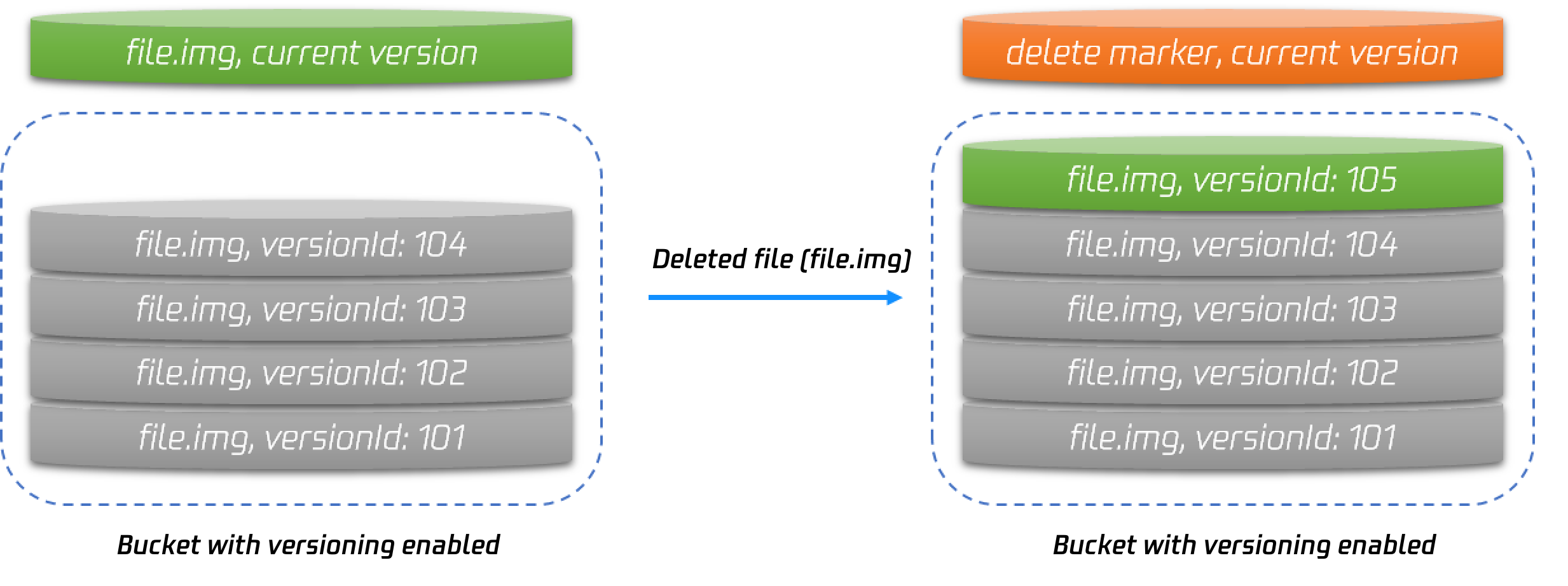
}
Execute this command will create a warehouse named my_cos_backup in the base_path directory of the corresponding bucket in COS.
The parameters are described as follows:
Parameter Name
Parameter Description
access_key_id,access_key_secret
Access key information can be created and obtained in Cloud API Key.
bucket
Bucket name. Note that do not include the appid.
app_id
APPID is one of the account identifiers assigned by the system after successfully applying for a Tencent Cloud account. It can be viewed in Tencent Cloud Console [Account Info].
region
The region where the bucket is located. For the abbreviation of COS region, please refer to regions and access endpoints.
base_path
Backup directory, such as /dir1/dir2/dir3. The initial / needs to be written. No / is needed at the end of the directory.
Notes:
If you use version 8.15.1 of the plug-in, note that the parameter name has added the prefix cos.client. For example, cos.client.access_key_id.
2. Create a snapshot file in the local repository. The snapshot file will be automatically uploaded to the specified repository in COS. You can execute the snapshot by using put _snapshot/repository name/snapshot name.
3. Similarly, register a repository on Tencent Cloud ES. The repository name may not be the same as that above.
PUT _snapshot/my_cos_backup
{
"type": "cos",
"settings": {
"access_key_id": "xxxxxx",
"access_key_secret": "xxxxxxx",
"bucket": "A bucket name without the appId suffix",
"region": "ap-guangzhou",
"compress": true,
"chunk_size": "500mb",
"base_path": "/yourbasepath",
"app_id": "xxxxxxx"
}
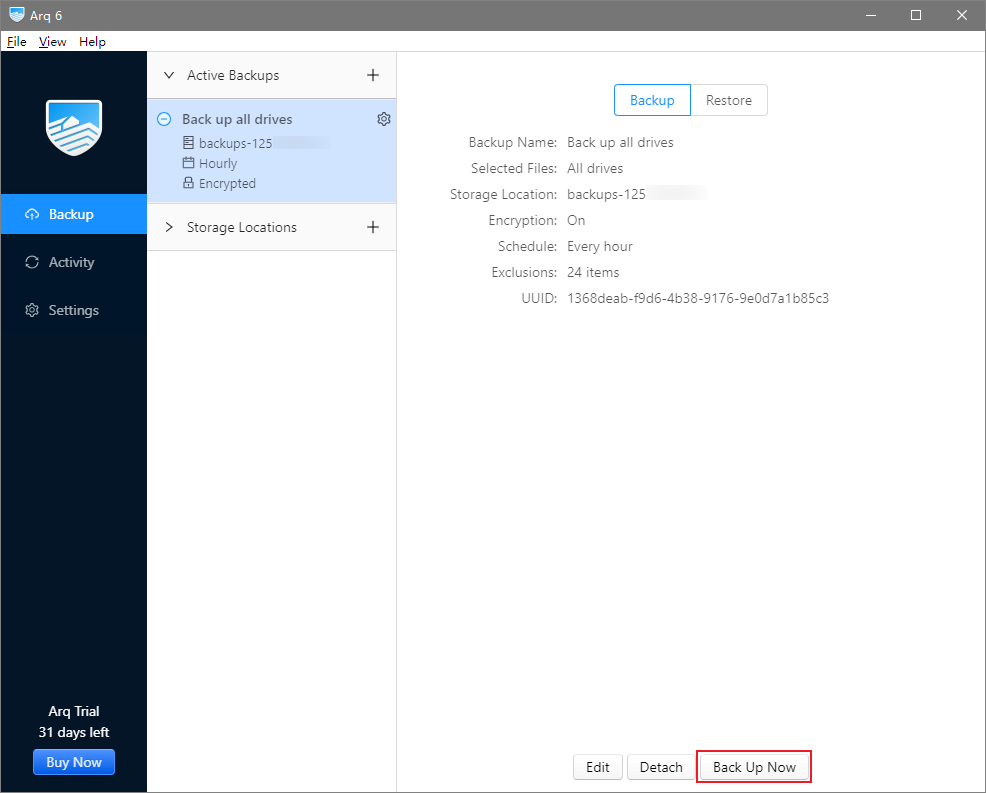
}
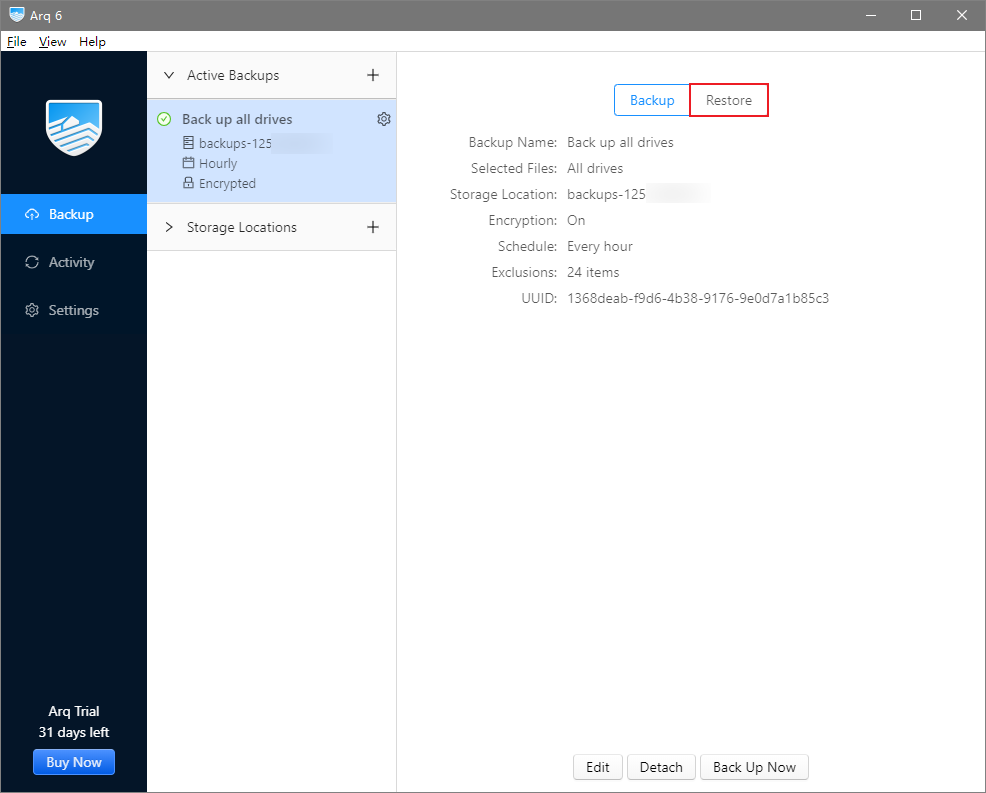
4. Perform recovery on Tencent Cloud ES. Run the following command to perform snapshot recovery.
POST _snapshot/repository name/snapshot name/_restore
Notes:
The name of the snapshot restored here is the name of the snapshot you created in the source cluster earlier.
","recentReleaseTime":"2025-04-17 18:26:55","slate":"[{\"id\":\"CPSU7UPTc4_k69IKi-6wt\",\"children\":[{\"text\":\"Overview\"}],\"nodeId\":\".E7.AE.80.E4.BB.8B\",\"type\":\"h2\"},{\"id\":\"2qJojhQPP_0LY5NNtl_ho\",\"children\":[{\"text\":\"Tencent Cloud Elasticsearch Service (ES) is a highly available, scalable, cloud-managed Elasticsearch service built on the open-source search engine Elasticsearch, including Kibana and common plugins, and integrating advanced features such as security, SQL, machine learning, alerts, and monitoring (X-Pack). With Tencent Cloud ES, you can quickly deploy, easily manage, and scale your cluster on demand, simplify complex operations and maintenance, and quickly create various services such as log analytics, anomaly monitoring, website search, enterprise search, and BI analysis. \"}],\"type\":\"p\"},{\"id\":\"NuKiAEaGjO0vfv9oVyIdH\",\"children\":[{\"text\":\"Tencent Cloud ES integrates the leading technological advantages of Tencent Cloud computing in areas such as computing, storage, and security. It also maintains the compatibility and openness of Elasticsearch itself. It has rich cluster management features as well as security, elasticity, and high availability features. At the same time, it also integrates official advanced commercial features (X-Pack). On the basis of being open-source, it adds features such as permission management, SQL, machine learning, and alarm. This helps you simplify basic Ops tasks such as cluster deployment and operational management, and focus more on the business itself.\"}],\"type\":\"p\"},{\"id\":\"NQnTKn--C7T6_uIMVdXUX\",\"children\":[{\"text\":\"Through Tencent Cloud ES, you can quickly build applications for massive data storage search and real-time log analysis, such as website search navigation, enterprise-level search, service log anomaly monitoring, clickstream analysis, etc.\"}],\"type\":\"p\"},{\"id\":\"TutMlQ3Si5JEfX4tQySON\",\"children\":[{\"text\":\"The usage scenarios between ES and COS are mainly reflected in data migration and data backup recovery. The principle is actually a process where COS is used for intermediate storage of source ES data, and then the stored data is asynchronously restored to the target ES cluster.\"}],\"type\":\"p\"},{\"id\":\"nf1S5uzRjnD9SEt_fRZyd\",\"children\":[{\"text\":\"Preparations\"}],\"nodeId\":\".E5.87.86.E5.A4.87.E5.B7.A5.E4.BD.9C\",\"type\":\"h2\"},{\"id\":\"RVp_QN5nTCO20tk41yV3m\",\"children\":[{\"text\":\"Create a \"},{\"text\":\"public-read/private-write\",\"b\":1},{\"text\":\" bucket. For details on how to create it, see \"},{\"type\":\"ref\",\"props\":{\"type\":\"link\",\"url\":\"https://www.tencentcloud.com/document/product/436/13309\"},\"children\":[{\"text\":\"Creating a Bucket\"}],\"id\":\"lHDnnQZljKfwd5Vm8YQ2d\"},{\"text\":\" document.\"}],\"type\":\"p\"},{\"id\":\"UVf99QUlUjj2hD-EKommT\",\"children\":[{\"id\":\"mUJngsoZchNg6C6H4HiPr\",\"children\":[{\"text\":\"Notes:\",\"type\":\"text\",\"b\":1,\"color\":\"#04C8DC\",\"id\":\"4RjrGaVYeGXSxakTYaGNf\"}],\"type\":\"p\"},{\"id\":\"GzETGUQHoM7iYXsE59RGG\",\"children\":[{\"text\":\"The region of the COS bucket must be the same as that of ES.\"}],\"type\":\"p\"}],\"type\":\"hint\",\"hintType\":\"alert\"},{\"id\":\"8oObe9RSx1ohG3UrYzCHj\",\"children\":[{\"text\":\"Installing the COS Plug-In\"}],\"nodeId\":\".E5.AE.89.E8.A3.85-cos-.E6.8F.92.E4.BB.B6\",\"type\":\"h2\"},{\"id\":\"2FzwV3r_rxoOOq8S3IMgS\",\"children\":[{\"text\":\"Tencent Cloud ES has these plug-ins internally integrated by default. If it is a user-built ES cluster and COS is required, then the COS plug-in corresponding to the user's ES version needs to be installed.\"}],\"type\":\"p\"},{\"id\":\"5NZH6cNkQGJ9KMZ-5ZuBr\",\"children\":[{\"text\":\"Features of COS Plug-In\"}],\"nodeId\":\"cos-.E6.8F.92.E4.BB.B6.E7.9A.84.E5.8A.9F.E8.83.BD\",\"type\":\"h3\"},{\"id\":\"MDZfcSl9GSbUGP_PSOu8j\",\"children\":[{\"text\":\"You can directly back up snapshot files from a user-built cluster to a COS bucket, and then perform recovery on the peer end.\"}],\"type\":\"p\"},{\"id\":\"tAk6qaK0GVl0AUDXiFoHx\",\"children\":[{\"text\":\"Download Plug-in\"}],\"nodeId\":\".E4.B8.8B.E8.BD.BD.E6.8F.92.E4.BB.B6\",\"type\":\"h3\"},{\"id\":\"1w_Rv0pnIMk6vJdcZD8Nt\",\"children\":[{\"text\":\"Go to \"},{\"id\":\"6JQhjVTLZmc5r0tDf-Rda\",\"children\":[{\"text\":\"Github\"}],\"type\":\"ref\",\"props\":{\"type\":\"link\",\"url\":\"https://github.com/tencentyun/elasticsearch-repository-cos\"},\"linkTitle\":\"https://github.com/tencentyun/elasticsearch-repository-cos\",\"linkTarget\":\"blank\"},{\"text\":\" to download the COS plug-in launched by Tencent Cloud ES. This practice takes the 7.2.0 version of the plug-in as an example. For other version differences, please see \"},{\"type\":\"ref\",\"props\":{\"type\":\"link\",\"url\":\"https://github.com/tencentyun/elasticsearch-repository-cos/releases\"},\"children\":[{\"text\":\"releases\"}],\"id\":\"S2QzRIdAcR4XZxVaLw4Pn\"},{\"text\":\".\"}],\"type\":\"p\"},{\"id\":\"5XkqI6QIoWzda60A9jd1j\",\"children\":[{\"text\":\"Plug-In Installation Workflow\"}],\"nodeId\":\".E6.8F.92.E4.BB.B6.E5.AE.89.E8.A3.85.E6.B5.81.E7.A8.8B\",\"type\":\"h3\"},{\"id\":\"T0K9ut4CyPa9kwWzxCjV-\",\"children\":[{\"text\":\"Retrieve the plug-in corresponding to the ES version. For example, version 7.2.0.\"}],\"type\":\"oli\",\"start\":true},{\"id\":\"XZ31EPeDzZee-H8Ilg_al\",\"children\":[{\"text\":\"Grant all privileges of the plugin file to the ES startup account elastic.\"}],\"type\":\"oli\",\"start\":false},{\"id\":\"Qx1oPyVkct-YoWhvjb-GD\",\"type\":\"p\",\"start\":false,\"children\":[{\"text\":\"\"},{\"id\":\"Mv6jh2_flnETayW4yqg2b\",\"children\":[{\"text\":\"\"}],\"type\":\"image\",\"inline\":true,\"alt\":\"\",\"url\":\"https://cloudcache.intl.tencent-cloud.com/cms/backend-cms/7d073057162c11ee9225525400088f3a.png\",\"naturalSize\":[1458,132],\"size\":[696,63]},{\"text\":\"\"}],\"indent\":1},{\"id\":\"RxN1MjKOS2iK6BzsEBCmn\",\"children\":[{\"text\":\"Switch to a regular user account, install the plugin, and restart the ES service. Note: Perform the operation on each node of the cluster. Execute the command as follows.\"}],\"type\":\"oli\",\"start\":false},{\"id\":\"Y7MsEDvoDtIKVw5OYhPGh\",\"children\":[{\"id\":\"TDDNM87OF4zpOdQLZCq7O\",\"children\":[{\"text\":\"bin/elasticsearch-plugin install file:///path/repository-cos.zip\"}],\"type\":\"code-line\"}],\"type\":\"code-block\",\"language\":\"bash\",\"indent\":1,\"autoWrap\":false},{\"id\":\"2VwFti7zS86ywCPld-px2\",\"children\":[{\"text\":\"As shown below:\"}],\"type\":\"p\",\"indent\":1},{\"id\":\"3IXyyouKhV0fBi7-lyd5W\",\"type\":\"p\",\"indent\":1,\"children\":[{\"text\":\"\"},{\"id\":\"3GKnHQ3x9_CyG9D_Fxs_-\",\"children\":[{\"text\":\"\"}],\"type\":\"image\",\"inline\":true,\"alt\":\"\",\"url\":\"https://cloudcache.intl.tencent-cloud.com/cms/backend-cms/7d1e7721162c11ee9225525400088f3a.png\",\"naturalSize\":[3288,636],\"size\":[696,134]},{\"text\":\"\"}]},{\"id\":\"yX0Woh1rzJD0o1osGqhHN\",\"children\":[{\"text\":\"After execution, you can use \"},{\"text\":\"get _cat/plugins\",\"code\":1},{\"text\":\" on kibana to confirm whether the installation is completed. If you get the following results, it indicates successful installation.\"}],\"type\":\"oli\",\"start\":false},{\"id\":\"KDWTnQ5DhGufEXsanye5L\",\"type\":\"p\",\"start\":false,\"children\":[{\"text\":\"\"},{\"id\":\"rnRbwW1N-ocmMjWFWhEnR\",\"children\":[{\"text\":\"\"}],\"type\":\"image\",\"inline\":true,\"alt\":\"\",\"url\":\"https://cloudcache.intl.tencent-cloud.com/cms/backend-cms/7d495dda162c11ee9225525400088f3a.png\",\"naturalSize\":[558,160],\"size\":[357,102]},{\"text\":\"\"}],\"indent\":1},{\"id\":\"FqDIS-NkrndCIBNq3-oaL\",\"children\":[{\"text\":\"Use COS to Achieve Data Migration From Self-Built ES to Tencent Cloud ES\"}],\"nodeId\":\".E4.BD.BF.E7.94.A8-cos-.E5.AE.9E.E7.8E.B0.E8.87.AA.E5.BB.BA-es-.E4.B8.8E.E8.85.BE.E8.AE.AF.E4.BA.91-es-.E7.9A.84.E6.95.B0.E6.8D.AE.E8.BF.81.E7.A7.BB\",\"type\":\"h2\"},{\"id\":\"uurDaKpL31tnWpZGbGLhS\",\"children\":[{\"text\":\"Register a COS Repository on a local cluster.\"}],\"type\":\"oli\",\"start\":true},{\"id\":\"pxTtmbQLDMy32yMnAgWVN\",\"children\":[{\"id\":\"GzNeZbecznlW3SloYEOXo\",\"children\":[{\"text\":\"PUT _snapshot/my_cos_backup\"}],\"type\":\"code-line\"},{\"id\":\"x-RaLUnPjQHbWvQ_YRUNn\",\"children\":[{\"text\":\"{\"}],\"type\":\"code-line\"},{\"id\":\"jsokDgsnV0r9a6jubMwun\",\"children\":[{\"text\":\" \\\"type\\\": \\\"cos\\\",\"}],\"type\":\"code-line\"},{\"id\":\"fHOVjBHxoyww5pPgSRPbL\",\"children\":[{\"text\":\" \\\"settings\\\": {\"}],\"type\":\"code-line\"},{\"id\":\"aHbxWq1zpOvYQUCDJeGvc\",\"children\":[{\"text\":\" \\\"access_key_id\\\": \\\"xxxxxx\\\",\"}],\"type\":\"code-line\"},{\"id\":\"TmIZNRTOkqFuGNQsyNqzj\",\"children\":[{\"text\":\" \\\"access_key_secret\\\": \\\"xxxxxxx\\\",\"}],\"type\":\"code-line\"},{\"id\":\"hXrj9fh-KBtcjfzizHXfU\",\"children\":[{\"text\":\" \\\"bucket\\\": \\\"A bucket name without the appId suffix\\\",\"}],\"type\":\"code-line\"},{\"id\":\"pcf3P8Ws0SbLHr_pCZBlJ\",\"children\":[{\"text\":\" \\\"region\\\": \\\"ap-guangzhou\\\",\"}],\"type\":\"code-line\"},{\"id\":\"3Jk-RhKy9SURiBPd15TAl\",\"children\":[{\"text\":\" \\\"compress\\\": true,\"}],\"type\":\"code-line\"},{\"id\":\"Ajwu-SyxY4S2RciGZOJw_\",\"children\":[{\"text\":\" \\\"chunk_size\\\": \\\"500mb\\\",\"}],\"type\":\"code-line\"},{\"id\":\"dPLDKIFmwUGtH4t7Fz3yg\",\"children\":[{\"text\":\" \\\"base_path\\\": \\\"/yourbasepath\\\",\"}],\"type\":\"code-line\"},{\"id\":\"dAYc0EBTFFwaS3uiUYBO5\",\"children\":[{\"text\":\" \\\"app_id\\\": \\\"xxxxxxx\\\" \"}],\"type\":\"code-line\"},{\"id\":\"xN85fm1zwyCmsWtk-RbvR\",\"children\":[{\"text\":\" }\"}],\"type\":\"code-line\"},{\"id\":\"zT6omEoKAk6C7N0pRrJTx\",\"children\":[{\"text\":\"}\"}],\"type\":\"code-line\"}],\"type\":\"code-block\",\"language\":\"bash\",\"indent\":1,\"autoWrap\":false},{\"id\":\"8wfUWT8hmbmVk3Pc6WQkT\",\"children\":[{\"text\":\"Execute this command will create a warehouse named my_cos_backup in the base_path directory of the corresponding bucket in COS.\"}],\"type\":\"p\",\"indent\":1},{\"id\":\"4v4OptnHgHyUK1ZV-ZMwn\",\"children\":[{\"text\":\"The parameters are described as follows:\"}],\"type\":\"p\",\"indent\":1},{\"id\":\"aF13dlGhzC8zlPV3WYWx3\",\"children\":[{\"id\":\"cOwo4YZqjHSkscefBP9XS\",\"children\":[{\"id\":\"-lwPQzUbdcZxe4RmwJFPz\",\"children\":[{\"id\":\"QlI34uwcS-HETMcUigvl0\",\"children\":[{\"text\":\"Parameter Name\"}],\"type\":\"p\"}],\"type\":\"cell\"},{\"id\":\"qF295KQkFc03p0Sn6YZtx\",\"children\":[{\"id\":\"6bvzAVaY-XLcsnuQe1Pwb\",\"children\":[{\"text\":\"Parameter Description\"}],\"type\":\"p\"}],\"type\":\"cell\"}],\"type\":\"row\"},{\"id\":\"BqnDFkjI5lEEKHV8XD4rr\",\"children\":[{\"id\":\"SaCRAwtr9ihDlqQm85NIz\",\"children\":[{\"id\":\"Hg-Yz78XVkkUNNTWRrqAK\",\"children\":[{\"text\":\"access_key_id,access_key_secret\"}],\"type\":\"p\"}],\"type\":\"cell\"},{\"id\":\"A5DS0RLIC3j8HrRxIPXX7\",\"children\":[{\"id\":\"-pslhIJHD-ZBRqpj8W2B3\",\"children\":[{\"text\":\"Access key information can be created and obtained in \"},{\"id\":\"gac7sai8-YaKEXfh9MGq2\",\"children\":[{\"text\":\"Cloud API Key\"}],\"type\":\"ref\",\"props\":{\"type\":\"link\",\"url\":\"https://console.tencentcloud.com/capi\"},\"linkTitle\":\"https://console.tencentcloud.com/capi\",\"linkTarget\":\"blank\"},{\"text\":\".\"}],\"type\":\"p\"}],\"type\":\"cell\"}],\"type\":\"row\"},{\"id\":\"a6kRG8S3E4deYqCKi9xWR\",\"children\":[{\"id\":\"e69aRCXbhfe9qvwrIXvaV\",\"children\":[{\"id\":\"a1eoH4LBmW0q9mmk6wC1l\",\"children\":[{\"text\":\"bucket\"}],\"type\":\"p\"}],\"type\":\"cell\"},{\"id\":\"nW-b3QuD-KLMJoZwpYMVt\",\"children\":[{\"id\":\"pCreh09wrGdLRtfbI0X2n\",\"children\":[{\"text\":\"Bucket name. Note that do not include the appid.\"}],\"type\":\"p\"}],\"type\":\"cell\"}],\"type\":\"row\"},{\"id\":\"6TpXlHua8aMEHb6R1fCn9\",\"children\":[{\"id\":\"hZR_hUAgcZA4YuxD5AuHD\",\"children\":[{\"id\":\"Rv6b9WVkXJ8X8uMU8vNED\",\"children\":[{\"text\":\"app_id\"}],\"type\":\"p\"}],\"type\":\"cell\"},{\"id\":\"fmlNB-61xWh9s09H204C6\",\"children\":[{\"id\":\"xh0JbYkA9VkZVdc6Gwrgb\",\"children\":[{\"text\":\"APPID is one of the account identifiers assigned by the system after successfully applying for a Tencent Cloud account. It can be viewed in \"},{\"id\":\"BWXWnaGm5FmsBboVHMajm\",\"children\":[{\"text\":\"Tencent Cloud Console\"}],\"type\":\"ref\",\"props\":{\"type\":\"link\",\"url\":\"https://console.tencentcloud.com/developer\"},\"linkTitle\":\"https://console.tencentcloud.com/developer\",\"linkTarget\":\"blank\"},{\"text\":\" [Account Info].\"}],\"type\":\"p\"}],\"type\":\"cell\"}],\"type\":\"row\"},{\"id\":\"zMPyro_CGe8OpJNYn7rvs\",\"children\":[{\"id\":\"DrhPuy1A91fJlHYCQarQJ\",\"children\":[{\"id\":\"m1gIcvfacv-sMGJ4bYN-C\",\"children\":[{\"text\":\"region\"}],\"type\":\"p\"}],\"type\":\"cell\"},{\"id\":\"lAFpP3Y7xPReJP_8kz_tE\",\"children\":[{\"id\":\"9lpg19el4RBOOyV3XPp8a\",\"children\":[{\"text\":\"The region where the bucket is located. For the abbreviation of COS region, please refer to \"},{\"type\":\"ref\",\"props\":{\"type\":\"link\",\"url\":\"https://www.tencentcloud.com/document/product/436/6224\"},\"children\":[{\"text\":\"regions and access endpoints\"}],\"id\":\"cc1P2KxL7pFajc0HMI-Bk\"},{\"text\":\".\"}],\"type\":\"p\"}],\"type\":\"cell\"}],\"type\":\"row\"},{\"id\":\"oBknlG6_A5lv8TDpZb-hh\",\"children\":[{\"id\":\"yGon4ca3uOh0BZj_NfZBq\",\"children\":[{\"id\":\"1yriSooCM4KYiYM7LmZIY\",\"children\":[{\"text\":\"base_path\"}],\"type\":\"p\"}],\"type\":\"cell\"},{\"id\":\"gioWRAAtfr0ygBDihWRTS\",\"children\":[{\"id\":\"4dHIEpwa-ph8iH-y0vA0t\",\"children\":[{\"text\":\"Backup directory, such as /dir1/dir2/dir3. The initial \"},{\"text\":\"/\",\"code\":1},{\"text\":\" needs to be written. No \"},{\"text\":\"/\",\"code\":1},{\"text\":\" is needed at the end of the directory.\"}],\"type\":\"p\"}],\"type\":\"cell\"}],\"type\":\"row\"}],\"type\":\"table\",\"rowHeader\":true,\"columnHeader\":false,\"widths\":[23,77],\"indent\":1,\"widthMode\":\"percentage\"},{\"type\":\"hint\",\"hintType\":\"alert\",\"children\":[{\"type\":\"p\",\"children\":[{\"b\":1,\"text\":\"Notes:\",\"color\":\"#04C8DC\"}],\"id\":\"h-cnh_MqYyWnyzYslNg8k\"},{\"type\":\"p\",\"children\":[{\"text\":\"If you use version 8.15.1 of the plug-in, note that the parameter name has added the prefix cos.client. For example, cos.client.access_key_id.\"}],\"id\":\"DVU87bayAzsLDVsopA6T5\"}],\"id\":\"h9S38teZH6PUHj9Lhrmpc\",\"indent\":1},{\"id\":\"kZEhSuQk2IAz1HnRDV9As\",\"children\":[{\"text\":\"Create a snapshot file in the local repository. The snapshot file will be automatically uploaded to the specified repository in COS. You can execute the snapshot by using \"},{\"text\":\"put _snapshot/repository name/snapshot name\",\"code\":1},{\"text\":\".\"}],\"type\":\"oli\",\"start\":false},{\"id\":\"rbmyuRchMSXEaqHXD0IGq\",\"children\":[{\"text\":\"Similarly, register a repository on Tencent Cloud ES. The repository name may not be the same as that above.\"}],\"type\":\"oli\",\"start\":false},{\"id\":\"csGx2VepWhzMn0cyyyV33\",\"children\":[{\"id\":\"tYsGQ4yj5bjkZ-6S6LQom\",\"children\":[{\"text\":\"PUT _snapshot/my_cos_backup\"}],\"type\":\"code-line\"},{\"id\":\"dIXgyZGWgY2R8IBMe_DHJ\",\"children\":[{\"text\":\"{\"}],\"type\":\"code-line\"},{\"id\":\"OwqOp9g5jZ9JDtLtUlEdB\",\"children\":[{\"text\":\" \\\"type\\\": \\\"cos\\\",\"}],\"type\":\"code-line\"},{\"id\":\"rLUGfHoGzmIVPs65TtmbP\",\"children\":[{\"text\":\" \\\"settings\\\": {\"}],\"type\":\"code-line\"},{\"id\":\"WgKXYSW8Ta2wKV_8NI9s2\",\"children\":[{\"text\":\" \\\"access_key_id\\\": \\\"xxxxxx\\\",\"}],\"type\":\"code-line\"},{\"id\":\"IO19c8a56g-Sq_EdRwo8Z\",\"children\":[{\"text\":\" \\\"access_key_secret\\\": \\\"xxxxxxx\\\",\"}],\"type\":\"code-line\"},{\"id\":\"ZyLA963Y7XoPWSUotIs9r\",\"children\":[{\"text\":\" \\\"bucket\\\": \\\"A bucket name without the appId suffix\\\",\"}],\"type\":\"code-line\"},{\"id\":\"29GvR7FGQpFszqYE7SzyH\",\"children\":[{\"text\":\" \\\"region\\\": \\\"ap-guangzhou\\\",\"}],\"type\":\"code-line\"},{\"id\":\"9W2JUZI4_T2nX2Jx_TFEY\",\"children\":[{\"text\":\" \\\"compress\\\": true,\"}],\"type\":\"code-line\"},{\"id\":\"uFjFtsi4TvDFIFSS17ZAp\",\"children\":[{\"text\":\" \\\"chunk_size\\\": \\\"500mb\\\",\"}],\"type\":\"code-line\"},{\"id\":\"1O723bOL2TwK7DlMSMbqV\",\"children\":[{\"text\":\" \\\"base_path\\\": \\\"/yourbasepath\\\",\"}],\"type\":\"code-line\"},{\"id\":\"yfD7Z1OvCnUm816nFpKm2\",\"children\":[{\"text\":\" \\\"app_id\\\": \\\"xxxxxxx\\\" \"}],\"type\":\"code-line\"},{\"id\":\"kmTht7JqEb8hWe_hr6R1B\",\"children\":[{\"text\":\" }\"}],\"type\":\"code-line\"},{\"id\":\"jOtQyCs2Bxa_7Gha3scEP\",\"children\":[{\"text\":\"}\"}],\"type\":\"code-line\"}],\"type\":\"code-block\",\"language\":\"bash\",\"indent\":1,\"autoWrap\":false},{\"id\":\"C83pRHW_UJvVKs6kpUNry\",\"children\":[{\"text\":\"Perform recovery on Tencent Cloud ES. Run the following command to perform snapshot recovery.\"}],\"type\":\"oli\",\"start\":false},{\"id\":\"9Ih0a5F_aG1cMPu096nIC\",\"children\":[{\"id\":\"tOY4zeCNt6w32hpiv8LFo\",\"children\":[{\"text\":\"POST _snapshot/repository name/snapshot name/_restore\"}],\"type\":\"code-line\"}],\"type\":\"code-block\",\"language\":\"bash\",\"indent\":1,\"autoWrap\":false},{\"id\":\"XQPTmwUDBOAi6oK0MEB9A\",\"children\":[{\"id\":\"poUioUG6S2neGLVNwVKvm\",\"children\":[{\"text\":\"Notes:\",\"type\":\"text\",\"b\":1,\"color\":\"#04C8DC\",\"id\":\"KFmHfqYLsY1M6H9nyTvOj\"}],\"type\":\"p\"},{\"id\":\"oy2wLX3s7jcQt5KnsdEAp\",\"children\":[{\"text\":\"The name of the snapshot restored here is the name of the snapshot you created in the source cluster earlier.\"}],\"type\":\"p\"}],\"type\":\"hint\",\"hintType\":\"alert\",\"indent\":1}]"}},"72694":{"categoryId":436,"weight":49,"type":"page","extension":"","pid":9511,"id":72694,"lang":"en","title":"COS Cost Optimization Solutions","pdfUrl":"","docType":"default","children":[],"firstReleaseTime":"2025-08-22 18:41:49","recentReleaseTime":"2025-08-22 18:41:49","content":{"title":"COS Cost Optimization Solutions","body":"
With the increasing number of enterprises migrating to the cloud, cost control has become a key concern. Business growth often results in massive storage demands. How can enterprises optimize costs when storing data in the cloud to reduce operational burdens?
Before optimizing costs, it is important to understand the cost composition of Tencent Cloud Object Storage (COS). The main billing items of object storage include five categories: storage capacity fees, data transfer fees, request fees, data retrieval fees, and management function fees.

For most enterprises, storage capacity fees and data transfer fees constitute the majority of cloud storage costs. Regarding storage fees, Tencent Cloud Object Storage offers multiple storage classes, such as Standard Storage, Infrequent Access Storage, Archive Storage, and Deep Archive Storage, with different product specifications and pricing. Enterprises can select the storage class that balances cost-effectiveness with their business requirements. For traffic fees, there are various types including external internet egress traffic, CDN origin pull traffic, cross-region replication traffic, and global acceleration traffic. Different business models result in different compositions of traffic fees. For example, an e-commerce website with a large volume of image distribution will typically incur greater costs from CDN origin pull traffic.

Optimization 1: Choose the suitable storage type and business region

Selecting the right storage class and business region based on your business model can significantly optimize enterprise storage costs.
Object storage offers a diverse range of storage types for enterprises, allowing them to choose different storage types based on their performance, data durability, and business availability requirements, while incurring varying costs. Standard Storage has relatively higher storage fees but provides the lowest read latency. Infrequent Access Storage, Archive Storage, and Deep Archive Storage have lower storage capacity fees, but when downloading data, additional data retrieval fees are incurred, and longer retrieval times are required. Therefore, these storage types are more suitable for scenarios with infrequent data access.
The following table illustrates the storage costs for storing 100 TB of business data in the Guangzhou region for one month using different storage types:
Metric
STANDARD
Infrequent Access Storage
ARCHIVE
DEEP ARCHIVE
MAZ_STANDARD
MAZ_STANDARD_IA
Storage Price (USD/GB/month)
0.016
0.01
0.004
0.0016
0.0195
0.0132
Traffic Price (USD/GB)
0.1
0.1
0.1
0.1
0.1
0.1
Request Unit Price (USD per 10,000 requests)
0.002
0.01
0.002
Read/write Requests: 0.07 Standard retrieval Request: 1
0.002
0.01
Data Retrieval Price (USD/GB)
0
0.002
Standard Retrieval:0.01
Standard Retrieval: 0.02
0
0.002
Total Cost (100TB storage + no downloads)
1638.40
1024.00
409.60
163.84
1996.80
1351.68
Total cost (100TB storage + 100TB download + 1 million requests + 100TB retrieval)
11638.60
11229.80
11433.80
12318.84
11997.00
11557.48
Total cost (100TB storage + 500TB download + 1 million requests + 500TB retrieval)
51638.60
52049.00
55529.80
60510.84
51997.00
52376.68
Note:
To learn about the unit prices for other regions and storage types, please refer to the COS Pricing page.
As seen in the table, if the business data download volume is low, choosing Archive Storage or even Deep Archive Storage can effectively reduce storage costs, with the coldest Deep Archive Storage saving up to 90% of storage fees compared to Standard Storage. However, if the business data requires frequent downloads, the retrieval fees of Infrequent Access Storage, Archive Storage, and Deep Archive Storage will result in additional cost overheads, leading to higher overall expenses.
In specific business scenarios, we recommend:
1. Frequent read-write scenarios: For businesses with more reads than writes, such as UGC scenarios and e-commerce images, Standard Storage can be used. If the business requires high availability and data durability, consider using Multi-AZ Standard Storage.
2. Low-frequency read scenarios (once a month): For businesses such as log data analysis and cloud storage data, where the read frequency is low but high performance is required during reads, Infrequent Access Storage can be used. For businesses with high requirements for availability and data durability, Infrequent Access Storage (multi-AZ) is recommended.
3. Very infrequent read scenarios (once every three months): For businesses such as video surveillance and log data archiving, where the read frequency is extremely low and read performance requirements are minimal, Archive Storage can be used.
4. Infrequent access scenarios (accessed once every six months): For businesses such as medical imaging and archival materials that only require long-term backups and have virtually no demand for read performance, Deep Archive Storage can be used.
Additionally, when selecting different storage types, we recommend that enterprises pay attention to the minimum storage duration and minimum storage unit restrictions for some storage types, as well as the performance differences between them. The following table provides a simple comparison.
Comparison Item
STANDARD
Infrequent Access Storage
ARCHIVE
DEEP ARCHIVE
MAZ_STANDARD
MAZ_STANDARD_IA
Time to First Byte (TTFB)
Milliseconds
Milliseconds
Minimum 1-minute recovery time.
Restore within a minimum of 12 hours.
Milliseconds
Milliseconds
Minimum Storage Unit
No limit
64KB
64KB
64KB
No limit
No limit
Minimum Storage Time
No limit
30 days
90 days
180 days
No limit
30 days
Data durability
Eleven nines
Eleven nines
Eleven nines
Eleven nines
Twelve nines
Twelve nines
Designing for availability in business operations.
99.95%
99.95%
99.95%
99.95%
99.995%
99.995%
Note:
Minimum storage duration: The shortest time a file must be stored in a specific storage type. If the actual storage time is shorter than the minimum duration, the fee will be calculated based on the minimum duration. For example, if a file in Infrequent Access Storage is stored for only 1 day and then deleted, the fee will still be calculated based on a 30-day storage period, as the minimum storage duration for Infrequent Access Storage is 30 days.
Minimum Storage Unit: The minimum file capacity required when a file is stored in a specific storage type. If the file capacity does not meet the minimum requirement, it will be calculated based on the minimum file capacity. For example, Infrequent Access Storage requires a minimum of 64KB. If a file in this storage type only occupies 1KB, the fee will still be calculated based on 64KB.

Optimization 2: Analyze access patterns and implement data tiering

1. Regularly analyze data access patterns using inventory and access log features

Analyzing data access patterns can provide data analytics support for selecting a reasonable storage type. Tencent Cloud Object Storage (COS) offers inventory and access log features, which record file metadata information and file access records, respectively, and transfer this information to the user's storage bucket.
Note:
For a detailed introduction to the inventory feature, see Inventory Feature Overview.
For a detailed introduction to the access log management feature, please refer to Log Management Overview.
Object Storage offers the COS Select feature, which allows you to search the contents of files. If you have generated a large number of inventory files or log records, you can also purchase an Elastic Map Reduce cluster and set up a Presto cluster for data analysis.
Note:
For an overview of the COS Select feature, see Select Overview.
For information on using EMR for analysis, please refer to Analyzing Data in COS with Presto.
Taking the example of retrieving and analyzing data from an inventory file, once the inventory report is delivered to the specified bucket, you can access the console to analyze the designated report. The analysis operation guide is as follows:
Note:
For instructions on generating inventory reports, please refer to Enabling Inventory Feature
The console only supports searching for files smaller than 128MB. If the inventory report has a large capacity or a high number of reports, you can opt for using tools, SDKs, or APIs to make the call.
1. Log in to the COS Console.
2. Click the name of the bucket you wish to configure to enter the bucket list page.
3. Locate the corresponding report list, and in the Operation column on the right, select More > Retrieve.
4. On the object retrieval page, configure the corresponding input parameters, enter the retrieval statement, and click Run SQL to view the retrieval results on the results card page.
Here are some common retrieval statements for inventory reports:
Query the number of files for a specific storage type on a particular day:
select count(*) from cosobject s where s._7 = <storage_class>
select count(*) from cosobject s where s._7 = 'Standard'
Query the storage capacity in MB for a specific storage type on a particular day:
select SUM(CAST(s._4 AS FLOAT))/1024/1024 from cosobject s where s._7 = <storage_class>
select SUM(CAST(s._4 AS FLOAT))/1024/1024 from cosobject s where s._7 = 'Standard'
Query the number of files smaller than 64KB for a specific storage type:
select count(*) from cosobject s where s._7 = <storage_class> and CAST(s._4 AS FLOAT) < <SIZE>
select count(*) from cosobject s where s._7 = 'Standard_IA' and s._4 < 64*1024
Query the number of files with cross-region replication failures within the bucket:
select count(*) from cosobject s where s._9 = 'Failed'
Note:
The inventory report does not include header information, so you can only search by entering the corresponding field's serial number. The header and serial number correspondence information for the inventory report is as follows:
Appid
Bucket
Key
Size
LastModifiedDate
ETag
StorageClass
IsMultipartUploaded
ReplicationStatus
s._1
s._2
s._3
s._4
s._5
s._6
s._7
s._8
s._9

2. Transition data using lifecycle policies and batch processing

During business development, data access patterns are constantly changing. By periodically analyzing data access patterns using inventory and access log features, you can "cool down" business data based on the analysis report.
For most data, the access frequency tends to decrease as the storage duration increases. Therefore, enterprises need to adjust their data storage types based on the changing access patterns of their business data to achieve optimal cost control.
Object storage offers a lifecycle feature that helps enterprises periodically transition storage types. Enterprises can analyze their business data access patterns using inventory and access logs, and establish reasonable lifecycle transition rules based on these access patterns.
Taking a customer from a community platform as an example, they use object storage services to store user-uploaded image data. Generally, image data is frequently accessed shortly after being uploaded, and after some time, most data gradually "cools down," with access frequency decreasing. Assuming that for this customer, the access frequency of most image data drops below once per month after 90 days and is virtually not accessed after 365 days, we can compare the cost scenarios when setting a lifecycle policy and not setting a lifecycle policy:
Comparison Item
Use Standard Storage only.
Use Standard Storage for hot data, and transition to Infrequent Access Storage after 90 days.
Utilize Standard Storage for hot data, transition to Infrequent Access Storage after 90 days, and move to Archive Storage after 365 days.
Storage unit price (USD/GB/month, using Guangzhou region as an example)
Standard Storage: 0.016
Infrequent Access Storage: 0.01
Standard Storage: 0.016
Infrequent Access Storage: 0.01
Archive Storage: 0.004
Storage Time
Twenty-four months
Twenty-four months
(3 months of Standard Storage + 21 months of Infrequent Access Storage)
Twenty-four months
(3 months of Standard Storage + 9 months of Infrequent Access Storage + 12 months of Archive Storage)
Total Storage Fees (USD)
39321.60
26419.20
19046.40
As observed, using lifecycle rules to manage objects in storage buckets can substantially reduce data storage costs. For long-term data storage, properly configuring lifecycle rules can help businesses reduce storage costs by more than 50%.
In addition to managing the storage type of business data, the lifecycle feature can also be used to manage file fragments and historical version files in storage buckets. File fragments are incomplete file chunks generated when the transmission of large files fails due to unexpected interruptions, such as network disconnections. If there are numerous file fragments in the business data, you can use lifecycle rules to delete expired fragments. Historical version files are old file information generated after enabling version control. These files can be used for data recovery and rollback in case of accidental deletion but will occupy storage space. Businesses can also set an expiration time for deleting historical version files that are no longer in use, achieving a balance between data security and cost.
Refer to Setting Lifecycle to add rules and enable Manage Historical Version Files for downgrading or deleting historical version files. Select Delete Fragments and set an expiration time to clean up any potential file fragments.
For specific businesses that require a one-time conversion of a large number of files to colder storage types without fixed rules (such as specified prefixes or tags), users can utilize the COS Batch Processing (Batch) feature. This feature allows for batch replication of data to other storage types. Additionally, you can add object tags to your business data to set lifecycle rules for batch deletion. The operation steps are as follows:
1. Export the list of files pending processing and consolidate them into a CSV format file.
2. Create a COSBatch bulk processing task and import the file list.
3. Initiate a batch processing task and wait for its completion.
For detailed instructions, refer to Batch Processing.

Conduct a cost review.

Cost optimization should be implemented throughout the entire business process, not just during the initial cloud migration planning. Businesses need to periodically review their costs. On the one hand, as the business grows, storage demands and data access patterns are constantly changing. On the other hand, Tencent Cloud Object Storage is committed to providing users with lower-cost storage services to help reduce costs and increase efficiency. Therefore, conducting regular cost reviews and planning the cloud storage architecture according to business needs is beneficial for reducing storage costs.
In addition, you can also:
1. Go to the Bill Download page in the Billing Center to download your Tencent Cloud billing statement and understand your cloud storage usage details. Analyze your cloud storage consumption and optimize it accordingly.
2. Follow the Tencent Cloud Storage WeChat Official Account or visit the Object Storage Console Overview page to stay informed about new product releases and cost optimization-related updates.
","recentReleaseTime":"2025-08-22 10:41:49","slate":"[{\"type\":\"p\",\"children\":[{\"text\":\"With the increasing number of enterprises migrating to the cloud, cost control has become a key concern. Business growth often results in massive storage demands. How can enterprises optimize costs when storing data in the cloud to reduce operational burdens?\"}],\"id\":\"9kVpmS3NC4BGpGp8pZu3F\"},{\"type\":\"p\",\"children\":[{\"text\":\"Before optimizing costs, it is important to understand the cost composition of Tencent Cloud Object Storage (COS). The main billing items of object storage include five categories: storage capacity fees, data transfer fees, request fees, data retrieval fees, and management function fees.\"}],\"id\":\"4fevWJu3bvyhWRiliHzYd\"},{\"type\":\"p\",\"children\":[{\"text\":\"\"}],\"id\":\"A8nTnMsk9Jno9GeVz7KZD\"},{\"type\":\"p\",\"children\":[{\"text\":\"For most enterprises, storage capacity fees and data transfer fees constitute the majority of cloud storage costs. Regarding \"},{\"text\":\"storage fees\",\"b\":1},{\"text\":\", Tencent Cloud Object Storage offers multiple storage classes, such as Standard Storage, Infrequent Access Storage, Archive Storage, and Deep Archive Storage, with different product specifications and pricing. Enterprises can select the storage class that balances cost-effectiveness with their business requirements. For \"},{\"text\":\"traffic fees\",\"b\":1},{\"text\":\", there are various types including external internet egress traffic, CDN origin pull traffic, cross-region replication traffic, and global acceleration traffic. Different business models result in different compositions of traffic fees. For example, an e-commerce website with a large volume of image distribution will typically incur greater costs from CDN origin pull traffic.\"}],\"id\":\"82aLay4CNOjQ3QOSP9QY6\"},{\"type\":\"h2\",\"children\":[{\"text\":\"Optimization 1: Choose the suitable storage type and business region\"}],\"id\":\"KdoM1gy8VosSvvJZhJWdI\",\"nodeId\":\"1f226954-7317-47fb-8f05-af0cbd24e7ff\"},{\"type\":\"p\",\"children\":[{\"text\":\"Selecting the right storage class and business region based on your business model can significantly optimize enterprise storage costs.\"}],\"id\":\"jG_MOVcS36_n0XETgGp5W\"},{\"type\":\"p\",\"children\":[{\"text\":\"Object storage offers a diverse range of storage types for enterprises, allowing them to choose different storage types based on their performance, data durability, and business availability requirements, while incurring varying costs. Standard Storage has relatively higher storage fees but provides the lowest read latency. Infrequent Access Storage, Archive Storage, and Deep Archive Storage have lower storage capacity fees, but when downloading data, additional data retrieval fees are incurred, and longer retrieval times are required. Therefore, these storage types are more suitable for scenarios with infrequent data access.\"}],\"id\":\"gjp0ylmToPQnMIG4KY-yc\"},{\"type\":\"p\",\"children\":[{\"text\":\"The following table illustrates the storage costs for storing 100 TB of business data in the Guangzhou region for one month using different storage types:\"}],\"id\":\"jk-wajCcOVfiVSk8UHU1l\"},{\"type\":\"table\",\"rowHeader\":true,\"children\":[{\"type\":\"row\",\"children\":[{\"type\":\"cell\",\"children\":[{\"type\":\"p\",\"children\":[{\"text\":\"Metric\"}],\"id\":\"8xe6gtVL4LEDF4UUhux0s\"}],\"id\":\"YxoQILPDC7hCo7YPKSE9w\"},{\"type\":\"cell\",\"children\":[{\"type\":\"p\",\"children\":[{\"text\":\"STANDARD\"}],\"id\":\"1JSaKWqOHmn_z9g7Mxpcm\"}],\"id\":\"7fADbnh560zMz_PSD51uK\"},{\"type\":\"cell\",\"children\":[{\"type\":\"p\",\"children\":[{\"text\":\"Infrequent Access Storage\"}],\"id\":\"uO-3iB4J0rch6CeypgxF5\"}],\"id\":\"qQ_KNXW-_hJmVK4ZJPyS_\"},{\"type\":\"cell\",\"children\":[{\"type\":\"p\",\"children\":[{\"text\":\"ARCHIVE\"}],\"id\":\"U17OUd5efbvWVgBtsCxAm\"}],\"id\":\"cqafLCf56wKeFjNaJGELW\"},{\"type\":\"cell\",\"children\":[{\"type\":\"p\",\"children\":[{\"text\":\"DEEP ARCHIVE\"}],\"id\":\"0jyOaFTnJrqT9maFhZHTb\"}],\"id\":\"fIT9ZY4E1A-LTn5LiutMO\"},{\"type\":\"cell\",\"children\":[{\"type\":\"p\",\"children\":[{\"text\":\"MAZ_STANDARD\"}],\"id\":\"p5RYitspacvxElhqWUvQo\"}],\"id\":\"48e_b-oi92aqCpuckEshn\"},{\"type\":\"cell\",\"children\":[{\"type\":\"p\",\"children\":[{\"text\":\"MAZ_STANDARD_IA\"}],\"id\":\"yigLHlI5X8S8jeWKT5ssc\"}],\"id\":\"uUzVsAc_kFtc6FVBUwb9c\"}],\"id\":\"mPxXNvW6lHntugy87bGeZ\"},{\"type\":\"row\",\"children\":[{\"type\":\"cell\",\"children\":[{\"type\":\"p\",\"children\":[{\"text\":\"Storage Price (USD/GB/month)\"}],\"id\":\"4FohqrIInFNllnGMj2pf6\"}],\"id\":\"2jvWAm_SWD6cqjPjEVfYA\"},{\"type\":\"cell\",\"children\":[{\"type\":\"p\",\"children\":[{\"text\":\"0.016\"}],\"id\":\"ytA5TyKArZlzxwCRg-6S4\"}],\"id\":\"XNoCqqGOv2hU1feZzBifj\"},{\"type\":\"cell\",\"children\":[{\"type\":\"p\",\"children\":[{\"text\":\"0.01\"}],\"id\":\"7Gm6zjr9vDxyFfGSRg71o\"}],\"id\":\"IZT25WZucNiM4L1eIlNk-\"},{\"type\":\"cell\",\"children\":[{\"type\":\"p\",\"children\":[{\"text\":\"0.004\"}],\"id\":\"01Yky_fuu0EWmgo-Yi__o\"}],\"id\":\"mEgQw-RdDdrfjTaw1E4ze\"},{\"type\":\"cell\",\"children\":[{\"type\":\"p\",\"children\":[{\"text\":\"0.0016\"}],\"id\":\"HAoxs8K7ETDR5sYhwQQMv\"}],\"id\":\"yoyB4-_zUg3JpNGW4k5m7\"},{\"type\":\"cell\",\"children\":[{\"type\":\"p\",\"children\":[{\"text\":\"0.0195\"}],\"id\":\"-STEueEJ1m0itD3CbS8op\"}],\"id\":\"yZV_my0He7YiXBPoj8bb4\"},{\"type\":\"cell\",\"children\":[{\"type\":\"p\",\"children\":[{\"text\":\"0.0132\"}],\"id\":\"vBCGe38WyvPGuE7arvQTy\"}],\"id\":\"xk2lqbLr19xNrbCpoyJzK\"}],\"id\":\"V6jMEmBqO5uAg634-I9rh\"},{\"type\":\"row\",\"children\":[{\"type\":\"cell\",\"children\":[{\"type\":\"p\",\"children\":[{\"text\":\"Traffic Price (USD/GB)\"}],\"id\":\"YHwYXJbrIIrUvfRt6ZK7S\"}],\"id\":\"9IapkUS5s1GwXqHXHBy-t\"},{\"type\":\"cell\",\"children\":[{\"type\":\"p\",\"children\":[{\"text\":\"0.1\"}],\"id\":\"6ehBC8EQq7F-LZnrz_TYd\"}],\"id\":\"nHLjTP8K12hG-UNXZVx_9\"},{\"type\":\"cell\",\"children\":[{\"type\":\"p\",\"children\":[{\"text\":\"0.1\"}],\"id\":\"swotfZhWlQ6NdgjOE2DET\"}],\"id\":\"fvpnT5cZznY5iAkQMASk1\"},{\"type\":\"cell\",\"children\":[{\"type\":\"p\",\"children\":[{\"text\":\"0.1\"}],\"id\":\"US-4FTw6vLQnjmjRSseKh\"}],\"id\":\"yTDs0CBNB8L3t4KJ-BMkq\"},{\"type\":\"cell\",\"children\":[{\"type\":\"p\",\"children\":[{\"text\":\"0.1\"}],\"id\":\"PG5ALTedvE31krsykhmuy\"}],\"id\":\"VW1lH933FIELASCck3Bqq\"},{\"type\":\"cell\",\"children\":[{\"type\":\"p\",\"children\":[{\"text\":\"0.1\"}],\"id\":\"yTF_-1kLhb-FAB-jQby2-\"}],\"id\":\"cCXiheNJrIu4sqc11ktvb\"},{\"type\":\"cell\",\"children\":[{\"type\":\"p\",\"children\":[{\"text\":\"0.1\"}],\"id\":\"aKh9KG96MrpCnI4spl1c1\"}],\"id\":\"AMEfP-DH4Okslox6dJDW1\"}],\"id\":\"cXezGlFxQdprTUF4Jn-eY\"},{\"type\":\"row\",\"children\":[{\"type\":\"cell\",\"children\":[{\"type\":\"p\",\"children\":[{\"text\":\"Request Unit Price (USD per 10,000 requests)\"}],\"id\":\"LfGZhApW1OFOA1rOAYlr9\"}],\"id\":\"E-ogk_4HRQLh927cbLZo3\"},{\"type\":\"cell\",\"children\":[{\"type\":\"p\",\"children\":[{\"text\":\"0.002\"}],\"id\":\"IPna7bBF9aWirXVxOUkeo\"}],\"id\":\"DzQYaZwkP7cFtLx_dy0aX\"},{\"type\":\"cell\",\"children\":[{\"type\":\"p\",\"children\":[{\"text\":\"0.01\"}],\"id\":\"r6PWUE8snA7vYhBzBRi7s\"}],\"id\":\"wt6Q06M2GCFRQQknyNmCX\"},{\"type\":\"cell\",\"children\":[{\"type\":\"p\",\"children\":[{\"text\":\"0.002\"}],\"id\":\"UMzhjUB27F0KHBIzAsh4E\"}],\"id\":\"11iP6cM7vmSOSgyIBRjGe\"},{\"type\":\"cell\",\"children\":[{\"type\":\"p\",\"children\":[{\"text\":\"Read/write Requests: 0.07 Standard retrieval Request: 1\"}],\"id\":\"ERFEQeoV4VfNSLvfP3dDA\"}],\"id\":\"57WUXUiRQfRm_xaWfdv6H\"},{\"type\":\"cell\",\"children\":[{\"type\":\"p\",\"children\":[{\"text\":\"0.002\"}],\"id\":\"IO3m6WdiC3CEQmphxfNme\"}],\"id\":\"UcFiHh6WndM_gIpIq3r0w\"},{\"type\":\"cell\",\"children\":[{\"type\":\"p\",\"children\":[{\"text\":\"0.01\"}],\"id\":\"fAJHMj7IyNDqzOhDjH4YZ\"}],\"id\":\"rkbBSiVgj21x_jCSbe1Y3\"}],\"id\":\"d4x5Sk7soxi2z0xZTibf7\"},{\"type\":\"row\",\"children\":[{\"type\":\"cell\",\"children\":[{\"type\":\"p\",\"children\":[{\"text\":\"Data Retrieval Price (USD/GB)\"}],\"id\":\"Ny6K_TkUYByNmEre8IFKg\"}],\"id\":\"fUHHy4CZbyqO15qgFQhht\"},{\"type\":\"cell\",\"children\":[{\"type\":\"p\",\"children\":[{\"text\":\"0\"}],\"id\":\"HQrzdFMJIM761_HXX-Dpa\"}],\"id\":\"QRfd45y99Q_G8Y3ZqTwK0\"},{\"type\":\"cell\",\"children\":[{\"type\":\"p\",\"children\":[{\"text\":\"0.002\"}],\"id\":\"4oQCVUS2gyyzSMWTE8a2w\"}],\"id\":\"dpCQwngauOwMQJrkDXSjb\"},{\"type\":\"cell\",\"children\":[{\"type\":\"p\",\"children\":[{\"text\":\"Standard Retrieval:0.01\"}],\"id\":\"urzgF606Va6PQXcizEKyv\"}],\"id\":\"c4sVJQUEDDodLS11zqc6F\"},{\"type\":\"cell\",\"children\":[{\"type\":\"p\",\"children\":[{\"text\":\"Standard Retrieval: 0.02\"}],\"id\":\"2aqQ_L0gBH6vxOFrQ9l0p\"}],\"id\":\"ND--MzGnNTkrjVZXSnv4X\"},{\"type\":\"cell\",\"children\":[{\"type\":\"p\",\"children\":[{\"text\":\"0\"}],\"id\":\"86E5j54Bic5OSa4AZOkUr\"}],\"id\":\"vS95MUzTz_5mv52kHk7rA\"},{\"type\":\"cell\",\"children\":[{\"type\":\"p\",\"children\":[{\"text\":\"0.002\"}],\"id\":\"cHdg9ZeLxN7eUmpsKfRbP\"}],\"id\":\"9ZKIUtneZZ7G7Gp0PHbcp\"}],\"id\":\"DRHx6MCnqVI7bNjzwBUam\"},{\"type\":\"row\",\"children\":[{\"type\":\"cell\",\"children\":[{\"type\":\"p\",\"children\":[{\"text\":\"Total Cost (100TB storage + no downloads)\"}],\"id\":\"pgO9MgWSGiHKOiLmudN3-\"}],\"id\":\"kLmi1lQgac8pGwvLIc8E2\"},{\"type\":\"cell\",\"children\":[{\"type\":\"p\",\"children\":[{\"text\":\"1638.40\"}],\"id\":\"5e4tloiul94IPpqIYU0-q\"}],\"id\":\"Ri8nVpkA9c_CFX7kpJMKW\"},{\"type\":\"cell\",\"children\":[{\"type\":\"p\",\"children\":[{\"text\":\"1024.00\"}],\"id\":\"ix5utVNgVDr5OPzvb7ezf\"}],\"id\":\"fyn6Ukocv6VoWcw3q6f0_\"},{\"type\":\"cell\",\"children\":[{\"type\":\"p\",\"children\":[{\"text\":\"409.60\"}],\"id\":\"ULC1E86ZExiD21bA57HgK\"}],\"id\":\"jGtE6uw0JuGYbiUT9gq3U\"},{\"type\":\"cell\",\"children\":[{\"type\":\"p\",\"children\":[{\"text\":\"163.84\"}],\"id\":\"ZuIhoqEHOLg8sF4EXhXGH\"}],\"id\":\"PBmOwsb-9DPCCriCzCBvi\"},{\"type\":\"cell\",\"children\":[{\"type\":\"p\",\"children\":[{\"text\":\"1996.80\"}],\"id\":\"8T5x1S4rMKnJNqHf3hLpR\"}],\"id\":\"vXbNCkdHvNkAlWNugRbOD\"},{\"type\":\"cell\",\"children\":[{\"type\":\"p\",\"children\":[{\"text\":\"1351.68\"}],\"id\":\"XVvcnej1utGb9OM1jSo-K\"}],\"id\":\"H_ldExtWWQu6tzF7aTFJO\"}],\"id\":\"4lu2McgY0yk3Q42jyAchu\"},{\"type\":\"row\",\"children\":[{\"type\":\"cell\",\"children\":[{\"type\":\"p\",\"children\":[{\"text\":\"Total cost (100TB storage + 100TB download + 1 million requests + 100TB retrieval)\"}],\"id\":\"_4r35YXGByRvZIhap-1ui\"}],\"id\":\"8UdTePwgu2vYFrbkPvsQy\"},{\"type\":\"cell\",\"children\":[{\"type\":\"p\",\"children\":[{\"text\":\"11638.60\"}],\"id\":\"XM9zmEvCIPv8FIF5LyWOy\"}],\"id\":\"BRQ0hTM-Uobbd2-TFMBiu\"},{\"type\":\"cell\",\"children\":[{\"type\":\"p\",\"children\":[{\"text\":\"11229.80\"}],\"id\":\"P0Btn0_Bq_ZJqttRz89lr\"}],\"id\":\"34XnBUCqB6qCiBk1dSc1F\"},{\"type\":\"cell\",\"children\":[{\"type\":\"p\",\"children\":[{\"text\":\"11433.80\"}],\"id\":\"4M1jJbpZvYToHBQy0bCJZ\"}],\"id\":\"oTQmAoqm3gr0HVJvlxo20\"},{\"type\":\"cell\",\"children\":[{\"type\":\"p\",\"children\":[{\"text\":\"12318.84\"}],\"id\":\"fEhNTOtmF1vodO9Zdkemo\"}],\"id\":\"AVK1j69CTQkT2yInmXn__\"},{\"type\":\"cell\",\"children\":[{\"type\":\"p\",\"children\":[{\"text\":\"11997.00\"}],\"id\":\"GQEihUWkppsGZU1xNvMoz\"}],\"id\":\"NBScqf2scf4NRHXyzPCz9\"},{\"type\":\"cell\",\"children\":[{\"type\":\"p\",\"children\":[{\"text\":\"11557.48\"}],\"id\":\"4CnagjcEI2J3dDmRHysW7\"}],\"id\":\"qL4escUA17NjTwea3WCQn\"}],\"id\":\"nDe8faw4e-1oTsTElrvS4\"},{\"type\":\"row\",\"children\":[{\"type\":\"cell\",\"children\":[{\"type\":\"p\",\"children\":[{\"text\":\"Total cost (100TB storage + 500TB download + 1 million requests + 500TB retrieval)\"}],\"id\":\"EfM3bI35NCt4mIRSX3G0W\"}],\"id\":\"deIkmgvadUAiNhNzdJ5k3\"},{\"type\":\"cell\",\"children\":[{\"type\":\"p\",\"children\":[{\"text\":\"51638.60\"}],\"id\":\"DWxt_nFV3EeNwPx_BsS6t\"}],\"id\":\"YGm-LzZ4WAGlpMcWQe2wE\"},{\"type\":\"cell\",\"children\":[{\"type\":\"p\",\"children\":[{\"text\":\"52049.00\"}],\"id\":\"IsQzPjIe2IPm5Dc9iFXaV\"}],\"id\":\"fxigrEbtKqJXJe9et15wU\"},{\"type\":\"cell\",\"children\":[{\"type\":\"p\",\"children\":[{\"text\":\"55529.80\"}],\"id\":\"eiC9fkVQK5HlVhnnmWSdU\"}],\"id\":\"X6NiOV9Ki-RRuZlPe2Rjg\"},{\"type\":\"cell\",\"children\":[{\"type\":\"p\",\"children\":[{\"text\":\"60510.84\"}],\"id\":\"x8DL-RmyJDTmxFOxoLgpM\"}],\"id\":\"qByVmKydcBSxRut_8sbie\"},{\"type\":\"cell\",\"children\":[{\"type\":\"p\",\"children\":[{\"text\":\"51997.00\"}],\"id\":\"JkPUDsCi_T3d9wHAglRrS\"}],\"id\":\"d4Nvt1mrnEveTyqXMcf2G\"},{\"type\":\"cell\",\"children\":[{\"type\":\"p\",\"children\":[{\"text\":\"52376.68\"}],\"id\":\"jn08egQjpzzU1KklJQLEh\"}],\"id\":\"YRsT9p6rlsqtGmfxAutxN\"}],\"id\":\"R9Eh-En0_xnem4Uv_8TfA\"}],\"id\":\"yixecq7gEWAZXKHAGpDA0\",\"widths\":[22,12,12,11,17,12,14],\"widthMode\":\"percentage\"},{\"id\":\"wJqYOvNTrTsoHUbUvgj07\",\"children\":[{\"id\":\"PKEXkMnfEP_VP_qZjcCtR\",\"children\":[{\"text\":\"Note:\",\"type\":\"text\",\"b\":1,\"color\":\"inherit\",\"id\":\"N8OdFZNBigGDG-ykuVtMO\"}],\"type\":\"p\"},{\"id\":\"rkkhqO61mM56XrP-dLV95\",\"children\":[{\"text\":\"To learn about the unit prices for other regions and storage types, please refer to the \"},{\"type\":\"ref\",\"props\":{\"type\":\"link\",\"url\":\"https://www.tencentcloud.com/pricing/cos/overview\"},\"children\":[{\"text\":\"COS Pricing page\"}],\"id\":\"ybloQAEtnZwNtag69HKPS\"},{\"text\":\".\"}],\"type\":\"p\"}],\"type\":\"hint\",\"hintType\":\"info\"},{\"type\":\"p\",\"children\":[{\"text\":\"As seen in the table, \"},{\"text\":\"if the business data download volume is low, choosing Archive Storage or even Deep Archive Storage can effectively reduce storage costs, with the coldest Deep Archive Storage saving up to 90% of storage fees compared to Standard Storage. However, if the business data requires frequent downloads, the retrieval fees of Infrequent Access Storage, Archive Storage, and Deep Archive Storage will result in additional cost overheads, leading to higher overall expenses.\",\"b\":1}],\"id\":\"HS-fVEhr3WjDnO3I-HdYh\"},{\"type\":\"p\",\"children\":[{\"text\":\"In specific business scenarios, we recommend:\"}],\"id\":\"QWNPbaCs1vWL5RuBmo55N\"},{\"type\":\"oli\",\"children\":[{\"text\":\"Frequent read-write scenarios:\",\"b\":1},{\"text\":\" For businesses with more reads than writes, such as UGC scenarios and e-commerce images, Standard Storage can be used. If the business requires high availability and data durability, consider using Multi-AZ Standard Storage.\"}],\"id\":\"6Sav-wsmG2GzlBOKroW3v\",\"start\":true},{\"type\":\"oli\",\"children\":[{\"text\":\"Low-frequency read scenarios (once a month): \",\"b\":1},{\"text\":\"For businesses such as log data analysis and cloud storage data, where the read frequency is low but high performance is required during reads, Infrequent Access Storage can be used. For businesses with high requirements for availability and data durability, Infrequent Access Storage (multi-AZ) is recommended.\"}],\"id\":\"QW1R2600NaXhdb1hTTobA\"},{\"type\":\"oli\",\"children\":[{\"text\":\"Very infrequent read scenarios (once every three months): \",\"b\":1},{\"text\":\"For businesses such as video surveillance and log data archiving, where the read frequency is extremely low and read performance requirements are minimal, Archive Storage can be used.\"}],\"id\":\"vNXs_dBgWQ59fTFeWPM9A\"},{\"type\":\"oli\",\"children\":[{\"text\":\"Infrequent access scenarios (accessed once every six months):\",\"b\":1},{\"text\":\" For businesses such as medical imaging and archival materials that only require long-term backups and have virtually no demand for read performance, Deep Archive Storage can be used.\"}],\"id\":\"v1mBx5vOYci6XKW9Cukgz\"},{\"type\":\"p\",\"children\":[{\"text\":\"Additionally, when selecting different storage types, we recommend that enterprises pay attention to the minimum storage duration and minimum storage unit restrictions for some storage types, as well as the performance differences between them. The following table provides a simple comparison.\"}],\"id\":\"ng-Du3ghheRR_VoYok5sb\"},{\"type\":\"table\",\"children\":[{\"type\":\"row\",\"children\":[{\"type\":\"cell\",\"children\":[{\"type\":\"p\",\"children\":[{\"text\":\"Comparison Item\"}],\"id\":\"RX_OSJjfD40C7ZozOibsg\"}],\"id\":\"IOMi6F7idOA-uEXni8b4s\"},{\"type\":\"cell\",\"children\":[{\"type\":\"p\",\"children\":[{\"text\":\"STANDARD\"}],\"id\":\"a0eNn9aPjcnSkIpgfFf6S\"}],\"id\":\"LsrK0CG69hVmMvLXkZ3gG\"},{\"type\":\"cell\",\"children\":[{\"type\":\"p\",\"children\":[{\"text\":\"Infrequent Access Storage\"}],\"id\":\"80pZlZiGWUeA-vX7vGXuY\"}],\"id\":\"nWUJDYdwOQ3DlkWYl_cVZ\"},{\"type\":\"cell\",\"children\":[{\"type\":\"p\",\"children\":[{\"text\":\"ARCHIVE\"}],\"id\":\"_3IkQv8X2H0TrkhfTP84l\"}],\"id\":\"chvd9dpiOiS-vID4BLQQe\"},{\"type\":\"cell\",\"children\":[{\"type\":\"p\",\"children\":[{\"text\":\"DEEP ARCHIVE\"}],\"id\":\"GORpGORj14EMFFCcuveNA\"}],\"id\":\"ILy75-Ejg_Gc5cm33qXOn\"},{\"type\":\"cell\",\"children\":[{\"type\":\"p\",\"children\":[{\"text\":\"MAZ_STANDARD\"}],\"id\":\"q3c8ufoq1PP3hFNYvtSJM\"}],\"id\":\"wqDIKTtl2-LttP1YAvIHt\"},{\"type\":\"cell\",\"children\":[{\"type\":\"p\",\"children\":[{\"text\":\"MAZ_STANDARD_IA\"}],\"id\":\"Ez1mlpkTYJ5LMXIAAU5Jx\"}],\"id\":\"4D8IuYhpUaTTMR70Qc_lK\"}],\"id\":\"QL04XKW9d-HduWUjRy0oG\"},{\"type\":\"row\",\"children\":[{\"type\":\"cell\",\"children\":[{\"type\":\"p\",\"children\":[{\"text\":\"Time to First Byte (TTFB)\"}],\"id\":\"ZeamLKyi5eB5tLIlLtujn\"}],\"id\":\"qA3bVHZ4QsEwGfRXHcGD8\"},{\"type\":\"cell\",\"children\":[{\"type\":\"p\",\"children\":[{\"text\":\"Milliseconds\"}],\"id\":\"X_pq0OSKB7RQKRdmqzcUm\"}],\"id\":\"LWGj57tLVuAsWiVdkJTud\"},{\"type\":\"cell\",\"children\":[{\"type\":\"p\",\"children\":[{\"text\":\"Milliseconds\"}],\"id\":\"s_8riDOYlWo4LcgiMXrm4\"}],\"id\":\"u8qleUap4vkJWCsQP3GHX\"},{\"type\":\"cell\",\"children\":[{\"type\":\"p\",\"children\":[{\"text\":\"Minimum 1-minute recovery time.\"}],\"id\":\"6IfZV127sWrs1cSaQGZMn\"}],\"id\":\"8ISZU7IDqQ2797F6vrvfY\"},{\"type\":\"cell\",\"children\":[{\"type\":\"p\",\"children\":[{\"text\":\"Restore within a minimum of 12 hours.\"}],\"id\":\"tu94Ww7d_HhiApRBNWhJ1\"}],\"id\":\"OnOqd7Golbstn1XWJ9VNV\"},{\"type\":\"cell\",\"children\":[{\"type\":\"p\",\"children\":[{\"text\":\"Milliseconds\"}],\"id\":\"l_csvcZCPyc3M0wVPyzXw\"}],\"id\":\"CH0jifv3kN73j65pTJk1p\"},{\"type\":\"cell\",\"children\":[{\"type\":\"p\",\"children\":[{\"text\":\"Milliseconds\"}],\"id\":\"VPmV6o58WQQyk0icanmf4\"}],\"id\":\"UtP8iuniCgy_IzpPaxsMr\"}],\"id\":\"LyuSSjV72KoF-mLHUa-hJ\"},{\"type\":\"row\",\"children\":[{\"type\":\"cell\",\"children\":[{\"type\":\"p\",\"children\":[{\"text\":\"Minimum Storage Unit\"}],\"id\":\"heyLjei6ijj5GOuAueMTA\"}],\"id\":\"CiMmKo9OS-7ENeyOS_vft\"},{\"type\":\"cell\",\"children\":[{\"type\":\"p\",\"children\":[{\"text\":\"No limit\"}],\"id\":\"kBwhCnXw-cps-UYWlS3nf\"}],\"id\":\"5dNnLi5KI_oJz6MozLdHK\"},{\"type\":\"cell\",\"children\":[{\"type\":\"p\",\"children\":[{\"text\":\"64KB\"}],\"id\":\"Ojnt6_T5s8XUwejgXO0Uh\"}],\"id\":\"_In-6P_n7MyEy781ncd2m\"},{\"type\":\"cell\",\"children\":[{\"type\":\"p\",\"children\":[{\"text\":\"64KB\"}],\"id\":\"Q6w81Yyfx3ZfNjmu5XOPP\"}],\"id\":\"DxezIn-vime6n7huRMyZq\"},{\"type\":\"cell\",\"children\":[{\"type\":\"p\",\"children\":[{\"text\":\"64KB\"}],\"id\":\"zN7Pbg9Q-QnZMwC47Pkx-\"}],\"id\":\"ctufYOJUmPh6HqJxS6sGI\"},{\"type\":\"cell\",\"children\":[{\"type\":\"p\",\"children\":[{\"text\":\"No limit\"}],\"id\":\"OnA3L_oV7bq5f6rdllhQa\"}],\"id\":\"4bqqm3rHwsVwxsEgCpk7Q\"},{\"type\":\"cell\",\"children\":[{\"type\":\"p\",\"children\":[{\"text\":\"No limit\"}],\"id\":\"3sGQ7gN7sFSp99MKtRp4J\"}],\"id\":\"3nce01IQAKdQLG6IOFaky\"}],\"id\":\"dq5Wc5iLV-5Ibi8LgsJDM\"},{\"type\":\"row\",\"children\":[{\"type\":\"cell\",\"children\":[{\"type\":\"p\",\"children\":[{\"text\":\"Minimum Storage Time\"}],\"id\":\"rbWo91bHEbUN6XevcHx-8\"}],\"id\":\"ldX_jcDaRBD2LzaolKOTB\"},{\"type\":\"cell\",\"children\":[{\"type\":\"p\",\"children\":[{\"text\":\"No limit\"}],\"id\":\"vc8RKoKiawiosQKqXxaCj\"}],\"id\":\"bUMiOhzRbZ2f3eOD2_bLX\"},{\"type\":\"cell\",\"children\":[{\"type\":\"p\",\"children\":[{\"text\":\"30 days\"}],\"id\":\"_hkuGRmiVl8C24Xe7pV4g\"}],\"id\":\"ZnVQPdH2hqaEHEuNFp2zY\"},{\"type\":\"cell\",\"children\":[{\"type\":\"p\",\"children\":[{\"text\":\"90 days\"}],\"id\":\"jiSTvIdI6OY37u8-iXn-S\"}],\"id\":\"SnxA_CVzJe9gZ-T333iQR\"},{\"type\":\"cell\",\"children\":[{\"type\":\"p\",\"children\":[{\"text\":\"180 days\"}],\"id\":\"etAYwk7RCfEU82Ucijzz8\"}],\"id\":\"_NqID8LEB1nlVF2WKMdXZ\"},{\"type\":\"cell\",\"children\":[{\"type\":\"p\",\"children\":[{\"text\":\"No limit\"}],\"id\":\"00XqrdcBiRlUgYXA1ar20\"}],\"id\":\"jsXm4GtGwLM_Mcb3KMvEg\"},{\"type\":\"cell\",\"children\":[{\"type\":\"p\",\"children\":[{\"text\":\"30 days\"}],\"id\":\"S-317ojV4DH7pYyOZjRHN\"}],\"id\":\"0RNhBV1etcxBs1Buqpbkf\"}],\"id\":\"RKj39Yj30Jt3PsSJp3UEP\"},{\"type\":\"row\",\"children\":[{\"type\":\"cell\",\"children\":[{\"type\":\"p\",\"children\":[{\"text\":\"Data durability\"}],\"id\":\"Gb04uGCW86v3xOoHc9kUI\"}],\"id\":\"88p4rcS8inwmSCd221652\"},{\"type\":\"cell\",\"children\":[{\"type\":\"p\",\"children\":[{\"text\":\"Eleven nines\"}],\"id\":\"WCAkF_TSS0bN-Jsy2QX_r\"}],\"id\":\"PAw6-l97fxs7IvYKV73rU\"},{\"type\":\"cell\",\"children\":[{\"type\":\"p\",\"children\":[{\"text\":\"Eleven nines\"}],\"id\":\"9Nffy5xYRQKY3ZG9OkA77\"}],\"id\":\"s8HvO5T1QzhkU_3DbUV9s\"},{\"type\":\"cell\",\"children\":[{\"type\":\"p\",\"children\":[{\"text\":\"Eleven nines\"}],\"id\":\"pfaU32YGRZMM0lFpsC3LP\"}],\"id\":\"sZ9mkXdsG8d9aG4lQEs-W\"},{\"type\":\"cell\",\"children\":[{\"type\":\"p\",\"children\":[{\"text\":\"Eleven nines\"}],\"id\":\"utGzL-GtxvLDSOtYzpI-m\"}],\"id\":\"EFhmmMf17I_dHKyMPyncR\"},{\"type\":\"cell\",\"children\":[{\"type\":\"p\",\"children\":[{\"text\":\"Twelve nines\"}],\"id\":\"EN75Z2d57-KUEjLpEgIRj\"}],\"id\":\"fedTDqWVX6PVQTYvEfll9\"},{\"type\":\"cell\",\"children\":[{\"type\":\"p\",\"children\":[{\"text\":\"Twelve nines\"}],\"id\":\"2VdcJH8DFtF1zA0PLZWvv\"}],\"id\":\"xUucnvTRJdiUaW1kcY71W\"}],\"id\":\"ntSCdrtzj4WMHCEWjXhPJ\"},{\"type\":\"row\",\"children\":[{\"type\":\"cell\",\"children\":[{\"type\":\"p\",\"children\":[{\"text\":\"Designing for availability in business operations.\"}],\"id\":\"_Ivl_9RHoFixQsxqZFgDH\"}],\"id\":\"zYtcq4LIN4g8jDMi_AsZe\"},{\"type\":\"cell\",\"children\":[{\"type\":\"p\",\"children\":[{\"text\":\"99.95%\"}],\"id\":\"DdStXizS-rvFSAy2Ij34h\"}],\"id\":\"B0tMRhVt0XzNummar_fUo\"},{\"type\":\"cell\",\"children\":[{\"type\":\"p\",\"children\":[{\"text\":\"99.95%\"}],\"id\":\"uVKEt5g6B1vgffUyGqVgU\"}],\"id\":\"Pv-7YK85_2rdes_10pw-a\"},{\"type\":\"cell\",\"children\":[{\"type\":\"p\",\"children\":[{\"text\":\"99.95%\"}],\"id\":\"F6RnXhTGpaHiWClVupIp0\"}],\"id\":\"XOq4_AK-bRWUMHjwWb3d_\"},{\"type\":\"cell\",\"children\":[{\"type\":\"p\",\"children\":[{\"text\":\"99.95%\"}],\"id\":\"3PV56lP6yg07PtkH9V2at\"}],\"id\":\"p_1AAEjitIiwGj2OMDsFU\"},{\"type\":\"cell\",\"children\":[{\"type\":\"p\",\"children\":[{\"text\":\"99.995%\"}],\"id\":\"ISJh5em3JnKP2XaIZ25fX\"}],\"id\":\"S0pjjA7VDmzixwbGlVwzQ\"},{\"type\":\"cell\",\"children\":[{\"type\":\"p\",\"children\":[{\"text\":\"99.995%\"}],\"id\":\"x1a75BOpbE38IX8CDnzHW\"}],\"id\":\"W2N-skCs2BlLjN4fDd02h\"}],\"id\":\"IGKCI__c871DkjdwKHEod\"}],\"id\":\"V_Ud_7uwrLRP77mwizDTX\",\"rowHeader\":true,\"widths\":[14.28,14.28,14.28,14.28,14.28,15,13.6],\"widthMode\":\"percentage\"},{\"id\":\"3V8NZCU8rkmH2qhmqNIjM\",\"children\":[{\"id\":\"xt2Y4FznS8BbJtp_AXwOb\",\"children\":[{\"text\":\"Note:\",\"type\":\"text\",\"b\":1,\"color\":\"inherit\",\"id\":\"NuVe6FIxH43q_6TKl5uwt\"}],\"type\":\"p\"},{\"id\":\"jxwrWaWvxJ50i41oqnNEW\",\"children\":[{\"text\":\"Minimum storage duration: The shortest time a file must be stored in a specific storage type. If the actual storage time is shorter than the minimum duration, the fee will be calculated based on the minimum duration. For example, if a file in Infrequent Access Storage is stored for only 1 day and then deleted, the fee will still be calculated based on a 30-day storage period, as the minimum storage duration for Infrequent Access Storage is 30 days.\"}],\"type\":\"uli\",\"start\":false},{\"id\":\"Y8tQw6Uchy56jzzPB5gRJ\",\"children\":[{\"text\":\"Minimum Storage Unit: The minimum file capacity required when a file is stored in a specific storage type. If the file capacity does not meet the minimum requirement, it will be calculated based on the minimum file capacity. For example, Infrequent Access Storage requires a minimum of 64KB. If a file in this storage type only occupies 1KB, the fee will still be calculated based on 64KB.\"}],\"type\":\"uli\",\"start\":false}],\"type\":\"hint\",\"hintType\":\"info\"},{\"type\":\"h2\",\"children\":[{\"text\":\"Optimization 2: Analyze access patterns and implement data tiering\"}],\"id\":\"Dp_A6ZciMch3LQtbZt0Rb\",\"nodeId\":\"4d70537f-c24c-4581-b095-3923cc5d26a7\"},{\"type\":\"h3\",\"start\":true,\"children\":[{\"text\":\"1. Regularly analyze data access patterns using inventory and access log features\"}],\"id\":\"DMJyFOZ1qROUJPAgUNd7w\",\"nodeId\":\"3a601623-fff7-4e51-9724-3faa310d2928\"},{\"type\":\"p\",\"children\":[{\"text\":\"Analyzing data access patterns can provide data analytics support for selecting a reasonable storage type. Tencent Cloud Object Storage (COS) offers inventory and access log features, which record file metadata information and file access records, respectively, and transfer this information to the user's storage bucket.\"}],\"id\":\"7qhPg5CGNsFig8HfEuuZV\"},{\"id\":\"35NODNyncj3DoiK7I5MS0\",\"children\":[{\"id\":\"zUk0YujMD2uzEC-qthLku\",\"children\":[{\"text\":\"Note:\",\"type\":\"text\",\"b\":1,\"color\":\"inherit\",\"id\":\"C5f0v6kNEwnNIwTjMk-cM\"}],\"type\":\"p\"},{\"id\":\"pRZiHuWiguKTorTmNhzlW\",\"children\":[{\"text\":\"For a detailed introduction to the inventory feature, see \"},{\"type\":\"ref\",\"props\":{\"type\":\"link\",\"url\":\"https://www.tencentcloud.com/document/product/436/30622\"},\"children\":[{\"text\":\"Inventory Feature Overview\"}],\"id\":\"ZYocvFjYUo3CQAOtqnUVV\"},{\"text\":\".\"}],\"type\":\"uli\",\"start\":false},{\"id\":\"-MmmnMSUP-E6-56tsBIB7\",\"children\":[{\"text\":\"For a detailed introduction to the access log management feature, please refer to \"},{\"type\":\"ref\",\"props\":{\"type\":\"link\",\"url\":\"https://www.tencentcloud.com/document/product/436/16920\"},\"children\":[{\"text\":\"Log Management Overview\"}],\"id\":\"DWio0yHlXmET6rM377-ZI\"},{\"text\":\".\"}],\"type\":\"uli\",\"start\":false}],\"type\":\"hint\",\"hintType\":\"info\"},{\"type\":\"p\",\"children\":[{\"text\":\"Object Storage offers the COS Select feature, which allows you to search the contents of files. If you have generated a large number of inventory files or log records, you can also purchase an Elastic Map Reduce cluster and set up a Presto cluster for data analysis.\"}],\"id\":\"hCynMvrLpRoo53v9x_n0s\"},{\"id\":\"eqz3yhjqnY1wvn1wyypql\",\"children\":[{\"id\":\"KiMEUDkCde_mz2wfJLZIS\",\"children\":[{\"text\":\"Note:\",\"type\":\"text\",\"b\":1,\"color\":\"inherit\",\"id\":\"abdn8QQklWJTrst403rsH\"}],\"type\":\"p\"},{\"id\":\"8dNG0zxN6fcdrURhc-Asc\",\"children\":[{\"text\":\"For an overview of the COS Select feature, see \"},{\"type\":\"ref\",\"props\":{\"type\":\"link\",\"url\":\"https://www.tencentcloud.com/document/product/436/32472\"},\"children\":[{\"text\":\"Select Overview\"}],\"id\":\"PGSbi1rPxf7ZZp9wdT3LU\"},{\"text\":\".\"}],\"type\":\"uli\",\"start\":false},{\"id\":\"OTtfyec-VNx3VD8aVsZ7l\",\"children\":[{\"text\":\"For information on using EMR for analysis, please refer to \"},{\"type\":\"ref\",\"props\":{\"type\":\"link\",\"url\":\"https://www.tencentcloud.com/document/product/1026/31155\"},\"children\":[{\"text\":\"Analyzing Data in COS with Presto\"}],\"id\":\"fj7zhdryq4wL2uhHo83mF\"},{\"text\":\".\"}],\"type\":\"uli\",\"start\":false}],\"type\":\"hint\",\"hintType\":\"info\"},{\"type\":\"p\",\"children\":[{\"text\":\"Taking the example of retrieving and analyzing data from an inventory file, once the inventory report is delivered to the specified bucket, you can access the console to analyze the designated report. The analysis operation guide is as follows:\"}],\"id\":\"W7D4YroPnTID3GDp1rrTI\"},{\"id\":\"2BN7qWWrUu5vHzGaL4vBn\",\"children\":[{\"id\":\"u7NP3cPOMq78XnqA3HYGh\",\"children\":[{\"text\":\"Note:\",\"type\":\"text\",\"b\":1,\"color\":\"#04C8DC\",\"id\":\"1buPa317VQn-FsGre8aTt\"}],\"type\":\"p\"},{\"id\":\"uK0rN24kb-xYySgzi0WYM\",\"children\":[{\"text\":\"For instructions on generating inventory reports, please refer to \"},{\"type\":\"ref\",\"props\":{\"type\":\"link\",\"url\":\"https://www.tencentcloud.com/document/product/436/30622\"},\"children\":[{\"text\":\"Enabling Inventory Feature\"}],\"id\":\"hhRczkXclhImUXMT5Swga\"},{\"text\":\"。\"}],\"type\":\"uli\",\"start\":false},{\"id\":\"9j86UTBvSdZShe80YqBR2\",\"children\":[{\"text\":\"The console only supports searching for files smaller than 128MB. If the inventory report has a large capacity or a high number of reports, you can opt for using tools, SDKs, or APIs to make the call.\"}],\"type\":\"uli\",\"start\":false}],\"type\":\"hint\",\"hintType\":\"alert\"},{\"type\":\"oli\",\"children\":[{\"text\":\"Log in to the \"},{\"type\":\"ref\",\"props\":{\"type\":\"link\",\"url\":\"https://console.tencentcloud.com/cos5\"},\"linkTitle\":\"https://console.tencentcloud.com/cos5\",\"children\":[{\"text\":\"COS Console\"}],\"id\":\"Dwacdl7r2xuuL1q7uAuJk\"},{\"text\":\".\"}],\"id\":\"3jWbelSKqLn1F-HlSvzmG\"},{\"type\":\"oli\",\"children\":[{\"text\":\"Click the name of the bucket you wish to configure to enter the bucket list page.\"}],\"id\":\"X8CiOQc95dbiZJ2berTUu\"},{\"type\":\"oli\",\"children\":[{\"text\":\"Locate the corresponding report list, and in the Operation column on the right, select \"},{\"text\":\"More > Retrieve\",\"b\":1},{\"text\":\".\"}],\"id\":\"-WB1hc1wV2Y5zfhjemd2W\"},{\"type\":\"oli\",\"children\":[{\"text\":\"On the object retrieval page, configure the corresponding input parameters, enter the retrieval statement, and click \"},{\"text\":\"Run SQL\",\"b\":1},{\"text\":\" to view the retrieval results on the results card page.\"}],\"id\":\"vVHFyI5SQu721KKMPx3d3\"},{\"type\":\"p\",\"id\":\"Qohi9UywajaEDyQFAVyrx\",\"children\":[{\"text\":\"Here are some common retrieval statements for inventory reports:\"}],\"indent\":1},{\"type\":\"uli\",\"children\":[{\"text\":\"Query the number of files for a specific storage type on a particular day:\"}],\"id\":\"waSzGMu7IV5SxL4HG5nBw\",\"indent\":1},{\"type\":\"code-block\",\"language\":\"plaintext\",\"children\":[{\"type\":\"code-line\",\"id\":\"BEdHK0h0cJr8GH9aeUQ-_\",\"children\":[{\"text\":\"select count(*) from cosobject s where s._7 = \"}]},{\"type\":\"code-line\",\"children\":[{\"text\":\"select count(*) from cosobject s where s._7 = 'Standard'\"}],\"id\":\"ikKZGeeOtVVsGElhCtfnt\"}],\"id\":\"-whl4X93R4GZ85H651atB\",\"autoWrap\":false,\"indent\":2},{\"type\":\"uli\",\"children\":[{\"text\":\"Query the storage capacity in MB for a specific storage type on a particular day:\"}],\"id\":\"PmvztwgfbTVbx1-6zCXpT\",\"indent\":1},{\"type\":\"code-block\",\"language\":\"plaintext\",\"children\":[{\"type\":\"code-line\",\"id\":\"TDeKbOwGpnLqLB-RG4VNd\",\"children\":[{\"text\":\"select SUM(CAST(s._4 AS FLOAT))/1024/1024 from cosobject s where s._7 = \"}]},{\"type\":\"code-line\",\"children\":[{\"text\":\"select SUM(CAST(s._4 AS FLOAT))/1024/1024 from cosobject s where s._7 = 'Standard'\"}],\"id\":\"IWEFI1J6uJe0EAscmmEwn\"}],\"id\":\"cWEAn2nos3aXrLBhYBJqG\",\"autoWrap\":false,\"indent\":2},{\"type\":\"uli\",\"children\":[{\"text\":\"Query the number of files smaller than 64KB for a specific storage type:\"}],\"id\":\"N81509ZMWYgjqANwY0u7c\",\"indent\":1},{\"type\":\"code-block\",\"language\":\"plaintext\",\"children\":[{\"type\":\"code-line\",\"id\":\"Ug8FfeOmKy0XzMyJXRuAa\",\"children\":[{\"text\":\"select count(*) from cosobject s where s._7 = and CAST(s._4 AS FLOAT) < \"}]},{\"type\":\"code-line\",\"children\":[{\"text\":\"select count(*) from cosobject s where s._7 = 'Standard_IA' and s._4 < 64*1024\"}],\"id\":\"6rwai07XzBbw900r38pVU\"}],\"id\":\"SjJPxyk7U_eJ5HrqTbUJW\",\"autoWrap\":false,\"indent\":2},{\"type\":\"uli\",\"children\":[{\"text\":\"Query the number of files with cross-region replication failures within the bucket:\"}],\"id\":\"owKqlkPELhul_g0GsZzzX\",\"indent\":1},{\"type\":\"code-block\",\"language\":\"plaintext\",\"children\":[{\"type\":\"code-line\",\"id\":\"TUwN1huKkxHWIH9hUFWWf\",\"children\":[{\"text\":\"select count(*) from cosobject s where s._9 = 'Failed'\"}]}],\"id\":\"Pj41Xv72cPcYVgT-KNxYr\",\"autoWrap\":false,\"indent\":2},{\"id\":\"kc3dx66uCw6Q17PlCdXky\",\"children\":[{\"id\":\"sgq85WuIZJIx8wzwaPxMn\",\"children\":[{\"text\":\"Note:\",\"type\":\"text\",\"b\":1,\"color\":\"#04C8DC\",\"id\":\"9mFUtpcU6ycmEJxEtjkzL\"}],\"type\":\"p\"},{\"id\":\"JP-0S4yKg_ZkM_4SiB1jf\",\"children\":[{\"text\":\"The inventory report does not include header information, so you can only search by entering the corresponding field's serial number. The header and serial number correspondence information for the inventory report is as follows:\"}],\"type\":\"p\"},{\"id\":\"F48PQu-UeaRv-Qm-fOLq6\",\"children\":[{\"id\":\"vHKqFvraecWu10GBdtYWL\",\"children\":[{\"id\":\"cU-0Xz3-R9fOWqyNSORWz\",\"children\":[{\"id\":\"ozpwApaZN9vSRE8xOzarz\",\"children\":[{\"text\":\"Appid\"}],\"type\":\"p\"}],\"type\":\"cell\"},{\"id\":\"A5V7yqKIn6F0nDJka2Exz\",\"children\":[{\"id\":\"ujHQripj6Ude_kE3DJl3F\",\"children\":[{\"text\":\"Bucket\"}],\"type\":\"p\"}],\"type\":\"cell\"},{\"id\":\"fhR1pXdCqsQWY3GY_izUS\",\"children\":[{\"id\":\"SAyYSLVXShSjqtZQaahTQ\",\"children\":[{\"text\":\"Key\"}],\"type\":\"p\"}],\"type\":\"cell\"},{\"id\":\"z2Gku6AOTeT6yMpMINMRE\",\"children\":[{\"id\":\"cxAdYNdN7WzAHZ6ykN1Jw\",\"children\":[{\"text\":\"Size\"}],\"type\":\"p\"}],\"type\":\"cell\"},{\"id\":\"EooY_Y_mcIgcUlT6cjirT\",\"children\":[{\"id\":\"CvZbLwG7Wb7zZr3lr6AZN\",\"children\":[{\"text\":\"LastModifiedDate\"}],\"type\":\"p\"}],\"type\":\"cell\"},{\"id\":\"v_qklWe4a39gs080mawtF\",\"children\":[{\"id\":\"_sG3jz5T2VgcFZwjTyinu\",\"children\":[{\"text\":\"ETag\"}],\"type\":\"p\"}],\"type\":\"cell\"},{\"id\":\"x4EcCRxCGf53QD2bAChSS\",\"children\":[{\"id\":\"F8UwHcwPj6UXh015SVTu1\",\"children\":[{\"text\":\"StorageClass\"}],\"type\":\"p\"}],\"type\":\"cell\"},{\"id\":\"pVoc_Hp7NJTCXKsFfwuB4\",\"children\":[{\"id\":\"MKKggWaopw_Vnc5JQkIQw\",\"children\":[{\"text\":\"IsMultipartUploaded\"}],\"type\":\"p\"}],\"type\":\"cell\"},{\"id\":\"9ULk7req7KAK_t2tYr2gA\",\"children\":[{\"id\":\"5kQRRIn-WhoVu2Gkvg6V3\",\"children\":[{\"text\":\"ReplicationStatus\"}],\"type\":\"p\"}],\"type\":\"cell\"}],\"type\":\"row\"},{\"id\":\"Q9joncC-O6YfQmyvwQGFA\",\"children\":[{\"id\":\"ePLVRuTLCFY5HSc5H_dFX\",\"children\":[{\"id\":\"QLhn17aLy1BfbVeARkyAk\",\"children\":[{\"text\":\"s._1\"}],\"type\":\"p\"}],\"type\":\"cell\"},{\"id\":\"yBcn5IEWS3Ey8NdM-5wp2\",\"children\":[{\"id\":\"oYnnWXsz2V5IFrCwIuMSU\",\"children\":[{\"text\":\"s._2\"}],\"type\":\"p\"}],\"type\":\"cell\"},{\"id\":\"D5ts6iDl9Sdo0ucalwrZU\",\"children\":[{\"id\":\"hMUq5YuqWBxctwpxlewmZ\",\"children\":[{\"text\":\"s._3\"}],\"type\":\"p\"}],\"type\":\"cell\"},{\"id\":\"H_c8zuMMeEzaClWylX6nT\",\"children\":[{\"id\":\"FnwiKa9ze9jqpQMtNKGOS\",\"children\":[{\"text\":\"s._4\"}],\"type\":\"p\"}],\"type\":\"cell\"},{\"id\":\"2s5JS5UTo1OIIDfra8mjw\",\"children\":[{\"id\":\"0E6oV1U46-0i7XR6iyJln\",\"children\":[{\"text\":\"s._5\"}],\"type\":\"p\"}],\"type\":\"cell\"},{\"id\":\"D76VpYBA-_pmSTONLEV1e\",\"children\":[{\"id\":\"ksH1LXL7GNpxl4Og_JkH4\",\"children\":[{\"text\":\"s._6\"}],\"type\":\"p\"}],\"type\":\"cell\"},{\"id\":\"r0id8UK3iCRf8lPvP69RS\",\"children\":[{\"id\":\"eobba07q7nx474a79eX6T\",\"children\":[{\"text\":\"s._7\"}],\"type\":\"p\"}],\"type\":\"cell\"},{\"id\":\"7yM7e0Jp_6xteH00hV6K7\",\"children\":[{\"id\":\"iIOLN3YEdfAidEdKyN3Pm\",\"children\":[{\"text\":\"s._8\"}],\"type\":\"p\"}],\"type\":\"cell\"},{\"id\":\"vHrnZfp67FNe2rNALLUx-\",\"children\":[{\"id\":\"b4sU7sqOSUOacJdEmCZTQ\",\"children\":[{\"text\":\"s._9\"}],\"type\":\"p\"}],\"type\":\"cell\"}],\"type\":\"row\"}],\"type\":\"table\",\"rowHeader\":true,\"columnHeader\":false,\"widths\":[93,103,89,81,116,75,119,117,111]}],\"type\":\"hint\",\"hintType\":\"alert\"},{\"id\":\"evTP7FFC0pvYUIMnJG9WJ\",\"children\":[{\"text\":\"2. Transition data using lifecycle policies and batch processing\"}],\"nodeId\":\"2.-.E9.80.9A.E8.BF.87.E7.94.9F.E5.91.BD.E5.91.A8.E6.9C.9F.E5.92.8C.E6.89.B9.E9.87.8F.E5.A4.84.E7.90.86.E6.B2.89.E9.99.8D.E6.95.B0.E6.8D.AE\",\"type\":\"h3\"},{\"type\":\"p\",\"children\":[{\"text\":\"During business development, data access patterns are constantly changing. By periodically analyzing data access patterns using inventory and access log features, you can \\\"cool down\\\" business data based on the analysis report.\"}],\"id\":\"zkWbZ6tAoLrCQ_R1Xrq_o\"},{\"type\":\"p\",\"children\":[{\"text\":\"For most data, the access frequency tends to decrease as the storage duration increases. Therefore, enterprises need to adjust their data storage types based on the changing access patterns of their business data to achieve optimal cost control.\"}],\"id\":\"TX_kQL_AikAyJk_oZVtPp\"},{\"type\":\"p\",\"children\":[{\"text\":\"Object storage offers a lifecycle feature that helps enterprises periodically transition storage types. Enterprises can analyze their business data access patterns using inventory and access logs, and establish reasonable lifecycle transition rules based on these access patterns.\"}],\"id\":\"ryNn-E5Ast_C1Pr6BUfGf\"},{\"type\":\"p\",\"children\":[{\"text\":\"Taking a customer from a community platform as an example, they use object storage services to store user-uploaded image data. Generally, image data is frequently accessed shortly after being uploaded, and after some time, most data gradually \\\"cools down,\\\" with access frequency decreasing. Assuming that for this customer, the access frequency of most image data drops below once per month after 90 days and is virtually not accessed after 365 days, we can compare the cost scenarios when setting a \"},{\"text\":\"lifecycle policy\",\"b\":1},{\"text\":\" and \"},{\"text\":\"not setting a lifecycle policy\",\"b\":1},{\"text\":\":\"}],\"id\":\"gsPNPo-r0q9ycuj3kpL8V\"},{\"type\":\"table\",\"children\":[{\"type\":\"row\",\"children\":[{\"type\":\"cell\",\"children\":[{\"type\":\"p\",\"children\":[{\"text\":\"Comparison Item\"}],\"id\":\"7uzg79NSWLZrlye3G0nH1\"}],\"id\":\"VyVVhCWLPwFbkEfjApXO7\"},{\"type\":\"cell\",\"children\":[{\"type\":\"p\",\"children\":[{\"text\":\"Use Standard Storage only.\"}],\"id\":\"26kmYZzTP5BW34pYHxRnE\"}],\"id\":\"vKFKU5TukYh5d3lXhPjyU\"},{\"type\":\"cell\",\"children\":[{\"type\":\"p\",\"children\":[{\"text\":\"Use Standard Storage for hot data, and transition to Infrequent Access Storage after 90 days.\"}],\"id\":\"eZIlHZGj9_lCJGlblua8k\"}],\"id\":\"roG7BXODidNWnJT1H8Fvw\"},{\"type\":\"cell\",\"children\":[{\"type\":\"p\",\"children\":[{\"text\":\"Utilize Standard Storage for hot data, transition to Infrequent Access Storage after 90 days, and move to Archive Storage after 365 days.\"}],\"id\":\"thbKXV40MuJiV8b_6YT-O\"}],\"id\":\"Ecx2azrZV8Ma9iU5asOq6\"}],\"id\":\"1H0XNXgdt8shJjQX6IjlF\"},{\"type\":\"row\",\"children\":[{\"type\":\"cell\",\"children\":[{\"type\":\"p\",\"children\":[{\"text\":\"Storage unit price (USD/GB/month, using Guangzhou region as an example)\"}],\"id\":\"RPTniU6DFQsz2WPcSidIE\"}],\"id\":\"NjC0EOLRETlMv7bEmyrC-\"},{\"type\":\"cell\",\"children\":[{\"type\":\"p\",\"children\":[{\"text\":\"Standard Storage: 0.016\"}],\"id\":\"_DSJTxnJSdLAN5_dUt7MF\"}],\"id\":\"MN_e7zk3iZxNNfjWGDb5q\"},{\"type\":\"cell\",\"children\":[{\"type\":\"p\",\"children\":[{\"text\":\"Standard Storage: 0.016\"}],\"id\":\"ndVSDwNs1ziQJTlhJvOrv\"},{\"type\":\"p\",\"children\":[{\"text\":\"Infrequent Access Storage: 0.01\"}],\"id\":\"O7qk_e-vM7L-0Zii1wJvM\"}],\"id\":\"td4J5q_ml9KQdXjfLDxMw\"},{\"type\":\"cell\",\"children\":[{\"type\":\"p\",\"children\":[{\"text\":\"Standard Storage: 0.016\"}],\"id\":\"_8DQ-MyvfsVQsrignHcJ_\"},{\"type\":\"p\",\"children\":[{\"text\":\"Infrequent Access Storage: 0.01\"}],\"id\":\"pgd5s90P3enr6aNbt_Bv8\"},{\"type\":\"p\",\"children\":[{\"text\":\"Archive Storage: 0.004\"}],\"id\":\"Xoe7zGS8lZyhn13wFfEgN\"}],\"id\":\"0u3XRxZJghFHwuyKbrmLp\"}],\"id\":\"0am_VfuwNgjeuluPFBj_J\"},{\"type\":\"row\",\"children\":[{\"type\":\"cell\",\"children\":[{\"type\":\"p\",\"children\":[{\"text\":\"Storage Time\"}],\"id\":\"d2WKFiGO2cTCO-2ULrin1\"}],\"id\":\"iU3sISW37C8BryC8aX_UO\"},{\"type\":\"cell\",\"children\":[{\"type\":\"p\",\"children\":[{\"text\":\"Twenty-four months\"}],\"id\":\"433eErmWCThAvu2wX0ZAN\"}],\"id\":\"TCmz-XUxA4pcoPjoJ_6p5\"},{\"type\":\"cell\",\"children\":[{\"type\":\"p\",\"children\":[{\"text\":\"Twenty-four months\"}],\"id\":\"Z-9IVT2owhELhhXvvzVtR\"},{\"type\":\"p\",\"children\":[{\"text\":\"(3 months of Standard Storage + 21 months of Infrequent Access Storage)\"}],\"id\":\"vhDIdXUhWo5UeFJRJGcUu\"}],\"id\":\"F2tUg2v2OymgccI8npCEs\"},{\"type\":\"cell\",\"children\":[{\"type\":\"p\",\"children\":[{\"text\":\"Twenty-four months\"}],\"id\":\"_cLNc7rM16WsMHGs6iZs0\"},{\"type\":\"p\",\"children\":[{\"text\":\"(3 months of Standard Storage + 9 months of Infrequent Access Storage + 12 months of Archive Storage)\"}],\"id\":\"xqa5PLqOltM6Ddzek91P_\"}],\"id\":\"8kcgnLQBebQfmsBR_NONT\"}],\"id\":\"sLjB5pUiz0KZLz94w5zcY\"},{\"type\":\"row\",\"children\":[{\"type\":\"cell\",\"children\":[{\"type\":\"p\",\"children\":[{\"text\":\"Total Storage Fees (USD)\"}],\"id\":\"padCYVoFJWxicGVimLehw\"}],\"id\":\"KgGGiy3fRCskaNvS1lJLG\"},{\"type\":\"cell\",\"children\":[{\"type\":\"p\",\"children\":[{\"text\":\"39321.60\"}],\"id\":\"t9i3BmHox2sMoXlDZCu1F\"}],\"id\":\"TsW8MsSjngwdj08JGyNZ2\"},{\"type\":\"cell\",\"children\":[{\"type\":\"p\",\"children\":[{\"text\":\"26419.20\"}],\"id\":\"HgaVS4tiUao6eKafYGbVe\"}],\"id\":\"SKXbPmpfuwQZ7E3Lur9uE\"},{\"type\":\"cell\",\"children\":[{\"type\":\"p\",\"children\":[{\"text\":\"19046.40\"}],\"id\":\"C67V-X-6UZn6NnWHQpk32\"}],\"id\":\"-IQLzdt264O9Ua98L1Xf2\"}],\"id\":\"8fwA09jn9Tl5VxVoh1Uts\"}],\"id\":\"aP1gycIivvmvYJ9XLWIGz\",\"rowHeader\":true,\"widths\":[187,197,244,300]},{\"type\":\"p\",\"children\":[{\"text\":\"As observed, using lifecycle rules to manage objects in storage buckets can substantially reduce data storage costs. For long-term data storage, \"},{\"text\":\"properly configuring lifecycle rules can help businesses reduce storage costs by more than 50%\",\"b\":1},{\"text\":\".\"}],\"id\":\"TbLvB_nyZevv3zDuQQ6Qy\"},{\"type\":\"p\",\"children\":[{\"text\":\"In addition to managing the storage type of business data, the lifecycle feature can also be used to manage \"},{\"type\":\"ref\",\"props\":{\"type\":\"link\",\"url\":\"https://www.tencentcloud.com/document/product/436/31632\"},\"linkTitle\":\"https://www.tencentcloud.com/document/product/436/31632\",\"children\":[{\"text\":\"file fragments\"}],\"id\":\"T8OqKDqxbSHoEGACADbvZ\"},{\"text\":\" and \"},{\"type\":\"ref\",\"props\":{\"type\":\"link\",\"url\":\"https://www.tencentcloud.com/document/product/436/19883\"},\"linkTitle\":\"https://www.tencentcloud.com/document/product/436/19883\",\"children\":[{\"text\":\"historical version files\"}],\"id\":\"Tija_uxOL6sY50SQxL3A9\"},{\"text\":\" in storage buckets. File fragments are incomplete file chunks generated when the transmission of large files fails due to unexpected interruptions, such as network disconnections. If there are numerous file fragments in the business data, you can use lifecycle rules to delete expired fragments. Historical version files are old file information generated after enabling version control. These files can be used for data recovery and rollback in case of accidental deletion but will occupy storage space. Businesses can also set an expiration time for deleting historical version files that are no longer in use, achieving a balance between data security and cost.\"}],\"id\":\"x4AROOsp8WCe-jORd0f1B\"},{\"type\":\"uli\",\"children\":[{\"text\":\"Refer to \"},{\"type\":\"ref\",\"props\":{\"type\":\"link\",\"url\":\"https://www.tencentcloud.com/document/product/436/17031\"},\"linkTitle\":\"https://www.tencentcloud.com/document/product/436/17031\",\"children\":[{\"text\":\"Setting Lifecycle\"}],\"id\":\"ul1Wi16LuF4e0f6Vac1uU\"},{\"text\":\" to add rules and enable \"},{\"text\":\"Manage Historical Version Files\",\"b\":1},{\"text\":\" for downgrading or deleting historical version files. \"},{\"text\":\"Select Delete Fragments\",\"b\":1},{\"text\":\" and set an expiration time to clean up any potential file fragments.\"}],\"id\":\"EpasTuWwGX1QpXib7Bf3b\"},{\"type\":\"uli\",\"children\":[{\"text\":\"For specific businesses that require a one-time conversion of a large number of files to colder storage types without fixed rules (such as specified prefixes or tags), users can utilize the \"},{\"type\":\"ref\",\"props\":{\"type\":\"link\",\"url\":\"https://www.tencentcloud.com/document/product/436/32958\"},\"linkTitle\":\"https://www.tencentcloud.com/document/product/436/32958\",\"children\":[{\"text\":\"COS Batch Processing (Batch)\"}],\"id\":\"3pXGBfWVdmGMvAWHIjMT6\"},{\"text\":\" feature. This feature allows for batch replication of data to other storage types. Additionally, you can \"},{\"type\":\"ref\",\"props\":{\"type\":\"link\",\"url\":\"https://www.tencentcloud.com/document/product/436/35665\"},\"linkTitle\":\"https://www.tencentcloud.com/document/product/436/35665\",\"children\":[{\"text\":\"add object tags\"}],\"id\":\"TSF6AX5x5b1AKHrTobGhN\"},{\"text\":\" to your business data to set lifecycle rules for batch deletion. The operation steps are as follows:\"}],\"id\":\"l6qGXCr_E4rEY8EIj6xU0\"},{\"type\":\"oli\",\"children\":[{\"text\":\"Export the list of files pending processing and consolidate them into a CSV format file.\"}],\"id\":\"0YQNHVLw9gVlMtbX78Dam\"},{\"type\":\"oli\",\"children\":[{\"text\":\"Create a COSBatch bulk processing task and import the file list.\"}],\"id\":\"i4QO5jIO-CoovDiS2iw_K\"},{\"type\":\"oli\",\"children\":[{\"text\":\"Initiate a batch processing task and wait for its completion.\"}],\"id\":\"jDEuywQp9Mbbsz-rLOJDo\"},{\"type\":\"p\",\"children\":[{\"text\":\"For detailed instructions, refer to \"},{\"type\":\"ref\",\"props\":{\"type\":\"link\",\"url\":\"https://www.tencentcloud.com/document/product/436/32956\"},\"linkTitle\":\"https://www.tencentcloud.com/document/product/436/32956\",\"children\":[{\"text\":\"Batch Processing\"}],\"id\":\"fVrIH0m527L1bTglBQsg5\"},{\"text\":\".\"}],\"id\":\"5VLU33B3Vm9zvecNHXf7k\"},{\"type\":\"h2\",\"children\":[{\"text\":\"Conduct a cost review.\"}],\"id\":\"aSEP3_ouKiqPCYxVIr6q3\",\"nodeId\":\"5de0095e-b90a-46ff-904b-305e67840e92\"},{\"type\":\"p\",\"children\":[{\"text\":\"Cost optimization should be implemented throughout the entire business process, not just during the initial cloud migration planning. Businesses need to periodically review their costs. On the one hand, as the business grows, storage demands and data access patterns are constantly changing. On the other hand, Tencent Cloud Object Storage is committed to providing users with lower-cost storage services to help reduce costs and increase efficiency. Therefore, conducting regular cost reviews and planning the cloud storage architecture according to business needs is beneficial for reducing storage costs.\"}],\"id\":\"sUEGkoMZ4hPBtYGPMGrQC\"},{\"type\":\"p\",\"children\":[{\"text\":\"In addition, you can also:\"}],\"id\":\"1U81ozFA5gDm5Vj9BolUe\"},{\"type\":\"oli\",\"children\":[{\"text\":\"Go to the \"},{\"type\":\"ref\",\"props\":{\"type\":\"link\",\"url\":\"https://console.tencentcloud.com/expense/bill/dosageDownload\"},\"linkTitle\":\"https://console.tencentcloud.com/expense/bill/dosageDownload\",\"children\":[{\"text\":\"Bill Download\"}],\"id\":\"5wMcrqBQJc-4YDzWBUMl5\"},{\"text\":\" page in the Billing Center to download your Tencent Cloud billing statement and understand your cloud storage usage details. Analyze your cloud storage consumption and optimize it accordingly.\"}],\"id\":\"9zFkL6ibs4uaixvBj6DI4\"},{\"type\":\"oli\",\"children\":[{\"text\":\"Follow the Tencent Cloud Storage WeChat Official Account or visit the \"},{\"type\":\"ref\",\"props\":{\"type\":\"link\",\"url\":\"https://console.tencentcloud.com/cos5\"},\"linkTitle\":\"https://console.tencentcloud.com/cos5\",\"children\":[{\"text\":\"Object Storage Console Overview page\"}],\"id\":\"MtTD37QB44fIkky6_04A1\"},{\"text\":\" to stay informed about new product releases and cost optimization-related updates.\"}],\"id\":\"RK6SS9QY4I7LM_krr2XKw\"}]"}},"73579":{"categoryId":436,"weight":90,"type":"page","extension":"","pid":33419,"id":73579,"lang":"en","title":"Upload Security Restriction","pdfUrl":"","docType":"default","children":[],"firstReleaseTime":"2025-09-19 18:43:52","recentReleaseTime":"2025-09-19 18:43:52","content":{"title":"Upload Security Restriction","body":"
Documentation introduction to common issues with client upload and response plan. The following example is suitable for direct upload and client SDK upload scenarios.
The server-side code implementation uses Node.js as an example. For more languages, see Server Signature Practice.

1.Upload Size Limitation

Scenario 1: PutObject Upload, Achieved by Setting Numeric_less_than_equal Condition in Temporary Key Policy

condition: {
// Uploaded files must be less than 5MB
'numeric_less_than_equal': {
'cos:content-length': 5 * 1024 * 1024
},
}
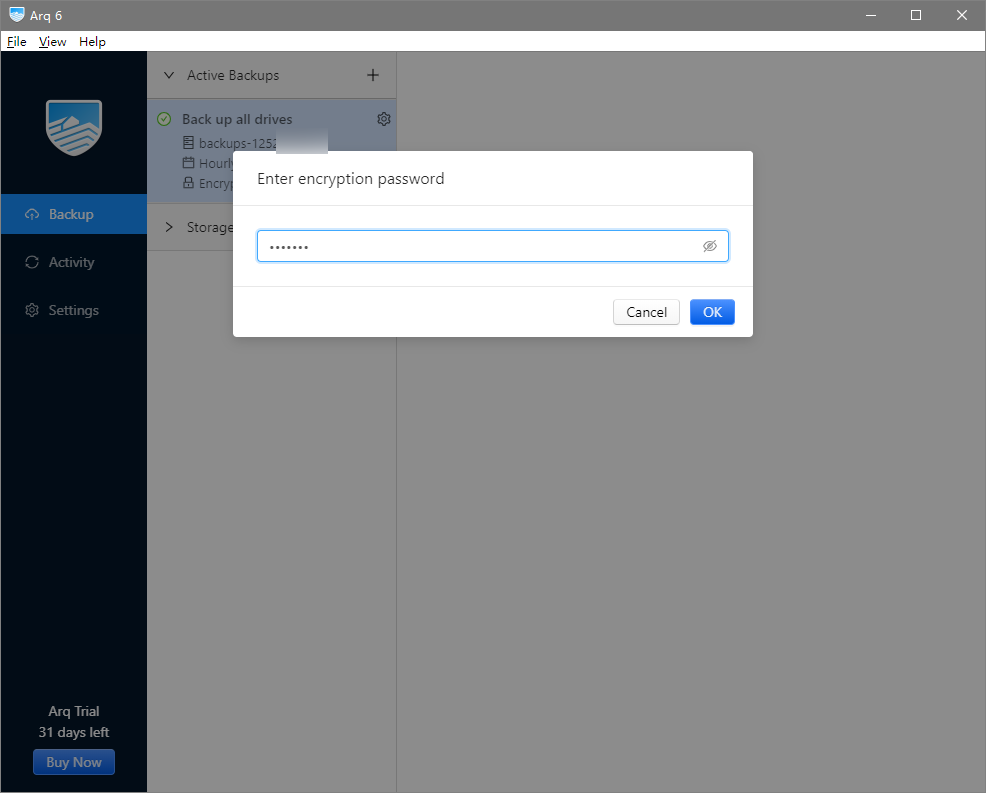
Scenario 2: PostObject Upload, Content-Length-Range Condition Can Be Achieved by Setting Signature Policy Conditions

var policy = JSON.stringify({
...
conditions: [
['content-length-range', 1, 5 * 1024 * 1024], // Limit file size range such as 1 - 5MB
],
});
The example will return an error 403 for file uploads exceeding 5MB.

2.Restrict Upload File Types

Scenario 1: PutObject Upload, Can Be Achieved by Setting String_like Condition in Temporary Key Policy Via STS

condition: {
// Uploaded files must be image type
'string_like': {
'cos:content-type': 'image/*'
}
}

Scenario 2: PostObject Upload, Set $Content-Type Condition Via Signature Policy Conditions

var policy = JSON.stringify({
...
conditions: [
// Limit uploading file content-type must be image type
['starts-with', '$Content-Type', 'image/*'],
],
});
The example will return an error 403 for non-image file uploads.

3.Prevent File Upload Overwrite

In Web or client upload scenarios, if the file name is specified by the client, there may exist risks of file overwrite upload.
The key measure to prevent file overwrite is server-side determination of the upload path.
/** Server-side generation upload path example nodejs **/

// Get the file extension ext passed from the frontend
const ext = req.query.ext;
const cosKey = generateCosKey(ext);

function generateCosKey(ext) {
const date = new Date();
const m = date.getMonth() + 1;
const ymd = `${date.getFullYear()}${m < 10 ? `0${m}` : m}${date.getDate()}`;
const r = ('000000' + Math.random() * 1000000).slice(-6);
const cosKey = `file/${ymd}/${ymd}_${r}${ext ? `.${ext}` : ''}`;
return cosKey;
};

Implementation Process

1. Select a file on the client, and the client will send the suffix to the server.
2. The server generates a random COS file path with time based on the suffix, calculates the corresponding signature, and returns the URL and signature information to the client.
3. The client uses a PUT or POST request to directly upload the file to COS.
\"\"


Documentation


","recentReleaseTime":"2025-09-19 10:43:52","slate":"[{\"children\":[{\"text\":\"Documentation introduction to common issues with client upload and response plan. The following example is suitable for direct upload and client SDK upload scenarios.\"}],\"id\":\"zmNjWk8Vsq_0WOuPGVpiK\",\"type\":\"p\"},{\"children\":[{\"text\":\"The server-side code implementation uses Node.js as an example. For more languages, see \"},{\"children\":[{\"text\":\"Server Signature Practice\"}],\"id\":\"FXTwsOrB5yICqVjEtPCS4\",\"props\":{\"type\":\"link\",\"url\":\"https://www.tencentcloud.com/document/product/436/73580\"},\"type\":\"ref\"},{\"text\":\".\"}],\"id\":\"ZzbMRkN84IDOA9AvJlRv7\",\"type\":\"p\"},{\"children\":[{\"text\":\"1.Upload Size Limitation\"}],\"id\":\"hkG8BEfwP9caNqX-BD7Qm\",\"nodeId\":\"5a8f238c-2997-4328-b4a4-26eafd9e25be\",\"type\":\"h2\"},{\"children\":[{\"text\":\"Scenario 1: PutObject Upload, Achieved by Setting Numeric_less_than_equal Condition in Temporary Key Policy\"}],\"id\":\"4tGNCfHYKMbrfhWCIuwFg\",\"nodeId\":\"03da9686-9b07-4597-8067-06b1a0595188\",\"type\":\"h3\"},{\"autoWrap\":false,\"children\":[{\"children\":[{\"text\":\"condition: {\"}],\"id\":\"tnpcF_QeIl_0fg_wA3Eyv\",\"type\":\"code-line\"},{\"children\":[{\"text\":\" // Uploaded files must be less than 5MB\"}],\"id\":\"5k4V0TdQ-tqWApxhn_Emf\",\"type\":\"code-line\"},{\"children\":[{\"text\":\" 'numeric_less_than_equal': {\"}],\"id\":\"VkyzdhOm1xmBEcDcKtmaf\",\"type\":\"code-line\"},{\"children\":[{\"text\":\" 'cos:content-length': 5 * 1024 * 1024\"}],\"id\":\"WOGO01y7IYogqHGoe5EvM\",\"type\":\"code-line\"},{\"children\":[{\"text\":\" },\"}],\"id\":\"s6DrNNrUh-TIGfhofRX9l\",\"type\":\"code-line\"},{\"children\":[{\"text\":\" }\"}],\"id\":\"ddlAqblixACE_mS8zADQF\",\"type\":\"code-line\"}],\"id\":\"VrxGkMoTZ8eqzHhBzhYWN\",\"language\":\"javascript\",\"type\":\"code-block\"},{\"children\":[{\"text\":\"Scenario 2: PostObject Upload, Content-Length-Range Condition Can Be Achieved by Setting Signature Policy Conditions\"}],\"id\":\"4U3yvhd3HyfyQllvXTyUU\",\"nodeId\":\"5b8ad6d9-0721-41f0-9cae-c60a409ea5af\",\"type\":\"h3\"},{\"autoWrap\":false,\"children\":[{\"children\":[{\"text\":\" var policy = JSON.stringify({\"}],\"id\":\"W6fTJjeqIMhCmlD-FrCs8\",\"type\":\"code-line\"},{\"children\":[{\"text\":\" ...\"}],\"id\":\"L7Z2OiUIYgKtx0Xbetvm8\",\"type\":\"code-line\"},{\"children\":[{\"text\":\" conditions: [\"}],\"id\":\"ur0TkbRSzq1z5VP1HuCNz\",\"type\":\"code-line\"},{\"children\":[{\"text\":\" ['content-length-range', 1, 5 * 1024 * 1024], // Limit file size range such as 1 - 5MB\"}],\"id\":\"suDOoMw3LLkeUBX3qvi5B\",\"type\":\"code-line\"},{\"children\":[{\"text\":\" ],\"}],\"id\":\"NAqbU2LLcI2lCKacFQ2u_\",\"type\":\"code-line\"},{\"children\":[{\"text\":\" });\"}],\"id\":\"nGCTjF3wERdGGL7K_pDJq\",\"type\":\"code-line\"}],\"id\":\"fPxILBM-xjRgpOUbDCTPh\",\"language\":\"javascript\",\"type\":\"code-block\"},{\"children\":[{\"text\":\"The example will return an error 403 for file uploads exceeding 5MB.\"}],\"id\":\"YNyaYpNb7hp8mTHtn1Xqr\",\"type\":\"p\"},{\"children\":[{\"text\":\"2.Restrict Upload File Types\"}],\"id\":\"WrYM9jktu3zCwKctxU0Ub\",\"nodeId\":\"be1a80be-7a66-40e6-880a-fce19a3a906d\",\"type\":\"h2\"},{\"children\":[{\"text\":\"Scenario 1: PutObject Upload, Can Be Achieved by Setting String_like Condition in Temporary Key Policy Via STS\"}],\"id\":\"m9qrpXGktNh_Xw8XO4HI1\",\"nodeId\":\"5276d35c-0fde-4b53-a27c-d0d94cabe733\",\"type\":\"h3\"},{\"autoWrap\":false,\"children\":[{\"children\":[{\"text\":\"condition: {\"}],\"id\":\"7iAhgwuRKCl6ijpF17Bvo\",\"type\":\"code-line\"},{\"children\":[{\"text\":\" // Uploaded files must be image type\"}],\"id\":\"FhfRPLrtZZr4mk25qVY78\",\"type\":\"code-line\"},{\"children\":[{\"text\":\" 'string_like': {\"}],\"id\":\"EfgU_kahcrAN1aro57zTD\",\"type\":\"code-line\"},{\"children\":[{\"text\":\" 'cos:content-type': 'image/*'\"}],\"id\":\"gMyCUhKYswhMRV88rLEWJ\",\"type\":\"code-line\"},{\"children\":[{\"text\":\" }\"}],\"id\":\"Y0QpwCskZGYVi1CcVc70J\",\"type\":\"code-line\"},{\"children\":[{\"text\":\" }\"}],\"id\":\"TRhFj_9LuheEUBL8BBnD-\",\"type\":\"code-line\"}],\"id\":\"WSqxmLWbs7yCO0jhD0LJj\",\"language\":\"javascript\",\"type\":\"code-block\"},{\"children\":[{\"text\":\"Scenario 2: PostObject Upload, Set $Content-Type Condition Via Signature Policy Conditions\"}],\"id\":\"lEwYVmInaACycW5-k19O8\",\"nodeId\":\"45c377fc-df74-4924-9c50-46fabe4a1d73\",\"type\":\"h3\"},{\"autoWrap\":false,\"children\":[{\"children\":[{\"text\":\" var policy = JSON.stringify({\"}],\"id\":\"fKJwW9r-T72F6m4puAIJU\",\"type\":\"code-line\"},{\"children\":[{\"text\":\" ...\"}],\"id\":\"TYilTAr-QF19AAmDLYETb\",\"type\":\"code-line\"},{\"children\":[{\"text\":\" conditions: [\"}],\"id\":\"tqqkWV2wJnWiucVamP_dC\",\"type\":\"code-line\"},{\"children\":[{\"text\":\" // Limit uploading file content-type must be image type\"}],\"id\":\"xgI0uoZ4qVflf9qbfjrZY\",\"type\":\"code-line\"},{\"children\":[{\"text\":\" ['starts-with', '$Content-Type', 'image/*'],\"}],\"id\":\"Qma4lTPX16X3VRMQDqYAV\",\"type\":\"code-line\"},{\"children\":[{\"text\":\" ],\"}],\"id\":\"y72kpLLng4ildqOSbLDIf\",\"type\":\"code-line\"},{\"children\":[{\"text\":\" });\"}],\"id\":\"arLqp6dYFXHMD5x88_gig\",\"type\":\"code-line\"}],\"id\":\"67CWFXxkuwq6CX79dXXn2\",\"language\":\"javascript\",\"type\":\"code-block\"},{\"children\":[{\"text\":\"The example will return an error 403 for non-image file uploads.\"}],\"id\":\"nihUyrGicZHjimpA62dnr\",\"type\":\"p\"},{\"children\":[{\"text\":\"3.Prevent File Upload Overwrite\"}],\"id\":\"0ggxULGECUjSscG-fx5cF\",\"nodeId\":\"0e9adb2a-8b94-4a81-abcd-e170b87cfeae\",\"type\":\"h2\"},{\"children\":[{\"text\":\"In Web or client upload scenarios, if the file name is specified by the client, there may exist risks of file overwrite upload.\"}],\"id\":\"K6TO84xYFsVXYNRBngbiy\",\"type\":\"p\"},{\"children\":[{\"text\":\"The key measure to prevent file overwrite is \"},{\"b\":1,\"text\":\"server-side determination of the upload path.\"}],\"id\":\"VaL55hCwN-MrcjsKRzEdw\",\"type\":\"p\"},{\"autoWrap\":false,\"children\":[{\"children\":[{\"b\":1,\"text\":\"/** Server-side generation upload path example nodejs **/\"}],\"id\":\"YpFZfUG7x_xbmKp0OGJw9\",\"type\":\"code-line\"},{\"children\":[{\"b\":1,\"text\":\"\"}],\"id\":\"skNtnC-3Ejwri5swnDRKj\",\"type\":\"code-line\"},{\"children\":[{\"b\":1,\"text\":\"// Get the file extension ext passed from the frontend\"}],\"id\":\"nvHpyT3YZl6ceG0eVdlYb\",\"type\":\"code-line\"},{\"children\":[{\"b\":1,\"text\":\"const ext = req.query.ext;\"}],\"id\":\"sky_kiAuqS_oObEr4pTgy\",\"type\":\"code-line\"},{\"children\":[{\"b\":1,\"text\":\"const cosKey = generateCosKey(ext);\"}],\"id\":\"6-A2SKPx_qeU2hDjPZpzI\",\"type\":\"code-line\"},{\"children\":[{\"b\":1,\"text\":\"\"}],\"id\":\"YNjPSOseUggb7fx8X3kw8\",\"type\":\"code-line\"},{\"children\":[{\"b\":1,\"text\":\"function generateCosKey(ext) {\"}],\"id\":\"NYwsOhLPO7P6BCTpr-JH7\",\"type\":\"code-line\"},{\"children\":[{\"b\":1,\"text\":\" const date = new Date();\"}],\"id\":\"hDt0ZrGd69IgY7lBmEsGO\",\"type\":\"code-line\"},{\"children\":[{\"b\":1,\"text\":\" const m = date.getMonth() + 1;\"}],\"id\":\"KnaoyN2qUA4rGYAFMgs2f\",\"type\":\"code-line\"},{\"children\":[{\"b\":1,\"text\":\" const ymd = `${date.getFullYear()}${m \\u003c 10 ? `0${m}` : m}${date.getDate()}`;\"}],\"id\":\"BLp9n88BwMP31Xj5mGuxf\",\"type\":\"code-line\"},{\"children\":[{\"b\":1,\"text\":\" const r = ('000000' + Math.random() * 1000000).slice(-6);\"}],\"id\":\"DdOtF7LK3DQM7Rrw4xZwz\",\"type\":\"code-line\"},{\"children\":[{\"b\":1,\"text\":\" const cosKey = `file/${ymd}/${ymd}_${r}${ext ? `.${ext}` : ''}`;\"}],\"id\":\"AZC6uuw3hil0FBS5nA89I\",\"type\":\"code-line\"},{\"children\":[{\"b\":1,\"text\":\" return cosKey;\"}],\"id\":\"7oZjtElWthCn99Zx7xFpt\",\"type\":\"code-line\"},{\"children\":[{\"b\":1,\"text\":\"};\"}],\"id\":\"JQQPgjYjQ0rRp9zYvJeGJ\",\"type\":\"code-line\"}],\"id\":\"SLbK9P0BdhDll7BUGOMQ5\",\"language\":\"javascript\",\"type\":\"code-block\"},{\"children\":[{\"text\":\"Implementation Process\"}],\"id\":\"a-pN393NJCc0Hqg1VVzni\",\"nodeId\":\"96ab0e4c-fb21-43ae-9b99-3157475de7ac\",\"type\":\"h3\"},{\"children\":[{\"text\":\"Select a file on the client, and the client will send the suffix to the server.\"}],\"id\":\"NVZVxZOWnQYo75BuLC74A\",\"start\":true,\"type\":\"oli\"},{\"children\":[{\"text\":\"The server generates a random COS file path with time based on the suffix, calculates the corresponding signature, and returns the URL and signature information to the client.\"}],\"id\":\"J5HRiDZ_3_aSxaF3gLUXK\",\"start\":false,\"type\":\"oli\"},{\"children\":[{\"text\":\"The client uses a PUT or POST request to directly upload the file to COS.\"}],\"id\":\"3sVWZ2GEEiCaYKuWps9Hc\",\"start\":false,\"type\":\"oli\"},{\"alt\":\"\",\"children\":[{\"text\":\"\"}],\"id\":\"94mUKGeZzEAaRr5hsqJK1\",\"indent\":1,\"inline\":false,\"naturalSize\":[644,530],\"size\":[644,530],\"type\":\"image\",\"url\":\"https://cloudcache.intl.tencent-cloud.com/cms/backend-cms/1f088bf1937511f090a8525400e889b2.png\"},{\"children\":[{\"text\":\"Documentation\"}],\"id\":\"IXVMDUzchqRt8pzqjhXZo\",\"nodeId\":\"75ad8702-ab55-4427-8096-4d191a6910f3\",\"start\":false,\"type\":\"h2\"},{\"children\":[{\"text\":\"\"},{\"children\":[{\"text\":\"Security guide for temporary key used for frontend direct upload to COS\"}],\"id\":\"mBjKOEwh5eq_JY_gaNbJS\",\"props\":{\"anchor\":\"\",\"id\":\"115554055628791808\",\"type\":\"link\",\"url\":\"https://www.tencentcloud.com/document/product/436/35265\"},\"type\":\"ref\"},{\"text\":\"\"}],\"id\":\"SESonvhRvypx2KovxnN_9\",\"type\":\"uli\"},{\"children\":[{\"text\":\"\"},{\"children\":[{\"text\":\"Web direct upload practice\"}],\"id\":\"Y5OxYucMpVKxFnHlygR7x\",\"props\":{\"anchor\":\"\",\"id\":\"115554057815072768\",\"type\":\"link\",\"url\":\"https://www.tencentcloud.com/document/product/436/9067\"},\"type\":\"ref\"},{\"text\":\"\"}],\"id\":\"84RWw9ZzeohPdVPjexEx5\",\"type\":\"uli\"},{\"children\":[{\"text\":\"\"},{\"children\":[{\"text\":\"Mini Program direct upload practice\"}],\"id\":\"YYcMGAEprk4gfA0bvrsaS\",\"props\":{\"anchor\":\"\",\"id\":\"115554057852821504\",\"type\":\"link\",\"url\":\"https://www.tencentcloud.com/document/product/436/30934\"},\"type\":\"ref\"},{\"text\":\"\"}],\"id\":\"nZDnoWT2mMqmnF_I1LNHc\",\"type\":\"uli\"},{\"children\":[{\"text\":\"\"},{\"children\":[{\"text\":\"Direct Upload for Mobile Apps practice\"}],\"id\":\"y-A6r9A_j_44ykQICnnDs\",\"props\":{\"anchor\":\"\",\"id\":\"115554057890570240\",\"type\":\"link\",\"url\":\"https://www.tencentcloud.com/document/product/436/30618\"},\"type\":\"ref\"},{\"text\":\"\"}],\"id\":\"d_oFBZBoyc9wQZulk1Fb2\",\"type\":\"uli\"},{\"children\":[{\"text\":\"\"},{\"children\":[{\"text\":\"HarmonyOS direct upload practice\"}],\"id\":\"zkOMz-2EU4UeBliD6fsNZ\",\"props\":{\"anchor\":\"\",\"id\":\"135511341732958208\",\"type\":\"link\",\"url\":\"https://www.tencentcloud.com/document/product/436/73581\"},\"type\":\"ref\"},{\"text\":\"\"}],\"id\":\"OjCjtl-6a736Sgf5CYZFJ\",\"type\":\"uli\"},{\"children\":[{\"text\":\"\"},{\"children\":[{\"text\":\"Flutter direct upload practice\"}],\"id\":\"qimu8VVYt85eVbXHpMf4j\",\"props\":{\"anchor\":\"\",\"id\":\"116662249034924032\",\"type\":\"link\",\"url\":\"https://www.tencentcloud.com/document/product/436/73582\"},\"type\":\"ref\"},{\"text\":\"\"}],\"id\":\"4gHI897hRBS0ApGCxKa5K\",\"type\":\"uli\"},{\"children\":[{\"text\":\"\"},{\"children\":[{\"text\":\"uni-app direct upload practice\"}],\"id\":\"RV4cNR7Vlh8DEDrIl6qEY\",\"props\":{\"anchor\":\"\",\"id\":\"115554057928318976\",\"type\":\"link\",\"url\":\"https://www.tencentcloud.com/document/product/436/46466\"},\"type\":\"ref\"},{\"text\":\"\"}],\"id\":\"ifCQNarsl7zU5ZeEmoS3F\",\"type\":\"uli\"},{\"children\":[{\"text\":\"\"}],\"id\":\"erlSE4EoNHnXJo042J_hg\",\"type\":\"p\"}]"}},"73580":{"categoryId":436,"weight":89,"type":"page","extension":"","pid":33419,"id":73580,"lang":"en","title":"Server Signature Practice","pdfUrl":"","docType":"default","children":[],"firstReleaseTime":"2025-09-19 18:43:54","recentReleaseTime":"2025-09-19 18:43:54","content":{"title":"Server Signature Practice","body":"
Documentation introduction on how to set up a secure temporary signature service.

Solution Strength

Permission security: It can effectively limit the scope of security permissions and can only be used to upload a specified file path.
Path security: The random COS file path is determined by the server, which can effectively avoid the problem of existing files being overwritten and security risks.
Transmission security: Generate the signature on the server to avoid the risk of temporary key leakage during transmission.

Upload Process

1. Select a file on the client, and the client will send the original file name to the server.
2. The server generates a random COS file path with time based on the file extension, applies for corresponding permissions, and returns the signature information and COS key to the front end.

Setting Up a Temporary Signature Service

Temporary Access Credentials are restricted-permission keys obtained through the TencentCloud API provided by CAM. When initiating a COS API request, the three fields TmpSecretId, TmpSecretKey, and Token in the returned information from the temporary key API are required to calculate the signature.
When requesting a server signature, first obtain a temporary key, then use it to generate the signature and return it to the client.
The following example code in languages:
Node.js
Complete code can be found in Sample Code.
// Temporary key service example
var express = require('express');
var crypto = require('crypto');
var moment = require('moment');
var STS = require('qcloud-cos-sts');
const url = require('url');
const { log } = require('console');

// config
var config = {
// Get Tencent Cloud Key, recommend using a Sub-user key with limited permissions https://console.tencentcloud.com/cam/capi
secretId: process.env.COS_SECRET_ID,
secretKey: process.env.COS_SECRET_KEY,
// key validity period
durationSeconds: 1800,
// fill in the bucket and region here, for example: test-1250000000, ap-guangzhou
bucket: process.env.PERSIST_BUCKET,
region: process.env.PERSIST_BUCKET_REGION
};

// get temporary key
var getTempCredential = async function(cosKey){
var shortBucketName = config.bucket.substr(0 , config.bucket.lastIndexOf('-'));
var appId = config.bucket.substr(1 + config.bucket.lastIndexOf('-'));
// Start getting temporary key
var policy = {
"version": "2.0",
"statement": [
{
"action": [
// Upload operation required
"name/cos:PutObject"
],
"effect": "allow",
"resource": [
// Only cosKey resource
'qcs::cos:' + config.region + ':uid/' + appId + ':prefix//' + appId + '/' + shortBucketName + '/' + cosKey,
]
}
]
};
let tempKeys = null;
try{
tempKeys = await STS.getCredential({
secretId: config.secretId,
secretKey: config.secretKey,
durationSeconds: config.durationSeconds,
policy: policy,
});
console.log(tempKeys);
return tempKeys;
} catch(err){
console.log(err);
res.send(JSON.stringify(err));
return null;
}
};

// Calculate the signature.
var getSignature = function(tempCredential, httpMethod, cosHost, pathname) {
const signAlgorithm = 'sha1';
const credentials = tempCredential.credentials;
const keyTime = `${tempCredential.startTime};${tempCredential.expiredTime}`;

// step 1: generate SignKey
var signKey = crypto.createHmac(signAlgorithm, credentials.tmpSecretKey).update(keyTime).digest('hex');
console.log("signKey:"+signKey);

// step two: generate StringToSign
const httpString = `${httpMethod.toLowerCase()}\\n/${pathname}\\n\\nhost=${cosHost}\\n`;
console.log("httpString:"+httpString);
const httpStringHash = crypto.createHash(signAlgorithm).update(httpString).digest('hex');
const stringToSign = `${signAlgorithm}\\n${keyTime}\\n${httpStringHash}\\n`;
console.log("stringToSign:"+stringToSign);

// step three: generate Signature
var signature = crypto.createHmac(signAlgorithm, signKey).update(stringToSign).digest('hex');
console.log("signature:"+signature);

// step four: generate authorization
let authorization = `q-sign-algorithm=${signAlgorithm}&
q-ak=${credentials.tmpSecretId}&
q-sign-time=${keyTime}&
q-key-time=${keyTime}&
q-header-list=host&q-url-param-list=&q-signature=${signature}`;

// Remove \\n caused by line breaks above
authorization = authorization.replace(/\\n/g, '');
console.log("authorization:"+authorization);
return authorization;
}

// Create a temporary key service and a static service for debug
var app = express();
// Signature interface for direct upload
app.all('/sts-server-sign', async function (req, res, next) {
// Get the field to be signed
var httpMethod = req.query.httpMethod;
var cosHost = req.query.host;
var cosKey = req.query.cosKey;

console.log(httpMethod + " " + cosHost + " " + cosKey);

cosHost = decodeURIComponent(cosHost);
cosKey = decodeURIComponent(cosKey);

console.log(httpMethod + " " + cosHost + " " + cosKey);

// Check for anomalies
if (!config.secretId || !config.secretKey) return res.send({ code: '-1', message: 'secretId or secretKey not ready' });
if (!config.bucket || !config.region) return res.send({ code: '-1', message: 'bucket or regions not ready' });
if (!httpMethod || !cosHost || !cosKey) return res.send({ code: '-1', message: 'httpMethod or host or coskey is not empty' });

// Start getting temporary key
var tempCredential = await getTempCredential(cosKey);
if(!tempCredential){
res.send({ code: -1, message: 'get temp credentials fail' });
return;
}

// Calculate the signature with temporary key
let authorization = getSignature(tempCredential, httpMethod, cosHost, cosKey);

// Return domain name, file path, signature, credentials
res.send({
code: 0,
data: {
cosHost: cosHost,
cosKey: cosKey,
authorization: authorization,
securityToken: tempCredential.credentials.sessionToken
},
});
});

app.all('*', function (req, res, next) {
res.send({ code: -1, message: '404 Not Found' });
});

// Start the signature service
app.listen(3000);
console.log('app is listening at http://127.0.0.1:3000');

Go
Complete code can be found in Sample Code.
package main

import (
"context"
"encoding/json"
"errors"
"fmt"
"github.com/tencentyun/cos-go-sdk-v5"
sts "github.com/tencentyun/qcloud-cos-sts-sdk/go"
"math/rand"
"net/http"
"net/url"
"os"
"reflect"
"strings"
"time"
"unicode"
)

type Config struct {
filename string
appId string
SecretId string
SecretKey string
Proxy string
DurationSeconds int
Bucket string
Region string
AllowActions []string
}

type Permission struct {
LimitExt bool `json:"limitExt"`
ExtWhiteList []string `json:"extWhiteList"`
LimitContentType bool `json:"limitContentType"`
LimitContentLength bool `json:"limitContentLength"`
}

func generateCosKey(ext string) string {
date := time.Now()
m := int(date.Month()) + 1
ymd := fmt.Sprintf("%d%02d%d", date.Year(), m, date.Day())
r := fmt.Sprintf("%06d", rand.Intn(1000000))
cosKey := fmt.Sprintf("file/%s/%s_%s.%s", ymd, ymd, r, ext)
return cosKey
}

func getPermission() Permission {
permission := Permission{
LimitExt: true,
ExtWhiteList: []string{"jpg", "jpeg", "png", "gif", "bmp"},
LimitContentType: false,
LimitContentLength: false,
}
return permission
}

func getConfig() Config {
config := Config{
filename: "test.jpg",
appId: "12500000000",
SecretId: os.Getenv("SECRETID"), // User's SecretId, recommend using sub-account keys, adhere to the principle of least privilege to reduce use risk. To obtain sub-account key, see https://cloud.tencent.com/document/product/598/37140
SecretKey: os.Getenv("SECRETKEY"), // User's SecretKey, recommend using sub-account keys, adhere to the principle of least privilege to reduce use risk. To obtain sub-account key, see https://cloud.tencent.com/document/product/598/37140
Proxy: os.Getenv("Proxy"),
DurationSeconds: 1800,
Bucket: "0-1253960454",
Region: "ap-guangzhou",
AllowActions: []string{
"name/cos:PutObject",
},
}
return config
}

func stringInSlice(str string, list []string) bool {
for _, v := range list {
if v == str {
return true
}
}
return false
}

func StructToCamelMap(input interface{}) map[string]interface{} {
v := reflect.ValueOf(input)
if v.Kind() == reflect.Ptr {
v = v.Elem()
}

result := make(map[string]interface{})
typ := v.Type()

for i := 0; i < v.NumField(); i++ {
field := typ.Field(i)
fieldValue := v.Field(i)

// Convert field name to lower camel case
key := toLowerCamel(field.Name)

// Handle nested structure
if fieldValue.Kind() == reflect.Struct ||
(fieldValue.Kind() == reflect.Ptr && fieldValue.Elem().Kind() == reflect.Struct) {

if fieldValue.IsNil() && fieldValue.Kind() == reflect.Ptr {
result[key] = nil
continue
}

result[key] = StructToCamelMap(fieldValue.Interface())
} else {
// Handle basic type
result[key] = fieldValue.Interface()
}
}

return result
}

// Convert to lower camel case (first letter lowercase)
func toLowerCamel(s string) string {
if s == "" {
return s
}

// Handle all caps words (for example ID)
if strings.ToUpper(s) == s {
return strings.ToLower(s)
}

// Switch to lower camel case
runes := []rune(s)
runes[0] = unicode.ToLower(runes[0])
return string(runes)
}

func getStsCredential() (map[string]interface{}, error) {
config := getConfig()

permission := getPermission()

c := sts.NewClient(
// Get key through environment variables, os.Getenv method means get environment variables
config.SecretId, //os.Getenv("SECRETID"), // User's SecretId, recommend using sub-account keys, follow the principle of least privilege to reduce use risk. To obtain sub-account key, see https://cloud.tencent.com/document/product/598/37140
config.SecretKey, //os.Getenv("SECRETKEY"), // User's SecretKey, recommend using sub-account keys, adhere to the principle of least privilege to reduce use risk. To obtain sub-account key, see https://cloud.tencent.com/document/product/598/37140
nil,
// sts.Host("sts.internal.tencentcloudapi.com"), // Set domain name, default domain sts.tencentcloudapi.com
// sts.Scheme("http"), // Set protocol. Default is https. Public cloud STS cannot use http. Set http only in special scenarios.
)

condition := make(map[string]map[string]interface{})

segments := strings.Split(config.filename, ".")
if len(segments) == 0 {
//ext := ""
}
ext := segments[len(segments)-1]

if permission.LimitExt {
extInvalid := ext == "" || !stringInSlice(ext, permission.ExtWhiteList)
if extInvalid {
return nil, errors.New("unauthorized file, upload prohibited")
}
}

if permission.LimitContentType {
condition["string_like_if_exist"] = map[string]interface{}{
// Only upload allowed with content-type as image/*
"cos:content-type": "image/*",
}
}

// 3. Limit upload file size
if permission.LimitContentLength {
condition["numeric_less_than_equal"] = map[string]interface{}{
// Upload size limit cannot exceed 5MB (effective for simple upload only)
"cos:content-length": 5 * 1024 * 1024,
}
}

key := generateCosKey(ext)
// Policy overview https://cloud.tencent.com/document/product/436/18023
opt := &sts.CredentialOptions{
DurationSeconds: int64(config.DurationSeconds),
Region: config.Region,
Policy: &sts.CredentialPolicy{
Version: "2.0",
Statement: []sts.CredentialPolicyStatement{
{
// Permission list for keys. Simple upload and sharding require the following permissions. For other permission lists, see https://cloud.tencent.com/document/product/436/31923
Action: config.AllowActions,
Effect: "allow",
Resource: []string{
// Change to the allowed path prefix. The specific path for upload can be selected based on your website's user login status, for example: a.jpg or a/* or * (using wildcard * poses significant security risks, please be cautious when considering using)
// The bucket naming format is BucketName-APPID, the bucket filled here must be in this format
"qcs::cos:ap-guangzhou:uid/" + config.appId + ":" + config.Bucket + "/" + key,
},
// Start building the effective condition condition
// For setting rules about condition and COS-supported condition types, see https://cloud.tencent.com/document/product/436/71306
Condition: condition,
},
},
},
}

// case 1 request temporary key
res, err := c.GetCredential(opt)
if err != nil {
return nil, err
}
// Convert to lower camel case map
resultMap := StructToCamelMap(res)
resultMap["bucket"] = config.Bucket
resultMap["region"] = config.Region
resultMap["key"] = key

return resultMap, nil
}

func main() {
result, err := getStsCredential()
if err != nil {
fmt.Printf("request temporary key fail: %v\\n", err)
return // determine whether to exit based on context
}

// Type assertion for credentials as map[string]interface{}
credentials, ok := result["credentials"].(map[string]interface{})
if !ok {
fmt.Println("Invalid credential format")
return
}
// Field acquisition with type checking
tak, tok := credentials["tmpSecretID"].(string)
tsk, tskok := credentials["tmpSecretKey"].(string)
token, tokenok := credentials["sessionToken"].(string)
if !tok || !tskok || !tokenok {
fmt.Println("Missing fields or type error in temporary credential")
return
}
host := "https://" + result["bucket"].(string) + ".cos." + result["region"].(string) + ".myqcloud.com"
u, _ := url.Parse(host)
b := &cos.BaseURL{BucketURL: u}
c := cos.NewClient(b, &http.Client{})
name := result["key"].(string)
ctx := context.Background()
opt := &cos.PresignedURLOptions{
Query: &url.Values{},
Header: &http.Header{},
}
opt.Query.Add("x-cos-security-token", token)
signature := c.Object.GetSignature(ctx, http.MethodPut, name, "tak", "tsk", time.Hour, opt, true)
fmt.Printf("%s\\n%s\\n%s\\n%s\\n", tak, tsk, token, signature)
data := make(map[string]string)

// Add token and sign
data["securityToken"] = token
data["authorization"] = signature
data["cosHost"] = host
data["cosKey"] = name
// Convert to JSON
jsonData, err := json.MarshalIndent(data, "", " ")
if err != nil {
fmt.Println("JSON encoding failure:", err)
return
}
fmt.Println(string(jsonData))
}


PHP
Complete code can be found in Sample Code.
<?php
require_once __DIR__ . '/vendor/autoload.php';

use QCloud\\COSSTS\\Sts;

// Generate the COS file path Filename to upload
function generateCosKey($ext) {
$ymd = date('Ymd');
$r = substr('000000' . rand(), -6);
$cosKey = 'file/' . $ymd. '/' . $ymd . '_' . $r;
if ($ext) {
$cosKey = $cosKey . '.' . $ext;
}
return $cosKey;
};

// Get temporary key for single file upload permission
function getKeyAndCredentials($filename) {
// Business implements user login status verification, such as token validation
// $canUpload = checkUserRole($userToken);
// if (!$canUpload) {
// return 'Current user has no upload permission';
// }

// Control file upload types and size, enable on demand
$permission = array(
'limitExt' => false, // Restrict file extensions
'extWhiteList' => ['jpg', 'jpeg', 'png', 'gif', 'bmp'], // Restricted file extensions
'limitContentType' => false, // Restrict content types
'limitContentLength' => false, // Limit upload file size
);
$condition = array();

// The client passes the original file name, generate a random Key based on the file suffix
$ext = pathinfo($filename, PATHINFO_EXTENSION);

// 1. Limit file upload extensions
if ($permission['limitExt']) {
if ($ext === '' || array_key_exists($ext, $permission['extWhiteList'])) {
return 'unauthorized file, upload prohibited';
}
}

// 2. Limit file upload content-type
if ($permission['limitContentType']) {
// Only upload allowed with content-type as image/*
$condition['string_like_if_exist'] = array('cos:content-type' => 'image/*');
}

// 3. Limit upload file size
if ($permission['limitContentLength']) {
// Upload size limit cannot exceed 5MB (effective for simple upload only)
$condition['numeric_less_than_equal'] = array('cos:content-length' => 5 * 1024 * 1024);
}

$cosKey = generateCosKey($ext);
$bucket = 'test-125000000'; // Replace with your bucket
$region = 'ap-guangzhou'; // Replace with the park where the bucket resides
$config = array(
'url' => 'https://sts.tencentcloudapi.com/', // URL and domain should be consistent
'domain' => 'sts.tencentcloudapi.com', // Domain name, optional, defaults to sts.tencentcloudapi.com
'proxy' => '',
'secretId' => "",//getenv('GROUP_SECRET_ID'), // Fixed key. For plaintext key, fill in directly as 'xxx', do not use getenv() function
'secretKey' => "",//getenv('GROUP_SECRET_KEY'), // Fixed key. For plaintext key, fill in directly as 'xxx', do not use getenv() function
'bucket' => $bucket, // Replace with your bucket
'region' => $region, // Replace with the park where the bucket resides
'durationSeconds' => 1800, // key validity period
'allowPrefix' => array($cosKey), // Only allocate path permission for the current key
// Permission list for keys. Simple upload and sharding require the following permissions. For other permission lists, see https://cloud.tencent.com/document/product/436/31923
'allowActions' => array (
// Simple upload
'name/cos:PutObject'
),
);

if (!empty($condition)) {
$config['condition'] = $condition;
}

$sts = new Sts();
$tempKeys = $sts->getTempKeys($config);
$resTemp = array_merge(
$tempKeys,
[
'startTime' => time(),
'bucket' => $bucket,
'region' => $region,
'key' => $cosKey,
]
);
return $resTemp;
}

function getSign()
{
$filename = "test.jpg";
$method = "putObject";
$result = getKeyAndCredentials($filename);
$credentials = $result["credentials"];
$sessionToken = $credentials["sessionToken"];
$tmpSecretId = $credentials["tmpSecretId"];
$tmpSecretKey = $credentials["tmpSecretKey"];
$expiredTime = $result["expiredTime"];
$startTime = $result["startTime"];
$bucket = $result["bucket"];
$region = $result["region"];
$key = $result["key"];

$cosClient = new Qcloud\\Cos\\Client(
array(
'region' => $region,
'scheme' => 'https', // protocol header, defaults to http
'signHost' => true, //By default, sign the Header Host. You can also choose not to sign the Header Host, but this may cause request failure or security vulnerability. Set to false if not signing the host.
'credentials'=> array(
'secretId' => $tmpSecretId,
'secretKey' => $tmpSecretKey,
'token' => $sessionToken)));
### Upload pre-signiture by using the simple upload.
try {
$url = $cosClient->getPresignedUrl($method,array(
'Bucket' => $bucket,
'Key' => $key,
'Body' => "",
'Params'=> array('x-cos-security-token' => $sessionToken),
'Headers'=> array(),
), $expiredTime - $startTime); //Signature validity time

$parsedUrl = parse_url($url);
$host = 'https://' . $parsedUrl['host']; // automatically include port (if any)
$queryString = isset($parsedUrl['query']) ? $parsedUrl['query'] : '';
$queryParts = explode('&', $queryString);
$signParts = array_filter($queryParts, function($part) {
return strpos($part, 'x-cos-security-token=') !== 0;
});
$sign = implode('&', $signParts);
$result = [
'cosHost' => $host,
'cosKey' => $key,
'authorization' => $sign,
'securityToken' => $sessionToken
];

echo json_encode($result, JSON_PRETTY_PRINT | JSON_UNESCAPED_SLASHES);

} catch (\\Exception $e) {
//Request failed
echo($e);
}
}
getSign();
Python
Complete code can be found in Sample Code.
#!/usr/bin/env python
# coding=utf-8
import json
import os
import datetime
import random
from urllib.parse import urlencode

from qcloud_cos import CosConfig, CosS3Client

from sts.sts import Sts


if __name__ == '__main__':

# config
config = {
"filename":"test.jpg",
"appId": "1250000000",
"secretId": os.getenv("SecretId"),
"secretKey": os.getenv("SecretKey"),
"proxy": os.getenv("Proxy"),
"durationSeconds": 1800,
"bucket": "0-1253960454",
"region": "ap-guangzhou",
# key upload permission list
"allowActions": [
# Simple upload
"name/cos:PutObject"
],
}

permission = {
"limitExt": True, # Restrict file extensions
"extWhiteList": ["jpg", "jpeg", "png", "gif", "bmp"], # Restricted file extensions
"limitContentType": False, # Limit uploading contentType
"limitContentLength": False, # Limit upload file size
}


# Generate the COS file path Filename to upload
def generate_cos_key(ext=None):
date = datetime.datetime.now()
ymd = date.strftime('%Y%m%d')
r = str(int(random.random() * 1000000)).zfill(6)
cos_key = f"file/{ymd}/{ymd}_{r}.{ext if ext else ''}"
return cos_key


segments = config['filename'].split(".")
ext = segments[-1] if segments else ""
key = generate_cos_key(ext)
resource = f"qcs::cos:{config['region']}:uid/{config['appId']}:{config['bucket']}/{key}"

condition = {}

# 1. Limit file upload extensions
if permission["limitExt"]:
ext_invalid = not ext or ext not in permission["extWhiteList"]
if ext_invalid:
print('Unauthorized file, upload prohibited')

# 2. Limit file upload content-type
if permission["limitContentType"]:
condition.update({
"string_like_if_exist": {
# Only upload allowed with content-type as image/*
"cos:content-type": "image/*"
}
})

# 3. Limit upload file size
if permission["limitContentLength"]:
condition.update({
"numeric_less_than_equal": {
# Upload size limit cannot exceed 5MB (effective for simple upload only)
"cos:content-length": 5 * 1024 * 1024
}
})


def get_credential_demo():
credentialOption = {
# Temporary key valid duration in seconds
'duration_seconds': config.get('durationSeconds'),
'secret_id': config.get("secretId"),
# fixed key
'secret_key': config.get("secretKey"),
# Replace with your bucket
'bucket': config.get("bucket"),
'proxy': config.get("proxy"),
# Replace with the bucket's located region
'region': config.get("region"),
"policy": {
"version": '2.0',
"statement": [
{
"action": config.get("allowActions"),
"effect": "allow",
"resource": [
resource
],
"condition": condition
}
],
},
}

try:

sts = Sts(credentialOption)
response = sts.get_credential()
credential_dic = dict(response)
credential_info = credential_dic.get("credentials")
credential = {
"bucket": config.get("bucket"),
"region": config.get("region"),
"key": key,
"startTime": credential_dic.get("startTime"),
"expiredTime": credential_dic.get("expiredTime"),
"requestId": credential_dic.get("requestId"),
"expiration": credential_dic.get("expiration"),
"credentials": {
"tmpSecretId": credential_info.get("tmpSecretId"),
"tmpSecretKey": credential_info.get("tmpSecretKey"),
"sessionToken": credential_info.get("sessionToken"),
},
}
return credential
except Exception as e:
print(e)


result = get_credential_demo()
credentials = result["credentials"]
secret_id = credentials["tmpSecretId"]
secret_key = credentials["tmpSecretKey"]
token = credentials["sessionToken"]
bucket = result["bucket"]
region = result["region"]
key = result["key"]
expired = result["expiredTime"]

config = CosConfig(Region=region, SecretId=secret_id, SecretKey=secret_key, Token=token)
client = CosS3Client(config)
sign = client.get_auth(Method='put',Bucket=bucket, Key=key, Expired=expired, Params={
'x-cos-security-token': token
},SignHost=True)
sign = urlencode(dict([item.split('=', 1) for item in sign.split('&')]))
host = "https://" + result["bucket"] + ".cos." + result["region"] + ".myqcloud.com"
response = {
"cosHost":host,
"cosKey":key,
"authorization":sign,
"securityToken":token
}
print('get data : ' + json.dumps(response, indent=4))
Java
Complete code can be found in Sample Code.
package com.tencent.cloud;

import com.qcloud.cos.COSClient;
import com.qcloud.cos.ClientConfig;
import com.qcloud.cos.auth.BasicSessionCredentials;
import com.qcloud.cos.auth.COSCredentials;
import com.qcloud.cos.http.HttpMethodName;
import com.qcloud.cos.region.Region;
import com.tencent.cloud.cos.util.Jackson;
import org.junit.Test;

import java.net.URL;
import java.text.SimpleDateFormat;
import java.util.*;

public class ServerSignTest {

public static String generateCosKey(String ext) {
Date date = new Date();
SimpleDateFormat dateFormat = new SimpleDateFormat("yyyyMMdd");
String ymd = dateFormat.format(date);

Random random = new Random();
int r = random.nextInt(1000000);
String rStr = String.format("%06d", r);

String cosKey = String.format("file/%s/%s_%s.%s", ymd, ymd, rStr, ext != null ? ext : "");
return cosKey;
}

// obtain configuration information
public TreeMap<String,Object> getConfig(){

String bucket = "0-1250000000";
String appId = "1250000000";
String filename = "test.jpg";
String region = "ap-guangzhou";
String secretId = "";
String secretKey = "";
String proxy = "";
int durationSeconds = 1800;

String[] segments = filename.split("\\\\.");
String ext = segments.length > 0 ? segments[segments.length - 1] : "";

// temporary key limit
Boolean limitExt = false; // Restrict file extensions
List extWhiteList = Arrays.asList("jpg", "jpeg", "png", "gif", "bmp"); // Restricted file extensions
Boolean limitContentType = false; // Limit uploading contentType
Boolean limitContentLength = false; // Limit upload file size


Map<String, Object> condition = new HashMap();

// 1. Limit file upload extensions
if (limitExt) {
boolean extInvalid = ext == null || !extWhiteList.contains(ext);
if (extInvalid) {
System.out.println("Unauthorized file, upload prohibited");
return null;
}
}

// 2. Limit file upload content-type
if (limitContentType) {
condition.put("string_like_if_exist", new HashMap<String, String>() {{
put("cos:content-type", "image/*");
}});
}

// 3. Limit upload file size (only takes effect for simple upload)
if (limitContentLength) {
condition.put("numeric_less_than_equal", new HashMap<String, Long>() {{
put("cos:content-length", 5L * 1024 * 1024);
}});
}
String key = generateCosKey(ext);
String resource = "qcs::cos:" + region + ":uid/" + appId + ':' + bucket + '/' + key;
List allowActions = Arrays.asList(
// Simple upload
"name/cos:PutObject"
);

// Build policy
Map<String, Object> policy = new HashMap();
policy.put("version", "2.0");
Map<String, Object> statement = new HashMap();
statement.put("action", allowActions);
statement.put("effect", "allow");
List<String> resources = Arrays.asList(
resource
);
statement.put("resource", resources);
statement.put("condition", condition);
policy.put("statement", Arrays.asList(statement));


// Build config
TreeMap <String,Object> config = new TreeMap<String, Object>();
config.put("secretId",secretId);
config.put("secretKey",secretKey);
config.put("proxy",proxy);
config.put("duration",durationSeconds);
config.put("bucket",bucket);
config.put("region",region);
config.put("key",key);
config.put("policy",Jackson.toJsonPrettyString(policy));
return config;
}

public TreeMap <String,Object> getKeyAndCredentials() {
TreeMap config = this.getConfig();
try {
Response response = CosStsClient.getCredential(config);
TreeMap <String,Object> credential = new TreeMap<String, Object>();
TreeMap <String,Object> credentials = new TreeMap<String, Object>();
credentials.put("tmpSecretId",response.credentials.tmpSecretId);
credentials.put("tmpSecretKey",response.credentials.tmpSecretKey);
credentials.put("sessionToken",response.credentials.sessionToken);
credential.put("startTime",response.startTime);
credential.put("expiredTime",response.expiredTime);
credential.put("requestId",response.requestId);
credential.put("expiration",response.expiration);
credential.put("credentials",credentials);
credential.put("bucket",config.get("bucket"));
credential.put("region",config.get("region"));
credential.put("key",config.get("key"));
return credential;
} catch (Exception e) {
e.printStackTrace();
throw new IllegalArgumentException("no valid secret !");
}
}
/**
Basic temporary key application example, suitable for granting a set of operation permissions to multiple object paths in a bucket
*/
@Test
public void testGetKeyAndCredentials() {
TreeMap <String,Object> credential = this.getKeyAndCredentials();
TreeMap <String,Object> credentials = (TreeMap<String, Object>) credential.get("credentials");
try {


String tmpSecretId = (String) credentials.get("tmpSecretId");
String tmpSecretKey = (String) credentials.get("tmpSecretKey");
String sessionToken = (String) credentials.get("sessionToken");
Date expiredTime = new Date((Long) credential.get("expiredTime"));
String key = (String) credential.get("key");
String bucket = (String) credential.get("bucket");
String region = (String) credential.get("region");

COSCredentials cred = new BasicSessionCredentials(tmpSecretId, tmpSecretKey, sessionToken);
ClientConfig clientConfig = new ClientConfig();
clientConfig.setRegion(new Region(region));

COSClient cosClient = new COSClient(cred, clientConfig);


Map<String, String> headers = new HashMap<String,String>();
Map<String, String> params = new HashMap<String,String>();
params.put("x-cos-security-token",sessionToken);
URL url = cosClient.generatePresignedUrl(bucket, key, expiredTime, HttpMethodName.PUT, headers, params);
String host = "https://" + url.getHost();
String query = url.toString().split("\\\\?")[1];
String sign = query.split("&x-cos-security-token")[0];
TreeMap <String,Object> result = new TreeMap<String, Object>();
result.put("cosHost",host);
result.put("cosKey",key);
result.put("authorization",sign);
result.put("securityToken",sessionToken);
System.out.println(Jackson.toJsonPrettyString(result));
} catch (Exception e) {
\t e.printStackTrace();
throw new IllegalArgumentException("no valid sign !");
}
}
}
.NET(C#)
Complete code can be found in Sample Code.

using System;
using System.Collections.Generic;
using System.IO;
using System.Linq;
using System.Reflection;
using System.Text;
using System.Threading;
using System.Threading.Tasks;
using System.Net.Mail;
using COSSTS;
using COSXML;
using COSXML.Auth;
using COSXML.Model.Tag;
using Newtonsoft.Json;
using Formatting = System.Xml.Formatting;


namespace COSSnippet
{
public class ServerSign
{
//permanent key
string secretId = "";
string secretKey = "";

string bucket = "bucket-1250000000";
string appId = "1250000000";
string region = "ap-guangzhou";
string filename = "test.jpg";
string method = "put";
int time = 1800;
// limit
Boolean limitExt = false; // Restrict file extensions
List<string> extWhiteList = new List<String> { "jpg", "jpeg", "png", "gif", "bmp" }; // Restricted file extensions
Boolean limitContentType = false; // Limit uploading contentType
Boolean limitContentLength = false; // Limit upload file size

public string generateCosKey(string ext)
{
DateTime date = DateTime.Now;
int m = date.Month;
string ymd = $"{date.Year}{(m < 10 ? $"0{m}" : m.ToString())}{date.Day}";
Random random = new Random();
string r = random.Next(0, 1000000).ToString("D6"); // Generate a 6-digit random number with leading zeros
string cosKey = $"file/{ymd}/{ymd}_{r}.{(string.IsNullOrEmpty(ext) ? "" : ext)}";
return cosKey;
}
public Dictionary<string, object> getConfig()
{
Dictionary<string, object> config = new Dictionary<string, object>();
string[] allowActions = new string[] { // Allowed operation scope, using upload as an example
"name/cos:PutObject"
};
string[] segments = filename.Split(".");
string ext = segments.Length > 0 ? segments[segments.Length - 1] : string.Empty;
string key = generateCosKey(ext);
string resource = $"qcs::cos:{region}:uid/{appId}:{bucket}/{key}";

var condition = new Dictionary<string, object>();
// 1. Limit file upload extensions
if (limitExt)
{
var extInvalid = string.IsNullOrEmpty(ext) || !extWhiteList.Contains(ext);
if (extInvalid)
{
Console.WriteLine("Unauthorized file, upload prohibited");
return null;
}
}

// 2. Limit file upload content-type
if (limitContentType)
{
condition["string_like_if_exist"] = new Dictionary<string, string>
{
{ "cos:content-type", "image/*" } // Only upload allowed with content-type as image/*
};
}

// 3. Limit upload file size (only takes effect for simple upload)
if (limitContentLength)
{
condition["numeric_less_than_equal"] = new Dictionary<string, long>
{
{ "cos:content-length", 5 * 1024 * 1024 } // Upload size limit cannot exceed 5MB
};
}

var policy = new Dictionary<string, object>
{
{ "version", "2.0" },
{ "statement", new List<Dictionary<string, object>>
{
new Dictionary<string, object>
{
{ "action", allowActions },
{ "effect", "allow" },
{ "resource", new List<string>
{
resource,
}
},
{ "condition", condition }
}
}
}
};

// Serialize to JSON and output
string jsonPolicy = JsonConvert.SerializeObject(policy);
config.Add("bucket", bucket);
config.Add("region", region);
config.Add("durationSeconds", time);

config.Add("secretId", secretId);
config.Add("secretKey", secretKey);
config.Add("key", key);
config.Add("policy", jsonPolicy);
return config;
}
// Obtain temporary access credentials for federated identity https://cloud.tencent.com/document/product/1312/48195
public Dictionary<string, object> GetCredential()
{

var config = getConfig();
// get temporary key
Dictionary<string, object> credential = STSClient.genCredential(config);
Dictionary<string, object> credentials = JsonConvert.DeserializeObject<Dictionary<string, object>>(JsonConvert.SerializeObject((object) credential["Credentials"]));
Dictionary<string, object> credentials1 = new Dictionary<string, object>();
credentials1.Add("tmpSecretId",credentials["TmpSecretId"]);
credentials1.Add("tmpSecretKey",credentials["TmpSecretKey"]);
credentials1.Add("sessionToken",credentials["Token"]);
Dictionary<string, object> dictionary1 = new Dictionary<string, object>();
dictionary1.Add("credentials",credentials1);
dictionary1.Add("startTime",credential["StartTime"]);
dictionary1.Add("requestId",credential["RequestId"]);
dictionary1.Add("expiration",credential["Expiration"]);
dictionary1.Add("expiredTime",credential["ExpiredTime"]);
dictionary1.Add("bucket",config["bucket"]);
dictionary1.Add("region",config["region"]);
dictionary1.Add("key",config["key"]);
return dictionary1;
}
static void Main(string[] args)
{
ServerSign m = new ServerSign();
Dictionary<string, object> result = m.GetCredential();
Dictionary<string, object> credentials = (Dictionary<string, object>)result["credentials"];
string tmpSecretId = (string)credentials["tmpSecretId"];
string tmpSecretKey = (string)credentials["tmpSecretKey"];
string sessionToken = (string)credentials["sessionToken"];
string bucket = (string)result["bucket"];
string region = (string)result["region"];
string key = (string)result["key"];
long expiredTime = (long)result["expiredTime"];
int startTime = (int)result["startTime"];
QCloudCredentialProvider cosCredentialProvider = new DefaultSessionQCloudCredentialProvider(
tmpSecretId, tmpSecretKey, expiredTime, sessionToken);
CosXmlConfig config = new CosXmlConfig.Builder()
.IsHttps(true) //set default HTTPS request
.SetRegion(region) // Set a default bucket region.
.SetDebugLog(true) // Display log.
.Build(); // Create CosXmlConfig object.
CosXml cosXml = new CosXmlServer(config, cosCredentialProvider);
PreSignatureStruct preSignatureStruct = new PreSignatureStruct();
preSignatureStruct.appid = m.appId;//"1250000000";
preSignatureStruct.region = region;//"COS_REGION";
preSignatureStruct.bucket = bucket;//"examplebucket-1250000000";
preSignatureStruct.key = "exampleObject"; //object key
preSignatureStruct.httpMethod = "PUT"; //HTTP request method
preSignatureStruct.isHttps = true; //generate HTTPS request URL
preSignatureStruct.signDurationSecond = 600; //request signature time is 600s
preSignatureStruct.headers = null; //headers to validate in signature
preSignatureStruct.queryParameters = null; //request parameters to validate in URL signature
//Upload pre-signed URL (pre-signed URL calculated using permanent key)
Dictionary<string, string> queryParameters = new Dictionary<string, string>();
queryParameters.Add("x-cos-security-token",sessionToken);
Dictionary<string, string> headers = new Dictionary<string, string>();
string authorization = cosXml.GenerateSign(m.method,key,queryParameters,headers,expiredTime - startTime,expiredTime - startTime);

string host = "https://" + bucket + ".cos." + region + ".myqcloud.com";
Dictionary<string, object> response = new Dictionary<string, object>();
response.Add("cosHost",host);
response.Add("cosKey",key);
response.Add("authorization",authorization);
response.Add("securityToken",sessionToken);
Console.WriteLine($"{JsonConvert.SerializeObject(response)}");
}
}
}


","recentReleaseTime":"2025-09-19 10:43:54","slate":"[{\"type\":\"p\",\"children\":[{\"text\":\"Documentation introduction on how to set up a secure temporary signature service.\"}],\"id\":\"6uBrIOgu0TqqyBPNT3sx4\"},{\"id\":\"b-FrhOOuefDmvyFrBZYo3\",\"children\":[{\"text\":\"Solution Strength\"}],\"nodeId\":\".E6.96.B9.E6.A1.88.E4.BC.98.E5.8A.BF\",\"type\":\"h2\"},{\"id\":\"nmdtUEYSVb0lXMBKQzWIF\",\"children\":[{\"text\":\"Permission security: It can effectively limit the scope of security permissions and can only be used to upload a specified file path.\"}],\"type\":\"uli\",\"start\":false},{\"id\":\"9JPKvHqK_ASg0DL3ovFec\",\"children\":[{\"text\":\"Path security: The random COS file path is determined by the server, which can effectively avoid the problem of existing files being overwritten and security risks.\"}],\"type\":\"uli\",\"start\":false},{\"id\":\"uAsexKLX1JH_2_yNiftsp\",\"type\":\"uli\",\"start\":false,\"children\":[{\"text\":\"Transmission security: Generate the signature on the server to avoid the risk of temporary key leakage during transmission.\"}]},{\"type\":\"h2\",\"children\":[{\"text\":\"Upload Process\"}],\"id\":\"_6I5lqhkTKUmm4ehPJuk3\",\"nodeId\":\"a66db716-520f-481e-8467-160d881164bb\"},{\"id\":\"GxxSSosl9N6azzUlscUEz\",\"children\":[{\"text\":\"Select a file on the client, and the client will send the original file name to the server.\"}],\"type\":\"oli\",\"start\":true},{\"id\":\"ABGWcrd7AEbyH-9ww5H2G\",\"children\":[{\"text\":\"The server generates a random COS file path with time based on the file extension, applies for corresponding permissions, and returns the signature information and COS key to the front end.\"}],\"type\":\"oli\",\"start\":false},{\"type\":\"h2\",\"id\":\"sHNBoAHFIPsgl4e4xwy5_\",\"nodeId\":\"a1e3eb7b-f6cb-4686-a8bd-1a78dda9753d\",\"children\":[{\"text\":\"Setting Up a Temporary Signature Service\"}]},{\"type\":\"p\",\"children\":[{\"text\":\"\"},{\"type\":\"ref\",\"props\":{\"type\":\"link\",\"url\":\"https://www.tencentcloud.com/document/product/436/45242\"},\"children\":[{\"text\":\"Temporary Access Credentials\"}],\"id\":\"kZBkq_N6zHUqx-6A7wIhd\"},{\"text\":\" are restricted-permission keys obtained through the TencentCloud API provided by CAM. When initiating a COS API request, the three fields TmpSecretId, TmpSecretKey, and Token in the returned information from the temporary key API are required to calculate the signature.\"}],\"id\":\"xzkCvzXb_h8oU5xv2SOk3\"},{\"type\":\"p\",\"id\":\"9UKUv_7DHFpQfUN6V24Kr\",\"children\":[{\"text\":\"When requesting a server signature, first obtain a temporary key, then use it to generate the signature and return it to the client.\"}]},{\"type\":\"p\",\"children\":[{\"text\":\"The following example code in languages:\"}],\"id\":\"UXHhTZ41aU0GFu6snPjuy\"},{\"type\":\"tabs\",\"children\":[{\"type\":\"tab\",\"id\":\"TUYs-cx4W4F6i4HoLXTvg\",\"name\":\"Node.js\",\"children\":[{\"type\":\"p\",\"children\":[{\"text\":\"Complete code can be found in \"},{\"type\":\"ref\",\"props\":{\"type\":\"link\",\"url\":\"https://github.com/tencentyun/cos-demo/tree/main/server/server-sign/nodejs\"},\"children\":[{\"text\":\"Sample Code\"}],\"id\":\"UIaap_tXe9s5i6pEGmUvC\"},{\"text\":\".\"}],\"id\":\"HOSjEEDUOgh13buOLs6is\"},{\"type\":\"code-block\",\"language\":\"javascript\",\"children\":[{\"type\":\"code-line\",\"children\":[{\"text\":\"// Temporary key service example\"}],\"id\":\"3S40_DVX0D4_y8U9jlcjz\"},{\"type\":\"code-line\",\"children\":[{\"text\":\"var express = require('express');\"}],\"id\":\"fCRxOqLL88qJTo72kqM_c\"},{\"type\":\"code-line\",\"children\":[{\"text\":\"var crypto = require('crypto');\"}],\"id\":\"p0tNx2N3lxG7FJ9IA9NRM\"},{\"type\":\"code-line\",\"children\":[{\"text\":\"var moment = require('moment');\"}],\"id\":\"93hHSi0C0CWvV446G3loo\"},{\"type\":\"code-line\",\"children\":[{\"text\":\"var STS = require('qcloud-cos-sts');\"}],\"id\":\"ObBAVfQDyuCg3vP6BF78K\"},{\"type\":\"code-line\",\"children\":[{\"text\":\"const url = require('url');\"}],\"id\":\"GqJwLEY2Yk0ZnXzdPlQbf\"},{\"type\":\"code-line\",\"children\":[{\"text\":\"const { log } = require('console');\"}],\"id\":\"bxOf5gZTadmhSSP9mUl1-\"},{\"type\":\"code-line\",\"children\":[{\"text\":\"\"}],\"id\":\"3ulqNOg5Yrf_J4P9u9cTK\"},{\"type\":\"code-line\",\"children\":[{\"text\":\"// config\"}],\"id\":\"1XvK5YcpLcB3wbjY5WsJA\"},{\"type\":\"code-line\",\"children\":[{\"text\":\"var config = {\"}],\"id\":\"FZf26qX1yxHM-JlcraatV\"},{\"type\":\"code-line\",\"children\":[{\"text\":\" // Get Tencent Cloud Key, recommend using a Sub-user key with limited permissions https://console.cloud.tencent.com/cam/capi\"}],\"id\":\"syHRTDCWDUGPl6q0eUMb9\"},{\"type\":\"code-line\",\"children\":[{\"text\":\" secretId: process.env.COS_SECRET_ID,\"}],\"id\":\"86dwSnXxlKhOIyvk0nGtL\"},{\"type\":\"code-line\",\"children\":[{\"text\":\" secretKey: process.env.COS_SECRET_KEY,\"}],\"id\":\"3s6hj0Bm8taMZCKpBNNCK\"},{\"type\":\"code-line\",\"children\":[{\"text\":\" // key validity period\"}],\"id\":\"STO540bwJdmlOqOpdEg2s\"},{\"type\":\"code-line\",\"children\":[{\"text\":\" durationSeconds: 1800,\"}],\"id\":\"qUEfCSWYR7X5mCocoaj8S\"},{\"type\":\"code-line\",\"children\":[{\"text\":\" // fill in the bucket and region here, for example: test-1250000000, ap-guangzhou\"}],\"id\":\"vsgiKK3pzsWSIh0ZbVLSN\"},{\"type\":\"code-line\",\"children\":[{\"text\":\" bucket: process.env.PERSIST_BUCKET,\"}],\"id\":\"JOsgV1bmTXp2vZ1OsZwGV\"},{\"type\":\"code-line\",\"children\":[{\"text\":\" region: process.env.PERSIST_BUCKET_REGION\"}],\"id\":\"5rCHQ3XMRUevHhKcU0Uq4\"},{\"type\":\"code-line\",\"children\":[{\"text\":\"};\"}],\"id\":\"cOXM8Eic66xZaQRSr3myX\"},{\"type\":\"code-line\",\"children\":[{\"text\":\"\"}],\"id\":\"2Kl9YNiWWuDFDn1juaUVR\"},{\"type\":\"code-line\",\"children\":[{\"text\":\"// get temporary key\"}],\"id\":\"Ii7PzJtaJnnIg4KXBhUjC\"},{\"type\":\"code-line\",\"children\":[{\"text\":\"var getTempCredential = async function(cosKey){\"}],\"id\":\"ZHrmV6luhglfkXL8n0CJK\"},{\"type\":\"code-line\",\"children\":[{\"text\":\" var shortBucketName = config.bucket.substr(0 , config.bucket.lastIndexOf('-'));\"}],\"id\":\"NrLbrdD-6BwOXmowE4gns\"},{\"type\":\"code-line\",\"children\":[{\"text\":\" var appId = config.bucket.substr(1 + config.bucket.lastIndexOf('-'));\"}],\"id\":\"jLhWS5HTmQDOM8aaZU8fg\"},{\"type\":\"code-line\",\"children\":[{\"text\":\" // Start getting temporary key\"}],\"id\":\"8uIdqUFHw9Q3n1OFvm6Br\"},{\"type\":\"code-line\",\"children\":[{\"text\":\" var policy = {\"}],\"id\":\"bdZwyr_yDZwBlMWrsJ9bL\"},{\"type\":\"code-line\",\"children\":[{\"text\":\" \\\"version\\\": \\\"2.0\\\",\"}],\"id\":\"TZg1TVCWrz4lRcO4-pEJ2\"},{\"type\":\"code-line\",\"children\":[{\"text\":\" \\\"statement\\\": [\"}],\"id\":\"8vcVUo2PihWya6IKxCmXc\"},{\"type\":\"code-line\",\"children\":[{\"text\":\" {\"}],\"id\":\"2NgZra60JdlPbqf4AEyEG\"},{\"type\":\"code-line\",\"children\":[{\"text\":\" \\\"action\\\": [\"}],\"id\":\"bGc1W4F8cE0QmULLC_PVu\"},{\"type\":\"code-line\",\"children\":[{\"text\":\" // Upload operation required\"}],\"id\":\"DTrINeFXLQRJE0fPgM6cu\"},{\"type\":\"code-line\",\"children\":[{\"text\":\" \\\"name/cos:PutObject\\\"\"}],\"id\":\"WmupcXYJdhjEaC7o2fpj_\"},{\"type\":\"code-line\",\"children\":[{\"text\":\" ],\"}],\"id\":\"pXBdQTDwtg7cjhKS21Ry4\"},{\"type\":\"code-line\",\"children\":[{\"text\":\" \\\"effect\\\": \\\"allow\\\",\"}],\"id\":\"ugjpgYrTwKBY94Q584heJ\"},{\"type\":\"code-line\",\"children\":[{\"text\":\" \\\"resource\\\": [\"}],\"id\":\"mqJGU7fWvBbgQmxvQvuvV\"},{\"type\":\"code-line\",\"children\":[{\"text\":\" // Only cosKey resource\"}],\"id\":\"HzNZ-tSeUlRRoZdtm9JEu\"},{\"type\":\"code-line\",\"children\":[{\"text\":\" 'qcs::cos:' + config.region + ':uid/' + appId + ':prefix//' + appId + '/' + shortBucketName + '/' + cosKey,\"}],\"id\":\"Y6zZ-tp5et9UhmCBtVeqL\"},{\"type\":\"code-line\",\"children\":[{\"text\":\" ]\"}],\"id\":\"uD5YjpxFU0NRS_Fcq2VbR\"},{\"type\":\"code-line\",\"children\":[{\"text\":\" }\"}],\"id\":\"vbCEkO_XglfKU-gJa78dB\"},{\"type\":\"code-line\",\"children\":[{\"text\":\" ]\"}],\"id\":\"SzDdvKNq0BmUYtxz7bgGd\"},{\"type\":\"code-line\",\"children\":[{\"text\":\" };\"}],\"id\":\"Q3HGGlRrBOFcphgYdsrZl\"},{\"type\":\"code-line\",\"children\":[{\"text\":\" let tempKeys = null;\"}],\"id\":\"7GT5n8H6zYwSJyJB-LHqI\"},{\"type\":\"code-line\",\"children\":[{\"text\":\" try{\"}],\"id\":\"vS2HOku9fYSgud3-gJWdV\"},{\"type\":\"code-line\",\"children\":[{\"text\":\" tempKeys = await STS.getCredential({\"}],\"id\":\"lDlubUEdNx7NeVdgyJ4EC\"},{\"type\":\"code-line\",\"children\":[{\"text\":\" secretId: config.secretId,\"}],\"id\":\"pYQ4fKIBOTPknplFFcncI\"},{\"type\":\"code-line\",\"children\":[{\"text\":\" secretKey: config.secretKey,\"}],\"id\":\"L7sGkovbAIyG_hotda6dS\"},{\"type\":\"code-line\",\"children\":[{\"text\":\" durationSeconds: config.durationSeconds,\"}],\"id\":\"81H2eBR_Q00A4_fY8zXms\"},{\"type\":\"code-line\",\"children\":[{\"text\":\" policy: policy,\"}],\"id\":\"BKgYQhSi1cCGqiHJUF0VU\"},{\"type\":\"code-line\",\"children\":[{\"text\":\" });\"}],\"id\":\"0GkLDoahhWUhj_rOHNkWr\"},{\"type\":\"code-line\",\"children\":[{\"text\":\" console.log(tempKeys);\"}],\"id\":\"-OTw2qEXFYr9x4tNQchJP\"},{\"type\":\"code-line\",\"children\":[{\"text\":\" return tempKeys;\"}],\"id\":\"cqc7XCchq6SDl_jNg40zh\"},{\"type\":\"code-line\",\"children\":[{\"text\":\" } catch(err){\"}],\"id\":\"aE_2wl752yDAvhpl8J_Pz\"},{\"type\":\"code-line\",\"children\":[{\"text\":\" console.log(err);\"}],\"id\":\"ADyR_Ear49MgPbMSOJZ2G\"},{\"type\":\"code-line\",\"children\":[{\"text\":\" res.send(JSON.stringify(err));\"}],\"id\":\"9ickwF23K7CXsMcbJ_VW-\"},{\"type\":\"code-line\",\"children\":[{\"text\":\" return null;\"}],\"id\":\"XQDT_-BOW68HSB10sMA-M\"},{\"type\":\"code-line\",\"children\":[{\"text\":\" }\"}],\"id\":\"xGpxmH0OxysrRAOy6g2jO\"},{\"type\":\"code-line\",\"children\":[{\"text\":\"};\"}],\"id\":\"7V_Sz5ltlcb76UORCRJkB\"},{\"type\":\"code-line\",\"children\":[{\"text\":\"\"}],\"id\":\"fRK8ufuBnqV50iEAJtefW\"},{\"type\":\"code-line\",\"children\":[{\"text\":\"// Calculate the signature.\"}],\"id\":\"i6QagW87IVCj9UigEXUpU\"},{\"type\":\"code-line\",\"children\":[{\"text\":\"var getSignature = function(tempCredential, httpMethod, cosHost, pathname) {\"}],\"id\":\"OVHeExsj32V7sM9CRaWPA\"},{\"type\":\"code-line\",\"children\":[{\"text\":\" const signAlgorithm = 'sha1';\"}],\"id\":\"JJo2Hbfvmy6mcxZseR7ba\"},{\"type\":\"code-line\",\"children\":[{\"text\":\" const credentials = tempCredential.credentials;\"}],\"id\":\"hsJ7hssH9vAMJ34UzZITM\"},{\"type\":\"code-line\",\"children\":[{\"text\":\" const keyTime = `${tempCredential.startTime};${tempCredential.expiredTime}`;\"}],\"id\":\"yGbtQXDKtrZE5xyYIOh7O\"},{\"type\":\"code-line\",\"children\":[{\"text\":\"\"}],\"id\":\"3queouovX7tJvfSLbzh1D\"},{\"type\":\"code-line\",\"children\":[{\"text\":\" // step 1: generate SignKey\"}],\"id\":\"siInpehcYQAHLNHnWG3wE\"},{\"type\":\"code-line\",\"children\":[{\"text\":\" var signKey = crypto.createHmac(signAlgorithm, credentials.tmpSecretKey).update(keyTime).digest('hex');\"}],\"id\":\"2tfT5REVK-pgqzlhnqheF\"},{\"type\":\"code-line\",\"children\":[{\"text\":\" console.log(\\\"signKey:\\\"+signKey);\"}],\"id\":\"vch4n0mwBLVIMYR9KZGd2\"},{\"type\":\"code-line\",\"children\":[{\"text\":\"\"}],\"id\":\"NPCPd7n0Q9nocMFVlI4JC\"},{\"type\":\"code-line\",\"children\":[{\"text\":\" // step two: generate StringToSign\"}],\"id\":\"5r9tHS_G2D2KvlI2OY333\"},{\"type\":\"code-line\",\"children\":[{\"text\":\" const httpString = `${httpMethod.toLowerCase()}\\\\n/${pathname}\\\\n\\\\nhost=${cosHost}\\\\n`;\"}],\"id\":\"P2OcY4Eyx5pzK_WfHIzH-\"},{\"type\":\"code-line\",\"children\":[{\"text\":\" console.log(\\\"httpString:\\\"+httpString);\"}],\"id\":\"IF3H2wYJa4mWtvIrCyh3a\"},{\"type\":\"code-line\",\"children\":[{\"text\":\" const httpStringHash = crypto.createHash(signAlgorithm).update(httpString).digest('hex');\"}],\"id\":\"uLEhM3ZpsHtpslrIZ7Us4\"},{\"type\":\"code-line\",\"children\":[{\"text\":\" const stringToSign = `${signAlgorithm}\\\\n${keyTime}\\\\n${httpStringHash}\\\\n`;\"}],\"id\":\"S837HvQD_R0_5godNkwFe\"},{\"type\":\"code-line\",\"children\":[{\"text\":\" console.log(\\\"stringToSign:\\\"+stringToSign);\"}],\"id\":\"RIMwRhA4R2Eq8LjbRQphD\"},{\"type\":\"code-line\",\"children\":[{\"text\":\"\"}],\"id\":\"m-zD8MVfWic0E7pLQk4pI\"},{\"type\":\"code-line\",\"children\":[{\"text\":\" // step three: generate Signature\"}],\"id\":\"MgOm6JZAyfqlYf24M7cmp\"},{\"type\":\"code-line\",\"children\":[{\"text\":\" var signature = crypto.createHmac(signAlgorithm, signKey).update(stringToSign).digest('hex');\"}],\"id\":\"dYeHMt6aq_5HoVBxntg4P\"},{\"type\":\"code-line\",\"children\":[{\"text\":\" console.log(\\\"signature:\\\"+signature);\"}],\"id\":\"qAjpFmBEDD8CE5EnbvU30\"},{\"type\":\"code-line\",\"children\":[{\"text\":\"\"}],\"id\":\"tuva44Vb1uxBQF7EC4S8N\"},{\"type\":\"code-line\",\"children\":[{\"text\":\" // step four: generate authorization\"}],\"id\":\"X03uGC08YP3-lWKkSOtxu\"},{\"type\":\"code-line\",\"children\":[{\"text\":\" let authorization = `q-sign-algorithm=${signAlgorithm}&\"}],\"id\":\"ck8gmRkIuKY7ufZhliAx0\"},{\"type\":\"code-line\",\"children\":[{\"text\":\"q-ak=${credentials.tmpSecretId}&\"}],\"id\":\"2Mk_OIS1W49DBt2MBg1Qv\"},{\"type\":\"code-line\",\"children\":[{\"text\":\"q-sign-time=${keyTime}&\"}],\"id\":\"TUbtNFcs3kIfSX1dn-2b0\"},{\"type\":\"code-line\",\"children\":[{\"text\":\"q-key-time=${keyTime}&\"}],\"id\":\"Vfncxj6UvBGojFhI7EUHw\"},{\"type\":\"code-line\",\"children\":[{\"text\":\"q-header-list=host&q-url-param-list=&q-signature=${signature}`;\"}],\"id\":\"TCNtMS3FOW1Qp09rlUWk7\"},{\"type\":\"code-line\",\"children\":[{\"text\":\"\"}],\"id\":\"OrgdZj-2tu7Cc6-KbFU0D\"},{\"type\":\"code-line\",\"children\":[{\"text\":\" // Remove \\\\n caused by line breaks above\"}],\"id\":\"E-rEDl0kHUgXvdOhUQ_jr\"},{\"type\":\"code-line\",\"children\":[{\"text\":\" authorization = authorization.replace(/\\\\n/g, '');\"}],\"id\":\"a2CQGQpE0pwKofo-dpFS_\"},{\"type\":\"code-line\",\"children\":[{\"text\":\" console.log(\\\"authorization:\\\"+authorization);\"}],\"id\":\"0e1ZVXgnkF4b3l7gD4NY7\"},{\"type\":\"code-line\",\"children\":[{\"text\":\" \"}],\"id\":\"Jph9v2IqHZwXNPpZB78hA\"},{\"type\":\"code-line\",\"children\":[{\"text\":\" return authorization;\"}],\"id\":\"tbFTy1NBUNTv18kqEjnGi\"},{\"type\":\"code-line\",\"children\":[{\"text\":\"}\"}],\"id\":\"6eJ8sth1JDUmQj26ktKNy\"},{\"type\":\"code-line\",\"children\":[{\"text\":\"\"}],\"id\":\"KPXGyXHSEU6XEn-FhzG1K\"},{\"type\":\"code-line\",\"children\":[{\"text\":\"// Create a temporary key service and a static service for debug\"}],\"id\":\"7iIx3Df-UeoJT4os5I_5r\"},{\"type\":\"code-line\",\"children\":[{\"text\":\"var app = express();\"}],\"id\":\"b8MlYpCdzG44mZcT574an\"},{\"type\":\"code-line\",\"children\":[{\"text\":\"// Signature interface for direct upload\"}],\"id\":\"yljBbjSYU-F7uZ02vrv5N\"},{\"type\":\"code-line\",\"children\":[{\"text\":\"app.all('/sts-server-sign', async function (req, res, next) {\"}],\"id\":\"8EZDQ9kzhT6HsPNVcXBIF\"},{\"type\":\"code-line\",\"children\":[{\"text\":\" // Get the field to be signed\"}],\"id\":\"N2UPoNBb-xqzxd5h3148i\"},{\"type\":\"code-line\",\"children\":[{\"text\":\" var httpMethod = req.query.httpMethod;\"}],\"id\":\"ruCc5ED3iF7DApnKyCgWz\"},{\"type\":\"code-line\",\"children\":[{\"text\":\" var cosHost = req.query.host;\"}],\"id\":\"9k09n1M9aVNOZsWmy85Tp\"},{\"type\":\"code-line\",\"children\":[{\"text\":\" var cosKey = req.query.cosKey;\"}],\"id\":\"Zm_uIQA-6dZ-nV2UFZfS-\"},{\"type\":\"code-line\",\"children\":[{\"text\":\"\"}],\"id\":\"WioDPeCwhSpnOBVXzkZyu\"},{\"type\":\"code-line\",\"children\":[{\"text\":\" console.log(httpMethod + \\\" \\\" + cosHost + \\\" \\\" + cosKey);\"}],\"id\":\"sd8JYrSpqoUGLXmLvT9_k\"},{\"type\":\"code-line\",\"children\":[{\"text\":\"\"}],\"id\":\"rNjjjwgoAJ3LzKcMlXXuo\"},{\"type\":\"code-line\",\"children\":[{\"text\":\" cosHost = decodeURIComponent(cosHost);\"}],\"id\":\"PnmR4VNp1e_gLHKsg7uVs\"},{\"type\":\"code-line\",\"children\":[{\"text\":\" cosKey = decodeURIComponent(cosKey);\"}],\"id\":\"njNM-KAw925n8R-IdCs2N\"},{\"type\":\"code-line\",\"children\":[{\"text\":\"\"}],\"id\":\"OuTQFwZlu7FN79DdIW_pM\"},{\"type\":\"code-line\",\"children\":[{\"text\":\" console.log(httpMethod + \\\" \\\" + cosHost + \\\" \\\" + cosKey);\"}],\"id\":\"IOx-YlSt0f4CnX3NbU0R-\"},{\"type\":\"code-line\",\"children\":[{\"text\":\"\"}],\"id\":\"BPZQ2tsrIcr7PTlsSBaVR\"},{\"type\":\"code-line\",\"children\":[{\"text\":\" // Check for anomalies\"}],\"id\":\"8v9u_RJxQ_vo40Y2sALNb\"},{\"type\":\"code-line\",\"children\":[{\"text\":\" if (!config.secretId || !config.secretKey) return res.send({ code: '-1', message: 'secretId or secretKey not ready' });\"}],\"id\":\"AIh-_qOH09i0U5o3sWROt\"},{\"type\":\"code-line\",\"children\":[{\"text\":\" if (!config.bucket || !config.region) return res.send({ code: '-1', message: 'bucket or regions not ready' });\"}],\"id\":\"KJlmg9w3MU0-mZ6wRuHeV\"},{\"type\":\"code-line\",\"children\":[{\"text\":\" if (!httpMethod || !cosHost || !cosKey) return res.send({ code: '-1', message: 'httpMethod or host or coskey is not empty' });\"}],\"id\":\"XO9O2sE9cs85OcRdYDMT3\"},{\"type\":\"code-line\",\"children\":[{\"text\":\"\"}],\"id\":\"bh9c8hbAe1DoJcG5f9EaN\"},{\"type\":\"code-line\",\"children\":[{\"text\":\" // Start getting temporary key\"}],\"id\":\"U7Pc_Plmz7azrHo26Wj_Q\"},{\"type\":\"code-line\",\"children\":[{\"text\":\" var tempCredential = await getTempCredential(cosKey);\"}],\"id\":\"m1-p6bgbC_PJB2xc9gCHd\"},{\"type\":\"code-line\",\"children\":[{\"text\":\" if(!tempCredential){\"}],\"id\":\"c-CR2T5x5rZ1AkzmDrrZb\"},{\"type\":\"code-line\",\"children\":[{\"text\":\" res.send({ code: -1, message: 'get temp credentials fail' });\"}],\"id\":\"wxpdwzN8K1UBwCc7IpeCL\"},{\"type\":\"code-line\",\"children\":[{\"text\":\" return;\"}],\"id\":\"dDirwJ9v-n76JmP6cYgBG\"},{\"type\":\"code-line\",\"children\":[{\"text\":\" }\"}],\"id\":\"b3C4sSJkDiSU6hrQo2cL3\"},{\"type\":\"code-line\",\"children\":[{\"text\":\"\"}],\"id\":\"lmoJaNywrdjVBojHkOTzK\"},{\"type\":\"code-line\",\"children\":[{\"text\":\" // Calculate the signature with temporary key\"}],\"id\":\"mvwbnHF0QkqhWdovNDA6p\"},{\"type\":\"code-line\",\"children\":[{\"text\":\" let authorization = getSignature(tempCredential, httpMethod, cosHost, cosKey);\"}],\"id\":\"fx8LW9fbVAh3wulqsKgW4\"},{\"type\":\"code-line\",\"children\":[{\"text\":\"\"}],\"id\":\"1cVugNJ8HoqtHBJNFBJ5U\"},{\"type\":\"code-line\",\"children\":[{\"text\":\" // Return domain name, file path, signature, credentials\"}],\"id\":\"mvYCx2OVVdZtvAxXSAjsK\"},{\"type\":\"code-line\",\"children\":[{\"text\":\" res.send({\"}],\"id\":\"N_MvtG4U1nnQB3irtcDnU\"},{\"type\":\"code-line\",\"children\":[{\"text\":\" code: 0,\"}],\"id\":\"CCH_jK6KxT1s7AbCZm4Wu\"},{\"type\":\"code-line\",\"children\":[{\"text\":\" data: {\"}],\"id\":\"S9RjUI60zGRCK268RXZ5g\"},{\"type\":\"code-line\",\"children\":[{\"text\":\" cosHost: cosHost,\"}],\"id\":\"mmuO5LvfsSJ_DkoYjlvi-\"},{\"type\":\"code-line\",\"children\":[{\"text\":\" cosKey: cosKey,\"}],\"id\":\"j9ZEZeDIEbCILPtYMlf3D\"},{\"type\":\"code-line\",\"children\":[{\"text\":\" authorization: authorization,\"}],\"id\":\"Ue0XU_pLNkmDMCsueN6MT\"},{\"type\":\"code-line\",\"children\":[{\"text\":\" securityToken: tempCredential.credentials.sessionToken\"}],\"id\":\"ST5BOfSqKF7PujBdwx4uu\"},{\"type\":\"code-line\",\"children\":[{\"text\":\" },\"}],\"id\":\"U7zHv8fzxpJLmCdz0uImb\"},{\"type\":\"code-line\",\"children\":[{\"text\":\" });\"}],\"id\":\"YO1GveQHWpGaWZrRmk0MB\"},{\"type\":\"code-line\",\"children\":[{\"text\":\"});\"}],\"id\":\"sftxioK0N5Z2pIPdlrpSm\"},{\"type\":\"code-line\",\"children\":[{\"text\":\"\"}],\"id\":\"-xM3_t5ll2318El7opzej\"},{\"type\":\"code-line\",\"children\":[{\"text\":\"app.all('*', function (req, res, next) {\"}],\"id\":\"gYPy1sn7YstsbwWQmm3wI\"},{\"type\":\"code-line\",\"children\":[{\"text\":\" res.send({ code: -1, message: '404 Not Found' });\"}],\"id\":\"qV3W3lUoeZCJFCx0obMMA\"},{\"type\":\"code-line\",\"children\":[{\"text\":\"});\"}],\"id\":\"pZd3AGhoY5ED9Jz0vdDwm\"},{\"type\":\"code-line\",\"children\":[{\"text\":\"\"}],\"id\":\"GpaK-sEV6kQ8fjw0LVdAa\"},{\"type\":\"code-line\",\"children\":[{\"text\":\"// Start the signature service\"}],\"id\":\"5YHckBUnkDChz3Wk6Altb\"},{\"type\":\"code-line\",\"children\":[{\"text\":\"app.listen(3000);\"}],\"id\":\"B7k1O99jLAQO_4qcIBwc1\"},{\"type\":\"code-line\",\"children\":[{\"text\":\"console.log('app is listening at http://127.0.0.1:3000');\"}],\"id\":\"YryzVKMh2EukOxL-Kf-N7\"},{\"type\":\"code-line\",\"children\":[{\"text\":\"\"}],\"id\":\"PpVxYGk0SRCzm4cVEqkgL\"}],\"id\":\"xkSFe_OcnapYueiQc-jcI\",\"autoWrap\":false}]},{\"type\":\"tab\",\"id\":\"ZrN2BO1s6lpxwxsqh5TRj\",\"name\":\"Go\",\"children\":[{\"type\":\"p\",\"children\":[{\"text\":\"Complete code can be found in \"},{\"type\":\"ref\",\"props\":{\"type\":\"link\",\"url\":\"https://github.com/tencentyun/cos-demo/tree/main/server/server-sign/go\"},\"children\":[{\"text\":\"Sample Code\"}],\"id\":\"jz6br49PboGt9kC3HlaQO\"},{\"text\":\".\"}],\"id\":\"4ciqhnsUS5TCTUn6hUW4i\"},{\"type\":\"code-block\",\"language\":\"go\",\"children\":[{\"type\":\"code-line\",\"children\":[{\"text\":\"package main\"}],\"id\":\"_BG1AVsmGQEk76V4QMDe_\"},{\"type\":\"code-line\",\"children\":[{\"text\":\"\"}],\"id\":\"W9yASp8oMHnBQ5lKgA04Y\"},{\"type\":\"code-line\",\"children\":[{\"text\":\"import (\"}],\"id\":\"gMcO1wUbaE1YhiJTC1JSh\"},{\"type\":\"code-line\",\"children\":[{\"text\":\" \\\"context\\\"\"}],\"id\":\"zczwD9PtyRxbfxNY8EJxt\"},{\"type\":\"code-line\",\"children\":[{\"text\":\" \\\"encoding/json\\\"\"}],\"id\":\"s6iIpSy8GrY_skRJQJm4O\"},{\"type\":\"code-line\",\"children\":[{\"text\":\" \\\"errors\\\"\"}],\"id\":\"og6xNefVV8OGadCgl_ipv\"},{\"type\":\"code-line\",\"children\":[{\"text\":\" \\\"fmt\\\"\"}],\"id\":\"NnRCyTathxAFgs5yDXvuv\"},{\"type\":\"code-line\",\"children\":[{\"text\":\" \\\"github.com/tencentyun/cos-go-sdk-v5\\\"\"}],\"id\":\"dPbaEgD2Uj05H8dH1AUAb\"},{\"type\":\"code-line\",\"children\":[{\"text\":\" sts \\\"github.com/tencentyun/qcloud-cos-sts-sdk/go\\\"\"}],\"id\":\"qnEWp2427_71SnHjQlCbB\"},{\"type\":\"code-line\",\"children\":[{\"text\":\" \\\"math/rand\\\"\"}],\"id\":\"JaWBKxvr2ouoj0HBLU7ET\"},{\"type\":\"code-line\",\"children\":[{\"text\":\" \\\"net/http\\\"\"}],\"id\":\"CHSKBn_4AsYYvCJR9y1Of\"},{\"type\":\"code-line\",\"children\":[{\"text\":\" \\\"net/url\\\"\"}],\"id\":\"AkrSswWy-UFYKFLCtIjOm\"},{\"type\":\"code-line\",\"children\":[{\"text\":\" \\\"os\\\"\"}],\"id\":\"K17FuMXK1ev5e2mE_Hm4-\"},{\"type\":\"code-line\",\"children\":[{\"text\":\" \\\"reflect\\\"\"}],\"id\":\"QB6bCgEfLIQItL61-aer4\"},{\"type\":\"code-line\",\"children\":[{\"text\":\" \\\"strings\\\"\"}],\"id\":\"ite7nPyD8leEJ_BvA_gZH\"},{\"type\":\"code-line\",\"children\":[{\"text\":\" \\\"time\\\"\"}],\"id\":\"68AQiYUB95gnquwa4kgFk\"},{\"type\":\"code-line\",\"children\":[{\"text\":\" \\\"unicode\\\"\"}],\"id\":\"d1IwnE3KIb_wcJJPXooIY\"},{\"type\":\"code-line\",\"children\":[{\"text\":\")\"}],\"id\":\"t45cNJ-_LgeO3CbKQWRdJ\"},{\"type\":\"code-line\",\"children\":[{\"text\":\"\"}],\"id\":\"84txtGtx5qm57Jdi1B0PJ\"},{\"type\":\"code-line\",\"children\":[{\"text\":\"type Config struct {\"}],\"id\":\"cjXB7Y8nnC-unkTHQPmeB\"},{\"type\":\"code-line\",\"children\":[{\"text\":\" filename string\"}],\"id\":\"1jcfrm8Uc2xvbwKL4v3HE\"},{\"type\":\"code-line\",\"children\":[{\"text\":\" appId string\"}],\"id\":\"ltiIWZqUJ3us6CYx2zowh\"},{\"type\":\"code-line\",\"children\":[{\"text\":\" SecretId string\"}],\"id\":\"drZmsybaRw6xEbvR80tYv\"},{\"type\":\"code-line\",\"children\":[{\"text\":\" SecretKey string\"}],\"id\":\"kyCrNFCqY82jtDzWHg1Ru\"},{\"type\":\"code-line\",\"children\":[{\"text\":\" Proxy string\"}],\"id\":\"ahSuofTqodl14fR4qHoix\"},{\"type\":\"code-line\",\"children\":[{\"text\":\" DurationSeconds int\"}],\"id\":\"4Jz7sQyLfYCR9Z1txbpKq\"},{\"type\":\"code-line\",\"children\":[{\"text\":\" Bucket string\"}],\"id\":\"4PA5LWNgHOqgKCHIEbIbY\"},{\"type\":\"code-line\",\"children\":[{\"text\":\" Region string\"}],\"id\":\"hYv65E-61vpLah_OtQwUe\"},{\"type\":\"code-line\",\"children\":[{\"text\":\" AllowActions []string\"}],\"id\":\"3FK37bneSSSVGfwx3kLKP\"},{\"type\":\"code-line\",\"children\":[{\"text\":\"}\"}],\"id\":\"sRyRBt62rTDepQXMrnpJG\"},{\"type\":\"code-line\",\"children\":[{\"text\":\"\"}],\"id\":\"2ZBo9sG6houRC38s0CUbn\"},{\"type\":\"code-line\",\"children\":[{\"text\":\"type Permission struct {\"}],\"id\":\"xbvh6JsgGNs4g0Mrjz4CX\"},{\"type\":\"code-line\",\"children\":[{\"text\":\" LimitExt bool `json:\\\"limitExt\\\"`\"}],\"id\":\"hJEe-joMaltMc20eoO531\"},{\"type\":\"code-line\",\"children\":[{\"text\":\" ExtWhiteList []string `json:\\\"extWhiteList\\\"`\"}],\"id\":\"rEYq4q9L5aVBubyGtXSBl\"},{\"type\":\"code-line\",\"children\":[{\"text\":\" LimitContentType bool `json:\\\"limitContentType\\\"`\"}],\"id\":\"oEai5ifNsSD3Uk7JLcJfy\"},{\"type\":\"code-line\",\"children\":[{\"text\":\" LimitContentLength bool `json:\\\"limitContentLength\\\"`\"}],\"id\":\"oKPCXUNbSqVn_0ZfntxP-\"},{\"type\":\"code-line\",\"children\":[{\"text\":\"}\"}],\"id\":\"PSVhVv6xSglcPEHNlTRa9\"},{\"type\":\"code-line\",\"children\":[{\"text\":\"\"}],\"id\":\"-KFimI1zYH51xXn-kF1wf\"},{\"type\":\"code-line\",\"children\":[{\"text\":\"func generateCosKey(ext string) string {\"}],\"id\":\"ZXi0K7jolc0_RKlHqlzZL\"},{\"type\":\"code-line\",\"children\":[{\"text\":\" date := time.Now()\"}],\"id\":\"WmArERjGl06IaeNgwR9v9\"},{\"type\":\"code-line\",\"children\":[{\"text\":\" m := int(date.Month()) + 1\"}],\"id\":\"Alzxszh_h4poEneYTMG0w\"},{\"type\":\"code-line\",\"children\":[{\"text\":\" ymd := fmt.Sprintf(\\\"%d%02d%d\\\", date.Year(), m, date.Day())\"}],\"id\":\"x3MiyuciAmV_Z1-bkC96D\"},{\"type\":\"code-line\",\"children\":[{\"text\":\" r := fmt.Sprintf(\\\"%06d\\\", rand.Intn(1000000))\"}],\"id\":\"Gugl0uGWoQ4t5WEe-n9Aa\"},{\"type\":\"code-line\",\"children\":[{\"text\":\" cosKey := fmt.Sprintf(\\\"file/%s/%s_%s.%s\\\", ymd, ymd, r, ext)\"}],\"id\":\"T3cpKdgp1BmOKvzNxnAlr\"},{\"type\":\"code-line\",\"children\":[{\"text\":\" return cosKey\"}],\"id\":\"BkDEKtD7jXb5O_QxtTBlJ\"},{\"type\":\"code-line\",\"children\":[{\"text\":\"}\"}],\"id\":\"A0K7j5Zcz5660mWjOFI1f\"},{\"type\":\"code-line\",\"children\":[{\"text\":\"\"}],\"id\":\"NxNNsTNLQfUn31nL3Db3J\"},{\"type\":\"code-line\",\"children\":[{\"text\":\"func getPermission() Permission {\"}],\"id\":\"2x6cPKTzeYtfyVG3w3YWo\"},{\"type\":\"code-line\",\"children\":[{\"text\":\" permission := Permission{\"}],\"id\":\"5bamMe1Lknf1MNCWNZEcS\"},{\"type\":\"code-line\",\"children\":[{\"text\":\" LimitExt: true,\"}],\"id\":\"Mwa0i_NhjjAbxsmPOojXp\"},{\"type\":\"code-line\",\"children\":[{\"text\":\" ExtWhiteList: []string{\\\"jpg\\\", \\\"jpeg\\\", \\\"png\\\", \\\"gif\\\", \\\"bmp\\\"},\"}],\"id\":\"e4Vs-uYvNs-939qIraj3k\"},{\"type\":\"code-line\",\"children\":[{\"text\":\" LimitContentType: false,\"}],\"id\":\"LG48DH2LcWTbtR8RlUxyV\"},{\"type\":\"code-line\",\"children\":[{\"text\":\" LimitContentLength: false,\"}],\"id\":\"ftsiqsCRvRm7yUmhKbeJR\"},{\"type\":\"code-line\",\"children\":[{\"text\":\" }\"}],\"id\":\"jvPd5c6kzBugZhb7PrQ-8\"},{\"type\":\"code-line\",\"children\":[{\"text\":\" return permission\"}],\"id\":\"8uLalBgFN6uCzN8cADrWa\"},{\"type\":\"code-line\",\"children\":[{\"text\":\"}\"}],\"id\":\"SMaVcWyu5-8yi4yR6b1Gm\"},{\"type\":\"code-line\",\"children\":[{\"text\":\"\"}],\"id\":\"Xd-CsOO-M2XVwe5TvwwDN\"},{\"type\":\"code-line\",\"children\":[{\"text\":\"func getConfig() Config {\"}],\"id\":\"fIi2lahHzrD7eFR_HzVuH\"},{\"type\":\"code-line\",\"children\":[{\"text\":\" config := Config{\"}],\"id\":\"6SCNtsszHS5kwSmCwzaQ1\"},{\"type\":\"code-line\",\"children\":[{\"text\":\" filename: \\\"test.jpg\\\",\"}],\"id\":\"54jPIEd1O5MMBftWUV432\"},{\"type\":\"code-line\",\"children\":[{\"text\":\" appId: \\\"12500000000\\\",\"}],\"id\":\"OeVuAUIRHZ9o2iBvohwDM\"},{\"type\":\"code-line\",\"children\":[{\"text\":\" SecretId: os.Getenv(\\\"SECRETID\\\"), // User's SecretId, recommend using sub-account keys, adhere to the principle of least privilege to reduce use risk. To obtain sub-account key, see https://cloud.tencent.com/document/product/598/37140\"}],\"id\":\"OQN-XDttedLMGkvLLALOf\"},{\"type\":\"code-line\",\"children\":[{\"text\":\" SecretKey: os.Getenv(\\\"SECRETKEY\\\"), // User's SecretKey, recommend using sub-account keys, adhere to the principle of least privilege to reduce use risk. To obtain sub-account key, see https://cloud.tencent.com/document/product/598/37140\"}],\"id\":\"-t1-m7trR1wYHlXgBk_S7\"},{\"type\":\"code-line\",\"children\":[{\"text\":\" Proxy: os.Getenv(\\\"Proxy\\\"),\"}],\"id\":\"s_6y1mc5QVfsCU8yEGCnG\"},{\"type\":\"code-line\",\"children\":[{\"text\":\" DurationSeconds: 1800,\"}],\"id\":\"FYJWly-gCAIjxzZkdtaiu\"},{\"type\":\"code-line\",\"children\":[{\"text\":\" Bucket: \\\"0-1253960454\\\",\"}],\"id\":\"i4V-okBkWVb9aBFCTFs5w\"},{\"type\":\"code-line\",\"children\":[{\"text\":\" Region: \\\"ap-guangzhou\\\",\"}],\"id\":\"bsatVMNouSnv2eBALzHp2\"},{\"type\":\"code-line\",\"children\":[{\"text\":\" AllowActions: []string{\"}],\"id\":\"tE1M9iM_NXtJxe6C2UU4L\"},{\"type\":\"code-line\",\"children\":[{\"text\":\" \\\"name/cos:PutObject\\\",\"}],\"id\":\"yhefPNErI22XLO_5SP7Sv\"},{\"type\":\"code-line\",\"children\":[{\"text\":\" },\"}],\"id\":\"zFybf0dSmgjc7SdaMnX9T\"},{\"type\":\"code-line\",\"children\":[{\"text\":\" }\"}],\"id\":\"IJWxcpUT_l1HtZ4nm0zZG\"},{\"type\":\"code-line\",\"children\":[{\"text\":\" return config\"}],\"id\":\"rvLl1_6Z3WpukI6NEwUUr\"},{\"type\":\"code-line\",\"children\":[{\"text\":\"}\"}],\"id\":\"RqIZ_ho2tNrNB3PtrV_6j\"},{\"type\":\"code-line\",\"children\":[{\"text\":\"\"}],\"id\":\"6fyut7-OImayy1rC7_eSe\"},{\"type\":\"code-line\",\"children\":[{\"text\":\"func stringInSlice(str string, list []string) bool {\"}],\"id\":\"-I89mvNArkKytRowpHq6W\"},{\"type\":\"code-line\",\"children\":[{\"text\":\" for _, v := range list {\"}],\"id\":\"baQ4LVbE5qasB39NSu9uZ\"},{\"type\":\"code-line\",\"children\":[{\"text\":\" if v == str {\"}],\"id\":\"IBoj3F42x46s0DNfrNm5m\"},{\"type\":\"code-line\",\"children\":[{\"text\":\" return true\"}],\"id\":\"YdHKCiBizFWYNvvX9jcJY\"},{\"type\":\"code-line\",\"children\":[{\"text\":\" }\"}],\"id\":\"_xnbwxscKWCaclQweYENE\"},{\"type\":\"code-line\",\"children\":[{\"text\":\" }\"}],\"id\":\"CuRlHmPwR0f2BVxOCErsE\"},{\"type\":\"code-line\",\"children\":[{\"text\":\" return false\"}],\"id\":\"GzDbkwlXThO2ZLO3hxuJu\"},{\"type\":\"code-line\",\"children\":[{\"text\":\"}\"}],\"id\":\"xAL8s_2OZqvjuxyBMN_sR\"},{\"type\":\"code-line\",\"children\":[{\"text\":\"\"}],\"id\":\"9jykztFDySOpzA6X6CDij\"},{\"type\":\"code-line\",\"children\":[{\"text\":\"func StructToCamelMap(input interface{}) map[string]interface{} {\"}],\"id\":\"j2nit8k7WmFwJ7UI-Tv52\"},{\"type\":\"code-line\",\"children\":[{\"text\":\" v := reflect.ValueOf(input)\"}],\"id\":\"8FYxdgJOQrVLTlAerCHai\"},{\"type\":\"code-line\",\"children\":[{\"text\":\" if v.Kind() == reflect.Ptr {\"}],\"id\":\"gnduoEQFaEt6i17bqE9cN\"},{\"type\":\"code-line\",\"children\":[{\"text\":\" v = v.Elem()\"}],\"id\":\"CUp_YjZhZkbAeE-G40G1J\"},{\"type\":\"code-line\",\"children\":[{\"text\":\" }\"}],\"id\":\"nsmD3VhQOtjzWVkKqA7Np\"},{\"type\":\"code-line\",\"children\":[{\"text\":\"\"}],\"id\":\"SRfO56XUdaCWfUHZnABV0\"},{\"type\":\"code-line\",\"children\":[{\"text\":\" result := make(map[string]interface{})\"}],\"id\":\"xzGnjpiDtAet7FierDeQo\"},{\"type\":\"code-line\",\"children\":[{\"text\":\" typ := v.Type()\"}],\"id\":\"8g4Rcf7JQ1zM1fBG7q77U\"},{\"type\":\"code-line\",\"children\":[{\"text\":\"\"}],\"id\":\"BoROTM7a_Ankb--3njggE\"},{\"type\":\"code-line\",\"children\":[{\"text\":\" for i := 0; i < v.NumField(); i++ {\"}],\"id\":\"i4YkxjaNudMs83l_yuqmF\"},{\"type\":\"code-line\",\"children\":[{\"text\":\" field := typ.Field(i)\"}],\"id\":\"nwZLgeCUL_3i0n36LjkiP\"},{\"type\":\"code-line\",\"children\":[{\"text\":\" fieldValue := v.Field(i)\"}],\"id\":\"M2qwDFDT32Op0FmTQCtJ3\"},{\"type\":\"code-line\",\"children\":[{\"text\":\"\"}],\"id\":\"RPPHYzAneTchpv_GSbfO8\"},{\"type\":\"code-line\",\"children\":[{\"text\":\" // Convert field name to lower camel case\"}],\"id\":\"2FTOIE6irHl9xinV_srUP\"},{\"type\":\"code-line\",\"children\":[{\"text\":\" key := toLowerCamel(field.Name)\"}],\"id\":\"PZoAddtwKNcMxDBNx0S9k\"},{\"type\":\"code-line\",\"children\":[{\"text\":\"\"}],\"id\":\"zhuLY9ZP7my9tg-4D70nC\"},{\"type\":\"code-line\",\"children\":[{\"text\":\" // Handle nested structure\"}],\"id\":\"ZiB0gO8Xw1OpUNyXRwDv9\"},{\"type\":\"code-line\",\"children\":[{\"text\":\" if fieldValue.Kind() == reflect.Struct ||\"}],\"id\":\"SqAav5111HZgvaT4aiH8d\"},{\"type\":\"code-line\",\"children\":[{\"text\":\" (fieldValue.Kind() == reflect.Ptr && fieldValue.Elem().Kind() == reflect.Struct) {\"}],\"id\":\"9tooayeVWfXJf-dyqcXOW\"},{\"type\":\"code-line\",\"children\":[{\"text\":\"\"}],\"id\":\"MV8RSZ4hCgGPN804Mzj7i\"},{\"type\":\"code-line\",\"children\":[{\"text\":\" if fieldValue.IsNil() && fieldValue.Kind() == reflect.Ptr {\"}],\"id\":\"AkzabArYR3QIAE2YbvI0v\"},{\"type\":\"code-line\",\"children\":[{\"text\":\" result[key] = nil\"}],\"id\":\"gdduk7P-gRxwXlBC9L3dg\"},{\"type\":\"code-line\",\"children\":[{\"text\":\" continue\"}],\"id\":\"0OJKBqduqKemfpXdcV6Nj\"},{\"type\":\"code-line\",\"children\":[{\"text\":\" }\"}],\"id\":\"XENInKBjC9pPwh4T-s20t\"},{\"type\":\"code-line\",\"children\":[{\"text\":\"\"}],\"id\":\"h8iHXjyn_rBC2LNSsKKxK\"},{\"type\":\"code-line\",\"children\":[{\"text\":\" result[key] = StructToCamelMap(fieldValue.Interface())\"}],\"id\":\"Ge6Q1RMETGDuVHb4p4VQF\"},{\"type\":\"code-line\",\"children\":[{\"text\":\" } else {\"}],\"id\":\"4ScX_nzRDUwqv3Kbm9Om-\"},{\"type\":\"code-line\",\"children\":[{\"text\":\" // Handle basic type\"}],\"id\":\"XTidZRs24a0xqDISnW_8w\"},{\"type\":\"code-line\",\"children\":[{\"text\":\" result[key] = fieldValue.Interface()\"}],\"id\":\"tmc_Z-kMrNLm9B-zUZg-x\"},{\"type\":\"code-line\",\"children\":[{\"text\":\" }\"}],\"id\":\"rAGh-8qWr4WbMg1t_u6fq\"},{\"type\":\"code-line\",\"children\":[{\"text\":\" }\"}],\"id\":\"7OSv6HKJDpcHO8Y2j2n7W\"},{\"type\":\"code-line\",\"children\":[{\"text\":\"\"}],\"id\":\"98RGqqHD_P_jNz2lRE6WF\"},{\"type\":\"code-line\",\"children\":[{\"text\":\" return result\"}],\"id\":\"9APPCEUckiRSLjwD387es\"},{\"type\":\"code-line\",\"children\":[{\"text\":\"}\"}],\"id\":\"OdRKAitN0FS5Zl1Sa8XI2\"},{\"type\":\"code-line\",\"children\":[{\"text\":\"\"}],\"id\":\"vuGe0seUdrEvKMhXpHv7x\"},{\"type\":\"code-line\",\"children\":[{\"text\":\"// Convert to lower camel case (first letter lowercase)\"}],\"id\":\"BXq64IPpu9Ul7gfhXopUo\"},{\"type\":\"code-line\",\"children\":[{\"text\":\"func toLowerCamel(s string) string {\"}],\"id\":\"hWdvwVwHEUpBsZgD3io6o\"},{\"type\":\"code-line\",\"children\":[{\"text\":\" if s == \\\"\\\" {\"}],\"id\":\"IFxueW4Jq5vXRq0J6OsEk\"},{\"type\":\"code-line\",\"children\":[{\"text\":\" return s\"}],\"id\":\"aHjEv_NmoZ3KwqB6sQomF\"},{\"type\":\"code-line\",\"children\":[{\"text\":\" }\"}],\"id\":\"jwv1BxbuNQxPVI4SXjPq4\"},{\"type\":\"code-line\",\"children\":[{\"text\":\"\"}],\"id\":\"5n_hA4tnUDFu1BuLHx5VE\"},{\"type\":\"code-line\",\"children\":[{\"text\":\" // Handle all caps words (for example ID)\"}],\"id\":\"CEUGHlYbsfgUHFsjbgT8U\"},{\"type\":\"code-line\",\"children\":[{\"text\":\" if strings.ToUpper(s) == s {\"}],\"id\":\"HfIHdSP57zufAr2Ho_5Wc\"},{\"type\":\"code-line\",\"children\":[{\"text\":\" return strings.ToLower(s)\"}],\"id\":\"cKdCLluq1b2d9epdhPMLt\"},{\"type\":\"code-line\",\"children\":[{\"text\":\" }\"}],\"id\":\"dgglEll1UODPVkybcOnEu\"},{\"type\":\"code-line\",\"children\":[{\"text\":\"\"}],\"id\":\"ZyXYZ9fXlk31IK1iIWtN8\"},{\"type\":\"code-line\",\"children\":[{\"text\":\" // Switch to lower camel case\"}],\"id\":\"OUnOErOJ9jm2qMeQQP_F7\"},{\"type\":\"code-line\",\"children\":[{\"text\":\" runes := []rune(s)\"}],\"id\":\"7rGHw-_yKy1ye4yGuSbBU\"},{\"type\":\"code-line\",\"children\":[{\"text\":\" runes[0] = unicode.ToLower(runes[0])\"}],\"id\":\"2lEPJSaqvawq5mJzN733h\"},{\"type\":\"code-line\",\"children\":[{\"text\":\" return string(runes)\"}],\"id\":\"94cApVWZEUiqvhDaPL3og\"},{\"type\":\"code-line\",\"children\":[{\"text\":\"}\"}],\"id\":\"NtpvaTnbr26mBfmqU3Q5I\"},{\"type\":\"code-line\",\"children\":[{\"text\":\"\"}],\"id\":\"4xQWbHDMdNVdzN4G_Vdpu\"},{\"type\":\"code-line\",\"children\":[{\"text\":\"func getStsCredential() (map[string]interface{}, error) {\"}],\"id\":\"WwsfdngYZJK9SuaA1HJJ2\"},{\"type\":\"code-line\",\"children\":[{\"text\":\" config := getConfig()\"}],\"id\":\"BWLvY1o64zLSONxr6w2_t\"},{\"type\":\"code-line\",\"children\":[{\"text\":\"\"}],\"id\":\"HY8sxCyrY7VFDgmOYe_ij\"},{\"type\":\"code-line\",\"children\":[{\"text\":\" permission := getPermission()\"}],\"id\":\"M70AAJktyyvuyzWApXGKA\"},{\"type\":\"code-line\",\"children\":[{\"text\":\"\"}],\"id\":\"sLe_viDFzpxh5E13CxTXI\"},{\"type\":\"code-line\",\"children\":[{\"text\":\" c := sts.NewClient(\"}],\"id\":\"LH_5l0ekFIcEZlFcAri6O\"},{\"type\":\"code-line\",\"children\":[{\"text\":\" // Get key through environment variables, os.Getenv method means get environment variables\"}],\"id\":\"nONBqdXHDt9378Gr36jDh\"},{\"type\":\"code-line\",\"children\":[{\"text\":\" config.SecretId, //os.Getenv(\\\"SECRETID\\\"), // User's SecretId, recommend using sub-account keys, follow the principle of least privilege to reduce use risk. To obtain sub-account key, see https://cloud.tencent.com/document/product/598/37140\"}],\"id\":\"vlgixZAes2SBBUiNEaGeq\"},{\"type\":\"code-line\",\"children\":[{\"text\":\" config.SecretKey, //os.Getenv(\\\"SECRETKEY\\\"), // User's SecretKey, recommend using sub-account keys, adhere to the principle of least privilege to reduce use risk. To obtain sub-account key, see https://cloud.tencent.com/document/product/598/37140\"}],\"id\":\"6VLdTy1IqAdULh_xf4Q2y\"},{\"type\":\"code-line\",\"children\":[{\"text\":\" nil,\"}],\"id\":\"kKR3QlhVWFU02kO7GxtkZ\"},{\"type\":\"code-line\",\"children\":[{\"text\":\" // sts.Host(\\\"sts.internal.tencentcloudapi.com\\\"), // Set domain name, default domain sts.tencentcloudapi.com\"}],\"id\":\"j9RQSt_3qydYqICZYsAY9\"},{\"type\":\"code-line\",\"children\":[{\"text\":\" // sts.Scheme(\\\"http\\\"), // Set protocol. Default is https. Public cloud STS cannot use http. Set http only in special scenarios.\"}],\"id\":\"24VWECrAmCZUAgpndiAa_\"},{\"type\":\"code-line\",\"children\":[{\"text\":\" )\"}],\"id\":\"0pdprx9X_PFhvDKnFx8FR\"},{\"type\":\"code-line\",\"children\":[{\"text\":\"\"}],\"id\":\"ajOQs5dJQ7t83t_yTj7S4\"},{\"type\":\"code-line\",\"children\":[{\"text\":\" condition := make(map[string]map[string]interface{})\"}],\"id\":\"mwfgjyW61l4o2dI3KUnJ1\"},{\"type\":\"code-line\",\"children\":[{\"text\":\"\"}],\"id\":\"oNZcfszRVxpC1oqo6zXI3\"},{\"type\":\"code-line\",\"children\":[{\"text\":\" segments := strings.Split(config.filename, \\\".\\\")\"}],\"id\":\"9MX08BLyV-eUQwZcWLbN9\"},{\"type\":\"code-line\",\"children\":[{\"text\":\" if len(segments) == 0 {\"}],\"id\":\"Dzm76mik2tcYJtBBUzL52\"},{\"type\":\"code-line\",\"children\":[{\"text\":\" //ext := \\\"\\\"\"}],\"id\":\"Y3XuxZmw7ceEe8fYmvZxV\"},{\"type\":\"code-line\",\"children\":[{\"text\":\" }\"}],\"id\":\"rvQ_0frqbSk3LvLc7CSYe\"},{\"type\":\"code-line\",\"children\":[{\"text\":\" ext := segments[len(segments)-1]\"}],\"id\":\"87xuxlF0fAzKoqInrJCTc\"},{\"type\":\"code-line\",\"children\":[{\"text\":\"\"}],\"id\":\"jNIEogBiSeyjeDg7KNPRo\"},{\"type\":\"code-line\",\"children\":[{\"text\":\" if permission.LimitExt {\"}],\"id\":\"5Q3mGLF7xU1aLUFgDHf74\"},{\"type\":\"code-line\",\"children\":[{\"text\":\" extInvalid := ext == \\\"\\\" || !stringInSlice(ext, permission.ExtWhiteList)\"}],\"id\":\"tUkMCXAmcb5dKDYgURxUl\"},{\"type\":\"code-line\",\"children\":[{\"text\":\" if extInvalid {\"}],\"id\":\"jWTEMlZkxeiIZDCTpijiA\"},{\"type\":\"code-line\",\"children\":[{\"text\":\" return nil, errors.New(\\\"unauthorized file, upload prohibited\\\")\"}],\"id\":\"boD4TMfM2b5KwaUxSm6os\"},{\"type\":\"code-line\",\"children\":[{\"text\":\" }\"}],\"id\":\"PHq-fFJaR4T0fpLyTxbZj\"},{\"type\":\"code-line\",\"children\":[{\"text\":\" }\"}],\"id\":\"7gohQLMOEkMr38zvklSvo\"},{\"type\":\"code-line\",\"children\":[{\"text\":\"\"}],\"id\":\"L5-_IHWONFupv8KVqPT_o\"},{\"type\":\"code-line\",\"children\":[{\"text\":\" if permission.LimitContentType {\"}],\"id\":\"34v5KDwEX_kMRxT3ajdWz\"},{\"type\":\"code-line\",\"children\":[{\"text\":\" condition[\\\"string_like_if_exist\\\"] = map[string]interface{}{\"}],\"id\":\"Z_vl4jkPc8RTKMsEzQrR8\"},{\"type\":\"code-line\",\"children\":[{\"text\":\" // Only upload allowed with content-type as image/*\"}],\"id\":\"mfE8S7qYvpNQNprlLj52T\"},{\"type\":\"code-line\",\"children\":[{\"text\":\" \\\"cos:content-type\\\": \\\"image/*\\\",\"}],\"id\":\"_3oRd_2YqnmbylHgXxYYA\"},{\"type\":\"code-line\",\"children\":[{\"text\":\" }\"}],\"id\":\"3Ut37aDhfxkq0O__GlQhP\"},{\"type\":\"code-line\",\"children\":[{\"text\":\" }\"}],\"id\":\"j6TusV_AVuR_ZIgpfft6I\"},{\"type\":\"code-line\",\"children\":[{\"text\":\"\"}],\"id\":\"vf0QMqulzHxhQj2Ml1rh3\"},{\"type\":\"code-line\",\"children\":[{\"text\":\" // 3. Limit upload file size\"}],\"id\":\"5BIUc03hGrYwv2qLSqjj_\"},{\"type\":\"code-line\",\"children\":[{\"text\":\" if permission.LimitContentLength {\"}],\"id\":\"t-NCaKUlpx8ohDIEmYyOt\"},{\"type\":\"code-line\",\"children\":[{\"text\":\" condition[\\\"numeric_less_than_equal\\\"] = map[string]interface{}{\"}],\"id\":\"5rnGiphmWLziDA1Q5IxNi\"},{\"type\":\"code-line\",\"children\":[{\"text\":\" // Upload size limit cannot exceed 5MB (effective for simple upload only)\"}],\"id\":\"MnlPCHK4ve2ZSJD7sIaPs\"},{\"type\":\"code-line\",\"children\":[{\"text\":\" \\\"cos:content-length\\\": 5 * 1024 * 1024,\"}],\"id\":\"lzmEiaq_XbHKnDwbEWIQm\"},{\"type\":\"code-line\",\"children\":[{\"text\":\" }\"}],\"id\":\"_qZFlQZSRF92CHedsDglk\"},{\"type\":\"code-line\",\"children\":[{\"text\":\" }\"}],\"id\":\"i1JybCa-70e0eKMnKUARM\"},{\"type\":\"code-line\",\"children\":[{\"text\":\"\"}],\"id\":\"-oCJYEVmFWBQMrh9Am0Re\"},{\"type\":\"code-line\",\"children\":[{\"text\":\" key := generateCosKey(ext)\"}],\"id\":\"1eEy4bu-iMtfNsdmzHHZE\"},{\"type\":\"code-line\",\"children\":[{\"text\":\" // Policy overview https://cloud.tencent.com/document/product/436/18023\"}],\"id\":\"lSmvqarDquvFiRPWrC0EL\"},{\"type\":\"code-line\",\"children\":[{\"text\":\" opt := &sts.CredentialOptions{\"}],\"id\":\"FuzNrI8AS9_e5rXLk13CR\"},{\"type\":\"code-line\",\"children\":[{\"text\":\" DurationSeconds: int64(config.DurationSeconds),\"}],\"id\":\"fLIc7K279bFJ3WMFLFGU4\"},{\"type\":\"code-line\",\"children\":[{\"text\":\" Region: config.Region,\"}],\"id\":\"x6wNYDiDkcRwQqDqvoXsg\"},{\"type\":\"code-line\",\"children\":[{\"text\":\" Policy: &sts.CredentialPolicy{\"}],\"id\":\"MoJMwg00_NNtoVQiTYcsv\"},{\"type\":\"code-line\",\"children\":[{\"text\":\" Version: \\\"2.0\\\",\"}],\"id\":\"qxbDiWEPUJaKa4SOIodkd\"},{\"type\":\"code-line\",\"children\":[{\"text\":\" Statement: []sts.CredentialPolicyStatement{\"}],\"id\":\"P240HMOdKJeO4ttnMbAhB\"},{\"type\":\"code-line\",\"children\":[{\"text\":\" {\"}],\"id\":\"Bkw6_NFdEepc2t6mfa15n\"},{\"type\":\"code-line\",\"children\":[{\"text\":\" // Permission list for keys. Simple upload and sharding require the following permissions. For other permission lists, see https://cloud.tencent.com/document/product/436/31923\"}],\"id\":\"sYc_Pz5C7HHXUgVc6aGa_\"},{\"type\":\"code-line\",\"children\":[{\"text\":\" Action: config.AllowActions,\"}],\"id\":\"jE8HEV1Pbc5WSC3ka45tu\"},{\"type\":\"code-line\",\"children\":[{\"text\":\" Effect: \\\"allow\\\",\"}],\"id\":\"xfvaqS1wSWuxmUiyKIueQ\"},{\"type\":\"code-line\",\"children\":[{\"text\":\" Resource: []string{\"}],\"id\":\"CBpaz0EuE-k-ab_WqqqSr\"},{\"type\":\"code-line\",\"children\":[{\"text\":\" // Change to the allowed path prefix. The specific path for upload can be selected based on your website's user login status, for example: a.jpg or a/* or * (using wildcard * poses significant security risks, please be cautious when considering using)\"}],\"id\":\"QNAVY8MreTWT9QuIETV0S\"},{\"type\":\"code-line\",\"children\":[{\"text\":\" // The bucket naming format is BucketName-APPID, the bucket filled here must be in this format\"}],\"id\":\"w1rrxFAs5Il9vBS5qwxQz\"},{\"type\":\"code-line\",\"children\":[{\"text\":\" \\\"qcs::cos:ap-guangzhou:uid/\\\" + config.appId + \\\":\\\" + config.Bucket + \\\"/\\\" + key,\"}],\"id\":\"eBD83nywbTAn7ubwb0W8f\"},{\"type\":\"code-line\",\"children\":[{\"text\":\" },\"}],\"id\":\"yUOKXGd-Aiu7k5UQR_ZHW\"},{\"type\":\"code-line\",\"children\":[{\"text\":\" // Start building the effective condition condition\"}],\"id\":\"7cLnNSrUaB9lDzRKD34rv\"},{\"type\":\"code-line\",\"children\":[{\"text\":\" // For setting rules about condition and COS-supported condition types, see https://cloud.tencent.com/document/product/436/71306\"}],\"id\":\"Re5X14avH7AkXUKKmjrEv\"},{\"type\":\"code-line\",\"children\":[{\"text\":\" Condition: condition,\"}],\"id\":\"OenGuf2Il5lxYCuiziGjy\"},{\"type\":\"code-line\",\"children\":[{\"text\":\" },\"}],\"id\":\"jU345X3mi1H0RQoiWi3Cg\"},{\"type\":\"code-line\",\"children\":[{\"text\":\" },\"}],\"id\":\"Vr8Hxjq8TxBc6upmSFikE\"},{\"type\":\"code-line\",\"children\":[{\"text\":\" },\"}],\"id\":\"E7QnJdcEo8z_sZt8_knyE\"},{\"type\":\"code-line\",\"children\":[{\"text\":\" }\"}],\"id\":\"t97i_LM5U4JERRWj5cX8J\"},{\"type\":\"code-line\",\"children\":[{\"text\":\"\"}],\"id\":\"7o9gU5RXRhXgOwD0xm2IX\"},{\"type\":\"code-line\",\"children\":[{\"text\":\" // case 1 request temporary key\"}],\"id\":\"Sdo9LGVFldffT1DxXmaNH\"},{\"type\":\"code-line\",\"children\":[{\"text\":\" res, err := c.GetCredential(opt)\"}],\"id\":\"MftXcLqC1lF2BHYzQSf_H\"},{\"type\":\"code-line\",\"children\":[{\"text\":\" if err != nil {\"}],\"id\":\"cU92zFmdGjtStFPaYcMG6\"},{\"type\":\"code-line\",\"children\":[{\"text\":\" return nil, err\"}],\"id\":\"rmtRPWO_qZR4of7VDCskJ\"},{\"type\":\"code-line\",\"children\":[{\"text\":\" }\"}],\"id\":\"k8U4Lc6wSPj8xNWo06DrN\"},{\"type\":\"code-line\",\"children\":[{\"text\":\" // Convert to lower camel case map\"}],\"id\":\"7MX7KG31qdjgZg9fCXvGl\"},{\"type\":\"code-line\",\"children\":[{\"text\":\" resultMap := StructToCamelMap(res)\"}],\"id\":\"3uMlmGO6p_P5DuapQ5SNQ\"},{\"type\":\"code-line\",\"children\":[{\"text\":\" resultMap[\\\"bucket\\\"] = config.Bucket\"}],\"id\":\"Nf48xyxOcsB2tTI9D5HWt\"},{\"type\":\"code-line\",\"children\":[{\"text\":\" resultMap[\\\"region\\\"] = config.Region\"}],\"id\":\"o_UaiMIwFKeJ9qbT_EO46\"},{\"type\":\"code-line\",\"children\":[{\"text\":\" resultMap[\\\"key\\\"] = key\"}],\"id\":\"k1c-ZZyk_ma1ojbyCxSBn\"},{\"type\":\"code-line\",\"children\":[{\"text\":\"\"}],\"id\":\"8PqSIWCT5bDLMZ81j-gFA\"},{\"type\":\"code-line\",\"children\":[{\"text\":\" return resultMap, nil\"}],\"id\":\"ulQxqjqqM0QjazY6BEaJZ\"},{\"type\":\"code-line\",\"children\":[{\"text\":\"}\"}],\"id\":\"pSE33iTD2jVqLGAxW7M9n\"},{\"type\":\"code-line\",\"children\":[{\"text\":\"\"}],\"id\":\"iO2Wb53_lgkn4OmxatMNm\"},{\"type\":\"code-line\",\"children\":[{\"text\":\"func main() {\"}],\"id\":\"LdkHoJEoDia44u1fPW5tP\"},{\"type\":\"code-line\",\"children\":[{\"text\":\" result, err := getStsCredential()\"}],\"id\":\"Y6cH2Fiik4HsKx6WfnmkU\"},{\"type\":\"code-line\",\"children\":[{\"text\":\" if err != nil {\"}],\"id\":\"1Bx5GIC-ER0UbqSgfsdVK\"},{\"type\":\"code-line\",\"children\":[{\"text\":\" fmt.Printf(\\\"request temporary key fail: %v\\\\n\\\", err)\"}],\"id\":\"b-RvBcyJT7urHmysIMwQl\"},{\"type\":\"code-line\",\"children\":[{\"text\":\" return // determine whether to exit based on context\"}],\"id\":\"2VCJr95BIMRpgKmLqnREJ\"},{\"type\":\"code-line\",\"children\":[{\"text\":\" }\"}],\"id\":\"dQQ1ntn5CcsBo7rgfyRa2\"},{\"type\":\"code-line\",\"children\":[{\"text\":\"\"}],\"id\":\"hfB76gg2FmoN3bKiWet6b\"},{\"type\":\"code-line\",\"children\":[{\"text\":\" // Type assertion for credentials as map[string]interface{}\"}],\"id\":\"CvSKp4If5_pmuoe3p3bHE\"},{\"type\":\"code-line\",\"children\":[{\"text\":\" credentials, ok := result[\\\"credentials\\\"].(map[string]interface{})\"}],\"id\":\"PnFQurmUIYHN_-dpFoU60\"},{\"type\":\"code-line\",\"children\":[{\"text\":\" if !ok {\"}],\"id\":\"MLtDkL3Ydhl93fT7sWmVe\"},{\"type\":\"code-line\",\"children\":[{\"text\":\" fmt.Println(\\\"Invalid credential format\\\")\"}],\"id\":\"mm6PoapICO2J998A-yGrH\"},{\"type\":\"code-line\",\"children\":[{\"text\":\" return\"}],\"id\":\"NQsQNdrxUb0Qu6Q94rov6\"},{\"type\":\"code-line\",\"children\":[{\"text\":\" }\"}],\"id\":\"no_p5w0vfVEQkTmxLSPbk\"},{\"type\":\"code-line\",\"children\":[{\"text\":\" // Field acquisition with type checking\"}],\"id\":\"NJmGXXHoTynQ5CMa43V7A\"},{\"type\":\"code-line\",\"children\":[{\"text\":\" tak, tok := credentials[\\\"tmpSecretID\\\"].(string)\"}],\"id\":\"8mOcfq7fJXG4BeCDwnDEt\"},{\"type\":\"code-line\",\"children\":[{\"text\":\" tsk, tskok := credentials[\\\"tmpSecretKey\\\"].(string)\"}],\"id\":\"-jeAUKdAiAVsQveAs80_a\"},{\"type\":\"code-line\",\"children\":[{\"text\":\" token, tokenok := credentials[\\\"sessionToken\\\"].(string)\"}],\"id\":\"K_i1lbGmlsPAK6Y7zmQrq\"},{\"type\":\"code-line\",\"children\":[{\"text\":\" if !tok || !tskok || !tokenok {\"}],\"id\":\"0AWLz_YhEMu9GVo-HELM7\"},{\"type\":\"code-line\",\"children\":[{\"text\":\" fmt.Println(\\\"Missing fields or type error in temporary credential\\\")\"}],\"id\":\"VPaiEPEYJ3mlwdgHBTcHH\"},{\"type\":\"code-line\",\"children\":[{\"text\":\" return\"}],\"id\":\"Rcv3dUgpfcyaxOtiZZ_wd\"},{\"type\":\"code-line\",\"children\":[{\"text\":\" }\"}],\"id\":\"tbKkBt_6a6a4958sCajHZ\"},{\"type\":\"code-line\",\"children\":[{\"text\":\" host := \\\"https://\\\" + result[\\\"bucket\\\"].(string) + \\\".cos.\\\" + result[\\\"region\\\"].(string) + \\\".myqcloud.com\\\"\"}],\"id\":\"ozO88gVcwnkEsWMMD0W8m\"},{\"type\":\"code-line\",\"children\":[{\"text\":\" u, _ := url.Parse(host)\"}],\"id\":\"OrSuFa0jd8THf3NXWz44_\"},{\"type\":\"code-line\",\"children\":[{\"text\":\" b := &cos.BaseURL{BucketURL: u}\"}],\"id\":\"IVzVVJFgjql-CWXVwz7sq\"},{\"type\":\"code-line\",\"children\":[{\"text\":\" c := cos.NewClient(b, &http.Client{})\"}],\"id\":\"0bFB7-I3LIdeDfmsN4Oxm\"},{\"type\":\"code-line\",\"children\":[{\"text\":\" name := result[\\\"key\\\"].(string)\"}],\"id\":\"BrBIvHuc8z8XuCFLM-jFw\"},{\"type\":\"code-line\",\"children\":[{\"text\":\" ctx := context.Background()\"}],\"id\":\"PJlBgk9Vn36RywbgyWp9M\"},{\"type\":\"code-line\",\"children\":[{\"text\":\" opt := &cos.PresignedURLOptions{\"}],\"id\":\"pPn7rjMASndjcUneDtlIt\"},{\"type\":\"code-line\",\"children\":[{\"text\":\" Query: &url.Values{},\"}],\"id\":\"LmTcJUHpvLS75ynFl6s18\"},{\"type\":\"code-line\",\"children\":[{\"text\":\" Header: &http.Header{},\"}],\"id\":\"AX0BPWcwUX2SVLHKiEYoK\"},{\"type\":\"code-line\",\"children\":[{\"text\":\" }\"}],\"id\":\"OmNhW2Icx2908RB967Mb-\"},{\"type\":\"code-line\",\"children\":[{\"text\":\" opt.Query.Add(\\\"x-cos-security-token\\\", token)\"}],\"id\":\"CIek2tgAMifQUSKMZdQTL\"},{\"type\":\"code-line\",\"children\":[{\"text\":\" signature := c.Object.GetSignature(ctx, http.MethodPut, name, \\\"tak\\\", \\\"tsk\\\", time.Hour, opt, true)\"}],\"id\":\"LnIrketyoNrf7vFZYwr3w\"},{\"type\":\"code-line\",\"children\":[{\"text\":\" fmt.Printf(\\\"%s\\\\n%s\\\\n%s\\\\n%s\\\\n\\\", tak, tsk, token, signature)\"}],\"id\":\"AH6ZuyoBfk28FMDMrGVfD\"},{\"type\":\"code-line\",\"children\":[{\"text\":\" data := make(map[string]string)\"}],\"id\":\"dTHyIxQsOwz3Rf6mSXZrJ\"},{\"type\":\"code-line\",\"children\":[{\"text\":\"\"}],\"id\":\"z_14jxAuVXd57TITg-YWF\"},{\"type\":\"code-line\",\"children\":[{\"text\":\" // Add token and sign\"}],\"id\":\"O6IdzZy2IBE6KdpEn51tU\"},{\"type\":\"code-line\",\"children\":[{\"text\":\" data[\\\"securityToken\\\"] = token\"}],\"id\":\"RmbyViVKIeYQy1M8Dcgoi\"},{\"type\":\"code-line\",\"children\":[{\"text\":\" data[\\\"authorization\\\"] = signature\"}],\"id\":\"rfoWWNN1TNvFnwu9OFuDj\"},{\"type\":\"code-line\",\"children\":[{\"text\":\" data[\\\"cosHost\\\"] = host\"}],\"id\":\"IOr5pWK5VPq3omsVDaXGw\"},{\"type\":\"code-line\",\"children\":[{\"text\":\" data[\\\"cosKey\\\"] = name\"}],\"id\":\"ra64RjyM1CQreGkdvjslo\"},{\"type\":\"code-line\",\"children\":[{\"text\":\" // Convert to JSON\"}],\"id\":\"eWdDpeOwNgZy6X08Busg6\"},{\"type\":\"code-line\",\"children\":[{\"text\":\" jsonData, err := json.MarshalIndent(data, \\\"\\\", \\\" \\\")\"}],\"id\":\"HgtIWHZxHTdNJSYRHTig6\"},{\"type\":\"code-line\",\"children\":[{\"text\":\" if err != nil {\"}],\"id\":\"ldQqfnuaKaw6XkWXO2Y-W\"},{\"type\":\"code-line\",\"children\":[{\"text\":\" fmt.Println(\\\"JSON encoding failure:\\\", err)\"}],\"id\":\"QzqwctJtH8ryy_32kuYCF\"},{\"type\":\"code-line\",\"children\":[{\"text\":\" return\"}],\"id\":\"0Ef0B5u-VFTk3KMPofREG\"},{\"type\":\"code-line\",\"children\":[{\"text\":\" }\"}],\"id\":\"9HWJ9KvttG7X0FzsHfdga\"},{\"type\":\"code-line\",\"children\":[{\"text\":\" fmt.Println(string(jsonData))\"}],\"id\":\"tTWVaQJNr8CVf_BGkUIVI\"},{\"type\":\"code-line\",\"children\":[{\"text\":\"}\"}],\"id\":\"RckzFwtlLhKefT4ys_6-r\"},{\"type\":\"code-line\",\"children\":[{\"text\":\"\"}],\"id\":\"NVHO1bqZqq9vDzoQ1jM6i\"},{\"type\":\"code-line\",\"children\":[{\"text\":\"\"}],\"id\":\"EnRC50lFjAZqDzTSriHlU\"}],\"id\":\"3lFGCIAwgOxF3iv0dvmiY\",\"autoWrap\":false,\"executionContext\":{}}]},{\"type\":\"tab\",\"id\":\"AuAnnWQaSU1pNu4wm1L0A\",\"name\":\"PHP\",\"children\":[{\"type\":\"p\",\"children\":[{\"text\":\"Complete code can be found in \"},{\"type\":\"ref\",\"props\":{\"type\":\"link\",\"url\":\"https://github.com/tencentyun/cos-demo/tree/main/server/server-sign/php/demo\"},\"children\":[{\"text\":\"Sample Code\"}],\"id\":\"rfl1mFltJe3Vtl5DcW6va\"},{\"text\":\".\"}],\"id\":\"x4d8bstuY0knTpoJe2ZJz\"},{\"type\":\"code-block\",\"language\":\"php\",\"children\":[{\"type\":\"code-line\",\"children\":[{\"text\":\" false, // Restrict file extensions\"}],\"id\":\"LjRL84pz-dslUlqSa0Wf_\"},{\"type\":\"code-line\",\"children\":[{\"text\":\" 'extWhiteList' => ['jpg', 'jpeg', 'png', 'gif', 'bmp'], // Restricted file extensions\"}],\"id\":\"PH6nIVVAJ5R7S00Vy8sG8\"},{\"type\":\"code-line\",\"children\":[{\"text\":\" 'limitContentType' => false, // Restrict content types\"}],\"id\":\"xtGcj1hn0xNKewjrx8fjW\"},{\"type\":\"code-line\",\"children\":[{\"text\":\" 'limitContentLength' => false, // Limit upload file size\"}],\"id\":\"mgctMndNxEESwju-pDGdE\"},{\"type\":\"code-line\",\"children\":[{\"text\":\" );\"}],\"id\":\"KvCoWOETPGd2JmJoj3oHr\"},{\"type\":\"code-line\",\"children\":[{\"text\":\" $condition = array();\"}],\"id\":\"pbce1OIJxRQuGhzeDprNu\"},{\"type\":\"code-line\",\"children\":[{\"text\":\"\"}],\"id\":\"5rKQ8aMLXUn8wWTP2lfxD\"},{\"type\":\"code-line\",\"children\":[{\"text\":\" // The client passes the original file name, generate a random Key based on the file suffix\"}],\"id\":\"i-gTVTBdzLQg6G7HUPcMe\"},{\"type\":\"code-line\",\"children\":[{\"text\":\" $ext = pathinfo($filename, PATHINFO_EXTENSION);\"}],\"id\":\"r2TPIZuspnvHgKGHvnPGx\"},{\"type\":\"code-line\",\"children\":[{\"text\":\"\"}],\"id\":\"Uz7Pz0mABEcGTB3OZWp_v\"},{\"type\":\"code-line\",\"children\":[{\"text\":\" // 1. Limit file upload extensions\"}],\"id\":\"5hBdGIjqIWb4Ye-ZAL5Eu\"},{\"type\":\"code-line\",\"children\":[{\"text\":\" if ($permission['limitExt']) {\"}],\"id\":\"a70g7FPsFRKD1L9CYxS0T\"},{\"type\":\"code-line\",\"children\":[{\"text\":\" if ($ext === '' || array_key_exists($ext, $permission['extWhiteList'])) {\"}],\"id\":\"SyBx6SBUuXra1kB6qU6Q_\"},{\"type\":\"code-line\",\"children\":[{\"text\":\" return 'unauthorized file, upload prohibited';\"}],\"id\":\"uOggd0lXdc4-EN_ES5h2U\"},{\"type\":\"code-line\",\"children\":[{\"text\":\" }\"}],\"id\":\"tSiTnXgrZWk7FEjUPrV_D\"},{\"type\":\"code-line\",\"children\":[{\"text\":\" }\"}],\"id\":\"3swsTzpks1wwiwaMIbMWB\"},{\"type\":\"code-line\",\"children\":[{\"text\":\"\"}],\"id\":\"IPGALhjqgn2fKF61mbXyC\"},{\"type\":\"code-line\",\"children\":[{\"text\":\" // 2. Limit file upload content-type\"}],\"id\":\"ua-B2xXVHzyITpaqBqhgz\"},{\"type\":\"code-line\",\"children\":[{\"text\":\" if ($permission['limitContentType']) {\"}],\"id\":\"9U234G7YwIaMcAwRz4crL\"},{\"type\":\"code-line\",\"children\":[{\"text\":\" // Only upload allowed with content-type as image/*\"}],\"id\":\"VLLkbOBvQgfcJoMfwApC7\"},{\"type\":\"code-line\",\"children\":[{\"text\":\" $condition['string_like_if_exist'] = array('cos:content-type' => 'image/*');\"}],\"id\":\"Uod2c9T0rsOJTARQndXIF\"},{\"type\":\"code-line\",\"children\":[{\"text\":\" }\"}],\"id\":\"6AFTqT1wh5bHHuDVWX53S\"},{\"type\":\"code-line\",\"children\":[{\"text\":\"\"}],\"id\":\"4GzolHw2KQDm0jtIonHuo\"},{\"type\":\"code-line\",\"children\":[{\"text\":\" // 3. Limit upload file size\"}],\"id\":\"RQbosmm5REWnOyRDpU9q1\"},{\"type\":\"code-line\",\"children\":[{\"text\":\" if ($permission['limitContentLength']) {\"}],\"id\":\"XxMVbtpxFc7BEGoBfXQso\"},{\"type\":\"code-line\",\"children\":[{\"text\":\" // Upload size limit cannot exceed 5MB (effective for simple upload only)\"}],\"id\":\"uguj9Rb2klz0PC5B2PcyZ\"},{\"type\":\"code-line\",\"children\":[{\"text\":\" $condition['numeric_less_than_equal'] = array('cos:content-length' => 5 * 1024 * 1024);\"}],\"id\":\"w1XcTlNbYwe0S-zsMQcIw\"},{\"type\":\"code-line\",\"children\":[{\"text\":\" }\"}],\"id\":\"MgKxDPwKylZuL_SzTtFcH\"},{\"type\":\"code-line\",\"children\":[{\"text\":\"\"}],\"id\":\"22AkUSfl-gzTapv6espVq\"},{\"type\":\"code-line\",\"children\":[{\"text\":\" $cosKey = generateCosKey($ext);\"}],\"id\":\"2mh5UyQqDbsYad_pO9gXd\"},{\"type\":\"code-line\",\"children\":[{\"text\":\" $bucket = 'test-125000000'; // Replace with your bucket\"}],\"id\":\"OTSohdY-ME48bbS1pNS8a\"},{\"type\":\"code-line\",\"children\":[{\"text\":\" $region = 'ap-guangzhou'; // Replace with the park where the bucket resides\"}],\"id\":\"sb726sqFl7ImSmOIweomW\"},{\"type\":\"code-line\",\"children\":[{\"text\":\" \"}],\"id\":\"l2sy3SJi_WJPVw-4GLE6F\"},{\"type\":\"code-line\",\"children\":[{\"text\":\" $config = array(\"}],\"id\":\"L8JtExuG8x_4UUmYRtGSt\"},{\"type\":\"code-line\",\"children\":[{\"text\":\" 'url' => 'https://sts.tencentcloudapi.com/', // URL and domain should be consistent\"}],\"id\":\"I7_cOtPf2m-FTOUtUF8NV\"},{\"type\":\"code-line\",\"children\":[{\"text\":\" 'domain' => 'sts.tencentcloudapi.com', // Domain name, optional, defaults to sts.tencentcloudapi.com\"}],\"id\":\"GtGLpBumdwnMkFxPrqXpe\"},{\"type\":\"code-line\",\"children\":[{\"text\":\" 'proxy' => '',\"}],\"id\":\"0rdDxFpwvKdmtUHTWI-Gc\"},{\"type\":\"code-line\",\"children\":[{\"text\":\" 'secretId' => \\\"\\\",//getenv('GROUP_SECRET_ID'), // Fixed key. For plaintext key, fill in directly as 'xxx', do not use getenv() function\"}],\"id\":\"VkcPJE81-9VSfMmwyZzKa\"},{\"type\":\"code-line\",\"children\":[{\"text\":\" 'secretKey' => \\\"\\\",//getenv('GROUP_SECRET_KEY'), // Fixed key. For plaintext key, fill in directly as 'xxx', do not use getenv() function\"}],\"id\":\"N8gzHNV1IJzW5KnYRYd_Z\"},{\"type\":\"code-line\",\"children\":[{\"text\":\" 'bucket' => $bucket, // Replace with your bucket\"}],\"id\":\"suBI5vDOotPTyp3n0R32z\"},{\"type\":\"code-line\",\"children\":[{\"text\":\" 'region' => $region, // Replace with the park where the bucket resides\"}],\"id\":\"cq2d0-hf7COLVN98Nl_KZ\"},{\"type\":\"code-line\",\"children\":[{\"text\":\" 'durationSeconds' => 1800, // key validity period\"}],\"id\":\"zqCFL71_T6YYmNmUz2XkI\"},{\"type\":\"code-line\",\"children\":[{\"text\":\" 'allowPrefix' => array($cosKey), // Only allocate path permission for the current key\"}],\"id\":\"q9kQRlyRPtd3KsGxj73w6\"},{\"type\":\"code-line\",\"children\":[{\"text\":\" // Permission list for keys. Simple upload and sharding require the following permissions. For other permission lists, see https://cloud.tencent.com/document/product/436/31923\"}],\"id\":\"HCy5b4AFTmHVktCm07DjF\"},{\"type\":\"code-line\",\"children\":[{\"text\":\" 'allowActions' => array (\"}],\"id\":\"UXONnh970NwDJvTYQnKhF\"},{\"type\":\"code-line\",\"children\":[{\"text\":\" // Simple upload \"}],\"id\":\"fCYf-ECz20La-OYXL6LW2\"},{\"type\":\"code-line\",\"children\":[{\"text\":\" 'name/cos:PutObject'\"}],\"id\":\"UnwYMuk8z_-gX-4ofApFs\"},{\"type\":\"code-line\",\"children\":[{\"text\":\" ),\"}],\"id\":\"s0DaJFGK6QZFyWj8kT_Ir\"},{\"type\":\"code-line\",\"children\":[{\"text\":\" );\"}],\"id\":\"qpYD850Tlr8BrTLTjRmcQ\"},{\"type\":\"code-line\",\"children\":[{\"text\":\"\"}],\"id\":\"QqWaR1MNVXvDzlbTadoWp\"},{\"type\":\"code-line\",\"children\":[{\"text\":\" if (!empty($condition)) {\"}],\"id\":\"MvZR8s4pM73QGGz9Dyazy\"},{\"type\":\"code-line\",\"children\":[{\"text\":\" $config['condition'] = $condition;\"}],\"id\":\"2NRe0heJs1PIkzLcQhrh-\"},{\"type\":\"code-line\",\"children\":[{\"text\":\" }\"}],\"id\":\"AqBevxTsjp31b5byTGFP6\"},{\"type\":\"code-line\",\"children\":[{\"text\":\"\"}],\"id\":\"UaNDxNDoIUnn1l3SS8REW\"},{\"type\":\"code-line\",\"children\":[{\"text\":\" $sts = new Sts();\"}],\"id\":\"pAgX8mMQ-sKpOPjEvmN8G\"},{\"type\":\"code-line\",\"children\":[{\"text\":\" $tempKeys = $sts->getTempKeys($config);\"}],\"id\":\"0y3gcX_TFyvEwE0gUIBs0\"},{\"type\":\"code-line\",\"children\":[{\"text\":\" $resTemp = array_merge(\"}],\"id\":\"IdKiIg6pUVB_d6PpKqrUR\"},{\"type\":\"code-line\",\"children\":[{\"text\":\" $tempKeys,\"}],\"id\":\"-aNkSId158ChB3prAYKEI\"},{\"type\":\"code-line\",\"children\":[{\"text\":\" [\"}],\"id\":\"pgF1UiNiTz2gX1qrjnC0v\"},{\"type\":\"code-line\",\"children\":[{\"text\":\" 'startTime' => time(),\"}],\"id\":\"qxqL73emhDpeFlIEkmxZp\"},{\"type\":\"code-line\",\"children\":[{\"text\":\" 'bucket' => $bucket,\"}],\"id\":\"JEDQ2TNhvRjH8aUc8HbJK\"},{\"type\":\"code-line\",\"children\":[{\"text\":\" 'region' => $region,\"}],\"id\":\"MMnWJR31fYz8gBEFHsFLw\"},{\"type\":\"code-line\",\"children\":[{\"text\":\" 'key' => $cosKey,\"}],\"id\":\"KzFNxStaVpheZTHUHVRXr\"},{\"type\":\"code-line\",\"children\":[{\"text\":\" ]\"}],\"id\":\"19IpgG4B4FTw2qRcCOKuD\"},{\"type\":\"code-line\",\"children\":[{\"text\":\" );\"}],\"id\":\"gGBpkI09DtsilvnXOM9zG\"},{\"type\":\"code-line\",\"children\":[{\"text\":\" return $resTemp;\"}],\"id\":\"0_FlDqeD9t-nsE9-VM_oU\"},{\"type\":\"code-line\",\"children\":[{\"text\":\"}\"}],\"id\":\"YiptuAnK1UVJPcw8MJ7QX\"},{\"type\":\"code-line\",\"children\":[{\"text\":\"\"}],\"id\":\"LC2xmssaaOvFYK-STB1mS\"},{\"type\":\"code-line\",\"children\":[{\"text\":\"function getSign()\"}],\"id\":\"nCo0eitb1rZULig0Eyn_O\"},{\"type\":\"code-line\",\"children\":[{\"text\":\"{\"}],\"id\":\"R3MKODzPa4yC_k-JlKCAj\"},{\"type\":\"code-line\",\"children\":[{\"text\":\" $filename = \\\"test.jpg\\\";\"}],\"id\":\"eHvYmoWF2rT77ZQSl7mrQ\"},{\"type\":\"code-line\",\"children\":[{\"text\":\" $method = \\\"putObject\\\";\"}],\"id\":\"qabCxqkT56I8NF-5sy7dg\"},{\"type\":\"code-line\",\"children\":[{\"text\":\" $result = getKeyAndCredentials($filename);\"}],\"id\":\"i9gV8aJ8eo4UcIW1ey3fK\"},{\"type\":\"code-line\",\"children\":[{\"text\":\" $credentials = $result[\\\"credentials\\\"];\"}],\"id\":\"QCKuv8J62Za8R7tef5HhA\"},{\"type\":\"code-line\",\"children\":[{\"text\":\" $sessionToken = $credentials[\\\"sessionToken\\\"];\"}],\"id\":\"Gly3T0gKqM74cf1FsT2wn\"},{\"type\":\"code-line\",\"children\":[{\"text\":\" $tmpSecretId = $credentials[\\\"tmpSecretId\\\"];\"}],\"id\":\"vwLKbxGlcSD_IVwzX5GdL\"},{\"type\":\"code-line\",\"children\":[{\"text\":\" $tmpSecretKey = $credentials[\\\"tmpSecretKey\\\"];\"}],\"id\":\"kcp_iNU3QonYHHyV4IHOs\"},{\"type\":\"code-line\",\"children\":[{\"text\":\" $expiredTime = $result[\\\"expiredTime\\\"];\"}],\"id\":\"siizI7YvYAGT8ihGcFlOh\"},{\"type\":\"code-line\",\"children\":[{\"text\":\" $startTime = $result[\\\"startTime\\\"];\"}],\"id\":\"-9LOEOqrVgXNEuwMT3Ho1\"},{\"type\":\"code-line\",\"children\":[{\"text\":\" $bucket = $result[\\\"bucket\\\"];\"}],\"id\":\"nIq8NEZ91YEROpjKLvgal\"},{\"type\":\"code-line\",\"children\":[{\"text\":\" $region = $result[\\\"region\\\"];\"}],\"id\":\"DFj7k6pZ-KHOo2jd9QMcc\"},{\"type\":\"code-line\",\"children\":[{\"text\":\" $key = $result[\\\"key\\\"];\"}],\"id\":\"XggqsPOLl_PELRP1uM4K7\"},{\"type\":\"code-line\",\"children\":[{\"text\":\"\"}],\"id\":\"zVlFvYm4-zUQ4-xO9tPQE\"},{\"type\":\"code-line\",\"children\":[{\"text\":\" $cosClient = new Qcloud\\\\Cos\\\\Client(\"}],\"id\":\"Nq7-uCmNU7FcqiExgyber\"},{\"type\":\"code-line\",\"children\":[{\"text\":\" array(\"}],\"id\":\"pS3C02R9K_Qc2t9t-iihv\"},{\"type\":\"code-line\",\"children\":[{\"text\":\" 'region' => $region,\"}],\"id\":\"x308wdTcomQQGKIWBH1gR\"},{\"type\":\"code-line\",\"children\":[{\"text\":\" 'scheme' => 'https', // protocol header, defaults to http\"}],\"id\":\"cs9eYXGR5PE-x3xfTJpUN\"},{\"type\":\"code-line\",\"children\":[{\"text\":\" 'signHost' => true, //By default, sign the Header Host. You can also choose not to sign the Header Host, but this may cause request failure or security vulnerability. Set to false if not signing the host.\"}],\"id\":\"KodU8xy5c1XuF3wCsHDi8\"},{\"type\":\"code-line\",\"children\":[{\"text\":\" 'credentials'=> array(\"}],\"id\":\"idI0-gAK4Xk-Gq2X1BHW5\"},{\"type\":\"code-line\",\"children\":[{\"text\":\" 'secretId' => $tmpSecretId,\"}],\"id\":\"QDVe7v6rUBnoupOsoc3ZD\"},{\"type\":\"code-line\",\"children\":[{\"text\":\" 'secretKey' => $tmpSecretKey,\"}],\"id\":\"UKna_sjDP5dvRGh7lkVXu\"},{\"type\":\"code-line\",\"children\":[{\"text\":\" 'token' => $sessionToken)));\"}],\"id\":\"gFBL3VeUKmVmb5B4FpxBm\"},{\"type\":\"code-line\",\"children\":[{\"text\":\" ### Upload pre-signiture by using the simple upload.\"}],\"id\":\"QWbPalqQnJRxx_caAPKUJ\"},{\"type\":\"code-line\",\"children\":[{\"text\":\" try {\"}],\"id\":\"PWYg53JLpZtfdESBqv9bK\"},{\"type\":\"code-line\",\"children\":[{\"text\":\" $url = $cosClient->getPresignedUrl($method,array(\"}],\"id\":\"wAsCIX2MmKgbQYToLuyLn\"},{\"type\":\"code-line\",\"children\":[{\"text\":\" 'Bucket' => $bucket,\"}],\"id\":\"fGTXbDoRjuYhHZyeaP6cF\"},{\"type\":\"code-line\",\"children\":[{\"text\":\" 'Key' => $key,\"}],\"id\":\"RhZmmKfPTMdMZSxRbFDt5\"},{\"type\":\"code-line\",\"children\":[{\"text\":\" 'Body' => \\\"\\\",\"}],\"id\":\"P26u0QcAOj5JczZb_JbiU\"},{\"type\":\"code-line\",\"children\":[{\"text\":\" 'Params'=> array('x-cos-security-token' => $sessionToken),\"}],\"id\":\"DAjLlx7v00tx2f7eRKWVi\"},{\"type\":\"code-line\",\"children\":[{\"text\":\" 'Headers'=> array(),\"}],\"id\":\"uw84aCi62qsv_UXabuVxl\"},{\"type\":\"code-line\",\"children\":[{\"text\":\" ), $expiredTime - $startTime); //Signature validity time\"}],\"id\":\"RRPx66JU98K1UbbHOthDQ\"},{\"type\":\"code-line\",\"children\":[{\"text\":\"\"}],\"id\":\"0K2-0IPzhEI1hnsgmV9q6\"},{\"type\":\"code-line\",\"children\":[{\"text\":\" $parsedUrl = parse_url($url);\"}],\"id\":\"77eHFT1-lXS9gn0sNtlRr\"},{\"type\":\"code-line\",\"children\":[{\"text\":\" $host = 'https://' . $parsedUrl['host']; // automatically include port (if any)\"}],\"id\":\"HvUb2qefHTyhSmwBlXx4n\"},{\"type\":\"code-line\",\"children\":[{\"text\":\" $queryString = isset($parsedUrl['query']) ? $parsedUrl['query'] : '';\"}],\"id\":\"4GrjR6lGXxhXvC8Frgtiq\"},{\"type\":\"code-line\",\"children\":[{\"text\":\" $queryParts = explode('&', $queryString);\"}],\"id\":\"V4JZB7WfGxb4zPTIdDKtC\"},{\"type\":\"code-line\",\"children\":[{\"text\":\" $signParts = array_filter($queryParts, function($part) {\"}],\"id\":\"HJ5KMGwhktt9fy4eA93nk\"},{\"type\":\"code-line\",\"children\":[{\"text\":\" return strpos($part, 'x-cos-security-token=') !== 0;\"}],\"id\":\"4s3DGb0tbfZQlZZD_mz_o\"},{\"type\":\"code-line\",\"children\":[{\"text\":\" });\"}],\"id\":\"1ZJD-1UOT8nzPOUe9ovE8\"},{\"type\":\"code-line\",\"children\":[{\"text\":\" $sign = implode('&', $signParts);\"}],\"id\":\"9XJKPTqoRiGrLKMTioZdj\"},{\"type\":\"code-line\",\"children\":[{\"text\":\" $result = [\"}],\"id\":\"rNygzqYTrIgj-Je2Q-_y1\"},{\"type\":\"code-line\",\"children\":[{\"text\":\" 'cosHost' => $host,\"}],\"id\":\"mbw66GvuxCOGhDgMEI_sf\"},{\"type\":\"code-line\",\"children\":[{\"text\":\" 'cosKey' => $key,\"}],\"id\":\"a0TGm6yYjWqCn85VMDBHM\"},{\"type\":\"code-line\",\"children\":[{\"text\":\" 'authorization' => $sign,\"}],\"id\":\"nP6URUWK4LLoSVDEGb3lh\"},{\"type\":\"code-line\",\"children\":[{\"text\":\" 'securityToken' => $sessionToken\"}],\"id\":\"Vgc0k3YR5UiQ-HnbxoNG0\"},{\"type\":\"code-line\",\"children\":[{\"text\":\" ];\"}],\"id\":\"0ZLSxUV8HZf51WF5_OWhN\"},{\"type\":\"code-line\",\"children\":[{\"text\":\"\"}],\"id\":\"uw6omO0iSBtwHbwp4nGZU\"},{\"type\":\"code-line\",\"children\":[{\"text\":\" echo json_encode($result, JSON_PRETTY_PRINT | JSON_UNESCAPED_SLASHES);\"}],\"id\":\"kdcwiyxK7UlGBR-8jcweh\"},{\"type\":\"code-line\",\"children\":[{\"text\":\"\"}],\"id\":\"LDISkIqg6W6h9iBpc4ufV\"},{\"type\":\"code-line\",\"children\":[{\"text\":\" } catch (\\\\Exception $e) {\"}],\"id\":\"OFA7TDX8_iWfZYdsfdbsQ\"},{\"type\":\"code-line\",\"children\":[{\"text\":\" //Request failed\"}],\"id\":\"7yYSnqoJbAsWam3QJWkk0\"},{\"type\":\"code-line\",\"children\":[{\"text\":\" echo($e);\"}],\"id\":\"O2lfK7suomca5ErHjZ7AD\"},{\"type\":\"code-line\",\"children\":[{\"text\":\" }\"}],\"id\":\"AgcuT_8mDlu8_fBdLNB5T\"},{\"type\":\"code-line\",\"children\":[{\"text\":\"}\"}],\"id\":\"mo4KMdv-E7Pe7N7wrAnpe\"},{\"type\":\"code-line\",\"children\":[{\"text\":\"getSign();\"}],\"id\":\"T6a_Tfqeq26exJJOO3SI7\"}],\"id\":\"A4kHmN_e4pMOOfyex_mgr\",\"autoWrap\":false}]},{\"type\":\"tab\",\"id\":\"eqUmi7xEQL0Xf7efvXxv3\",\"name\":\"Python\",\"children\":[{\"type\":\"p\",\"children\":[{\"text\":\"Complete code can be found in \"},{\"type\":\"ref\",\"props\":{\"type\":\"link\",\"url\":\"https://github.com/tencentyun/cos-demo/tree/main/server/server-sign/python\"},\"children\":[{\"text\":\"Sample Code\"}],\"id\":\"e7z7cDzkhvaCGAoHS78Tc\"},{\"text\":\".\"}],\"id\":\"FWOtKZ03HtzoN1ryHSe4J\"},{\"type\":\"code-block\",\"language\":\"python\",\"children\":[{\"type\":\"code-line\",\"children\":[{\"text\":\"#!/usr/bin/env python\"}],\"id\":\"gd-GKmBxJIcB5iT2WwFjN\"},{\"type\":\"code-line\",\"children\":[{\"text\":\"# coding=utf-8\"}],\"id\":\"Et9LIqoRCPypB1P5KMcqo\"},{\"type\":\"code-line\",\"children\":[{\"text\":\"import json\"}],\"id\":\"3B5Ox29SDSzKNoRJrrtHd\"},{\"type\":\"code-line\",\"children\":[{\"text\":\"import os\"}],\"id\":\"eW6Vc7LUaPZadFJYiHZXD\"},{\"type\":\"code-line\",\"children\":[{\"text\":\"import datetime\"}],\"id\":\"XuuO6fhkMbtxgtQH-FAD_\"},{\"type\":\"code-line\",\"children\":[{\"text\":\"import random\"}],\"id\":\"JHOcdxXiygTgtvVgaVwav\"},{\"type\":\"code-line\",\"children\":[{\"text\":\"from urllib.parse import urlencode\"}],\"id\":\"yDlfJFOpx3oJVfIWmwbgi\"},{\"type\":\"code-line\",\"children\":[{\"text\":\"\"}],\"id\":\"VlzWLxqEcewVc2LEDKe-c\"},{\"type\":\"code-line\",\"children\":[{\"text\":\"from qcloud_cos import CosConfig, CosS3Client\"}],\"id\":\"gSC53B9r9OajijachGleT\"},{\"type\":\"code-line\",\"children\":[{\"text\":\"\"}],\"id\":\"L8WcFdBudOuD3V4dZfqcw\"},{\"type\":\"code-line\",\"children\":[{\"text\":\"from sts.sts import Sts\"}],\"id\":\"p-4O95GzXWukXIOEnDra3\"},{\"type\":\"code-line\",\"children\":[{\"text\":\"\"}],\"id\":\"2VuzcJo6cOx7FncL2aV_5\"},{\"type\":\"code-line\",\"children\":[{\"text\":\"\"}],\"id\":\"417gJdxf1UlofPbiz9q-_\"},{\"type\":\"code-line\",\"children\":[{\"text\":\"if __name__ == '__main__':\"}],\"id\":\"NYgzC0HVJoY8RQAXVkGHr\"},{\"type\":\"code-line\",\"children\":[{\"text\":\"\"}],\"id\":\"780hJwS65hFapXi_yfzX1\"},{\"type\":\"code-line\",\"children\":[{\"text\":\" # config\"}],\"id\":\"ancoANKwVTGk0H2BtLFdi\"},{\"type\":\"code-line\",\"children\":[{\"text\":\" config = {\"}],\"id\":\"E6jxFappHmeXMa_stSZ7S\"},{\"type\":\"code-line\",\"children\":[{\"text\":\" \\\"filename\\\":\\\"test.jpg\\\",\"}],\"id\":\"7zVukx_HUNqEiuRucFzrW\"},{\"type\":\"code-line\",\"children\":[{\"text\":\" \\\"appId\\\": \\\"1250000000\\\",\"}],\"id\":\"O--e5wgS231ia2lZOW76b\"},{\"type\":\"code-line\",\"children\":[{\"text\":\" \\\"secretId\\\": os.getenv(\\\"SecretId\\\"),\"}],\"id\":\"IwnIejdEn2FT7QvXKVjx9\"},{\"type\":\"code-line\",\"children\":[{\"text\":\" \\\"secretKey\\\": os.getenv(\\\"SecretKey\\\"),\"}],\"id\":\"lstmUht4u6JItuUhrzPBA\"},{\"type\":\"code-line\",\"children\":[{\"text\":\" \\\"proxy\\\": os.getenv(\\\"Proxy\\\"),\"}],\"id\":\"5t85QVTQqRijjo3VnYgwy\"},{\"type\":\"code-line\",\"children\":[{\"text\":\" \\\"durationSeconds\\\": 1800,\"}],\"id\":\"0QA182H-I-UDrmaypXjXz\"},{\"type\":\"code-line\",\"children\":[{\"text\":\" \\\"bucket\\\": \\\"0-1253960454\\\",\"}],\"id\":\"pyYeL3SYkaQNEx0JfiyGK\"},{\"type\":\"code-line\",\"children\":[{\"text\":\" \\\"region\\\": \\\"ap-guangzhou\\\",\"}],\"id\":\"J_ma1DHGlffolvyJdsGGk\"},{\"type\":\"code-line\",\"children\":[{\"text\":\" # key upload permission list\"}],\"id\":\"GWyOA0rNWcWrc8enLCsDg\"},{\"type\":\"code-line\",\"children\":[{\"text\":\" \\\"allowActions\\\": [\"}],\"id\":\"cD9W8PDhsxF9yZnlinQQ4\"},{\"type\":\"code-line\",\"children\":[{\"text\":\" # Simple upload\"}],\"id\":\"AOWCjpYwORI5Xd7Iv7-Pr\"},{\"type\":\"code-line\",\"children\":[{\"text\":\" \\\"name/cos:PutObject\\\"\"}],\"id\":\"-4RosDJ_Ob1MVXO7gFziL\"},{\"type\":\"code-line\",\"children\":[{\"text\":\" ],\"}],\"id\":\"0GY7avtWcFaSK8tZHQe5K\"},{\"type\":\"code-line\",\"children\":[{\"text\":\" }\"}],\"id\":\"j_OszMcs2ZNCUxG-W38r7\"},{\"type\":\"code-line\",\"children\":[{\"text\":\"\"}],\"id\":\"mLlNYG2Faj_xzYjCrhJFE\"},{\"type\":\"code-line\",\"children\":[{\"text\":\" permission = {\"}],\"id\":\"1vdQZaqMnpcS4_S1kvqTQ\"},{\"type\":\"code-line\",\"children\":[{\"text\":\" \\\"limitExt\\\": True, # Restrict file extensions\"}],\"id\":\"5LsmW9P40fA_Vn0iTNw_I\"},{\"type\":\"code-line\",\"children\":[{\"text\":\" \\\"extWhiteList\\\": [\\\"jpg\\\", \\\"jpeg\\\", \\\"png\\\", \\\"gif\\\", \\\"bmp\\\"], # Restricted file extensions\"}],\"id\":\"kem3iRaLwoj6D_llXc7hP\"},{\"type\":\"code-line\",\"children\":[{\"text\":\" \\\"limitContentType\\\": False, # Limit uploading contentType\"}],\"id\":\"xImf-M6BQHHP2q89zzqNq\"},{\"type\":\"code-line\",\"children\":[{\"text\":\" \\\"limitContentLength\\\": False, # Limit upload file size\"}],\"id\":\"_r-TEff3bjnPYw-KzfJiN\"},{\"type\":\"code-line\",\"children\":[{\"text\":\" }\"}],\"id\":\"RKG8VQDjx9Kh6m_5Acrks\"},{\"type\":\"code-line\",\"children\":[{\"text\":\"\"}],\"id\":\"g6-MEUlU9lbb9-COEDFu-\"},{\"type\":\"code-line\",\"children\":[{\"text\":\"\"}],\"id\":\"Flyur7UvOiJFKHFoiM5Ah\"},{\"type\":\"code-line\",\"children\":[{\"text\":\" # Generate the COS file path Filename to upload\"}],\"id\":\"yfNF2xD19jiYtA248aUUk\"},{\"type\":\"code-line\",\"children\":[{\"text\":\" def generate_cos_key(ext=None):\"}],\"id\":\"pcQr7-5shzhK1NYMD9bjb\"},{\"type\":\"code-line\",\"children\":[{\"text\":\" date = datetime.datetime.now()\"}],\"id\":\"W-RcxUiG-azTiHkkRIOP-\"},{\"type\":\"code-line\",\"children\":[{\"text\":\" ymd = date.strftime('%Y%m%d')\"}],\"id\":\"AYyIBZ8d8AzH0n37pZ--u\"},{\"type\":\"code-line\",\"children\":[{\"text\":\" r = str(int(random.random() * 1000000)).zfill(6)\"}],\"id\":\"0xwuws8At3xdJuwdoxyY9\"},{\"type\":\"code-line\",\"children\":[{\"text\":\" cos_key = f\\\"file/{ymd}/{ymd}_{r}.{ext if ext else ''}\\\"\"}],\"id\":\"6SoJ9zZtaVhd63rDOqNEk\"},{\"type\":\"code-line\",\"children\":[{\"text\":\" return cos_key\"}],\"id\":\"q6nCw7EvhiVG2t4SuWAdx\"},{\"type\":\"code-line\",\"children\":[{\"text\":\"\"}],\"id\":\"UUfFheY6dQBEbD59ej77C\"},{\"type\":\"code-line\",\"children\":[{\"text\":\"\"}],\"id\":\"3F5zeDZm5KXCB37yZR7av\"},{\"type\":\"code-line\",\"children\":[{\"text\":\" segments = config['filename'].split(\\\".\\\")\"}],\"id\":\"Gat6Yo5dVyA4d6j684wB0\"},{\"type\":\"code-line\",\"children\":[{\"text\":\" ext = segments[-1] if segments else \\\"\\\"\"}],\"id\":\"doXJhK69aZxTJZWksRqYB\"},{\"type\":\"code-line\",\"children\":[{\"text\":\" key = generate_cos_key(ext)\"}],\"id\":\"wlRgQQNp714qFiUj6Qs1P\"},{\"type\":\"code-line\",\"children\":[{\"text\":\" resource = f\\\"qcs::cos:{config['region']}:uid/{config['appId']}:{config['bucket']}/{key}\\\"\"}],\"id\":\"e9bXEtefItMQgowE0vgrc\"},{\"type\":\"code-line\",\"children\":[{\"text\":\"\"}],\"id\":\"KKbKT5m6xNFMMcBC9zI1O\"},{\"type\":\"code-line\",\"children\":[{\"text\":\" condition = {}\"}],\"id\":\"8YoST5nMV_2Xv3cFFz5G-\"},{\"type\":\"code-line\",\"children\":[{\"text\":\"\"}],\"id\":\"Ptu0APrI-fc-QR6ha4KMv\"},{\"type\":\"code-line\",\"children\":[{\"text\":\" # 1. Limit file upload extensions\"}],\"id\":\"XFeGdB1kehcIk3ECzu0PD\"},{\"type\":\"code-line\",\"children\":[{\"text\":\" if permission[\\\"limitExt\\\"]:\"}],\"id\":\"J7Op_MB7rq_Wjkl5NtaKm\"},{\"type\":\"code-line\",\"children\":[{\"text\":\" ext_invalid = not ext or ext not in permission[\\\"extWhiteList\\\"]\"}],\"id\":\"CvaoRRzsqxfF6lqsidiMB\"},{\"type\":\"code-line\",\"children\":[{\"text\":\" if ext_invalid:\"}],\"id\":\"Ojzskz_G7guM6tEdb2DZ9\"},{\"type\":\"code-line\",\"children\":[{\"text\":\" print('Unauthorized file, upload prohibited')\"}],\"id\":\"hGG8E9GdwYHEav3RkR_TM\"},{\"type\":\"code-line\",\"children\":[{\"text\":\"\"}],\"id\":\"zRQo523KiLRC60ap2opZL\"},{\"type\":\"code-line\",\"children\":[{\"text\":\" # 2. Limit file upload content-type\"}],\"id\":\"g_1vS5DDxCM6AWo_Zx9xU\"},{\"type\":\"code-line\",\"children\":[{\"text\":\" if permission[\\\"limitContentType\\\"]:\"}],\"id\":\"Vbczrm5IPhdRgv6PkKKuQ\"},{\"type\":\"code-line\",\"children\":[{\"text\":\" condition.update({\"}],\"id\":\"GMWuKMvy5eOP1x6q40Z2-\"},{\"type\":\"code-line\",\"children\":[{\"text\":\" \\\"string_like_if_exist\\\": {\"}],\"id\":\"xMDAymiar7sc9OHVwGLsL\"},{\"type\":\"code-line\",\"children\":[{\"text\":\" # Only upload allowed with content-type as image/*\"}],\"id\":\"iAGyJN7NuyJ63nF_pc94b\"},{\"type\":\"code-line\",\"children\":[{\"text\":\" \\\"cos:content-type\\\": \\\"image/*\\\"\"}],\"id\":\"FMzKLzUrJz2oVFT-NHtfi\"},{\"type\":\"code-line\",\"children\":[{\"text\":\" }\"}],\"id\":\"wJOd5AAYqFbiH4QurByVp\"},{\"type\":\"code-line\",\"children\":[{\"text\":\" })\"}],\"id\":\"zPOlYgI-SgAvkeY2cyGQ1\"},{\"type\":\"code-line\",\"children\":[{\"text\":\"\"}],\"id\":\"Ndl31irUHYbzddh8zn-kt\"},{\"type\":\"code-line\",\"children\":[{\"text\":\" # 3. Limit upload file size\"}],\"id\":\"23H_4Au8mzlF6PXo0XgNp\"},{\"type\":\"code-line\",\"children\":[{\"text\":\" if permission[\\\"limitContentLength\\\"]:\"}],\"id\":\"mQ1Mj_B_0OHgla-ArWXoY\"},{\"type\":\"code-line\",\"children\":[{\"text\":\" condition.update({\"}],\"id\":\"5X8iH-MACh9JAjWMXIpP2\"},{\"type\":\"code-line\",\"children\":[{\"text\":\" \\\"numeric_less_than_equal\\\": {\"}],\"id\":\"Zm20iUYD5zQxzZopi0lx6\"},{\"type\":\"code-line\",\"children\":[{\"text\":\" # Upload size limit cannot exceed 5MB (effective for simple upload only)\"}],\"id\":\"d6MsAleCM4LyYaH4xuDrt\"},{\"type\":\"code-line\",\"children\":[{\"text\":\" \\\"cos:content-length\\\": 5 * 1024 * 1024\"}],\"id\":\"5x1k3f48FNFQh_8R7Tc5Q\"},{\"type\":\"code-line\",\"children\":[{\"text\":\" }\"}],\"id\":\"pPp0qeWUQw3MRbvuvvbxG\"},{\"type\":\"code-line\",\"children\":[{\"text\":\" })\"}],\"id\":\"kMGVqpsokAkVZCCShrc0q\"},{\"type\":\"code-line\",\"children\":[{\"text\":\"\"}],\"id\":\"c9NxdimlU53fDjx8AvzgU\"},{\"type\":\"code-line\",\"children\":[{\"text\":\"\"}],\"id\":\"f2oQZI-ksqxGOfpc5Vi-x\"},{\"type\":\"code-line\",\"children\":[{\"text\":\" def get_credential_demo():\"}],\"id\":\"vrVnmV6jjzs4xTtOd43oS\"},{\"type\":\"code-line\",\"children\":[{\"text\":\" credentialOption = {\"}],\"id\":\"8XkaKE345cknDe6zM-_CC\"},{\"type\":\"code-line\",\"children\":[{\"text\":\" # Temporary key valid duration in seconds\"}],\"id\":\"u2pTczwSU57qHWQ57lT5U\"},{\"type\":\"code-line\",\"children\":[{\"text\":\" 'duration_seconds': config.get('durationSeconds'),\"}],\"id\":\"Xt9ksbc_fpQTaQkOUhsI9\"},{\"type\":\"code-line\",\"children\":[{\"text\":\" 'secret_id': config.get(\\\"secretId\\\"),\"}],\"id\":\"9rKZREMiylEHDFc1xTXBC\"},{\"type\":\"code-line\",\"children\":[{\"text\":\" # fixed key\"}],\"id\":\"tigAMoZU_OrJj-teAfRS1\"},{\"type\":\"code-line\",\"children\":[{\"text\":\" 'secret_key': config.get(\\\"secretKey\\\"),\"}],\"id\":\"n6sz-kM7-LAygRsyW8uhj\"},{\"type\":\"code-line\",\"children\":[{\"text\":\" # Replace with your bucket\"}],\"id\":\"jy11wmj07vFRtYDO-NluZ\"},{\"type\":\"code-line\",\"children\":[{\"text\":\" 'bucket': config.get(\\\"bucket\\\"),\"}],\"id\":\"k0P2NOMZmmY6st8r9bR4D\"},{\"type\":\"code-line\",\"children\":[{\"text\":\" 'proxy': config.get(\\\"proxy\\\"),\"}],\"id\":\"DNewFY4IfKuXVRMrgkVVf\"},{\"type\":\"code-line\",\"children\":[{\"text\":\" # Replace with the bucket's located region\"}],\"id\":\"_cBSTKGJIqVuFd7crg4sr\"},{\"type\":\"code-line\",\"children\":[{\"text\":\" 'region': config.get(\\\"region\\\"),\"}],\"id\":\"jQ2e7XCSJz6oGsd-DA3lG\"},{\"type\":\"code-line\",\"children\":[{\"text\":\" \\\"policy\\\": {\"}],\"id\":\"P9iljJD1swVp_cGZ8y8cA\"},{\"type\":\"code-line\",\"children\":[{\"text\":\" \\\"version\\\": '2.0',\"}],\"id\":\"0BBWYH_pqZiwNnYZVlJ2x\"},{\"type\":\"code-line\",\"children\":[{\"text\":\" \\\"statement\\\": [\"}],\"id\":\"BgKnqq_mlezRcIrs-Mcs1\"},{\"type\":\"code-line\",\"children\":[{\"text\":\" {\"}],\"id\":\"Crd4tJcCsXmaNcuEtoTAR\"},{\"type\":\"code-line\",\"children\":[{\"text\":\" \\\"action\\\": config.get(\\\"allowActions\\\"),\"}],\"id\":\"KmYjvWHiW2hmjeOt55x82\"},{\"type\":\"code-line\",\"children\":[{\"text\":\" \\\"effect\\\": \\\"allow\\\",\"}],\"id\":\"rIxnQDWThl3eo6qK9ro9a\"},{\"type\":\"code-line\",\"children\":[{\"text\":\" \\\"resource\\\": [\"}],\"id\":\"EcRBmn0f5uYdWxMpbBCxh\"},{\"type\":\"code-line\",\"children\":[{\"text\":\" resource\"}],\"id\":\"gOzsHbd4NH2n8_LOAriKJ\"},{\"type\":\"code-line\",\"children\":[{\"text\":\" ],\"}],\"id\":\"y2hFq-7QaM2BqcxK5dvS7\"},{\"type\":\"code-line\",\"children\":[{\"text\":\" \\\"condition\\\": condition\"}],\"id\":\"4mMmde9nDsouuD6z6II8c\"},{\"type\":\"code-line\",\"children\":[{\"text\":\" }\"}],\"id\":\"GKzu8A-8IzDWrgS8jswfv\"},{\"type\":\"code-line\",\"children\":[{\"text\":\" ],\"}],\"id\":\"J3JeuKjGV6Xw17zhdSLFx\"},{\"type\":\"code-line\",\"children\":[{\"text\":\" },\"}],\"id\":\"E--a10NrOAcUqHZxuvRkd\"},{\"type\":\"code-line\",\"children\":[{\"text\":\" }\"}],\"id\":\"CDSqGEuyiPW_53YkY8ccG\"},{\"type\":\"code-line\",\"children\":[{\"text\":\"\"}],\"id\":\"ntZreLTfFldsoWLjwa-VB\"},{\"type\":\"code-line\",\"children\":[{\"text\":\" try:\"}],\"id\":\"6MINW74oTk8xp8l1-QZqb\"},{\"type\":\"code-line\",\"children\":[{\"text\":\"\"}],\"id\":\"Ut_taBeGojgpUsK85S8Xc\"},{\"type\":\"code-line\",\"children\":[{\"text\":\" sts = Sts(credentialOption)\"}],\"id\":\"f_I1lUUC-1YHHd0nif4Mv\"},{\"type\":\"code-line\",\"children\":[{\"text\":\" response = sts.get_credential()\"}],\"id\":\"hal_k9LAEWlnar97tuqNA\"},{\"type\":\"code-line\",\"children\":[{\"text\":\" credential_dic = dict(response)\"}],\"id\":\"cOwFWEN7uPpGvDYgIOJDW\"},{\"type\":\"code-line\",\"children\":[{\"text\":\" credential_info = credential_dic.get(\\\"credentials\\\")\"}],\"id\":\"486-c8SDT6ar4MQbcAMWR\"},{\"type\":\"code-line\",\"children\":[{\"text\":\" credential = {\"}],\"id\":\"PT8Gc10c5eWWu5ZeR_mor\"},{\"type\":\"code-line\",\"children\":[{\"text\":\" \\\"bucket\\\": config.get(\\\"bucket\\\"),\"}],\"id\":\"Gosqb4umtB2Pb2B4J7FQB\"},{\"type\":\"code-line\",\"children\":[{\"text\":\" \\\"region\\\": config.get(\\\"region\\\"),\"}],\"id\":\"nMhgHNjOQ4rzbbeonSxkP\"},{\"type\":\"code-line\",\"children\":[{\"text\":\" \\\"key\\\": key,\"}],\"id\":\"Um7L2t2C6L4kOdZ4Y6yhr\"},{\"type\":\"code-line\",\"children\":[{\"text\":\" \\\"startTime\\\": credential_dic.get(\\\"startTime\\\"),\"}],\"id\":\"iwoL8KcGE2s6tlBAyQccL\"},{\"type\":\"code-line\",\"children\":[{\"text\":\" \\\"expiredTime\\\": credential_dic.get(\\\"expiredTime\\\"),\"}],\"id\":\"SEES3oEvXmgJ-zTN9TkMm\"},{\"type\":\"code-line\",\"children\":[{\"text\":\" \\\"requestId\\\": credential_dic.get(\\\"requestId\\\"),\"}],\"id\":\"s-h316MKlvF24PqLqxXb2\"},{\"type\":\"code-line\",\"children\":[{\"text\":\" \\\"expiration\\\": credential_dic.get(\\\"expiration\\\"),\"}],\"id\":\"v-hkb98odlng99slI-7cu\"},{\"type\":\"code-line\",\"children\":[{\"text\":\" \\\"credentials\\\": {\"}],\"id\":\"CNKdKcGFtFEdXY5TozKDJ\"},{\"type\":\"code-line\",\"children\":[{\"text\":\" \\\"tmpSecretId\\\": credential_info.get(\\\"tmpSecretId\\\"),\"}],\"id\":\"NaF6rzB9SwWdLdfPIVJvg\"},{\"type\":\"code-line\",\"children\":[{\"text\":\" \\\"tmpSecretKey\\\": credential_info.get(\\\"tmpSecretKey\\\"),\"}],\"id\":\"WRsc1CuXsq9vpggaWwywg\"},{\"type\":\"code-line\",\"children\":[{\"text\":\" \\\"sessionToken\\\": credential_info.get(\\\"sessionToken\\\"),\"}],\"id\":\"pnwRWhfiejUOysWBOsrBk\"},{\"type\":\"code-line\",\"children\":[{\"text\":\" },\"}],\"id\":\"7b-ixr7E4_AwQhJMTtuqa\"},{\"type\":\"code-line\",\"children\":[{\"text\":\" }\"}],\"id\":\"PVqHLi6JBY2WoQonk4rWk\"},{\"type\":\"code-line\",\"children\":[{\"text\":\" return credential\"}],\"id\":\"07n-v2Ni1foGRl4Yahkii\"},{\"type\":\"code-line\",\"children\":[{\"text\":\" except Exception as e:\"}],\"id\":\"Dnd8mtFFBrIKKgw1eChXI\"},{\"type\":\"code-line\",\"children\":[{\"text\":\" print(e)\"}],\"id\":\"rVmPnXi0cQ6M5X2KVerCS\"},{\"type\":\"code-line\",\"children\":[{\"text\":\"\"}],\"id\":\"tvzBsI5ntqHInoS-GiGac\"},{\"type\":\"code-line\",\"children\":[{\"text\":\"\"}],\"id\":\"-Z2ayTvdt4AM34NmoXsYJ\"},{\"type\":\"code-line\",\"children\":[{\"text\":\" result = get_credential_demo()\"}],\"id\":\"Mv2w07nR3wJozIi2wFyeK\"},{\"type\":\"code-line\",\"children\":[{\"text\":\" credentials = result[\\\"credentials\\\"]\"}],\"id\":\"C5fGcXAoKZ9OaSIoTJ5vr\"},{\"type\":\"code-line\",\"children\":[{\"text\":\" secret_id = credentials[\\\"tmpSecretId\\\"]\"}],\"id\":\"XnNI4ZmXbvvta9OwmeMFn\"},{\"type\":\"code-line\",\"children\":[{\"text\":\" secret_key = credentials[\\\"tmpSecretKey\\\"]\"}],\"id\":\"zXVCdlUrHc3Nja4jwUhn8\"},{\"type\":\"code-line\",\"children\":[{\"text\":\" token = credentials[\\\"sessionToken\\\"]\"}],\"id\":\"zEGc0nUm44ok91UR-APra\"},{\"type\":\"code-line\",\"children\":[{\"text\":\" bucket = result[\\\"bucket\\\"]\"}],\"id\":\"fXwOgdsMdyztNuyCqNHsP\"},{\"type\":\"code-line\",\"children\":[{\"text\":\" region = result[\\\"region\\\"]\"}],\"id\":\"L5Psv0I3qdkdrsrxLMpxb\"},{\"type\":\"code-line\",\"children\":[{\"text\":\" key = result[\\\"key\\\"]\"}],\"id\":\"SH2zcf_pdPsyd8iu68bSQ\"},{\"type\":\"code-line\",\"children\":[{\"text\":\" expired = result[\\\"expiredTime\\\"]\"}],\"id\":\"MxFOu0HTqSvt037DrJHvy\"},{\"type\":\"code-line\",\"children\":[{\"text\":\"\"}],\"id\":\"Mo9oI-PSWRVjVAKv96q7e\"},{\"type\":\"code-line\",\"children\":[{\"text\":\" config = CosConfig(Region=region, SecretId=secret_id, SecretKey=secret_key, Token=token)\"}],\"id\":\"F26Ova6SpGBLKTlJjbpxU\"},{\"type\":\"code-line\",\"children\":[{\"text\":\" client = CosS3Client(config)\"}],\"id\":\"LqI_3AhBmnJRuxu4t8MK3\"},{\"type\":\"code-line\",\"children\":[{\"text\":\" sign = client.get_auth(Method='put',Bucket=bucket, Key=key, Expired=expired, Params={\"}],\"id\":\"Q0aZYlj0GVBMeZ1vwVLnl\"},{\"type\":\"code-line\",\"children\":[{\"text\":\" 'x-cos-security-token': token\"}],\"id\":\"ElEp2tSzX_IAKc2BEh-uq\"},{\"type\":\"code-line\",\"children\":[{\"text\":\" },SignHost=True)\"}],\"id\":\"D893y66JkwSQ8wrmYYNbr\"},{\"type\":\"code-line\",\"children\":[{\"text\":\" sign = urlencode(dict([item.split('=', 1) for item in sign.split('&')]))\"}],\"id\":\"fNgKChOmnQ6J4AhO-0ePv\"},{\"type\":\"code-line\",\"children\":[{\"text\":\" host = \\\"https://\\\" + result[\\\"bucket\\\"] + \\\".cos.\\\" + result[\\\"region\\\"] + \\\".myqcloud.com\\\"\"}],\"id\":\"6E9RSr6Dpbm5V-WKjJ089\"},{\"type\":\"code-line\",\"children\":[{\"text\":\" response = {\"}],\"id\":\"cZphUlMKn1mpsCq8ujk1T\"},{\"type\":\"code-line\",\"children\":[{\"text\":\" \\\"cosHost\\\":host,\"}],\"id\":\"zoymlqgmlyegI39Vzn5gm\"},{\"type\":\"code-line\",\"children\":[{\"text\":\" \\\"cosKey\\\":key,\"}],\"id\":\"vPlU-B--7hdiY2bqfXp1E\"},{\"type\":\"code-line\",\"children\":[{\"text\":\" \\\"authorization\\\":sign,\"}],\"id\":\"Ibg4FeNRvbU7aWpReNrAK\"},{\"type\":\"code-line\",\"children\":[{\"text\":\" \\\"securityToken\\\":token\"}],\"id\":\"HnTXr_yw1GnG-MoDmzFin\"},{\"type\":\"code-line\",\"children\":[{\"text\":\" }\"}],\"id\":\"skSW7e2CW-efvhA6Qf-cx\"},{\"type\":\"code-line\",\"children\":[{\"text\":\" print('get data : ' + json.dumps(response, indent=4))\"}],\"id\":\"0X36n1RIzxMO6BqZJ-eci\"}],\"id\":\"Yj19piO3GnPa6O5iUFW1Q\",\"autoWrap\":false}]},{\"type\":\"tab\",\"id\":\"XdvbOZOz3-th2P5RtzKrY\",\"name\":\"Java\",\"children\":[{\"type\":\"p\",\"children\":[{\"text\":\"Complete code can be found in \"},{\"type\":\"ref\",\"props\":{\"type\":\"link\",\"url\":\"https://github.com/tencentyun/cos-demo/tree/main/server/server-sign/java\"},\"children\":[{\"text\":\"Sample Code\"}],\"id\":\"5Au-3WNc7PCosm_cj4ZQ9\"},{\"text\":\".\"}],\"id\":\"8w9ESCsMrHPLmKkK3VRap\"},{\"type\":\"code-block\",\"language\":\"java\",\"children\":[{\"type\":\"code-line\",\"children\":[{\"text\":\"package com.tencent.cloud;\"}],\"id\":\"qyGG8DKbyo__RABKn3y_r\"},{\"type\":\"code-line\",\"children\":[{\"text\":\"\"}],\"id\":\"-5HWgKujhLCk2BU7Qh2_F\"},{\"type\":\"code-line\",\"children\":[{\"text\":\"import com.qcloud.cos.COSClient;\"}],\"id\":\"6rMaiB4guyXxM49QPFKvi\"},{\"type\":\"code-line\",\"children\":[{\"text\":\"import com.qcloud.cos.ClientConfig;\"}],\"id\":\"9A_uQcw-mwnXo65FeU5nz\"},{\"type\":\"code-line\",\"children\":[{\"text\":\"import com.qcloud.cos.auth.BasicSessionCredentials;\"}],\"id\":\"6AUwTbh1rguoGTXb515yl\"},{\"type\":\"code-line\",\"children\":[{\"text\":\"import com.qcloud.cos.auth.COSCredentials;\"}],\"id\":\"0T9Ubh7UM248lL52WFRLp\"},{\"type\":\"code-line\",\"children\":[{\"text\":\"import com.qcloud.cos.http.HttpMethodName;\"}],\"id\":\"H4SMEKPQOogrRHsMqQ62X\"},{\"type\":\"code-line\",\"children\":[{\"text\":\"import com.qcloud.cos.region.Region;\"}],\"id\":\"FU6CiQMBnYBaTHYhpScYY\"},{\"type\":\"code-line\",\"children\":[{\"text\":\"import com.tencent.cloud.cos.util.Jackson;\"}],\"id\":\"-eqLHGUBe5aBP2qNe3Np6\"},{\"type\":\"code-line\",\"children\":[{\"text\":\"import org.junit.Test;\"}],\"id\":\"Au_EWa3FitrZGTucTZNYS\"},{\"type\":\"code-line\",\"children\":[{\"text\":\"\"}],\"id\":\"_kizmwIZ5COwAtEVKUEcm\"},{\"type\":\"code-line\",\"children\":[{\"text\":\"import java.net.URL;\"}],\"id\":\"YeU3ipX8V3bqOR5Y_16Lb\"},{\"type\":\"code-line\",\"children\":[{\"text\":\"import java.text.SimpleDateFormat;\"}],\"id\":\"zxSY90GrCwPc27-XgQaOB\"},{\"type\":\"code-line\",\"children\":[{\"text\":\"import java.util.*;\"}],\"id\":\"zPxcFydISvvZ-fI4a0NsL\"},{\"type\":\"code-line\",\"children\":[{\"text\":\"\"}],\"id\":\"GqAbsO3PJUlaiEbS467nt\"},{\"type\":\"code-line\",\"children\":[{\"text\":\"public class ServerSignTest {\"}],\"id\":\"fVJNVh8BGOfFugkq7Y0g8\"},{\"type\":\"code-line\",\"children\":[{\"text\":\"\"}],\"id\":\"MHnuqXgNvYPYtJp0HJEdl\"},{\"type\":\"code-line\",\"children\":[{\"text\":\" public static String generateCosKey(String ext) {\"}],\"id\":\"pETVW_QmVI4XhEgD6cxNY\"},{\"type\":\"code-line\",\"children\":[{\"text\":\" Date date = new Date();\"}],\"id\":\"FZ5YJU7pQLfvs9jY0bicO\"},{\"type\":\"code-line\",\"children\":[{\"text\":\" SimpleDateFormat dateFormat = new SimpleDateFormat(\\\"yyyyMMdd\\\");\"}],\"id\":\"NtxDGd71fJqQw7NinTjib\"},{\"type\":\"code-line\",\"children\":[{\"text\":\" String ymd = dateFormat.format(date);\"}],\"id\":\"zJ4GEI8JnWuNpwAcZHAr8\"},{\"type\":\"code-line\",\"children\":[{\"text\":\"\"}],\"id\":\"-vS6-GkG4a29RalFzR0lO\"},{\"type\":\"code-line\",\"children\":[{\"text\":\" Random random = new Random();\"}],\"id\":\"CkTwrcJHCbG5BErflbCn8\"},{\"type\":\"code-line\",\"children\":[{\"text\":\" int r = random.nextInt(1000000);\"}],\"id\":\"u1ZXg5FgryfMkdkxUD8LL\"},{\"type\":\"code-line\",\"children\":[{\"text\":\" String rStr = String.format(\\\"%06d\\\", r);\"}],\"id\":\"GAW3zOi43D779-mgcgD6W\"},{\"type\":\"code-line\",\"children\":[{\"text\":\"\"}],\"id\":\"z2cR6NdryLD9ydLBsThWj\"},{\"type\":\"code-line\",\"children\":[{\"text\":\" String cosKey = String.format(\\\"file/%s/%s_%s.%s\\\", ymd, ymd, rStr, ext != null ? ext : \\\"\\\");\"}],\"id\":\"Zc4KKpg5_wHNJiTcpDf9A\"},{\"type\":\"code-line\",\"children\":[{\"text\":\" return cosKey;\"}],\"id\":\"kizKZ4J6ICj2vJDfBv1AT\"},{\"type\":\"code-line\",\"children\":[{\"text\":\" }\"}],\"id\":\"QitIAFhGbCku9BJLj1hcw\"},{\"type\":\"code-line\",\"children\":[{\"text\":\"\"}],\"id\":\"ZBOzRvBoIm65xGlpQGpCG\"},{\"type\":\"code-line\",\"children\":[{\"text\":\" // obtain configuration information\"}],\"id\":\"7JlY76ay7DRJpzsfXaQ_6\"},{\"type\":\"code-line\",\"children\":[{\"text\":\" public TreeMap getConfig(){\"}],\"id\":\"06VTWoiMFbOZQOcoYbfBl\"},{\"type\":\"code-line\",\"children\":[{\"text\":\"\"}],\"id\":\"Gxojiov8Dk1aSScufoFz4\"},{\"type\":\"code-line\",\"children\":[{\"text\":\" String bucket = \\\"0-1250000000\\\";\"}],\"id\":\"4fY8xStxiKBsHJByRDexB\"},{\"type\":\"code-line\",\"children\":[{\"text\":\" String appId = \\\"1250000000\\\";\"}],\"id\":\"Vz66-2EGmmUwA-9HqOaAr\"},{\"type\":\"code-line\",\"children\":[{\"text\":\" String filename = \\\"test.jpg\\\";\"}],\"id\":\"-NR9AL3zYY95TpTs99Ug6\"},{\"type\":\"code-line\",\"children\":[{\"text\":\" String region = \\\"ap-guangzhou\\\";\"}],\"id\":\"2I-Wd9M7AaRynMBiQUvXv\"},{\"type\":\"code-line\",\"children\":[{\"text\":\" String secretId = \\\"\\\";\"}],\"id\":\"7E32QzWFttcFs4qfOZhsD\"},{\"type\":\"code-line\",\"children\":[{\"text\":\" String secretKey = \\\"\\\";\"}],\"id\":\"zIvjYtLoyRwxg1oirQjik\"},{\"type\":\"code-line\",\"children\":[{\"text\":\" String proxy = \\\"\\\";\"}],\"id\":\"ij4peffvwaMl7MlSJoeT0\"},{\"type\":\"code-line\",\"children\":[{\"text\":\" int durationSeconds = 1800;\"}],\"id\":\"_S-wb3AqDWi3SG23PJVrP\"},{\"type\":\"code-line\",\"children\":[{\"text\":\"\"}],\"id\":\"SPIIhwj_BGto9OOgFNKaM\"},{\"type\":\"code-line\",\"children\":[{\"text\":\" String[] segments = filename.split(\\\"\\\\\\\\.\\\");\"}],\"id\":\"gKLavu_85WEWD_P2qQd2v\"},{\"type\":\"code-line\",\"children\":[{\"text\":\" String ext = segments.length > 0 ? segments[segments.length - 1] : \\\"\\\";\"}],\"id\":\"d90lV1lENk3o30NWMVAhu\"},{\"type\":\"code-line\",\"children\":[{\"text\":\"\"}],\"id\":\"mZwCuheaB51WtRkpKBgKO\"},{\"type\":\"code-line\",\"children\":[{\"text\":\" // temporary key limit\"}],\"id\":\"Cyg0BIs0n7QIE49FJHKG4\"},{\"type\":\"code-line\",\"children\":[{\"text\":\" Boolean limitExt = false; // Restrict file extensions\"}],\"id\":\"aFfxQAxtVz-LqXGYeC1Vr\"},{\"type\":\"code-line\",\"children\":[{\"text\":\" List extWhiteList = Arrays.asList(\\\"jpg\\\", \\\"jpeg\\\", \\\"png\\\", \\\"gif\\\", \\\"bmp\\\"); // Restricted file extensions\"}],\"id\":\"lpto61D5pdmPYn0qs503I\"},{\"type\":\"code-line\",\"children\":[{\"text\":\" Boolean limitContentType = false; // Limit uploading contentType\"}],\"id\":\"EbmvzYe-NL1ei1mXYJ8wU\"},{\"type\":\"code-line\",\"children\":[{\"text\":\" Boolean limitContentLength = false; // Limit upload file size\"}],\"id\":\"wSlZl_yu32JsFXzYnWNeb\"},{\"type\":\"code-line\",\"children\":[{\"text\":\"\"}],\"id\":\"dvMzTPIwxmtxayfwAbxtw\"},{\"type\":\"code-line\",\"children\":[{\"text\":\"\"}],\"id\":\"1Dfr5uLJn_Z_9l2rI5NEz\"},{\"type\":\"code-line\",\"children\":[{\"text\":\" Map condition = new HashMap();\"}],\"id\":\"ULzXnxPWIQrNugamt4vVJ\"},{\"type\":\"code-line\",\"children\":[{\"text\":\"\"}],\"id\":\"oTPYAQU_Bt7se0LaRMg0f\"},{\"type\":\"code-line\",\"children\":[{\"text\":\" // 1. Limit file upload extensions\"}],\"id\":\"oP3__ZWvGxPz4lAkS_-Te\"},{\"type\":\"code-line\",\"children\":[{\"text\":\" if (limitExt) {\"}],\"id\":\"EkFNNACNglJTCco5_bx1t\"},{\"type\":\"code-line\",\"children\":[{\"text\":\" boolean extInvalid = ext == null || !extWhiteList.contains(ext);\"}],\"id\":\"LdgcjuH94iEAK6fxCGkaE\"},{\"type\":\"code-line\",\"children\":[{\"text\":\" if (extInvalid) {\"}],\"id\":\"KAKegppT0S42twMS951AN\"},{\"type\":\"code-line\",\"children\":[{\"text\":\" System.out.println(\\\"Unauthorized file, upload prohibited\\\");\"}],\"id\":\"0JLv5JyllaKu9Nh4buguc\"},{\"type\":\"code-line\",\"children\":[{\"text\":\" return null;\"}],\"id\":\"lZvww7vUR-13Y1EFm0nSr\"},{\"type\":\"code-line\",\"children\":[{\"text\":\" }\"}],\"id\":\"Tu1AfXB9En7JQdNYJ1O3a\"},{\"type\":\"code-line\",\"children\":[{\"text\":\" }\"}],\"id\":\"gPHUm0UK71fCvOPkSInIV\"},{\"type\":\"code-line\",\"children\":[{\"text\":\"\"}],\"id\":\"Fwmkx2LHNY26RcV1723u0\"},{\"type\":\"code-line\",\"children\":[{\"text\":\" // 2. Limit file upload content-type\"}],\"id\":\"knxws_RpB8wx5RPcyWXos\"},{\"type\":\"code-line\",\"children\":[{\"text\":\" if (limitContentType) {\"}],\"id\":\"Ap2Yoq5mgVNoLKQqM2mvl\"},{\"type\":\"code-line\",\"children\":[{\"text\":\" condition.put(\\\"string_like_if_exist\\\", new HashMap() {{\"}],\"id\":\"AFG1uOIibB2YHZcGPO9Un\"},{\"type\":\"code-line\",\"children\":[{\"text\":\" put(\\\"cos:content-type\\\", \\\"image/*\\\");\"}],\"id\":\"ta_AyfkH6zPanUq8uoXm8\"},{\"type\":\"code-line\",\"children\":[{\"text\":\" }});\"}],\"id\":\"r_s9y9dw2u3kslELsaBb4\"},{\"type\":\"code-line\",\"children\":[{\"text\":\" }\"}],\"id\":\"q-2zetoGiURqCZYytkIqW\"},{\"type\":\"code-line\",\"children\":[{\"text\":\"\"}],\"id\":\"dHxjOuAepVof_u2G-VfVm\"},{\"type\":\"code-line\",\"children\":[{\"text\":\" // 3. Limit upload file size (only takes effect for simple upload)\"}],\"id\":\"nbMWcyKrxrar4AT__FbJG\"},{\"type\":\"code-line\",\"children\":[{\"text\":\" if (limitContentLength) {\"}],\"id\":\"mCVYtN9MhnBW2TyACriSA\"},{\"type\":\"code-line\",\"children\":[{\"text\":\" condition.put(\\\"numeric_less_than_equal\\\", new HashMap() {{\"}],\"id\":\"T_8SaEbTCXcleQXF45Oz3\"},{\"type\":\"code-line\",\"children\":[{\"text\":\" put(\\\"cos:content-length\\\", 5L * 1024 * 1024);\"}],\"id\":\"RJgBMwpf19vw77vEaPZkh\"},{\"type\":\"code-line\",\"children\":[{\"text\":\" }});\"}],\"id\":\"JEC7cK7hlgk5kGZ1ijSCd\"},{\"type\":\"code-line\",\"children\":[{\"text\":\" }\"}],\"id\":\"NP2ryS9C7HJmo_48C5GVA\"},{\"type\":\"code-line\",\"children\":[{\"text\":\" String key = generateCosKey(ext);\"}],\"id\":\"hq4jCt67JQdnarh3fBWkC\"},{\"type\":\"code-line\",\"children\":[{\"text\":\" String resource = \\\"qcs::cos:\\\" + region + \\\":uid/\\\" + appId + ':' + bucket + '/' + key;\"}],\"id\":\"1grvpw2n2ev916VbFsIqZ\"},{\"type\":\"code-line\",\"children\":[{\"text\":\" List allowActions = Arrays.asList(\"}],\"id\":\"0OCGIldqt1btrrZmWq22j\"},{\"type\":\"code-line\",\"children\":[{\"text\":\" // Simple upload\"}],\"id\":\"q2g2K8_BYbkLnQRUYf0ly\"},{\"type\":\"code-line\",\"children\":[{\"text\":\" \\\"name/cos:PutObject\\\"\"}],\"id\":\"evpCbb5bg3CLfdeJhjTy8\"},{\"type\":\"code-line\",\"children\":[{\"text\":\" );\"}],\"id\":\"ylYFU_cZ4MBxH5i-ePFUu\"},{\"type\":\"code-line\",\"children\":[{\"text\":\"\"}],\"id\":\"WxfGU-t6pCqfJhCUT6fkh\"},{\"type\":\"code-line\",\"children\":[{\"text\":\" // Build policy\"}],\"id\":\"fTDJAZv-5oWtltYwMD19F\"},{\"type\":\"code-line\",\"children\":[{\"text\":\" Map policy = new HashMap();\"}],\"id\":\"eCruS65S9kWsteVCJ4OPi\"},{\"type\":\"code-line\",\"children\":[{\"text\":\" policy.put(\\\"version\\\", \\\"2.0\\\");\"}],\"id\":\"z9GmNZ20FGoruQu2jhXUu\"},{\"type\":\"code-line\",\"children\":[{\"text\":\" Map statement = new HashMap();\"}],\"id\":\"-Lo0wdzqfpF1gmn3jdAej\"},{\"type\":\"code-line\",\"children\":[{\"text\":\" statement.put(\\\"action\\\", allowActions);\"}],\"id\":\"EPyZZtyMZFRMyPkpnOM93\"},{\"type\":\"code-line\",\"children\":[{\"text\":\" statement.put(\\\"effect\\\", \\\"allow\\\");\"}],\"id\":\"td1MgKHPofUl1qnn8ZMOj\"},{\"type\":\"code-line\",\"children\":[{\"text\":\" List resources = Arrays.asList(\"}],\"id\":\"KrxH3_p6xPUMpaRN_7a4U\"},{\"type\":\"code-line\",\"children\":[{\"text\":\" resource\"}],\"id\":\"lsVshAB1p1WNAvmpXS4Kl\"},{\"type\":\"code-line\",\"children\":[{\"text\":\" );\"}],\"id\":\"IoV_7GfoceqKqqgVQxvjm\"},{\"type\":\"code-line\",\"children\":[{\"text\":\" statement.put(\\\"resource\\\", resources);\"}],\"id\":\"8xMlpSFFVOPdDjJ3zPRzc\"},{\"type\":\"code-line\",\"children\":[{\"text\":\" statement.put(\\\"condition\\\", condition);\"}],\"id\":\"tH-Vf6_4ZZEKHBr_XapZ_\"},{\"type\":\"code-line\",\"children\":[{\"text\":\" policy.put(\\\"statement\\\", Arrays.asList(statement));\"}],\"id\":\"O-MF6xtKnmYSJXVib1R7Q\"},{\"type\":\"code-line\",\"children\":[{\"text\":\"\"}],\"id\":\"qAAd37BpIKfEDNvyGN_zk\"},{\"type\":\"code-line\",\"children\":[{\"text\":\"\"}],\"id\":\"PpOpt7D9UyksqL9oxzyJl\"},{\"type\":\"code-line\",\"children\":[{\"text\":\" // Build config\"}],\"id\":\"ylFC6cH6yME96ADf-6qLi\"},{\"type\":\"code-line\",\"children\":[{\"text\":\" TreeMap config = new TreeMap();\"}],\"id\":\"3pgKjauha9sX2zpA-_X06\"},{\"type\":\"code-line\",\"children\":[{\"text\":\" config.put(\\\"secretId\\\",secretId);\"}],\"id\":\"cwT_lvkfhh0JxNubmb6bp\"},{\"type\":\"code-line\",\"children\":[{\"text\":\" config.put(\\\"secretKey\\\",secretKey);\"}],\"id\":\"rYWyM082VtJg7-I-mW_Hb\"},{\"type\":\"code-line\",\"children\":[{\"text\":\" config.put(\\\"proxy\\\",proxy);\"}],\"id\":\"yOxgEBV1Jy7v8Cd3YbYHz\"},{\"type\":\"code-line\",\"children\":[{\"text\":\" config.put(\\\"duration\\\",durationSeconds);\"}],\"id\":\"101Isgbbwto1UUtotLIAC\"},{\"type\":\"code-line\",\"children\":[{\"text\":\" config.put(\\\"bucket\\\",bucket);\"}],\"id\":\"Zt83P1z8J9S-hco32mWAv\"},{\"type\":\"code-line\",\"children\":[{\"text\":\" config.put(\\\"region\\\",region);\"}],\"id\":\"uKp95GKRUKeHXCmHEuKdd\"},{\"type\":\"code-line\",\"children\":[{\"text\":\" config.put(\\\"key\\\",key);\"}],\"id\":\"fI28A8ARHe-tB5rIToa9i\"},{\"type\":\"code-line\",\"children\":[{\"text\":\" config.put(\\\"policy\\\",Jackson.toJsonPrettyString(policy));\"}],\"id\":\"W3DvixQ9Oli5U4MC6z-ZX\"},{\"type\":\"code-line\",\"children\":[{\"text\":\" return config;\"}],\"id\":\"4aW-8kiQG2Bckp7fc0wCm\"},{\"type\":\"code-line\",\"children\":[{\"text\":\" }\"}],\"id\":\"Gkw61Q4IC0-NkxwozCK4b\"},{\"type\":\"code-line\",\"children\":[{\"text\":\"\"}],\"id\":\"lalKZitztrFLwpyYXM57R\"},{\"type\":\"code-line\",\"children\":[{\"text\":\" public TreeMap getKeyAndCredentials() {\"}],\"id\":\"3n345IahmbifK-Zdt8dKq\"},{\"type\":\"code-line\",\"children\":[{\"text\":\" TreeMap config = this.getConfig();\"}],\"id\":\"8oNLKVVZk4idxNUPKM8YU\"},{\"type\":\"code-line\",\"children\":[{\"text\":\" try {\"}],\"id\":\"SZk7hT3dEk8YnL3ZNJo59\"},{\"type\":\"code-line\",\"children\":[{\"text\":\" Response response = CosStsClient.getCredential(config);\"}],\"id\":\"0urwQkUPpR1QhlarhXOuW\"},{\"type\":\"code-line\",\"children\":[{\"text\":\" TreeMap credential = new TreeMap();\"}],\"id\":\"Pa-N2xb7HAKc5xKds4cxS\"},{\"type\":\"code-line\",\"children\":[{\"text\":\" TreeMap credentials = new TreeMap();\"}],\"id\":\"1TmYNQ-QBTb_Qv2ImKDin\"},{\"type\":\"code-line\",\"children\":[{\"text\":\" credentials.put(\\\"tmpSecretId\\\",response.credentials.tmpSecretId);\"}],\"id\":\"KQX9I9qTF5V7RGHLAKZTF\"},{\"type\":\"code-line\",\"children\":[{\"text\":\" credentials.put(\\\"tmpSecretKey\\\",response.credentials.tmpSecretKey);\"}],\"id\":\"yoWRFphz1AN4CDAPfC13B\"},{\"type\":\"code-line\",\"children\":[{\"text\":\" credentials.put(\\\"sessionToken\\\",response.credentials.sessionToken);\"}],\"id\":\"6Bukgkv3vF1NQeQKm9Rtf\"},{\"type\":\"code-line\",\"children\":[{\"text\":\" credential.put(\\\"startTime\\\",response.startTime);\"}],\"id\":\"KujKOa4efQfAyrxFNv7oC\"},{\"type\":\"code-line\",\"children\":[{\"text\":\" credential.put(\\\"expiredTime\\\",response.expiredTime);\"}],\"id\":\"w16NJGMNBgDMizDuwv7V7\"},{\"type\":\"code-line\",\"children\":[{\"text\":\" credential.put(\\\"requestId\\\",response.requestId);\"}],\"id\":\"vSH66pZSosxJbApZ3k2Lm\"},{\"type\":\"code-line\",\"children\":[{\"text\":\" credential.put(\\\"expiration\\\",response.expiration);\"}],\"id\":\"mkPWVgLGxGWtNAx6tpAbU\"},{\"type\":\"code-line\",\"children\":[{\"text\":\" credential.put(\\\"credentials\\\",credentials);\"}],\"id\":\"IZKarfAP3tn-Gb3Y-DOON\"},{\"type\":\"code-line\",\"children\":[{\"text\":\" credential.put(\\\"bucket\\\",config.get(\\\"bucket\\\"));\"}],\"id\":\"ighskK6jjpXCmOqv7o0AD\"},{\"type\":\"code-line\",\"children\":[{\"text\":\" credential.put(\\\"region\\\",config.get(\\\"region\\\"));\"}],\"id\":\"IFyy3G21MiRkSMTl-nrIi\"},{\"type\":\"code-line\",\"children\":[{\"text\":\" credential.put(\\\"key\\\",config.get(\\\"key\\\"));\"}],\"id\":\"ZknN3-AZwW3ayxzJjaI81\"},{\"type\":\"code-line\",\"children\":[{\"text\":\" return credential;\"}],\"id\":\"QJ81D_sprRcxpy1mjkJ2U\"},{\"type\":\"code-line\",\"children\":[{\"text\":\" } catch (Exception e) {\"}],\"id\":\"niccdAZGrqnox6UkZ1NpI\"},{\"type\":\"code-line\",\"children\":[{\"text\":\" e.printStackTrace();\"}],\"id\":\"L0yDBnDtEYYeIr7o5TmsZ\"},{\"type\":\"code-line\",\"children\":[{\"text\":\" throw new IllegalArgumentException(\\\"no valid secret !\\\");\"}],\"id\":\"k3tuEwZBIjPfl-Zdz54c1\"},{\"type\":\"code-line\",\"children\":[{\"text\":\" }\"}],\"id\":\"LgdZ3yrjVZa7aaZt29vT1\"},{\"type\":\"code-line\",\"children\":[{\"text\":\" }\"}],\"id\":\"qeDbJOay0e387ASRZT2f3\"},{\"type\":\"code-line\",\"children\":[{\"text\":\" /**\"}],\"id\":\"dIFn12KCt24lwzS-jld1u\"},{\"type\":\"code-line\",\"children\":[{\"text\":\" Basic temporary key application example, suitable for granting a set of operation permissions to multiple object paths in a bucket\"}],\"id\":\"FBHcPMWA3SLHERU1oZDjH\"},{\"type\":\"code-line\",\"children\":[{\"text\":\" */\"}],\"id\":\"8rtTyhCMotfp8HVDd-GC4\"},{\"type\":\"code-line\",\"children\":[{\"text\":\" @Test\"}],\"id\":\"otmIL7PLGlorR_KIafex1\"},{\"type\":\"code-line\",\"children\":[{\"text\":\" public void testGetKeyAndCredentials() {\"}],\"id\":\"hL7GBL20eP0ylrPyorhOC\"},{\"type\":\"code-line\",\"children\":[{\"text\":\" TreeMap credential = this.getKeyAndCredentials();\"}],\"id\":\"R4uBEkF22wbSKepg2mdGQ\"},{\"type\":\"code-line\",\"children\":[{\"text\":\" TreeMap credentials = (TreeMap) credential.get(\\\"credentials\\\");\"}],\"id\":\"uGzEduZnxIE7nr0pQwH2s\"},{\"type\":\"code-line\",\"children\":[{\"text\":\" try {\"}],\"id\":\"3lM4QT5vbaKFSRXCLxKHM\"},{\"type\":\"code-line\",\"children\":[{\"text\":\"\"}],\"id\":\"YezflIKd0RWRTLLjOPN6J\"},{\"type\":\"code-line\",\"children\":[{\"text\":\"\"}],\"id\":\"axZAgEZsbAqW-r_xbwNzu\"},{\"type\":\"code-line\",\"children\":[{\"text\":\" String tmpSecretId = (String) credentials.get(\\\"tmpSecretId\\\");\"}],\"id\":\"pOwqnG40eNRqql0r68gJZ\"},{\"type\":\"code-line\",\"children\":[{\"text\":\" String tmpSecretKey = (String) credentials.get(\\\"tmpSecretKey\\\");\"}],\"id\":\"AQAGgwWAAOPgiF8NxrMZ1\"},{\"type\":\"code-line\",\"children\":[{\"text\":\" String sessionToken = (String) credentials.get(\\\"sessionToken\\\");\"}],\"id\":\"0UCaRY-P17ijQwn7rdjY4\"},{\"type\":\"code-line\",\"children\":[{\"text\":\" Date expiredTime = new Date((Long) credential.get(\\\"expiredTime\\\"));\"}],\"id\":\"YkqKhpUYz5TAmyR-TyvJJ\"},{\"type\":\"code-line\",\"children\":[{\"text\":\" String key = (String) credential.get(\\\"key\\\");\"}],\"id\":\"-JNlc3N4QvOeM5Ju-x5GK\"},{\"type\":\"code-line\",\"children\":[{\"text\":\" String bucket = (String) credential.get(\\\"bucket\\\");\"}],\"id\":\"UrSMfenTus9O_lWr6X2vb\"},{\"type\":\"code-line\",\"children\":[{\"text\":\" String region = (String) credential.get(\\\"region\\\");\"}],\"id\":\"OH579VnaX0Lw7ACXGL2SA\"},{\"type\":\"code-line\",\"children\":[{\"text\":\"\"}],\"id\":\"fLAVkRGjicWjCkInCJ6k1\"},{\"type\":\"code-line\",\"children\":[{\"text\":\" COSCredentials cred = new BasicSessionCredentials(tmpSecretId, tmpSecretKey, sessionToken);\"}],\"id\":\"3vONQSL5g2NOQGCNUAv_8\"},{\"type\":\"code-line\",\"children\":[{\"text\":\" ClientConfig clientConfig = new ClientConfig();\"}],\"id\":\"3L70kcwq6V2InPdjxdrqJ\"},{\"type\":\"code-line\",\"children\":[{\"text\":\" clientConfig.setRegion(new Region(region));\"}],\"id\":\"VeOKwZUvyJa4zhc1zbUrS\"},{\"type\":\"code-line\",\"children\":[{\"text\":\"\"}],\"id\":\"9oJAnQTcqXBjufkds-4Ai\"},{\"type\":\"code-line\",\"children\":[{\"text\":\" COSClient cosClient = new COSClient(cred, clientConfig);\"}],\"id\":\"Yh4Pd5pswfXTbM8hxqral\"},{\"type\":\"code-line\",\"children\":[{\"text\":\"\"}],\"id\":\"exJKOUNXRDlnCnmkhXEzf\"},{\"type\":\"code-line\",\"children\":[{\"text\":\"\"}],\"id\":\"ErMfOm1QCJJZFH5PDFGWt\"},{\"type\":\"code-line\",\"children\":[{\"text\":\" Map headers = new HashMap();\"}],\"id\":\"uDvXjyWLeZhXrrsD_ydVA\"},{\"type\":\"code-line\",\"children\":[{\"text\":\" Map params = new HashMap();\"}],\"id\":\"CTuQTcRhzbKq1IpN8D777\"},{\"type\":\"code-line\",\"children\":[{\"text\":\" params.put(\\\"x-cos-security-token\\\",sessionToken);\"}],\"id\":\"9IoIuWpQc-jqaNOuEDvo1\"},{\"type\":\"code-line\",\"children\":[{\"text\":\" URL url = cosClient.generatePresignedUrl(bucket, key, expiredTime, HttpMethodName.PUT, headers, params);\"}],\"id\":\"le68nj2lRWR_jkD-RVojs\"},{\"type\":\"code-line\",\"children\":[{\"text\":\" String host = \\\"https://\\\" + url.getHost();\"}],\"id\":\"mJdevEvAwz_3Sq-PeJjpu\"},{\"type\":\"code-line\",\"children\":[{\"text\":\" String query = url.toString().split(\\\"\\\\\\\\?\\\")[1];\"}],\"id\":\"LfnCXhzSGZpa0zj30bW8V\"},{\"type\":\"code-line\",\"children\":[{\"text\":\" String sign = query.split(\\\"&x-cos-security-token\\\")[0];\"}],\"id\":\"niAG8ISNCDyGV6Arvilq2\"},{\"type\":\"code-line\",\"children\":[{\"text\":\" TreeMap result = new TreeMap();\"}],\"id\":\"fgoGHDDznnGkBSXXWX3YJ\"},{\"type\":\"code-line\",\"children\":[{\"text\":\" result.put(\\\"cosHost\\\",host);\"}],\"id\":\"390CT-W3KJjzXjPwQoy9F\"},{\"type\":\"code-line\",\"children\":[{\"text\":\" result.put(\\\"cosKey\\\",key);\"}],\"id\":\"qJdOQduZyqk653xDfYNEc\"},{\"type\":\"code-line\",\"children\":[{\"text\":\" result.put(\\\"authorization\\\",sign);\"}],\"id\":\"lHVrlW9kioJsJQAQY3w4F\"},{\"type\":\"code-line\",\"children\":[{\"text\":\" result.put(\\\"securityToken\\\",sessionToken);\"}],\"id\":\"MikFfaUuRPoeBl2nFYXIL\"},{\"type\":\"code-line\",\"children\":[{\"text\":\" System.out.println(Jackson.toJsonPrettyString(result));\"}],\"id\":\"yVxS3B713HaBdblV3m_Mj\"},{\"type\":\"code-line\",\"children\":[{\"text\":\" } catch (Exception e) {\"}],\"id\":\"SQnlFbQnsmNGXpJlzIPhP\"},{\"type\":\"code-line\",\"children\":[{\"text\":\" \\t e.printStackTrace();\"}],\"id\":\"om9oSysWo5ZP2-xLJyySL\"},{\"type\":\"code-line\",\"children\":[{\"text\":\" throw new IllegalArgumentException(\\\"no valid sign !\\\");\"}],\"id\":\"EPoJUfIqEf1XXJ32JR3BA\"},{\"type\":\"code-line\",\"children\":[{\"text\":\" }\"}],\"id\":\"EV3I7AaBilZlx603hK9vO\"},{\"type\":\"code-line\",\"children\":[{\"text\":\" }\"}],\"id\":\"eV3IC_IDSm-JofuEtk6rm\"},{\"type\":\"code-line\",\"children\":[{\"text\":\"}\"}],\"id\":\"HHxVeltsWfENf6dvdqW15\"}],\"id\":\"yrNXySXY2JJQti4hvLlRT\",\"autoWrap\":false}]},{\"type\":\"tab\",\"id\":\"mAS_t7A1la8pZ5KQiiE6d\",\"name\":\".NET(C#)\",\"children\":[{\"type\":\"p\",\"children\":[{\"text\":\"Complete code can be found in \"},{\"type\":\"ref\",\"props\":{\"type\":\"link\",\"url\":\"https://github.com/tencentyun/cos-demo/tree/main/server/server-sign/dotnet\"},\"children\":[{\"text\":\"Sample Code\"}],\"id\":\"NbHg1jvTmT1-LKS2lRNza\"},{\"text\":\".\"}],\"id\":\"U-urRwZR4Fbnn--yh3LEo\"},{\"type\":\"code-block\",\"language\":\"csharp\",\"children\":[{\"type\":\"code-line\",\"children\":[{\"text\":\"\"}],\"id\":\"Wui6655fF8E06xCBUPh-d\"},{\"type\":\"code-line\",\"id\":\"ebL7o6fncPMTdlw9_hyCi\",\"children\":[{\"text\":\"using System;\"}]},{\"type\":\"code-line\",\"children\":[{\"text\":\"using System.Collections.Generic;\"}],\"id\":\"Dl2LjT657TcV_GDM0AULK\"},{\"type\":\"code-line\",\"children\":[{\"text\":\"using System.IO;\"}],\"id\":\"OO--xMVMv0ZSC6EmkwfSz\"},{\"type\":\"code-line\",\"children\":[{\"text\":\"using System.Linq;\"}],\"id\":\"OzAv8EuUTfNGTBc-kQo7h\"},{\"type\":\"code-line\",\"children\":[{\"text\":\"using System.Reflection;\"}],\"id\":\"6RtDC9S_SNKNT-0q0mtcX\"},{\"type\":\"code-line\",\"children\":[{\"text\":\"using System.Text;\"}],\"id\":\"3RluK8sqKAfIWwGXY8K48\"},{\"type\":\"code-line\",\"children\":[{\"text\":\"using System.Threading;\"}],\"id\":\"CL_Z_F-0UNBn1_1EwlKG6\"},{\"type\":\"code-line\",\"children\":[{\"text\":\"using System.Threading.Tasks;\"}],\"id\":\"Yv8lvHMISU8qgX9BHswnf\"},{\"type\":\"code-line\",\"children\":[{\"text\":\"using System.Net.Mail;\"}],\"id\":\"lS0dTLD1MVTvGSLgFx1Io\"},{\"type\":\"code-line\",\"children\":[{\"text\":\"using COSSTS;\"}],\"id\":\"wiPubNdqhvzHomyLpC5vs\"},{\"type\":\"code-line\",\"children\":[{\"text\":\"using COSXML;\"}],\"id\":\"j9YLBnWFIIAt6LmlcEJtg\"},{\"type\":\"code-line\",\"children\":[{\"text\":\"using COSXML.Auth;\"}],\"id\":\"uxgpj7-i6s2xzFDZ4jusT\"},{\"type\":\"code-line\",\"children\":[{\"text\":\"using COSXML.Model.Tag;\"}],\"id\":\"zTmym8UK3p1pO2rn5puph\"},{\"type\":\"code-line\",\"children\":[{\"text\":\"using Newtonsoft.Json;\"}],\"id\":\"ofBBA0XQucEtuAgYvrFLH\"},{\"type\":\"code-line\",\"children\":[{\"text\":\"using Formatting = System.Xml.Formatting;\"}],\"id\":\"op5xf05b2uGO7yBl1ScKj\"},{\"type\":\"code-line\",\"children\":[{\"text\":\"\"}],\"id\":\"tzYT8ne5pRC855YONvz5Z\"},{\"type\":\"code-line\",\"children\":[{\"text\":\"\"}],\"id\":\"aSfWpcnuAjTVVwR16yjtl\"},{\"type\":\"code-line\",\"children\":[{\"text\":\"namespace COSSnippet\"}],\"id\":\"T4Fa_jFwXlXOFBW9TVcxb\"},{\"type\":\"code-line\",\"children\":[{\"text\":\"{\"}],\"id\":\"zWXAtEdSkUXSiBZ-vjl7j\"},{\"type\":\"code-line\",\"children\":[{\"text\":\" public class ServerSign\"}],\"id\":\"gY_HsojfdDdD___a6TZZP\"},{\"type\":\"code-line\",\"children\":[{\"text\":\" {\"}],\"id\":\"GLQIu6Dp3_j1rfiyC5glo\"},{\"type\":\"code-line\",\"children\":[{\"text\":\" //permanent key\"}],\"id\":\"E4JNB6jfOa_HTXT8Z0Iqv\"},{\"type\":\"code-line\",\"children\":[{\"text\":\" string secretId = \\\"\\\";\"}],\"id\":\"H_x7JsLkPVXlLnaJkvBEs\"},{\"type\":\"code-line\",\"children\":[{\"text\":\" string secretKey = \\\"\\\";\"}],\"id\":\"xvGP8LQ80C4PpxsQtkJEz\"},{\"type\":\"code-line\",\"children\":[{\"text\":\"\"}],\"id\":\"pOWhvemvevblpKcq2OItg\"},{\"type\":\"code-line\",\"children\":[{\"text\":\" string bucket = \\\"bucket-1250000000\\\";\"}],\"id\":\"rpsHSGB-1OEKWkmGORJz1\"},{\"type\":\"code-line\",\"children\":[{\"text\":\" string appId = \\\"1250000000\\\";\"}],\"id\":\"ks0BGU57T9yziShunzU2f\"},{\"type\":\"code-line\",\"children\":[{\"text\":\" string region = \\\"ap-guangzhou\\\";\"}],\"id\":\"oCzCbGuk7ylucPykw9htb\"},{\"type\":\"code-line\",\"children\":[{\"text\":\" string filename = \\\"test.jpg\\\";\"}],\"id\":\"bzCPa_OGx6PN5Sys0quxO\"},{\"type\":\"code-line\",\"children\":[{\"text\":\" string method = \\\"put\\\";\"}],\"id\":\"bPPKgBY5pLWRPh_Evz9pJ\"},{\"type\":\"code-line\",\"children\":[{\"text\":\" int time = 1800;\"}],\"id\":\"V-gJtq0uQ9d5Vzh2b2fhl\"},{\"type\":\"code-line\",\"children\":[{\"text\":\" \"}],\"id\":\"DJIZa3IlLYLovVttdIjYZ\"},{\"type\":\"code-line\",\"children\":[{\"text\":\" // limit\"}],\"id\":\"nOh22XwCf4Bx-7ZUk__fu\"},{\"type\":\"code-line\",\"children\":[{\"text\":\" Boolean limitExt = false; // Restrict file extensions\"}],\"id\":\"OZN_C_kLj2Xi6TduV0vYz\"},{\"type\":\"code-line\",\"children\":[{\"text\":\" List extWhiteList = new List { \\\"jpg\\\", \\\"jpeg\\\", \\\"png\\\", \\\"gif\\\", \\\"bmp\\\" }; // Restricted file extensions\"}],\"id\":\"SGsyqdCf8RlfAFIlcos0W\"},{\"type\":\"code-line\",\"children\":[{\"text\":\" Boolean limitContentType = false; // Limit uploading contentType\"}],\"id\":\"AuCb-U-yyDn9kVDfOSaeL\"},{\"type\":\"code-line\",\"children\":[{\"text\":\" Boolean limitContentLength = false; // Limit upload file size\"}],\"id\":\"n8BrGD-XoC6J2hVBDSZSZ\"},{\"type\":\"code-line\",\"children\":[{\"text\":\"\"}],\"id\":\"sxUqV4GsmsFZXddiVYDHL\"},{\"type\":\"code-line\",\"children\":[{\"text\":\" \"}],\"id\":\"EWs2WcpQIHNl5Qw_RZDCW\"},{\"type\":\"code-line\",\"children\":[{\"text\":\" public string generateCosKey(string ext)\"}],\"id\":\"Itgv_qJaj-5NQQU7b1JC_\"},{\"type\":\"code-line\",\"children\":[{\"text\":\" {\"}],\"id\":\"cycL0WLxxoifIyjqnX-K7\"},{\"type\":\"code-line\",\"children\":[{\"text\":\" DateTime date = DateTime.Now;\"}],\"id\":\"3VyxIHAsPOSF_mhxwjKBF\"},{\"type\":\"code-line\",\"children\":[{\"text\":\" int m = date.Month;\"}],\"id\":\"zYxu8M6XYlUrHU9pBXFDv\"},{\"type\":\"code-line\",\"children\":[{\"text\":\" string ymd = $\\\"{date.Year}{(m < 10 ? $\\\"0{m}\\\" : m.ToString())}{date.Day}\\\";\"}],\"id\":\"sIp4e7f0U56_3AqnCLrxF\"},{\"type\":\"code-line\",\"children\":[{\"text\":\" \"}],\"id\":\"7vp1hQzx8yvyLTjXvKRG3\"},{\"type\":\"code-line\",\"children\":[{\"text\":\" Random random = new Random();\"}],\"id\":\"QISr8HsiFfhx19lEjRZuI\"},{\"type\":\"code-line\",\"children\":[{\"text\":\" string r = random.Next(0, 1000000).ToString(\\\"D6\\\"); // Generate a 6-digit random number with leading zeros\"}],\"id\":\"VhNaAAUS1GDOHGWHTVVuc\"},{\"type\":\"code-line\",\"children\":[{\"text\":\" \"}],\"id\":\"F6Po5XDlN28sE_IbQMPeO\"},{\"type\":\"code-line\",\"children\":[{\"text\":\" string cosKey = $\\\"file/{ymd}/{ymd}_{r}.{(string.IsNullOrEmpty(ext) ? \\\"\\\" : ext)}\\\";\"}],\"id\":\"uFgm1kdsdWIj_o2VKx05u\"},{\"type\":\"code-line\",\"children\":[{\"text\":\" return cosKey;\"}],\"id\":\"S2J-bQ-Ax-y-ArperHa1-\"},{\"type\":\"code-line\",\"children\":[{\"text\":\" }\"}],\"id\":\"vcJwxOw5kwreqp3TjDV3n\"},{\"type\":\"code-line\",\"children\":[{\"text\":\" \"}],\"id\":\"i0myFIQtcVZBgCAcx5cgp\"},{\"type\":\"code-line\",\"children\":[{\"text\":\" public Dictionary getConfig()\"}],\"id\":\"RtFXtWP4GCN6-QRvhuAUT\"},{\"type\":\"code-line\",\"children\":[{\"text\":\" {\"}],\"id\":\"s3kejLhGOlb1_PIBTq5tH\"},{\"type\":\"code-line\",\"children\":[{\"text\":\" Dictionary config = new Dictionary();\"}],\"id\":\"UbgtDJK6Tx0g8hkjVWTZi\"},{\"type\":\"code-line\",\"children\":[{\"text\":\" string[] allowActions = new string[] { // Allowed operation scope, using upload as an example\"}],\"id\":\"csqAWvgKExD0-EzC-nS3u\"},{\"type\":\"code-line\",\"children\":[{\"text\":\" \\\"name/cos:PutObject\\\"\"}],\"id\":\"OK-EQ6ppP2rEQPa2upKS-\"},{\"type\":\"code-line\",\"children\":[{\"text\":\" };\"}],\"id\":\"gXDz6e7Ba_kkaX6Wav7Db\"},{\"type\":\"code-line\",\"children\":[{\"text\":\" \"}],\"id\":\"ms-IOo9A1nPw1aDeSSj5p\"},{\"type\":\"code-line\",\"children\":[{\"text\":\" string[] segments = filename.Split(\\\".\\\");\"}],\"id\":\"vDL9n8AwZRR-dTErsfIA7\"},{\"type\":\"code-line\",\"children\":[{\"text\":\" string ext = segments.Length > 0 ? segments[segments.Length - 1] : string.Empty;\"}],\"id\":\"L5nfvEEQZ7nD_sYK5P7sx\"},{\"type\":\"code-line\",\"children\":[{\"text\":\" string key = generateCosKey(ext);\"}],\"id\":\"k53bFBUjIMINHODONRVsu\"},{\"type\":\"code-line\",\"children\":[{\"text\":\" string resource = $\\\"qcs::cos:{region}:uid/{appId}:{bucket}/{key}\\\";\"}],\"id\":\"VFm_UEIxrLcdyNgD_zZyO\"},{\"type\":\"code-line\",\"children\":[{\"text\":\"\"}],\"id\":\"mL9WxkxcSeU7ROJ3o4_IF\"},{\"type\":\"code-line\",\"children\":[{\"text\":\" var condition = new Dictionary();\"}],\"id\":\"yuKETb-89GLbvHadG2C4X\"},{\"type\":\"code-line\",\"children\":[{\"text\":\" \"}],\"id\":\"HtknfGh5KrmLFBytQWJJa\"},{\"type\":\"code-line\",\"children\":[{\"text\":\" // 1. Limit file upload extensions\"}],\"id\":\"UzwJwNTNitXUSCY99V7tg\"},{\"type\":\"code-line\",\"children\":[{\"text\":\" if (limitExt)\"}],\"id\":\"ox1yLnMqk94xhhJVIrvrV\"},{\"type\":\"code-line\",\"children\":[{\"text\":\" {\"}],\"id\":\"Y3Qqys5WrwBmbY1Z2INfy\"},{\"type\":\"code-line\",\"children\":[{\"text\":\" var extInvalid = string.IsNullOrEmpty(ext) || !extWhiteList.Contains(ext);\"}],\"id\":\"P8qD44MY-LI-7DzIBcdFd\"},{\"type\":\"code-line\",\"children\":[{\"text\":\" if (extInvalid)\"}],\"id\":\"4Rsuunh-M336jOfBhcxy_\"},{\"type\":\"code-line\",\"children\":[{\"text\":\" {\"}],\"id\":\"qjQq7-FfXliAsh-fbgYNA\"},{\"type\":\"code-line\",\"children\":[{\"text\":\" Console.WriteLine(\\\"Unauthorized file, upload prohibited\\\");\"}],\"id\":\"JIFUKipjGSdKY1ZREwn2z\"},{\"type\":\"code-line\",\"children\":[{\"text\":\" return null;\"}],\"id\":\"jnZycxpmS9pXZ5Y1uABWg\"},{\"type\":\"code-line\",\"children\":[{\"text\":\" }\"}],\"id\":\"Dsy2hL2FW1r7s1YM8skEz\"},{\"type\":\"code-line\",\"children\":[{\"text\":\" }\"}],\"id\":\"QnlbDpHoI2zKavHD_g1HV\"},{\"type\":\"code-line\",\"children\":[{\"text\":\"\"}],\"id\":\"RcucXll-Uvf4CfmPHxHi0\"},{\"type\":\"code-line\",\"children\":[{\"text\":\" // 2. Limit file upload content-type\"}],\"id\":\"xkmkHblenIG0kPeUKx9X0\"},{\"type\":\"code-line\",\"children\":[{\"text\":\" if (limitContentType)\"}],\"id\":\"nQt7a4zTGswGEl72kL4zX\"},{\"type\":\"code-line\",\"children\":[{\"text\":\" {\"}],\"id\":\"LwMBK2T_gpaxNADh221m8\"},{\"type\":\"code-line\",\"children\":[{\"text\":\" condition[\\\"string_like_if_exist\\\"] = new Dictionary\"}],\"id\":\"0mUzaH8hZ5WWls6SPQUTQ\"},{\"type\":\"code-line\",\"children\":[{\"text\":\" {\"}],\"id\":\"VfDlMabltzkEvzxjiqcch\"},{\"type\":\"code-line\",\"children\":[{\"text\":\" { \\\"cos:content-type\\\", \\\"image/*\\\" } // Only upload allowed with content-type as image/*\"}],\"id\":\"Pa0Wf_9MdYtWpdGqDKZTS\"},{\"type\":\"code-line\",\"children\":[{\"text\":\" };\"}],\"id\":\"H7Bm-R93ccU-uZmLNiqLW\"},{\"type\":\"code-line\",\"children\":[{\"text\":\" }\"}],\"id\":\"sT_vSkd33opPEhErJ4PVu\"},{\"type\":\"code-line\",\"children\":[{\"text\":\"\"}],\"id\":\"Gq1jPMVQhhk-08vxnyJ4W\"},{\"type\":\"code-line\",\"children\":[{\"text\":\" // 3. Limit upload file size (only takes effect for simple upload)\"}],\"id\":\"SruNXMtrpPZLZWfLLg6ZP\"},{\"type\":\"code-line\",\"children\":[{\"text\":\" if (limitContentLength)\"}],\"id\":\"wrtsNuEKT7Uyj8w0A1KtC\"},{\"type\":\"code-line\",\"children\":[{\"text\":\" {\"}],\"id\":\"BkSdBvKMbshm-AbEi7tty\"},{\"type\":\"code-line\",\"children\":[{\"text\":\" condition[\\\"numeric_less_than_equal\\\"] = new Dictionary\"}],\"id\":\"Mp0eI3spNDsCR-1PSnIPn\"},{\"type\":\"code-line\",\"children\":[{\"text\":\" {\"}],\"id\":\"7yZMCoIaLT727cyKIjRHr\"},{\"type\":\"code-line\",\"children\":[{\"text\":\" { \\\"cos:content-length\\\", 5 * 1024 * 1024 } // Upload size limit cannot exceed 5MB\"}],\"id\":\"prpXvgckXVdFohrPBbaaU\"},{\"type\":\"code-line\",\"children\":[{\"text\":\" };\"}],\"id\":\"oZ1y9UhrGT2vn9hJBAwJ1\"},{\"type\":\"code-line\",\"children\":[{\"text\":\" }\"}],\"id\":\"MmOa9x7ZQ-AdW7fpX2k8q\"},{\"type\":\"code-line\",\"children\":[{\"text\":\"\"}],\"id\":\"4xNL4aPXd77bSDUA71YPq\"},{\"type\":\"code-line\",\"children\":[{\"text\":\" var policy = new Dictionary\"}],\"id\":\"nEO3k7LAVVotwuA4rRhbS\"},{\"type\":\"code-line\",\"children\":[{\"text\":\" {\"}],\"id\":\"fVEkK2WcYvbPAxRfShSK_\"},{\"type\":\"code-line\",\"children\":[{\"text\":\" { \\\"version\\\", \\\"2.0\\\" },\"}],\"id\":\"M006Un3i8gEnZ5ImZYhxW\"},{\"type\":\"code-line\",\"children\":[{\"text\":\" { \\\"statement\\\", new List>\"}],\"id\":\"wLkDpMHjFVmFIV0N8tMz3\"},{\"type\":\"code-line\",\"children\":[{\"text\":\" {\"}],\"id\":\"Ttj2uTcZzSX8jwB-yvlLA\"},{\"type\":\"code-line\",\"children\":[{\"text\":\" new Dictionary\"}],\"id\":\"uChIvpBe2vmBhrTq-HxSq\"},{\"type\":\"code-line\",\"children\":[{\"text\":\" {\"}],\"id\":\"vhis66HAL0BnqKwxl-Fgc\"},{\"type\":\"code-line\",\"children\":[{\"text\":\" { \\\"action\\\", allowActions },\"}],\"id\":\"p0MdVW1roOatR5FUxZi74\"},{\"type\":\"code-line\",\"children\":[{\"text\":\" { \\\"effect\\\", \\\"allow\\\" },\"}],\"id\":\"4UJMyckwtUn_fU56aFZuU\"},{\"type\":\"code-line\",\"children\":[{\"text\":\" { \\\"resource\\\", new List\"}],\"id\":\"qjQwTivP7JAZ6tIA8-pVl\"},{\"type\":\"code-line\",\"children\":[{\"text\":\" {\"}],\"id\":\"p8-LhXeOrY9rZBYRBBWTK\"},{\"type\":\"code-line\",\"children\":[{\"text\":\" resource,\"}],\"id\":\"d6CWQfyG53DWb4z2EFEdE\"},{\"type\":\"code-line\",\"children\":[{\"text\":\" }\"}],\"id\":\"hytQePNakKUuPHIut4-MM\"},{\"type\":\"code-line\",\"children\":[{\"text\":\" },\"}],\"id\":\"1g_4bT-RhWuZz5UbgKbyQ\"},{\"type\":\"code-line\",\"children\":[{\"text\":\" { \\\"condition\\\", condition }\"}],\"id\":\"Z_23-pgqVTGLrnuMx4fQ6\"},{\"type\":\"code-line\",\"children\":[{\"text\":\" }\"}],\"id\":\"cbFODspFV_WgcAIvg9kIC\"},{\"type\":\"code-line\",\"children\":[{\"text\":\" }\"}],\"id\":\"nM1ssHmY9yXGLrhHOiQP7\"},{\"type\":\"code-line\",\"children\":[{\"text\":\" }\"}],\"id\":\"KSkwkG1YrJJLGnb__sryd\"},{\"type\":\"code-line\",\"children\":[{\"text\":\" };\"}],\"id\":\"j-6tDcFK-I9UQkIyYLxgm\"},{\"type\":\"code-line\",\"children\":[{\"text\":\"\"}],\"id\":\"f3DRjRgv8kbBiK6dODHr8\"},{\"type\":\"code-line\",\"children\":[{\"text\":\" // Serialize to JSON and output\"}],\"id\":\"zlgYSTchlhctmeew3Guvr\"},{\"type\":\"code-line\",\"children\":[{\"text\":\" string jsonPolicy = JsonConvert.SerializeObject(policy);\"}],\"id\":\"abWDqSgpERVpP3cwNSFex\"},{\"type\":\"code-line\",\"children\":[{\"text\":\" \"}],\"id\":\"Z41rrOpR3Yazt_GRpEtVx\"},{\"type\":\"code-line\",\"children\":[{\"text\":\" config.Add(\\\"bucket\\\", bucket);\"}],\"id\":\"AeFgKdNyWLCVC6I6xso43\"},{\"type\":\"code-line\",\"children\":[{\"text\":\" config.Add(\\\"region\\\", region);\"}],\"id\":\"6KVC1WmLWBag7lixFxMQ4\"},{\"type\":\"code-line\",\"children\":[{\"text\":\" config.Add(\\\"durationSeconds\\\", time);\"}],\"id\":\"6ly0Nm4e8lW0thHmiGNni\"},{\"type\":\"code-line\",\"children\":[{\"text\":\"\"}],\"id\":\"ImMqBl4lhulF9o7h42Kuj\"},{\"type\":\"code-line\",\"children\":[{\"text\":\" config.Add(\\\"secretId\\\", secretId);\"}],\"id\":\"Gx9wJ4dB2y73PrUal4wXm\"},{\"type\":\"code-line\",\"children\":[{\"text\":\" config.Add(\\\"secretKey\\\", secretKey);\"}],\"id\":\"CTDCn0ybOpmUbm4MTCFGK\"},{\"type\":\"code-line\",\"children\":[{\"text\":\" config.Add(\\\"key\\\", key);\"}],\"id\":\"F_BTZKqG77AbyqxCU9Ctx\"},{\"type\":\"code-line\",\"children\":[{\"text\":\" config.Add(\\\"policy\\\", jsonPolicy);\"}],\"id\":\"XeUYCsJoc-9veqFItp7kZ\"},{\"type\":\"code-line\",\"children\":[{\"text\":\" return config;\"}],\"id\":\"tBrde1GTEI66Rv2Ffr4bk\"},{\"type\":\"code-line\",\"children\":[{\"text\":\" }\"}],\"id\":\"3_CaakMCAgqsY-8gVBfIK\"},{\"type\":\"code-line\",\"children\":[{\"text\":\" \"}],\"id\":\"VcYr8WWUeYxkznFn-cnC1\"},{\"type\":\"code-line\",\"children\":[{\"text\":\" // Obtain temporary access credentials for federated identity https://cloud.tencent.com/document/product/1312/48195\"}],\"id\":\"5-EPopRPXWS5C6vIV2Fax\"},{\"type\":\"code-line\",\"children\":[{\"text\":\" public Dictionary GetCredential()\"}],\"id\":\"Lla_EpcMrtIZV5emuJpV7\"},{\"type\":\"code-line\",\"children\":[{\"text\":\" {\"}],\"id\":\"FMRwOoHbseq7uoDVpr8Xx\"},{\"type\":\"code-line\",\"children\":[{\"text\":\"\"}],\"id\":\"_QVk_Lwsc9A9CWosEz59W\"},{\"type\":\"code-line\",\"children\":[{\"text\":\" var config = getConfig();\"}],\"id\":\"YBYJV3m90u-lBrctMlezG\"},{\"type\":\"code-line\",\"children\":[{\"text\":\" // get temporary key\"}],\"id\":\"GTadmeBM93duTxHfxefTq\"},{\"type\":\"code-line\",\"children\":[{\"text\":\" Dictionary credential = STSClient.genCredential(config);\"}],\"id\":\"D4sl14J_lMM34b9jeo42Y\"},{\"type\":\"code-line\",\"children\":[{\"text\":\" Dictionary credentials = JsonConvert.DeserializeObject>(JsonConvert.SerializeObject((object) credential[\\\"Credentials\\\"]));\"}],\"id\":\"yWjPZblvQ14s0FW6uS162\"},{\"type\":\"code-line\",\"children\":[{\"text\":\" Dictionary credentials1 = new Dictionary();\"}],\"id\":\"PvjcDHFd_c5prI1xUhx6Q\"},{\"type\":\"code-line\",\"children\":[{\"text\":\" credentials1.Add(\\\"tmpSecretId\\\",credentials[\\\"TmpSecretId\\\"]);\"}],\"id\":\"tlS0D2ekF0iRgmKW3RNCk\"},{\"type\":\"code-line\",\"children\":[{\"text\":\" credentials1.Add(\\\"tmpSecretKey\\\",credentials[\\\"TmpSecretKey\\\"]);\"}],\"id\":\"RBZQ-m-oeOBXQMa3p5yDt\"},{\"type\":\"code-line\",\"children\":[{\"text\":\" credentials1.Add(\\\"sessionToken\\\",credentials[\\\"Token\\\"]);\"}],\"id\":\"FChNMPkHIGwqIfAKqN7bt\"},{\"type\":\"code-line\",\"children\":[{\"text\":\" Dictionary dictionary1 = new Dictionary();\"}],\"id\":\"f2YAwrCVlzdc_MOFsrVdx\"},{\"type\":\"code-line\",\"children\":[{\"text\":\" dictionary1.Add(\\\"credentials\\\",credentials1);\"}],\"id\":\"ynpYxLpQKYReuyccI2UzP\"},{\"type\":\"code-line\",\"children\":[{\"text\":\" dictionary1.Add(\\\"startTime\\\",credential[\\\"StartTime\\\"]);\"}],\"id\":\"ZNoDMq0vAw7a3gF9MKyHT\"},{\"type\":\"code-line\",\"children\":[{\"text\":\" dictionary1.Add(\\\"requestId\\\",credential[\\\"RequestId\\\"]);\"}],\"id\":\"_B-c0AYJMlcLzzplY20W_\"},{\"type\":\"code-line\",\"children\":[{\"text\":\" dictionary1.Add(\\\"expiration\\\",credential[\\\"Expiration\\\"]);\"}],\"id\":\"XEjOJjhQ6K_Qhx2Iw3B-H\"},{\"type\":\"code-line\",\"children\":[{\"text\":\" dictionary1.Add(\\\"expiredTime\\\",credential[\\\"ExpiredTime\\\"]);\"}],\"id\":\"9yH8if9kSyU1lNBvGMem1\"},{\"type\":\"code-line\",\"children\":[{\"text\":\" dictionary1.Add(\\\"bucket\\\",config[\\\"bucket\\\"]);\"}],\"id\":\"rYUf8vkA8IRhGOj_R4HLF\"},{\"type\":\"code-line\",\"children\":[{\"text\":\" dictionary1.Add(\\\"region\\\",config[\\\"region\\\"]);\"}],\"id\":\"oTF8Ls93EgrUbQZFU-t5U\"},{\"type\":\"code-line\",\"children\":[{\"text\":\" dictionary1.Add(\\\"key\\\",config[\\\"key\\\"]);\"}],\"id\":\"HFR30KEOq1ENZTR94GvlB\"},{\"type\":\"code-line\",\"children\":[{\"text\":\" return dictionary1;\"}],\"id\":\"W9KIpAkCONZgH1yI6bLje\"},{\"type\":\"code-line\",\"children\":[{\"text\":\" }\"}],\"id\":\"yHK_1vKy1mi2fvoWdkBIe\"},{\"type\":\"code-line\",\"children\":[{\"text\":\" static void Main(string[] args)\"}],\"id\":\"vdlec58OP7HQMfMiVrlhX\"},{\"type\":\"code-line\",\"children\":[{\"text\":\" {\"}],\"id\":\"FCUWZ1PtKbQDjUEXIBrcI\"},{\"type\":\"code-line\",\"children\":[{\"text\":\" ServerSign m = new ServerSign();\"}],\"id\":\"C6rjpaGyuZAkttkjkLZ41\"},{\"type\":\"code-line\",\"children\":[{\"text\":\" Dictionary result = m.GetCredential();\"}],\"id\":\"bpiHmEVq-pkeLBjH1D6Om\"},{\"type\":\"code-line\",\"children\":[{\"text\":\" Dictionary credentials = (Dictionary)result[\\\"credentials\\\"];\"}],\"id\":\"6SBFdneFfRaELEbni7wEx\"},{\"type\":\"code-line\",\"children\":[{\"text\":\" string tmpSecretId = (string)credentials[\\\"tmpSecretId\\\"];\"}],\"id\":\"2WwiVK900_F4b0NYPV6gp\"},{\"type\":\"code-line\",\"children\":[{\"text\":\" string tmpSecretKey = (string)credentials[\\\"tmpSecretKey\\\"];\"}],\"id\":\"PfeM2G3RtCy_XoWOO6bzF\"},{\"type\":\"code-line\",\"children\":[{\"text\":\" string sessionToken = (string)credentials[\\\"sessionToken\\\"];\"}],\"id\":\"E2SVXZW-z7rEkigu9QCTq\"},{\"type\":\"code-line\",\"children\":[{\"text\":\" string bucket = (string)result[\\\"bucket\\\"];\"}],\"id\":\"l3xpq0eoc4KEdUIxh3nnR\"},{\"type\":\"code-line\",\"children\":[{\"text\":\" string region = (string)result[\\\"region\\\"];\"}],\"id\":\"7nUBrpR1n6NU47NHqQHF9\"},{\"type\":\"code-line\",\"children\":[{\"text\":\" string key = (string)result[\\\"key\\\"];\"}],\"id\":\"lTWieO3Wds6o0JvF6vXuf\"},{\"type\":\"code-line\",\"children\":[{\"text\":\" long expiredTime = (long)result[\\\"expiredTime\\\"];\"}],\"id\":\"6f8pVeduRBqRiQ7z71lup\"},{\"type\":\"code-line\",\"children\":[{\"text\":\" int startTime = (int)result[\\\"startTime\\\"];\"}],\"id\":\"OVgRTsJ6F2FM29utwLtRt\"},{\"type\":\"code-line\",\"children\":[{\"text\":\" \"}],\"id\":\"tq3pvUTnWSN52er3avGRk\"},{\"type\":\"code-line\",\"children\":[{\"text\":\" QCloudCredentialProvider cosCredentialProvider = new DefaultSessionQCloudCredentialProvider(\"}],\"id\":\"QtggEBjc_bY97AIRbkXt1\"},{\"type\":\"code-line\",\"children\":[{\"text\":\" tmpSecretId, tmpSecretKey, expiredTime, sessionToken);\"}],\"id\":\"J7Ycfd9NUYSohg9ZAmD7Q\"},{\"type\":\"code-line\",\"children\":[{\"text\":\" \"}],\"id\":\"qKqG6EX3JHO0V6P_vLxx7\"},{\"type\":\"code-line\",\"children\":[{\"text\":\" CosXmlConfig config = new CosXmlConfig.Builder()\"}],\"id\":\"KI0sDIE0mR-oGn7BGa7fv\"},{\"type\":\"code-line\",\"children\":[{\"text\":\" .IsHttps(true) //set default HTTPS request\"}],\"id\":\"Xp7e62qP0itqNKFg64dZf\"},{\"type\":\"code-line\",\"children\":[{\"text\":\" .SetRegion(region) // Set a default bucket region.\"}],\"id\":\"FgX2B1_Grig6Rgtk-X5T_\"},{\"type\":\"code-line\",\"children\":[{\"text\":\" .SetDebugLog(true) // Display log.\"}],\"id\":\"bijlBqzGbYpJE-jtbGKdi\"},{\"type\":\"code-line\",\"children\":[{\"text\":\" .Build(); // Create CosXmlConfig object.\"}],\"id\":\"5N-6TTUTOBZ2ujjUtIZ9c\"},{\"type\":\"code-line\",\"children\":[{\"text\":\" CosXml cosXml = new CosXmlServer(config, cosCredentialProvider);\"}],\"id\":\"dQnn0zp6_3m52-b1mshJ2\"},{\"type\":\"code-line\",\"children\":[{\"text\":\" \"}],\"id\":\"W6W6MOyrDlUYuo2MNRd1L\"},{\"type\":\"code-line\",\"children\":[{\"text\":\" PreSignatureStruct preSignatureStruct = new PreSignatureStruct();\"}],\"id\":\"d24Td_8cZ2NogCAjfB_VY\"},{\"type\":\"code-line\",\"children\":[{\"text\":\" \"}],\"id\":\"b1w-y7mgqPcVo5obdROf3\"},{\"type\":\"code-line\",\"children\":[{\"text\":\" preSignatureStruct.appid = m.appId;//\\\"1250000000\\\";\"}],\"id\":\"DYfEB_v-6wip7m0vWY_cw\"},{\"type\":\"code-line\",\"children\":[{\"text\":\" \"}],\"id\":\"8HP6XGMg6U5GYxc2rtw4h\"},{\"type\":\"code-line\",\"children\":[{\"text\":\" preSignatureStruct.region = region;//\\\"COS_REGION\\\";\"}],\"id\":\"-vJS9J9HipnuH_5uHl20i\"},{\"type\":\"code-line\",\"children\":[{\"text\":\" \"}],\"id\":\"053dqQ4uLMczS0Opzwl2q\"},{\"type\":\"code-line\",\"children\":[{\"text\":\" preSignatureStruct.bucket = bucket;//\\\"examplebucket-1250000000\\\";\"}],\"id\":\"4O27dtm3shUviGkvOU1bK\"},{\"type\":\"code-line\",\"children\":[{\"text\":\" preSignatureStruct.key = \\\"exampleObject\\\"; //object key\"}],\"id\":\"OEeprp75AFhYTJ8q7Ouh0\"},{\"type\":\"code-line\",\"children\":[{\"text\":\" preSignatureStruct.httpMethod = \\\"PUT\\\"; //HTTP request method\"}],\"id\":\"3lulB2LqhPbYxlxIMnni_\"},{\"type\":\"code-line\",\"children\":[{\"text\":\" preSignatureStruct.isHttps = true; //generate HTTPS request URL\"}],\"id\":\"FUPZ9GLWUn9v_VIwjbwhH\"},{\"type\":\"code-line\",\"children\":[{\"text\":\" preSignatureStruct.signDurationSecond = 600; //request signature time is 600s\"}],\"id\":\"cfug3bNE9b1VWokvtdQtd\"},{\"type\":\"code-line\",\"children\":[{\"text\":\" preSignatureStruct.headers = null; //headers to validate in signature\"}],\"id\":\"F0Shq6TfwAqsqXhrgk8JV\"},{\"type\":\"code-line\",\"children\":[{\"text\":\" preSignatureStruct.queryParameters = null; //request parameters to validate in URL signature\"}],\"id\":\"ooqYhLC1ahksMmHDj0vAR\"},{\"type\":\"code-line\",\"children\":[{\"text\":\" //Upload pre-signed URL (pre-signed URL calculated using permanent key)\"}],\"id\":\"hVCnCDLmGsNSCWn1XHGs9\"},{\"type\":\"code-line\",\"children\":[{\"text\":\" Dictionary queryParameters = new Dictionary();\"}],\"id\":\"h5PA0CH46kHU6Cn8Ha9G3\"},{\"type\":\"code-line\",\"children\":[{\"text\":\" queryParameters.Add(\\\"x-cos-security-token\\\",sessionToken);\"}],\"id\":\"k39iSkkgtJeOLCSWrbGku\"},{\"type\":\"code-line\",\"children\":[{\"text\":\" Dictionary headers = new Dictionary();\"}],\"id\":\"-FINGyIMhMRR-GqSWx1zL\"},{\"type\":\"code-line\",\"children\":[{\"text\":\" string authorization = cosXml.GenerateSign(m.method,key,queryParameters,headers,expiredTime - startTime,expiredTime - startTime);\"}],\"id\":\"uI1k7AF-jxoV7RXbDlHD7\"},{\"type\":\"code-line\",\"children\":[{\"text\":\"\"}],\"id\":\"AfW3GPl_KcXwyjj4JRiyA\"},{\"type\":\"code-line\",\"children\":[{\"text\":\" string host = \\\"https://\\\" + bucket + \\\".cos.\\\" + region + \\\".myqcloud.com\\\";\"}],\"id\":\"GPZaToCwoEF9trBXz0Guk\"},{\"type\":\"code-line\",\"children\":[{\"text\":\" Dictionary response = new Dictionary();\"}],\"id\":\"DTYLeuZYTdtxmQ22z7Icp\"},{\"type\":\"code-line\",\"children\":[{\"text\":\" response.Add(\\\"cosHost\\\",host);\"}],\"id\":\"S5t7lT118V21ze7eHh2Ny\"},{\"type\":\"code-line\",\"children\":[{\"text\":\" response.Add(\\\"cosKey\\\",key);\"}],\"id\":\"NkDCKDo2vArVkLvXFck2r\"},{\"type\":\"code-line\",\"children\":[{\"text\":\" response.Add(\\\"authorization\\\",authorization);\"}],\"id\":\"h54KOqwhl95xeV3DpAcIU\"},{\"type\":\"code-line\",\"children\":[{\"text\":\" response.Add(\\\"securityToken\\\",sessionToken);\"}],\"id\":\"8YDENOMYr8IglAg3mR88m\"},{\"type\":\"code-line\",\"children\":[{\"text\":\" Console.WriteLine($\\\"{JsonConvert.SerializeObject(response)}\\\");\"}],\"id\":\"8RUtOyKJ8xJy6E7-IQ6UN\"},{\"type\":\"code-line\",\"children\":[{\"text\":\" }\"}],\"id\":\"nHiAJMwqL81Zp-bvujZGN\"},{\"type\":\"code-line\",\"children\":[{\"text\":\" }\"}],\"id\":\"dGPwfnuQqREFfkHacKr4D\"},{\"type\":\"code-line\",\"children\":[{\"text\":\"}\"}],\"id\":\"GbBxwB-c-uDsn-P7n0Mtd\"},{\"type\":\"code-line\",\"children\":[{\"text\":\"\"}],\"id\":\"bBahYc7rJaEyxNhGQDA26\"},{\"type\":\"code-line\",\"children\":[{\"text\":\"\"}],\"id\":\"vOFRv2hovxM9U3I726Df-\"}],\"id\":\"t-8pPXQtm2m4Kfe4rfA_H\",\"autoWrap\":false}]}],\"id\":\"MAdfMZMkSky6kV8dVfDJA\"},{\"type\":\"p\",\"children\":[{\"text\":\"\"}],\"id\":\"pC6aMNW7PPf-w7FfnDSbg\"},{\"type\":\"p\",\"children\":[{\"text\":\"\"}],\"id\":\"9Siyhw0LzYVNJr6lmyg9n\"}]"}},"73581":{"categoryId":436,"weight":59,"type":"page","extension":"","pid":33419,"id":73581,"lang":"en","title":"HarmonyOS Direct Upload Practice","pdfUrl":"","docType":"default","children":[],"firstReleaseTime":"2025-09-19 18:43:53","recentReleaseTime":"2025-09-19 18:43:53","content":{"title":"HarmonyOS Direct Upload Practice","body":"

Overview

This documentation introduction explains how to directly upload files to a Cloud Object Storage (COS) bucket on the HarmonyOS system using simple code without relying on an SDK.
Notes:
Note: The content of this documentation is based on the XML version of the API.

Prerequisites

Log in to the COS console and create a bucket to get the Bucket (bucket name) and Region (region name). For details, see create a bucket.
Log in to the Cloud Access Management console to obtain your project's SecretId and SecretKey.

Practice Steps

Procedure:
1. The client calls the server API to input the file suffix. The server generates a cos key and a direct upload url based on the suffix and timestamp.
2. The server obtains a temporary key using the STS SDK.
3. The server signs the direct upload url with the obtained temporary key pair and returns the url, signature, token, etc.
4. After obtaining the information in procedure 3, the client directly initiates a put request and uploads with headers such as signature and token.
For specific code, see HarmonyOS sample code.

Configuring the Server to Implement Signatures

Notes:
Add a layer of authority check on your website itself when the server is officially deployed.
For security reasons, the backend obtains the temporary key, generates a direct upload url, and directly signs it. See Server Signature Practice.
Procedure:
1. Obtain a temporary key using the STS SDK.
2. Generate a cos key and direct upload url based on the extension.
3. Sign the direct upload url with the temporary key and return the direct upload url, signature, token, etc.
Server configuration procedure:
1. Configure the key, bucket, and region.
var config = {
// Get Tencent Cloud Key, recommend using a Sub-user key with limited permissions https://console.tencentcloud.com/cam/capi
secretId: process.env.COS_SECRET_ID,
secretKey: process.env.COS_SECRET_KEY,
// key validity period
durationSeconds: 1800,
// Fill in the bucket and region here, for example: test-1250000000, ap-guangzhou
bucket: process.env.PERSIST_BUCKET,
region: process.env.PERSIST_BUCKET_REGION,
// Upload extension limit
extWhiteList: ['jpg', 'jpeg', 'png', 'gif', 'bmp'],
};
2. Execute in the terminal
npm install
3. Start the service.
node app.js
The server has started successfully here, and the client process can begin.
For other languages or implementing your own, see the following process:
1. Get a temporary key from the server. The server first uses the fixed key SecretId and SecretKey to obtain a temporary key from the STS service, getting the temporary key tmpSecretId, tmpSecretKey, and sessionToken. For details, see temporary key generation and usage guide or cos-sts-sdk.
2. Sign the direct upload url and generate authorization.
3. Return the direct upload url, authorization, sessionToken, etc. When uploading files, the client places the obtained signature and sessionToken in the authorization and x-cos-security-token fields of the request header.

HarmonyOS Upload Example

1. Request direct upload and signature information from the server.
import http from '@ohos.net.http';

/**
Get the direct upload url and signature
*
* @param ext File suffix. The backend generates a cos key based on the suffix for direct upload.
* @returns Direct upload url and signature
*/
public static async getStsDirectSign(ext: string): Promise<Object> {
// Each httpRequest corresponds to an HTTP request task and cannot be reused
let httpRequest = http.createHttp();
//Direct upload signature business server url (official environment, replace with official direct upload signature business url)
// For server-side code example of direct upload signature business, see: https://github.com/tencentyun/cos-demo/blob/main/server/direct-sign/nodejs/app.js
let url = "http://127.0.0.1:3000/sts-direct-sign?ext=" + ext;
try {
let httpResponse = await httpRequest.request(url, { method: http.RequestMethod.GET });
if (httpResponse.responseCode == 200) {
let result = JSON.parse(httpResponse.result.toString())
if (result.code == 0) {
return result.data;
} else {
console.info(`getStsDirectSign error code: ${result.code}, error message: ${result.message}`);
}
} else {
console.info("getStsDirectSign HTTP error code: " + httpResponse.responseCode);
}
} catch (err) {
console.info("getStsDirectSign Error sending GET request: " + JSON.stringify(err));
} finally {
// When the request is complete, call destroy to terminate.
httpRequest.destroy();
}
return null;
}
2. Use the obtained direct upload and signature information to start uploading files.
import http from '@ohos.net.http';
import promptAction from '@ohos.promptAction'
import fs from '@ohos.file.fs';
import request from '@ohos.request';
import common from '@ohos.app.ability.common';
import { MediaBean } from '../bean/MediaBean';
import { MediaHelper } from './MediaHelper';

/**
* Upload files (implemented via uploadTask)
* @param context context
* @param media Media file
*/
public static async uploadFileByTask(context: common.Context, media: MediaBean, progressCallback: (uploadedSize: number, totalSize: number) => void) {
// Get the direct upload signature and data
let ext = MediaHelper.getFileExtension(media.fileName);
let directTransferData: any = await UploadHelper.getStsDirectSign(ext);
if (directTransferData == null) {
promptAction.showToast({ message: 'getStsDirectSign fail' });
return;
}

// Upload information returned by the server
let cosHost: String = directTransferData.cosHost;
let cosKey: String = directTransferData.cosKey;
let authorization: String = directTransferData.authorization;
let securityToken: String = directTransferData.securityToken;

// Generate the uploaded url
let url = `https://${cosHost}/${cosKey}`;
try {
// Copy the uri file to cacheDir (because request.uploadFile only accepts internal: paths)
let file = await fs.open(media.fileUri, fs.OpenMode.READ_ONLY);
let destPath = context.cacheDir + "/" + media.fileName;
await fs.copyFile(file.fd, destPath);
let realuri = "internal://cache/" + destPath.split("cache/")[1];

let uploadConfig = {
url: url,
header: {
"Content-Type": "application/octet-stream",
"Authorization": authorization,
"x-cos-security-token": securityToken,
"Host": cosHost
},
method: "PUT",
files: [{ filename: media.fileName, name: "file", uri: realuri, type: ext }],
data: []
};
// Start uploading
let uploadTask = await request.uploadFile(context, uploadConfig)

uploadTask.on('progress', progressCallback);
let upCompleteCallback = (taskStates) => {
for (let i = 0; i < taskStates.length; i++) {
promptAction.showToast({ message: 'upload succeeded' });
console.info("upOnComplete taskState:" + JSON.stringify(taskStates[i]));
}
};
uploadTask.on('complete', upCompleteCallback);

let upFailCallback = (taskStates) => {
for (let i = 0; i < taskStates.length; i++) {
promptAction.showToast({ message: 'upload failed' });
console.info("upOnFail taskState:" + JSON.stringify(taskStates[i]));
}
};
uploadTask.on('fail', upFailCallback);
} catch (err) {
console.info("uploadFile Error sending PUT request: " + JSON.stringify(err));
promptAction.showToast({ message: "uploadFile Error sending PUT request: " + JSON.stringify(err) });
}
}


","recentReleaseTime":"2025-09-19 10:43:53","slate":"[{\"id\":\"nq3zXzTMj4q1N4o-Qp-FH\",\"children\":[{\"text\":\"Overview\"}],\"nodeId\":\".E7.AE.80.E4.BB.8B\",\"type\":\"h2\"},{\"id\":\"RAFrd1UGVjBi6F85tcDnh\",\"children\":[{\"text\":\"This documentation introduction explains how to directly upload files to a Cloud Object Storage (COS) bucket on the HarmonyOS system using simple code without relying on an SDK.\"}],\"type\":\"p\"},{\"id\":\"JDfXyuCq-Qw1sO5JN_y4u\",\"children\":[{\"id\":\"tzWuT41JroXetQc0o3gbO\",\"children\":[{\"text\":\"Notes:\",\"type\":\"text\",\"b\":1,\"color\":\"#04C8DC\",\"id\":\"OCUmrC6e-HgkxX0aXR20A\"}],\"type\":\"p\"},{\"id\":\"PdvSUjUX4t6WKX9pwQ-ul\",\"children\":[{\"text\":\"Note: The content of this documentation is based on the XML version of the \"},{\"id\":\"TDbj9YGdzRN2gE-hUrxhO\",\"children\":[{\"text\":\"API\"}],\"type\":\"ref\",\"props\":{\"type\":\"link\",\"url\":\"https://www.tencentcloud.com/document/product/436/7751\"},\"linkTitle\":\"https://www.tencentcloud.com/document/product/436/7751\",\"linkTarget\":\"blank\"},{\"text\":\".\"}],\"type\":\"p\"}],\"type\":\"hint\",\"hintType\":\"alert\"},{\"id\":\"K5fnrZXlN2_Q70czVsfHU\",\"children\":[{\"text\":\"Prerequisites\"}],\"nodeId\":\".E5.89.8D.E6.8F.90.E6.9D.A1.E4.BB.B6\",\"type\":\"h2\"},{\"id\":\"0mEq4JvMmet_VruWd7I9R\",\"children\":[{\"text\":\"Log in to the \"},{\"id\":\"f2hPLmxSb5g8yBiv51UX1\",\"children\":[{\"text\":\"COS console\"}],\"type\":\"ref\",\"props\":{\"type\":\"link\",\"url\":\"https://console.tencentcloud.com/cos5\"},\"linkTitle\":\"https://console.tencentcloud.com/cos5\",\"linkTarget\":\"blank\"},{\"text\":\" and create a bucket to get the Bucket (bucket name) and Region (region name). For details, see \"},{\"id\":\"W6wItlc4B_tIqS7cgwJlV\",\"children\":[{\"text\":\"create a bucket\"}],\"type\":\"ref\",\"props\":{\"type\":\"link\",\"url\":\"https://www.tencentcloud.com/document/product/436/14106\"},\"linkTitle\":\"https://www.tencentcloud.com/document/product/436/14106\",\"linkTarget\":\"blank\"},{\"text\":\".\"}],\"type\":\"uli\",\"start\":true},{\"id\":\"jQ_1AKbO-j47mzvhxH_as\",\"children\":[{\"text\":\"Log in to the \"},{\"id\":\"hQwq1gtlDV7ZQ2P-PgC3-\",\"children\":[{\"text\":\"Cloud Access Management console\"}],\"type\":\"ref\",\"props\":{\"type\":\"link\",\"url\":\"https://console.tencentcloud.com/cam/capi\"},\"linkTitle\":\"https://console.tencentcloud.com/cam/capi\",\"linkTarget\":\"blank\"},{\"text\":\" to obtain your project's SecretId and SecretKey.\"}],\"type\":\"uli\",\"start\":false},{\"id\":\"OC8DXB0UVkPlb9OSQHW1G\",\"children\":[{\"text\":\"Practice Steps\"}],\"type\":\"h2\",\"nodeId\":\"878c6106-1aba-4f0f-bc6c-583ecc3b7de8\"},{\"id\":\"q492-BRnPwcLSVUbwwV7r\",\"children\":[{\"text\":\"Procedure:\"}],\"type\":\"p\"},{\"id\":\"L7Mlgdq5h5no56fKwVwnI\",\"children\":[{\"text\":\"The client calls the server API to input the file suffix. The server generates a cos key and a direct upload url based on the suffix and timestamp.\"}],\"type\":\"oli\",\"start\":true},{\"id\":\"Jxuatf0aIfQ8gRRDD3DYY\",\"children\":[{\"text\":\"The server obtains a temporary key using the STS SDK.\"}],\"type\":\"oli\",\"start\":false},{\"id\":\"d3HXflzGVcrjjzX5PVp9R\",\"children\":[{\"text\":\"The server signs the direct upload url with the obtained temporary key pair and returns the url, signature, token, etc.\"}],\"type\":\"oli\",\"start\":false},{\"id\":\"CeC4utkmxcIbKcEhjGnX1\",\"children\":[{\"text\":\"After obtaining the information in procedure 3, the client directly initiates a put request and uploads with headers such as signature and token.\"}],\"type\":\"oli\",\"start\":false},{\"id\":\"hIfZ6-BwJGtEV5K-VkyQs\",\"children\":[{\"text\":\"For specific code, see \"},{\"type\":\"ref\",\"id\":\"l2DjnXEKWqWdJ5ozYyPsu\",\"props\":{\"type\":\"link\",\"url\":\"https://github.com/tencentyun/qcloud-cos-harmonyos-samples/tree/main/COSDirectTransferPractice\"},\"children\":[{\"text\":\"HarmonyOS sample code\"}]},{\"text\":\".\"}],\"type\":\"p\"},{\"id\":\"RlEV9n4xNxfV0lCVRQfw_\",\"children\":[{\"text\":\"Configuring the Server to Implement Signatures\"}],\"nodeId\":\".E9.85.8D.E7.BD.AE.E6.9C.8D.E5.8A.A1.E7.AB.AF.E5.AE.9E.E7.8E.B0.E7.AD.BE.E5.90.8D\",\"type\":\"h3\"},{\"id\":\"6a122jUT6eCPQtpfOWq79\",\"children\":[{\"id\":\"AUXHBeUKKTh_6AVnHo2o9\",\"children\":[{\"text\":\"Notes:\",\"type\":\"text\",\"b\":1,\"color\":\"#04C8DC\",\"id\":\"WRRF1r6z2RP-1CeijJ4kO\"}],\"type\":\"p\"},{\"id\":\"7NVI8H2dHvSC8Mg8eJ_X9\",\"children\":[{\"text\":\"Add a layer of authority check on your website itself when the server is officially deployed.\"}],\"type\":\"p\"}],\"type\":\"hint\",\"hintType\":\"alert\"},{\"id\":\"QQ4c7MzXKNwQgCQardPMN\",\"children\":[{\"text\":\"For security reasons, the backend obtains the temporary key, generates a direct upload url, and directly signs it. See \"},{\"type\":\"ref\",\"props\":{\"type\":\"link\",\"url\":\"https://www.tencentcloud.com/document/product/436/73580\"},\"children\":[{\"text\":\"Server Signature Practice\"}],\"id\":\"kONYnrZg9oWfl2iEtGJHA\"},{\"text\":\".\"}],\"type\":\"p\"},{\"id\":\"Cl1tS4gawCW5bVQGzdkha\",\"type\":\"p\",\"children\":[{\"text\":\"Procedure:\"}]},{\"id\":\"0gmj0-gO1FOURZwpdOVdm\",\"children\":[{\"text\":\"Obtain a temporary key using the STS SDK.\"}],\"type\":\"oli\",\"start\":true},{\"id\":\"a5jm1hn84hWCCtlv2vpPn\",\"children\":[{\"text\":\"Generate a cos key and direct upload url based on the extension.\"}],\"type\":\"oli\",\"start\":false},{\"id\":\"oSZW-Kb7vAMSbtLSObpX0\",\"children\":[{\"text\":\"Sign the direct upload url with the temporary key and return the direct upload url, signature, token, etc.\"}],\"type\":\"oli\",\"start\":false},{\"id\":\"krt7LuiDTZRVLuR8AwA_z\",\"children\":[{\"text\":\"Server configuration procedure:\",\"b\":1}],\"type\":\"p\"},{\"id\":\"sVvJu3s_kmoEgPPUP8ab9\",\"children\":[{\"text\":\"Configure the key, bucket, and region.\"}],\"type\":\"oli\",\"start\":true},{\"id\":\"VyOIElPNiVrzAg73HSoaI\",\"children\":[{\"id\":\"kT4NqvftCs5RqCEcmxLMB\",\"children\":[{\"text\":\"var config = {\"}],\"type\":\"code-line\"},{\"id\":\"rmdYXfZTBXif39mcEEP24\",\"children\":[{\"text\":\" // Get Tencent Cloud Key, recommend using a Sub-user key with limited permissions https://console.tencentcloud.com/cam/capi\"}],\"type\":\"code-line\"},{\"id\":\"qnffFN-OMJm7LL6uQw32R\",\"children\":[{\"text\":\" secretId: process.env.COS_SECRET_ID,\"}],\"type\":\"code-line\"},{\"id\":\"nDZoGeBuxS9c--cCd0xUS\",\"children\":[{\"text\":\" secretKey: process.env.COS_SECRET_KEY,\"}],\"type\":\"code-line\"},{\"id\":\"TqokqTiIFIBbUS1CxRvYc\",\"children\":[{\"text\":\" // key validity period\"}],\"type\":\"code-line\"},{\"id\":\"8Y61h90MnZFvXhop1psbP\",\"children\":[{\"text\":\" durationSeconds: 1800,\"}],\"type\":\"code-line\"},{\"id\":\"k140tmXDU_oADrJUeRzBY\",\"children\":[{\"text\":\" // Fill in the bucket and region here, for example: test-1250000000, ap-guangzhou\"}],\"type\":\"code-line\"},{\"id\":\"R1knfh7R3W5I3BnAwW1-t\",\"children\":[{\"text\":\" bucket: process.env.PERSIST_BUCKET,\"}],\"type\":\"code-line\"},{\"id\":\"j98JB139C0h_ug9JBe2f9\",\"children\":[{\"text\":\" region: process.env.PERSIST_BUCKET_REGION,\"}],\"type\":\"code-line\"},{\"id\":\"7E6t7Qv7YRp36Wwn1NlsV\",\"children\":[{\"text\":\" // Upload extension limit\"}],\"type\":\"code-line\"},{\"id\":\"5eY5ewLagCkQQ1nRuoNUf\",\"children\":[{\"text\":\" extWhiteList: ['jpg', 'jpeg', 'png', 'gif', 'bmp'],\"}],\"type\":\"code-line\"},{\"id\":\"rk8LwbqANScQZNFOYEpSR\",\"children\":[{\"text\":\"};\"}],\"type\":\"code-line\"}],\"type\":\"code-block\",\"language\":\"cpp\",\"autoWrap\":false},{\"id\":\"3rJ72R3bH_LJXsh_E30kY\",\"children\":[{\"text\":\"Execute in the terminal\"}],\"type\":\"oli\",\"start\":false},{\"id\":\"joj17jxyUzedpfXhF3msI\",\"children\":[{\"id\":\"eVEFBQS0pbgLi0BRgo6T9\",\"children\":[{\"text\":\"npm install\"}],\"type\":\"code-line\"}],\"type\":\"code-block\",\"language\":\"bash\",\"autoWrap\":false},{\"id\":\"-TtHnhwxRZpU7ly1VPnta\",\"children\":[{\"text\":\"Start the service.\"}],\"type\":\"oli\",\"start\":false},{\"id\":\"jp7fsOiiGdfIz6TW52zuk\",\"children\":[{\"id\":\"4NexhGGwBLsMERY5KYEwm\",\"children\":[{\"text\":\"node app.js\"}],\"type\":\"code-line\"}],\"type\":\"code-block\",\"language\":\"bash\",\"autoWrap\":false},{\"id\":\"tQaYoSVl9VWQ9xI3OFpqG\",\"children\":[{\"text\":\"The server has started successfully here, and the client process can begin.\"}],\"type\":\"p\"},{\"id\":\"kLj-zGJE5UsjUhDhchZ6t\",\"children\":[{\"text\":\"For other languages or implementing your own, see the following process:\",\"b\":1}],\"type\":\"p\"},{\"id\":\"Iqy8NJXzdixIo-t-45MRd\",\"children\":[{\"text\":\"Get a temporary key from the server. The server first uses the fixed key SecretId and SecretKey to obtain a temporary key from the STS service, getting the temporary key tmpSecretId, tmpSecretKey, and sessionToken. For details, see \"},{\"id\":\"isvGWRM4tZYFAga3DptQt\",\"children\":[{\"text\":\"temporary key generation and usage guide\"}],\"type\":\"ref\",\"props\":{\"type\":\"link\",\"url\":\"https://www.tencentcloud.com/document/product/436/14048\"},\"linkTitle\":\"https://www.tencentcloud.com/document/product/436/14048\",\"linkTarget\":\"blank\"},{\"text\":\" or \"},{\"id\":\"Ex34E7MNxcTp3zIOrIQoN\",\"children\":[{\"text\":\"cos-sts-sdk\"}],\"type\":\"ref\",\"props\":{\"type\":\"link\",\"url\":\"https://github.com/tencentyun/qcloud-cos-sts-sdk\"},\"linkTitle\":\"https://github.com/tencentyun/qcloud-cos-sts-sdk\",\"linkTarget\":\"blank\"},{\"text\":\".\"}],\"type\":\"oli\",\"start\":true},{\"id\":\"2CZeSiVBBtpPNH7f3rVEN\",\"children\":[{\"text\":\"Sign the direct upload url and generate authorization.\"}],\"type\":\"oli\",\"start\":false},{\"id\":\"lNo9w1OTBNJZWzaqrcd0B\",\"children\":[{\"text\":\"Return the direct upload url, authorization, sessionToken, etc. When uploading files, the client places the obtained signature and sessionToken in the authorization and x-cos-security-token fields of the request header.\"}],\"type\":\"oli\",\"start\":false},{\"id\":\"zfYkfn6vtq7wZapsHjDaZ\",\"children\":[{\"text\":\"HarmonyOS Upload Example\"}],\"nodeId\":\".E5.AE.A2.E6.88.B7.E7.AB.AF.E4.B8.8A.E4.BC.A0.E7.A4.BA.E4.BE.8B\",\"type\":\"h3\"},{\"id\":\"-7T3seta_AqO32s4SzIHf\",\"children\":[{\"text\":\"Request direct upload and signature information from the server.\"}],\"type\":\"oli\",\"start\":true},{\"id\":\"a-IAmK6oZbTSuXwdafidi\",\"children\":[{\"type\":\"code-line\",\"children\":[{\"text\":\"import http from '@ohos.net.http';\"}],\"id\":\"3pXepXVKM_pSl_AVX1-A-\"},{\"type\":\"code-line\",\"id\":\"3kwkVtWZUkyOR8YjIS7bR\",\"children\":[{\"text\":\"\"}]},{\"id\":\"ivksEdUHxpYkkb3Ez6lpo\",\"type\":\"code-line\",\"children\":[{\"text\":\"/**\"}]},{\"id\":\"rsihxJbvPz-DYDALyIFkG\",\"type\":\"code-line\",\"children\":[{\"text\":\" Get the direct upload url and signature\"}]},{\"id\":\"xrIN9l0fm2MPNxX4yIB3w\",\"type\":\"code-line\",\"children\":[{\"text\":\" *\"}]},{\"id\":\"zeZdGZklvBqYcLdIWM8iB\",\"type\":\"code-line\",\"children\":[{\"text\":\" * @param ext File suffix. The backend generates a cos key based on the suffix for direct upload.\"}]},{\"id\":\"oftREfmHD0RcOecH76u_G\",\"type\":\"code-line\",\"children\":[{\"text\":\" * @returns Direct upload url and signature\"}]},{\"id\":\"q-uRJYeo1J6V0g_5LoOz2\",\"type\":\"code-line\",\"children\":[{\"text\":\" */\"}]},{\"id\":\"1UD0D58930CzFZbHjcQa7\",\"type\":\"code-line\",\"children\":[{\"text\":\"public static async getStsDirectSign(ext: string): Promise {\"}]},{\"id\":\"Dw2Aw44rWAk70lS04nec1\",\"type\":\"code-line\",\"children\":[{\"text\":\" // Each httpRequest corresponds to an HTTP request task and cannot be reused\"}]},{\"id\":\"ZZUMM8htmHIypMe8e2kYK\",\"type\":\"code-line\",\"children\":[{\"text\":\" let httpRequest = http.createHttp();\"}]},{\"id\":\"G2br6aiQhO6pG8BTzwV_q\",\"type\":\"code-line\",\"children\":[{\"text\":\" //Direct upload signature business server url (official environment, replace with official direct upload signature business url)\"}]},{\"id\":\"-IZT7zpa1Dq4JQeZRoPQF\",\"type\":\"code-line\",\"children\":[{\"text\":\" // For server-side code example of direct upload signature business, see: https://github.com/tencentyun/cos-demo/blob/main/server/direct-sign/nodejs/app.js\"}]},{\"id\":\"u7xjASZUYjzjAgQTYFS7p\",\"type\":\"code-line\",\"children\":[{\"text\":\" let url = \\\"http://127.0.0.1:3000/sts-direct-sign?ext=\\\" + ext;\"}]},{\"id\":\"dhhwFhonaDjN2wC3rWI1H\",\"type\":\"code-line\",\"children\":[{\"text\":\" try {\"}]},{\"id\":\"xhghdZmXsX-KVdpgJm19I\",\"type\":\"code-line\",\"children\":[{\"text\":\" let httpResponse = await httpRequest.request(url, { method: http.RequestMethod.GET });\"}]},{\"id\":\"ufra7RRvcWJIygt9xkBZP\",\"type\":\"code-line\",\"children\":[{\"text\":\" if (httpResponse.responseCode == 200) {\"}]},{\"id\":\"17HoiN9pKj4n-r720FMIM\",\"type\":\"code-line\",\"children\":[{\"text\":\" let result = JSON.parse(httpResponse.result.toString())\"}]},{\"id\":\"t0HzOgq7IsHKOvpnHC9F6\",\"type\":\"code-line\",\"children\":[{\"text\":\" if (result.code == 0) {\"}]},{\"id\":\"crLfcqPr77G85DaEnq1FO\",\"type\":\"code-line\",\"children\":[{\"text\":\" return result.data;\"}]},{\"id\":\"MoiSiQGriMZQCFFbGQD2O\",\"type\":\"code-line\",\"children\":[{\"text\":\" } else {\"}]},{\"id\":\"sqVQP9oCpjT3sK-2XEXZQ\",\"type\":\"code-line\",\"children\":[{\"text\":\" console.info(`getStsDirectSign error code: ${result.code}, error message: ${result.message}`);\"}]},{\"id\":\"y63mCb8MyLy7lBUoEZ08g\",\"type\":\"code-line\",\"children\":[{\"text\":\" }\"}]},{\"id\":\"nPR_HghQH1LaW3D7COFV9\",\"type\":\"code-line\",\"children\":[{\"text\":\" } else {\"}]},{\"id\":\"TYWeU4mS88m8q87JtCk0C\",\"type\":\"code-line\",\"children\":[{\"text\":\" console.info(\\\"getStsDirectSign HTTP error code: \\\" + httpResponse.responseCode);\"}]},{\"id\":\"l1PYCNTya5iNoH9UCeZWz\",\"type\":\"code-line\",\"children\":[{\"text\":\" }\"}]},{\"id\":\"XI9U2MYv0msFfT2b1Tv0Y\",\"type\":\"code-line\",\"children\":[{\"text\":\" } catch (err) {\"}]},{\"id\":\"Iw133Pc_4eEAnhqTD7RjP\",\"type\":\"code-line\",\"children\":[{\"text\":\" console.info(\\\"getStsDirectSign Error sending GET request: \\\" + JSON.stringify(err));\"}]},{\"id\":\"E72GcgIdw__o-RUzOIQhM\",\"type\":\"code-line\",\"children\":[{\"text\":\" } finally {\"}]},{\"id\":\"86la5fh6zJhNV8FpeQH3D\",\"type\":\"code-line\",\"children\":[{\"text\":\" // When the request is complete, call destroy to terminate.\"}]},{\"id\":\"diXxr3Bcc58Qj-2I3gY3r\",\"type\":\"code-line\",\"children\":[{\"text\":\" httpRequest.destroy();\"}]},{\"id\":\"EMGdLZby9vssx41DVzTMz\",\"type\":\"code-line\",\"children\":[{\"text\":\" }\"}]},{\"id\":\"C4kSf5tNjE32paCKkggbd\",\"type\":\"code-line\",\"children\":[{\"text\":\" return null;\"}]},{\"id\":\"6YGwTMCQAMwcPm3OgpOr9\",\"type\":\"code-line\",\"children\":[{\"text\":\"}\"}]}],\"type\":\"code-block\",\"language\":\"typescript\",\"autoWrap\":false},{\"id\":\"VowH6W8tY1NkO2xsj2uOo\",\"children\":[{\"text\":\"Use the obtained direct upload and signature information to start uploading files.\"}],\"type\":\"oli\",\"start\":false},{\"id\":\"sMzQKHTj1h7AXk8LxQKKg\",\"children\":[{\"type\":\"code-line\",\"children\":[{\"text\":\"import http from '@ohos.net.http';\"}],\"id\":\"lZ-7e6e8jOy_WRxSuMNid\"},{\"type\":\"code-line\",\"id\":\"fQLhd-NhCkTDRvoEvJDyS\",\"children\":[{\"text\":\"import promptAction from '@ohos.promptAction'\"}]},{\"type\":\"code-line\",\"id\":\"vEfGuDOiRhTlC0B7AW055\",\"children\":[{\"text\":\"import fs from '@ohos.file.fs';\"}]},{\"type\":\"code-line\",\"id\":\"JMoyVPcpWdP7vgXKaJJ07\",\"children\":[{\"text\":\"import request from '@ohos.request';\"}]},{\"type\":\"code-line\",\"id\":\"ICDoZMdihlhGYngdjGFZy\",\"children\":[{\"text\":\"import common from '@ohos.app.ability.common';\"}]},{\"type\":\"code-line\",\"id\":\"nG2zsluYq6t20nAcD-7mq\",\"children\":[{\"text\":\"import { MediaBean } from '../bean/MediaBean';\"}]},{\"type\":\"code-line\",\"id\":\"nIJkimeL5BKSj1Dwr_SCe\",\"children\":[{\"text\":\"import { MediaHelper } from './MediaHelper';\"}]},{\"id\":\"2K8W4nH1zO1atjNODY1XY\",\"type\":\"code-line\",\"children\":[{\"text\":\"\"}]},{\"id\":\"OW1rTDMCB3BuZ-SmGas7C\",\"type\":\"code-line\",\"children\":[{\"text\":\"/**\"}]},{\"id\":\"lYcJitkB-VZaPCrTvmWO6\",\"type\":\"code-line\",\"children\":[{\"text\":\" * Upload files (implemented via uploadTask)\"}]},{\"id\":\"p4z6uw83zeIptp_e9u1Zu\",\"type\":\"code-line\",\"children\":[{\"text\":\" * @param context context\"}]},{\"id\":\"MoKs-Y5V2wGclesY1VBVm\",\"type\":\"code-line\",\"children\":[{\"text\":\" * @param media Media file\"}]},{\"id\":\"qVUj5jZmsu6C33fqqKCEV\",\"type\":\"code-line\",\"children\":[{\"text\":\" */\"}]},{\"id\":\"UZjt61Fn2TJ2yEYfycQ1h\",\"type\":\"code-line\",\"children\":[{\"text\":\"public static async uploadFileByTask(context: common.Context, media: MediaBean, progressCallback: (uploadedSize: number, totalSize: number) => void) {\"}]},{\"id\":\"i3HuI1OaXEFA2HmjMGNPl\",\"type\":\"code-line\",\"children\":[{\"text\":\" // Get the direct upload signature and data\"}]},{\"id\":\"aVFlf4FG0OUHOv1bn-3XH\",\"type\":\"code-line\",\"children\":[{\"text\":\" let ext = MediaHelper.getFileExtension(media.fileName);\"}]},{\"id\":\"tqBiU29SpEUAWJJ_HLjMq\",\"type\":\"code-line\",\"children\":[{\"text\":\" let directTransferData: any = await UploadHelper.getStsDirectSign(ext);\"}]},{\"id\":\"0oP8ttc2H9ZhfZmdZLaMj\",\"type\":\"code-line\",\"children\":[{\"text\":\" if (directTransferData == null) {\"}]},{\"id\":\"ETcFm-JrRpE6HANAMVY0p\",\"type\":\"code-line\",\"children\":[{\"text\":\" promptAction.showToast({ message: 'getStsDirectSign fail' });\"}]},{\"id\":\"t1fw9FJHJiNvwHZq56FVv\",\"type\":\"code-line\",\"children\":[{\"text\":\" return;\"}]},{\"id\":\"xKW-_--OUMxeHBwO1lmQA\",\"type\":\"code-line\",\"children\":[{\"text\":\" }\"}]},{\"id\":\"RZxoLSxwnmFvRYvBqEeym\",\"type\":\"code-line\",\"children\":[{\"text\":\"\"}]},{\"id\":\"Ff6qrh5vPNrN93-Q0jGt9\",\"type\":\"code-line\",\"children\":[{\"text\":\" // Upload information returned by the server\"}]},{\"id\":\"5OjkpL88G3FfwXcrwU3cW\",\"type\":\"code-line\",\"children\":[{\"text\":\" let cosHost: String = directTransferData.cosHost;\"}]},{\"id\":\"-LY8H3yZM-2xOjWuxn2Tu\",\"type\":\"code-line\",\"children\":[{\"text\":\" let cosKey: String = directTransferData.cosKey;\"}]},{\"id\":\"vDtpBpiFVJwbA7-UCxBa7\",\"type\":\"code-line\",\"children\":[{\"text\":\" let authorization: String = directTransferData.authorization;\"}]},{\"id\":\"A7vWj68_Ox8lrwl9QVVCA\",\"type\":\"code-line\",\"children\":[{\"text\":\" let securityToken: String = directTransferData.securityToken;\"}]},{\"id\":\"TNzKclkRMabCW6bhxjIhh\",\"type\":\"code-line\",\"children\":[{\"text\":\"\"}]},{\"id\":\"mij6ddQkb1_TEholZ2WD3\",\"type\":\"code-line\",\"children\":[{\"text\":\" // Generate the uploaded url\"}]},{\"id\":\"IcKG5Lv9aQClB1G8fVWHJ\",\"type\":\"code-line\",\"children\":[{\"text\":\" let url = `https://${cosHost}/${cosKey}`;\"}]},{\"id\":\"NI24QYD-0GTZPPB3WlY1P\",\"type\":\"code-line\",\"children\":[{\"text\":\" try {\"}]},{\"id\":\"D7l5Qt2bamV5nGK7npoX7\",\"type\":\"code-line\",\"children\":[{\"text\":\" // Copy the uri file to cacheDir (because request.uploadFile only accepts internal: paths)\"}]},{\"id\":\"-am9Y8h-ti42Y-WC99obP\",\"type\":\"code-line\",\"children\":[{\"text\":\" let file = await fs.open(media.fileUri, fs.OpenMode.READ_ONLY);\"}]},{\"id\":\"s7mCOdwyNd29ZJMPL2EqL\",\"type\":\"code-line\",\"children\":[{\"text\":\" let destPath = context.cacheDir + \\\"/\\\" + media.fileName;\"}]},{\"id\":\"YugxQ_Bb6h6P2F28K8ZfY\",\"type\":\"code-line\",\"children\":[{\"text\":\" await fs.copyFile(file.fd, destPath);\"}]},{\"id\":\"uZ2DRCAUKb-6GNHKDBHp3\",\"type\":\"code-line\",\"children\":[{\"text\":\" let realuri = \\\"internal://cache/\\\" + destPath.split(\\\"cache/\\\")[1];\"}]},{\"id\":\"ql8cvtFWIlIc839poKWPI\",\"type\":\"code-line\",\"children\":[{\"text\":\"\"}]},{\"id\":\"vE6GltYp0E3g6s5v5qu-n\",\"type\":\"code-line\",\"children\":[{\"text\":\" let uploadConfig = {\"}]},{\"id\":\"wzNJCmhsgHSvtrniqMwcs\",\"type\":\"code-line\",\"children\":[{\"text\":\" url: url,\"}]},{\"id\":\"y52CKcKuNF67ysnsK28c3\",\"type\":\"code-line\",\"children\":[{\"text\":\" header: {\"}]},{\"id\":\"-baxDsZjaO-AjmuVYSBte\",\"type\":\"code-line\",\"children\":[{\"text\":\" \\\"Content-Type\\\": \\\"application/octet-stream\\\",\"}]},{\"id\":\"go12e885np44OH6uYl8aX\",\"type\":\"code-line\",\"children\":[{\"text\":\" \\\"Authorization\\\": authorization,\"}]},{\"id\":\"kkBZ8Jhrap6FcUj8pvpjB\",\"type\":\"code-line\",\"children\":[{\"text\":\" \\\"x-cos-security-token\\\": securityToken,\"}]},{\"id\":\"-L4QnCT42efznJdeSlpdu\",\"type\":\"code-line\",\"children\":[{\"text\":\" \\\"Host\\\": cosHost\"}]},{\"id\":\"oAbb6SCiohl79cMLpX6d6\",\"type\":\"code-line\",\"children\":[{\"text\":\" },\"}]},{\"id\":\"OWBUdpetjJFHEc07FcyJx\",\"type\":\"code-line\",\"children\":[{\"text\":\" method: \\\"PUT\\\",\"}]},{\"id\":\"J1VppxETyLWzueJsFI1eP\",\"type\":\"code-line\",\"children\":[{\"text\":\" files: [{ filename: media.fileName, name: \\\"file\\\", uri: realuri, type: ext }],\"}]},{\"id\":\"w0ZjnruRs0NnTXEEK_d9t\",\"type\":\"code-line\",\"children\":[{\"text\":\" data: []\"}]},{\"id\":\"yaQGVKKiV44ZlCqThg4FO\",\"type\":\"code-line\",\"children\":[{\"text\":\" };\"}]},{\"id\":\"tABIeluoWFogIBcuYekM8\",\"type\":\"code-line\",\"children\":[{\"text\":\" // Start uploading\"}]},{\"id\":\"ZMA5ozRq8NKnjl-fNpnNp\",\"type\":\"code-line\",\"children\":[{\"text\":\" let uploadTask = await request.uploadFile(context, uploadConfig)\"}]},{\"id\":\"xPXzEYm3MN2FRDokUHyWE\",\"type\":\"code-line\",\"children\":[{\"text\":\"\"}]},{\"id\":\"Khiud7jF7w5bLaFH-fgc6\",\"type\":\"code-line\",\"children\":[{\"text\":\" uploadTask.on('progress', progressCallback);\"}]},{\"id\":\"B6vlYZg1I8BqvlNOelNR4\",\"type\":\"code-line\",\"children\":[{\"text\":\" let upCompleteCallback = (taskStates) => {\"}]},{\"id\":\"YhS2hYpw2LIX66ISp75ii\",\"type\":\"code-line\",\"children\":[{\"text\":\" for (let i = 0; i < taskStates.length; i++) {\"}]},{\"id\":\"3ivdEY9oXHwt6NGNQwacb\",\"type\":\"code-line\",\"children\":[{\"text\":\" promptAction.showToast({ message: 'upload succeeded' });\"}]},{\"id\":\"UPfszT0qifYQb3lqVciFW\",\"type\":\"code-line\",\"children\":[{\"text\":\" console.info(\\\"upOnComplete taskState:\\\" + JSON.stringify(taskStates[i]));\"}]},{\"id\":\"Y5_4oFv6Ue00-scT4h_SF\",\"type\":\"code-line\",\"children\":[{\"text\":\" }\"}]},{\"id\":\"3EcA1hoN0d4QNWaSdkgh_\",\"type\":\"code-line\",\"children\":[{\"text\":\" };\"}]},{\"id\":\"foIkHjP-NUQzYHhcItwQv\",\"type\":\"code-line\",\"children\":[{\"text\":\" uploadTask.on('complete', upCompleteCallback);\"}]},{\"id\":\"yIBmDFE9ZLlReDyXSPexg\",\"type\":\"code-line\",\"children\":[{\"text\":\"\"}]},{\"id\":\"wPUR26nvvwqElwdCDrLV4\",\"type\":\"code-line\",\"children\":[{\"text\":\" let upFailCallback = (taskStates) => {\"}]},{\"id\":\"RsD3RcByPTqS0RnvnPAAB\",\"type\":\"code-line\",\"children\":[{\"text\":\" for (let i = 0; i < taskStates.length; i++) {\"}]},{\"id\":\"r20zOIfCttwydF73AF1pm\",\"type\":\"code-line\",\"children\":[{\"text\":\" promptAction.showToast({ message: 'upload failed' });\"}]},{\"id\":\"jmq9AxpAUNMj1gvEqAetA\",\"type\":\"code-line\",\"children\":[{\"text\":\" console.info(\\\"upOnFail taskState:\\\" + JSON.stringify(taskStates[i]));\"}]},{\"id\":\"WzDcJjeNRzuYMo9XTB0t_\",\"type\":\"code-line\",\"children\":[{\"text\":\" }\"}]},{\"id\":\"oLXT_LKF3fwTWZESP_eXA\",\"type\":\"code-line\",\"children\":[{\"text\":\" };\"}]},{\"id\":\"L6EZkp8pGUsbtAw7WlrnF\",\"type\":\"code-line\",\"children\":[{\"text\":\" uploadTask.on('fail', upFailCallback);\"}]},{\"id\":\"_xnDhz6xuurLgWZCtB0-b\",\"type\":\"code-line\",\"children\":[{\"text\":\" } catch (err) {\"}]},{\"id\":\"DQWFRfXxcMOTxE3FAAJUt\",\"type\":\"code-line\",\"children\":[{\"text\":\" console.info(\\\"uploadFile Error sending PUT request: \\\" + JSON.stringify(err));\"}]},{\"id\":\"xmj2y3-n41_aIXrs521dv\",\"type\":\"code-line\",\"children\":[{\"text\":\" promptAction.showToast({ message: \\\"uploadFile Error sending PUT request: \\\" + JSON.stringify(err) });\"}]},{\"id\":\"tNOCeK2eGNwiPG44WRm3Q\",\"type\":\"code-line\",\"children\":[{\"text\":\" }\"}]},{\"id\":\"tA0OMWCO9s7nk-cr_Ofdo\",\"type\":\"code-line\",\"children\":[{\"text\":\"}\"}]}],\"type\":\"code-block\",\"language\":\"typescript\",\"autoWrap\":false},{\"type\":\"p\",\"children\":[{\"text\":\"\"}],\"id\":\"5UUPI34NcTeKe5y3axFdV\"},{\"type\":\"p\",\"children\":[{\"text\":\"\"}],\"id\":\"2wpsIXwO_b9_4ZK0wY1_p\"}]"}},"73582":{"categoryId":436,"weight":58,"type":"page","extension":"","pid":33419,"id":73582,"lang":"en","title":"Flutter Direct Upload Practice","pdfUrl":"","docType":"default","children":[],"firstReleaseTime":"2025-09-19 18:43:53","recentReleaseTime":"2025-09-19 18:43:53","content":{"title":"Flutter Direct Upload Practice","body":"

Overview

This documentation introduction explains how to directly upload files to a Cloud Object Storage (COS) bucket in Flutter with simple code, independent of SDK.
Notes:
The content of this documentation is based on the XML version of the API.

Prerequisites

1. Log in to the COS console and create a Bucket to get the Bucket name and Region. For details, see the create a Bucket document.
2. Log in to the Cloud Access Management console and obtain your project's SecretId and SecretKey.

Practice Steps

Procedure logic:
1. The client calls the server API to input the file suffix. The server generates a cos key and direct upload url based on the suffix and timestamp.
2. The server obtains a temporary key using the STS SDK.
3. The server signs the direct upload url with the obtained temporary key pair and returns the url, signature, token, etc.
4. The client obtains the information in procedure 3, directly initiates a put request with headers carrying signature and token, then uploads.
For specific code, see Flutter example.

Server

Notes:
Add a layer of authority check on your website itself when the server is officially deployed.
For security reasons, the backend obtains the temporary key, generates a direct upload url, and signs it directly. See Server Signature Practice.
Specific steps are as follows:
1. Obtain a temporary key using the STS SDK.
2. Generate a cos key and direct upload url based on the extension.
3. Sign the direct upload url with the temporary key and return the direct upload url, signature, token, etc.
Server configuration procedure:
1. Configure the key, bucket and region.
var config = {
// Retrieve Tencent Cloud Key, recommend using a Sub-user key with limit permissions https://console.tencentcloud.com/cam/capi
secretId: process.env.COS_SECRET_ID,
secretKey: process.env.COS_SECRET_KEY,
// key validity period
durationSeconds: 1800,
// Fill in the bucket and region here, for example: test-1250000000, ap-guangzhou
bucket: process.env.PERSIST_BUCKET,
region: process.env.PERSIST_BUCKET_REGION,
// Upload suffix limitation
extWhiteList: ['jpg', 'jpeg', 'png', 'gif', 'bmp'],
};
2. Execute in the terminal
npm install
3. Start the service.
node app.js
The server has started successfully here. You can now start the client process.
If any other languages or implement your own, see below:
1. Get a temporary key from the server. The server first uses the fixed key SecretId and SecretKey to obtain a temporary key from the STS service, getting the temporary key tmpSecretId, tmpSecretKey, and sessionToken. For details, see temporary key generation and usage guide or the cos-sts-sdk document.
2. Sign the direct upload url to generate authorization.
3. Return the direct upload url, authorization, sessionToken, etc. When uploading a file from the client, place the obtained signature and sessionToken into the authorization and x-cos-security-token fields in the header at the time of request.

Client (Flutter)

For specific code, see Flutter example.

Using the Dio Network Library

1. Request direct upload and signature information from the server.
/// Get the direct upload url and signature
/// @param ext File suffix. The backend generates a cos key based on the suffix for direct upload.
/// @return Direct upload url and signature
static Future<Map<String, dynamic>> getStsDirectSign(String ext) async {
Dio dio = Dio();
//Direct upload signature business server url (official environment, replace with the official direct upload signature business url)
//See direct upload signature business server example code: https://github.com/tencentyun/cos-demo/blob/main/server/direct-sign/nodejs/app.js
//10.91.22.16 is the server address for direct upload signature business, such as the above node service, in short, it is the url to access the direct upload signature business server
Response response = await dio.get('http://10.91.22.16:3000/sts-direct-sign',
queryParameters: {'ext': ext});
if (response.statusCode == 200) {
if (kDebugMode) {
print(response.data);
}
if (response.data['code'] == 0) {
return response.data['data'];
} else {
throw Exception(
'getStsDirectSign error code: ${response.data['code']}, error message: ${response.data['message']}');
}
} else {
throw Exception(
'getStsDirectSign HTTP error code: ${response.statusCode}');
}
}
2. Start uploading files using the obtained direct upload and signature information
Upload file
/// @param filePath file path
/// @param progressCallback Progress callback
static Future<void> upload(String filePath, ProgressCallback progressCallback) async {
String ext = path.extension(filePath).substring(1);
Map<String, dynamic> directTransferData;
try {
directTransferData = await getStsDirectSign(ext);
} catch (err) {
if (kDebugMode) {
print(err);
}
throw Exception("getStsDirectSign fail");
}
String cosHost = directTransferData['cosHost'];
String cosKey = directTransferData['cosKey'];
String authorization = directTransferData['authorization'];
String securityToken = directTransferData['securityToken'];
String url = 'https://$cosHost/$cosKey';
File file = File(filePath);
Options options = Options(
method: 'PUT',
headers: {
'Content-Length': await file.length(),
'Content-Type': 'application/octet-stream',
'Authorization': authorization,
'x-cos-security-token': securityToken,
'Host': cosHost,
},
);
try {
Dio dio = Dio();
Response response = await dio.put(url,
data: file.openRead(),
options: options, onSendProgress: (int sent, int total) {
double progress = sent / total;
if (kDebugMode) {
print('Progress: ${progress.toStringAsFixed(2)}');
}
progressCallback(sent, total);
});
if (response.statusCode == 200) {
if (kDebugMode) {
print('upload succeeded');
}
} else {
throw Exception("Upload failed ${response.statusMessage}");
}
} catch (error) {
if (kDebugMode) {
print('Error: $error');
}
throw Exception("Upload failed ${error.toString()}");
}
}

Using Native Http Client Network Library

1. Request direct upload and signature information from the server.
/// Get the direct upload url and signature
/// @param ext File suffix. The backend generates a cos key based on the suffix for direct upload.
/// @return Direct upload url and signature
static Future<Map<String, dynamic>> _getStsDirectSign(String ext) async {
HttpClient httpClient = HttpClient();
//Direct upload signature business server url (official environment, replace with the official direct upload signature business url)
//See direct upload signature business server example code: https://github.com/tencentyun/cos-demo/blob/main/server/direct-sign/nodejs/app.js
//10.91.22.16 is the server address for direct upload signature business, such as the above node service, in short, it is the url to access the direct upload signature business server
HttpClientRequest request = await httpClient
.getUrl(Uri.parse("http://10.91.22.16:3000/sts-direct-sign?ext=$ext"));
HttpClientResponse response = await request.close();
String responseBody = await response.transform(utf8.decoder).join();
if (response.statusCode == 200) {
Map<String, dynamic> json = jsonDecode(responseBody);
if (kDebugMode) {
print(json);
}
httpClient.close();
if (json['code'] == 0) {
return json['data'];
} else {
throw Exception(
'getStsDirectSign error code: ${json['code']}, error message: ${json['message']}');
}
} else {
httpClient.close();
throw Exception(
'getStsDirectSign HTTP error code: ${response.statusCode}');
}
}
2. Start uploading files using the obtained direct upload and signature information
Upload file
/// @param filePath file path
/// @param progressCallback Progress callback
static Future<void> upload(String filePath, ProgressCallback progressCallback) async {
// Get the direct upload signature and information
String ext = path.extension(filePath).substring(1);
Map<String, dynamic> directTransferData;
try {
directTransferData = await _getStsDirectSign(ext);
} catch (err) {
if (kDebugMode) {
print(err);
}
throw Exception("getStsDirectSign fail");
}

String cosHost = directTransferData['cosHost'];
String cosKey = directTransferData['cosKey'];
String authorization = directTransferData['authorization'];
String securityToken = directTransferData['securityToken'];
String url = 'https://$cosHost/$cosKey';

File file = File(filePath);
int fileSize = await file.length();
HttpClient httpClient = HttpClient();
HttpClientRequest request = await httpClient.putUrl(Uri.parse(url));
request.headers.set('Content-Type', 'application/octet-stream');
request.headers.set('Content-Length', fileSize.toString());
request.headers.set('Authorization', authorization);
request.headers.set('x-cos-security-token', securityToken);
request.headers.set('Host', cosHost);
request.contentLength = fileSize;
Stream<List<int>> stream = file.openRead();
int bytesSent = 0;
stream.listen(
(List<int> chunk) {
bytesSent += chunk.length;
double progress = bytesSent / fileSize;
if (kDebugMode) {
print('Progress: ${progress.toStringAsFixed(2)}');
}
progressCallback(bytesSent, fileSize);
request.add(chunk);
},
onDone: () async {
HttpClientResponse response = await request.close();
if (response.statusCode == 200) {
if (kDebugMode) {
print('upload succeeded');
}
} else {
throw Exception("Upload failed $response");
}
},
onError: (error) {
if (kDebugMode) {
print('Error: $error');
}
throw Exception("Upload failed ${error.toString()}");
},
cancelOnError: true,
);
}

Documentation

If you need to call richer APIs, see Flutter SDK.

","recentReleaseTime":"2025-09-19 10:43:53","slate":"[{\"id\":\"IlStmoBxWEpNGheEjtS6-\",\"children\":[{\"text\":\"Overview\"}],\"nodeId\":\".E7.AE.80.E4.BB.8B\",\"type\":\"h2\"},{\"id\":\"eLTsWCfvfUdIyJArbw2Cw\",\"children\":[{\"text\":\"This documentation introduction explains how to directly upload files to a Cloud Object Storage (COS) bucket in Flutter with simple code, independent of SDK.\"}],\"type\":\"p\"},{\"type\":\"hint\",\"hintType\":\"alert\",\"children\":[{\"type\":\"p\",\"children\":[{\"b\":1,\"text\":\"Notes:\",\"color\":\"#04C8DC\"}],\"id\":\"jEo2_8trvKwGuBzRh2Qoz\"},{\"type\":\"p\",\"children\":[{\"text\":\"The content of this documentation is based on the XML version of the \"},{\"id\":\"lDYL8KFLZIORG6YTg0a8W\",\"children\":[{\"text\":\"API\"}],\"type\":\"ref\",\"props\":{\"type\":\"link\",\"url\":\"https://www.tencentcloud.com/document/product/436/7751\"},\"linkTitle\":\"https://www.tencentcloud.com/document/product/436/7751\",\"linkTarget\":\"blank\"},{\"text\":\".\"}],\"id\":\"n-V0vnpNFo1KPRuA7iTK4\"}],\"id\":\"H4mDZ5MjeTyfGcEqhmnCj\"},{\"id\":\"T1sSSAGY3Q49Qy6Fsg-6N\",\"nodeId\":\".E5.89.8D.E6.8F.90.E6.9D.A1.E4.BB.B6\",\"type\":\"h2\",\"children\":[{\"text\":\"Prerequisites\"}]},{\"id\":\"XuRV1ogKalmpgWCel32oE\",\"children\":[{\"text\":\"Log in to the \"},{\"id\":\"EhugyiSn80lwV8H-UmdeW\",\"children\":[{\"text\":\"COS console\"}],\"type\":\"ref\",\"props\":{\"type\":\"link\",\"url\":\"https://console.tencentcloud.com/cos5\"},\"linkTitle\":\"https://console.tencentcloud.com/cos5\",\"linkTarget\":\"blank\"},{\"text\":\" and create a Bucket to get the Bucket name and Region. For details, see the \"},{\"id\":\"gCVu-umN2fdBn50LyK-nm\",\"children\":[{\"text\":\"create a Bucket\"}],\"type\":\"ref\",\"props\":{\"type\":\"link\",\"url\":\"https://www.tencentcloud.com/document/product/436/14106\"},\"linkTitle\":\"https://www.tencentcloud.com/document/product/436/14106\",\"linkTarget\":\"blank\"},{\"text\":\" document.\"}],\"type\":\"oli\",\"start\":true},{\"id\":\"4JVjsxQXCvG-nVVZO44ob\",\"children\":[{\"text\":\"Log in to the \"},{\"id\":\"Lzv7JZ7-xdh0QmfoipdZi\",\"children\":[{\"text\":\"Cloud Access Management console\"}],\"type\":\"ref\",\"props\":{\"type\":\"link\",\"url\":\"https://console.tencentcloud.com/cam/capi\"},\"linkTitle\":\"https://console.tencentcloud.com/cam/capi\",\"linkTarget\":\"blank\"},{\"text\":\" and obtain your project's SecretId and SecretKey.\"}],\"type\":\"oli\",\"start\":false},{\"id\":\"aK-vkPPifRWbTUbXA4DOq\",\"children\":[{\"text\":\"Practice Steps\"}],\"nodeId\":\".E5.AE.9E.E8.B7.B5.E6.AD.A5.E9.AA.A4\",\"type\":\"h2\"},{\"id\":\"GD34-DZKFuojN92wzRuD7\",\"children\":[{\"text\":\"Procedure logic:\"}],\"type\":\"p\"},{\"id\":\"piHpq_cq8xLKCJViDuMjn\",\"children\":[{\"text\":\"The client calls the server API to input the file suffix. The server generates a cos key and direct upload url based on the suffix and timestamp.\"}],\"type\":\"oli\",\"start\":true},{\"id\":\"I0GFcZoSgEbqe0J8rwTzK\",\"children\":[{\"text\":\"The server obtains a temporary key using the STS SDK.\"}],\"type\":\"oli\",\"start\":false},{\"id\":\"eRgziBKMy1bQMcvM4V8oE\",\"children\":[{\"text\":\"The server signs the direct upload url with the obtained temporary key pair and returns the url, signature, token, etc.\"}],\"type\":\"oli\",\"start\":false},{\"id\":\"dpMwO80CyzvzyCblfC7fc\",\"children\":[{\"text\":\"The client obtains the information in procedure 3, directly initiates a put request with headers carrying signature and token, then uploads.\"}],\"type\":\"oli\",\"start\":false},{\"id\":\"IFwhtvw8gJp_MbJrOFnHS\",\"children\":[{\"text\":\"For specific code, see \"},{\"id\":\"VCZKGaVN-zIXaHvFv3Jf7\",\"children\":[{\"text\":\"Flutter example\"}],\"type\":\"ref\",\"props\":{\"type\":\"link\",\"url\":\"https://github.com/TencentCloud/cos-sdk-flutter-plugin/tree/main/example_direct\"},\"linkTitle\":\"https://github.com/TencentCloud/cos-sdk-flutter-plugin/tree/main/example_direct\",\"linkTarget\":\"blank\"},{\"text\":\".\"}],\"type\":\"p\"},{\"id\":\"9HkA_hElxTCivk2KgYM6E\",\"children\":[{\"text\":\"Server\"}],\"nodeId\":\".E9.85.8D.E7.BD.AE.E6.9C.8D.E5.8A.A1.E7.AB.AF.E5.AE.9E.E7.8E.B0.E7.AD.BE.E5.90.8D\",\"type\":\"h2\"},{\"type\":\"hint\",\"hintType\":\"alert\",\"children\":[{\"type\":\"p\",\"children\":[{\"b\":1,\"text\":\"Notes:\",\"color\":\"#04C8DC\"}],\"id\":\"_WTUkLXE7HVa5xpFQZBl9\"},{\"type\":\"p\",\"children\":[{\"text\":\"Add a layer of authority check on your website itself when the server is officially deployed.\"}],\"id\":\"VppdWvGXDpbrNwZpfFuQG\"}],\"id\":\"hae2RCJJCb2bezKJX9OCo\"},{\"id\":\"xP_MMyXYezfTTYn-0jtxj\",\"type\":\"p\",\"children\":[{\"text\":\"For security reasons, the backend obtains the temporary key, generates a direct upload url, and signs it directly. See \"},{\"type\":\"ref\",\"props\":{\"type\":\"link\",\"url\":\"https://www.tencentcloud.com/document/product/436/73580\"},\"children\":[{\"text\":\"Server Signature Practice\"}],\"id\":\"9BmNPKfLRY9VdPtWYPwj4\"},{\"text\":\".\"}]},{\"id\":\"ZLZ8f9A9pFuqfdPU0fuZV\",\"type\":\"p\",\"children\":[{\"text\":\"Specific steps are as follows:\"}]},{\"id\":\"dx_dz2F9vn8s6s-atbjuw\",\"children\":[{\"text\":\"Obtain a temporary key using the STS SDK.\"}],\"type\":\"oli\",\"start\":true},{\"id\":\"AHjEtQw8GDDsgHzGfc1fg\",\"children\":[{\"text\":\"Generate a cos key and direct upload url based on the extension.\"}],\"type\":\"oli\",\"start\":false},{\"id\":\"Bt-kqo-wopoYbvmzKFxc2\",\"children\":[{\"text\":\"Sign the direct upload url with the temporary key and return the direct upload url, signature, token, etc.\"}],\"type\":\"oli\",\"start\":false},{\"id\":\"EdU64mxvRVVl9l4Prep0X\",\"children\":[{\"text\":\"Server configuration procedure:\"}],\"type\":\"p\"},{\"id\":\"0IAN-yxxDAT97FNrQq2V1\",\"children\":[{\"text\":\"Configure the key, bucket and region.\"}],\"type\":\"oli\",\"start\":true},{\"id\":\"bra3xHE4_DWcPMPowfz8C\",\"children\":[{\"id\":\"q3Y0RZmrrRFC3CMtQ_aiQ\",\"children\":[{\"text\":\"var config = {\"}],\"type\":\"code-line\"},{\"id\":\"GjViBJa12vEbM4D_zAZ9o\",\"children\":[{\"text\":\" // Retrieve Tencent Cloud Key, recommend using a Sub-user key with limit permissions https://console.tencentcloud.com/cam/capi\"}],\"type\":\"code-line\"},{\"id\":\"pruV_jYb0D9M59ge7awlV\",\"children\":[{\"text\":\" secretId: process.env.COS_SECRET_ID,\"}],\"type\":\"code-line\"},{\"id\":\"WVPuj7mGSPcvlqUFvByhr\",\"children\":[{\"text\":\" secretKey: process.env.COS_SECRET_KEY,\"}],\"type\":\"code-line\"},{\"id\":\"yGNKagROFI6BaLkZpHQxm\",\"children\":[{\"text\":\" // key validity period\"}],\"type\":\"code-line\"},{\"id\":\"peNvZyBot_Pqe-8gj976q\",\"children\":[{\"text\":\" durationSeconds: 1800,\"}],\"type\":\"code-line\"},{\"id\":\"k5RyuLEWNU-jJ5AKfC89d\",\"children\":[{\"text\":\" // Fill in the bucket and region here, for example: test-1250000000, ap-guangzhou\"}],\"type\":\"code-line\"},{\"id\":\"JFMfGrdiHJWcDtrNU6L40\",\"children\":[{\"text\":\" bucket: process.env.PERSIST_BUCKET,\"}],\"type\":\"code-line\"},{\"id\":\"FZ9PG8BZd5UeXsca-Mi5j\",\"children\":[{\"text\":\" region: process.env.PERSIST_BUCKET_REGION,\"}],\"type\":\"code-line\"},{\"id\":\"Pd896GLUB4-g03Vsa7VWo\",\"children\":[{\"text\":\" // Upload suffix limitation\"}],\"type\":\"code-line\"},{\"id\":\"JL3NL1mY7L2FLQgokD04p\",\"children\":[{\"text\":\" extWhiteList: ['jpg', 'jpeg', 'png', 'gif', 'bmp'],\"}],\"type\":\"code-line\"},{\"id\":\"_rjSxZFM0Jq_V9f54v6o0\",\"children\":[{\"text\":\"};\"}],\"type\":\"code-line\"}],\"type\":\"code-block\",\"language\":\"javascript\",\"autoWrap\":false},{\"id\":\"JtoqDUiFeyrH9_RFWFT9P\",\"children\":[{\"text\":\"Execute in the terminal\"}],\"type\":\"oli\",\"start\":false},{\"id\":\"TF82XXoZrmAkCUV5lBWt5\",\"children\":[{\"id\":\"_x9rY_TT4W1xwqYFxXG05\",\"children\":[{\"text\":\"npm install\"}],\"type\":\"code-line\"}],\"type\":\"code-block\",\"language\":\"bash\",\"autoWrap\":false},{\"id\":\"cBExBl0RIfRjJiHbqQjMQ\",\"children\":[{\"text\":\"Start the service.\"}],\"type\":\"oli\",\"start\":false},{\"id\":\"mqCLuueNQawSFTo6FsRcI\",\"children\":[{\"id\":\"fxQWPykMD7qHtVvjViOLx\",\"children\":[{\"text\":\"node app.js\"}],\"type\":\"code-line\"}],\"type\":\"code-block\",\"language\":\"bash\",\"autoWrap\":false},{\"id\":\"bpchbfiS2JJUGjqB7Cee0\",\"children\":[{\"text\":\"The server has started successfully here. You can now start the client process.\"}],\"type\":\"p\"},{\"id\":\"L_yCBerxmu-W4wQPP0E9S\",\"children\":[{\"text\":\"If any other languages or implement your own, see below:\"}],\"type\":\"p\"},{\"id\":\"0597YoNSjNGXL4lXXdlho\",\"children\":[{\"text\":\"Get a temporary key from the server. The server first uses the fixed key SecretId and SecretKey to obtain a temporary key from the STS service, getting the temporary key tmpSecretId, tmpSecretKey, and sessionToken. For details, see \"},{\"id\":\"cYkSkDSioaVkKi0RO7_qO\",\"children\":[{\"text\":\"temporary key generation and usage guide\"}],\"type\":\"ref\",\"props\":{\"type\":\"link\",\"url\":\"https://www.tencentcloud.com/document/product/436/14048\"},\"linkTitle\":\"https://www.tencentcloud.com/document/product/436/14048\",\"linkTarget\":\"blank\"},{\"text\":\" or the \"},{\"id\":\"3AJTennzn6WB_Bxd-dP1s\",\"children\":[{\"text\":\"cos-sts-sdk\"}],\"type\":\"ref\",\"props\":{\"type\":\"link\",\"url\":\"https://github.com/tencentyun/qcloud-cos-sts-sdk\"},\"linkTitle\":\"https://github.com/tencentyun/qcloud-cos-sts-sdk\",\"linkTarget\":\"blank\"},{\"text\":\" document.\"}],\"type\":\"oli\",\"start\":true},{\"id\":\"G7GzFYJCfSmdhqEXgL0l4\",\"children\":[{\"text\":\"Sign the direct upload url to generate authorization.\"}],\"type\":\"oli\",\"start\":false},{\"id\":\"jMvPxFHaojFyFi-qKTNCV\",\"children\":[{\"text\":\"Return the direct upload url, authorization, sessionToken, etc. When uploading a file from the client, place the obtained signature and sessionToken into the authorization and x-cos-security-token fields in the header at the time of request.\"}],\"type\":\"oli\",\"start\":false},{\"id\":\"4Vl2I89X7HyvLZ44fNnQk\",\"children\":[{\"text\":\"Client (Flutter)\"}],\"nodeId\":\"flutter-.E4.B8.8A.E4.BC.A0.E7.A4.BA.E4.BE.8B\",\"type\":\"h2\"},{\"id\":\"HVaFAEGHTldzS0qISXYLc\",\"children\":[{\"text\":\"For specific code, see \"},{\"id\":\"uDmeL-kPNl1Cz6jm2-33V\",\"children\":[{\"text\":\"Flutter example\"}],\"type\":\"ref\",\"props\":{\"type\":\"link\",\"url\":\"https://github.com/TencentCloud/cos-sdk-flutter-plugin/tree/main/example_direct\"},\"linkTitle\":\"https://github.com/TencentCloud/cos-sdk-flutter-plugin/tree/main/example_direct\",\"linkTarget\":\"blank\"},{\"text\":\".\"}],\"type\":\"p\"},{\"id\":\"M69nTYm4G_L-pfwg-JH0r\",\"children\":[{\"text\":\"Using the Dio Network Library\"}],\"nodeId\":\".E4.BD.BF.E7.94.A8-dio-.E7.BD.91.E7.BB.9C.E5.BA.93\",\"type\":\"h4\"},{\"id\":\"2t8-hV5iAR6yvMNIPSs-T\",\"children\":[{\"text\":\"Request direct upload and signature information from the server.\"}],\"type\":\"oli\",\"start\":true},{\"id\":\"YexDtrx3aUj8heiKypvPm\",\"children\":[{\"id\":\"L62FTYiZnDyIJXMxjOX_r\",\"children\":[{\"text\":\"/// Get the direct upload url and signature\"}],\"type\":\"code-line\"},{\"id\":\"V8y9KexdJyGFd9onzgiPe\",\"children\":[{\"text\":\"/// @param ext File suffix. The backend generates a cos key based on the suffix for direct upload.\"}],\"type\":\"code-line\"},{\"id\":\"zPXUGj1UlQMpVpd0fx6s5\",\"children\":[{\"text\":\"/// @return Direct upload url and signature\"}],\"type\":\"code-line\"},{\"id\":\"HxSqWr5lhaPJbocK_lDpn\",\"children\":[{\"text\":\"static Future> getStsDirectSign(String ext) async {\"}],\"type\":\"code-line\"},{\"id\":\"H4lYQQ5UcGAFMETyXelDu\",\"children\":[{\"text\":\" Dio dio = Dio();\"}],\"type\":\"code-line\"},{\"id\":\"WpagwpnHsnOO7X8mxWBxH\",\"children\":[{\"text\":\" //Direct upload signature business server url (official environment, replace with the official direct upload signature business url)\"}],\"type\":\"code-line\"},{\"id\":\"H3kSzq7pXy2knvzTFGZDr\",\"children\":[{\"text\":\" //See direct upload signature business server example code: https://github.com/tencentyun/cos-demo/blob/main/server/direct-sign/nodejs/app.js\"}],\"type\":\"code-line\"},{\"id\":\"q-I4HqknHy9NolM7pJv-O\",\"children\":[{\"text\":\" //10.91.22.16 is the server address for direct upload signature business, such as the above node service, in short, it is the url to access the direct upload signature business server\"}],\"type\":\"code-line\"},{\"id\":\"7EKtYlFSYCCZLjyTQPuRV\",\"children\":[{\"text\":\" Response response = await dio.get('http://10.91.22.16:3000/sts-direct-sign',\"}],\"type\":\"code-line\"},{\"id\":\"CsyQDSQdmMieCpJKdyTry\",\"children\":[{\"text\":\" queryParameters: {'ext': ext});\"}],\"type\":\"code-line\"},{\"id\":\"hO3sU9Krlv83JDX_3WTOn\",\"children\":[{\"text\":\" if (response.statusCode == 200) {\"}],\"type\":\"code-line\"},{\"id\":\"7Yv1dsRXboWsi-rwYv6fO\",\"children\":[{\"text\":\" if (kDebugMode) {\"}],\"type\":\"code-line\"},{\"id\":\"hKQW_I9geBv1Jp5eI5b86\",\"children\":[{\"text\":\" print(response.data);\"}],\"type\":\"code-line\"},{\"id\":\"ATijA4rRZyze-SUSmokoL\",\"children\":[{\"text\":\" }\"}],\"type\":\"code-line\"},{\"id\":\"mnTYlPBRDOZl3K9IkSbBi\",\"children\":[{\"text\":\" if (response.data['code'] == 0) {\"}],\"type\":\"code-line\"},{\"id\":\"_f20LdkrBicbKOQ-aiBOV\",\"children\":[{\"text\":\" return response.data['data'];\"}],\"type\":\"code-line\"},{\"id\":\"CS2vmlBgvaD6dhL-9okWi\",\"children\":[{\"text\":\" } else {\"}],\"type\":\"code-line\"},{\"id\":\"bWniMbvu1Czyf2pZ0Qu2N\",\"children\":[{\"text\":\" throw Exception(\"}],\"type\":\"code-line\"},{\"id\":\"WXc4j9tG_qZit4OXKP6Pz\",\"children\":[{\"text\":\" 'getStsDirectSign error code: ${response.data['code']}, error message: ${response.data['message']}');\"}],\"type\":\"code-line\"},{\"id\":\"dONTyq6JVFxY2g_-31t7p\",\"children\":[{\"text\":\" }\"}],\"type\":\"code-line\"},{\"id\":\"-YGuanBm_5ab_N86QNcZM\",\"children\":[{\"text\":\" } else {\"}],\"type\":\"code-line\"},{\"id\":\"Q-JMyFbquljQ45HimLil7\",\"children\":[{\"text\":\" throw Exception(\"}],\"type\":\"code-line\"},{\"id\":\"LPLygzFZN1qKtpfOd3uKR\",\"children\":[{\"text\":\" 'getStsDirectSign HTTP error code: ${response.statusCode}');\"}],\"type\":\"code-line\"},{\"id\":\"1rFuRqyjjVjWX9Z6ctihq\",\"children\":[{\"text\":\" }\"}],\"type\":\"code-line\"},{\"id\":\"F3Pi49gue3QNj9NibjZak\",\"children\":[{\"text\":\"}\"}],\"type\":\"code-line\"}],\"type\":\"code-block\",\"language\":\"java\",\"autoWrap\":false},{\"id\":\"6fNz2cCG3ABexVjL1y7PY\",\"children\":[{\"text\":\"Start uploading files using the obtained direct upload and signature information\"}],\"type\":\"oli\",\"start\":false},{\"id\":\"j38yPbt8lPZ3UBntJypge\",\"children\":[{\"id\":\"vryfPPLzbTjbg7Fw2Qk3c\",\"children\":[{\"text\":\"Upload file\"}],\"type\":\"code-line\"},{\"id\":\"jZ1IRBTn_RQnX7tnLR_MP\",\"children\":[{\"text\":\"/// @param filePath file path\"}],\"type\":\"code-line\"},{\"id\":\"R-m-28NiD8Jh8K4UiLJH2\",\"children\":[{\"text\":\"/// @param progressCallback Progress callback\"}],\"type\":\"code-line\"},{\"id\":\"ex-X34A0RirsgoeJVJXQS\",\"children\":[{\"text\":\"static Future upload(String filePath, ProgressCallback progressCallback) async {\"}],\"type\":\"code-line\"},{\"id\":\"qApjYQzGlv-s1oy_6zOEH\",\"children\":[{\"text\":\" String ext = path.extension(filePath).substring(1);\"}],\"type\":\"code-line\"},{\"id\":\"9RT3ffEIZ7IjF5_KBYf2V\",\"children\":[{\"text\":\" Map directTransferData;\"}],\"type\":\"code-line\"},{\"id\":\"C6tHjvGj0XWHmxawniXWH\",\"children\":[{\"text\":\" try {\"}],\"type\":\"code-line\"},{\"id\":\"ENk-230GOPTpA-upD2t45\",\"children\":[{\"text\":\" directTransferData = await getStsDirectSign(ext);\"}],\"type\":\"code-line\"},{\"id\":\"JC14Jqb1eM-_2BqHVFrMr\",\"children\":[{\"text\":\" } catch (err) {\"}],\"type\":\"code-line\"},{\"id\":\"3hXsfIT5G_H803cms8AZw\",\"children\":[{\"text\":\" if (kDebugMode) {\"}],\"type\":\"code-line\"},{\"id\":\"aann4-Wl8xY1bhTcD_M7Z\",\"children\":[{\"text\":\" print(err);\"}],\"type\":\"code-line\"},{\"id\":\"56g25guxHlIuJQ9T85XPe\",\"children\":[{\"text\":\" }\"}],\"type\":\"code-line\"},{\"id\":\"0cMlRQZplgUu00PUQT55y\",\"children\":[{\"text\":\" throw Exception(\\\"getStsDirectSign fail\\\");\"}],\"type\":\"code-line\"},{\"id\":\"Zz3iHKtuFA36cOa7D41os\",\"children\":[{\"text\":\" }\"}],\"type\":\"code-line\"},{\"id\":\"YqwqLx0zkwNT0YmPL6g3_\",\"children\":[{\"text\":\" String cosHost = directTransferData['cosHost'];\"}],\"type\":\"code-line\"},{\"id\":\"UybJ59d6g11Gkf0aPTDlm\",\"children\":[{\"text\":\" String cosKey = directTransferData['cosKey'];\"}],\"type\":\"code-line\"},{\"id\":\"uMfBlNZ3KveLEImV30a-b\",\"children\":[{\"text\":\" String authorization = directTransferData['authorization'];\"}],\"type\":\"code-line\"},{\"id\":\"UnJ7DMnpp81tikjsAQlU8\",\"children\":[{\"text\":\" String securityToken = directTransferData['securityToken'];\"}],\"type\":\"code-line\"},{\"id\":\"G2jVQnkppA1hMwxlTI42N\",\"children\":[{\"text\":\" String url = 'https://$cosHost/$cosKey';\"}],\"type\":\"code-line\"},{\"id\":\"LvfRo2qwVm7FKZcrKugAO\",\"children\":[{\"text\":\" File file = File(filePath);\"}],\"type\":\"code-line\"},{\"id\":\"y9WOucs5HJcy_swAYyGvc\",\"children\":[{\"text\":\" Options options = Options(\"}],\"type\":\"code-line\"},{\"id\":\"WIKGg7ogJShd-DTckr_iV\",\"children\":[{\"text\":\" method: 'PUT',\"}],\"type\":\"code-line\"},{\"id\":\"fqA34I9IqnAAgaRo8qWcD\",\"children\":[{\"text\":\" headers: {\"}],\"type\":\"code-line\"},{\"id\":\"yT8tSsbqv635M_SNtyjq5\",\"children\":[{\"text\":\" 'Content-Length': await file.length(),\"}],\"type\":\"code-line\"},{\"id\":\"GkVlaEkCKnCar80jG9M4J\",\"children\":[{\"text\":\" 'Content-Type': 'application/octet-stream',\"}],\"type\":\"code-line\"},{\"id\":\"gf-OrX7xy-dBWUCR0WdTT\",\"children\":[{\"text\":\" 'Authorization': authorization,\"}],\"type\":\"code-line\"},{\"id\":\"_WUqrWwWft7W4HhZHRT1d\",\"children\":[{\"text\":\" 'x-cos-security-token': securityToken,\"}],\"type\":\"code-line\"},{\"id\":\"CRiVjiln3pn7HwY71QKko\",\"children\":[{\"text\":\" 'Host': cosHost,\"}],\"type\":\"code-line\"},{\"id\":\"M7r5EnaP9_XsJc1aEf_Fx\",\"children\":[{\"text\":\" },\"}],\"type\":\"code-line\"},{\"id\":\"n31bDdeVN30tYpumPFhHV\",\"children\":[{\"text\":\" );\"}],\"type\":\"code-line\"},{\"id\":\"MRRXBjrVsku6kUIRnAX_z\",\"children\":[{\"text\":\" try {\"}],\"type\":\"code-line\"},{\"id\":\"X3qtOmyFSP_1JepW0eenB\",\"children\":[{\"text\":\" Dio dio = Dio();\"}],\"type\":\"code-line\"},{\"id\":\"SkG8jORxDWvCcxUORxC18\",\"children\":[{\"text\":\" Response response = await dio.put(url,\"}],\"type\":\"code-line\"},{\"id\":\"RTkgaPzxFBCYYw8zgSeVB\",\"children\":[{\"text\":\" data: file.openRead(),\"}],\"type\":\"code-line\"},{\"id\":\"nsBC5vE_3nFDY3JsqqIg9\",\"children\":[{\"text\":\" options: options, onSendProgress: (int sent, int total) {\"}],\"type\":\"code-line\"},{\"id\":\"7y5N4E-3eTOoCFOnaTEfl\",\"children\":[{\"text\":\" double progress = sent / total;\"}],\"type\":\"code-line\"},{\"id\":\"YqbUMRn0C6w4GrVv-W5Yg\",\"children\":[{\"text\":\" if (kDebugMode) {\"}],\"type\":\"code-line\"},{\"id\":\"h7jwYRq-Jd63bTYGgJF85\",\"children\":[{\"text\":\" print('Progress: ${progress.toStringAsFixed(2)}');\"}],\"type\":\"code-line\"},{\"id\":\"4Bpz26YzcMI6A542Ir-4m\",\"children\":[{\"text\":\" }\"}],\"type\":\"code-line\"},{\"id\":\"BIipuuJVfq6XLit3WnRRZ\",\"children\":[{\"text\":\" progressCallback(sent, total);\"}],\"type\":\"code-line\"},{\"id\":\"t9gzo1wTxllO2YKo_MSQi\",\"children\":[{\"text\":\" });\"}],\"type\":\"code-line\"},{\"id\":\"Dy5z4rM_G3r26azSLPHuL\",\"children\":[{\"text\":\" if (response.statusCode == 200) {\"}],\"type\":\"code-line\"},{\"id\":\"7K6TQxcCplUOhwWNO0WHJ\",\"children\":[{\"text\":\" if (kDebugMode) {\"}],\"type\":\"code-line\"},{\"id\":\"QfrqLiNgN6zYJp8hnfiM3\",\"children\":[{\"text\":\" print('upload succeeded');\"}],\"type\":\"code-line\"},{\"id\":\"MT8gmJFwOze-9gqo7n47e\",\"children\":[{\"text\":\" }\"}],\"type\":\"code-line\"},{\"id\":\"PX3_b6SVUHtpoZrPzCeXN\",\"children\":[{\"text\":\" } else {\"}],\"type\":\"code-line\"},{\"id\":\"oUExVJf4tyCSrJPbrUDE2\",\"children\":[{\"text\":\" throw Exception(\\\"Upload failed ${response.statusMessage}\\\");\"}],\"type\":\"code-line\"},{\"id\":\"pHISHi5-AECtsa4gVyX9Z\",\"children\":[{\"text\":\" }\"}],\"type\":\"code-line\"},{\"id\":\"taWiTBUjIjOK-dpGJYKaA\",\"children\":[{\"text\":\" } catch (error) {\"}],\"type\":\"code-line\"},{\"id\":\"NiY4QA5nnkToaAlnTeHJJ\",\"children\":[{\"text\":\" if (kDebugMode) {\"}],\"type\":\"code-line\"},{\"id\":\"waihv-CEiuEIfpC9y4gz8\",\"children\":[{\"text\":\" print('Error: $error');\"}],\"type\":\"code-line\"},{\"id\":\"9DQj1ZxyKW9empKs4FgOh\",\"children\":[{\"text\":\" }\"}],\"type\":\"code-line\"},{\"id\":\"Qrhv1aKSflK_Naovve9jf\",\"children\":[{\"text\":\" throw Exception(\\\"Upload failed ${error.toString()}\\\");\"}],\"type\":\"code-line\"},{\"id\":\"kHG8irzl85hxwkqbja_pG\",\"children\":[{\"text\":\" }\"}],\"type\":\"code-line\"},{\"id\":\"JKSMmnFvBfyVAZAhBdxdF\",\"children\":[{\"text\":\"}\"}],\"type\":\"code-line\"}],\"type\":\"code-block\",\"language\":\"java\",\"autoWrap\":false},{\"id\":\"hRwiViDPu_Y8KRC-HKhR1\",\"children\":[{\"text\":\"Using Native Http Client Network Library\"}],\"nodeId\":\".E4.BD.BF.E7.94.A8.E5.8E.9F.E7.94.9F-http-client-.E7.BD.91.E7.BB.9C.E5.BA.93\",\"type\":\"h4\"},{\"id\":\"Kcg2d0A9kEgTAIELOYlfc\",\"children\":[{\"text\":\"Request direct upload and signature information from the server.\"}],\"type\":\"oli\",\"start\":true},{\"id\":\"h_UI7a0D-mGjLfDfiExmx\",\"children\":[{\"id\":\"5zMAYiKcylZdM7Swiwdc2\",\"children\":[{\"text\":\"/// Get the direct upload url and signature\"}],\"type\":\"code-line\"},{\"id\":\"Mz2FgVsXV6ktUHI36umHV\",\"children\":[{\"text\":\"/// @param ext File suffix. The backend generates a cos key based on the suffix for direct upload.\"}],\"type\":\"code-line\"},{\"id\":\"BWfcQs0qk6HlxoNQ70gh-\",\"children\":[{\"text\":\"/// @return Direct upload url and signature\"}],\"type\":\"code-line\"},{\"id\":\"fIBrKlWY-caETdhJFrjAM\",\"children\":[{\"text\":\"static Future> _getStsDirectSign(String ext) async {\"}],\"type\":\"code-line\"},{\"id\":\"ohShp5iR9qGBZi8HSlCFg\",\"children\":[{\"text\":\" HttpClient httpClient = HttpClient();\"}],\"type\":\"code-line\"},{\"id\":\"p-wi99DcdfXqbYhCctcGw\",\"children\":[{\"text\":\" //Direct upload signature business server url (official environment, replace with the official direct upload signature business url)\"}],\"type\":\"code-line\"},{\"id\":\"KEBsCKTQzLi04okexGcZ8\",\"children\":[{\"text\":\" //See direct upload signature business server example code: https://github.com/tencentyun/cos-demo/blob/main/server/direct-sign/nodejs/app.js\"}],\"type\":\"code-line\"},{\"id\":\"ccJzVMdhAXHtXhnFfr2FY\",\"children\":[{\"text\":\" //10.91.22.16 is the server address for direct upload signature business, such as the above node service, in short, it is the url to access the direct upload signature business server\"}],\"type\":\"code-line\"},{\"id\":\"oxivB-HvYn-xNMdNEDWVf\",\"children\":[{\"text\":\" HttpClientRequest request = await httpClient\"}],\"type\":\"code-line\"},{\"id\":\"5WvMKTzf7zoAoenWnnpo8\",\"children\":[{\"text\":\" .getUrl(Uri.parse(\\\"http://10.91.22.16:3000/sts-direct-sign?ext=$ext\\\"));\"}],\"type\":\"code-line\"},{\"id\":\"vbC8VHvKX-GUFRxlw34u6\",\"children\":[{\"text\":\" HttpClientResponse response = await request.close();\"}],\"type\":\"code-line\"},{\"id\":\"n9OpcWsxWLrmnLT9zRz63\",\"children\":[{\"text\":\" String responseBody = await response.transform(utf8.decoder).join();\"}],\"type\":\"code-line\"},{\"id\":\"sc_3wC6JEqclV6YPNMx0J\",\"children\":[{\"text\":\" if (response.statusCode == 200) {\"}],\"type\":\"code-line\"},{\"id\":\"7LeQmxmt9E6kZajoRT3lg\",\"children\":[{\"text\":\" Map json = jsonDecode(responseBody);\"}],\"type\":\"code-line\"},{\"id\":\"T4CDXyn515_QVltBpTPqE\",\"children\":[{\"text\":\" if (kDebugMode) {\"}],\"type\":\"code-line\"},{\"id\":\"7XSXoYhRck8sERazdeQju\",\"children\":[{\"text\":\" print(json);\"}],\"type\":\"code-line\"},{\"id\":\"gPybOYIT0-Gt3Ylrcr_14\",\"children\":[{\"text\":\" }\"}],\"type\":\"code-line\"},{\"id\":\"mfUV7WyCPzMSq9OOq1QgT\",\"children\":[{\"text\":\" httpClient.close();\"}],\"type\":\"code-line\"},{\"id\":\"hB-6s20ugO08ccfTEcQfR\",\"children\":[{\"text\":\" if (json['code'] == 0) {\"}],\"type\":\"code-line\"},{\"id\":\"jNhSv9emoTDuSwZUFnWB6\",\"children\":[{\"text\":\" return json['data'];\"}],\"type\":\"code-line\"},{\"id\":\"Ra9oVwXitkZwOPhwBIo2C\",\"children\":[{\"text\":\" } else {\"}],\"type\":\"code-line\"},{\"id\":\"uscWIc2gXvMvN__IdHtKb\",\"children\":[{\"text\":\" throw Exception(\"}],\"type\":\"code-line\"},{\"id\":\"NuQLitJz_HHXl6Jb76lun\",\"children\":[{\"text\":\" 'getStsDirectSign error code: ${json['code']}, error message: ${json['message']}');\"}],\"type\":\"code-line\"},{\"id\":\"lI3CVkzqIqkGwRBJoGMsP\",\"children\":[{\"text\":\" }\"}],\"type\":\"code-line\"},{\"id\":\"NsS1iAUhSmEUUfuHNoEQz\",\"children\":[{\"text\":\" } else {\"}],\"type\":\"code-line\"},{\"id\":\"R9eAaK2Hdkl4y7bofrgFz\",\"children\":[{\"text\":\" httpClient.close();\"}],\"type\":\"code-line\"},{\"id\":\"YBVDmzdR9XmD4GJpBjqXX\",\"children\":[{\"text\":\" throw Exception(\"}],\"type\":\"code-line\"},{\"id\":\"V89Vt5VY_Du5RG1fX1BD6\",\"children\":[{\"text\":\" 'getStsDirectSign HTTP error code: ${response.statusCode}');\"}],\"type\":\"code-line\"},{\"id\":\"aD61yQR9z5jXXsXR1Tq3U\",\"children\":[{\"text\":\" }\"}],\"type\":\"code-line\"},{\"id\":\"kwntM8x4tBUCB1UeU5AB6\",\"children\":[{\"text\":\"}\"}],\"type\":\"code-line\"}],\"type\":\"code-block\",\"language\":\"java\",\"autoWrap\":false},{\"id\":\"y5NegETkZkqYDVhiPsJQ7\",\"children\":[{\"text\":\"Start uploading files using the obtained direct upload and signature information\"}],\"type\":\"oli\",\"start\":false},{\"id\":\"5tPO2lOHh3Vwk-o5Pz5nD\",\"children\":[{\"id\":\"caVYkhDb7tknCPYCZAQg2\",\"children\":[{\"text\":\"Upload file\"}],\"type\":\"code-line\"},{\"id\":\"haBfbh-EljItQmCggidbZ\",\"children\":[{\"text\":\"/// @param filePath file path\"}],\"type\":\"code-line\"},{\"id\":\"TK5Dc23RxRsH5c4FlZzlF\",\"children\":[{\"text\":\"/// @param progressCallback Progress callback\"}],\"type\":\"code-line\"},{\"id\":\"kcTcoTyMhKRU1P3I-90kF\",\"children\":[{\"text\":\"static Future upload(String filePath, ProgressCallback progressCallback) async {\"}],\"type\":\"code-line\"},{\"id\":\"JekqxIwrWR8qjFz8j3zaw\",\"children\":[{\"text\":\" // Get the direct upload signature and information\"}],\"type\":\"code-line\"},{\"id\":\"ST3arVEWaGIAbUt_G_Iw6\",\"children\":[{\"text\":\" String ext = path.extension(filePath).substring(1);\"}],\"type\":\"code-line\"},{\"id\":\"2B0OJrVv2Snt8zHjEdEKL\",\"children\":[{\"text\":\" Map directTransferData;\"}],\"type\":\"code-line\"},{\"id\":\"4my80WKtfZpVp8rJjKKtr\",\"children\":[{\"text\":\" try {\"}],\"type\":\"code-line\"},{\"id\":\"rSbLmQVIXIH8t5785JP50\",\"children\":[{\"text\":\" directTransferData = await _getStsDirectSign(ext);\"}],\"type\":\"code-line\"},{\"id\":\"58aF2lJq0Ezh2pA3GVZeJ\",\"children\":[{\"text\":\" } catch (err) {\"}],\"type\":\"code-line\"},{\"id\":\"0tbiQIWVrzWgFRkiXLv8g\",\"children\":[{\"text\":\" if (kDebugMode) {\"}],\"type\":\"code-line\"},{\"id\":\"JKUrWXhIfMn4WZ28sezsR\",\"children\":[{\"text\":\" print(err);\"}],\"type\":\"code-line\"},{\"id\":\"9ETvP5W-_EY4Lwn-_1f2z\",\"children\":[{\"text\":\" }\"}],\"type\":\"code-line\"},{\"id\":\"b-XXYqNKCWjo5KRYUk-2Y\",\"children\":[{\"text\":\" throw Exception(\\\"getStsDirectSign fail\\\");\"}],\"type\":\"code-line\"},{\"id\":\"dNbUkIpBCoTFucKjl3uj4\",\"children\":[{\"text\":\" }\"}],\"type\":\"code-line\"},{\"id\":\"ug912LR549hEDOMfYlxcY\",\"children\":[{\"text\":\"\"}],\"type\":\"code-line\"},{\"id\":\"Z0YxqKHzDnfnaG2AgF0N8\",\"children\":[{\"text\":\" String cosHost = directTransferData['cosHost'];\"}],\"type\":\"code-line\"},{\"id\":\"_DWdwcpKvcYPHQ7CIodEh\",\"children\":[{\"text\":\" String cosKey = directTransferData['cosKey'];\"}],\"type\":\"code-line\"},{\"id\":\"vbKjBYccEnTRGCLT3QsGK\",\"children\":[{\"text\":\" String authorization = directTransferData['authorization'];\"}],\"type\":\"code-line\"},{\"id\":\"aoZjFuA-CPOuRPR65erLa\",\"children\":[{\"text\":\" String securityToken = directTransferData['securityToken'];\"}],\"type\":\"code-line\"},{\"id\":\"DL_Vz4CkKIp0HL_Z6RE6Z\",\"children\":[{\"text\":\" String url = 'https://$cosHost/$cosKey';\"}],\"type\":\"code-line\"},{\"id\":\"4PZX2s4QNy4Y1x-MUM1X1\",\"children\":[{\"text\":\"\"}],\"type\":\"code-line\"},{\"id\":\"WJ50GePpsYdrHo0bbSybi\",\"children\":[{\"text\":\" File file = File(filePath);\"}],\"type\":\"code-line\"},{\"id\":\"fdOF-caB1FRsRFzgdvzjZ\",\"children\":[{\"text\":\" int fileSize = await file.length();\"}],\"type\":\"code-line\"},{\"id\":\"45QbIbBqdhMWVGDaE1Uaf\",\"children\":[{\"text\":\" HttpClient httpClient = HttpClient();\"}],\"type\":\"code-line\"},{\"id\":\"t7iGvb073g5ynLcK9Iip_\",\"children\":[{\"text\":\" HttpClientRequest request = await httpClient.putUrl(Uri.parse(url));\"}],\"type\":\"code-line\"},{\"id\":\"eA4Lz4uHC8Bbv7sTP7YQV\",\"children\":[{\"text\":\" request.headers.set('Content-Type', 'application/octet-stream');\"}],\"type\":\"code-line\"},{\"id\":\"VJNGnsP1S_S9K0royRw87\",\"children\":[{\"text\":\" request.headers.set('Content-Length', fileSize.toString());\"}],\"type\":\"code-line\"},{\"id\":\"Cl1pxdIxU4HlTLK2r98Ic\",\"children\":[{\"text\":\" request.headers.set('Authorization', authorization);\"}],\"type\":\"code-line\"},{\"id\":\"yAxxiAe57_Pa3nXzXClqK\",\"children\":[{\"text\":\" request.headers.set('x-cos-security-token', securityToken);\"}],\"type\":\"code-line\"},{\"id\":\"dc4PIB7c0mNrMCtAeQugZ\",\"children\":[{\"text\":\" request.headers.set('Host', cosHost);\"}],\"type\":\"code-line\"},{\"id\":\"LmoIR3XgEJ71rD4I7awt1\",\"children\":[{\"text\":\" request.contentLength = fileSize;\"}],\"type\":\"code-line\"},{\"id\":\"_LF1H_2UC0IVJ0gDhOfuo\",\"children\":[{\"text\":\" Stream> stream = file.openRead();\"}],\"type\":\"code-line\"},{\"id\":\"SouHzNnGOF9N5IjbDzCsI\",\"children\":[{\"text\":\" int bytesSent = 0;\"}],\"type\":\"code-line\"},{\"id\":\"IzVbmUN01npwWpB2bVzJ9\",\"children\":[{\"text\":\" stream.listen(\"}],\"type\":\"code-line\"},{\"id\":\"O6VgZe1Bf72KYkWQm0sGu\",\"children\":[{\"text\":\" (List chunk) {\"}],\"type\":\"code-line\"},{\"id\":\"9IK9YW22c9OFlmSt8bFYp\",\"children\":[{\"text\":\" bytesSent += chunk.length;\"}],\"type\":\"code-line\"},{\"id\":\"HV8fYAc01yblAzadAtA_v\",\"children\":[{\"text\":\" double progress = bytesSent / fileSize;\"}],\"type\":\"code-line\"},{\"id\":\"0hcaoLMY25z5JuqYbXTej\",\"children\":[{\"text\":\" if (kDebugMode) {\"}],\"type\":\"code-line\"},{\"id\":\"d5ogx29W6Cd0uQl59v7fO\",\"children\":[{\"text\":\" print('Progress: ${progress.toStringAsFixed(2)}');\"}],\"type\":\"code-line\"},{\"id\":\"08KgCAitfU_MZDU3NoUvj\",\"children\":[{\"text\":\" }\"}],\"type\":\"code-line\"},{\"id\":\"kAz9roZ0QfX_KG5INzxsQ\",\"children\":[{\"text\":\" progressCallback(bytesSent, fileSize);\"}],\"type\":\"code-line\"},{\"id\":\"gpoIE5fEFT9kOHtd0T30U\",\"children\":[{\"text\":\" request.add(chunk);\"}],\"type\":\"code-line\"},{\"id\":\"xX3FGhKwcs3Ju_ac8BDKL\",\"children\":[{\"text\":\" },\"}],\"type\":\"code-line\"},{\"id\":\"HEtai-6cv9QCjh2C1Cte_\",\"children\":[{\"text\":\" onDone: () async {\"}],\"type\":\"code-line\"},{\"id\":\"W4V0Y2I8gHYSiESU2mWgx\",\"children\":[{\"text\":\" HttpClientResponse response = await request.close();\"}],\"type\":\"code-line\"},{\"id\":\"SYx7rse2ACceteeybU9Tl\",\"children\":[{\"text\":\" if (response.statusCode == 200) {\"}],\"type\":\"code-line\"},{\"id\":\"O4p7VkpvxQvdXcCMi6vAT\",\"children\":[{\"text\":\" if (kDebugMode) {\"}],\"type\":\"code-line\"},{\"id\":\"_YIRa-l0s7AOdhkWL56PL\",\"children\":[{\"text\":\" print('upload succeeded');\"}],\"type\":\"code-line\"},{\"id\":\"SXDNuYFwHhnqc6pz_pbSv\",\"children\":[{\"text\":\" }\"}],\"type\":\"code-line\"},{\"id\":\"Td776JCBtAj8-GX4Iwr5z\",\"children\":[{\"text\":\" } else {\"}],\"type\":\"code-line\"},{\"id\":\"A0jQoEtx9WdA80aNSVYib\",\"children\":[{\"text\":\" throw Exception(\\\"Upload failed $response\\\");\"}],\"type\":\"code-line\"},{\"id\":\"sovgrio_lnw8lbnCwleXu\",\"children\":[{\"text\":\" }\"}],\"type\":\"code-line\"},{\"id\":\"3yL2Wg_KM1ZzIdvZtb8lr\",\"children\":[{\"text\":\" },\"}],\"type\":\"code-line\"},{\"id\":\"Leqj48zXsIB31HOxS2-xX\",\"children\":[{\"text\":\" onError: (error) {\"}],\"type\":\"code-line\"},{\"id\":\"bvOtyffWOp64s9vYzucyQ\",\"children\":[{\"text\":\" if (kDebugMode) {\"}],\"type\":\"code-line\"},{\"id\":\"s-VHpxQ78axdtrnAw2KPQ\",\"children\":[{\"text\":\" print('Error: $error');\"}],\"type\":\"code-line\"},{\"id\":\"WFOhq2Sy0V3WnwDymM0R3\",\"children\":[{\"text\":\" }\"}],\"type\":\"code-line\"},{\"id\":\"MestbyyAH4KFogYEVzwVH\",\"children\":[{\"text\":\" throw Exception(\\\"Upload failed ${error.toString()}\\\");\"}],\"type\":\"code-line\"},{\"id\":\"nxGZyVi5zWyDsxH0BTrli\",\"children\":[{\"text\":\" },\"}],\"type\":\"code-line\"},{\"id\":\"dPhCdO3_dWaCy7RrmFkyO\",\"children\":[{\"text\":\" cancelOnError: true,\"}],\"type\":\"code-line\"},{\"id\":\"rV2JDxiEYpWadwzN9iUyq\",\"children\":[{\"text\":\" );\"}],\"type\":\"code-line\"},{\"id\":\"ODEloXKClLh3qk8TA-PCI\",\"children\":[{\"text\":\"}\"}],\"type\":\"code-line\"}],\"type\":\"code-block\",\"language\":\"java\",\"autoWrap\":false},{\"id\":\"oiwkHM3AoLUA1LhAH5Lg9\",\"children\":[{\"text\":\"Documentation\"}],\"nodeId\":\".E7.9B.B8.E5.85.B3.E6.96.87.E6.A1.A3\",\"type\":\"h2\"},{\"id\":\"1AWbLBG7NxuV67rGZYt1V\",\"children\":[{\"text\":\"If you need to call richer APIs, see \"},{\"id\":\"I2hpRNlbNDUbEqlhZd55Q\",\"children\":[{\"text\":\"Flutter SDK\"}],\"type\":\"ref\",\"props\":{\"type\":\"link\",\"url\":\"https://www.tencentcloud.com/document/product/436/53959\"},\"linkTitle\":\"https://www.tencentcloud.com/document/product/436/53959\",\"linkTarget\":\"blank\"},{\"text\":\".\"}],\"type\":\"p\"},{\"type\":\"p\",\"children\":[{\"text\":\"\"}],\"id\":\"7z2b5A-ljC5OQm_ROq2QM\"}]"}},"74925":{"categoryId":436,"weight":2,"type":"page","extension":"","pid":32967,"id":74925,"lang":"en","title":"Practice for Auditing COS Bucket Encryption Configuration Using Custom SCF Functions","pdfUrl":"","docType":"default","children":[],"firstReleaseTime":"2026-01-14 22:11:04","recentReleaseTime":"2026-01-14 22:11:04","content":{"title":"Practice for Auditing COS Bucket Encryption Configuration Using Custom SCF Functions","body":"

Introduction

You can use custom SCF functions to configure inspection of COS bucket encryption. After successful configuration, your bucket can achieve audit and governance. To learn more, see Config.

Preparations

Operation Steps

Step 1: Create SCF

1. Log in to the SCF console, click Function Service in the left sidebar, and go to the function list page.
2. Create SCF. Click New to create SCF. Configure the following options:
Select template: choose the template type from scratch.
Basic Configuration:
Function type: select Event Function.
Function name: You can use the default function name or a custom function name.
Region: select the bucket region. The following uses Guangzhou as an example for explanation.
Runtime environment: select Go 1.
Timezone: Use the default setting UTC.
\"\"

Function code:
Submission method: select local upload zip package and upload the zip package downloaded during the preparation work.
Execution method: Use the default setting main.
\"\"

Log configuration: No setup required.

\"\"


Advanced Configuration: Click the Advanced Configuration option and expand the configuration details. In the Permission Configuration, click Enable the role for runtime.
\"\"

3. Agree and authorize, and Submit.
\"\"

4. Click Create New Runtime Role.

\"\"


Step 2: Create Custom Role

1. Log in to the CAM console, choose Role > Create Role > Tencent Cloud Product Service. On the New Custom Role page, search for and select Cloud Function (scf) in the product services, then click Next.
\"\"

2. In the policy list, search for the QcloudCOSBucketConfigRead policy and the QcloudConfigFullAccess policy and select them. When done, click Next.
\"\"

3. You can choose whether to configure role tags based on the actual situation. This step is optional. After completion, click Next.
4. On the Review page, set the role name and click Complete. At this point, all operations for creating a new custom role have been completed.
\"\"

5. Return to the SCF creation page. In the runtime role section under permission configuration, refresh the runtime roles and select the previously created role.
\"\"

6. Check the service agreement box. After completing the above configurations, check the agreement box. Click Complete, and the SCF has been successfully created.

\"\"


Step 3: Create a New Custom Rule

1. In the Config console, navigate to the Rules page. Choose New Rule > New Custom Rule to go to the rule configuration page.
\"\"

2. On the Basic Attributes page in the custom rule configuration, configure the basic information, select the newly deployed cloud function (SCF), and click Next.
\"\"

3. On the Associated Resources page, select COS Object Storage by resource type.
\"\"

By Tag. If you need to inspect buckets with specific tags, you can set tags for the buckets to be inspected on the Bucket List Page in the COS console.
Go to the bucket list page.
\"\"

Set the tags for the bucket.
\"\"

Select the corresponding Tag to complete the operation.
\"\"

By Region. If you need to inspect buckets in specific regions, configure this field. For example: to inspect buckets in the Guangzhou region, select Guangzhou from the By Region drop-down menu.
\"\"

4. After completing the configuration in the previous step, click Next, to go to Trigger Mechanism:
Rule Trigger Mechanism: Select Periodic Execution.
Rule Trigger Condition: Select based on actual conditions. The minimum selectable interval is 1 hour.
\"\"

5. Parameter Settings: No configuration required, skip.
6. Preview and Save: No configuration required, simply click Confirm. Now, the custom rule has been successfully created.

Step 5: Set Up Delivery Service

1. In the Config console, click Settings > Delivery Service. Once enabled, the results of configuration inspections will be delivered to CLS.
Note:
If you have not enabled the Config service yet, please activate it by following the prompts.
Currently, the delivery of inspection results is only supported at 00:15 daily.
2. Detailed configuration is as follows:
Delivery Type Selection: Select Log Service (CLS).
Delivery Service Name: Customize as needed.
Delivery Content: Select Configuration Change History.
log topic: Select Use Existing or create new, both are acceptable. The following section will use 'Use Existing' as an example for explanation.
Region: Select the region where the log topic is located.
log topic name: Configure the name of the log topic as needed.
\"\"

At this point, you have completed all configurations.
3. In the Config console, click Rules to view the inspection results.
","recentReleaseTime":"2026-01-14 14:11:04","slate":"[{\"type\":\"h2\",\"children\":[{\"text\":\"Introduction\"}],\"id\":\"JMgRl5G0zc7lDL2obMEUU\",\"nodeId\":\"51fe44dd-4724-4b5a-835e-4c79d0e422c4\"},{\"type\":\"p\",\"id\":\"O92mPpEefmFT2v5UtXPEq\",\"children\":[{\"text\":\"You can use custom SCF functions to configure inspection of COS bucket encryption. After successful configuration, your bucket can achieve audit and governance. To learn more, see \"},{\"type\":\"ref\",\"props\":{\"type\":\"link\",\"url\":\"https://www.tencentcloud.com/document/product/1164/51542\"},\"children\":[{\"text\":\"Config\"}],\"id\":\"_s8Acr8Txw9dawaZLOKte\"},{\"text\":\".\"}]},{\"type\":\"h2\",\"id\":\"4B3f6JejJETBWtqsqtfxs\",\"children\":[{\"text\":\"Preparations\"}],\"nodeId\":\"95e6d4f5-2cdf-42db-ab5c-c916230198b4\"},{\"type\":\"p\",\"children\":[{\"text\":\"Download the \"},{\"type\":\"ref\",\"props\":{\"type\":\"link\",\"url\":\"https://cosbrowser-1253960454.cos.ap-shanghai.myqcloud.com/software/Inspecting-cos-bucket-encryption/Inspecting-cos-bucket-encryption.zip\"},\"children\":[{\"text\":\"Inspecting-cos-bucket-encryption.zip\"}],\"id\":\"VO6_vOy8YetAt5pdAMflM\"},{\"text\":\" package.\"}],\"id\":\"XlfFJRP3JpTI9-9sW23JU\"},{\"type\":\"h2\",\"id\":\"9JNQjxhd05CvPxfUiTy-9\",\"children\":[{\"text\":\"Operation Steps\"}],\"nodeId\":\"5b50e982-c79e-4eb6-ac12-448610d3e36a\"},{\"type\":\"h3\",\"id\":\"tM_xMejfdcrhOpwESkDtr\",\"nodeId\":\"23cc731c-601d-4a88-9f78-e3b36b681815\",\"children\":[{\"text\":\"Step 1: Create SCF\"}]},{\"type\":\"oli\",\"children\":[{\"text\":\"Log in to the \"},{\"type\":\"ref\",\"props\":{\"type\":\"link\",\"url\":\"https://console.tencentcloud.com/scf/list?rid=1&ns=default \"},\"children\":[{\"text\":\"SCF console\"}],\"id\":\"4M6IF6Qo7HlglEsY4GZcj\"},{\"text\":\", click \"},{\"text\":\"Function Service\",\"b\":1},{\"text\":\" in the left sidebar, and go to the function list page.\"}],\"id\":\"RqQNexKbak5MzzW85qy0v\"},{\"type\":\"oli\",\"children\":[{\"text\":\"Create SCF. Click \"},{\"text\":\"New\",\"b\":1},{\"text\":\" to create SCF. Configure the following options:\"}],\"id\":\"Fa8C5X51Pf3RaARZTlbQ-\"},{\"type\":\"uli\",\"id\":\"84oI1U6nD6xJI21XYSF83\",\"children\":[{\"text\":\"Select template: choose the template type \"},{\"text\":\"from scratch\",\"b\":1},{\"text\":\".\"}],\"indent\":1},{\"type\":\"uli\",\"id\":\"-HbNqxy4XrEJho_Mvo-aZ\",\"children\":[{\"text\":\"Basic Configuration:\"}],\"indent\":1},{\"type\":\"uli\",\"children\":[{\"text\":\"Function type: select \"},{\"text\":\"Event Function\",\"b\":1},{\"text\":\".\"}],\"id\":\"E3UiEtDZ2Z00fAMH2xyu1\",\"indent\":2},{\"type\":\"uli\",\"id\":\"Q9izHVjJkG9couz4_QmVr\",\"children\":[{\"text\":\"Function name: You can use the default function name or a custom function name.\"}],\"indent\":2},{\"type\":\"uli\",\"id\":\"9ZkfptvsjL0QmbyzE6w70\",\"children\":[{\"text\":\"Region: select the \"},{\"text\":\"bucket region\",\"b\":1},{\"text\":\". The following uses \"},{\"text\":\"Guangzhou\",\"b\":1},{\"text\":\" as an example for explanation.\"}],\"indent\":2},{\"type\":\"uli\",\"id\":\"1_Ht1lKKxMi8EXujnq8gg\",\"children\":[{\"text\":\"Runtime environment: select \"},{\"text\":\"Go 1\",\"b\":1},{\"text\":\".\"}],\"indent\":2},{\"type\":\"uli\",\"id\":\"4A1qfzTPTICFkbZVf8J_f\",\"children\":[{\"text\":\"Timezone: Use the default setting \"},{\"text\":\"UTC\",\"b\":1},{\"text\":\".\"}],\"indent\":2},{\"type\":\"image\",\"url\":\"https://cloudcache.intl.tencent-cloud.com/cms/backend-cms/cf67b327ea1811f0885152540097cba1.png\",\"alt\":\"\",\"inline\":false,\"children\":[{\"text\":\"\"}],\"id\":\"V7z8ITacmeiptRNGzccSI\",\"naturalSize\":[908,522],\"size\":[378,217],\"indent\":2},{\"type\":\"uli\",\"id\":\"K18iV1ZnkqPtWVSfc8kjJ\",\"children\":[{\"text\":\"Function code:\"}],\"indent\":1},{\"type\":\"uli\",\"children\":[{\"text\":\"Submission method: select \"},{\"text\":\"local upload zip package\",\"b\":1},{\"text\":\" and upload the zip package downloaded during the preparation work.\"}],\"id\":\"gndygH6Avhxebfm5f_Jqa\",\"indent\":2},{\"type\":\"uli\",\"children\":[{\"text\":\"Execution method: Use the default setting \"},{\"text\":\"main\",\"b\":1},{\"text\":\".\"}],\"id\":\"VHJWrBtQvZ7JsnKS7B2Ot\",\"indent\":2},{\"type\":\"image\",\"url\":\"https://cloudcache.intl.tencent-cloud.com/cms/backend-cms/e44ed36dea1811f0885152540097cba1.png\",\"alt\":\"\",\"inline\":false,\"children\":[{\"text\":\"\"}],\"id\":\"WloxLfyh5gNyf1a6VZTGV\",\"naturalSize\":[821,238],\"size\":[378,109],\"indent\":2},{\"type\":\"uli\",\"children\":[{\"text\":\"Log configuration: No setup required.\"}],\"id\":\"K4P4bhwCsQVz418iOUYoc\",\"indent\":1},{\"type\":\"p\",\"children\":[{\"text\":\"\"},{\"type\":\"image\",\"url\":\"https://cloudcache.intl.tencent-cloud.com/cms/backend-cms/eb3e2027ea1a11f0885152540097cba1.png\",\"alt\":\"\",\"inline\":true,\"children\":[{\"text\":\"\"}],\"id\":\"-duAA4BvL0q0QZe7GUoaL\",\"naturalSize\":[1011,237],\"size\":[378,88]},{\"text\":\"\"}],\"id\":\"5iGtGZ7-JSOBeSo3tyux2\",\"indent\":2},{\"type\":\"uli\",\"id\":\"4Iv5W8OnuqZ-wXrMzssI7\",\"children\":[{\"text\":\" Advanced Configuration: Click the \"},{\"text\":\"Advanced Configuration\",\"b\":1},{\"text\":\" option and expand the configuration details. In the \"},{\"text\":\"Permission Configuration\",\"b\":1},{\"text\":\", click \"},{\"text\":\"Enable\",\"b\":1},{\"text\":\" the role for runtime.\"}],\"indent\":1},{\"type\":\"image\",\"url\":\"https://cloudcache.intl.tencent-cloud.com/cms/backend-cms/ef7fd907ea1a11f0a75a525400370dda.png\",\"alt\":\"\",\"inline\":false,\"children\":[{\"text\":\"\"}],\"id\":\"4ccmIuInCG6DALtHHfWrG\",\"naturalSize\":[239,87],\"size\":[298,108.47698744769876],\"indent\":2},{\"type\":\"oli\",\"id\":\"YqTu_lIDm-S1dqvB8sjuU\",\"children\":[{\"text\":\"Agree and authorize, and \"},{\"text\":\"Submit\",\"b\":1},{\"text\":\".\"}]},{\"type\":\"image\",\"url\":\"https://cloudcache.intl.tencent-cloud.com/cms/backend-cms/f2e53b75ea1a11f09fdb525400ecee81.png\",\"alt\":\"\",\"inline\":false,\"children\":[{\"text\":\"\"}],\"id\":\"0tYeggpZ0bC6lEWOdMSsq\",\"naturalSize\":[681,334],\"size\":[406,199],\"indent\":1},{\"type\":\"oli\",\"id\":\"jatLnfa8s1WDhx-WIfJMb\",\"children\":[{\"text\":\"Click \"},{\"text\":\"Create New Runtime Role\",\"b\":1},{\"text\":\".\"}]},{\"type\":\"p\",\"id\":\"bp_xJ6FKMEF18UF5NDPcr\",\"children\":[{\"text\":\"\"},{\"type\":\"image\",\"url\":\"https://cloudcache.intl.tencent-cloud.com/cms/backend-cms/f6fdcfcdea1a11f0b585525400074c32.png\",\"alt\":\"\",\"inline\":true,\"children\":[{\"text\":\"\"}],\"id\":\"3cS9Nkz29dhVteG_zDh1B\",\"naturalSize\":[501,128],\"size\":[406,103]},{\"text\":\"\"}],\"indent\":1},{\"type\":\"h3\",\"id\":\"qK-Xpg6uDd5NyPAkeELHR\",\"children\":[{\"text\":\"Step 2: \"},{\"text\":\"Create Custom Role\",\"b\":1}],\"nodeId\":\"30cdbfe6-d96a-4c3e-b553-7179d465ffc8\"},{\"type\":\"oli\",\"id\":\"horRfALvLZlv9DqCgTh-z\",\"children\":[{\"text\":\"Log in to the \"},{\"type\":\"ref\",\"props\":{\"type\":\"link\",\"url\":\"https://console.tencentcloud.com/cam\"},\"children\":[{\"text\":\"CAM console\"}],\"id\":\"m2RNIU8P-I5F0_BdWn552\"},{\"text\":\", choose \"},{\"text\":\"Role\",\"b\":1},{\"text\":\" > \"},{\"b\":1,\"text\":\"Create Role\"},{\"text\":\" > \"},{\"b\":1,\"text\":\"Tencent Cloud Product Service\"},{\"text\":\". On the \"},{\"text\":\"New Custom Role\",\"b\":1},{\"text\":\" page, search for and select \"},{\"text\":\"Cloud Function (scf)\",\"b\":1},{\"text\":\" in the product services, then click \"},{\"text\":\"Next\",\"b\":1},{\"text\":\".\"}]},{\"type\":\"image\",\"url\":\"https://cloudcache.intl.tencent-cloud.com/cms/backend-cms/fd7d7cdfea1a11f0885152540097cba1.png\",\"alt\":\"\",\"inline\":false,\"children\":[{\"text\":\"\"}],\"id\":\"31J_Q563Ky50OkYMmh-Yl\",\"naturalSize\":[1302,114],\"size\":[406,35],\"indent\":1},{\"type\":\"oli\",\"children\":[{\"text\":\"In the policy list, search for the \"},{\"text\":\"QcloudCOSBucketConfigRead\",\"b\":1},{\"text\":\" policy and the \"},{\"text\":\"QcloudConfigFullAccess \",\"b\":1},{\"text\":\" policy and select them. When done, click \"},{\"text\":\"Next\",\"b\":1},{\"text\":\".\"}],\"id\":\"7ev7jztNid2qNMGcwU33d\"},{\"type\":\"image\",\"url\":\"https://cloudcache.intl.tencent-cloud.com/cms/backend-cms/00479c6fea1b11f0a616525400380f7d.png\",\"alt\":\"\",\"inline\":false,\"children\":[{\"text\":\"\"}],\"id\":\"sbwVCnZCN3LJPy_HdAz6A\",\"naturalSize\":[1285,246],\"size\":[406,77],\"indent\":1},{\"type\":\"oli\",\"children\":[{\"text\":\"You can choose whether to configure role tags based on the actual situation. This step is optional. After completion, click \"},{\"text\":\"Next\",\"b\":1},{\"text\":\".\"}],\"id\":\"R588y4iJmtiV5eopOeVfT\"},{\"type\":\"oli\",\"id\":\"zrjZrQg5gz_kJtB26SyRH\",\"children\":[{\"text\":\"On the \"},{\"text\":\"Review\",\"b\":1},{\"text\":\" page, set the role name and click \"},{\"text\":\"Complete\",\"b\":1},{\"text\":\". At this point, all operations for creating a new custom role have been completed.\"}]},{\"type\":\"image\",\"url\":\"https://cloudcache.intl.tencent-cloud.com/cms/backend-cms/03694ce7ea1b11f0885152540097cba1.png\",\"alt\":\"\",\"inline\":false,\"children\":[{\"text\":\"\"}],\"id\":\"37GdzV1xQfHEnvldjULUq\",\"naturalSize\":[889,488],\"size\":[406,222],\"indent\":1},{\"type\":\"oli\",\"id\":\"dacbxdZPlqXzdW2lkiPBk\",\"children\":[{\"text\":\"Return to the SCF creation page. In the runtime role section under permission configuration, refresh the runtime roles and select the previously created role.\"}]},{\"type\":\"image\",\"url\":\"https://cloudcache.intl.tencent-cloud.com/cms/backend-cms/09059b66ea1b11f0ae695254001d6acc.png\",\"alt\":\"\",\"inline\":false,\"children\":[{\"text\":\"\"}],\"id\":\"PvwtqkWwvja0k2bl5t1J9\",\"naturalSize\":[500,246],\"size\":[406,199],\"indent\":1},{\"type\":\"oli\",\"id\":\"NUIYN5i6sXJwoWYBh3NkC\",\"children\":[{\"text\":\"Check the service agreement box. After completing the above configurations, check the agreement box. Click \"},{\"text\":\"Complete\",\"b\":1},{\"text\":\", and the SCF has been successfully created.\"}]},{\"type\":\"p\",\"children\":[{\"text\":\"\"},{\"type\":\"image\",\"url\":\"https://cloudcache.intl.tencent-cloud.com/cms/backend-cms/0c1929b1ea1b11f0a616525400380f7d.png\",\"alt\":\"\",\"inline\":true,\"children\":[{\"text\":\"\"}],\"id\":\"CaOfYED2i5QcfuC9-Asq7\",\"naturalSize\":[974,329],\"size\":[406,137]},{\"text\":\"\"}],\"id\":\"nkrziksUbDYOFtjhGulQp\",\"align\":\"left\",\"indent\":1},{\"type\":\"h3\",\"children\":[{\"text\":\"Step 3: Create a New Custom Rule\"}],\"id\":\"uDmCCKle8NCz95L1bgvNp\",\"nodeId\":\"8002b2c2-f966-4de0-9a67-f8d9d684115f\"},{\"type\":\"oli\",\"id\":\"Ca21SrrIBkLRMUldoMxHP\",\"children\":[{\"text\":\"In the \"},{\"type\":\"ref\",\"props\":{\"type\":\"link\",\"url\":\"https://console.tencentcloud.com/cfa/\"},\"children\":[{\"text\":\"Config\"}],\"id\":\"AFDa8oBokX_-0ZPB3LnXn\"},{\"text\":\" console, navigate to the \"},{\"text\":\"Rules\",\"b\":1},{\"text\":\" page. Choose \"},{\"text\":\"New Rule\",\"b\":1},{\"text\":\" > \"},{\"b\":1,\"text\":\"New Custom Rule\"},{\"text\":\" to go to the rule configuration page.\"}],\"align\":\"left\"},{\"type\":\"image\",\"url\":\"https://cloudcache.intl.tencent-cloud.com/cms/backend-cms/0efe4ac2ea1b11f09fdb525400ecee81.png\",\"alt\":\"\",\"inline\":false,\"children\":[{\"text\":\"\"}],\"id\":\"1e_D4ykeefnBI2D3j68ZM\",\"naturalSize\":[422,185],\"size\":[406,177],\"indent\":1},{\"type\":\"oli\",\"children\":[{\"text\":\"On the \"},{\"text\":\"Basic Attributes\",\"b\":1},{\"text\":\" page in the custom rule configuration\"},{\"b\":1,\"text\":\",\"},{\"text\":\" configure the basic information, select the newly deployed cloud function (SCF), and click \"},{\"text\":\"Next\",\"b\":1},{\"text\":\".\"}],\"id\":\"bjLN0W4QFA76ehbPHZwn0\"},{\"type\":\"image\",\"url\":\"https://cloudcache.intl.tencent-cloud.com/cms/backend-cms/1272752aea1b11f0a616525400380f7d.png\",\"alt\":\"\",\"inline\":false,\"children\":[{\"text\":\"\"}],\"id\":\"dCaMtYWmwQrCh0dah-65r\",\"naturalSize\":[720,486],\"size\":[406,274],\"indent\":1},{\"type\":\"oli\",\"children\":[{\"text\":\"On the \"},{\"text\":\"Associated Resources\",\"b\":1},{\"text\":\" page, select \"},{\"text\":\"COS Object Storage\",\"b\":1},{\"text\":\" by resource type.\"}],\"id\":\"odJzCEqxIyQM5fO30H8-b\"},{\"type\":\"image\",\"url\":\"https://cloudcache.intl.tencent-cloud.com/cms/backend-cms/5f90d1efea1b11f09fdb525400ecee81.png\",\"alt\":\"\",\"inline\":false,\"children\":[{\"text\":\"\"}],\"id\":\"8-_tRZzdXyRePoqNr_CbM\",\"naturalSize\":[845,398],\"size\":[406,191],\"indent\":1},{\"type\":\"uli\",\"children\":[{\"text\":\"By Tag\",\"b\":1},{\"text\":\". If you need to inspect buckets with specific tags, you can set tags for the buckets to be inspected on the \"},{\"type\":\"ref\",\"props\":{\"type\":\"link\",\"url\":\"https://console.tencentcloud.com/cos/bucket\"},\"children\":[{\"text\":\"Bucket List Page\"}],\"id\":\"L0BUD7tAN7ENVS_ePJdJ3\"},{\"text\":\" in the COS console.\"}],\"id\":\"AduKcU_hiUOEKoKlmd-3S\",\"indent\":1},{\"type\":\"uli\",\"id\":\"Y4-QcIaFZiaCfTNEiac0B\",\"children\":[{\"text\":\" Go to the bucket list page.\"}],\"indent\":2},{\"type\":\"image\",\"url\":\"https://cloudcache.intl.tencent-cloud.com/cms/backend-cms/651fdb2fea1b11f0ae695254001d6acc.png\",\"alt\":\"\",\"inline\":false,\"children\":[{\"text\":\"\"}],\"id\":\"RXohuZaUvCuTFSpOn68dd\",\"naturalSize\":[1364,105],\"size\":[341.6,26],\"indent\":3},{\"type\":\"uli\",\"children\":[{\"text\":\"Set the tags for the bucket.\"}],\"id\":\"OPDEGzA-Nsl75VmZL2m_q\",\"at\":[50],\"indent\":2},{\"type\":\"image\",\"url\":\"https://cloudcache.intl.tencent-cloud.com/cms/backend-cms/6d135b6bea1b11f0bff652540073fd3b.png\",\"alt\":\"\",\"inline\":false,\"children\":[{\"text\":\"\"}],\"id\":\"9rVaex6IWledNyhSPCfis\",\"naturalSize\":[563,240],\"size\":[341.6,145],\"indent\":3},{\"type\":\"uli\",\"children\":[{\"text\":\"Select the corresponding Tag to complete the operation.\"}],\"id\":\"72vDKGZWShJCH-_eDD_Dz\",\"indent\":2},{\"type\":\"image\",\"url\":\"https://cloudcache.intl.tencent-cloud.com/cms/backend-cms/74f8059bea1b11f0b7a4525400a31896.png\",\"alt\":\"\",\"inline\":false,\"children\":[{\"text\":\"\"}],\"id\":\"qu4vqDFM_KpNxrY9NcZUO\",\"naturalSize\":[594,453],\"size\":[341.6,260],\"indent\":3},{\"type\":\"uli\",\"id\":\"NBzUqvqESLpLDykovZAku\",\"children\":[{\"text\":\"By Region\",\"b\":1},{\"text\":\". If you need to inspect buckets in specific regions, configure this field. For example: to inspect buckets in the Guangzhou region, select Guangzhou from the \"},{\"text\":\"By Region\",\"b\":1},{\"text\":\" drop-down menu.\"}],\"indent\":1},{\"type\":\"image\",\"url\":\"https://cloudcache.intl.tencent-cloud.com/cms/backend-cms/9ad5f93fea1b11f0b585525400074c32.png\",\"alt\":\"\",\"inline\":false,\"children\":[{\"text\":\"\"}],\"id\":\"8qvheM1ggB33aFxyVMOBX\",\"naturalSize\":[594,453],\"size\":[378,288],\"indent\":2},{\"type\":\"oli\",\"children\":[{\"text\":\"After completing the configuration in the previous step, click \"},{\"text\":\"Next,\",\"b\":1},{\"text\":\" to go to \"},{\"b\":1,\"text\":\"Trigger Mechanism:\"}],\"id\":\"rif2fI-NYzEtkSwS3LDWL\"},{\"type\":\"uli\",\"id\":\"D1VOmbe8jweVCHfiZi7VQ\",\"children\":[{\"text\":\"Rule Trigger Mechanism\",\"b\":1},{\"text\":\": Select \"},{\"text\":\"Periodic Execution\",\"b\":1},{\"text\":\".\"}],\"indent\":1},{\"type\":\"uli\",\"id\":\"5Pn3SJF6uf4Ag6kQ5xBcN\",\"children\":[{\"text\":\"Rule Trigger Condition\",\"b\":1},{\"text\":\": Select based on actual conditions. The minimum selectable interval is \"},{\"text\":\"1 hour\",\"b\":1},{\"text\":\".\"}],\"indent\":1},{\"type\":\"image\",\"url\":\"https://cloudcache.intl.tencent-cloud.com/cms/backend-cms/a43e5471ea1b11f0a616525400380f7d.png\",\"alt\":\"\",\"inline\":false,\"children\":[{\"text\":\"\"}],\"id\":\"l2k917r_Tb2IAZxuQ8Hud\",\"naturalSize\":[607,410],\"size\":[406,274],\"indent\":1},{\"type\":\"oli\",\"children\":[{\"text\":\"Parameter Settings\",\"b\":1},{\"text\":\": No configuration required, skip.\"}],\"id\":\"OsoObrLuFhyb-Ikn6gdE5\"},{\"type\":\"oli\",\"id\":\"WTafehgFP05-O-S4HuMD6\",\"children\":[{\"text\":\"Preview and Save\",\"b\":1},{\"text\":\": No configuration required, simply click Confirm. Now, the custom rule has been successfully created.\"}]},{\"type\":\"h3\",\"children\":[{\"text\":\"Step 5: Set Up Delivery Service\"}],\"id\":\"b2ceXRMFAf1UuZJylMsBJ\",\"nodeId\":\"a6eeaf82-b6f8-4afd-aa2b-471bfe01e947\"},{\"type\":\"oli\",\"id\":\"cxJwEUfVNc6OFB_XyY9t1\",\"children\":[{\"text\":\"In the \"},{\"type\":\"ref\",\"props\":{\"type\":\"link\",\"url\":\"https://console.tencentcloud.com/cfa\"},\"children\":[{\"text\":\"Config\"}],\"id\":\"xbbl7_82ZGcg-Yl5DtAfi\"},{\"text\":\" console, click \"},{\"text\":\"Settings\",\"b\":1},{\"text\":\" > \"},{\"text\":\"Delivery Service\",\"b\":1},{\"text\":\". Once enabled, the results of configuration inspections will be delivered to CLS.\"}]},{\"type\":\"hint\",\"hintType\":\"alert\",\"children\":[{\"type\":\"p\",\"children\":[{\"b\":1,\"text\":\"Note:\",\"color\":\"#04C8DC\"}],\"id\":\"Xb4WSk-S7snVz1HnsFzpz\"},{\"type\":\"uli\",\"id\":\"OTjga6Zks4qzpom4AOEiQ\",\"children\":[{\"text\":\"If you have not enabled the Config service yet, please activate it by following the prompts.\"}],\"at\":[65,1]},{\"type\":\"uli\",\"id\":\"fFoTeNIcaRqnhYo5Use4c\",\"at\":[65,1],\"children\":[{\"text\":\"Currently, the delivery of inspection results is only supported at 00:15 daily.\"}]}],\"id\":\"a1yjGvCurwZMJOeSNskp8\",\"indent\":1},{\"type\":\"oli\",\"id\":\"tewGJcbusJp9AWSm5j_Df\",\"children\":[{\"text\":\"Detailed configuration is as follows:\"}]},{\"type\":\"uli\",\"id\":\"H5VyGLqZMt4sB7uAi42Y8\",\"children\":[{\"text\":\"Delivery Type Selection\",\"b\":1},{\"text\":\": Select \"},{\"text\":\"Log Service (CLS)\",\"b\":1},{\"text\":\".\"}],\"indent\":1},{\"type\":\"uli\",\"id\":\"Und6WOwERuyVuhiGPHpmD\",\"children\":[{\"text\":\"Delivery Service Name\",\"b\":1},{\"text\":\": Customize as needed.\"}],\"indent\":1},{\"type\":\"uli\",\"id\":\"6zSpjrryYocLnMLB3aZ6q\",\"indent\":1,\"children\":[{\"text\":\"Delivery Content:\",\"b\":1},{\"text\":\" Select \"},{\"text\":\"Configuration Change History\",\"b\":1},{\"text\":\".\"}]},{\"type\":\"uli\",\"id\":\"5Izznq5h7pPmYkLN4QgBL\",\"children\":[{\"text\":\"log topic\",\"b\":1},{\"text\":\": Select \"},{\"text\":\"Use Existing\",\"b\":1},{\"text\":\" or create new, both are acceptable. The following section will use 'Use Existing' as an example for explanation.\"}],\"indent\":1},{\"type\":\"uli\",\"id\":\"oOOU4Lat69nmN4W4DGIF1\",\"children\":[{\"text\":\"Region\",\"b\":1},{\"text\":\": Select the region where the log topic is located.\"}],\"indent\":1},{\"type\":\"uli\",\"id\":\"dOwtAkbPaScKrtLJ622Qf\",\"children\":[{\"text\":\"log topic name\",\"b\":1},{\"text\":\": Configure the name of the log topic as needed.\"}],\"indent\":1},{\"type\":\"image\",\"url\":\"https://cloudcache.intl.tencent-cloud.com/cms/backend-cms/a9b6d929ea1b11f0885152540097cba1.png\",\"alt\":\"\",\"inline\":false,\"children\":[{\"text\":\"\"}],\"id\":\"AUywHswfx2CFwZec47E4S\",\"naturalSize\":[589,379],\"size\":[406,261],\"indent\":1},{\"type\":\"p\",\"id\":\"q8PqM2FQqyxxgX5aKwVZj\",\"children\":[{\"text\":\"At this point, you have completed all configurations.\"}]},{\"type\":\"oli\",\"id\":\"u5CcXt5QOfRdaPUjqIQTW\",\"children\":[{\"text\":\"In the \"},{\"text\":\"Config\",\"diff\":{\"type\":\"insert\"}},{\"text\":\" console, click \"},{\"text\":\"Rules\",\"diff\":{\"type\":\"insert\"}},{\"text\":\" to view the inspection results.\"}],\"at\":[75]}]"}},"74927":{"categoryId":436,"weight":1,"type":"page","extension":"","pid":34079,"id":74927,"lang":"en","title":"Implementing a Cloud Storage Solution for Web Applications Using Django + COS","pdfUrl":"","docType":"default","children":[],"firstReleaseTime":"2025-12-24 19:00:45","recentReleaseTime":"2025-12-24 19:00:45","content":{"title":"Implementing a Cloud Storage Solution for Web Applications Using Django + COS","body":"

Introduction

Django is an open-source Python-based Web application framework that significantly simplifies the development process of Web applications. To better meet the demands of modern Web applications, Django provides numerous extension features, including cloud storage.
This article mainly introduces how to use the COS plugin to implement the remote attachment feature, storing data of Django applications on Tencent Cloud COS (Cloud Object Storage, COS).

Prerequisites

If you do not have a COS bucket, refer to the Create Bucket operation guide.
A server has been created, such as Cloud Virtual Machine (CVM). For related guidance, refer to the CVM product documentation.

Environment Dependency

Python version: greater than or equal to version 3.8. This article uses Python version 3.12.0 as an example.
COS Python version: greater than or equal to version 1.9.31. For installation methods, see COS Python SDK Quick Start. This article uses COS Python version 1.9.31 as an example.
Django version: greater than or equal to 2.2 and less than 3.3. This article uses version 3.2.18 as an example.

Practical Steps

Create a COS Bucket

1. Create a bucket with access permission set to public-read-private-write. It is recommended that the bucket region matches the region of the CVM running Django. For creation details, see the Create Bucket documentation.
2. Locate the newly created bucket in the bucket list and obtain the bucket name, for example, examplebucket-1250000000.

Create Django

1. Go to the PyCharm official website and select the corresponding PyCharm version based on the operating system of your CVM.
2. After PyCharm is installed on the CVM, open it, click NEW project or create project, and select Django below.
\"\"

3. After creation, locate and open the setting.py file in your directory.

\"\"


4. Copy and paste the following code into it and configure the COS service according to the parameter description.
DEFAULT_FILE_STORAGE = "django_cos_storage.TencentCOSStorage"

TENCENTCOS_STORAGE = {
"BUCKET": "xxx",
"CONFIG": {
"Region": "ap-guangzhou",
"SecretId": "xxxx",
"SecretKey": "xxxx",
}
}
The parameter description is as follows:
Configuration Item
Configuration Value
Bucket
The custom name defined when a bucket is created, for example, examplebucket-1250000000.
Region
The region selected when the bucket was created.
SecretId
Access key information can be created and obtained in TencentCloud API Keys. It is recommended to use sub-account keys and follow the principle of least privilege to mitigate usage risks. For details, see Access Key Management for Sub-accounts.
SecretKey
Access key information can be created and obtained in TencentCloud API Keys. It is recommended to use sub-account keys and follow the principle of least privilege to mitigate usage risks. For details, see Sub-account Access Key Management.

Download and Configure the COS Plugin

1. Go to Github to download the COS plugin. After downloading it, extract the django_cos_storage directory to the directory of your django project.
Note:
To view its plugin information, open the terminal, enter pip freeze, then you can view its module information.
2. Create a Python file, for example, COSStorage.py, in the django_cos_storage directory.

\"\"


Copy and paste the following code into it.
from .storage import TencentCOSStorage
from functools import wraps

def decorator(cls):

instance = None
@wraps(cls)
def inner(*args,**kwargs):
nonlocal instance
if not instance:
instance = cls(*args,**kwargs)
return instance
return inner

@decorator
class QFStorage:
def __init__(self):
pass
self.storage =TencentCOSStorage()
self.bucket =self.storage.bucket
self.client =self.storage.client

#Upload Object
def upload_file(self, Key, LocalFilePath, PartSize=1, MAXThread=5, EnableMD5=False):
try:
response =self.client.upload_file(
Bucket=self.bucket,
Key=Key,
LocalFilePath=LocalFilePath,
PartSize=PartSize,
MAXThread=MAXThread,
EnableMD5=EnableMD5
)
return response
except Exception as e:
print('Failed to upload object, error:', e)
return None
3. Open views.py in the app_cos directory.

\"\"


Copy and paste the following code into it.
from django.shortcuts import render,redirect
from django.http import HttpResponse
from django_cos_storage.COSStorage import QFStorage
from django.conf import settings


#Upload Object

def upload_file_view(request):
response = QFStorage().upload_file(
Key='1.png',
LocalFilePath=settings.BASE_DIR / 'cessu/1.png'
)

if response:
return HttpResponse('File uploaded successfully!')
return HttpResponse('File upload failed')
Note:
In this example, cessu/1.png represents the local file to be uploaded, 1.png is located in the cessu folder under the project directory. After successful upload, you can find the image 1.png in the cessu folder of the COS bucket.
4. Find and open urls.py in the djangoProject2 directory.
\"\"

Copy and paste the code into it.
from django.contrib import admin
from django.urls import path
from app_cos.views import *

urlpatterns = [
path('admin/', admin.site.urls),

path('upload_file/', upload_file_view),
]
5. Enter python manage.py migrate in the terminal and run it.
6. Enter python manage.py createsuperuser in the terminal and follow the prompts to enter your username and password.
Note:
If executing python manage.py createsuperuser prompts that pkg_resources is missing, please execute the installation command pip install setuptools to resolve it.

\"\"


7. Then, run python .\\manage.py runserver in the terminal.
\"\"

8. Open the website http://127.0.0.1:8000/admin/ and enter the previously set username and password to log in.

\"\"


Note:
If opening the website displays the following error:\n
\"\"

\nReturn to pycharm, reopen the terminal, and enter the following commands in sequence:
python manage.py makemigrations
python manage.py migrate

Finally, run python .\\manage.py runserver in the terminal, then open http://127.0.0.1:8000/admin/.

Verifying storage of Django attachments to COS

1. Access http://127.0.0.1:8000/upload_file to complete the operation to upload files. When the prompt as shown below is displayed, it indicates a successful upload.

\"\"


2. Log in to the COS console, select the previously created bucket, and under the cessu path, you can see the uploaded images.
","recentReleaseTime":"2025-12-24 11:00:45","slate":"[{\"id\":\"X85JRdPhWcwf64Md4bN_U\",\"children\":[{\"text\":\"Introduction\"}],\"nodeId\":\".E7.AE.80.E4.BB.8B\",\"type\":\"h2\"},{\"id\":\"5t4XMIWsLKSpqNrjxotkw\",\"children\":[{\"id\":\"LBHl6JP_17UOGxGDu2rtz\",\"children\":[{\"text\":\"Django\"}],\"type\":\"ref\",\"props\":{\"type\":\"link\",\"url\":\"https://www.djangoproject.com/\"},\"linkTarget\":\"blank\"},{\"text\":\" is an open-source Python-based Web application framework that significantly simplifies the development process of Web applications. To better meet the demands of modern Web applications, Django provides numerous extension features, including cloud storage.\"}],\"type\":\"p\"},{\"id\":\"jMCOyVyFB_knG1XrTDkoH\",\"children\":[{\"text\":\"This article mainly introduces how to use the COS plugin to implement the remote attachment feature, storing data of Django applications on Tencent Cloud \"},{\"id\":\"L__ME3cWs1raYcGxGmyJG\",\"children\":[{\"text\":\"COS (Cloud Object Storage, COS)\"}],\"type\":\"ref\",\"props\":{\"type\":\"link\",\"url\":\"https://cloud.tencent.com/product/cos\"},\"linkTarget\":\"blank\"},{\"text\":\".\"}],\"type\":\"p\"},{\"id\":\"2KwqwpBvwsUR6l21ogd1n\",\"children\":[{\"text\":\"Prerequisites\"}],\"nodeId\":\".E5.89.8D.E6.8F.90.E6.9D.A1.E4.BB.B6\",\"type\":\"h2\"},{\"id\":\"nt1U5zR3tUiqfNLI1yx1L\",\"children\":[{\"text\":\"If you do not have a COS bucket, refer to the \"},{\"id\":\"aCBr2wwWogOAv3vhli-zu\",\"children\":[{\"text\":\"Create Bucket\"}],\"type\":\"ref\",\"props\":{\"type\":\"link\",\"url\":\"https://www.tencentcloud.com/document/product/436/14106\"},\"linkTarget\":\"blank\"},{\"text\":\" operation guide.\"}],\"type\":\"uli\",\"start\":true},{\"id\":\"-Jcm8TeyX74bVLD7z8OaG\",\"children\":[{\"text\":\"A server has been created, such as Cloud Virtual Machine (CVM). For related guidance, refer to the \"},{\"id\":\"AAwYRYuWZ8lRSGwAK2_9F\",\"children\":[{\"text\":\"CVM product documentation\"}],\"type\":\"ref\",\"props\":{\"type\":\"link\",\"url\":\"https://cloud.tencent.com/document/product/213\"},\"linkTarget\":\"blank\"},{\"text\":\".\"}],\"type\":\"uli\",\"start\":false},{\"id\":\"e8O3GDFZnvkLC6MmLfBJU\",\"children\":[{\"text\":\"Environment Dependency\"}],\"nodeId\":\".E7.8E.AF.E5.A2.83.E4.BE.9D.E8.B5.96\",\"type\":\"h2\"},{\"id\":\"eusBK9qjVXPGKPg5xoaeR\",\"children\":[{\"text\":\"Python version: greater than or equal to version 3.8. This article uses Python version 3.12.0 as an example.\"}],\"type\":\"uli\",\"start\":false},{\"id\":\"xfpCUA9KZK5aeeisD6BhW\",\"type\":\"uli\",\"start\":false,\"children\":[{\"text\":\"COS Python version: greater than or equal to version 1.9.31. For installation methods, see \"},{\"type\":\"ref\",\"props\":{\"type\":\"link\",\"url\":\"https://www.tencentcloud.com/document/product/436/12269\"},\"children\":[{\"text\":\"COS Python SDK Quick Start\"}],\"id\":\"EXCDcYZifKH09QeSDGOhp\"},{\"text\":\". This article uses COS Python version 1.9.31 as an example.\"}]},{\"id\":\"_iCcD1rldxYGuXb092XnM\",\"children\":[{\"text\":\"Django version: greater than or equal to 2.2 and less than 3.3. This article uses version 3.2.18 as an example.\"}],\"type\":\"uli\",\"start\":false},{\"id\":\"NrSivAofVEkhKLXCtb_SM\",\"children\":[{\"text\":\"Practical Steps\"}],\"nodeId\":\".E5.AE.9E.E8.B7.B5.E6.AD.A5.E9.AA.A4\",\"type\":\"h2\"},{\"id\":\"UkPIoyeZvhm841xc0jO6A\",\"children\":[{\"text\":\"Create a COS Bucket\"}],\"nodeId\":\".E5.88.9B.E5.BB.BA-cos-.E5.AD.98.E5.82.A8.E6.A1.B6\",\"type\":\"h3\"},{\"id\":\"vA5cDyxygJs39jWcAyIkT\",\"children\":[{\"text\":\"Create a bucket with access permission set to \"},{\"text\":\"public-read-private-write\",\"b\":1},{\"text\":\". It is recommended that the bucket region matches the region of the CVM running Django. For creation details, see the \"},{\"id\":\"wDEwp6SqkZ1C0Go_OViI1\",\"children\":[{\"text\":\"Create Bucket\"}],\"type\":\"ref\",\"props\":{\"type\":\"link\",\"url\":\"https://www.tencentcloud.com/document/product/436/14106\"},\"linkTarget\":\"blank\"},{\"text\":\" documentation.\"}],\"type\":\"oli\",\"start\":true},{\"id\":\"8gWNL5W_w6GRTdlaSDthz\",\"children\":[{\"text\":\"Locate the newly created bucket in the bucket list and obtain the bucket name, for example, examplebucket-1250000000.\"}],\"type\":\"oli\",\"start\":false},{\"id\":\"kXC0KVOfM5zL_vMotzxUn\",\"children\":[{\"text\":\"Create Django\"}],\"nodeId\":\".E5.88.9B.E5.BB.BA-django\",\"type\":\"h3\"},{\"id\":\"KtPzit0UBLZeB6Onknr-f\",\"children\":[{\"text\":\"Go to the \"},{\"id\":\"TT1W3cDBdQG_8qsio6z1M\",\"children\":[{\"text\":\"PyCharm official website\"}],\"type\":\"ref\",\"props\":{\"type\":\"link\",\"url\":\"https://www.jetbrains.com.cn/en-us/pycharm/download/#section=windows\"},\"linkTarget\":\"blank\"},{\"text\":\" and select the corresponding PyCharm version based on the operating system of your CVM.\"}],\"type\":\"oli\",\"start\":true},{\"id\":\"M160HHtTAtGodtSvkoBFn\",\"children\":[{\"text\":\"After PyCharm is installed on the CVM, open it, click NEW project or create project, and select Django below.\"}],\"type\":\"oli\",\"start\":false},{\"type\":\"image\",\"url\":\"https://cloudcache.intl.tencent-cloud.com/cms/backend-cms/8e1426a3db1a11f0b45152540099c741.png\",\"alt\":\"\",\"inline\":false,\"children\":[{\"text\":\"\"}],\"id\":\"xqpsjTBkZGZOnXqj64bJl\",\"naturalSize\":[817,542],\"size\":[974,646.1542227662179]},{\"id\":\"LBRHXHTQC2w5CYrDzxLmA\",\"children\":[{\"text\":\"After creation, locate and open the setting.py file in your directory.\"}],\"type\":\"oli\",\"start\":false},{\"id\":\"WN0TgsjhBWkUay7XpW3nJ\",\"type\":\"p\",\"children\":[{\"text\":\"\"},{\"type\":\"image\",\"url\":\"https://cloudcache.intl.tencent-cloud.com/cms/backend-cms/5e909ff82c6511eeaca7525400c56988.png\",\"alt\":\"\",\"inline\":true,\"children\":[{\"text\":\"\"}],\"id\":\"ZhVEOm9sN8_xAeeyDAp7e\",\"naturalSize\":[1128,600],\"size\":[972,517]},{\"text\":\"\"}]},{\"id\":\"VqqPEnB27s9G-2ZJVdile\",\"type\":\"oli\",\"start\":false,\"children\":[{\"text\":\"Copy and paste the following code into it and configure the COS service according to the parameter description.\"}]},{\"id\":\"_y5_b1gTGVrJhbxGXiUfO\",\"children\":[{\"id\":\"KpNaWSVu26nEkWNKZC3Lw\",\"children\":[{\"text\":\"DEFAULT_FILE_STORAGE = \\\"django_cos_storage.TencentCOSStorage\\\"\"}],\"type\":\"code-line\"},{\"id\":\"gzKU7-jhVzOy0_DRxb_FC\",\"children\":[{\"text\":\"\"}],\"type\":\"code-line\"},{\"id\":\"HmElLlV3osN3P1UQuKZ5f\",\"children\":[{\"text\":\"TENCENTCOS_STORAGE = {\"}],\"type\":\"code-line\"},{\"id\":\"7LkuIZXPo6O6iUX_N6sO7\",\"children\":[{\"text\":\" \\\"BUCKET\\\": \\\"xxx\\\",\"}],\"type\":\"code-line\"},{\"id\":\"jDbYoBkTRMf_13XdU10vw\",\"children\":[{\"text\":\" \\\"CONFIG\\\": {\"}],\"type\":\"code-line\"},{\"id\":\"9zBgjMSO_z4m_7qOgwu1t\",\"children\":[{\"text\":\" \\\"Region\\\": \\\"ap-guangzhou\\\",\"}],\"type\":\"code-line\"},{\"id\":\"w-vhQ_UihThNgxgwkJ9GE\",\"children\":[{\"text\":\" \\\"SecretId\\\": \\\"xxxx\\\",\"}],\"type\":\"code-line\"},{\"id\":\"6OHudE-BD0VUdGAMzS1Br\",\"children\":[{\"text\":\" \\\"SecretKey\\\": \\\"xxxx\\\",\"}],\"type\":\"code-line\"},{\"id\":\"nXDYRSxSHDR4obQYCFKJM\",\"children\":[{\"text\":\" }\"}],\"type\":\"code-line\"},{\"id\":\"0A3xcFPG7ADu_wo9jSkmV\",\"children\":[{\"text\":\"}\"}],\"type\":\"code-line\"}],\"type\":\"code-block\",\"language\":\"json\",\"autoWrap\":false},{\"id\":\"GPrvB3AOSdl8ozaumEDH0\",\"children\":[{\"text\":\"The parameter description is as follows:\"}],\"type\":\"p\"},{\"id\":\"akleVJO_ZbYo6KBEKRbt3\",\"children\":[{\"id\":\"3fDsnsmBIJslrVGqMZMRI\",\"children\":[{\"id\":\"TqMZrDw5g3bpnGQPADOoz\",\"children\":[{\"id\":\"64qOrH-0pUIosw8_luKQz\",\"children\":[{\"text\":\"Configuration Item \"}],\"type\":\"p\"}],\"type\":\"cell\"},{\"id\":\"evuaViY-7eoWy0CdzV313\",\"children\":[{\"id\":\"vj2HXoX_EB3kR73Yc0Wiz\",\"children\":[{\"text\":\"Configuration Value\"}],\"type\":\"p\"}],\"type\":\"cell\"}],\"type\":\"row\"},{\"id\":\"bPipZyq1UhWpiFfM8XPxz\",\"children\":[{\"id\":\"t9ac_90VcAGZFxxXSF6gf\",\"children\":[{\"id\":\"2uAxvIoxV6FiGhnTyx4cn\",\"children\":[{\"text\":\"Bucket\"}],\"type\":\"p\"}],\"type\":\"cell\"},{\"id\":\"sK4jIKGLkCYww_RvXOzj6\",\"children\":[{\"id\":\"GVkzTSMA6WfIdV9Ds90mc\",\"children\":[{\"text\":\"The custom name defined when a bucket is created, for example, examplebucket-1250000000.\"}],\"type\":\"p\"}],\"type\":\"cell\"}],\"type\":\"row\"},{\"id\":\"wBCbUH1gncmn6ex14FcJv\",\"children\":[{\"id\":\"1AWphv55j5nDQ6Sm2k8vV\",\"children\":[{\"id\":\"aMeNIVR7PW9gxoyVwqL4I\",\"children\":[{\"text\":\"Region\"}],\"type\":\"p\"}],\"type\":\"cell\"},{\"id\":\"rWJ7v2d_OCEuPr-HOpLhS\",\"children\":[{\"id\":\"_v4bSUJ784c-f4e97rWB6\",\"children\":[{\"text\":\"The region selected when the bucket was created.\"}],\"type\":\"p\"}],\"type\":\"cell\"}],\"type\":\"row\"},{\"id\":\"V87xQ_kqOFlFmpalMk3Qu\",\"children\":[{\"id\":\"H2nyOrIaqjqSx2BvwZ57i\",\"children\":[{\"id\":\"0ma_BAzm07Nm1_PZp0EIR\",\"children\":[{\"text\":\"SecretId\"}],\"type\":\"p\"}],\"type\":\"cell\"},{\"id\":\"wMAhGl12hf5Rq-zSjUeeN\",\"children\":[{\"id\":\"iFb3mP-CpKLGKdVS-JjL1\",\"children\":[{\"text\":\"Access key information can be created and obtained in \"},{\"id\":\"XWUTBaM4nbqDkoh6bnmlL\",\"children\":[{\"text\":\"TencentCloud API Keys\"}],\"type\":\"ref\",\"props\":{\"type\":\"link\",\"url\":\"https://console.tencentcloud.com/capi\"},\"linkTarget\":\"blank\"},{\"text\":\". It is recommended to use sub-account keys and follow the principle of least privilege to mitigate usage risks. For details, see \"},{\"id\":\"C75nCyj96GCECswC-6Hsd\",\"children\":[{\"text\":\"Access Key Management for Sub-accounts\"}],\"type\":\"ref\",\"props\":{\"type\":\"link\",\"url\":\"https://www.tencentcloud.com/document/product/598/32675\"},\"linkTarget\":\"blank\"},{\"text\":\".\"}],\"type\":\"p\"}],\"type\":\"cell\"}],\"type\":\"row\"},{\"id\":\"vAWdzwQwfnZJ7SoM2CfUE\",\"children\":[{\"id\":\"nPnr460FN73UZhBjZxyeB\",\"children\":[{\"id\":\"LKVzUqEKlf1e3Dq-lZExJ\",\"children\":[{\"text\":\"SecretKey\"}],\"type\":\"p\"}],\"type\":\"cell\"},{\"id\":\"f99OjJtmALTqIruunwIxe\",\"children\":[{\"id\":\"Yg1DRKIQ5Ob7SUu6DDszk\",\"children\":[{\"text\":\"Access key information can be created and obtained in \"},{\"id\":\"R7DlMwMFpqxr3uysnSqbG\",\"children\":[{\"text\":\"TencentCloud API Keys\"}],\"type\":\"ref\",\"props\":{\"type\":\"link\",\"url\":\"https://console.tencentcloud.com/capi\"},\"linkTarget\":\"blank\"},{\"text\":\". It is recommended to use sub-account keys and follow the principle of least privilege to mitigate usage risks. For details, see \"},{\"id\":\"k5lcri2TLwgkuFluTjKuO\",\"children\":[{\"text\":\"Sub-account Access Key Management\"}],\"type\":\"ref\",\"props\":{\"type\":\"link\",\"url\":\"https://www.tencentcloud.com/document/product/598/32675\"},\"linkTarget\":\"blank\"},{\"text\":\".\"}],\"type\":\"p\"}],\"type\":\"cell\"}],\"type\":\"row\"}],\"type\":\"table\",\"rowHeader\":true,\"widths\":[25,75],\"widthMode\":\"percentage\"},{\"id\":\"JBJ3RXl0TRvaA4CnPbaqo\",\"children\":[{\"text\":\"Download and Configure the COS Plugin\"}],\"nodeId\":\".E4.B8.8B.E8.BD.BD.E5.92.8C.E9.85.8D.E7.BD.AE-cos-.E6.8F.92.E4.BB.B6\",\"type\":\"h3\"},{\"id\":\"53u5-cabaKb64b0Vl8lzB\",\"children\":[{\"text\":\"Go to \"},{\"id\":\"coZlmhMk4qjJokewnuZnk\",\"children\":[{\"text\":\"Github\"}],\"type\":\"ref\",\"props\":{\"type\":\"link\",\"url\":\"https://github.com/Tencent-Cloud-Plugins/tencentcloud-django-plugin-cos/archive/refs/heads/master.zip\"},\"linkTarget\":\"blank\"},{\"text\":\" to download the COS plugin. After downloading it, extract the django_cos_storage directory to the directory of your django project.\"}],\"type\":\"oli\",\"start\":true},{\"id\":\"vUuApZ3lAuVAdOKLgLWGC\",\"children\":[{\"id\":\"3s-c5ZlZuh5CSDHWxHW7v\",\"children\":[{\"text\":\"Note:\",\"type\":\"text\",\"b\":1,\"color\":\"inherit\"}],\"type\":\"p\"},{\"id\":\"moN-ny52xU-LNpFYlTdmk\",\"children\":[{\"text\":\"To view its plugin information, open the terminal, enter \"},{\"text\":\"pip freeze\",\"code\":1},{\"text\":\", then you can view its module information.\"}],\"type\":\"p\"}],\"type\":\"hint\",\"hintType\":\"info\"},{\"id\":\"ovHY6yZjsNSQKEi1LrGxy\",\"children\":[{\"text\":\"Create a Python file, for example, COSStorage.py, in the django_cos_storage directory.\"}],\"type\":\"oli\",\"start\":false},{\"id\":\"jPL6ruqjjBN0i8WbKnIkG\",\"type\":\"p\",\"start\":false,\"children\":[{\"text\":\"\"},{\"id\":\"vLfOlfAJJRQHZNWyTP8IE\",\"children\":[{\"text\":\"\"}],\"type\":\"image\",\"inline\":true,\"alt\":\"\",\"url\":\"https://cloudcache.intl.tencent-cloud.com/cms/backend-cms/80657db9162c11ee9225525400088f3a.png\",\"naturalSize\":[847,521],\"size\":[973,598]},{\"text\":\"\"}]},{\"id\":\"uuJrT_JUHNUy4vRw9s7Rk\",\"type\":\"p\",\"start\":false,\"children\":[{\"text\":\"Copy and paste the following code into it.\"}]},{\"id\":\"t0ydR7BRQ4_e2sc_pFgbD\",\"children\":[{\"id\":\"kfdx3WHFT_XNzXw-PYIpL\",\"children\":[{\"text\":\"from .storage import TencentCOSStorage\"}],\"type\":\"code-line\"},{\"id\":\"CIOiDeJ3ieL1TRTbFCHQI\",\"type\":\"code-line\",\"children\":[{\"text\":\"from functools import wraps\"}]},{\"id\":\"ibSUVa1eFtgbjPtxjJW74\",\"type\":\"code-line\",\"children\":[{\"text\":\"\"}]},{\"id\":\"mTii_CWFAiKD_bohqeJys\",\"type\":\"code-line\",\"children\":[{\"text\":\"def decorator(cls):\"}]},{\"id\":\"0_fN5o71m4bjDuUIZJNr0\",\"type\":\"code-line\",\"children\":[{\"text\":\"\"}]},{\"id\":\"4A74E9wKHOZbD_ngWI3iO\",\"type\":\"code-line\",\"children\":[{\"text\":\" instance = None\"}]},{\"id\":\"yVd04lB7tboMYioA6t5yr\",\"type\":\"code-line\",\"children\":[{\"text\":\" @wraps(cls)\"}]},{\"id\":\"TsmshHWyAV1PqdMy5dE5O\",\"type\":\"code-line\",\"children\":[{\"text\":\" def inner(*args,**kwargs):\"}]},{\"id\":\"ZDTNYwbYf1anK0AhG-J6v\",\"type\":\"code-line\",\"children\":[{\"text\":\" nonlocal instance\"}]},{\"id\":\"eqoVZbGCiCsqLLkFod7ZW\",\"type\":\"code-line\",\"children\":[{\"text\":\" if not instance:\"}]},{\"id\":\"zsI_Dhs7RIPrlfNfNxOwr\",\"type\":\"code-line\",\"children\":[{\"text\":\" instance = cls(*args,**kwargs)\"}]},{\"id\":\"ETmvog_0u3g4PpJ678_nf\",\"type\":\"code-line\",\"children\":[{\"text\":\" return instance\"}]},{\"id\":\"PwdYIqob3m-ej8KXjRPlj\",\"type\":\"code-line\",\"children\":[{\"text\":\" return inner\"}]},{\"id\":\"aHcSlljjuGsF-PFefz2Y9\",\"type\":\"code-line\",\"children\":[{\"text\":\"\"}]},{\"id\":\"YkbhNryj-jfo5ELUJgc3H\",\"type\":\"code-line\",\"children\":[{\"text\":\"@decorator\"}]},{\"id\":\"NUE7gF9FXvUs_ZEA6DBDc\",\"type\":\"code-line\",\"children\":[{\"text\":\"class QFStorage:\"}]},{\"id\":\"wTxGUwdTr76PGyiRBBMsi\",\"type\":\"code-line\",\"children\":[{\"text\":\" def __init__(self):\"}]},{\"id\":\"4uHfK1vtbIbWnMjiW-VX7\",\"type\":\"code-line\",\"children\":[{\"text\":\" pass\"}]},{\"id\":\"3MBtstcsHtiAZu4EkF6tg\",\"type\":\"code-line\",\"children\":[{\"text\":\" self.storage =TencentCOSStorage()\"}]},{\"id\":\"XGcWc69gI51w_ldvaUJRW\",\"type\":\"code-line\",\"children\":[{\"text\":\" self.bucket =self.storage.bucket\"}]},{\"id\":\"04wMzXYYcpZyEzEfTHz3j\",\"type\":\"code-line\",\"children\":[{\"text\":\" self.client =self.storage.client\"}]},{\"id\":\"cEwdjzoJ3SjxbDLEqgnHb\",\"type\":\"code-line\",\"children\":[{\"text\":\"\"}]},{\"id\":\"PgUZSCgQXDeYICDpk7q0G\",\"type\":\"code-line\",\"children\":[{\"text\":\" #Upload Object\"}]},{\"id\":\"5cikypBxXnaAVF0Yn4to2\",\"type\":\"code-line\",\"children\":[{\"text\":\" def upload_file(self, Key, LocalFilePath, PartSize=1, MAXThread=5, EnableMD5=False):\"}]},{\"id\":\"_49uzxKTK_8jOAE72mvjl\",\"type\":\"code-line\",\"children\":[{\"text\":\" try:\"}]},{\"id\":\"PipPEvoPcuCSnybih49AA\",\"type\":\"code-line\",\"children\":[{\"text\":\" response =self.client.upload_file(\"}]},{\"id\":\"Q-QCpBckpKbACJy0TONFP\",\"type\":\"code-line\",\"children\":[{\"text\":\" Bucket=self.bucket,\"}]},{\"id\":\"0-Sgzm4K-Q-TKnMwbGQ9r\",\"type\":\"code-line\",\"children\":[{\"text\":\" Key=Key,\"}]},{\"id\":\"VRlgEflpCkKbu-PSPWdHX\",\"type\":\"code-line\",\"children\":[{\"text\":\" LocalFilePath=LocalFilePath,\"}]},{\"id\":\"nbS6vjTVIXA3W6RmlmHrt\",\"type\":\"code-line\",\"children\":[{\"text\":\" PartSize=PartSize,\"}]},{\"id\":\"lx1tEYx40i1cat8iijjyn\",\"type\":\"code-line\",\"children\":[{\"text\":\" MAXThread=MAXThread,\"}]},{\"id\":\"RqfbpPucDmOcZj0t6RgQz\",\"type\":\"code-line\",\"children\":[{\"text\":\" EnableMD5=EnableMD5\"}]},{\"id\":\"OgLyom-ZY1VI0cuAsu8oB\",\"type\":\"code-line\",\"children\":[{\"text\":\" )\"}]},{\"id\":\"MHoGKBbAbubiFAqrxfBt5\",\"type\":\"code-line\",\"children\":[{\"text\":\" return response\"}]},{\"id\":\"V_7FsWtYwqqYcMn5c_4MB\",\"type\":\"code-line\",\"children\":[{\"text\":\" except Exception as e:\"}]},{\"id\":\"naeegrzZhyFsD8R5U4Q-C\",\"type\":\"code-line\",\"children\":[{\"text\":\" print('Failed to upload object, error:', e)\"}]},{\"id\":\"9CgP_C5iIUx0MZVVi4PbK\",\"type\":\"code-line\",\"children\":[{\"text\":\" return None\"}]}],\"type\":\"code-block\",\"language\":\"python\",\"autoWrap\":false},{\"id\":\"kSVA9QyS8CYw__kJqnfG-\",\"children\":[{\"text\":\"Open views.py in the app_cos directory.\"}],\"type\":\"oli\",\"start\":false},{\"id\":\"MXPRWbKiAYbr5PECf_WH_\",\"type\":\"p\",\"children\":[{\"text\":\"\"},{\"type\":\"image\",\"url\":\"https://cloudcache.intl.tencent-cloud.com/cms/backend-cms/7ae2c02a2c6511ee9b13525400cea498.png\",\"alt\":\"\",\"inline\":true,\"children\":[{\"text\":\"\"}],\"id\":\"zKRMDfzHy1Kps0ISGt3Mt\",\"naturalSize\":[1255,307],\"size\":[974,238]},{\"text\":\"\"}]},{\"id\":\"bG4wfNLl0cohR1p5yWFkU\",\"type\":\"p\",\"start\":false,\"children\":[{\"text\":\"Copy and paste the following code into it.\"}]},{\"id\":\"CpFkYDEueIlg0y_nEee57\",\"children\":[{\"id\":\"bM0urIm3GZwIY3povcfWl\",\"children\":[{\"text\":\"from django.shortcuts import render,redirect\"}],\"type\":\"code-line\"},{\"id\":\"CrGXSwjI-kzHj1HYsg6ps\",\"children\":[{\"text\":\"from django.http import HttpResponse\"}],\"type\":\"code-line\"},{\"id\":\"AI7JD5jRrlrgHD6g8suqH\",\"children\":[{\"text\":\"from django_cos_storage.COSStorage import QFStorage\"}],\"type\":\"code-line\"},{\"id\":\"fxF3t4LQiTV9__KpK65zs\",\"children\":[{\"text\":\"from django.conf import settings\"}],\"type\":\"code-line\"},{\"id\":\"qFtOWbYbztfNUjB3yFrmo\",\"children\":[{\"text\":\"\"}],\"type\":\"code-line\"},{\"id\":\"m7V7fljuBB-ehGY2iUpwH\",\"children\":[{\"text\":\"\"}],\"type\":\"code-line\"},{\"id\":\"A0tGEJFIQVmuc6CImAjTB\",\"children\":[{\"text\":\"#Upload Object\"}],\"type\":\"code-line\"},{\"id\":\"CUeNf7_yhmQxk_zPGTQ6_\",\"children\":[{\"text\":\"\"}],\"type\":\"code-line\"},{\"id\":\"n-Tb7NS-X7LbPRhycejDS\",\"children\":[{\"text\":\"def upload_file_view(request):\"}],\"type\":\"code-line\"},{\"id\":\"wknEp0yNZAmHl0Bi0g4Na\",\"type\":\"code-line\",\"children\":[{\"text\":\" response = QFStorage().upload_file(\"}]},{\"id\":\"UeifnL3JfFyFIbrXdcnOW\",\"type\":\"code-line\",\"children\":[{\"text\":\" Key='1.png',\"}]},{\"id\":\"jEKoe_6KewUwZgWwnt8sv\",\"type\":\"code-line\",\"children\":[{\"text\":\" LocalFilePath=settings.BASE_DIR / 'cessu/1.png'\"}]},{\"id\":\"1nDdea35A3SEcbsAyy-Qd\",\"type\":\"code-line\",\"children\":[{\"text\":\" )\"}]},{\"id\":\"EdGQvxGBpkGBa_yldQOHu\",\"type\":\"code-line\",\"children\":[{\"text\":\"\"}]},{\"id\":\"-dGxWmOJofG5FOcsz2krD\",\"type\":\"code-line\",\"children\":[{\"text\":\" if response:\"}]},{\"id\":\"RLvYKd9Ti2kGi7eaNL663\",\"type\":\"code-line\",\"children\":[{\"text\":\" return HttpResponse('File uploaded successfully!')\"}]},{\"id\":\"tplA_YS26FLSG2hjlKCJe\",\"type\":\"code-line\",\"children\":[{\"text\":\" return HttpResponse('File upload failed')\"}]}],\"type\":\"code-block\",\"language\":\"python\",\"autoWrap\":false},{\"id\":\"tkypCctd-hRhcQ1yNtD19\",\"children\":[{\"id\":\"XnSS3peSClpra77vbG-Yu\",\"children\":[{\"text\":\"Note:\",\"type\":\"text\",\"b\":1,\"color\":\"#04C8DC\"}],\"type\":\"p\"},{\"id\":\"C2_SqIzsNVTe_ZxbONNA4\",\"children\":[{\"text\":\"In this example, \"},{\"text\":\"cessu/1.png\",\"code\":1},{\"text\":\" represents the local file to be uploaded, \"},{\"text\":\"1.png\",\"code\":1},{\"text\":\" is located in the \"},{\"text\":\"cessu\",\"code\":1},{\"text\":\" folder under the project directory. After successful upload, you can find the image 1.png in the cessu folder of the COS bucket.\"}],\"type\":\"p\"}],\"type\":\"hint\",\"hintType\":\"alert\"},{\"id\":\"iIFTyik80vTUypqRvHJqu\",\"children\":[{\"text\":\"Find and open urls.py in the djangoProject2 directory.\"}],\"type\":\"oli\",\"start\":false},{\"type\":\"image\",\"url\":\"https://cloudcache.intl.tencent-cloud.com/cms/backend-cms/a1a1165c2c6511ee9b13525400cea498.png\",\"alt\":\"\",\"inline\":false,\"children\":[{\"text\":\"\"}],\"id\":\"DESJWG6PpXiIuFAxfJuw_\",\"naturalSize\":[1254,602],\"size\":[974,467]},{\"id\":\"Bss3M4shEplNKNlxVCILk\",\"type\":\"p\",\"start\":false,\"children\":[{\"text\":\"Copy and paste the code into it.\"}]},{\"id\":\"v0YEkrIoCK8wiyV7mlbk0\",\"children\":[{\"id\":\"iiePyEG8r1W6s3cbK42n3\",\"children\":[{\"text\":\"from django.contrib import admin\"}],\"type\":\"code-line\"},{\"id\":\"qWiDDp65-MXVjxeuL0Fdt\",\"type\":\"code-line\",\"children\":[{\"text\":\"from django.urls import path\"}]},{\"id\":\"Mwoh-N_jwMcRB9y5ba-ku\",\"type\":\"code-line\",\"children\":[{\"text\":\"from app_cos.views import *\"}]},{\"id\":\"ZsC7cpvMpKxxvFscFMHLY\",\"type\":\"code-line\",\"children\":[{\"text\":\"\"}]},{\"id\":\"N9s66W6D2B1zNft5Ay10f\",\"type\":\"code-line\",\"children\":[{\"text\":\"urlpatterns = [\"}]},{\"id\":\"bAQdAnZlLw0K9tKJI5JQJ\",\"type\":\"code-line\",\"children\":[{\"text\":\" path('admin/', admin.site.urls),\"}]},{\"id\":\"JJGWRUUwjKzqKc5g0m8sr\",\"type\":\"code-line\",\"children\":[{\"text\":\"\"}]},{\"id\":\"h9x3ggB2_NhmaYYHOTTym\",\"type\":\"code-line\",\"children\":[{\"text\":\" path('upload_file/', upload_file_view),\"}]},{\"id\":\"gWD26x82medfWUFyRjjib\",\"type\":\"code-line\",\"children\":[{\"text\":\"]\"}]}],\"type\":\"code-block\",\"language\":\"python\",\"autoWrap\":false},{\"type\":\"oli\",\"children\":[{\"text\":\"Enter \"},{\"text\":\"python manage.py migrate\",\"code\":1},{\"text\":\" in the terminal and run it.\"}],\"id\":\"ZeQulhfgW6xJC4At1khqd\",\"at\":[35],\"start\":false},{\"id\":\"kyCocIsZ_mS3tX0LKdaUa\",\"type\":\"oli\",\"children\":[{\"text\":\"Enter \"},{\"text\":\"python manage.py createsuperuser\",\"code\":1},{\"text\":\" in the terminal and follow the prompts to enter your username and password.\"}]},{\"type\":\"hint\",\"hintType\":\"alert\",\"children\":[{\"type\":\"p\",\"children\":[{\"b\":1,\"text\":\"Note:\",\"color\":\"#04C8DC\"}],\"id\":\"C0jYCtSzGs-UjxKMxuwqs\"},{\"type\":\"p\",\"children\":[{\"text\":\"If executing \"},{\"text\":\"python manage.py createsuperuser\",\"code\":1},{\"text\":\" prompts that pkg_resources is missing, please execute the installation command \"},{\"text\":\"pip install setuptools\",\"code\":1},{\"text\":\" to resolve it.\"}],\"id\":\"vKjrw81hfUvtO6ULrXeZh\"}],\"id\":\"z9wyBizrK48gCCtG0CZ2a\"},{\"id\":\"i7QodpHcafpUIFh8axROc\",\"type\":\"p\",\"children\":[{\"text\":\"\"},{\"id\":\"VpM4oVjVog9J-qZRitC9j\",\"children\":[{\"text\":\"\"}],\"type\":\"image\",\"inline\":true,\"alt\":\"\",\"url\":\"https://cloudcache.intl.tencent-cloud.com/cms/backend-cms/aaf0b8d4db1a11f0bf585254005ef0f7.png\",\"naturalSize\":[1191,432],\"size\":[974,353.2896725440806]},{\"text\":\"\"}]},{\"id\":\"R6D0w5oa-ixV0ky7C2fqH\",\"children\":[{\"text\":\"Then, run \"},{\"text\":\"python .\\\\manage.py runserver\",\"code\":1},{\"text\":\" in the terminal.\"}],\"type\":\"oli\",\"start\":false},{\"type\":\"image\",\"url\":\"https://cloudcache.intl.tencent-cloud.com/cms/backend-cms/65d1d719533e11f0bf84525400454e06.png\",\"alt\":\"\",\"inline\":false,\"children\":[{\"text\":\"\"}],\"id\":\"bXyq84rStZ5GdXqRnDgCC\",\"naturalSize\":[940,384],\"size\":[974,397]},{\"id\":\"wqLlN7p1xzw-D8TI5qMyd\",\"children\":[{\"text\":\"Open the website \"},{\"text\":\"http://127.0.0.1:8000/admin/\",\"code\":1},{\"text\":\" and enter the previously set username and password to log in.\"}],\"type\":\"oli\",\"start\":false},{\"id\":\"ufA-kUjbL7XhEsb9QSrxb\",\"type\":\"p\",\"start\":false,\"children\":[{\"text\":\"\"},{\"id\":\"PF0qRpuRFJm0ocpE0ySnZ\",\"children\":[{\"text\":\"\"}],\"type\":\"image\",\"inline\":true,\"alt\":\"\",\"url\":\"https://cloudcache.intl.tencent-cloud.com/cms/backend-cms/80ea341c162c11ee9225525400088f3a.png\",\"naturalSize\":[1440,486],\"size\":[970,327]},{\"text\":\"\"}]},{\"id\":\"XXhF77-BtWOJjWArRLROI\",\"children\":[{\"id\":\"okF-NqBCR_Xzgj7vbKrm0\",\"children\":[{\"text\":\"Note:\",\"type\":\"text\",\"b\":1,\"color\":\"#04C8DC\"}],\"type\":\"p\"},{\"id\":\"iPGZSZK434hSa-2TdKYCj\",\"children\":[{\"text\":\"If opening the website displays the following error:\\n\"},{\"id\":\"GUIiKoVQhJrsaZdfpABG2\",\"children\":[{\"text\":\"\"}],\"type\":\"image\",\"inline\":true,\"alt\":\"\",\"url\":\"https://cloudcache.intl.tencent-cloud.com/cms/backend-cms/8101631c162c11ee9225525400088f3a.png\",\"naturalSize\":[1011,351],\"size\":[723,251]},{\"text\":\"\\nReturn to pycharm, reopen the terminal, and enter the following commands in sequence:\"}],\"type\":\"p\"},{\"type\":\"code-block\",\"language\":\"python\",\"children\":[{\"type\":\"code-line\",\"children\":[{\"text\":\"python manage.py makemigrations\"}],\"id\":\"63Z4G_rsWDgGKuTqOnBWj\"},{\"type\":\"code-line\",\"id\":\"z0fDRoMQ2_rKtItQiCPPW\",\"children\":[{\"text\":\"python manage.py migrate\"}]}],\"id\":\"PqyoTksJpeIUXIZYAcyzA\",\"autoWrap\":false},{\"type\":\"p\",\"children\":[{\"text\":\"\"}],\"id\":\"nh2riyk7NHVkUunV1LX6Y\"},{\"type\":\"p\",\"id\":\"tW3O-4n690zbCzTJB8D0X\",\"children\":[{\"text\":\"Finally, run \"},{\"text\":\"python .\\\\manage.py runserver\",\"code\":1},{\"text\":\" in the terminal, then open \"},{\"text\":\"http://127.0.0.1:8000/admin/\",\"code\":1},{\"text\":\".\"}]}],\"type\":\"hint\",\"hintType\":\"alert\"},{\"id\":\"525Vb8HJ_Z49rFngu5qj3\",\"children\":[{\"text\":\"Verifying storage of Django attachments to COS\"}],\"nodeId\":\".E9.AA.8C.E8.AF.81-django-.E9.99.84.E4.BB.B6.E5.AD.98.E5.82.A8.E5.88.B0-cos\",\"type\":\"h3\"},{\"id\":\"3sM2ceHZzG6BfDAN1k0lQ\",\"children\":[{\"text\":\"Access \"},{\"text\":\"http://127.0.0.1:8000/upload_file\",\"code\":1},{\"text\":\" to complete the operation to upload files. When the prompt as shown below is displayed, it indicates a successful upload.\"}],\"type\":\"oli\",\"start\":true},{\"id\":\"x0_QXhmJ_VQXJtVXJ1QQK\",\"type\":\"p\",\"children\":[{\"text\":\"\"},{\"id\":\"j5OamZs2GZJbmdDv-7wF4\",\"children\":[{\"text\":\"\"}],\"type\":\"image\",\"inline\":true,\"alt\":\"\",\"url\":\"https://cloudcache.intl.tencent-cloud.com/cms/backend-cms/b601182cdb1a11f0809c525400454e06.png\",\"naturalSize\":[743,282],\"size\":[710,269.4751009421265]},{\"text\":\"\"}]},{\"id\":\"YNXMLTgJ2sHXO88lmwZi6\",\"children\":[{\"text\":\"Log in to the COS console, select the previously created bucket, and under the cessu path, you can see the uploaded images.\"}],\"type\":\"oli\",\"start\":false}]"}}} document.addEventListener('DOMContentLoaded', () => { function hasImages(data) { for (const node of data) { if (node.type === 'image') { return true; } if (node.children && node.children.length && hasImages(node.children)) { return true; } } return false; } function pollSlateRenderStatus(articleId, pollInterval = 100, timeout = 30000) { return new Promise((resolve) => { const startTime = Date.now(); let pollTimer; function checkAllImages() { const imgs = document.querySelectorAll(`#article-body-root-${articleId} .tea-editable .image[data-slate-node="element"]`); if (!imgs.length) { return false; } for (const img of imgs) { const { offsetWidth, offsetParent } = img; if (!offsetWidth) { return false; } if (offsetParent) { const styles = window.getComputedStyle(offsetParent); const validWidth = offsetParent.clientWidth - parseFloat(styles.paddingLeft) - parseFloat(styles.paddingRight); if (offsetWidth > validWidth) { return false; } } } return true; } function performCheck() { const result = checkAllImages(); if (result) { resolve({ success: true, }); return; } const elapsed = Date.now() - startTime; if (elapsed < timeout) { pollTimer = setTimeout(performCheck, pollInterval); } else { resolve({ success: false, reason: 'timeout', }); } } pollTimer = setTimeout(performCheck, pollInterval); }) } async function renderArticle(articleId, articleData) { return new Promise((resolve) => { try { window.TeaSlateSDK.render(`article-body-root-${articleId}`, articleData, { mode: 'print', link: { baseUrl: '/document/product/', defaultTarget: 'blank', }, locale: window.__LANG__, }); } catch(err) { console.log(`slate article[${articleId}] render failed: ${err}`); resolve(); return; } pollSlateRenderStatus(articleId, 100, 30000).then(result => { if (result.success) { console.log(`slate article[${articleId}] render success`); } else { console.log(`slate article[${articleId}] render failed: ${reason}`); } }).catch(error=> { console.error( error); }).finally(()=> { resolve() }) })} async function batchRenderArticles(items) { return Promise.all(items.map(item => { return renderArticle(item.articleId, item.articleData ) })) } const articleRoots = document.querySelectorAll(".article-body-root"); const batches = []; const articleMap = window.__SLATE_MAP__ || {}; for (const articleRoot of articleRoots){ const rootId = articleRoot.dataset.articleId; const articleData = articleMap[rootId]; const slateData = articleData && articleData.content && articleData.content.slate ? JSON.parse(articleData.content.slate) : null; if (!rootId || !slateData) { continue; } if (hasImages(slateData)) { const item = { articleId: rootId, articleData: slateData } //render tree articles in a batch if (!batches.length || batches[batches.length - 1].length >= 3) { batches.push([item]) } else { batches[batches.length - 1].push(item); } } } if (!batches.length) { window.__PAGE_RENDERED__ = true; return; } async function renderAll() { try { for (const batch of batches) { await batchRenderArticles(batch); } } catch (err) { console.error(err); } finally { window.__PAGE_RENDERED__ = true; console.log("slate render finished"); } } renderAll(); })