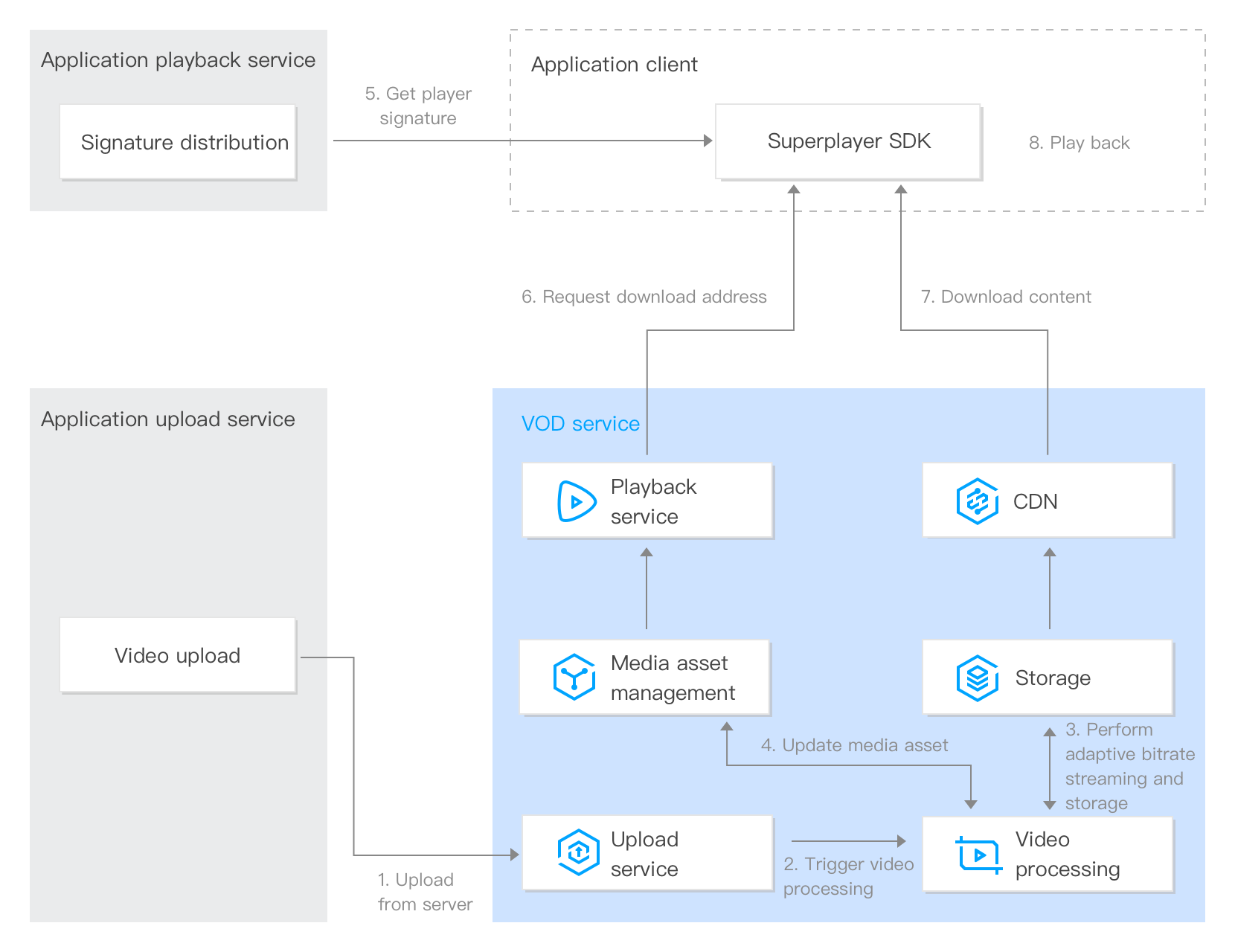
A player signature is used to authorize a playback device to play videos. If your application playback service issues a valid signature to a device (step 6 in the figure below), the device will be able to play the video within the signature’s validity period.
This document describes the parameters of a player signature and how to generate a signature.
Signature Parameters
Parameter
Required
Type
Description
appId
Yes
Integer
The VOD application AppID.
fileId
Yes
String
The VOD file ID.
contentInfo
Yes
Object
The content type of the specified file ID. For the structure of this parameter, see ContentInfo. Three types of content are supported:
The expiration time (Unix timestamp) of the distributed signature. If this parameter is left empty, the signature will never expire.
urlAccessInfo
No
Object
The access parameters of the playback URL, including key hotlink protection parameters, the playback domain, and the protocol. For the structure of this parameter, see UrlAccessInfo.
drmLicenseInfo
No
Object
The DRM configuration. For the structure of this parameter, see DrmLicenseInfo.
The ID of the unencrypted adaptive bitrate template allowed. This parameter is valid and required if audioVideoType is RawAdaptive.
drmAdaptiveInfo
No
Object
The ID of the encrypted adaptive bitrate template allowed. This parameter is valid and required if audioVideoType is ProtectedAdaptive. For its structure, see DRMAdaptiveInfo.
transcodeDefinition
No
Integer
The ID of the transcoding template allowed. This parameter is valid and required if audioVideoType is Transcode.
The names of different streams (different resolutions) displayed in the player. For its structure, see ResolutionNameInfo. If you do not specify this parameter or leave it empty, the following will be used:
The expiration time of the URL, which must be a hexadecimal string.
For the valid values and other information, see the t parameter of hotlink protection.
If this parameter is left empty, the URL will never expire.
exper
No
Integer
The preview duration in decimal seconds.
The preview duration cannot be shorter than 30 seconds.
For the valid values and other information, see the exper parameter of hotlink protection.
rlimit
No
Integer
The maximum number (decimal) of IP addresses allowed for playback.
For the valid values and other information, see the rlimit parameter of hotlink protection.
us
No
String
The URL ID, which uniquely identifies a link.
For the valid values and other information, see the us parameter of hotlink protection.
domain
No
String
The playback domain. If this is not specified or Default is passed in, the default distribution domain will be used.
scheme
No
String
The playback scheme. If this is not specified or Default is passed in, the default distribution configuration will be used. Other valid values:
HTTP
HTTPS
uv
No
String
A 6-digit hexadecimal string used for traceable watermarking scenarios.
DrmLicenseInfo
Parameter
Required
Type
Description
persistent
No
String
Whether to allow persistent storage of DRM playback licenses by playback devices. Valid values:
ON: Allow
OFF: Do not allow
The default value is OFF.
rentalDuration
No
Integer
The allowed storage time (seconds) of DRM playback licenses when persistent is ON. If this is not specified, there will be no limit on the storage time.
forceL1TrackTypes
No
Array of String
The track type that must use the L1 security level when Widevine is used. For other track types, Widevine L3 will be used. Valid values:
AUDIO: Audio tracks
SD: Video tracks whose short side is smaller than 720 px
HD: Video tracks whose short side is equal to or larger than 720 px and smaller than 2160 px
UHD1: Video tracks whose short side is equal to or larger than 2160 px and smaller than 4320 px
UHD2: Video tracks whose short side is equal to or larger than 4320 px
minimumProtectionLevel
No
String
Whether to allow the terminal to use the basic mode for playback. Value options:
BASIC: Allow playback using the basic mode
STANDARD: Do not allow playback using the basic mode
The default value is BASIC
Note:
If you use a subapplication, set appId to the ID of the subapplication.
The meanings and valid values of the signature parameters t, exper, rlimit, and us are the same as those of the hotlink protection.
Signature Calculation
The VOD player signature is a JSON Web Token (JWT), which consists of a header, a payload, and a key.
Header
The header is in JSON format and indicates the algorithm information used. Its content is fixed as follows:
{
"alg":"HS256",
"typ":"JWT"
}
Payload
The payload is in JSON format and includes the player signature parameters. Below is an example:
{
"appId":1255566655,
"fileId":"4564972818519602447",
"contentInfo":{
"audioVideoType":"RawAdaptive",
"rawAdaptiveDefinition":10,
"imageSpriteDefinition":10
},
"currentTimeStamp":1663064276,
"expireTimeStamp":1663294210,
"urlAccessInfo":{
"t":"6323e6b0",
"rlimit":3,
"us":"72d4cd1101"
}
}
Key
The key is what’s used to calculate the signature. In the example below, the default playback key is used.
2. Calculate the token:
Token = base64UrlEncode(Header) + '.' + base64UrlEncode(Payload) + '.' + base64UrlEncode(Signature)
The token generated is the VOD player signature.
Suppose your appId is 1255566655 and you want to generate a player signature for a video whose file ID is 4564972818519602447. The other parameters are as follows:
The playback key is TxtyhLlgo7J3iOADIron.
The distribution time of the player signature is 18:17:56 on September 13, 2022, which converted to Unix timestamp is 1663064276.
The expiration time of the player signature is 10:10:10 on September 16, 2022, which converted to Unix timestamp is 1663294210.
The expiration time of hotlink protection is 11:00:00 on September 16, 2022, which converted to Unix timestamp is 6323e6b0.
Up to three IP addresses are allowed to play the video using the playback URL.
The random string generated for the URL ID is 72d4cd1101.
Calculate the signature as follows:
1. Determine the content of the header:
{
"alg":"HS256",
"typ":"JWT"
}
The result generated after base64UrlEncode is:
eyJhbGciOiJIUzI1NiIsInR5cCI6IkpXVCJ9.
2. Determine the content of the payload:
{
"appId":1255566655,
"fileId":"4564972818519602447",
"contentInfo":{
"audioVideoType":"RawAdaptive",
"rawAdaptiveDefinition":10,
"imageSpriteDefinition":10
},
"currentTimeStamp":1663064276,
"expireTimeStamp":1663294210,
"urlAccessInfo":{
"t":"6323e6b0",
"rlimit":3,
"us":"72d4cd1101"
}
}
The result generated after base64UrlEncode is:
eyJhcHBJZCI6MTI1NTU2NjY1NSwiZmlsZUlkIjoiNDU2NDk3MjgxODUxOTYwMjQ0NyIsImNvbnRlbnRJbmZvMSI6eyJhdWRpb1ZpZGVvVHlwZSI6IlJhd0FkYXB0
3. Use the playback key (TxtyhLlgo7J3iOADIron) to generate an HMAC signature:
QFcBX9830ysTzJIyZxoOlRmNb2Gqy2fns9yOfriaDI8.
4. The token generated is:
eyJhbGciOiJIUzI1NiIsInR5cCI6IkpXVCJ9.eyJhcHBJZCI6MTI1NTU2NjY1NSwiZmlsZUlkIjoiNDU2NDk3MjgxODUxOTYwMjQ0NyIsImNvbnRlbnRJbmZvMSI6eyJhdWRpb1ZpZGVvVHlwZSI6IlJhd0FkYXB0aXZlIiwicmF3QWRhcHRpdmVEZWZpbml0aW9uIjoxMCwiaW1hZ2VTcHJpdGVEZWZpbml0aW9uIjoxMH0sImN1cnJlbnRUaW1lU3RhbXAiOjE2NjMwNjQyNzYsImV4cGlyZVRpbWVTdGFtcCI6MTY2MzI5NDIxMCwidXJsQWNjZXNzSW5mbyI6eyJ0IjoiNjMyM2U2YjAiLCJybGltaXQiOjMsInVzIjoiNzJkNGNkMTEwMSJ9fQ.QFcBX9830ysTzJIyZxoOlRmNb2Gqy2fns9yOfriaDI8。
Sample Code
VOD provides Python, Java, Go, C#, PHP, and Node.js sample code for calculating player signatures. For details, see Player Signature Sample Codes.
Common Errors
If you use the player signature and the player SDK returns an error code, common causes include:
Incorrect parameter type. For example, appId must be an integer, but the value entered is appId:"125000123" (string); the transcoding template parameter in contentInfo must be an integer, but the value entered is transcodeDefinition: "14011" (string).
Incorrect parameter value. For example, the audioVideoType parameter in contentInfo is set to Transocde (typo).