tencent cloud

TDMQ for CKafka

DocumentationTDMQ for CKafkaUser GuideManaging Consumer GroupDeleting the Subscription Relationship Between Consumer Groups and Topics

Deleting the Subscription Relationship Between Consumer Groups and Topics

PDF
Focus Mode
Font Size
Last updated: 2026-01-20 16:52:41
This document describes how to delete the subscription relationship between consumer groups and topics in the console.

Constraints and Limitations

When a consumer group was empty, the subscription relationship of the associated topic could be deleted.

Operation Steps

2. In the left sidebar, select Instance List, select the target region, and click the ID of the target instance to go to the basic instance information page.
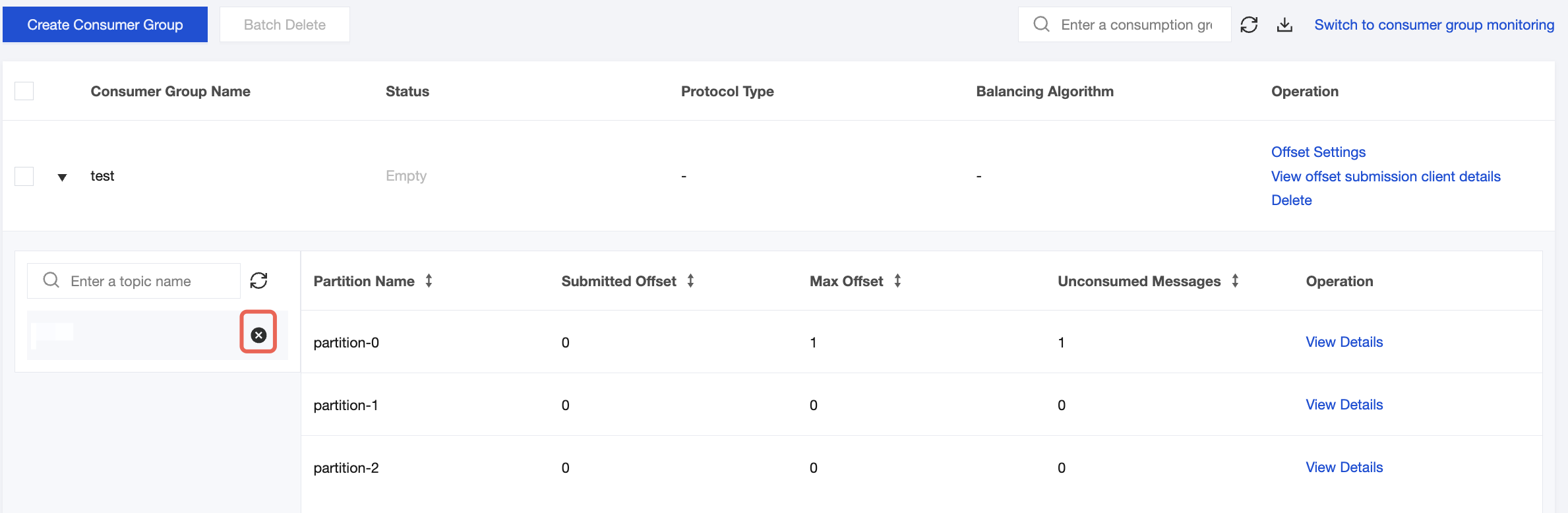
3. On the basic instance information page, select the Consumer Group tab. On the consumer group list page, click the

icon next to the subscription relationship to be deleted. After confirmation, you can delete the subscription relationship of the associated topic.


Help and Support

Was this page helpful?

Help us improve! Rate your documentation experience in 5 mins.

Feedback