Enabling Elastic Storage
Background
The rapid development of serverless technology has created a win-win scenario for users, offering both technical advantages and cost-effectiveness. This new architecture leverages the robust technical support of commercial platform as a service (PaaS) products to build a more flexible system architecture for users. Its core value is reflected in:
1. Billing mode revolution: a shift from traditional fixed-specification procurement to elastic pay-as-you-go billing.
2. Storage capacity optimization: billing based on actual storage usage, with support for elastic scaling.
3. Resource efficiency enhancement: significantly increased resource utilization and effective cost savings.
Taking a typical customer scenario as an example: In the traditional model, customers need to pre-allocate 200 GB of fixed storage space. However, during the initial business phase, the actual utilization is less than 10%, resulting in idle resources. As the business grows, frequent manual scaling is required, making operations cumbersome.
To address this pain point, TDMQ for CKafka (CKafka) Pro Edition has innovatively introduced an elastic storage solution, perfectly balancing resource utilization and business expansion.
How It Works
CKafka Pro Edition implements elastic storage through a tiered "local storage + remote storage" architecture: Local storage uses cloud disks to store recently active data, ensuring low-latency access. Remote storage employs high-capacity storage systems to handle historical data, providing a cost-effective storage solution.
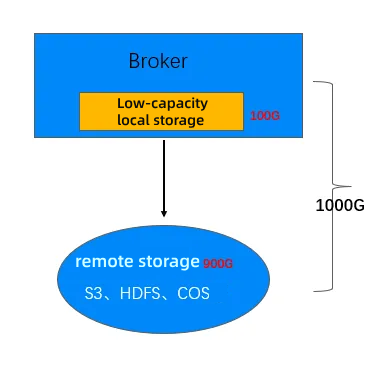
Local Storage
Local storage serves write traffic and tail-read operations, offering latency characteristics, availability, and consistency identical to those of native Kafka.
When remote storage experiences failures or performance fluctuations, local storage supports elastic scaling to continue providing complete read and write services.
Remote Storage
Remote storage serves catch-up read operations, enabling the separation of cold and hot data.
On-demand usage and pay-as-you-go billing.
Excellent future scalability, supporting multi-mode storage and multi-media storage.
This technical solution maintains write latency identical to local storage. When remote storage experiences exceptions or performance fluctuations, the system automatically falls back to the local storage mode and dynamically scales local storage resources through an automated operations system. The more cost-efficient remote storage solution effectively reduces overall storage costs while ensuring business performance and reliability.
Tiered Storage Read/Write Process
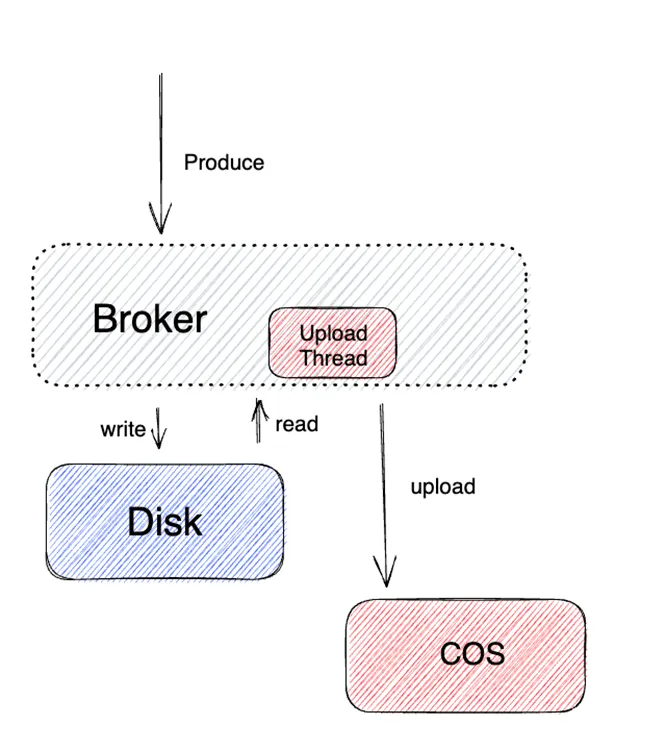
Production Process
The core production process is similar to that of native Kafka, where data written to cloud disks is asynchronously synchronized to Cloud Object Storage (COS) for remote storage.
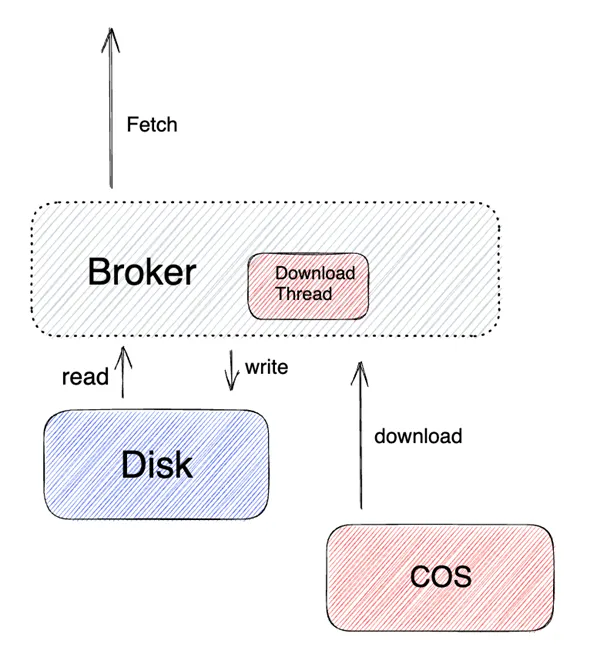
Consumption Process
Similar to the consumption process of native Kafka, the system compares the user's consumer offset. If the message data resides in local storage, it is returned from local storage first. If it is not in local storage, the message data is read in real time from remote storage, or different read/download policies are applied based on the configured policy for message consumption.
For more information about data lifecycle management, offset constraints, segment status mechanisms, and the tiered storage architecture, see Kafka Tiered Storage: Practices and Evolution in Tencent Cloud.
Use Limits
1. Engine version: Only Pro Edition instances of version 2.8.1 support the elastic storage capability.
2. Region: This capability is supported only in Beijing, Shanghai, Guangzhou, Singapore, and Hong Kong (China).
3. Transactional messages prohibited: It is temporarily not recommended to use transactional messages in elastic storage mode.
4. Availability: This feature is in an allowlist status. To use it, submit a ticket and wait for background review.
Pricing Description
Enabling Elastic Storage
1. Log in to the CKafka console.
2. In the left sidebar, select Instance List and click New to go to the instance purchase page.
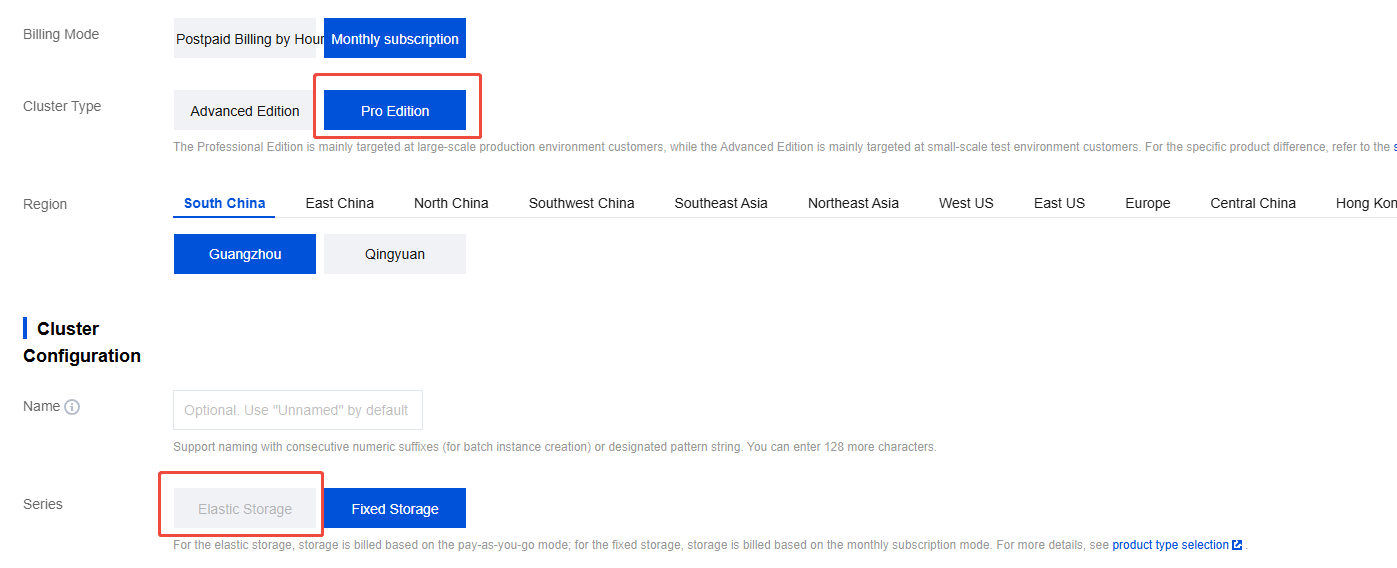
3. On the instance purchase page, select Pro Edition for Cluster Type, select Elastic Storage for Series, and configure other options based on your business requirements.
4. Confirm the fees and click Buy Now. On the order payment page, click Pay. After completing the payment, wait 5–10 minutes to view the created elastic storage instance on the Instance List page.
Viewing Monitoring Metrics
Elastic storage instances support three monitoring metrics to help you observe storage usage.
Instance-level: Disk usage of an instance (MB) refers to the storage usage of the current instance, including the consumption of replicas.
Topic-level: Total disk space used by messages in a topic (MB) refers to the storage usage of the current topic, excluding the consumption of replicas.
Partition-level: Total disk space used by messages in a partition (MB) refers to the storage usage under the current topic partition, excluding the consumption of replicas.
Help and Support
Was this page helpful?
You can also Contact sales or Submit a Ticket for help.
Help us improve! Rate your documentation experience in 5 mins.
Feedback