tencent cloud

TencentDB for MongoDB

Release Notes and Announcements
Release Notes
Announcements
User Guide
Product Introduction
Overview
Strengths
Use Cases
Cluster Architecture
Product Specifications
Features
Regions and AZs
Terms
Service Regions and Service Providers
Purchase Guide
Billing Overview
MongoDB Pricing
Billing Formula
Payment Overdue
Backup Space Billing
Configuration Adjustment Billing
Getting Started
Quickly Creating an Instance
Connecting to a TencentDB for MongoDB Instance
Reading/Writing Database
Operation Guide
Access Management
Instance Management
Node Management
Version Upgrade
Network Configuration
Monitoring
Backup and Rollback
Database Audit
Data Security
SSL Authentication
Log Management
Database Management
Multi-AZ Deployment
Disaster Recovery/Read-Only Instances
Parameter Configuration
Recycle Bin
Task Management
Performance Optimization
Data Migration Guide
Practical Tutorial
Optimizing Indexes to Break Through Read/Write Performance Bottlenecks
Troubleshooting Mongos Load Imbalance in Sharded Cluster
Considerations for Using Shard Clusters
Sample of Reading and Writing Data in MongoDB Instance
Methods for Importing and Exporting Data Based on CVM Connected with MongoDB
What to Do for Errors of Repeated Instance Creation and Deletion of Databases with the Same Names?
Troubleshooting MongoDB Connection Failures
Shard Removal Task: Guide for Confirming the Progress and Troubleshooting Issues
Performance Fine-Tuning
Ops and Development Guide
Development Specifications
Command Support in Sharded Cluster v3.2
Command Support in v3.6
Development Ops
Troubleshooting
Increased Slow Queries
Number of Connections Exceeding Limit
API Documentation
History
Introduction
API Category
Making API Requests
Instance APIs
Backup APIs
Account APIs
Other APIs
Task APIs
Introduction
Data Types
Error Codes
Instance Connection
Shell Connection Sample
PHP Connection Sample
Node.js Connection Sample
Java Connection Sample
Python Connection Sample
Python Read/Write Sample
Go Connection Sample
PHP Reconnection Sample
Product Performance
Test Environment
Test Method
Test Result
FAQs
Cost
Features
Sharded Cluster
Instance
Rollback and Backup
Connection
Data Migration
Others
Service Agreement
Service Level Agreement
Terms of Service
Glossary
Contact Us

Restoring to Self-built Database

PDF
Focus Mode
Font Size
Last updated: 2024-01-15 14:40:06

Restoring a Physical Backup to a Self-Built Database

A replica set instance has only one copy of data, while each shard of a sharded cluster has one copy of data. Restore your data based on your business needs. This document describes how to restore a single copy of data.

Restoring data to a single node

1. Copy the data to an empty data directory in the self-built database, such as /data/27017/.
cp -r * /data/27017/
2. Restart mongod and check the data. Below is a command sample:
./mongod --dbpath /data/27017 --port 27017 --logpath /var/log/mongodb/27017.log --fork

Restoring data to a replica set

As a physical backup retains the configuration of the original instance by default, the original configuration needs to be removed first; otherwise, the data may become inaccessible.
1. Restore the data to a single-node self-built database and then restart the node in the form of replica set. Below is a command sample:
./mongod --replSet mymongo --dbpath /data/27017 --port 27017 --logpath /var/log/mongodb/27017.log --fork
2. Log in to the node and remove the replica set configuration of the original instance by running the following command:
rs.slaveOk()
use local
db.system.replset.remove({})
3. Restart the node, add a node to the replica set, initialize it, and check the data. The node added to the replica set should have been started with no data contained. Below is a command sample:
rs.initiate({"_id":"mymongo","members":[{"_id":0,"host":"127.0.0.1:27017"},{"_id":1, "host":"127.0.0.1:27018"},{"_id":2, "host":"127.0.0.1:27019"}]})
For more information on the rs.initiate() command, see rs.initiate().
Notes:
Data cannot be restored to a sharded cluster. As the route of physical backup is missing in a sharded cluster, mongos can only read the data of the primary shard even if the data of each shard is restored to the self-built replica set (each shard of the sharded cluster).

Restoring a Logical Backup to a Self-Built Database

To avoid any impact on data check after the data is restored to a self-built database, the self-built database must be empty.
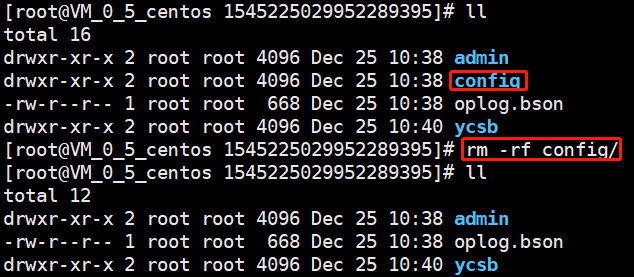
For v3.6, you need to delete the config directory manually and then run the mongorestore command to restore the data of each shard.

For v3.2, you need to merge all the files in individual collections manually before restoring the data. Below is a file merge operation sample: The c_10 collection is in the ycsb directory in the database and contains data files from c_10.bson.gz.chunk-64 to c_10.bson.gz.chunk-127. The merge command is cat c_10.bson.gz.chunk-* > ./c_10.bson.gz.
Notes:
Chunk distinction will appear in some scenarios on v3.2.
Run the mongorestore command to restore the data, where the -h parameter specifies the self-built database address, --dir specifies the directory of the data file, and --gzip must be specified to decompress the backup file. The command is as follows:
./mongorestore --gzip --drop -h127.0.0.1:27017 --dir ./1544517027220146694


Help and Support

Was this page helpful?

Help us improve! Rate your documentation experience in 5 mins.

Feedback