tencent cloud

Accessing CKafka via Flink
Last updated:2026-01-20 17:10:14
Accessing CKafka via Flink
Last updated: 2026-01-20 17:10:14
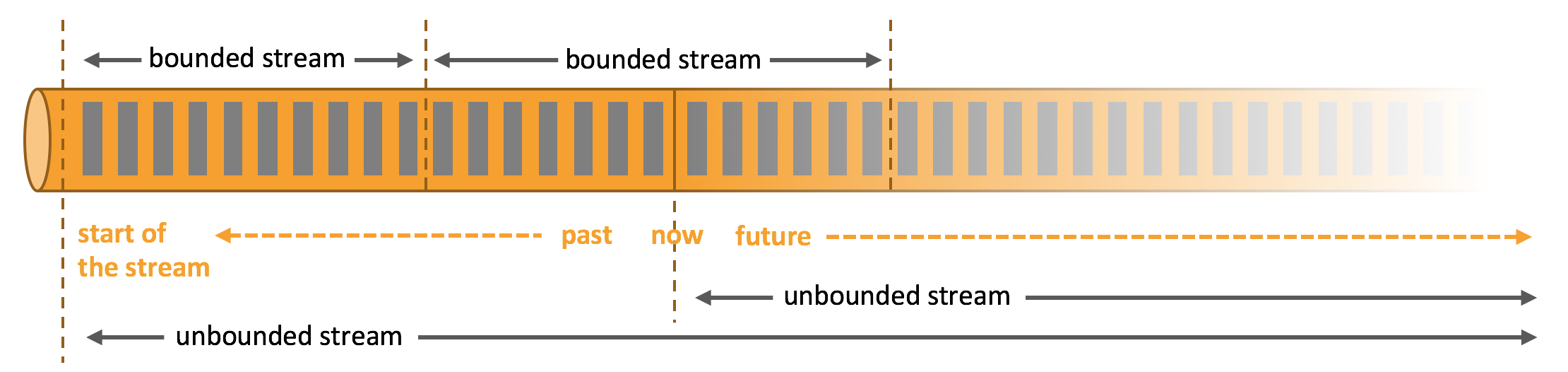
Apache Flink is a framework and distributed processing engine for stateful computations over unbounded and bounded data streams. Flink has been designed to run in all common cluster environments and perform computations at memory speed and at any scale.


Apache Flink excels at processing unbounded and bounded data sets. Precise control of time and status enables Flink’s runtime to run any kind of application on unbounded streams. Bounded streams are internally processed by algorithms and data structures that are specifically designed for fixed-sized data sets, yielding excellent performance.
Apache Flink requires real-time data from various sources (message queues or distributed logs such as Apache Kafka or Kinesis) in order to execute applications. Flink provides Apache Kafka connectors for reading data from or writing data to Kafka topics, which offer exactly-once processing semantics.

Operation Steps

Step 1: Obtaining the CKafka Instance Access Address

2. In the left sidebar, select Instance List and click the ID of the target instance to go to the basic instance information page.
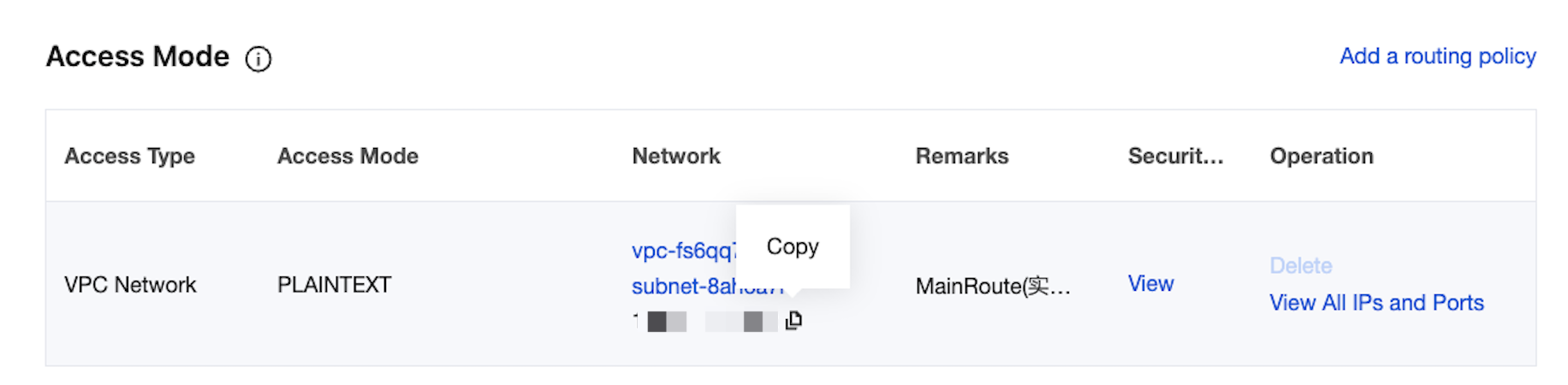
3. In the Access Mode module on the basic instance information page, obtain the instance access address, which is the bootstrap-server required for production and consumption.


Step 2: Creating a Topic

1. On the basic instance information page, select the Topic Management tab at the top.
2. On the topic management page, click New to create a topic named test. This topic is used as an example below to describe how to consume messages.


Step 3: Adding Maven Dependencies

Configure pom.xml as follows:
<?xml version="1.0" encoding="UTF-8"?>
<project xmlns="http://maven.apache.org/POM/4.0.0"
xmlns:xsi="http://www.w3.org/2001/XMLSchema-instance"
xsi:schemaLocation="http://maven.apache.org/POM/4.0.0 http://maven.apache.org/xsd/maven-4.0.0.xsd">
<modelVersion>4.0.0</modelVersion>

<groupId>org.example</groupId>
<artifactId>Test-CKafka</artifactId>
<version>1.0-SNAPSHOT</version>
<dependencies>
<dependency>
<groupId>org.apache.kafka</groupId>
<artifactId>kafka-clients</artifactId>
<version>0.10.2.2</version>
</dependency>
<dependency>
<groupId>org.slf4j</groupId>
<artifactId>slf4j-simple</artifactId>
<version>1.7.25</version>
<scope>compile</scope>
</dependency>
<dependency>
<groupId>org.apache.flink</groupId>
<artifactId>flink-java</artifactId>
<version>1.6.1</version>
</dependency>
<dependency>
<groupId>org.apache.flink</groupId>
<artifactId>flink-streaming-java_2.11</artifactId>
<version>1.6.1</version>
</dependency>
<dependency>
<groupId>org.apache.flink</groupId>
<artifactId>flink-connector-kafka_2.11</artifactId>
<version>1.7.0</version>
</dependency>
</dependencies>
<build>
<plugins>
<plugin>
<groupId>org.apache.maven.plugins</groupId>
<artifactId>maven-compiler-plugin</artifactId>
<version>3.3</version>
<configuration>
<source>1.8</source>
<target>1.8</target>
</configuration>
</plugin>
</plugins>
</build>
</project>

Step 4: Consuming Messages in CKafka

You can click the tabs below to view the two methods of message consumption and view consumption results in the console or through printed logs.
Consuming via VPC
Consuming via Public Domain Name
import org.apache.flink.api.common.serialization.SimpleStringSchema;
import org.apache.flink.streaming.api.datastream.DataStream;
import org.apache.flink.streaming.api.environment.StreamExecutionEnvironment;
import org.apache.flink.streaming.connectors.kafka.FlinkKafkaConsumer;
import java.util.Properties;

public class CKafkaConsumerDemo {
public static void main(String args[]) throws Exception {
StreamExecutionEnvironment env = StreamExecutionEnvironment.getExecutionEnvironment();
Properties properties = new Properties();
//Domain name address for public network access, that is, public routing address, which can be obtained in the Access Method module of the instance details page.
properties.setProperty("bootstrap.servers", "IP:PORT");
//Consumer group ID.
properties.setProperty("group.id", "testConsumerGroup");
DataStream<String> stream = env
.addSource(new FlinkKafkaConsumer<>("topicName", new SimpleStringSchema(), properties));
stream.print();
env.execute();
}
}
import org.apache.flink.api.common.serialization.SimpleStringSchema;
import org.apache.flink.streaming.api.datastream.DataStream;
import org.apache.flink.streaming.api.environment.StreamExecutionEnvironment;
import org.apache.flink.streaming.connectors.kafka.FlinkKafkaConsumer;
import java.util.Properties;

public class CKafkaConsumerDemo {
public static void main(String args[]) throws Exception {
StreamExecutionEnvironment env = StreamExecutionEnvironment.getExecutionEnvironment();
Properties properties = new Properties();
//Domain name address for public network access, that is, public routing address, which can be obtained in the Access Method module of the instance details page.
properties.setProperty("bootstrap.servers", "IP:PORT");
//Consumer group ID.
properties.setProperty("group.id", "testConsumerGroup");
properties.setProperty("security.protocol", "SASL_PLAINTEXT");
properties.setProperty("sasl.mechanism", "PLAIN");
//Username and password. Note: The username is not the one in the console, but needs to be concatenated as instanceId#username instead.
properties.setProperty("sasl.jaas.config",
"org.apache.kafka.common.security.plain.PlainLoginModule required\\nusername=\\"yourinstanceId#yourusername\\"\\npassword=\\"yourpassword\\";");
properties.setProperty("sasl.kerberos.service.name","kafka");
DataStream<String> stream = env
.addSource(new FlinkKafkaConsumer<>("topicName", new SimpleStringSchema(), properties));
stream.print();
env.execute();
}
}

Was this page helpful?
You can also Contact Sales or Submit a Ticket for help.
Yes
No

Feedback
