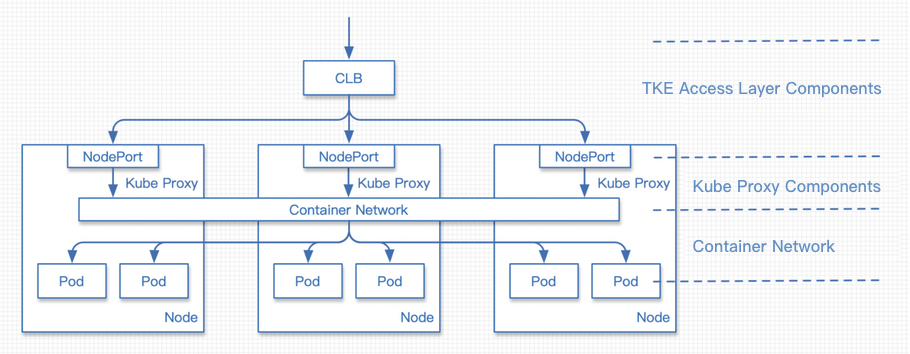
By default, a Service configures the NodePort of a cluster node as the CLB backend, as shown in the TKE Access Layer Components section below. This solution is highly fault-tolerant, where traffic from a CLB instance to any NodePort will be forwarded to a random Pod. This is also the most basic network access layer solution proposed by Kubernetes, as shown below:
TKE Service Controller does not use the following nodes as the CLB backend by default:
Master nodes (which cannot be used for loads at the network access layer).
Nodes in the NotReady status (unhealthy nodes).
Note:
TKE Service Controller can bind nodes in the Unschedulable status. They can be used as the traffic ingress, as they will forward the received traffic in the container network and will not discard it, as shown above.
Specifying Access Layer Backend
For some very large clusters, a Service-managed CLB instance will mount the NodePort of almost all cluster nodes as the backend, which may cause the following problems:
A limit is imposed on the number of the CLB backends.
A CLB instance performs a health check on each NodePort, and all health check requests are sent to the backend workload.
Such problems can be solved in the following ways:
For some large clusters, you can specify some nodes to be bound by using the service.kubernetes.io/qcloud-loadbalancer-backends-label annotation, which contains a label selector that allows you to bind matching nodes after they are labeled. This process is synced, which means when a node changes so that it is selected or no longer selected, TKE Service Controller will add or remove the corresponding backend on the CLB instance. For more information, see Labels and Selectors.
Notes
When the selector in the service.kubernetes.io/qcloud-loadbalancer-backends-label does not select any node, the Service backend will be emptied, interrupting the service. This feature requires cluster node label management.
Adding a compliant node or changing an existing node will trigger a Controller update.
Use cases
Test application in large cluster
Deploy a test application containing only one or two Pods under a large cluster. When the service is exposed through Service, the CLB instance will perform a health check on all the backend NodePorts, and the number of such requests has a huge impact on the test application. In this case, you can specify a small number of nodes in the cluster as the backends by using labels to relieve the pressure brought by health checks. For more information, see High Health Check Frequency.
Describes a service exposure for public network CLB instances.
The service.kubernetes.io/qcloud-loadbalancer-backends-label annotation declares the backend selector, and only cluster nodes labeled group=access-layer will be used as the CLB backends.
Service Local Mode
Kubernetes provides the ExternalTrafficPolicy Service feature. When it is set to Local, traffic will not be forwarded between nodes through NAT, reducing NAT operations and retaining the source IP. NodePort will only forward traffic to the Pod of the current node. The Local mode has the following characteristics:
Strengths:
Avoids the performance loss caused by inter-node forwarding through NAT Gateway.
Retains the request source IP for the server.
Shortcomings:
NodePort cannot serve nodes without a workload.
Notes
CLB sync takes time. When the number of Local service workloads is small, the drifting or rolling updates of the workloads are fast. If the updates are not synced to the backend promptly, the backend service may become unavailable.
It is only suitable for handling low-traffic, low-load businesses and not recommended in the production environment.
Sample: Enabling Local forwarding for Service (externalTrafficPolicy: Local)
apiVersion: v1
kind: Service
metadata:
name: nginx-service
spec:
externalTrafficPolicy: Local
ports:
- name: 80-80-no
port: 80
protocol: TCP
targetPort: 80
selector:
app: nginx
type: LoadBalancer
Default backend in Local mode
By default, when the Local mode is enabled for a Service, the NodePorts of almost all nodes will be mounted as the backends. The CLB instance will not forward traffic to backend nodes without workloads based on the health check result. To prevent backends without workloads from being bound, you can specify nodes with workloads as the backends in Local mode by using the service.kubernetes.io/local-svc-only-bind-node-with-pod: "true" annotation. For more information, see Using Source IP.
Sample: Enabling Local forwarding and binding for Service
In Local mode, the request traffic to a node is not forwarded among nodes. Therefore, when nodes have different numbers of workloads, using the same backend weight may make the load on each node uneven. In this case, you can perform weighted balancing by using the service.cloud.tencent.com/local-svc-weighted-balance: "true" annotation, where the weight of the NodePort backend will be determined by the number of workloads on the node, thus avoiding load unevenness caused by the different numbers of workloads on different nodes. Here, Local weighted balancing must be used in conjunction with Local binding as shown below:
Sample: Enabling Local forwarding, binding, and weighted balancing for Service