tencent cloud

Tencent Kubernetes Engine

Release Notes and Announcements
Release Notes
Announcements
Release Notes
Product Introduction
Overview
Strengths
Architecture
Scenarios
Features
Concepts
Native Kubernetes Terms
Common High-Risk Operations
Regions and Availability Zones
Service Regions and Service Providers
Open Source Components
Purchase Guide
Purchase Instructions
Purchase a TKE General Cluster
Purchasing Native Nodes
Purchasing a Super Node
Getting Started
Beginner’s Guide
Quickly Creating a Standard Cluster
Examples
Container Application Deployment Check List
Cluster Configuration
General Cluster Overview
Cluster Management
Network Management
Storage Management
Node Management
GPU Resource Management
Remote Terminals
Application Configuration
Workload Management
Service and Configuration Management
Component and Application Management
Auto Scaling
Container Login Methods
Observability Configuration
Ops Observability
Cost Insights and Optimization
Scheduler Configuration
Scheduling Component Overview
Resource Utilization Optimization Scheduling
Business Priority Assurance Scheduling
QoS Awareness Scheduling
Security and Stability
TKE Security Group Settings
Identity Authentication and Authorization
Application Security
Multi-cluster Management
Planned Upgrade
Backup Center
Cloud Native Service Guide
Cloud Service for etcd
TMP
TKE Serverless Cluster Guide
TKE Registered Cluster Guide
Use Cases
Cluster
Serverless Cluster
Scheduling
Security
Service Deployment
Network
Release
Logs
Monitoring
OPS
Terraform
DevOps
Auto Scaling
Containerization
Microservice
Cost Management
Hybrid Cloud
AI
Troubleshooting
Disk Full
High Workload
Memory Fragmentation
Cluster DNS Troubleshooting
Cluster kube-proxy Troubleshooting
Cluster API Server Inaccessibility Troubleshooting
Service and Ingress Inaccessibility Troubleshooting
Common Service & Ingress Errors and Solutions
Engel Ingres appears in Connechtin Reverside
CLB Ingress Creation Error
Troubleshooting for Pod Network Inaccessibility
Pod Status Exception and Handling
Authorizing Tencent Cloud OPS Team for Troubleshooting
CLB Loopback
API Documentation
History
Introduction
API Category
Making API Requests
Elastic Cluster APIs
Resource Reserved Coupon APIs
Cluster APIs
Third-party Node APIs
Relevant APIs for Addon
Network APIs
Node APIs
Node Pool APIs
TKE Edge Cluster APIs
Cloud Native Monitoring APIs
Scaling group APIs
Super Node APIs
Other APIs
Data Types
Error Codes
TKE API 2022-05-01
FAQs
TKE General Cluster
TKE Serverless Cluster
About OPS
Hidden Danger Handling
About Services
Image Repositories
About Remote Terminals
Event FAQs
Resource Management
Service Agreement
TKE Service Level Agreement
TKE Serverless Service Level Agreement
Contact Us
Glossary

Multiple Services Sharing a CLB

PDF
Mode fokus
Ukuran font
Terakhir diperbarui: 2025-04-25 17:35:40

Scenario

You can use the feature for sharing the same CLB among multiple Services to support the simultaneous opening of TCP and UDP on the same port for the same VIP.
Note
This feature is not recommended for other scenarios.

Notes

For TKE clusters created before Aug. 17, 2020, the CLBs created by their Services support the sharing of the same CLB by default.
For TKE clusters created during August 17, 2020 - January 1, 2025, the feature of sharing the same CLB among multiple Services is disabled by default. If you need to reuse CLB instances for Services, submit a ticket for application.
If it is a TKE Serverless cluster, the CLB sharing is enabled by default. Notes:
1.1 Only CLB instances purchased manually can be reused, and those purchased automatically by a serverless cluster cannot. If those purchased automatically are reused, an error will be reported. This is to protect them from being repossessed by the serverless cluster.
1.2 The following two annotations must be added to the Service once the CLB is purchased:
service.kubernetes.io/qcloud-share-existed-lb:"true"
service.kubernetes.io/tke-existed-lbid:lb-xxx
The management and sync of configurations between Service and CLB instances are based on the resource object of the LoadBalancerResource type named the CLB ID. Do not perform any operations on this CRD; otherwise, the Service may fail.
During service release (rolling update), avoid releasing the backend services associated with these Services, because the operations for CLB sharing among multiple Services are synchronized concurrently (to ensure accuracy of the synchronization result). If multiple Services are being updated at back end simultaneously, some backend traffic may not be removed timely, leading to traffic anomalies. Meanwhile, graceful shutdown may not truly take effect.

Use Limits

In Service reuse scenarios, the number of listeners managed by a CLB instance is subject to the TOTAL_LISTENER_QUOTA of the CLB instance. For more information, see DescribeQuota.
In scenarios where a Service is reused, only the user-created Cloud Load Balancer (CLB) can be used. This is because when the CLB created in the TKE cluster is reused, CLB resources may not be released, leading to a resource leak.
Note
After reusing CLB resources created by the current TKE, you need to manually manage the CLB resources, because the CLB's life cycle will not be controlled by the TKE due to the lack of the tag.

Directions

1. 
Refer to
Creating CLB Instances to create a public or private CLB in the VPC where the cluster is located.
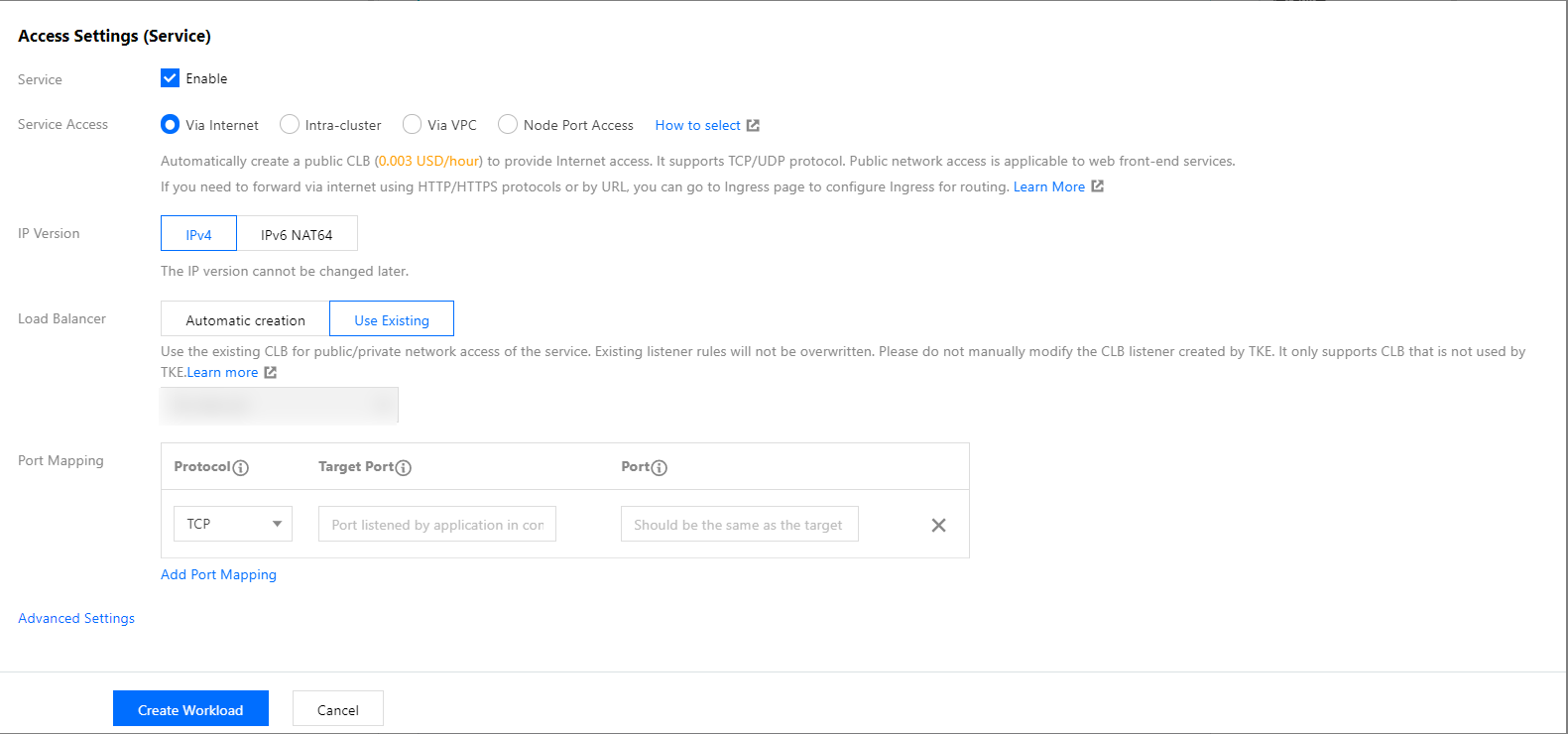
2. Refer to Creating a Deployment or Creating a Service to create a Service of the Loadbalancer type. Select Use existing for load balancer and choose the CLB instance created in Step 1.

3. Repeat Step 2 to share the same CLB among multiple Services.
Bantuan dan Dukungan

Apakah halaman ini membantu?

masukan