Building Deep Learning Container Image
Download
Mode fokus
Ukuran font
Overview
This series of documents describe how to deploy deep learning in TKE serverless clusters from direct TensorFlow deployment to subsequent Kubeflow deployment and are intended to provide a comprehensive scheme for implementing container-based deep learning. This document focuses on how to create a deep learning container image, which offers an easier and quicker method to deploy deep learning.
Public images cannot meet the requirements for deep learning deployment in this document. Therefore, a self-built image is used.
In addition to the deep learning framework TensorFlow-gpu, this image contains Compute Unified Device Architecture (CUDA) and CUDA Deep Neural Network library (cuDNN), which are required by GPU-based training. This image also integrates official TensorFlow deep learning models, including SOTA models for fields such as computer vision (CV), natural language processing (NLP), and recommender system (RS). For more information on the models, see TensorFlow Model Garden.
Directions
1. This example uses a Docker container to create an image. Prepare a Dockerfile as follows:
FROM nvidia/cuda:11.3.1-cudnn8-runtime-ubuntu20.04RUN apt-get update -y \\&& apt-get install -y python3 \\python3-pip \\git \\&& git clone git://github.com/tensorflow/models.git \\&& apt-get --purge remove -y git \\ # Promptly uninstall unneeded components (optional)&& rm -rf /var/lib/apt/lists/* # Delete the package for installation through APT (optional)&& mkdir /tf /tf/models /tf/data # Create storage models and data paths, which can be used as mount points (optional)ENV PYTHONPATH $PYTHONPATH:/modelsENV LD_LIBRARY_PATH $LD_LIBRARY_PATH:/usr/local/cuda-11.3/lib64:/usr/lib/x86_64-linux-gnu#RUN pip3 install --user -r models/official/requirements.txt \\&& pip3 install tensorflow
2. Run the following command for deployment:
docker build -t [name]:[tag] .
Note
The steps to install required components such as Python, TensorFlow, CUDA, cuDNN, and model library are not detailed in this document.
Note
Image issues
For the base image nvidia/cuda, the CUDA container image provides an easy-to-use distribution for CUDA-supported platforms and architectures. Here, CUDA 11.3.1 and cuDNN 8 are selected. For more supported tags, see Supported tags.
Environment Variables
Before implement the best practice in this document, you need to pay special attention to the
LD_LIBRARY_PATH environment variable.LD_LIBRARY_PATH lists the installation paths of dynamic link libraries usually in the format of libxxxx.so, such as libcudart.so.[version], ibcusolver.so.[version], and libcudnn.so.[version], and is used to link CUDA and cuDNN in this example. You can run the ll command to view the paths as shown below:
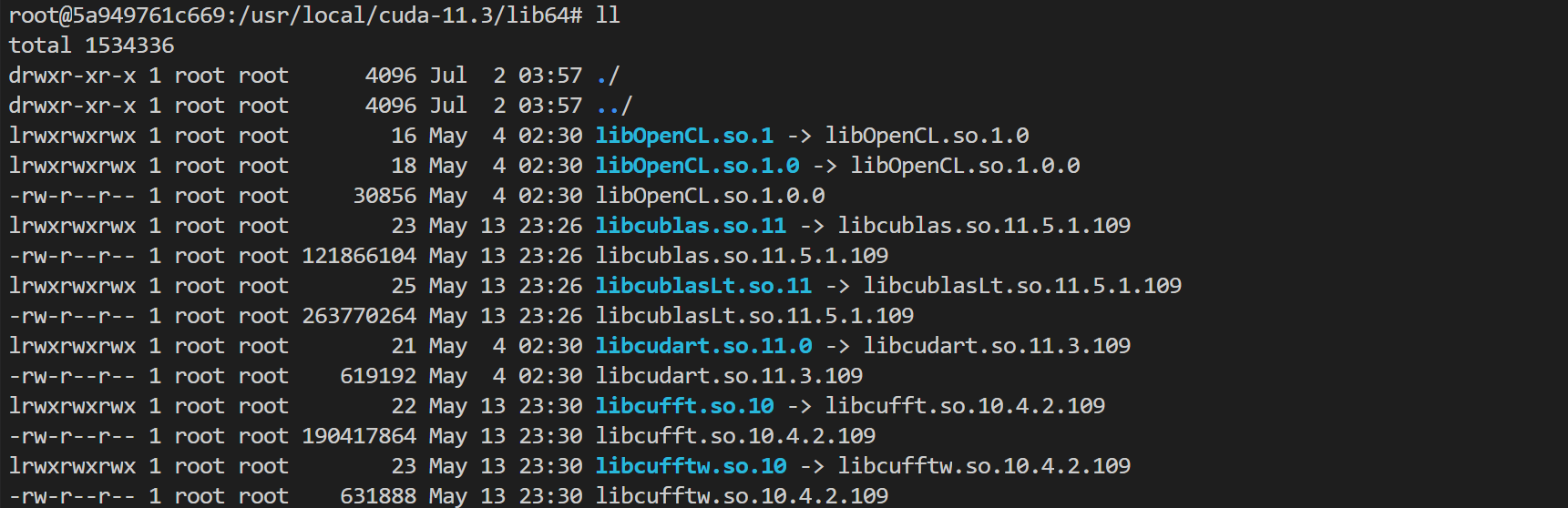
ENV LD_LIBRARY_PATH /usr/local/nvidia/lib:/usr/local/nvidia/lib64
Here,
/usr/local/nvidia/lib points to the soft link of the CUDA path and is prepared for CUDA. However, in the tag with cuDNN, only cuDNN is installed, and LD_LIBRARY_PATH is not specified for cuDNN, which may report a warning and make GPU resources unavailable. The error is as shown below:Could not load dynamic library 'libcudnn.so.8'; dlerror: libcudnn.so.8: cannot open shared object file: No such file or directoryCannot dlopen some GPU libraries. Please make sure the missing libraries mentioned above are installed properly if you would like to use GPU...
If such an error is reported, you can manually add the cuDNN path. Here, you can run the following command to run the image and view the path of
libcudnn.so:docker run -it nvidia/cuda:[tag] /bin/bash
As shown in the source code, cuDNN is installed under
/usr/lib by default with the apt-get install command. In this example, the actual path of libcudnn.so.8 is under /usr/lib/x86_64-linux-gnu#, and you need to add the path to the end after the colon.The actual path may vary by tag and system. The path in the source code and what you actually see shall prevail.
Related Operations
FAQs
Bantuan dan Dukungan
Apakah halaman ini membantu?
Anda juga dapat Menghubungi Penjualan atau Mengirimkan Tiket untuk meminta bantuan.
masukan