A UGSV SDK license is used to activate the use rights of the UGSV SDK. You can apply for, renew, and view a trial license in the console. For more information on UGSV SDK features, see UGSV.
Trial License Application
You can apply for a trial license to try out various features available in the UGSV SDK Basic Edition for free. The license is valid for 14 days upon initial application and can be renewed for 14 days (with a validity period of up to 28 days). The steps are as follows:
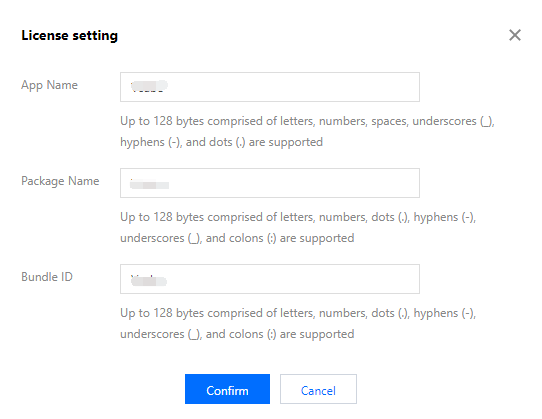
2. Click Edit in the top-right corner and enter the App Name, Package Name, and Bundle ID.
3. Click Confirm.
Step 2. Save the trial license
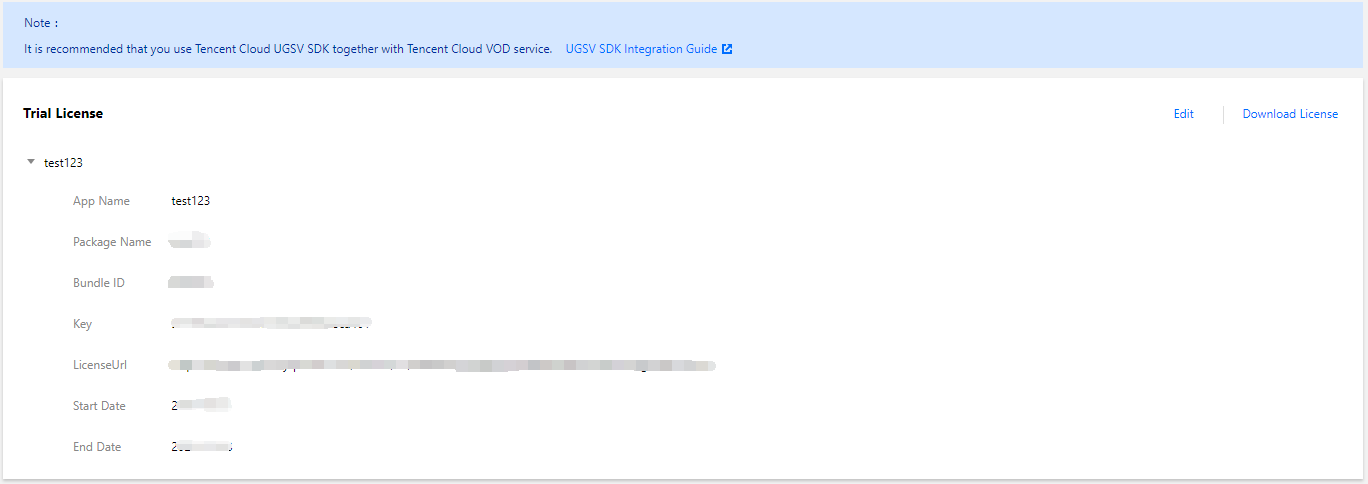
After the free trial license is successfully created, the page will display the information of the generated license. You need to pass in two parameters Key and LicenseUrl during initial SDK configuration. Please save the following information properly.
Trial License Renewal
You can check the validity period of the trial license in the VOD console, which is up to 28 days. Before the trial license expires in 14 days after application, you need to renew it by following the steps below:
Step 1. Apply for license renewal
Go to the UGSV SDK License page and click Renew in the top-right corner of the trial license section.
Step 2. Complete license renewal
After the pop-up window prompts that the renewal is successful, the Renew button in the top-right corner will disappear, indicating that the trial license is renewed for 14 days.
Trial License Query
After the license is configured successfully, wait for a while (subject to the network conditions) and then you can view the license information by calling the following methods:
iOS:
NSLog(@"%@", [TXUGCBase getLicenceInfo]);
Android:
TXUGCBase.getInstance().getLicenceInfo(context);
How to Use the License
Call the following methods to configure the license before calling the relevant APIs of the SDK:
For iOS, we recommend you add the following in [AppDelegate application:didFinishLaunchingWithOptions:]:
[TXUGCBase setLicenceURL:LicenceUrl key:Key];
For Android, we recommend you add the following in application: